Introducing socialondemand™Presented by Olivier ChoronFounder and CEO, purechannelapps
Notes:socialondemand doesn’t replace or simplify the listening/ interacting activities that are necessary for partners to generate interest/ recommendations/ leads.
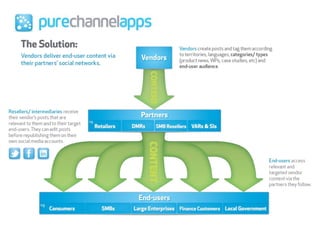
socialondemand simplifies the way content is provided … to start this interaction!
purechannelapps will also provide white-labelled ‘educational’ pieces (white papers/ top 10 tips/ the dont’s/ webcast) for vendors to arm their partners with and educate them on the benefits of B2B social media!socialondemand™ - Demo
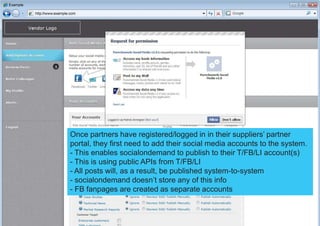
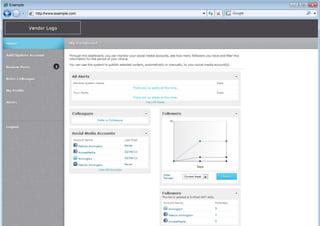
Once partners have registered/logged in in their suppliers’ partner portal, they first need to add their social media accounts to the system. This enables socialondemand to publish to their T/FB/LI account(s)
 This is using public APIs from T/FB/LI
 All posts will, as a result, be published system-to-system
socialondemand doesn’t store any of this info
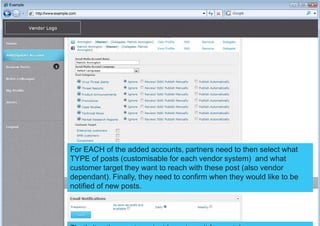
 FB fanpages are created as separate accountsFor EACH of the added accounts, partners need to then select what TYPE of posts (customisable for each vendor system)  and what customer target they want to reach with these post (also vendor dependant). Finally, they need to confirm when they would like to be notified of new posts.That’s it… then partners just have to wait for posts!
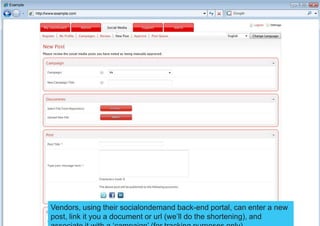
Vendors, using their socialondemand back-end portal, can enter a new post, link it you a document or url (we’ll do the shortening), and associate it with a ‘campaign’ (for tracking purposes only)
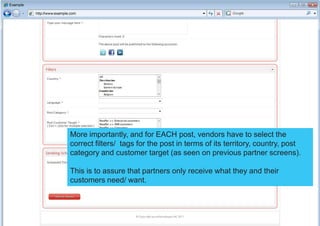
More importantly, and for EACH post, vendors have to select the correct filters/  tags for the post in terms of its territory, country, post category and customer target (as seen on previous partner screens).This is to assure that partners only receive what they and their customers need/ want.
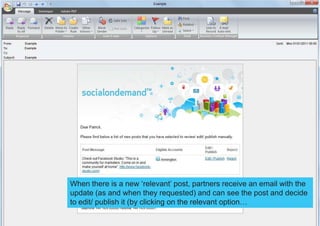
When there is a new ‘relevant’ post, partners receive an email with the update (as and when they requested) and can see the post and decide to edit/ publish it (by clicking on the relevant option…
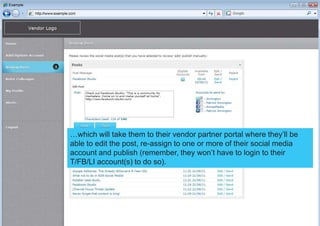
…which will take them to their vendor partner portal where they’ll be able to edit the post, re-assign to one or more of their social media account and publish (remember, they won’t have to login to their T/FB/LI account(s) to do so).
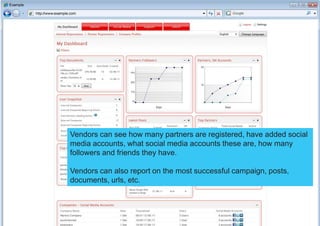
Vendors can see how many partners are registered, have added social media accounts, what social media accounts these are, how many followers and friends they have.Vendors can also report on the most successful campaign, posts, documents, urls, etc.
Backgrounder

purechannelapps - Introducing socialondemand

  • 1.
    Introducing socialondemand™Presented byOlivier ChoronFounder and CEO, purechannelapps
  • 5.
    Notes:socialondemand doesn’t replaceor simplify the listening/ interacting activities that are necessary for partners to generate interest/ recommendations/ leads.
  • 6.
    socialondemand simplifies theway content is provided … to start this interaction!
  • 7.
    purechannelapps will alsoprovide white-labelled ‘educational’ pieces (white papers/ top 10 tips/ the dont’s/ webcast) for vendors to arm their partners with and educate them on the benefits of B2B social media!socialondemand™ - Demo
  • 8.
    Once partners haveregistered/logged in in their suppliers’ partner portal, they first need to add their social media accounts to the system. This enables socialondemand to publish to their T/FB/LI account(s)
  • 9.
    This isusing public APIs from T/FB/LI
  • 10.
    All postswill, as a result, be published system-to-system
  • 11.
  • 12.
    FB fanpagesare created as separate accountsFor EACH of the added accounts, partners need to then select what TYPE of posts (customisable for each vendor system) and what customer target they want to reach with these post (also vendor dependant). Finally, they need to confirm when they would like to be notified of new posts.That’s it… then partners just have to wait for posts!
  • 13.
    Vendors, using theirsocialondemand back-end portal, can enter a new post, link it you a document or url (we’ll do the shortening), and associate it with a ‘campaign’ (for tracking purposes only)
  • 14.
    More importantly, andfor EACH post, vendors have to select the correct filters/ tags for the post in terms of its territory, country, post category and customer target (as seen on previous partner screens).This is to assure that partners only receive what they and their customers need/ want.
  • 15.
    When there isa new ‘relevant’ post, partners receive an email with the update (as and when they requested) and can see the post and decide to edit/ publish it (by clicking on the relevant option…
  • 16.
    …which will takethem to their vendor partner portal where they’ll be able to edit the post, re-assign to one or more of their social media account and publish (remember, they won’t have to login to their T/FB/LI account(s) to do so).
  • 18.
    Vendors can seehow many partners are registered, have added social media accounts, what social media accounts these are, how many followers and friends they have.Vendors can also report on the most successful campaign, posts, documents, urls, etc.
  • 19.