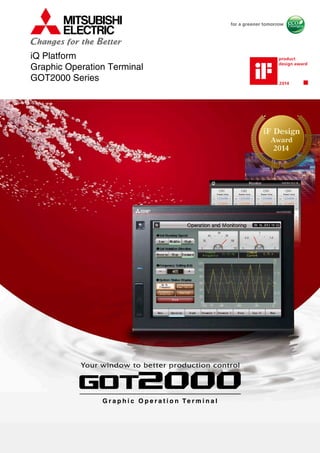
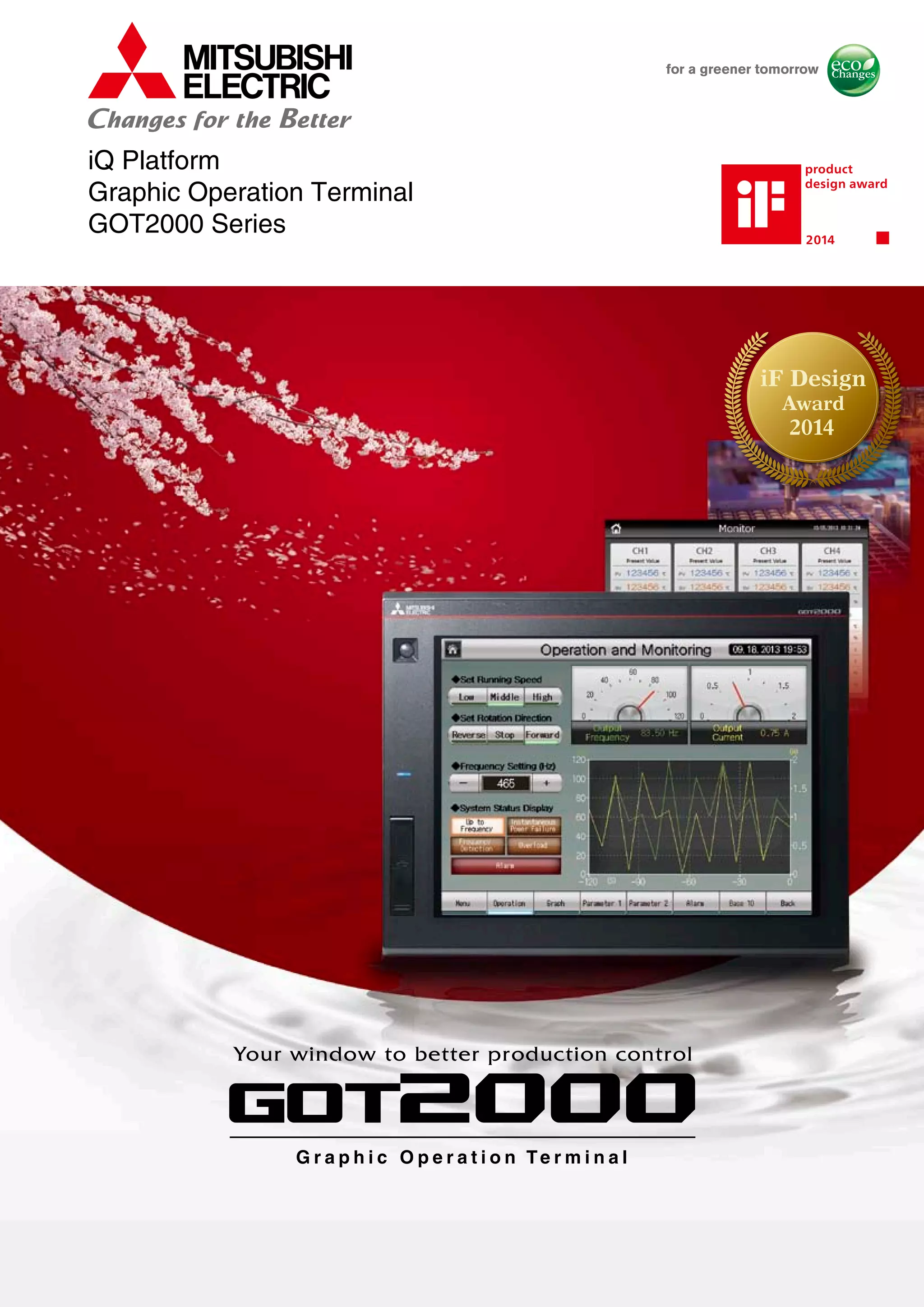

iQ Platform
Graphic Operation Terminal
GOT2000 Series
G r a p h i c O p e r a t i o n Te r m i n a l
Your window to better production control
G r a p h i c O p e r a t i o n Te r m i n a l
Your window to better production control
iF Design
2014
Award
The GOT2000 boasts advanced functionality, acts as a seamless gateway to other industrial
automation devices, all while increasing productivity and efficiency.
The high quality display is designed to optimize operator control and monitoring of device
and line statuses. If you are looking for an intuitive operation terminal, the new tablet-like
operability and the higher functionality of operation terminal makes the GOT2000 the ideal
choice.
Incorporate the GOT2000 to bring forth flexibility, productivity, and quality on a global scale.
The Mitsubishi Electric
Graphic Operation Terminal GOT2000 series
continues to impress with solutions
that fulfill all demands.
G r a p h i c O p e r a t i o n Te r m i n a lG r a p h i c O p e r a t i o n Te r m i n a l
Your window to better production control
C O N T E N T S
04 Line up
LineupFASolutions
24 FA Solutions
Specifications
Specifications28
Support
Support40
Productlist
Product list35
06 Features
GOT2000 Features
GT Works3 Features
Features
An Easy and Flexible
HMI Solution
Functions
14 Functions
Powerful Remote
Access Options
Perfectly Complemented
by SoftGOT
GT27 15inch 12.1inch
Advanced model with multi-touch gesture functions
The GOT2000 inherits all the features of our popular GOT1000 series, and introduces a more refined
and advanced function set.The powerful and flexible lineup includes GOTs with various features and
communication options to tackle any application you may encounter.
XGA SVGA
GT25 High performance, cost efficient, mid-range model
RS-232
Ethernet
RS-422/485
Bus
MELSECNET/H
CC-Link IE
CC-Link
RS-232
Ethernet
RS-422/485
Bus
MELSECNET/H
CC-Link IE
CC-Link
RS-232
Ethernet
RS-422/485
12.1inch
SVGA
GT2512-STBA
GT2512-STBD
Resolution: 800×600
Display color: 65536 colors
GT23 10.4inch
Unchallenged cost performance
VGA
GT2310-VTBA
GT2310-VTBD
Resolution: 640×480
Display color: 65536 colors
8.4inch
VGA
GT2308-VTBA
GT2308-VTBD
Resolution: 640×480
Display color: 65536 colors
NEW
GT2715-XTBA
GT2715-XTBD
Resolution: 1024×768
Display color: 65536 colors
GT2712-STBA
GT2712-STBD
GT2712-STWA [White model]
GT2712-STWD [White model]
Resolution: 800×600
Display color: 65536 colors
Coming soon
4
Line up
SoftGOT
10.4inch 8.4inch
GT SoftGOT2000 is an HMI software that allows GOT2000
functions to operate on a personal computer or panel computer.
8 GT SoftGOT2000 Version1 is included with GT Works3.
A separate license key must be mounted during use.
Resolution: 640 to 1920 × 480 to 1200
Display color: 65536 colors
GOT2000 compatible HMI software
2000 Version1
Multi-mediaGesture Video/RGB Sound output External I/O
Turn your personal computer into a GOT!
SVGA
GT2708-STBA
GT2708-STBD
Resolution: 800×600
Display color:
65536 colors
VGA
GT2708-VTBA
GT2708-VTBD
Resolution: 640×480
Display color:
65536 colors
SVGA
GT2710-STBA
GT2710-STBD
Resolution: 800×600
Display color:
65536 colors
VGA
GT2710-VTBA
GT2710-VTBD
GT2710-VTWA [White model]
GT2710-VTWD [White model]
Resolution: 640×480
Display color: 65536 colors
10.4inch 8.4inch
Sound output External I/O
VGA
GT2510-VTBA
GT2510-VTBD
GT2510-VTWA [White model]
GT2510-VTWD [White model]
Resolution: 640×480
Display color: 65536 colors
VGA
GT2508-VTBA
GT2508-VTBD
GT2508-VTWA [White model]
GT2508-VTWD [White model]
Resolution: 640×480
Display color: 65536 colors
Compliant with safety standards including UL Standards, shipping standards (to be obtained soon),
and radio laws. For inquiries relating to the status of conforming to UL, cUL, and CE directives and
shipping directives, please contact your local sales office.
NEW NEW
5
G r a p h i c O p e r a t i o n Te r m i n a l
LineupFASolutionsSpecificationsSupportProductlistFeaturesFunctions
Flexible interface (Standard SD card slot)
Human sensor
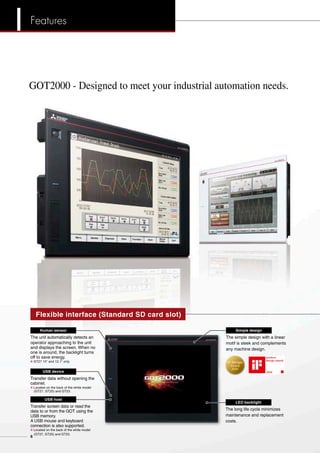
GOT2000 - Designed to meet your industrial automation needs.
The unit automatically detects an
operator approaching to the unit
and displays the screen. When no
one is around, the backlight turns
off to save energy.
8 GT27 15" and 12.1" only
Transfer data without opening the
cabinet.
8 Located on the back of the white model
(GT27, GT25) and GT23.
Transfer screen data or read the
data to or from the GOT using the
USB memory.
A USB mouse and keyboard
connection is also supported.
8 Located on the back of the white model
(GT27, GT25) and GT23.
USB device
USB host
Simple design
The long life cycle minimizes
maintenance and replacement
costs.
LED backlight
iF Design
2014
Award
The simple design with a linear
motif is sleek and complements
any machine design.
6
Features
Ethernet
SD card slot
A communication unit or option
unit can be mounted.
8 GT27 and GT25 only.
Connect to various industrial
devices, barcode readers and
serial printers.
Save large volumes of data,
including alarms and logging
data.
Use Ethernet to simultaneously
connect to up to four types
of PLCs from different
manufacturers.
USB host
Save the alarm and logging data
by connecting a USB memory. A
USB mouse and keyboard
connection is also supported.
RS-232
Extension interface
8 The white model is only available
with GT27 and GT25.
8 The picture shows GT2712.
Easily connect to various serial devices.
RS-422/485
The new GOT2000 is suitable for applications in any industry.
The GT27, GT25 white model provides an additional color option,
and the flush frame without the USB port can be cleaned very easily.
The GOT can be installed vertically for extra flexibility when installed
in confined spaces.
Enhanced lineup
Customize screen designs using parts library and fonts that are crisp
even when enlarged or reduced.
Crisp display with outline fonts and PNG images
Use intuitive gestures to zoom in/out and to scroll.
¬ See page 8 for details.
Easy operations with multi-touch gestures
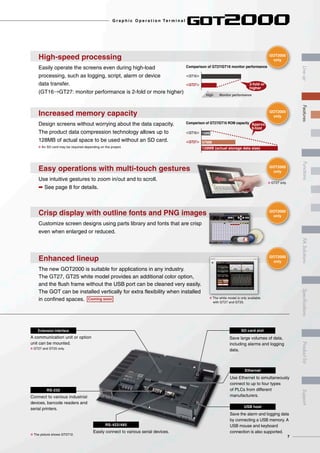
High-speed processing
Easily operate the screens even during high-load
processing, such as logging, script, alarm or device
data transfer.
(GT16→GT27: monitor performance is 2-fold or more higher)
2-fold or
higher
<GT16>
Comparison of GT27/GT16 monitor performance
<GT27>
Monitor performanceHigh
Increased memory capacity
Design screens without worrying about the data capacity.
The product data compression technology allows up to
128MB of actual space to be used without an SD card.
8 An SD card may be required depending on the project.
Comparison of GT27/GT16 ROM capacity Approx.
9-fold
<GT16> 15MB
<GT27> 57MB
128MB (actual storage data size)
Coming soon
GOT2000
only
GOT2000
only
GOT2000
only
8 GT27 only
GOT2000
only
GOT2000
only
7
G r a p h i c O p e r a t i o n Te r m i n a l
LineupFASolutionsSpecificationsSupportProductlistFeaturesFunctions
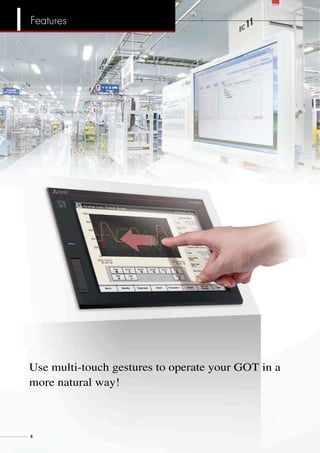
Use multi-touch gestures to operate your GOT in a
more natural way!
8
Features
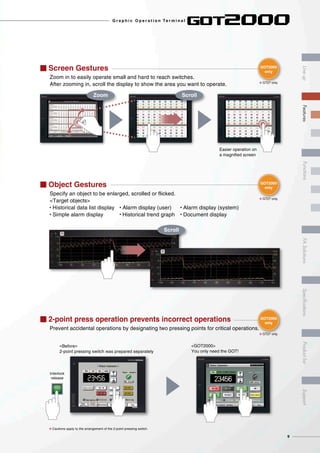
I 2-point press operation prevents incorrect operations
Prevent accidental operations by designating two pressing points for critical operations.
<Before>
2-point pressing switch was prepared separately
<GOT2000>
You only need the GOT!
8 Cautions apply to the arrangement of the 2-point pressing switch.
Interlock
release
I Object Gestures
Specify an object to be enlarged, scrolled or flicked.
<Target objects>
• Historical data list display • Alarm display (user) • Alarm display (system)
• Simple alarm display • Historical trend graph • Document display
Scroll
I Screen Gestures
Zoom in to easily operate small and hard to reach switches.
After zooming in, scroll the display to show the area you want to operate.
Zoom Scroll
Easier operation on
a magnified screen
GOT2000
only
GOT2000
only
GOT2000
only
8 GT27 only
8 GT27 only
8 GT27 only
9
G r a p h i c O p e r a t i o n Te r m i n a l
LineupFASolutionsSpecificationsSupportProductlistFeaturesFunctions
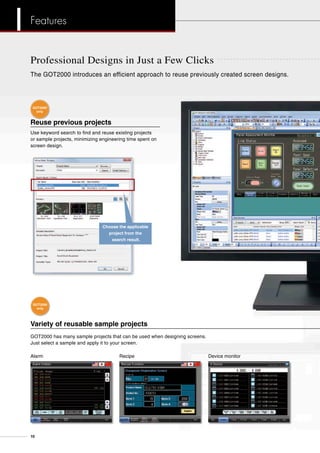
Professional Designs in Just a Few Clicks
Reuse previous projects
Use keyword search to find and reuse existing projects
or sample projects, minimizing engineering time spent on
screen design.
Variety of reusable sample projects
GOT2000 has many sample projects that can be used when designing screens.
Just select a sample and apply it to your screen.
The GOT2000 introduces an efficient approach to reuse previously created screen designs.
Choose the applicable
project from the
search result.
Alarm Recipe Device monitor
GOT2000
only
GOT2000
only
10
Features
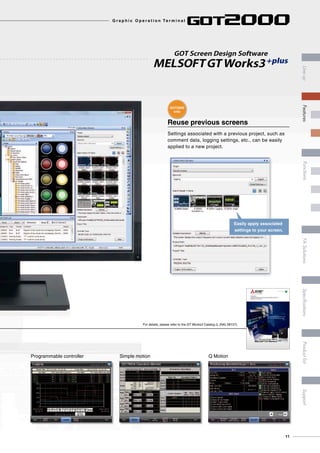
Reuse previous screens
Settings associated with a previous project, such as
comment data, logging settings, etc., can be easily
applied to a new project.
GOT Screen Design Software
MELSOFTGT Works3+plus
Easily apply associated
settings to your screen.
Programmable controller Simple motion Q Motion
For details, please refer to the GT Works3 Catalog (L (NA) 08157).
GOT Screen Design Software
MELSOFTGT Works3+plus
Streamlining workplaces with
a new style of screen design
iQ Platform
Graphic Operation Terminal Screen Design Software
MELSOFT GT Works3
GOT2000
only
11
G r a p h i c O p e r a t i o n Te r m i n a l
LineupFASolutionsSpecificationsSupportProductlistFeaturesFunctions
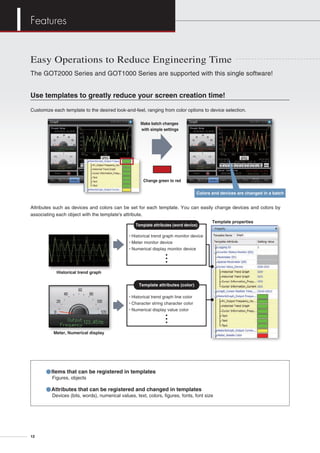
Easy Operations to Reduce Engineering Time
Use templates to greatly reduce your screen creation time!
Customize each template to the desired look-and-feel, ranging from color options to device selection.
Historical trend graph
Meter, Numerical display
Template properties
• Historical trend graph monitor device
• Meter monitor device
• Numerical display monitor device
• Historical trend graph line color
• Character string character color
• Numerical display value color
Template attributes (word device)
Template attributes (color)
Attributes such as devices and colors can be set for each template. You can easily change devices and colors by
associating each object with the template's attribute.
Make batch changes
with simple settings
Change green to red
Colors and devices are changed in a batch
The GOT2000 Series and GOT1000 Series are supported with this single software!
●Items that can be registered in templates
Figures, objects
●Attributes that can be registered and changed in templates
Devices (bits, words), numerical values, text, colors, figures, fonts, font size
12
Features
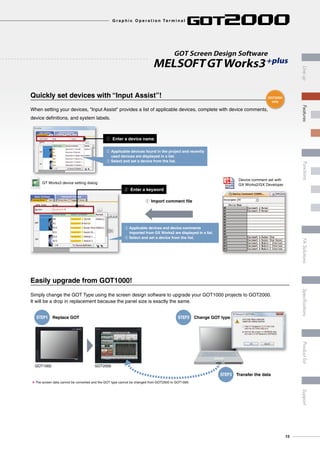
Quickly set devices with “Input Assist”!
When setting your devices, "Input Assist" provides a list of applicable devices, complete with device comments,
device definitions, and system labels.
Easily upgrade from GOT1000!
Simply change the GOT Type using the screen design software to upgrade your GOT1000 projects to GOT2000.
It will be a drop in replacement because the panel size is exactly the same.
STEP1 Replace GOT STEP2 Change GOT type
STEP3 Transfer the data
GOT1000 GOT2000
8 The screen data cannot be converted and the GOT type cannot be changed from GOT2000 to GOT1000.
GOT Screen Design Software
MELSOFTGT Works3+plus
q Enter a device name
q Import comment file
w Enter a keyword
Device comment set with
GX Works2/GX DeveloperGT Works3 device setting dialog
w Applicable devices found in the project and recently
used devices are displayed in a list.
e Select and set a device from the list.
e Applicable devices and device comments
imported from GX Works2 are displayed in a list.
r Select and set a device from the list.
GOT2000
only
13
G r a p h i c O p e r a t i o n Te r m i n a l
LineupFASolutionsSpecificationsSupportProductlistFeaturesFunctions
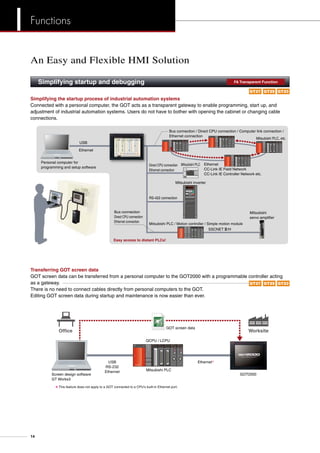
Simplifying the startup process of industrial automation systems
Connected with a personal computer, the GOT acts as a transparent gateway to enable programming, start up, and
adjustment of industrial automation systems. Users do not have to bother with opening the cabinet or changing cable
connections.
Ethernet
CC-Link IE Field Network
CC-Link IE Controller Network etc.
Personal computer for
programming and setup software
Bus connection / Direct CPU connection / Computer link connection /
Ethernet connection
Bus connection
Direct CPU connection
Ethernet connection
RS-422 connection
Direct CPU connection
Ethernet connection
Mitsubishi inverter
Mitsubishi PLC
Mitsubishi PLC / Motion controller / Simple motion module
SSCNET#/H
Mitsubishi PLC, etc.
USB
Ethernet
Easy access to distant PLCs!
Mitsubishi
servo amplifier
Transferring GOT screen data
GOT screen data can be transferred from a personal computer to the GOT2000 with a programmable controller acting
as a gateway.
There is no need to connect cables directly from personal computers to the GOT.
Editing GOT screen data during startup and maintenance is now easier than ever.
GOT screen data
Screen design software
GT Works3
Mitsubishi PLC
WorksiteOffice
GOT2000
QCPU / LCPU
USB
RS-232
Ethernet
Ethernet8
8 This feature does not apply to a GOT connected to a CPU's built-in Ethernet port.
An Easy and Flexible HMI Solution
Simplifying startup and debugging	 FA Transparent Function
GT27 GT25 GT23
GT27 GT25 GT23
14
Functions
Quickly identify cause of errors by reviewing recordings of the production line.
Event trigger device: ON
120
seconds
before
Error!
Attach a video camera to the GOT, and record
the production line before and after trouble occurs.
Play the video on the GOT. Play the video on the alarm display screen.
Record and playback in high quality VGA resolution.
120
seconds
after
Alarm display screen
10/01/2013 10:00 Error B110
10/01/2013 10:10 Error B112
10/01/2013 9:55 Error B110
Video
search
[Recording specifications]
<Before-after event recording> …A total of 240 seconds of images can be recorded, including 120 seconds before and
after a system error occurs. (When event trigger device turns on.)
Standard mode …Two types of recording modes are available. Recording size VGA (640×480), frame rate max. 15fps,
or recording size QVGA (320×240), frame rate max. 30fps.
Longtime mode …Approximately two days worth of video image can be recorded. The recording size is QVGA
(320×240), frame rate is 15fps.
When errors occur on-site, a check sheet or manual can be displayed on the GOT with instructions on how to restore the
system. This can reduce the downtime.
Display documents on the GOT
Supported file format
doc, xls, ppt, pdf, jpg, bmp
Record the worksite state 	 Multimedia Function
Review documents at the production site	 Document Display
GT23GT27 GT25
GT23GT27 GT25
G r a p h i c O p e r a t i o n Te r m i n a l
15
LineupFASolutionsSpecificationsSupportProductlistFeaturesFunctions
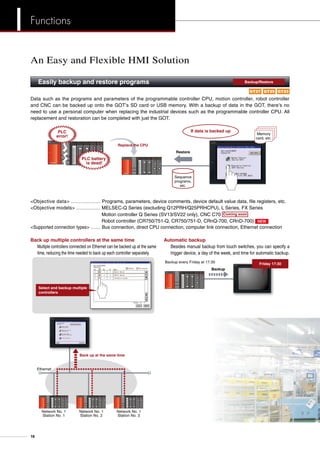
Data such as the programs and parameters of the programmable controller CPU, motion controller, robot controller
and CNC can be backed up onto the GOT’s SD card or USB memory. With a backup of data in the GOT, there’s no
need to use a personal computer when replacing the industrial devices such as the programmable controller CPU. All
replacement and restoration can be completed with just the GOT.
Memory
card, etc.
Sequence
programs,
etc.
Restore
Replace the CPU
If data is backed upPLC
error!
PLC battery
is dead!
Objective data ……………… Programs, parameters, device comments, device default value data, file registers, etc.
Objective models …………… MELSEC-Q Series (excluding Q12PRH/Q25PRHCPU), L Series, FX Series
Motion controller Q Series (SV13/SV22 only), CNC C70 Coming soon
Robot controller (CR750/751-Q, CR750/751-D, CRnQ-700, CRnD-700) NEW
Supported connection types …… Bus connection, direct CPU connection, computer link connection, Ethernet connection
Back up multiple controllers at the same time
Multiple controllers connected on Ethernet can be backed up at the same
time, reducing the time needed to back up each controller separately.
Ethernet
Network No. 1
Station No. 1
Back up at the same time
Network No. 1
Station No. 2
Network No. 1
Station No. 3
Select and backup multiple
controllers
Automatic backup
	 Besides manual backup from touch switches, you can specify a
trigger device, a day of the week, and time for automatic backup.
Backup every Friday at 17:30
Backup
Friday 17:30
An Easy and Flexible HMI Solution
Easily backup and restore programs	 Backup/Restore
GT23GT27 GT25
16
Functions
When an error occurs, monitor the ladder program and identify the cause of error. There is no need for a personal
computer on the production floor.
Edit Find/Replace Convert Display Online
Insert row Delete row Insert column Delete column
Enter ladder program
Insert row Delete row Insert column Delete column
Just touch the GOT screen and easily edit the ladder program to make simple changes.
Sensor
X20
M20M20
Circuit input
  [ ]
a ecb d f g
ENT
1 2
6
3 4
5 7h i j k l m n
X20
Sensor
X10
Change the device number from
X10 to X20.
Review
Target models ……… MELSEC-Q Series (excluding QnPHCPU/QnPRHCPU/QnUDPVCPU), L Series,
Motion controller Q Series (programmable controller CPU section)
Monitor and edit ladder programs without a personal computer	 Sequence Program Monitor
GT23GT27 GT25
G r a p h i c O p e r a t i o n Te r m i n a l
17
LineupFASolutionsSpecificationsSupportProductlistFeaturesFunctions
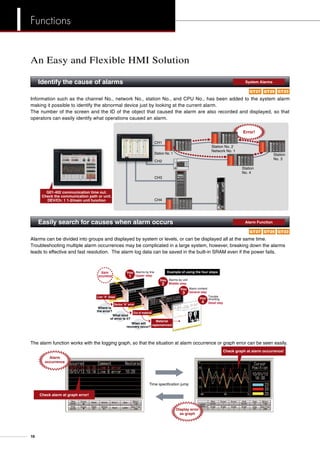
Alarms can be divided into groups and displayed by system or levels, or can be displayed all at the same time.
Troubleshooting multiple alarm occurrences may be complicated in a large system, however, breaking down the alarms
leads to effective and fast resolution. The alarm log data can be saved in the built-in SRAM even if the power fails.
Where is
the error?
What kind
of error is it?
When will
recovery occur?
Alarm
occurrence Upper step
Alarms by line
Alarms by unit
Middle step
Alarm content
General step
Trouble
shooting
Detail step
Step
2
Step
3
Step
4
Step
1
Device A error
Out of material
Material
replenishment
Line A stops
Example of using the four steps
Information such as the channel No., network No., station No., and CPU No., has been added to the system alarm
making it possible to identify the abnormal device just by looking at the current alarm.
The number of the screen and the ID of the object that caused the alarm are also recorded and displayed, so that
operators can easily identify what operations caused an alarm.
CH1
Station No. 2
Network No. 1
Station No. 1 Station
No. 3
Station
No. 4
CH2
CH3
CH4
G01-402 communication time out.
Check the communication path or unit.
DEV/Ch: 1 1-2/main unit function
Error!
The alarm function works with the logging graph, so that the situation at alarm occurrence or graph error can be seen easily.
Check graph at alarm occurrence!
Check alarm at graph error!
Time specification jump
Display error
as graph
Alarm
occurrence
Identify the cause of alarms	 System Alarms
Easily search for causes when alarm occurs	 Alarm Function
An Easy and Flexible HMI Solution
GT23GT27 GT25
GT23GT27 GT25
18
Functions
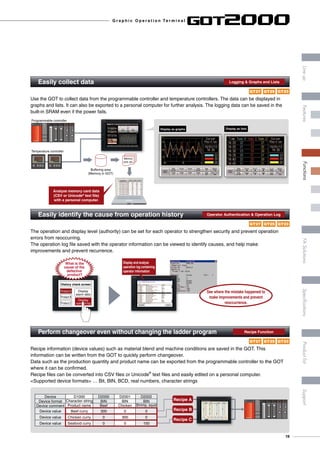
Recipe information (device values) such as material blend and machine conditions are saved in the GOT. This
information can be written from the GOT to quickly perform changeover.
Data such as the production quantity and product name can be exported from the programmable controller to the GOT
where it can be confirmed.
Recipe files can be converted into CSV files or Unicode®
text files and easily edited on a personal computer.
Supported device formats … Bit, BIN, BCD, real numbers, character strings
The operation and display level (authority) can be set for each operator to strengthen security and prevent operation
errors from reoccurring.
The operation log file saved with the operator information can be viewed to identify causes, and help make
improvements and prevent recurrence.
Use the GOT to collect data from the programmable controller and temperature controllers. The data can be displayed in
graphs and lists. It can also be exported to a personal computer for further analysis. The logging data can be saved in the
built-in SRAM even if the power fails.
Easily collect data	 Logging  Graphs and Lists
Easily identify the cause from operation history	 Operator Authentication  Operation Log
Perform changeover even without changing the ladder program 	 Recipe Function
Programmable controller
Temperature controller
Buffering area
(Memory in GOT)
Analyze memory card data
(CSV or Unicode®
text file)
with a personal computer.
Memory
card, etc.
Display as graphs Display as lists
History check screen
Display
operation log
Display
alarm data
Product A
Product B
Product C
What is the
cause of the
defective
product?
Display and analyze
operation log containing
operator information
See where the mistake happened to
make improvements and prevent
reoccurrence.
Recipe A
Recipe B
Recipe C
Device D1000 D2000 D2001 D2002
Device format Character string BIN BIN BIN
Device comment Product name Beef Chicken Shrimp, squid
Device value Beef curry 300 0 0
Device value Chicken curry 0 300 0
Device value Seafood curry 0 0 150
GT23GT27 GT25
GT23GT27 GT25
GT23GT27 GT25
G r a p h i c O p e r a t i o n Te r m i n a l
19
LineupFASolutionsSpecificationsSupportProductlistFeaturesFunctions
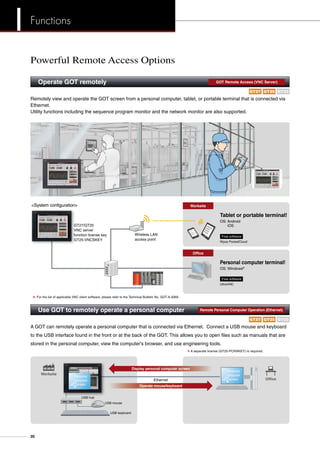
Remotely view and operate the GOT screen from a personal computer, tablet, or portable terminal that is connected via
Ethernet.
Utility functions including the sequence program monitor and the network monitor are also supported.
Powerful Remote Access Options
Operate GOT remotely	 GOT Remote Access (VNC Server)
A GOT can remotely operate a personal computer that is connected via Ethernet. Connect a USB mouse and keyboard
to the USB interface found in the front or at the back of the GOT. This allows you to open files such as manuals that are
stored in the personal computer, view the computer's browser, and use engineering tools.
Use GOT to remotely operate a personal computer	 Remote Personal Computer Operation (Ethernet)
System configuration
Personal computer terminal!
OS: Windows®
UltraVNC
Free software
Tablet or portable terminal!
OS: Android
iOS
Wyse PocketCloud
Free software
Wireless LAN
access point
GT27/GT25
VNC server
function license key
GT25-VNCSKEY
Office
Worksite
8: For the list of applicable VNC client software, please refer to the Technical Bulletin No. GOT-A-0069.
8 A separate license (GT25-PCRAKEY) is required.
USB mouse
USB hub
USB keyboard
Personal
computer
screenEthernet
Operate mouse/keyboard
Display personal computer screen
Worksite
Office
Personal
computer
screen
GT23GT27 GT25
GT23GT27 GT25
20
Functions
Communicate with databases	 MES Interface Function NEW
More cost for installing a gateway personal
computer and its maintenance
No need for gateway personal
computer or database transfer programs.
Minimize the costs!
Before When MES interface is used
MES database sever
MES application
Database (Oracle®
, etc.) Database (Oracle®
, etc.)
MES database sever
MES application
GOT
Gateway (server function)
Host information system
communication processing
Gateway personal computer
Data processing (operation process,logging,etc.)
(MX Component)
Send events
(SQL statement)
Send production instruction requests
or production results, etc.
• SELECT (Select/MultiSelect)
• UPDATE
• INSERT
GOT
MES interface function
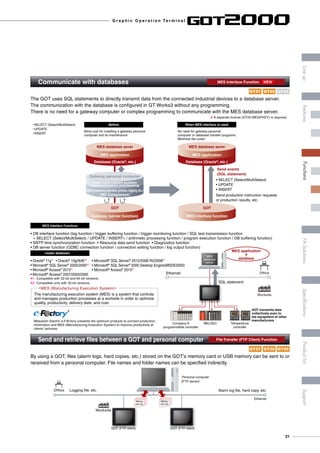
The GOT uses SQL statements to directly transmit data from the connected industrial devices to a database server.
The communication with the database is configured in GT Works3 without any programming.
There is no need for a gateway computer or complex programming to communicate with the MES database server.
8 A separate license (GT25-MESIFKEY) is required.
• DB interface function (tag function / trigger buffering function / trigger monitoring function / SQL text transmission function
 SELECT (Select/MultiSelect) / UPDATE / INSERT / arithmetic processing function / program execution function / DB buffering function)
• SNTP time synchronization function • Resource data send function • Diagnostics function
• DB server function (ODBC connection function / connection setting function / log output function)
MES (Manufacturing Execution System)
The manufacturing execution system (MES) is a system that controls
and manages production processes at a worksite in order to optimize
quality, productivity, delivery date, and cost.
MES Interface Functions
• Oracle®
11g81
• Oracle®
10g/9i/8i82
• Microsoft®
SQL Server®
2012/2008 R2/200881
• Microsoft®
SQL Server®
2005/200082
• Microsoft®
SQL Server®
2000 Desktop Engine(MSDE2000)
• Microsoft®
Access®
201381
• Microsoft®
Access®
201082
• Microsoft®
Access®
2007/2003/2000
Usable databases
81: Compatible with 32-bit and 64-bit versions.
82: Compatible only with 32-bit versions.
• SELECT (Select/MultiSelect)
• UPDATE
• INSERT
Mitsubishi Electric e-F@ctory presents the optimum products to connect production
information and MES (Manufacturing Execution System) to improve productivity at
clients’ factories.
Ethernet
SQL statement
MELSECCompany A
programmable controller
Temperature
controller
GOT transmits data
collectively even to
the equipment of other
manufacturers
MES
database
server
MES application
database
+
Worksite
Office
By using a GOT, files (alarm logs, hard copies, etc.) stored on the GOT’s memory card or USB memory can be sent to or
received from a personal computer. File names and folder names can be specified indirectly.
Ethernet
Worksite
Office
GOT (FTP client)
Personal computer
(FTP server)
Alarm log file, hard copy, etc.Logging file, etc.
GOT (FTP client)
Memory
card, etc.
Memory
card, etc.
Send and retrieve files between a GOT and personal computer	 File Transfer (FTP Client) Function
GT23GT27 GT25
GT23GT27 GT25
G r a p h i c O p e r a t i o n Te r m i n a l
21
LineupFASolutionsSpecificationsSupportProductlistFeaturesFunctions
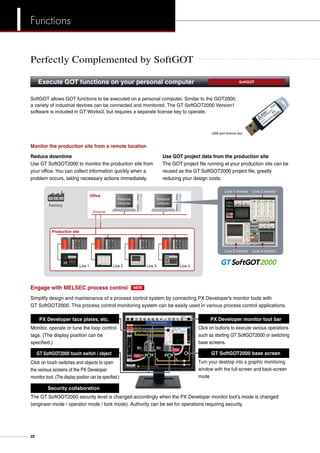
Reduce downtime
Monitor the production site from a remote location
Use GOT project data from the production site
Line 1 Line 2 Line 3 Line 4
Personal
computer
Production site
Office
Factory
Ethernet
Line 1 monitor Line 2 monitor
Line 4 monitorLine 3 monitor
Use GT SoftGOT2000 to monitor the production site from
your office. You can collect information quickly when a
problem occurs, taking necessary actions immediately.
The GOT project file running at your production site can be
reused as the GT SoftGOT2000 project file, greatly
reducing your design costs.
Simplify design and maintenance of a process control system by connecting PX Developer's monitor tools with
GT SoftGOT2000. This process control monitoring system can be easily used in various process control applications.
Engage with MELSEC process control
Click on buttons to execute various operations
such as starting GT SoftGOT2000 or switching
base screens.
Turn your desktop into a graphic monitoring
window with the full-screen and back-screen
mode.
Click on touch switches and objects to open
the various screens of the PX Developer
monitor tool. (The display position can be specified.)
Monitor, operate or tune the loop control
tags. (The display position can be
specified.)
The GT SoftGOT2000 security level is changed accordingly when the PX Developer monitor tool’s mode is changed
(engineer mode / operator mode / lock mode). Authority can be set for operations requiring security.
Security collaboration
PX Developer monitor tool barPX Developer face plates, etc.
GT SoftGOT2000 touch switch / object GT SoftGOT2000 base screen
2000
Personal
computer
NEW
Execute GOT functions on your personal computer 	 SoftGOT
SoftGOT allows GOT functions to be executed on a personal computer. Similar to the GOT2000,
a variety of industrial devices can be connected and monitored. The GT SoftGOT2000 Version1
software is included in GT Works3, but requires a separate license key to operate.
USB port license key
Perfectly Complemented by SoftGOT
22
Functions
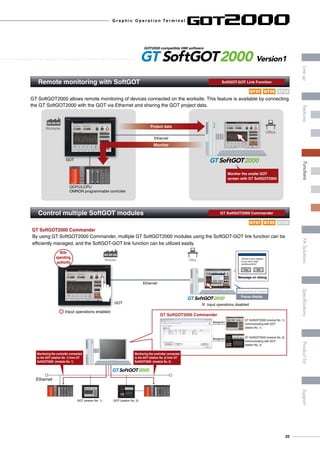
GT SoftGOT2000 allows remote monitoring of devices connected on the worksite. This feature is available by connecting
the GT SoftGOT2000 with the GOT via Ethernet and sharing the GOT project data.
Worksite
Ethernet
GOT
QCPU/LCPU
OMRON programmable controller
Project data
Monitor
Office
Monitor the onsite GOT
screen with GT SoftGOT2000
2000
Remote monitoring with SoftGOT	 SoftGOT-GOT Link Function
Control multiple SoftGOT modules	 GT SoftGOT2000 Commander
By using GT SoftGOT2000 Commander, multiple GT SoftGOT2000 modules using the SoftGOT-GOT link function can be
efficiently managed, and the SoftGOT-GOT link function can be utilized easily.
GT SoftGOT2000 Commander
Ethernet
GOT (station No. 1) GOT (station No. 2)
2000
Ethernet
Worksite
GOT
Office
Input operations enabled
Input operations disabled
With
operating
authority
NoYes
2000
Message on dialog
NoYes
The host is now in operation.
Do you want to obtain
operating authority?
The host is now in operation.
Do you want to obtain
operating authority?
Popup display
Operating authority can be obtained
Monitoring the controller connected
to the GOT (station No. 2) from GT
SoftGOT2000 (module No. 2)
Monitoring the controller connected
to the GOT (station No. 1) from GT
SoftGOT2000 (module No. 1)
GT SoftGOT2000 (module No. 1):
Communicating with GOT
(station No. 1)
GT SoftGOT2000 (module No. 2):
Communicating with GOT
(station No. 2)
Management
Management
Operating authority can be obtained.
GOT2000 compatible HMI software
2000 Version1
GT23GT27 GT25
GT23GT27 GT25
G r a p h i c O p e r a t i o n Te r m i n a l
23
LineupFASolutionsSpecificationsSupportProductlistFeaturesFunctions
“Easier Operations!”
The GOT2000 engages various industrial devices to support maintenance 	
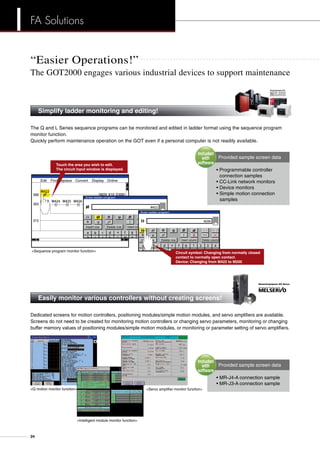
The Q and L Series sequence programs can be monitored and edited in ladder format using the sequence program
monitor function.
Quickly perform maintenance operation on the GOT even if a personal computer is not readily available.
Simplify ladder monitoring and editing!	
General-purpose PLC
Dedicated screens for motion controllers, positioning modules/simple motion modules, and servo amplifiers are available.
Screens do not need to be created for monitoring motion controllers or changing servo parameters, monitoring or changing
buffer memory values of positioning modules/simple motion modules, or monitoring or parameter setting of servo amplifiers.
• MR-J4-A connection sample
• MR-J3-A connection sample
Provided sample screen data
Easily monitor various controllers without creating screens!	
General-purpose AC Servo
Included
with
software
Edit
Sequence program monitor function
Find/Replace Convert Display Online
Insert row Delete row Insert column Delete column
Enter ladder program
Insert row Delete row Insert column Delete column
Circuit symbol: Changing from normally closed
contact to normally open contact.
Device: Changing from M422 to M200
Touch the area you wish to edit.
The circuit input window is displayed. • Programmable controller 	
	 connection samples
• CC-Link network monitors
• Device monitors
• Simple motion connection 	
	samples
Provided sample screen data
Included
with
software
Q motion monitor function
Intelligent module monitor function
Servo amplifier monitor function
FA Solutions
24
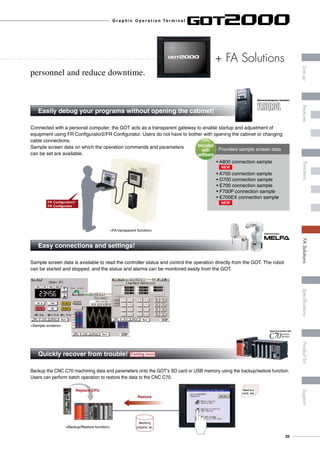
Connected with a personal computer, the GOT acts as a transparent gateway to enable startup and adjustment of
equipment using FR Configurator2/FR Configurator. Users do not have to bother with opening the cabinet or changing
cable connections.
Sample screen data on which the operation commands and parameters
can be set are available.
FR Configurator2/
FR Configurator
personnel and reduce downtime.
Quickly recover from trouble! Coming soon 	
Backup the CNC C70 machining data and parameters onto the GOT’s SD card or USB memory using the backup/restore function.
Users can perform batch operation to restore the data to the CNC C70.
Memory
card, etc.
Restore
Replace CPU
Machining
programs, etc.
Numerical Control Unit
+ FA Solutions
Easily debug your programs without opening the cabinet!	
• A800 connection sample
	
• A700 connection sample
• D700 connection sample
• E700 connection sample
• F700P connection sample
• E700EX connection sample
Provided sample screen data
Included
with
software
General-purpose Inverter
Easy connections and settings!	
Sample screen data is available to read the controller status and control the operation directly from the GOT. The robot
can be started and stopped, and the status and alarms can be monitored easily from the GOT.
Industrial Robot
FA transparent function
Sample screens
Backup/Restore function
NEW
NEW
G r a p h i c O p e r a t i o n Te r m i n a l
25
LineupFASolutionsSpecificationsSupportProductlistFeaturesFunctions
“More Options!”
The GOT2000 engages various industrial devices to support maintenance 	
wReduce spare parts cost
ePowerful support for maintenance
iQ Platform, the next generation integrated platformMitsubishi FA Integrated Platform
optimizes the front line of production
qReduce engineering costs
The FA integrated software suite, MELSOFT iQ Works, in which
the GT Works3 screen design software is included, allows for
efficient design of systems and monitor screens for each controller.
A single GOT2000 can take the place for several types of
monitor units, thus greatly reducing costs for spare parts.
The GOT2000 has a variety of useful maintenance functions
including the “Q motion monitor function” and “CNC monitor
function”. Use these reliable functions for
troubleshooting.
Controllers compatible with iQ Platform
GOT2000
Quickly reduce total costs by creating a
seamless integrated engineering environment
• System Management Software [MELSOFT Navigator]
• Programmable Controller Engineering Software [MELSOFT GX Works2]
• Motion Controller Engineering Software [MELSOFT MT Works2]
• Servo Setup Software [MELSOFT MR Configurator2]
• Inverter Setup Software [FR Configurator2]
• Screen Design Software for Graphic Operation Terminal [MELSOFT GT Works3]
• Robot Engineering Software [MELSOFT RT ToolBox2 mini]
With high speed control and convenience fully assured, controllers compatible with the iQ Platform and the GOT2000
are the keys to higher productivity at lower cost. PLCs, motion controllers, CNCs, robot controllers, and C controllers
are integrated into one as controllers compatible with the iQ Platform. The GOT2000 integrates different types of
monitor units that were previously connected to each controller.
Coming soon
I improved Quality
I intelligent  Quick
I innovation  Quest
CNCProgrammable controller C ControllerRobotMotion controller
Unique functions designed for iQ Platform controllers!
FA Solutions
26
personnel and reduce downtime.
+ FA Solutions
iQ Sensor Solution
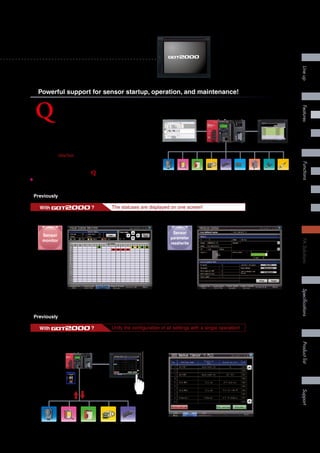
Sensors used in production sites are incorporating more features and
becoming more complex. Are you spending lots of time and money
managing your configuration tools, or starting up and servicing your
sensor systems? To simplify sensor configuration and maintenance,
Mitsubishi Electric has collaborated with various manufacturers
and developed OneTool. This powerful integration of sensors,
programmable controllers, GOTs, and engineering tools is the solution
to reducing your TCO.
This is the iQ Sensor Solution ( iQ Sensor Solution).
✽ TCO: Total Cost of Ownership
Vision sensor Laser
displacement
sensor
Laser
sensor
Pressure
sensor
Fiber
sensor
Pressure
sensor
Photoelectric
sensor
Proximity
sensor
Proximity
sensor
GX Works2
engineering environment
MELSEC-L
programmable controller
GOT2000
HMI
Powerful support for sensor startup, operation, and maintenance!
The statuses are displayed on one screen!With ?
iQSS partner sensors are displayed on a single screen for comprehensive monitoring
Previously Sensor status could not be monitored collectively and was time consuming
Backup and restore the parameters of any iQSS partner sensor to the SD card mounted on the LCPU, allowing work
time to be reduced.
Ethernet
Ethernet
CC-Link
AnyWireASLINK
LCPU
SD card
Backup into
programmable
controller
iQSS compatible partner sensor
Restore
into sensor
iQSS backup (sensor ¬ programmable controller) screen
Previously It was a hassle to backup sensor parameters because each manufacturer has a different software
Unify the configuration of all settings with a single operation!With ?
Input signal monitor screen
Sensor
monitor
Sensor detailed information
(Parameter setting screen)
Sensor
parameter
read/write
G r a p h i c O p e r a t i o n Te r m i n a l
27
LineupFASolutionsSpecificationsSupportProductlistFeaturesFunctions
Item Specifications
Operating ambient temperature ]1 0 to 55°C ]2
Storage ambient temperature -20 to 60°C
Operating ambient humidity 10 to 90% RH, non-condensing
Storage ambient humidity 10 to 90% RH, non-condensing
Vibration resistance
Compliant with
JIS B3502 and
IEC61131-2
Frequency Acceleration Half-amplitude Sweep count
Under intermittent
vibration
5 to 8.4Hz – 3.5mm 10 times each
in X, Y and Z
directions8.4 to 150Hz 9.8m/s2
–
Under continuous
vibration
5 to 8.4Hz – 1.75mm
–
8.4 to 150Hz 4.9m/s2
–
Shock resistance Compliant with JIS B3502, IEC 61131-2 (147 m/s2 (15G), 3 times each in X, Y and Z directions)
Operating atmosphere No oily smoke, corrosive gas or combustible gas, less conductive dust, away from direct sunlight (the same in storage)
Operating altitude ]3 2000m or less
Installation location Inside control panel
Overvoltage category ]4 II or less
Pollution level ]5 2 or less
Cooling method Self-cooling
Grounding Type D grounding (100Ω or less). Connect to panel if unable to ground.
]1	 The operating ambient temperature includes the temperature
inside the enclosure of the control panel to which the GOT is
installed.
]2	 The maximum operating ambient temperature should be 5°C
lower than that shown in the table on the left when connecting
to a multimedia unit (GT27-MMR-Z), MELSECNET/H
communication unit (GT15-J71LP23-25 or GT15-J71BR13) or
CC-Link communication unit (GT15-J61BT13).
]3	 Do not operate or store the GOT unit in pressurized
environments where the pressure exceeds 0m elevation
atmospheric pressure, as this could result in abnormal operation.
Do not pressurize inside the control panel for air purge cleaning.
The pressure could raise the surface sheet, making the touch
panel difficult to operate or causing the sheet to come off.
]4	 Assuming that the device is connected at some point between a
public power distribution network and local system equipment.
CategoryII applies to devices that are supplied with power from
fixed equipment. The surge withstand voltage is 2,500V for
devices with ratings up to 300V.
]5	 Index that indicates the level of foreign conductive matter in the
operating environment of the device. Pollution level 2 denotes
an environment contaminated only by non-conductive matter
which may, under certain conditions, become temporarily
conductive due to condensation.
Do not use or store the GOT under direct sun light or in
an environment with excessively high temperature, dust,
humidity or vibration.
For inquiries relating to the status of conforming to UL, cUL,
and CE directives and shipping directives, please contact
your local sales office.
General specifications
GT27
Power supply specifications
Item
Specifications
GT2715-XTBA
GT2712-STBA
GT2712-STWA
GT2710-STBA
GT2710-VTBA
GT2710-VTWA
GT2708-STBA
GT2708-VTBA
GT2715-XTBD
GT2712-STBD
GT2712-STWD
GT2710-STBD
GT2710-VTBD
GT2710-VTWD
GT2708-STBD
GT2708-VTBD
Power supply voltage 100 to 240VAC (+10%, -15%) 24VDC (+25%, -20%)
Power supply frequency 50/60Hz ±5% –
Power
consumption
Maximum load 51W or less 44W or less 41W or less 41W or less 48W or less 45W or less 42W or less 39W or less
Stand alone 25W 19W 17W 15W 23W 18W 15W 13W
Stand alone with backlight off 10W 10W 10W 10W 8W 8W 8W 8W
Inrush current
40A or less
(3ms, ambient
temperature 25°C,
maximum load)
60A or less (2ms, ambient temperature 25°C, maximum load) 5A or less (20ms, ambient temperature 25°C, maximum load)
Allowable momentary power failure time Within 20ms (100VAC or more) Within 10ms
Noise immunity Noise voltage 1500Vp-p, noise width 1μs by noise simulator with noise frequency 25 to 60Hz Noise voltage 500Vp-p, noise width 1μs by noise simulator with noise frequency 25 to 60Hz
Withstand voltage 1500VAC for 1 minute between power supply terminal and ground 350VAC for 1 minute between power supply terminal and ground
Insulation resistance 10MΩ or higher with an insulation resistance tester (500VDC between power supply terminal and ground)
Screen size Model A B Remarks
15 GT2715 383.5 (15.10) 282.5 (11.12) Same dimensions as GT1695, GT1595.
12.1 GT2712 302 (11.89) 228 (8.98) Same dimensions as GT1685, GT1585, A985GOT.
10.4 GT2710 289 (11.38) 200 (7.87) Same dimensions as GT167M, GT157M, A97MGOT.
8.4 GT2708 227 (8.94) 176 (6.93) Same dimensions as GT1665, GT1565.
Unit: mm (inch)
Unit: mm (inch)
A
+2
0
B
+2
0Panel opening
Panel cutting dimensions
External dimensions
GT2715 GT2712 GT2710 GT2708
316 (12.44)
246(9.69)
227(8.94)10
(0.39)
10
(0.39)
52
(2.05)6
(0.24)
241 (9.49)
241 (9.49)
301 (11.85)
397 (15.63)
322 (12.68)
300(11.81)
20
(0.79)
322 (12.68)
10
(0.39)
6(0.24)
60(2.36)
46(1.81)
382 (15.04)
281(11.06)10(0.39)
10
(0.39)
10
(0.39)
303 (11.93)
208 (8.19)
228 (8.98)
288 (11.34)
218(8.58)
199(7.83)10
(0.39)
10
(0.39)
52
(2.05)6
(0.24)
241 (9.49)
166 (6.54)
226 (8.90)
171.6
(6.76)
175(6.89)
194(7.64)
10
(0.39)
10
(0.39)
52
(2.05)6
(0.24)
37.5 (1.48)
37.5 (1.48)
28
Specifications
Performance specifications
Item
Specifications
GT2715-XTBA
GT2715-XTBD
GT2712-STBA
GT2712-STBD
GT2712-STWA
GT2712-STWD
GT2710-STBA
GT2710-STBD
GT2710-VTBA
GT2710-VTBD
GT2710-VTWA
GT2710-VTWD
GT2708-STBA
GT2708-STBD
GT2708-VTBA
GT2708-VTBD
Display
section ]1 ]2
Display device TFT color LCD
Screen size 15 12.1 10.4 8.4
Resolution XGA: 1024×768 dots SVGA: 800×600 dots VGA: 640×480 dots
SVGA: 800×600
dots
VGA: 640×480 dots
Display size
304.1(12.0)(W)×
228.1(8.98)(H)
mm(inch)
246.0(9.685)(W)×184.5(7.264)(H)
mm(inch)
211.2(8.315)(W)×158.4(6.236)(H) mm(inch)
170.9(6.728)(W) x 128.2(5.047)(H)
mm(inch)
Number of characters
16-dot standard font:
64 chars. × 48 lines (2-byte)
12-dot standard font:
85 chars. × 64 lines (2-byte)
16-dot standard font: 50 chars. × 37 lines (2-byte)
12-dot standard font: 66 chars. × 50 lines (2-byte)
16-dot standard font: 40 chars. × 30 lines (2-byte)
12-dot standard font: 53 chars. × 40 lines (2-byte)
16-dot standard font:
50 chars. × 37 lines (2-byte)
12-dot standard font:
66 chars. × 50 lines (2-byte)
16-dot standard font:
40 chars. × 30 lines (2-byte)
12-dot standard font:
53 chars. × 40 lines (2-byte)
Display color 65536 colors
Intensity adjustment 32-level adjustment
Backlight LED (not replaceable)
Backlight life ]4 Approx. 60000 hours or more (Time for display intensity reaches 50% at ambient temperature of 25°C)
Touch panel ]3
Type Analog resistive film
Key size Minimum 2 × 2 dots (per key)
Simultaneous press Maximum 2 points
Life 1 million times or more (operating force 0.98N or less)
Human
sensor
Detection distance 1m –
Detection temperature Temperature difference between human body and ambient air: 4°C or higher –
User memory
User memory
capacity
Memory for storage (ROM): 57MB
Memory for operation (RAM): 128MB
Life (No. of writings) 100000 times
Internal clock accuracy ±90 sec/month (ambient temperature 25°C)
Battery
GT11-50BAT lithium battery
Life Approx. 5 years (ambient temperature 25°C)
Built-in
interface
RS-232 1ch Transmission speed: 115200/57600/38400/19200/9600/4800bps Connector shape: D-sub 9-pin (male)
RS-422/485 1ch Transmission speed: 115200/57600/38400/19200/9600/4800bps Connector shape: D-sub 9-pin (female)
Ethernet 1ch Data transfer method: 10BASE-T/100BASE-TX Connector shape: RJ-45 (modular jack)
USB (host)
2ch (front face/rear face) 1ch (rear face) 2ch (front face/rear face) 1ch (rear face) 2ch (front face/rear face)
Maximum transfer speed: High-Speed 480Mbps Connector shape: USB-A
USB (device)
1ch (front face) 1ch (rear face) 1ch (front face) 1ch (rear face) 1ch (front face)
Maximum transfer speed: High-Speed 480Mbps Connector shape: USB Mini-B
SD card 1ch SDHC compliant (maximum 32GB)
Extension interface For communication unit/option unit mounting
Auxiliary extension I/F For option unit mounting
Side interface For communication unit mounting
Buzzer output Single tone (tone, tone length adjustable)
POWER LED Emission color: 2 colors (blue, orange)
Protective structure Front: IP67F ]5 In control panel: IP2X
External dimensions
397(15.63)(W)×
300(11.81)(H)×60(D)
mm(inch)
316(12.44)(W)×246(9.69)(H)×52(2.05)(D) mm(inch) 303(11.93)(W)×218(8.58)(H)×52(2.05)(D) mm(inch) 241(9.49)(W)×194(7.64)(H)×52(2.05)(D) mm(inch)
Panel cutting dimensions
383.5(15.10)(W)×
282.5(11.12)(H)
mm(inch)
302(11.89)(W)×228(8.98)(H) mm(inch) 289(11.38)(W)×200(7.87)(H) mm(inch) 227(8.94)(W)×176(6.93)(H) mm(inch)
Weight (excl. mounting brackets) 4.5kg 2.4kg 2.1kg 1.5kg
Compatible software package GT Designer3 Version1.112S or later
]1	 On LCD panels, bright dots (permanently lit) and black dots (never lit) generally appear. Because the number of display elements that exist on an LCD panel is large, it is not possible to reduce appearance of the
bright and black dots to zero. Individual differences in LCD panels may cause differences in color, uneven brightness and flickering. Note that these are characteristics of LCD panels and it does not mean the products
are defective or damaged.
]2	 Flickering may occur due to vibration or shock, or depending on the display colors.
]3	 The life of using a stylus pen is 100,000. Use a stylus pen meeting the following specifications.
• Material: Polyacetal resin • Pen point radius: 0.8mm or more
]4	 Using the GOT screen saver/backlight OFF functions prevents screen burn-in and extends backlight life.
]5	 Pressing PUSH mark firmly and locking the USB environmentally protective cover makes it conform to IP67F. (The USB interface conforms to IP2X when the cover is open.)
However, this does not guarantee protection in all users' environments. The unit may not be used in an environment where it is exposed to splashing oil or chemicals for a long time or it is soaked with oil mist.
Components names q Display screen
w Touch panel
e USB interface (host/front face)
] Excluding white model
r USB interface (device/front face)
] Excluding white model
t POWER LED
y Human sensor
(GT2715/GT2712 only)
u Unit mounting bracket
i Reset switch
o S. MODE switch
!0 SD card access LED
!1 SD card interface
!2 SD card cover
!3 Battery
!4 Side interface
!5 USB interface (host/rear face)
!6 Cable clamp mounting hole
!7 Terminating resistor setting switch
(inside the cover)
!8 Auxiliary extension I/F
!9 Extension interface
@0 Power supply terminal
@1 Ethernet interface
@2 RS-232 interface
@3 RS-422/485 interface
@4 USB interface (device/rear face)
] White model only
!0
GT2715/GT2712
qw
t
@3
!9
i
!7!8
o
!1
!2
!3
!4
!5
@2 @1 @0
u u
u
y
u
e
r
@4
!6
!0
!1
!2
!3
!4
!5
!6
GT2710
@3 @2@1 @0
u u!9
i
!8
!7
ou u
@4
qw
t
e
r
GT2708
!0
!1!2!3
!7
!4
!5
@3 @2@1 @0
u u!9
i
!8
ou u
qw
t
er
!6
G r a p h i c O p e r a t i o n Te r m i n a l
29
LineupFASolutionsSpecificationsSupportProductlistFeaturesFunctions
Item Specifications
Operating ambient temperature ]1 0 to 55°C ]2
Storage ambient temperature -20 to 60°C
Operating ambient humidity 10 to 90% RH, non-condensing
Storage ambient humidity 10 to 90% RH, non-condensing
Vibration resistance
Compliant with
JIS B3502 and
IEC61131-2
Frequency Acceleration Half-amplitude Sweep count
Under intermittent
vibration
5 to 8.4Hz – 3.5mm 10 times each
in X, Y and Z
directions8.4 to 150Hz 9.8m/s2
–
Under continuous
vibration
5 to 8.4Hz – 1.75mm
–
8.4 to 150Hz 4.9m/s2
–
Shock resistance Compliant with JIS B3502, IEC 61131-2 (147 m/s2 (15G), 3 times each in X, Y and Z directions)
Operating atmosphere No oily smoke, corrosive gas or combustible gas, less conductive dust, away from direct sunlight (the same in storage)
Operating altitude ]3 2000m or less
Installation location Inside control panel
Overvoltage category ]4 II or less
Pollution level ]5 2 or less
Cooling method Self-cooling
Grounding Type D grounding (100Ω or less). Connect to panel if unable to ground.
]1	 The operating ambient temperature includes the temperature
inside the enclosure of the control panel to which the GOT is
installed.
]2	 The maximum operating ambient temperature should be 5°C
lower than that shown in the table on the left when connecting
to a MELSECNET/H communication unit (GT15-J71LP23-25
or GT15-J71BR13) or CC-Link communication unit (GT15-
J61BT13).
]3	 Do not operate or store the GOT unit in pressurized
environments where the pressure exceeds 0m elevation
atmospheric pressure, as this could result in abnormal
operation. Do not pressurize inside the control panel for air
purge cleaning. The pressure could raise the surface sheet,
making the touch panel difficult to operate or causing the sheet
to come off.
]4	 Assuming that the device is connected at some point
between a public power distribution network and local system
equipment.
	 CategoryII applies to devices that are supplied with power from
fixed equipment. The surge withstand voltage is 2,500V for
devices with ratings up to 300V.
]5	 Index that indicates the level of foreign conductive matter in the
operating environment of the device. Pollution level 2 denotes
an environment contaminated only by non-conductive matter
which may, under certain conditions, become temporarily
conductive due to condensation.
Do not use or store the GOT under direct sun light or in
an environment with excessively high temperature, dust,
humidity or vibration.
For inquiries relating to the status of conforming to UL, cUL,
and CE directives and shipping directives, please contact
your local sales office.
General specifications
GT25
Power supply specifications
Item
Specifications
GT2510-VTBA
GT2510-VTWA
GT2508-VTBA
GT2508-VTWA
GT2510-VTBD
GT2510-VTWD
GT2508-VTBD
GT2508-VTWD
Power supply voltage 100 to 240VAC (+10%, -15%) 24VDC (+25%, -20%)
Power supply frequency 50/60Hz ±5% –
Power
consumption
Maximum load 34W or less 31W or less 33W or less 31W or less
Stand alone 12W 11W 10W 8W
Stand alone with backlight off 7W 7W 6W 6W
Inrush current 60A or less (2ms, ambient temperature 25°C, maximum load) 5A or less (20ms, ambient temperature 25°C, maximum load)
Allowable momentary power failure time Within 20ms (100VAC or more) WWithin 10ms
Noise immunity Noise voltage 1500Vp-p, noise width 1μs by noise simulator with noise frequency 25 to 60Hz Noise voltage 500Vp-p, noise width 1μs by noise simulator with noise frequency 25 to 60Hz
Withstand voltage 1500VAC for 1 minute between power supply terminal and ground 350VAC for 1 minute between power supply terminal and ground
Insulation resistance 10MΩ or higher with an insulation resistance tester (500VDC between power supply terminal and ground)
Screen size Model A B Remarks
10.4 GT2510 289 (11.38) 200 (7.87) Same dimensions as GT167M, GT157M, A97MGOT.
8.4 GT2508 227 (8.94) 176 (6.93) Same dimensions as GT1665, GT1565.
GT2510 GT2508
Unit: mm (inch)
Unit: mm (inch)
A
+2
0
B
+2
0Panel opening
303 (11.93)
208 (8.19)
228 (8.98)
288 (11.34)
218(8.58)
199(7.83)10
(0.39)
10
(0.39)
52
(2.05)6
(0.24)
241 (9.49)
166 (6.54)
226 (8.90)
171.6
(6.76)
175(6.89)
194(7.64)
10
(0.39)
10
(0.39)
52
(2.05)6
(0.24)
37.5 (1.48)
37.5 (1.48)
Panel cutting dimensions
External dimensions
30
Specifications
Performance specifications
Item
Specifications
GT2510-VTBA
GT2510-VTBD
GT2510-VTWA
GT2510-VTWD
GT2508-VTBA
GT2508-VTBD
GT2508-VTWA
GT2508-VTWD
Display
section ]1 ]2
Display device TFT color LCD
Screen size 10.4 8.4
Resolution VGA: 640×480 dots
Display size 211.2(8.315)(W)×158.4(6.236)(H) mm(inch) 170.9(6.728)(W) x 128.2(5.047)(H) mm(inch)
Number of characters
16-dot standard font: 40 chars. × 30 lines (2-byte)
12-dot standard font: 53 chars. × 40 lines (2-byte)
Display color 65536 colors
Intensity adjustment 32-level adjustment
Backlight LED (not replaceable)
Backlight life ]4 Approx. 60000 hours or more (Time for display intensity reaches 50% at ambient temperature of 25°C)
Touch panel ]3
Type Analog resistive film
Key size Minimum 2 × 2 dots (per key)
Simultaneous press Simultaneous press prohibited ]5 (only 1 point can be pressed)
Life 1 million times or more (operating force 0.98N or less)
User memory
User memory
capacity
Memory for storage (ROM): 32MB
Memory for operation (RAM): 80MB
Life (No. of writings) 100000 times
Internal clock accuracy ±90 sec/month (ambient temperature 25°C)
Battery
GT11-50BAT lithium battery
Life Approx. 5 years (ambient temperature 25°C)
Built-in
interface
RS-232 1ch Transmission speed: 115200/57600/38400/19200/9600/4800bps Connector shape: D-sub 9-pin (male)
RS-422/485 1ch Transmission speed: 115200/57600/38400/19200/9600/4800bps Connector shape: D-sub 9-pin (female)
Ethernet 1ch Data transfer method: 10BASE-T/100BASE-TX Connector shape: RJ-45 (modular jack)
USB (host)
2ch (front face/rear face) 1ch (rear face) 2ch (front face/rear face) 1ch (rear face)
Maximum transfer speed: High-Speed 480Mbps Connector shape: USB-A
USB (device)
1ch (front face) 1ch (rear face) 1ch (front face) 1ch (rear face)
Maximum transfer speed: High-Speed 480Mbps Connector shape: USB Mini-B
SD card 1ch SDHC compliant (maximum 32GB)
Extension interface For communication unit/option unit mounting
Side interface For communication unit mounting
Buzzer output Single tone (tone, tone length adjustable)
POWER LED Emission color: 2 colors (blue, orange)
Protective structure Front: IP67F ]6 In control panel: IP2X
External dimensions 303(11.93)(W)×218(8.58)(H)×52(2.05)(D) mm(inch) 241(9.49)(W)×194(7.64)(H)×52(2.05)(D) mm(inch)
Panel cutting dimensions 289(11.38)(W)×200(7.87)(H) mm(inch) 227(8.94)(W)×176(6.93)(H) mm(inch)
Weight (excl. mounting brackets) 2.1kg 1.5kg
Compatible software package GT Designer3 Version1.112S or later
]1	 On LCD panels, bright dots (permanently lit) and black dots (never lit) generally appear. Because the number of display elements that exist on an LCD panel is large, it is not possible to reduce appearance of the
bright and black dots to zero. Individual differences in LCD panels may cause differences in color, uneven brightness and flickering. Note that these are characteristics of LCD panels and it does not mean the
products are defective or damaged.
]2	 Flickering may occur due to vibration or shock, or depending on the display colors.
]3	 The life of using a stylus pen is 100,000. Use a stylus pen meeting the following specifications.
	 • Material: Polyacetal resin • Pen point radius: 0.8mm or more
]4	 Using the GOT screen saver/backlight OFF functions prevents screen burn-in and extends backlight life.
]5	 When 2 points on the touch panel are pressed simultaneously, if a switch is located in the middle of the 2 points then the switch will be activated. Therefore, avoid pressing 2 points on the touch panel simultaneously.
]6	 Pressing PUSH mark firmly and locking the USB environmentally protective cover makes it conform to IP67F. (The USB interface conforms to IP2X when the cover is open.)
	 However, this does not guarantee protection in all users' environments. The unit may not be used in an environment where it is exposed to splashing oil or chemicals for a long time or it is soaked with oil mist.
Components names
q Display screen
w Touch panel
e USB interface (host/front face)
] Excluding white model
r USB interface (device/front face)
] Excluding white model
t POWER LED
y Unit mounting bracket
u Reset switch
i S. MODE switch
o SD card access LED
!0 SD card interface
!1 SD card cover
!2 Battery
!3 Side interface
!4 USB interface (host/rear face)
!5 Cable clamp mounting hole
!6 Terminating resistor setting switch
(inside the cover)
!7 Extension interface
!8 Power supply terminal
!9 Ethernet interface
@0 RS-232 interface
@1 RS-422/485 interface
@2 USB interface (device/rear face)
] White model only
GT2510
qw
GT2508
!3
!0!1!2
!4
!5
!5
@2 @1 @0 !9 !8
@2 !9 !8
o
!3
!0!1
!4
o
!2
uy
y y
yy
t
er
t
er
!6
!7
y y!6!7
qw
@1 @0
u ⑥ i i
G r a p h i c O p e r a t i o n Te r m i n a l
31
LineupFASolutionsSpecificationsSupportProductlistFeaturesFunctions
Item Specifications
Operating ambient temperature ]1 0 to 55°C
Storage ambient temperature -20 to 60°C
Operating ambient humidity 10 to 90% RH, non-condensing ]2
Storage ambient humidity 10 to 90% RH, non-condensing ]2
Vibration resistance
Compliant with
JIS B3502 and
IEC61131-2
Frequency Acceleration Half-amplitude Sweep count
Under intermittent
vibration
5 to 8.4Hz – 3.5mm 10 times each
in X, Yand Z
directions8.4 to 150Hz 9.8m/s2
–
Under continuous
vibration
5 to 8.4Hz – 1.75mm
–
8.4 to 150Hz 4.9m/s2
–
Shock resistance Compliant with JIS B3502, IEC 61131-2 (147 m/s2
(15G), 3 times each in X, Y and Z directions)
Operating atmosphere No oily smoke, corrosive gas or combustible gas, less conductive dust, away from direct sunlight (the same in storage)
Operating altitude ]3 2000m or less
Installation location Inside control panel
Overvoltage category ]4 II or less
Pollution level ]5 2 or less
Cooling method Self-cooling
Grounding Type D grounding (100Ω or less). Connect to panel if unable to ground.
]1	 The operating ambient temperature includes the temperature
inside the enclosure of the control panel to which the GOT is
installed.
]2	 If ambient temperature exceeds 40°C, absolute humidity should
not exceed 90% at 40°C.
]3	 Do not operate or store the GOT unit in pressurized environments
where the pressure exceeds 0m elevation atmospheric
pressure, as this could result in abnormal operation. Do not
pressurize inside the control panel for air purge cleaning. The
pressure could raise the surface sheet, making the touch panel
difficult to operate or causing the sheet to come off.
]4	 Assuming that the device is connected at some point between a
public power distribution network and local system equipment.
CategoryII applies to devices that are supplied with power from
fixed equipment. The surge withstand voltage is 2,500V for
devices with ratings up to 300V.
]5	 Index that indicates the level of foreign conductive matter in the
operating environment of the device. Pollution level 2 denotes an
environment contaminated only by non-conductive matter which
may, under certain conditions, become temporarily conductive
due to condensation.
General specifications
GT23
Power supply specifications
External dimensions
Panel cutting dimensions
Item
Specifications
GT2310-VTBA GT2308-VTBA GT2310-VTBD GT2308-VTBD
Power supply voltage 100 to 240VAC (+10%, -15%) 24VDC (+25%, −20%)
Power supply frequency 50/60Hz ±5% –
Power
consumption
Maximum load 18W or less 11W or less 16W or less 11W or less
Stand alone 15W 9W 13W 8W
Stand alone with backlight off 8W 6W 7W 6W
Inrush current 40A or less (4ms, ambient temperature 25°C, maximum load) 40A or less (2ms, ambient temperature 25°C, maximum load)
Allowable momentary power failure time Within 20ms (100VAC or more) Within 10ms
Noise immunity Noise voltage 1500Vp-p, noise width 1μs by noise simulator with noise frequency 25 to 60Hz Noise voltage 500Vp-p, noise width 1μs by noise simulator with noise frequency 25 to 60Hz
Withstand voltage 1500VAC for 1 minute between AC external terminal and ground 350VAC for 1 minute between power supply terminal and ground
Insulation resistance 10MΩ or higher with an insulation resistance tester (500VDC between power supply terminal and ground)
Screen size Model A B Remarks
10.4 GT2310 289 (11.38) 200 (7.87) Same dimensions as GT167M, GT157M, A97MGOT.
8.4 GT2308 227 (8.94) 176 (6.93) Same dimensions as GT1665, GT1565.
GT2310 GT2308
Unit: mm (inch)
Unit: mm (inch)
A
+2
0
B
+2
0Panel opening
175(6.89)
194(7.64)
10
(0.39)
10
(0.39)
241 (9.49)
166 (6.54)
166 (6.54)
226 (8.90)
56(2.20)
6
(0.24)
199(7.84)10
(0.39)
10
(0.39)
303 (11.93)
208 (8.19)
228 (8.98)
288 (11.34)
218(8.58)
56(2.20)
6
(0.24)
Do not use or store the GOT under direct sun light or in
an environment with excessively high temperature, dust,
humidity or vibration.
For inquiries relating to the status of conforming to UL,
cUL, and CE directives and shipping directives, please
contact your local sales office.
32
Specifications
Performance specifications
Item
Specifications
GT2310-VTBA
GT2310-VTBD
GT2308-VTBA
GT2308-VTBD
Display
section ]1 ]2
Display device TFT color LCD
Screen size 10.4 8.4
Resolution VGA: 640×480 dots
Display size 211.2(8.315)(W)×158.4(6.236)(H) mm(inch) 170.9(6.728)(W) × 128.2(5.047)(H) mm(inch)
Number of characters
16-dot standard font: 40 chars. × 30 lines (2-byte)
12-dot standard font: 53 chars. × 40 lines (2-byte)
Display color 65536 colors
Intensity adjustment 16-level adjustment
Backlight LED (not replaceable)
Backlight life ]4 Approx. 50000 hours or more (Time for display intensity reaches 50% at ambient temperature of 25°C)
Touch panel ]3
Type Analog resistive film
Key size Minimum 2 × 2 dots (per key)
Simultaneous press Simultaneous press prohibited ]5 (only 1 point can be pressed)
Life 1 million times or more (operating force 0.98N or less)
User memory
User memory
capacity
Memory for storage (ROM): 9MB
Memory for operation (RAM): 9MB
Life (No. of writings) 100000 times
Internal clock accuracy ±90 sec/month (ambient temperature 25°C)
Battery
GT11-50BAT lithium battery
Life Approx. 5 years (ambient temperature 25°C)
Built-in
interface
RS-232 1ch Transmission speed: 115200/57600/38400/19200/9600/4800bps Connector shape: D-sub 9-pin (male)
RS-422/485 1ch Transmission speed: 115200/57600/38400/19200/9600/4800bps Connector shape: D-sub 9-pin (female)
Ethernet 1ch Data transfer method: 10BASE-T/100BASE-TX Connector shape: RJ-45 (modular jack)
USB (host)
1ch
Maximum transfer speed: Full-Speed 12Mbps Connector shape: USB-A
USB (device)
1ch
Maximum transfer speed: Full-Speed 12Mbps Connector shape: USB Mini-B
SD card 1ch SDHC compliant (maximum 32GB)
Buzzer output Single tone (tone length adjustable)
POWER LED Emission color: 2 colors (blue, orange)
Protective structure Front: IP67F ]6 In control panel: IP2X
External dimensions 303(11.93)(W)×218(8.58)(H)×56(2.20)(D) mm(inch) 241(9.49)(W)×194(7.64)(H)×56(2.20)(D) mm(inch)
Panel cutting dimensions 289(11.38)(W)×200(7.87)(H) mm(inch) 227(8.94)(W)×176(6.93)(H) mm(inch)
Weight (excl. mounting brackets) 1.9kg 1.5kg
Compatible software package GT Designer3 Version1.112S or later
Components names
q Display screen
w Touch panel
e POWER LED
r Unit mounting bracket
t S. MODE switch
y SD card access LED
u SD card interface
i SD card cover
o USB interface (host)
!0 USB interface (device)
!1 Cable clamp mounting hole
!2 Terminating resistor setting switch
(inside the cover)
!3 Battery
!4 Power supply terminal
!5 Ethernet interface
!6 RS-232 interface
!7 RS-422/485 interface
]1	 On LCD panels, bright dots (permanently lit) and black dots (never lit) generally appear. Because the number of display elements that exist on an LCD panel is large, it is not possible to reduce appearance of the
bright and black dots to zero. Individual differences in LCD panels may cause differences in color, uneven brightness and flickering. Note that these are characteristics of LCD panels and it does not mean the products
are defective or damaged.
]2	 Flickering may occur due to vibration or shock, or depending on the display colors.
]3	 The life of using a stylus pen is 100,000. Use a stylus pen meeting the following specifications.
• Material: Polyacetal resin • Pen point radius: 0.8mm or more
]4	 Using the GOT screen saver/backlight OFF functions prevents screen burn-in and extends backlight life.
]5	 When 2 points on the touch panel are pressed simultaneously, if a switch is located in the middle of the 2 points then the switch will be activated. Therefore, avoid pressing 2 points on the touch panel simultaneously.
]6	 This does not guarantee protection in all users' environments. The unit may not be used in an environment where it is exposed to splashing oil or chemicals for a long time or it is soaked with oil mist.
GT2310 / GT2308
qw
e
t
y
u
i
!0
o
!7 !6 !5 !4
r !3 r
r r
!2 !1
G r a p h i c O p e r a t i o n Te r m i n a l
33
LineupFASolutionsSpecificationsSupportProductlistFeaturesFunctions
Category Function name Necessary devices ]1
GT27 GT25 GT23 GT SoftGOT2000
Screendesign
Figure/objectfunctions
Figure ● ● ● ●
Logo text ● ● ● ●
Touch switch ● ● ● ●
Lamp ● ● ● ●
Numerical display, Numerical input ● ● ● ●
Text display, Text input ● ● ● ●
Date display, Time display (Battery) ● ● ● ●
Comment display ● ● ● ●
Parts display (SD card or USB memory) ● ● ● ●
Parts movement (SD card or USB memory) ● ● ● ●
Historical data list display ● ● ● ●
Simple alarm display ● ● ● ●
System alarm display ● ● ● ●
Alarm display (user) (SD card or USB memory, battery) ● ● ● ●
Alarm display (system) (SD card or USB memory, battery) ● ● ● ●
Level ● ● ● ●
Panelmeter ● ● ● ●
Line graph ● ● ● ●
Trend graph ● ● ● ●
Bar graph ● ● ● ●
Statistic bar graph ● ● ● ●
Statistic pie graph ● ● ● ●
Scatter graph ● ● ● ●
Historical trend graph ● ● ● ●
Slider NEW ● ● ● ●
Document display SD card ● ● – ●
FunctionsperformedonbackgroundofGOT
Logging (SD card or USB memory, battery) ● ● ● ●
Recipe (SD card or USB memory) ● ● ● ●
Device data transfer ● ● ● ●
Trigger action ● ● ● ●
Time action (SD card or USB memory) ● ● ● ●
Hard copy
File output SD card or USB memory ● ● ● ●
Serial printer output NEW ● ● ● ●]2
PictBridge printer output NEW Printer unit ● ● – ●]2
Project/screen script ● ● ● ●
Object script ● ● ● ●
Functionsusedwithperipheraldevices
Barcode function ● ● ● ●
RFID function ● ● ● ●
Remote personal computer operation function (Ethernet) License ● ● – –
Remote personal computer operation function (serial) RGB input unit or Video/RGB input unit ● – – –
GOT remote access function (VNC server function) License ● ● – –
Video display function Video input unit or Video/RGB input unit ● – – –
RGB display function RGB input unit or Video/RGB input unit ● – – –
Multimedia function Multimedia unit, CF card ● – – –
External I/O function External I/O unit ● ● – –
Operation panel function NEW External I/O unit ● ● – ●
RGB output function RGB output unit ● – – –
Report function
Serial printer output NEW ● ● ● ●]3
PictBridge printer output NEW Printer unit ● ● – ●]3
Sound output function Sound output unit ● ● – ●
Server function, Client function ● ● – –
Mail send function ● ● – ●
FTP server function (SD card or USB memory) ● ● ● –
File transfer (FTP client) function SD card or USB memory ● ● ● –
MES interface function NEW License, (SD card) ● ● – –
GOTfunctions
Base screen ● ● ● ●
Overlap window ● ● ● ●
Superimpose window ● ● ● ●
Dialog window ● ● ● ●
Key window ● ● ● ●
Language switching ● ● ● ●
System information ● ● ● ●
Operator authentication (SD card or USB memory) ● ● ● ●
Operation log SD card or USB memory ● ● ● ●
Startup logo ● ● ● ●
Kana-kanji conversion NEW ● ● – ●
FA transparent ● ● ● –
SoftGOT-GOT link ● ● – ●
Backup/Restore SD card or USB memory ● ● ● –
Multi-channel function ●
4ch (Up to 3 units)
●
4ch (Up to 3 units)
●
2ch (No units can be mounted)
–
Station No. switching ● ● ● ●
Screen gesture function ● – – –
Object gesture function ● – – –
Vertical display Coming soon ● ● ● –
Debugfunctions
Device monitor ● ● ● –
Sequence program monitor (Ladder) SD card or USB memory ● ● – –
Sequence program monitor (SFC) SD card or USB memory ● ● – –
Network monitor ● ● – –
Intelligent module monitor ● ● – –
Servo amplifier monitor ● ● – –
Q motion monitor ● ● – –
Motion SFC monitor SD card or USB memory ● ● – –
CNC monitor Coming soon ●]4 ●]4 – –
CNC data I/O Coming soon SD card or USB memory ●]4 ●]4 – –
CNC machining program edit Coming soon ●]4 ●]4 – –
Log viewer (SD card or USB memory) ● ● – –
MELSEC-FX list editor ● ● ● –
FX ladder monitor ● ● – –
MELSEC-L troubleshooting ● ● – –
]1	 Necessary units when using GT27, GT25, or GT23 are shown. Parenthesized devices will be required depending on conditions of use.
]2	 Data is output to the printer that is recognized by the personal computer.
]3	 CSV files are saved in the virtual drive of the personal computer so that it is recommended to output the files to printers.
]4	 Only the GOTs with SVGA or higher resolution are supported.
● : Supported – : Not supported
For details of functions, supported controllers, and connection types, please refer to the GOT2000 Series Manual or Help.
Function list
34
Specifications / Product list
GOT model name
GOTs
GT27 15 X T B A-
GT27
Advanced model with multi-touch gesture
functions
GT25
High performance, cost efficient, mid-range
model
GT23 Unchallenged cost performance
Code Screen size
15 15
12 12.1
10 10.4
08 8.4
Code Resolution
X XGA
S SVGA
V VGA
Code Display section
T TFT color
Code Panel color
B Black
W White
Code Power supply type
A 100 to 240VAC
D 24VDC
]For inquiries relating to the status of conforming to UL, cUL, and CE directives
and shipping directives, please contact your local sales office.
Category Model name Screen size Display section Display color Panel color Power supply Remarks
GT27
GT2715
GT2715-XTBA	 NEW
15 XGA
TFT color 65536 colors
Black
AC
Multimedia  Video/RGB
compliant
Multi-touch compliant
GT2715-XTBD	 NEW DC
GT2712
GT2712-STBA
12.1 SVGA
Black
AC
GT2712-STBD DC
GT2712-STWA
White
AC
GT2712-STWD DC
GT2710
GT2710-STBA
10.4 SVGA
Black
AC
GT2710-STBD DC
GT2710-VTBA
10.4 VGA
AC
GT2710-VTBD DC
GT2710-VTWA
White
AC
GT2710-VTWD DC
GT2708
GT2708-STBA
8.4 SVGA
Black
AC
GT2708-STBD DC
GT2708-VTBA
8.4 VGA
AC
GT2708-VTBD DC
GT25
GT2512
GT2512-STBA	 Coming soon
12.1 SVGA Black
AC
–
GT2512-STBD	 Coming soon DC
GT2510
GT2510-VTBA	 NEW
10.4 VGA
Black
AC
GT2510-VTBD	 NEW DC
GT2510-VTWA	 NEW
White
AC
GT2510-VTWD	 NEW DC
GT2508
GT2508-VTBA	 NEW
8.4 VGA
Black
AC
GT2508-VTBD	 NEW DC
GT2508-VTWA	 NEW
White
AC
GT2508-VTWD	 NEW DC
GT23
GT2310
GT2310-VTBA
10.4 VGA Black
AC
–
GT2310-VTBD DC
GT2308
GT2308-VTBA
8.4 VGA Black
AC
GT2308-VTBD DC
G r a p h i c O p e r a t i o n Te r m i n a l
35
LineupFASolutionsSpecificationsSupportProductlistFeaturesFunctions
Communication units
Option units
Product name Model name Specifications
Applicable model
GT27 GT25 GT23
Serial communication unit
GT15-RS2-9P RS-232 serial communication unit (D-sub 9-pin male) ● ● –
GT15-RS4-9S RS-422/485 serial communication unit (D-sub 9-pin female) ]1 ]2 ● ● –
GT15-RS4-TE
RS-422/485 serial communication unit (terminal block) ]1
Usable only when connecting to temperature controllers/indicating controllers via
RS-485 or in GOT multi-drop connection
● ● –
Q bus connection unit
GT15-QBUS Q bus connection (1ch) unit standard model ● ● –
GT15-QBUS2 Q bus connection (2ch) unit standard model ● ● –
GT15-75QBUSL Q bus connection (1ch) unit slim model ]3 ● ● –
GT15-75QBUS2L Q bus connection (2ch) unit slim model ]3 ● ● –
MELSECNET/H communication unit
GT15-J71LP23-25 Normal station unit (optical loop) ● ● –
GT15-J71BR13 Normal station unit (coaxial bus) ● ● –
CC-Link IE Controller Network communication unit GT15-J71GP23-SX Normal station unit (optical loop) ● ● –
CC-Link IE Field Network communication unit GT15-J71GF13-T2 Intelligent device station unit ● ● –
CC-Link communication unit GT15-J61BT13 Intelligent device station unit CC-LINK Ver. 2 compliant ● ● –
Serial multi-drop connection unit GT01-RS4-M For GOT multi-drop connection ● ● –
Product name Model name Specifications
Applicable model
GT27 GT25 GT23
Printer unit GT15-PRN
USB slave (PictBridge) for printer connection, 1ch
Cable for connection between printer unit and printer (3m) included
●
NEW
● –
Multimedia unit GT27-MMR-Z For video input (NTSC/PAL) 1ch, Record video images/play video files ● – –
Video input unit GT27-V4-Z For video input (NTSC/PAL) 4ch ● – –
RGB input unit GT27-R2-Z For analog RGB input 2ch ● – –
Video/RGB input unit GT27-V4R1-Z For video input (NTSC/PAL) 4ch / analog RGB 1ch input ● – –
RGB output unit GT27-ROUT-Z For analog RGB output 1ch ● – –
Sound output unit GT15-SOUT For sound output (φ3.5 stereo pin jack) ● ● –
External I/O unit
GT15-DIOR
For external I/O devices and operation panel connection
(negative common input / source type output)
● ● –
GT15-DIO
For external I/O devices and operation panel connection
(positive common input / sink type output)
● ● –
]1 The unit may not be able to be used depending on the connection destination. Please refer to the GOT2000 Series Connection Manual.
]2 The unit cannot be used when connecting to temperature controllers/indicating controllers via RS-485 (2-wire type).
]3 The unit cannot be used stacked on other units.
Software
Product name Model name Contents
HMI screen design software
MELSOFT GT Works3
SW1DND-GTWK3-E
English
Version
Standard license product
DVD-ROMSW1DND-GTWK3-EA Volume license product ]1
SW1DND-GTWK3-EAZ Additional license product ]1 ]6
FA Integrated Engineering Software
MELSOFT iQ Works ]2 ]3 SW1DND-IQWK-E
English
Version
Standard license product (Version1.77F or later) DVD-ROM
License key for GT SoftGOT2000 ]4 GT27-SGTKEY-U USB port licence key
PC remote operation
function (Ethernet) license ]5 GT25-PCRAKEY 1 license
VNC® server function license ]5 GT25-VNCSKEY 1 license (License for GOT remote access function)
MES interface function license ]5 GT25-MESIFKEY	 NEW 1 license
]1	 The desired number of licenses (2 or more) can be purchased. For details, please contact your local sales office.
]2	 Volume license product and additional license product are also available. For more details, please refer to the MELSOFT iQ Works catalog (L(NA)08232).
]3	 The product includes the following software.
• System Management Software [MELSOFT Navigator]	 • Programmable Controller Engineering Software [MELSOFT GX Works2]
• Motion Controller Engineering Software [MELSOFT MT Works2]	 • Servo Setup Software [MELSOFT MR Configurator2]
• Inverter Setup Software [FR Configurator2]	 • Screen Design Software for Graphic Operation Terminal [MELSOFT GT Works3]
• Robot Engineering Software [MELSOFT RT ToolBox2 mini]
]4	 To use GT SoftGOT2000, a license key for GT SoftGOT2000 is necessary for each personal computer.
]5	 1 license is required for 1 GOT unit.
]6	 This product does not include the DVD-ROM. Only the license certificate with the product ID No. is issued.
36
Product list
Options
Product name Model name Specifications
Applicable model
GT27 GT25 GT23
Protective sheet ]1
GT27-15PSGC	 NEW For 15
Surface treatment: anti-glare
Sheet color: transparent
USB environmental protection cover area: open
Number of sheets included in a set: 5
● – –
GT25-12PSGC For 12.1 ● ●
Coming soon
–
GT25-10PSGC For 10.4 ● ● –
GT25-08PSGC For 8.4 ● ● –
GT27-15PSCC	 NEW For 15
Surface treatment: clear
Sheet color: transparent
USB environmental protection cover area: open
Number of sheets included in a set: 5
● – –
GT25-12PSCC For 12.1 ● ●
Coming soon
–
GT25-10PSCC For 10.4 ● ● –
GT25-08PSCC For 8.4 ● ● –
GT25-12PSCC-UC For 12.1 Surface treatment: clear
Sheet color: transparent
USB environmental protection cover area: closed ]2
Number of sheets included in a set: 5
● ●
Coming soon
–
GT25-10PSCC-UC For 10.4 ● ● ●
GT25-08PSCC-UC For 8.4 ● ● ●
USB environmental protection cover GT25-UCOV Protective cover for USB interface on GOT front panel (for replacement) ● ● –
Protective cover for oil ]3
GT20-15PCO	 NEW For 15 ● – –
GT20-12PCO For 12.1 ● ●
Coming soon
–
GT20-10PCO For 10.4 ● ● ●
GT20-08PCO For 8.4 ● ● ●
Stand
GT15-90STAND For 15 ● – –
GT15-80STAND For 12.1 ● ●
Coming soon
–
GT15-70STAND For 10.4/8.4 ● ● ●
Memory card
SD card
L1MEM-2GBSD 2GB SD memory card for GOT ● ● ●
L1MEM-4GBSD 4GB SDHC memory card for GOT ● ● ●
CF card
GT05-MEM-128MC 128MB CF card for GT27-MMR-Z ● – –
GT05-MEM-256MC 256MB CF card for GT27-MMR-Z ● – –
GT05-MEM-512MC 512MB CF card for GT27-MMR-Z ● – –
GT05-MEM-1GC 1GB CF card for GT27-MMR-Z ● – –
GT05-MEM-2GC 2GB CF card for GT27-MMR-Z ● – –
GT05-MEM-4GC 4GB CF card for GT27-MMR-Z ● – –
GT05-MEM-8GC 8GB CF card for GT27-MMR-Z ● – –
GT05-MEM-16GC 16GB CF card for GT27-MMR-Z ● – –
Memory card adapter GT05-MEM-ADPC CF card→memory card (TYPE II) conversion adapter for GT27-MMR-Z ● – –
Attachment
GT15-70ATT-98
For 10.4
For conversion from GT168M, GT158M, A985GOT ]4 ● ● ●
GT15-70ATT-87 For conversion from A870GOT-SWS/TWS, A8GT-70GOT-TB/TW/SB/SW ● ● ●
GT15-60ATT-97
For 8.4
For conversion from GT167M, GT157M, A97MGOT ● ● ●
GT15-60ATT-96 For conversion from A960GOT ● ● ●
GT15-60ATT-87 For conversion from A870GOT-EWS, A8GT-70GOT-EB/EW, A77GOT-EL, A77GOT-EL-S5/S3 ● ● ●
GT15-60ATT-77 For conversion from A77GOT-CL, A77GOT-CL-S5/S3, A77GOT-L, A77GOT-L-S5/S3 ● ● ●
Battery GT11-50BAT Battery for backup of SRAM data, clock data, and system status log data ●
(For replacement)
●
(For replacement)
●
(Option)
]1	 The while model does not have the front USB interface. It is recommended to use the products that the USB environmental protection cover area is closed.
]2	 When using the product with the USB environmental protection cover area closed, the front USB interface cannot be used.
]3	 Check if the protective cover for oil can be used in the actual environment before use. When using the cover, the front USB interface and human sensor cannot be used.
]4	 Including the GP250M and GP260M manufactured by Digital Electronics Corporation.
G r a p h i c O p e r a t i o n Te r m i n a l
37
LineupFASolutionsSpecificationsSupportProductlistFeaturesFunctions
Cables
Product name Model name
Cable
length
Recommended
product ]1 Specifications
Applicable model
GT27 GT25 GT23
QCPU bus
connection
cable
QCPU connection cable
GOT-to-GOT
connection cable
GT15-QC06B 0.6m
Between QCPU and GOT
Between GOT and GOT
● ● –
GT15-QC12B 1.2m
GT15-QC30B 3m
GT15-QC50B 5m
GT15-QC100B 10m
QCPU connection cable
GOT-to-GOT
connection cable
(for long distance connection)
GT15-QC150BS 15m
Between QCPU and GOT (for long-distance connection)
A9GT-QCNB required
Between GOT and GOT (for long-distance connection)
● ● –
GT15-QC200BS 20m
GT15-QC250BS 25m
GT15-QC300BS 30m
GT15-QC350BS 35m
Bus extension connector box A9GT-QCNB – – Attach to PLC main base when using QCPU and GOT long-distance connection ● ● –
Ferrite core set for Q bus cable GT15-QFC – –
Attach to GOT-A900 bus connection cable when replacing existing GOT-A900
with GOT2000 (two-pack)
● ● –
RS-485 terminal block conversion unit
FA-LTBGT2R4CBL05 0.5m
RS-485 terminal block conversion unit
With cable for connection between RS-422/485 (connector) of GOT2000 and
RS-485 terminal block conversion unit
● ● –FA-LTBGT2R4CBL10 1m
FA-LTBGT2R4CBL20 2m
RS-422 conversion cable
FA-CNV2402CBL 0.2m Between QCPU/L02SCPU(-P) and RS-422 cable (GT01-CMR4-25P, GT10-
CMR4-25P)
Between L6ADP-R2 and RS-422 cable (GT01-CMR4-25P, GT10-CMR4-25P)
[MINI-DIN6 pin and D-sub 25-pin]
● ● ●
FA-CNV2405CBL 0.5m
RS-422
cable
QnA/A/FXCPU direct
connection cable
Computer link
connection cable
CC-Link(G4)
connection cable
GT01-C30R4-25P 3m
–
Between QnA/ACPU/motion controller CPU (A series)/FXCPU and GOT
Between RS-422 conversion cable (FA-CNVMCBL) and GOT
Between serial communication module and GOT
Between peripheral connection module (AJ65BT-G4-S3) and GOT
[Between D-sub 25-pin and D-sub 9-pin]
● ● ●
GT01-C100R4-25P 10m
GT01-C200R4-25P 20m
GT01-C300R4-25P 30m
Computer link
connection cable
GT09-C30R4-6C 3m
Between serial communication module and GOT
Between computer link module and GOT
[Between loose wire and D-sub 9-pin]
● ● ●
GT09-C100R4-6C 10m
GT09-C200R4-6C 20m
GT09-C300R4-6C 30m
FXCPU direct
connection cable
FXCPU communication expansion
board connection cable
GT01-C10R4-8P 1m
–
Between FXCPU and GOT
Between FXCPU communication expansion board and GOT
[Between MINI-DIN 8-pin connector and D-sub 9-pin]
● ● ●
GT01-C30R4-8P 3m
GT01-C100R4-8P 10m
GT01-C200R4-8P 20m
GT01-C300R4-8P 30m
RS-232
cable
Q/LCPU direct
connection cable
GT01-C30R2-6P 3m –
Between Q/LCPU and GOT
Between L6ADP-R2 and personal computer (GT SoftGOT2000)
[Between MINI-DIN 6-pin and D-sub 9-pin]
● ● ●
FXCPU communication expansion
board connection cable
FXCPU communication special
adapter connection cable
GT01-C30R2-9S 3m –
Between FXCPU communication expansion board and GOT/personal computer
(GT SoftGOT2000)
Between FXCPU communication special adapter and GOT/personal computer
(GT SoftGOT2000)
[Between D-sub 9-pin and D-sub 9-pin]
● ● ●
FXCPU communication special
adapter connection cable
GT01-C30R2-25P 3m –
Between FXCPU communication special adapter and GOT/personal computer
(GT SoftGOT2000)
[Between D-sub 25-pin connector and D-sub 9-pin]
● ● ●
Computer link
connection cable
CC-Link(G4)
connection cable
GT09-C30R2-9P 3m
Between serial communication module and GOT
Between computer link module and GOT
Between peripheral connection module (AJ65BT-R2N) and GOT
[Between D-sub 9-pin and D-sub 9-pin]
● ● ●
Computer link
connection cable
GT09-C30R2-25P 3m
Between serial communication module and GOT
Between computer link module and GOT
[Between D-sub 25-pin and D-sub 9-pin]
● ● ●
External I/O unit connection
conversion cable
GT15-C03HTB 0.3m
Between external I/O unit (GT15-DIO) and GOT-A900 external I/O interface unit
connection cable (A8GT-C05TK, A8GT-C30TB, user-fabricated cable)
● ● –
Analog RGB cable GT15-C50VG 5m Between external monitor, personal computer and vision sensor and GOT ● – –
USB cable
Data transfer cable
Printer connection
cable
GT09-C30USB-5P 3m
Between personal computer (screen design software) and GOT
Between personal computer (GT SoftGOT2000) and QnU/L/FXCPU
Between PictBridge-compatible printer and printer unit (GT15-PRN)
[Between USB-A and USB Mini-B]
● ● ●
]1	 FA-LTBGT2R4CBLM, FA-CNV240MCBL are developed by Mitsubishi Electric Engineering Company Limited and sold through your local sales office.
	 The other products listed are developed by Mitsubishi Electric Systems  Service Co., LTD. and sold through your local sales office.
38
Product list
Manuals
Cables for non-Mitsubishi FA products
Manual name Manual number
GOT2000 Series User's Manual (Hardware) SH-081194ENG
GOT2000 Series User's Manual (Utility) SH-081195ENG
GOT2000 Series User's Manual (Monitor) SH-081196ENG
GOT2000 Series Connection Manual (Mitsubishi Products) for GT Works3 Version1 SH-081197ENG
GT Designer3 (GOT2000) Screen Design Manual SH-081220ENG
RS-232 and RS-422 cables are available from every manufacturer. For more details, please see the GOT2000 Series Connection Manual.
G r a p h i c O p e r a t i o n Te r m i n a l
39
LineupFASolutionsSpecificationsSupportProductlistFeaturesFunctions
Beijing FA Center
Russia FA Center
Czech Republic
FA Center
Germany FA Center
UK FA Center
Europe FA Center
Turkey FA Center
Tianjin FA Center
Thailand FA Center
Ho Chi Minh FA Center
ASEAN FA Center
India Chennai FA Center
Guangzhou
FA CenterIndia Gurgaon FA Center
India Ahmedabad
FA Center
India Pune FA Center
India Bangalore FA Center
Global FA Centers
MITSUBISHI
ELECTRIC
CORPORATION
Korea
FA Center
Hanoi FA Center
Taipei
FA Center
Shanghai
FA Center
Indonesia FA Center
Beijing FA Center
MITSUBISHI ELECTRIC AUTOMATION (CHINA) LTD.
Beijing Branch
Unit 901, 9F, Office Tower 1, Henderson Centre, 18
Jianguomennei Avenue, Dongcheng District,
Beijing, China
Tel: +86-10-6518-8830 / Fax: +86-10-6518-2938
Tianjin FA Center
MITSUBISHI ELECTRIC AUTOMATION (CHINA) LTD.
Tianjin Branch
Room 2003 City Tower, No.35, Youyi Road, Hexi
District, Tianjin, China
Tel: +86-22-2813-1015 / Fax: +86-22-2813-1017
Guangzhou FA Center
MITSUBISHI ELECTRIC AUTOMATION (CHINA) LTD.
Guangzhou Branch
Room 1609, North Tower, The Hub Center, No.1068,
Xingang East Road, Haizhu District,Guangzhou, China
Tel: +86-20-8923-6730 / Fax: +86-20-8923-6715
China Mainland
MITSUBISHI ELECTRIC AUTOMATION (CHINA) LTD.
No.1386 Hongqiao Road, Mitsubishi Electric
Automation Center, Shanghai, China
Tel: +86-21-2322-3030 / Fax: +86-21-2322-3000(9611#)
Shanghai FA Center
Taiwan
Taipei FA Center
SETSUYO ENTERPRISE CO., LTD.
3F, No.105, Wugong 3rd Road, Wugu District,
New Taipei City 24889, Taiwan, R.O.C.
Tel: +886-2-2299-9917 / Fax: +886-2-2299-9963
Korea
Korea FA Center
MITSUBISHI ELECTRIC AUTOMATION KOREA CO., LTD.,
B1F, 2F, 1480-6, Gayang-Dong, Gangseo-Gu, Seoul,
157-200, Korea
Tel: +82-2-3660-9632 / Fax: +82-2-3663-0475
Vietnam
Hanoi FA Center
MITSUBISHI ELECTRIC VIETNAM COMPANY LIMITED
Hanoi Branch
Unit 9-05, 9th Floor, Hanoi Central Office Building,
44B Ly Thuong Kiet Street, Hoan Kiem District,
Hanoi City, Vietnam
Tel: +84-4-3937-8075 / Fax: +84-4-3937-8076
Ho Chi Minh FA Center
MITSUBISHI ELECTRIC VIETNAM COMPANY LIMITED
Unit 01-04, 10th Floor, Vincom Center, 72 Le
Thanh Ton Street, District 1, Ho Chi Minh City,
Vietnam
Tel: +84-8-3910-5945 / Fax: +84-8-3910-5947
Indonesia
Indonesia FA Center
PT. MITSUBISHI ELECTRIC INDONESIA
Gedung Jaya 11th Floor, JL MH. Thamrin No.12,
Jakarta, Pusat 10340, Indonesia
Tel: +62-21-3192-6461 / Fax: +62-21-3192-3942
ASEAN FA Center
MITSUBISHI ELECTRIC ASIA PTE. LTD.
307, Alexandra Road, Mitsubishi Electric Building,
Singapore 159943
Tel: +65-6470-2480 / Fax: +65-6476-7439
ASEAN
Thailand
Thailand FA Center
MITSUBISHI ELECTRIC FACTORY AUTOMATION
(THAILAND) CO., LTD.
12th Floor, SV. City Building, Office Tower 1, No.896/19
and 20 Rama 3 Road, Kwaeng Bangpongpang,
Khet Yannawa, Bangkok 10120, Thailand
Tel: +66-2682-6522 to 31 / Fax: +66-2682-6020
Support
40
Mitsubishi Global FA Centers are located around the world in
North America FA Center
Brazil FA Center
Mexico FA Center
Americas
North America FA Center
MITSUBISHI ELECTRIC AUTOMATION, INC.
500 Corporate Woods Parkway, Vernon Hills, IL 60061, U.S.A.
Tel: +1-847-478-2100 / Fax: +1-847-478-2253
Mexico
Mexico FA Center
MITSUBISHI ELECTRIC AUTOMATION, INC.
Mexico Branch
Mariano Escobedo #69, Col. Zona Industrial,
Tlalnepantla Edo, C.P.54030, Mexico
Tel: +52-55-3067-7511 / Fax: -
Turkey FA Center
MITSUBISHI ELECTRIC TURKEY A.S. Umraniye
Branch
Serifali Mahallesi Nutuk Sokak No:5, TR-34775
Umraniye, Istanbul, Turkey
Tel: +90-216-526-3990 / Fax: +90-216-526-3995
Brazil
Brazil FA Center
MITSUBISHI ELECTRIC DO BRASIL COMÉRCIO E
SERVIÇOS LTDA.
Rua Jussara, 1750- Bloco B Anexo, Jardim Santa Cecilia,
CEP 06465-070, Barueri, - SP, Brasil
Tel: +55-11-4689-3000 / Fax: +55-11-4689-3016
Europe
Europe FA Center
MITSUBISHI ELECTRIC EUROPE B.V. Polish Branch
32-083 Balice ul. Krakowska 50, Poland
Tel: +48-12-630-47-00 / Fax: +48-12-630-47-01
Germany FA Center
MITSUBISHI ELECTRIC EUROPE B.V. German Branch
Gothaer Strasse 8, D-40880 Ratingen, Germany
Tel: +49-2102-486-0 / Fax: +49-2102-486-1120
Czech Republic FA Center
MITSUBISHI ELECTRIC EUROPE B.V. Czech Branch
Avenir Business Park, Radlicka 751/113e, 158 00
Praha5, Czech Republic
Tel: +420-251-551-470 / Fax: +420-251-551-471
Russia FA Center
MITSUBISHI ELECTRIC EUROPE B.V. Russian Branch
St. Petersburg Office
Piskarevsky pr. 2, bld 2, lit Sch, BC Benua,
office 720; 195027, St. Petersburg, Russia
Tel: +7-812-633-3497 / Fax: +7-812-633-3499
UK FA Center
MITSUBISHI ELECTRIC EUROPE B.V. UK Branch
Travellers Lane, Hatfield, Hertfordshire, AL10 8XB, U.K.
Tel: +44-1707-28-8780 / Fax: +44-1707-27-8695
India
India Pune FA Center
MITSUBISHI ELECTRIC INDIA PVT. LTD.
Pune Branch
Emerald House, EL -3, J Block, M.I.D.C., Bhosari,
Pune - 411026, Maharashtra, India
Tel: +91-20-2710-2000 / Fax: +91-20-2710-2100
India Gurgaon FA Center
MITSUBISHI ELECTRIC INDIA PVT. LTD.
Gurgaon Head Office
2nd Floor, Tower A  B, Cyber Greens, DLF Cyber City,
DLF Phase -3, Gurgaon - 122002 Haryana, India
Tel: +91-124-463-0300 / Fax: +91-124-463-0399
India Bangalore FA Center
MITSUBISHI ELECTRIC INDIA PVT. LTD.
Bangalore Branch
Prestige Emerald, 6th Floor, Municipal No.2,
Madras Bank Road (Lavelle Road), Bangalore -
560001, Karnataka, India
Tel: +91-80-4020-1600 / Fax: +91-80-4020-1699
India Chennai FA Center
MITSUBISHI ELECTRIC INDIA PVT. LTD.
Chennai Branch
“Citilights Corporate Centre” No.1, Vivekananda
Road, Srinivasa Nagar, Chetpet, Chennai - 600031,
Tamil Nadu, India
Tel: +91-44-4554-8772 / Fax: +91-44-4554-8773
India Ahmedabad FA Center
MITSUBISHI ELECTRIC INDIA PVT. LTD.
Ahmedabad Branch
303/A, 3rd Floor, Primate, Judges Bungalow Cross
Road, Bodakdev, Ahmedabad - 380054, Gujarat, India
Tel: +91-79-6512-0063 / Fax: -
G r a p h i c O p e r a t i o n Te r m i n a l
41
LineupFASolutionsSpecificationsSupportProductlistFeaturesFunctions
Asia, North America and Europe to provide optimum services.
Please confirm the following product warranty details before using this product.
Gratis Warranty Term and Gratis
Warranty Range
If any faults or defects (hereinafter Failure) found to be the
responsibility of Mitsubishi occurs during use of the product
within the gratis warranty term, the product shall be repaired at
no cost via the sales representative or Mitsubishi Service
Company.
However, if repairs are required onsite at domestic or overseas
location, expenses to send an engineer will be solely at the
customer's discretion. Mitsubishi shall not be held responsible
for any re-commissioning, maintenance, or testing on-site that
involves replacement of the failed module.
IGratis Warranty Term
The gratis warranty term of the product shall be for thirty-six
(36) months after the date of purchase or delivery to a
designated place.
Note that after manufacture and shipment from Mitsubishi, the
maximum distribution period shall be six (6) months, and the
longest gratis warranty term after manufacturing shall be
forty-two (42) months. The gratis warranty term of repair parts
shall not exceed the gratis warranty term before repairs.
IGratis Warranty Range
(1) The customer shall be responsible for the primary failure
diagnosis unless otherwise specified.
If requested by the customer, Mitsubishi Electric
Corporation or its representative firm may carry out the
primary failure diagnosis at the customer's expense.
The primary failure diagnosis will, however, be free of
charge should the cause of failure be attributable to
Mitsubishi Electric Corporation.
(2) The range shall be limited to normal use within the usage
state, usage methods, usage environment, etc. which follow
the conditions, precautions, etc. given in the instruction
manual, user's manual, caution labels on the product, etc.
(3) Even within the gratis warranty term, repairs shall be
charged for in the following cases.
1Failure occurring from inappropriate storage or handling,
carelessness or negligence by the user. Failure caused
by the user's hardware or software design.
2Failure caused by unapproved modifications, etc., to the
product by the user.
3When the Mitsubishi product is assembled into a user's
device, Failure that could have been avoided if
functions or structures, judged as necessary in the legal
safety measures the user's device is subject to or as
necessary by industry standards, had been provided.
4Failure that could have been avoided if consumable
parts designated in the user's manual etc. had been
correctly serviced or replaced.
5Replacement of consumable parts (battery, display
device, touch panel, fuse, etc.).
6Failure caused by external irresistible forces such as
fires or abnormal voltages, and Failure caused by force
majeure such as earthquakes, lightning, wind and water
damage.
7Failure caused by reasons unpredictable by scientific
technology standards at time of shipment from
Mitsubishi.
8Any other failure found not to be the responsibility of
Mitsubishi or that admitted not to be so by the user.
Onerous repair term after discontinuation
of production
(1) Mitsubishi shall accept onerous product repairs for seven
(7) years after production of the product is discontinued.
Discontinuation of production shall be notified with
Mitsubishi Technical Bulletins, etc.
(2) Product supply (including repair parts) is not available after
production is discontinued.
Overseas service
Overseas, repairs shall be accepted by Mitsubishi's local
overseas FA Center. Note that the repair conditions at each FA
Center may differ.
Exclusion of loss in opportunity and
secondary loss from warranty liability
Regardless of the gratis warranty term, Mitsubishi shall not be
liable for compensation to damages caused by any cause
found not to be the responsibility of Mitsubishi, loss in
opportunity, lost profits incurred to the user by Failures of
Mitsubishi products, special damages and secondary damages
whether foreseeable or not, compensation for accidents, and
compensation for damages to products other than Mitsubishi
products, replacement by the user, maintenance of on-site
equipment, start-up test run and other tasks.
Changes in product specifications
The specifications given in the catalogs, manuals or technical
documents are subject to change without prior notice.
Product application
(1) In using the Mitsubishi graphic operation terminal, the
usage conditions shall be that the application will not lead
to a major accident even if any problem or fault should
occur in the graphic operation terminal device, and that
backup and fail-safe functions are systematically provided
outside of the device for any problem or fault.
(2) The Mitsubishi graphic operation terminal has been designed
and manufactured for applications in general industries, etc.
Thus, applications in which the public could be affected such
as in nuclear power plants and other power plants operated
by respective power companies, and applications in which a
special quality assurance system is required, such as for
Railway companies or Public service purposes shall be
excluded from the graphic operation terminal applications.
In addition, applications in which human life or property that
could be greatly affected, such as in aircraft, medical
applications, incineration and fuel devices, manned
transportation equipment for recreation and amusement,
and safety devices, shall also be excluded from the graphic
operation terminal range of applications.
However, in certain cases, some applications may be
possible, providing the user consults the local Mitsubishi
representative outlining the special requirements of the
project, and providing that all parties concerned agree to
the special circumstances, solely at our discretion.
In some of these cases, however, Mitsubishi Electric
Corporation may consider the possibility of an application,
provided that the customer notifies Mitsubishi Electric
Corporation of the intention, the application is clearly
defined and any special quality is not required.
Warranty
42
FA Products
Product Specifications
Program capacity
Number of I/O points [X/Y], number of I/O device points [X/Y]
Basic instruction processing speed (LD instruction)
External connection interface
Function module
Module extension style
Network
10k steps to 1000k steps
256 points to 4096 points/8192 points
120 ns to 1.9 ns
USB (all models equipped), Ethernet, RS-232, memory card, extended SRAM cassette
I/O, analog, high-speed counter, positioning, simple motion, temperature input, temperature control, network module
Building block type
Ethernet, CC-Link IE controller network, CC-Link IE field netwo rk, CC-Link,
CC-Link/LT, MELSECNET/H, SSCNETⅢ (/H), AnyWire, RS-232, RS-422
PLC MELSEC-Q Series Universal Model
◎Realize high-speed, high-accuracy machine control with various iQ Platform compatible controllers and multiple CPUs.
◎Easily connect to GOTs and Programming tools using built-in Ethernet port.
◎25 models from 10k step small capacity to 1000k step large capacity, are available.
◎Seamless communication and flexible integration at any network level.
Introducing the high-speed QCPU (QnUDVCPU) for faster processing of large data volumes.
Product specifications
Program capacity
Number of input/output points [X/Y]
Number of input/output device points [X/Y]
Basic instruction processing speed (LD instruction)
External connection interface
Function modules
Unit expansion style
Network
20 k steps/60 k steps/260 k steps
1024 points/4096 points
8192 points
60 ns/ 40 ns/ 9.5 ns
USB, Ethernet, RS-232, SD memory card, CC-Link (L26CPU-BT/PBT)
I/O, analog, high-speed counter, positioning, simple motion, temperature control, network module
Base-less structure
Ethernet, CC-Link IE Field network, CC-Link, CC-Link/LT, SSCNETIII(/H), RS-232, RS-422
PLC MELSEC-L Series
◎CPU equipped as a standard with various functions including counter, positioning and CC-Link.
◎The base-less structure with high degree of freedom saves space in the control panel.
◎Easily confirm the system status and change the settings with the display unit.
◎Ten models are available in program capacities from 20 k steps to 260 k steps.
“Light  Flexible”condensing various functions easily and flexibly.
Product specifications
Program capacity
Number of input/output points
Basic instruction processing speed
External connection interface
Built-in functions
Extended functions
Unit expansion style
Network
16k steps (FX3S) to 64 k steps (FX3U/FX3UC)
10 points (FX3S) to 384 points (FX3U/FX3UC with CC-Link)
0.21μs (FX3S) to 65 ns (FX3U/FX3UC)
RS-422, USB (FX3S/FX3G/FX3GC/FX3GE only), Ethernet (FX3GE only), CC-Link/LT (FX3UC-32MT-LT(-2) only)
I/O, high-speed counter input, positioning pulse output, analog (FX3GE only)
I/O, analog, temperature control, high-speed counter, positioning, network
Backplane-less design
Ethernet, CC-Link, CC-Link/LT, SSCNETⅢ, CANopen, J1939, RS-232C, RS-422, RS-485, MODBUS
PLC MELSEC-F Series
◎Supporting small-scale control from 10 points to 384 points (using CC-Link) with an outstanding cost performance.
◎Wide range of options available for additional functions required by your system.
◎Easy to use and highly reliable. More than 12 million units have shipped worldwide. (April 2013)
◎Small-scale control is available in various networks such as CC-Link, Ethernet, and MODBUS.
All-in-One Micro Programmable Controller equipped with all necessary functions in a compact body
43
Product Specifications
Power supply specifications
Command interface
Control mode
Speed frequency response
Tuning function
Safety function
Compatible servo motor
1-phase/3-phase 200V AC, 1-phase 100V AC, 3-phase 400V AC
SSCNET Ⅲ/H, SSCNET Ⅲ (compatible in J3 compatibility mode), CC-Link IE Field
Network interface with Motion, pulse train, analog
Position/Speed/Torque/Fully closed loop
2.5kHz
Advanced one-touch tuning, advanced vibration suppression control Ⅱ, robust filter, etc.
STO, SS1
SS2, SOS, SLS, SBC, SSM (compatible when combined with motion controller)
Rotary servo motor (rated output: 0.05 to 22kW), linear servo motor (continuous
thrust 50 to 3000N), direct drive motor (rated torque: 2 to 240N • m)
AC Servo Mitsubishi General-Purpose AC Servo MELSERVO-J4 Series
Industry-leading level of high performance servo
◎Industry-leading level of basic performance: Speed frequency response (2.5kHz), 4,000,000 (4,194,304p/rev) encoder
◎Advanced one-touch tuning function achieves the one-touch adjustment of advanced vibration suppression controlⅡ, etc.
◎Equipped with large capacity drive recorder and machine diagnosis function for easy maintenance.
◎2-axis and 3-axis servo amplifiers are available for energy-conservative, space-saving, and low-cost machines.
Product Specifications
Inverter capacity
Control method
Output frequency range
Regenerative braking torque
(Maximum tolerable usage rate)
Starting torque
200V class: 0.4kW to 90kW, 400V class: 0.4kW to 500kW
High-carrier frequency PWM control (Select from V/F, advanced flux vector,
real sensor-less vector or PM sensor-less vector control), vector control (when using options)
0.2 to 590Hz (when using V/F control or advanced flux vector control)
200V class: 0.4K to 1.5K (150% at 3%ED) 2.2K/3.7K (100% at 3%ED) 5.5K/7.5K (100% at 2%ED)
11K to 55K (20% continuous) 75K or more (10% continuous), 400V class: 0.4K to 7.5K (100% at 2%ED)
11K to 55K (20% continuous) 75K or more (10% continuous)
200% 0.3Hz (3.7K or less), 150% 0.3Hz (5.5K or more) (when using real sensor-less vector, vector control)
Inverter FR-A800 Series
◎Realize even higher responsiveness during real sensor-less vector control or vector control, and achieve faster operating frequencies.
◎The latest automatic tuning function supports various induction motors and also sensor-less PM motors.
◎The standard model is compatible with EU Safety Standards STO (PLd, SIL2). Add options to support higher level safety standards.
◎A variety of useful functions provide USB memory support and customization with a PLC function.
High-functionality, high-performance inverter
Product Specifications
Drive unit / motor capacity
Control method
Rated speed
Speed fluctuation rate
Position control Command input method
Positioning accuracy
Starting torque
Communication specifications
200V class: 0.1kW to 0.75kW
PM sensor-less vector control (low speed range: high frequency superimposition control)
3000r/min
±0.05% (at 0 to 100% load fluctuation)
The point table method and zero point return enable position control with absolute position commands
±1.8°(machine angle: equivalent to 200 [pulses/rev] resolution, input voltage 200V, wiring length within 5m)
200% (default value)
Built-in: RS-485 communication (Mitsubishi inverter protocol, Modbus-RTU protocol), option: CC-Link communication
Sensor-less Servo FR-E700EX Series, MM-GKR Series
◎Use PM sensor-less vector control to control dedicated PM motors with high accuracy without an encoder.
◎High-accuracy speed control (speed fluctuation rate ±0.05%) and positioning control are supported.
◎The dedicated PM motor (MM-GKR) is quiet as it has no cooling fan. The compact and lightweight unit also supports reduction gears.
◎The standard model supports RS-485 communication. CC-Link communication is supported with an additional option.
Compact and high-function drive unit, low-inertial small capacity sensor-less PM motor
FA Products
44
Product Specifications
Number of poles
Voltage・Frequency
Exterior
Protection system
Electrically-driven
power system
Rotation direction
Compatible standard
2-poles, 4-poles, 6-poles
200/200/220/230V 50/60/60/60Hz EISA 230V 60Hz or 400/400/440/460V 50/60/60/60Hz EISA 460V 60Hz
Totally enclosed fan cooled type (inside, outside installation)
IP44
Motor with 2-poles over 11kW is dedicated for a direct connection.
Motors with 4-poles and 6-poles are for both direct and crossed belt connections.
Counter-clock-wise (CCW) direction viewed from the edge of axis.
JEC-2137-2000 (Efficiency is compatible with IEC 60034-30.)
Three-Phase Motor High Performance Energy-Saving Motor Super Line Premium Series SF-PR
◎Compared to general-purpose motor SF-JR model, generated loss is reduced by 37% on average, and it is compatible with highly efficient premium IE3.
◎Easy replacement is achieved as mounting dimension (frame number) is compatible with general-purpose motor SF-JR model.
◎One motor can accommodate different power sources of Japan and the U.S. Three ratings in Japan meet the Top Runner standards, while it corresponds to EISA in the U.S.
◎Can be driven by inverters as standard. Advanced magnetic-flux vector control by our FR-A800 achieves steady torque drive up to 0.5Hz.
High Efficiency  Compatible. New Launch of Super Line Premium Series SF-PR Model
Product Specifications
Degrees of freedom
Installation
Maximum load capacity
Maximum reach radius
Vertical:6  Horizontal:4
Vertical:Floor-mount, ceiling mount, wall mount (Range of motion for J1 is limited)
Horizontal:Floor-mount
Vertical:2-20kg  Horizontal:3-20kg
Vertical:504-1503mm  Horizontal:350-1,000mm
Robot MELFA F Series
◎Compact body and slim arm design, allowing operating area to be expanded and load capacity increased.
◎The fastest in its class using high performance motors and unique driver control technology.
◎Improved flexibility for robot layout design considerations.
◎Optimal motor control tuning set automatically based on operating position, posture, and load conditions.
High speed, high precision and high reliability industrial robot
Product specifications
Frame
Applicable standards
Terminal cover
Improved wiring
Operation coil rating
Option units
10 A to 32 A
Certification to various standards including IEC, JIS, CE, UL, TÜV, CCC.
Standard terminal cover improves safety, simplifies ordering, and reduces inventory, etc.
Wiring and operability are improved with streamlining wiring terminal BC specifications.
Wide range of operation coil ratings reduces number of coil types from 14 (N Series) to 7 types and simplifies selection.
Diverse lineup includes Auxiliary Contact Block, Operation Coil Surge Absorber Unit, Mechanical Interlock Unit.
Magnetic Starter MS-T Series
◎10A frame model is over 16% smaller with a width of just 36mm!!
◎New integrated terminal covers.
◎Reduce your coil inventory by up to 50%.
◎Be certified to the highest international levels while work is ongoing to gain other country.
Exceed your expectations.
45
FA Products
Product Specifications.
Frame
Applicable standard
Expansion of UL listed product line-up
Commoditization of internal accessories
Commoditization for AC and DC circuit use
Compact size for easy to use
Measuring Display Unit (MDU) breakers
32-250A Frame
Applicable to IEC, GB, UL, CSA, JIS and etc.
New line-up of 480VAC type with high breaking performance for SCCR requirement
Reduction of internal accessory types from 3 to 1
Common use of 32/63A frame in both AC and DC circuit
Thermal adjustable and electronic circuit breakers are same size as 250AF fixed type
MDU breakers measure, display and transmit energy date to realize energy management.
Low Voltage Circuit Breakers Mitsubishi WS-V Series Molded Case Circuit Breakers, Earth Leakage Circuit Breakers
◎The new electronic circuit breakers can display various measurement items.
◎Improvement of breaking performance with new breaking technology“Expanded ISTAC”.
◎Compliance with global standard for panel and machine export.
◎Commoditization of internal accessories for shorter delivery time and stock reduction.
Technologies based on long year experience realize more improved performance.
Product specifications
Maximum number of control axes (NC axis + spindle + PLC axis)
Maximum number of part system
Maximum number of NC axes per part system
Maximum program capacity
Maximum number of files to store
Number of input/output points
Safety observation function
For detailed information, please refer to: http://www.mitsubishielectric.com/fa/worldwide/index.html
16 axes
Machining center system: 7 systems, Lathe system: 3 systems
8 axes
2,000 kB (5,120 m)
124 files/252 files
4,096 points
Safety signal comparison function, speed monitoring function, duplexed emergency stop
CNC Mitsubishi Numerical Control Unit C70 Series
◎A CNC structured in building block method on iQ Platform.
◎High performance CNC integrated with high-speed PLC offers high-speed control to reduce cycle time.
◎A wide variety of FA products helps construct flexible lines.
iQ Platform compatible CNC to provide TCO reduction effect.
Product Specifications
Model
Machining travel (X×Y×Z)[mm]
Machining travel (U×V)[mm]
Max. taper angle [°]
Max. workpiece dimensions [mm]
Wire diameter [mm]
Dielectric fluid
Footprint (W×D)[mm]
(in)
(in)
(in)
(in)
(in)
※1:Φ0.2(0.08) DD guides and Φ1.5(0.06) jet nozzle are standard equipment.
MV1200R
400(15.7)×300(11.8)×220(8.7)(XY axis OPT-drive specifications)
±60(2.4)×±60(2.4)(OPT-drive specifications)
15°(maximum 200mm)(7.9)
810(31.9)×700(27.6)×215(8.5)
0.1(.004) to 0.3(.012)※1
Water
2025(79.7)×2760(108.7)
EDM Wire EDM MV1200R
Next-generation Innovations of our best selling Performance Machine.
◎Total running cost reduced up to 42%, which is accounted for 90% by filter, ion exchange
resin and power consumption.
◎Improved productivity by an innovative automatic wire threading.
◎Faster machining is realized with improved power-supply performance.
 (Rz3. 5μm/Ra0. 45μm with 3cuts)(Rz2. 0μm/Ra0. 28μm with 4cuts)
46
Product specifications
Model Name
Drive system
Stroke (X×Y×X) [mm]
Rapid feedrate [m/min]
Processing feedrate [m/min]
Positioning accuracy [mm]
Repeat accuracy [mm]
Rated output [W]
ML3015eX
Flying optic (3-axis beam movement)
3100×1565×150
X,Y axes: Max. 100; Z-axis: Max. 65
Max. 50
0.05 / 500 (X,Y axes)
± 0.01 (X,Y axes)
4500
Laser Processing Machine CO2 2-Dimensional Laser Processing Machine eX-Series
◎Productivity has been dramatically enhanced owing to improved acceleration and the latest control technologies exclusive to Mitsubishi Electric.
◎2 Action Cutting allows for the entire process, from job setup to parts cutting, to be completed in two simple actions.
◎When not processing, the system switches to ECO mode and the resonator stops idling. Minimizes energy consumption, reducing running costs by up to 99%*1
during standby.
*1
: Compared to the previous LV-Series with Mitsubishi's designated benchmark shape.
A global standard CO2 2-dimensional laser processing systems.
47
As the core for the next-generation automation
environment, realizing an automation controller with
added value while reducing TCO
Productivity
Improve productivity through
advanced performance/functionality
Engineering
Reducing development costs through
intuitive engineering
• Intuitive engineering environment covering the product development cycle
• Simple point-and-click programming architecture
• Understanding globalization by multiple language support
Maintenance
Reduce maintenance costs and downtime
utilizing easier maintenance features
Quality
Reliable and trusted MELSEC
product quality
One Software, Many Possibilities
• Robust design ideal for harsh industrial environments
• Improve and maintain actual manufacturing quality
• Conforms to main international standards
Connectivity
Seamless network reduces system
costs
Security
Robust security that can be relied on
• Protect intellectual property
• Unauthorized access protection across distributed control network
Compatibility
Extensive compatibility with existing
products
To succeed in highly competitive markets, it’s important to build automation systems that ensure high productivity and consistent product
quality. The MELSEC iQ-R Series has been developed from the ground up based on common problems faced by customers and rational-
izing them into seven key areas: Productivity, Engineering, Maintenance, Quality, Connectivity, Security and Compatibility. Mitsubishi
Electric is taking a three-point approach to solving these problems: Reduce TCO*, increasing Reliability and Reuse of existing assets.
As a bridge to the next generation in automation, the MELSEC iQ-R Series is a driving force behind revolutionary progress in the future
of manufacturing. *TCO: Total cost of ownership
• Seamless connectivity within all levels of manufacturing
• High-speed and large data bandwidth ideal for large-scale control
systems
• Easy connection of third-party components utilizing device library
• Utilize existing assets while taking advantage of cutting-edge technology
• Compatible with most existing MELSEC-Q Series I/O
• Visualize entire plant data in real-time
• Extensive preventative maintenance functions embedded into modules
Reduce TCO Reliability
Reuse
Bridging the next generation of automation
MELSEC iQ-R Series
iQ Platform-compatible PAC
Coming soon!
For details, refer to the
MELSEC iQ-R Series
iQ Platform-compatible
PAC catalog.
Intuitive and easy engineering
With GX Works3 programming cannot be made any
easier with various intuitive features such as
graphic-based system configuration and an extensive
module library provided as standard. In addition to
multiple language support realizing a global
engineering tool required for current automation needs.
• New high-speed system bus realizing shorter production cycle
• Super-high-accuracy motion control utilizing advanced multiple CPU features
• Inter-modular synchronization resulting in increased processing accuracy
Revolutionary, next-generation controllers
building a new era in automation
Coming soon!
48
To be obtained soon
Mitsubishi’s products comply with various standards and laws.
Mitsubishi's products also comply with various safety standards including UL standards, shipping standards, and radio laws.
Mark
CE
UL
cUL
EN Standards
UL Standards
Canadian Standards Association (CSA)
Standards/Agency Country/Region
Europe
United States
Canada
Abbrev.
ABS
BV
DNV
GL
LR
NK
RINA
American Bureau of Shipping
Bureau Veritas
Det Norske Veritas
Germanischer Lloyd
Lloyd's Register
NIPPON KAIJI KYOKAI
Registro Italiano Navale
Certification Organization Country
United States
France
Norway
Germany
England
Japan
Italy
Safety Standards
Mark
KC Korea Radio Waves Act
Law Country
Korea
Radio Laws
Shipping Standards
For the details on the approval model within each standards,
please contact your local sales office.
49
MEMO
50
MELDAS, MELSEC, iQ Platform, MELSOFT, GOT, CC-Link, CC-Link/LT, CC-Link IE are either trademarks or registered trademarks of Mitsubishi Electric
Corporation in Japan and other countries.
Microsoft, Windows, Windows Vista, Windows Server, Excel, Visual Basic, Visual C++, Visual Studio, Access, SQL Server are registered trademarks or
trademarks of Microsoft Corporation in the United States, Japan and other countries.
ETHERNET is a registered trademark of Xerox Corp.
MODBUS is a registered trademark of SCHNEIDER ELECTRIC USA, INC.
SD and SDHC Logos are registered trademarks or trademarks of SD-3C, LLC.
VNC is a registered trademark of RealVNC Ltd. in the United States and other countries.
Unicode and the Unicode Logo are registered trademarks of Unicode, Inc. in the United States and other countries.
Oracle is a registered trademark of Oracle Corporation and/or its affiliates in the United States and other countries.
PictBridge is a registered trademark of Canon Inc.
Android is a registered trademark or trademark of Google Inc.
PocketCloud is a registered trademark or trademark of Wyse Technology Inc.
Other product and company names are either trademarks or registered trademarks of their respective owners.
The actual color may differ slightly from the pictures in this catalog.
The actual display may differ from what are shown on GOT screen images.
This catalog explains the typical features and functions of the GOT2000 series HMI and
does not provide restrictions and other information on usage and module combinations.
When using the products, always read the user's manuals of the products.
Mitsubishi will not be held liable for damage caused by factors found not to be the cause
of Mitsubishi; machine damage or lost profits caused by faults in the Mitsubishi products;
damage, secondary damage, accident compensation caused by special factors
unpredictable by Mitsubishi; damages to products other than Mitsubishi products; and to
other duties.
• To use the products given in this catalog properly, always read the related manuals
before starting to use them.
• The products within this catalog have been manufactured as general-purpose parts
for general industries and have not been designed or manufactured to be
incorporated into any devices or systems used in purpose related to human life.
• Before using any product for special purposes such as nuclear power, electric power,
aerospace, medicine or passenger movement vehicles, consult with Mitsubishi.
• The products within this catalog have been manufactured under strict quality control.
However, when installing the product where major accidents or losses could occur if
the product fails, install appropriate backup or failsafe functions in the system.
51
HEAD OFFICE: TOKYO BLDG., 2-7-3, MARUNOUCHI, CHIYODA-KU, TOKYO 100-8310, JAPAN
NAGOYA WORKS: 1-14, YADA-MINAMI 5, HIGASHI-KU, NAGOYA, JAPAN
Sales officeCountry/Region Tel/Fax
MITSUBISHI ELECTRIC AUTOMATION, INC.
500 Corporate Woods Parkway, Vernon Hills, IL 60061, U.S.A.
USA Tel: +1-847-478-2100
Fax: +1-847-478-2253
MITSUBISHI ELECTRIC DO BRASIL COMÉRCIO E SERVIÇOS LTDA.
Rua Jussara, 1750- Bloco B Anexo, Jardim Santa Cecilia, CEP 06465-070, Barueri - SP, Brasil
Brazil Tel: +55-11-4689-3000
Fax: +55-11-4689-3016
MITSUBISHI ELECTRIC AUTOMATION, INC. Mexico Branch
Mariano Escobedo #69, Col.Zona Industrial, Tlalnepantla
Edo, C.P.54030, México
Mexico Tel: +52-55-9171-7600
Fax: +52-55-9171-7649
MITSUBISHI ELECTRIC EUROPE B.V. German Branch
Gothaer Strasse 8, D-40880 Ratingen, Germany
Germany Tel: +49-2102-486-0
Fax: +49-2102-486-1120
MITSUBISHI ELECTRIC EUROPE B.V. UK Branch
Travellers Lane, Hatfield, Hertfordshire, AL10 8XB, U.K.
UK Tel: +44-1707-28-8780
Fax: +44-1707-27-8695
MITSUBISHI ELECTRIC EUROOPE B.V. Italy Branch
Centro Direzionale Colleoni - Palazzo Sirio Viale Colleoni 7,
20864 Agrate Brianza (Milano), Italy
Italy Tel: +39-039-60531
Fax: +39-039-6053-312
MITSUBISHI ELECTRIC EUROPE B.V. Spanish Branch
Carretera de Rubí 76-80-Apdo.420,
08173 Sant Cugat del Vallés (Barcelona), Spain
Spain Tel: +34-935-65-3131
Fax: +34-935-89-1579
MITSUBISHI ELECTRIC EUROPE B.V. French Branch
25, Boulevard des Bouvets, F-92741 Nanterre Cedex, France
France Tel: +33-1-55-68-55-68
Fax: +33-1-55-68-57-57
MITSUBISHI ELECTRIC EUROPE B.V. Czech Branch
Avenir Business Park, Radlicka 751/113e, 158 00 Praha 5, Czech Republic
Czech Republic Tel: +420-251-551-470
Fax: +420-251-551-471
MITSUBISHI ELECTRIC TURKEY A.S. Umraniye Branch
Serifali Mahallesi Nutuk Sokak No:5, TR-34775 Umraniye, Istanbul, Turkey
Turkey Tel: +90-216-526-3990
Fax: +90-216-526-3995
MITSUBISHI ELECTRIC EUROPE B.V. Polish Branch
ul. Krakowska 50, 32-083 Balice, Poland
Poland Tel: +48-12-630-47-00
Fax: +48-12-630-47-01
MITSUBISHI ELECTRIC EUROPE B.V. Russian Branch St. Petersburg Office
Piskarevsky pr. 2, bld 2, lit Sch, BC Benua, office 720; RU-195027 St. Petersburg, Russia
Russia Tel: +7-812-633-3497
Fax: +7-812-633-3499
ADROIT TECHNOLOGIES
20 Waterford Office Park, 189 Witkoppen Road, ZA-Fourways, South Africa
South Africa Tel: +27-11-658-8100
Fax: +27-11-658-8101
MITSUBISHI ELECTRIC AUTOMATION (CHINA) LTD.
No.1386 Hongqiao Road, Mitsubishi Electric Automation Center, Changning District,
Shanghai, China
China Tel: +86-21-2322-3030
Fax: +86-21-2322-3000
SETSUYO ENTERPRISE CO., LTD.
6F., No.105, Wugong 3rd Road, Wugu District, New Taipei City 24889, Taiwan, R.O.C.
Taiwan Tel: +886-2-2299-2499
Fax: +886-2-2299-2509
MITSUBISHI ELECTRIC AUTOMATION KOREA CO., LTD.
1480-6, Gayang-Dong, Gangseo-Gu, Seoul 157-200, Korea
Korea Tel: +82-2-3660-9530
Fax: +82-2-3664-8372/8335
MITSUBISHI ELECTRIC ASIA PTE. LTD.
307, Alexandra Road, Mitsubishi Electric Building, Singapore 159943
Singapore Tel: +65-6473-2308
Fax: +65-6476-7439
MITSUBISHI ELECTRIC FACTORY AUTOMATION (THAILAND) CO., LTD.
12th Floor, SV.City Building, Office Tower 1, No. 896/19 and 20 Rama 3 Road,
Kwaeng Bangpongpang, Khet Yannawa, Bangkok 10120, Thailand
Thailand Tel: +66-2682-6522 to 31
Fax: +66-2682-6020
PT. MITSUBISHI ELECTRIC INDONESIA
Gedung Jaya 11th Floor, JL. MH. Thamrin No.12, Jakarta Pusat 10340, Indonesia
Indonesia Tel: +62-21-3192-6461
Fax: +62-21-3192-3942
MITSUBISHI ELECTRIC VIETNAM COMPANY LIMITED
Unit 01-04, 10th Floor, Vincom Center, 72 Le Thanh Ton Street, District 1,
Ho Chi Minh City, Vietnam
Vietnam Tel: +84-8-3910-5945
Fax: +84-8-3910-5947
MITSUBISHI ELECTRIC INDIA PVT. LTD. Pune Branch
Emerald House, EL-3, J Block, M.I.D.C., Bhosari, Pune, 411026, Maharastra State, India
India Tel: +91-20-2710-2000
Fax: +91-20-2710-2100
MITSUBISHI ELECTRIC AUSTRALIA PTY. LTD.
348 Victoria Road, P.O. Box 11, Rydalmere, N.S.W. 2116, Australia
Australia Tel: +61-2-9684-7777
Fax: +61-2-9684-7245
Mitsubishi Electric Corporation Nagoya Works and Himeji Works are factories certified for ISO14001 (standards for environmental management systems) and ISO9001
(standards for quality assurance management systems).
iQ Platform Graphic Operation Terminal GOT2000 Series
L(NA)08270ENG-B 1404[IP]
New publication, effective Apr. 2014.
Specifications are subject to change without notice.

Pulpit operatorski Mitsubishi GOT2000 HMI

  • 1.
    iQ Platform Graphic OperationTerminal GOT2000 Series G r a p h i c O p e r a t i o n Te r m i n a l Your window to better production control G r a p h i c O p e r a t i o n Te r m i n a l Your window to better production control iF Design 2014 Award
  • 2.
    The GOT2000 boastsadvanced functionality, acts as a seamless gateway to other industrial automation devices, all while increasing productivity and efficiency. The high quality display is designed to optimize operator control and monitoring of device and line statuses. If you are looking for an intuitive operation terminal, the new tablet-like operability and the higher functionality of operation terminal makes the GOT2000 the ideal choice. Incorporate the GOT2000 to bring forth flexibility, productivity, and quality on a global scale. The Mitsubishi Electric Graphic Operation Terminal GOT2000 series continues to impress with solutions that fulfill all demands. G r a p h i c O p e r a t i o n Te r m i n a lG r a p h i c O p e r a t i o n Te r m i n a l Your window to better production control
  • 3.
    C O NT E N T S 04 Line up LineupFASolutions 24 FA Solutions Specifications Specifications28 Support Support40 Productlist Product list35 06 Features GOT2000 Features GT Works3 Features Features An Easy and Flexible HMI Solution Functions 14 Functions Powerful Remote Access Options Perfectly Complemented by SoftGOT
  • 4.
    GT27 15inch 12.1inch Advancedmodel with multi-touch gesture functions The GOT2000 inherits all the features of our popular GOT1000 series, and introduces a more refined and advanced function set.The powerful and flexible lineup includes GOTs with various features and communication options to tackle any application you may encounter. XGA SVGA GT25 High performance, cost efficient, mid-range model RS-232 Ethernet RS-422/485 Bus MELSECNET/H CC-Link IE CC-Link RS-232 Ethernet RS-422/485 Bus MELSECNET/H CC-Link IE CC-Link RS-232 Ethernet RS-422/485 12.1inch SVGA GT2512-STBA GT2512-STBD Resolution: 800×600 Display color: 65536 colors GT23 10.4inch Unchallenged cost performance VGA GT2310-VTBA GT2310-VTBD Resolution: 640×480 Display color: 65536 colors 8.4inch VGA GT2308-VTBA GT2308-VTBD Resolution: 640×480 Display color: 65536 colors NEW GT2715-XTBA GT2715-XTBD Resolution: 1024×768 Display color: 65536 colors GT2712-STBA GT2712-STBD GT2712-STWA [White model] GT2712-STWD [White model] Resolution: 800×600 Display color: 65536 colors Coming soon 4 Line up
  • 5.
    SoftGOT 10.4inch 8.4inch GT SoftGOT2000is an HMI software that allows GOT2000 functions to operate on a personal computer or panel computer. 8 GT SoftGOT2000 Version1 is included with GT Works3. A separate license key must be mounted during use. Resolution: 640 to 1920 × 480 to 1200 Display color: 65536 colors GOT2000 compatible HMI software 2000 Version1 Multi-mediaGesture Video/RGB Sound output External I/O Turn your personal computer into a GOT! SVGA GT2708-STBA GT2708-STBD Resolution: 800×600 Display color: 65536 colors VGA GT2708-VTBA GT2708-VTBD Resolution: 640×480 Display color: 65536 colors SVGA GT2710-STBA GT2710-STBD Resolution: 800×600 Display color: 65536 colors VGA GT2710-VTBA GT2710-VTBD GT2710-VTWA [White model] GT2710-VTWD [White model] Resolution: 640×480 Display color: 65536 colors 10.4inch 8.4inch Sound output External I/O VGA GT2510-VTBA GT2510-VTBD GT2510-VTWA [White model] GT2510-VTWD [White model] Resolution: 640×480 Display color: 65536 colors VGA GT2508-VTBA GT2508-VTBD GT2508-VTWA [White model] GT2508-VTWD [White model] Resolution: 640×480 Display color: 65536 colors Compliant with safety standards including UL Standards, shipping standards (to be obtained soon), and radio laws. For inquiries relating to the status of conforming to UL, cUL, and CE directives and shipping directives, please contact your local sales office. NEW NEW 5 G r a p h i c O p e r a t i o n Te r m i n a l LineupFASolutionsSpecificationsSupportProductlistFeaturesFunctions
  • 6.
    Flexible interface (StandardSD card slot) Human sensor GOT2000 - Designed to meet your industrial automation needs. The unit automatically detects an operator approaching to the unit and displays the screen. When no one is around, the backlight turns off to save energy. 8 GT27 15" and 12.1" only Transfer data without opening the cabinet. 8 Located on the back of the white model (GT27, GT25) and GT23. Transfer screen data or read the data to or from the GOT using the USB memory. A USB mouse and keyboard connection is also supported. 8 Located on the back of the white model (GT27, GT25) and GT23. USB device USB host Simple design The long life cycle minimizes maintenance and replacement costs. LED backlight iF Design 2014 Award The simple design with a linear motif is sleek and complements any machine design. 6 Features
  • 7.
    Ethernet SD card slot Acommunication unit or option unit can be mounted. 8 GT27 and GT25 only. Connect to various industrial devices, barcode readers and serial printers. Save large volumes of data, including alarms and logging data. Use Ethernet to simultaneously connect to up to four types of PLCs from different manufacturers. USB host Save the alarm and logging data by connecting a USB memory. A USB mouse and keyboard connection is also supported. RS-232 Extension interface 8 The white model is only available with GT27 and GT25. 8 The picture shows GT2712. Easily connect to various serial devices. RS-422/485 The new GOT2000 is suitable for applications in any industry. The GT27, GT25 white model provides an additional color option, and the flush frame without the USB port can be cleaned very easily. The GOT can be installed vertically for extra flexibility when installed in confined spaces. Enhanced lineup Customize screen designs using parts library and fonts that are crisp even when enlarged or reduced. Crisp display with outline fonts and PNG images Use intuitive gestures to zoom in/out and to scroll. ¬ See page 8 for details. Easy operations with multi-touch gestures High-speed processing Easily operate the screens even during high-load processing, such as logging, script, alarm or device data transfer. (GT16→GT27: monitor performance is 2-fold or more higher) 2-fold or higher <GT16> Comparison of GT27/GT16 monitor performance <GT27> Monitor performanceHigh Increased memory capacity Design screens without worrying about the data capacity. The product data compression technology allows up to 128MB of actual space to be used without an SD card. 8 An SD card may be required depending on the project. Comparison of GT27/GT16 ROM capacity Approx. 9-fold <GT16> 15MB <GT27> 57MB 128MB (actual storage data size) Coming soon GOT2000 only GOT2000 only GOT2000 only 8 GT27 only GOT2000 only GOT2000 only 7 G r a p h i c O p e r a t i o n Te r m i n a l LineupFASolutionsSpecificationsSupportProductlistFeaturesFunctions
  • 8.
    Use multi-touch gesturesto operate your GOT in a more natural way! 8 Features
  • 9.
    I 2-point pressoperation prevents incorrect operations Prevent accidental operations by designating two pressing points for critical operations. <Before> 2-point pressing switch was prepared separately <GOT2000> You only need the GOT! 8 Cautions apply to the arrangement of the 2-point pressing switch. Interlock release I Object Gestures Specify an object to be enlarged, scrolled or flicked. <Target objects> • Historical data list display • Alarm display (user) • Alarm display (system) • Simple alarm display • Historical trend graph • Document display Scroll I Screen Gestures Zoom in to easily operate small and hard to reach switches. After zooming in, scroll the display to show the area you want to operate. Zoom Scroll Easier operation on a magnified screen GOT2000 only GOT2000 only GOT2000 only 8 GT27 only 8 GT27 only 8 GT27 only 9 G r a p h i c O p e r a t i o n Te r m i n a l LineupFASolutionsSpecificationsSupportProductlistFeaturesFunctions
  • 10.
    Professional Designs inJust a Few Clicks Reuse previous projects Use keyword search to find and reuse existing projects or sample projects, minimizing engineering time spent on screen design. Variety of reusable sample projects GOT2000 has many sample projects that can be used when designing screens. Just select a sample and apply it to your screen. The GOT2000 introduces an efficient approach to reuse previously created screen designs. Choose the applicable project from the search result. Alarm Recipe Device monitor GOT2000 only GOT2000 only 10 Features
  • 11.
    Reuse previous screens Settingsassociated with a previous project, such as comment data, logging settings, etc., can be easily applied to a new project. GOT Screen Design Software MELSOFTGT Works3+plus Easily apply associated settings to your screen. Programmable controller Simple motion Q Motion For details, please refer to the GT Works3 Catalog (L (NA) 08157). GOT Screen Design Software MELSOFTGT Works3+plus Streamlining workplaces with a new style of screen design iQ Platform Graphic Operation Terminal Screen Design Software MELSOFT GT Works3 GOT2000 only 11 G r a p h i c O p e r a t i o n Te r m i n a l LineupFASolutionsSpecificationsSupportProductlistFeaturesFunctions
  • 12.
    Easy Operations toReduce Engineering Time Use templates to greatly reduce your screen creation time! Customize each template to the desired look-and-feel, ranging from color options to device selection. Historical trend graph Meter, Numerical display Template properties • Historical trend graph monitor device • Meter monitor device • Numerical display monitor device • Historical trend graph line color • Character string character color • Numerical display value color Template attributes (word device) Template attributes (color) Attributes such as devices and colors can be set for each template. You can easily change devices and colors by associating each object with the template's attribute. Make batch changes with simple settings Change green to red Colors and devices are changed in a batch The GOT2000 Series and GOT1000 Series are supported with this single software! ●Items that can be registered in templates Figures, objects ●Attributes that can be registered and changed in templates Devices (bits, words), numerical values, text, colors, figures, fonts, font size 12 Features
  • 13.
    Quickly set deviceswith “Input Assist”! When setting your devices, "Input Assist" provides a list of applicable devices, complete with device comments, device definitions, and system labels. Easily upgrade from GOT1000! Simply change the GOT Type using the screen design software to upgrade your GOT1000 projects to GOT2000. It will be a drop in replacement because the panel size is exactly the same. STEP1 Replace GOT STEP2 Change GOT type STEP3 Transfer the data GOT1000 GOT2000 8 The screen data cannot be converted and the GOT type cannot be changed from GOT2000 to GOT1000. GOT Screen Design Software MELSOFTGT Works3+plus q Enter a device name q Import comment file w Enter a keyword Device comment set with GX Works2/GX DeveloperGT Works3 device setting dialog w Applicable devices found in the project and recently used devices are displayed in a list. e Select and set a device from the list. e Applicable devices and device comments imported from GX Works2 are displayed in a list. r Select and set a device from the list. GOT2000 only 13 G r a p h i c O p e r a t i o n Te r m i n a l LineupFASolutionsSpecificationsSupportProductlistFeaturesFunctions
  • 14.
    Simplifying the startupprocess of industrial automation systems Connected with a personal computer, the GOT acts as a transparent gateway to enable programming, start up, and adjustment of industrial automation systems. Users do not have to bother with opening the cabinet or changing cable connections. Ethernet CC-Link IE Field Network CC-Link IE Controller Network etc. Personal computer for programming and setup software Bus connection / Direct CPU connection / Computer link connection / Ethernet connection Bus connection Direct CPU connection Ethernet connection RS-422 connection Direct CPU connection Ethernet connection Mitsubishi inverter Mitsubishi PLC Mitsubishi PLC / Motion controller / Simple motion module SSCNET#/H Mitsubishi PLC, etc. USB Ethernet Easy access to distant PLCs! Mitsubishi servo amplifier Transferring GOT screen data GOT screen data can be transferred from a personal computer to the GOT2000 with a programmable controller acting as a gateway. There is no need to connect cables directly from personal computers to the GOT. Editing GOT screen data during startup and maintenance is now easier than ever. GOT screen data Screen design software GT Works3 Mitsubishi PLC WorksiteOffice GOT2000 QCPU / LCPU USB RS-232 Ethernet Ethernet8 8 This feature does not apply to a GOT connected to a CPU's built-in Ethernet port. An Easy and Flexible HMI Solution Simplifying startup and debugging FA Transparent Function GT27 GT25 GT23 GT27 GT25 GT23 14 Functions
  • 15.
    Quickly identify causeof errors by reviewing recordings of the production line. Event trigger device: ON 120 seconds before Error! Attach a video camera to the GOT, and record the production line before and after trouble occurs. Play the video on the GOT. Play the video on the alarm display screen. Record and playback in high quality VGA resolution. 120 seconds after Alarm display screen 10/01/2013 10:00 Error B110 10/01/2013 10:10 Error B112 10/01/2013 9:55 Error B110 Video search [Recording specifications] <Before-after event recording> …A total of 240 seconds of images can be recorded, including 120 seconds before and after a system error occurs. (When event trigger device turns on.) Standard mode …Two types of recording modes are available. Recording size VGA (640×480), frame rate max. 15fps, or recording size QVGA (320×240), frame rate max. 30fps. Longtime mode …Approximately two days worth of video image can be recorded. The recording size is QVGA (320×240), frame rate is 15fps. When errors occur on-site, a check sheet or manual can be displayed on the GOT with instructions on how to restore the system. This can reduce the downtime. Display documents on the GOT Supported file format doc, xls, ppt, pdf, jpg, bmp Record the worksite state Multimedia Function Review documents at the production site Document Display GT23GT27 GT25 GT23GT27 GT25 G r a p h i c O p e r a t i o n Te r m i n a l 15 LineupFASolutionsSpecificationsSupportProductlistFeaturesFunctions
  • 16.
    Data such asthe programs and parameters of the programmable controller CPU, motion controller, robot controller and CNC can be backed up onto the GOT’s SD card or USB memory. With a backup of data in the GOT, there’s no need to use a personal computer when replacing the industrial devices such as the programmable controller CPU. All replacement and restoration can be completed with just the GOT. Memory card, etc. Sequence programs, etc. Restore Replace the CPU If data is backed upPLC error! PLC battery is dead! Objective data ……………… Programs, parameters, device comments, device default value data, file registers, etc. Objective models …………… MELSEC-Q Series (excluding Q12PRH/Q25PRHCPU), L Series, FX Series Motion controller Q Series (SV13/SV22 only), CNC C70 Coming soon Robot controller (CR750/751-Q, CR750/751-D, CRnQ-700, CRnD-700) NEW Supported connection types …… Bus connection, direct CPU connection, computer link connection, Ethernet connection Back up multiple controllers at the same time Multiple controllers connected on Ethernet can be backed up at the same time, reducing the time needed to back up each controller separately. Ethernet Network No. 1 Station No. 1 Back up at the same time Network No. 1 Station No. 2 Network No. 1 Station No. 3 Select and backup multiple controllers Automatic backup Besides manual backup from touch switches, you can specify a trigger device, a day of the week, and time for automatic backup. Backup every Friday at 17:30 Backup Friday 17:30 An Easy and Flexible HMI Solution Easily backup and restore programs Backup/Restore GT23GT27 GT25 16 Functions
  • 17.
    When an erroroccurs, monitor the ladder program and identify the cause of error. There is no need for a personal computer on the production floor. Edit Find/Replace Convert Display Online Insert row Delete row Insert column Delete column Enter ladder program Enter ladder program Insert row Delete row Insert column Delete column Just touch the GOT screen and easily edit the ladder program to make simple changes. Sensor X20 M20M20 Circuit input [ ] a ecb d f g ENT 1 2 6 3 4 5 7h i j k l m n X20 Sensor X10 Change the device number from X10 to X20. Review Target models ……… MELSEC-Q Series (excluding QnPHCPU/QnPRHCPU/QnUDPVCPU), L Series, Motion controller Q Series (programmable controller CPU section) Monitor and edit ladder programs without a personal computer Sequence Program Monitor GT23GT27 GT25 G r a p h i c O p e r a t i o n Te r m i n a l 17 LineupFASolutionsSpecificationsSupportProductlistFeaturesFunctions
  • 18.
    Alarms can bedivided into groups and displayed by system or levels, or can be displayed all at the same time. Troubleshooting multiple alarm occurrences may be complicated in a large system, however, breaking down the alarms leads to effective and fast resolution. The alarm log data can be saved in the built-in SRAM even if the power fails. Where is the error? What kind of error is it? When will recovery occur? Alarm occurrence Upper step Alarms by line Alarms by unit Middle step Alarm content General step Trouble shooting Detail step Step 2 Step 3 Step 4 Step 1 Device A error Out of material Material replenishment Line A stops Example of using the four steps Information such as the channel No., network No., station No., and CPU No., has been added to the system alarm making it possible to identify the abnormal device just by looking at the current alarm. The number of the screen and the ID of the object that caused the alarm are also recorded and displayed, so that operators can easily identify what operations caused an alarm. CH1 Station No. 2 Network No. 1 Station No. 1 Station No. 3 Station No. 4 CH2 CH3 CH4 G01-402 communication time out. Check the communication path or unit. DEV/Ch: 1 1-2/main unit function Error! The alarm function works with the logging graph, so that the situation at alarm occurrence or graph error can be seen easily. Check graph at alarm occurrence! Check alarm at graph error! Time specification jump Display error as graph Alarm occurrence Identify the cause of alarms System Alarms Easily search for causes when alarm occurs Alarm Function An Easy and Flexible HMI Solution GT23GT27 GT25 GT23GT27 GT25 18 Functions
  • 19.
    Recipe information (devicevalues) such as material blend and machine conditions are saved in the GOT. This information can be written from the GOT to quickly perform changeover. Data such as the production quantity and product name can be exported from the programmable controller to the GOT where it can be confirmed. Recipe files can be converted into CSV files or Unicode® text files and easily edited on a personal computer. Supported device formats … Bit, BIN, BCD, real numbers, character strings The operation and display level (authority) can be set for each operator to strengthen security and prevent operation errors from reoccurring. The operation log file saved with the operator information can be viewed to identify causes, and help make improvements and prevent recurrence. Use the GOT to collect data from the programmable controller and temperature controllers. The data can be displayed in graphs and lists. It can also be exported to a personal computer for further analysis. The logging data can be saved in the built-in SRAM even if the power fails. Easily collect data Logging Graphs and Lists Easily identify the cause from operation history Operator Authentication Operation Log Perform changeover even without changing the ladder program Recipe Function Programmable controller Temperature controller Buffering area (Memory in GOT) Analyze memory card data (CSV or Unicode® text file) with a personal computer. Memory card, etc. Display as graphs Display as lists History check screen Display operation log Display alarm data Product A Product B Product C What is the cause of the defective product? Display and analyze operation log containing operator information See where the mistake happened to make improvements and prevent reoccurrence. Recipe A Recipe B Recipe C Device D1000 D2000 D2001 D2002 Device format Character string BIN BIN BIN Device comment Product name Beef Chicken Shrimp, squid Device value Beef curry 300 0 0 Device value Chicken curry 0 300 0 Device value Seafood curry 0 0 150 GT23GT27 GT25 GT23GT27 GT25 GT23GT27 GT25 G r a p h i c O p e r a t i o n Te r m i n a l 19 LineupFASolutionsSpecificationsSupportProductlistFeaturesFunctions
  • 20.
    Remotely view andoperate the GOT screen from a personal computer, tablet, or portable terminal that is connected via Ethernet. Utility functions including the sequence program monitor and the network monitor are also supported. Powerful Remote Access Options Operate GOT remotely GOT Remote Access (VNC Server) A GOT can remotely operate a personal computer that is connected via Ethernet. Connect a USB mouse and keyboard to the USB interface found in the front or at the back of the GOT. This allows you to open files such as manuals that are stored in the personal computer, view the computer's browser, and use engineering tools. Use GOT to remotely operate a personal computer Remote Personal Computer Operation (Ethernet) System configuration Personal computer terminal! OS: Windows® UltraVNC Free software Tablet or portable terminal! OS: Android iOS Wyse PocketCloud Free software Wireless LAN access point GT27/GT25 VNC server function license key GT25-VNCSKEY Office Worksite 8: For the list of applicable VNC client software, please refer to the Technical Bulletin No. GOT-A-0069. 8 A separate license (GT25-PCRAKEY) is required. USB mouse USB hub USB keyboard Personal computer screenEthernet Operate mouse/keyboard Display personal computer screen Worksite Office Personal computer screen GT23GT27 GT25 GT23GT27 GT25 20 Functions
  • 21.
    Communicate with databases MES Interface Function NEW More cost for installing a gateway personal computer and its maintenance No need for gateway personal computer or database transfer programs. Minimize the costs! Before When MES interface is used MES database sever MES application Database (Oracle® , etc.) Database (Oracle® , etc.) MES database sever MES application GOT Gateway (server function) Host information system communication processing Gateway personal computer Data processing (operation process,logging,etc.) (MX Component) Send events (SQL statement) Send production instruction requests or production results, etc. • SELECT (Select/MultiSelect) • UPDATE • INSERT GOT MES interface function The GOT uses SQL statements to directly transmit data from the connected industrial devices to a database server. The communication with the database is configured in GT Works3 without any programming. There is no need for a gateway computer or complex programming to communicate with the MES database server. 8 A separate license (GT25-MESIFKEY) is required. • DB interface function (tag function / trigger buffering function / trigger monitoring function / SQL text transmission function SELECT (Select/MultiSelect) / UPDATE / INSERT / arithmetic processing function / program execution function / DB buffering function) • SNTP time synchronization function • Resource data send function • Diagnostics function • DB server function (ODBC connection function / connection setting function / log output function) MES (Manufacturing Execution System) The manufacturing execution system (MES) is a system that controls and manages production processes at a worksite in order to optimize quality, productivity, delivery date, and cost. MES Interface Functions • Oracle® 11g81 • Oracle® 10g/9i/8i82 • Microsoft® SQL Server® 2012/2008 R2/200881 • Microsoft® SQL Server® 2005/200082 • Microsoft® SQL Server® 2000 Desktop Engine(MSDE2000) • Microsoft® Access® 201381 • Microsoft® Access® 201082 • Microsoft® Access® 2007/2003/2000 Usable databases 81: Compatible with 32-bit and 64-bit versions. 82: Compatible only with 32-bit versions. • SELECT (Select/MultiSelect) • UPDATE • INSERT Mitsubishi Electric e-F@ctory presents the optimum products to connect production information and MES (Manufacturing Execution System) to improve productivity at clients’ factories. Ethernet SQL statement MELSECCompany A programmable controller Temperature controller GOT transmits data collectively even to the equipment of other manufacturers MES database server MES application database + Worksite Office By using a GOT, files (alarm logs, hard copies, etc.) stored on the GOT’s memory card or USB memory can be sent to or received from a personal computer. File names and folder names can be specified indirectly. Ethernet Worksite Office GOT (FTP client) Personal computer (FTP server) Alarm log file, hard copy, etc.Logging file, etc. GOT (FTP client) Memory card, etc. Memory card, etc. Send and retrieve files between a GOT and personal computer File Transfer (FTP Client) Function GT23GT27 GT25 GT23GT27 GT25 G r a p h i c O p e r a t i o n Te r m i n a l 21 LineupFASolutionsSpecificationsSupportProductlistFeaturesFunctions
  • 22.
    Reduce downtime Monitor theproduction site from a remote location Use GOT project data from the production site Line 1 Line 2 Line 3 Line 4 Personal computer Production site Office Factory Ethernet Line 1 monitor Line 2 monitor Line 4 monitorLine 3 monitor Use GT SoftGOT2000 to monitor the production site from your office. You can collect information quickly when a problem occurs, taking necessary actions immediately. The GOT project file running at your production site can be reused as the GT SoftGOT2000 project file, greatly reducing your design costs. Simplify design and maintenance of a process control system by connecting PX Developer's monitor tools with GT SoftGOT2000. This process control monitoring system can be easily used in various process control applications. Engage with MELSEC process control Click on buttons to execute various operations such as starting GT SoftGOT2000 or switching base screens. Turn your desktop into a graphic monitoring window with the full-screen and back-screen mode. Click on touch switches and objects to open the various screens of the PX Developer monitor tool. (The display position can be specified.) Monitor, operate or tune the loop control tags. (The display position can be specified.) The GT SoftGOT2000 security level is changed accordingly when the PX Developer monitor tool’s mode is changed (engineer mode / operator mode / lock mode). Authority can be set for operations requiring security. Security collaboration PX Developer monitor tool barPX Developer face plates, etc. GT SoftGOT2000 touch switch / object GT SoftGOT2000 base screen 2000 Personal computer NEW Execute GOT functions on your personal computer SoftGOT SoftGOT allows GOT functions to be executed on a personal computer. Similar to the GOT2000, a variety of industrial devices can be connected and monitored. The GT SoftGOT2000 Version1 software is included in GT Works3, but requires a separate license key to operate. USB port license key Perfectly Complemented by SoftGOT 22 Functions
  • 23.
    GT SoftGOT2000 allowsremote monitoring of devices connected on the worksite. This feature is available by connecting the GT SoftGOT2000 with the GOT via Ethernet and sharing the GOT project data. Worksite Ethernet GOT QCPU/LCPU OMRON programmable controller Project data Monitor Office Monitor the onsite GOT screen with GT SoftGOT2000 2000 Remote monitoring with SoftGOT SoftGOT-GOT Link Function Control multiple SoftGOT modules GT SoftGOT2000 Commander By using GT SoftGOT2000 Commander, multiple GT SoftGOT2000 modules using the SoftGOT-GOT link function can be efficiently managed, and the SoftGOT-GOT link function can be utilized easily. GT SoftGOT2000 Commander GT SoftGOT2000 Commander Ethernet GOT (station No. 1) GOT (station No. 2) 2000 Ethernet Worksite GOT Office Input operations enabled Input operations disabled With operating authority NoYes 2000 Message on dialog NoYes The host is now in operation. Do you want to obtain operating authority? The host is now in operation. Do you want to obtain operating authority? Popup display Operating authority can be obtained Monitoring the controller connected to the GOT (station No. 2) from GT SoftGOT2000 (module No. 2) Monitoring the controller connected to the GOT (station No. 1) from GT SoftGOT2000 (module No. 1) GT SoftGOT2000 (module No. 1): Communicating with GOT (station No. 1) GT SoftGOT2000 (module No. 2): Communicating with GOT (station No. 2) Management Management Operating authority can be obtained. GOT2000 compatible HMI software 2000 Version1 GT23GT27 GT25 GT23GT27 GT25 G r a p h i c O p e r a t i o n Te r m i n a l 23 LineupFASolutionsSpecificationsSupportProductlistFeaturesFunctions
  • 24.
    “Easier Operations!” The GOT2000engages various industrial devices to support maintenance The Q and L Series sequence programs can be monitored and edited in ladder format using the sequence program monitor function. Quickly perform maintenance operation on the GOT even if a personal computer is not readily available. Simplify ladder monitoring and editing! General-purpose PLC Dedicated screens for motion controllers, positioning modules/simple motion modules, and servo amplifiers are available. Screens do not need to be created for monitoring motion controllers or changing servo parameters, monitoring or changing buffer memory values of positioning modules/simple motion modules, or monitoring or parameter setting of servo amplifiers. • MR-J4-A connection sample • MR-J3-A connection sample Provided sample screen data Easily monitor various controllers without creating screens! General-purpose AC Servo Included with software Edit Sequence program monitor function Find/Replace Convert Display Online Insert row Delete row Insert column Delete column Enter ladder program Enter ladder program Insert row Delete row Insert column Delete column Circuit symbol: Changing from normally closed contact to normally open contact. Device: Changing from M422 to M200 Touch the area you wish to edit. The circuit input window is displayed. • Programmable controller connection samples • CC-Link network monitors • Device monitors • Simple motion connection samples Provided sample screen data Included with software Q motion monitor function Intelligent module monitor function Servo amplifier monitor function FA Solutions 24
  • 25.
    Connected with apersonal computer, the GOT acts as a transparent gateway to enable startup and adjustment of equipment using FR Configurator2/FR Configurator. Users do not have to bother with opening the cabinet or changing cable connections. Sample screen data on which the operation commands and parameters can be set are available. FR Configurator2/ FR Configurator personnel and reduce downtime. Quickly recover from trouble! Coming soon Backup the CNC C70 machining data and parameters onto the GOT’s SD card or USB memory using the backup/restore function. Users can perform batch operation to restore the data to the CNC C70. Memory card, etc. Restore Replace CPU Machining programs, etc. Numerical Control Unit + FA Solutions Easily debug your programs without opening the cabinet! • A800 connection sample • A700 connection sample • D700 connection sample • E700 connection sample • F700P connection sample • E700EX connection sample Provided sample screen data Included with software General-purpose Inverter Easy connections and settings! Sample screen data is available to read the controller status and control the operation directly from the GOT. The robot can be started and stopped, and the status and alarms can be monitored easily from the GOT. Industrial Robot FA transparent function Sample screens Backup/Restore function NEW NEW G r a p h i c O p e r a t i o n Te r m i n a l 25 LineupFASolutionsSpecificationsSupportProductlistFeaturesFunctions
  • 26.
    “More Options!” The GOT2000engages various industrial devices to support maintenance wReduce spare parts cost ePowerful support for maintenance iQ Platform, the next generation integrated platformMitsubishi FA Integrated Platform optimizes the front line of production qReduce engineering costs The FA integrated software suite, MELSOFT iQ Works, in which the GT Works3 screen design software is included, allows for efficient design of systems and monitor screens for each controller. A single GOT2000 can take the place for several types of monitor units, thus greatly reducing costs for spare parts. The GOT2000 has a variety of useful maintenance functions including the “Q motion monitor function” and “CNC monitor function”. Use these reliable functions for troubleshooting. Controllers compatible with iQ Platform GOT2000 Quickly reduce total costs by creating a seamless integrated engineering environment • System Management Software [MELSOFT Navigator] • Programmable Controller Engineering Software [MELSOFT GX Works2] • Motion Controller Engineering Software [MELSOFT MT Works2] • Servo Setup Software [MELSOFT MR Configurator2] • Inverter Setup Software [FR Configurator2] • Screen Design Software for Graphic Operation Terminal [MELSOFT GT Works3] • Robot Engineering Software [MELSOFT RT ToolBox2 mini] With high speed control and convenience fully assured, controllers compatible with the iQ Platform and the GOT2000 are the keys to higher productivity at lower cost. PLCs, motion controllers, CNCs, robot controllers, and C controllers are integrated into one as controllers compatible with the iQ Platform. The GOT2000 integrates different types of monitor units that were previously connected to each controller. Coming soon I improved Quality I intelligent Quick I innovation Quest CNCProgrammable controller C ControllerRobotMotion controller Unique functions designed for iQ Platform controllers! FA Solutions 26
  • 27.
    personnel and reducedowntime. + FA Solutions iQ Sensor Solution Sensors used in production sites are incorporating more features and becoming more complex. Are you spending lots of time and money managing your configuration tools, or starting up and servicing your sensor systems? To simplify sensor configuration and maintenance, Mitsubishi Electric has collaborated with various manufacturers and developed OneTool. This powerful integration of sensors, programmable controllers, GOTs, and engineering tools is the solution to reducing your TCO. This is the iQ Sensor Solution ( iQ Sensor Solution). ✽ TCO: Total Cost of Ownership Vision sensor Laser displacement sensor Laser sensor Pressure sensor Fiber sensor Pressure sensor Photoelectric sensor Proximity sensor Proximity sensor GX Works2 engineering environment MELSEC-L programmable controller GOT2000 HMI Powerful support for sensor startup, operation, and maintenance! The statuses are displayed on one screen!With ? iQSS partner sensors are displayed on a single screen for comprehensive monitoring Previously Sensor status could not be monitored collectively and was time consuming Backup and restore the parameters of any iQSS partner sensor to the SD card mounted on the LCPU, allowing work time to be reduced. Ethernet Ethernet CC-Link AnyWireASLINK LCPU SD card Backup into programmable controller iQSS compatible partner sensor Restore into sensor iQSS backup (sensor ¬ programmable controller) screen Previously It was a hassle to backup sensor parameters because each manufacturer has a different software Unify the configuration of all settings with a single operation!With ? Input signal monitor screen Sensor monitor Sensor detailed information (Parameter setting screen) Sensor parameter read/write G r a p h i c O p e r a t i o n Te r m i n a l 27 LineupFASolutionsSpecificationsSupportProductlistFeaturesFunctions
  • 28.
    Item Specifications Operating ambienttemperature ]1 0 to 55°C ]2 Storage ambient temperature -20 to 60°C Operating ambient humidity 10 to 90% RH, non-condensing Storage ambient humidity 10 to 90% RH, non-condensing Vibration resistance Compliant with JIS B3502 and IEC61131-2 Frequency Acceleration Half-amplitude Sweep count Under intermittent vibration 5 to 8.4Hz – 3.5mm 10 times each in X, Y and Z directions8.4 to 150Hz 9.8m/s2 – Under continuous vibration 5 to 8.4Hz – 1.75mm – 8.4 to 150Hz 4.9m/s2 – Shock resistance Compliant with JIS B3502, IEC 61131-2 (147 m/s2 (15G), 3 times each in X, Y and Z directions) Operating atmosphere No oily smoke, corrosive gas or combustible gas, less conductive dust, away from direct sunlight (the same in storage) Operating altitude ]3 2000m or less Installation location Inside control panel Overvoltage category ]4 II or less Pollution level ]5 2 or less Cooling method Self-cooling Grounding Type D grounding (100Ω or less). Connect to panel if unable to ground. ]1 The operating ambient temperature includes the temperature inside the enclosure of the control panel to which the GOT is installed. ]2 The maximum operating ambient temperature should be 5°C lower than that shown in the table on the left when connecting to a multimedia unit (GT27-MMR-Z), MELSECNET/H communication unit (GT15-J71LP23-25 or GT15-J71BR13) or CC-Link communication unit (GT15-J61BT13). ]3 Do not operate or store the GOT unit in pressurized environments where the pressure exceeds 0m elevation atmospheric pressure, as this could result in abnormal operation. Do not pressurize inside the control panel for air purge cleaning. The pressure could raise the surface sheet, making the touch panel difficult to operate or causing the sheet to come off. ]4 Assuming that the device is connected at some point between a public power distribution network and local system equipment. CategoryII applies to devices that are supplied with power from fixed equipment. The surge withstand voltage is 2,500V for devices with ratings up to 300V. ]5 Index that indicates the level of foreign conductive matter in the operating environment of the device. Pollution level 2 denotes an environment contaminated only by non-conductive matter which may, under certain conditions, become temporarily conductive due to condensation. Do not use or store the GOT under direct sun light or in an environment with excessively high temperature, dust, humidity or vibration. For inquiries relating to the status of conforming to UL, cUL, and CE directives and shipping directives, please contact your local sales office. General specifications GT27 Power supply specifications Item Specifications GT2715-XTBA GT2712-STBA GT2712-STWA GT2710-STBA GT2710-VTBA GT2710-VTWA GT2708-STBA GT2708-VTBA GT2715-XTBD GT2712-STBD GT2712-STWD GT2710-STBD GT2710-VTBD GT2710-VTWD GT2708-STBD GT2708-VTBD Power supply voltage 100 to 240VAC (+10%, -15%) 24VDC (+25%, -20%) Power supply frequency 50/60Hz ±5% – Power consumption Maximum load 51W or less 44W or less 41W or less 41W or less 48W or less 45W or less 42W or less 39W or less Stand alone 25W 19W 17W 15W 23W 18W 15W 13W Stand alone with backlight off 10W 10W 10W 10W 8W 8W 8W 8W Inrush current 40A or less (3ms, ambient temperature 25°C, maximum load) 60A or less (2ms, ambient temperature 25°C, maximum load) 5A or less (20ms, ambient temperature 25°C, maximum load) Allowable momentary power failure time Within 20ms (100VAC or more) Within 10ms Noise immunity Noise voltage 1500Vp-p, noise width 1μs by noise simulator with noise frequency 25 to 60Hz Noise voltage 500Vp-p, noise width 1μs by noise simulator with noise frequency 25 to 60Hz Withstand voltage 1500VAC for 1 minute between power supply terminal and ground 350VAC for 1 minute between power supply terminal and ground Insulation resistance 10MΩ or higher with an insulation resistance tester (500VDC between power supply terminal and ground) Screen size Model A B Remarks 15 GT2715 383.5 (15.10) 282.5 (11.12) Same dimensions as GT1695, GT1595. 12.1 GT2712 302 (11.89) 228 (8.98) Same dimensions as GT1685, GT1585, A985GOT. 10.4 GT2710 289 (11.38) 200 (7.87) Same dimensions as GT167M, GT157M, A97MGOT. 8.4 GT2708 227 (8.94) 176 (6.93) Same dimensions as GT1665, GT1565. Unit: mm (inch) Unit: mm (inch) A +2 0 B +2 0Panel opening Panel cutting dimensions External dimensions GT2715 GT2712 GT2710 GT2708 316 (12.44) 246(9.69) 227(8.94)10 (0.39) 10 (0.39) 52 (2.05)6 (0.24) 241 (9.49) 241 (9.49) 301 (11.85) 397 (15.63) 322 (12.68) 300(11.81) 20 (0.79) 322 (12.68) 10 (0.39) 6(0.24) 60(2.36) 46(1.81) 382 (15.04) 281(11.06)10(0.39) 10 (0.39) 10 (0.39) 303 (11.93) 208 (8.19) 228 (8.98) 288 (11.34) 218(8.58) 199(7.83)10 (0.39) 10 (0.39) 52 (2.05)6 (0.24) 241 (9.49) 166 (6.54) 226 (8.90) 171.6 (6.76) 175(6.89) 194(7.64) 10 (0.39) 10 (0.39) 52 (2.05)6 (0.24) 37.5 (1.48) 37.5 (1.48) 28 Specifications
  • 29.
    Performance specifications Item Specifications GT2715-XTBA GT2715-XTBD GT2712-STBA GT2712-STBD GT2712-STWA GT2712-STWD GT2710-STBA GT2710-STBD GT2710-VTBA GT2710-VTBD GT2710-VTWA GT2710-VTWD GT2708-STBA GT2708-STBD GT2708-VTBA GT2708-VTBD Display section ]1]2 Display device TFT color LCD Screen size 15 12.1 10.4 8.4 Resolution XGA: 1024×768 dots SVGA: 800×600 dots VGA: 640×480 dots SVGA: 800×600 dots VGA: 640×480 dots Display size 304.1(12.0)(W)× 228.1(8.98)(H) mm(inch) 246.0(9.685)(W)×184.5(7.264)(H) mm(inch) 211.2(8.315)(W)×158.4(6.236)(H) mm(inch) 170.9(6.728)(W) x 128.2(5.047)(H) mm(inch) Number of characters 16-dot standard font: 64 chars. × 48 lines (2-byte) 12-dot standard font: 85 chars. × 64 lines (2-byte) 16-dot standard font: 50 chars. × 37 lines (2-byte) 12-dot standard font: 66 chars. × 50 lines (2-byte) 16-dot standard font: 40 chars. × 30 lines (2-byte) 12-dot standard font: 53 chars. × 40 lines (2-byte) 16-dot standard font: 50 chars. × 37 lines (2-byte) 12-dot standard font: 66 chars. × 50 lines (2-byte) 16-dot standard font: 40 chars. × 30 lines (2-byte) 12-dot standard font: 53 chars. × 40 lines (2-byte) Display color 65536 colors Intensity adjustment 32-level adjustment Backlight LED (not replaceable) Backlight life ]4 Approx. 60000 hours or more (Time for display intensity reaches 50% at ambient temperature of 25°C) Touch panel ]3 Type Analog resistive film Key size Minimum 2 × 2 dots (per key) Simultaneous press Maximum 2 points Life 1 million times or more (operating force 0.98N or less) Human sensor Detection distance 1m – Detection temperature Temperature difference between human body and ambient air: 4°C or higher – User memory User memory capacity Memory for storage (ROM): 57MB Memory for operation (RAM): 128MB Life (No. of writings) 100000 times Internal clock accuracy ±90 sec/month (ambient temperature 25°C) Battery GT11-50BAT lithium battery Life Approx. 5 years (ambient temperature 25°C) Built-in interface RS-232 1ch Transmission speed: 115200/57600/38400/19200/9600/4800bps Connector shape: D-sub 9-pin (male) RS-422/485 1ch Transmission speed: 115200/57600/38400/19200/9600/4800bps Connector shape: D-sub 9-pin (female) Ethernet 1ch Data transfer method: 10BASE-T/100BASE-TX Connector shape: RJ-45 (modular jack) USB (host) 2ch (front face/rear face) 1ch (rear face) 2ch (front face/rear face) 1ch (rear face) 2ch (front face/rear face) Maximum transfer speed: High-Speed 480Mbps Connector shape: USB-A USB (device) 1ch (front face) 1ch (rear face) 1ch (front face) 1ch (rear face) 1ch (front face) Maximum transfer speed: High-Speed 480Mbps Connector shape: USB Mini-B SD card 1ch SDHC compliant (maximum 32GB) Extension interface For communication unit/option unit mounting Auxiliary extension I/F For option unit mounting Side interface For communication unit mounting Buzzer output Single tone (tone, tone length adjustable) POWER LED Emission color: 2 colors (blue, orange) Protective structure Front: IP67F ]5 In control panel: IP2X External dimensions 397(15.63)(W)× 300(11.81)(H)×60(D) mm(inch) 316(12.44)(W)×246(9.69)(H)×52(2.05)(D) mm(inch) 303(11.93)(W)×218(8.58)(H)×52(2.05)(D) mm(inch) 241(9.49)(W)×194(7.64)(H)×52(2.05)(D) mm(inch) Panel cutting dimensions 383.5(15.10)(W)× 282.5(11.12)(H) mm(inch) 302(11.89)(W)×228(8.98)(H) mm(inch) 289(11.38)(W)×200(7.87)(H) mm(inch) 227(8.94)(W)×176(6.93)(H) mm(inch) Weight (excl. mounting brackets) 4.5kg 2.4kg 2.1kg 1.5kg Compatible software package GT Designer3 Version1.112S or later ]1 On LCD panels, bright dots (permanently lit) and black dots (never lit) generally appear. Because the number of display elements that exist on an LCD panel is large, it is not possible to reduce appearance of the bright and black dots to zero. Individual differences in LCD panels may cause differences in color, uneven brightness and flickering. Note that these are characteristics of LCD panels and it does not mean the products are defective or damaged. ]2 Flickering may occur due to vibration or shock, or depending on the display colors. ]3 The life of using a stylus pen is 100,000. Use a stylus pen meeting the following specifications. • Material: Polyacetal resin • Pen point radius: 0.8mm or more ]4 Using the GOT screen saver/backlight OFF functions prevents screen burn-in and extends backlight life. ]5 Pressing PUSH mark firmly and locking the USB environmentally protective cover makes it conform to IP67F. (The USB interface conforms to IP2X when the cover is open.) However, this does not guarantee protection in all users' environments. The unit may not be used in an environment where it is exposed to splashing oil or chemicals for a long time or it is soaked with oil mist. Components names q Display screen w Touch panel e USB interface (host/front face) ] Excluding white model r USB interface (device/front face) ] Excluding white model t POWER LED y Human sensor (GT2715/GT2712 only) u Unit mounting bracket i Reset switch o S. MODE switch !0 SD card access LED !1 SD card interface !2 SD card cover !3 Battery !4 Side interface !5 USB interface (host/rear face) !6 Cable clamp mounting hole !7 Terminating resistor setting switch (inside the cover) !8 Auxiliary extension I/F !9 Extension interface @0 Power supply terminal @1 Ethernet interface @2 RS-232 interface @3 RS-422/485 interface @4 USB interface (device/rear face) ] White model only !0 GT2715/GT2712 qw t @3 !9 i !7!8 o !1 !2 !3 !4 !5 @2 @1 @0 u u u y u e r @4 !6 !0 !1 !2 !3 !4 !5 !6 GT2710 @3 @2@1 @0 u u!9 i !8 !7 ou u @4 qw t e r GT2708 !0 !1!2!3 !7 !4 !5 @3 @2@1 @0 u u!9 i !8 ou u qw t er !6 G r a p h i c O p e r a t i o n Te r m i n a l 29 LineupFASolutionsSpecificationsSupportProductlistFeaturesFunctions
  • 30.
    Item Specifications Operating ambienttemperature ]1 0 to 55°C ]2 Storage ambient temperature -20 to 60°C Operating ambient humidity 10 to 90% RH, non-condensing Storage ambient humidity 10 to 90% RH, non-condensing Vibration resistance Compliant with JIS B3502 and IEC61131-2 Frequency Acceleration Half-amplitude Sweep count Under intermittent vibration 5 to 8.4Hz – 3.5mm 10 times each in X, Y and Z directions8.4 to 150Hz 9.8m/s2 – Under continuous vibration 5 to 8.4Hz – 1.75mm – 8.4 to 150Hz 4.9m/s2 – Shock resistance Compliant with JIS B3502, IEC 61131-2 (147 m/s2 (15G), 3 times each in X, Y and Z directions) Operating atmosphere No oily smoke, corrosive gas or combustible gas, less conductive dust, away from direct sunlight (the same in storage) Operating altitude ]3 2000m or less Installation location Inside control panel Overvoltage category ]4 II or less Pollution level ]5 2 or less Cooling method Self-cooling Grounding Type D grounding (100Ω or less). Connect to panel if unable to ground. ]1 The operating ambient temperature includes the temperature inside the enclosure of the control panel to which the GOT is installed. ]2 The maximum operating ambient temperature should be 5°C lower than that shown in the table on the left when connecting to a MELSECNET/H communication unit (GT15-J71LP23-25 or GT15-J71BR13) or CC-Link communication unit (GT15- J61BT13). ]3 Do not operate or store the GOT unit in pressurized environments where the pressure exceeds 0m elevation atmospheric pressure, as this could result in abnormal operation. Do not pressurize inside the control panel for air purge cleaning. The pressure could raise the surface sheet, making the touch panel difficult to operate or causing the sheet to come off. ]4 Assuming that the device is connected at some point between a public power distribution network and local system equipment. CategoryII applies to devices that are supplied with power from fixed equipment. The surge withstand voltage is 2,500V for devices with ratings up to 300V. ]5 Index that indicates the level of foreign conductive matter in the operating environment of the device. Pollution level 2 denotes an environment contaminated only by non-conductive matter which may, under certain conditions, become temporarily conductive due to condensation. Do not use or store the GOT under direct sun light or in an environment with excessively high temperature, dust, humidity or vibration. For inquiries relating to the status of conforming to UL, cUL, and CE directives and shipping directives, please contact your local sales office. General specifications GT25 Power supply specifications Item Specifications GT2510-VTBA GT2510-VTWA GT2508-VTBA GT2508-VTWA GT2510-VTBD GT2510-VTWD GT2508-VTBD GT2508-VTWD Power supply voltage 100 to 240VAC (+10%, -15%) 24VDC (+25%, -20%) Power supply frequency 50/60Hz ±5% – Power consumption Maximum load 34W or less 31W or less 33W or less 31W or less Stand alone 12W 11W 10W 8W Stand alone with backlight off 7W 7W 6W 6W Inrush current 60A or less (2ms, ambient temperature 25°C, maximum load) 5A or less (20ms, ambient temperature 25°C, maximum load) Allowable momentary power failure time Within 20ms (100VAC or more) WWithin 10ms Noise immunity Noise voltage 1500Vp-p, noise width 1μs by noise simulator with noise frequency 25 to 60Hz Noise voltage 500Vp-p, noise width 1μs by noise simulator with noise frequency 25 to 60Hz Withstand voltage 1500VAC for 1 minute between power supply terminal and ground 350VAC for 1 minute between power supply terminal and ground Insulation resistance 10MΩ or higher with an insulation resistance tester (500VDC between power supply terminal and ground) Screen size Model A B Remarks 10.4 GT2510 289 (11.38) 200 (7.87) Same dimensions as GT167M, GT157M, A97MGOT. 8.4 GT2508 227 (8.94) 176 (6.93) Same dimensions as GT1665, GT1565. GT2510 GT2508 Unit: mm (inch) Unit: mm (inch) A +2 0 B +2 0Panel opening 303 (11.93) 208 (8.19) 228 (8.98) 288 (11.34) 218(8.58) 199(7.83)10 (0.39) 10 (0.39) 52 (2.05)6 (0.24) 241 (9.49) 166 (6.54) 226 (8.90) 171.6 (6.76) 175(6.89) 194(7.64) 10 (0.39) 10 (0.39) 52 (2.05)6 (0.24) 37.5 (1.48) 37.5 (1.48) Panel cutting dimensions External dimensions 30 Specifications
  • 31.
    Performance specifications Item Specifications GT2510-VTBA GT2510-VTBD GT2510-VTWA GT2510-VTWD GT2508-VTBA GT2508-VTBD GT2508-VTWA GT2508-VTWD Display section ]1]2 Display device TFT color LCD Screen size 10.4 8.4 Resolution VGA: 640×480 dots Display size 211.2(8.315)(W)×158.4(6.236)(H) mm(inch) 170.9(6.728)(W) x 128.2(5.047)(H) mm(inch) Number of characters 16-dot standard font: 40 chars. × 30 lines (2-byte) 12-dot standard font: 53 chars. × 40 lines (2-byte) Display color 65536 colors Intensity adjustment 32-level adjustment Backlight LED (not replaceable) Backlight life ]4 Approx. 60000 hours or more (Time for display intensity reaches 50% at ambient temperature of 25°C) Touch panel ]3 Type Analog resistive film Key size Minimum 2 × 2 dots (per key) Simultaneous press Simultaneous press prohibited ]5 (only 1 point can be pressed) Life 1 million times or more (operating force 0.98N or less) User memory User memory capacity Memory for storage (ROM): 32MB Memory for operation (RAM): 80MB Life (No. of writings) 100000 times Internal clock accuracy ±90 sec/month (ambient temperature 25°C) Battery GT11-50BAT lithium battery Life Approx. 5 years (ambient temperature 25°C) Built-in interface RS-232 1ch Transmission speed: 115200/57600/38400/19200/9600/4800bps Connector shape: D-sub 9-pin (male) RS-422/485 1ch Transmission speed: 115200/57600/38400/19200/9600/4800bps Connector shape: D-sub 9-pin (female) Ethernet 1ch Data transfer method: 10BASE-T/100BASE-TX Connector shape: RJ-45 (modular jack) USB (host) 2ch (front face/rear face) 1ch (rear face) 2ch (front face/rear face) 1ch (rear face) Maximum transfer speed: High-Speed 480Mbps Connector shape: USB-A USB (device) 1ch (front face) 1ch (rear face) 1ch (front face) 1ch (rear face) Maximum transfer speed: High-Speed 480Mbps Connector shape: USB Mini-B SD card 1ch SDHC compliant (maximum 32GB) Extension interface For communication unit/option unit mounting Side interface For communication unit mounting Buzzer output Single tone (tone, tone length adjustable) POWER LED Emission color: 2 colors (blue, orange) Protective structure Front: IP67F ]6 In control panel: IP2X External dimensions 303(11.93)(W)×218(8.58)(H)×52(2.05)(D) mm(inch) 241(9.49)(W)×194(7.64)(H)×52(2.05)(D) mm(inch) Panel cutting dimensions 289(11.38)(W)×200(7.87)(H) mm(inch) 227(8.94)(W)×176(6.93)(H) mm(inch) Weight (excl. mounting brackets) 2.1kg 1.5kg Compatible software package GT Designer3 Version1.112S or later ]1 On LCD panels, bright dots (permanently lit) and black dots (never lit) generally appear. Because the number of display elements that exist on an LCD panel is large, it is not possible to reduce appearance of the bright and black dots to zero. Individual differences in LCD panels may cause differences in color, uneven brightness and flickering. Note that these are characteristics of LCD panels and it does not mean the products are defective or damaged. ]2 Flickering may occur due to vibration or shock, or depending on the display colors. ]3 The life of using a stylus pen is 100,000. Use a stylus pen meeting the following specifications. • Material: Polyacetal resin • Pen point radius: 0.8mm or more ]4 Using the GOT screen saver/backlight OFF functions prevents screen burn-in and extends backlight life. ]5 When 2 points on the touch panel are pressed simultaneously, if a switch is located in the middle of the 2 points then the switch will be activated. Therefore, avoid pressing 2 points on the touch panel simultaneously. ]6 Pressing PUSH mark firmly and locking the USB environmentally protective cover makes it conform to IP67F. (The USB interface conforms to IP2X when the cover is open.) However, this does not guarantee protection in all users' environments. The unit may not be used in an environment where it is exposed to splashing oil or chemicals for a long time or it is soaked with oil mist. Components names q Display screen w Touch panel e USB interface (host/front face) ] Excluding white model r USB interface (device/front face) ] Excluding white model t POWER LED y Unit mounting bracket u Reset switch i S. MODE switch o SD card access LED !0 SD card interface !1 SD card cover !2 Battery !3 Side interface !4 USB interface (host/rear face) !5 Cable clamp mounting hole !6 Terminating resistor setting switch (inside the cover) !7 Extension interface !8 Power supply terminal !9 Ethernet interface @0 RS-232 interface @1 RS-422/485 interface @2 USB interface (device/rear face) ] White model only GT2510 qw GT2508 !3 !0!1!2 !4 !5 !5 @2 @1 @0 !9 !8 @2 !9 !8 o !3 !0!1 !4 o !2 uy y y yy t er t er !6 !7 y y!6!7 qw @1 @0 u ⑥ i i G r a p h i c O p e r a t i o n Te r m i n a l 31 LineupFASolutionsSpecificationsSupportProductlistFeaturesFunctions
  • 32.
    Item Specifications Operating ambienttemperature ]1 0 to 55°C Storage ambient temperature -20 to 60°C Operating ambient humidity 10 to 90% RH, non-condensing ]2 Storage ambient humidity 10 to 90% RH, non-condensing ]2 Vibration resistance Compliant with JIS B3502 and IEC61131-2 Frequency Acceleration Half-amplitude Sweep count Under intermittent vibration 5 to 8.4Hz – 3.5mm 10 times each in X, Yand Z directions8.4 to 150Hz 9.8m/s2 – Under continuous vibration 5 to 8.4Hz – 1.75mm – 8.4 to 150Hz 4.9m/s2 – Shock resistance Compliant with JIS B3502, IEC 61131-2 (147 m/s2 (15G), 3 times each in X, Y and Z directions) Operating atmosphere No oily smoke, corrosive gas or combustible gas, less conductive dust, away from direct sunlight (the same in storage) Operating altitude ]3 2000m or less Installation location Inside control panel Overvoltage category ]4 II or less Pollution level ]5 2 or less Cooling method Self-cooling Grounding Type D grounding (100Ω or less). Connect to panel if unable to ground. ]1 The operating ambient temperature includes the temperature inside the enclosure of the control panel to which the GOT is installed. ]2 If ambient temperature exceeds 40°C, absolute humidity should not exceed 90% at 40°C. ]3 Do not operate or store the GOT unit in pressurized environments where the pressure exceeds 0m elevation atmospheric pressure, as this could result in abnormal operation. Do not pressurize inside the control panel for air purge cleaning. The pressure could raise the surface sheet, making the touch panel difficult to operate or causing the sheet to come off. ]4 Assuming that the device is connected at some point between a public power distribution network and local system equipment. CategoryII applies to devices that are supplied with power from fixed equipment. The surge withstand voltage is 2,500V for devices with ratings up to 300V. ]5 Index that indicates the level of foreign conductive matter in the operating environment of the device. Pollution level 2 denotes an environment contaminated only by non-conductive matter which may, under certain conditions, become temporarily conductive due to condensation. General specifications GT23 Power supply specifications External dimensions Panel cutting dimensions Item Specifications GT2310-VTBA GT2308-VTBA GT2310-VTBD GT2308-VTBD Power supply voltage 100 to 240VAC (+10%, -15%) 24VDC (+25%, −20%) Power supply frequency 50/60Hz ±5% – Power consumption Maximum load 18W or less 11W or less 16W or less 11W or less Stand alone 15W 9W 13W 8W Stand alone with backlight off 8W 6W 7W 6W Inrush current 40A or less (4ms, ambient temperature 25°C, maximum load) 40A or less (2ms, ambient temperature 25°C, maximum load) Allowable momentary power failure time Within 20ms (100VAC or more) Within 10ms Noise immunity Noise voltage 1500Vp-p, noise width 1μs by noise simulator with noise frequency 25 to 60Hz Noise voltage 500Vp-p, noise width 1μs by noise simulator with noise frequency 25 to 60Hz Withstand voltage 1500VAC for 1 minute between AC external terminal and ground 350VAC for 1 minute between power supply terminal and ground Insulation resistance 10MΩ or higher with an insulation resistance tester (500VDC between power supply terminal and ground) Screen size Model A B Remarks 10.4 GT2310 289 (11.38) 200 (7.87) Same dimensions as GT167M, GT157M, A97MGOT. 8.4 GT2308 227 (8.94) 176 (6.93) Same dimensions as GT1665, GT1565. GT2310 GT2308 Unit: mm (inch) Unit: mm (inch) A +2 0 B +2 0Panel opening 175(6.89) 194(7.64) 10 (0.39) 10 (0.39) 241 (9.49) 166 (6.54) 166 (6.54) 226 (8.90) 56(2.20) 6 (0.24) 199(7.84)10 (0.39) 10 (0.39) 303 (11.93) 208 (8.19) 228 (8.98) 288 (11.34) 218(8.58) 56(2.20) 6 (0.24) Do not use or store the GOT under direct sun light or in an environment with excessively high temperature, dust, humidity or vibration. For inquiries relating to the status of conforming to UL, cUL, and CE directives and shipping directives, please contact your local sales office. 32 Specifications
  • 33.
    Performance specifications Item Specifications GT2310-VTBA GT2310-VTBD GT2308-VTBA GT2308-VTBD Display section ]1]2 Display device TFT color LCD Screen size 10.4 8.4 Resolution VGA: 640×480 dots Display size 211.2(8.315)(W)×158.4(6.236)(H) mm(inch) 170.9(6.728)(W) × 128.2(5.047)(H) mm(inch) Number of characters 16-dot standard font: 40 chars. × 30 lines (2-byte) 12-dot standard font: 53 chars. × 40 lines (2-byte) Display color 65536 colors Intensity adjustment 16-level adjustment Backlight LED (not replaceable) Backlight life ]4 Approx. 50000 hours or more (Time for display intensity reaches 50% at ambient temperature of 25°C) Touch panel ]3 Type Analog resistive film Key size Minimum 2 × 2 dots (per key) Simultaneous press Simultaneous press prohibited ]5 (only 1 point can be pressed) Life 1 million times or more (operating force 0.98N or less) User memory User memory capacity Memory for storage (ROM): 9MB Memory for operation (RAM): 9MB Life (No. of writings) 100000 times Internal clock accuracy ±90 sec/month (ambient temperature 25°C) Battery GT11-50BAT lithium battery Life Approx. 5 years (ambient temperature 25°C) Built-in interface RS-232 1ch Transmission speed: 115200/57600/38400/19200/9600/4800bps Connector shape: D-sub 9-pin (male) RS-422/485 1ch Transmission speed: 115200/57600/38400/19200/9600/4800bps Connector shape: D-sub 9-pin (female) Ethernet 1ch Data transfer method: 10BASE-T/100BASE-TX Connector shape: RJ-45 (modular jack) USB (host) 1ch Maximum transfer speed: Full-Speed 12Mbps Connector shape: USB-A USB (device) 1ch Maximum transfer speed: Full-Speed 12Mbps Connector shape: USB Mini-B SD card 1ch SDHC compliant (maximum 32GB) Buzzer output Single tone (tone length adjustable) POWER LED Emission color: 2 colors (blue, orange) Protective structure Front: IP67F ]6 In control panel: IP2X External dimensions 303(11.93)(W)×218(8.58)(H)×56(2.20)(D) mm(inch) 241(9.49)(W)×194(7.64)(H)×56(2.20)(D) mm(inch) Panel cutting dimensions 289(11.38)(W)×200(7.87)(H) mm(inch) 227(8.94)(W)×176(6.93)(H) mm(inch) Weight (excl. mounting brackets) 1.9kg 1.5kg Compatible software package GT Designer3 Version1.112S or later Components names q Display screen w Touch panel e POWER LED r Unit mounting bracket t S. MODE switch y SD card access LED u SD card interface i SD card cover o USB interface (host) !0 USB interface (device) !1 Cable clamp mounting hole !2 Terminating resistor setting switch (inside the cover) !3 Battery !4 Power supply terminal !5 Ethernet interface !6 RS-232 interface !7 RS-422/485 interface ]1 On LCD panels, bright dots (permanently lit) and black dots (never lit) generally appear. Because the number of display elements that exist on an LCD panel is large, it is not possible to reduce appearance of the bright and black dots to zero. Individual differences in LCD panels may cause differences in color, uneven brightness and flickering. Note that these are characteristics of LCD panels and it does not mean the products are defective or damaged. ]2 Flickering may occur due to vibration or shock, or depending on the display colors. ]3 The life of using a stylus pen is 100,000. Use a stylus pen meeting the following specifications. • Material: Polyacetal resin • Pen point radius: 0.8mm or more ]4 Using the GOT screen saver/backlight OFF functions prevents screen burn-in and extends backlight life. ]5 When 2 points on the touch panel are pressed simultaneously, if a switch is located in the middle of the 2 points then the switch will be activated. Therefore, avoid pressing 2 points on the touch panel simultaneously. ]6 This does not guarantee protection in all users' environments. The unit may not be used in an environment where it is exposed to splashing oil or chemicals for a long time or it is soaked with oil mist. GT2310 / GT2308 qw e t y u i !0 o !7 !6 !5 !4 r !3 r r r !2 !1 G r a p h i c O p e r a t i o n Te r m i n a l 33 LineupFASolutionsSpecificationsSupportProductlistFeaturesFunctions
  • 34.
    Category Function nameNecessary devices ]1 GT27 GT25 GT23 GT SoftGOT2000 Screendesign Figure/objectfunctions Figure ● ● ● ● Logo text ● ● ● ● Touch switch ● ● ● ● Lamp ● ● ● ● Numerical display, Numerical input ● ● ● ● Text display, Text input ● ● ● ● Date display, Time display (Battery) ● ● ● ● Comment display ● ● ● ● Parts display (SD card or USB memory) ● ● ● ● Parts movement (SD card or USB memory) ● ● ● ● Historical data list display ● ● ● ● Simple alarm display ● ● ● ● System alarm display ● ● ● ● Alarm display (user) (SD card or USB memory, battery) ● ● ● ● Alarm display (system) (SD card or USB memory, battery) ● ● ● ● Level ● ● ● ● Panelmeter ● ● ● ● Line graph ● ● ● ● Trend graph ● ● ● ● Bar graph ● ● ● ● Statistic bar graph ● ● ● ● Statistic pie graph ● ● ● ● Scatter graph ● ● ● ● Historical trend graph ● ● ● ● Slider NEW ● ● ● ● Document display SD card ● ● – ● FunctionsperformedonbackgroundofGOT Logging (SD card or USB memory, battery) ● ● ● ● Recipe (SD card or USB memory) ● ● ● ● Device data transfer ● ● ● ● Trigger action ● ● ● ● Time action (SD card or USB memory) ● ● ● ● Hard copy File output SD card or USB memory ● ● ● ● Serial printer output NEW ● ● ● ●]2 PictBridge printer output NEW Printer unit ● ● – ●]2 Project/screen script ● ● ● ● Object script ● ● ● ● Functionsusedwithperipheraldevices Barcode function ● ● ● ● RFID function ● ● ● ● Remote personal computer operation function (Ethernet) License ● ● – – Remote personal computer operation function (serial) RGB input unit or Video/RGB input unit ● – – – GOT remote access function (VNC server function) License ● ● – – Video display function Video input unit or Video/RGB input unit ● – – – RGB display function RGB input unit or Video/RGB input unit ● – – – Multimedia function Multimedia unit, CF card ● – – – External I/O function External I/O unit ● ● – – Operation panel function NEW External I/O unit ● ● – ● RGB output function RGB output unit ● – – – Report function Serial printer output NEW ● ● ● ●]3 PictBridge printer output NEW Printer unit ● ● – ●]3 Sound output function Sound output unit ● ● – ● Server function, Client function ● ● – – Mail send function ● ● – ● FTP server function (SD card or USB memory) ● ● ● – File transfer (FTP client) function SD card or USB memory ● ● ● – MES interface function NEW License, (SD card) ● ● – – GOTfunctions Base screen ● ● ● ● Overlap window ● ● ● ● Superimpose window ● ● ● ● Dialog window ● ● ● ● Key window ● ● ● ● Language switching ● ● ● ● System information ● ● ● ● Operator authentication (SD card or USB memory) ● ● ● ● Operation log SD card or USB memory ● ● ● ● Startup logo ● ● ● ● Kana-kanji conversion NEW ● ● – ● FA transparent ● ● ● – SoftGOT-GOT link ● ● – ● Backup/Restore SD card or USB memory ● ● ● – Multi-channel function ● 4ch (Up to 3 units) ● 4ch (Up to 3 units) ● 2ch (No units can be mounted) – Station No. switching ● ● ● ● Screen gesture function ● – – – Object gesture function ● – – – Vertical display Coming soon ● ● ● – Debugfunctions Device monitor ● ● ● – Sequence program monitor (Ladder) SD card or USB memory ● ● – – Sequence program monitor (SFC) SD card or USB memory ● ● – – Network monitor ● ● – – Intelligent module monitor ● ● – – Servo amplifier monitor ● ● – – Q motion monitor ● ● – – Motion SFC monitor SD card or USB memory ● ● – – CNC monitor Coming soon ●]4 ●]4 – – CNC data I/O Coming soon SD card or USB memory ●]4 ●]4 – – CNC machining program edit Coming soon ●]4 ●]4 – – Log viewer (SD card or USB memory) ● ● – – MELSEC-FX list editor ● ● ● – FX ladder monitor ● ● – – MELSEC-L troubleshooting ● ● – – ]1 Necessary units when using GT27, GT25, or GT23 are shown. Parenthesized devices will be required depending on conditions of use. ]2 Data is output to the printer that is recognized by the personal computer. ]3 CSV files are saved in the virtual drive of the personal computer so that it is recommended to output the files to printers. ]4 Only the GOTs with SVGA or higher resolution are supported. ● : Supported – : Not supported For details of functions, supported controllers, and connection types, please refer to the GOT2000 Series Manual or Help. Function list 34 Specifications / Product list
  • 35.
    GOT model name GOTs GT2715 X T B A- GT27 Advanced model with multi-touch gesture functions GT25 High performance, cost efficient, mid-range model GT23 Unchallenged cost performance Code Screen size 15 15 12 12.1 10 10.4 08 8.4 Code Resolution X XGA S SVGA V VGA Code Display section T TFT color Code Panel color B Black W White Code Power supply type A 100 to 240VAC D 24VDC ]For inquiries relating to the status of conforming to UL, cUL, and CE directives and shipping directives, please contact your local sales office. Category Model name Screen size Display section Display color Panel color Power supply Remarks GT27 GT2715 GT2715-XTBA NEW 15 XGA TFT color 65536 colors Black AC Multimedia Video/RGB compliant Multi-touch compliant GT2715-XTBD NEW DC GT2712 GT2712-STBA 12.1 SVGA Black AC GT2712-STBD DC GT2712-STWA White AC GT2712-STWD DC GT2710 GT2710-STBA 10.4 SVGA Black AC GT2710-STBD DC GT2710-VTBA 10.4 VGA AC GT2710-VTBD DC GT2710-VTWA White AC GT2710-VTWD DC GT2708 GT2708-STBA 8.4 SVGA Black AC GT2708-STBD DC GT2708-VTBA 8.4 VGA AC GT2708-VTBD DC GT25 GT2512 GT2512-STBA Coming soon 12.1 SVGA Black AC – GT2512-STBD Coming soon DC GT2510 GT2510-VTBA NEW 10.4 VGA Black AC GT2510-VTBD NEW DC GT2510-VTWA NEW White AC GT2510-VTWD NEW DC GT2508 GT2508-VTBA NEW 8.4 VGA Black AC GT2508-VTBD NEW DC GT2508-VTWA NEW White AC GT2508-VTWD NEW DC GT23 GT2310 GT2310-VTBA 10.4 VGA Black AC – GT2310-VTBD DC GT2308 GT2308-VTBA 8.4 VGA Black AC GT2308-VTBD DC G r a p h i c O p e r a t i o n Te r m i n a l 35 LineupFASolutionsSpecificationsSupportProductlistFeaturesFunctions
  • 36.
    Communication units Option units Productname Model name Specifications Applicable model GT27 GT25 GT23 Serial communication unit GT15-RS2-9P RS-232 serial communication unit (D-sub 9-pin male) ● ● – GT15-RS4-9S RS-422/485 serial communication unit (D-sub 9-pin female) ]1 ]2 ● ● – GT15-RS4-TE RS-422/485 serial communication unit (terminal block) ]1 Usable only when connecting to temperature controllers/indicating controllers via RS-485 or in GOT multi-drop connection ● ● – Q bus connection unit GT15-QBUS Q bus connection (1ch) unit standard model ● ● – GT15-QBUS2 Q bus connection (2ch) unit standard model ● ● – GT15-75QBUSL Q bus connection (1ch) unit slim model ]3 ● ● – GT15-75QBUS2L Q bus connection (2ch) unit slim model ]3 ● ● – MELSECNET/H communication unit GT15-J71LP23-25 Normal station unit (optical loop) ● ● – GT15-J71BR13 Normal station unit (coaxial bus) ● ● – CC-Link IE Controller Network communication unit GT15-J71GP23-SX Normal station unit (optical loop) ● ● – CC-Link IE Field Network communication unit GT15-J71GF13-T2 Intelligent device station unit ● ● – CC-Link communication unit GT15-J61BT13 Intelligent device station unit CC-LINK Ver. 2 compliant ● ● – Serial multi-drop connection unit GT01-RS4-M For GOT multi-drop connection ● ● – Product name Model name Specifications Applicable model GT27 GT25 GT23 Printer unit GT15-PRN USB slave (PictBridge) for printer connection, 1ch Cable for connection between printer unit and printer (3m) included ● NEW ● – Multimedia unit GT27-MMR-Z For video input (NTSC/PAL) 1ch, Record video images/play video files ● – – Video input unit GT27-V4-Z For video input (NTSC/PAL) 4ch ● – – RGB input unit GT27-R2-Z For analog RGB input 2ch ● – – Video/RGB input unit GT27-V4R1-Z For video input (NTSC/PAL) 4ch / analog RGB 1ch input ● – – RGB output unit GT27-ROUT-Z For analog RGB output 1ch ● – – Sound output unit GT15-SOUT For sound output (φ3.5 stereo pin jack) ● ● – External I/O unit GT15-DIOR For external I/O devices and operation panel connection (negative common input / source type output) ● ● – GT15-DIO For external I/O devices and operation panel connection (positive common input / sink type output) ● ● – ]1 The unit may not be able to be used depending on the connection destination. Please refer to the GOT2000 Series Connection Manual. ]2 The unit cannot be used when connecting to temperature controllers/indicating controllers via RS-485 (2-wire type). ]3 The unit cannot be used stacked on other units. Software Product name Model name Contents HMI screen design software MELSOFT GT Works3 SW1DND-GTWK3-E English Version Standard license product DVD-ROMSW1DND-GTWK3-EA Volume license product ]1 SW1DND-GTWK3-EAZ Additional license product ]1 ]6 FA Integrated Engineering Software MELSOFT iQ Works ]2 ]3 SW1DND-IQWK-E English Version Standard license product (Version1.77F or later) DVD-ROM License key for GT SoftGOT2000 ]4 GT27-SGTKEY-U USB port licence key PC remote operation function (Ethernet) license ]5 GT25-PCRAKEY 1 license VNC® server function license ]5 GT25-VNCSKEY 1 license (License for GOT remote access function) MES interface function license ]5 GT25-MESIFKEY NEW 1 license ]1 The desired number of licenses (2 or more) can be purchased. For details, please contact your local sales office. ]2 Volume license product and additional license product are also available. For more details, please refer to the MELSOFT iQ Works catalog (L(NA)08232). ]3 The product includes the following software. • System Management Software [MELSOFT Navigator] • Programmable Controller Engineering Software [MELSOFT GX Works2] • Motion Controller Engineering Software [MELSOFT MT Works2] • Servo Setup Software [MELSOFT MR Configurator2] • Inverter Setup Software [FR Configurator2] • Screen Design Software for Graphic Operation Terminal [MELSOFT GT Works3] • Robot Engineering Software [MELSOFT RT ToolBox2 mini] ]4 To use GT SoftGOT2000, a license key for GT SoftGOT2000 is necessary for each personal computer. ]5 1 license is required for 1 GOT unit. ]6 This product does not include the DVD-ROM. Only the license certificate with the product ID No. is issued. 36 Product list
  • 37.
    Options Product name Modelname Specifications Applicable model GT27 GT25 GT23 Protective sheet ]1 GT27-15PSGC NEW For 15 Surface treatment: anti-glare Sheet color: transparent USB environmental protection cover area: open Number of sheets included in a set: 5 ● – – GT25-12PSGC For 12.1 ● ● Coming soon – GT25-10PSGC For 10.4 ● ● – GT25-08PSGC For 8.4 ● ● – GT27-15PSCC NEW For 15 Surface treatment: clear Sheet color: transparent USB environmental protection cover area: open Number of sheets included in a set: 5 ● – – GT25-12PSCC For 12.1 ● ● Coming soon – GT25-10PSCC For 10.4 ● ● – GT25-08PSCC For 8.4 ● ● – GT25-12PSCC-UC For 12.1 Surface treatment: clear Sheet color: transparent USB environmental protection cover area: closed ]2 Number of sheets included in a set: 5 ● ● Coming soon – GT25-10PSCC-UC For 10.4 ● ● ● GT25-08PSCC-UC For 8.4 ● ● ● USB environmental protection cover GT25-UCOV Protective cover for USB interface on GOT front panel (for replacement) ● ● – Protective cover for oil ]3 GT20-15PCO NEW For 15 ● – – GT20-12PCO For 12.1 ● ● Coming soon – GT20-10PCO For 10.4 ● ● ● GT20-08PCO For 8.4 ● ● ● Stand GT15-90STAND For 15 ● – – GT15-80STAND For 12.1 ● ● Coming soon – GT15-70STAND For 10.4/8.4 ● ● ● Memory card SD card L1MEM-2GBSD 2GB SD memory card for GOT ● ● ● L1MEM-4GBSD 4GB SDHC memory card for GOT ● ● ● CF card GT05-MEM-128MC 128MB CF card for GT27-MMR-Z ● – – GT05-MEM-256MC 256MB CF card for GT27-MMR-Z ● – – GT05-MEM-512MC 512MB CF card for GT27-MMR-Z ● – – GT05-MEM-1GC 1GB CF card for GT27-MMR-Z ● – – GT05-MEM-2GC 2GB CF card for GT27-MMR-Z ● – – GT05-MEM-4GC 4GB CF card for GT27-MMR-Z ● – – GT05-MEM-8GC 8GB CF card for GT27-MMR-Z ● – – GT05-MEM-16GC 16GB CF card for GT27-MMR-Z ● – – Memory card adapter GT05-MEM-ADPC CF card→memory card (TYPE II) conversion adapter for GT27-MMR-Z ● – – Attachment GT15-70ATT-98 For 10.4 For conversion from GT168M, GT158M, A985GOT ]4 ● ● ● GT15-70ATT-87 For conversion from A870GOT-SWS/TWS, A8GT-70GOT-TB/TW/SB/SW ● ● ● GT15-60ATT-97 For 8.4 For conversion from GT167M, GT157M, A97MGOT ● ● ● GT15-60ATT-96 For conversion from A960GOT ● ● ● GT15-60ATT-87 For conversion from A870GOT-EWS, A8GT-70GOT-EB/EW, A77GOT-EL, A77GOT-EL-S5/S3 ● ● ● GT15-60ATT-77 For conversion from A77GOT-CL, A77GOT-CL-S5/S3, A77GOT-L, A77GOT-L-S5/S3 ● ● ● Battery GT11-50BAT Battery for backup of SRAM data, clock data, and system status log data ● (For replacement) ● (For replacement) ● (Option) ]1 The while model does not have the front USB interface. It is recommended to use the products that the USB environmental protection cover area is closed. ]2 When using the product with the USB environmental protection cover area closed, the front USB interface cannot be used. ]3 Check if the protective cover for oil can be used in the actual environment before use. When using the cover, the front USB interface and human sensor cannot be used. ]4 Including the GP250M and GP260M manufactured by Digital Electronics Corporation. G r a p h i c O p e r a t i o n Te r m i n a l 37 LineupFASolutionsSpecificationsSupportProductlistFeaturesFunctions
  • 38.
    Cables Product name Modelname Cable length Recommended product ]1 Specifications Applicable model GT27 GT25 GT23 QCPU bus connection cable QCPU connection cable GOT-to-GOT connection cable GT15-QC06B 0.6m Between QCPU and GOT Between GOT and GOT ● ● – GT15-QC12B 1.2m GT15-QC30B 3m GT15-QC50B 5m GT15-QC100B 10m QCPU connection cable GOT-to-GOT connection cable (for long distance connection) GT15-QC150BS 15m Between QCPU and GOT (for long-distance connection) A9GT-QCNB required Between GOT and GOT (for long-distance connection) ● ● – GT15-QC200BS 20m GT15-QC250BS 25m GT15-QC300BS 30m GT15-QC350BS 35m Bus extension connector box A9GT-QCNB – – Attach to PLC main base when using QCPU and GOT long-distance connection ● ● – Ferrite core set for Q bus cable GT15-QFC – – Attach to GOT-A900 bus connection cable when replacing existing GOT-A900 with GOT2000 (two-pack) ● ● – RS-485 terminal block conversion unit FA-LTBGT2R4CBL05 0.5m RS-485 terminal block conversion unit With cable for connection between RS-422/485 (connector) of GOT2000 and RS-485 terminal block conversion unit ● ● –FA-LTBGT2R4CBL10 1m FA-LTBGT2R4CBL20 2m RS-422 conversion cable FA-CNV2402CBL 0.2m Between QCPU/L02SCPU(-P) and RS-422 cable (GT01-CMR4-25P, GT10- CMR4-25P) Between L6ADP-R2 and RS-422 cable (GT01-CMR4-25P, GT10-CMR4-25P) [MINI-DIN6 pin and D-sub 25-pin] ● ● ● FA-CNV2405CBL 0.5m RS-422 cable QnA/A/FXCPU direct connection cable Computer link connection cable CC-Link(G4) connection cable GT01-C30R4-25P 3m – Between QnA/ACPU/motion controller CPU (A series)/FXCPU and GOT Between RS-422 conversion cable (FA-CNVMCBL) and GOT Between serial communication module and GOT Between peripheral connection module (AJ65BT-G4-S3) and GOT [Between D-sub 25-pin and D-sub 9-pin] ● ● ● GT01-C100R4-25P 10m GT01-C200R4-25P 20m GT01-C300R4-25P 30m Computer link connection cable GT09-C30R4-6C 3m Between serial communication module and GOT Between computer link module and GOT [Between loose wire and D-sub 9-pin] ● ● ● GT09-C100R4-6C 10m GT09-C200R4-6C 20m GT09-C300R4-6C 30m FXCPU direct connection cable FXCPU communication expansion board connection cable GT01-C10R4-8P 1m – Between FXCPU and GOT Between FXCPU communication expansion board and GOT [Between MINI-DIN 8-pin connector and D-sub 9-pin] ● ● ● GT01-C30R4-8P 3m GT01-C100R4-8P 10m GT01-C200R4-8P 20m GT01-C300R4-8P 30m RS-232 cable Q/LCPU direct connection cable GT01-C30R2-6P 3m – Between Q/LCPU and GOT Between L6ADP-R2 and personal computer (GT SoftGOT2000) [Between MINI-DIN 6-pin and D-sub 9-pin] ● ● ● FXCPU communication expansion board connection cable FXCPU communication special adapter connection cable GT01-C30R2-9S 3m – Between FXCPU communication expansion board and GOT/personal computer (GT SoftGOT2000) Between FXCPU communication special adapter and GOT/personal computer (GT SoftGOT2000) [Between D-sub 9-pin and D-sub 9-pin] ● ● ● FXCPU communication special adapter connection cable GT01-C30R2-25P 3m – Between FXCPU communication special adapter and GOT/personal computer (GT SoftGOT2000) [Between D-sub 25-pin connector and D-sub 9-pin] ● ● ● Computer link connection cable CC-Link(G4) connection cable GT09-C30R2-9P 3m Between serial communication module and GOT Between computer link module and GOT Between peripheral connection module (AJ65BT-R2N) and GOT [Between D-sub 9-pin and D-sub 9-pin] ● ● ● Computer link connection cable GT09-C30R2-25P 3m Between serial communication module and GOT Between computer link module and GOT [Between D-sub 25-pin and D-sub 9-pin] ● ● ● External I/O unit connection conversion cable GT15-C03HTB 0.3m Between external I/O unit (GT15-DIO) and GOT-A900 external I/O interface unit connection cable (A8GT-C05TK, A8GT-C30TB, user-fabricated cable) ● ● – Analog RGB cable GT15-C50VG 5m Between external monitor, personal computer and vision sensor and GOT ● – – USB cable Data transfer cable Printer connection cable GT09-C30USB-5P 3m Between personal computer (screen design software) and GOT Between personal computer (GT SoftGOT2000) and QnU/L/FXCPU Between PictBridge-compatible printer and printer unit (GT15-PRN) [Between USB-A and USB Mini-B] ● ● ● ]1 FA-LTBGT2R4CBLM, FA-CNV240MCBL are developed by Mitsubishi Electric Engineering Company Limited and sold through your local sales office. The other products listed are developed by Mitsubishi Electric Systems Service Co., LTD. and sold through your local sales office. 38 Product list
  • 39.
    Manuals Cables for non-MitsubishiFA products Manual name Manual number GOT2000 Series User's Manual (Hardware) SH-081194ENG GOT2000 Series User's Manual (Utility) SH-081195ENG GOT2000 Series User's Manual (Monitor) SH-081196ENG GOT2000 Series Connection Manual (Mitsubishi Products) for GT Works3 Version1 SH-081197ENG GT Designer3 (GOT2000) Screen Design Manual SH-081220ENG RS-232 and RS-422 cables are available from every manufacturer. For more details, please see the GOT2000 Series Connection Manual. G r a p h i c O p e r a t i o n Te r m i n a l 39 LineupFASolutionsSpecificationsSupportProductlistFeaturesFunctions
  • 40.
    Beijing FA Center RussiaFA Center Czech Republic FA Center Germany FA Center UK FA Center Europe FA Center Turkey FA Center Tianjin FA Center Thailand FA Center Ho Chi Minh FA Center ASEAN FA Center India Chennai FA Center Guangzhou FA CenterIndia Gurgaon FA Center India Ahmedabad FA Center India Pune FA Center India Bangalore FA Center Global FA Centers MITSUBISHI ELECTRIC CORPORATION Korea FA Center Hanoi FA Center Taipei FA Center Shanghai FA Center Indonesia FA Center Beijing FA Center MITSUBISHI ELECTRIC AUTOMATION (CHINA) LTD. Beijing Branch Unit 901, 9F, Office Tower 1, Henderson Centre, 18 Jianguomennei Avenue, Dongcheng District, Beijing, China Tel: +86-10-6518-8830 / Fax: +86-10-6518-2938 Tianjin FA Center MITSUBISHI ELECTRIC AUTOMATION (CHINA) LTD. Tianjin Branch Room 2003 City Tower, No.35, Youyi Road, Hexi District, Tianjin, China Tel: +86-22-2813-1015 / Fax: +86-22-2813-1017 Guangzhou FA Center MITSUBISHI ELECTRIC AUTOMATION (CHINA) LTD. Guangzhou Branch Room 1609, North Tower, The Hub Center, No.1068, Xingang East Road, Haizhu District,Guangzhou, China Tel: +86-20-8923-6730 / Fax: +86-20-8923-6715 China Mainland MITSUBISHI ELECTRIC AUTOMATION (CHINA) LTD. No.1386 Hongqiao Road, Mitsubishi Electric Automation Center, Shanghai, China Tel: +86-21-2322-3030 / Fax: +86-21-2322-3000(9611#) Shanghai FA Center Taiwan Taipei FA Center SETSUYO ENTERPRISE CO., LTD. 3F, No.105, Wugong 3rd Road, Wugu District, New Taipei City 24889, Taiwan, R.O.C. Tel: +886-2-2299-9917 / Fax: +886-2-2299-9963 Korea Korea FA Center MITSUBISHI ELECTRIC AUTOMATION KOREA CO., LTD., B1F, 2F, 1480-6, Gayang-Dong, Gangseo-Gu, Seoul, 157-200, Korea Tel: +82-2-3660-9632 / Fax: +82-2-3663-0475 Vietnam Hanoi FA Center MITSUBISHI ELECTRIC VIETNAM COMPANY LIMITED Hanoi Branch Unit 9-05, 9th Floor, Hanoi Central Office Building, 44B Ly Thuong Kiet Street, Hoan Kiem District, Hanoi City, Vietnam Tel: +84-4-3937-8075 / Fax: +84-4-3937-8076 Ho Chi Minh FA Center MITSUBISHI ELECTRIC VIETNAM COMPANY LIMITED Unit 01-04, 10th Floor, Vincom Center, 72 Le Thanh Ton Street, District 1, Ho Chi Minh City, Vietnam Tel: +84-8-3910-5945 / Fax: +84-8-3910-5947 Indonesia Indonesia FA Center PT. MITSUBISHI ELECTRIC INDONESIA Gedung Jaya 11th Floor, JL MH. Thamrin No.12, Jakarta, Pusat 10340, Indonesia Tel: +62-21-3192-6461 / Fax: +62-21-3192-3942 ASEAN FA Center MITSUBISHI ELECTRIC ASIA PTE. LTD. 307, Alexandra Road, Mitsubishi Electric Building, Singapore 159943 Tel: +65-6470-2480 / Fax: +65-6476-7439 ASEAN Thailand Thailand FA Center MITSUBISHI ELECTRIC FACTORY AUTOMATION (THAILAND) CO., LTD. 12th Floor, SV. City Building, Office Tower 1, No.896/19 and 20 Rama 3 Road, Kwaeng Bangpongpang, Khet Yannawa, Bangkok 10120, Thailand Tel: +66-2682-6522 to 31 / Fax: +66-2682-6020 Support 40 Mitsubishi Global FA Centers are located around the world in
  • 41.
    North America FACenter Brazil FA Center Mexico FA Center Americas North America FA Center MITSUBISHI ELECTRIC AUTOMATION, INC. 500 Corporate Woods Parkway, Vernon Hills, IL 60061, U.S.A. Tel: +1-847-478-2100 / Fax: +1-847-478-2253 Mexico Mexico FA Center MITSUBISHI ELECTRIC AUTOMATION, INC. Mexico Branch Mariano Escobedo #69, Col. Zona Industrial, Tlalnepantla Edo, C.P.54030, Mexico Tel: +52-55-3067-7511 / Fax: - Turkey FA Center MITSUBISHI ELECTRIC TURKEY A.S. Umraniye Branch Serifali Mahallesi Nutuk Sokak No:5, TR-34775 Umraniye, Istanbul, Turkey Tel: +90-216-526-3990 / Fax: +90-216-526-3995 Brazil Brazil FA Center MITSUBISHI ELECTRIC DO BRASIL COMÉRCIO E SERVIÇOS LTDA. Rua Jussara, 1750- Bloco B Anexo, Jardim Santa Cecilia, CEP 06465-070, Barueri, - SP, Brasil Tel: +55-11-4689-3000 / Fax: +55-11-4689-3016 Europe Europe FA Center MITSUBISHI ELECTRIC EUROPE B.V. Polish Branch 32-083 Balice ul. Krakowska 50, Poland Tel: +48-12-630-47-00 / Fax: +48-12-630-47-01 Germany FA Center MITSUBISHI ELECTRIC EUROPE B.V. German Branch Gothaer Strasse 8, D-40880 Ratingen, Germany Tel: +49-2102-486-0 / Fax: +49-2102-486-1120 Czech Republic FA Center MITSUBISHI ELECTRIC EUROPE B.V. Czech Branch Avenir Business Park, Radlicka 751/113e, 158 00 Praha5, Czech Republic Tel: +420-251-551-470 / Fax: +420-251-551-471 Russia FA Center MITSUBISHI ELECTRIC EUROPE B.V. Russian Branch St. Petersburg Office Piskarevsky pr. 2, bld 2, lit Sch, BC Benua, office 720; 195027, St. Petersburg, Russia Tel: +7-812-633-3497 / Fax: +7-812-633-3499 UK FA Center MITSUBISHI ELECTRIC EUROPE B.V. UK Branch Travellers Lane, Hatfield, Hertfordshire, AL10 8XB, U.K. Tel: +44-1707-28-8780 / Fax: +44-1707-27-8695 India India Pune FA Center MITSUBISHI ELECTRIC INDIA PVT. LTD. Pune Branch Emerald House, EL -3, J Block, M.I.D.C., Bhosari, Pune - 411026, Maharashtra, India Tel: +91-20-2710-2000 / Fax: +91-20-2710-2100 India Gurgaon FA Center MITSUBISHI ELECTRIC INDIA PVT. LTD. Gurgaon Head Office 2nd Floor, Tower A B, Cyber Greens, DLF Cyber City, DLF Phase -3, Gurgaon - 122002 Haryana, India Tel: +91-124-463-0300 / Fax: +91-124-463-0399 India Bangalore FA Center MITSUBISHI ELECTRIC INDIA PVT. LTD. Bangalore Branch Prestige Emerald, 6th Floor, Municipal No.2, Madras Bank Road (Lavelle Road), Bangalore - 560001, Karnataka, India Tel: +91-80-4020-1600 / Fax: +91-80-4020-1699 India Chennai FA Center MITSUBISHI ELECTRIC INDIA PVT. LTD. Chennai Branch “Citilights Corporate Centre” No.1, Vivekananda Road, Srinivasa Nagar, Chetpet, Chennai - 600031, Tamil Nadu, India Tel: +91-44-4554-8772 / Fax: +91-44-4554-8773 India Ahmedabad FA Center MITSUBISHI ELECTRIC INDIA PVT. LTD. Ahmedabad Branch 303/A, 3rd Floor, Primate, Judges Bungalow Cross Road, Bodakdev, Ahmedabad - 380054, Gujarat, India Tel: +91-79-6512-0063 / Fax: - G r a p h i c O p e r a t i o n Te r m i n a l 41 LineupFASolutionsSpecificationsSupportProductlistFeaturesFunctions Asia, North America and Europe to provide optimum services.
  • 42.
    Please confirm thefollowing product warranty details before using this product. Gratis Warranty Term and Gratis Warranty Range If any faults or defects (hereinafter Failure) found to be the responsibility of Mitsubishi occurs during use of the product within the gratis warranty term, the product shall be repaired at no cost via the sales representative or Mitsubishi Service Company. However, if repairs are required onsite at domestic or overseas location, expenses to send an engineer will be solely at the customer's discretion. Mitsubishi shall not be held responsible for any re-commissioning, maintenance, or testing on-site that involves replacement of the failed module. IGratis Warranty Term The gratis warranty term of the product shall be for thirty-six (36) months after the date of purchase or delivery to a designated place. Note that after manufacture and shipment from Mitsubishi, the maximum distribution period shall be six (6) months, and the longest gratis warranty term after manufacturing shall be forty-two (42) months. The gratis warranty term of repair parts shall not exceed the gratis warranty term before repairs. IGratis Warranty Range (1) The customer shall be responsible for the primary failure diagnosis unless otherwise specified. If requested by the customer, Mitsubishi Electric Corporation or its representative firm may carry out the primary failure diagnosis at the customer's expense. The primary failure diagnosis will, however, be free of charge should the cause of failure be attributable to Mitsubishi Electric Corporation. (2) The range shall be limited to normal use within the usage state, usage methods, usage environment, etc. which follow the conditions, precautions, etc. given in the instruction manual, user's manual, caution labels on the product, etc. (3) Even within the gratis warranty term, repairs shall be charged for in the following cases. 1Failure occurring from inappropriate storage or handling, carelessness or negligence by the user. Failure caused by the user's hardware or software design. 2Failure caused by unapproved modifications, etc., to the product by the user. 3When the Mitsubishi product is assembled into a user's device, Failure that could have been avoided if functions or structures, judged as necessary in the legal safety measures the user's device is subject to or as necessary by industry standards, had been provided. 4Failure that could have been avoided if consumable parts designated in the user's manual etc. had been correctly serviced or replaced. 5Replacement of consumable parts (battery, display device, touch panel, fuse, etc.). 6Failure caused by external irresistible forces such as fires or abnormal voltages, and Failure caused by force majeure such as earthquakes, lightning, wind and water damage. 7Failure caused by reasons unpredictable by scientific technology standards at time of shipment from Mitsubishi. 8Any other failure found not to be the responsibility of Mitsubishi or that admitted not to be so by the user. Onerous repair term after discontinuation of production (1) Mitsubishi shall accept onerous product repairs for seven (7) years after production of the product is discontinued. Discontinuation of production shall be notified with Mitsubishi Technical Bulletins, etc. (2) Product supply (including repair parts) is not available after production is discontinued. Overseas service Overseas, repairs shall be accepted by Mitsubishi's local overseas FA Center. Note that the repair conditions at each FA Center may differ. Exclusion of loss in opportunity and secondary loss from warranty liability Regardless of the gratis warranty term, Mitsubishi shall not be liable for compensation to damages caused by any cause found not to be the responsibility of Mitsubishi, loss in opportunity, lost profits incurred to the user by Failures of Mitsubishi products, special damages and secondary damages whether foreseeable or not, compensation for accidents, and compensation for damages to products other than Mitsubishi products, replacement by the user, maintenance of on-site equipment, start-up test run and other tasks. Changes in product specifications The specifications given in the catalogs, manuals or technical documents are subject to change without prior notice. Product application (1) In using the Mitsubishi graphic operation terminal, the usage conditions shall be that the application will not lead to a major accident even if any problem or fault should occur in the graphic operation terminal device, and that backup and fail-safe functions are systematically provided outside of the device for any problem or fault. (2) The Mitsubishi graphic operation terminal has been designed and manufactured for applications in general industries, etc. Thus, applications in which the public could be affected such as in nuclear power plants and other power plants operated by respective power companies, and applications in which a special quality assurance system is required, such as for Railway companies or Public service purposes shall be excluded from the graphic operation terminal applications. In addition, applications in which human life or property that could be greatly affected, such as in aircraft, medical applications, incineration and fuel devices, manned transportation equipment for recreation and amusement, and safety devices, shall also be excluded from the graphic operation terminal range of applications. However, in certain cases, some applications may be possible, providing the user consults the local Mitsubishi representative outlining the special requirements of the project, and providing that all parties concerned agree to the special circumstances, solely at our discretion. In some of these cases, however, Mitsubishi Electric Corporation may consider the possibility of an application, provided that the customer notifies Mitsubishi Electric Corporation of the intention, the application is clearly defined and any special quality is not required. Warranty 42
  • 43.
    FA Products Product Specifications Programcapacity Number of I/O points [X/Y], number of I/O device points [X/Y] Basic instruction processing speed (LD instruction) External connection interface Function module Module extension style Network 10k steps to 1000k steps 256 points to 4096 points/8192 points 120 ns to 1.9 ns USB (all models equipped), Ethernet, RS-232, memory card, extended SRAM cassette I/O, analog, high-speed counter, positioning, simple motion, temperature input, temperature control, network module Building block type Ethernet, CC-Link IE controller network, CC-Link IE field netwo rk, CC-Link, CC-Link/LT, MELSECNET/H, SSCNETⅢ (/H), AnyWire, RS-232, RS-422 PLC MELSEC-Q Series Universal Model ◎Realize high-speed, high-accuracy machine control with various iQ Platform compatible controllers and multiple CPUs. ◎Easily connect to GOTs and Programming tools using built-in Ethernet port. ◎25 models from 10k step small capacity to 1000k step large capacity, are available. ◎Seamless communication and flexible integration at any network level. Introducing the high-speed QCPU (QnUDVCPU) for faster processing of large data volumes. Product specifications Program capacity Number of input/output points [X/Y] Number of input/output device points [X/Y] Basic instruction processing speed (LD instruction) External connection interface Function modules Unit expansion style Network 20 k steps/60 k steps/260 k steps 1024 points/4096 points 8192 points 60 ns/ 40 ns/ 9.5 ns USB, Ethernet, RS-232, SD memory card, CC-Link (L26CPU-BT/PBT) I/O, analog, high-speed counter, positioning, simple motion, temperature control, network module Base-less structure Ethernet, CC-Link IE Field network, CC-Link, CC-Link/LT, SSCNETIII(/H), RS-232, RS-422 PLC MELSEC-L Series ◎CPU equipped as a standard with various functions including counter, positioning and CC-Link. ◎The base-less structure with high degree of freedom saves space in the control panel. ◎Easily confirm the system status and change the settings with the display unit. ◎Ten models are available in program capacities from 20 k steps to 260 k steps. “Light Flexible”condensing various functions easily and flexibly. Product specifications Program capacity Number of input/output points Basic instruction processing speed External connection interface Built-in functions Extended functions Unit expansion style Network 16k steps (FX3S) to 64 k steps (FX3U/FX3UC) 10 points (FX3S) to 384 points (FX3U/FX3UC with CC-Link) 0.21μs (FX3S) to 65 ns (FX3U/FX3UC) RS-422, USB (FX3S/FX3G/FX3GC/FX3GE only), Ethernet (FX3GE only), CC-Link/LT (FX3UC-32MT-LT(-2) only) I/O, high-speed counter input, positioning pulse output, analog (FX3GE only) I/O, analog, temperature control, high-speed counter, positioning, network Backplane-less design Ethernet, CC-Link, CC-Link/LT, SSCNETⅢ, CANopen, J1939, RS-232C, RS-422, RS-485, MODBUS PLC MELSEC-F Series ◎Supporting small-scale control from 10 points to 384 points (using CC-Link) with an outstanding cost performance. ◎Wide range of options available for additional functions required by your system. ◎Easy to use and highly reliable. More than 12 million units have shipped worldwide. (April 2013) ◎Small-scale control is available in various networks such as CC-Link, Ethernet, and MODBUS. All-in-One Micro Programmable Controller equipped with all necessary functions in a compact body 43
  • 44.
    Product Specifications Power supplyspecifications Command interface Control mode Speed frequency response Tuning function Safety function Compatible servo motor 1-phase/3-phase 200V AC, 1-phase 100V AC, 3-phase 400V AC SSCNET Ⅲ/H, SSCNET Ⅲ (compatible in J3 compatibility mode), CC-Link IE Field Network interface with Motion, pulse train, analog Position/Speed/Torque/Fully closed loop 2.5kHz Advanced one-touch tuning, advanced vibration suppression control Ⅱ, robust filter, etc. STO, SS1 SS2, SOS, SLS, SBC, SSM (compatible when combined with motion controller) Rotary servo motor (rated output: 0.05 to 22kW), linear servo motor (continuous thrust 50 to 3000N), direct drive motor (rated torque: 2 to 240N • m) AC Servo Mitsubishi General-Purpose AC Servo MELSERVO-J4 Series Industry-leading level of high performance servo ◎Industry-leading level of basic performance: Speed frequency response (2.5kHz), 4,000,000 (4,194,304p/rev) encoder ◎Advanced one-touch tuning function achieves the one-touch adjustment of advanced vibration suppression controlⅡ, etc. ◎Equipped with large capacity drive recorder and machine diagnosis function for easy maintenance. ◎2-axis and 3-axis servo amplifiers are available for energy-conservative, space-saving, and low-cost machines. Product Specifications Inverter capacity Control method Output frequency range Regenerative braking torque (Maximum tolerable usage rate) Starting torque 200V class: 0.4kW to 90kW, 400V class: 0.4kW to 500kW High-carrier frequency PWM control (Select from V/F, advanced flux vector, real sensor-less vector or PM sensor-less vector control), vector control (when using options) 0.2 to 590Hz (when using V/F control or advanced flux vector control) 200V class: 0.4K to 1.5K (150% at 3%ED) 2.2K/3.7K (100% at 3%ED) 5.5K/7.5K (100% at 2%ED) 11K to 55K (20% continuous) 75K or more (10% continuous), 400V class: 0.4K to 7.5K (100% at 2%ED) 11K to 55K (20% continuous) 75K or more (10% continuous) 200% 0.3Hz (3.7K or less), 150% 0.3Hz (5.5K or more) (when using real sensor-less vector, vector control) Inverter FR-A800 Series ◎Realize even higher responsiveness during real sensor-less vector control or vector control, and achieve faster operating frequencies. ◎The latest automatic tuning function supports various induction motors and also sensor-less PM motors. ◎The standard model is compatible with EU Safety Standards STO (PLd, SIL2). Add options to support higher level safety standards. ◎A variety of useful functions provide USB memory support and customization with a PLC function. High-functionality, high-performance inverter Product Specifications Drive unit / motor capacity Control method Rated speed Speed fluctuation rate Position control Command input method Positioning accuracy Starting torque Communication specifications 200V class: 0.1kW to 0.75kW PM sensor-less vector control (low speed range: high frequency superimposition control) 3000r/min ±0.05% (at 0 to 100% load fluctuation) The point table method and zero point return enable position control with absolute position commands ±1.8°(machine angle: equivalent to 200 [pulses/rev] resolution, input voltage 200V, wiring length within 5m) 200% (default value) Built-in: RS-485 communication (Mitsubishi inverter protocol, Modbus-RTU protocol), option: CC-Link communication Sensor-less Servo FR-E700EX Series, MM-GKR Series ◎Use PM sensor-less vector control to control dedicated PM motors with high accuracy without an encoder. ◎High-accuracy speed control (speed fluctuation rate ±0.05%) and positioning control are supported. ◎The dedicated PM motor (MM-GKR) is quiet as it has no cooling fan. The compact and lightweight unit also supports reduction gears. ◎The standard model supports RS-485 communication. CC-Link communication is supported with an additional option. Compact and high-function drive unit, low-inertial small capacity sensor-less PM motor FA Products 44
  • 45.
    Product Specifications Number ofpoles Voltage・Frequency Exterior Protection system Electrically-driven power system Rotation direction Compatible standard 2-poles, 4-poles, 6-poles 200/200/220/230V 50/60/60/60Hz EISA 230V 60Hz or 400/400/440/460V 50/60/60/60Hz EISA 460V 60Hz Totally enclosed fan cooled type (inside, outside installation) IP44 Motor with 2-poles over 11kW is dedicated for a direct connection. Motors with 4-poles and 6-poles are for both direct and crossed belt connections. Counter-clock-wise (CCW) direction viewed from the edge of axis. JEC-2137-2000 (Efficiency is compatible with IEC 60034-30.) Three-Phase Motor High Performance Energy-Saving Motor Super Line Premium Series SF-PR ◎Compared to general-purpose motor SF-JR model, generated loss is reduced by 37% on average, and it is compatible with highly efficient premium IE3. ◎Easy replacement is achieved as mounting dimension (frame number) is compatible with general-purpose motor SF-JR model. ◎One motor can accommodate different power sources of Japan and the U.S. Three ratings in Japan meet the Top Runner standards, while it corresponds to EISA in the U.S. ◎Can be driven by inverters as standard. Advanced magnetic-flux vector control by our FR-A800 achieves steady torque drive up to 0.5Hz. High Efficiency Compatible. New Launch of Super Line Premium Series SF-PR Model Product Specifications Degrees of freedom Installation Maximum load capacity Maximum reach radius Vertical:6  Horizontal:4 Vertical:Floor-mount, ceiling mount, wall mount (Range of motion for J1 is limited) Horizontal:Floor-mount Vertical:2-20kg  Horizontal:3-20kg Vertical:504-1503mm  Horizontal:350-1,000mm Robot MELFA F Series ◎Compact body and slim arm design, allowing operating area to be expanded and load capacity increased. ◎The fastest in its class using high performance motors and unique driver control technology. ◎Improved flexibility for robot layout design considerations. ◎Optimal motor control tuning set automatically based on operating position, posture, and load conditions. High speed, high precision and high reliability industrial robot Product specifications Frame Applicable standards Terminal cover Improved wiring Operation coil rating Option units 10 A to 32 A Certification to various standards including IEC, JIS, CE, UL, TÜV, CCC. Standard terminal cover improves safety, simplifies ordering, and reduces inventory, etc. Wiring and operability are improved with streamlining wiring terminal BC specifications. Wide range of operation coil ratings reduces number of coil types from 14 (N Series) to 7 types and simplifies selection. Diverse lineup includes Auxiliary Contact Block, Operation Coil Surge Absorber Unit, Mechanical Interlock Unit. Magnetic Starter MS-T Series ◎10A frame model is over 16% smaller with a width of just 36mm!! ◎New integrated terminal covers. ◎Reduce your coil inventory by up to 50%. ◎Be certified to the highest international levels while work is ongoing to gain other country. Exceed your expectations. 45
  • 46.
    FA Products Product Specifications. Frame Applicablestandard Expansion of UL listed product line-up Commoditization of internal accessories Commoditization for AC and DC circuit use Compact size for easy to use Measuring Display Unit (MDU) breakers 32-250A Frame Applicable to IEC, GB, UL, CSA, JIS and etc. New line-up of 480VAC type with high breaking performance for SCCR requirement Reduction of internal accessory types from 3 to 1 Common use of 32/63A frame in both AC and DC circuit Thermal adjustable and electronic circuit breakers are same size as 250AF fixed type MDU breakers measure, display and transmit energy date to realize energy management. Low Voltage Circuit Breakers Mitsubishi WS-V Series Molded Case Circuit Breakers, Earth Leakage Circuit Breakers ◎The new electronic circuit breakers can display various measurement items. ◎Improvement of breaking performance with new breaking technology“Expanded ISTAC”. ◎Compliance with global standard for panel and machine export. ◎Commoditization of internal accessories for shorter delivery time and stock reduction. Technologies based on long year experience realize more improved performance. Product specifications Maximum number of control axes (NC axis + spindle + PLC axis) Maximum number of part system Maximum number of NC axes per part system Maximum program capacity Maximum number of files to store Number of input/output points Safety observation function For detailed information, please refer to: http://www.mitsubishielectric.com/fa/worldwide/index.html 16 axes Machining center system: 7 systems, Lathe system: 3 systems 8 axes 2,000 kB (5,120 m) 124 files/252 files 4,096 points Safety signal comparison function, speed monitoring function, duplexed emergency stop CNC Mitsubishi Numerical Control Unit C70 Series ◎A CNC structured in building block method on iQ Platform. ◎High performance CNC integrated with high-speed PLC offers high-speed control to reduce cycle time. ◎A wide variety of FA products helps construct flexible lines. iQ Platform compatible CNC to provide TCO reduction effect. Product Specifications Model Machining travel (X×Y×Z)[mm] Machining travel (U×V)[mm] Max. taper angle [°] Max. workpiece dimensions [mm] Wire diameter [mm] Dielectric fluid Footprint (W×D)[mm] (in) (in) (in) (in) (in) ※1:Φ0.2(0.08) DD guides and Φ1.5(0.06) jet nozzle are standard equipment. MV1200R 400(15.7)×300(11.8)×220(8.7)(XY axis OPT-drive specifications) ±60(2.4)×±60(2.4)(OPT-drive specifications) 15°(maximum 200mm)(7.9) 810(31.9)×700(27.6)×215(8.5) 0.1(.004) to 0.3(.012)※1 Water 2025(79.7)×2760(108.7) EDM Wire EDM MV1200R Next-generation Innovations of our best selling Performance Machine. ◎Total running cost reduced up to 42%, which is accounted for 90% by filter, ion exchange resin and power consumption. ◎Improved productivity by an innovative automatic wire threading. ◎Faster machining is realized with improved power-supply performance.  (Rz3. 5μm/Ra0. 45μm with 3cuts)(Rz2. 0μm/Ra0. 28μm with 4cuts) 46
  • 47.
    Product specifications Model Name Drivesystem Stroke (X×Y×X) [mm] Rapid feedrate [m/min] Processing feedrate [m/min] Positioning accuracy [mm] Repeat accuracy [mm] Rated output [W] ML3015eX Flying optic (3-axis beam movement) 3100×1565×150 X,Y axes: Max. 100; Z-axis: Max. 65 Max. 50 0.05 / 500 (X,Y axes) ± 0.01 (X,Y axes) 4500 Laser Processing Machine CO2 2-Dimensional Laser Processing Machine eX-Series ◎Productivity has been dramatically enhanced owing to improved acceleration and the latest control technologies exclusive to Mitsubishi Electric. ◎2 Action Cutting allows for the entire process, from job setup to parts cutting, to be completed in two simple actions. ◎When not processing, the system switches to ECO mode and the resonator stops idling. Minimizes energy consumption, reducing running costs by up to 99%*1 during standby. *1 : Compared to the previous LV-Series with Mitsubishi's designated benchmark shape. A global standard CO2 2-dimensional laser processing systems. 47
  • 48.
    As the corefor the next-generation automation environment, realizing an automation controller with added value while reducing TCO Productivity Improve productivity through advanced performance/functionality Engineering Reducing development costs through intuitive engineering • Intuitive engineering environment covering the product development cycle • Simple point-and-click programming architecture • Understanding globalization by multiple language support Maintenance Reduce maintenance costs and downtime utilizing easier maintenance features Quality Reliable and trusted MELSEC product quality One Software, Many Possibilities • Robust design ideal for harsh industrial environments • Improve and maintain actual manufacturing quality • Conforms to main international standards Connectivity Seamless network reduces system costs Security Robust security that can be relied on • Protect intellectual property • Unauthorized access protection across distributed control network Compatibility Extensive compatibility with existing products To succeed in highly competitive markets, it’s important to build automation systems that ensure high productivity and consistent product quality. The MELSEC iQ-R Series has been developed from the ground up based on common problems faced by customers and rational- izing them into seven key areas: Productivity, Engineering, Maintenance, Quality, Connectivity, Security and Compatibility. Mitsubishi Electric is taking a three-point approach to solving these problems: Reduce TCO*, increasing Reliability and Reuse of existing assets. As a bridge to the next generation in automation, the MELSEC iQ-R Series is a driving force behind revolutionary progress in the future of manufacturing. *TCO: Total cost of ownership • Seamless connectivity within all levels of manufacturing • High-speed and large data bandwidth ideal for large-scale control systems • Easy connection of third-party components utilizing device library • Utilize existing assets while taking advantage of cutting-edge technology • Compatible with most existing MELSEC-Q Series I/O • Visualize entire plant data in real-time • Extensive preventative maintenance functions embedded into modules Reduce TCO Reliability Reuse Bridging the next generation of automation MELSEC iQ-R Series iQ Platform-compatible PAC Coming soon! For details, refer to the MELSEC iQ-R Series iQ Platform-compatible PAC catalog. Intuitive and easy engineering With GX Works3 programming cannot be made any easier with various intuitive features such as graphic-based system configuration and an extensive module library provided as standard. In addition to multiple language support realizing a global engineering tool required for current automation needs. • New high-speed system bus realizing shorter production cycle • Super-high-accuracy motion control utilizing advanced multiple CPU features • Inter-modular synchronization resulting in increased processing accuracy Revolutionary, next-generation controllers building a new era in automation Coming soon! 48
  • 49.
    To be obtainedsoon Mitsubishi’s products comply with various standards and laws. Mitsubishi's products also comply with various safety standards including UL standards, shipping standards, and radio laws. Mark CE UL cUL EN Standards UL Standards Canadian Standards Association (CSA) Standards/Agency Country/Region Europe United States Canada Abbrev. ABS BV DNV GL LR NK RINA American Bureau of Shipping Bureau Veritas Det Norske Veritas Germanischer Lloyd Lloyd's Register NIPPON KAIJI KYOKAI Registro Italiano Navale Certification Organization Country United States France Norway Germany England Japan Italy Safety Standards Mark KC Korea Radio Waves Act Law Country Korea Radio Laws Shipping Standards For the details on the approval model within each standards, please contact your local sales office. 49
  • 50.
  • 51.
    MELDAS, MELSEC, iQPlatform, MELSOFT, GOT, CC-Link, CC-Link/LT, CC-Link IE are either trademarks or registered trademarks of Mitsubishi Electric Corporation in Japan and other countries. Microsoft, Windows, Windows Vista, Windows Server, Excel, Visual Basic, Visual C++, Visual Studio, Access, SQL Server are registered trademarks or trademarks of Microsoft Corporation in the United States, Japan and other countries. ETHERNET is a registered trademark of Xerox Corp. MODBUS is a registered trademark of SCHNEIDER ELECTRIC USA, INC. SD and SDHC Logos are registered trademarks or trademarks of SD-3C, LLC. VNC is a registered trademark of RealVNC Ltd. in the United States and other countries. Unicode and the Unicode Logo are registered trademarks of Unicode, Inc. in the United States and other countries. Oracle is a registered trademark of Oracle Corporation and/or its affiliates in the United States and other countries. PictBridge is a registered trademark of Canon Inc. Android is a registered trademark or trademark of Google Inc. PocketCloud is a registered trademark or trademark of Wyse Technology Inc. Other product and company names are either trademarks or registered trademarks of their respective owners. The actual color may differ slightly from the pictures in this catalog. The actual display may differ from what are shown on GOT screen images. This catalog explains the typical features and functions of the GOT2000 series HMI and does not provide restrictions and other information on usage and module combinations. When using the products, always read the user's manuals of the products. Mitsubishi will not be held liable for damage caused by factors found not to be the cause of Mitsubishi; machine damage or lost profits caused by faults in the Mitsubishi products; damage, secondary damage, accident compensation caused by special factors unpredictable by Mitsubishi; damages to products other than Mitsubishi products; and to other duties. • To use the products given in this catalog properly, always read the related manuals before starting to use them. • The products within this catalog have been manufactured as general-purpose parts for general industries and have not been designed or manufactured to be incorporated into any devices or systems used in purpose related to human life. • Before using any product for special purposes such as nuclear power, electric power, aerospace, medicine or passenger movement vehicles, consult with Mitsubishi. • The products within this catalog have been manufactured under strict quality control. However, when installing the product where major accidents or losses could occur if the product fails, install appropriate backup or failsafe functions in the system. 51
  • 52.
    HEAD OFFICE: TOKYOBLDG., 2-7-3, MARUNOUCHI, CHIYODA-KU, TOKYO 100-8310, JAPAN NAGOYA WORKS: 1-14, YADA-MINAMI 5, HIGASHI-KU, NAGOYA, JAPAN Sales officeCountry/Region Tel/Fax MITSUBISHI ELECTRIC AUTOMATION, INC. 500 Corporate Woods Parkway, Vernon Hills, IL 60061, U.S.A. USA Tel: +1-847-478-2100 Fax: +1-847-478-2253 MITSUBISHI ELECTRIC DO BRASIL COMÉRCIO E SERVIÇOS LTDA. Rua Jussara, 1750- Bloco B Anexo, Jardim Santa Cecilia, CEP 06465-070, Barueri - SP, Brasil Brazil Tel: +55-11-4689-3000 Fax: +55-11-4689-3016 MITSUBISHI ELECTRIC AUTOMATION, INC. Mexico Branch Mariano Escobedo #69, Col.Zona Industrial, Tlalnepantla Edo, C.P.54030, México Mexico Tel: +52-55-9171-7600 Fax: +52-55-9171-7649 MITSUBISHI ELECTRIC EUROPE B.V. German Branch Gothaer Strasse 8, D-40880 Ratingen, Germany Germany Tel: +49-2102-486-0 Fax: +49-2102-486-1120 MITSUBISHI ELECTRIC EUROPE B.V. UK Branch Travellers Lane, Hatfield, Hertfordshire, AL10 8XB, U.K. UK Tel: +44-1707-28-8780 Fax: +44-1707-27-8695 MITSUBISHI ELECTRIC EUROOPE B.V. Italy Branch Centro Direzionale Colleoni - Palazzo Sirio Viale Colleoni 7, 20864 Agrate Brianza (Milano), Italy Italy Tel: +39-039-60531 Fax: +39-039-6053-312 MITSUBISHI ELECTRIC EUROPE B.V. Spanish Branch Carretera de Rubí 76-80-Apdo.420, 08173 Sant Cugat del Vallés (Barcelona), Spain Spain Tel: +34-935-65-3131 Fax: +34-935-89-1579 MITSUBISHI ELECTRIC EUROPE B.V. French Branch 25, Boulevard des Bouvets, F-92741 Nanterre Cedex, France France Tel: +33-1-55-68-55-68 Fax: +33-1-55-68-57-57 MITSUBISHI ELECTRIC EUROPE B.V. Czech Branch Avenir Business Park, Radlicka 751/113e, 158 00 Praha 5, Czech Republic Czech Republic Tel: +420-251-551-470 Fax: +420-251-551-471 MITSUBISHI ELECTRIC TURKEY A.S. Umraniye Branch Serifali Mahallesi Nutuk Sokak No:5, TR-34775 Umraniye, Istanbul, Turkey Turkey Tel: +90-216-526-3990 Fax: +90-216-526-3995 MITSUBISHI ELECTRIC EUROPE B.V. Polish Branch ul. Krakowska 50, 32-083 Balice, Poland Poland Tel: +48-12-630-47-00 Fax: +48-12-630-47-01 MITSUBISHI ELECTRIC EUROPE B.V. Russian Branch St. Petersburg Office Piskarevsky pr. 2, bld 2, lit Sch, BC Benua, office 720; RU-195027 St. Petersburg, Russia Russia Tel: +7-812-633-3497 Fax: +7-812-633-3499 ADROIT TECHNOLOGIES 20 Waterford Office Park, 189 Witkoppen Road, ZA-Fourways, South Africa South Africa Tel: +27-11-658-8100 Fax: +27-11-658-8101 MITSUBISHI ELECTRIC AUTOMATION (CHINA) LTD. No.1386 Hongqiao Road, Mitsubishi Electric Automation Center, Changning District, Shanghai, China China Tel: +86-21-2322-3030 Fax: +86-21-2322-3000 SETSUYO ENTERPRISE CO., LTD. 6F., No.105, Wugong 3rd Road, Wugu District, New Taipei City 24889, Taiwan, R.O.C. Taiwan Tel: +886-2-2299-2499 Fax: +886-2-2299-2509 MITSUBISHI ELECTRIC AUTOMATION KOREA CO., LTD. 1480-6, Gayang-Dong, Gangseo-Gu, Seoul 157-200, Korea Korea Tel: +82-2-3660-9530 Fax: +82-2-3664-8372/8335 MITSUBISHI ELECTRIC ASIA PTE. LTD. 307, Alexandra Road, Mitsubishi Electric Building, Singapore 159943 Singapore Tel: +65-6473-2308 Fax: +65-6476-7439 MITSUBISHI ELECTRIC FACTORY AUTOMATION (THAILAND) CO., LTD. 12th Floor, SV.City Building, Office Tower 1, No. 896/19 and 20 Rama 3 Road, Kwaeng Bangpongpang, Khet Yannawa, Bangkok 10120, Thailand Thailand Tel: +66-2682-6522 to 31 Fax: +66-2682-6020 PT. MITSUBISHI ELECTRIC INDONESIA Gedung Jaya 11th Floor, JL. MH. Thamrin No.12, Jakarta Pusat 10340, Indonesia Indonesia Tel: +62-21-3192-6461 Fax: +62-21-3192-3942 MITSUBISHI ELECTRIC VIETNAM COMPANY LIMITED Unit 01-04, 10th Floor, Vincom Center, 72 Le Thanh Ton Street, District 1, Ho Chi Minh City, Vietnam Vietnam Tel: +84-8-3910-5945 Fax: +84-8-3910-5947 MITSUBISHI ELECTRIC INDIA PVT. LTD. Pune Branch Emerald House, EL-3, J Block, M.I.D.C., Bhosari, Pune, 411026, Maharastra State, India India Tel: +91-20-2710-2000 Fax: +91-20-2710-2100 MITSUBISHI ELECTRIC AUSTRALIA PTY. LTD. 348 Victoria Road, P.O. Box 11, Rydalmere, N.S.W. 2116, Australia Australia Tel: +61-2-9684-7777 Fax: +61-2-9684-7245 Mitsubishi Electric Corporation Nagoya Works and Himeji Works are factories certified for ISO14001 (standards for environmental management systems) and ISO9001 (standards for quality assurance management systems). iQ Platform Graphic Operation Terminal GOT2000 Series L(NA)08270ENG-B 1404[IP] New publication, effective Apr. 2014. Specifications are subject to change without notice.