Welcome To Our Project
presentation on:
Questions Bank
Management System
(Qbank)
North Western University, Khulna
Department of Computer Science and Engineering
Name ID
Amit Sarker 20183014011
Labnya Dhar 20191006011
Asma khatun 20191010011
Presented By:
Questions Bank Management System
(Qbank)
Contents
 Introduction
 OBJECTIVES
 Review of Existing System
 Methodology
 Proposed Software Development
Model
 Techniques is used
 Use-Case Diagram
 Entity-Relationship Diagram
 Project Description & Screenshots
Introduction
Education is a complex activity. Examinations are important tools for assessing
student performance. The aim of the students is gain knowledge and develop
skills for their career. Most of the times, students get only recall type questions
during the examinations and sometimes they get that type of question which are
repeated several times in several semester. This creates a knowledge gap which
is not suitable for the student.
To help the teacher avoiding the recall and repetition question paper in
examinations this system will be helpful. This system uses certain set of
conditions to automatically select questions from this system. This web-based
application is designed to create and store all academic questions.
OBJECTIVES
 To assist teachers in creating question by using of this system.
 To help the new teacher for understanding university question pattern.
 To develop quiz exam system (Still on progress)
Methodology
For this system we examined different types of software development model and
we create a new model which is suitable for our project. This one is a
straightforward and transformable model of methodology that can be utilized to
execute this project and work easily.
 With this model revisions of functional requirements are implemented into
the development process to give the competitiveness.
 We can divide the project by short and transparent iteration.
 Also, with this model risks are minimized. It requires only initial planning to
start the project.
Proposed Software Development Model
Figure: Proposed Software Development Model
Techniques is used
Design Platform: HTML, CSS, JavaScript
Development Platform: php
Database: MySQL
Server: XAMPP
Framework: Bootstrap , jQuery
Use-Case Diagram
Figure: Use Case Diagram
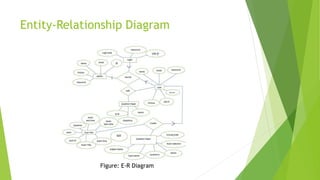
Entity-Relationship Diagram
Figure: E-R Diagram
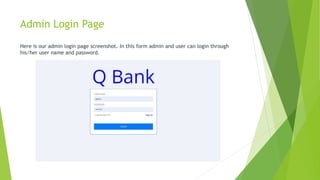
Admin Login Page
Here is our admin login page screenshot. In this form admin and user can login through
his/her user name and password.
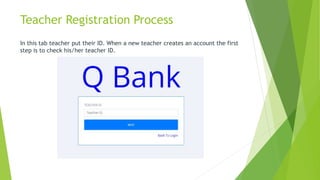
Teacher Registration Process
In this tab teacher put their ID. When a new teacher creates an account the first
step is to check his/her teacher ID.
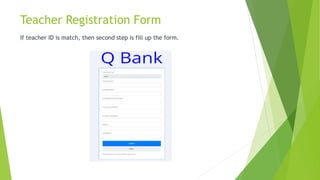
Teacher Registration Form
If teacher ID is match, then second step is fill up the form.
Teacher add form for admin
This is us add teacher ID page screenshot. In this page admin can add the teacher
ID here.
Here admin can also add teacher name and details.
All teacher list
Here we can see the list of all the teachers
Teacher portfolio settings
Add Batch Option
This page teacher can add batch with course name.
Add Course and Course Code
This is our course name and course code adding page screenshot. This page is
controlled by only admin.
Topic Management Page
This is our system topic management page. In this page teacher can add topic.
All topic list
Here we can see the list of all topic. A teacher can edit or delete it.
Question Management Page
This is our add question page. In this page teacher add question by topic with
marks.
Manage question
Here a teacher can see all the question and marks and able to delete it.
Add new Quiz Question
In this page a teacher can add quiz questions and their option with marks
View Quiz Questions
Here a teacher can see all the question and marks and able to delete it.
Create Question Page
This is our question creation page. Here teacher can create question for student.
First teacher selects exam type midterm or final exam. Then teacher select
subject and batch after selecting both, system show the topic selection box and
mark input box. Teacher just select topic and give mark system will create
question according to compression database mark and given mark.
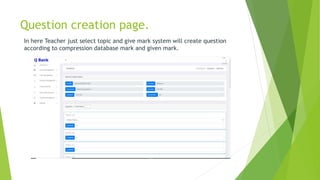
Question creation page.
In here Teacher just select topic and give mark system will create question
according to compression database mark and given mark.
View Questions
From here we can see all the questions that we created. We can edit and delete
question. We can make public the questions from here too.
Question Paper Layout
This is a printout format of sample question paper.
Create Quiz questions
This is our quiz question creation page. Here teacher can create quiz question
for student. First teacher select subject and batch after selecting both need to
input semester then press on quiz button.
Select quiz question
Then from here we can manually select the quiz and then save it. We can also
change the marks from here if we want.
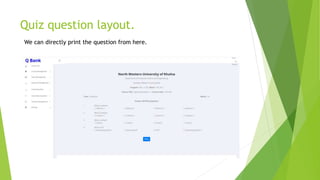
Quiz question layout.
We can directly print the question from here.
Question Paper Edit Layout
In this page teacher can edit the created question paper if they need to any
change of question title or mark.
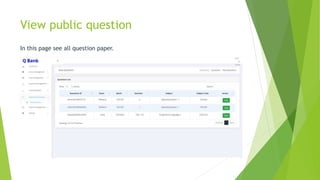
View public question
In this page see all question paper.
Profile settings page
Here is our profile setting page. We can update personal information from here.
Database
We total have 13 table here. Those are:
Allq, batch, course, mid, question, quiz, quiz_mid_q, quiz_question,
result_quiz, subject, teacher, topic, user
Conclusion
Web applications are becoming so popular day by day. Most of the sector is becoming
digitalized in our country. So our educational sector should be digitalized. The
government should focus on this sector. The process of making such kind of system is
not so easy. So it wasn’t easy to design & developed the whole system. It needs
considerable amount of time and effort to design and developed the system
correctly. As well as we need concern about such kind of practical problem and
that’s systematically solution.
The system has been built with proper validation and tested as many times. We were
very careful and always focus on our goals and how to succeed to the target and
goals. We are successful in building a question papers and online based quiz test
using this system with the exception of manual process. The project has been
developed with as much as devotion as possible. We are so hopeful about success of
this project.
Reference
 [1] Question Bank of WJEC. WJEC is an examination board, providing
qualifications and exam assessment to schools and colleges in England, Wales,
Northern Ireland and independent regions.(wjec.co.uk/question-bank) [Last
Accessed: 10.09.2022]
 [2] IB Question Bank. IB Question Bank most popular question bank for
multiple language supported. It’s paid version software
(https://questionbank.ibo.org/) [Last Accessed: 10.09.2022]

Project presentation on.pptx

  • 1.
    Welcome To OurProject presentation on: Questions Bank Management System (Qbank)
  • 2.
    North Western University,Khulna Department of Computer Science and Engineering Name ID Amit Sarker 20183014011 Labnya Dhar 20191006011 Asma khatun 20191010011 Presented By:
  • 3.
  • 4.
    Contents  Introduction  OBJECTIVES Review of Existing System  Methodology  Proposed Software Development Model  Techniques is used  Use-Case Diagram  Entity-Relationship Diagram  Project Description & Screenshots
  • 5.
    Introduction Education is acomplex activity. Examinations are important tools for assessing student performance. The aim of the students is gain knowledge and develop skills for their career. Most of the times, students get only recall type questions during the examinations and sometimes they get that type of question which are repeated several times in several semester. This creates a knowledge gap which is not suitable for the student. To help the teacher avoiding the recall and repetition question paper in examinations this system will be helpful. This system uses certain set of conditions to automatically select questions from this system. This web-based application is designed to create and store all academic questions.
  • 6.
    OBJECTIVES  To assistteachers in creating question by using of this system.  To help the new teacher for understanding university question pattern.  To develop quiz exam system (Still on progress)
  • 7.
    Methodology For this systemwe examined different types of software development model and we create a new model which is suitable for our project. This one is a straightforward and transformable model of methodology that can be utilized to execute this project and work easily.  With this model revisions of functional requirements are implemented into the development process to give the competitiveness.  We can divide the project by short and transparent iteration.  Also, with this model risks are minimized. It requires only initial planning to start the project.
  • 8.
    Proposed Software DevelopmentModel Figure: Proposed Software Development Model
  • 9.
    Techniques is used DesignPlatform: HTML, CSS, JavaScript Development Platform: php Database: MySQL Server: XAMPP Framework: Bootstrap , jQuery
  • 10.
  • 11.
  • 12.
    Admin Login Page Hereis our admin login page screenshot. In this form admin and user can login through his/her user name and password.
  • 13.
    Teacher Registration Process Inthis tab teacher put their ID. When a new teacher creates an account the first step is to check his/her teacher ID.
  • 14.
    Teacher Registration Form Ifteacher ID is match, then second step is fill up the form.
  • 15.
    Teacher add formfor admin This is us add teacher ID page screenshot. In this page admin can add the teacher ID here.
  • 16.
    Here admin canalso add teacher name and details.
  • 17.
    All teacher list Herewe can see the list of all the teachers
  • 18.
  • 19.
    Add Batch Option Thispage teacher can add batch with course name.
  • 20.
    Add Course andCourse Code This is our course name and course code adding page screenshot. This page is controlled by only admin.
  • 21.
    Topic Management Page Thisis our system topic management page. In this page teacher can add topic.
  • 22.
    All topic list Herewe can see the list of all topic. A teacher can edit or delete it.
  • 23.
    Question Management Page Thisis our add question page. In this page teacher add question by topic with marks.
  • 24.
    Manage question Here ateacher can see all the question and marks and able to delete it.
  • 25.
    Add new QuizQuestion In this page a teacher can add quiz questions and their option with marks
  • 26.
    View Quiz Questions Herea teacher can see all the question and marks and able to delete it.
  • 27.
    Create Question Page Thisis our question creation page. Here teacher can create question for student. First teacher selects exam type midterm or final exam. Then teacher select subject and batch after selecting both, system show the topic selection box and mark input box. Teacher just select topic and give mark system will create question according to compression database mark and given mark.
  • 28.
    Question creation page. Inhere Teacher just select topic and give mark system will create question according to compression database mark and given mark.
  • 29.
    View Questions From herewe can see all the questions that we created. We can edit and delete question. We can make public the questions from here too.
  • 30.
    Question Paper Layout Thisis a printout format of sample question paper.
  • 31.
    Create Quiz questions Thisis our quiz question creation page. Here teacher can create quiz question for student. First teacher select subject and batch after selecting both need to input semester then press on quiz button.
  • 32.
    Select quiz question Thenfrom here we can manually select the quiz and then save it. We can also change the marks from here if we want.
  • 33.
    Quiz question layout. Wecan directly print the question from here.
  • 34.
    Question Paper EditLayout In this page teacher can edit the created question paper if they need to any change of question title or mark.
  • 35.
    View public question Inthis page see all question paper.
  • 36.
    Profile settings page Hereis our profile setting page. We can update personal information from here.
  • 37.
    Database We total have13 table here. Those are: Allq, batch, course, mid, question, quiz, quiz_mid_q, quiz_question, result_quiz, subject, teacher, topic, user
  • 38.
    Conclusion Web applications arebecoming so popular day by day. Most of the sector is becoming digitalized in our country. So our educational sector should be digitalized. The government should focus on this sector. The process of making such kind of system is not so easy. So it wasn’t easy to design & developed the whole system. It needs considerable amount of time and effort to design and developed the system correctly. As well as we need concern about such kind of practical problem and that’s systematically solution. The system has been built with proper validation and tested as many times. We were very careful and always focus on our goals and how to succeed to the target and goals. We are successful in building a question papers and online based quiz test using this system with the exception of manual process. The project has been developed with as much as devotion as possible. We are so hopeful about success of this project.
  • 39.
    Reference  [1] QuestionBank of WJEC. WJEC is an examination board, providing qualifications and exam assessment to schools and colleges in England, Wales, Northern Ireland and independent regions.(wjec.co.uk/question-bank) [Last Accessed: 10.09.2022]  [2] IB Question Bank. IB Question Bank most popular question bank for multiple language supported. It’s paid version software (https://questionbank.ibo.org/) [Last Accessed: 10.09.2022]