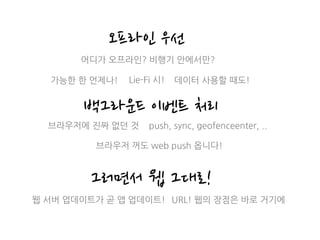
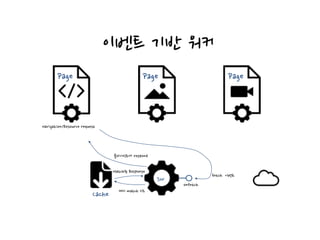
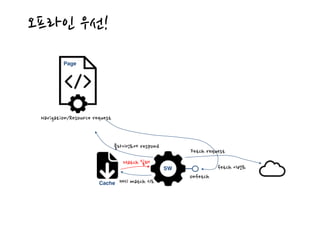
오프라인 우선
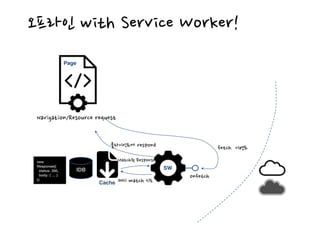
백그라운드 이벤트처리
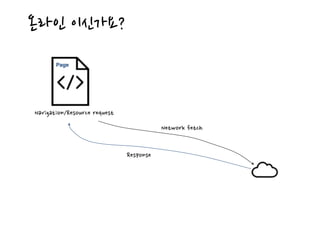
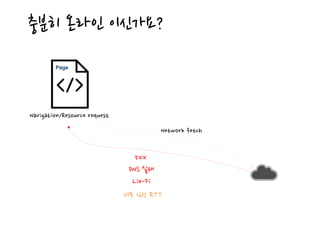
어디가 오프라인? 비행기 안에서만?
가능한 한 언제나!
브라우저에 진짜 없던 것
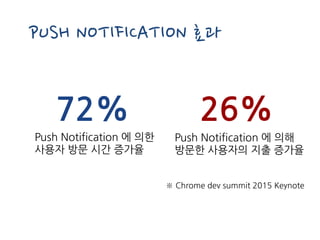
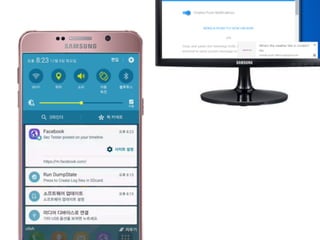
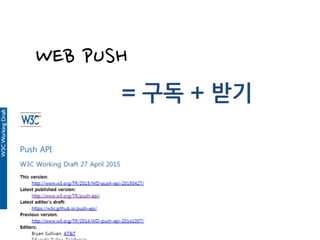
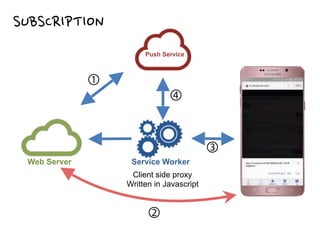
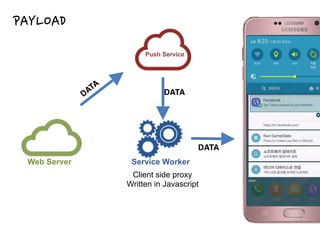
브라우저 꺼도 web push 옵니다!
그러면서 웹 그대로!
웹 서버 업데이트가 곧 앱 업데이트! URL! 웹의 장점은 바로 거기에
Lie-Fi 시! 데이터 사용할 때도!
push, sync, geofenceenter, ..
26.
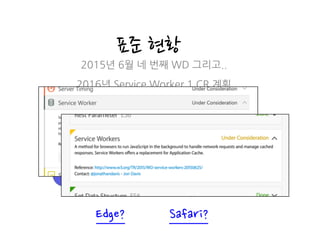
표준 현황
개발 현황
2015년6월 네 번째 WD 그리고..
2016년 Service Worker 1 CR 계획
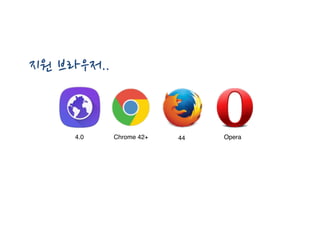
4.0 40+ 44 32+
Edge? Safari?
27.
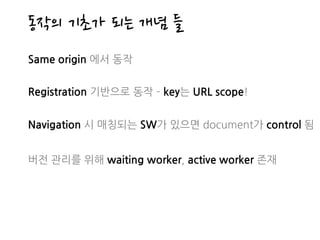
동작의 기초가 되는개념 들
Same origin 에서 동작
Registration 기반으로 동작 key는 URL scope!
Navigation 시 매칭되는 SW가 있으면 document가 control 됨
버전 관리를 위해 waiting worker, active worker 존재
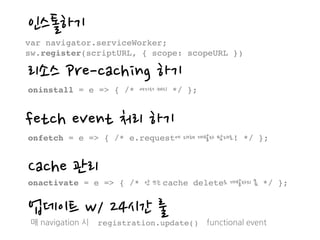
인스톨하기
var navigator.serviceWorker;
sw.register(scriptURL, {scope: scopeURL })
리소스 Pre-caching 하기
oninstall = e => { /* 여기서 캐시 */ };
fetch event 처리 하기
onfetch = e => { /* e.request에 대해 개발자 맘대로! */ };
Cache 관리
onactivate = e => { /* 안 쓰는 cache delete도 개발자의 몫 */ };
업데이트 w/ 24시간 룰
매 navigation 시 registration.update() functional event
34.
“/assets/v1” /assets/v1/serviceworker.js
[ Registrationmap ]
Scope Script URL
Register
Page에서
// scope defaults to ‘/‘
var sw = navigator.serviceWorker;
sw.register(‘/assets/v1/serviceworker.js’)
.then(reg => {
console.log(‘success!’);
reg.installing.postMessage(‘Howdy from your installing page.’);
})
.catch(e => {
console.error(‘Installing the worker failed!:’, e);
});
35.
“/bar” /bar/sw1.js
Var sw= navigator.serviceWorker;
① sw.register(‘/bar/sw1.js’, { scope: ‘/bar’ });
② sw.register(‘/foo/sw.js’, { scope: ‘/foo’ });
③ sw.register(‘/bar/sw2.js’, { scope: ‘/bar’ } );
[ Registration map ]
Scope Script URL
“/foo” /foo/sw.js
Register 복수개의 registration 생성 가능
Page에서
“/bar” /bar/sw2.js ③ Replace sw1
①
②
36.
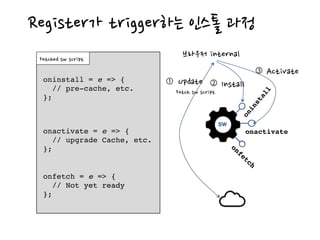
onactivate
SW
oninstall
onfetch
Register가 trigger하는 인스톨과정
브라우저 internal
oninstall = e => {
// pre-cache, etc.
};
onactivate = e => {
// upgrade Cache, etc.
};
onfetch = e => {
// Not yet ready
};
Fetched sw script
Fetch sw script
Update①
Install②
Activate③
onfetch
onfetch = e => {
// Not yet ready
};
37.
Pre-cache in oninstall
//sw.js – 인스톨 과정에서 pre-caching
self.addEventListener(‘install’, function(e) {
// 명시된 모든 리소스를 성공적으로 받아 캐시 해야만 인스톨 성공
e.waitUntil(
self.caches.open(‘shellResources’).then(function(cache) {
return cache.addAll([
‘/app.html’,
‘/assets/v1/base.css’,
‘/assets/v1/app.js’,
‘/assets/v1/logo.png’,
‘/assets/v1/intro_video.webm’
]);
});
});
38.
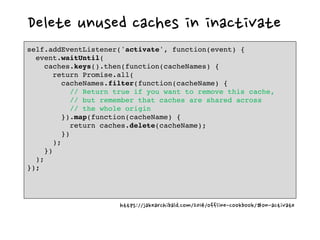
Delete unused cachesin inactivate
self.addEventListener('activate', function(event) {
event.waitUntil(
caches.keys().then(function(cacheNames) {
return Promise.all(
cacheNames.filter(function(cacheName) {
// Return true if you want to remove this cache,
// but remember that caches are shared across
// the whole origin
}).map(function(cacheName) {
return caches.delete(cacheName);
})
);
})
);
});
https://jakearchibald.com/2014/offline-cookbook/#on-activate
39.
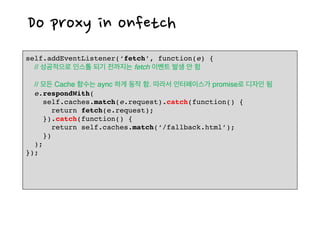
Do proxy inonfetch
self.addEventListener(‘fetch’, function(e) {
// 성공적으로 인스톨 되기 전까지는 fetch 이벤트 발생 안 함
// 모든 Cache 함수는 aync 하게 동작 함. 따라서 인터페이스가 promise로 디자인 됨
e.respondWith(
self.caches.match(e.request).catch(function() {
return fetch(e.request);
}).catch(function() {
return self.caches.match(‘/fallback.html’);
})
);
});
40.
onfetch
sw.js
Cache
캐시 match 시도
Match된response
클라이언트에 respond
“/” /sw.js
[ Registration map ]
Scope Script URL
“/foo” /foo/sw.js
Page Navigate https://example.com/index.html
fetch 이벤트
Scope matching
Run SW
클라이언트 Match (navigation)
41.
onfetch
sw.js
Cache 캐시 match시도
Match된 response
클라이언트에 respond
“/” /sw.js
[ Registration map ]
Scope Script URL
“/img” /img/sw.js
Page
Fetch “https://example.com/img/flower.png
fetch 이벤트
Control
Run SW
Subresource request
참고자료
개념 이해
•Introduction toService Worker
•Service Worker - first draft published
표준 리소스
•Nightly
API 사용 패턴
•The offline cookbook
•플랫폼 구현자 참고 문서
•GitHub
•Platinum Service Worker Elements
•Service Worker API MDN





![Installable Web App
{
"name": "Simple web app demo",
"short_name": "Demo",
"icons": [
{
"src": "icon-medium.png",
"sizes": "96x96"
}, {
"src": "icon-large.png",
"sizes": "192x192"
}
],
"theme_color": "#3F51B5",
"background_color": "#F5F5F5",
"display": "standalone",
"orientation": "portrait",
"start_url": "/simple-demo/?home=true"
}
click](https://image.slidesharecdn.com/pwaapril2016-160409092822/85/Progressive-Web-Apps-12-320.jpg)
![Installable Web App
{
"name": "Simple web app demo",
"short_name": "Demo",
"icons": [
{
"src": "icon-medium.png",
"sizes": "96x96"
}, {
"src": "icon-large.png",
"sizes": "192x192"
}
],
"theme_color": "#3F51B5",
"background_color": "#F5F5F5",
"display": "standalone",
"orientation": "portrait",
"start_url": "/simple-demo/?home=true"
}
click](https://image.slidesharecdn.com/pwaapril2016-160409092822/85/Progressive-Web-Apps-13-320.jpg)
![Installable Web App
{
"name": "Simple web app demo",
"short_name": "Demo",
"icons": [
{
"src": "icon-medium.png",
"sizes": "96x96"
}, {
"src": "icon-large.png",
"sizes": "192x192"
}
],
"theme_color": "#3F51B5",
"background_color": "#F5F5F5",
"display": "standalone",
"orientation": "portrait",
"start_url": "/simple-demo/?home=true"
}
installed](https://image.slidesharecdn.com/pwaapril2016-160409092822/85/Progressive-Web-Apps-14-320.jpg)
![Installable Web App - Demo
{
"name": "Simple web app demo",
"short_name": "Demo",
"icons": [
{
"src": "icon-medium.png",
"sizes": "96x96"
}, {
"src": "icon-large.png",
"sizes": "192x192"
}
],
"theme_color": "#3F51B5",
"background_color": "#F5F5F5",
"display": "standalone",
"orientation": "portrait",
"start_url": "/simple-demo/?home=true"
}](https://image.slidesharecdn.com/pwaapril2016-160409092822/85/Progressive-Web-Apps-15-320.jpg)
![Splash Screen
{
"name": "Simple web app demo",
"short_name": "Demo",
"icons": [
{
"src": "icon-medium.png",
"sizes": "96x96"
}, {
"src": "icon-large.png",
"sizes": "192x192"
}
],
"theme_color": "#3F51B5",
"background_color": "#F5F5F5",
"display": "standalone",
"orientation": "portrait",
"start_url": "/simple-demo/?home=true"
}
background_color
icons name
* Chrome implemented it using name/icon/background_color](https://image.slidesharecdn.com/pwaapril2016-160409092822/85/Progressive-Web-Apps-16-320.jpg)
![Splash Screen - Demo
{
"name": "Simple web app demo",
"short_name": "Demo",
"icons": [
{
"src": "icon-medium.png",
"sizes": "96x96"
}, {
"src": "icon-large.png",
"sizes": "192x192"
}
],
"theme_color": "#3F51B5",
"background_color": "#F5F5F5",
"display": "standalone",
"orientation": "portrait",
"start_url": "/simple-demo/?home=true"
}](https://image.slidesharecdn.com/pwaapril2016-160409092822/85/Progressive-Web-Apps-17-320.jpg)
![Task Manager
{
"name": "Simple web app demo",
"short_name": "Demo",
"icons": [
{
"src": "icon-medium.png",
"sizes": "96x96"
}, {
"src": "icon-large.png",
"sizes": "192x192"
}
],
"theme_color": "#3F51B5",
"background_color": "#F5F5F5",
"display": "standalone",
"orientation": "portrait",
"start_url": "/simple-demo/?home=true"
}](https://image.slidesharecdn.com/pwaapril2016-160409092822/85/Progressive-Web-Apps-18-320.jpg)
![Display Mode (standalone)
{
"name": "Simple web app demo",
"short_name": "Demo",
"icons": [
{
"src": "icon-medium.png",
"sizes": "96x96"
}, {
"src": "icon-large.png",
"sizes": "192x192"
}
],
"theme_color": "#3F51B5",
"background_color": "#F5F5F5",
"display": "standalone",
"orientation": "portrait",
"start_url": "/simple-demo/?home=true"
}
status
bar
#3F51B5](https://image.slidesharecdn.com/pwaapril2016-160409092822/85/Progressive-Web-Apps-19-320.jpg)
![Display Mode (fullscreen)
{
"name": "Simple web app demo",
"short_name": "Demo",
"icons": [
{
"src": "icon-medium.png",
"sizes": "96x96"
}, {
"src": "icon-large.png",
"sizes": "192x192"
}
],
"theme_color": "#3F51B5",
"background_color": "#F5F5F5",
"display": "fullscreen",
"orientation": "portrait",
"start_url": "/simple-demo/?home=true"
}
no status bar](https://image.slidesharecdn.com/pwaapril2016-160409092822/85/Progressive-Web-Apps-20-320.jpg)
![Start URL
{
"name": "Simple web app demo",
"short_name": "Demo",
"icons": [
{
"src": "icon-medium.png",
"sizes": "96x96"
}, {
"src": "icon-large.png",
"sizes": "192x192"
}
],
"theme_color": "#3F51B5",
"background_color": "#F5F5F5",
"display": "standalone",
"orientation": "portrait",
"start_url": "/simple-demo/?home=true"
}
../simple_demo?home=true
../simple_demo](https://image.slidesharecdn.com/pwaapril2016-160409092822/85/Progressive-Web-Apps-21-320.jpg)
![Orientation (landscape)
{
"name": "Simple web app demo",
"short_name": "Demo",
"icons": [
{
"src": "icon-medium.png",
"sizes": "96x96"
}, {
"src": "icon-large.png",
"sizes": "192x192"
}
],
"theme_color": "#3F51B5",
"background_color": "#F5F5F5",
"display": "standalone",
"orientation": "landscape",
"start_url": "/simple-demo/?home=true"
}](https://image.slidesharecdn.com/pwaapril2016-160409092822/85/Progressive-Web-Apps-22-320.jpg)
![“/assets/v1” /assets/v1/serviceworker.js
[ Registration map ]
Scope Script URL
Register
Page에서
// scope defaults to ‘/‘
var sw = navigator.serviceWorker;
sw.register(‘/assets/v1/serviceworker.js’)
.then(reg => {
console.log(‘success!’);
reg.installing.postMessage(‘Howdy from your installing page.’);
})
.catch(e => {
console.error(‘Installing the worker failed!:’, e);
});](https://image.slidesharecdn.com/pwaapril2016-160409092822/85/Progressive-Web-Apps-34-320.jpg)
![“/bar” /bar/sw1.js
Var sw = navigator.serviceWorker;
① sw.register(‘/bar/sw1.js’, { scope: ‘/bar’ });
② sw.register(‘/foo/sw.js’, { scope: ‘/foo’ });
③ sw.register(‘/bar/sw2.js’, { scope: ‘/bar’ } );
[ Registration map ]
Scope Script URL
“/foo” /foo/sw.js
Register 복수개의 registration 생성 가능
Page에서
“/bar” /bar/sw2.js ③ Replace sw1
①
②](https://image.slidesharecdn.com/pwaapril2016-160409092822/85/Progressive-Web-Apps-35-320.jpg)
![Pre-cache in oninstall
// sw.js – 인스톨 과정에서 pre-caching
self.addEventListener(‘install’, function(e) {
// 명시된 모든 리소스를 성공적으로 받아 캐시 해야만 인스톨 성공
e.waitUntil(
self.caches.open(‘shellResources’).then(function(cache) {
return cache.addAll([
‘/app.html’,
‘/assets/v1/base.css’,
‘/assets/v1/app.js’,
‘/assets/v1/logo.png’,
‘/assets/v1/intro_video.webm’
]);
});
});](https://image.slidesharecdn.com/pwaapril2016-160409092822/85/Progressive-Web-Apps-37-320.jpg)
![onfetch
sw.js
Cache
캐시 match 시도
Match된 response
클라이언트에 respond
“/” /sw.js
[ Registration map ]
Scope Script URL
“/foo” /foo/sw.js
Page Navigate https://example.com/index.html
fetch 이벤트
Scope matching
Run SW
클라이언트 Match (navigation)](https://image.slidesharecdn.com/pwaapril2016-160409092822/85/Progressive-Web-Apps-40-320.jpg)
![onfetch
sw.js
Cache 캐시 match 시도
Match된 response
클라이언트에 respond
“/” /sw.js
[ Registration map ]
Scope Script URL
“/img” /img/sw.js
Page
Fetch “https://example.com/img/flower.png
fetch 이벤트
Control
Run SW
Subresource request](https://image.slidesharecdn.com/pwaapril2016-160409092822/85/Progressive-Web-Apps-41-320.jpg)




![REFOCUS EXISTING WINDOWS
self.addEventListener('notificationclick', function(event) {
clients.matchAll({
type: 'window'
})
.then(function(clients) {
if (clients.length > 0) {
clients[0].postMessage({ navigateTo: event.notification.data.url });
return clients[0].focus();
} else {
return clients.openWindow(event.notification.data.url);
}
})
});](https://image.slidesharecdn.com/pwaapril2016-160409092822/85/Progressive-Web-Apps-60-320.jpg)





![XECon2015 :: [2-2] 박상현 - React로 개발하는 SPA 실무 이야기](https://cdn.slidesharecdn.com/ss_thumbnails/react1-160404022032-thumbnail.jpg?width=640&height=640&fit=bounds)


![[115] clean fe development_윤지수](https://cdn.slidesharecdn.com/ss_thumbnails/115cleanfedevelopment-161023163916-thumbnail.jpg?width=640&height=640&fit=bounds)


![[D2 COMMUNITY] ECMAScript 2015 S67 seminar - 2. functions](https://cdn.slidesharecdn.com/ss_thumbnails/2functions-161207024734-thumbnail.jpg?width=640&height=640&fit=bounds)
![[D2 COMMUNITY] ECMAScript 2015 S67 seminar - 3. generator](https://cdn.slidesharecdn.com/ss_thumbnails/3generator-161207024803-thumbnail.jpg?width=640&height=640&fit=bounds)
![[D2 COMMUNITY] ECMAScript 2015 S67 seminar - 1. primitive](https://cdn.slidesharecdn.com/ss_thumbnails/1primitive-161207024601-thumbnail.jpg?width=640&height=640&fit=bounds)


![[STONE BID] 무엇이 오스카를 특별하게 만드는가 by Kriss Gim](https://cdn.slidesharecdn.com/ss_thumbnails/bidkriss50226-150227022324-conversion-gate01-thumbnail.jpg?width=640&height=640&fit=bounds)


![PWA - overview [written in KOREAN]](https://cdn.slidesharecdn.com/ss_thumbnails/pwa-170721082628-thumbnail.jpg?width=640&height=640&fit=bounds)
![조은 - AMP PWA 101 [WSConf.Seoul.2017. Vol.2]](https://cdn.slidesharecdn.com/ss_thumbnails/amppwa101-170719064722-thumbnail.jpg?width=640&height=640&fit=bounds)
![[141]지난 1년간의 웨일 브라우저와 그 미래 (부제: 제품 매니저가 들려주는 생생한 기술/제품 이야기)](https://cdn.slidesharecdn.com/ss_thumbnails/141-181010154133-thumbnail.jpg?width=640&height=640&fit=bounds)


![[123]동네 커피샵도 사이렌 오더를 쓸 수 있을까](https://cdn.slidesharecdn.com/ss_thumbnails/23-171016044352-thumbnail.jpg?width=640&height=640&fit=bounds)


![[2018] 프런트엔드 성능 최적화](https://cdn.slidesharecdn.com/ss_thumbnails/webapp03-190201074444-thumbnail.jpg?width=640&height=640&fit=bounds)


