프론트엔드 스터디
CH.02. CSS & DOM
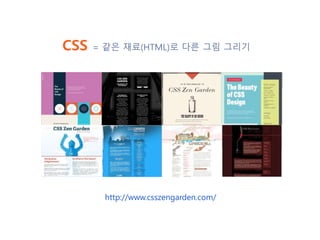
CSS = 같은 재료(HTML)로 다른 그림 그리기
http://www.csszengarden.com/
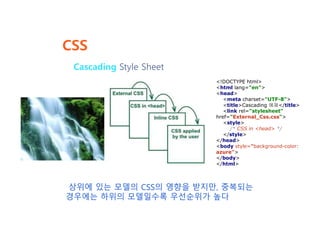
CSS
Cascading Style Sheet
상위에 있는 모델의 CSS의 영향을 받지만, 중복되는
경우에는 하위의 모델일수록 우선순위가 높다
<!DOCTYPE html>
<html lang="en">
<head>
<meta charset="UTF-8">
<title>Cascading 예제</title>
<link rel="stylesheet"
href="External_Css.css">
<style>
/* CSS in <head> */
</style>
</head>
<body style="background-color:
azure">
</body>
</html>
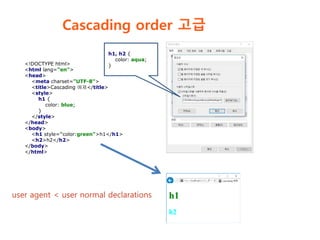
Cascading order 고급
<!DOCTYPE html>
<html lang="en">
<head>
<meta charset="UTF-8">
<title>Cascading 예제</title>
<style>
h1 {
color: blue;
}
</style>
</head>
<body>
<h1 style="color:green">h1</h1>
<h2>h2</h2>
</body>
</html>
h1, h2 {
color: aqua;
}
user agent < user normal declarations
Cascading order 고급
h1 {
color: red;
}
h2 {
color: red;
}
<!DOCTYPE html>
<html lang="en">
<head>
<meta charset="UTF-8">
<title>Cascading 예제</title>
<link rel="stylesheet"
href="External_Css.css">
<style>
h1 {
color: blue;
}
h2 {
color: blue;
}
</style>
</head>
<body>
<h1 style="color:green">h1</h1>
<h2>h2</h2>
</body>
</html>
h1 {
color: red;
}
h2 {
color: red !important;
}
https://www.w3.org/TR/CSS2/cascade.html#cascading-order
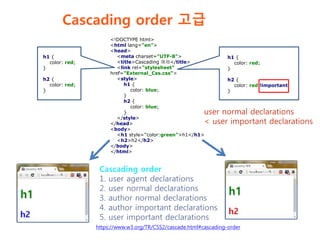
Cascading order
1. user agent declarations
2. user normal declarations
3. author normal declarations
4. author important declarations
5. user important declarations
user normal declarations
< user important declarations
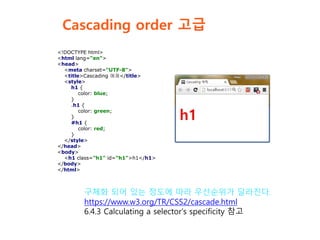
Cascading order 고급
<!DOCTYPE html>
<html lang="en">
<head>
<meta charset="UTF-8">
<title>Cascading 예제</title>
<style>
h1 {
color: blue;
}
.h1 {
color: green;
}
#h1 {
color: red;
}
</style>
</head>
<body>
<h1 class="h1" id="h1">h1</h1>
</body>
</html>
구체화 되어 있는 정도에 따라 우선순위가 달라진다.
https://www.w3.org/TR/CSS2/cascade.html
6.4.3 Calculating a selector's specificity 참고
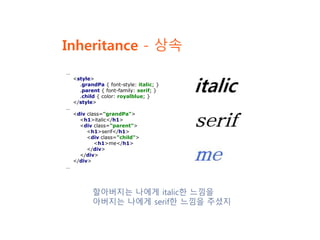
Inheritance - 상속
할아버지는 나에게 italic한 느낌을
아버지는 나에게 serif한 느낌을 주셨지
…
<style>
.grandPa { font-style: italic; }
.parent { font-family: serif; }
.child { color: royalblue; }
</style>
…
<div class="grandPa">
<h1>italic</h1>
<div class="parent">
<h1>serif</h1>
<div class="child">
<h1>me</h1>
</div>
</div>
</div>
…
CSS의 발전
https://en.wikipedia.org/wiki/Cascading_Style_Sheets#History
=> 일독을 권함
CSS1 - official W3C Recommendation 1996
CSS2 - official W3C Recommendation 1998 (no loger maintenance)
CSS2.1 - 2004년에 Recommendation 후보에 올랐지만
2011년에나 지정 (no loger maintenance)
CSS2.2 – draft version
CSS3 – CSS2 에 기반. Module 별로 발전.
CSS4 – CSS3의 Module을 발전
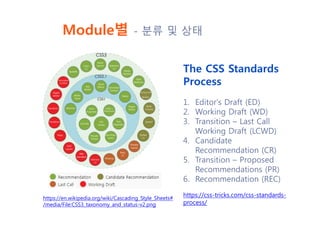
Module별 - 분류 및 상태
https://en.wikipedia.org/wiki/Cascading_Style_Sheets#
/media/File:CSS3_taxonomy_and_status-v2.png
The CSS Standards
Process
1. Editor's Draft (ED)
2. Working Draft (WD)
3. Transition – Last Call
Working Draft (LCWD)
4. Candidate
Recommendation (CR)
5. Transition – Proposed
Recommendations (PR)
6. Recommendation (REC)
https://css-tricks.com/css-standards-
process/
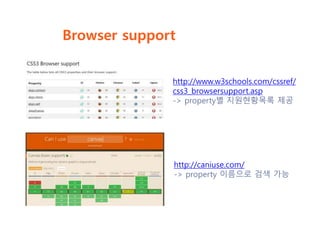
Browser support
http://www.w3schools.com/cssref/
css3_browsersupport.asp
-> property별 지원현황목록 제공
http://caniuse.com/
-> property 이름으로 검색 가능
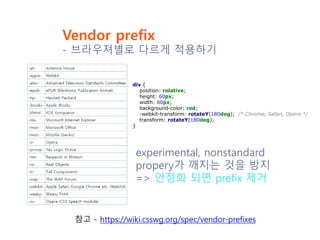
Vendor prefix
- 브라우져별로 다르게 적용하기
div {
position: relative;
height: 60px;
width: 60px;
background-color: red;
-webkit-transform: rotateY(180deg); /* Chrome, Safari, Opera */
transform: rotateY(180deg);
}
experimental, nonstandard
propery가 깨지는 것을 방지
=> 안정화 되면 prefix 제거
참고 - https://wiki.csswg.org/spec/vendor-prefixes
IE 버젼별 처리
https://ko.wikipedia.org/wiki/조건부_주석
<!--[if IE]>
IE에서 작동<br />
<![endif]-->
<!--[if IE 6]>
IE6에서 작동<br />
<![endif]-->
<!--[if IE 7]>
IE7에서 작동<br />
<![endif]-->
<!--[if IE 8]>
IE8에서 작동<br />
<![endif]-->
<!--[if gte IE 8]>
IE8 이상에서 작동<br />
<![endif]-->
…
<!--[if !IE]> -->
IE 5-9가 아닌 경우 작동<br />
<!-- <![endif]-->
버전별로 다른 CSS를 적용시키는 등의 버
젼별로 다른 처리 가능
조건부 주석 : IE 버젼별로 다르게 적용하기
IE 버젼별 처리
페이지의 렌더링 모드를 지정 가능
렌더링모드 지정 : x-ua-compatible
<head>
<meta charset="UTF-8">
<meta http-equiv="X-UA-Compatible"
content="IE=8">
<title>랜더링 모드 지정하기</title>
</head>
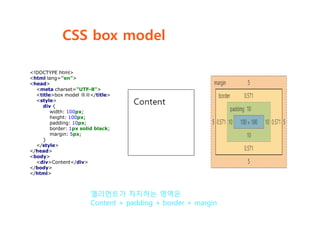
CSS box model
엘리먼트가 차지하는 영역은
Content + padding + border + margin
<!DOCTYPE html>
<html lang="en">
<head>
<meta charset="UTF-8">
<title>box model 예제</title>
<style>
div {
width: 100px;
height: 100px;
padding: 10px;
border: 1px solid black;
margin: 5px;
}
</style>
</head>
<body>
<div>Content</div>
</body>
</html>
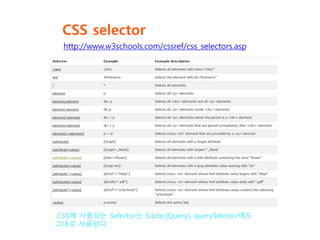
CSS selector
http://www.w3schools.com/cssref/css_selectors.asp
CSS에 사용되는 Selector는 Sizzle(jQuery), querySelector에도
그대로 사용된다.
DOM
Platform과 Language 중립적인 interface.
일부 Vendor사에서 제안한 DHTML(Dynamic HTML)을 수용
Script를 통해 Content, 구조, style에 동적으로 접근하고 수정
할 수 있다.
Document Object Model
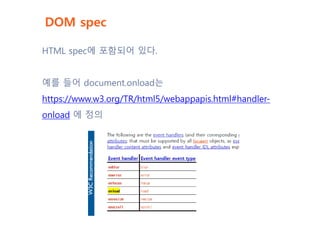
DOM spec
HTML spec에 포함되어 있다.
예를 들어 document.onload는
https://www.w3.org/TR/html5/webappapis.html#handler-
onload 에 정의
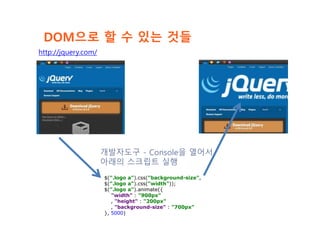
DOM으로 할 수 있는 것들
$(".logo a").css("background-size",
$(".logo a").css("width"));
$(".logo a").animate({
"width" : "900px"
, "height" : "200px"
, "background-size" : "700px"
}, 5000)
개발자도구 - Console을 열어서
아래의 스크립트 실행
http://jquery.com/
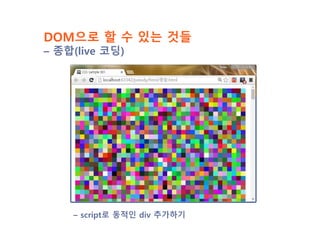
DOM으로 할 수 있는 것들
– 종합(live 코딩)
– script로 동적인 div 추가하기
CSS 유용한 사이트 모음
https://www.w3.org/Style/CSS/specs
- CSS spec 모음
https://lists.w3.org/Archives/Public/public-html5kr/2015Oct/0004.html
- CSS 권고안 번역본
https://jigsaw.w3.org/css-validator/
- CSS validator
https://en.wikipedia.org/wiki/Cascading_Style_Sheets
- Wiki
http://www.w3schools.com/css/default.asp
- Tutorial

프론트엔드스터디 E02 css dom

  • 1.
  • 2.
    CSS = 같은재료(HTML)로 다른 그림 그리기 http://www.csszengarden.com/
  • 3.
    CSS Cascading Style Sheet 상위에있는 모델의 CSS의 영향을 받지만, 중복되는 경우에는 하위의 모델일수록 우선순위가 높다 <!DOCTYPE html> <html lang="en"> <head> <meta charset="UTF-8"> <title>Cascading 예제</title> <link rel="stylesheet" href="External_Css.css"> <style> /* CSS in <head> */ </style> </head> <body style="background-color: azure"> </body> </html>
  • 4.
    Cascading order 고급 <!DOCTYPEhtml> <html lang="en"> <head> <meta charset="UTF-8"> <title>Cascading 예제</title> <style> h1 { color: blue; } </style> </head> <body> <h1 style="color:green">h1</h1> <h2>h2</h2> </body> </html> h1, h2 { color: aqua; } user agent < user normal declarations
  • 5.
    Cascading order 고급 h1{ color: red; } h2 { color: red; } <!DOCTYPE html> <html lang="en"> <head> <meta charset="UTF-8"> <title>Cascading 예제</title> <link rel="stylesheet" href="External_Css.css"> <style> h1 { color: blue; } h2 { color: blue; } </style> </head> <body> <h1 style="color:green">h1</h1> <h2>h2</h2> </body> </html> h1 { color: red; } h2 { color: red !important; } https://www.w3.org/TR/CSS2/cascade.html#cascading-order Cascading order 1. user agent declarations 2. user normal declarations 3. author normal declarations 4. author important declarations 5. user important declarations user normal declarations < user important declarations
  • 6.
    Cascading order 고급 <!DOCTYPEhtml> <html lang="en"> <head> <meta charset="UTF-8"> <title>Cascading 예제</title> <style> h1 { color: blue; } .h1 { color: green; } #h1 { color: red; } </style> </head> <body> <h1 class="h1" id="h1">h1</h1> </body> </html> 구체화 되어 있는 정도에 따라 우선순위가 달라진다. https://www.w3.org/TR/CSS2/cascade.html 6.4.3 Calculating a selector's specificity 참고
  • 7.
    Inheritance - 상속 할아버지는나에게 italic한 느낌을 아버지는 나에게 serif한 느낌을 주셨지 … <style> .grandPa { font-style: italic; } .parent { font-family: serif; } .child { color: royalblue; } </style> … <div class="grandPa"> <h1>italic</h1> <div class="parent"> <h1>serif</h1> <div class="child"> <h1>me</h1> </div> </div> </div> …
  • 8.
    CSS의 발전 https://en.wikipedia.org/wiki/Cascading_Style_Sheets#History => 일독을권함 CSS1 - official W3C Recommendation 1996 CSS2 - official W3C Recommendation 1998 (no loger maintenance) CSS2.1 - 2004년에 Recommendation 후보에 올랐지만 2011년에나 지정 (no loger maintenance) CSS2.2 – draft version CSS3 – CSS2 에 기반. Module 별로 발전. CSS4 – CSS3의 Module을 발전
  • 9.
    Module별 - 분류및 상태 https://en.wikipedia.org/wiki/Cascading_Style_Sheets# /media/File:CSS3_taxonomy_and_status-v2.png The CSS Standards Process 1. Editor's Draft (ED) 2. Working Draft (WD) 3. Transition – Last Call Working Draft (LCWD) 4. Candidate Recommendation (CR) 5. Transition – Proposed Recommendations (PR) 6. Recommendation (REC) https://css-tricks.com/css-standards- process/
  • 10.
    Browser support http://www.w3schools.com/cssref/ css3_browsersupport.asp -> property별지원현황목록 제공 http://caniuse.com/ -> property 이름으로 검색 가능
  • 11.
    Vendor prefix - 브라우져별로다르게 적용하기 div { position: relative; height: 60px; width: 60px; background-color: red; -webkit-transform: rotateY(180deg); /* Chrome, Safari, Opera */ transform: rotateY(180deg); } experimental, nonstandard propery가 깨지는 것을 방지 => 안정화 되면 prefix 제거 참고 - https://wiki.csswg.org/spec/vendor-prefixes
  • 12.
    IE 버젼별 처리 https://ko.wikipedia.org/wiki/조건부_주석 <!--[ifIE]> IE에서 작동<br /> <![endif]--> <!--[if IE 6]> IE6에서 작동<br /> <![endif]--> <!--[if IE 7]> IE7에서 작동<br /> <![endif]--> <!--[if IE 8]> IE8에서 작동<br /> <![endif]--> <!--[if gte IE 8]> IE8 이상에서 작동<br /> <![endif]--> … <!--[if !IE]> --> IE 5-9가 아닌 경우 작동<br /> <!-- <![endif]--> 버전별로 다른 CSS를 적용시키는 등의 버 젼별로 다른 처리 가능 조건부 주석 : IE 버젼별로 다르게 적용하기
  • 13.
    IE 버젼별 처리 페이지의렌더링 모드를 지정 가능 렌더링모드 지정 : x-ua-compatible <head> <meta charset="UTF-8"> <meta http-equiv="X-UA-Compatible" content="IE=8"> <title>랜더링 모드 지정하기</title> </head>
  • 14.
    CSS box model 엘리먼트가차지하는 영역은 Content + padding + border + margin <!DOCTYPE html> <html lang="en"> <head> <meta charset="UTF-8"> <title>box model 예제</title> <style> div { width: 100px; height: 100px; padding: 10px; border: 1px solid black; margin: 5px; } </style> </head> <body> <div>Content</div> </body> </html>
  • 15.
    CSS selector http://www.w3schools.com/cssref/css_selectors.asp CSS에 사용되는Selector는 Sizzle(jQuery), querySelector에도 그대로 사용된다.
  • 16.
    DOM Platform과 Language 중립적인interface. 일부 Vendor사에서 제안한 DHTML(Dynamic HTML)을 수용 Script를 통해 Content, 구조, style에 동적으로 접근하고 수정 할 수 있다. Document Object Model
  • 17.
    DOM spec HTML spec에포함되어 있다. 예를 들어 document.onload는 https://www.w3.org/TR/html5/webappapis.html#handler- onload 에 정의
  • 18.
    DOM으로 할 수있는 것들 $(".logo a").css("background-size", $(".logo a").css("width")); $(".logo a").animate({ "width" : "900px" , "height" : "200px" , "background-size" : "700px" }, 5000) 개발자도구 - Console을 열어서 아래의 스크립트 실행 http://jquery.com/
  • 19.
    DOM으로 할 수있는 것들 – 종합(live 코딩) – script로 동적인 div 추가하기
  • 20.
    CSS 유용한 사이트모음 https://www.w3.org/Style/CSS/specs - CSS spec 모음 https://lists.w3.org/Archives/Public/public-html5kr/2015Oct/0004.html - CSS 권고안 번역본 https://jigsaw.w3.org/css-validator/ - CSS validator https://en.wikipedia.org/wiki/Cascading_Style_Sheets - Wiki http://www.w3schools.com/css/default.asp - Tutorial