Download to read offline
![PRINTING IN LINUX WITH CUPS
By Robert Spotswood
General Printing Tips
Understand your printing needs. If you will print mostly text, a laser will give
much better quality and cost per page. If you need low volume color, you'll want
an inkjet. If you want high volume color, good luck!
Always check the compatibility lists! Don't buy a printer until you know your
OS(s) is(are) supported.
If in doubt, make sure the cable is IEEE 1284. Some old printers don't need this
cable, but most (all?) new printers require this type of cable. Using a non-IEEE
1284 cable could void your warranty.
If using a parallel port on a computer, set your bios correctly. The choices on a
modern bios are SPP, ECP, EPP, ECP+EPP. SPP is the poorest choice. ECP is the
best choice for printers and scanners. EPP works best for things like parallel port
drives. ECP+EPP is a compromise between ECP and EPP. Don't select this unless
you have multiple parallel port devices that would use both ECP and EPP.
Also in the bios, if you have the option, "EPP Mode Select", pick "EPP 1.9". Note
that with an IEEE 1284 cable and this setting, cable lengths as long as 50 meters
have been used successfully.
You get what you pay for. From the printing howto: "The least expensive printers,
for example, have a MTBF [Mean Time Between Failures] of about three
months".
If you buy supplies and equipment online, try to use the affiliate program for the
linuxprinting organization. This helps to support them and other free printing
software.
Printing in Linux Introduction
Setting up printing under Linux isn't fun or easy, especially for newbies.
One LinuxJournal article estimates that printing problems take up about 25% of a
system administrator's time.
Some distros (Redhat for instance) come with semi-automatic printer
configurators.
Unfortunately, these are unreliable and cover only a limited number of printers.
Printing other than straight text (<sarcasm>Who would want to print graphics
anyway!?</sarcasm>) has always been something of an afterthought. It shows!](https://image.slidesharecdn.com/9pb29zoesr217o4cqnyd-signature-be3b19db19e0de2bb95c3a69e0d4f69c02ddfa4ac6991dabe56e06d92a008cc3-poli-140812111516-phpapp01/85/Printing-in-linux-with-cups-1-320.jpg)

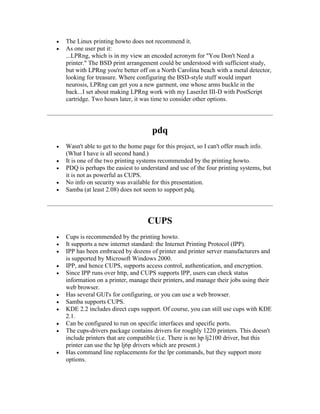

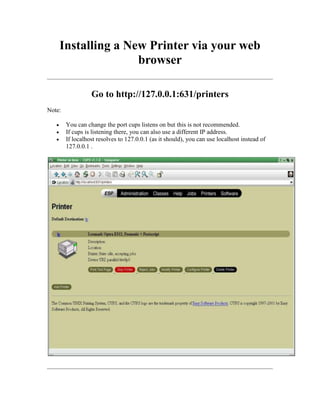

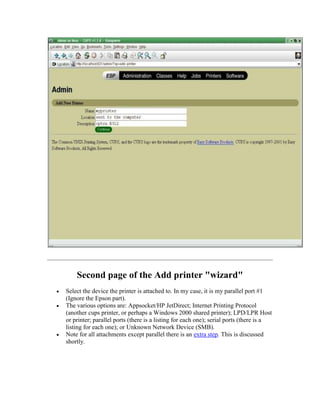

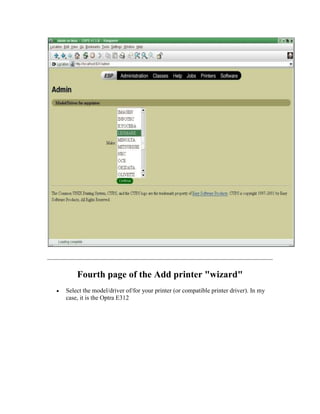


![is a good idea anyway), you can also not have cups listen on your internet
connection. This also prevents any possibility of a root exploit from the internet.
Of course, you still have internal crackers to worry about...
In cups.conf, comment out the lines:
Port 80
Port 631
Replace them with:
Listen 127.0.0.1:631
Listen lan_ip_address:631
Listen 127.0.0.1:80
Listen lan_ip_address:80
Still leaves a UDP port 631 open to the world though. The simplest way to close
this port is by turning browsing off, but it may cause problems if you have other
cups servers (and maybe clients?). The line for this is:
Browsing off
Another way to limit access to UDP on port 631, but less secure, is to add the
following lines:
BrowseAddress lan_ip_broadcast_address
BrowseAddress 127.0.0.1
BrowseAllow from 127.0.0.1
BrowseAllow from lan_ip_subnet (i.e. 192.168.1.0/24)
BrowseOrder deny,allow
Cups and Samba
Starting with Samba version 2.06, cups is supported.
If you are going to print to SMB servers, or allow clients to send print jobs to your
cups server using the SMB protocol, you must install and configure Samba.
To configure Samba for CUPS (windows users can print to your cups server), edit
the smb.conf file and replace the existing printing commands and options with the
line:
printing = cups
Versions of Samba older than 2.06 and broken versions of Samba (2.06 and 2.07
have been reported) require the following lines in your smb.conf file:
printing = sysv
printcap name = lpstat
print command = lp -d %p -o raw %s; rm -f %s
You will also need to add a [printer] section to your smb.conf file. (Otherwise,
you are sharing any printers!) Here is a sample one I use:
# NOTE: If you have a CUPS print system there is no need to
# specifically define each individual printer.
# You must configure the Samba printers as "Generic PostScript
Printer"](https://image.slidesharecdn.com/9pb29zoesr217o4cqnyd-signature-be3b19db19e0de2bb95c3a69e0d4f69c02ddfa4ac6991dabe56e06d92a008cc3-poli-140812111516-phpapp01/85/Printing-in-linux-with-cups-15-320.jpg)
![ # on your Windows clients.
# If you wish to configure the printers directly on the Windows
clients
# (i.e. use the windows drivers on the clients) you must swap the
# 'print command' line below with the commented one.
[printers]
comment = All Printers
path = /var/spool/Samba
browseable = yes
# to allow user 'guest account' to print.
guest ok = yes
writable = no
printable = yes
create mode = 0700
# =====================================
# print command: see above for details.
# =====================================
print command = lpr-cups -P %p -o raw %s # using client side
printer drivers.
# print command = lpr-cups -P %p %s # using cups own drivers
(use
#generic PostScript on clients).
# lpr -P %p %s
lpq command = lpstat -o %p
lprm command = cancel %p-%j
To configure CUPS for SAMBA (cups can use printers on windows machines),
run the following command:
ln -s `which smbspool` /usr/lib/cups/backend/smb
Your Samba installation or cups installation *MAY* have already done this, so
check for link first.
Cups command line tricks and tips
Because cups has a command line equivalent to the lp and lpr commands (I prefer
lpr), all the commands that worked with the old LPD print system still work
exactly the same.
Only the lpr version of the commands will be presented here. The equivalent lp
commands do differ in some cases.
Cups, however, adds a bunch of new options you can use that are not present in
LPD.
Only a few of the options will be presented here. See the docs for the full list.](https://image.slidesharecdn.com/9pb29zoesr217o4cqnyd-signature-be3b19db19e0de2bb95c3a69e0d4f69c02ddfa4ac6991dabe56e06d92a008cc3-poli-140812111516-phpapp01/85/Printing-in-linux-with-cups-16-320.jpg)


This document provides instructions for setting up printing in Linux using CUPS (Common Unix Printing System). It discusses various printing programs available in Linux and recommends CUPS. CUPS supports the Internet Printing Protocol (IPP) standard, allows managing printers via a web browser, and is compatible with Samba and KDE. The document then provides step-by-step instructions for installing CUPS via RPM or tarball, and for adding a new printer via the CUPS web interface by selecting the printer make, model, and connection type.


![Lect 1 Number systems and base conversions. [Autosaved].pptx](https://cdn.slidesharecdn.com/ss_thumbnails/lect1numbersystemsandbaseconversions-260111134109-67c2d865-thumbnail.jpg?width=640&height=640&fit=bounds)


