Need of programming Languages
Computers can execute tasks very rapidly. They
can handle a greater amount of input data than
you can. But they can not design a strategy to
solve problems for you.
Need one programming language to
communicate with computer to solve the
problem.
Python – Why?
• Python has a simple syntax. Python programs are clear and easy to
read. At the same time, Python provides powerful programming
features, and is widely used.
• Companies and organizations that use Python include YouTube, Google,
Yahoo, and NASA. Python is well supported and freely available at
www.python.org.
• Guido van Rossum is the creator of the Python programming language,
first released in the early 1990s. Its name comes from a 1970s British
comedy sketch television show called
Monty Python’s Flying Circus.
Python….
• Python is an example of a high-level language; other high-level
languages you might have heard of are C, C++, Perl, and Java.
• There are also low-level languages, sometimes referred to as
“machine languages” or “assembly languages.”
• Computers can only run programs written in low-level languages. So
programs written in a high-level language have to be processed
before they can run. This extra processing takes some time, which is
a small disadvantage of high-level languages.
Python….
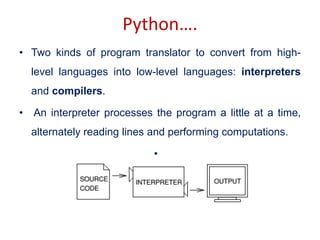
• Two kinds of program translator to convert from high-
level languages into low-level languages: interpreters
and compilers.
• An interpreter processes the program a little at a time,
alternately reading lines and performing computations.
•
Python….
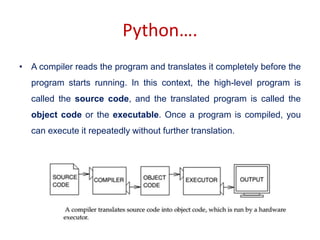
• A compiler reads the program and translates it completely before the
program starts running. In this context, the high-level program is
called the source code, and the translated program is called the
object code or the executable. Once a program is compiled, you
can execute it repeatedly without further translation.
Python….
• Python is considered an interpreted language because Python
programs are executed by an interpreter. There are two ways
to use the interpreter:
• interactive mode and script mode.
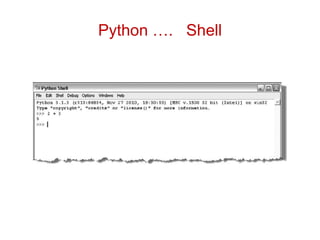
Python….Interactive mode
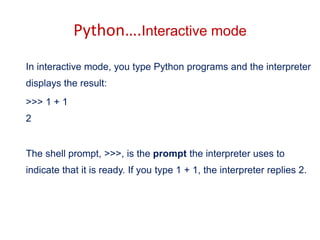
In interactive mode, you type Python programs and the interpreter
displays the result:
>>> 1 + 1
2
The shell prompt, >>>, is the prompt the interpreter uses to
indicate that it is ready. If you type 1 + 1, the interpreter replies 2.
Python …. Shell
Python…. Script Mode
• Alternatively, you can store code in a file and use the interpreter to
execute the contents of the file, which is called a script.
• By convention, Python scripts have names that end with .py.
• Working in interactive mode is convenient for testing small pieces of
code because you can type and execute them immediately.
• But for anything more than a few lines, you should save your code
as a script so you can modify and execute it in the future.
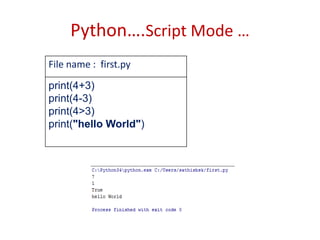
Python….Script Mode …
File name : first.py
print(4+3)
print(4-3)
print(4>3)
print("hello World")
Problem that can be solved by
Sequential Algorithms
• Some of the problem involves simple
computation of values
Example Problem
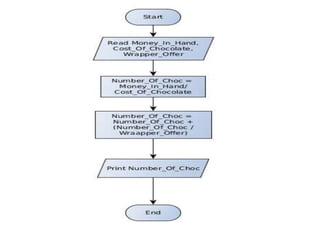
• Little Bob loves chocolate, and he goes to a store
with Rs. N in his pocket. The price of each
chocolate is Rs. C. The store offers a discount: for
every M wrappers he gives to the store, he gets
one chocolate for free. This offer shall be availed
only once. How many chocolates does Bob get to
eat?
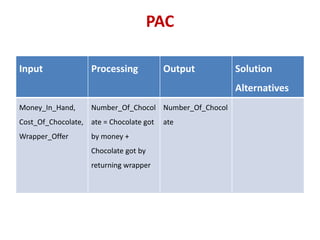
PAC
Input Processing Output Solution
Alternatives
Money_In_Hand,
Cost_Of_Chocolate,
Wrapper_Offer
Number_Of_Chocol
ate = Chocolate got
by money +
Chocolate got by
returning wrapper
Number_Of_Chocol
ate
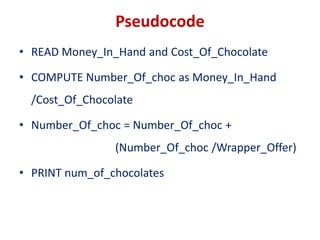
Pseudocode
• READ Money_In_Hand and Cost_Of_Chocolate
• COMPUTE Number_Of_choc as Money_In_Hand
/Cost_Of_Chocolate
• Number_Of_choc = Number_Of_choc +
(Number_Of_choc /Wrapper_Offer)
• PRINT num_of_chocolates
Concepts of Python for Solving
Sequential Problems
What is an Identifier?
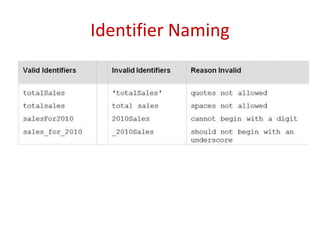
• An identifier is a sequence of one or more
characters used to name a given program
element. In Python, an identifier may contain
letters and digits, but cannot begin with a
digit. The special underscore character can
also be used.
Rules for Identifier
• An identifier is a sequence of one or more characters
used to provide a name for a given program element.
• Example : line, salary, emp1, emp_salary
• Python is case sensitive, thus, Line is different from
line.
• Identifiers may contain letters and digits, but cannot
begin with a digit.
• The underscore character, _, is also allowed to aid in
the readability of long identifier names. It should not
be used as the first character
• Spaces are not allowed as part of an identifier.
Identifier Naming
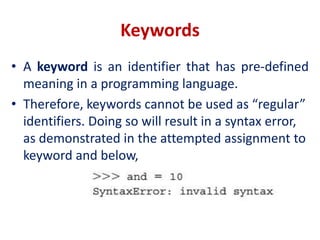
Keywords
• A keyword is an identifier that has pre-defined
meaning in a programming language.
• Therefore, keywords cannot be used as “regular”
identifiers. Doing so will result in a syntax error,
as demonstrated in the attempted assignment to
keyword and below,
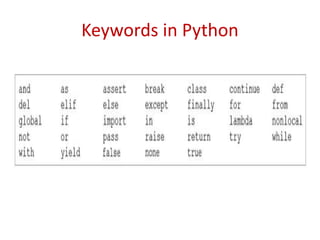
Keywords in Python
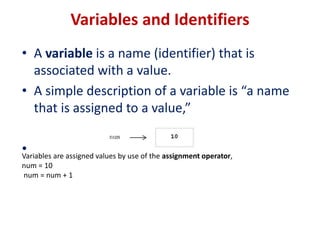
Variables and Identifiers
• A variable is a name (identifier) that is
associated with a value.
• A simple description of a variable is “a name
that is assigned to a value,”
•
Variables are assigned values by use of the assignment operator,
num = 10
num = num + 1
Comments
• Meant as documentation for anyone reading the code
• Single-line comments begin with the hash character ("#")
and are terminated by the end of line.
• Python ignores all text that comes after # to end of line
• Comments spanning more than one line are achieved by
inserting a multi-line string (with """ as the delimiter one
each end) that is not used in assignment or otherwise
evaluated, but sits in between other statements.
• #This is also a comment in Python
• """ This is an example of a multiline comment that spans
multiple lines ... "“”
Literals
• A literal is a sequence of one or more
characters that stands for itself.
Numeric literal
• A numeric literal is a literal containing only the
digits 0–9, an optional sign character (1 or 2),
and a possible decimal point. (The letter e is also
used in exponential notation).
• If a numeric literal contains a decimal point, then it
denotes a floating-point value, or “float” (e.g.,
10.24); otherwise, it denotes an integer value
(e.g., 10).
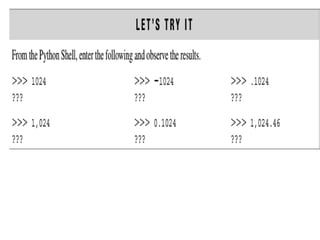
• Commas are never used in numeric literals
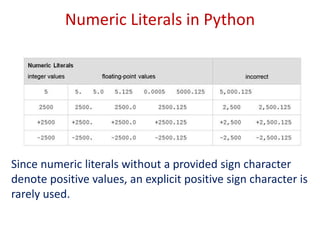
Numeric Literals in Python
Since numeric literals without a provided sign character
denote positive values, an explicit positive sign character is
rarely used.
String Literals
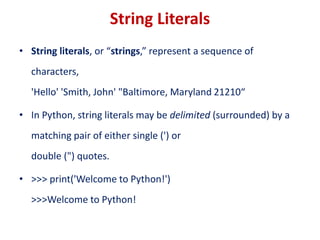
• String literals, or “strings,” represent a sequence of
characters,
'Hello' 'Smith, John' "Baltimore, Maryland 21210“
• In Python, string literals may be delimited (surrounded) by a
matching pair of either single (') or
double (") quotes.
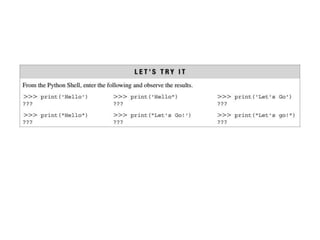
• >>> print('Welcome to Python!')
>>>Welcome to Python!
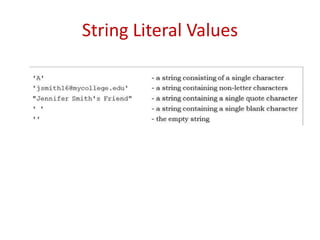
String Literal Values
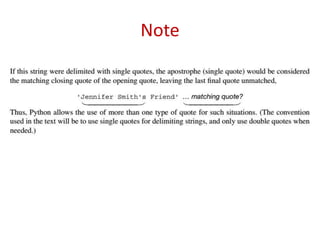
Note
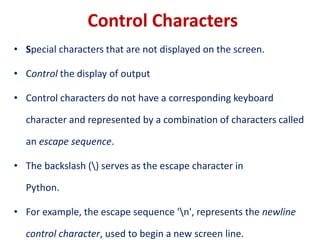
Control Characters
• Special characters that are not displayed on the screen.
• Control the display of output
• Control characters do not have a corresponding keyboard
character and represented by a combination of characters called
an escape sequence.
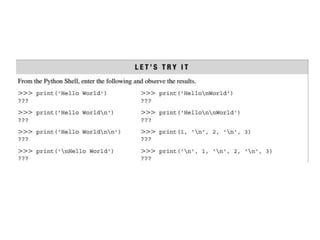
• The backslash () serves as the escape character in
Python.
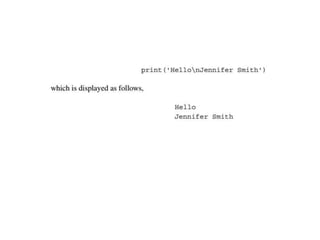
• For example, the escape sequence 'n', represents the newline
control character, used to begin a new screen line.
Data Types
• Python's data types are built in the core of the
language
• They are easy to use and straightforward.
• Data types supported by Python
– Boolean values
– None
– Numbers
– Strings
– Tuples
– Lists
– Sets
Boolean values
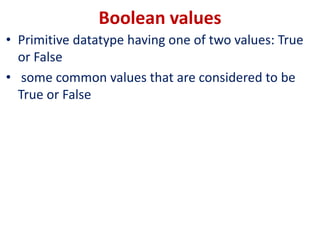
• Primitive datatype having one of two values: True
or False
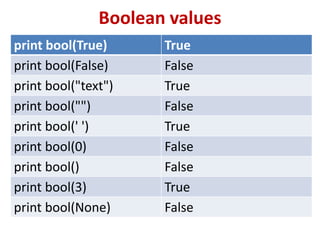
• some common values that are considered to be
True or False
Boolean values
print bool(True) True
print bool(False) False
print bool("text") True
print bool("") False
print bool(' ') True
print bool(0) False
print bool() False
print bool(3) True
print bool(None) False
None
• Special data type - None
• Basically, the data type means non existent,
not known or empty
• Can be used to check for emptiness
Numbers
Types of numbers supported by Python:
• Integers
• floating point numbers
• complex numbers
• Fractional numbers
Integers
• Integers have no fractional part in the
number
• Integer type automatically provides extra
precision for large numbers like this when
needed (different in Python 2.X)
• >>> a = 10
• >>> b = a
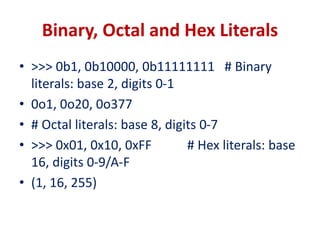
Binary, Octal and Hex Literals
• >>> 0b1, 0b10000, 0b11111111 # Binary
literals: base 2, digits 0-1
• 0o1, 0o20, 0o377
• # Octal literals: base 8, digits 0-7
• >>> 0x01, 0x10, 0xFF # Hex literals: base
16, digits 0-9/A-F
• (1, 16, 255)
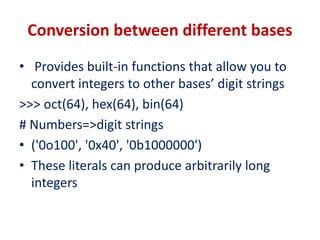
Conversion between different bases
• Provides built-in functions that allow you to
convert integers to other bases’ digit strings
>>> oct(64), hex(64), bin(64)
# Numbers=>digit strings
• ('0o100', '0x40', '0b1000000')
• These literals can produce arbitrarily long
integers
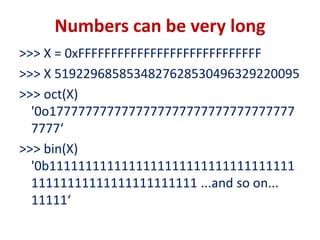
Numbers can be very long
>>> X = 0xFFFFFFFFFFFFFFFFFFFFFFFFFFFF
>>> X 5192296858534827628530496329220095
>>> oct(X)
'0o1777777777777777777777777777777777
7777‘
>>> bin(X)
'0b1111111111111111111111111111111111
11111111111111111111111 ...and so on...
11111‘
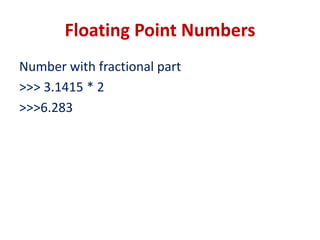
Floating Point Numbers
Number with fractional part
>>> 3.1415 * 2
>>>6.283
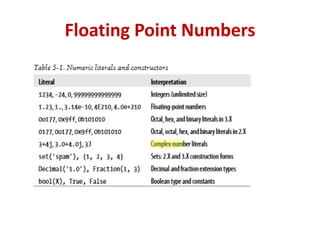
Floating Point Numbers
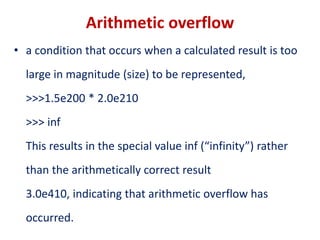
Arithmetic overflow
• a condition that occurs when a calculated result is too
large in magnitude (size) to be represented,
>>>1.5e200 * 2.0e210
>>> inf
This results in the special value inf (“infinity”) rather
than the arithmetically correct result
3.0e410, indicating that arithmetic overflow has
occurred.
Arithmetic underflow
• a condition that occurs when a calculated result is too small in
magnitude to be represented,
>>>1.0e-300 / 1.0e100
>>>0.0
• This results in 0.0 rather than the arithmetically correct result
1.0e-400, indicating that arithmetic underflow has occurred.
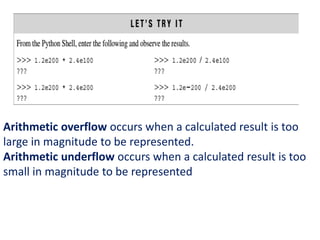
Arithmetic overflow occurs when a calculated result is too
large in magnitude to be represented.
Arithmetic underflow occurs when a calculated result is too
small in magnitude to be represented
Input and output function
Input function : input
Basic_pay = input('Enter the Basic Pay: ')
Output function : print
>>> print('Hello world!')
print(‘Net Salary', salary)
Input and output function
Input function : input
Basic_pay = input('Enter the Basic Pay: ')
Input received is always a string.
To convert it to integer use int function of Python
Basic_pay = int(input('Enter the Basic Pay: '))
Output function : print
>>> print('Hello world!')
print(‘Net Salary', salary)
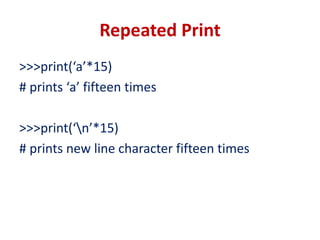
Repeated Print
>>>print(‘a’*15)
# prints ‘a’ fifteen times
>>>print(‘n’*15)
# prints new line character fifteen times
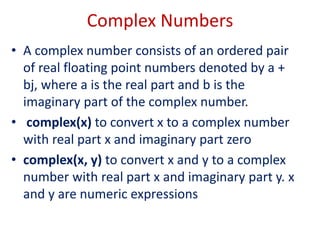
Complex Numbers
• A complex number consists of an ordered pair
of real floating point numbers denoted by a +
bj, where a is the real part and b is the
imaginary part of the complex number.
• complex(x) to convert x to a complex number
with real part x and imaginary part zero
• complex(x, y) to convert x and y to a complex
number with real part x and imaginary part y. x
and y are numeric expressions
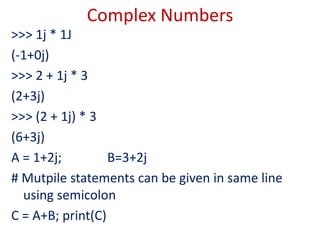
Complex Numbers
>>> 1j * 1J
(-1+0j)
>>> 2 + 1j * 3
(2+3j)
>>> (2 + 1j) * 3
(6+3j)
A = 1+2j; B=3+2j
# Mutpile statements can be given in same line
using semicolon
C = A+B; print(C)
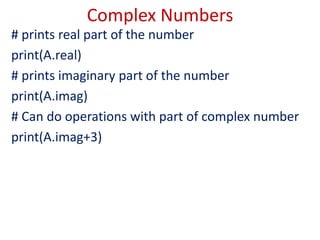
Complex Numbers
# prints real part of the number
print(A.real)
# prints imaginary part of the number
print(A.imag)
# Can do operations with part of complex number
print(A.imag+3)
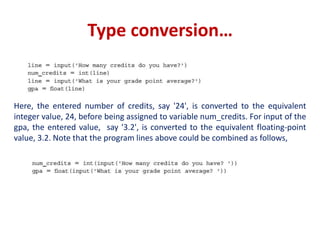
Type conversion…
Here, the entered number of credits, say '24', is converted to the equivalent
integer value, 24, before being assigned to variable num_credits. For input of the
gpa, the entered value, say '3.2', is converted to the equivalent floating-point
value, 3.2. Note that the program lines above could be combined as follows,
Assignment Statement
Statement Type
spam = 'Spam' Basic form
spam, ham = 'yum', 'YUM' Tuple assignment (positional)
[spam, ham] = ['yum',
'YUM']
List assignment (positional)
a, b, c, d = 'spam' Sequence assignment,
generalized
a, *b = 'spam' Extended sequence unpacking
(Python 3.X)
spam = ham = 'lunch' Multiple-target assignment
spams += 42 Augmented assignment
(equivalent to spams = spams +
42)
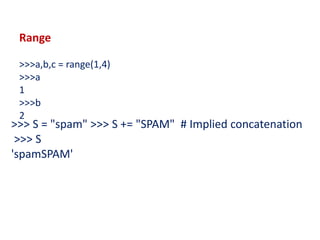
Range
>>>a,b,c = range(1,4)
>>>a
1
>>>b
2
>>> S = "spam" >>> S += "SPAM" # Implied concatenation
>>> S
'spamSPAM'
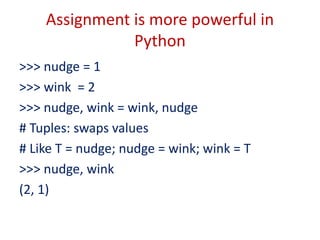
Assignment is more powerful in
Python
>>> nudge = 1
>>> wink = 2
>>> nudge, wink = wink, nudge
# Tuples: swaps values
# Like T = nudge; nudge = wink; wink = T
>>> nudge, wink
(2, 1)

presentation_python_7_1569170870_375360.pptx

  • 1.
    Need of programmingLanguages Computers can execute tasks very rapidly. They can handle a greater amount of input data than you can. But they can not design a strategy to solve problems for you. Need one programming language to communicate with computer to solve the problem.
  • 2.
    Python – Why? •Python has a simple syntax. Python programs are clear and easy to read. At the same time, Python provides powerful programming features, and is widely used. • Companies and organizations that use Python include YouTube, Google, Yahoo, and NASA. Python is well supported and freely available at www.python.org. • Guido van Rossum is the creator of the Python programming language, first released in the early 1990s. Its name comes from a 1970s British comedy sketch television show called Monty Python’s Flying Circus.
  • 3.
    Python…. • Python isan example of a high-level language; other high-level languages you might have heard of are C, C++, Perl, and Java. • There are also low-level languages, sometimes referred to as “machine languages” or “assembly languages.” • Computers can only run programs written in low-level languages. So programs written in a high-level language have to be processed before they can run. This extra processing takes some time, which is a small disadvantage of high-level languages.
  • 4.
    Python…. • Two kindsof program translator to convert from high- level languages into low-level languages: interpreters and compilers. • An interpreter processes the program a little at a time, alternately reading lines and performing computations. •
  • 5.
    Python…. • A compilerreads the program and translates it completely before the program starts running. In this context, the high-level program is called the source code, and the translated program is called the object code or the executable. Once a program is compiled, you can execute it repeatedly without further translation.
  • 6.
    Python…. • Python isconsidered an interpreted language because Python programs are executed by an interpreter. There are two ways to use the interpreter: • interactive mode and script mode.
  • 7.
    Python….Interactive mode In interactivemode, you type Python programs and the interpreter displays the result: >>> 1 + 1 2 The shell prompt, >>>, is the prompt the interpreter uses to indicate that it is ready. If you type 1 + 1, the interpreter replies 2.
  • 8.
  • 9.
    Python…. Script Mode •Alternatively, you can store code in a file and use the interpreter to execute the contents of the file, which is called a script. • By convention, Python scripts have names that end with .py. • Working in interactive mode is convenient for testing small pieces of code because you can type and execute them immediately. • But for anything more than a few lines, you should save your code as a script so you can modify and execute it in the future.
  • 10.
    Python….Script Mode … Filename : first.py print(4+3) print(4-3) print(4>3) print("hello World")
  • 11.
    Problem that canbe solved by Sequential Algorithms • Some of the problem involves simple computation of values
  • 12.
    Example Problem • LittleBob loves chocolate, and he goes to a store with Rs. N in his pocket. The price of each chocolate is Rs. C. The store offers a discount: for every M wrappers he gives to the store, he gets one chocolate for free. This offer shall be availed only once. How many chocolates does Bob get to eat?
  • 14.
    PAC Input Processing OutputSolution Alternatives Money_In_Hand, Cost_Of_Chocolate, Wrapper_Offer Number_Of_Chocol ate = Chocolate got by money + Chocolate got by returning wrapper Number_Of_Chocol ate
  • 15.
    Pseudocode • READ Money_In_Handand Cost_Of_Chocolate • COMPUTE Number_Of_choc as Money_In_Hand /Cost_Of_Chocolate • Number_Of_choc = Number_Of_choc + (Number_Of_choc /Wrapper_Offer) • PRINT num_of_chocolates
  • 17.
    Concepts of Pythonfor Solving Sequential Problems
  • 18.
    What is anIdentifier? • An identifier is a sequence of one or more characters used to name a given program element. In Python, an identifier may contain letters and digits, but cannot begin with a digit. The special underscore character can also be used.
  • 19.
    Rules for Identifier •An identifier is a sequence of one or more characters used to provide a name for a given program element. • Example : line, salary, emp1, emp_salary • Python is case sensitive, thus, Line is different from line. • Identifiers may contain letters and digits, but cannot begin with a digit. • The underscore character, _, is also allowed to aid in the readability of long identifier names. It should not be used as the first character • Spaces are not allowed as part of an identifier.
  • 20.
  • 21.
    Keywords • A keywordis an identifier that has pre-defined meaning in a programming language. • Therefore, keywords cannot be used as “regular” identifiers. Doing so will result in a syntax error, as demonstrated in the attempted assignment to keyword and below,
  • 22.
  • 23.
    Variables and Identifiers •A variable is a name (identifier) that is associated with a value. • A simple description of a variable is “a name that is assigned to a value,” • Variables are assigned values by use of the assignment operator, num = 10 num = num + 1
  • 24.
    Comments • Meant asdocumentation for anyone reading the code • Single-line comments begin with the hash character ("#") and are terminated by the end of line. • Python ignores all text that comes after # to end of line • Comments spanning more than one line are achieved by inserting a multi-line string (with """ as the delimiter one each end) that is not used in assignment or otherwise evaluated, but sits in between other statements. • #This is also a comment in Python • """ This is an example of a multiline comment that spans multiple lines ... "“”
  • 25.
    Literals • A literalis a sequence of one or more characters that stands for itself.
  • 26.
    Numeric literal • Anumeric literal is a literal containing only the digits 0–9, an optional sign character (1 or 2), and a possible decimal point. (The letter e is also used in exponential notation). • If a numeric literal contains a decimal point, then it denotes a floating-point value, or “float” (e.g., 10.24); otherwise, it denotes an integer value (e.g., 10). • Commas are never used in numeric literals
  • 27.
    Numeric Literals inPython Since numeric literals without a provided sign character denote positive values, an explicit positive sign character is rarely used.
  • 29.
    String Literals • Stringliterals, or “strings,” represent a sequence of characters, 'Hello' 'Smith, John' "Baltimore, Maryland 21210“ • In Python, string literals may be delimited (surrounded) by a matching pair of either single (') or double (") quotes. • >>> print('Welcome to Python!') >>>Welcome to Python!
  • 30.
  • 31.
  • 33.
    Control Characters • Specialcharacters that are not displayed on the screen. • Control the display of output • Control characters do not have a corresponding keyboard character and represented by a combination of characters called an escape sequence. • The backslash () serves as the escape character in Python. • For example, the escape sequence 'n', represents the newline control character, used to begin a new screen line.
  • 36.
    Data Types • Python'sdata types are built in the core of the language • They are easy to use and straightforward. • Data types supported by Python – Boolean values – None – Numbers – Strings – Tuples – Lists – Sets
  • 37.
    Boolean values • Primitivedatatype having one of two values: True or False • some common values that are considered to be True or False
  • 38.
    Boolean values print bool(True)True print bool(False) False print bool("text") True print bool("") False print bool(' ') True print bool(0) False print bool() False print bool(3) True print bool(None) False
  • 39.
    None • Special datatype - None • Basically, the data type means non existent, not known or empty • Can be used to check for emptiness
  • 40.
    Numbers Types of numberssupported by Python: • Integers • floating point numbers • complex numbers • Fractional numbers
  • 41.
    Integers • Integers haveno fractional part in the number • Integer type automatically provides extra precision for large numbers like this when needed (different in Python 2.X) • >>> a = 10 • >>> b = a
  • 42.
    Binary, Octal andHex Literals • >>> 0b1, 0b10000, 0b11111111 # Binary literals: base 2, digits 0-1 • 0o1, 0o20, 0o377 • # Octal literals: base 8, digits 0-7 • >>> 0x01, 0x10, 0xFF # Hex literals: base 16, digits 0-9/A-F • (1, 16, 255)
  • 43.
    Conversion between differentbases • Provides built-in functions that allow you to convert integers to other bases’ digit strings >>> oct(64), hex(64), bin(64) # Numbers=>digit strings • ('0o100', '0x40', '0b1000000') • These literals can produce arbitrarily long integers
  • 44.
    Numbers can bevery long >>> X = 0xFFFFFFFFFFFFFFFFFFFFFFFFFFFF >>> X 5192296858534827628530496329220095 >>> oct(X) '0o1777777777777777777777777777777777 7777‘ >>> bin(X) '0b1111111111111111111111111111111111 11111111111111111111111 ...and so on... 11111‘
  • 45.
    Floating Point Numbers Numberwith fractional part >>> 3.1415 * 2 >>>6.283
  • 46.
  • 47.
    Arithmetic overflow • acondition that occurs when a calculated result is too large in magnitude (size) to be represented, >>>1.5e200 * 2.0e210 >>> inf This results in the special value inf (“infinity”) rather than the arithmetically correct result 3.0e410, indicating that arithmetic overflow has occurred.
  • 48.
    Arithmetic underflow • acondition that occurs when a calculated result is too small in magnitude to be represented, >>>1.0e-300 / 1.0e100 >>>0.0 • This results in 0.0 rather than the arithmetically correct result 1.0e-400, indicating that arithmetic underflow has occurred.
  • 49.
    Arithmetic overflow occurswhen a calculated result is too large in magnitude to be represented. Arithmetic underflow occurs when a calculated result is too small in magnitude to be represented
  • 50.
    Input and outputfunction Input function : input Basic_pay = input('Enter the Basic Pay: ') Output function : print >>> print('Hello world!') print(‘Net Salary', salary)
  • 51.
    Input and outputfunction Input function : input Basic_pay = input('Enter the Basic Pay: ') Input received is always a string. To convert it to integer use int function of Python Basic_pay = int(input('Enter the Basic Pay: ')) Output function : print >>> print('Hello world!') print(‘Net Salary', salary)
  • 52.
    Repeated Print >>>print(‘a’*15) # prints‘a’ fifteen times >>>print(‘n’*15) # prints new line character fifteen times
  • 53.
    Complex Numbers • Acomplex number consists of an ordered pair of real floating point numbers denoted by a + bj, where a is the real part and b is the imaginary part of the complex number. • complex(x) to convert x to a complex number with real part x and imaginary part zero • complex(x, y) to convert x and y to a complex number with real part x and imaginary part y. x and y are numeric expressions
  • 54.
    Complex Numbers >>> 1j* 1J (-1+0j) >>> 2 + 1j * 3 (2+3j) >>> (2 + 1j) * 3 (6+3j) A = 1+2j; B=3+2j # Mutpile statements can be given in same line using semicolon C = A+B; print(C)
  • 55.
    Complex Numbers # printsreal part of the number print(A.real) # prints imaginary part of the number print(A.imag) # Can do operations with part of complex number print(A.imag+3)
  • 56.
    Type conversion… Here, theentered number of credits, say '24', is converted to the equivalent integer value, 24, before being assigned to variable num_credits. For input of the gpa, the entered value, say '3.2', is converted to the equivalent floating-point value, 3.2. Note that the program lines above could be combined as follows,
  • 57.
    Assignment Statement Statement Type spam= 'Spam' Basic form spam, ham = 'yum', 'YUM' Tuple assignment (positional) [spam, ham] = ['yum', 'YUM'] List assignment (positional) a, b, c, d = 'spam' Sequence assignment, generalized a, *b = 'spam' Extended sequence unpacking (Python 3.X) spam = ham = 'lunch' Multiple-target assignment spams += 42 Augmented assignment (equivalent to spams = spams + 42)
  • 58.
    Range >>>a,b,c = range(1,4) >>>a 1 >>>b 2 >>>S = "spam" >>> S += "SPAM" # Implied concatenation >>> S 'spamSPAM'
  • 59.
    Assignment is morepowerful in Python >>> nudge = 1 >>> wink = 2 >>> nudge, wink = wink, nudge # Tuples: swaps values # Like T = nudge; nudge = wink; wink = T >>> nudge, wink (2, 1)