PRESENTATION ON PYTHON
SETH JAI PARKASH MUKAND LAL INSTITUTE OF ENGINEERING AND TECHNOLOGY, RADAUR
PRESENTED BY :
ABHISHEK
1220162
B.TECH (CSE) 2ND YEAR
INDEX :
 Introduction To Python
 Operators & Data Type
 Conditions & Loops
 Function & Exceptional Handling
 Classes & Inheritance
 Python Libraries
 Project On Python
 Queries
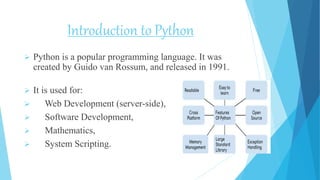
Introduction to Python
 Python is a popular programming language. It was
created by Guido van Rossum, and released in 1991.
 It is used for:
 Web Development (server-side),
 Software Development,
 Mathematics,
 System Scripting.
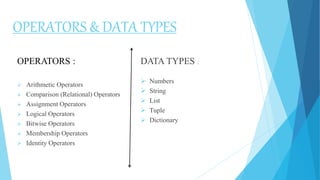
OPERATORS & DATA TYPES
OPERATORS :
 Arithmetic Operators
 Comparison (Relational) Operators
 Assignment Operators
 Logical Operators
 Bitwise Operators
 Membership Operators
 Identity Operators
DATA TYPES :
 Numbers
 String
 List
 Tuple
 Dictionary
Conditions & loops
 if statement : if statement is the most simple decision-making statement. It is
used to decide whether a certain statement or block of statements will be
executed or not .
 if-else : The if statement alone tells us that if a condition is true it will execute
a block of statements and if the condition is false it won’t. But what if we want
to do something else if the condition is false.
Python programming language provides following types of loops to handle
looping requirements.
 while loop : Repeats a statement or group of statements while a given
condition is TRUE. It tests the condition before executing the loop body.
 for loop: Executes a sequence of statements multiple times and abbreviates the
code that manages the loop variable.
 nested loops : We can use one or more loop inside any another while, for or
do..while loop.
FUNCTIONS AND EXCEPTION HANDLING
The try-expect statement
 If the Python program contains suspicious code that may throw the
exception, we must place that code in the try block.
 The try block must be followed with the except statement, which
contains a block of code that will be executed if there is some exception
in the try block.
A function is a block of organized, reusable code that is used to perform a
single, related action. Functions provide better modularity for your
application and a high degree of code reusing.
Calling a Function
 Call by Value
 Call by Reference
 Call by Address
Classes & inheritance
 Python is an object oriented programming language. Almost everything in Python is an
object, with its properties and methods. A Class is like an object constructor, or a
"blueprint" for creating objects.
 To understand the meaning of classes we have to understand the built-in __init__()
function. All classes have a function called __init__(), which is always executed when
the class is being initiated. Use the __init__() function to assign values to object
properties, or other operations that are necessary to do when the object is being created.
 Inheritance allows us to define a class that inherits all the methods and properties from
another class. Parent class is the class being inherited from, also called base class. Child
class is the class that inherits from another class, also called derived class.
 Single Inheritance
 Multiple Inheritance
 Multilevel Inheritance
PYTHON LIBRARIES
NUMPY :
 NumPy is a Python library used for working with arrays.
 It also has functions for working in domain of linear algebra, fourier
transform, and matrices.
 NumPy was created in 2005 by Travis Oliphant. It is an open source
project and you can use it freely.
 NumPy stands for Numerical Python.
PANDAS :
 Pandas is a Python library used for working with data sets.
 It has functions for analyzing, cleaning, exploring, and manipulating data.
 Pandas allows us to analyze big data and make conclusions based on
statistical theories.
 The name "Pandas" has a reference to both "Panel Data", and "Python
Data Analysis" and was created by Wes McKinney in 2008.
Project
LIBRARY
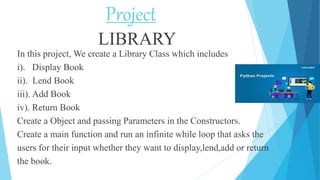
In this project, We create a Library Class which includes
i). Display Book
ii). Lend Book
iii). Add Book
iv). Return Book
Create a Object and passing Parameters in the Constructors.
Create a main function and run an infinite while loop that asks the
users for their input whether they want to display,lend,add or return
the book.
Code :
class Library():
def __init__(self,list_of_books,library_name): #constructor
self.list_of_books = list_of_books
self.library_name = library_name
self.lend_dict = {}
def display_book(self): #display function display the list of
books
print(f"nWe Have Following Books In {self.library_name}")
for item in self.list_of_books:
print(item)
def lend_book(self,user,book): #lend function is for lending a
book from library
if book not in self.lend_dict.keys():
self.lend_dict.update({book:user})
print("Lender-Book database has been updated. You Can Take Your Book Now")
else:
print(f"Book is Already being used by {self.lend_dict[book]}")
def add_book(self,book): #add function is for adding a book in Library
self.list_of_books.append(book)
print("Book has been added to the book List")
def return_book(self,book): #return function is for return the book in library
self.lend_dict.pop(book)
if __name__ == '__main__': # main function starts
bookandname = Library(["LET US C", "DSA", "C++", "PYTHON", "JAVA"], "ABHISHEK'S LIBRARY")
while True:
print(f"nn..............WELCOME TO {bookandname.library_name}..............")
name = input("Enter Your Name : ")
print(f"nHii {name.capitalize()} Welcome to {bookandname.library_name}")
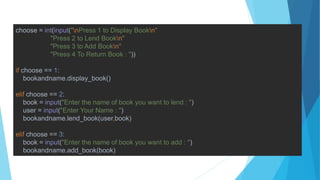
choose = int(input("nPress 1 to Display Bookn"
"Press 2 to Lend Bookn"
"Press 3 to Add Bookn"
"Press 4 To Return Book : "))
if choose == 1:
bookandname.display_book()
elif choose == 2:
book = input("Enter the name of book you want to lend : ")
user = input("Enter Your Name : ")
bookandname.lend_book(user,book)
elif choose == 3:
book = input("Enter the name of book you want to add : ")
bookandname.add_book(book)
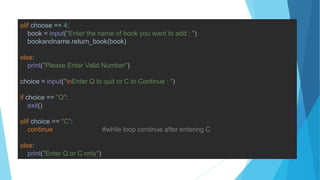
elif choose == 4:
book = input("Enter the name of book you want to add : ")
bookandname.return_book(book)
else:
print("Please Enter Valid Number")
choice = input("nEnter Q to quit or C to Continue : ")
if choice == "Q":
exit()
elif choice == "C":
continue #while loop continue after entering C
else:
print("Enter Q or C only")
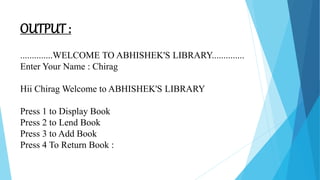
OUTPUT :
..............WELCOME TO ABHISHEK'S LIBRARY..............
Enter Your Name : Chirag
Hii Chirag Welcome to ABHISHEK'S LIBRARY
Press 1 to Display Book
Press 2 to Lend Book
Press 3 to Add Book
Press 4 To Return Book :
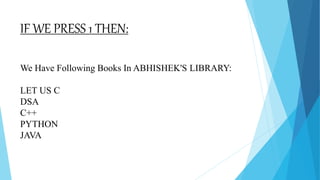
IF WE PRESS 1 THEN:
We Have Following Books In ABHISHEK'S LIBRARY:
LET US C
DSA
C++
PYTHON
JAVA
ANY QUERY????
THANK YOU!!

PRESENTATION ON PYTHON.pptx

  • 1.
    PRESENTATION ON PYTHON SETHJAI PARKASH MUKAND LAL INSTITUTE OF ENGINEERING AND TECHNOLOGY, RADAUR PRESENTED BY : ABHISHEK 1220162 B.TECH (CSE) 2ND YEAR
  • 2.
    INDEX :  IntroductionTo Python  Operators & Data Type  Conditions & Loops  Function & Exceptional Handling  Classes & Inheritance  Python Libraries  Project On Python  Queries
  • 3.
    Introduction to Python Python is a popular programming language. It was created by Guido van Rossum, and released in 1991.  It is used for:  Web Development (server-side),  Software Development,  Mathematics,  System Scripting.
  • 4.
    OPERATORS & DATATYPES OPERATORS :  Arithmetic Operators  Comparison (Relational) Operators  Assignment Operators  Logical Operators  Bitwise Operators  Membership Operators  Identity Operators DATA TYPES :  Numbers  String  List  Tuple  Dictionary
  • 5.
    Conditions & loops if statement : if statement is the most simple decision-making statement. It is used to decide whether a certain statement or block of statements will be executed or not .  if-else : The if statement alone tells us that if a condition is true it will execute a block of statements and if the condition is false it won’t. But what if we want to do something else if the condition is false. Python programming language provides following types of loops to handle looping requirements.  while loop : Repeats a statement or group of statements while a given condition is TRUE. It tests the condition before executing the loop body.  for loop: Executes a sequence of statements multiple times and abbreviates the code that manages the loop variable.  nested loops : We can use one or more loop inside any another while, for or do..while loop.
  • 6.
    FUNCTIONS AND EXCEPTIONHANDLING The try-expect statement  If the Python program contains suspicious code that may throw the exception, we must place that code in the try block.  The try block must be followed with the except statement, which contains a block of code that will be executed if there is some exception in the try block. A function is a block of organized, reusable code that is used to perform a single, related action. Functions provide better modularity for your application and a high degree of code reusing. Calling a Function  Call by Value  Call by Reference  Call by Address
  • 7.
    Classes & inheritance Python is an object oriented programming language. Almost everything in Python is an object, with its properties and methods. A Class is like an object constructor, or a "blueprint" for creating objects.  To understand the meaning of classes we have to understand the built-in __init__() function. All classes have a function called __init__(), which is always executed when the class is being initiated. Use the __init__() function to assign values to object properties, or other operations that are necessary to do when the object is being created.  Inheritance allows us to define a class that inherits all the methods and properties from another class. Parent class is the class being inherited from, also called base class. Child class is the class that inherits from another class, also called derived class.  Single Inheritance  Multiple Inheritance  Multilevel Inheritance
  • 8.
    PYTHON LIBRARIES NUMPY : NumPy is a Python library used for working with arrays.  It also has functions for working in domain of linear algebra, fourier transform, and matrices.  NumPy was created in 2005 by Travis Oliphant. It is an open source project and you can use it freely.  NumPy stands for Numerical Python. PANDAS :  Pandas is a Python library used for working with data sets.  It has functions for analyzing, cleaning, exploring, and manipulating data.  Pandas allows us to analyze big data and make conclusions based on statistical theories.  The name "Pandas" has a reference to both "Panel Data", and "Python Data Analysis" and was created by Wes McKinney in 2008.
  • 9.
    Project LIBRARY In this project,We create a Library Class which includes i). Display Book ii). Lend Book iii). Add Book iv). Return Book Create a Object and passing Parameters in the Constructors. Create a main function and run an infinite while loop that asks the users for their input whether they want to display,lend,add or return the book.
  • 10.
    Code : class Library(): def__init__(self,list_of_books,library_name): #constructor self.list_of_books = list_of_books self.library_name = library_name self.lend_dict = {} def display_book(self): #display function display the list of books print(f"nWe Have Following Books In {self.library_name}") for item in self.list_of_books: print(item) def lend_book(self,user,book): #lend function is for lending a book from library if book not in self.lend_dict.keys(): self.lend_dict.update({book:user}) print("Lender-Book database has been updated. You Can Take Your Book Now") else: print(f"Book is Already being used by {self.lend_dict[book]}")
  • 11.
    def add_book(self,book): #addfunction is for adding a book in Library self.list_of_books.append(book) print("Book has been added to the book List") def return_book(self,book): #return function is for return the book in library self.lend_dict.pop(book) if __name__ == '__main__': # main function starts bookandname = Library(["LET US C", "DSA", "C++", "PYTHON", "JAVA"], "ABHISHEK'S LIBRARY") while True: print(f"nn..............WELCOME TO {bookandname.library_name}..............") name = input("Enter Your Name : ") print(f"nHii {name.capitalize()} Welcome to {bookandname.library_name}")
  • 12.
    choose = int(input("nPress1 to Display Bookn" "Press 2 to Lend Bookn" "Press 3 to Add Bookn" "Press 4 To Return Book : ")) if choose == 1: bookandname.display_book() elif choose == 2: book = input("Enter the name of book you want to lend : ") user = input("Enter Your Name : ") bookandname.lend_book(user,book) elif choose == 3: book = input("Enter the name of book you want to add : ") bookandname.add_book(book)
  • 13.
    elif choose ==4: book = input("Enter the name of book you want to add : ") bookandname.return_book(book) else: print("Please Enter Valid Number") choice = input("nEnter Q to quit or C to Continue : ") if choice == "Q": exit() elif choice == "C": continue #while loop continue after entering C else: print("Enter Q or C only")
  • 14.
    OUTPUT : ..............WELCOME TOABHISHEK'S LIBRARY.............. Enter Your Name : Chirag Hii Chirag Welcome to ABHISHEK'S LIBRARY Press 1 to Display Book Press 2 to Lend Book Press 3 to Add Book Press 4 To Return Book :
  • 15.
    IF WE PRESS1 THEN: We Have Following Books In ABHISHEK'S LIBRARY: LET US C DSA C++ PYTHON JAVA
  • 16.
  • 17.