Practical SharePoint 2013
Development Environment
Rajesh Agadi
Netwoven Inc
My Bio
• Over 18 years of Consulting Experience
• Focused on Microsoft Stack of ECM
• Worked and deployed across all SharePoint versions.
• Organizational Portals/Extranets/Public
Sites/Migration/Branding/Workflows/Custom
• Infrastructure/Information/Technical Architecture and
Hardcore development.
• Held Consulting Architecture and Organizational Leadership
roles.
• MCSD and MSTS in SharePoint
• http://www.linkedin.com/in/rajeshagadi
• http://rajeshagadi.blogspot.com/
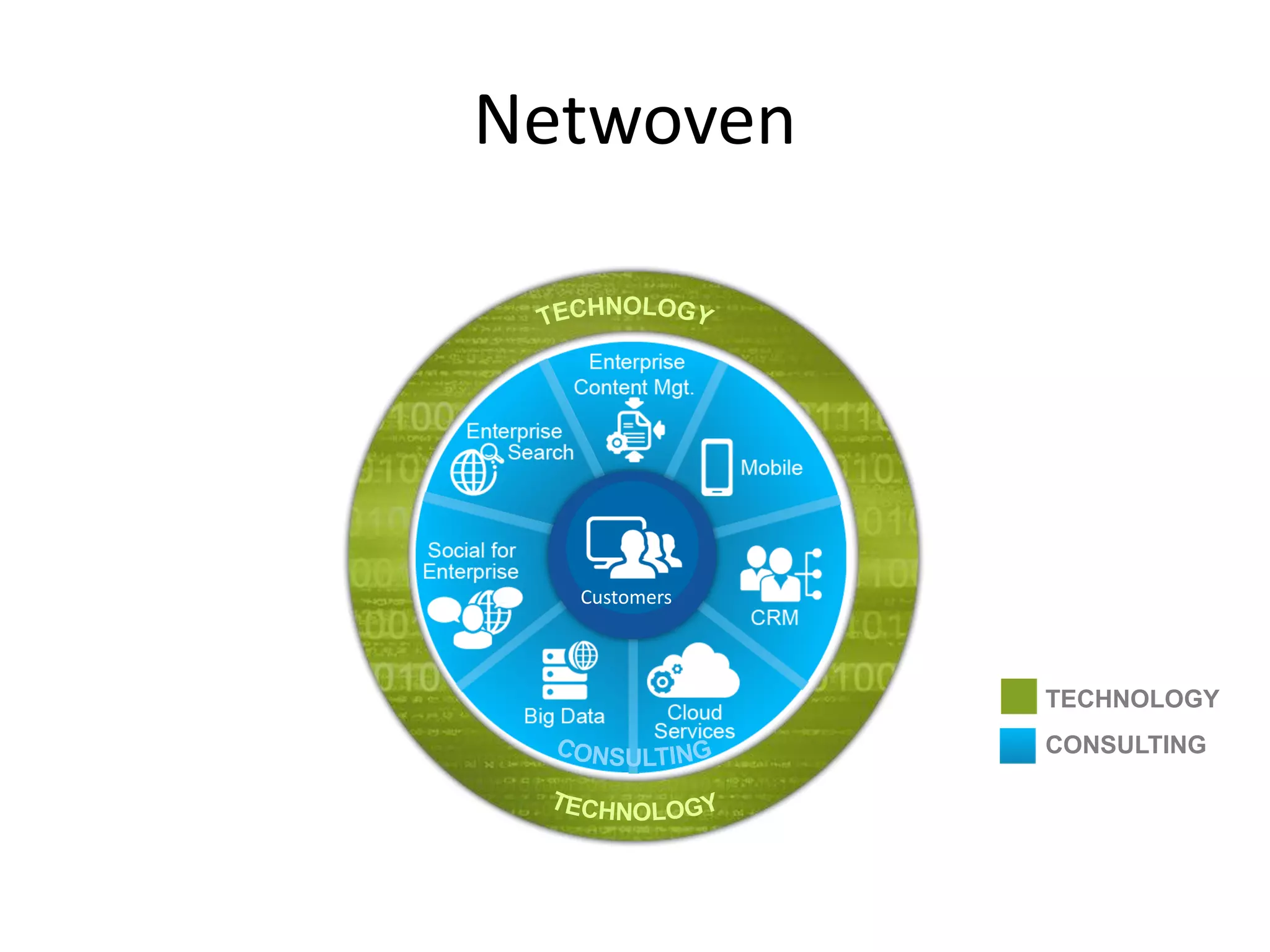
Netwoven
Customers
TECHNOLOGY
CONSULTING
Agenda
• Challenges and Goals
• Baseline Requirements
• Developer Scenarios
• Options
• Infrastructure Design
• Installations
• My Wish List
• Personal Experience
• Highlights
• Points to note
• Evolving
Quick Reflect Back
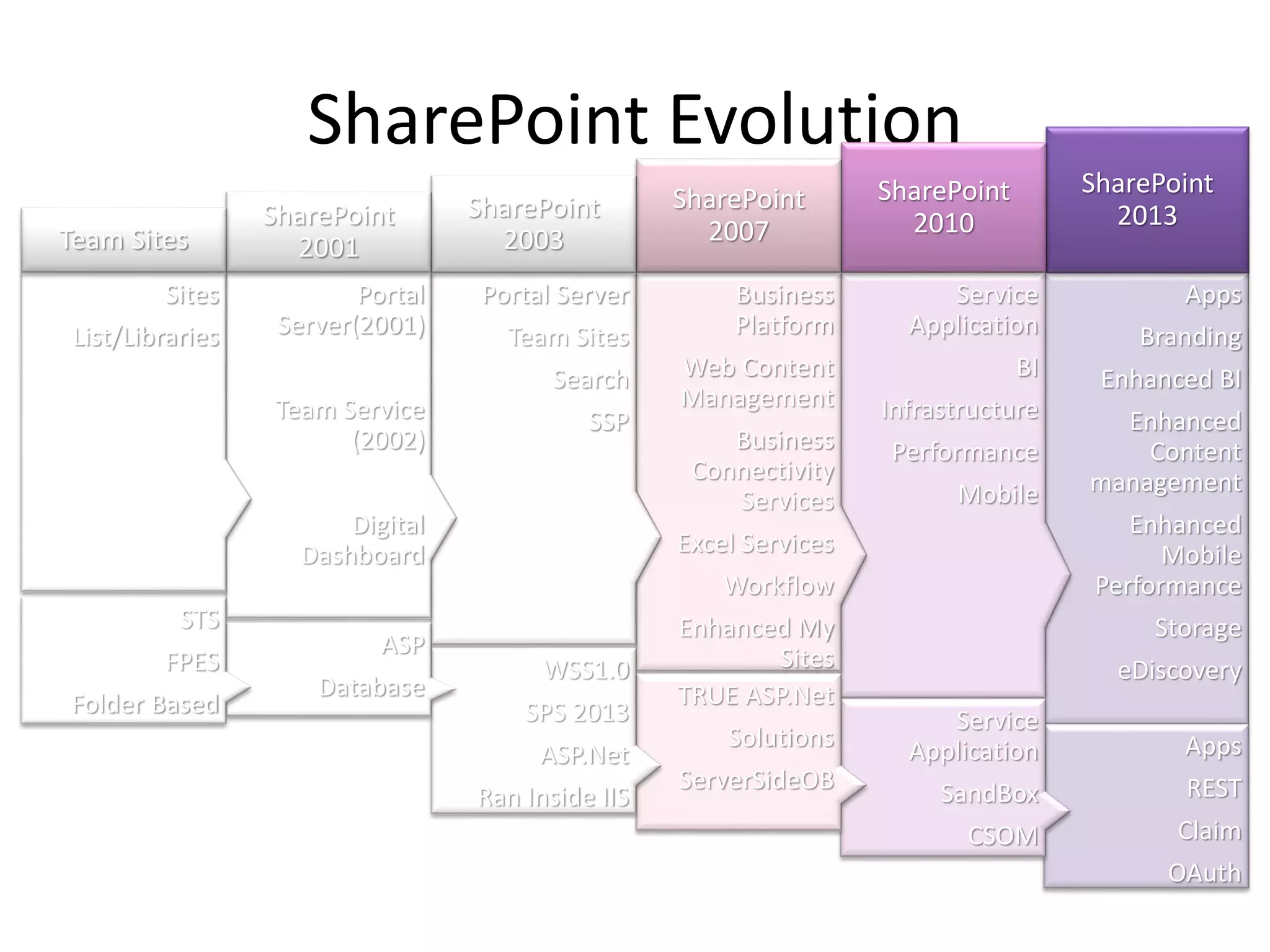
SharePoint Evolution
Apps
Branding
Enhanced BI
Enhanced
Content
management
Enhanced
Mobile
Performance
Storage
eDiscovery
SharePoint
2013
Service
Application
BI
Infrastructure
Performance
Mobile
SharePoint
2010
Business
Platform
Web Content
Management
Business
Connectivity
Services
Excel Services
Workflow
Enhanced My
Sites
SharePoint
2007
Portal Server
Team Sites
Search
SSP
SharePoint
2003
Portal
Server(2001)
Team Service
(2002)
Digital
Dashboard
SharePoint
2001
Sites
List/Libraries
Team Sites
Apps
REST
Claim
OAuth
Service
Application
SandBox
CSOM
TRUE ASP.Net
Solutions
ServerSideOB
WSS1.0
SPS 2013
ASP.Net
Ran Inside IIS
ASP
Database
STS
FPES
Folder Based
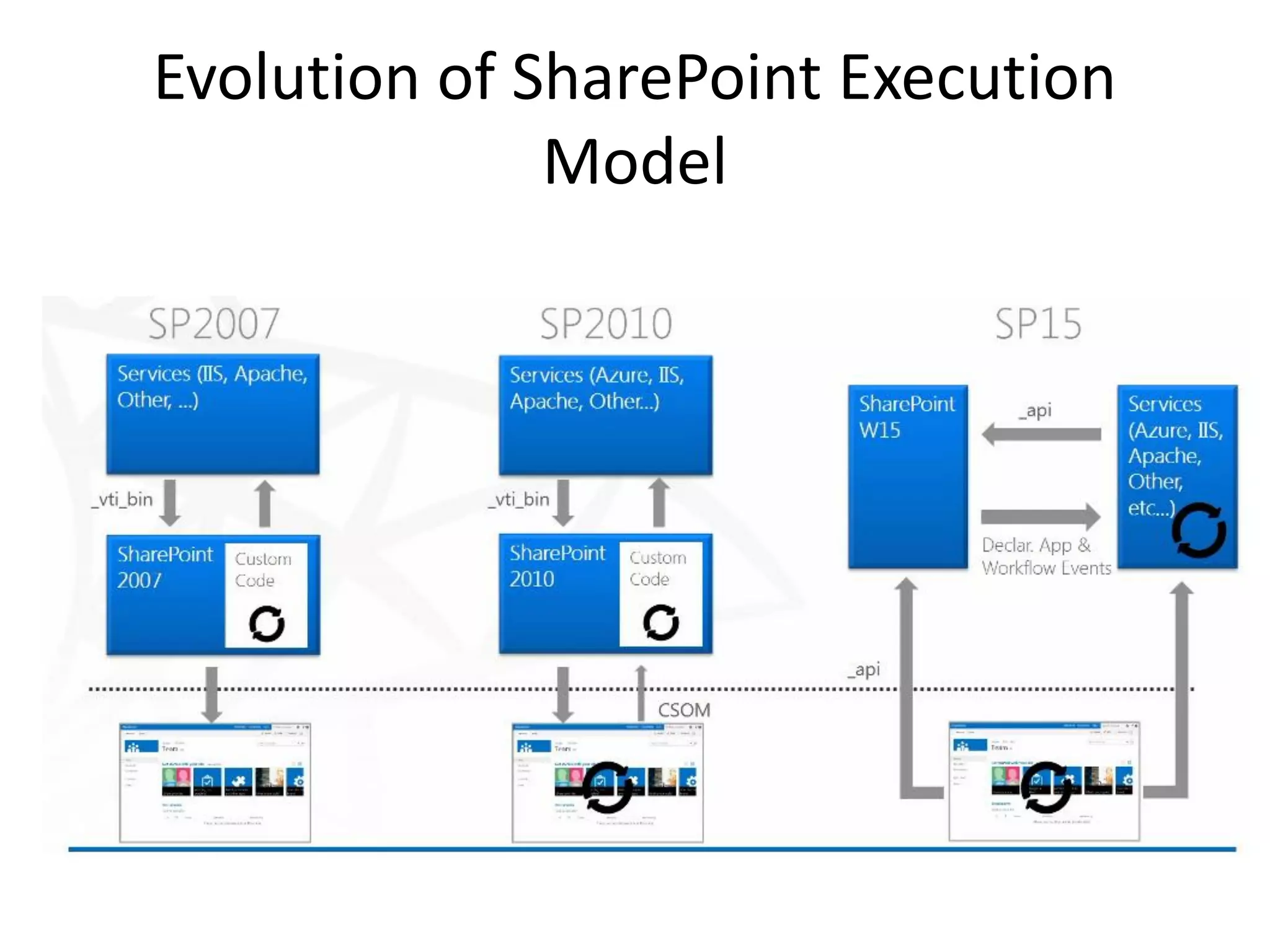
Evolution of SharePoint Execution
Model
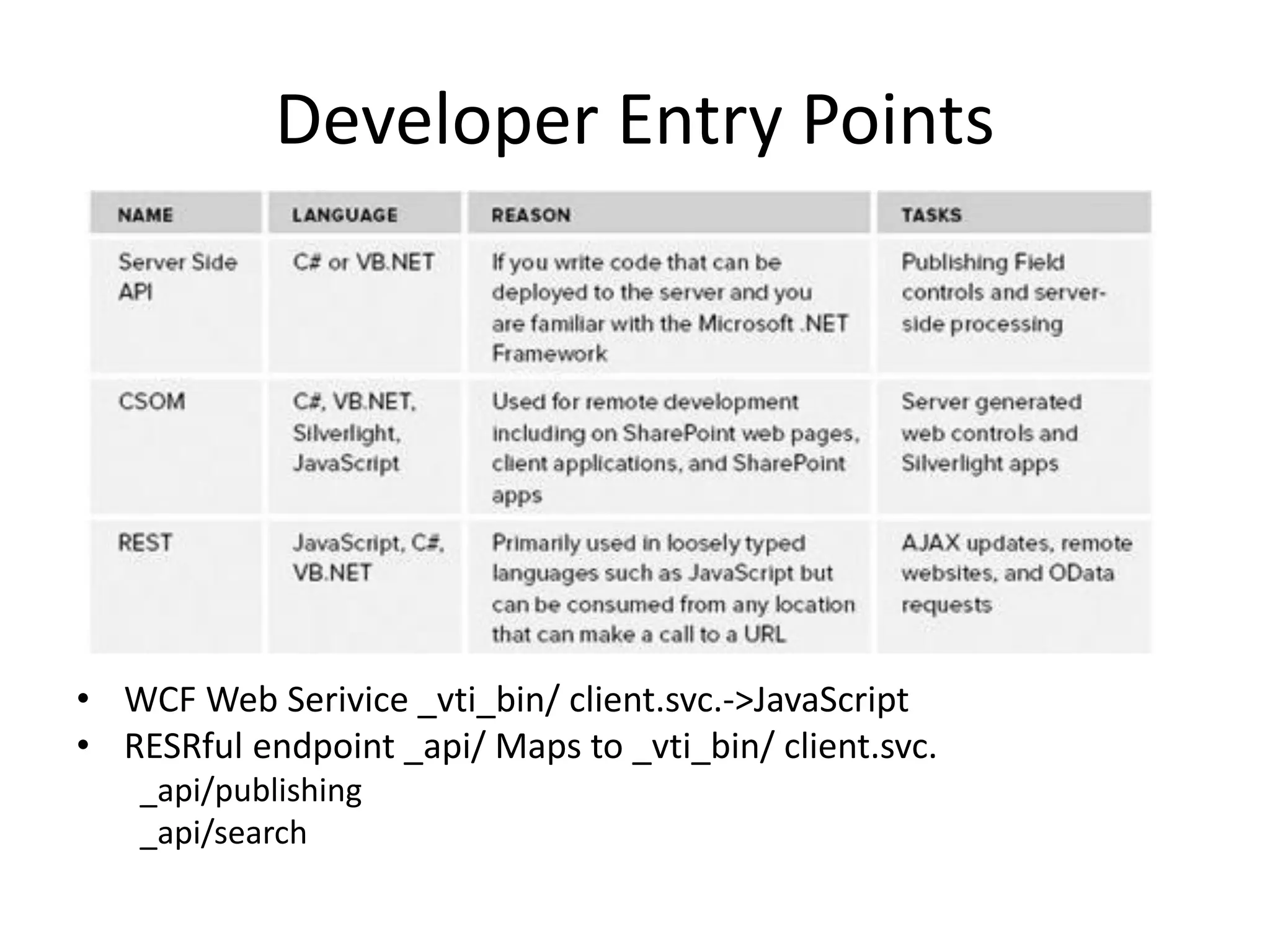
Developer Entry Points
• WCF Web Serivice _vti_bin/ client.svc.->JavaScript
• RESRful endpoint _api/ Maps to _vti_bin/ client.svc.
_api/publishing
_api/search
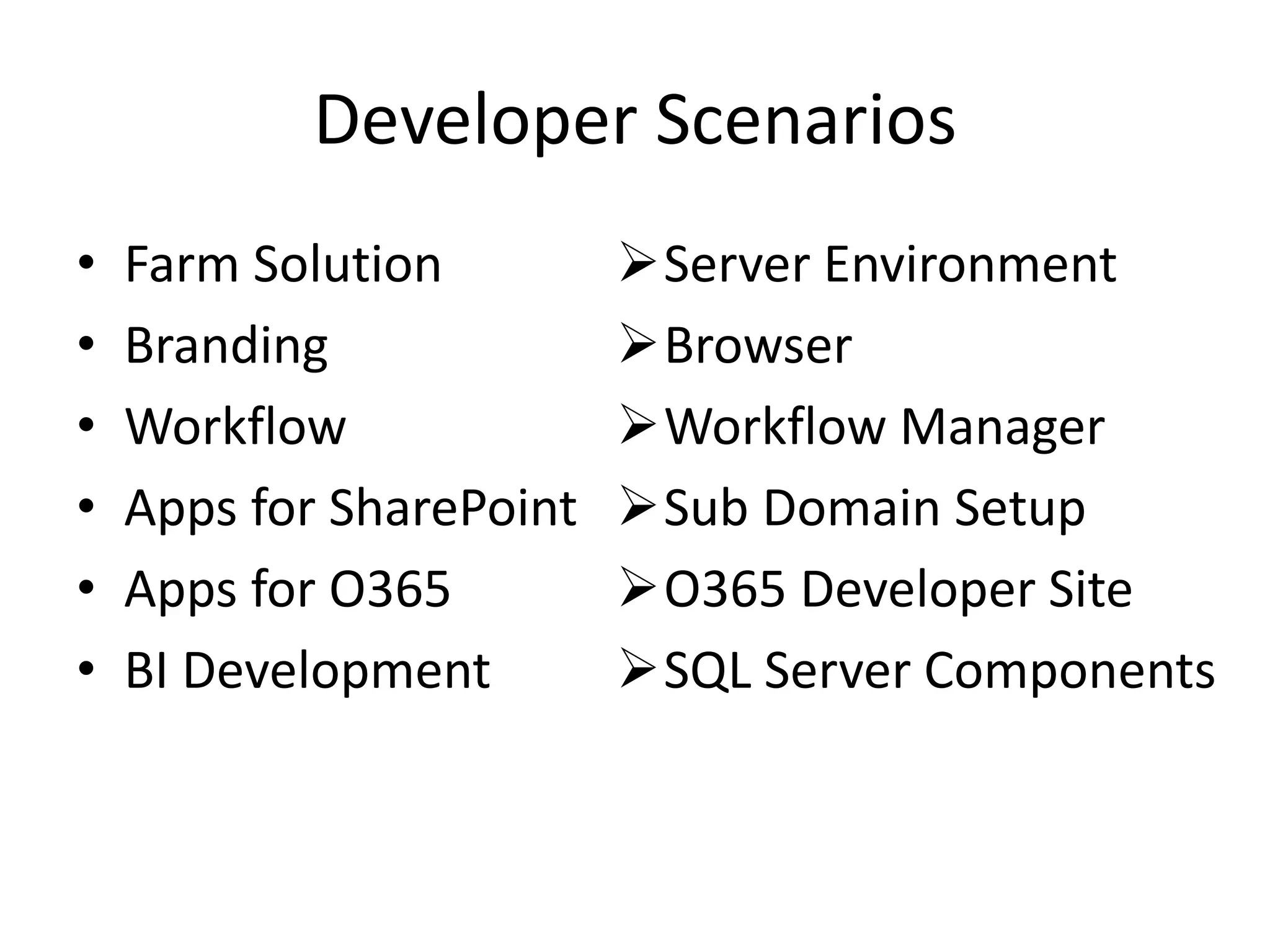
Developer Scenarios
• Farm Solution
• Branding
• Workflow
• Apps for SharePoint
• Apps for O365
• BI Development
Server Environment
Browser
Workflow Manager
Sub Domain Setup
O365 Developer Site
SQL Server Components
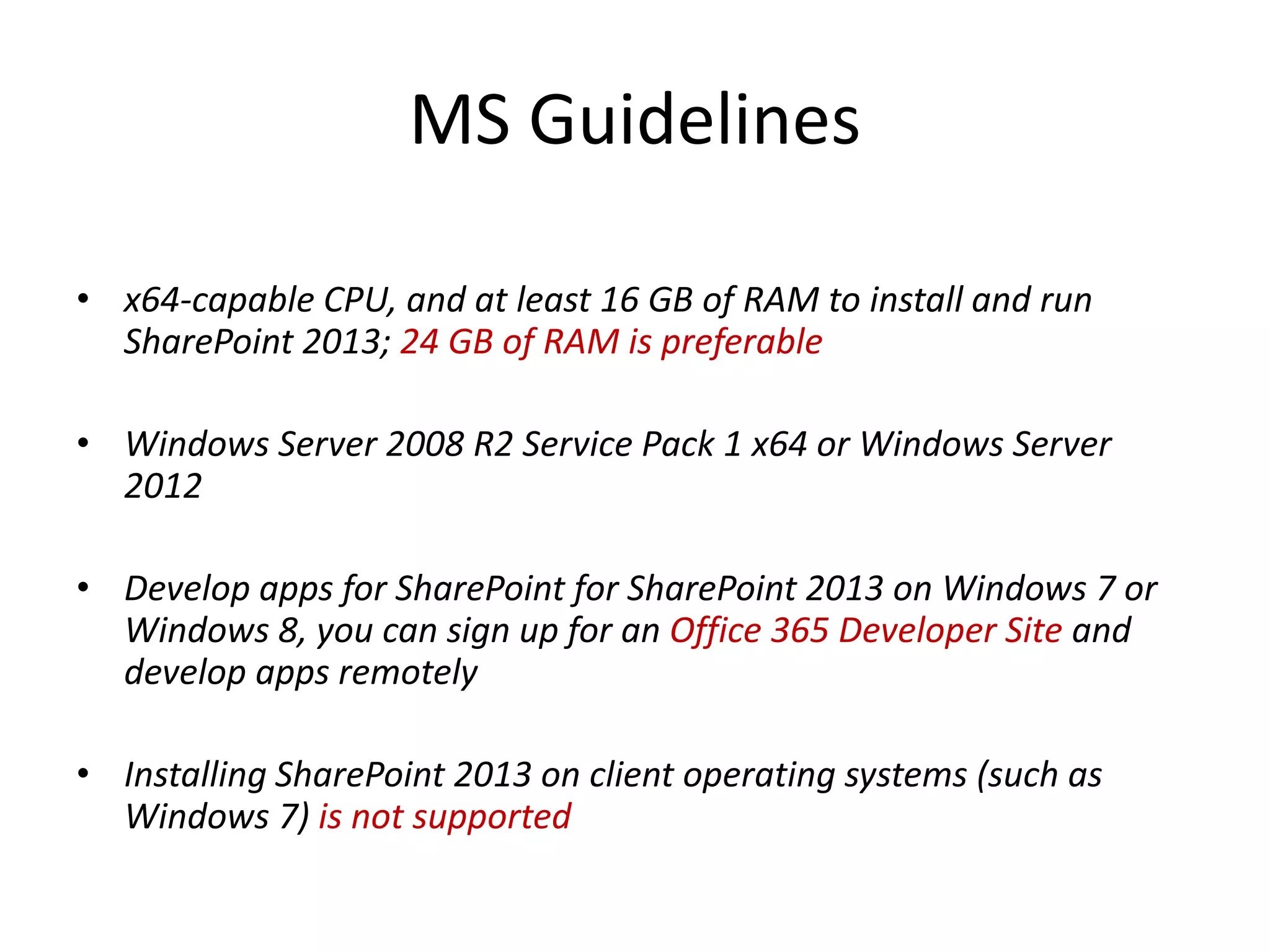
MS Guidelines
• x64-capable CPU, and at least 16 GB of RAM to install and run
SharePoint 2013; 24 GB of RAM is preferable
• Windows Server 2008 R2 Service Pack 1 x64 or Windows Server
2012
• Develop apps for SharePoint for SharePoint 2013 on Windows 7 or
Windows 8, you can sign up for an Office 365 Developer Site and
develop apps remotely
• Installing SharePoint 2013 on client operating systems (such as
Windows 7) is not supported
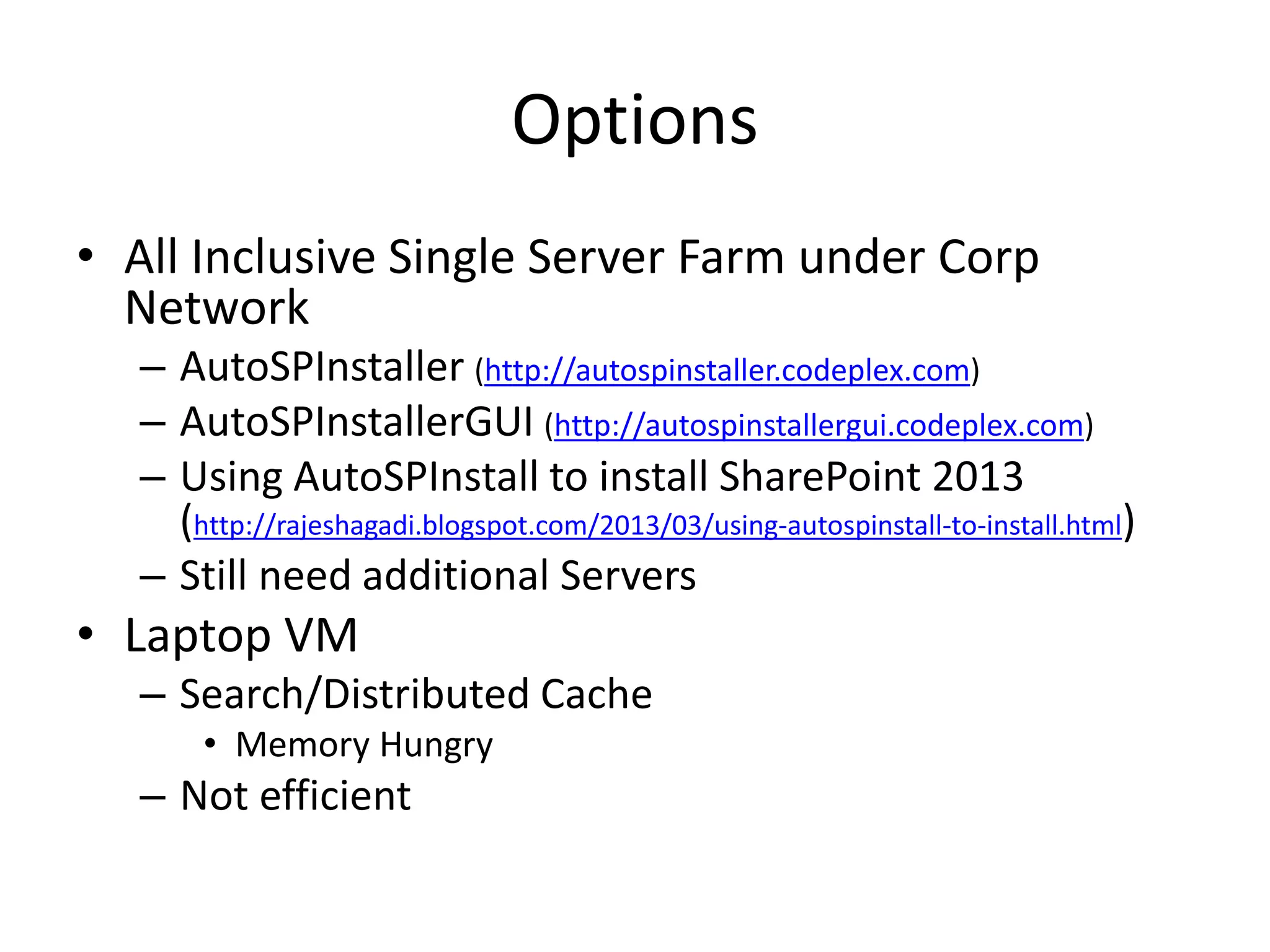
Options
• All Inclusive Single Server Farm under Corp
Network
– AutoSPInstaller (http://autospinstaller.codeplex.com)
– AutoSPInstallerGUI (http://autospinstallergui.codeplex.com)
– Using AutoSPInstall to install SharePoint 2013
(http://rajeshagadi.blogspot.com/2013/03/using-autospinstall-to-install.html)
– Still need additional Servers
• Laptop VM
– Search/Distributed Cache
• Memory Hungry
– Not efficient
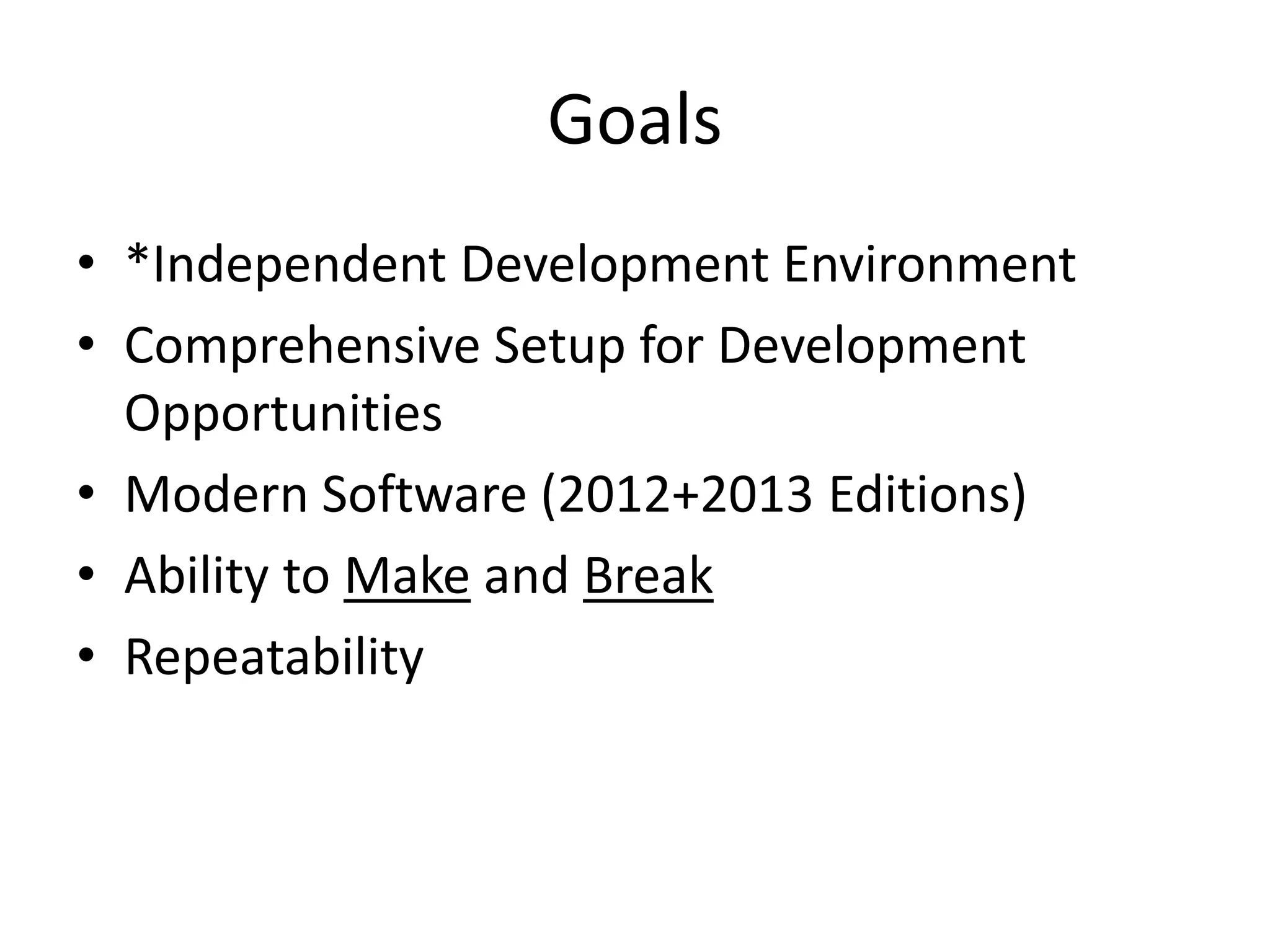
Goals
• *Independent Development Environment
• Comprehensive Setup for Development
Opportunities
• Modern Software (2012+2013 Editions)
• Ability to Make and Break
• Repeatability
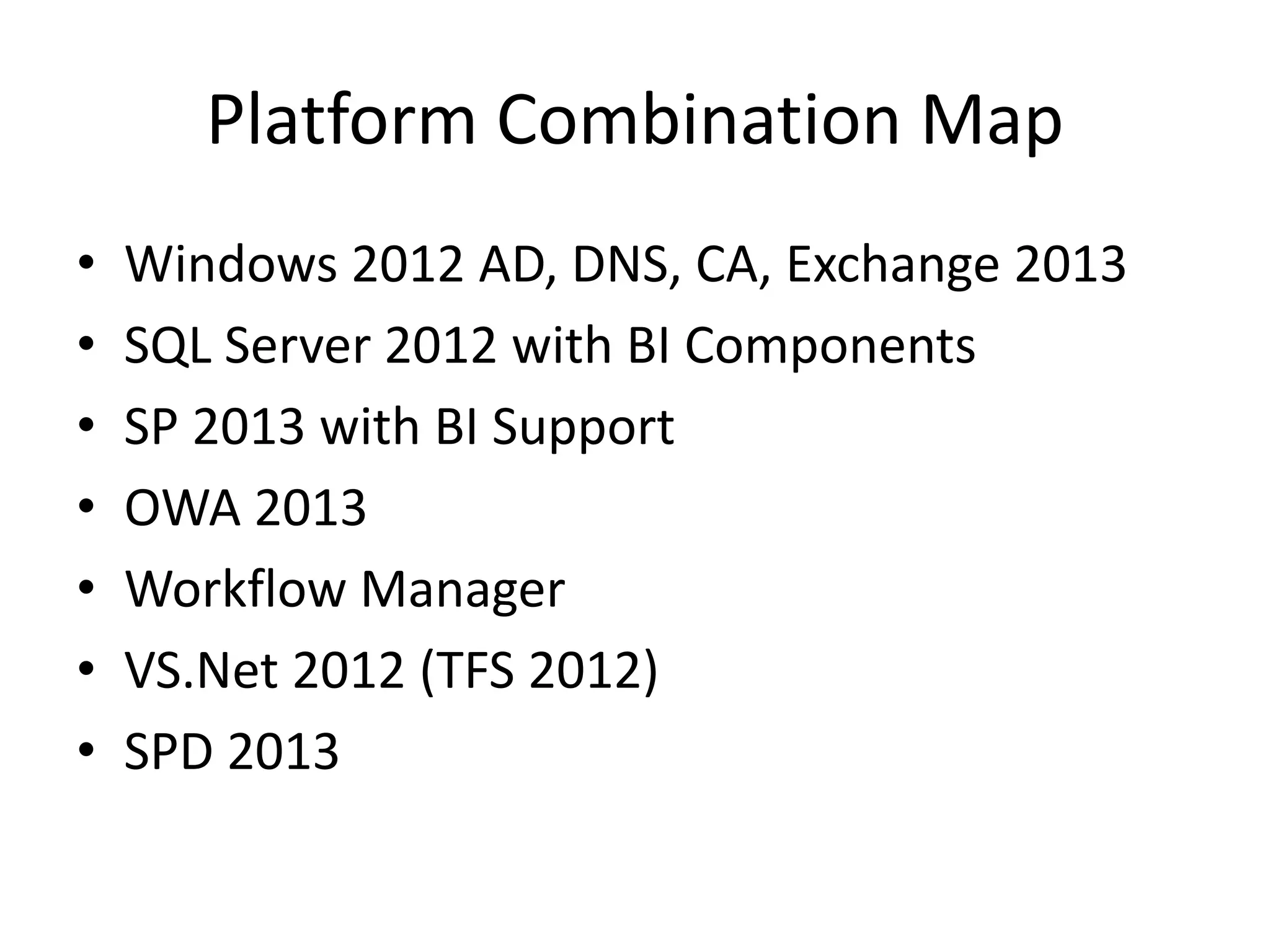
Platform Combination Map
• Windows 2012 AD, DNS, CA, Exchange 2013
• SQL Server 2012 with BI Components
• SP 2013 with BI Support
• OWA 2013
• Workflow Manager
• VS.Net 2012 (TFS 2012)
• SPD 2013
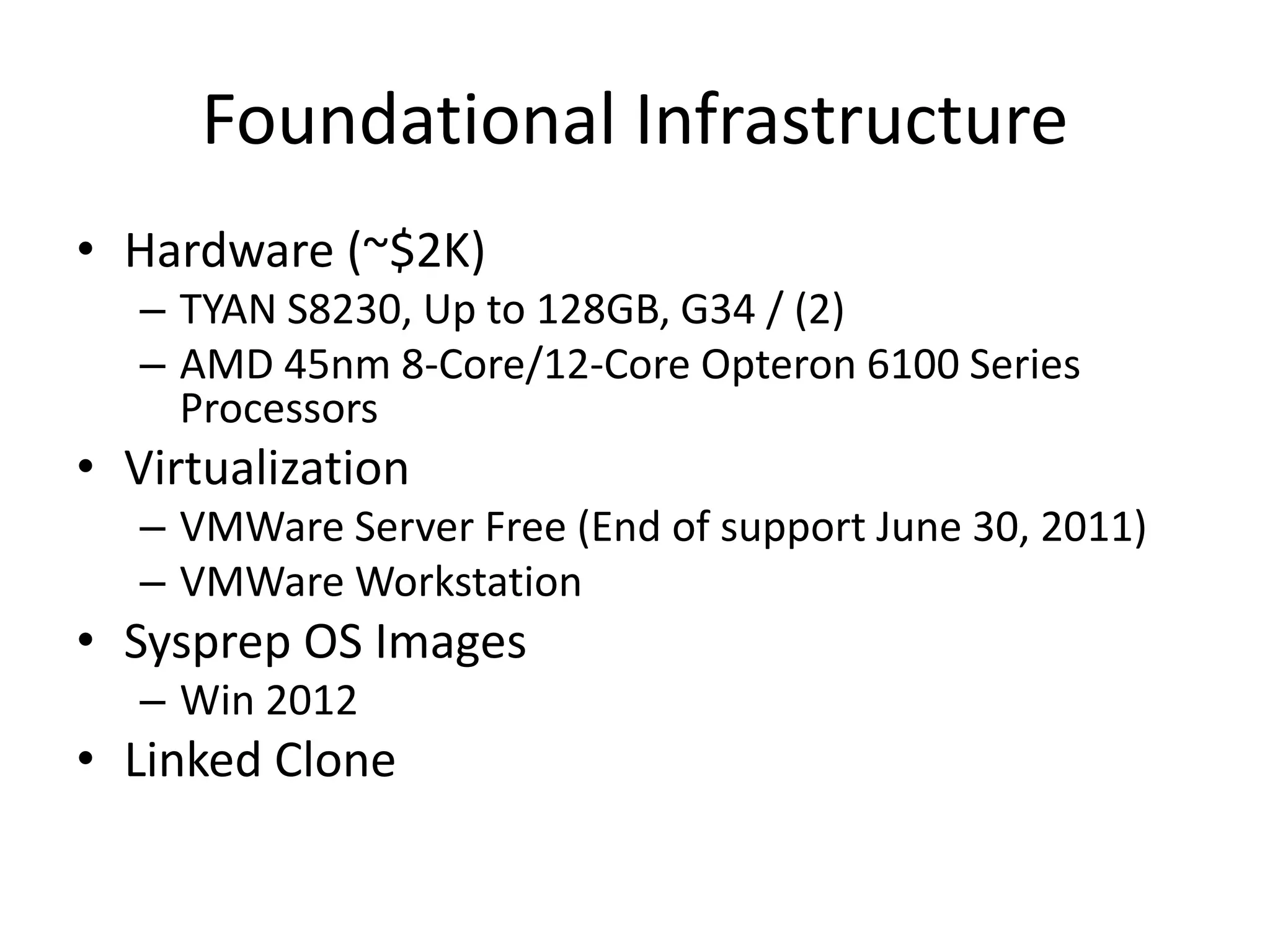
Foundational Infrastructure
• Hardware (~$2K)
– TYAN S8230, Up to 128GB, G34 / (2)
– AMD 45nm 8-Core/12-Core Opteron 6100 Series
Processors
• Virtualization
– VMWare Server Free (End of support June 30, 2011)
– VMWare Workstation
• Sysprep OS Images
– Win 2012
• Linked Clone
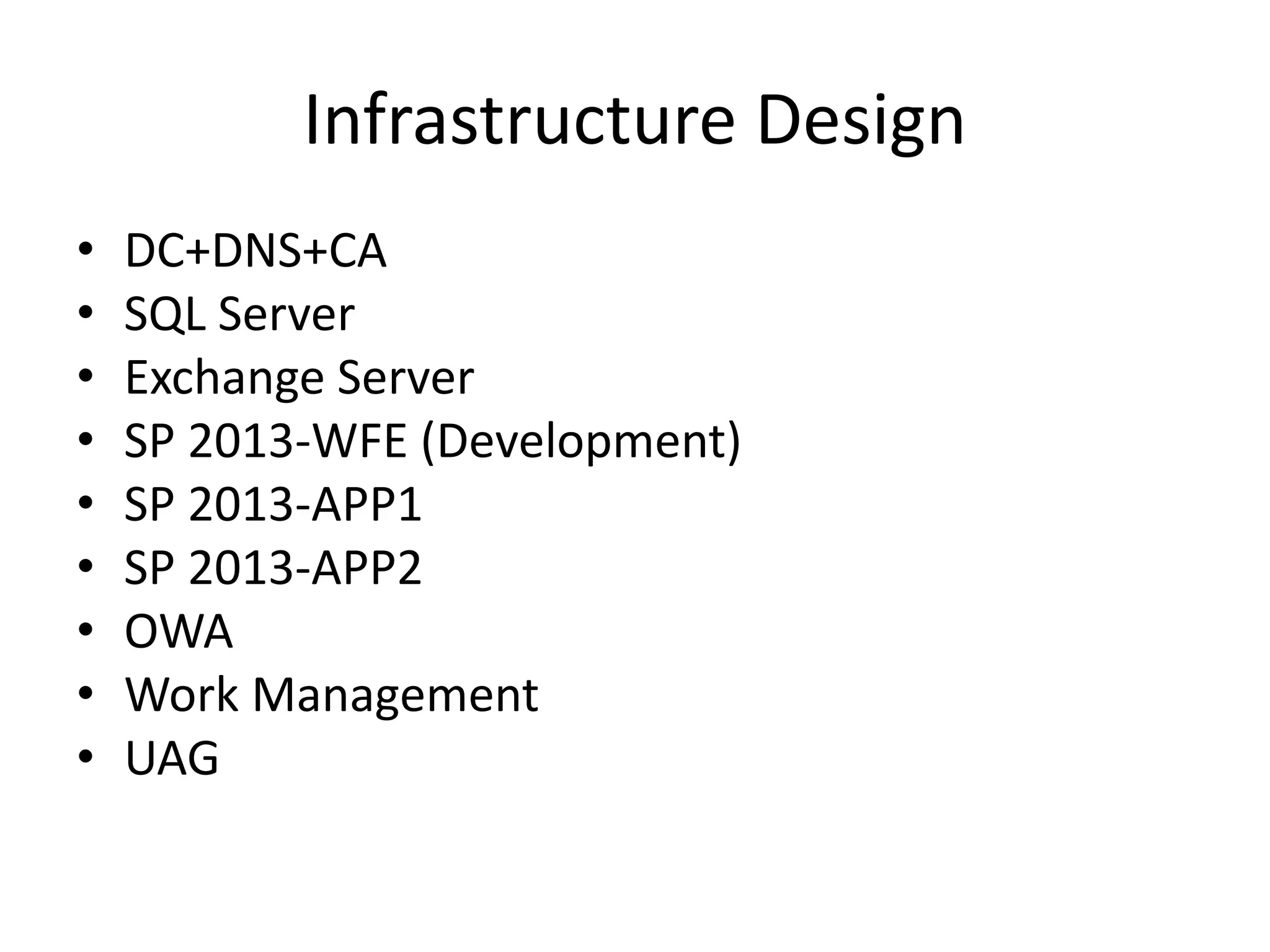
Infrastructure Design
• DC+DNS+CA
• SQL Server
• Exchange Server
• SP 2013-WFE (Development)
• SP 2013-APP1
• SP 2013-APP2
• OWA
• Work Management
• UAG
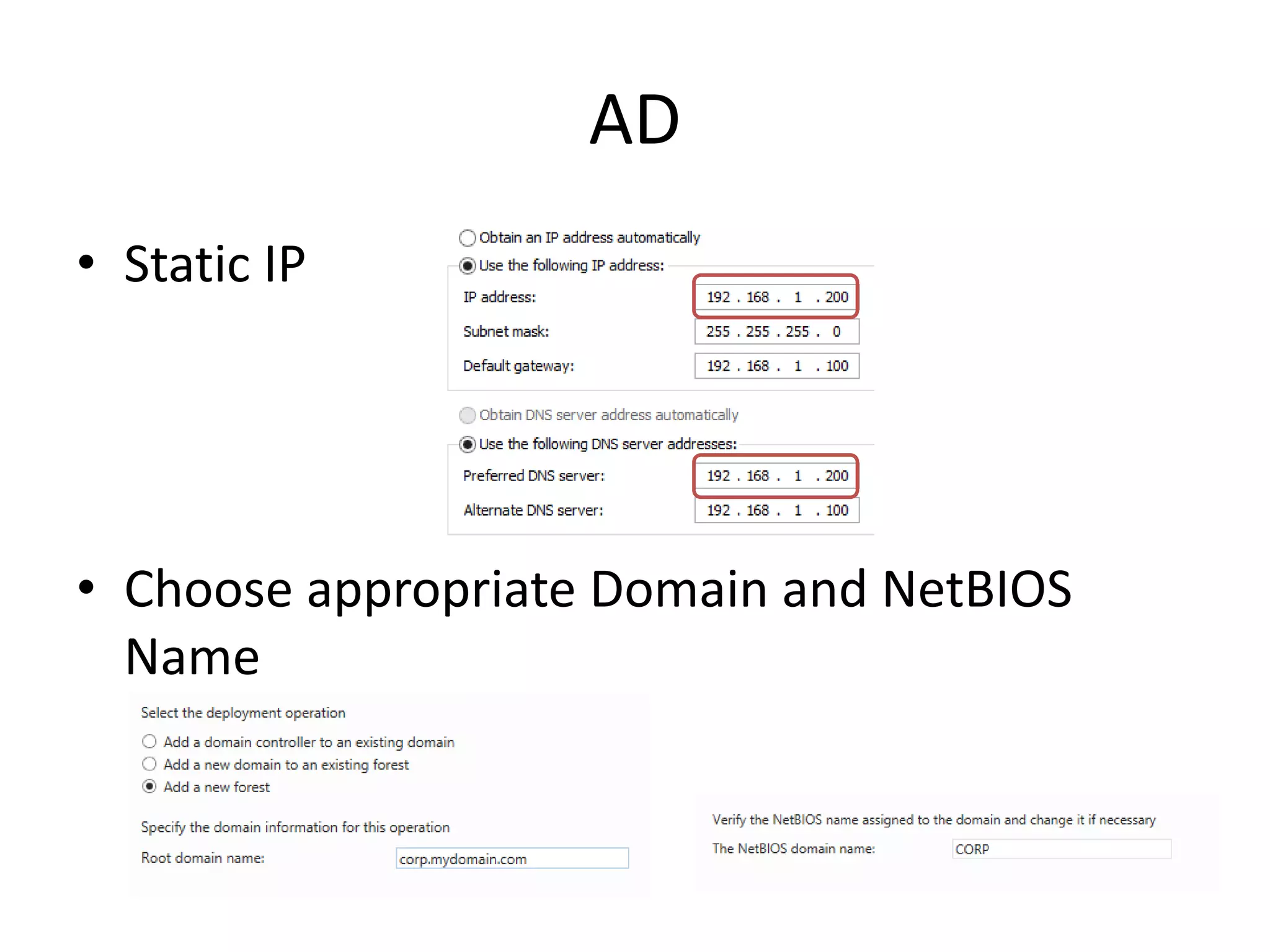
AD
• Static IP
• Choose appropriate Domain and NetBIOS
Name
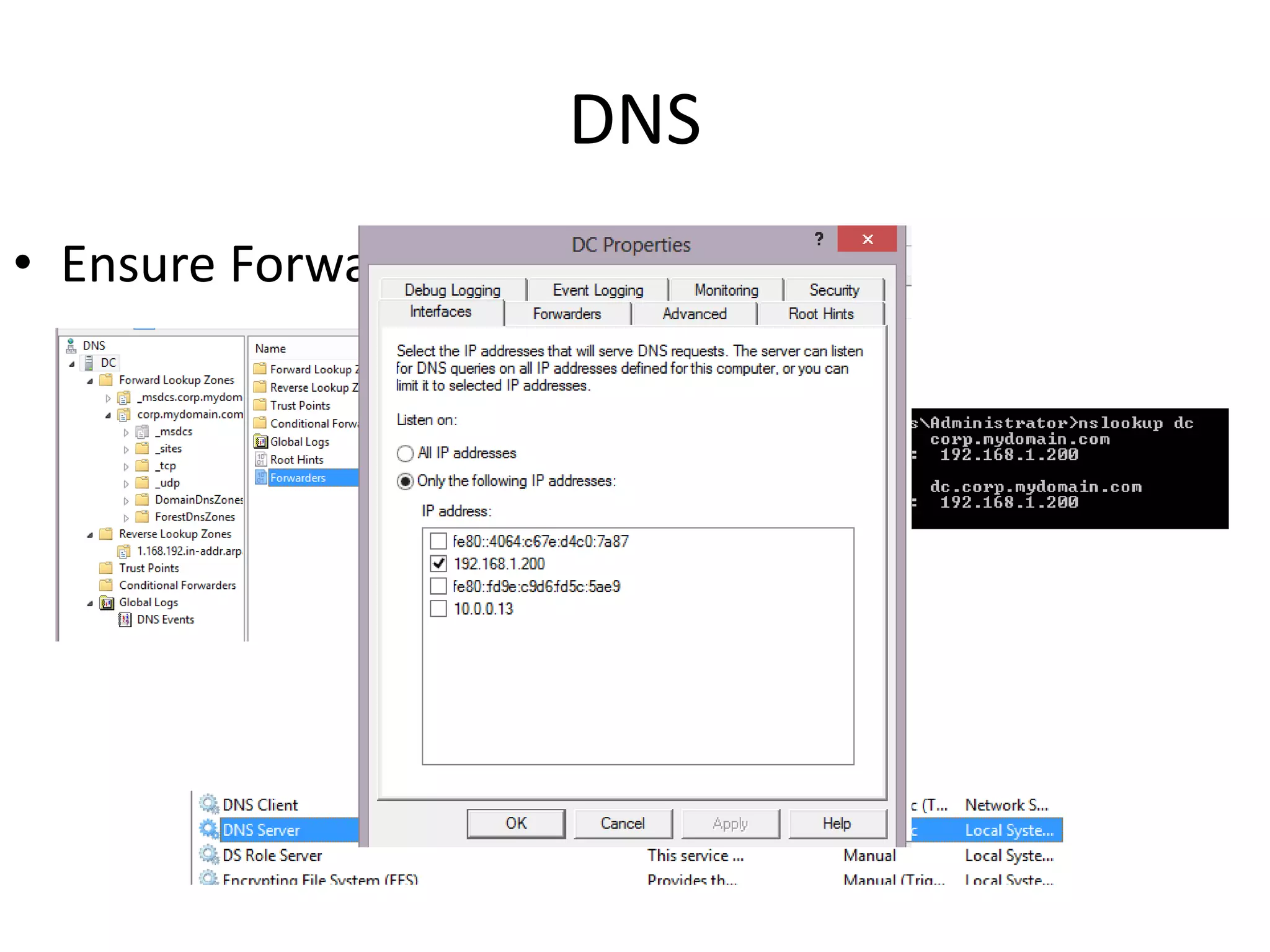
DNS
• Ensure Forwarders are in place
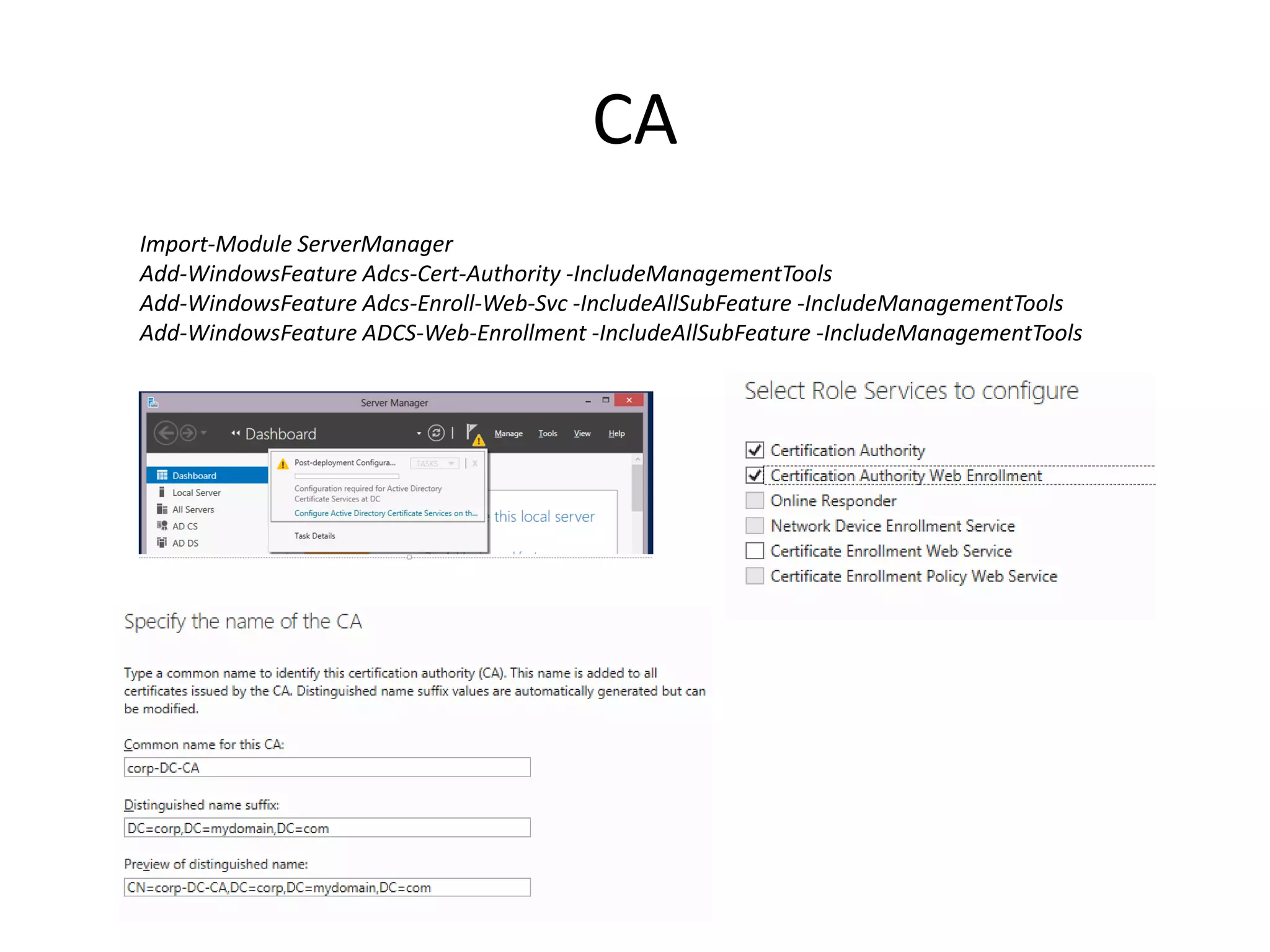
CA
Import-Module ServerManager
Add-WindowsFeature Adcs-Cert-Authority -IncludeManagementTools
Add-WindowsFeature Adcs-Enroll-Web-Svc -IncludeAllSubFeature -IncludeManagementTools
Add-WindowsFeature ADCS-Web-Enrollment -IncludeAllSubFeature -IncludeManagementTools
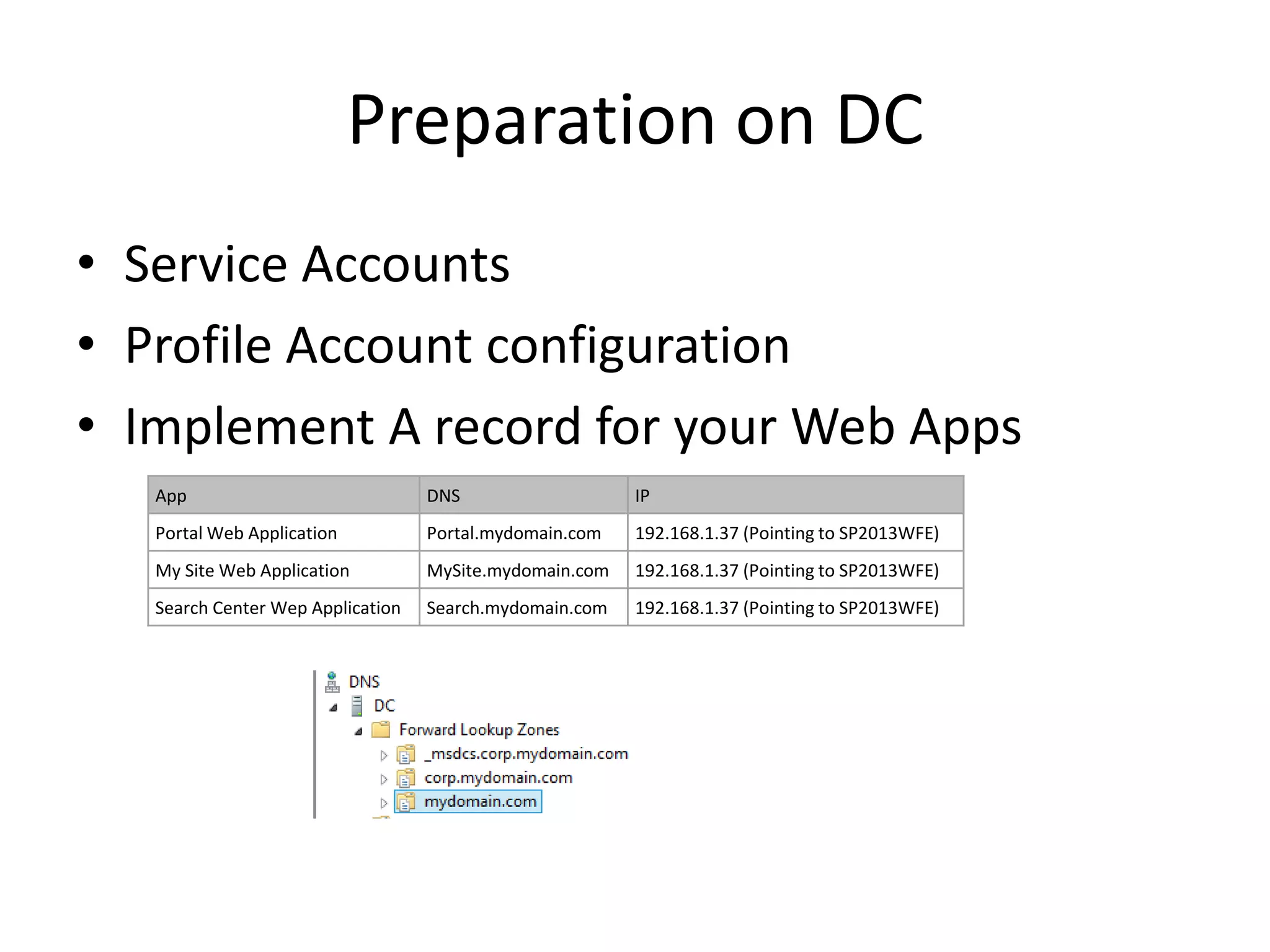
Preparation on DC
• Service Accounts
• Profile Account configuration
• Implement A record for your Web Apps
App DNS IP
Portal Web Application Portal.mydomain.com 192.168.1.37 (Pointing to SP2013WFE)
My Site Web Application MySite.mydomain.com 192.168.1.37 (Pointing to SP2013WFE)
Search Center Wep Application Search.mydomain.com 192.168.1.37 (Pointing to SP2013WFE)
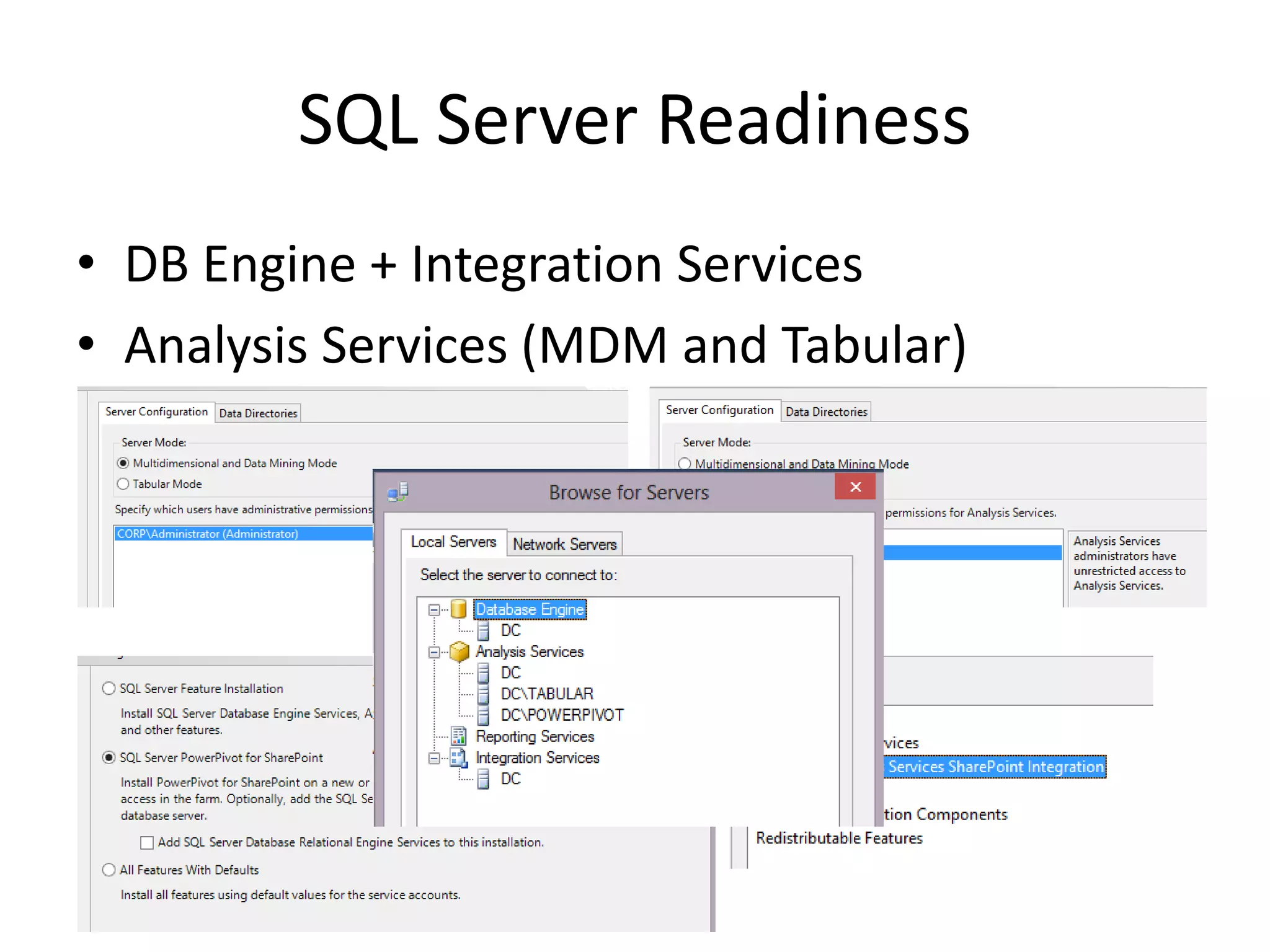
SQL Server Readiness
• DB Engine + Integration Services
• Analysis Services (MDM and Tabular)
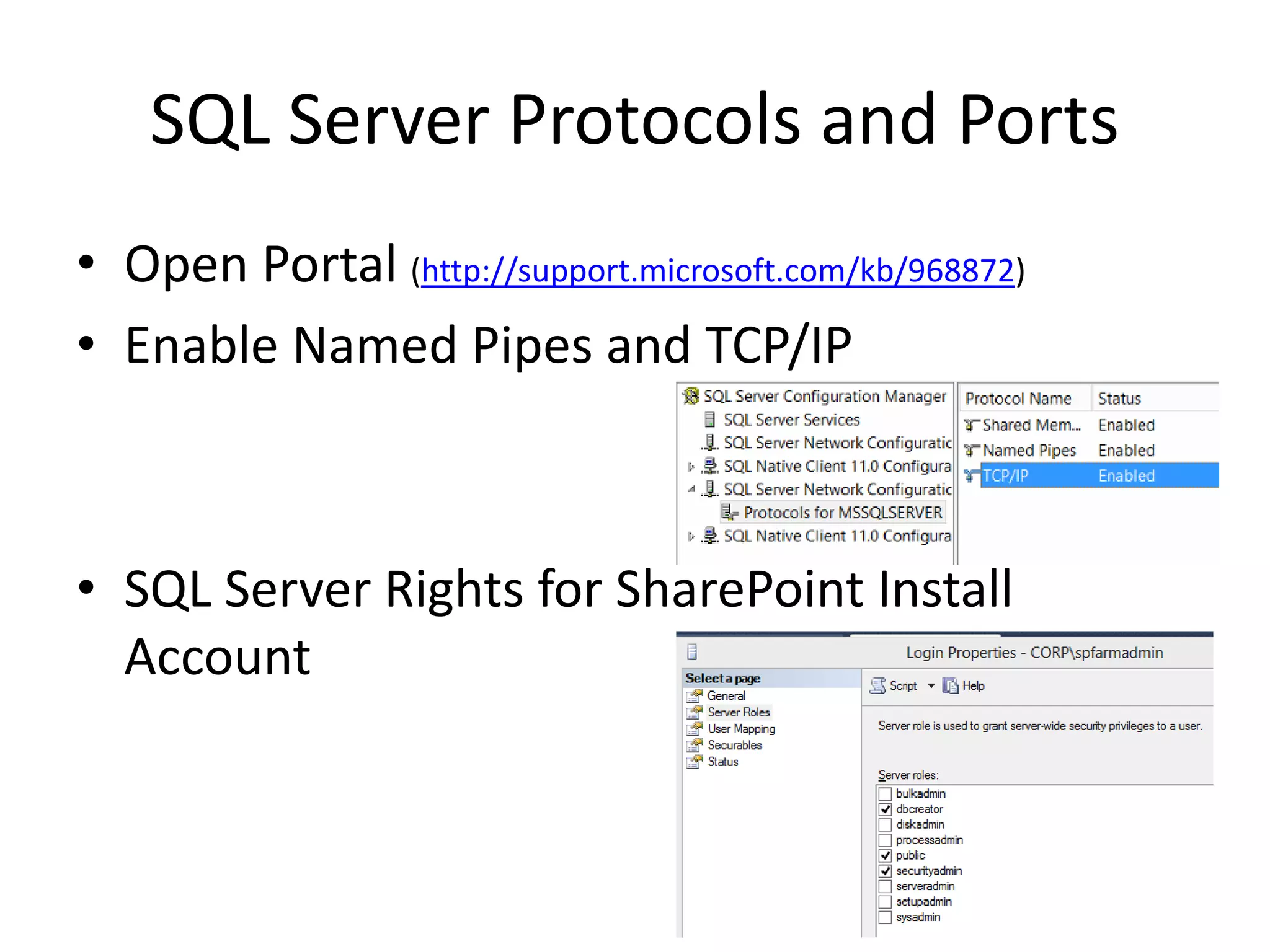
SQL Server Protocols and Ports
• Open Portal (http://support.microsoft.com/kb/968872)
• Enable Named Pipes and TCP/IP
• SQL Server Rights for SharePoint Install
Account
SharePoint Servers Readiness
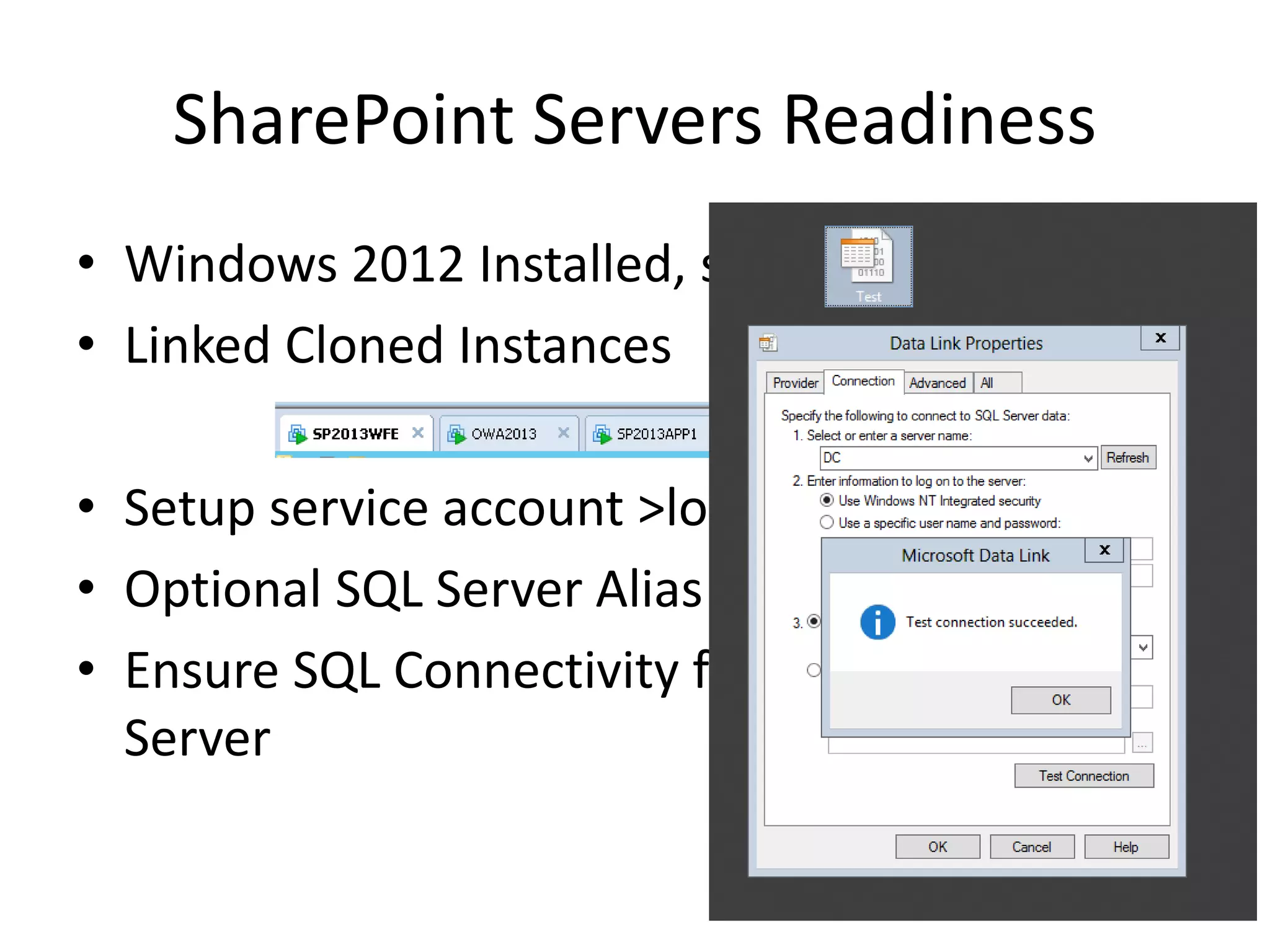
• Windows 2012 Installed, syspreped.
• Linked Cloned Instances
• Setup service account >local administrator.
• Optional SQL Server Alias
• Ensure SQL Connectivity from SharePoint
Server
SharePoint Software Readiness
• SP2013 RTM + March 2013 PU Slipstreamed
• April/June 2013 CU separate Install (No Slipstream)
• Complete Install
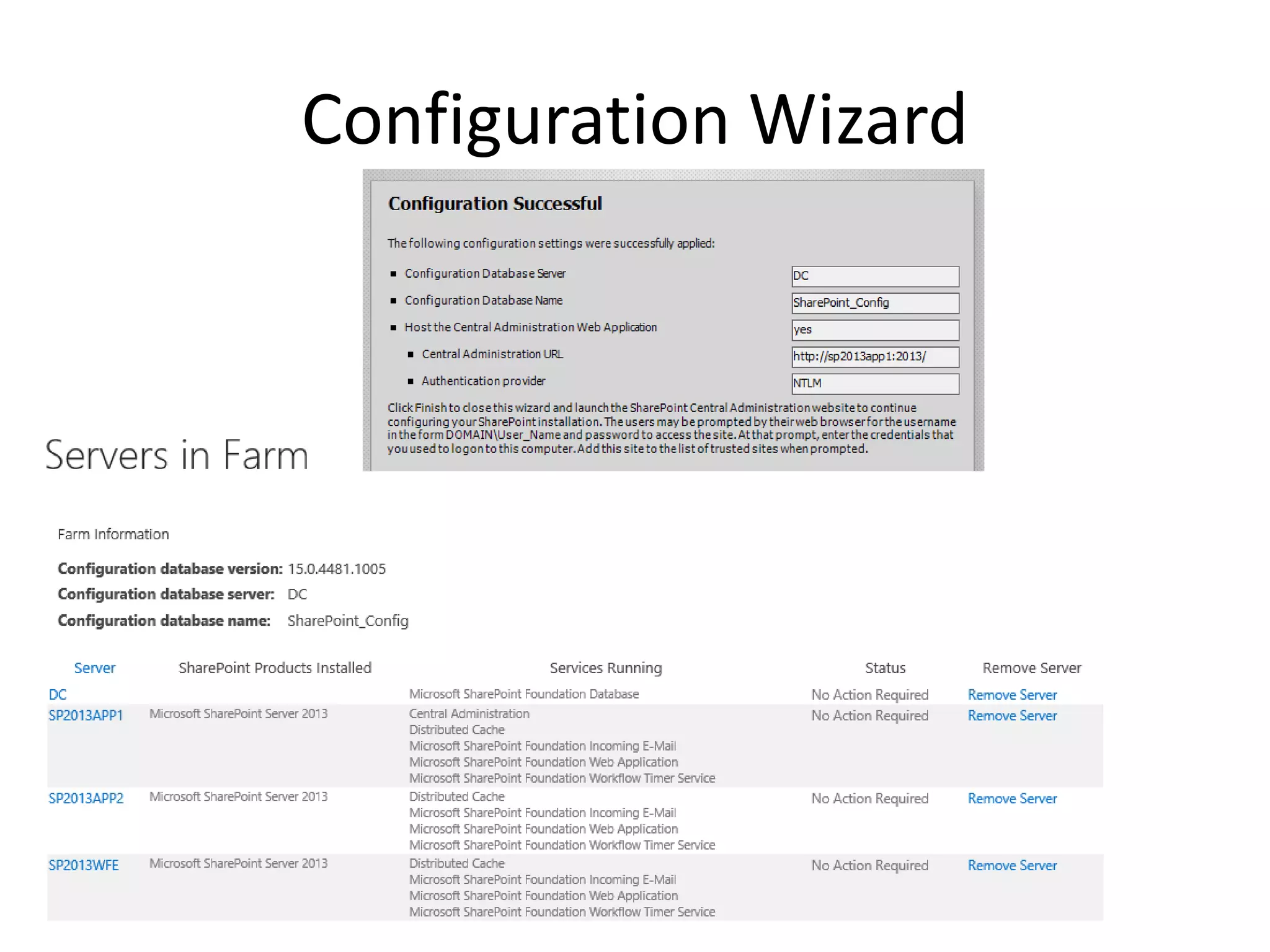
Configuration Wizard
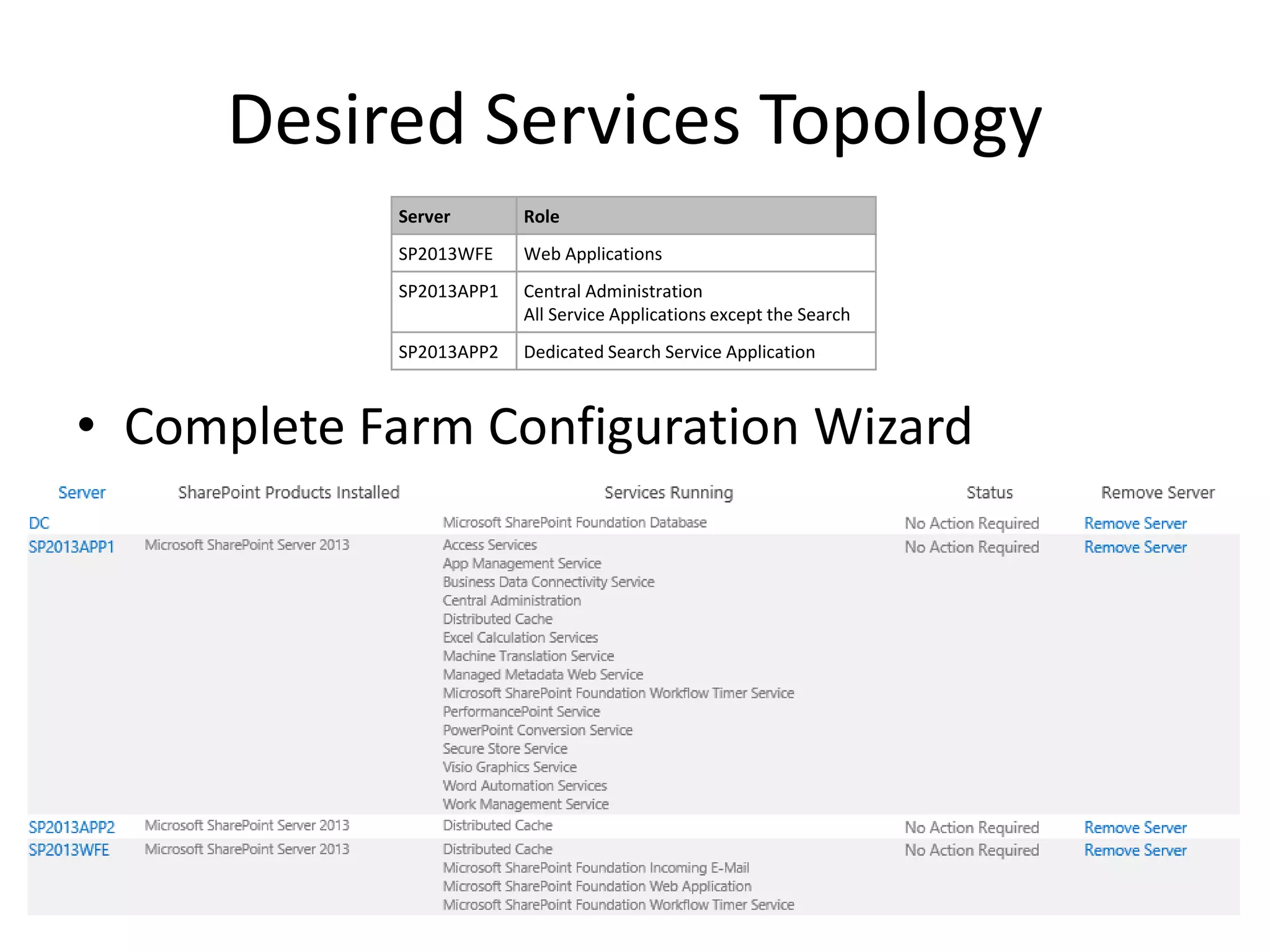
Desired Services Topology
• Complete Farm Configuration Wizard
Server Role
SP2013WFE Web Applications
SP2013APP1 Central Administration
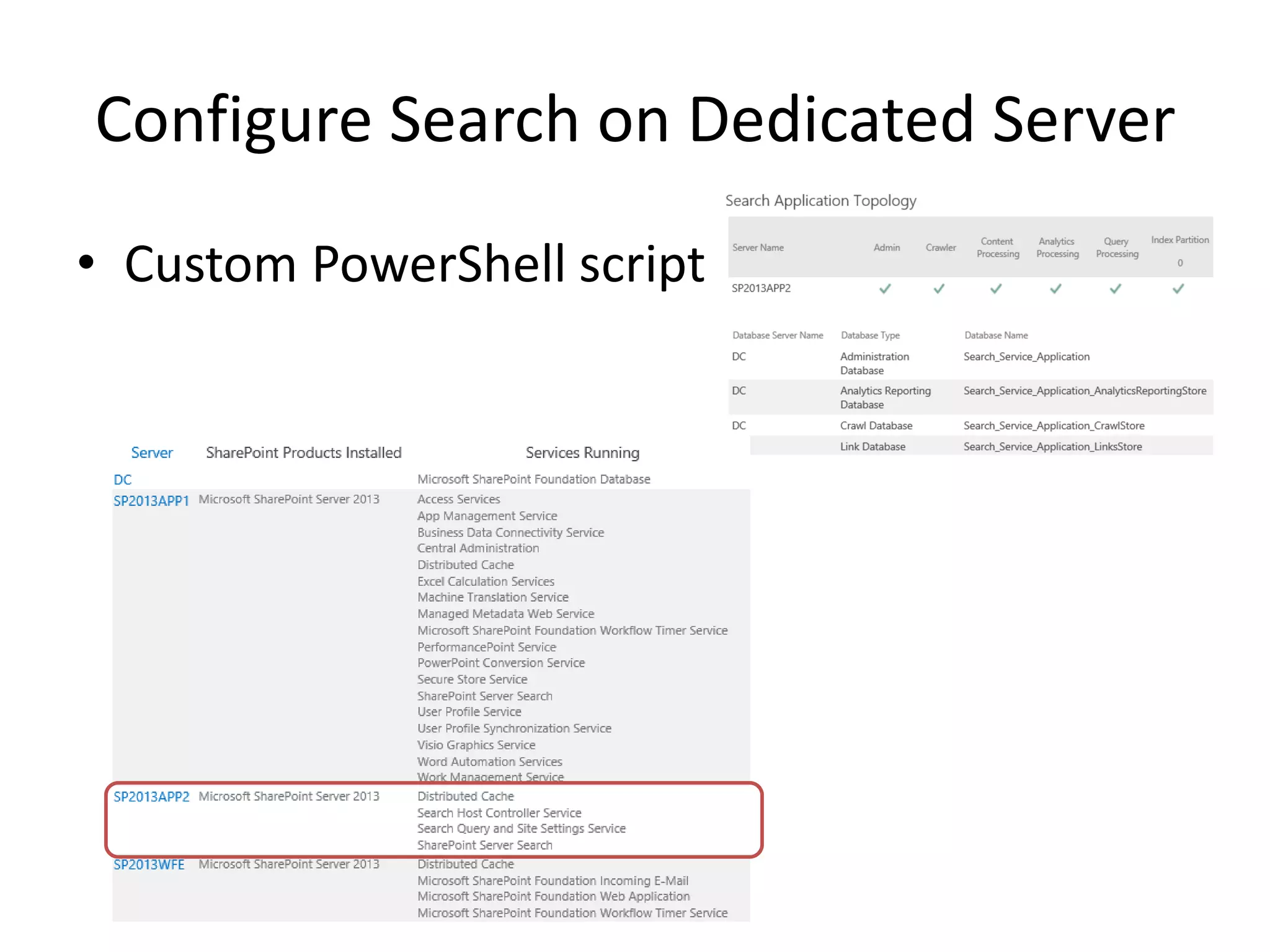
All Service Applications except the Search
SP2013APP2 Dedicated Search Service Application
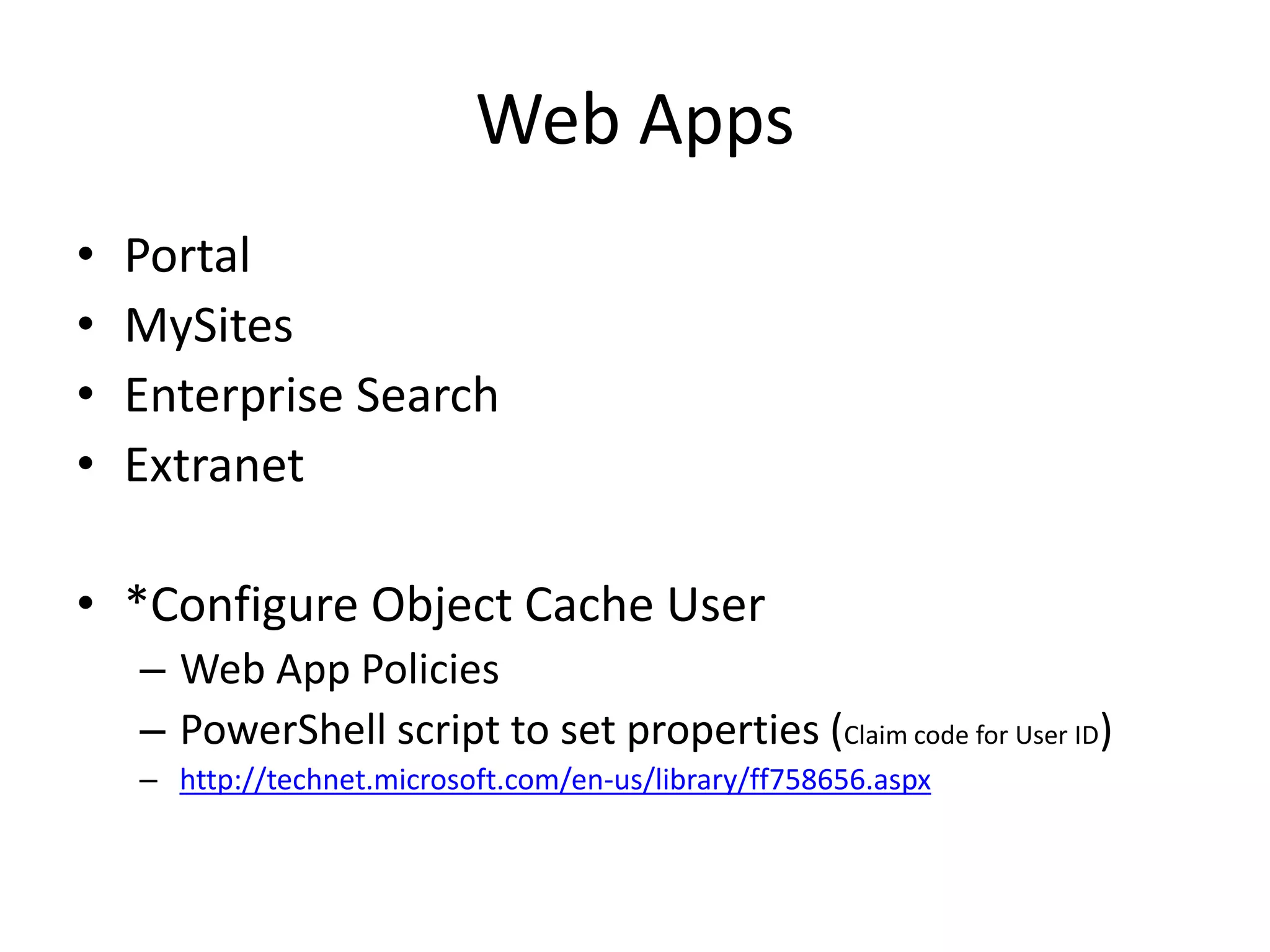
Web Apps
• Portal
• MySites
• Enterprise Search
• Extranet
• *Configure Object Cache User
– Web App Policies
– PowerShell script to set properties (Claim code for User ID)
– http://technet.microsoft.com/en-us/library/ff758656.aspx
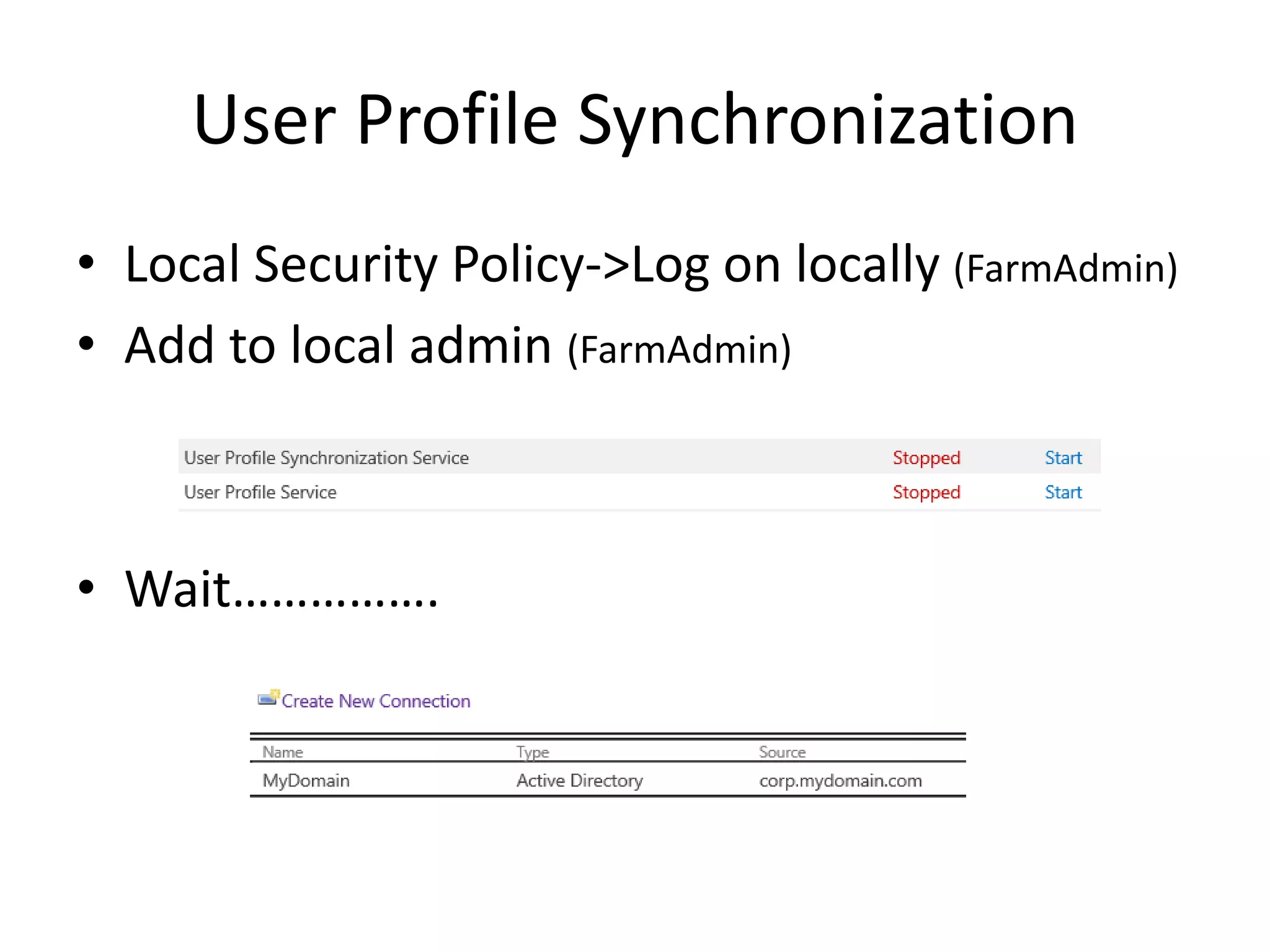
User Profile Synchronization
• Local Security Policy->Log on locally (FarmAdmin)
• Add to local admin (FarmAdmin)
• Wait…………….
Configure Search on Dedicated Server
• Custom PowerShell script
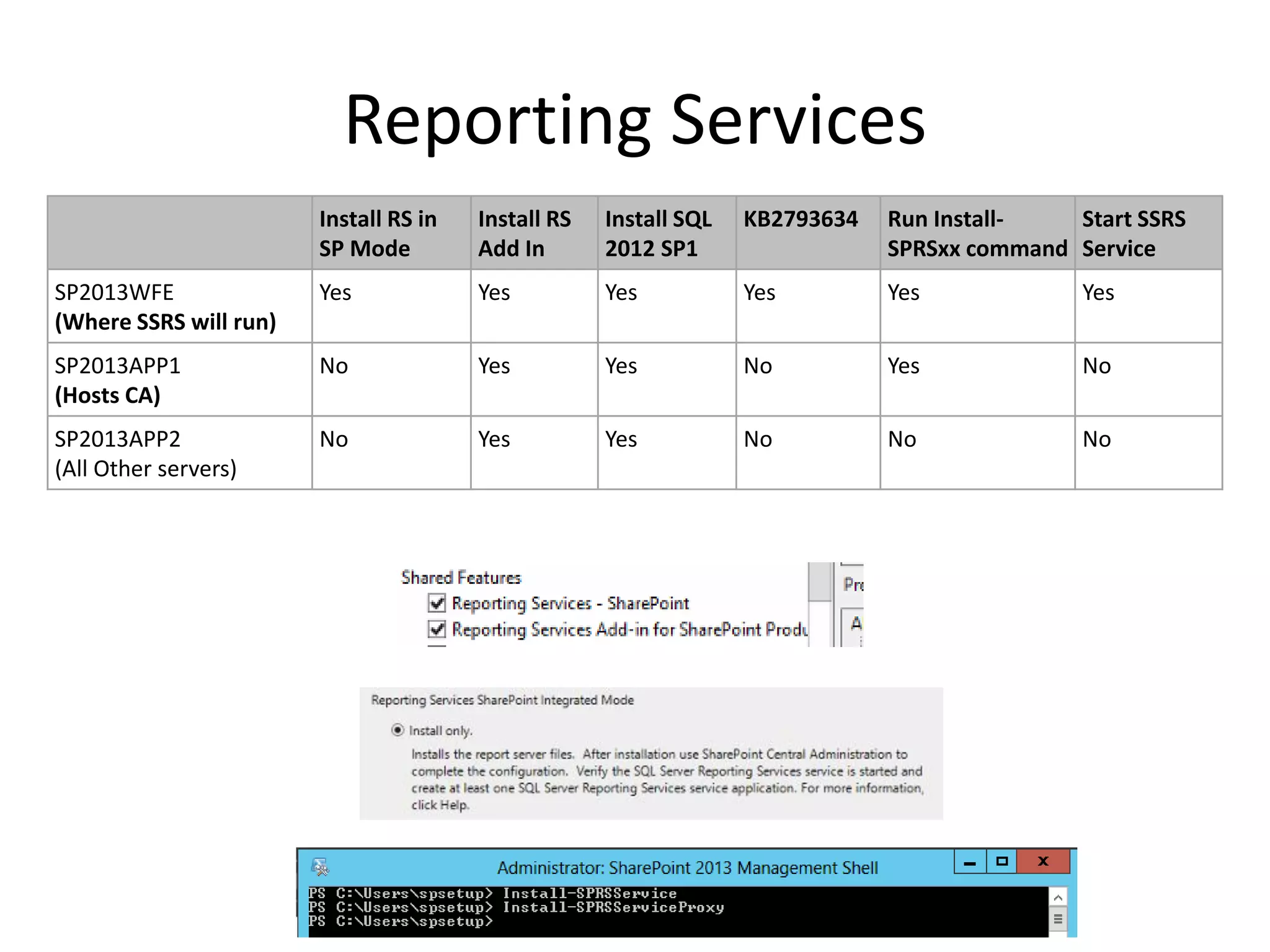
Reporting Services
Install RS in
SP Mode
Install RS
Add In
Install SQL
2012 SP1
KB2793634 Run Install-
SPRSxx command
Start SSRS
Service
SP2013WFE
(Where SSRS will run)
Yes Yes Yes Yes Yes Yes
SP2013APP1
(Hosts CA)
No Yes Yes No Yes No
SP2013APP2
(All Other servers)
No Yes Yes No No No
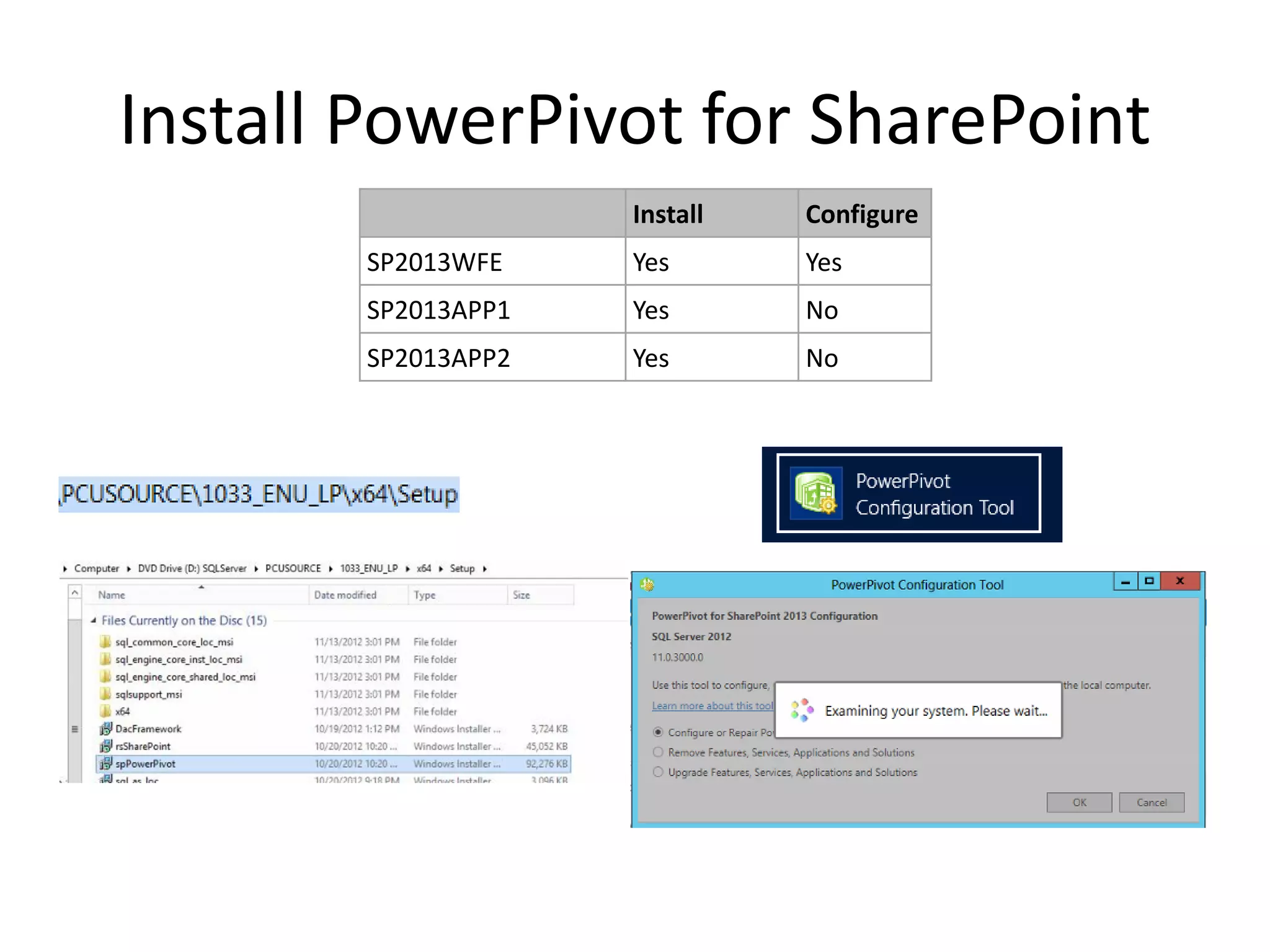
Install PowerPivot for SharePoint
Install Configure
SP2013WFE Yes Yes
SP2013APP1 Yes No
SP2013APP2 Yes No
Office Web Apps 2013
1. Install OOTB + CU
2. New OWA Farm PowerShell cmdlet
3. SP Farm binding with OWA Farm cmdLet
• *http(s)
• Browser Compatibility Issues
• False Office Compatibility error message
• Beware of Excel OWA do not support Excel Data
Connections (Excel Web App Web Part)
• Use Document Edit option to use Rich Client
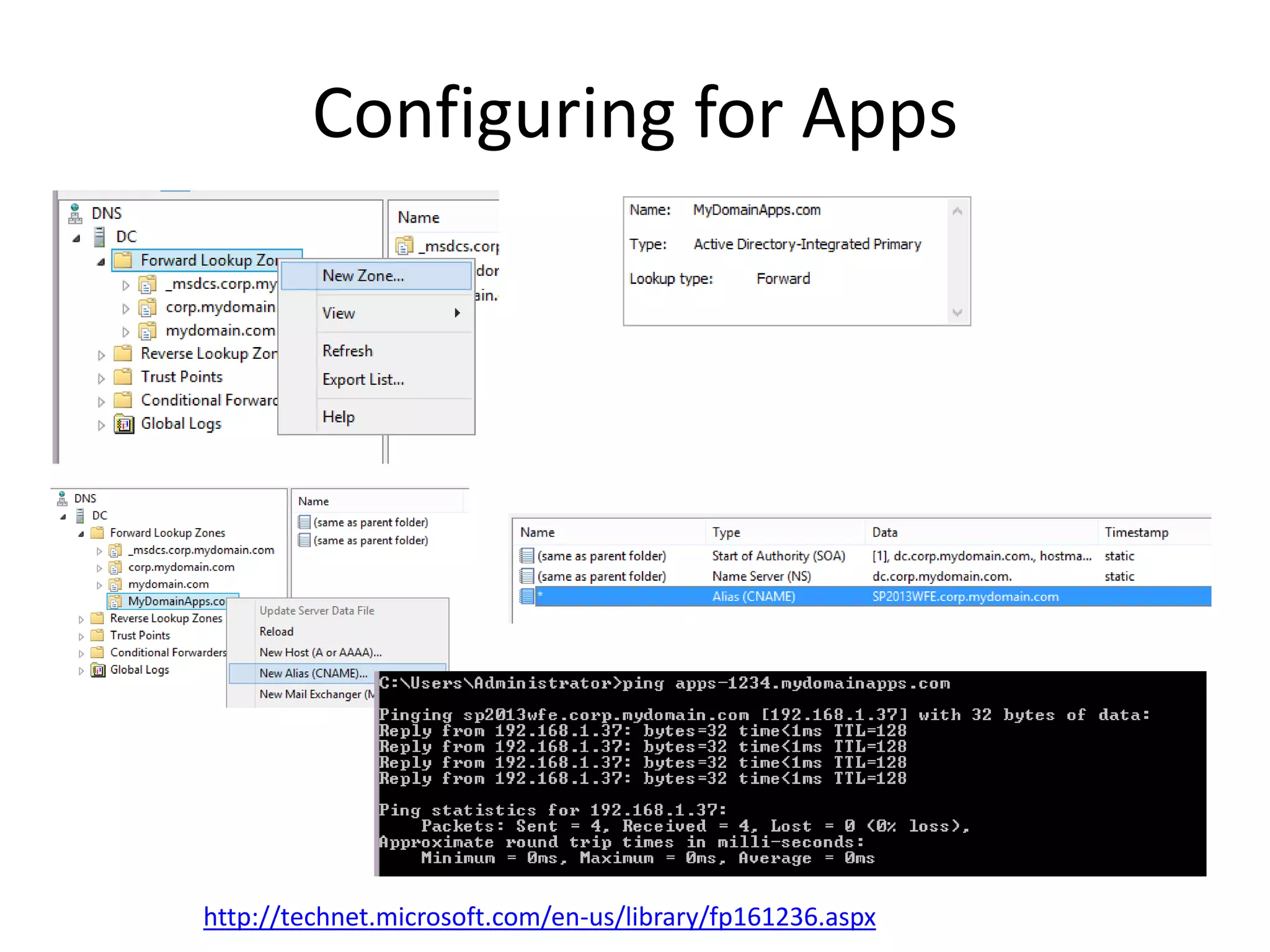
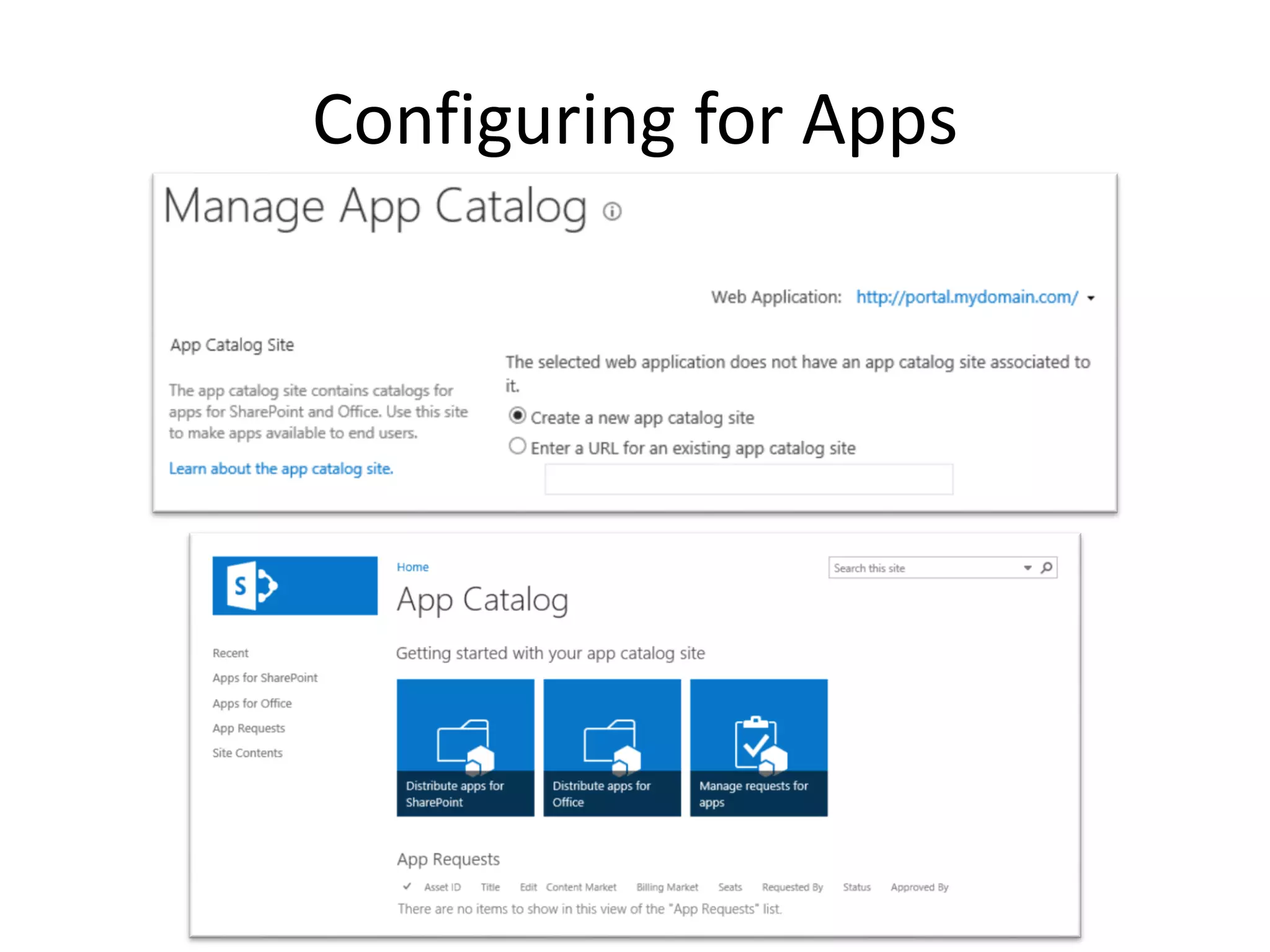
Configuring for Apps
http://technet.microsoft.com/en-us/library/fp161236.aspx
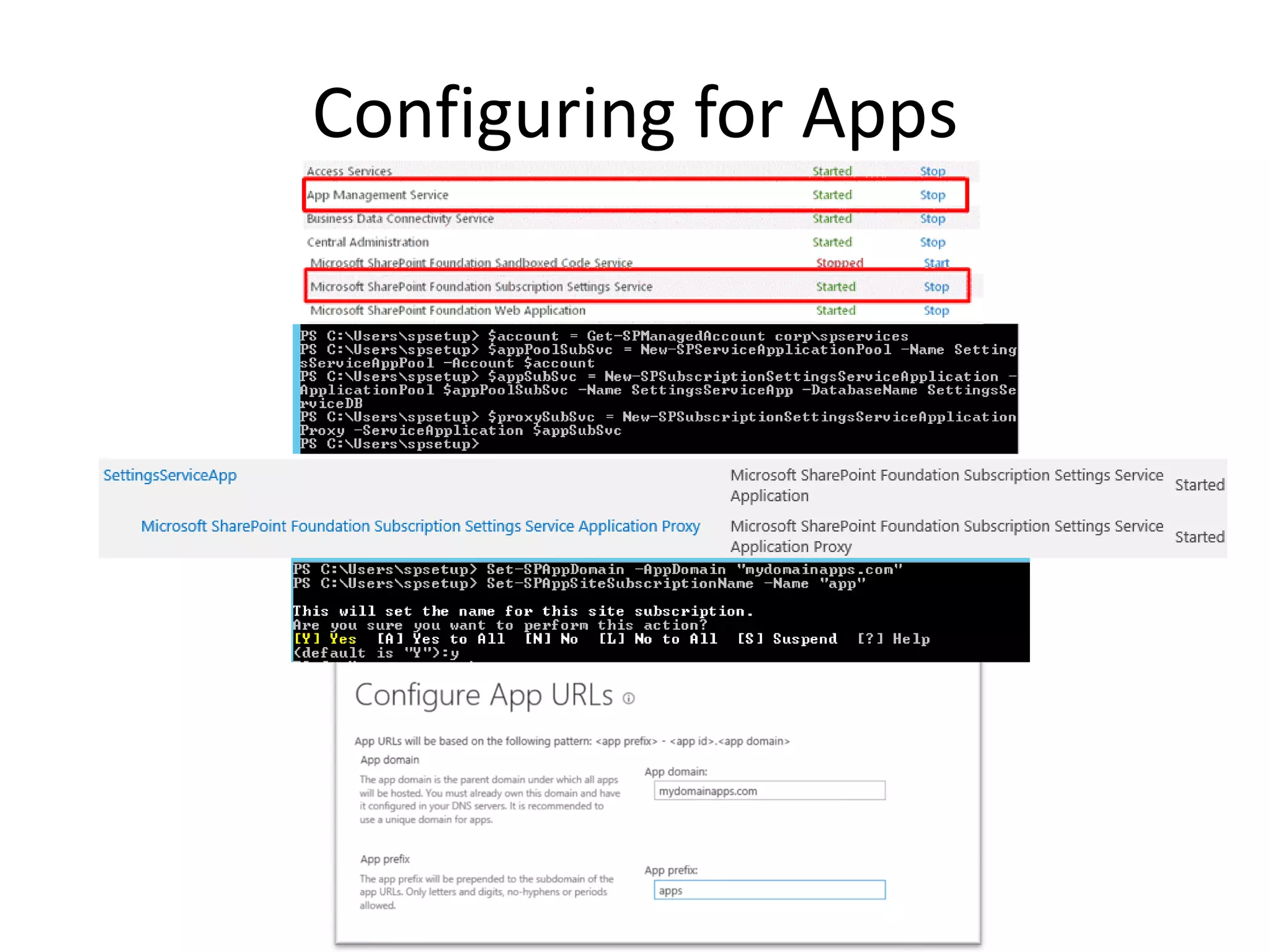
Configuring for Apps
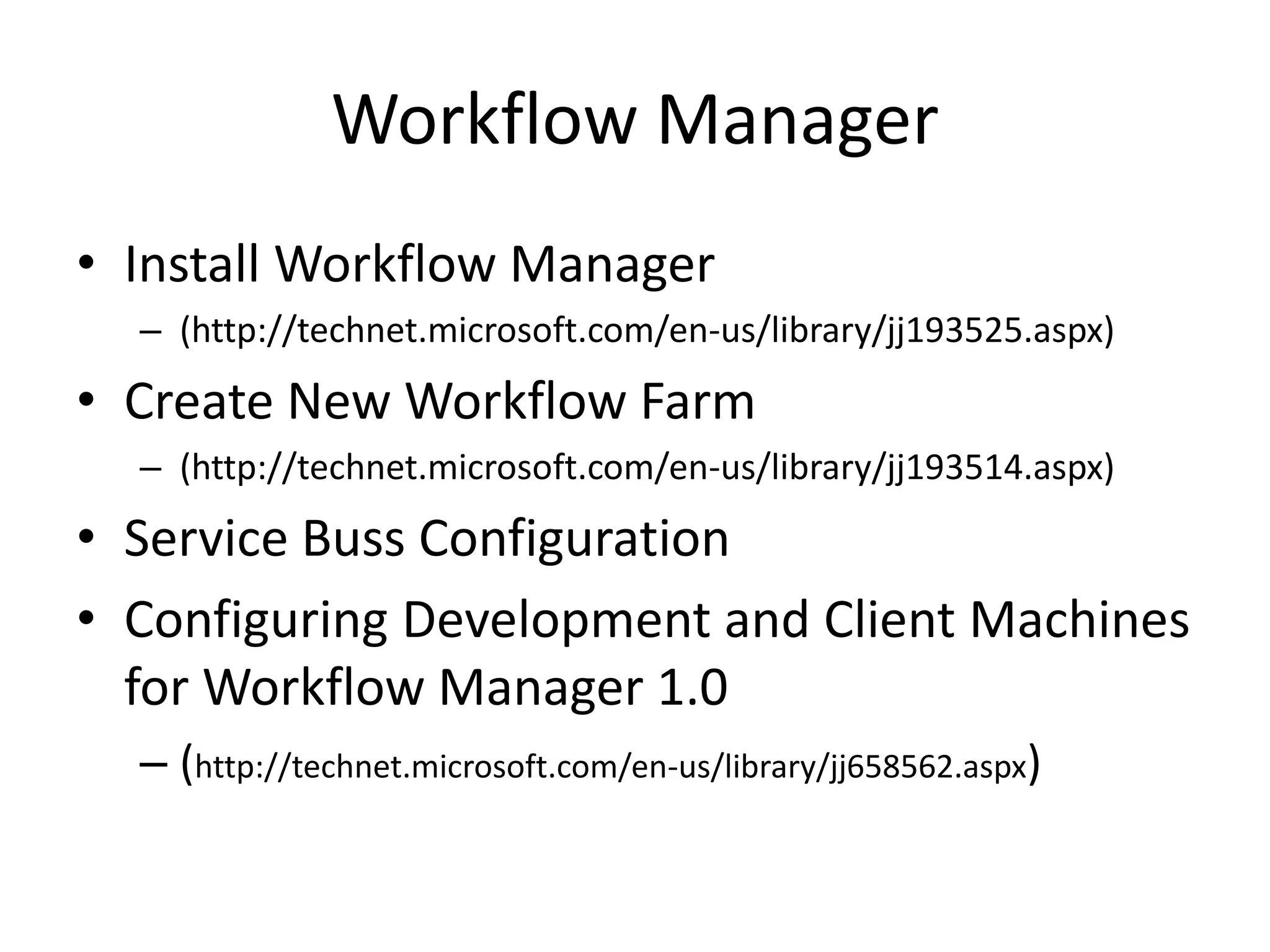
Workflow Manager
• Install Workflow Manager
– (http://technet.microsoft.com/en-us/library/jj193525.aspx)
• Create New Workflow Farm
– (http://technet.microsoft.com/en-us/library/jj193514.aspx)
• Service Buss Configuration
• Configuring Development and Client Machines
for Workflow Manager 1.0
– (http://technet.microsoft.com/en-us/library/jj658562.aspx)
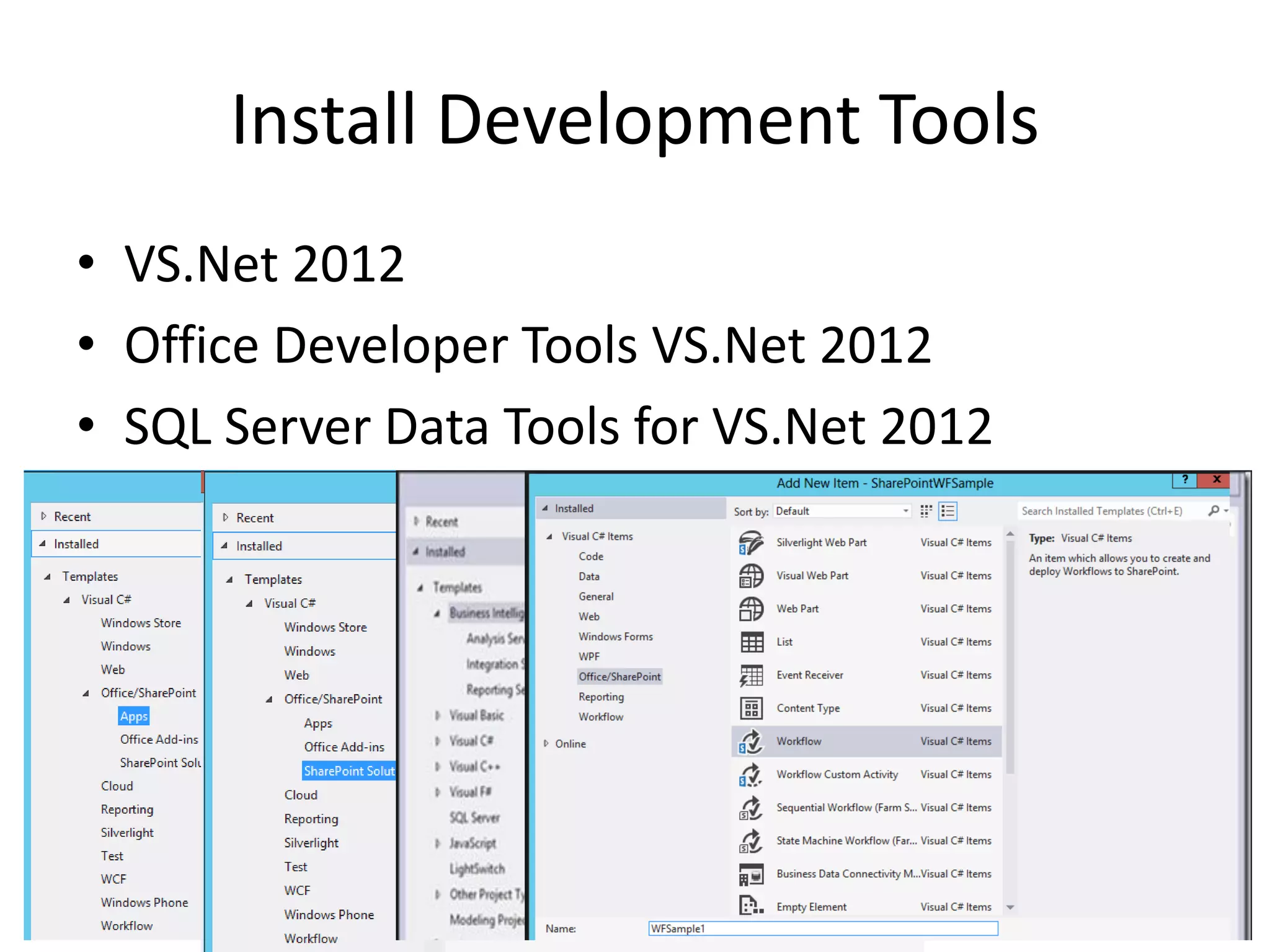
Install Development Tools
• VS.Net 2012
• Office Developer Tools VS.Net 2012
• SQL Server Data Tools for VS.Net 2012
 Several Downloads and Installs
 Several PowerShell Scripts
 Sequence is important
 Ensure appropriate configuration parameters
 Complete baseline install and configuration
 Start Development
Uncover several security and further configuration
requirements
• Outcome
– Inefficiencies in starting effective development
My Wish List For Install and
Configuration
• Unified Installation Solution (Patches/Roles)
• Centralized and Remote Farm Installation
• Central Administration based Roles
Configuration
My Wish list for Developers
• Universal Development Tools Installer
• Centralized Configuration Assistance
• Better ULS/IIS Log/Debug Review Panel
• Early documentation release
• Clarity with better examples
True Farm Installation Wizard
• Targeted to Server Roles
– Hence mandatory services are selected for you
per server role
– Service Account prompt based standardized least
security guidance
– Key Feature Search Topology is only PowerShell
driven.
– SP 2003/2007 supported topology configuration
over browser
Now I am Too Greedy!!!!
• MS preaches do less custom in SP 2013 and
stay OOTB
• Lack True Global Navigation OOTB
• Lack OOTB Consistent Breadcrumb across CA
and Site Templates
• SP 2010 Hierarchical Nav control is hidden in
SP 2013
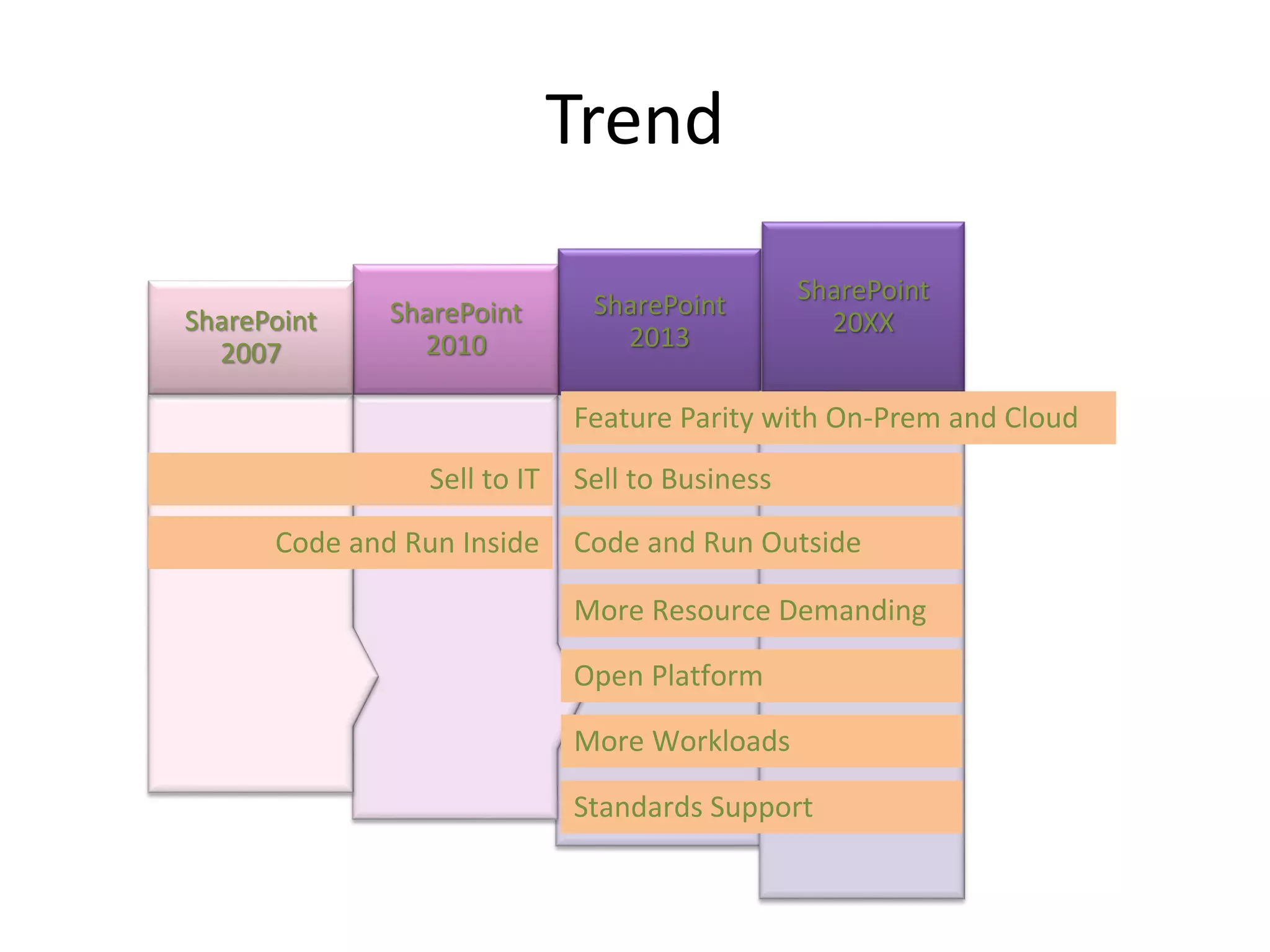
SharePoint
2013
SharePoint
2010
SharePoint
2007
SharePoint
20XX
Feature Parity with On-Prem and Cloud
Sell to IT Sell to Business
Code and Run Inside Code and Run Outside
More Resource Demanding
Open Platform
More Workloads
Standards Support
Trend
Join us right after the event at the Firehouse Grill!
Socialize and unwind after our day of learning.
1765 E. Bayshore Road
East Palo Alto, CA

Practical SharePoint 2013 Development Environment

  • 2.
    Practical SharePoint 2013 DevelopmentEnvironment Rajesh Agadi Netwoven Inc
  • 3.
    My Bio • Over18 years of Consulting Experience • Focused on Microsoft Stack of ECM • Worked and deployed across all SharePoint versions. • Organizational Portals/Extranets/Public Sites/Migration/Branding/Workflows/Custom • Infrastructure/Information/Technical Architecture and Hardcore development. • Held Consulting Architecture and Organizational Leadership roles. • MCSD and MSTS in SharePoint • http://www.linkedin.com/in/rajeshagadi • http://rajeshagadi.blogspot.com/
  • 4.
  • 5.
    Agenda • Challenges andGoals • Baseline Requirements • Developer Scenarios • Options • Infrastructure Design • Installations • My Wish List • Personal Experience • Highlights • Points to note • Evolving Quick Reflect Back
  • 6.
    SharePoint Evolution Apps Branding Enhanced BI Enhanced Content management Enhanced Mobile Performance Storage eDiscovery SharePoint 2013 Service Application BI Infrastructure Performance Mobile SharePoint 2010 Business Platform WebContent Management Business Connectivity Services Excel Services Workflow Enhanced My Sites SharePoint 2007 Portal Server Team Sites Search SSP SharePoint 2003 Portal Server(2001) Team Service (2002) Digital Dashboard SharePoint 2001 Sites List/Libraries Team Sites Apps REST Claim OAuth Service Application SandBox CSOM TRUE ASP.Net Solutions ServerSideOB WSS1.0 SPS 2013 ASP.Net Ran Inside IIS ASP Database STS FPES Folder Based
  • 7.
    Evolution of SharePointExecution Model
  • 8.
    Developer Entry Points •WCF Web Serivice _vti_bin/ client.svc.->JavaScript • RESRful endpoint _api/ Maps to _vti_bin/ client.svc. _api/publishing _api/search
  • 9.
    Developer Scenarios • FarmSolution • Branding • Workflow • Apps for SharePoint • Apps for O365 • BI Development Server Environment Browser Workflow Manager Sub Domain Setup O365 Developer Site SQL Server Components
  • 10.
    MS Guidelines • x64-capableCPU, and at least 16 GB of RAM to install and run SharePoint 2013; 24 GB of RAM is preferable • Windows Server 2008 R2 Service Pack 1 x64 or Windows Server 2012 • Develop apps for SharePoint for SharePoint 2013 on Windows 7 or Windows 8, you can sign up for an Office 365 Developer Site and develop apps remotely • Installing SharePoint 2013 on client operating systems (such as Windows 7) is not supported
  • 11.
    Options • All InclusiveSingle Server Farm under Corp Network – AutoSPInstaller (http://autospinstaller.codeplex.com) – AutoSPInstallerGUI (http://autospinstallergui.codeplex.com) – Using AutoSPInstall to install SharePoint 2013 (http://rajeshagadi.blogspot.com/2013/03/using-autospinstall-to-install.html) – Still need additional Servers • Laptop VM – Search/Distributed Cache • Memory Hungry – Not efficient
  • 12.
    Goals • *Independent DevelopmentEnvironment • Comprehensive Setup for Development Opportunities • Modern Software (2012+2013 Editions) • Ability to Make and Break • Repeatability
  • 13.
    Platform Combination Map •Windows 2012 AD, DNS, CA, Exchange 2013 • SQL Server 2012 with BI Components • SP 2013 with BI Support • OWA 2013 • Workflow Manager • VS.Net 2012 (TFS 2012) • SPD 2013
  • 14.
    Foundational Infrastructure • Hardware(~$2K) – TYAN S8230, Up to 128GB, G34 / (2) – AMD 45nm 8-Core/12-Core Opteron 6100 Series Processors • Virtualization – VMWare Server Free (End of support June 30, 2011) – VMWare Workstation • Sysprep OS Images – Win 2012 • Linked Clone
  • 15.
    Infrastructure Design • DC+DNS+CA •SQL Server • Exchange Server • SP 2013-WFE (Development) • SP 2013-APP1 • SP 2013-APP2 • OWA • Work Management • UAG
  • 16.
    AD • Static IP •Choose appropriate Domain and NetBIOS Name
  • 17.
  • 18.
    CA Import-Module ServerManager Add-WindowsFeature Adcs-Cert-Authority-IncludeManagementTools Add-WindowsFeature Adcs-Enroll-Web-Svc -IncludeAllSubFeature -IncludeManagementTools Add-WindowsFeature ADCS-Web-Enrollment -IncludeAllSubFeature -IncludeManagementTools
  • 19.
    Preparation on DC •Service Accounts • Profile Account configuration • Implement A record for your Web Apps App DNS IP Portal Web Application Portal.mydomain.com 192.168.1.37 (Pointing to SP2013WFE) My Site Web Application MySite.mydomain.com 192.168.1.37 (Pointing to SP2013WFE) Search Center Wep Application Search.mydomain.com 192.168.1.37 (Pointing to SP2013WFE)
  • 20.
    SQL Server Readiness •DB Engine + Integration Services • Analysis Services (MDM and Tabular)
  • 21.
    SQL Server Protocolsand Ports • Open Portal (http://support.microsoft.com/kb/968872) • Enable Named Pipes and TCP/IP • SQL Server Rights for SharePoint Install Account
  • 22.
    SharePoint Servers Readiness •Windows 2012 Installed, syspreped. • Linked Cloned Instances • Setup service account >local administrator. • Optional SQL Server Alias • Ensure SQL Connectivity from SharePoint Server
  • 23.
    SharePoint Software Readiness •SP2013 RTM + March 2013 PU Slipstreamed • April/June 2013 CU separate Install (No Slipstream) • Complete Install
  • 24.
  • 25.
    Desired Services Topology •Complete Farm Configuration Wizard Server Role SP2013WFE Web Applications SP2013APP1 Central Administration All Service Applications except the Search SP2013APP2 Dedicated Search Service Application
  • 26.
    Web Apps • Portal •MySites • Enterprise Search • Extranet • *Configure Object Cache User – Web App Policies – PowerShell script to set properties (Claim code for User ID) – http://technet.microsoft.com/en-us/library/ff758656.aspx
  • 27.
    User Profile Synchronization •Local Security Policy->Log on locally (FarmAdmin) • Add to local admin (FarmAdmin) • Wait…………….
  • 28.
    Configure Search onDedicated Server • Custom PowerShell script
  • 29.
    Reporting Services Install RSin SP Mode Install RS Add In Install SQL 2012 SP1 KB2793634 Run Install- SPRSxx command Start SSRS Service SP2013WFE (Where SSRS will run) Yes Yes Yes Yes Yes Yes SP2013APP1 (Hosts CA) No Yes Yes No Yes No SP2013APP2 (All Other servers) No Yes Yes No No No
  • 30.
    Install PowerPivot forSharePoint Install Configure SP2013WFE Yes Yes SP2013APP1 Yes No SP2013APP2 Yes No
  • 31.
    Office Web Apps2013 1. Install OOTB + CU 2. New OWA Farm PowerShell cmdlet 3. SP Farm binding with OWA Farm cmdLet • *http(s) • Browser Compatibility Issues • False Office Compatibility error message • Beware of Excel OWA do not support Excel Data Connections (Excel Web App Web Part) • Use Document Edit option to use Rich Client
  • 32.
  • 33.
  • 34.
  • 35.
    Workflow Manager • InstallWorkflow Manager – (http://technet.microsoft.com/en-us/library/jj193525.aspx) • Create New Workflow Farm – (http://technet.microsoft.com/en-us/library/jj193514.aspx) • Service Buss Configuration • Configuring Development and Client Machines for Workflow Manager 1.0 – (http://technet.microsoft.com/en-us/library/jj658562.aspx)
  • 36.
    Install Development Tools •VS.Net 2012 • Office Developer Tools VS.Net 2012 • SQL Server Data Tools for VS.Net 2012
  • 37.
     Several Downloadsand Installs  Several PowerShell Scripts  Sequence is important  Ensure appropriate configuration parameters  Complete baseline install and configuration  Start Development Uncover several security and further configuration requirements • Outcome – Inefficiencies in starting effective development
  • 38.
    My Wish ListFor Install and Configuration • Unified Installation Solution (Patches/Roles) • Centralized and Remote Farm Installation • Central Administration based Roles Configuration
  • 39.
    My Wish listfor Developers • Universal Development Tools Installer • Centralized Configuration Assistance • Better ULS/IIS Log/Debug Review Panel • Early documentation release • Clarity with better examples
  • 40.
    True Farm InstallationWizard • Targeted to Server Roles – Hence mandatory services are selected for you per server role – Service Account prompt based standardized least security guidance – Key Feature Search Topology is only PowerShell driven. – SP 2003/2007 supported topology configuration over browser
  • 41.
    Now I amToo Greedy!!!! • MS preaches do less custom in SP 2013 and stay OOTB • Lack True Global Navigation OOTB • Lack OOTB Consistent Breadcrumb across CA and Site Templates • SP 2010 Hierarchical Nav control is hidden in SP 2013
  • 42.
    SharePoint 2013 SharePoint 2010 SharePoint 2007 SharePoint 20XX Feature Parity withOn-Prem and Cloud Sell to IT Sell to Business Code and Run Inside Code and Run Outside More Resource Demanding Open Platform More Workloads Standards Support Trend
  • 44.
    Join us rightafter the event at the Firehouse Grill! Socialize and unwind after our day of learning. 1765 E. Bayshore Road East Palo Alto, CA