4040233202
Python Programming
Unit-1
Introduction of Python
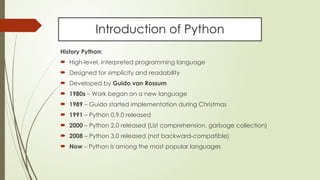
History Python:
 High-level, interpreted programming language
 Designed for simplicity and readability
 Developed by Guido van Rossum
 1980s – Work began on a new language
 1989 – Guido started implementation during Christmas
 1991 – Python 0.9.0 released
 2000 – Python 2.0 released (List comprehension, garbage collection)
 2008 – Python 3.0 released (not backward-compatible)
 Now – Python is among the most popular languages
Introduction of Python
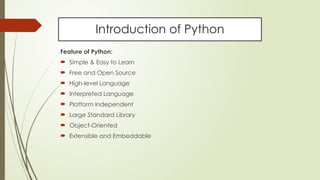
Feature of Python:
 Simple & Easy to Learn
 Free and Open Source
 High-level Language
 Interpreted Language
 Platform Independent
 Large Standard Library
 Object-Oriented
 Extensible and Embeddable
Introduction of Python
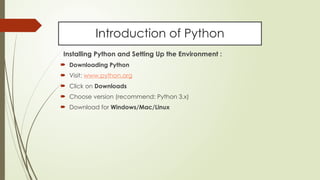
Installing Python and Setting Up the Environment :
 Downloading Python
 Visit: www.python.org
 Click on Downloads
 Choose version (recommend: Python 3.x)
 Download for Windows/Mac/Linux
Introduction of Python
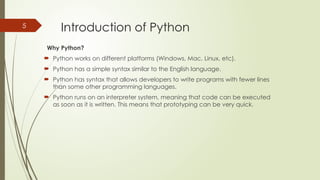
Why Python?
 Python works on different platforms (Windows, Mac, Linux, etc).
 Python has a simple syntax similar to the English language.
 Python has syntax that allows developers to write programs with fewer lines
than some other programming languages.
 Python runs on an interpreter system, meaning that code can be executed
as soon as it is written. This means that prototyping can be very quick.
5
Introduction of Python
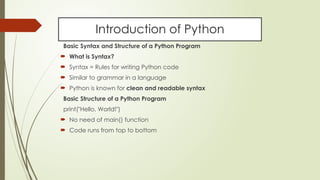
Basic Syntax and Structure of a Python Program
 What is Syntax?
 Syntax = Rules for writing Python code
 Similar to grammar in a language
 Python is known for clean and readable syntax
Basic Structure of a Python Program
print("Hello, World!")
 No need of main() function
 Code runs from top to bottom
Introduction of Python
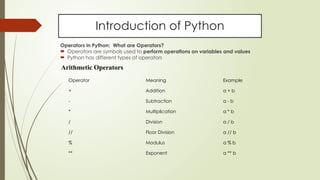
Operators in Python: What are Operators?
 Operators are symbols used to perform operations on variables and values
 Python has different types of operators
Operator Meaning Example
+ Addition a + b
- Subtraction a - b
* Multiplication a * b
/ Division a / b
// Floor Division a // b
% Modulus a % b
** Exponent a ** b
Arithmetic Operators
Introduction of Python
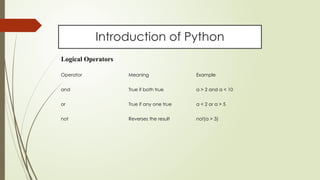
Logical Operators
Operator Meaning Example
and True if both true a > 2 and a < 10
or True if any one true a < 2 or a > 5
not Reverses the result not(a > 3)
Introduction of Python
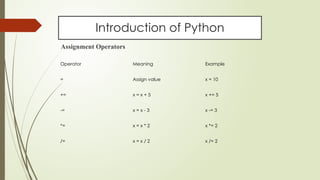
Assignment Operators
Operator Meaning Example
= Assign value x = 10
+= x = x + 5 x += 5
-= x = x - 3 x -= 3
*= x = x * 2 x *= 2
/= x = x / 2 x /= 2
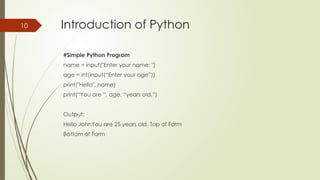
Introduction of Python
#Simple Python Program
name = input("Enter your name: ")
age = int(input(“Enter your age”))
print("Hello", name)
print(“You are “, age, “years old.”)
Output:
Hello JohnYou are 25 years old. Top of Form
Bottom of Form
10
PPT_PYTHON Programming language High-level, interpreted

  • 1.
  • 2.
    Introduction of Python HistoryPython:  High-level, interpreted programming language  Designed for simplicity and readability  Developed by Guido van Rossum  1980s – Work began on a new language  1989 – Guido started implementation during Christmas  1991 – Python 0.9.0 released  2000 – Python 2.0 released (List comprehension, garbage collection)  2008 – Python 3.0 released (not backward-compatible)  Now – Python is among the most popular languages
  • 3.
    Introduction of Python Featureof Python:  Simple & Easy to Learn  Free and Open Source  High-level Language  Interpreted Language  Platform Independent  Large Standard Library  Object-Oriented  Extensible and Embeddable
  • 4.
    Introduction of Python InstallingPython and Setting Up the Environment :  Downloading Python  Visit: www.python.org  Click on Downloads  Choose version (recommend: Python 3.x)  Download for Windows/Mac/Linux
  • 5.
    Introduction of Python WhyPython?  Python works on different platforms (Windows, Mac, Linux, etc).  Python has a simple syntax similar to the English language.  Python has syntax that allows developers to write programs with fewer lines than some other programming languages.  Python runs on an interpreter system, meaning that code can be executed as soon as it is written. This means that prototyping can be very quick. 5
  • 6.
    Introduction of Python BasicSyntax and Structure of a Python Program  What is Syntax?  Syntax = Rules for writing Python code  Similar to grammar in a language  Python is known for clean and readable syntax Basic Structure of a Python Program print("Hello, World!")  No need of main() function  Code runs from top to bottom
  • 7.
    Introduction of Python Operatorsin Python: What are Operators?  Operators are symbols used to perform operations on variables and values  Python has different types of operators Operator Meaning Example + Addition a + b - Subtraction a - b * Multiplication a * b / Division a / b // Floor Division a // b % Modulus a % b ** Exponent a ** b Arithmetic Operators
  • 8.
    Introduction of Python LogicalOperators Operator Meaning Example and True if both true a > 2 and a < 10 or True if any one true a < 2 or a > 5 not Reverses the result not(a > 3)
  • 9.
    Introduction of Python AssignmentOperators Operator Meaning Example = Assign value x = 10 += x = x + 5 x += 5 -= x = x - 3 x -= 3 *= x = x * 2 x *= 2 /= x = x / 2 x /= 2
  • 10.
    Introduction of Python #SimplePython Program name = input("Enter your name: ") age = int(input(“Enter your age”)) print("Hello", name) print(“You are “, age, “years old.”) Output: Hello JohnYou are 25 years old. Top of Form Bottom of Form 10