JavaScript
Session 17
Introduction to JavaScript
■ At First, Scripting Language developed by Sun Micro
Systems & Netscape jointly
JavaScript was designed to add interactivity to HTML
pages
JavaScript is a scripting language
A scripting language is a lightweight programming
language
JavaScript is usually embedded directly into HTML
pages
JavaScript is an interpreted language (means that scripts
execute without preliminary compilation)
■
■
■
■
■
K.Sasidhar
Importance / facts
■ Embedded into HTML
■ Browser Dependent
■ Interpreted Language
■ Loosely Typed Language
■ Object-Based Language
■ Event-Driven
■ Java Script is not java
K.Sasidhar
Importance ………
■ JavaScript is multifunctional
i) Enhance HTML Pages
ii) Develop client side applications
iii) creates extensions to a webserver
iv)Provide database connectivity without
using CGI
K.Sasidhar
Web Application Framework
Content
Creation
Graphics
Editor
HTML Editor
Browsers Client
Extensions
Active X
Applets
Scripting
JavaScript
VB Script
Servers Server
Extension
s
Java
script
Database
Extensions
ODBC, JDBC
Security
Content
Management
Search tools
Database Services
K.Sasidhar
JavaScript & HTML
■ JavaScript is integrated into HTML with
■ <script> and </script> tags.
■ Ex:
■ <script language = “JavaScript”>
■ </script>
K.Sasidhar
First program
■ Ex:
■ <script language=“JavaScript”>
■ {
■ Document.write(“Hello to script”);
■ }
■ </script>
K.Sasidhar
Ex program
K.Sasidhar
■
■
■
■
■
■
■
■
■
■
■
■
<HTML>
<HEAD>
<TITLE>
JAVASCRIPT PROGRAM TESTING</TITLE>
<SCRIPT LANGUAGE="JavaScript">
alert("Hello! everybody");
</script>
</head>
<body>
testing script
</body>
</html>
User Interaction
K.Sasidhar
■ <HTML>
■
■
■
■
■
■
■
■
■
■
■
<HEAD><TITLE>
Dialog Box from a function</TITLE>
<SCRIPT LANGUAGE="JavaScript">
function opendoc()
{
alert(“dialog called from function");
}
</script></head>
<body><b>Push button test</b>
<FORM METHOD=“POST”>
<INPUT TYPE=Button Name=“B1” VALUE=“push”
onClick=“opendoc()”></FORM>
</body>
</html>
■
■
Identifiers, Keywords
K.Sasidhar
■ Variables or methods or objects
■ Key words:
■ break, if, this, continue, in, time, else,
but, false, new, while, for, null, with,
function and return.
■ Literals:
■ Integer, Floating, Boolean, String,
Special characters.
Variables
K.Sasidhar
■ Variables are used to store the data.
■ Ex:
■ Var variablename;
■ Types: Number, Boolean, String,
Function, Object
■ A variable declared inside a function
has local scope.
Global Scope
K.Sasidhar
■ Global variables are accessible to all
parts of an application including
functions.
■ Global variable is created by initializing
it directly and not using the keyword
var.
■ Comments: // or /* ------*/
Functions
K.Sasidhar
■ Declaration:
function displaymessage()
{
document.write(“functions demo”);
}
A function is declared in the head part of
html.
■
■
■
■
■
Operators
K.Sasidhar
■ Assignment
Arithmetic
Comparison
Conditional
String
Boolean
Type
Function
■
■
■
■
■
■
■
Operators continue…
K.Sasidhar
■ Data structure
■ Bitwise
Control Structures
K.Sasidhar
■ Conditional
■ Looping
■ With
■Conditional:
if(condition)
{ statements
}
Conditions ……
}
■
K.Sasidhar
■ if – else
if(condition)
{
Statemetns
}
Else
{
■
■
■
■
■
■
Looping
K.Sasidhar
■
■
■
■
■
■
■
■
■
■
for :
for (initializing exp; condition-exp; loop-exp)
{
Statements;
}
Ex:
for(var i=0;i<10;i++)
{
document.writeln(i);
}
for … in
K.Sasidhar
■ for .. in loop works with arrays.
■ Ex: for (index in arrayName)
■ {
■ // some code
■ }
■ index is a variable that we declare prior to
loop, that will automatically populated with
the next index value in array.
Example:
K.Sasidhar
■ var myArray= new Array(“rama”, “ravana”);
■ var elementIndex;
■ for(elementIndex in myArray)
■ {
■ document. Write(myArray[elementIndex]);
■}
While Loop
K.Sasidhar
■ While loop allows to test a condition and
keep on looping while it’s true.
■ While loop is more useful when you don’t
know how many you will need to loop.
do-while, break and continue
K.Sasidhar
■ break terminates the loop altogether
■ continue skips the remaining statements
for the current loop,
Object Model
K.Sasidhar
■ Java script is an object based
language.
■ It has no inheritance.
■ The relation between objects is not of
ancestor descendent but of container.
■ When an objects properties or methods
are referenced is used to denoted
ownership.
Java Script Objects &
Corresponding HTML tags
K.Sasidhar
■ Window
Frame
History
Location
Document
form
Button
Checkbox
---
<frame>
----
----
<BODY>
<FORM>
<Input type = “button”>
< Input type = “checkbox” >
■
■
■
■
■
■
■
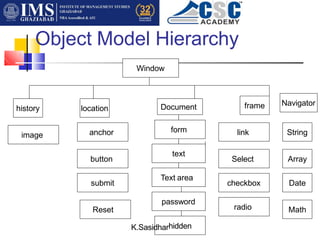
Object Model Hierarchy
Window
history location
text
Text area
form
frame
Document
password
K.Sasidharhidden
checkbox
Select
link
Reset
submit
button
anchor
image
radio
Navigator
String
Array
Date
Math
Window object
K.Sasidhar
■
■
■
■
■
Browser runs in a window.
This is highest level object.
It contains all other navigator object.
Two primary methods:
open() – name of html page, internal name of
window, host features of the window – menu
bar, tool bar, location, directories, document
and status.
These are properties of window object.
■
Ex:
K.Sasidhar
■ function a()
■ {
■ var k= window.open(“xyz.html”,
“mywin”,”menubar=yes, toolbar=yes,
location=yes directories=yes,
status=yes”);
}
Properties with objects
K.Sasidhar
■ window.status = “this is displayed on
the status bar”
■ HISTORY object
■ To navigate to back page
■ Window.history.back()
■ Window.history.forward()
Continue…
K.Sasidhar
■ Specific page no
■ Use go() method
■ Window.history.go(5)
■ Location object:
Ex:
K.Sasidhar
■
■
■
■
■
■
■
■
■
■
■
■
Ex: function evalProtocol
{
if(curProtocol == “http:”)
{
alert(“from web”);
else
if(curProtocol == “file:”)
alert(“from file”);
else
alert(“else where”);
}
}
Location object properties
K.Sasidhar
■ Href: complete URL
■ Protocol: initial element of a URL
■ Hostname: Host and domain name or
IP address
■ Host : Hostname: Port element of a
URL
■ Port: communications port of server
■ Pathname: path element of URL
Continue….
K.Sasidhar
■ Serach: query definition portion of URL
■ Hash : Anchor name of url (begin with #)
■ Opening a new URL:
■ Window.location=http://www.snist.com/
■ Window.location.href = “href://
www.snist.com/”
Document object
K.Sasidhar
■ This is important and is responsible for all the
actual content displayed on a given page.
We can display dynamic HTML pages & all user
interface elements.
Write() or writeln() method is used to display
content on page.
This is equivalent of HTML document.
It is a container for all HTML related objects
associated with <head><body> tags.
■
■
■
■
Document continue…..
<BODY
[BACKGROUND = “backgroundImage”]
[BGCOLOR = “backgroundColor”]
[TEXT = “foregroundColor”]
[LINK = “unfollowedLinkColor”]
[ALINK = “activatedLinkColor”]
[VLINK = “followedLinkColor”]
[onload = “methodName”]
[onUnload = “meK
.
tS
ha
os
i
dd
h
Na
rame”]>
■
■
■
■
■
■
■
■
■
K.Sasidhar
Form Object
■ This allows users interactions.
■
■
■
■
■
■
■
■
■
■
Gives life to static web pages.
Properties:
<FORM
[NAME=“formName”]
[ACTION=“ServerURL”]
[ENCTYPE=“encodingType”]
[METHOD = “GET|POST”]
[TARGET = “windowName”]
[onSubmit = “methodName”]
</FORM>
Text Object
■ Common element to gather data entered by user.
<INPUT type=“text”
[Name = “objectname”]
[Value=“value”]
[Size=size]
[MAX.LENGTH = size]
[onBlur = “methodname”]
[onChange = “methodname”]
[onFocus = “methodname”]
[onSelect = “methodnK
a.S
mas
eid
”h
]ar
■
■
■
■
■
■
■
■
■
Text Area Object
K.Sasidhar
■
■
■
■
■
■
■
■
■
< TEXTAREA
[Name = “objectName”]
[ROWS=“numRows”]
[COLS=“numCols”
[WRAP=“off | virtual | physical”]
[onBlur = “methodname”]
[onChange = “methodname”]
[onFocus = “methodname”]
[onSelect = “methodname”]
</TEXTAREA>
■
Password object
K.Sasidhar
■
■
■
■
<INPUT type=“password”
[Name = “objectname”]
[Value=“defaultpassword”]
[Size=integer]
■ Anchor Object:
■ <A [HREF = URL ]
■ Name = “objectname”
■ [TARGET = “windowName”]>
Button
K.Sasidhar
■ This is a generic object that we have to
add code for it to be useful.
■ Submit button is used to submit form data.
■ Reset button is for reset the values of all
controls of a form.
Button properties
K.Sasidhar
<INPUT
TYPE=“button | submit | reset”
[NAME = “objectName”]
[VALUE=“labelText”]
[onClick = “methodName”]
Select Object
K.Sasidhar
■
■
■
■
■
■
■
■
<SELECT>
[Name = “objectname”]
[Size=“numberVisible”]
[MULTIPLE]
[onBlur = “methodname”]
[onChange = “methodname”]
[onFocus = “methodname”]
<OPTION VALUE = “optionValue”
<[SELECTED]>
Radio Object
K.Sasidhar
■ <input>
■ TYPE = “radio”
■ [NAME = “groupName”]
■ [VALUE = “value”][CHECKED]
■ [onClick=“methodName”]> [displayText]
BUILT-IN LANGUAGE
Objects
K.Sasidhar
■ String
■ Date
■ Array
■ Math
K.Sasidhar
Methods…..
■
■
■
■
■
■
■
■
■
■
■
■
■
■
■
Length
CharAt(pos)
IndexOf (search text[startPos],[endpos])
Substring(startPos,endPos)
Big
Blink
Fixed
Fontcolor
Fontsize
Small
Strike
Sub
Sup
toLowerCase
toUPperCase
Date
K.Sasidhar
■
■
■
■
■
■
■
■
■
getDate()
getDay()
getHours()
getMinutes()
getMonth()
getSeconds()
getTime()
getYear()
getTimeZoneOffset() --- GMT etc..
Set Methods of Date object
K.Sasidhar
■ setdate(value)
■ setHours(value)
■ setMinutes(value)
■ setMonth(value)
■ setSeconds(value)
■ setTime(value)
■ setYear(value)
K.Sasidhar
examples
■ var today = newDate()
■ Result = today.getDate()
■ Other formats:
■ getFullyear() returns a year in the yyyy
format
■ getActualMonth() returns the actual
numeric value for the month
■ getCalenderMonth() returns the name of
the month
Date methods continue…..
K.Sasidhar
■ getActualDay() returns the actual numeric
value of the day of the week
■ getCalenderDay() returns the name of the
day of the week
Mathematical constants
Property
E
Description
Returns Euler's number (approx. 2.718)
LN2 Returns the natural logarithm of 2 (approx. 0.693)
LN10 Returns the natural logarithm of 10 (approx. 2.302)
LOG2E Returns the base-2 logarithm of E (approx. 1.442)
LOG10E Returns the base-10 logarithm of E (approx. 0.434)
PI Returns PI (approx. 3.14)
SQRT1_2 Returns the square root of 1/2 (approx. 0.707)
SQRT2 Returns the square root of 2 (approx. 1.414)
K.Sasidhar
Math Object
K.Sasidhar
■ abs(value)
■ acos(value)
■ asin(value)
■ atan(value)
■ ceil(value)
absolute value
arc cosine value in radians
arc sine of value in radians
arc tangent of value in radians
■ Cos(value) cosine value
■ floor(value)
K.Sasidhar
Math continue
■ exp(value) Euler’s constant to the power of value
(euler’s constant: 2.718)
log(value)
max(value)
min(value)
pow(value)
round(value)
sin(value)
sqrt(value)
■
■
■
■
■
■
■
■
tan(value)
K.Sasidhar
Arrays
K.Sasidhar
Arrays
■
■
<html>
<body>
<script type="text/javascript">
var i;
var mycars = new Array();
mycars[0] = "Saab";
mycars[1] = "Volvo";
mycars[2] = "BMW";
for (i=0;i<mycars.length;i++)
{
document.write(mycars[i] + "<br />");
}
</script>
</body>
■
■
■
■
■
■
■
■
■
■
■
■
■
</html>
Join two arrays
K.Sasidhar
</html>
■
<html>
■
■ <body>
<p id="demo">Click the button to join three arrays.</p>
<button onclick="myFunction()">Try it</button>
<script type="text/javascript">
function myFunction()
{
var hege = ["Cecilie", "Lone"];
var stale = ["Emil", "Tobias", "Linus"];
var kai = ["Robin"];
var children = hege.concat(stale,kai);
var x=document.getElementById("demo");
x.innerHTML=children;
}
</script>
</body>
■
■
■
■
■
■
■
■
■
■
■
■
■
■
Remove the last element
K.Sasidhar
</html>
■
<!DOCTYPE html>
■
■
■
<html>
<body>
<p id="demo">Click the button to remove the last array element.</p>
<button onclick="myFunction()">Try it</button>
<script type="text/javascript">
var fruits = ["Banana", "Orange", "Apple", "Mango"];
function myFunction()
{
fruits.pop();
var x=document.getElementById("demo");
x.innerHTML=fruits;
}
</script>
</body>
■
■
■
■
■
■
■
■
■
■
■
■
Creating custom objects
K.Sasidhar
■ function object (parameter1, parameter2,…)
■ {
■ this.property1=parameter1
this.property2=parameter2
this.method1=function1
this.method2=function2
■
■
■
■ }
Instantiating objects
K.Sasidhar
■ new operator is used for instantiating objects
■ objectInstance= objectType(parameter1,
2,3,……)
■ Ex: creating a book object using the
following code
■ dbBook=new book(“beginning javascript”,
“paul wilton”, “Rs.400”, “ 1000”);
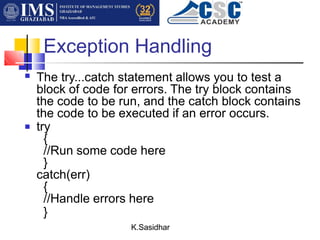
Exception Handling
K.Sasidhar
■ The try...catch statement allows you to test a
block of code for errors. The try block contains
the code to be run, and the catch block contains
the code to be executed if an error occurs.
try
{
//Run some code here
}
catch(err)
{
//Handle errors here
}
■
The Throw Statement
K.Sasidhar
■ The throw statement allows you to create an
exception. If you use this statement together
with the try...catch statement, you can
control program flow and generate accurate
error messages.
■ Syntax: throw exception
K.Sasidhar
■ The example below determines the value of
a variable called x. If the value of x is
higher than 10, lower than 5, or not a
number, then throw an error. The error is
then caught by the catch argument and the
proper error message is displayed:
Example
JavaScript facts
■
■
JavaScript is Case Sensitive
A function named "myfunction" is not the same as
"myFunction" and a variable named "myVar" is not the
same as "myvar".
JavaScript is case sensitive - therefore watch your
capitalization closely when you create or call variables,
objects and functions.
White Space:
JavaScript ignores extra spaces. You can add white
space to your script to make it more readable. The
following lines are equivalent:
var name="Hege";
var name = "Hege";
K.Sasidhar
■
■
■
■
■
K.Sasidhar
Break up a Code Line
■ You can break up a code line within a text
string with a backslash. The example below
will be displayed properly:
document.write("Hello 
World!");
However, you cannot break up a code line
like this:
document.write 
("Hello World!");
■
■
■

ppt 17 18.pptx