Poona Club Ltd has extended the e‐
voting facility through CDSL 
The following slides can be used as a 
guide for members wishing to opt for 
e‐voting.
How to exercise your e‐vote?
________________________________
Cleanliness | Competence | Consistency | Continuous Improvement
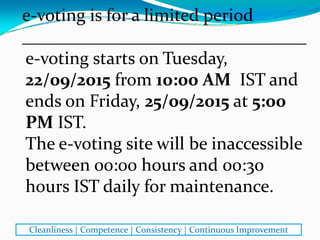
e‐voting starts on Tuesday, 
22/09/2015 from 10:00 AM  IST and 
ends on Friday, 25/09/2015 at 5:00 
PM IST. 
The e‐voting site will be inaccessible 
between 00:00 hours and 00:30 
hours IST daily for maintenance.
e‐voting is for a limited period 
________________________________
Cleanliness | Competence | Consistency | Continuous Improvement
Those exercising e‐voting outside 
Indian time zone are requested to 
take note of time difference and plan 
accordingly.
e‐voting is for a limited period
________________________________
Cleanliness | Competence | Consistency | Continuous Improvement
Check if you have any dues to the club
________________________________
You would have got an email from 
membersbilling@poonaclubltd.com
on or about 4th Sept. 2015.
Or you would have received the 
statement of dues by post. If you 
have online access to your account in 
Poona Club, you may check there 
too.
Cleanliness | Competence | Consistency | Continuous Improvement
Check if you have any dues to the club
________________________________
If there are dues of Rs.100 or more, 
pertaining to the period prior to 26th
Aug. 2015, pay now to be eligible to 
vote. 
Cleanliness | Competence | Consistency | Continuous Improvement
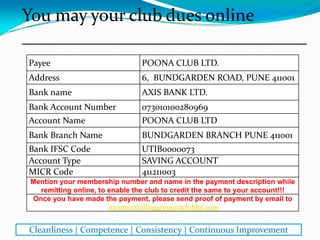
Payee POONA CLUB LTD.
Address 6, BUNDGARDEN ROAD, PUNE 411001
Bank name AXIS BANK LTD.
Bank Account Number 073010100280969
Account Name POONA CLUB LTD
Bank Branch Name BUNDGARDEN BRANCH PUNE 411001
Bank IFSC Code UTIB0000073
Account Type SAVING ACCOUNT
MICR Code 411211003
Mention your membership number and name in the payment description while
remitting online, to enable the club to credit the same to your account!!!
Once you have made the payment, please send proof of payment by email to
membersbilling@poonaclubltd.com
You may pay your club dues online
________________________________
Cleanliness | Competence | Consistency | Continuous Improvement
A member would be able to vote 
only once either: 
via e‐voting from 22nd to 25th Sept.
OR
on physical Ballot Paper at the 
Club on the date of the AGM i.e. 
26th Sept.
Choose how you want to vote
________________________________
Cleanliness | Competence | Consistency | Continuous Improvement
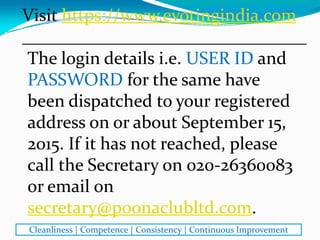
Visit https://www.evotingindia.com
________________________________
The login details i.e. USER ID and 
PASSWORD for the same have 
been dispatched to your registered 
address on or about September 15, 
2015. If it has not reached, please 
call the Secretary on 020‐26360083 
or email on 
secretary@poonaclubltd.com.
Cleanliness | Competence | Consistency | Continuous Improvement
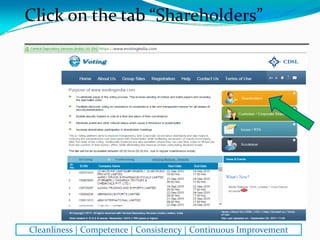
Click on the tab “Shareholders”
________________________________
Cleanliness | Competence | Consistency | Continuous Improvement
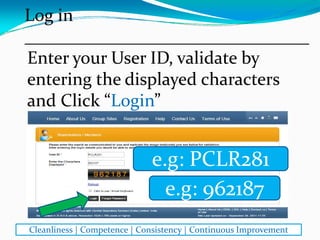
Enter your User ID, validate by 
entering the displayed characters 
and Click “Login”
e.g: PCLR281
e.g: 962187
Log in
________________________________
Cleanliness | Competence | Consistency | Continuous Improvement
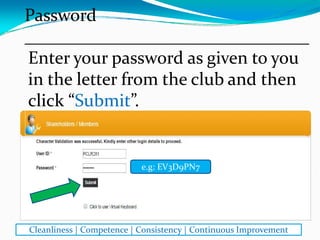
Enter your password as given to you 
in the letter from the club and then 
click “Submit”. 
e.g: EV3D9PN7
Password
________________________________
Cleanliness | Competence | Consistency | Continuous Improvement
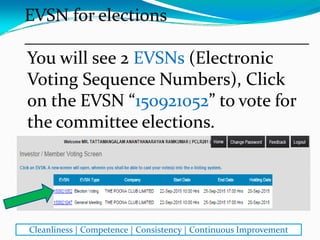
You will see 2 EVSNs (Electronic 
Voting Sequence Numbers), Click 
on the EVSN “150921052” to vote for 
the committee elections.
EVSN for elections
________________________________
Cleanliness | Competence | Consistency | Continuous Improvement
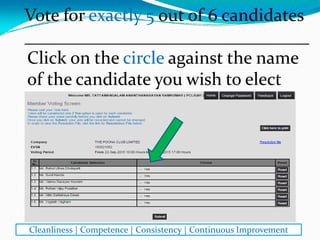
Click on the circle against the name 
of the candidate you wish to elect
Vote for exactly 5 out of 6 candidates
________________________________
Cleanliness | Competence | Consistency | Continuous Improvement
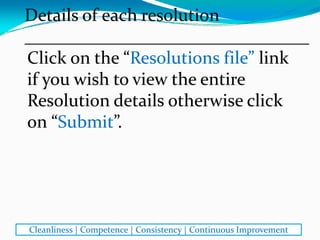
Click on the “Resolutions file” link 
if you wish to view the entire 
Resolution details otherwise click 
on “Submit”.
Details of each resolution
________________________________
Cleanliness | Competence | Consistency | Continuous Improvement
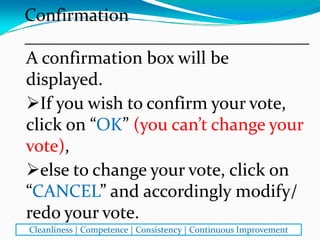
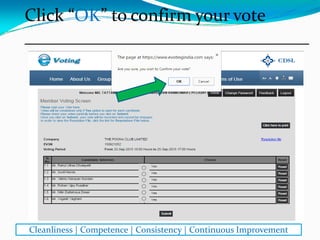
A confirmation box will be 
displayed. 
If you wish to confirm your vote, 
click on “OK” (you can’t change your 
vote), 
else to change your vote, click on 
“CANCEL” and accordingly modify/ 
redo your vote.
Confirmation
________________________________
Cleanliness | Competence | Consistency | Continuous Improvement
Click “OK” to confirm your vote
________________________________
Cleanliness | Competence | Consistency | Continuous Improvement
⃝
⃝
⃝
⃝
⃝
⃝
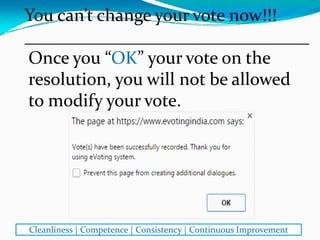
Once you “OK” your vote on the 
resolution, you will not be allowed 
to modify your vote. 
You can’t change your vote now!!!
________________________________
Cleanliness | Competence | Consistency | Continuous Improvement
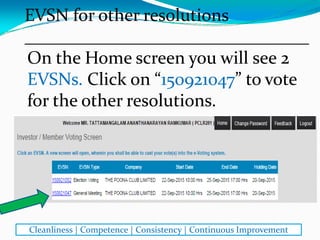
On the Home screen you will see 2 
EVSNs. Click on “150921047” to vote 
for the other resolutions.
EVSN for other resolutions
________________________________
Cleanliness | Competence | Consistency | Continuous Improvement
You can either vote on all the 
resolutions together or on certain 
resolutions first and the
remaining till the completion of 
the voting period i.e. till 5.00 pm 
on 25th Sept. 2015. 
You can vote on the resolutions
________________________________
Cleanliness | Competence | Consistency | Continuous Improvement
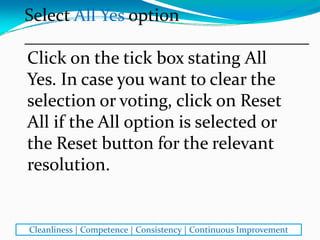
Click on the tick box stating All 
Yes. In case you want to clear the 
selection or voting, click on Reset 
All if the All option is selected or 
the Reset button for the relevant 
resolution. 
Select All Yes option
________________________________
Cleanliness | Competence | Consistency | Continuous Improvement
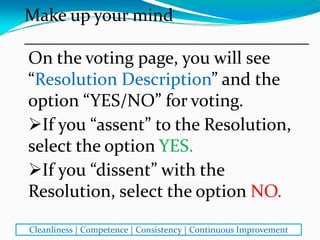
On the voting page, you will see 
“Resolution Description” and the 
option “YES/NO” for voting. 
If you “assent” to the Resolution, 
select the option YES.
If you “dissent” with the 
Resolution, select the option NO.
Make up your mind
________________________________
Cleanliness | Competence | Consistency | Continuous Improvement
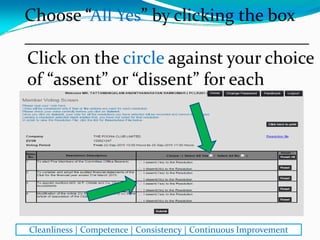
Click on the circle against your choice 
of “assent” or “dissent” for each
Choose “All Yes” by clicking the box
________________________________
Cleanliness | Competence | Consistency | Continuous Improvement
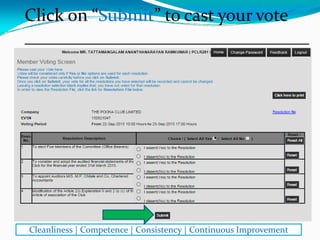
Click on “Submit” to cast your vote
________________________________
Cleanliness | Competence | Consistency | Continuous Improvement
⃝
⃝
⃝
⃝
⃝
⃝
⃝
⃝
●
A confirmation box will be 
displayed. 
If you wish to confirm your vote, 
click on “OK” (you can’t change your 
vote), 
else to change your vote, click on 
“CANCEL” and accordingly modify/ 
redo your vote.
Confirmation
________________________________
Cleanliness | Competence | Consistency | Continuous Improvement
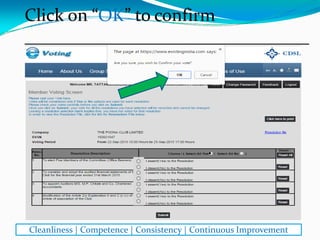
Click on “OK” to confirm
________________________________
Cleanliness | Competence | Consistency | Continuous Improvement
⃝
⃝
⃝
⃝
⃝
⃝
⃝
⃝
●
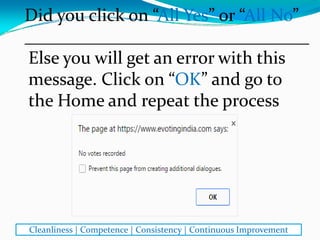
Did you click on “All Yes” or “All No”
________________________________
Cleanliness | Competence | Consistency | Continuous Improvement
Else you will get an error with this 
message. Click on “OK” and go to 
the Home and repeat the process
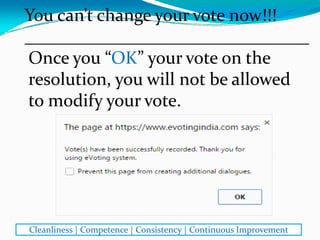
You can’t change your vote now!!!
________________________________
Cleanliness | Competence | Consistency | Continuous Improvement
Once you “OK” your vote on the 
resolution, you will not be allowed 
to modify your vote. 
You can print the voting done by 
you by clicking on “Click here to 
print” option on the Voting page. 
You can visit this page even after 
completion of your voting.
If you want to keep a record
________________________________
Cleanliness | Competence | Consistency | Continuous Improvement
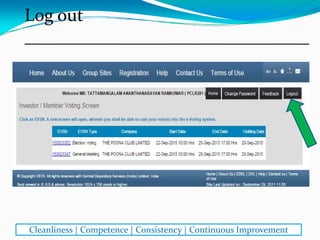
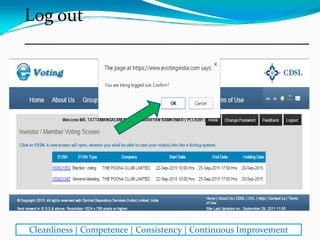
Log out
________________________________
Cleanliness | Competence | Consistency | Continuous Improvement
Log out
________________________________
Cleanliness | Competence | Consistency | Continuous Improvement
In case you have any queries or 
issues regarding e‐voting, you can 
email to: 
helpdesk.evoting@cdslindia.com
OR
contact help desk from 10:00 am to 
6:15 pm only on 1800‐200‐5533 or 
Tel. 022‐22728588 /022‐22725040
If you face any issue or have a query
________________________________
Cleanliness | Competence | Consistency | Continuous Improvement
Happy voting!
Thank you
All the best
________________________________
Cleanliness | Competence | Consistency | Continuous Improvement

Poona Club Elections E-voting procedure