PONG 1D EXPERIENCE
I&R Comenius Project
Torino (April 2014)
Poitiers (November 2014)
Performed by Stefano and Leopoldo (Spain teachers)
Pong 1D
 The main aim of this workshop is to develop a
program that simulates a ping-pong match
between 2 players from different countries of our
project thinking together.
 To achieve the final product, you have to follow
the 3 steps approach we are going to show here.
 First of all let’s see what we can use:
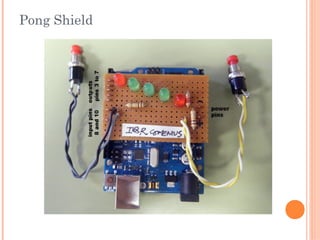
Pong Shield
Pong shield
 The pong shield is composed by a line of 5 leds (1
green, 3 red, 1 green).
 The idea is that two players stand next to the green
leds. When the game starts, the leds light up
secuencially from left to right or from right to left,
simulating a ping pong ball moving from one side to
the other.
 Players uses a button to “hit” the ball and send it to
the other player.
Step 1: turn on the leds
 Let’s say that player1 is on the left and player2 is on
the right.
 You have to create a program that:
 If player1 press the button1, the led on the left turns on
for a second, then it turns off and the next led turns on
for a second, then the third and so on until the led on the
right is on.
 If player 2 press the button2, the led on the right turns
on for a second, then it turns off and the next led turns
on for a second, then the third and so on until the led on
the left is on
 In this step, noone win or lose. They just send the
“ball” to each other.
Step 2: considering realtime
 In this step you have to modify the previous
program and add a maximum response time for the
players
 This means that when the green led next to a
player turns on, he has a maximum time (say 1
second) to press his button.
 If he doesn’t press the button, the other player win
the game.
Step 3: making your pong unique
 Add some feature to improve the pong experience!!
For example you can:
 the ball increases its speed during the game
 A match starts when both players press their button
 Create an “intro led show” at the beginning of the
game
 Mark up who won the last game switching on his
green led until next game starts
 Add the rule that if a player press his button when
his green light is not switched on, he loses the
match.
Add whatever you think is
important to make your pong
more enjoyable.
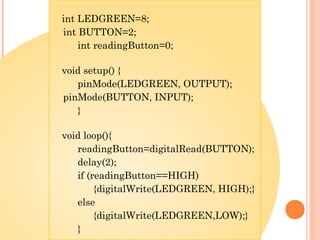
You can BEGIN with these
simple lines of code!
int LEDGREEN=8;
int BUTTON=2;
int readingButton=0;
void setup() {
pinMode(LEDGREEN, OUTPUT);
pinMode(BUTTON, INPUT);
}
void loop(){
readingButton=digitalRead(BUTTON);
delay(2);
if (readingButton==HIGH)
{digitalWrite(LEDGREEN, HIGH);}
else
{digitalWrite(LEDGREEN,LOW);}
}
Step 4: finding a solution
After trying, you can check it with
a complete solution at this link:
https://sites.google.com/site/pongversion4/
Thanks for your attention!

Pong1 d

  • 1.
    PONG 1D EXPERIENCE I&RComenius Project Torino (April 2014) Poitiers (November 2014) Performed by Stefano and Leopoldo (Spain teachers)
  • 2.
    Pong 1D  Themain aim of this workshop is to develop a program that simulates a ping-pong match between 2 players from different countries of our project thinking together.  To achieve the final product, you have to follow the 3 steps approach we are going to show here.  First of all let’s see what we can use:
  • 3.
  • 4.
    Pong shield  Thepong shield is composed by a line of 5 leds (1 green, 3 red, 1 green).  The idea is that two players stand next to the green leds. When the game starts, the leds light up secuencially from left to right or from right to left, simulating a ping pong ball moving from one side to the other.  Players uses a button to “hit” the ball and send it to the other player.
  • 5.
    Step 1: turnon the leds  Let’s say that player1 is on the left and player2 is on the right.  You have to create a program that:  If player1 press the button1, the led on the left turns on for a second, then it turns off and the next led turns on for a second, then the third and so on until the led on the right is on.  If player 2 press the button2, the led on the right turns on for a second, then it turns off and the next led turns on for a second, then the third and so on until the led on the left is on  In this step, noone win or lose. They just send the “ball” to each other.
  • 6.
    Step 2: consideringrealtime  In this step you have to modify the previous program and add a maximum response time for the players  This means that when the green led next to a player turns on, he has a maximum time (say 1 second) to press his button.  If he doesn’t press the button, the other player win the game.
  • 7.
    Step 3: makingyour pong unique  Add some feature to improve the pong experience!! For example you can:  the ball increases its speed during the game  A match starts when both players press their button  Create an “intro led show” at the beginning of the game  Mark up who won the last game switching on his green led until next game starts  Add the rule that if a player press his button when his green light is not switched on, he loses the match.
  • 8.
    Add whatever youthink is important to make your pong more enjoyable. You can BEGIN with these simple lines of code!
  • 9.
    int LEDGREEN=8; int BUTTON=2; intreadingButton=0; void setup() { pinMode(LEDGREEN, OUTPUT); pinMode(BUTTON, INPUT); } void loop(){ readingButton=digitalRead(BUTTON); delay(2); if (readingButton==HIGH) {digitalWrite(LEDGREEN, HIGH);} else {digitalWrite(LEDGREEN,LOW);} }
  • 10.
    Step 4: findinga solution After trying, you can check it with a complete solution at this link: https://sites.google.com/site/pongversion4/ Thanks for your attention!