What Is Poll Everywhere?
“On the surface, Poll Everywhere is a simple text message
voting application that works well for live audiences.

People vote by sending text messages (or using Twitter) to
options displayed on-screen. The poll that is embedded within
the presentation or web page will update in real time.

Advanced uses include texting comments to a presentation,
texting questions to a presenter, web voting, and SMS
interactivity in print, radio, and TV.”
                                            Polleverywhere.com/faq
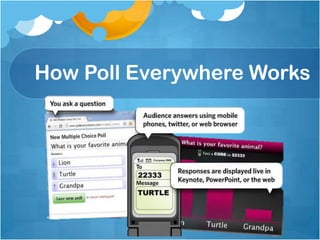
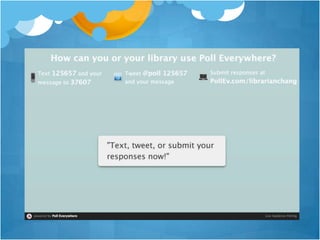
How Poll Everywhere Works
Why Use Poll Everywhere?
 It’s a free student response system

 Flexibility: patrons can respond through:
   SMS (texting)
   Computers with Internet access
   Mobile Internet devices
   Twitter accounts

 Multiple formats allow various kinds of polls:
 multiple choice, free response, and now goal
Even More Reasons!
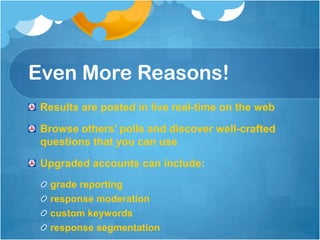
 Results are posted in live real-time on the web

 Browse others’ polls and discover well-crafted
 questions that you can use

 Upgraded accounts can include:
   grade reporting
   response moderation
   custom keywords
   response segmentation
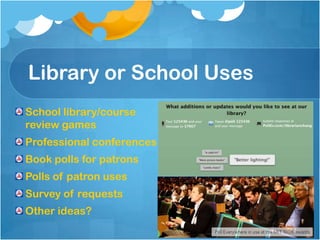
Library or School Uses
School library/course
review games
Professional conferences
Book polls for patrons
Polls of patron uses
Survey of requests
Other ideas?
Getting Started:
   Sign up for a free account at polleverywhere.com
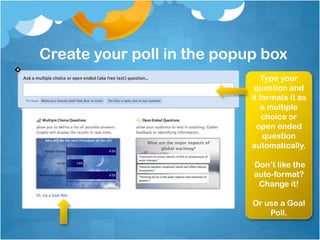
Create your poll in the popup box
                                Type your
                             question and
                            it formats it as
                                a multiple
                                choice or
                              open ended
                                question
                            automatically.

                            Don’t like the
                            auto-format?
                             Change it!

                            Or use a Goal
                                Poll.
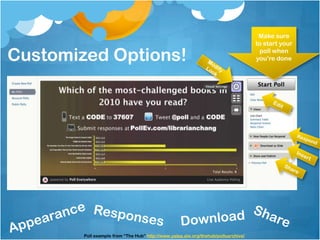
Make sure
                                                                                    to start your

Customized Options!                                                                  poll when
                                                                                    you’re done


        Poll example from “The Hub” http://www.yalsa.ala.org/thehub/pollsarchive/
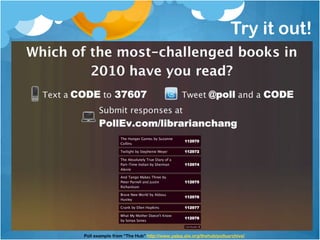
Try it out!


Poll example from “The Hub” http://www.yalsa.ala.org/thehub/pollsarchive/
Mediagraphy
All images and screenshots from www.polleverywhere.com

What is Poll Everywhere? Quote from
www.polleverywhere.com/faq

Challenged Books poll quoted from YALSA’s “The Hub”
http://www.yalsa.ala.org/thehub/pollsarchive/


This presentation was created for educational purposes only.
No copyright infringement was intended.

Polleverywhere Tutorial

  • 2.
    What Is PollEverywhere? “On the surface, Poll Everywhere is a simple text message voting application that works well for live audiences. People vote by sending text messages (or using Twitter) to options displayed on-screen. The poll that is embedded within the presentation or web page will update in real time. Advanced uses include texting comments to a presentation, texting questions to a presenter, web voting, and SMS interactivity in print, radio, and TV.” Polleverywhere.com/faq
  • 3.
  • 4.
    Why Use PollEverywhere? It’s a free student response system Flexibility: patrons can respond through: SMS (texting) Computers with Internet access Mobile Internet devices Twitter accounts Multiple formats allow various kinds of polls: multiple choice, free response, and now goal
  • 5.
    Even More Reasons! Results are posted in live real-time on the web Browse others’ polls and discover well-crafted questions that you can use Upgraded accounts can include: grade reporting response moderation custom keywords response segmentation
  • 6.
    Library or SchoolUses School library/course review games Professional conferences Book polls for patrons Polls of patron uses Survey of requests Other ideas?
  • 7.
    Getting Started: Sign up for a free account at polleverywhere.com
  • 8.
    Create your pollin the popup box Type your question and it formats it as a multiple choice or open ended question automatically. Don’t like the auto-format? Change it! Or use a Goal Poll.
  • 9.
    Make sure to start your Customized Options! poll when you’re done Poll example from “The Hub” http://www.yalsa.ala.org/thehub/pollsarchive/
  • 10.
    Try it out! Pollexample from “The Hub” http://www.yalsa.ala.org/thehub/pollsarchive/
  • 12.
    Mediagraphy All images andscreenshots from www.polleverywhere.com What is Poll Everywhere? Quote from www.polleverywhere.com/faq Challenged Books poll quoted from YALSA’s “The Hub” http://www.yalsa.ala.org/thehub/pollsarchive/ This presentation was created for educational purposes only. No copyright infringement was intended.

Editor's Notes

  • #6 1. It does not require any software installation or additional hardware. 3.Upgraded accounts can include: grade reporting (see each students’ answers), response moderation (approve before posting), custom keywords (vs. assigned numbers), and response segmentation (competitions and comparisons).
  • #7 MIT $100K Entrepreneurship Competition
  • #8 Free account= 30 participants per poll but can clear results and reuse.