Podcasting and Videocasting Primer Jim Greenberg, TLTC, SUNY Oneonta TLTC December 8, 2005
Podcasting Happens Podcasting and Videocasting are methods of publishing audio or video programs via the Internet, allowing users to subscribe to a feed of new files. It became popular in late 2004, largely due to automatic downloading of audio onto portable players or personal computers. From Wikipedia, the free encyclopedia.
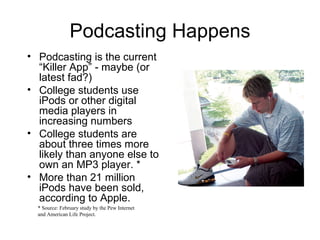
Podcasting Happens Podcasting is the current “Killer App” - maybe (or latest fad?) College students use iPods or other digital media players in increasing numbers College students are about three times more likely than anyone else to own an MP3 player. * More than 21 million iPods have been sold, according to Apple. * Source: February study by the Pew Internet and American Life Project.
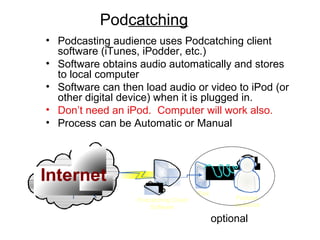
Pod catching Podcasting audience uses Podcatching client software (iTunes, iPodder, etc.) Software obtains audio automatically and stores to local computer Software can then load audio or video to iPod (or other digital device) when it is plugged in. Don’t need an iPod.  Computer will work also. Process can be Automatic or Manual optional
How Podcasting Works The “podcast feed” URL  address of a specially encoded page on the podcaster’s web server  contains information about the podcast if viewed in a web browser, you will see the raw XML code used
you copy the URL into a  “podcatching” client software  there are many different podcatching applications available But you’re not meant to look at this “raw” data
 
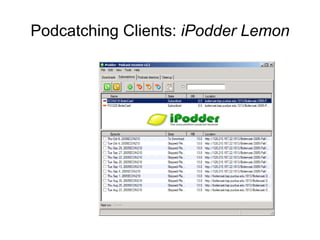
Podcatching Clients:  iPodder Lemon
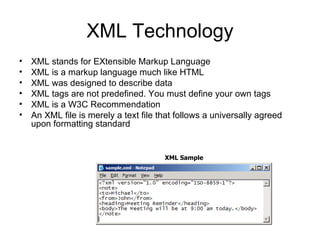
XML Technology XML stands for EXtensible Markup Language  XML is a markup language much like HTML  XML was designed to describe data  XML tags are not predefined. You must define your own tags  XML is a W3C Recommendation  An XML file is merely a text file that follows a universally agreed upon formatting standard XML Sample
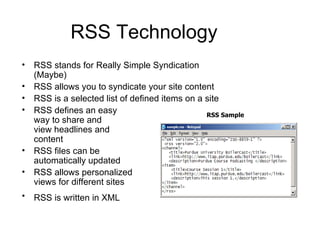
RSS Technology RSS stands for Really Simple Syndication (Maybe) RSS allows you to syndicate your site content  RSS is a selected list of defined items on a site  RSS defines an easy  way to share and  view headlines and  content  RSS files can be  automatically updated  RSS allows personalized  views for different sites  RSS is written in XML   RSS Sample
RSS Technology Why Use RSS? RSS was designed to show selected data. RSS Readers are designed to regularly check the RSS file for new data Without RSS, users will have to check a web site daily to check for new updates.  This may be too time-consuming for many users.  With an RSS feed they can check your site faster using an RSS aggregator  Since RSS data is small and fast-loading, it can easily be used with services like cell phones or PDA's.
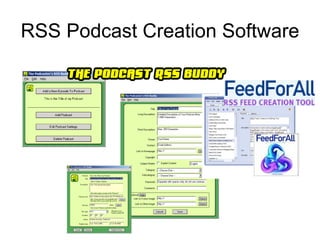
RSS Podcast Creation Software
“ What do I need to Podcast or Videocast?” MP3 Audio File or MP4 Video file Created in any number of ways.  TLTC can help get you started. RSS File (or aristotle.oneonta.edu blog) Created with RSS Podcast Software Created Manually (if you are bored) Web Server Any Flavor Need a Web Page to post the RSS link Audience Audience needs to know where to find the podcast Audience needs to be interested in podcast
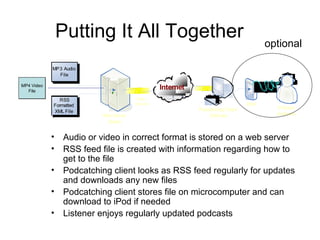
Putting It All Together Audio or video in correct format is stored on a web server RSS feed file is created with information regarding how to get to the file Podcatching client looks as RSS feed regularly for updates and downloads any new files Podcatching client stores file on microcomputer and can download to iPod if needed Listener enjoys regularly updated podcasts optional MP4 Video File
Suggested Web Resources Podcatching Clients Apple iTunes:  http://www.apple.com/itunes/ iPodder Client:  http://www.ipodder.org/ Podcasting Tools Podcast RSS Buddy:  http://www.tolley.info/rssbuddy/ Feed for All:  http://www.feedforall.com/ College Feed:  http: //aristotle . oneonta . edu/ Podcasting Directories Podcast.net Directory:  http://www.podcast.net/ Podcast Alley Directory:  http://www.podcastalley.com/ Podcasting Technology RSS/XML Tutorial:  http://www.w3schools.com/rss/ Podcasting 101:  http://maczealots.com/articles/podcasting/ Make RSS Feeds:  http: //make-rss-feeds . com/making-an-rss-feed . htm

Podcasting

  • 1.
    Podcasting and VideocastingPrimer Jim Greenberg, TLTC, SUNY Oneonta TLTC December 8, 2005
  • 2.
    Podcasting Happens Podcastingand Videocasting are methods of publishing audio or video programs via the Internet, allowing users to subscribe to a feed of new files. It became popular in late 2004, largely due to automatic downloading of audio onto portable players or personal computers. From Wikipedia, the free encyclopedia.
  • 3.
    Podcasting Happens Podcastingis the current “Killer App” - maybe (or latest fad?) College students use iPods or other digital media players in increasing numbers College students are about three times more likely than anyone else to own an MP3 player. * More than 21 million iPods have been sold, according to Apple. * Source: February study by the Pew Internet and American Life Project.
  • 4.
    Pod catching Podcastingaudience uses Podcatching client software (iTunes, iPodder, etc.) Software obtains audio automatically and stores to local computer Software can then load audio or video to iPod (or other digital device) when it is plugged in. Don’t need an iPod. Computer will work also. Process can be Automatic or Manual optional
  • 5.
    How Podcasting WorksThe “podcast feed” URL address of a specially encoded page on the podcaster’s web server contains information about the podcast if viewed in a web browser, you will see the raw XML code used
  • 6.
    you copy theURL into a “podcatching” client software there are many different podcatching applications available But you’re not meant to look at this “raw” data
  • 7.
  • 8.
    Podcatching Clients: iPodder Lemon
  • 9.
    XML Technology XMLstands for EXtensible Markup Language XML is a markup language much like HTML XML was designed to describe data XML tags are not predefined. You must define your own tags XML is a W3C Recommendation An XML file is merely a text file that follows a universally agreed upon formatting standard XML Sample
  • 10.
    RSS Technology RSSstands for Really Simple Syndication (Maybe) RSS allows you to syndicate your site content RSS is a selected list of defined items on a site RSS defines an easy way to share and view headlines and content RSS files can be automatically updated RSS allows personalized views for different sites RSS is written in XML RSS Sample
  • 11.
    RSS Technology WhyUse RSS? RSS was designed to show selected data. RSS Readers are designed to regularly check the RSS file for new data Without RSS, users will have to check a web site daily to check for new updates. This may be too time-consuming for many users. With an RSS feed they can check your site faster using an RSS aggregator Since RSS data is small and fast-loading, it can easily be used with services like cell phones or PDA's.
  • 12.
  • 13.
    “ What doI need to Podcast or Videocast?” MP3 Audio File or MP4 Video file Created in any number of ways. TLTC can help get you started. RSS File (or aristotle.oneonta.edu blog) Created with RSS Podcast Software Created Manually (if you are bored) Web Server Any Flavor Need a Web Page to post the RSS link Audience Audience needs to know where to find the podcast Audience needs to be interested in podcast
  • 14.
    Putting It AllTogether Audio or video in correct format is stored on a web server RSS feed file is created with information regarding how to get to the file Podcatching client looks as RSS feed regularly for updates and downloads any new files Podcatching client stores file on microcomputer and can download to iPod if needed Listener enjoys regularly updated podcasts optional MP4 Video File
  • 15.
    Suggested Web ResourcesPodcatching Clients Apple iTunes: http://www.apple.com/itunes/ iPodder Client: http://www.ipodder.org/ Podcasting Tools Podcast RSS Buddy: http://www.tolley.info/rssbuddy/ Feed for All: http://www.feedforall.com/ College Feed: http: //aristotle . oneonta . edu/ Podcasting Directories Podcast.net Directory: http://www.podcast.net/ Podcast Alley Directory: http://www.podcastalley.com/ Podcasting Technology RSS/XML Tutorial: http://www.w3schools.com/rss/ Podcasting 101: http://maczealots.com/articles/podcasting/ Make RSS Feeds: http: //make-rss-feeds . com/making-an-rss-feed . htm