Session and Cookies
SESSION One of the standard examples used to demonstrate how a session works is the hit counter application.  The example of coding: <?php  // initialize a session  session_start ();  // increment a session counter  $_SESSION [ 'counter' ]++;  // print value  echo  &quot;You have viewed this page &quot;  .  $_SESSION [ 'counter' ] .  &quot; times&quot; ;  ?>  With above code, the counter will increases by 1 on each subsequent page load. If two browser windows are open, and request the same page in each one, PHP will maintain and increment individual session counters for each browser instance.
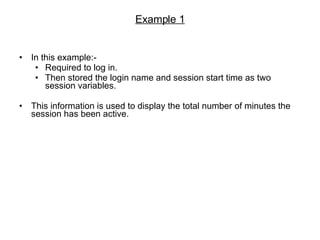
Example 1 In this example:- Required to log in. Then stored the login name and session start time as two session variables. This information is used to display the total number of minutes the session has been active.
<?php  // initialize a session  session_start ();  ?>  <html>  <head></head>  <body>  <?php  if (!isset( $_SESSION [ 'name' ]) && !isset( $_POST [ 'name' ])) {       // if no data, print the form  ?>      <form action=&quot; <?php  echo  $_SERVER [ 'PHP_SELF' ] ?> &quot; method=&quot;post&quot;>          <input type=&quot;text&quot; name=&quot;name&quot;>          <input type=&quot;submit&quot; name=&quot;submit&quot; value=&quot;Enter your name&quot;>      </form>  <?php  }  else if (!isset( $_SESSION [ 'name' ]) && isset( $_POST [ 'name' ])) {       // if a session does not exist but the form has been submitted      // check to see if the form has all required values      // create a new session       if (!empty( $_POST [ 'name' ])) {           $_SESSION [ 'name' ] =  $_POST [ 'name' ];           $_SESSION [ 'start' ] =  time ();          echo  &quot;Welcome, &quot;  .  $_POST [ 'name' ] .  &quot;. A new session has been activated for you. Click <a href=&quot;  .  $_SERVER [ 'PHP_SELF' ] .  &quot;>here</a> to refresh the page.&quot; ;      }      else {          echo  &quot;ERROR: Please enter your name!&quot; ;      }  }  else if (isset( $_SESSION [ 'name' ])) {       // if a previous session exists      // calculate elapsed time since session start and now       echo  &quot;Welcome back, &quot;  .  $_SESSION [ 'name' ] .  &quot;. This session was activated &quot;  .  round (( time () -  $_SESSION [ 'start' ]) /  60 ) .  &quot; minute(s) ago. Click <a href=&quot;  .  $_SERVER [ 'PHP_SELF' ] .  &quot;>here</a> to refresh the page.&quot; ;  }  ?>  </body>  </html>
Continue… The session start time is recorded in $_SESSION['start'] with the time() function. Then, the value stored in $_SESSION['start'] is compared with the most current value of time() to calculate and display an (approximate) display of elapsed time. The call to session_start() must appear first, before any output is generated by the script. This is because the PHP session handler internally uses in-memory cookies to store session data, and the cookie creation headers must be transmitted to the client browser before any output.
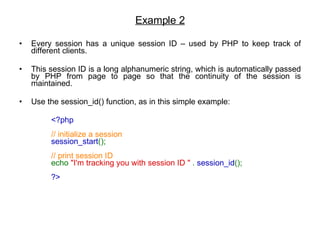
Example 2 Every session has a unique session ID – used by PHP to keep track of different clients. This session ID is a long alphanumeric string, which is automatically passed by PHP from page to page so that the continuity of the session is maintained.  Use the session_id() function, as in this simple example:  <?php  // initialize a session  session_start ();  // print session ID  echo  &quot;I'm tracking you with session ID &quot;  .  session_id ();  ?>
Example 3 When the user shuts down the client browser and destroys the session, the $_SESSION array will be flushed of all session variables.  A session can also explicitly be destroy. For example, when a user logs out - by calling the session_destroy() function. Consider the given example below:-  <?php  // initialize a session  session_start ();  // then destroy it  session_destroy ();  ?>   Before calling a session_destroy() to destroy a session, session_start() is called first to recreate it. $_SESSION is a superglobal – can use it inside and outside functions without needing to declare it as global first.
Cookies PHP offers a single function for cookie manipulation – setcookie().  This function allows a read and write of cookie files. <?php  if (!isset( $_COOKIE [ 'visited' ])) {       // if a cookie does not exist      // set it       setcookie ( &quot;visited&quot; ,  &quot;1&quot; ,  mktime ()+ 86400 ,  &quot;/&quot; ) or die( &quot;Could not set cookie&quot; );      echo  &quot;This is your first visit here today.&quot; ;  }  else {       // if a cookie already exists       echo  &quot;Nice to see you again, old friend!&quot; ;  }  ?>
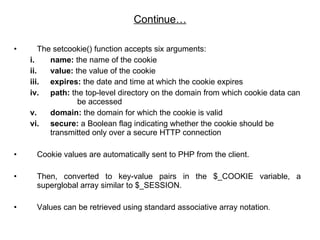
The setcookie() function accepts six arguments:  name:  the name of the cookie value:  the value of the cookie  expires:  the date and time at which the cookie expires  path:  the top-level directory on the domain from which cookie data can  be accessed  domain:  the domain for which the cookie is valid  secure:  a Boolean flag indicating whether the cookie should be transmitted only over a secure HTTP connection  Cookie values are automatically sent to PHP from the client. Then, converted to key-value pairs in the $_COOKIE variable, a superglobal array similar to $_SESSION.  Values can be retrieved using standard associative array notation .  Continue…
<?php  if (!isset( $_POST [ 'email' ])) {       // if form has not been submitted      // display form      // if cookie already exists, pre-fill form field with cookie value  ?>      <html>      <head></head>      <body>            <form action=&quot; <?php  echo  $_SERVER [ 'PHP_SELF' ] ?> &quot; method=&quot;post&quot;>          Enter your email address: <input type=&quot;text&quot; name=&quot;email&quot; value=&quot; <?php  echo  $_COOKIE [ 'email' ];  ?> &quot;>          <input type=&quot;submit&quot; name=&quot;submit&quot;>           <?php           // also calculate the time since the last submission           if ( $_COOKIE [ 'lastsave' ]) {               $days  =  round (( time () -  $_COOKIE [ 'lastsave' ]) /  86400 );              echo  &quot;<br /> $days day(s) since last submission&quot; ;          }           ?>      </form>            </body>      </html>  <?php  }  Form and Function
Continue… else {       // if form has been submitted      // set cookies with form value and timestamp      // both cookies expire after 30 days       if (!empty( $_POST [ 'email' ])) {           setcookie ( &quot;email&quot; ,  $_POST [ 'email' ],  mktime ()+( 86400 * 30 ),  &quot;/&quot; );           setcookie ( &quot;lastsave&quot; ,  time (),  mktime ()+( 86400 * 30 ),  &quot;/&quot; );          echo  &quot;Your email address has been recorded.&quot; ;      }      else {          echo  &quot;ERROR: Please enter your email address!&quot; ;      }  }  ?>  </body>  </html>
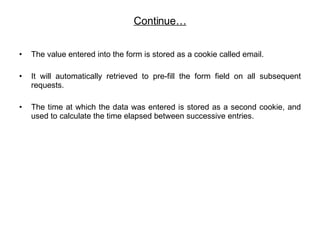
Continue… The value entered into the form is stored as a cookie called email. It will automatically retrieved to pre-fill the form field on all subsequent requests.  The time at which the data was entered is stored as a second cookie, and used to calculate the time elapsed between successive entries.
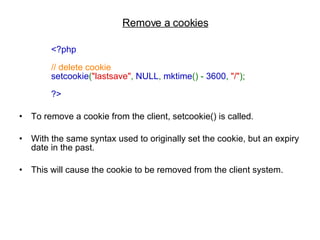
Remove a cookies <?php  // delete cookie  setcookie ( &quot;lastsave&quot; ,  NULL ,  mktime () -  3600 ,  &quot;/&quot; );  ?>   To remove a cookie from the client, setcookie() is called.  With the same syntax used to originally set the cookie, but an expiry date in the past. This will cause the cookie to be removed from the client system.
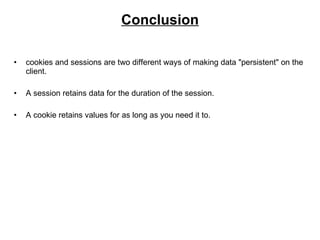
Conclusion cookies and sessions are two different ways of making data &quot;persistent&quot; on the client.  A session retains data for the duration of the session.  A cookie retains values for as long as you need it to.

Php Sessoins N Cookies

  • 1.
  • 2.
    SESSION One ofthe standard examples used to demonstrate how a session works is the hit counter application. The example of coding: <?php // initialize a session session_start (); // increment a session counter $_SESSION [ 'counter' ]++; // print value echo &quot;You have viewed this page &quot; . $_SESSION [ 'counter' ] . &quot; times&quot; ; ?> With above code, the counter will increases by 1 on each subsequent page load. If two browser windows are open, and request the same page in each one, PHP will maintain and increment individual session counters for each browser instance.
  • 3.
    Example 1 Inthis example:- Required to log in. Then stored the login name and session start time as two session variables. This information is used to display the total number of minutes the session has been active.
  • 4.
    <?php //initialize a session session_start (); ?> <html> <head></head> <body> <?php if (!isset( $_SESSION [ 'name' ]) && !isset( $_POST [ 'name' ])) {      // if no data, print the form ?>     <form action=&quot; <?php echo $_SERVER [ 'PHP_SELF' ] ?> &quot; method=&quot;post&quot;>         <input type=&quot;text&quot; name=&quot;name&quot;>         <input type=&quot;submit&quot; name=&quot;submit&quot; value=&quot;Enter your name&quot;>     </form> <?php } else if (!isset( $_SESSION [ 'name' ]) && isset( $_POST [ 'name' ])) {      // if a session does not exist but the form has been submitted     // check to see if the form has all required values     // create a new session      if (!empty( $_POST [ 'name' ])) {          $_SESSION [ 'name' ] = $_POST [ 'name' ];          $_SESSION [ 'start' ] = time ();         echo &quot;Welcome, &quot; . $_POST [ 'name' ] . &quot;. A new session has been activated for you. Click <a href=&quot; . $_SERVER [ 'PHP_SELF' ] . &quot;>here</a> to refresh the page.&quot; ;     }     else {         echo &quot;ERROR: Please enter your name!&quot; ;     } } else if (isset( $_SESSION [ 'name' ])) {      // if a previous session exists     // calculate elapsed time since session start and now      echo &quot;Welcome back, &quot; . $_SESSION [ 'name' ] . &quot;. This session was activated &quot; . round (( time () - $_SESSION [ 'start' ]) / 60 ) . &quot; minute(s) ago. Click <a href=&quot; . $_SERVER [ 'PHP_SELF' ] . &quot;>here</a> to refresh the page.&quot; ; } ?> </body> </html>
  • 5.
    Continue… The sessionstart time is recorded in $_SESSION['start'] with the time() function. Then, the value stored in $_SESSION['start'] is compared with the most current value of time() to calculate and display an (approximate) display of elapsed time. The call to session_start() must appear first, before any output is generated by the script. This is because the PHP session handler internally uses in-memory cookies to store session data, and the cookie creation headers must be transmitted to the client browser before any output.
  • 6.
    Example 2 Everysession has a unique session ID – used by PHP to keep track of different clients. This session ID is a long alphanumeric string, which is automatically passed by PHP from page to page so that the continuity of the session is maintained. Use the session_id() function, as in this simple example: <?php // initialize a session session_start (); // print session ID echo &quot;I'm tracking you with session ID &quot; . session_id (); ?>
  • 7.
    Example 3 Whenthe user shuts down the client browser and destroys the session, the $_SESSION array will be flushed of all session variables. A session can also explicitly be destroy. For example, when a user logs out - by calling the session_destroy() function. Consider the given example below:- <?php // initialize a session session_start (); // then destroy it session_destroy (); ?> Before calling a session_destroy() to destroy a session, session_start() is called first to recreate it. $_SESSION is a superglobal – can use it inside and outside functions without needing to declare it as global first.
  • 8.
    Cookies PHP offersa single function for cookie manipulation – setcookie(). This function allows a read and write of cookie files. <?php if (!isset( $_COOKIE [ 'visited' ])) {      // if a cookie does not exist     // set it      setcookie ( &quot;visited&quot; , &quot;1&quot; , mktime ()+ 86400 , &quot;/&quot; ) or die( &quot;Could not set cookie&quot; );     echo &quot;This is your first visit here today.&quot; ; } else {      // if a cookie already exists      echo &quot;Nice to see you again, old friend!&quot; ; } ?>
  • 9.
    The setcookie() functionaccepts six arguments: name: the name of the cookie value: the value of the cookie expires: the date and time at which the cookie expires path: the top-level directory on the domain from which cookie data can be accessed domain: the domain for which the cookie is valid secure: a Boolean flag indicating whether the cookie should be transmitted only over a secure HTTP connection Cookie values are automatically sent to PHP from the client. Then, converted to key-value pairs in the $_COOKIE variable, a superglobal array similar to $_SESSION. Values can be retrieved using standard associative array notation . Continue…
  • 10.
    <?php if(!isset( $_POST [ 'email' ])) {      // if form has not been submitted     // display form     // if cookie already exists, pre-fill form field with cookie value ?>     <html>     <head></head>     <body>          <form action=&quot; <?php echo $_SERVER [ 'PHP_SELF' ] ?> &quot; method=&quot;post&quot;>         Enter your email address: <input type=&quot;text&quot; name=&quot;email&quot; value=&quot; <?php echo $_COOKIE [ 'email' ]; ?> &quot;>         <input type=&quot;submit&quot; name=&quot;submit&quot;>          <?php          // also calculate the time since the last submission          if ( $_COOKIE [ 'lastsave' ]) {              $days = round (( time () - $_COOKIE [ 'lastsave' ]) / 86400 );             echo &quot;<br /> $days day(s) since last submission&quot; ;         }          ?>     </form>          </body>     </html> <?php } Form and Function
  • 11.
    Continue… else {      // if form has been submitted     // set cookies with form value and timestamp     // both cookies expire after 30 days      if (!empty( $_POST [ 'email' ])) {          setcookie ( &quot;email&quot; , $_POST [ 'email' ], mktime ()+( 86400 * 30 ), &quot;/&quot; );          setcookie ( &quot;lastsave&quot; , time (), mktime ()+( 86400 * 30 ), &quot;/&quot; );         echo &quot;Your email address has been recorded.&quot; ;     }     else {         echo &quot;ERROR: Please enter your email address!&quot; ;     } } ?> </body> </html>
  • 12.
    Continue… The valueentered into the form is stored as a cookie called email. It will automatically retrieved to pre-fill the form field on all subsequent requests. The time at which the data was entered is stored as a second cookie, and used to calculate the time elapsed between successive entries.
  • 13.
    Remove a cookies<?php // delete cookie setcookie ( &quot;lastsave&quot; , NULL , mktime () - 3600 , &quot;/&quot; ); ?> To remove a cookie from the client, setcookie() is called. With the same syntax used to originally set the cookie, but an expiry date in the past. This will cause the cookie to be removed from the client system.
  • 14.
    Conclusion cookies andsessions are two different ways of making data &quot;persistent&quot; on the client. A session retains data for the duration of the session. A cookie retains values for as long as you need it to.