Using PHPDebugger - work in progress / unfinished - - work in progress / unfinished - December 2006 Stefan Pantke  [email_address] http://www.turingart.com /
Online resources Project info http://www.turingart.com/phpdebugger_lan__en.htm Mac OS X download http://www.turingart.com/downloads/phpDebugger.zip Windows download http://www.turingart.com/downloads/phpDebuggerWin.zip Sample report http://www.turingart.com/downloads/phpDebugger.pdf
In case you change something If you change ‚TADebugger.inc.php‘ Please forward your changed ‚TADebugger.inc.php‘ Probably add a sample PHP file, which uses your new feature If you‘d like to enrich the debugger protocol to post other types of information Please describe your change-request, I‘m happy to review
Motivation :: Debugging isn‘t that fun... Debugging applications is a time-consuming task  Without special debugging tools, this task gets even more time-consuming Client-side apps may redirect debug-output to a special log-window Web-apps can‘t access a log-window of a web-browser Writing log-entries on a web-server isn‘t that user friendly
Debuggers :: We have to so many... Yes, but some debuggers can‘t be used without a special IDE require a source-level re-compile of PHP are only available for Windows require a special browser
PHPDebugger :: Main features Two components: TADebugger at the PHP side and PHPDebugger at the client-side Interfaces with PHP using a new PHP class ‚TADebugger‘ PHP and PHPDebugger communicate using TCP  [-> Firewall ] Does not require a source-level re-compile of PHP Is available for Mac OS X and Windows, might be become available for Linux too Supports any browser and ships with a built-in one too [a simple one]
PHPDebugger :: Why use it? Improves quality of code TADebugger switches to the highest available error level and automatically catches as much errors as possible Keeps HTML clean while debugging TADebugger redirects all errors or exceptions to PHPDebugger and does not disrupt HTML by messages Makes messages persist PHPDebugger keeps messages, even if a new HTML page is loaded Prints debugging reports PHPDebugger allows to print well-formated reports for your team leader
For the rest, let‘s assume... 192.68.1.100 IP of the web-server your PHP web-app runs on  192.168.1.42 IP of the system PHPDebugger runs on 8881 Port, on which PHPDebugger listens [default port] /Applications/MAMP/htdocs/phpDebugger/ Web-server root of our PHP web-app Instrument one of your web-apps using the following step-by-step guide
PHPDebugger :: Installation Install ‚TADebugger.inc.php‘ somewhere in your web-app‘s folder You might wish to install the file your ‚includes‘ folder [assumed] Load the ‚TADebugger‘ class using  require_once( ‚includes/TADebugger.inc.php‘ ); as the first statement of your PHP source file Now, you may access the debugger using the  $sharedDebugger variable
PHPDebugger :: Setting up communication First, define where PHPDebugger runs and where your PHP web-app lives Define the IP of the system you launched PHPDebugger $sharedDebugger->myDebugHost = '192.168.1.42'; Define the port, which PHPDebugger listens on: $sharedDebugger->myDebugPort = 8881; Define the root folder of your web-app [optional] $sharedDebugger->setAppBasePath(  '/Applications/MAMP/htdocs/phpDebugger/' );
PHPDebugger :: Output for free... Now start PHPDebugger and click the ‚Stop/Pause‘ button in the upper left corner of the main window PHPDebugger is now prepared to receive messages from PHP Finally, call your web-app using some URL like this http://192.168.1.100/ Note, that you may already see certain messages, although you didn‘t added special debugging instructions These messages are for free, since TADebugger defined the highest possible error reporting level for you.
PHPDebugger :: Posting messages To post an arbitrary message from your web-app to PHPDebugger, add this to your code $sharedDebugger->postMessage( 'My Message' ); If you call this from within a function, ensure to declare it as global global  $sharedDebugger; postMessage() basically post one line messages of arbitrary data
PHPDebugger :: Posting backtraces To post a backtrace - a list of all currently called functions or methods - call this $sharedDebugger->postTrace(); PHPDebugger prints the first function/method called and each other one slightly shifted right Each argument passed will get printed too
PHPDebugger :: Inspecting variables TADebugger can trace variables using this call $sharedDebugger->traceVariable(  $myVar, 'some Info' ); All values of traced variable get posted back to PHPDebugger if you call this $sharedDebugger->postState(); Select ‚Window -> Data Inspector‘ in PHPDebugger to show inspected variables
PHPDebugger :: Installing sample code Copy the contents of the folder named ‚putContentsInWebRoot‘ in your web-server‘s ‚htdocs‘ folder Start PHPDebugger and click the ‚Pause/Start‘ button in the upper left corner once Launch the sample web-app using this URL http://192.168.1.100/phpDebugger/?k=23 You should see output as on the next slide...
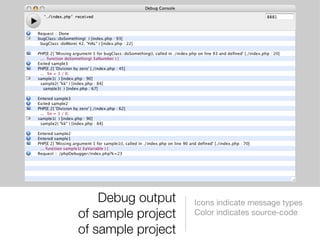
Debug output of sample project of sample project Icons indicate message types  Color indicates source-code
Security Tips Protect your includes directory using a ‚.htaccess‘ file and add these lines # Reject any request regarding this directory Order deny,allow Deny from all Using this ‚.htaccess‘, your web-server denies any access to the ./includes/ directory Use the ‚.inc.php‘ extension for each include/require file and deny access using ‚.htaccess‘ settings in your web-app‘s root folder
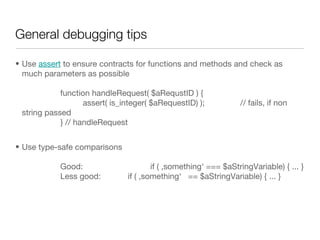
General debugging tips Use  assert  to ensure contracts for functions and methods and check as much parameters as possible function handleRequest( $aRequstID ) { assert( is_integer( $aRequestID) ); // fails, if non string passed } // handleRequest Use type-safe comparisons  Good: if ( ‚something‘ === $aStringVariable) { ... } Less good: if ( ‚something‘  == $aStringVariable) { ... }
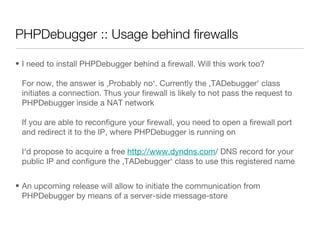
PHPDebugger :: Usage behind firewalls I need to install PHPDebugger behind a firewall. Will this work too? For now, the answer is ‚Probably no‘. Currently the ‚TADebugger‘ class initiates a connection. Thus your firewall is likely to not pass the request to PHPDebugger inside a NAT network If you are able to reconfigure your firewall, you need to open a firewall port and redirect it to the IP, where PHPDebugger is running on I‘d propose to acquire a free  http://www.dyndns.com / DNS record for your public IP and configure the ‚TADebugger‘ class to use this registered name An upcoming release will allow to initiate the communication from PHPDebugger by means of a server-side message-store
The Author Stefan Pantke Dipl.-Informatiker [M. Sc. CS] [email_address] I might wear polo shirts too ;-)
Thanks for your attention! http://www.turingart.com /

Php Debugger

  • 1.
    Using PHPDebugger -work in progress / unfinished - - work in progress / unfinished - December 2006 Stefan Pantke [email_address] http://www.turingart.com /
  • 2.
    Online resources Projectinfo http://www.turingart.com/phpdebugger_lan__en.htm Mac OS X download http://www.turingart.com/downloads/phpDebugger.zip Windows download http://www.turingart.com/downloads/phpDebuggerWin.zip Sample report http://www.turingart.com/downloads/phpDebugger.pdf
  • 3.
    In case youchange something If you change ‚TADebugger.inc.php‘ Please forward your changed ‚TADebugger.inc.php‘ Probably add a sample PHP file, which uses your new feature If you‘d like to enrich the debugger protocol to post other types of information Please describe your change-request, I‘m happy to review
  • 4.
    Motivation :: Debuggingisn‘t that fun... Debugging applications is a time-consuming task Without special debugging tools, this task gets even more time-consuming Client-side apps may redirect debug-output to a special log-window Web-apps can‘t access a log-window of a web-browser Writing log-entries on a web-server isn‘t that user friendly
  • 5.
    Debuggers :: Wehave to so many... Yes, but some debuggers can‘t be used without a special IDE require a source-level re-compile of PHP are only available for Windows require a special browser
  • 6.
    PHPDebugger :: Mainfeatures Two components: TADebugger at the PHP side and PHPDebugger at the client-side Interfaces with PHP using a new PHP class ‚TADebugger‘ PHP and PHPDebugger communicate using TCP [-> Firewall ] Does not require a source-level re-compile of PHP Is available for Mac OS X and Windows, might be become available for Linux too Supports any browser and ships with a built-in one too [a simple one]
  • 7.
    PHPDebugger :: Whyuse it? Improves quality of code TADebugger switches to the highest available error level and automatically catches as much errors as possible Keeps HTML clean while debugging TADebugger redirects all errors or exceptions to PHPDebugger and does not disrupt HTML by messages Makes messages persist PHPDebugger keeps messages, even if a new HTML page is loaded Prints debugging reports PHPDebugger allows to print well-formated reports for your team leader
  • 8.
    For the rest,let‘s assume... 192.68.1.100 IP of the web-server your PHP web-app runs on 192.168.1.42 IP of the system PHPDebugger runs on 8881 Port, on which PHPDebugger listens [default port] /Applications/MAMP/htdocs/phpDebugger/ Web-server root of our PHP web-app Instrument one of your web-apps using the following step-by-step guide
  • 9.
    PHPDebugger :: InstallationInstall ‚TADebugger.inc.php‘ somewhere in your web-app‘s folder You might wish to install the file your ‚includes‘ folder [assumed] Load the ‚TADebugger‘ class using require_once( ‚includes/TADebugger.inc.php‘ ); as the first statement of your PHP source file Now, you may access the debugger using the $sharedDebugger variable
  • 10.
    PHPDebugger :: Settingup communication First, define where PHPDebugger runs and where your PHP web-app lives Define the IP of the system you launched PHPDebugger $sharedDebugger->myDebugHost = '192.168.1.42'; Define the port, which PHPDebugger listens on: $sharedDebugger->myDebugPort = 8881; Define the root folder of your web-app [optional] $sharedDebugger->setAppBasePath( '/Applications/MAMP/htdocs/phpDebugger/' );
  • 11.
    PHPDebugger :: Outputfor free... Now start PHPDebugger and click the ‚Stop/Pause‘ button in the upper left corner of the main window PHPDebugger is now prepared to receive messages from PHP Finally, call your web-app using some URL like this http://192.168.1.100/ Note, that you may already see certain messages, although you didn‘t added special debugging instructions These messages are for free, since TADebugger defined the highest possible error reporting level for you.
  • 12.
    PHPDebugger :: Postingmessages To post an arbitrary message from your web-app to PHPDebugger, add this to your code $sharedDebugger->postMessage( 'My Message' ); If you call this from within a function, ensure to declare it as global global $sharedDebugger; postMessage() basically post one line messages of arbitrary data
  • 13.
    PHPDebugger :: Postingbacktraces To post a backtrace - a list of all currently called functions or methods - call this $sharedDebugger->postTrace(); PHPDebugger prints the first function/method called and each other one slightly shifted right Each argument passed will get printed too
  • 14.
    PHPDebugger :: Inspectingvariables TADebugger can trace variables using this call $sharedDebugger->traceVariable( $myVar, 'some Info' ); All values of traced variable get posted back to PHPDebugger if you call this $sharedDebugger->postState(); Select ‚Window -> Data Inspector‘ in PHPDebugger to show inspected variables
  • 15.
    PHPDebugger :: Installingsample code Copy the contents of the folder named ‚putContentsInWebRoot‘ in your web-server‘s ‚htdocs‘ folder Start PHPDebugger and click the ‚Pause/Start‘ button in the upper left corner once Launch the sample web-app using this URL http://192.168.1.100/phpDebugger/?k=23 You should see output as on the next slide...
  • 16.
    Debug output ofsample project of sample project Icons indicate message types Color indicates source-code
  • 17.
    Security Tips Protectyour includes directory using a ‚.htaccess‘ file and add these lines # Reject any request regarding this directory Order deny,allow Deny from all Using this ‚.htaccess‘, your web-server denies any access to the ./includes/ directory Use the ‚.inc.php‘ extension for each include/require file and deny access using ‚.htaccess‘ settings in your web-app‘s root folder
  • 18.
    General debugging tipsUse assert to ensure contracts for functions and methods and check as much parameters as possible function handleRequest( $aRequstID ) { assert( is_integer( $aRequestID) ); // fails, if non string passed } // handleRequest Use type-safe comparisons Good: if ( ‚something‘ === $aStringVariable) { ... } Less good: if ( ‚something‘ == $aStringVariable) { ... }
  • 19.
    PHPDebugger :: Usagebehind firewalls I need to install PHPDebugger behind a firewall. Will this work too? For now, the answer is ‚Probably no‘. Currently the ‚TADebugger‘ class initiates a connection. Thus your firewall is likely to not pass the request to PHPDebugger inside a NAT network If you are able to reconfigure your firewall, you need to open a firewall port and redirect it to the IP, where PHPDebugger is running on I‘d propose to acquire a free http://www.dyndns.com / DNS record for your public IP and configure the ‚TADebugger‘ class to use this registered name An upcoming release will allow to initiate the communication from PHPDebugger by means of a server-side message-store
  • 20.
    The Author StefanPantke Dipl.-Informatiker [M. Sc. CS] [email_address] I might wear polo shirts too ;-)
  • 21.
    Thanks for yourattention! http://www.turingart.com /