What is PHP?
PHP is an HTML-embedded scripting language. The
 goal of the language is to allow web developers to
 write dynamically generated pages quickly.
PHP will allow you to:
 Reduce the time to create large websites it’s an Open
  Source Software.
 Create a customized user experience for visitors
  based on information that you have gathered from
  them
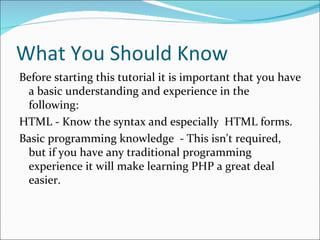
What You Should Know
Before starting this tutorial it is important that you have
 a basic understanding and experience in the
 following:
HTML - Know the syntax and especially HTML forms.
Basic programming knowledge - This isn't required,
 but if you have any traditional programming
 experience it will make learning PHP a great deal
 easier.
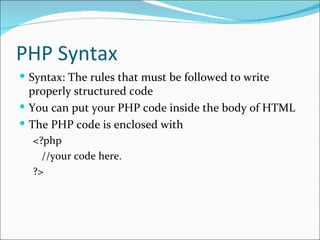
PHP Syntax
 Syntax: The rules that must be followed to write
  properly structured code
 You can put your PHP code inside the body of HTML
 The PHP code is enclosed with
  <?php
    //your code here.
  ?>
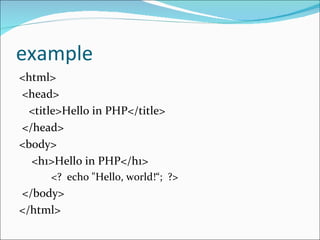
example
<html>
<head>
 <title>Hello in PHP</title>
</head>
<body>
  <h1>Hello in PHP</h1>
      <? echo "Hello, world!“; ?>
</body>
</html>
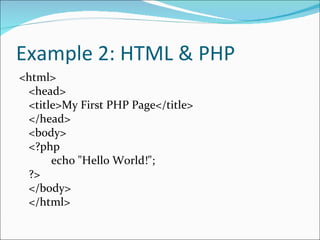
Example 2: HTML & PHP
<html>
 <head>
 <title>My First PHP Page</title>
 </head>
 <body>
 <?php
      echo "Hello World!";
 ?>
 </body>
 </html>
PHP - Variables
 A variable is a means of storing a value, such as text string "Hello
   World!" or the integer value 4. A variable can then be reused
   throughout your code, instead of having to type out the actual value,
   over and over again.
   In PHP you define a variable with the following form:
Example:
   $variable_name = Value;
Description:
If you forget that dollar sign at the beginning and the semi-colon at the
   end, it will not work. This is a common mistake for new PHP
   programmers!
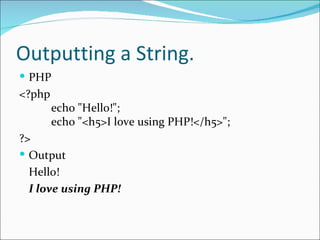
Outputting a String.
 PHP
<?php
        echo "Hello!";
        echo "<h5>I love using PHP!</h5>";
?>
 Output
  Hello!
  I love using PHP!
Using Comment in PHP
 Comments in PHP are similar to comments that are used
  in HTML. A comment is started with a special character
  sequence and all text that appears between the start of the
  comment and the end will be ignored by the browser.
 Single Line Comment
  // this a single line statement
 Multiple Line Comment
        /* this is a multiple
           line comment.
        */
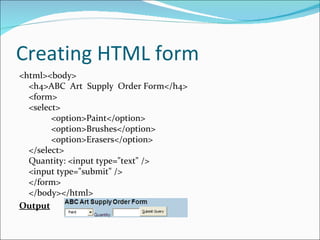
Creating HTML form
<html><body>
  <h4>ABC Art Supply Order Form</h4>
  <form>
  <select>
        <option>Paint</option>
        <option>Brushes</option>
        <option>Erasers</option>
  </select>
  Quantity: <input type="text" />
  <input type="submit" />
  </form>
  </body></html>
Output
PHP Form Processor
<html>
<body>
  <?php
  $quantity = $_POST['quantity'];
  $item = $_POST['item'];
  echo "You ordered ". $quantity . " " . $item . ".<br />";
  echo "Thank you for ordering from ABC Art Supplies!";
  ?>
  </body>
</html>

Php

  • 2.
    What is PHP? PHPis an HTML-embedded scripting language. The goal of the language is to allow web developers to write dynamically generated pages quickly.
  • 3.
    PHP will allowyou to:  Reduce the time to create large websites it’s an Open Source Software.  Create a customized user experience for visitors based on information that you have gathered from them
  • 4.
    What You ShouldKnow Before starting this tutorial it is important that you have a basic understanding and experience in the following: HTML - Know the syntax and especially HTML forms. Basic programming knowledge - This isn't required, but if you have any traditional programming experience it will make learning PHP a great deal easier.
  • 5.
    PHP Syntax  Syntax:The rules that must be followed to write properly structured code  You can put your PHP code inside the body of HTML  The PHP code is enclosed with <?php //your code here. ?>
  • 6.
    example <html> <head> <title>Hello inPHP</title> </head> <body> <h1>Hello in PHP</h1> <? echo "Hello, world!“; ?> </body> </html>
  • 7.
    Example 2: HTML& PHP <html> <head> <title>My First PHP Page</title> </head> <body> <?php echo "Hello World!"; ?> </body> </html>
  • 8.
    PHP - Variables A variable is a means of storing a value, such as text string "Hello World!" or the integer value 4. A variable can then be reused throughout your code, instead of having to type out the actual value, over and over again. In PHP you define a variable with the following form: Example: $variable_name = Value; Description: If you forget that dollar sign at the beginning and the semi-colon at the end, it will not work. This is a common mistake for new PHP programmers!
  • 9.
    Outputting a String. PHP <?php echo "Hello!"; echo "<h5>I love using PHP!</h5>"; ?>  Output Hello! I love using PHP!
  • 10.
    Using Comment inPHP  Comments in PHP are similar to comments that are used in HTML. A comment is started with a special character sequence and all text that appears between the start of the comment and the end will be ignored by the browser.  Single Line Comment // this a single line statement  Multiple Line Comment /* this is a multiple line comment. */
  • 11.
    Creating HTML form <html><body> <h4>ABC Art Supply Order Form</h4> <form> <select> <option>Paint</option> <option>Brushes</option> <option>Erasers</option> </select> Quantity: <input type="text" /> <input type="submit" /> </form> </body></html> Output
  • 12.
    PHP Form Processor <html> <body> <?php $quantity = $_POST['quantity']; $item = $_POST['item']; echo "You ordered ". $quantity . " " . $item . ".<br />"; echo "Thank you for ordering from ABC Art Supplies!"; ?> </body> </html>