Advanced Pattern Matching
UNIVERSITAS IBBI – Medan
NOVEMBER – 2023
Disusun oleh : Wilianto, S.T., S.Pd., M.M., M.T.I.
Wilianto Gan
Latest Work Experiences:
● Tutor for mathematics, physics, chemistry, IT, and English in EL’S
Education Center
1991 – present
● Lecturer in Faculty of Science and Technology, IBBI University
2013 – present
● Online Shop Manager, Toko Sepatu New Colombia Shopee, Lazada and
Tokopedia
2020 – present
● Lead Facilitator Intel AI for Workforce, PT.Nusa Aksara Teknologi(SL2)
2021 – present
Education:
● North Sumatra University
1991 - 2000
Electrical Engineer
● Bina Nusantara University
2013 - 2015
Master of Information Technology
Your
Image
About Me
Profile
Wilianto, S.T., S.Pd, M.M., M.T.I.
1. Electrical Engineering Department USU Medan
Control System & Computer Subject of Study
2. Mathematics Subject of Study STKIP Teladan Medan
3. Master of Management STM IMNI Jakarta
4. Master of Information Technology BINUS University
Jakarta
- Cisco CCNA IT Network & Infrastructure (DTS) Certified
- Cisco CCNA Cybersecurity Operations (DTS) Certified
- Aptikom Introduction to AI Certified
- NDG Linux Unhatched English 1120 cga Cisco Certified
- Intel AI for Workforce Training (SL-2 Singapore)
- Aptikom Data Science and AI/ML Training (kemendikbud)
- HTML, CSS, Javascripts Training (OpenClassroom) Certified
- Intro to Python, R, SQL Data for Data Science(Data Camp)
Certified
- SAP ABAP with Net Weaver 7.52 Certified
- UI/UX Design DTS Kominfo
- IoT DTS Kominfo & Indobot
• Permanent Lecturer of IS/IT Universitas IBBI
• Non-Permanent Lecturer of Universitas Pelita Harapan (UPH) Medan
• Toko Sepatu New Colombia Shopee, Tokopedia & Lazada
• Head Trainer PT.Nusa Aksara Teknologi (Sustainable Living Labs-2) (SL2)
• Trainer Data Science Narasio Data Surabaya
• ML Instructor Bangkit Academy
Email: wiliantogan@gmail.com
Github:
https://github.com/wiliantogan
Linkedln:
https://www.linkedin.com/in/wiliant
ogan
Telegram: https://t.me/Wilianto_Gan
Observe the following rules to ensure a supportive, inclusive, and engaging
classes
Give full attention
in class
Mute yourself
when the lecturer is talking
Keep your
eyes on the
lecturer
Raise hand
to ask questions
Make this classroom a safe
place to learn and share
Turn off or mute your
Handphone during the
class
Ground Rules
Expert Systems: Principles and Programming, Fourth Edition
5
Objectives
Learn about field constraints
Learn how to use functions and expressions
Learn how to perform summing values using rules
Learn how to use the bind function
Learn how to use I/O functions
Expert Systems: Principles and Programming, Fourth Edition
6
Objectives
Examine the two-player game called Sticks
Learn how to use the test conditional element
Learn how to use the predicate field constraint
and the return value constraint
Examine the or, and, not, exists, for all logical
elements.
Expert Systems: Principles and Programming, Fourth Edition
7
Field Constraints
In addition to pattern matching capabilities and
variable bindings, CLIPS has more powerful
pattern matching operators.
Consider writing a rule for all people who do not
have brown hair:
We could write a rule for every type of hair color that
is not brown.
This involves testing the condition in a roundabout
manner – tedious, but effective.
Expert Systems: Principles and Programming, Fourth Edition
8
Field Constraints
The technique for writing a rule for all non-
brown hair colors implies that we have the ability
to supply all hair colors – virtually impossible.
An alternative is to use a field constraint to
restrict the values a field may have on the LHS –
the THEN part of the rule.
Expert Systems: Principles and Programming, Fourth Edition
9
Connective Constraints
 Connective constraints are used to connect
variables and other constraints.
 Not connective – the ~ acts on the one constraint or
variable that immediately follows it.
 Or constraint – the symbol | is used to allow one or
more possible values to match a field or a pattern.
 And constraint – the symbol & is useful with
binding instances of variables and on conjunction
with the not constraint.
Expert Systems: Principles and Programming, Fourth Edition
10
Combining Field Constraints
Field constraints can be used together with variables
and other literals to provide powerful pattern matching
capabilities.
Example #1: ?eyes1&blue|green
This constraint binds the person’s eye color to the variable, ?
eyes1 if the eye color of the fact being matched is either blue
or green.
Example #2: ?hair1&~black
This constraint binds the variable ?hair1 if the hair color of
the fact being matched is not black.
Expert Systems: Principles and Programming, Fourth Edition 11
Functions and Expressions
 CLIPS has the capability to perform calculations.
 The math functions in CLIPS are primarily used for
modifying numbers that are used to make inferences by
the application program.
Expert Systems: Principles and Programming, Fourth Edition
12
Numeric Expressions in CLIPS
Numeric expressions are written in CLIPS in LISP-
style – using prefix form – the operator symbol
goes before the operands to which it pertains.
Example #1:
5 + 8 (infix form)  + 5 8 (prefix form)
Example #2:
(infix) (y2 – y1) / (x2 – x1) > 0
(prefix) (> ( / ( - y2 y1 ) (- x2 x1 ) ) 0)
Expert Systems: Principles and Programming, Fourth Edition
13
Return Values
Most functions (addition) have a return value that
can be an integer, float, symbol, string, or
multivalued value.
Some functions (facts, agenda commands) have
no return values – just side effects.
Division results are usually rounded off.
Return values for +, -, and * will be integer if all
arguments are integer, but if at least one value is
floating point, the value returned will be float.
Expert Systems: Principles and Programming, Fourth Edition
14
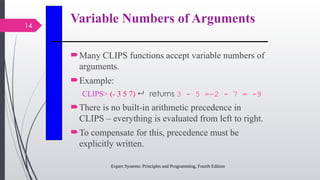
Variable Numbers of Arguments
Many CLIPS functions accept variable numbers of
arguments.
Example:
CLIPS> (- 3 5 7)  returns 3 - 5 =-2 - 7 = -9
There is no built-in arithmetic precedence in
CLIPS – everything is evaluated from left to right.
To compensate for this, precedence must be
explicitly written.
Expert Systems: Principles and Programming, Fourth Edition 15
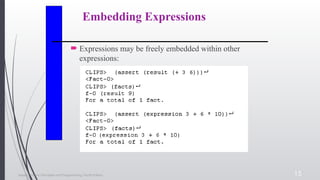
Embedding Expressions
 Expressions may be freely embedded within other
expressions:
Expert Systems: Principles and Programming, Fourth Edition
16
Summing Values Using Rules
Suppose you wanted to sum the areas of a group
of rectangles.
The heights and widths of the rectangles can be
specified using the deftemplate:
(deftemplate rectangle (slot height) (slot
width))
The sum of the rectangle areas could be specified
using an ordered fact such as:
(sum 20)
Expert Systems: Principles and Programming, Fourth Edition
17
Summing Values
A deffacts containing sample information is:
(deffacts initial-information
(rectangle (height 10) (width 6))
(rectangle (height 7) (width 5)
(rectangle (height 6) (width 8))
(rectangle (height 2) (width 5))
(sum 0))
Expert Systems: Principles and Programming, Fourth Edition
18 Summing Values
Expert Systems: Principles and Programming, Fourth Edition
19
The Bind Function
Sometimes it is advantageous to store a value in a
temporary variable to avoid recalculation.
The bind function can be used to bind the value
of a variable to the value of an expression using
the following syntax:
(bind <variable> <value>)
Expert Systems: Principles and Programming, Fourth Edition 20
I/O Functions
 When a CLIPS program requires input from the user of
a program, a read function can be used to provide input
from the keyboard:
Expert Systems: Principles and Programming, Fourth Edition
21
Read Function from Keyboard
The read function can only input a single field at
a time.
Characters entered after the first field up to the 
are discarded.
To input, say a first and last name, they must be
delimited with quotes, “xxx xxx”.
Data must be followed by a carriage return to be
read.
Expert Systems: Principles and Programming, Fourth Edition
22
I/O from/to Files
Input can also come from external files.
Output can be directed to external files.
Before a file can be accessed, it must be opened
using the open function:
Example:
(open “mydata.dat” data “r”)
mydata.dat – is the name of the file (path can also
be provided)
Expert Systems: Principles and Programming, Fourth Edition
23
I/O from/to Files
data – is the logical name that CLIPS associates
with the file
“r” – represents the mode – how the file will be
used – here read access
The open function acts as a predicate function
Returns true if the file was successfully opened
Returns false otherwise
Expert Systems: Principles and Programming, Fourth Edition
24
Table 8.2 File Access Modes
Expert Systems: Principles and Programming, Fourth Edition
25
Close Function
Once access to the file is no longer needed, it
should be closed.
Failure to close a file may result in loss of
information.
General format of the close function:
(close [<file-ID>])
(close data)  example
Expert Systems: Principles and Programming, Fourth Edition 26
Reading / Writing to a File
 Which logical name used, depends on where information
will be written – logical name t refers to the terminal
(standard output device).
Expert Systems: Principles and Programming, Fourth Edition
27
Formatting
Output sent to a terminal or file may need to be
formatted – enhanced in appearance.
To do this, we use the format function which
provides a variety of formatting styles.
General format:
(format <logical-name> <control-
string> <parameters>*)
Expert Systems: Principles and Programming, Fourth Edition
28
Formatting
Logical name – t – standard output device; or logical
name associated with a file.
Control string:
Must be delimited with quotes
Consists of format flags to indicate how parameters
should be printed
1 – 1 correspondence between flags and number of
parameters – constant values or expressions
Return value of the format function is the formatted string
– nil can be used to suppress printing.
Expert Systems: Principles and Programming, Fourth Edition
29
Formatting
Example:
(format nil “Name: %-15s Age: %3d” “Bob Green”
35) 
Produces the results:
“Name: Bob green Age: 35”
Expert Systems: Principles and Programming, Fourth Edition
30
Specifications of Format Flag
%-m.Nx
The “-” means to left justify (right is the default)
M – total field width – no truncation occurs
N – number of digits of precision – default = 6
x – display format specification
Expert Systems: Principles and Programming, Fourth Edition
31
Table 8.3 Display Format Specifications
Expert Systems: Principles and Programming, Fourth Edition
32
Readline Function
To read an entire line of input, the readline function
can be used:
(readline [<logical-name>])
Example:
(defrule get-name
=>
(printout t “What is your name? “
(bind ?response (readline))
(assert (user’s-name ?response)))
Expert Systems: Principles and Programming, Fourth Edition
33
Predicate Functions
A predicate function is defined to be any function
that returns:
TRUE
FALSE
Any value other than FALSE is considered
TRUE.
We say the predicate function returns a Boolean
value.
Expert Systems: Principles and Programming, Fourth Edition
34
The Test Conditional Element
Processing of information often requires a loop.
Sometimes a loop needs to terminate
automatically as the result of an arbitrary
expression.
The test condition provides a powerful way to
evaluate expressions on the LHS of a rule.
Rather than pattern matching against a fact in a
fact list, the test CE evaluates an expression –
outermost function must be a predicate function.
Expert Systems: Principles and Programming, Fourth Edition
35
Test Condition
A rule will be triggered only if all its test CEs are
satisfied along with other patterns.
(test <predicate-function>)
Example:
(test (> ?value 1))
Expert Systems: Principles and Programming, Fourth Edition
36
Predicate Field Constraint
The predicate field constraint : allows for
performing predicate tests directly within
patterns.
The predicate field constraint is more efficient
than using the test CE.
It can be used just like a literal field constraint –
by itself or part of a complex field.
The predicate field constraint is always followed
by a function for evaluation (predicate function).
Expert Systems: Principles and Programming, Fourth Edition
37
Return Value Constraint
The return value constraint = allows the return
value of a function to be used for comparison
inside a pattern.
The return value constraint must be followed by a
function (not necessarily a predicate function).
The function must have a single-field return
value.
Expert Systems: Principles and Programming, Fourth Edition 38
The OR Conditional Element
 Consider the two rules:
Expert Systems: Principles and Programming, Fourth Edition 39
OR Conditional Element
These two rules can be combined into one rule – or CE
requires only one CE be satisfied:
Expert Systems: Principles and Programming, Fourth Edition 40
The And Conditional Element
The and CE is opposite in concept to the or CE –
requiring all the CEs be satisfied:
Expert Systems: Principles and Programming, Fourth Edition 41
Not Conditional Element
When it is advantageous to activate a rule based on the
absence of a particular fact in the list, CLIPS allows the
specification of the absence of the fact in the LHS of a
rule using the not conditional element:
Expert Systems: Principles and Programming, Fourth Edition 42
Not Conditional
We can implement this as follows:
Expert Systems: Principles and Programming, Fourth Edition
43
The Exists Conditional Element
The exists CE allows one to pattern match based
on the existence of at least one fact that matches
a pattern without regard to the total number of
facts that actually match the pattern.
This allows a single partial match or activation
for a rule to be generated based on the existence
of one fact out of a class of facts.
Expert Systems: Principles and Programming, Fourth Edition
44
Exists Conditional
Expert Systems: Principles and Programming, Fourth Edition 45
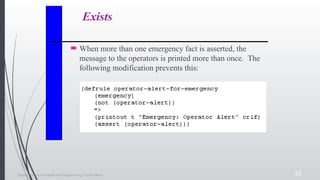
Exists
 When more than one emergency fact is asserted, the
message to the operators is printed more than once. The
following modification prevents this:
Expert Systems: Principles and Programming, Fourth Edition 46
Exists
 This assumes there was already an alert – triggered by
an operator-emergency rule. What if the operators were
merely placed on alert to a drill:
Expert Systems: Principles and Programming, Fourth Edition
47
Exists
Now consider how the rule has been modified
using the exists CE:
(defrule operator-alert-for-emergency
(exists (emergency))
(not (operator-alert))
=>
(printout t “Emergency: Operator Alert”
crlf)
(assert (operator-alert))))
Expert Systems: Principles and Programming, Fourth Edition
48
Forall / Logical
Conditional Elements
The forall CE allows one to pattern match based
on a set of CEs that are satisfied for every
occurrence of another CE.
The logical CE allows one to specify that the
existence of a fact depends on the existence of
another fact or group of facts.
Expert Systems: Principles and Programming, Fourth Edition
49
Summary
We have introduced the concept of field
constraints – not, and, and or.
Functions are entered into CLIPS top-level
command loop or are used on the LHS or RHS of
a rule.
Many functions have variable number of arguments
Function calls can be nested w/in other function calls
Expert Systems: Principles and Programming, Fourth Edition
50
Summary
CLIPS provides several I/O functions.
Open / close
Printout / read / readline
Format
Various concepts for controlling the flow of
execution are available
Also included in the discussion were the following
CEs:
Test, And, Or, Exists, Forall, and logical
Discussions
Quiz
Conclusion
Anda telah mempelajari
tentang Advanced Pattern
Matching.
Pengetahuan ini akan
membantu anda untuk
pekerjaan anda sebagai
seorang pengembang di masa
depan.
Thank You

Pertemuan-8 - Advanced Pattern Matching.pptx

  • 1.
    Advanced Pattern Matching UNIVERSITASIBBI – Medan NOVEMBER – 2023 Disusun oleh : Wilianto, S.T., S.Pd., M.M., M.T.I.
  • 2.
    Wilianto Gan Latest WorkExperiences: ● Tutor for mathematics, physics, chemistry, IT, and English in EL’S Education Center 1991 – present ● Lecturer in Faculty of Science and Technology, IBBI University 2013 – present ● Online Shop Manager, Toko Sepatu New Colombia Shopee, Lazada and Tokopedia 2020 – present ● Lead Facilitator Intel AI for Workforce, PT.Nusa Aksara Teknologi(SL2) 2021 – present Education: ● North Sumatra University 1991 - 2000 Electrical Engineer ● Bina Nusantara University 2013 - 2015 Master of Information Technology Your Image About Me
  • 3.
    Profile Wilianto, S.T., S.Pd,M.M., M.T.I. 1. Electrical Engineering Department USU Medan Control System & Computer Subject of Study 2. Mathematics Subject of Study STKIP Teladan Medan 3. Master of Management STM IMNI Jakarta 4. Master of Information Technology BINUS University Jakarta - Cisco CCNA IT Network & Infrastructure (DTS) Certified - Cisco CCNA Cybersecurity Operations (DTS) Certified - Aptikom Introduction to AI Certified - NDG Linux Unhatched English 1120 cga Cisco Certified - Intel AI for Workforce Training (SL-2 Singapore) - Aptikom Data Science and AI/ML Training (kemendikbud) - HTML, CSS, Javascripts Training (OpenClassroom) Certified - Intro to Python, R, SQL Data for Data Science(Data Camp) Certified - SAP ABAP with Net Weaver 7.52 Certified - UI/UX Design DTS Kominfo - IoT DTS Kominfo & Indobot • Permanent Lecturer of IS/IT Universitas IBBI • Non-Permanent Lecturer of Universitas Pelita Harapan (UPH) Medan • Toko Sepatu New Colombia Shopee, Tokopedia & Lazada • Head Trainer PT.Nusa Aksara Teknologi (Sustainable Living Labs-2) (SL2) • Trainer Data Science Narasio Data Surabaya • ML Instructor Bangkit Academy Email: wiliantogan@gmail.com Github: https://github.com/wiliantogan Linkedln: https://www.linkedin.com/in/wiliant ogan Telegram: https://t.me/Wilianto_Gan
  • 4.
    Observe the followingrules to ensure a supportive, inclusive, and engaging classes Give full attention in class Mute yourself when the lecturer is talking Keep your eyes on the lecturer Raise hand to ask questions Make this classroom a safe place to learn and share Turn off or mute your Handphone during the class Ground Rules
  • 5.
    Expert Systems: Principlesand Programming, Fourth Edition 5 Objectives Learn about field constraints Learn how to use functions and expressions Learn how to perform summing values using rules Learn how to use the bind function Learn how to use I/O functions
  • 6.
    Expert Systems: Principlesand Programming, Fourth Edition 6 Objectives Examine the two-player game called Sticks Learn how to use the test conditional element Learn how to use the predicate field constraint and the return value constraint Examine the or, and, not, exists, for all logical elements.
  • 7.
    Expert Systems: Principlesand Programming, Fourth Edition 7 Field Constraints In addition to pattern matching capabilities and variable bindings, CLIPS has more powerful pattern matching operators. Consider writing a rule for all people who do not have brown hair: We could write a rule for every type of hair color that is not brown. This involves testing the condition in a roundabout manner – tedious, but effective.
  • 8.
    Expert Systems: Principlesand Programming, Fourth Edition 8 Field Constraints The technique for writing a rule for all non- brown hair colors implies that we have the ability to supply all hair colors – virtually impossible. An alternative is to use a field constraint to restrict the values a field may have on the LHS – the THEN part of the rule.
  • 9.
    Expert Systems: Principlesand Programming, Fourth Edition 9 Connective Constraints  Connective constraints are used to connect variables and other constraints.  Not connective – the ~ acts on the one constraint or variable that immediately follows it.  Or constraint – the symbol | is used to allow one or more possible values to match a field or a pattern.  And constraint – the symbol & is useful with binding instances of variables and on conjunction with the not constraint.
  • 10.
    Expert Systems: Principlesand Programming, Fourth Edition 10 Combining Field Constraints Field constraints can be used together with variables and other literals to provide powerful pattern matching capabilities. Example #1: ?eyes1&blue|green This constraint binds the person’s eye color to the variable, ? eyes1 if the eye color of the fact being matched is either blue or green. Example #2: ?hair1&~black This constraint binds the variable ?hair1 if the hair color of the fact being matched is not black.
  • 11.
    Expert Systems: Principlesand Programming, Fourth Edition 11 Functions and Expressions  CLIPS has the capability to perform calculations.  The math functions in CLIPS are primarily used for modifying numbers that are used to make inferences by the application program.
  • 12.
    Expert Systems: Principlesand Programming, Fourth Edition 12 Numeric Expressions in CLIPS Numeric expressions are written in CLIPS in LISP- style – using prefix form – the operator symbol goes before the operands to which it pertains. Example #1: 5 + 8 (infix form)  + 5 8 (prefix form) Example #2: (infix) (y2 – y1) / (x2 – x1) > 0 (prefix) (> ( / ( - y2 y1 ) (- x2 x1 ) ) 0)
  • 13.
    Expert Systems: Principlesand Programming, Fourth Edition 13 Return Values Most functions (addition) have a return value that can be an integer, float, symbol, string, or multivalued value. Some functions (facts, agenda commands) have no return values – just side effects. Division results are usually rounded off. Return values for +, -, and * will be integer if all arguments are integer, but if at least one value is floating point, the value returned will be float.
  • 14.
    Expert Systems: Principlesand Programming, Fourth Edition 14 Variable Numbers of Arguments Many CLIPS functions accept variable numbers of arguments. Example: CLIPS> (- 3 5 7)  returns 3 - 5 =-2 - 7 = -9 There is no built-in arithmetic precedence in CLIPS – everything is evaluated from left to right. To compensate for this, precedence must be explicitly written.
  • 15.
    Expert Systems: Principlesand Programming, Fourth Edition 15 Embedding Expressions  Expressions may be freely embedded within other expressions:
  • 16.
    Expert Systems: Principlesand Programming, Fourth Edition 16 Summing Values Using Rules Suppose you wanted to sum the areas of a group of rectangles. The heights and widths of the rectangles can be specified using the deftemplate: (deftemplate rectangle (slot height) (slot width)) The sum of the rectangle areas could be specified using an ordered fact such as: (sum 20)
  • 17.
    Expert Systems: Principlesand Programming, Fourth Edition 17 Summing Values A deffacts containing sample information is: (deffacts initial-information (rectangle (height 10) (width 6)) (rectangle (height 7) (width 5) (rectangle (height 6) (width 8)) (rectangle (height 2) (width 5)) (sum 0))
  • 18.
    Expert Systems: Principlesand Programming, Fourth Edition 18 Summing Values
  • 19.
    Expert Systems: Principlesand Programming, Fourth Edition 19 The Bind Function Sometimes it is advantageous to store a value in a temporary variable to avoid recalculation. The bind function can be used to bind the value of a variable to the value of an expression using the following syntax: (bind <variable> <value>)
  • 20.
    Expert Systems: Principlesand Programming, Fourth Edition 20 I/O Functions  When a CLIPS program requires input from the user of a program, a read function can be used to provide input from the keyboard:
  • 21.
    Expert Systems: Principlesand Programming, Fourth Edition 21 Read Function from Keyboard The read function can only input a single field at a time. Characters entered after the first field up to the  are discarded. To input, say a first and last name, they must be delimited with quotes, “xxx xxx”. Data must be followed by a carriage return to be read.
  • 22.
    Expert Systems: Principlesand Programming, Fourth Edition 22 I/O from/to Files Input can also come from external files. Output can be directed to external files. Before a file can be accessed, it must be opened using the open function: Example: (open “mydata.dat” data “r”) mydata.dat – is the name of the file (path can also be provided)
  • 23.
    Expert Systems: Principlesand Programming, Fourth Edition 23 I/O from/to Files data – is the logical name that CLIPS associates with the file “r” – represents the mode – how the file will be used – here read access The open function acts as a predicate function Returns true if the file was successfully opened Returns false otherwise
  • 24.
    Expert Systems: Principlesand Programming, Fourth Edition 24 Table 8.2 File Access Modes
  • 25.
    Expert Systems: Principlesand Programming, Fourth Edition 25 Close Function Once access to the file is no longer needed, it should be closed. Failure to close a file may result in loss of information. General format of the close function: (close [<file-ID>]) (close data)  example
  • 26.
    Expert Systems: Principlesand Programming, Fourth Edition 26 Reading / Writing to a File  Which logical name used, depends on where information will be written – logical name t refers to the terminal (standard output device).
  • 27.
    Expert Systems: Principlesand Programming, Fourth Edition 27 Formatting Output sent to a terminal or file may need to be formatted – enhanced in appearance. To do this, we use the format function which provides a variety of formatting styles. General format: (format <logical-name> <control- string> <parameters>*)
  • 28.
    Expert Systems: Principlesand Programming, Fourth Edition 28 Formatting Logical name – t – standard output device; or logical name associated with a file. Control string: Must be delimited with quotes Consists of format flags to indicate how parameters should be printed 1 – 1 correspondence between flags and number of parameters – constant values or expressions Return value of the format function is the formatted string – nil can be used to suppress printing.
  • 29.
    Expert Systems: Principlesand Programming, Fourth Edition 29 Formatting Example: (format nil “Name: %-15s Age: %3d” “Bob Green” 35)  Produces the results: “Name: Bob green Age: 35”
  • 30.
    Expert Systems: Principlesand Programming, Fourth Edition 30 Specifications of Format Flag %-m.Nx The “-” means to left justify (right is the default) M – total field width – no truncation occurs N – number of digits of precision – default = 6 x – display format specification
  • 31.
    Expert Systems: Principlesand Programming, Fourth Edition 31 Table 8.3 Display Format Specifications
  • 32.
    Expert Systems: Principlesand Programming, Fourth Edition 32 Readline Function To read an entire line of input, the readline function can be used: (readline [<logical-name>]) Example: (defrule get-name => (printout t “What is your name? “ (bind ?response (readline)) (assert (user’s-name ?response)))
  • 33.
    Expert Systems: Principlesand Programming, Fourth Edition 33 Predicate Functions A predicate function is defined to be any function that returns: TRUE FALSE Any value other than FALSE is considered TRUE. We say the predicate function returns a Boolean value.
  • 34.
    Expert Systems: Principlesand Programming, Fourth Edition 34 The Test Conditional Element Processing of information often requires a loop. Sometimes a loop needs to terminate automatically as the result of an arbitrary expression. The test condition provides a powerful way to evaluate expressions on the LHS of a rule. Rather than pattern matching against a fact in a fact list, the test CE evaluates an expression – outermost function must be a predicate function.
  • 35.
    Expert Systems: Principlesand Programming, Fourth Edition 35 Test Condition A rule will be triggered only if all its test CEs are satisfied along with other patterns. (test <predicate-function>) Example: (test (> ?value 1))
  • 36.
    Expert Systems: Principlesand Programming, Fourth Edition 36 Predicate Field Constraint The predicate field constraint : allows for performing predicate tests directly within patterns. The predicate field constraint is more efficient than using the test CE. It can be used just like a literal field constraint – by itself or part of a complex field. The predicate field constraint is always followed by a function for evaluation (predicate function).
  • 37.
    Expert Systems: Principlesand Programming, Fourth Edition 37 Return Value Constraint The return value constraint = allows the return value of a function to be used for comparison inside a pattern. The return value constraint must be followed by a function (not necessarily a predicate function). The function must have a single-field return value.
  • 38.
    Expert Systems: Principlesand Programming, Fourth Edition 38 The OR Conditional Element  Consider the two rules:
  • 39.
    Expert Systems: Principlesand Programming, Fourth Edition 39 OR Conditional Element These two rules can be combined into one rule – or CE requires only one CE be satisfied:
  • 40.
    Expert Systems: Principlesand Programming, Fourth Edition 40 The And Conditional Element The and CE is opposite in concept to the or CE – requiring all the CEs be satisfied:
  • 41.
    Expert Systems: Principlesand Programming, Fourth Edition 41 Not Conditional Element When it is advantageous to activate a rule based on the absence of a particular fact in the list, CLIPS allows the specification of the absence of the fact in the LHS of a rule using the not conditional element:
  • 42.
    Expert Systems: Principlesand Programming, Fourth Edition 42 Not Conditional We can implement this as follows:
  • 43.
    Expert Systems: Principlesand Programming, Fourth Edition 43 The Exists Conditional Element The exists CE allows one to pattern match based on the existence of at least one fact that matches a pattern without regard to the total number of facts that actually match the pattern. This allows a single partial match or activation for a rule to be generated based on the existence of one fact out of a class of facts.
  • 44.
    Expert Systems: Principlesand Programming, Fourth Edition 44 Exists Conditional
  • 45.
    Expert Systems: Principlesand Programming, Fourth Edition 45 Exists  When more than one emergency fact is asserted, the message to the operators is printed more than once. The following modification prevents this:
  • 46.
    Expert Systems: Principlesand Programming, Fourth Edition 46 Exists  This assumes there was already an alert – triggered by an operator-emergency rule. What if the operators were merely placed on alert to a drill:
  • 47.
    Expert Systems: Principlesand Programming, Fourth Edition 47 Exists Now consider how the rule has been modified using the exists CE: (defrule operator-alert-for-emergency (exists (emergency)) (not (operator-alert)) => (printout t “Emergency: Operator Alert” crlf) (assert (operator-alert))))
  • 48.
    Expert Systems: Principlesand Programming, Fourth Edition 48 Forall / Logical Conditional Elements The forall CE allows one to pattern match based on a set of CEs that are satisfied for every occurrence of another CE. The logical CE allows one to specify that the existence of a fact depends on the existence of another fact or group of facts.
  • 49.
    Expert Systems: Principlesand Programming, Fourth Edition 49 Summary We have introduced the concept of field constraints – not, and, and or. Functions are entered into CLIPS top-level command loop or are used on the LHS or RHS of a rule. Many functions have variable number of arguments Function calls can be nested w/in other function calls
  • 50.
    Expert Systems: Principlesand Programming, Fourth Edition 50 Summary CLIPS provides several I/O functions. Open / close Printout / read / readline Format Various concepts for controlling the flow of execution are available Also included in the discussion were the following CEs: Test, And, Or, Exists, Forall, and logical
  • 51.
  • 52.
  • 53.
  • 54.
    Anda telah mempelajari tentangAdvanced Pattern Matching. Pengetahuan ini akan membantu anda untuk pekerjaan anda sebagai seorang pengembang di masa depan.
  • 55.

Editor's Notes

  • #2 if you like, please tell about yourself in more detail
  • #4 Turn off your audio throughout the session unless the Instructor asks you to do so. This is to minimize disruption during the sessions. Turn on your video at all times throughout the session to promote an offline-like class environment. If you are experiencing connection difficulties, please make it known to the Class Instructor using the Chat feature. Feel free to ask questions by using the Chat feature. In between the session, the Instructor will take a look at your questions and answer them. As such, please reserve the Chat Box as a space to ask questions or participate in class discussions and refrain from using it for idle chat and unrelated conversations. This is a place to learn and share our experience. Let's open our mind to other people's stories and understand each others' perspective. No idle browsing or chatting during class. Hands off phones or other devices that may distract you from giving your full attention.
  • #52 Link: https://forms.gle/UC1n8D9KaerojJh87
  • #54 Ask students to conclude before you, as a speaker, generalizes the topic as a whole.