We	are	spoiling	ourselves
With	faster	websites
Our	Generation’s	Perception
>	10s
>	1s
300ms	- 1s
<	100ms WOW
THAT	WAS	FAST
Our	Generation’s	Perception
>	10s
>	1s
300ms	- 1s
<	100ms
Our	Generation’s	Perception
>	10s
1s - 10s
300ms	- 1s
<	100ms
WEBSITE	TO	LOAD
WAITING	FOR
Our	Generation’s	Perception
>	10s
1s - 10s
300ms	- 1s
<	100ms
EVER	COMING	BACK
WE	ARE	NEVER
Perceived	Performance
Aziz	Khambati
Housing.com
Key	Points
1. RAIL	Performance	Model
2. Passive	Event	Listeners
3. CSS	contain	property
4. Speed	Index
RAIL	Performance	Model
The	RAIL	Performance	Model by	Google	Developers is	licensed	under	CC	BY	3.0
RAIL	Performance	Goals
Response Animation Idle Load
Tap	to	paint	in
<	100ms
Swipe to	paint	
in	<	16ms
Each	frame	in	
<	16ms
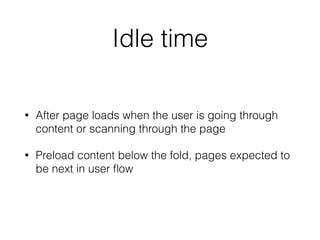
Use	idle	time	to	
proactively	
schedule	work.
Complete	that	
work	in	50ms	
chunks
Ready	to	use
in	1s
Respond	to	clicks	in	<100ms
Taking	more	than	500ms?
Provide	Feedback
Ripple	Effect
Intermediate	State	Transitions
Last	Option	- Loading	Spinner
Respond	to	swipes	in	<16ms
Avoid	Heavy	Scroll	Listeners
Rate	Limit	your	Listeners	(Debounce &	Throttle)
Debounce
• Wait	for	x	milliseconds	for	the	event	
to	stop	firing	before	calling	your	
function
• Useful	when	you	are	using	your	
listener	for	analytics	like	whether	
the	user	has	reached	this	part,	
tracking	impressions	etc.
Throttle
• Proper	Rate	Limiting
• Call	your	functions	only	once	
every	x	milliseconds	if	triggered
• Useful	for	infinite	lists,	where	
you	shouldn’t	wait	if	the	user	has	
already	scrolled	ahead.
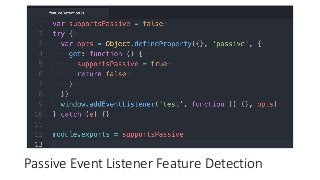
Passive	Event	Listeners
• Browsers	don’t	know	if	a	listener	
is	a	going	to	preventDefault()
• So	it	has	to	run	the	function	
before	scrolling	which	causes	
sluggishness.
Promise	that	I	won’t	preventDefault
Passive	Event	Listener	Syntax
Passive	Event	Listener	Feature	Detection
Example
https://rbyers.github.io/scroll-latency.html
CSS	touch-action	Property	to	disable	scroll
Infinite	Lists
Some	tips	for	React	users
React	keeps	the	virtual	DOM	in	memory.
Image	by	Sebastián Peyrott of	auth0
Patching	might	trigger	a	Garbage	Collection
Image	source:	Valtteri Mäki
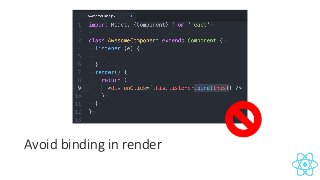
Avoid	creating	new	functions	in	render
Avoid	binding	in	render
Bind	functions	in	constructor
✓
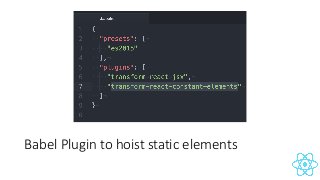
Hoist	up	Static	Content
Babel	Plugin	to	hoist	static	elements
Add	“react”	preset	and	optimize	everything
Define	shouldComponentUpdate
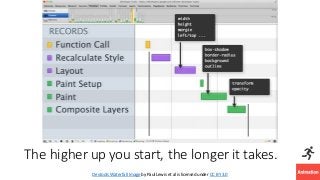
Animate	in	<16ms
Render	Pipeline
The	higher	up	you	start,	the	longer	it	takes.
Devtools Waterfall	Imageby	Paul	Lewis	et	al	is	licensed	under	CC	BY	3.0
Cheap	CSS	Properties by	Paul	Lewis	et	al	is	licensed	under	CC	BY	3.0
will-change:	transform;
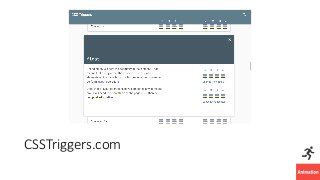
CSSTriggers.com
New	CSS	‘contain’	Property
Chrome	52+,	Opera	40+,	Coming	soon	to	Firefox
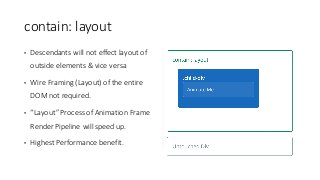
contain:	layout
• Descendants	will	not	effect	layout	of	
outside	elements	&	vice	versa
• Wire	Framing	(Layout)	of	the	entire	
DOM	not	required.
• “Layout”	Process	of	Animation	Frame	
Render	Pipeline	will	speed	up.
• Highest	Performance	benefit.
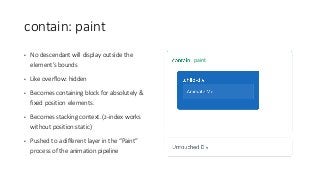
contain:	paint
• No	descendant	will	display	outside	the	
element’s	bounds
• Like	overflow:	hidden
• Becomes	containing	block	for	absolutely	&	
fixed	position	elements.
• Becomes	stacking	context.	(z-index	works	
without	position:static)
• Pushed	to	a	different	layer	in	the	“Paint”	
process	of	the	animation	pipeline
paint
Simply	Put
contain:	paint;
overflow:	hidden;
position:	non-static;
will-change:	transform;
contain:	size
• size	is	&	has	to	be	defined
• Descendants	don’t	affect	element’s	size
• If	dimensions	not	defined,	element	will	be	rendered	0px	by	0px
• Not	much	performance	benefit
contain:	style
• Descendant’s	styles	won’t	affect	outside.
• One	use	case	is	CSS	Counters	with	same	variable	name
• No	way	similar	to	Shadow	DOM	like	scoped	styling
contain:	strict
• layout	+	style	+	paint	+	size
• All	four	containment	levels
• Useful	if	dimensions	are	set
contain:	content
• layout	+	style	+	paint
• All	except	size
• Doesn't	need	dimensions
Performance	Improvement
Javascript Animations
Avoid	animating	using	JS.	Use	CSS	instead.
Render	Pipeline
JS	Animations	Start	From	Here
If	optimized
Update	Layer	Tree
• Browser	thinks	that	my	current	split	of	DOM	elements	to	layers	might	
not	be	performant
• Let	me	compute	layers	again.
• Does	this	in	every	frame.
• This	process	is	proportional	to	DOM	size.
• https://github.com/openstreetmap/iD/pull/8/files
Avoid	setTimeout/setInterval for	callbacks
Use	requestAnimationFrame
Or	use	a	library	which	does	that	for	you.
✓
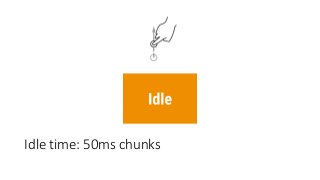
Idle	time:	50ms	chunks
User	scanning	through	your	page.
Idle	Time
• Heavy	computations
• Should	be	done	in	blocks	of	
50ms	in	case	user	begins	
interacting
PRPL
Push	Render	Pre-cache Lazy-load
requestIdleCallback()
Call	Me	when	Free	
https://www.chromestatus.com/features/5572795866021888
Load	in	1s 😂
Repeat	Users	should	load	in	1s
Speed	Index
Important	for	Perceived	Performance
Rate	of	visual	completeness
The	average	time	at	which	visible	
parts	of	the	page	are	displayed.	
Expressed	in	milliseconds	and	
dependent	on	size	of	the	viewport.
https://sites.google.com/a/webpagetest.org/docs/using-webpagetest/metrics/speed-index
Gmail	(example)					vs.												Amazon
11s	to	reach	90% 85%	in	4.5s
Visual	Completeness
Speed	Index	depends	on
• Networks	Conditions
• Screen	Size
Summary	- Performance	Goals
Response Animation Idle Load
Tap	to	paint	in
<	100ms
Swipe to	paint	
in	<	16ms
Each	frame	in	
<	16ms
Use	idle	time	to	
proactively	
schedule	work.
Complete	that	
work	in	50ms	
chunks
Ready	to	use
in	1s
Low	Speed	
Index

Perceived Performance with Extra tips for React