Ordinary Least Squares
Estimation
Simon Woodcock
From Last Day
 Recall our population regression function:
 Because the coefficients (β) and the errors (εi) are population quantities, we
don’t observe them.
 Sometimes our primary interest is the coefficients themselves
 βk measures the marginal effect of variable Xki on the dependent variable Yi.
 Sometimes we’re more interested in predicting Yi.
 if we have sample estimates of the coefficients, we can calculate predicted
values:
 In either case, we need a way to estimate the unknown β’s.
 That is, we need a way to compute from a sample of data
 It turns out there are lots of ways to estimate the β’s (compute ).
 By far the most common method is called ordinary least squares (OLS).
i
ki
k
i
i
i
i X
X
X
X
Y 




 





 
3
3
2
2
1
1
0
ki
k
i
i
i X
X
X
Y 


 ˆ
ˆ
ˆ
ˆ
ˆ
2
2
1
1
0 



 
s
'
ˆ

s
'
ˆ

What OLS does
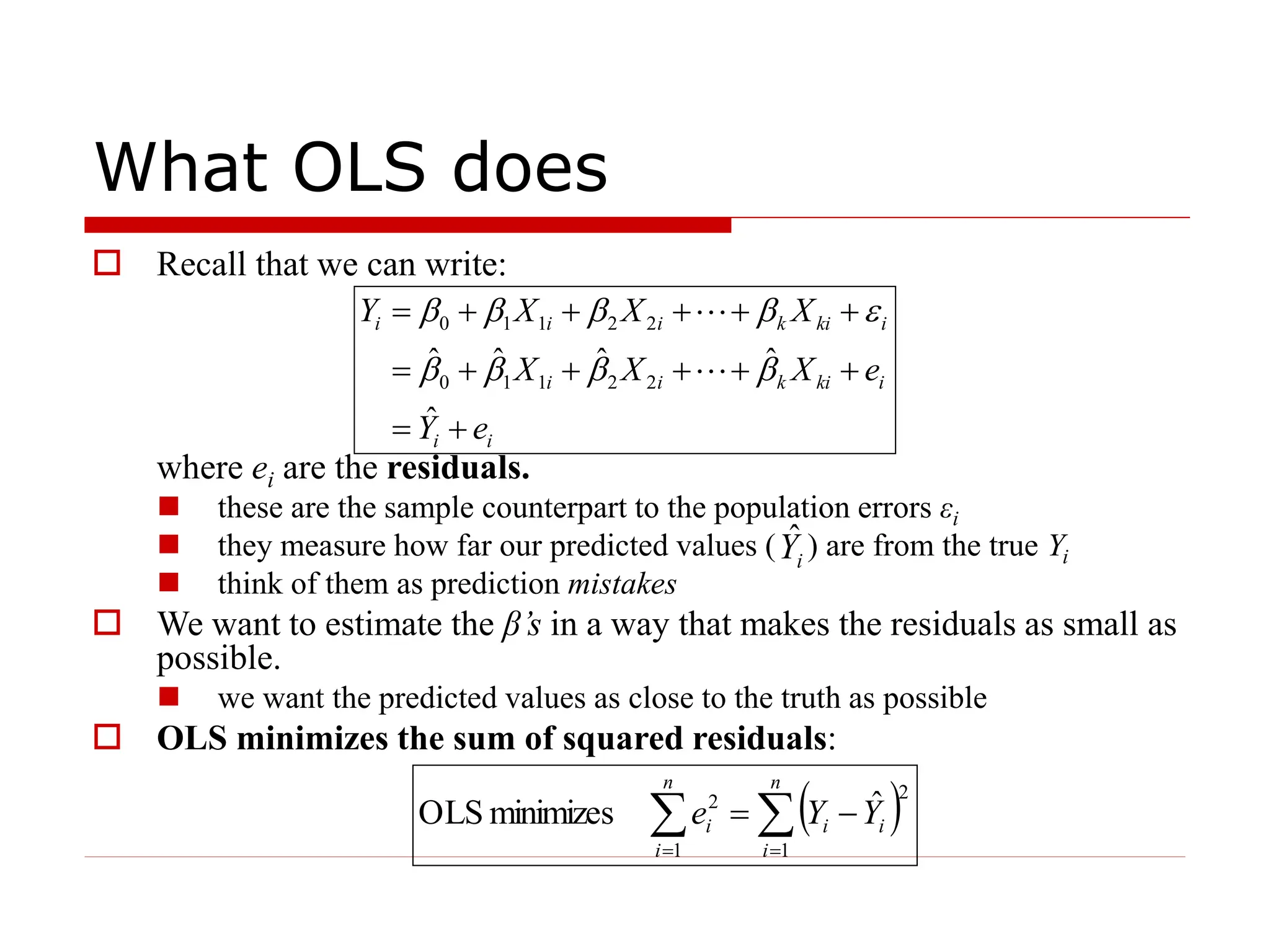
 Recall that we can write:
where ei are the residuals.
 these are the sample counterpart to the population errors εi
 they measure how far our predicted values ( ) are from the true Yi
 think of them as prediction mistakes
 We want to estimate the β’s in a way that makes the residuals as small as
possible.
 we want the predicted values as close to the truth as possible
 OLS minimizes the sum of squared residuals:
i
i
i
ki
k
i
i
i
ki
k
i
i
i
e
Y
e
X
X
X
X
X
X
Y














ˆ
ˆ
ˆ
ˆ
ˆ
2
2
1
1
0
2
2
1
1
0











i
Y
ˆ
 
 
 


n
i
n
i
i
i
i Y
Y
e
1 1
2
2 ˆ
minimizes
OLS
Why OLS?
 OLS is “easy”
 computers do it routinely
 if you had to do OLS by hand, you could
 Minimizing squared residuals is better than just minimizing
residuals:
 we could minimize the sum (or average) of residuals, but the
positive and negative residuals would cancel out – and we might
end up with really bad predicted values (huge positive and negative
“mistakes” that cancel out – draw a picture)
 squaring penalizes “big” mistakes (big ei) more than “little”
mistakes (small ei)
 by minimizing the sum of squared residuals, we get a zero average
residual (mistake) as a bonus
 OLS estimates are unbiased, and are most efficient in the class of
(linear) unbiased estimators (more about this later).
How OLS works
 Suppose we have a linear regression model with one independent
variable:
 The OLS estimates of β0 and β1 are the values that minimize:
 you all know how to solve for the OLS estimates. We just differentiate this
expression with respect to β0 and β1, set the derivatives equal to zero, and
solve.
 The solutions to this minimization problem are (look familiar?):
i
i
i X
Y 

 

 1
0
   

  
 





n
i
i
i
n
i
n
i
i
i
i X
Y
Y
Y
e
1
2
1
0
1 1
2
2 ˆ
ˆ
ˆ 

  
 
X
Y
β
X
X
Y
Y
X
X
n
i
i
n
i
i
i
1
0
1
2
1
1
ˆ
ˆ
and
ˆ 
 









OLS in practice
 Knowing the summation formulas for OLS
estimates is useful for understanding how OLS
estimation works.
 once we add more than one independent variable,
these summation formulas become cumbersome
 In practice, we never do least squares calculations
by hand (that’s what computers are for)
 In fact, doing least squares regression in
EViews is a piece of cake – time for an
example.
An example
 Suppose we are interested in how an NHL hockey player’s salary varies
with the number of points they score.
 it’s natural to think variation in salary is related to variation in points scored
 our dependent variable (Yi) will be SALARY_USD
 our independent variable (Xi) will be POINTS
 After opening the EViews workfile, there are two ways to set up the
equation:
1. select SALARY_USD and then POINTS (the order is important), then
right-click one of the selected objects, and OPEN -> AS EQUATION
or
2. QUICK -> ESTIMATE EQUATION and then in the EQUATION
SPECIFICATION dialog box, type:
salary_usd points c
(the first variable in the list is the dependent variable, the remaining
variables are the independent variables including the intercept c)
 You’ll see a drop down box for the estimation METHOD, and notice that
least squares (LS) is the default. Click OK.
 It’s as easy as that. Your results should look like the next slide ...
Estimation Results
What the results mean
 The column labeled “Coefficient” gives the least squares estimates of the
regression coefficients.
 So our estimated model is:
USD_SALARY = 335602 + (41801.42)*POINTS
 That is, players who scored zero points earned $335,602 on average
 For each point scored, players were paid an additional $41,801 on average
 So the “average” 100-point player was paid $4,515,702
 The column labeled “Std. Error” gives the standard error (square root of the
sampling variance) of the regression coefficients
 the OLS estimates are functions of the sample data, and hence are RVs – more
on their sampling distribution later
 The column labeled “t-Statistic” is a test statistic for the null hypothesis that
the corresponding regression coefficient is zero (more about this later)
 The column labeled “Prob.” is the p-value associated with this test
 Ignore the rest for now
 Now let’s see if anything changes when we add a player’s age & years of
NHL experience to our model
Another Example
What’s Changed: The Intercept
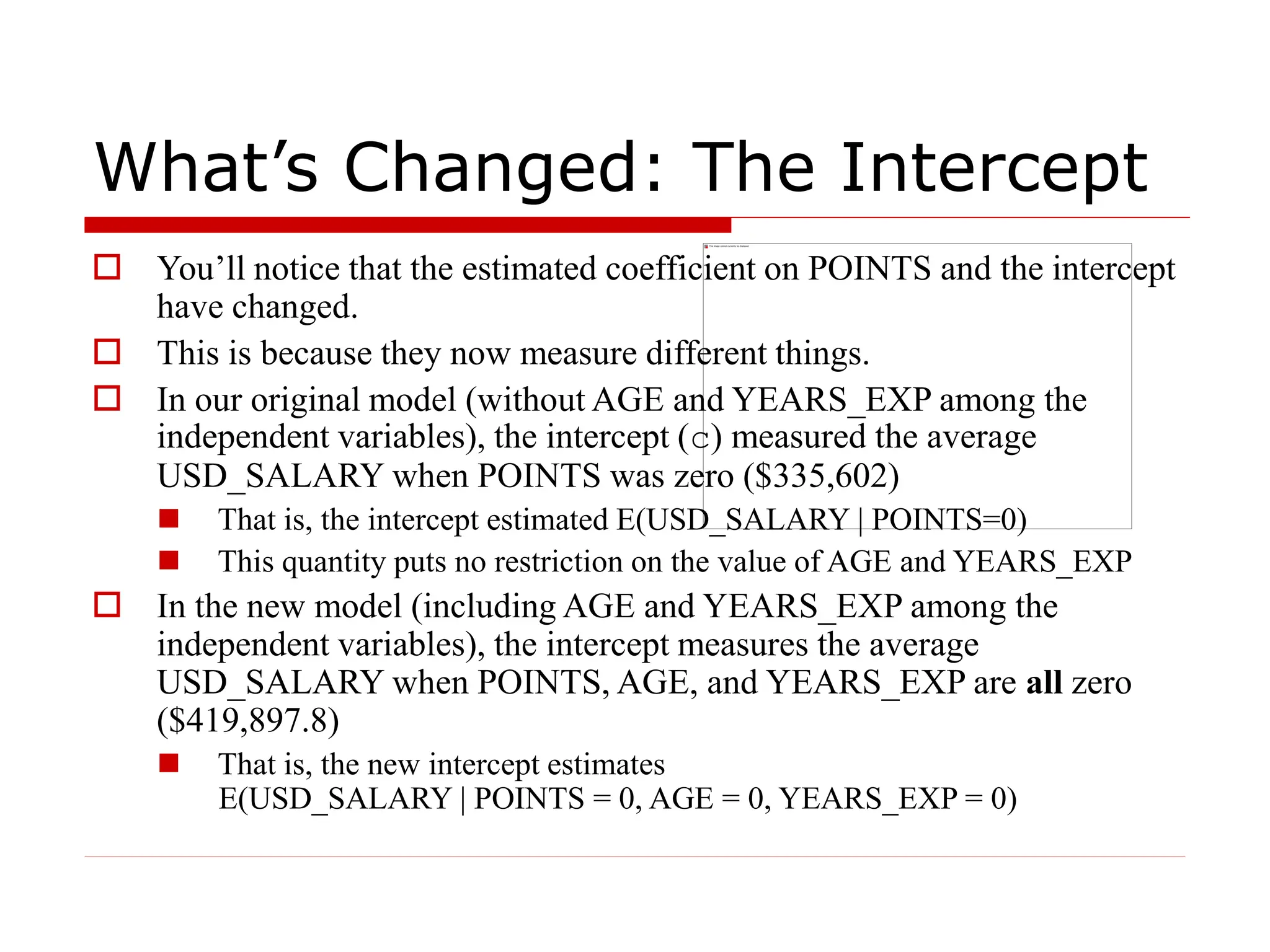
 You’ll notice that the estimated coefficient on POINTS and the intercept
have changed.
 This is because they now measure different things.
 In our original model (without AGE and YEARS_EXP among the
independent variables), the intercept (c) measured the average
USD_SALARY when POINTS was zero ($335,602)
 That is, the intercept estimated E(USD_SALARY | POINTS=0)
 This quantity puts no restriction on the value of AGE and YEARS_EXP
 In the new model (including AGE and YEARS_EXP among the
independent variables), the intercept measures the average
USD_SALARY when POINTS, AGE, and YEARS_EXP are all zero
($419,897.8)
 That is, the new intercept estimates
E(USD_SALARY | POINTS = 0, AGE = 0, YEARS_EXP = 0)
What’s Changed: The Slope
 In our original model (excluding AGE and YEARS_EXP), the coefficient
on POINTS was an estimate of the marginal effect of POINTS on
USD_SALARY, i.e.,
 This quantity puts no restriction on the values of AGE and YEARS_EXP
(implicitly, we are allowing them to vary along with POINTS) – it’s a total
derivative
 In the new model (which includes AGE and YEARS_EXP), the coefficient
on POINTS measures the marginal effect of POINTS on USD_SALARY
holding AGE and YEARS_EXP constant, i.e.,
 That is, it’s a partial derivative
 The point: what your estimated regression coefficients measure
depends on what is (and isn’t) in your model!
42
41801
(POINTS)
Y)
(USD_SALAR
.
d
d

37
.
36603
(POINTS)
Y)
(USD_SALAR




Ordinary Least Squares Ordinary Least Squares

  • 1.
  • 2.
    From Last Day Recall our population regression function:  Because the coefficients (β) and the errors (εi) are population quantities, we don’t observe them.  Sometimes our primary interest is the coefficients themselves  βk measures the marginal effect of variable Xki on the dependent variable Yi.  Sometimes we’re more interested in predicting Yi.  if we have sample estimates of the coefficients, we can calculate predicted values:  In either case, we need a way to estimate the unknown β’s.  That is, we need a way to compute from a sample of data  It turns out there are lots of ways to estimate the β’s (compute ).  By far the most common method is called ordinary least squares (OLS). i ki k i i i i X X X X Y               3 3 2 2 1 1 0 ki k i i i X X X Y     ˆ ˆ ˆ ˆ ˆ 2 2 1 1 0       s ' ˆ  s ' ˆ 
  • 3.
    What OLS does Recall that we can write: where ei are the residuals.  these are the sample counterpart to the population errors εi  they measure how far our predicted values ( ) are from the true Yi  think of them as prediction mistakes  We want to estimate the β’s in a way that makes the residuals as small as possible.  we want the predicted values as close to the truth as possible  OLS minimizes the sum of squared residuals: i i i ki k i i i ki k i i i e Y e X X X X X X Y               ˆ ˆ ˆ ˆ ˆ 2 2 1 1 0 2 2 1 1 0            i Y ˆ         n i n i i i i Y Y e 1 1 2 2 ˆ minimizes OLS
  • 4.
    Why OLS?  OLSis “easy”  computers do it routinely  if you had to do OLS by hand, you could  Minimizing squared residuals is better than just minimizing residuals:  we could minimize the sum (or average) of residuals, but the positive and negative residuals would cancel out – and we might end up with really bad predicted values (huge positive and negative “mistakes” that cancel out – draw a picture)  squaring penalizes “big” mistakes (big ei) more than “little” mistakes (small ei)  by minimizing the sum of squared residuals, we get a zero average residual (mistake) as a bonus  OLS estimates are unbiased, and are most efficient in the class of (linear) unbiased estimators (more about this later).
  • 5.
    How OLS works Suppose we have a linear regression model with one independent variable:  The OLS estimates of β0 and β1 are the values that minimize:  you all know how to solve for the OLS estimates. We just differentiate this expression with respect to β0 and β1, set the derivatives equal to zero, and solve.  The solutions to this minimization problem are (look familiar?): i i i X Y       1 0                n i i i n i n i i i i X Y Y Y e 1 2 1 0 1 1 2 2 ˆ ˆ ˆ        X Y β X X Y Y X X n i i n i i i 1 0 1 2 1 1 ˆ ˆ and ˆ            
  • 6.
    OLS in practice Knowing the summation formulas for OLS estimates is useful for understanding how OLS estimation works.  once we add more than one independent variable, these summation formulas become cumbersome  In practice, we never do least squares calculations by hand (that’s what computers are for)  In fact, doing least squares regression in EViews is a piece of cake – time for an example.
  • 7.
    An example  Supposewe are interested in how an NHL hockey player’s salary varies with the number of points they score.  it’s natural to think variation in salary is related to variation in points scored  our dependent variable (Yi) will be SALARY_USD  our independent variable (Xi) will be POINTS  After opening the EViews workfile, there are two ways to set up the equation: 1. select SALARY_USD and then POINTS (the order is important), then right-click one of the selected objects, and OPEN -> AS EQUATION or 2. QUICK -> ESTIMATE EQUATION and then in the EQUATION SPECIFICATION dialog box, type: salary_usd points c (the first variable in the list is the dependent variable, the remaining variables are the independent variables including the intercept c)  You’ll see a drop down box for the estimation METHOD, and notice that least squares (LS) is the default. Click OK.  It’s as easy as that. Your results should look like the next slide ...
  • 8.
  • 9.
    What the resultsmean  The column labeled “Coefficient” gives the least squares estimates of the regression coefficients.  So our estimated model is: USD_SALARY = 335602 + (41801.42)*POINTS  That is, players who scored zero points earned $335,602 on average  For each point scored, players were paid an additional $41,801 on average  So the “average” 100-point player was paid $4,515,702  The column labeled “Std. Error” gives the standard error (square root of the sampling variance) of the regression coefficients  the OLS estimates are functions of the sample data, and hence are RVs – more on their sampling distribution later  The column labeled “t-Statistic” is a test statistic for the null hypothesis that the corresponding regression coefficient is zero (more about this later)  The column labeled “Prob.” is the p-value associated with this test  Ignore the rest for now  Now let’s see if anything changes when we add a player’s age & years of NHL experience to our model
  • 10.
  • 11.
    What’s Changed: TheIntercept  You’ll notice that the estimated coefficient on POINTS and the intercept have changed.  This is because they now measure different things.  In our original model (without AGE and YEARS_EXP among the independent variables), the intercept (c) measured the average USD_SALARY when POINTS was zero ($335,602)  That is, the intercept estimated E(USD_SALARY | POINTS=0)  This quantity puts no restriction on the value of AGE and YEARS_EXP  In the new model (including AGE and YEARS_EXP among the independent variables), the intercept measures the average USD_SALARY when POINTS, AGE, and YEARS_EXP are all zero ($419,897.8)  That is, the new intercept estimates E(USD_SALARY | POINTS = 0, AGE = 0, YEARS_EXP = 0)
  • 12.
    What’s Changed: TheSlope  In our original model (excluding AGE and YEARS_EXP), the coefficient on POINTS was an estimate of the marginal effect of POINTS on USD_SALARY, i.e.,  This quantity puts no restriction on the values of AGE and YEARS_EXP (implicitly, we are allowing them to vary along with POINTS) – it’s a total derivative  In the new model (which includes AGE and YEARS_EXP), the coefficient on POINTS measures the marginal effect of POINTS on USD_SALARY holding AGE and YEARS_EXP constant, i.e.,  That is, it’s a partial derivative  The point: what your estimated regression coefficients measure depends on what is (and isn’t) in your model! 42 41801 (POINTS) Y) (USD_SALAR . d d  37 . 36603 (POINTS) Y) (USD_SALAR   