Orchestrating API
Programs with
Postman
CUSTOMER SUCCESS ENGINEER, POSTMAN
Yi-An
Tseng
@yiantseng
Agenda
1 Why orchestrate your API program?
2 How Postman can help?
3 Demo in Postman
4 Q&A
Why Orchestrate Your API Program?
● APIs are becoming more abundant within each company; there are
many internal microservices and external APIs that are being used in
conjunction with each other.
● Managing all of these together can be quite complex.
● It can be difficult to test and visualize how to integrate different APIs
and microservices, which leads to outdated APIs and unclear
documentation.
How Can Postman Help?
● Postman has an API Builder feature that helps wrangle in all the APIs,
environments, tests, and versions that your team or organization
utilizes.
● Maintain multiple versions of an API, manage ownership and
permissions, and ensure seamless collaboration within the
organization with a single source of truth.
● For the admins, you need to be able to properly manage each API
and set up roles.
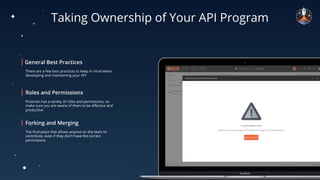
Taking Ownership of Your API Program
There are a few best practices to keep in mind when
developing and maintaining your API
Postman has a variety of roles and permissions, so
make sure you are aware of them to be effective and
productive
The final piece that allows anyone on the team to
contribute, even if they don’t have the correct
permissions
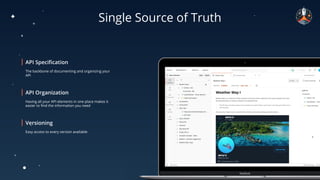
Single Source of Truth
The backbone of documenting and organizing your
API
Having all your API elements in one place makes it
easier to find the information you need
Easy access to every version available
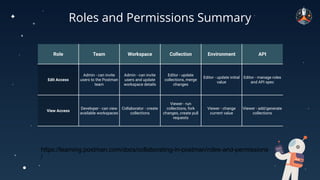
Roles and Permissions Summary
Role Team Workspace Collection Environment API
Edit Access
Admin - can invite
users to the Postman
team
Admin - can invite
users and update
workspace details
Editor - update
collections, merge
changes
Editor - update initial
value
Editor - manage roles
and API spec
View Access
Developer - can view
available workspaces
Collaborator - create
collections
Viewer - run
collections, fork
changes, create pull
requests
Viewer - change
current value
Viewer - add/generate
collections
https://learning.postman.com/docs/collaborating-in-postman/roles-and-permissions
/
Resources
Postman Support Center
postman.com/support
Postman Learning Center
learning.postman.com
Q&A
Thank You
postman.com @getpostman

Orchestrating API Programs for your Team

  • 1.
  • 2.
    CUSTOMER SUCCESS ENGINEER,POSTMAN Yi-An Tseng @yiantseng
  • 3.
    Agenda 1 Why orchestrateyour API program? 2 How Postman can help? 3 Demo in Postman 4 Q&A
  • 4.
    Why Orchestrate YourAPI Program? ● APIs are becoming more abundant within each company; there are many internal microservices and external APIs that are being used in conjunction with each other. ● Managing all of these together can be quite complex. ● It can be difficult to test and visualize how to integrate different APIs and microservices, which leads to outdated APIs and unclear documentation.
  • 5.
    How Can PostmanHelp? ● Postman has an API Builder feature that helps wrangle in all the APIs, environments, tests, and versions that your team or organization utilizes. ● Maintain multiple versions of an API, manage ownership and permissions, and ensure seamless collaboration within the organization with a single source of truth. ● For the admins, you need to be able to properly manage each API and set up roles.
  • 6.
    Taking Ownership ofYour API Program There are a few best practices to keep in mind when developing and maintaining your API Postman has a variety of roles and permissions, so make sure you are aware of them to be effective and productive The final piece that allows anyone on the team to contribute, even if they don’t have the correct permissions
  • 7.
    Single Source ofTruth The backbone of documenting and organizing your API Having all your API elements in one place makes it easier to find the information you need Easy access to every version available
  • 8.
    Roles and PermissionsSummary Role Team Workspace Collection Environment API Edit Access Admin - can invite users to the Postman team Admin - can invite users and update workspace details Editor - update collections, merge changes Editor - update initial value Editor - manage roles and API spec View Access Developer - can view available workspaces Collaborator - create collections Viewer - run collections, fork changes, create pull requests Viewer - change current value Viewer - add/generate collections https://learning.postman.com/docs/collaborating-in-postman/roles-and-permissions /
  • 9.
  • 10.
  • 11.