Published by CFS Documentation Cell
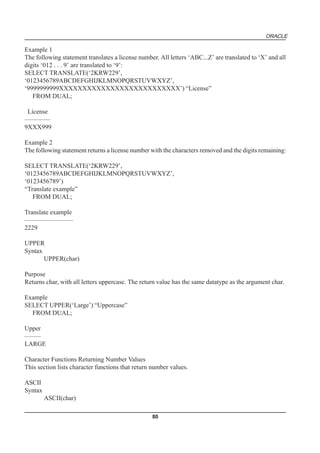
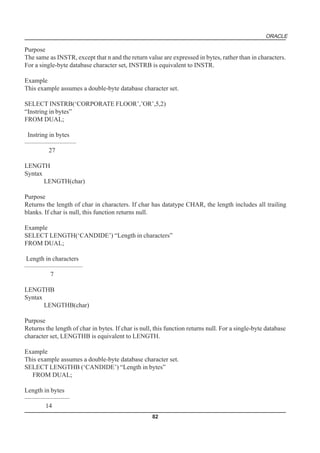
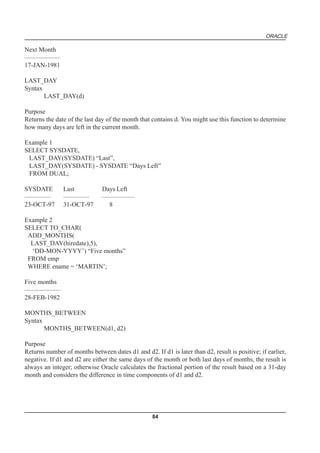
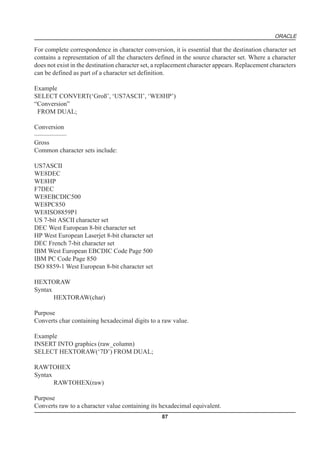
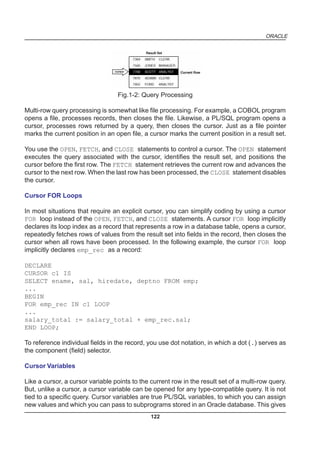
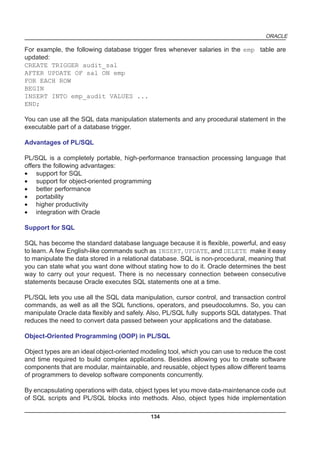
Centre for Electronics Design and Technology of India
An Autonomous Scientific Society under Department of Electronics,
Govt. of India,
New Delhi.


First Edition: 1999


TRADEMARKS: All brand name and product names mentioned in this book are trademarks or registered trademark of their
respective companies.

Every effort has been made to supply complete and accurate information. However, CEDTI assumes no responsibility for its
use, nor for any infringement of the intellectual property rights of third parties which would result from such use.

No part of this publication may be stored in a retrieval system, transmitted or reproduced in any forms or by any means,
electronic, photocopy, photograph, magnetic or otherwise, without written permission of CEDTI.


CEDTI/CFS/99/6/3.2/R1
FOREWORD

      The information technology and telecom sectors have suddenly opened up avenues,
which require a very large specially trained manpower. These sectors are highly dynamic and
need training and re-training of manpower at a rapid rate. The growing gap of requirement of
the industry and its fulfillment has created a challenging situation before manpower training
institutes of the country. To meet this challenge most effectively, Centre for Electronics Design
and Technology of India (CEDTI) has launched its nation-wide franchising scheme.

     Centre for Electronics Design and Technology of India (CEDTI) is an Autonomous
Scientific Society under the Govt. of India, Department of Electronics with its Headquarters at
New Delhi. It operates seven centres located at Aurangabad, Calicut, Gorakhpur, Imphal,
Mohali, Jammu and Tezpur. The scheme will be implemented and coordinated by these centres.

     The scheme endeavours to promote high quality computer and information technology
education in the country at an affordable cost while ensuring uniform standards in order to
build a national resource of trained manpower. Low course fees will make this education
available to people in relatively small, semi urban and rural areas. State-of-the-art training will
be provided keeping in view the existing and emerging needs of the industrial and Govt.
sectors. The examinations will be conducted by CEDTI and certificates will also be awarded
by CEDTI. The scheme will be operated through all the seven centres of CEDTI.

     The CEDTI functions under the overall control and guidance of the Governing Council
with Secretary, Department of Electronics as its Chairman. The members of the council are
drawn from scientific, government and industrial sectors. The Centres have separate executive
committees headed by Director General, CEDTI. The members of these committees are from
academic/professional institutes, state governments, industry and department of electronics.

      CEDTI is a quality conscious organisation and has taken steps to formally get recognition
of the quality and standards in various activities. CEDTI, Mohali was granted the prestigious
ISO 9002 certificate in 1997. The other centres have taken steps to obtain the certification as
early as possible. This quality consciousness will assist CEDTI in globalizing some of its
activities. In keeping with its philosophy of ‘Quality in every Activity’, CEDTI will endeavour to
impart state of the art – computer and IT training through its franchising scheme.

     The thrust of the Software Courses is to train the students at various levels to carry out
the Management Information System functions of a medium sized establishment, manufacture
Software for domestic and export use, make multimedia presentations for management and
effectively produce various manufacturing and architectural designs.
The thrust of the Hardware Courses at Technician and Telecommunication Equipment
Maintenance Course levels is to train the students to diagnose the faults and carry out repairs
at card level in computers, instruments, EPABX, Fax etc. and other office equipment. At
Engineer and Network Engineer levels the thrust is to train them as System Engineers to
install and supervise the Window NT, Netware and Unix Networking Systems and repair
Microcontrollers / Microprocessor based electronic applications.

      An Advisory Committee comprising eminent and expert personalities from the Information
Technology field have been constituted to advise CEDTI on introduction of new courses and
revising the syllabus of existing courses to meet the changing IT needs of the trade, industry
and service sectors. The ultimate objective is to provide industry-specific quality education in
modular form to supplement the formal education.

     The study material has been prepared by the CEDTI, document centre. It is based on
the vast and rich instructional experience of all the CEDTI centres. Any suggestions on the
improvement of the study material will be most welcome.


                                                                             (R. S. Khandpur)
                                                                     Director General (CEDTI)
TABLE OF CONTENTS

UNIT   CHAPTER NAME                 PAGE NO.


1      BASIC FEATURES OF ORACLE           11

2      SQL - AN INTRODUCTION              31

3      OPERATORS USED IN ORACLE           53

4      DATA MANIPULATION LANGUAGE         99

5      PL/SQL & ITS FEATURES             119
preface
BASIC FEATURES OF ORACLE


COMPETENCY OBJECTIVES

This chapter covers the following topics

      v        Basic features of oracle
      v        Oracle server – introduction
      v        Database – introduction
      v        Physical files
      v        Logical structure
      v        Memory structure
      v        Background processes
      v        SQL, PL/SQL – introduction
ORACLE


10
ORACLE


                                                                                   CHAPTER - 1


   BASIC FEATURES OF ORACLE


ORACLE SERVER - AN INTRODUCTION

The Oracle server is an object-relational database management system . It provides an open,
comprehensive, and integrated approach to information management. An Oracle server is combination
of an Oracle database and an Oracle server instance.

STRUCTURED QUERY LANGUAGE (SQL)

SQL is the programming language that defines and manipulates the database. SQL databases are
relational databases which implies that data is stored in a set of simple relations. A database can have
one or more tables. And each table has columns and rows.

In addition to SQL commands, the Oracle server has a procedural language called PL/SQL. PL/SQL
enables the programmer to program SQL statements. It allows you to control the flow of a SQL program,
to use variables, and to write error-handling procedures.

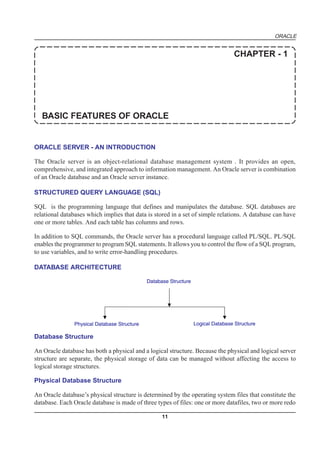
DATABASE ARCHITECTURE

                                             Database Structure


               Physical Database Structure                        Logical Database Structure

Database Structure

An Oracle database has both a physical and a logical structure. Because the physical and logical server
structure are separate, the physical storage of data can be managed without affecting the access to
logical storage structures.

Physical Database Structure

An Oracle database’s physical structure is determined by the operating system files that constitute the
database. Each Oracle database is made of three types of files: one or more datafiles, two or more redo

                                                   11
ORACLE

log files, and one or more control files. The files of an Oracle database provide the actual physical
storage for database information.

Logical Database Structure

An Oracle database’s logical structure is determined by:

•      one or more tablespaces
       A tablespace is a logical area of storage.
•      the database’s schema objects
       A schema is a collection of objects. Schema objects are the logical structures that directly refer
       to the database’s data. Schema objects include such structures as tables, views, sequences, stored
       procedures, synonyms, indexes, clusters, and database links.

The logical storage structures, including tablespaces, segments, and extents, dictate how the physical
space of a database is used. The schema objects and the relationships among them form the relational
design of a database.

AN ORACLE INSTANCE

Every time a database is started, a system global area (SGA) is allocated and Oracle background processes
are started. The system global area is a an area of memory used for database information shared by the
database users. The combination of the background processes and memory buffers is called an Oracle
instance.

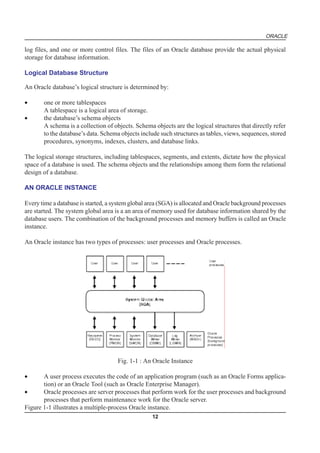
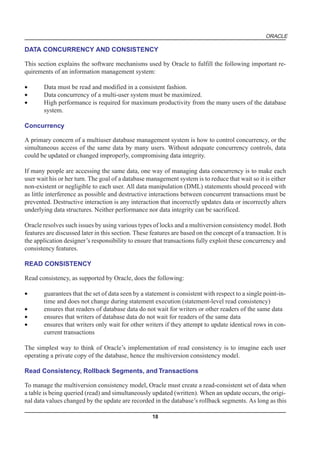
An Oracle instance has two types of processes: user processes and Oracle processes.


                                     Fig. 1-1 : An Oracle Instance

•      A user process executes the code of an application program (such as an Oracle Forms applica-
       tion) or an Oracle Tool (such as Oracle Enterprise Manager).
•      Oracle processes are server processes that perform work for the user processes and background
       processes that perform maintenance work for the Oracle server.
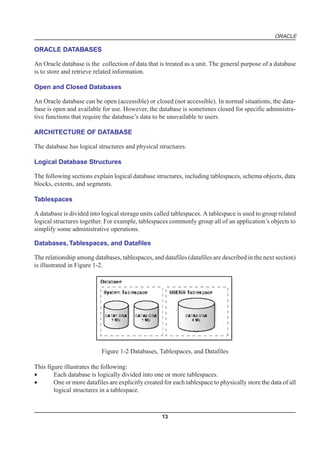
Figure 1-1 illustrates a multiple-process Oracle instance.
                                                   12
ORACLE

ORACLE DATABASES

An Oracle database is the collection of data that is treated as a unit. The general purpose of a database
is to store and retrieve related information.

Open and Closed Databases

An Oracle database can be open (accessible) or closed (not accessible). In normal situations, the data-
base is open and available for use. However, the database is sometimes closed for specific administra-
tive functions that require the database’s data to be unavailable to users.

ARCHITECTURE OF DATABASE

The database has logical structures and physical structures.

Logical Database Structures

The following sections explain logical database structures, including tablespaces, schema objects, data
blocks, extents, and segments.

Tablespaces

A database is divided into logical storage units called tablespaces. A tablespace is used to group related
logical structures together. For example, tablespaces commonly group all of an application’s objects to
simplify some administrative operations.

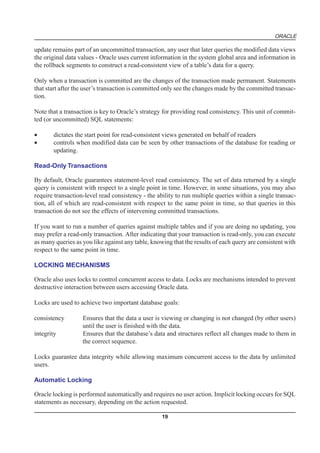
Databases, Tablespaces, and Datafiles

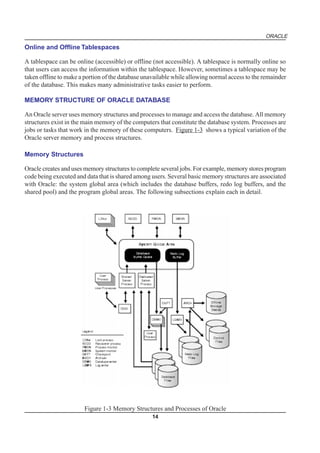
The relationship among databases, tablespaces, and datafiles (datafiles are described in the next section)
is illustrated in Figure 1-2.


                           Figure 1-2 Databases, Tablespaces, and Datafiles

This figure illustrates the following:
•       Each database is logically divided into one or more tablespaces.
•       One or more datafiles are explicitly created for each tablespace to physically store the data of all
        logical structures in a tablespace.


                                                    13
ORACLE

Online and Offline Tablespaces

A tablespace can be online (accessible) or offline (not accessible). A tablespace is normally online so
that users can access the information within the tablespace. However, sometimes a tablespace may be
taken offline to make a portion of the database unavailable while allowing normal access to the remainder
of the database. This makes many administrative tasks easier to perform.

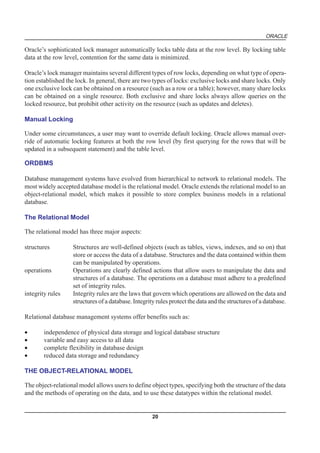
MEMORY STRUCTURE OF ORACLE DATABASE

An Oracle server uses memory structures and processes to manage and access the database. All memory
structures exist in the main memory of the computers that constitute the database system. Processes are
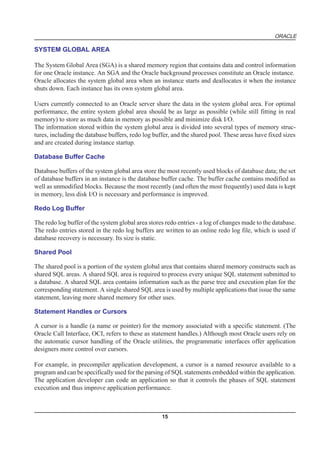
jobs or tasks that work in the memory of these computers. Figure 1-3 shows a typical variation of the
Oracle server memory and process structures.

Memory Structures

Oracle creates and uses memory structures to complete several jobs. For example, memory stores program
code being executed and data that is shared among users. Several basic memory structures are associated
with Oracle: the system global area (which includes the database buffers, redo log buffers, and the
shared pool) and the program global areas. The following subsections explain each in detail.


                        Figure 1-3 Memory Structures and Processes of Oracle
                                                   14
ORACLE

SYSTEM GLOBAL AREA

The System Global Area (SGA) is a shared memory region that contains data and control information
for one Oracle instance. An SGA and the Oracle background processes constitute an Oracle instance.
Oracle allocates the system global area when an instance starts and deallocates it when the instance
shuts down. Each instance has its own system global area.

Users currently connected to an Oracle server share the data in the system global area. For optimal
performance, the entire system global area should be as large as possible (while still fitting in real
memory) to store as much data in memory as possible and minimize disk I/O.
The information stored within the system global area is divided into several types of memory struc-
tures, including the database buffers, redo log buffer, and the shared pool. These areas have fixed sizes
and are created during instance startup.

Database Buffer Cache

Database buffers of the system global area store the most recently used blocks of database data; the set
of database buffers in an instance is the database buffer cache. The buffer cache contains modified as
well as unmodified blocks. Because the most recently (and often the most frequently) used data is kept
in memory, less disk I/O is necessary and performance is improved.

Redo Log Buffer

The redo log buffer of the system global area stores redo entries - a log of changes made to the database.
The redo entries stored in the redo log buffers are written to an online redo log file, which is used if
database recovery is necessary. Its size is static.

Shared Pool

The shared pool is a portion of the system global area that contains shared memory constructs such as
shared SQL areas. A shared SQL area is required to process every unique SQL statement submitted to
a database. A shared SQL area contains information such as the parse tree and execution plan for the
corresponding statement. A single shared SQL area is used by multiple applications that issue the same
statement, leaving more shared memory for other uses.

Statement Handles or Cursors

A cursor is a handle (a name or pointer) for the memory associated with a specific statement. (The
Oracle Call Interface, OCI, refers to these as statement handles.) Although most Oracle users rely on
the automatic cursor handling of the Oracle utilities, the programmatic interfaces offer application
designers more control over cursors.

For example, in precompiler application development, a cursor is a named resource available to a
program and can be specifically used for the parsing of SQL statements embedded within the application.
The application developer can code an application so that it controls the phases of SQL statement
execution and thus improve application performance.


                                                   15
ORACLE

BACKGROUND PROCESSES

Oracle creates a set of background processes for each instance. They consolidate functions that would
otherwise be handled by multiple Oracle programs running for each user process. The background
processes asynchronously perform I/O and monitor other Oracle processes to provide increased paral-
lelism for better performance and reliability.

An SGA and the set of Oracle background processes constitute an Oracle instance. Each Oracle in-
stance may use several background processes. The names of these processes are DBWn, LGWR, CKPT,
SMON, PMON, ARCH, RECO, Dnnn, LCKn, SNPn, and QMNn.

Database Writer (DBWn)

The Database Writer writes modified blocks from the database buffer cache to the datafiles. Although
one database writer process (DBW0) is sufficient for most systems, you can configure additional pro-
cesses (DBW1 through DBW9) to improve write performance for a system that modifies data heavily.
The initialization parameter DB_WRITER_PROCESSES specifies the number of DBWn processes.

Since Oracle uses write-ahead logging, DBWn does not need to write blocks when a transaction com-
mits. Instead, DBWn is designed to perform batched writes with high efficiency. In the most common
case, DBWn writes only when more data needs to be read into the system global area and too few
database buffers are free. The least recently used data is written to the datafiles first. DBWn also per-
forms writes for other functions such as checkpointing.

Log Writer (LGWR)

The Log Writer writes redo log entries to disk. Redo log data is generated in the redo log buffer of the
system global area. As transactions commit and the log buffer fills, LGWR writes redo log entries into
an online redo log file.

Checkpoint (CKPT)

At specific times, all modified database buffers in the system global area are written to the datafiles by
DBWn; this event is called a checkpoint. The Checkpoint process is responsible for signalling DBWn
at checkpoints and updating all the datafiles and control files of the database to indicate the most recent
checkpoint.

System Monitor (SMON)

The system monitor performs instance recovery at instance startup. In a multiple instance system (one
that uses Oracle Parallel Server), SMON of one instance can also perform instance recovery for other
instances that have failed. SMON also cleans up temporary segments that are no longer in use and
recovers dead transactions skipped during crash and instance recovery because of file-read or offline
errors. These transactions are eventually recovered by SMON when the tablespace or file is brought
back online. SMON also coalesces free extents within the database to make free space contiguous and
easier to allocate.


                                                    16
ORACLE

Process Monitor (PMON)

The process monitor performs process recovery when a user process fails. PMON is responsible for
cleaning up the cache and freeing resources that the process was using. PMON also checks on dispatcher
(see below) and server processes and restarts them if they have failed.

THE PROGRAM INTERFACE

The program interface is the mechanism by which a user process communicates with a server process.
It serves as a method of standard communication between any client tool or application (such as Oracle
Forms) and Oracle software. Its functions are to:

•      act as a communications mechanism, by formatting data requests, passing data, and trapping
       and returning errors
•      perform conversions and translations of data, particularly between different types of computers
       or to external user program datatypes

AN EXAMPLE OF HOW ORACLE WORKS

The following example illustrates an Oracle configuration where the user and associated server process
are on separate machines (connected via a network).

1.     An instance is currently running on the computer that is executing Oracle (often called the host
       or database server).
2.     A computer running an application (a local machine or client workstation) runs the application
       in a user process. The client application attempts to establish a connection to the server using
       the proper Net8 driver.
3.     The server is running the proper Net8 driver. The server detects the connection request from the
       application and creates a (dedicated) server process on behalf of the user process.
4.     The user executes a SQL statement and commits the transaction. For example, the user changes
       a name in a row of a table.
5.     The server process receives the statement and checks the shared pool for any shared SQL area
       that contains an identical SQL statement. If a shared SQL area is found, the server process
       checks the user’s access privileges to the requested data and the previously existing shared SQL
       area is used to process the statement; if not, a new shared SQL area is allocated for the statement
       so that it can be parsed and processed.
6.     The server process retrieves any necessary data values from the actual datafile (table) or those
       stored in the system global area.
7.     The server process modifies data in the system global area. The DBWn process writes modified
       blocks permanently to disk when doing so is efficient. Because the transaction committed, the
       LGWR process immediately records the transaction in the online redo log file.
8.     If the transaction is successful, the server process sends a message across the network to the
       application. If it is not successful, an appropriate error message is transmitted.
9.     Throughout this entire procedure, the other background processes run, watching for conditions
       that require intervention. In addition, the database server manages other users’ transactions and
       prevents contention between transactions that request the same data.

These steps describe only the most basic level of operations that Oracle performs.
                                                   17
ORACLE

DATA CONCURRENCY AND CONSISTENCY

This section explains the software mechanisms used by Oracle to fulfill the following important re-
quirements of an information management system:

•       Data must be read and modified in a consistent fashion.
•       Data concurrency of a multi-user system must be maximized.
•       High performance is required for maximum productivity from the many users of the database
        system.

Concurrency

A primary concern of a multiuser database management system is how to control concurrency, or the
simultaneous access of the same data by many users. Without adequate concurrency controls, data
could be updated or changed improperly, compromising data integrity.

If many people are accessing the same data, one way of managing data concurrency is to make each
user wait his or her turn. The goal of a database management system is to reduce that wait so it is either
non-existent or negligible to each user. All data manipulation (DML) statements should proceed with
as little interference as possible and destructive interactions between concurrent transactions must be
prevented. Destructive interaction is any interaction that incorrectly updates data or incorrectly alters
underlying data structures. Neither performance nor data integrity can be sacrificed.

Oracle resolves such issues by using various types of locks and a multiversion consistency model. Both
features are discussed later in this section. These features are based on the concept of a transaction. It is
the application designer’s responsibility to ensure that transactions fully exploit these concurrency and
consistency features.

READ CONSISTENCY

Read consistency, as supported by Oracle, does the following:

•       guarantees that the set of data seen by a statement is consistent with respect to a single point-in-
        time and does not change during statement execution (statement-level read consistency)
•       ensures that readers of database data do not wait for writers or other readers of the same data
•       ensures that writers of database data do not wait for readers of the same data
•       ensures that writers only wait for other writers if they attempt to update identical rows in con-
        current transactions

The simplest way to think of Oracle’s implementation of read consistency is to imagine each user
operating a private copy of the database, hence the multiversion consistency model.

Read Consistency, Rollback Segments, and Transactions

To manage the multiversion consistency model, Oracle must create a read-consistent set of data when
a table is being queried (read) and simultaneously updated (written). When an update occurs, the origi-
nal data values changed by the update are recorded in the database’s rollback segments. As long as this

                                                     18
ORACLE

update remains part of an uncommitted transaction, any user that later queries the modified data views
the original data values - Oracle uses current information in the system global area and information in
the rollback segments to construct a read-consistent view of a table’s data for a query.

Only when a transaction is committed are the changes of the transaction made permanent. Statements
that start after the user’s transaction is committed only see the changes made by the committed transac-
tion.

Note that a transaction is key to Oracle’s strategy for providing read consistency. This unit of commit-
ted (or uncommitted) SQL statements:

•      dictates the start point for read-consistent views generated on behalf of readers
•      controls when modified data can be seen by other transactions of the database for reading or
       updating.

Read-Only Transactions

By default, Oracle guarantees statement-level read consistency. The set of data returned by a single
query is consistent with respect to a single point in time. However, in some situations, you may also
require transaction-level read consistency - the ability to run multiple queries within a single transac-
tion, all of which are read-consistent with respect to the same point in time, so that queries in this
transaction do not see the effects of intervening committed transactions.

If you want to run a number of queries against multiple tables and if you are doing no updating, you
may prefer a read-only transaction. After indicating that your transaction is read-only, you can execute
as many queries as you like against any table, knowing that the results of each query are consistent with
respect to the same point in time.

LOCKING MECHANISMS

Oracle also uses locks to control concurrent access to data. Locks are mechanisms intended to prevent
destructive interaction between users accessing Oracle data.

Locks are used to achieve two important database goals:

consistency        Ensures that the data a user is viewing or changing is not changed (by other users)
                   until the user is finished with the data.
integrity          Ensures that the database’s data and structures reflect all changes made to them in
                   the correct sequence.

Locks guarantee data integrity while allowing maximum concurrent access to the data by unlimited
users.

Automatic Locking

Oracle locking is performed automatically and requires no user action. Implicit locking occurs for SQL
statements as necessary, depending on the action requested.

                                                   19
ORACLE

Oracle’s sophisticated lock manager automatically locks table data at the row level. By locking table
data at the row level, contention for the same data is minimized.

Oracle’s lock manager maintains several different types of row locks, depending on what type of opera-
tion established the lock. In general, there are two types of locks: exclusive locks and share locks. Only
one exclusive lock can be obtained on a resource (such as a row or a table); however, many share locks
can be obtained on a single resource. Both exclusive and share locks always allow queries on the
locked resource, but prohibit other activity on the resource (such as updates and deletes).

Manual Locking

Under some circumstances, a user may want to override default locking. Oracle allows manual over-
ride of automatic locking features at both the row level (by first querying for the rows that will be
updated in a subsequent statement) and the table level.

ORDBMS

Database management systems have evolved from hierarchical to network to relational models. The
most widely accepted database model is the relational model. Oracle extends the relational model to an
object-relational model, which makes it possible to store complex business models in a relational
database.

The Relational Model

The relational model has three major aspects:

structures         Structures are well-defined objects (such as tables, views, indexes, and so on) that
                   store or access the data of a database. Structures and the data contained within them
                   can be manipulated by operations.
operations         Operations are clearly defined actions that allow users to manipulate the data and
                   structures of a database. The operations on a database must adhere to a predefined
                   set of integrity rules.
integrity rules    Integrity rules are the laws that govern which operations are allowed on the data and
                   structures of a database. Integrity rules protect the data and the structures of a database.

Relational database management systems offer benefits such as:

•       independence of physical data storage and logical database structure
•       variable and easy access to all data
•       complete flexibility in database design
•       reduced data storage and redundancy

THE OBJECT-RELATIONAL MODEL

The object-relational model allows users to define object types, specifying both the structure of the data
and the methods of operating on the data, and to use these datatypes within the relational model.


                                                     20
ORACLE

Object types are abstractions of the real-world entities - for example, purchase orders - that application
programs deal with. An object type has three kinds of components:
•      A name, which serves to identify the object type uniquely.
•      Attributes, which are built-in datatypes or other user-defined types. Attributes model the struc-
       ture of the real world entity.
•      Methods, which are functions or procedures written in PL/SQL and stored in the database, or
       written in a language like C and stored externally. Methods implement specific operations that
       an application can perform on the data. Every object type has a constructor method that makes
       a new object according to the datatype’s specification.

SCHEMAS AND SCHEMA OBJECTS

A schema is a collection of database objects that are available to a user. Schema objects are the logical
structures that directly refer to the database’s data. Schema objects include such structures as tables,
views, sequences, stored procedures, synonyms, indexes, clusters, and database links. (There is no
relationship between a tablespace and a schema; objects in the same schema can be in different
tablespaces, and a tablespace can hold objects from different schemas.)

Tables

A table is the basic unit of data storage in an Oracle database. The tables of a database hold all of the
user-accessible data.

Table data is stored in rows and columns. Every table is defined with a table name and set of columns.
Each column is given a column name, a datatype (such as CHAR, DATE, or NUMBER), and a width
(which may be predetermined by the datatype, as in DATE) or scale and precision (for the NUMBER
datatype only). Once a table is created, valid rows of data can be inserted into it. The table’s rows can
then be queried, deleted, or updated.

Oracle8 provides for the partitioning of tables.

To enforce defined business rules on a table’s data, integrity constraints and triggers can also be defined
for a table.

Views

A view is a custom-tailored presentation of the data in one or more tables. A view can also be thought
of as a “stored query”.

Views do not actually contain or store data; rather, they derive their data from the tables on which they
are based, referred to as the base tables of the views. Base tables can in turn be tables or can themselves
be views.

Like tables, views can be queried, updated, inserted into, and deleted from, with some restrictions. All
operations performed on a view actually affect the base tables of the view.


                                                    21
ORACLE

Views are often used to do the following:
•      Provide an additional level of table security by restricting access to a predetermined set of rows
       and columns of a table. For example, a view of a table can be created so that columns with
       sensitive data (for example, salary information) are not included in the definition of the view.
•      Hide data complexity. For example, a single view can combine 12 monthly sales tables to pro-
       vide a year of data for analysis and reporting. A single view can also be used to create a join,
       which is a display of related columns or rows in multiple tables. However, the view hides the
       fact that this data actually originates from several tables.
•      Simplify commands for the user. For example, views allow users to select information from
       multiple tables without requiring the users to actually know how to perform a correlated subquery.
•      Present the data in a different perspective from that of the base table. For example, views pro-
       vide a means to rename columns without affecting the tables on which the view is based.
•      Store complex queries. For example, a query might perform extensive calculations with table
       information. By saving this query as a view, the calculations are performed only when the view
       is queried.

Views that involve a join (a SELECT statement that selects data from multiple tables) of two or more
tables can only be updated under certain conditions.

Sequences

A sequence generates a serial list of unique numbers for numeric columns of a database’s tables. Se-
quences simplify application programming by automatically generating unique numerical values for
the rows of a single table or multiple tables.

For example, assume two users are simultaneously inserting new employee rows into the EMP table.
By using a sequence to generate unique employee numbers for the EMPNO column, neither user has to
wait for the other to input the next available employee number. The sequence automatically generates
the correct values for each user.

Sequence numbers are independent of tables, so the same sequence can be used for one or more tables.
After creation, a sequence can be accessed by various users to generate actual sequence numbers.

Program Units

The term “program unit” is used in this manual to refer to stored procedures, functions, packages,
triggers, and anonymous blocks.

A procedure or function is a set of SQL and PL/SQL (Oracle’s procedural language extension to SQL)
statements grouped together as an executable unit to perform a specific task. Procedures and functions
allow you to combine the ease and flexibility of SQL with the procedural functionality of a structured
programming language. Using PL/SQL, such procedures and functions can be defined and stored in the
database for continued use. Procedures and functions are identical, except that functions always return
a single value to the caller, while procedures do not return a value to the caller.

Packages provide a method of encapsulating and storing related procedures, functions, and other pack-
age constructs together as a unit in the database. While packages provide the database administrator or

                                                   22
ORACLE

application developer organizational benefits, they also offer increased functionality and database per-
formance.

Synonyms

A synonym is an alias for a table, view, sequence, or program unit. A synonym is not actually a schema
object itself, but instead is a direct reference to a schema object. Synonyms are used to
•       mask the real name and owner of a schema object
•       provide public access to a schema object
•       provide location transparency for tables, views, or program units of a remote database
•       simplify the SQL statements for database users

A synonym can be public or private. An individual user can create a private synonym, which is avail-
able only to that user. Database administrators most often create public synonyms that make the base
schema object available for general, system-wide use by any database user.

THE DATA DICTIONARY

Each Oracle database has a data dictionary. An Oracle data dictionary is a set of tables and views that
are used as a read-only reference about the database. For example, a data dictionary stores information
about both the logical and physical structure of the database. In addition to this valuable information, a
data dictionary also stores such information as:
•       the valid users of an Oracle database
•       information about integrity constraints defined for tables in the database
•       how much space is allocated for a schema object and how much of it is in use

A data dictionary is created when a database is created. To accurately reflect the status of the database
at all times, the data dictionary is automatically updated by Oracle in response to specific actions (such
as when the structure of the database is altered). The data dictionary is critical to the operation of the
database, which relies on the data dictionary to record, verify, and conduct ongoing work. For example,
during database operation, Oracle reads the data dictionary to verify that schema objects exist and that
users have proper access to them.

DATA ACCESS

This section introduces how Oracle meets the general requirements for a DBMS to:
•      adhere to industry accepted standards for a data access language
•      control and preserve the consistency of a database’s information while manipulating its data
•      provide a system for defining and enforcing rules to maintain the integrity of a database’s
       information
•      provide high performance

SQL - THE STRUCTURED QUERY LANGUAGE

SQL is a simple, powerful database access language that is the standard language for relational data-
base management systems. The SQL implemented by Oracle Corporation for Oracle is 100 percent
compliant with the ANSI/ISO standard SQL data language.

                                                   23
ORACLE

SQL Statements

All operations on the information in an Oracle database are performed using SQL statements. A SQL
statement is a string of SQL text that is given to Oracle to execute. A statement must be the equivalent
of a complete SQL sentence, as in:

SELECT ename, deptno FROM emp;

Only a complete SQL statement can be executed, whereas a sentence fragment, such as the following,
generates an error indicating that more text is required before a SQL statement can execute:

SELECT ename

A SQL statement can be thought of as a very simple, but powerful, computer program or instruction.
SQL statements are divided into the following categories:
•     Data Definition Language (DDL) statements
•     Data Manipulation Language (DML) statements
•     transaction control statements
•     session control statements
•     system control statements
•     embedded SQL statements

Data Definition Statements (DDL)

DDL statements define, maintain, and drop schema objects when they are no longer needed. DDL
statements also include statements that permit a user to grant other users the privileges, or rights, to
access the database and specific objects within the database.

Data Manipulation Statements (DML)

DML statements manipulate the database’s data. For example, querying, inserting, updating, and delet-
ing rows of a table are all DML operations; locking a table or view and examining the execution plan of
an SQL statement are also DML operations.

Transaction Control Statements

Transaction control statements manage the changes made by DML statements. They allow the user or
application developer to group changes into logical transactions.

Session Control Statements

Session control statements allow a user to control the properties of his current session, including en-
abling and disabling roles and changing language settings. The two session control statements are
ALTER SESSION and SET ROLE.


                                                  24
ORACLE

System Control Statements

System control commands change the properties of the Oracle server instance. The only system control
command is ALTER SYSTEM; it allows you to change such settings as the minimum number of
shared servers, to kill a session, and to perform other tasks.
Embedded SQL Statements

Embedded SQL statements incorporate DDL, DML, and transaction control statements in a procedural
language program (such as those used with the Oracle Precompilers). Examples include OPEN, CLOSE,
FETCH, and EXECUTE.

PL/SQL

PL/SQL is Oracle’s procedural language extension to SQL. PL/SQL combines the ease and flexibility
of SQL with the procedural functionality of a structured programming language, such as IF ... THEN,
WHILE, and LOOP.

When designing a database application, a developer should consider the advantages of using stored PL/
SQL:
•     Because PL/SQL code can be stored centrally in a database, network traffic between applica-
      tions and the database is reduced, so application and system performance increases.
•     Data access can be controlled by stored PL/SQL code. In this case, the users of PL/SQL can
      access data only as intended by the application developer (unless another access route is granted).
•     PL/SQL blocks can be sent by an application to a database, executing complex operations with-
      out excessive network traffic.

Even when PL/SQL is not stored in the database, applications can send blocks of PL/SQL to the data-
base rather than individual SQL statements, thereby again reducing network traffic.

The following sections describe the different program units that can be defined and stored centrally in
a database.

Procedures and Functions

Procedures and functions consist of a set of SQL and PL/SQL statements that are grouped together as a
unit to solve a specific problem or perform a set of related tasks. A procedure is created and stored in
compiled form in the database and can be executed by a user or a database application. Procedures and
functions are identical except that functions always return a single value to the caller, while procedures
do not return values to the caller.

Packages

Packages provide a method of encapsulating and storing related procedures, functions, variables, and
other package constructs together as a unit in the database. While packages allow the administrator or
application developer the ability to organize such routines, they also offer increased functionality (for
example, global package variables can be declared and used by any procedure in the package) and
performance (eg. all objects of the package are parsed, compiled, and loaded into memory once).
                                                   25
ORACLE

Database Triggers

Oracle allows you to write procedures that are automatically executed as a result of an insert in, update
to, or delete from a table. These procedures are called database triggers.

Database triggers can be used in a variety of ways for the information management of your database.
For example, they can be used to automate data generation, audit data modifications, enforce complex
integrity constraints, and customize complex security authorizations.

Methods

A method is a procedure or function that is part of the definition of a user-defined datatype (object type,
nested table, or variable array).

Methods are different from stored procedures in two ways:
•     You invoke a method by referring to an object of its associated type.
•     A method has complete access to the attributes of its associated object and to information about
      its type.

Every user-defined datatype has a system-defined constructor method, that is, a method that makes a
new object according to the datatype’s specification. The name of the constructor method is the name
of the user-defined type. In the case of an object type, the constructor method’s parameters have the
names and types of the object type’s attributes. The constructor method is a function that returns the
new object as its value. Nested tables and arrays also have constructor methods.

Comparison methods define an order relationship among objects of a given object type. A map method
uses Oracle’s ability to compare built-in types. For example, Oracle can compare two rectangles by
comparing their areas if an object type called RECTANGLE has attributes HEIGHT and WIDTH and
you define a map method area that returns a number, namely the product of the rectangle’s HEIGHT
and WIDTH attributes. An order method uses its own internal logic to compare two objects of a given
object type. It returns a value that encodes the order relationship. For example, it may return -1 if the
first is smaller, 0 if they are equal, and 1 if the first is larger.

DATA INTEGRITY

It is very important to guarantee that data adheres to certain business rules, as determined by the data-
base administrator or application developer. For example, assume that a business rule says that no row
in the INVENTORY table can contain a numeric value greater than 9 in the SALE_DISCOUNT col-
umn. If an INSERT or UPDATE statement attempts to violate this integrity rule, Oracle must roll back
the invalid statement and return an error to the application. Oracle provides integrity constraints and
database triggers as solutions to manage a database’s data integrity rules.

Integrity Constraints

An integrity constraint is a declarative way to define a business rule for a column of a table. An integrity
constraint is a statement about a table’s data that is always true:


                                                    26
ORACLE

•       If an integrity constraint is created for a table and some existing table data does not satisfy the
        constraint, the constraint cannot be enforced.
•       After a constraint is defined, if any of the results of a DML statement violate the integrity
        constraint, the statement is rolled back and an error is returned.

Integrity constraints are defined with a table and are stored as part of the table’s definition, centrally in
the database’s data dictionary, so that all database applications must adhere to the same set of rules. If
a rule changes, it need only be changed once at the database level and not many times for each applica-
tion.

The following integrity constraints are supported by Oracle:

NOT NULL                Disallows nulls (empty entries) in a table’s column.
UNIQUE                  Disallows duplicate values in a column or set of columns.
PRIMARY KEY             Disallows duplicate values and nulls in a column or set of columns.
FOREIGN KEY             Requires each value in a column or set of columns match a value in a related
                        table’s UNIQUE or PRIMARY KEY (FOREIGN KEY integrity constraints also
                        define referential integrity actions that dictate what Oracle should do with
                        dependent data if the data it references is altered).
CHECK                   Disallows values that do not satisfy the logical expression of the constraint.

Keys

The term “key” is used in the definitions of several types of integrity constraints. A key is the column or
set of columns included in the definition of certain types of integrity constraints. Keys describe the
relationships between the different tables and columns of a relational database. The different types of
keys include:

primary key         The column or set of columns included in the definition of a table’s PRIMARY
                    KEY constraint. A primary key’s values uniquely identify the rows in a table. Only
                    one primary key may be defined per table.
unique key          The column or set of columns included in the definition of a UNIQUE constraint.

foreign key         The column or set of columns included in the definition of a referential integrity
                    constraint.
Referenced key      The unique key or primary key of the same or different table that is referenced by a
                    foreign key.

Individual values in a key are called key values.

Database Triggers

Centralized actions can be defined using a non-declarative approach (writing PL/SQL code) with database
triggers. A database trigger is a stored procedure that is fired (implicitly executed) when an INSERT,
UPDATE, or DELETE statement is issued against the associated table. Database triggers can be used to
customize a database management system with such features as value-based auditing and the enforcement

                                                     27
ORACLE

of complex security checks and integrity rules. For example, a database trigger might be created to
allow a table to be modified only during normal business hours.

Note:
While database triggers allow you to define and enforce integrity rules, a database trigger is not the
same as an integrity constraint. Among other things, a database trigger defined to enforce an integrity
rule does not check data already loaded into a table. Therefore, it is strongly recommended that you use
database triggers only when the integrity rule cannot be enforced by integrity constraints.


                                                  28
ORACLE


                    SQL - AN INTRODUCTION


COMPETENCY OBJECTIVES

This chapter covers the following topics

      v        SQL - An Introduction
      v        Data types in SQL
      v        SQL - Queries
      v        SQL Commands


                                           29
ORACLE


30
ORACLE


                                                                               CHAPTER - 2


   SQL - AN INTRODUCTION


The language, Structured English Query Language (“SEQUEL”) was developed by IBM Corporation,
Inc., to use Codd’s model. SEQUEL later became SQL (still pronounced “sequel”). In 1979, Relational
Software, Inc. (now Oracle Corporation) introduced the first commercially available implementation
of SQL. Today, SQL is accepted as the standard RDBMS language.

Working of SQL

The strengths of SQL benefit all types of users, including application programmers, database adminis-
trators, management, and end users. Technically speaking, SQL is a data sublanguage: the purpose of
SQL is to provide an interface to a relational database such as Oracle, and all SQL statements are
instructions to the database. In this it differs from general-purpose programming languages like C and
BASIC. Among the features of SQL are the following:
•        It processes sets of data as groups rather than as individual units.
•        It provides automatic navigation to the data.

Essentially, SQL lets you work with data at the logical level. You need to be concerned with the imple-
mentation details only when you want to manipulate the data. For example, to retrieve a set of rows
from a table, you define a condition used to filter the rows. All rows satisfying the condition are re-
trieved in a single step and can be passed as a unit to the user, to another SQL statement, or to an
application. You need not deal with the rows one by one, nor do you have to worry about how they are
physically stored or retrieved. All SQL statements use the optimizer, a part of Oracle that determines a
fast means of accessing the specified data. Oracle also provides techniques you can use to make the
optimizer perform its job better.

SQL provides commands for a variety of tasks, including:
•     querying data
•     inserting, updating, and deleting rows in a table
•     creating, replacing, altering, and dropping objects
•     controlling access to the database and its objects
•     guaranteeing database consistency and integrity

SQL unifies all of the above tasks in one consistent language.


                                                  31
ORACLE

Language for All Relational Databases

All major relational database management systems support SQL, so you can transfer all skills you have
gained with SQL from one database to another. In addition, all programs written in SQL are portable:
they can often be moved from one database to another with very little modification.

EMBEDDED SQL

Embedded SQL refers to the use of standard SQL commands embedded within a procedural programming
language. Embedded SQL is a collection of these commands:
•      all SQL commands, such as SELECT and INSERT, available with SQL with interactive tools
•      dynamic SQL execution commands, such as PREPARE and OPEN, which integrate the standard
       SQL commands with a procedural programming language

Embedded SQL also includes extensions to some standard SQL commands. Embedded SQL is supported
by the Oracle precompilers. The Oracle precompilers interpret embedded SQL statements and translate
them into statements that can be understood by procedural language compilers.

Each of these Oracle precompilers translates embedded SQL programs into a different procedural
language:
•      the Pro*C/C++ precompiler
•      the Pro*COBOL precompiler
•      the Pro*FORTRAN precompiler
•      the SQL*Module for ADA

ELEMENTS OF SQL LANGUAGE

Basic elements of Oracle SQL :
•      Literals
•      Text
•      Integer
•      Number
•      Datatypes
•      Nulls
•      Pseudocolumns
•      Comments


Literals

The terms literal and constant value are synonymous and refer to a fixed data value. For example,
‘JACK’, ‘BLUE ISLAND’, and ‘101’ are all character literals; 5001 is a numeric literal. Note that
character literals are enclosed in single quotation marks, which enable Oracle to distinguish them from
schema object names.

Many SQL statements and functions require you to specify character and numeric literal values. You
can also specify literals as part of expressions and conditions. You can specify character literals with

                                                  32
ORACLE

the ‘text’ notation, national character literals with the N’text’ notation, and numeric literals with the
integer or number notation, depending on the context of the literal. The syntactic forms of these notations
appear in the following sections.

Text

Text specifies a text or character literal. You must use this notation to specify values whenever ‘text’ or
char appear in expressions, conditions, SQL functions, and SQL commands in other parts of this refer-
ence.

A text literal must be enclosed in single quotation marks. This reference uses the terms text literal and
character literal interchangeably.

Text literals have properties of both the CHAR and VARCHAR2 datatypes:
•       Within expressions and conditions, Oracle treats text literals as though they have the datatype
        CHAR by comparing them using blank-padded comparison semantics.
•       A text literal can have a maximum length of 4000 bytes.

Here are some valid text literals:
‘Hello’
‘ORACLE.dbs’
‘Jackie’’s raincoat’
’09-MAR-92'
N’nchar literal’

Integer

You must use the integer notation to specify an integer whenever integer appears in expressions,
conditions, SQL functions, and SQL commands described in other parts of this reference.

An integer can store a maximum of 38 digits of precision.
Here are some valid integers:
7
+255

Number

You must use the number notation to specify values whenever number appears in expressions, condi-
tions, SQL functions, and SQL commands in other parts of this reference.

A number can store a maximum of 38 digits of precision.

If you have established a decimal character other than a period (.) with the initialization parameter
NLS_NUMERIC_CHARACTERS, you must specify numeric literals with ‘text’ notation. In such cases,
Oracle automatically converts the text literal to a numeric value.


                                                    33
ORACLE

For example, if the NLS_NUMERIC_CHARACTERS parameter specifies a decimal character of
comma, specify the number 5.123 as follows:

‘5,123’

Here are some valid representations of number:

25
+6.34
0.5
25e-03
-1

Datatypes

Each literal or column value manipulated by Oracle has a datatype. A value’s datatype associates a
fixed set of properties with the value. These properties cause Oracle to treat values of one datatype
differently from values of another. For example, you can add values of NUMBER datatype, but not
values of RAW datatype.

When you create a table or cluster, you must specify an internal datatype for each of its columns. When
you create a procedure or stored function, you must specify an internal datatype for each of its arguments.
These datatypes define the domain of values that each column can contain or each argument can have.
For example, DATE columns cannot accept the value February 29 (except for a leap year) or the values
2 or ‘SHOE’. Each value subsequently placed in a column assumes the column’s datatype. For example,
if you insert ’01-JAN-92' into a DATE column, Oracle treats the ’01-JAN-92' character string as a
DATE value after verifying that it translates to a valid date.

Table 2-1 summarizes Oracle internal datatypes. The rest of this section describes these datatypes in
detail.


                                                    34
ORACLE

Table 2-1 : Internal Datatype Summary


                    INTERNAL
      CODE          DATATYPE                                 DESCRIPTION
                                     Variable-length character string having maximum length
         1       VARCHAR2(size) size bytes. Maximum size is 4000, and minimum is 1. You
                                must specify size for a VARCHAR2.
                                Variable-length character string having maximum length
                                size characters or bytes, depending on the choice of
                NVARCHAR2(size)
                                national character set. Maximum size is determined by the
                                number of bytes required to store each character, with an
                                upper limit of 4000 bytes. You must specify size for
                                NVARCHAR2.
                                Number having precision p and scale s. The precision p can
         2        NUMBER(p,s)
                                range from 1 to 38. The scale s can range from -84 to 127.
                                Character data of variable length up to 2 gigabytes, or 231 -
         8           LONG
                                1 bytes.
                                Valid date range from January 1, 4712 BC to December 31,
         12          DATE
                                4712 AD.
                                Raw binary data of length size bytes. Maximum size is
         23        RAW(size)
                                2000 bytes. You must specify size for a RAW value.
         24        LONG RAW     Raw binary data of variable length up to 2 gigabytes.
                                Hexadecimal string representing the unique address of a
         69          ROWID      row in its table. This datatype is primarily for values
                                returned by the ROWID pseudocolumn.
                                Fixed length character data of length size bytes. Maximum
         96        CHAR(size)
                                size is 2000 bytes. Default and minimum size is 1 byte.


Character Datatypes

Character datatypes store character (alphanumeric) data-words and free-form text-in the database or
national character set. They are less restrictive than other datatypes and consequently have fewer
properties. For example, character columns can store all alphanumeric values, but NUMBER columns
can store only numeric values.

Character data is stored in strings with byte values corresponding to one of the character sets, such as 7-
bit ASCII or EBCDIC Code , specified when the database was created. Oracle supports both single-
byte and multibyte character sets.
These datatypes are used for character data:

These datatypes are used for character data:
•      CHAR Datatype
•      VARCHAR2 Datatype
                                                    35
ORACLE

CHAR Datatype

The CHAR datatype specifies a fixed-length character string. When you create a table with a CHAR
column, you supply the column length in bytes. Oracle subsequently ensures that all values stored in
that column have this length. If you insert a value that is shorter than the column length, Oracle blank-
pads the value to column length. If you try to insert a value that is too long for the column, Oracle
returns an error.

The default length for a CHAR column is 1 character and the maximum allowed is 2000 characters. A
zero-length string can be inserted into a CHAR column, but the column is blank-padded to 1 character
when used in comparisons.

VARCHAR2 Datatype

The VARCHAR2 datatype specifies a variable-length character string. When you create a VARCHAR2
column, you can supply the maximum number of bytes of data that it can hold. Oracle subsequently
stores each value in the column exactly as you specify it, provided it does not exceed the column’s
maximum length. This maximum must be at least 1 byte, although the actual length of the string stored
is permitted to be zero. If you try to insert a value that exceeds the specified length, Oracle returns an
error.

You must specify a maximum length for a VARCHAR2 column. The maximum length of VARCHAR2
data is 4000 bytes. Oracle compares VARCHAR2 values using nonpadded comparison semantics.

VARCHAR Datatype

The VARCHAR datatype is currently synonymous with the VARCHAR2 datatype. Oracle recommends
that you use VARCHAR2 rather than VARCHAR. In the future, VARCHAR might be defined as a
separate datatype used for variable-length character strings compared with different comparison
semantics.

NUMBER Datatype

The NUMBER datatype stores zero, positive and negative fixed and floating-point numbers with
magnitudes between 1.0 x 10-130 and 9.9...9 x 10125 (38 nines followed by 88 zeroes) with 38 digits of
precision. If you specify an arithmetic expression whose value has a magnitude greater than or equal to
1.0 x 10126, Oracle returns an error.

Specify a fixed-point number using the following form:
NUMBER(p,s)

where:

s              is the scale, or the number of digits to the right of the decimal point. The scale can range
               from -84 to 127.


                                                   36
ORACLE

Specify an integer using the following form:
NUMBER(p) is a fixed-point number with precision p and scale 0. This is equivalent to NUMBER(p,0).
Specify a floating-point number using the following form:
NUMBER          is a floating-point number with decimal precision 38. Note that a scale value is not
                applicable for floating-point numbers.

Scale and Precision

Specify the scale and precision of a fixed-point number column for extra integrity checking on input.
Specifying scale and precision does not force all values to a fixed length. If a value exceeds the precision,
Oracle returns an error. If a value exceeds the scale, Oracle rounds it.

The following examples show how Oracle stores data using different precisions and scales.

                7456123.89                  NUMBER                      7456123.89
                7456123.89                  NUMBER(9)                   7456124
                7456123.89                  NUMBER(9,2)                 7456123.89
                7456123.89                  NUMBER(9,1)                 7456123.9
                7456123.89                  NUMBER(6)                   exceeds precision
                7456123.89                  NUMBER(7,-2)                7456100
                7456123.89                  NUMBER(-7,2)                exceeds precision

Negative Scale

If the scale is negative, the actual data is rounded to the specified number of places to the left of the
decimal point. For example, a specification of (10,-2) means to round to hundreds.

Scale Greater than Precision

You can specify a scale that is greater than precision, although it is uncommon. In this case, the precision
specifies the maximum number of digits to the right of the decimal point. As with all number datatypes,
if the value exceeds the precision, Oracle returns an error message. If the value exceeds the scale,
Oracle rounds the value. For example, a column defined as NUMBER(4,5) requires a zero for the first
digit after the decimal point and rounds all values past the fifth digit after the decimal point. The
following examples show the effects of a scale greater than precision:

                 Actual Data                        Specified As                      Stored As
                     .01234                        NUMBER(4,5)                             .01234
                     .00012                        NUMBER(4,5)                             .00012
                    .000127                        NUMBER(4,5)                             .00013
                   .0000012                        NUMBER(2,7)                          .0000012
                  .00000123                        NUMBER(2,7)                          .0000012


                                                     37
ORACLE

Floating-Point Numbers

Oracle allows you to specify floating-point numbers, which can have a decimal point anywhere from
the first to the last digit or can have no decimal point at all. A scale value is not applicable to floating-
point numbers, because the number of digits that can appear after the decimal point is not restricted.

Oracle also supports the ANSI datatype FLOAT. You can specify this datatype using one of these
syntactic forms:

FLOAT           specifies a floating-point number with decimal precision 38, or binary precision 126.

FLOAT(b)        specifies a floating-point number with binary precision b. The precision b can range
                from 1 to 126. To convert from binary to decimal precision, multiply b by 0.30103. To
                convert from decimal to binary precision, multiply the decimal precision by 3.32193.
                The maximum of 126 digits of binary precision is roughly equivalent to 38 digits of
                decimal precision.

LONG Datatype

LONG columns store variable length character strings containing up to 2 gigabytes, or 231-1 bytes.
LONG columns have many of the characteristics of VARCHAR2 columns. You can use LONG columns
to store long text strings. Oracle uses LONG columns in the data dictionary to store the text of view
definitions. The length of LONG values may be limited by the memory available on your computer.
You can reference LONG columns in SQL statements in these places:
•       SELECT lists
•       SET clauses of UPDATE statements
•       VALUES clauses of INSERT statements

The use of LONG values are subject to some restrictions:
•      A table cannot contain more than one LONG column.
•      LONG columns cannot appear in integrity constraints (except for NULL and NOT NULL
       constraints).
•      LONG columns cannot be indexed.
•      A stored function cannot return a LONG value.
•      Within a single SQL statement, all LONG columns, updated tables, and locked tables must be
       located on the same database.

LONG columns cannot appear in certain parts of SQL statements:
•    WHERE, GROUP BY, ORDER BY, or CONNECT BY clauses or with the DISTINCT operator
     in SELECT statements
•    the UNIQUE clause of a SELECT statement
•    the column list of a CREATE CLUSTER statement
•    the CLUSTER clause of a CREATE SNAPSHOT statement
•    SQL functions (such as SUBSTR or INSTR)
•    expressions or conditions
•    SELECT lists of queries containing GROUP BY clauses

                                                     38
ORACLE

•      SELECT lists of subqueries or queries combined by set operators
•      SELECT lists of CREATE TABLE ... AS SELECT statements
•      SELECT lists in subqueries in INSERT statements

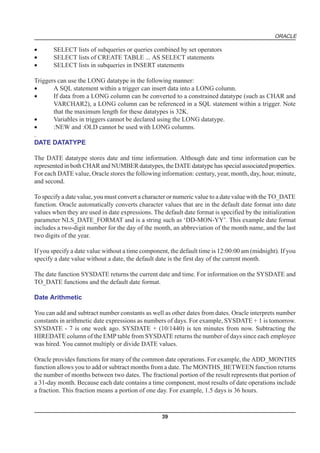
Triggers can use the LONG datatype in the following manner:
•      A SQL statement within a trigger can insert data into a LONG column.
•      If data from a LONG column can be converted to a constrained datatype (such as CHAR and
       VARCHAR2), a LONG column can be referenced in a SQL statement within a trigger. Note
       that the maximum length for these datatypes is 32K.
•      Variables in triggers cannot be declared using the LONG datatype.
•      :NEW and :OLD cannot be used with LONG columns.
.
DATE DATATYPE

The DATE datatype stores date and time information. Although date and time information can be
represented in both CHAR and NUMBER datatypes, the DATE datatype has special associated properties.
For each DATE value, Oracle stores the following information: century, year, month, day, hour, minute,
and second.

To specify a date value, you must convert a character or numeric value to a date value with the TO_DATE
function. Oracle automatically converts character values that are in the default date format into date
values when they are used in date expressions. The default date format is specified by the initialization
parameter NLS_DATE_FORMAT and is a string such as ‘DD-MON-YY’. This example date format
includes a two-digit number for the day of the month, an abbreviation of the month name, and the last
two digits of the year.

If you specify a date value without a time component, the default time is 12:00:00 am (midnight). If you
specify a date value without a date, the default date is the first day of the current month.

The date function SYSDATE returns the current date and time. For information on the SYSDATE and
TO_DATE functions and the default date format.

Date Arithmetic

You can add and subtract number constants as well as other dates from dates. Oracle interprets number
constants in arithmetic date expressions as numbers of days. For example, SYSDATE + 1 is tomorrow.
SYSDATE - 7 is one week ago. SYSDATE + (10/1440) is ten minutes from now. Subtracting the
HIREDATE column of the EMP table from SYSDATE returns the number of days since each employee
was hired. You cannot multiply or divide DATE values.

Oracle provides functions for many of the common date operations. For example, the ADD_MONTHS
function allows you to add or subtract months from a date. The MONTHS_BETWEEN function returns
the number of months between two dates. The fractional portion of the result represents that portion of
a 31-day month. Because each date contains a time component, most results of date operations include
a fraction. This fraction means a portion of one day. For example, 1.5 days is 36 hours.


                                                   39
ORACLE

Using Julian Dates

A Julian date is the number of days since January 1, 4712 bc. Julian dates allow continuous dating from
a common reference. You can use the date format model “J” with date functions TO_DATE and
TO_CHAR to convert between Oracle DATE values and their Julian equivalents.

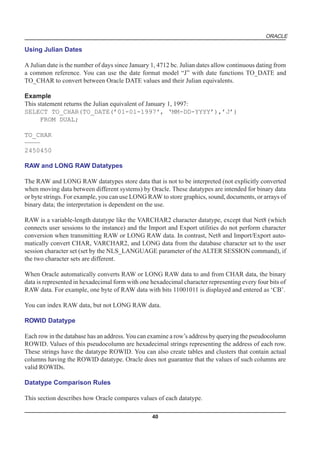
Example
This statement returns the Julian equivalent of January 1, 1997:
SELECT TO_CHAR(TO_DATE(’01-01-1997', ‘MM-DD-YYYY’),’J’)
      FROM DUAL;

TO_CHAR
————
2450450

RAW and LONG RAW Datatypes

The RAW and LONG RAW datatypes store data that is not to be interpreted (not explicitly converted
when moving data between different systems) by Oracle. These datatypes are intended for binary data
or byte strings. For example, you can use LONG RAW to store graphics, sound, documents, or arrays of
binary data; the interpretation is dependent on the use.

RAW is a variable-length datatype like the VARCHAR2 character datatype, except that Net8 (which
connects user sessions to the instance) and the Import and Export utilities do not perform character
conversion when transmitting RAW or LONG RAW data. In contrast, Net8 and Import/Export auto-
matically convert CHAR, VARCHAR2, and LONG data from the database character set to the user
session character set (set by the NLS_LANGUAGE parameter of the ALTER SESSION command), if
the two character sets are different.

When Oracle automatically converts RAW or LONG RAW data to and from CHAR data, the binary
data is represented in hexadecimal form with one hexadecimal character representing every four bits of
RAW data. For example, one byte of RAW data with bits 11001011 is displayed and entered as ‘CB’.

You can index RAW data, but not LONG RAW data.

ROWID Datatype

Each row in the database has an address. You can examine a row’s address by querying the pseudocolumn
ROWID. Values of this pseudocolumn are hexadecimal strings representing the address of each row.
These strings have the datatype ROWID. You can also create tables and clusters that contain actual
columns having the ROWID datatype. Oracle does not guarantee that the values of such columns are
valid ROWIDs.

Datatype Comparison Rules

This section describes how Oracle compares values of each datatype.

                                                  40
ORACLE

Number Values

A larger value is considered greater than a smaller one. All negative numbers are less than zero and all
positive numbers. Thus, -1 is less than 100; -100 is less than -1.

Date Values

A later date is considered greater than an earlier one. For example, the date equivalent of ’29-MAR-
1991' is less than that of ’05-JAN-1992' and ’05-JAN-1992 1:35pm’ is greater than ’05-JAN-1992
10:09am’.

Character String Values

Character values are compared using one of these comparison rules:
•      blank-padded comparison semantics
•      nonpadded comparison semantics

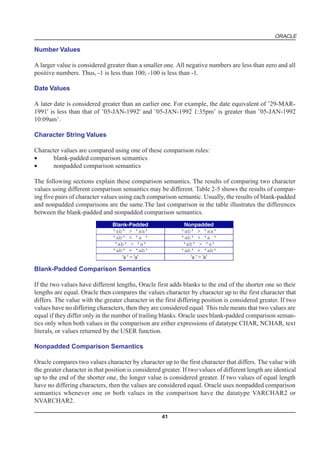
The following sections explain these comparison semantics. The results of comparing two character
values using different comparison semantics may be different. Table 2-5 shows the results of compar-
ing five pairs of character values using each comparison semantic. Usually, the results of blank-padded
and nonpadded comparisons are the same.The last comparison in the table illustrates the differences
between the blank-padded and nonpadded comparison semantics.
                                Blank-Padded                  Nonpadded
                                'ab' > 'aa'                  'ab' > 'aa'
                                'ab' > 'a '                  'ab' > 'a '
                                 'ab' > 'a'                   'ab' > 'a'
                                'ab' = 'ab'                  'ab' = 'ab'
                                    'a ' = 'a'                   'a ' > 'a'

Blank-Padded Comparison Semantics

If the two values have different lengths, Oracle first adds blanks to the end of the shorter one so their
lengths are equal. Oracle then compares the values character by character up to the first character that
differs. The value with the greater character in the first differing position is considered greater. If two
values have no differing characters, then they are considered equal. This rule means that two values are
equal if they differ only in the number of trailing blanks. Oracle uses blank-padded comparison seman-
tics only when both values in the comparison are either expressions of datatype CHAR, NCHAR, text
literals, or values returned by the USER function.

Nonpadded Comparison Semantics

Oracle compares two values character by character up to the first character that differs. The value with
the greater character in that position is considered greater. If two values of different length are identical
up to the end of the shorter one, the longer value is considered greater. If two values of equal length
have no differing characters, then the values are considered equal. Oracle uses nonpadded comparison
semantics whenever one or both values in the comparison have the datatype VARCHAR2 or
NVARCHAR2.

                                                     41
ORACLE

Single Characters

Oracle compares single characters according to their numeric values in the database character set. One
character is greater than another if it has a greater numeric value than the other in the character set.
Oracle considers blanks to be less than any character, which is true in most character sets.

These are some common character sets:
•      7-bit ASCII (American Standard Code for Information Interchange)
•      EBCDIC Code (Extended Binary Coded Decimal Interchange Code)
•      ISO 8859/1 (International Standards Organization)
•      JEUC Japan Extended UNIX

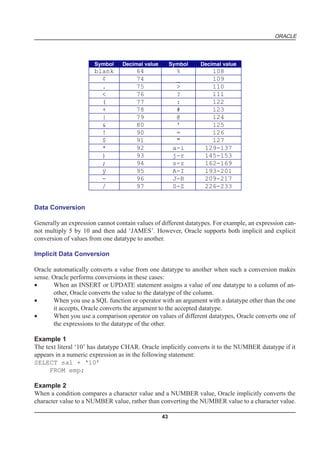
Portions of the ASCII and EBCDIC character sets appear in Table 2-6 and Table 2-7. Note that upper-
case and lowercase letters are not equivalent. Also, note that the numeric values for the characters of a
character set may not match the linguistic sequence for a particular language.

Table 2-6: ASCII Character Set


                   Symbol        Decimal value          Symbol         Decimal value
                   blank              32                   ;                 59
                     !                33                   <                 60
                     "                34                   =                 61
                     #                35                   >                 62
                     $                36                   ?                 63
                     %                37                   @                 64
                     &                38                 A-Z               65-90
                     '                39                   [                 91
                     (                40                                    92
                     )                41                   ]                 93
                     *                42                  ^^                 94
                     +                43                   _                 95
                     ,                44                   `                 96
                     -                45                 a-z              97-122
                     .                46                  {                 123
                     /                47                  |                 124
                    0-9             48-57                  }                125
                     :                58                  ~                 126


                                                   42
ORACLE


                       Symbol     Decimal value        Symbol   Decimal value
                       blank           64                %         108
                         ¢             74                _         109
                         .             75                >         110
                         <             76                ?         111
                         (             77                :         122
                         +             78                #         123
                         |             79                @         124
                         &             80                '         125
                         !             90                =         126
                         $             91                "         127
                         *             92               a-i      129-137
                         )             93               j-r      145-153
                         ;             94               s-z      162-169
                         ÿ             95               A-I      193-201
                         -             96               J-R      209-217
                         /             97               S-Z      226-233


Data Conversion

Generally an expression cannot contain values of different datatypes. For example, an expression can-
not multiply 5 by 10 and then add ‘JAMES’. However, Oracle supports both implicit and explicit
conversion of values from one datatype to another.

Implicit Data Conversion

Oracle automatically converts a value from one datatype to another when such a conversion makes
sense. Oracle performs conversions in these cases:
•      When an INSERT or UPDATE statement assigns a value of one datatype to a column of an-
       other, Oracle converts the value to the datatype of the column.
•      When you use a SQL function or operator with an argument with a datatype other than the one
       it accepts, Oracle converts the argument to the accepted datatype.
•      When you use a comparison operator on values of different datatypes, Oracle converts one of
       the expressions to the datatype of the other.

Example 1
The text literal ‘10’ has datatype CHAR. Oracle implicitly converts it to the NUMBER datatype if it
appears in a numeric expression as in the following statement:
SELECT sal + ‘10’
      FROM emp;

Example 2
When a condition compares a character value and a NUMBER value, Oracle implicitly converts the
character value to a NUMBER value, rather than converting the NUMBER value to a character value.

                                                  43
ORACLE

In the following statement, Oracle implicitly converts ‘7936’ to 7936:
SELECT ename
      FROM emp
      WHERE empno = ‘7936’;

Example 3

In the following statement, Oracle implicitly converts ’12-MAR-1993' to a DATE value using the
default date format ‘DD-MON-YYYY’:
SELECT ename
      FROM emp
      WHERE hiredate = ’12-MAR-1993';

Example 4

In the following statement, Oracle implicitly converts the text literal ‘AAAAZ8AABAAABvlAAA’ to
a ROWID value:
SELECT ename
       FROM emp
       WHERE ROWID = ‘AAAAZ8AABAAABvlAAA’;

Explicit Data Conversion

You can also explicitly specify datatype conversions using SQL conversion functions. Table 2-8 shows
SQL functions that explicitly convert a value from one datatype to another

Table 2-8 SQL Functions for Datatype Conversion

     TO: FROM:         CHAR            NUMBER           DATE          RAW            ROWID
      CHAR              -           TO_NUMBER          TO_DATE HEXTORAW CHARTOROWID
     NUMBER          TO_CHAR            -              TO_DATE
                                                      (number,
                                                        'J')
       DATE          TO_CHAR          TO_CHAR             -
                                    (date,'J')
       RAW          RAWTOHEX                                             -
      ROWID       ROWIDTOCHAR                                                           -

Implicit vs. Explicit Data Conversion

Oracle recommends that you specify explicit conversions rather than rely on implicit or automatic
conversions for these reasons:
•      SQL statements are easier to understand when you use explicit datatype conversions functions.
•      Automatic datatype conversion can have a negative impact on performance, especially if the
       datatype of a column value is converted to that of a constant rather than the other way around.


                                                 44
ORACLE

•       Implicit conversion depends on the context in which it occurs and may not work the same way
        in every case.
•       Algorithms for implicit conversion are subject to change across software releases and among
        Oracle products. Behavior of explicit conversions is more predictable.

Nulls

If a column in a row has no value, then column is said to be null, or to contain a null. Nulls can appear
in columns of any datatype that are not restricted by NOT NULL or PRIMARY KEY integrity constraints.
Use a null when the actual value is not known or when a value would not be meaningful.

Do not use null to represent a value of zero, because they are not equivalent. (Oracle currently treats a
character value with a length of zero as null. However, this may not continue to be true in future
releases, and Oracle recommends that you do not treat empty strings the same as NULLs.) Any arithmetic
expression containing a null always evaluates to null. For example, null added to 10 is null. In fact, all
operators (except concatenation) return null when given a null operand.

Nulls in SQL Functions

All scalar functions (except NVL and TRANSLATE) return null when given a null argument. The NVL
function can be used to return a value when a null occurs. For example, the expression NVL(COMM,0)
returns 0 if COMM is null or the value of COMM if it is not null.

Most group functions ignore nulls. For example, consider a query that averages the five values 1000,
null, null, null, and 2000. Such a query ignores the nulls and calculates the average to be (1000+2000)/
2 = 1500.

Nulls with Comparison Operators

To test for nulls, use only the comparison operators IS NULL and IS NOT NULL. If you use any other
operator with nulls and the result depends on the value of the null, the result is UNKNOWN. Because
null represents a lack of data, a null cannot be equal or unequal to any value or to another null. However,
note that Oracle considers two nulls to be equal when evaluating a DECODE expression.

Oracle also considers two nulls to be equal if they appear in compound keys. That is, Oracle considers
identical two compound keys containing nulls if all the non-null components of the keys are equal.

Nulls in Conditions

A condition that evaluates to UNKNOWN acts almost like FALSE. For example, a SELECT statement
with a condition in the WHERE clause that evaluates to UNKNOWN returns no rows. However, a
condition evaluating to UNKNOWN differs from FALSE in that further operations on an UNKNOWN
condition evaluation will evaluate to UNKNOWN. Thus, NOT FALSE evaluates to TRUE, but NOT
UNKNOWN evaluates to UNKNOWN.


                                                    45
ORACLE

Table 2-9 shows examples of various evaluations involving nulls in conditions. If the conditions
evaluating to UNKNOWN were used in a WHERE clause of a SELECT statement, then no rows would
be returned for that query.

Table 2-9: Conditions containing Nulls


                         If A is:           Condition            Evaluates to:
                            10              a IS NULL               FALSE
                            10           a IS NOT NULL              TRUE
                          NULL              a IS NULL               TRUE
                          NULL           a IS NOT NULL              FALSE
                            10               a = NULL             UNKNOWN
                            10              a != NULL             UNKNOWN
                          NULL               a = NULL             UNKNOWN
                          NULL              a != NULL             UNKNOWN
                          NULL                 a = 10             UNKNOWN
                          NULL                 a != 10            UNKNOWN

PSEUDOCOLUMNS

A pseudocolumn behaves like a table column, but is not actually stored in the table. You can select from
pseudocolumns, but you cannot insert, update, or delete their values. This section describes these
pseudocolumns:
•      CURRVAL and NEXTVAL
•      LEVEL
•      ROWID
•      ROWNUM

CURRVAL and NEXTVAL

A sequence is a schema object that can generate unique sequential values. These values are often used
for primary and unique keys. You can refer to sequence values in SQL statements with these
pseudocolumns:

CURRVAL returns the current value of a sequence.

NEXTVAL increments the sequence and returns the next value.

You must qualify CURRVAL and NEXTVAL with the name of the sequence:
sequence.CURRVAL
sequence.NEXTVAL

To refer to the current or next value of a sequence in the schema of another user, you must have been
granted either SELECT object privilege on the sequence or SELECT ANY SEQUENCE system privi-
lege, and you must qualify the sequence with the schema containing it:

                                                  46
ORACLE

schema.sequence.CURRVAL
schema.sequence.NEXTVAL

To refer to the value of a sequence on a remote database, you must qualify the sequence with a complete
or partial name of a database link:
schema.sequence.CURRVAL@dblink
schema.sequence.NEXTVAL@dblink

Where to Use Sequence Values

You can use CURRVAL and NEXTVAL in these places:
•     the SELECT list of a SELECT statement that is not contained in a subquery, snapshot, or view
•     the SELECT list of a subquery in an INSERT statement
•     the VALUES clause of an INSERT statement
•     the SET clause of an UPDATE statement

You cannot use CURRVAL and NEXTVAL in these places:
•     a subquery in a DELETE, SELECT, or UPDATE statement
•     a view’s query or snapshot’s query
•     a SELECT statement with the DISTINCT operator
•     a SELECT statement with a GROUP BY or ORDER BY clause
•     a SELECT statement that is combined with another SELECT statement with the UNION, IN-
      TERSECT, or MINUS set operator
•     the WHERE clause of a SELECT statement
•     DEFAULT value of a column in a CREATE TABLE or ALTER TABLE statement
•     the condition of a CHECK constraint

Also, within a single SQL statement that uses CURVAL or NEXTVAL, all referenced LONG columns,
updated tables, and locked tables must be located on the same database.

How to Use Sequence Values

When you create a sequence, you can define its initial value and the increment between its values. The
first reference to NEXTVAL returns the sequence’s initial value. Subsequent references to NEXTVAL
increment the sequence value by the defined increment and return the new value. Any reference to
CURRVAL always returns the sequence’s current value, which is the value returned by the last refer-
ence to NEXTVAL. Note that before you use CURRVAL for a sequence in your session, you must first
initialize the sequence with NEXTVAL.

Within a single SQL statement, Oracle will increment the sequence only once. If a statement contains
more than one reference to NEXTVAL for a sequence, Oracle increments the sequence once and re-
turns the same value for all occurrences of NEXTVAL. If a statement contains references to both
CURRVAL and NEXTVAL, Oracle increments the sequence and returns the same value for both
CURRVAL and NEXTVAL regardless of their order within the statement.

A sequence can be accessed by many users concurrently with no waiting or locking.

                                                  47
ORACLE

Example 1
This example selects the current value of the employee sequence:
SELECT empseq.currval
      FROM DUAL;

Example 2
This example increments the employee sequence and uses its value for a new employee inserted into
the employee table:
INSERT INTO emp
      VALUES (empseq.nextval, ‘LEWIS’, ‘CLERK’,
                   7902, SYSDATE, 1200, NULL, 20);

Example 3
This example adds a new order with the next order number to the master order table. It then adds
suborders with this number to the detail order table:
INSERT INTO master_order(orderno, customer, orderdate)
      VALUES (orderseq.nextval, ‘Al’’s Auto Shop’, SYSDATE);

INSERT INTO detail_order (orderno, part, quantity)
    VALUES (orderseq.currval, ‘SPARKPLUG’, 4);

INSERT INTO detail_order (orderno, part, quantity)
    VALUES (orderseq.currval, ‘FUEL PUMP’, 1);

INSERT INTO detail_order (orderno, part, quantity)
  VALUES (orderseq.currval, ‘TAILPIPE’, 2);

LEVEL

For each row returned by a hierarchical query, the LEVEL pseudocolumn returns 1 for a root node, 2 for
a child of a root, and so on. A root node is the highest node within an inverted tree. A child node is any
nonroot node. A parent node is any node that has children. A leaf node is any node without children.
Figure 2-1 shows the nodes of an inverted tree with their LEVEL values


Fig. 2-1 : Hierarchical Tree

To define a hierarchical relationship in a query, you must use the START WITH and CONNECT BY
clauses.

                                                   48
ORACLE

ROWID

For each row in the database, the ROWID pseudocolumn returns a row’s address. ROWID values
contain information necessary to locate a row:
•      the data object number of the object
•      which data block in the datafile
•      which row in the data block (first row is 0)
•      which datafile (first file is 1). The file number is relative to the tablespace.

Usually, a ROWID value uniquely identifies a row in the database. However, rows in different tables
that are stored together in the same cluster can have the same ROWID.

Values of the ROWID pseudocolumn have the datatype ROWID.

ROWID values have several important uses:
•   They are the fastest way to access a single row.
•   They can show you how a table’s rows are stored.
•   They are unique identifiers for rows in a table.

You should not use ROWID as a table’s primary key. If you delete and reinsert a row with the Import
and Export utilities, for example, its ROWID may change. If you delete a row, Oracle may reassign its
ROWID to a new row inserted later.

Although you can use the ROWID pseudocolumn in the SELECT and WHERE clauses of a query,
these pseudocolumn values are not actually stored in the database. You cannot insert, update, or delete
a value of the ROWID pseudocolumn.

Example

This statement selects the address of all rows that contain data for employees in department 20:
SELECT ROWID, ename
      FROM emp
      WHERE deptno = 20;

ROWID                        ENAME
————————— ———-—-
AAAAfSAABAAAClaAAA           SMITH
AAAAfSAABAAAClaAAD           JONES
AAAAfSAABAAAClaAAH           SCOTT
AAAAfSAABAAAClaAAK           ADAMS
AAAAfSAABAAAClaAAM           FORD

ROWNUM

For each row returned by a query, the ROWNUM pseudocolumn returns a number indicating the order
in which Oracle selects the row from a table or set of joined rows. The first row selected has a ROWNUM
of 1, the second has 2, and so on.
                                                  49
ORACLE

You can use ROWNUM to limit the number of rows returned by a query, as in this example:
SELECT *
     FROM emp
     WHERE ROWNUM < 10;

Note that conditions testing for ROWNUM values greater than a positive integer are always false. For
example, this query returns no rows:
SELECT * FROM emp
      WHERE ROWNUM > 1;

The first row fetched is assigned a ROWNUM of 1 and makes the condition false. The second row to be
fetched is now the first row and is also assigned a ROWNUM of 1 and makes the condition false. All
rows subsequently fail to satisfy the condition, so no rows are returned.

You can also use ROWNUM to assign unique values to each row of a table, as in this example:
UPDATE tabx
     SET col1 = ROWNUM;

Oracle assigns a ROWNUM value to each row as it is retrieved, before rows are sorted for an ORDER
BY clause, so an ORDER BY clause normally does not affect the ROWNUM of each row. However, if
an ORDER BY clause causes Oracle to use an index to access the data, Oracle may retrieve the rows in
a different order than without the index, so the ROWNUMs may be different than they would be
without the ORDER BY clause.


                                                50
ORACLE


                    SQL - AN INTRODUCTION


COMPETENCY OBJECTIVES

This chapter covers the following topics

      v        SQL Operators
      v        SQL Functions
      v        SQL Queries


                                           51
ORACLE


52
ORACLE


                                                                                    CHAPTER - 3


   OPERATORS USED IN SQL LANGUAGE


An operator manipulates individual data items and returns a result. The data items are called operands
or arguments. Operators are represented by special characters or by keywords. For example, the
multiplication operator is represented by an asterisk (*) and the operator that tests for nulls is represented
by the keywords IS NULL. Tables in this section list SQL operators.

ARITHMETIC OPERATORS IN SQL

You can use an arithmetic operator in an expression to negate, add, subtract, multiply, and divide
numeric values. The result of the operation is also a numeric value. Some of these operators are also
used in date arithmetic. Table 3-2 lists arithmetic operators.


   Oper                          Purpose                                         Example
   ator
    + or Denotes a positive or negative expression. These              SELECT * FROM orders
      - are unary operators.                                            WHERE qtysold = -1;
                                                                         SELECT * FROM emp
                                                                          WHERE -sal < 0;
     */    Multiplies, divides. These are binary operators.               UPDATE emp
                                                                     SET sal = sal * 1.1;
    +-     Adds, subtracts. These are binary operators.             SELECT sal + comm FROM
                                                                              emp
                                                                   WHERE SYSDATE - hiredate
                                                                            > 365;

                                     Table 3-2: Arithmetic Operators

You are advised not to use two consecutive minus signs with no separation (—) in arithmetic expressions
for indicating double negation or the subtraction of a negative value. The characters — are used to
begin comments within SQL statements. Two consecutive minus signs should be separated with a
space or a parenthesis.


                                                     53
ORACLE

Concatenation Operator in SQL

The concatenation operator manipulates character strings. Table 3-3 describes the concatenation operator.

             Operator          Purpose                           Example
                ||    Concatenates character             SELECT 'Name is ' ||
                      strings.                           ename
                                                            FROM emp;

                                  Table 3-3 : Concatenation Operator

The result of concatenating two character strings is another character string. If both character strings
are of datatype CHAR, the result has datatype CHAR and is limited to 2000 characters. If either string
is of datatype VARCHAR2, the result has datatype VARCHAR2 and is limited to 4000 characters.
Trailing blanks in character strings are preserved by concatenation, regardless of the strings’ datatypes.

Example
This example creates a table with both CHAR and VARCHAR2 columns, inserts values both with and
without trailing blanks, and then selects these values, concatenating them. Note that for both CHAR
and VARCHAR2 columns, the trailing blanks are preserved.

CREATE TABLE tab1 (col1 VARCHAR2(6), col2 CHAR(6),
   col3 VARCHAR2(6), col4 CHAR(6) );

Table created.

INSERT INTO tab1 (col1, col2, col3, col4)
    VALUES (‘abc’, ‘def ‘, ‘ghi ‘, ‘jkl’);

1 row created.

SELECT col1||col2||col3||col4 “Concatenation”
   FROM tab1;

Concatenation
————————————
abcdef ghi jkl

Comparison Operators

Comparison operators compare one expression with another. The result of such a comparison can be
TRUE, FALSE, or UNKNOWN

Equality test .
SELECT *
 FROM emp
 WHERE sal = 1500;

                                                   54
ORACLE

Inequality test. Some forms of the inequality operator may be unavailable on some platforms.
SELECT *
 FROM emp
 WHERE sal != 1500;

“Greater than” and “less than” tests.
SELECT * FROM emp
 WHERE sal > 1500;
SELECT * FROM emp
 WHERE sal < 1500;

“Greater than or equal to” and “less than or equal to” tests.
SELECT * FROM emp
 WHERE sal >= 1500;
SELECT * FROM emp
 WHERE sal <= 1500;

IN

“Equal to any member of” test. Equivalent to “= ANY”.
SELECT * FROM emp
 WHERE job IN
 (‘CLERK’,’ANALYST’);
SELECT * FROM emp
 WHERE sal IN
 (SELECT sal FROM emp
  WHERE deptno = 30);

NOT IN

Equivalent to “!=ALL”. Evaluates to FALSE if any member of the set is NULL.
SELECT * FROM emp
 WHERE sal NOT IN
 (SELECT sal FROM emp
 WHERE deptno = 30);
SELECT * FROM emp
 WHERE job NOT IN
 (‘CLERK’, ANALYST’);

ANY
SOME

Compares a value to each value in a list or returned by a query. Must be preceded by =, !=, >, <, <=, >=.


                                                   55
ORACLE

Evaluates to FALSE if the query returns no rows.
SELECT * FROM emp
 WHERE sal = ANY
 (SELECT sal FROM emp
 WHERE deptno = 30);

ALL

Compares a value to every value in a list or returned by a query. Must be preceded by =, !=, >, <, <=, >=.

Evaluates to TRUE if the query returns no rows.
SELECT * FROM emp
 WHERE sal >=
 ALL ( 1400, 3000);

[NOT]
BETWEEN
x AND y

[Not] greater than or equal to x and less than or equal to y.
SELECT * FROM emp
 WHERE sal
 BETWEEN 2000 AND 3000;

EXISTS

TRUE if a subquery returns at least one row.
SELECT ename, deptno
 FROM dept
 WHERE EXISTS
 (SELECT * FROM emp
  WHERE dept.deptno
  = emp.deptno);

x [NOT]
LIKE y

[ESCAPE
‘z’]

TRUE if x does [not] match the pattern y. Within y, the character “%” matches any string of zero or
more characters except null. The character “_” matches any single character. Any character, excepting
percent (%) and underbar (_) may follow ESCAPE; a wildcard character is treated as a literal if preceded
by the character designated as the escape character.
See “LIKE Operator”.


                                                   56
ORACLE

SELECT * FROM tab1
 WHERE col1 LIKE
 ‘A_C/%E%’ ESCAPE ‘/’;

IS
[NOT]
NULL

Tests for nulls. This is the only operator that you should use to test for nulls. See “Nulls”.
SELECT ename, deptno
 FROM emp
 WHERE comm IS NULL;

Additional information on the NOT IN and LIKE operators appears in the sections that follow.

NOT IN Operator

If any item in the list following a NOT IN operation is null, all rows evaluate to UNKNOWN (and no
rows are returned). For example, the following statement returns the string ‘TRUE’ for each row:

SELECT ‘TRUE’
  FROM emp
  WHERE deptno NOT IN (5,15);

However, the following statement returns no rows:

SELECT ‘TRUE’
  FROM emp
  WHERE deptno NOT IN (5,15,null);

The above example returns no rows because the WHERE clause condition evaluates to:

deptno != 5 AND deptno != 15 AND deptno != null

Because all conditions that compare a null result in a null, the entire expression results in a null. This
behavior can easily be overlooked, especially when the NOT IN operator references a subquery.

LIKE Operator

The LIKE operator is used in character string comparisons with pattern matching. The syntax for a
condition using the LIKE operator is shown in this diagram:

where:
char1

is a value to be compared with a pattern. This value can have datatype CHAR or VARCHAR2.

                                                    57
ORACLE

NOT
logically inverts the result of the condition, returning FALSE if the condition evaluates to TRUE and
TRUE if it evaluates to FALSE.

char2
is the pattern to which char1 is compared. The pattern is a value of datatype CHAR or VARCHAR2 and
can contain the special pattern matching characters % and _.

ESCAPE
identifies a single character as the escape character. The escape character can be used to cause Oracle to
interpret % or _ literally, rather than as a special character, in the pattern.

If you wish to search for strings containing an escape character, you must specify this character twice.
For example, if the escape character is ‘/’, to search for the string ‘client/server’, you must specify,
‘client//server’.

While the equal (=) operator exactly matches one character value to another, the LIKE operator matches
a portion of one character value to another by searching the first value for the pattern specified by the
second. Note that blank padding is not used for LIKE comparisons.

With the LIKE operator, you can compare a value to a pattern rather than to a constant. The pattern can
only appear after the LIKE keyword. For example, you can issue the following query to find the salaries
of all employees with names beginning with ‘SM’:

SELECT sal
  FROM emp
  WHERE ename LIKE ‘SM%’;

The following query uses the = operator, rather than the LIKE operator, to find the salaries of all
employees with the name ‘SM%’:

SELECT sal
  FROM emp
  WHERE ename = ‘SM%’;

The following query finds the salaries of all employees with the name ‘SM%’. Oracle interprets ‘SM%’
as a text literal, rather than as a pattern, because it precedes the LIKE operator:

SELECT sal
  FROM emp
  WHERE ‘SM%’ LIKE ename;

Patterns usually use special characters that Oracle matches with different characters in the value:

An underscore (_) in the pattern matches exactly one character (as opposed to one byte in a multibyte
character set) in the value.

                                                   58
ORACLE

A percent sign (%) in the pattern can match zero or more characters (as opposed to bytes in a multibyte
character set) in the value. Note that the pattern ‘%’ cannot match a null.

Case Sensitivity and Pattern Matching

Case is significant in all conditions comparing character expressions including the LIKE and equality
(=) operators. You can use the UPPER() function to perform a case-insensitive match, as in this condition:

UPPER(ename) LIKE ‘SM%’
Pattern Matching on Indexed Columns
When LIKE is used to search an indexed column for a pattern, Oracle can use the index to improve the
statement’s performance if the leading character in the pattern is not “%” or “_”. In this case, Oracle can
scan the index by this leading character. If the first character in the pattern is “%” or “_”, the index
cannot improve the query’s performance because Oracle cannot scan the index.

Example 1
This condition is true for all ENAME values beginning with “MA”:

ename LIKE ‘MA%’

All of these ENAME values make the condition TRUE:

MARTIN, MA, MARK, MARY

Case is significant, so ENAME values beginning with “Ma,” “ma,” and “mA” make the condition
FALSE.

Example 2
Consider this condition:

ename LIKE ‘SMITH_’

This condition is true for these ENAME values:

SMITHE, SMITHY, SMITHS

This condition is false for ‘SMITH’, since the special character “_” must match exactly one character
of the ENAME value.

ESCAPE Option

You can include the actual characters “%” or “_” in the pattern by using the ESCAPE option. The
ESCAPE option identifies the escape character. If the escape character appears in the pattern before the
character “%” or “_” then Oracle interprets this character literally in the pattern, rather than as a special
pattern matching character.


                                                     59
ORACLE

Example:
To search for any employees with the pattern ‘A_B’ in their name:

SELECT ename
  FROM emp
  WHERE ename LIKE ‘%A_B%’ ESCAPE ‘’;

The ESCAPE option identifies the backslash () as the escape character. In the pattern, the escape
character precedes the underscore (_). This causes Oracle to interpret the underscore literally, rather
than as a special pattern matching character.

Patterns Without %
If a pattern does not contain the “%” character, the condition can be TRUE only if both operands have
the same length.

Example:
Consider the definition of this table and the values inserted into it:

CREATE TABLE freds (f CHAR(6), v VARCHAR2(6));
INSERT INTO freds VALUES (‘FRED’, ‘FRED’);

Because Oracle blank-pads CHAR values, the value of F is blank-padded to 6 bytes. V is not blank-
padded and has length 4.

Logical Operators

A logical operator combines the results of two component conditions to produce a single result based
on them or to invert the result of a single condition. Table 3-5 lists logical operators.

Table 3-5 Logical Operators
Operator Function Example
NOT
Returns TRUE if the following condition is FALSE. Returns FALSE if it is TRUE. If it is UNKNOWN,
it remains UNKNOWN.
SELECT *
  FROM emp
  WHERE NOT (job IS NULL);
SELECT *
  FROM emp
  WHERE NOT
  (sal BETWEEN 1000 AND 2000);

AND
Returns TRUE if both component conditions are TRUE. Returns FALSE if either is FALSE. Otherwise
returns UNKNOWN.
 SELECT *
 FROM emp
                                                    60
ORACLE

 WHERE job = ‘CLERK’
 AND deptno = 10;

OR

Returns TRUE if either component condition is TRUE. Returns FALSE if both are FALSE. Otherwise
returns UNKNOWN.
SELECT *
 FROM emp
 WHERE job = ‘CLERK’
 OR deptno = 10;

For example, in the WHERE clause of the following SELECT statement, the AND logical operator is
used to ensure that only those hired before 1984 and earning more than $1000 a month are returned:

SELECT *
  FROM emp
  WHERE hiredate < TO_DATE(’01-JAN-1984', ‘DD-MON-YYYY’)
    AND sal > 1000;

NOT Operator
AND Operator
OR Operator
Set Operators

Set operators combine the results of two component queries into a single result. Queries containing set
operators are called compound queries. Table 3-9 lists SQL set operators.

UNION
All rows selected by either query.

UNION ALL
All rows selected by either query, including all duplicates.

INTERSECT
All distinct rows selected by both queries.

MINUS
All distinct rows selected by the first query but not the second.


All set operators have equal precedence. If a SQL statement contains multiple set operators, Oracle
evaluates them from the left to right if no parentheses explicitly specify another order. To comply with
emerging SQL standards, a future release of Oracle will give the INTERSECT operator greater precedence
than the other set operators. Therefore, you should use parentheses to specify order of evaluation in
queries that use the INTERSECT operator with other set operators.

                                                   61
ORACLE

The corresponding expressions in the select lists of the component queries of a compound query must
match in number and datatype. If component queries select character data, the datatype of the return
values are determined as follows:

If both queries select values of datatype CHAR, the returned values have datatype CHAR.

If either or both of the queries select values of datatype VARCHAR2, the returned values have datatype
VARCHAR2.

Examples
Consider these two queries and their results:

SELECT part
  FROM orders_list1;

PART
—————
SPARKPLUG
FUEL PUMP
FUEL PUMP
TAILPIPE

SELECT part
  FROM orders_list2;

PART
—————
CRANKSHAFT
TAILPIPE
TAILPIPE

The following examples combine the two query results with each of the set operators.

UNION Example
The following statement combines the results with the UNION operator, which eliminates duplicate
selected rows. This statement shows how datatype must match when columns do not exist in one or the
other table:

SELECT part, partnum, to_date(null) date_in
  FROM orders_list1
UNION
SELECT part, to_null(null), date_in
  FROM orders_list2;


                                                 62
ORACLE

PART    PARTNUM DATE_IN
————— ——— ————
SPARKPLUG 3323165
SPARKPLUG       10/24/98
FUEL PUMP 3323162
FUEL PUMP      12/24/99
TAILPIPE 1332999
TAILPIPE     01/01/01
CRANKSHAFT 9394991
CRANKSHAFT       09/12/02

SELECT part
  FROM orders_list1
UNION
SELECT part
  FROM orders_list2;

PART
—————
SPARKPLUG
FUEL PUMP
TAILPIPE
CRANKSHAFT

UNION ALL Example
The following statement combines the results with the UNION ALL operator, which does not eliminate
duplicate selected rows:

SELECT part
  FROM orders_list1
UNION ALL
SELECT part
  FROM orders_list2;

PART
—————
SPARKPLUG
FUEL PUMP
FUEL PUMP
TAILPIPE
CRANKSHAFT
TAILPIPE
TAILPIPE


                                               63
ORACLE

Note that the UNION operator returns only distinct rows that appear in either result, while the UNION
ALL operator returns all rows. A PART value that appears multiple times in either or both queries (such
as ‘FUEL PUMP’) is returned only once by the UNION operator, but multiple times by the UNION
ALL operator.

INTERSECT Example
The following statement combines the results with the INTERSECT operator which returns only those
rows returned by both queries:

SELECT part
  FROM orders_list1
INTERSECT
SELECT part
  FROM orders_list2;

PART
—————
TAILPIPE

MINUS Example
The following statement combines results with the MINUS operator, which returns only rows returned
by the first query but not by the second:

SELECT part
  FROM orders_list1
MINUS
SELECT part
  FROM orders_list2;

PART
—————
SPARKPLUG
FUEL PUMP
Other Operators
Table 3-10 lists other SQL operators.

(+)
Indicates that the preceding column is the outer join column in a join. See “Outer Joins”.
SELECT ename, dname
 FROM emp, dept
 WHERE dept.deptno =
  emp.deptno(+);


                                                  64
ORACLE

PRIOR

Evaluates the following expression for the parent row of the current row in a hierarchical, or tree-
structured, query. In such a query, you must use this operator in the CONNECT BY clause to define the
relationship between parent and child rows. You can also use this operator in other parts of a SELECT
statement that performs a hierarchical query. The PRIOR operator is a unary operator and has the same
precedence as the unary + and - arithmetic operators. See “Hierarchical Queries”.
SELECT empno, ename, mgr
 FROM emp
 CONNECT BY
   PRIOR empno = mgr;

SQL Functions

A SQL function is similar to an operator in that it manipulates data items and returns a result. SQL
functions differ from operators in the format in which they appear with their arguments. This format
allows them to operate on zero, one, two, or more arguments:

function(argument, argument, ...)

If you call a SQL function with an argument of a datatype other than the datatype expected by the SQL
function, Oracle implicitly converts the argument to the expected datatype before performing the SQL
function. See “Data Conversion”.

If you call a SQL function with a null argument, the SQL function automatically returns null. The only
SQL functions that do not follow this rule are CONCAT, DECODE, DUMP, NVL, and REPLACE.

SQL functions should not be confused with user functions written in PL/SQL. User functions are
described in “User Functions”.

In the syntax diagrams for SQL functions, arguments are indicated with their datatypes following the
conventions described in “Syntax Diagrams and Notation” in the Preface of this reference.

SQL functions are of these general types:
      single-row (or scalar) functions
      group (or aggregate) functions

The two types of SQL functions differ in the number of rows upon which they act. A single-row function
returns a single result row for every row of a queried table or view; a group function returns a single
result row for a group of queried rows.

Single-row functions can appear in select lists (if the SELECT statement does not contain a GROUP
BY clause), WHERE clauses, START WITH clauses, and CONNECT BY clauses.


                                                  65
ORACLE

Group functions can appear in select lists and HAVING clauses. If you use the GROUP BY clause in a
SELECT statement, Oracle divides the rows of a queried table or view into groups. In a query containing
a GROUP BY clause, all elements of the select list must be expressions from the GROUP BY clause,
expressions containing group functions, or constants. Oracle applies the group functions in the select
list to each group of rows and returns a single result row for each group.

If you omit the GROUP BY clause, Oracle applies group functions in the select list to all the rows in the
queried table or view. You use group functions in the HAVING clause to eliminate groups from the
output based on the results of the group functions, rather than on the values of the individual rows of the
queried table or view. For more information on the GROUP BY and HAVING clauses, see the GROUP
BY Clause and the HAVING Clause.

In the sections that follow, functions are grouped by the datatypes of their arguments and return values.

Number Functions

Number functions accept numeric input and return numeric values. This section lists the SQL number
functions. Most of these functions return values that are accurate to 38 decimal digits. The transcendental
functions COS, COSH, EXP, LN, LOG, SIN, SINH, SQRT, TAN, and TANH are accurate to 36 decimal
digits. The transcendental functions ACOS, ASIN, ATAN, and ATAN2 are accurate to 30 decimal
digits.

ABS
Purpose
Returns the absolute value of n.

Example
SELECT ABS(-15) “Absolute” FROM DUAL;

Absolute
—————
  15

ACOS
Purpose
 Returns the arc cosine of n. Inputs are in the range of -1 to 1, and outputs are in the range of 0 to and
are expressed in radians.

Example
SELECT ACOS(.3)”Arc_Cosine” FROM DUAL;

Arc_Cosine
—————
1.26610367


                                                    66
ORACLE

ASIN
Purpose
Returns the arc sine of n. Inputs are in the range of -1 to 1, and outputs are in the range of -/2 to /2 and
are expressed in radians.

Example
SELECT ASIN(.3) “Arc_Sine” FROM DUAL;

Arc_Sine
—————
.304692654

ATAN
Purpose
Returns the arc tangent of n. Inputs are in an unbounded range, and outputs are in the range of -/2 to /2
and are expressed in radians.

Example
SELECT ATAN(.3) “Arc_Tangent” FROM DUAL;

Arc_Tangent
—————
.291456794

ATAN2
Purpose
 Returns the arc tangent of n and m. Inputs are in an unbounded range, and outputs are in the range of -
to , depending on the signs of n and m, and are expressed in radians. Atan2(n,m) is the same as atan2(n/
m)

Example
SELECT ATAN2(.3, .2) “Arc_Tangent2” FROM DUAL;

Arc_Tangent2
——————
.982793723

CEIL
Purpose
Returns smallest integer greater than or equal to n.

Example
SELECT CEIL(15.7) “Ceiling” FROM DUAL;

Ceiling
—————
     16
                                                    67
ORACLE

COS
Purpose
Returns the cosine of n (an angle expressed in radians).

Example
SELECT COS(180 * 3.14159265359/180)
“Cosine of 180 degrees” FROM DUAL;

Cosine of 180 degrees
——————————-
          -1

COSH
Purpose
Returns the hyperbolic cosine of n.

Example
SELECT COSH(0) “Hyperbolic cosine of 0” FROM DUAL;

Hyperbolic cosine of 0
—————————
            1

EXP
Purpose
Returns e raised to the nth power; e = 2.71828183 ...

Example
SELECT EXP(4) “e to the 4th power” FROM DUAL;

e to the 4th power
—————————
       54.59815

FLOOR
Purpose
Returns largest integer equal to or less than n.

Example
SELECT FLOOR(15.7) “Floor” FROM DUAL;

 Floor
—————
  15


                                                   68
ORACLE

LN
Purpose
Returns the natural logarithm of n, where n is greater than 0.

Example
SELECT LN(95) “Natural log of 95” FROM DUAL;

 Natural log of 95
—————————
   4.55387689

LOG
Purpose
Returns the logarithm, base m, of n. The base m can be any positive number other than 0 or 1 and n can
be any positive number.

Example
SELECT LOG(10,100) “Log base 10 of 100” FROM DUAL;

 Log base 10 of 100
—————————
         2

MOD
Syntax
MOD(m,n)

Purpose
Returns remainder of m divided by n. Returns m if n is 0.

Example
SELECT MOD(11,4) “Modulus” FROM DUAL;

 Modulus
—————
   3

This function behaves differently from the classical mathematical modulus function when m is negative.
The classical modulus can be expressed using the MOD function with this formula:

m - n * FLOOR(m/n)

The following statement illustrates the difference between the MOD function and the classical modulus:

SELECT m, n, MOD(m, n),
m - n * FLOOR(m/n) “Classical Modulus”
 FROM test_mod_table;
                                                  69
ORACLE

           M                    N                        MOD(M,N)               Classical Modulus
           11                   4                           3                            3
           11                   –4                          3                           –1
          –11                    4                         –3                            1
          –11                   –4                         –3                           –3

POWER
Purpose
Returns m raised to the nth power. The base m and the exponent n can be any numbers, but if m is
negative, n must be an integer.

Example
SELECT POWER(3,2) “Raised” FROM DUAL;

 Raised
—————
   9

ROUND
Syntax
       ROUND(n[,m])

Purpose
Returns n rounded to m places right of the decimal point; if m is omitted, to 0 places. m can be negative
to round off digits left of the decimal point. m must be an integer.

Example 1
SELECT ROUND(15.193,1) “Round” FROM DUAL;

 Round
—————
  15.2

Example 2
SELECT ROUND(15.193,-1) “Round” FROM DUAL;

 Round
—————
  20

SIGN
Syntax
         SIGN(n)

Purpose
If n<0, the function returns -1; if n=0, the function returns 0; if n>0, the function returns 1.

                                                    70
ORACLE

Example
SELECT SIGN(-15) “Sign” FROM DUAL;

 Sign
—————
  -1

SIN
Purpose
Returns the sine of n (an angle expressed in radians).

Example
SELECT SIN(30 * 3.14159265359/180)
“Sine of 30 degrees” FROM DUAL;

 Sine of 30 degrees
—————————
         .5

SINH
Purpose
Returns the hyperbolic sine of n.

Example
SELECT SINH(1) “Hyperbolic sine of 1” FROM DUAL;

 Hyperbolic sine of 1
——————————
    1.17520119

SQRT
Purpose
Returns square root of n. The value n cannot be negative. SQRT returns a “real” result.

Example
SELECT SQRT(26) “Square root” FROM DUAL;

Square root
—————–
 5.09901951

TAN
Purpose
Returns the tangent of n (an angle expressed in radians).


                                                  71
ORACLE

Example
SELECT TAN(135 * 3.14159265359/180)
“Tangent of 135 degrees” FROM DUAL;

 Tangent of 135 degrees
———————————
          -1

TANH
Purpose
Returns the hyperbolic tangent of n.

Example
SELECT TANH(.5) “Hyperbolic tangent of .5”
 FROM DUAL;

 Hyperbolic tangent of .5
————————————
       .462117157

TRUNC
Purpose
Returns n truncated to m decimal places; if m is omitted, to 0 places. m can be negative to truncate
(make zero) m digits left of the decimal point.

Examples
SELECT TRUNC(15.79,1) “Truncate” FROM DUAL;

Truncate
—————
  15.7

SELECT TRUNC(15.79,-1) “Truncate” FROM DUAL;

Truncate
—————
   10

Character Functions

Single-row character functions accept character input and can return either character or number values.

Character Functions Returning Character Values

This section lists character functions that return character values. Unless otherwise noted, these functions
all return values with the datatype VARCHAR2 and are limited in length to 4000 bytes. Functions that
return values of datatype CHAR are limited in length to 2000 bytes. If the length of the return value
                                                    72
ORACLE

exceeds the limit, Oracle truncates it and returns the result without an error message.

CHR
Syntax
         CHR(n [USING NCHAR_CS])

Purpose
Returns the character having the binary equivalent to n in either the database character set or the national
character set.

If the USING NCHAR_CS clause is not specified, this function returns the character having the binary
equivalent to n as a VARCHAR2 value in the database character set.

If the USING NCHAR_CS clause is specified, this function returns the character having the binary
equivalent to n as a NVARCHAR2 value in the national character set.

Example 1
SELECT CHR(67)||CHR(65)||CHR(84) “Dog”
 FROM DUAL;

Dog
–––—
CAT

Example 2
SELECT CHR(16705 USING NCHAR_CS) FROM DUAL;

 C
––
A

CONCAT
Syntax
       CONCAT(char1, char2)

Purpose
Returns char1 concatenated with char2. This function is equivalent to the concatenation operator (||).
For information on this operator, see “Concatenation Operator”.

Example
This example uses nesting to concatenate three character strings:

SELECT CONCAT( CONCAT(ename, ‘ is a ‘), job) “Job”
FROM emp
WHERE empno = 7900;


                                                    73
ORACLE

      Job
————————-
JAMES is a CLERK

INITCAP
Purpose
Returns char, with the first letter of each word in uppercase, all other letters in lowercase. Words are
delimited by white space or characters that are not alphanumeric.

Example
SELECT INITCAP(‘the soap’) “Capitals” FROM DUAL;

Capitals
————-
The Soap

LOWER
Purpose
Returns char, with all letters lowercase. The return value has the same datatype as the argument char
(CHAR or VARCHAR2).

Example
SELECT LOWER(‘MR. SCOTT MCMILLAN’) “Lowercase”
 FROM DUAL;

   Lowercase
——————————
 mr. scott mcmillan

LPAD
Purpose
Returns char1, left-padded to length n with the sequence of characters in char2; char2 defaults to a
single blank. If char1 is longer than n, this function returns the portion of char1 that fits in n.

The argument n is the total length of the return value as it is displayed on your terminal screen. In most
character sets, this is also the number of characters in the return value. However, in some multibyte
character sets, the display length of a character string can differ from the number of characters in the
string.

Example
SELECT LPAD(‘Page 1’,15,’*.’) “LPAD example”
  FROM DUAL;

LPAD example
———————-
*.*.*.*.*Page 1

                                                   74
ORACLE

LTRIM
Syntax
         LTRIM(char [,set])

Purpose
Removes characters from the left of char, with all the leftmost characters that appear in set removed; set
defaults to a single blank. Oracle begins scanning char from its first character and removes all characters
that appear in set until reaching a character not in set and then returns the result.

Example
SELECT LTRIM(‘xyxXxyLAST WORD’,’xy’) “LTRIM example”
  FROM DUAL;

LTRIM exampl
——————
XxyLAST WORD

NLS_INITCAP
Purpose
Returns char, with the first letter of each word in uppercase, all other letters in lowercase. Words are
delimited by white space or characters that are not alphanumeric. The value of ‘nlsparams’ can have
this form:

‘NLS_SORT = sort’

where sort is either a linguistic sort sequence or BINARY. The linguistic sort sequence handles special
linguistic requirements for case conversions. Note that these requirements can result in a return value
of a different length than the char. If you omit ‘nlsparams’, this function uses the default sort sequence
for your session.

Example
SELECT NLS_INITCAP
 (‘ijsland’, ‘NLS_SORT = XDutch’) “Capitalized”
 FROM DUAL;

Capital
———–
IJsland

NLS_LOWER
Syntax
       NLS_LOWER(char [, ‘nlsparams’] )

Purpose
Returns char, with all letters lowercase. The ‘nlsparams’ can have the same form and serve the same
purpose as in the NLS_INITCAP function.

                                                    75
ORACLE

Example
SELECT NLS_LOWER
 (‘CITTA’’’, ‘NLS_SORT = XGerman’) “Lowercase”
 FROM DUAL;

Lower
–––––
cittá

NLS_UPPER
Syntax
       NLS_UPPER(char [, ‘nlsparams’] )

Purpose
Returns char, with all letters uppercase. The ‘nlsparams’ can have the same form and serve the same
purpose as in the NLS_INITCAP function.

Example
SELECT NLS_UPPER
 (‘groe’, ‘NLS_SORT = XGerman’) “Uppercase”
   FROM DUAL;

Upper
——–
GROSS

REPLACE
Syntax
       REPLACE(char,search_string[,replacement_string])

Purpose
Returns char with every occurrence of search_string replaced with replacement_string. If
replacement_string is omitted or null, all occurrences of search_string are removed. If search_string is
null, char is returned. This function provides a superset of the functionality provided by the TRANSLATE
function. TRANSLATE provides single-character, one-to-one substitution. REPLACE allows you to
substitute one string for another as well as to remove character strings.

Example
SELECT REPLACE(‘JACK and JUE’,’J’,’BL’) “Changes”
  FROM DUAL;

Changes
———————
BLACK and BLUE


                                                  76
ORACLE

RPAD
Syntax
         RPAD(char1, n [,char2])

Purpose
Returns char1, right-padded to length n with char2, replicated as many times as necessary; char2 defaults
to a single blank. If char1 is longer than n, this function returns the portion of char1 that fits in n.

The argument n is the total length of the return value as it is displayed on your terminal screen. In most
character sets, this is also the number of characters in the return value. However, in some multibyte
character sets, the display length of a character string can differ from the number of characters in the
string.

Example
SELECT RPAD(‘MORRISON’,12,’ab’) “RPAD example”
  FROM DUAL;

RPAD example
————————–
MORRISONabab

RTRIM
Syntax
       RTRIM(char [,set]

Purpose
Returns char, with all the rightmost characters that appear in set removed; set defaults to a single blank.
RTRIM works similarly to LTRIM.

Example
SELECT RTRIM(‘BROWNINGyxXxy’,’xy’) “RTRIM e.g.”
  FROM DUAL;

RTRIM e.g
—————––
BROWNINGyxX

SOUNDEX
Syntax
       SOUNDEX(char)


Purpose
Returns a character string containing the phonetic representation of char. This function allows you to
compare words that are spelled differently, but sound alike in English.


                                                    77
ORACLE

The phonetic representation is defined in The Art of Computer Programming, Volume 3: Sorting and
Searching, by Donald E. Knuth, as follows:

Retain the first letter of the string and remove all other occurrences of the following letters: a, e, h, i, o,
u, w, y.

Assign numbers to the remaining letters (after the first) as follows:
b, f, p, v = 1
c, g, j, k, q, s, x, z = 2
d, t = 3
l=4
m, n = 5
r=6

If two or more letters with the same assigned number are adjacent, remove all but the first.

Return the first four bytes padded with 0.

Example
SELECT ename
  FROM emp
  WHERE SOUNDEX(ename)
    = SOUNDEX(‘SMYTHE’);

ENAME
—————
SMITH

SUBSTR
Syntax
       SUBSTR(char, m [,n])

Purpose
Returns a portion of char, beginning at character m, n characters long. If m is 0, it is treated as 1. If m is
positive, Oracle counts from the beginning of char to find the first character. If m is negative, Oracle
counts backwards from the end of char. If n is omitted, Oracle returns all characters to the end of char.
If n is less than 1, a null is returned.

Floating-point numbers passed as arguments to substr are automatically converted to integers.

Example 1
SELECT SUBSTR(‘ABCDEFG’,3.1,4) “Subs”
  FROM DUAL;

Subs
——
CDEF
                                                      78
ORACLE

Example 2
SELECT SUBSTR(‘ABCDEFG’,-5,4) “Subs”
  FROM DUAL;

Subs
——
CDEF

SUBSTRB
Syntax
       SUBSTR(char, m [,n])

Purpose
The same as SUBSTR, except that the arguments m and n are expressed in bytes, rather than in characters.
For a single-byte database character set, SUBSTRB is equivalent to SUBSTR.

Floating-point numbers passed as arguments to substrb are automatically converted to integers.

Example
Assume a double-byte database character set:

SELECT SUBSTRB(‘ABCDEFG’,5,4.2)
  “Substring with bytes”
  FROM DUAL;

Substring with bytes
————————
CD

TRANSLATE
Syntax
       TRANSLATE(char, from, to)

Purpose
Returns char with all occurrences of each character in from replaced by its corresponding character in
to. Characters in char that are not in from are not replaced. The argument from can contain more
characters than to. In this case, the extra characters at the end of from have no corresponding characters
in to. If these extra characters appear in char, they are removed from the return value. You cannot use an
empty string for to to remove all characters in from from the return value. Oracle interprets the empty
string as null, and if this function has a null argument, it returns null.


                                                   79
ORACLE

Example 1
The following statement translates a license number. All letters ‘ABC...Z’ are translated to ‘X’ and all
digits ‘012 . . . 9’ are translated to ‘9’:
SELECT TRANSLATE(‘2KRW229’,
‘0123456789ABCDEFGHIJKLMNOPQRSTUVWXYZ’,
‘9999999999XXXXXXXXXXXXXXXXXXXXXXXXXX’) “License”
   FROM DUAL;

 License
————
9XXX999

Example 2
The following statement returns a license number with the characters removed and the digits remaining:

SELECT TRANSLATE(‘2KRW229’,
‘0123456789ABCDEFGHIJKLMNOPQRSTUVWXYZ’,
‘0123456789’)
“Translate example”
   FROM DUAL;

Translate example
———————–
2229

UPPER
Syntax
       UPPER(char)

Purpose
Returns char, with all letters uppercase. The return value has the same datatype as the argument char.

Example
SELECT UPPER(‘Large’) “Uppercase”
  FROM DUAL;

Upper
——–
LARGE

Character Functions Returning Number Values
This section lists character functions that return number values.

ASCII
Syntax
         ASCII(char)

                                                  80
ORACLE

Purpose
Returns the decimal representation in the database character set of the first character of char. If your
database character set is 7-bit ASCII, this function returns an ASCII value. If your database character
set is EBCDIC Code Page 500, this function returns an EBCDIC value. Note that there is no similar
EBCDIC character function.

Example
SELECT ASCII(‘Q’)
  FROM DUAL;

ASCII(‘Q’)
—————
   81

INSTR
Syntax
INSTR (char1,char2 [,n[,m]])

Purpose
Searches char1 beginning with its nth character for the mth occurrence of char2 and returns the position
of the character in char1 that is the first character of this occurrence. If n is negative, Oracle counts and
searches backward from the end of char1. The value of m must be positive. The default values of both
n and m are 1, meaning Oracle begins searching at the first character of char1 for the first occurrence of
char2. The return value is relative to the beginning of char1, regardless of the value of n, and is expressed
in characters. If the search is unsuccessful (if char2 does not appear m times after the nth character of
char1) the return value is 0.

Example 1
SELECT INSTR(‘CORPORATE FLOOR’,’OR’, 3, 2)
 “Instring” FROM DUAL;

 Instring
—————
    14

Example 2
SELECT INSTR(‘CORPORATE FLOOR’,’OR’, -3, 2)
“Reversed Instring”
  FROM DUAL;

Reversed Instring
————————
        2

INSTRB
Syntax
       INSTRB(char1,char2[,n[,m]])
                                                     81
ORACLE

Purpose
The same as INSTR, except that n and the return value are expressed in bytes, rather than in characters.
For a single-byte database character set, INSTRB is equivalent to INSTR.

Example
This example assumes a double-byte database character set.

SELECT INSTRB(‘CORPORATE FLOOR’,’OR’,5,2)
“Instring in bytes”
FROM DUAL;

Instring in bytes
————————
         27

LENGTH
Syntax
       LENGTH(char)

Purpose
Returns the length of char in characters. If char has datatype CHAR, the length includes all trailing
blanks. If char is null, this function returns null.

Example
SELECT LENGTH(‘CANDIDE’) “Length in characters”
FROM DUAL;

Length in characters
—————————
         7

LENGTHB
Syntax
       LENGTHB(char)

Purpose
Returns the length of char in bytes. If char is null, this function returns null. For a single-byte database
character set, LENGTHB is equivalent to LENGTH.

Example
This example assumes a double-byte database character set.
SELECT LENGTHB (‘CANDIDE’) “Length in bytes”
  FROM DUAL;

Length in bytes
———————
        14
                                                    82
ORACLE

NLSSORT
Syntax
       NLSSORT(char [, ‘nlsparams’])

Purpose
Returns the string of bytes used to sort char. The value of ‘nlsparams’ can have the form

‘NLS_SORT = sort’

where sort is a linguistic sort sequence or BINARY. If you omit ‘nlsparams’, this function uses the
default sort sequence for your session. If you specify BINARY, this function returns char.

Example
This function can be used to specify comparisons based on a linguistic sort sequence rather on the
binary value of a string:

SELECT ename FROM emp
 WHERE NLSSORT (ename, ‘NLS_SORT = German’)
 > NLSSORT (‘S’, ‘NLS_SORT = German’) ORDER BY ename;

ENAME
—————
SCOTT
SMITH
TURNER
WARD

Date Functions

Date functions operate on values of the DATE datatype. All date functions return a value of DATE
datatype, except the MONTHS_BETWEEN function, which returns a number.

ADD_MONTHS
Syntax
       ADD_MONTHS(d,n)

Purpose
Returns the date d plus n months. The argument n can be any integer. If d is the last day of the month or
if the resulting month has fewer days than the day component of d, then the result is the last day of the
resulting month. Otherwise, the result has the same day component as d.

Example
SELECT TO_CHAR(
  ADD_MONTHS(hiredate,1),
  ‘DD-MON-YYYY’) “Next month”
  FROM emp
  WHERE ename = ‘SMITH’;
                                                   83
ORACLE

Next Month
—————–
17-JAN-1981

LAST_DAY
Syntax
       LAST_DAY(d)

Purpose
Returns the date of the last day of the month that contains d. You might use this function to determine
how many days are left in the current month.

Example 1
SELECT SYSDATE,
 LAST_DAY(SYSDATE) “Last”,
 LAST_DAY(SYSDATE) - SYSDATE “Days Left”
 FROM DUAL;

SYSDATE        Last            Days Left
————           ————            —————
23-OCT-97      31-OCT-97         8

Example 2
SELECT TO_CHAR(
 ADD_MONTHS(
  LAST_DAY(hiredate),5),
  ‘DD-MON-YYYY’) “Five months”
 FROM emp
 WHERE ename = ‘MARTIN’;

Five months
—————–
28-FEB-1982

MONTHS_BETWEEN
Syntax
       MONTHS_BETWEEN(d1, d2)

Purpose
Returns number of months between dates d1 and d2. If d1 is later than d2, result is positive; if earlier,
negative. If d1 and d2 are either the same days of the month or both last days of months, the result is
always an integer; otherwise Oracle calculates the fractional portion of the result based on a 31-day
month and considers the difference in time components of d1 and d2.


                                                   84
ORACLE

Example
SELECT MONTHS_BETWEEN
 (TO_DATE(’02-02-1995',’MM-DD-YYYY’),
  TO_DATE(’01-01-1995',’MM-DD-YYYY’) ) “Months”
  FROM DUAL;

   Months
—————
1.03225806

ROUND
Syntax
       ROUND(d[,fmt])

Purpose
Returns d rounded to the unit specified by the format model fmt. If you omit fmt, d is rounded to the
nearest day. See “ROUND and TRUNC” for the permitted format models to use in fmt.

Example
SELECT ROUND (TO_DATE (’27-OCT-92'),’YEAR’)
 “New Year” FROM DUAL;

New Year
————-
01-JAN-93

SYSDATE
Syntax
       SYSDATE

Purpose
Returns the current date and time. Requires no arguments. In distributed SQL statements, this function
returns the date and time on your local database. You cannot use this function in the condition of a
CHECK constraint.

Example
SELECT TO_CHAR
  (SYSDATE, ‘MM-DD-YYYY HH24:MI:SS’)”NOW”
   FROM DUAL;
NOW
—————————
10-29-1993 20:27:11

TRUNC
Syntax
       1TRUNC(d,[fmt])

                                                 85
ORACLE

Purpose
Returns d with the time portion of the day truncated to the unit specified by the format model fmt. If you
omit fmt, d is truncated to the nearest day. See “ROUND and TRUNC” for the permitted format models
to use in fmt.

Example
SELECT TRUNC(TO_DATE(’27-OCT-92',’DD-MON-YY’), ‘YEAR’)
 “New Year” FROM DUAL;

New Year
————
01-JAN-92

CHARTOROWID
Syntax
CHARTOROWID(char)

Purpose
Converts a value from CHAR or VARCHAR2 datatype to ROWID datatype.

Example
SELECT ename FROM emp
 WHERE ROWID = CHARTOROWID(‘AAAAfZAABAAACp8AAO’);

ENAME
————
LEWIS

CONVERT
Syntax
CONVERT(char, dest_char_set [,source_char_set] )

Purpose
Converts a character string from one character set to another.

The char argument is the value to be converted.

The dest_char_set argument is the name of the character set to which char is converted.

The source_char_set argument is the name of the character set in which char is stored in the database.
The default value is the database character set.

Both the destination and source character set arguments can be either literals or columns containing the
name of the character set.


                                                   86
ORACLE

For complete correspondence in character conversion, it is essential that the destination character set
contains a representation of all the characters defined in the source character set. Where a character
does not exist in the destination character set, a replacement character appears. Replacement characters
can be defined as part of a character set definition.

Example
SELECT CONVERT(‘Groß’, ‘US7ASCII’, ‘WE8HP’)
“Conversion”
 FROM DUAL;

Conversion
—————
Gross
Common character sets include:

US7ASCII
WE8DEC
WE8HP
F7DEC
WE8EBCDIC500
WE8PC850
WE8ISO8859P1
US 7-bit ASCII character set
DEC West European 8-bit character set
HP West European Laserjet 8-bit character set
DEC French 7-bit character set
IBM West European EBCDIC Code Page 500
IBM PC Code Page 850
ISO 8859-1 West European 8-bit character set

HEXTORAW
Syntax
       HEXTORAW(char)

Purpose
Converts char containing hexadecimal digits to a raw value.

Example
INSERT INTO graphics (raw_column)
SELECT HEXTORAW(‘7D’) FROM DUAL;

RAWTOHEX
Syntax
       RAWTOHEX(raw)

Purpose
Converts raw to a character value containing its hexadecimal equivalent.
                                                  87
ORACLE

Example
SELECT RAWTOHEX(raw_column) “Graphics”
 FROM graphics;

Graphics
————
7D

ROWIDTOCHAR
Syntax
       ROWIDTOCHAR(rowid)

Purpose
Converts a ROWID value to VARCHAR2 datatype. The result of this conversion is always 18 characters
long.

Example
SELECT ROWID
  FROM offices
  WHERE
  ROWIDTOCHAR(ROWID) LIKE ‘%Br1AAB%’;

ROWID
—————————––––––
AAAAZ6AABAAABr1AAB

TO_CHAR, date conversion
Syntax
       TO_CHAR(d [, fmt [, ‘nlsparams’] ])

Purpose
Converts d of DATE datatype to a value of VARCHAR2 datatype in the format specified by the date
format fmt. If you omit fmt, d is converted to a VARCHAR2 value in the default date format.

The ‘nlsparams’ specifies the language in which month and day names and abbreviations are returned.
This argument can have this form:

‘NLS_DATE_LANGUAGE = language’

If you omit nlsparams, this function uses the default date language for your session.

Example
SELECT TO_CHAR(HIREDATE, ‘Month DD, YYYY’)
  “New date format” FROM emp
  WHERE ename = ‘BLAKE’;


                                                  88
ORACLE

New date format
———————
May    01, 1981

TO_CHAR, number conversion
Syntax
       TO_CHAR(n [, fmt [, ‘nlsparams’] ])

Purpose
Converts n of NUMBER datatype to a value of VARCHAR2 datatype, using the optional number
format fmt. If you omit fmt, n is converted to a VARCHAR2 value exactly long enough to hold its
significant digits.

The ‘nlsparams’ specifies these characters that are returned by number format elements:
- decimal character
- group separator
- local currency symbol
- international currency symbol

This argument can have this form:

‘NLS_NUMERIC_CHARACTERS = ‘’dg’’
NLS_CURRENCY = ‘’text’’
NLS_ISO_CURRENCY = territory ‘

The characters d and g represent the decimal character and group separator, respectively. They must be
different single-byte characters. Note that within the quoted string, you must use two single quotation
marks around the parameter values. Ten characters are available for the currency symbol.

If you omit ‘nlsparams’ or any one of the parameters, this function uses the default parameter values for
your session.

Example 1
In this example, the output is blank padded to the left of the currency symbol.

SELECT TO_CHAR(-10000,’L99G999D99MI’) “Amount”
  FROM DUAL;

Amount
—————
$10,000.00-

Example 2
SELECT TO_CHAR(-10000,’L99G999D99MI’,
‘NLS_NUMERIC_CHARACTERS = ‘’,.’’
NLS_CURRENCY = ‘’AusDollars’’ ‘) “Amount”
  FROM DUAL;
                                                   89
ORACLE

Amount
—————————
AusDollars10.000,00-

Notes

In the optional number format fmt, L designates local currency symbol and MI designates a trailing
minus sign. See Table 3-13 for a complete listing of number format elements.

During a conversion of Oracle numbers to string, if a rounding operation occurs that overflows or
underflows the Oracle NUMBER range, then ~ or -~ may be returned, representing infinity and negative
infinity, respectively. This event typically occurs when you are using TO_CHAR() with a restrictive
number format string, causing a rounding operation.

TO_DATE
Syntax
TO_DATE(char [, fmt [, ‘nlsparams’] ])

Purpose
Converts char of CHAR or VARCHAR2 datatype to a value of DATE datatype. The fmt is a date format
specifying the format of char. If you omit fmt, char must be in the default date format. If fmt is ‘J’, for
Julian, then char must be an integer.

The ‘nlsparams’ has the same purpose in this function as in the TO_CHAR function for date conversion.

Do not use the TO_DATE function with a DATE value for the char argument. The returned DATE
value can have a different century value than the original char, depending on fmt or the default date
format.

Example
INSERT INTO bonus (bonus_date)
SELECT TO_DATE(
  ‘January 15, 1989, 11:00 A.M.’,
  ‘Month dd, YYYY, HH:MI A.M.’,
   ‘NLS_DATE_LANGUAGE = American’)
   FROM DUAL;

TO_MULTI_BYTE
Syntax
       TO_MULTI_BYTE(char)

Purpose
Returns char with all of its single-byte characters converted to their corresponding multibyte characters.
Any single-byte characters in char that have no multibyte equivalents appear in the output string as
single-byte characters. This function is only useful if your database character set contains both single-
byte and multibyte characters.

                                                    90
ORACLE

TO_NUMBER
Syntax
       TO_NUMBER(char [,fmt [, ‘nlsparams’] ])

Purpose
Converts char, a value of CHAR or VARCHAR2 datatype containing a number in the format specified
by the optional format model fmt, to a value of NUMBER datatype.

Example 1
UPDATE emp SET sal = sal +
 TO_NUMBER(‘100.00’, ‘9G999D99’)
  WHERE ename = ‘BLAKE’;

The ‘nlsparams’ string in this function has the same purpose as it does in the TO_CHAR function for
number conversions.

Example 2
SELECT TO_NUMBER(‘-AusDollars100’,’L9G999D99',
 ‘ NLS_NUMERIC_CHARACTERS = ‘’,.’’
   NLS_CURRENCY      = ‘’AusDollars’’
 ‘) “Amount”
   FROM DUAL;

 Amount
—————
  -100

TO_SINGLE_BYTE
Syntax
       TO_SINGLE_BYTE(char)

Purpose
Returns char with all of its multibyte character converted to their corresponding single-byte characters.
Any multibyte characters in char that have no single-byte equivalents appear in the output as multibyte
characters. This function is only useful if your database character set contains both single-byte and
multibyte characters.

TRANSLATE USING
Syntax
       TRANSLATE(text USING {CHAR_CS | NCHAR_CS })

Purpose
Converts text into the character set specified for conversions between the database character set and the
national character set.

The text argument is the expression to be converted.

                                                   91
ORACLE

Specifying the USING CHAR_CS argument converts text into the database character set. The output
datatype is VARCHAR2.

Specifying the USING NCHAR_CS argument converts text into the national character set. The output
datatype is NVARCHAR2.

This function is similar to the Oracle CONVERT function, but must be used instead of CONVERT if
either the input or the output datatype is being used as NCHAR or NVARCHAR2.

Example 1
CREATE TABLE t1 (char_col CHAR(20),
          nchar_col nchar(20));
INSERT INTO t1
VALUES (‘Hi’, N’Bye’);
SELECT * FROM t1;

CHAR_COL NCHAR_COL
————     ————–––––
Hi           Bye

Example 2
UPDATE t1 SET
 nchar_col = TRANSLATE(char_col USING NCHAR_CS);
UPDATE t1 SET
 char_col = TRANSLATE(nchar_col USING CHAR_CS);
SELECT * FROM t1;

CHAR_COL       NCHAR_COL
————           ———––––––
Hi                 Hi

Example 3
UPDATE t1 SET
 nchar_col = TRANSLATE(‘deo’ USING NCHAR_CS);
UPDATE t1 SET
 char_col = TRANSLATE(N’deo’ USING CHAR_CS);

CHAR_COL       NCHAR_COL
————           ––––————
deo                 deo

UID

              Syntax UID
              Purpose Returns an integer that uniquely identifies the current user.


                                                92
ORACLE

USER


         Syntax USER
        Purpose Returns the current Oracle user with the datatype VARCHAR2.
                  Oracle compares values of this function with blank-padded
                  comparison semantics.
                a distributed SQL statement, the UID and USER functions identify the
                 r on your local database. You cannot use these functions in the
                 dition of a CHECK constraint.
        Example SELECT USER, UID FROM DUAL;

                                                      UID
                     ------------------------- ----------
                                                       19


USERENV


  Syntax USERENV(option)
  Purpose Returns information of VARCHAR2 datatype about the current session. This information can be
          useful for writing an application-specific audit trail table or for determining the language-specific
          characters currently used by your session. You cannot use USERENV in the condition of a
          CHECK constraint. The argument option can have any of these values:
          'ISDBA'              returns 'TRUE' if you currently have the ISDBA role enabled and 'FALSE' if
                               you do not.
          'LANGUAGE'           returns the language and territory currently used by your session along with
                               the database character set in this form:
                              _territory.characterset
          'TERMINAL'           returns the operating system identifier for your current session's terminal. In
                               distributed SQL statements, this option returns the identifier for your local
                               session. In a distributed environment, this is supported only for remote
                               SELECTs, not for remote INSERTs, UPDATEs, or DELETEs.
          'SESSIONID'          returns your auditing session identifier. You cannot use this option in
                               distributed SQL statements. To use this keyword in USERENV, the
                               initialization parameter AUDIT_TRAIL must be set to TRUE.
          'ENTRYID'            returns available auditing entry identifier. You cannot use this option in
                               distributed SQL statements. To use this keyword in USERENV, the
                               initialization parameter AUDIT_TRAIL must be set to TRUE.
          'LANG'               Returns the ISO abbreviation for the language name, a shorter form than the
                               existing 'LANGUAGE' parameter.
          'INSTANCE'           Returns the instance identification number of the current instance.
                 Example SELECT USERENV('LANGUAGE') "Language" FROM DUAL;

             -----------------------------------
             AMERICAN_AMERICA.WE8DEC


                                                        93
ORACLE

VSIZE

  Syntax VSIZE(expr)
  Purpose Returns the number of bytes in the internal representation of expr. If expr is null, this
          function returns null.
          Example SELECT ename, VSIZE (ename) "BYTES"

              WHERE deptno = 10;

           ENAME           BYTES
           ---------- ----------
           CLARK               5
           KING                4
           MILLER              6

Group Functions

Group functions return results based on groups of rows, rather than on single rows. In this way, group
functions are different from single-row functions.
Many group functions accept these options:

DISTINCT           This option causes a group function to consider only distinct values of the argument
                   expression.
ALL                This option causes a group function to consider all values, including all duplicates.

For example, the DISTINCT average of 1, 1, 1, and 3 is 2; the ALL average is 1.5. If neither option is
specified, the default is ALL.

All group functions except COUNT(*) ignore nulls. You can use the NVL in the argument to a group
function to substitute a value for a null.

If a query with a group function returns no rows or only rows with nulls for the argument to the group
function, the group function returns null.

AVG

 Syntax                          AVG([DISTINCT|ALL] n)
 Purpose                         Returns average value of n.

                                 Example
                                 SELECT AVG(sal) "Average"
                                 FROM emp;

                                    Average
                                 ----------
                                 2077.21429


                                                  94
ORACLE

COUNT


      Syntax      COUNT({* | [DISTINCT|ALL] expr})
      Purpose     Returns the number of rows in the query.

                  If you specify expr, this function returns rows where expr is not null. You
                  can count either all rows, or only distinct values of expr.
                  If you specify the asterisk (*), this function returns all rows, including
                  duplicates and nulls.
                  Example 1 SELECT COUNT(*) "Total" from
                      FROM emp;

                     Total
                  ----------
                        18
      Example 2   SELECT COUNT(job) "Count"
                     FROM emp;

                     Count
                  ----------
                        14
      Example 3   SELECT COUNT(DISTINCT job) "Jobs"
                       FROM emp;

                        Jobs
                  ----------
                          5


MAX

           Syntax           MAX([DISTINCT|ALL] expr)
           Purpose          Returns maximum value of expr.
           Example          SELECT MAX(sal) "Maximum" FROM emp;

                               Maximum
                            ----------
                                  5000


                                              95
ORACLE

MIN

      Syntax     MIN([DISTINCT|ALL] expr)
      Purpose    Returns minimum value of expr.
                 Example SELECT MIN(hiredate) "Earliest" FROM emp;

                 Earliest
                 ---------
                 17-DEC-80

STDDEV

         Syntax STDDEV([DISTINCT|ALL] x)
         Purpose Returns standard deviation of x, a number. Oracle calculates the
                 standard deviation as the square root of the variance defined for the
                 VARIANCE group function.
                 Example SELECT STDDEV(sal) "Deviation"
                        FROM emp;
                 Deviation
                 ----------
                 1182.50322


SUM

                  Syntax          SUM([DISTINCT|ALL] n)
                  Purpose         Returns sum of values of n.
                                  Example SELECT SUM(sal) "Total"
                                         FROM emp;

                                       Total
                                  ----------
                                       29081


                                               96
ORACLE


          DATA MANIPULATION LANGUAGE


COMPETENCY OBJECTIVES

This chapter covers the following topics

      v        Data Manipulation commands in SQL.


                                                97
ORACLE


98
ORACLE


                                                                   CHAPTER - 4


  DATA MANIPULATION LANGUAGE


ALTER INDEX

Purpose
Use ALTER INDEX to:
change storage allocation for, rebuild, or rename an index

Example: This statement alters SCOTT’S CUSTOMER index so that future data blocks within
this index use 5 initial transaction entries and an incremental extent of 100 kilobytes:

ALTER INDEX scott.customer
INITRANS 5
STORAGE (NEXT 100K);

ALTER SEQUENCE

Purpose

To change the sequence by
• changing the increment between future sequence values
• setting or eliminating the minimum or maximum value
• changing the number of cached sequence numbers
• specifying whether the sequence continues to generate numbers after reaching
• the maximum or minimum value
• specifying whether sequence numbers must be ordered

Example: This statement sets a new maximum value for the ESEQ sequence:
ALTER SEQUENCE eseq
MAXVALUE 1500;

ALTER TABLE

Purpose
To alter the definition of a table in one of the following ways:


                                                99
ORACLE

l     add a column
l     add an integrity constraint
l     redefine a column (datatype, size, default value)
l     modify storage characteristics or other parameters
l     modify the real storage attributes of a nonpartitioned table or the default attributes of a
      partitioned table
l     enable, disable, or drop an integrity constraint or trigger
l     explicitly allocate an extent
l     explicitly deallocate the unused space of a table
l     allow or disallow writing to a table

Example I. The following statement adds a column named THRIFTPLAN of datatype NUMBER
with a maximum of seven digits and two decimal places and a column named LOANCODE of
datatype CHAR with a size of one and a NOT NULL integrity constraint:
ALTER TABLE emp
ADD (thriftplan NUMBER(7,2),
loancode CHAR(1) NOT NULL);

Example II. The following statement increases the size of the THRIFTPLAN column to nine
digits:
ALTER TABLE emp
MODIFY (thriftplan NUMBER(9,2));

Because the MODIFY clause contains only one column definition, the parentheses
around the definition are optional.

Example III. The following statement changes the values of the PCTFREE and PCTUSED
parameters for the EMP table to 30 and 60, respectively:
ALTER TABLE emp
PCTFREE 30
PCTUSED 60;

Example IV. The following statement allocates an extent of 5 kilobytes for the EMP table and
makes it available to instance 4:
ALTER TABLE emp
ALLOCATE EXTENT (SIZE 5K INSTANCE 4);
Because this command omits the DATAFILE parameter, Oracle allocates the extent in one of
the datafiles belonging to the tablespace containing the table.

Example V. This example modifies the BAL column of the ACCOUNTS table so that it has a
default value of 0:
ALTER TABLE accounts
MODIFY (bal DEFAULT 0);

If you subsequently add a new row to the ACCOUNTS table and do not specify a value for the
BAL column, the value of the BAL column is automatically 0:

                                              100
ORACLE

INSERT INTO accounts(accno, accname)
VALUES (accseq.nextval, ’LEWIS’)
SELECT *
FROM accounts
WHERE accname = ’LEWIS’;

ACCNO ACCNAME BAL
——— ——— —-
815234 LEWIS 0

ALTER TABLESPACE

Purpose
To alter an existing tablespace in one of the following ways:
l      add datafile(s)
l      rename datafiles
l      change default storage parameters
l      take the tablespace online or offline
l      begin or end a backup
l      allow or disallow writing to a tablespace
l      change the default logging attribute of the tablespace
l      change the minimum tablespace extent length

Prerequisites

If you have ALTER TABLESPACE system privilege, you can perform any of this command’s
operations. If you have MANAGE TABLESPACE system privilege, you can only perform the
following operations:
l      take the tablespace online or offline
l      begin or end a backup
l      make the tablespace read-only or read-write

Before you can make a tablespace read-only, the following conditions must be met. Performing
this function in restricted mode may help you meet these restrictions, since only users with
RESTRICTED SESSION system privilege can be logged on.
l       The tablespace must be online.
l       There must not be any active transactions in the entire database. This is necessary to
        ensure that no undo information needs to be applied to the tablespace.
l       The tablespace must not contain any active rollback segments. For this reason, the
        SYSTEM tablespace can never be made read-only, because it contains the SYSTEM
        rollback segment. Additionally, because the rollback segments of a read-only tablespace
        are not accessible, Oracle recommends that you drop the rollback segments before
        you make a tablespace read-only.


                                             101
ORACLE

USING ALTER TABLESPACE

The following examples illustrate the use of the ALTER TABLESPACE COMMAND.

Example IV. The following statement adds a datafile to the tablespace and changes the
default logging attribute to NOLOGGING; when more space is needed new extents of size 10
kilobytes will be added up to a maximum of 100 kilobytes:
ALTER TABLESPACE accounting NOLOGGING
ADD DATAFILE ’disk3:pay3.dbf’
AUTOEXTEND ON
NEXT 10 K
MAXSIZE 100 K;

ALTER USER

Purpose
To change any of the following characteristics of a database user:
•     authentication mechanism of the user
•     password
•     default tablespace for object creation
•     tablespace for temporary segments created for the user
•     tablespace access and tablespace quotas
•     limits on database resources
•     default roles

Example I. The following statement changes the user SCOTT’s password to LION and default
tablespace to the tablespace TSTEST:
ALTER USER scott
IDENTIFIED BY lion
DEFAULT TABLESPACE tstest;

CREATE DATABASE

Purpose
To create a database, making it available for general use, with the following options:
•     to establish a maximum number of instances, datafiles, redo log files groups, or
•     redo log file members
•     to specify names and sizes of datafiles and redo log files
•     to choose a mode of use for the redo log
•     to specify the national and database character sets

This command erases all data in any specified datafiles that already exist to prepare them for
initial database use. If you use the command on an existing database, all data in the datafiles
is lost.


                                             102
ORACLE

After creating the database, this command mounts it in the mode specified by the
PARALLEL_SERVER initialization parameter and opens it, making it available for normal
use.

Keyword and Parameters

Database is the name of the database to be created and can be up to eight bytes long. The
database name can contain only ASCII characters. Oracle writes this name into the control
file. If you subsequently issue an ALTER DATABASE statement and that explicitly specifies a
database name, Oracle verifies that name with the name in the control file.

Note: You cannot use special characters from European or Asian character sets in a database name. For
example, the umlaut is not allowed.

If you omit the database name from a CREATE DATABASE statement, Oracle uses the name
specified by the initialization parameter DB_NAME.

CONTROLFILE
REUSE

reuses existing control files identified by the initialization parameter CONTROL_FILES, thus
ignoring and overwriting any information they currently contain.

Normally you use this option only when you are re-creating a database, rather than creating
one for the first time. You cannot use this option if you also specify a parameter value that
requires that the control file be larger than the existing files. These parameters are
MAXLOGFILES, MAXLOGMEMBERS, MAXLOGHISTORY, MAXDATAFILES, and
MAXINSTANCES. If you omit this option and any of the files specified by CONTROL_FILES
already exist, Oracle returns an error message. LOGFILE specifies one or more files to be
used as redo log files. Each filespec specifies a redo log file group containing one or more
redo log file members, or copies.. All redo log files specified in a CREATE DATABASE statement
are added to redo log thread number 1.

GROUP uniquely identifies a redo log file group and can range from 1 to the value of the
MAXLOGFILES parameter. You cannot specify multiple redo log file groups having the same
GROUP value. If you omit this parameter, Oracle generates its value automatically. You can
examine the GROUP value for a redo log file group through the dynamic performance table
V$LOG.

If you omit the LOGFILE clause, Oracle creates two redo log file groups by default. The
names and sizes of the default files depends on your operating system. MAXLOGFILES
specifies the maximum number of redo log file groups that can ever be created for the database.
Oracle uses this value to determine how much space in the control file to allocate for the
names of redo log files. The default, minimum, and maximum values depends on your operating
system.


                                                103
ORACLE

The number of redo log file groups accessible to your instance is also limited by the initialization
parameter LOG_FILES. MAXLOGMEMBERS specifies the maximum number of members,
or copies, for a redo log file group. Oracle uses this value to determine how much space in the
control file to allocate for the names of redo log files. The minimum value is 1. The maximum
and default values depend on your operating system. MAXLOGHISTORY specifies the
maximum number of archived redo log files for automatic media recovery of Oracle with the
Parallel Server option. Oracle uses this value to determine how much space in the control file
to allocate for the names of archived redo log files. The minimum value is 0. The default value
is a multiple of the MAXINSTANCES value and depends on your operating system. The
maximum value is limited only by the maximum size of the control file.

Note: This parameter is useful only if you are using Oracle with the Parallel Server option in parallel mode, and
archivelog mode enabled.

MAXDATAFILES specifies the initial sizing of the datafiles section of the control file at CREATE
DATABASE or CREATE CONTROLFILE time. An attempt to add a file whose number is
greater than MAXDATAFILES, but less than or equal to DB_FILES, causes the Oracle8 control
file to expand automatically so that the datafiles section can accommodate more files.

Note that the number of datafiles accessible to your instance is also limited by the initialization
parameter DB_FILES.

MAXINSTANCES specifies the maximum number of instances that can simultaneously have
this database mounted and open. This value takes precedence over the value of initialization
parameter INSTANCES. The minimum value is 1. The maximum and default values depend
on your operating system.

ARCHIVELOG establishes archivelog mode for redo log file groups. In this mode, the contents
of a redo log file group must be archived before the group can be reused. This option prepares
for the possibility of media recovery.

NOARCHIVELOG establishes noarchivelog mode for redo log files groups. In this mode, the
contents of a redo log file group need not be archived before the group can be reused. This
option does not prepare for the possibility of media recovery. The default is noarchivelog
mode. After creating the database, you can change between archivelog mode and noarchivelog
mode with the ALTER DATABASE command.

CHARACTER SET specifies the character set the database uses to store data. You cannot
change the database character set after creating the database. The supported character sets
and default value of this parameter depend on your operating system.

Examples
Example I. The following statement creates a small database using defaults for all arguments:
CREATE DATABASE;


                                                      104
ORACLE

Example II. The following statement creates a database and fully specifies each argument:
CREATE DATABASE newtest
CONTROLFILE REUSE
LOGFILE
GROUP 1 (’diskb:log1.log’, ’diskc:log1.log’) SIZE 50K,
GROUP 2 (’diskb:log2.log’, ’diskc:log2.log’) SIZE 50K
MAXLOGFILES 5
MAXLOGHISTORY 100
DATAFILE ’diska:dbone.dat’ SIZE 2M
MAXDATAFILES 10
MAXINSTANCES 2
ARCHIVELOG
CHARACTER SET US7ASCII
NATIONAL CHARACTER SET JA16SJISFIXED
DATAFILE
’disk1:df1.dbf’ AUTOEXTEND ON
’disk2:df2.dbf’ AUTOEXTEND ON NEXT 10M MAXSIZE UNLIMITED;


CREATE USER

Purpose
To create a database user, or an account through which you can log in to the database and
establish the means by which Oracle permits access by the user. You can assign the following
optional properties to the user:
l      default tablespace
l      temporary tablespace
l      quotas for allocating space in tablespaces
l      profile containing resource limits

Example I. If you create a new user with PASSWORD EXPIRE, the user’s password must be
changed before attempting to log in to the database. You can create the user SIDNEY by
issuing the following statement:
CREATE USER sidney
IDENTIFIED BY carton
DEFAULT TABLESPACE cases_ts
QUOTA 10M ON cases_ts
QUOTA 5M ON temp_ts
QUOTA 5M ON system
PROFILE engineer
PASSWORD EXPIRE;

The user SIDNEY has the following characteristics:


                                            105
ORACLE

l      the password CARTON
l      default tablespace CASES_TS, with a quota of 10 megabytes
l      temporary tablespace TEMP_TS, with a quota of 5 megabytes
l      access to the tablespace SYSTEM, with a quota of 5 megabytes
l      limits on database resources defined by the profile ENGINEER
l      an expired password, which must be changed before attempting to log in to the database

Example II. To create a user accessible only by the operating system account GEORGE,
prefix GEORGE by the value of the initialization parameter OS_AUTHENT_PREFIX. For
example, if this value is “OPS$”, you can create the user OPS$GEORGE with the following
statement:
CREATE USER ops$george
IDENTIFIED EXTERNALLY
DEFAULT TABLESPACE accs_ts
TEMPORARY TABLESPACE temp_ts
QUOTA UNLIMITED ON accs_ts
QUOTA UNLIMITED ON temp_ts;

The user OPS$GEORGE has the following additional characteristics:
l     default tablespace ACCS_TS
l     default temporary tablespace TEMP_TS
l     unlimited space on the tablespaces ACCS_TS and TEMP_TS
l     limits on database resources defined by the DEFAULT profile

Example III. The following example creates user CINDY as a global user:
CREATE USER cindy IDENTIFIED GLOBALLY AS ’CN=cindyuser’
DEFAULT TABLESPACE legal_ts
QUOTA 20M ON legal_ts

CREATE VIEW

Purpose
To define a view, a logical table based on one or more tables or views.

CREATE INDEX

Purpose
To create an index on:

l      one or more columns of a table, a partitioned table, or a cluster
l      one or more scalar typed object attributes of a table or a cluster
l      a nested table storage table for indexing a nested table column

An index is a schema object that contains an entry for each value that appears in the indexed
column(s) of the table or cluster and provides direct, fast access to rows. A partitioned index
consists of partitions containing an entry for each value that appears in the indexed column(s)
of the table.
                                             106
ORACLE

Index Columns
An index can contain a maximum of 32 columns. The index entry becomes the concatenation
of all data values from each column. You can specify the columns in any order. The order you
choose is important to how Oracle uses the index.

When appropriate, Oracle uses the entire index or a leading portion of the index. Assume an
index named IDX1 is created on columns A, B, and C of table TAB1 (in the order A, B, C).
Oracle uses the index for references to columns A, B, C (the entire index); A, B; or just
column A. References to columns B and C do not use the IDX1 index. Of course, you can
also create another index just for columns B and C.

Multiple Indexes Per Table
You can create unlimited indexes for a table provided that the combination of columns differs
for each index. You can create more than one index using the same columns provided that
you specify distinctly different combinations of the columns. For example, the following
statements specify valid combinations:
CREATE INDEX emp_idx1 ON emp (ename, job);
CREATE INDEX emp_idx2 ON emp (job, ename);

You cannot create an index that references only one column in a table if another such index
already exists.

Note that each index increases the processing time needed to maintain the table during
updates to indexed data. Thus, updating a table with a single index will take less time than if
the table had five indexes.

CREATE SEQUENCE

Purpose
To create a sequence. A sequence is a database object from which multiple users may generate
unique integers. You can use sequences to automatically generate primary key values.

Accessing Sequence Values
Once a sequence is created, you can access its values in SQL statements with the following
pseudocolumns:
CURRVAL returns the current value of the sequence.
NEXTVAL increments the sequence and returns the new value.

Example. The following statement creates the sequence ESEQ:
CREATE SEQUENCE eseq
INCREMENT BY 10


                                             107
ORACLE

CREATE SYNONYM

Purpose
To create a synonym. A synonym is an alternative name for a table, view, sequence,
procedure, stored function, package, snapshot, or another synonym.

Scope of Synonyms
A private synonym name must be unique in its schema. Oracle attempts to resolve references
to objects at the schema level before resolving them at the PUBLIC synonym level. Oracle
uses a public synonym only when resolving references to an object if both of the following
cases are true:
l      the object is not prefaced by a schema
l      the object is not followed by a database link
For example, assume the schemas SCOTT and BLAKE each contain tables named DEPT
and the user SYSTEM creates a PUBLIC synonym named DEPT for BLAKE.DEPT. If the
user SCOTT then issues the following statement, Oracle returns rows from SCOTT.DEPT:
SELECT *
FROM dept;

To retrieve rows from BLAKE.DEPT, the user SCOTT must preface DEPT with the
schema name:
SELECT *
FROM blake.dept;

If the user ADAM’s schema does not contain an object named DEPT, then ADAM
can access the DEPT table in BLAKE’s schema by using the public synonym DEPT:
SELECT *
FROM dept;

Example I. To define the synonym MARKET for the table MARKET_RESEARCH in the schema
SCOTT, issue the following statement:
CREATE SYNONYM market
FOR scott.market_research;

Example II. To create a PUBLIC synonym for the EMP table in the schema SCOTT on the
remote SALES database, you could issue the following statement:
CREATE PUBLIC SYNONYM emp
FOR scott.emp@sales;

Note that a synonym may have the same name as the base table, provided the base table is
contained in another schema.


                                           108
ORACLE

CREATE TABLE

Purpose
To create a table, the basic structure to hold user data, specifying the following information:
l     column definitions
l     table organization definition
l     column definitions using objects
l     integrity constraints
l     the table’s tablespace
l     storage characteristics

Example I. To define the EMP table owned by SCOTT, you could issue the following statement:
CREATE TABLE scott.emp
(empno NUMBER CONSTRAINT pk_emp PRIMARY KEY,
ename VARCHAR2(10) CONSTRAINT nn_ename NOT NULL
CONSTRAINT upper_ename
CHECK (ename = UPPER(ename)),
job VARCHAR2(9),
mgr NUMBER CONSTRAINT fk_mgr
REFERENCES scott.emp(empno),
hiredate DATE DEFAULT SYSDATE,
sal NUMBER(10,2) CONSTRAINT ck_sal
CHECK (sal > 500),
comm NUMBER(9,0) DEFAULT NULL,
deptno NUMBER(2) CONSTRAINT nn_deptno NOT NULL
CONSTRAINT fk_deptno
REFERENCES scott.dept(deptno) )
PCTFREE 5 PCTUSED 75;

This table contains 8 columns. The EMPNO column is of datatype NUMBER and has an
associated integrity constraint named PK_EMP. The HIRDEDATE column is of datatype DATE
and has a default value of SYSDATE, and so on. This table definition specifies a PCTFREE
of 5 and a PCTUSED of 75, which is appropriate for a relatively static table. The definition
also defines integrity constraints on some columns of the EMP table.

Example II. To define the sample table SALGRADE in the HUMAN_RESOURCE tablespace
with a small storage capacity and limited allocation potential, issue the following statement:
CREATE TABLE salgrade
( grade NUMBER CONSTRAINT pk_salgrade

USING INDEX TABLESPACE users_a,
losal NUMBER,
hisal NUMBER )
TABLESPACE human_resource
STORAGE (INITIAL 6144
NEXT 6144

                                              109
ORACLE

MINEXTENTS 1
MAXEXTENTS 5
PCTINCREASE 5);
The above statement also defines a PRIMARY KEY constraint on the GRADE column and
specifies that the index Oracle creates to enforce this constraint is created in the USERS_A
tablespace.

CREATE TABLESPACE

Purpose
To create a tablespace. A tablespace is an allocation of space in the database that can
contain schema objects.

About Tablespaces
A tablespace is an allocation of space in the database that can contain any of the following
segments:
l      index segments
l      rollback segments
l      temporary segments

All databases have at least one tablespace, SYSTEM, which Oracle creates automatically
when you create the database.

When you create a tablespace, it is initially a read-write tablespace. After creating the
tablespace, you can subsequently use the ALTER TABLESPACE command to take it offline
or online, add datafiles to it, or make it a read-only tablespace.

Many schema objects have associated segments that occupy space in the database. These
objects are located in tablespaces. The user creating such an object can optionally specify
the tablespace to contain the object. The owner of the schema containing the object must
have space quota on the object’s tablespace. You can assign space quota on a tablespace to
a user with the QUOTA clause of the CREATE USER or ALTER USER commands.

Example I. This command creates a tablespace named TABSPACE_2 with one data file:
CREATE TABLESPACE tabspace_2
DATAFILE ’diska:tabspace_file2.dat’ SIZE 20M
DEFAULT STORAGE (INITIAL 10K NEXT 50K
MINEXTENTS 1 MAXEXTENTS 999
PCTINCREASE 10)
ONLINE;

Example II. This command creates a tablespace named TABSPACE_3 with one data file;
when more space is required, 50 kilobyte extents will be added up to a maximum size of 10
megabytes:
CREATE TABLESPACE tabspace_5
DATAFILE ’diskb:tabspace_file3.dat’ SIZE 500K REUSE
AUTOEXTEND ON NEXT 500K MAXSIZE 10M;
                                            110
ORACLE

Example III. This command creates tablespace TABSPACE_5 with one data file and
allocates every extent as a multiple of 64K:
CREATE TABLESPACE tabspace_3
DATAFILE ’tabspace_file5.dbf’ SIZE 2M
MINIMUM EXTENT 64K
DEFAULT STORAGE (INITIAL 128K NEXT 128K)
LOGGING;

CREATE VIEW

Purpose
To define a view, a logical table based on one or more tables or views.

Using Views
A view is a logical table that allows you to access data from other tables and views. A view
contains no data itself. The tables upon which a view is based are called base tables.

Views are used for the following purposes:
l     To provide an additional level of table security, by restricting access to a predetermined
      set of rows and/or columns of a base table.
l     To hide data complexity. For example, a view may be used to act as one table when
      actually several tables are used to construct the result.
l     To present data from another perspective. For example, views provide a means of
      renaming columns without actually changing the base table’s definition.
l     To cause Oracle to perform some operations, such as joins, on the database containing
      the view, rather than another database referenced in the same SQL statement. You
      can use a view anywhere you can use a table in these SQL statements:
l     COMMENT
l     DELETE
l     INSERT
l     LOCK TABLE
l     UPDATE
l     SELECT
l     A view’s query cannot select the CURRVAL or NEXTVAL pseudocolumns.
l     If a view’s query selects the ROWID, ROWNUM, or LEVEL pseudocolumns, they must
      have aliases in the view’s query.
l     You can define a view with a query that uses an asterisk (*) to select all the columns of
      a table:
CREATE VIEW emp_vu
AS SELECT * FROM emp;

Oracle translates the asterisk into a list of all the columns in the table at the time the CREATE
VIEW statement is issued. If you subsequently add new columns to the table, the view will not
contain these columns unless you recreate the view by issuing another CREATE VIEW
statement with the OR REPLACE option. Oracle recommends that you explicitly specify all
columns in the select list of a view query, rather than use the asterisk.

                                              111
ORACLE

Join Views

A join view is a view with a subquery containing a join. You can query
USER_UPDATABLE_COLUMNS to see whether the columns in a join view are updatable.
For example:
CREATE VIEW ed AS
SELECT e.empno, e.ename, d.deptno, d.loc
FROM emp e, dept d
WHERE e.deptno = d.deptno
View created.
SELECT column_name, updatable
FROM user_updatable_columns
WHERE table_name = ’ED’;
COLUMN_NAME UPD
——————— —-
ENAME YES
DEPTNO NO
EMPNO YES
LOC NO
In the above example, note the unique index on the DEPTNO column of the DEPT table. You
can insert, update or delete a row from the EMP base table, because all the columns in the
view mapping to the emp table are marked as updatable and because the primary key of emp
is included in the view.

Updatable Join Views

A join view is a view that contains a join. Join views are updatable under the conditions
discussed in this section. A key-preserved table is a table in a join view, all of whose key
columns are present as keys in the join view. This means the keys must not only be in the join
view, but must still be unique and not null in the join view. This implies that a key-preserved
table generally cannot be an outer-joined table. A key-preserved table could be an outer-
joined table only if the outer join did not in fact generate any nulls. This, however, is a function
of the data and therefore inadmissible as a basis for operations.

Therefore, you can execute the DML statements INSERT, UPDATE, and DELETE on a join
view only provided that all of the following are true:

l      The DML statement affects only one of the tables underlying the join.
l      If the statement is UPDATE, then all columns updated are extracted from a key-
       preserved table. In addition, if the view has the CHECK OPTION, join columns and
       columns taken from tables that are referenced more than once in the view are shielded
       from UPDATE.
l      If the statement is DELETE, then there is one and only one key-preserved table in the
       join. This table may be present more than once in the join, unless the view has the
       CHECK OPTION.
l      If the statement is INSERT, then all columns into which values are inserted come from
       a key-preserved table, and the view does not have the CHECK OPTION.
                                                112
ORACLE

Examples
Example I. The following statement creates a view of the EMP table named DEPT20. The
view shows the employees in Department 20 and their annual salary:
CREATE VIEW dept20
AS SELECT ename, sal*12 annual_salary
FROM emp
WHERE deptno = 20;

Note that the view declaration need not define a name for the column based on the expression
SAL*12, because the subquery uses a column alias (ANNUAL_SALARY) for this expression.

Example II. The following statement creates an updatable view named CLERKS of all clerks
in the EMP table; only the employees’ IDs, names, and department numbers are visible in
this view and only these columns can be updated in rows identified as clerks:
CREATE VIEW clerk (id_number, person, department, position)
AS SELECT empno, ename, deptno, job
FROM emp
WHERE job = ’CLERK’
WITH CHECK OPTION CONSTRAINT wco;

Because of the CHECK OPTION, you cannot subsequently insert a new row into CLERK if
the new employee is not a clerk.

Example III. The following statement creates a read-only view named CLERKS of all clerks
in the EMP table; only the employee’s IDs, names, and department numbers are visible in this
view:
CREATE VIEW clerk (id_number, person, department, position) AS SELECT
empno, ename, deptno, job
FROM emp
WHERE job = ’CLERK’
WITH READ ONLY;

INSERT

Purpose
To add rows to:
l     a table
l     a view’s base table

Examples

Example I. The following statement inserts a row into the DEPT table:
INSERT INTO dept
VALUES (50, ’PRODUCTION’, ’SAN FRANCISCO’);


                                            113
ORACLE

Example II. The following statement inserts a row with six columns into the EMP table. One of
these columns is assigned NULL and another is assigned a number in scientific notation:
INSERT INTO emp (empno, ename, job, sal, comm, deptno)
VALUES (7890, ’JINKS’, ’CLERK’, 1.2E3, NULL, 40);

Example III. The following statement has the same effect as Example II:
INSERT INTO (select empno, ename, job, sal, comm, deptno from emp)
VALUES (7890, ’JINKS’, ’CLERK’, 1.2E3, NULL, 40);

Example IV. The following statement copies managers and presidents or employees whose
commission exceeds 25% of their salary into the BONUS table:
INSERT INTO bonus
SELECT ename, job, sal, comm
FROM emp
WHERE comm > 0.25 * sal
OR job IN (’PRESIDENT’, ’MANAGER’);

LOCK TABLE

Purpose
To lock one or more tables in a specified mode. This lock manually overrides automatic
locking and permits or denies access to a table or view by other users for the duration of your
operation.

Lockmode is one of the following:

ROW SHARE allows concurrent access to the locked table, but prohibits users from locking
the entire table for exclusive access. ROW SHARE is synonymous with SHARE UPDATE,
which is included for compatibility with earlier versions of Oracle.

ROW EXCLUSIVE is the same as ROW SHARE, but also prohibits locking in SHARE mode.
Row Exclusive locks are automatically obtained when updating, inserting, or deleting.

SHARE UPDATE—see ROW SHARE.

SHARE allows concurrent queries but prohibits updates to the locked table.

SHARE ROW EXCLUSIVE is used to look at a whole table and to allow others to look at rows
in the table but to prohibit others from locking the table in SHARE mode or updating rows.

EXCLUSIVE allows queries on the locked table but prohibits any other activity on it.

NOWAIT specifies that Oracle returns control to you immediately if the specified table is
already locked by another user. In this case, Oracle returns a message indicating that the
table is already locked by another user.


                                             114
ORACLE

If you omit this clause, Oracle waits until the table is available, locks it, and returns control to
you.

Locking Tables

Some forms of locks can be placed on the same table at the same time; other locks only allow
one lock per table. For example, multiple users can place SHARE locks on the same table at
the same time, but only one user can place an EXCLUSIVE lock on a table at a time. For a
complete description of the interaction of lock modes, see Oracle8 Concepts. When you lock
a table, you choose how other users can access it. A locked table remains locked until you
either commit your transaction or roll it back, either entirely or to a savepoint before you
locked the table. A lock never prevents other users from querying the table. A query never
places a lock on a table. Readers never block writers and writers never block readers.

Example I. The following statement locks the EMP table in exclusive mode, but does not wait
if another user already has locked the table:
LOCK TABLE emp
IN EXCLUSIVE MODE
NOWAIT;

Example II. The following statement locks the remote ACCOUNTS table that is accessible
through the database link BOSTON:
LOCK TABLE accounts@boston
IN SHARE MODE;

UPDATE

Purpose
To change existing values in a table or in a view’s base table.

Example I. The following statement gives null commissions to all employees with the job
TRAINEE:
UPDATE emp
SET comm = NULL
WHERE job = ’TRAINEE’;

Example II. The following statement promotes JONES to manager of Department 20 with a
$1,000 raise (assuming there is only one JONES):
UPDATE emp
SET job = ’MANAGER’, sal = sal + 1000, deptno = 20
WHERE ename = ’JONES’;


                                                115
ORACLE


116
ORACLE


              PL/SQL AND ITS FEATURES


COMPETENCY OBJECTIVES

This chapter covers the following topics

      v        PL/SQL advantages & structure of PL/SQL block
      v        Variables & constants
      v        Conditional structures
      v        Unconditional branching
      v        Cursors
      v        SQL implicit cursor
      v        Error handling exceptions
      v        Procedures & functions
      v        Parameter passing

                                           117
ORACLE


118
ORACLE


                                                                         CHAPTER - 5


  PL/SQL AND ITS FEATURES


PL/SQL is Oracle’s programmatic language (PL extension to the structured query language.)

This chapter provides you with an introduction to PL/SQL.

A good way to get familiar with PL/SQL is to look at a sample program. The program below
processes an order for tennis rackets. First, it declares a variable of type NUMBER to store the
quantity of tennis rackets on hand. Then, it retrieves the quantity on hand from a database
table named inventory. If the quantity is greater than zero, the program updates the table
and inserts a purchase record into another table named purchase_record. Otherwise, the
program inserts an out-of-stock record into the purchase_record table.
DECLARE
Qty1 NUMBER(5);
BEGIN
SELECT quantity INTO qty FROM inventory
WHERE product = ’TENNIS RACKET’
FOR UPDATE OF quantity;
IF qty1 > 0 THEN — check quantity
UPDATE inventory SET quantity = quantity - 1
WHERE product = ’TENNIS RACKET’;
INSERT INTO purchase_record
VALUES (’Tennis racket purchased’, SYSDATE);
ELSE
INSERT INTO purchase_record
VALUES (’Out of tennis rackets’, SYSDATE);
END IF;
COMMIT;
END;

With PL/SQL, you can use SQL statements to manipulate Oracle data and flow-of-control
statements to process the data. Moreover, you can declare constants and variables, define
procedures and functions, and trap runtime errors. Thus, PL/SQL combines the data
manipulating power of SQL with the data processing power of procedural languages.


                                              119
ORACLE

Block Structure

PL/SQL is a block-structured language. That is, the basic units (procedures, functions, and
anonymous blocks) that make up a PL/SQL program are logical blocks, which can contain
any number of nested sub-blocks. Typically, each logical block corresponds to a problem or
subproblem to be solved. Thus, PL/SQL supports the divide-and- conquer approach to problem
solving called stepwise refinement.

A block (or sub-block) lets you group logically related declarations and statements. That way,
you can place declarations close to where they are used. The declarations are local to the
block and cease to exist when the block completes. As Figure 1–1 shows, a PL/SQL block
has three parts: a declarative part, an executable part, and an exception-handling part. (In
PL/SQL, a warning or error condition is called an exception.) Only the executable part is
required. The order of the parts is logical. First comes the declarative part, in which items can
be declared. Once declared, items can be manipulated in the executable part. Exceptions
raised during execution can be dealt with in the exception-handling part.

You can nest sub-blocks in the executable and exception-handling parts of a PL/SQL block or
subprogram but not in the declarative part. Also, you can define local subprograms in the
declarative part of any block. However, you can call local subprograms only from the block in
which they are defined.


                                   Fig. 1-1: Block Structure

Variables and Constants in PL/SQL

PL/SQL allows you to declare constants and variables, then use them in SQL and procedural
statements anywhere an expression can be used. However, forward references are not allowed.
So, you must declare a constant or variable before referencing it in other statements, including
other declarative statements.

Declaring Variables in PL/SQL

Variables in PL/SQL can have any SQL datatype, such as CHAR, DATE, and NUMBER, or any
PL/SQL datatype, such as BOOLEAN and BINARY_INTEGER. For example, assume that you
want to declare a variable named part_no to hold 4-digit numbers and a variable named
in_stock to hold the Boolean value TRUE or FALSE. You declare these variables as follows:
part NUMBER(4);
stock_status BOOLEAN;


                                              120
ORACLE

You can also declare nested tables, variable-size arrays (varrays for short), and records using
the TABLE, VARRAY, and RECORD composite datatypes.

Assigning Values to a Variable

You can assign values to a variable in two ways. The first way uses the assignment operator
(:=), a colon followed by an equal sign. You place the variable to the left of the operator and
an expression to the right. Some examples follow:
x := sale_value * tax_rate;
bonus := sal * 0.10;
amount := TO_NUMBER(SUBSTR(’750 rupees’, 1, 3));
valid := FALSE;

The second way to assign values to a variable is to select or fetch database values into it. In
the following example, you have Oracle compute a 10% bonus when you select the salary of
an employee:

SELECT sal * 0.10 INTO bonus FROM emp WHERE empno = emp_id;

Then, you can use the variable bonus in another computation or insert its value into a
database table.

Declaring Constants

Declaring a constant is like declaring a variable except that you must add the keyword
CONSTANT and immediately assign a value to the constant. Thereafter, no more assignments
to the constant are allowed. In the following example, you declare a constant named credit:

credit CONSTANT REAL := 1000.00;

Cursors

Oracle uses work areas to execute SQL statements and store processing information. A PL/
SQL construct called a cursor lets you name a work area and access its stored information.
There are two kinds of cursors: implicit and explicit. PL/SQL implicitly declares a cursor for all
SQL data manipulation statements, including queries that return only one row. For queries
that return more than one row, you can explicitly declare a cursor to process the rows individually.
An example follows:

DECLARE
CURSOR c1 IS
SELECT empno, ename, job FROM emp WHERE deptno = 20;

The set of rows returned by a multi-row query is called the result set. Its size is the number of
rows that meet your search criteria. As Figure 1–2 shows, an explicit cursor “points” to the
current row in the result set. This allows your program to process the rows one at a time.

                                                121
ORACLE


                                  Fig.1-2: Query Processing

Multi-row query processing is somewhat like file processing. For example, a COBOL program
opens a file, processes records, then closes the file. Likewise, a PL/SQL program opens a
cursor, processes rows returned by a query, then closes the cursor. Just as a file pointer
marks the current position in an open file, a cursor marks the current position in a result set.

You use the OPEN, FETCH, and CLOSE statements to control a cursor. The OPEN statement
executes the query associated with the cursor, identifies the result set, and positions the
cursor before the first row. The FETCH statement retrieves the current row and advances the
cursor to the next row. When the last row has been processed, the CLOSE statement disables
the cursor.

Cursor FOR Loops

In most situations that require an explicit cursor, you can simplify coding by using a cursor
FOR loop instead of the OPEN, FETCH, and CLOSE statements. A cursor FOR loop implicitly
declares its loop index as a record that represents a row in a database table, opens a cursor,
repeatedly fetches rows of values from the result set into fields in the record, then closes the
cursor when all rows have been processed. In the following example, the cursor FOR loop
implicitly declares emp_rec as a record:

DECLARE
CURSOR c1 IS
SELECT ename, sal, hiredate, deptno FROM emp;
...
BEGIN
FOR emp_rec IN c1 LOOP
...
salary_total := salary_total + emp_rec.sal;
END LOOP;

To reference individual fields in the record, you use dot notation, in which a dot (.) serves as
the component (field) selector.

Cursor Variables

Like a cursor, a cursor variable points to the current row in the result set of a multi-row query.
But, unlike a cursor, a cursor variable can be opened for any type-compatible query. It is not
tied to a specific query. Cursor variables are true PL/SQL variables, to which you can assign
new values and which you can pass to subprograms stored in an Oracle database. This gives
                                               122
ORACLE

you more flexibility and a convenient way to centralize data retrieval. Typically, you open a
cursor variable by passing it to a stored procedure that declares a cursor variable as one of its
formal parameters. The following procedure opens the cursor variable generic_cv for the
chosen query:

PROCEDURE open_cv (generic_cv IN OUT GenericCurTyp, choice IN NUMBER)
IS
BEGIN
IF choice = 1 THEN
OPEN generic_cv FOR SELECT * FROM emp;
ELSIF choice = 2 THEN
OPEN generic_cv FOR SELECT * FROM dept;
ELSIF choice = 3 THEN
OPEN generic_cv FOR SELECT * FROM salgrade;
END IF;

Attributes

PL/SQL variables and cursors have attributes, which are properties that let you reference the
datatype and structure of an item without repeating its definition. Database columns and
tables have similar attributes, which you can use to ease maintenance. A percent sign (%)
serves as the attribute indicator.

%TYPE

The %TYPE attribute provides the datatype of a variable or database column. This is particularly
useful when declaring variables that will hold database values. For example, assume there is
a column named title in a table named books. To declare a variable named my_title
that has the same datatype as column title, you use dot notation and the %TYPE attribute,
as follows:

my_title books.title%TYPE;

Declaring my_title with %TYPE has two advantages. First, you need not know the exact
datatype of title. Second, if you change the database definition of title (make it a longer
character string, for example), the datatype of my_title changes accordingly at run time.

%ROWTYPE

In PL/SQL, records are used to group data. A record consists of a number of related fields in
which data values can be stored. The %ROWTYPE attribute provides a record type that
represents a row in a table. The record can store an entire row of data selected from the table
or fetched from a cursor or cursor variable. Columns in a row and corresponding fields in a
record have the same names and datatypes. In the example below, you declare a record
named dept_rec. Its fields have the same names and datatypes as the columns in the
dept table.

                                              123
ORACLE

DECLARE
dept_rec dept%ROWTYPE; — declare record variable

You use dot notation to reference fields, as the following example shows:

my_deptno := dept_rec.deptno;

If you declare a cursor that retrieves the last name, salary, hire date, and job title of an
employee, you can use %ROWTYPE to declare a record that stores the same information, as
follows:

DECLARE
CURSOR c1 IS SELECT ename, sal, hiredate, job FROM emp;
emp_rec c1%ROWTYPE; — declare record variable that
— represents a row in the emp table

When you execute the statement

FETCH c1 INTO emp_rec;

the value in the ename column of the emp table is assigned to the ename field of emp_rec,
the value in the sal column is assigned to the sal field, and so on. Figure 1–3 shows how
the result might appear.


                               Fig.1-3: %ROWTYPE Record

Control Structures in PL/SQL

Control structures are the most important PL/SQL extension to SQL. Not only does PL/SQL
let you manipulate Oracle data, it lets you process the data using conditional, iterative, and
sequential flow-of-control statements such as IF-THEN-ELSE, FOR-LOOP, WHILE-LOOP, EXIT-
WHEN, and GOTO. Collectively, these statements can handle any situation.

Conditional Control

Often, it is necessary to take alternative actions depending on circumstances. The IF-THEN-
ELSE statement lets you execute a sequence of statements conditionally. The IF clause
checks a condition; the THEN clause defines what to do if the condition is true; the ELSE
clause defines what to do if the condition is false or null.


                                             124
ORACLE

Consider the program below, which processes a bank transaction. Before allowing you to
withdraw $500 from account 3, it makes sure the account has sufficient funds to cover the
withdrawal. If the funds are available, the program debits the account; otherwise, the program
inserts a record into an audit table.

DECLARE
acct_balance NUMBER(11,2);
acct CONSTANT NUMBER(4) := 3;
debit_amt CONSTANT NUMBER(5,2) := 500.00;
BEGIN
SELECT bal INTO acct_balance FROM accounts
WHERE account_id = acct
FOR UPDATE OF bal;
IF acct_balance >= debit_amt THEN
UPDATE accounts SET bal = bal - debit_amt
WHERE account_id = acct;
ELSE
INSERT INTO temp VALUES
(acct, acct_balance, ’Insufficient funds’);
— insert account, current balance, and message
END IF;
COMMIT;
END;

A sequence of statements that uses query results to select alternative actions is common in
database applications. Another common sequence inserts or deletes a row only if an associated
entry is found in another table. You can bundle these common sequences into a PL/SQL
block using conditional logic. This can improve performance and simplify the integrity checks
built into Oracle Forms applications.

Iterative Control

LOOP statements let you execute a sequence of statements multiple times. You place the
keyword LOOP before the first statement in the sequence and the keywords END LOOP after
the last statement in the sequence. The following example shows the simplest kind of loop,
which repeats a sequence of statements continually:

LOOP
— sequence of statements
END LOOP;

The FOR-LOOP statement lets you specify a range of integers, then execute a sequence of
statements once for each integer in the range. For example, suppose that you are a
manufacturer of custom-made cars and that each car has a serial number. To keep track of
which customer buys each car, you might use the following FOR loop:


                                             125
ORACLE

FOR i IN 1..order_qty LOOP
UPDATE sales SET custno = customer_id
WHERE serial_num = serial_num_seq.NEXTVAL;
END LOOP;

The WHILE-LOOP statement associates a condition with a sequence of statements. Before
each iteration of the loop, the condition is evaluated. If the condition yields TRUE, the sequence
of statements is executed, then control resumes at the top of the loop. If the condition yields
FALSE or NULL, the loop is bypassed and control passes to the next statement. In the
following example, you find the first employee who has a salary over $4000 and is higher in
the chain of command than employee 7902:

DECLARE
salary emp.sal%TYPE;
mgr_num emp.mgr%TYPE;
last_name emp.ename%TYPE;
starting_empno CONSTANT NUMBER(4) := 7902;
BEGIN
SELECT sal, mgr INTO salary, mgr_num FROM emp
WHERE empno = starting_empno;
WHILE salary < 4000 LOOP
SELECT sal, mgr, ename INTO salary, mgr_num, last_name
FROM emp WHERE empno = mgr_num;
END LOOP;
INSERT INTO temp VALUES (NULL, salary, last_name);
COMMIT;
END;

The EXIT-WHEN statement lets you complete a loop if further processing is impossible or
undesirable. When the EXIT statement is encountered, the condition in the WHEN clause is
evaluated. If the condition yields TRUE, the loop completes and control passes to the next
statement. In the following example, the loop completes when the value of total exceeds
25,000:
LOOP
...
total := total + salary;
EXIT WHEN total > 25000; — exit loop if condition is true
END LOOP;
— control resumes here

Sequential Control

The GOTO statement lets you branch to a label unconditionally. The label, an undeclared
identifier enclosed by double angle brackets, must precede an executable statement or a PL/
SQL block. When executed, the GOTO statement transfers control to the labeled statement or
block, as the following example shows:

                                               126
ORACLE

IF rating > 90 THEN
GOTO calc_raise; — branch to label
END IF;
...
<<calc_raise>>
IF job_title = ’SALESMAN’ THEN — control resumes here
amount := commission * 0.25;
ELSE
amount := salary * 0.10;
END IF;

Modularity

Modularity lets you break an application down into manageable, well-defined logic modules.
Through successive refinement, you can reduce a complex problem to a set of simple problems
that have easy-to-implement solutions. PL/SQL meets this need with program units. Besides
blocks and subprograms, PL/SQL provides the package, which allows you to group related
program items into larger units.

Subprograms

PL/SQL has two types of subprograms called procedures and functions, which can take
parameters and be invoked (called). As the following example shows, a subprogram is like a
miniature program, beginning with a header followed by an optional declarative part, an
executable part, and an optional exception-handling part:

PROCEDURE award_bonus (emp_id NUMBER) IS
bonus REAL;
comm_missing EXCEPTION;
BEGIN
SELECT comm * 0.15 INTO bonus FROM emp WHERE empno = emp_id;
IF bonus IS NULL THEN
RAISE comm_missing;
ELSE
UPDATE payroll SET pay = pay + bonus WHERE empno = emp_id;
END IF;
EXCEPTION
WHEN comm_missing THEN
...
END award_bonus;

When called, this procedure accepts an employee number. It uses the number to select the
employee’s commission from a database table and, at the same time, compute a 15% bonus.
Then, it checks the bonus amount. If the bonus is null, an exception is raised; otherwise, the
employee’s payroll record is updated.


                                             127
ORACLE

External Procedures

Some programming tasks are more quickly or easily done in a lower-level language such as
C, which is more efficient at machine-precision calculations. For example, a Fast Fourier
Transform (FFT) routine written in C runs faster than one written in PL/SQL.

To support such special-purpose processing, PL/SQL provides an interface for calling routines
written in other languages. This makes the strengths and capabilities of those languages
available to you. An external procedure is a third-generation-language routine stored in a
dynamic link library (DLL), registered with PL/SQL, and called by you to do special-purpose
processing. At run time, PL/SQL loads the library dynamically, then calls the routine as if it
were a PL/SQL subprogram. Typically, external procedures are used to interface with embedded
systems, solve scientific and engineering problems, analyze data, or control real-time devices
and processes. In the following example, you write a PL/SQL stand-alone function named
interp that registers the C routine c_interp as an external function:

CREATE FUNCTION interp (
— find the value of y at x degrees using Lagrange interpolation
x FLOAT,
y FLOAT)
RETURN FLOAT AS EXTERNAL
LIBRARY mathlib
NAME “c_interp”
LANGUAGE C;

Packages

PL/SQL lets you bundle logically related types, variables, cursors, and subprograms into a
package. Each package is easy to understand and the interfaces between packages are
simple, clear, and well defined. This aids application development. Packages usually have
two parts: a specification and a body. The specification is the interface to your applications; it
declares the types, constants, variables, exceptions, cursors, and subprograms available for
use. The body defines cursors and subprograms and so implements the specification. In the
following example, you package two employment procedures:

CREATE PACKAGE emp_actions AS — package specification
PROCEDURE hire_employee (empno NUMBER, ename CHAR, ...);
PROCEDURE fire_employee (emp_id NUMBER);
END emp_actions;
CREATE PACKAGE BODY emp_actions AS — package body
PROCEDURE hire_employee (empno NUMBER, ename CHAR, ...) IS
BEGIN
INSERT INTO emp VALUES (empno, ename, ...);
END hire_employee;
PROCEDURE fire_employee (emp_id NUMBER) IS
BEGIN

                                               128
ORACLE

DELETE FROM emp WHERE empno = emp_id;
END fire_employee;
END emp_actions;

Only the declarations in the package specification are visible and accessible to applications.
Implementation details in the package body are hidden and inaccessible.

Packages can be compiled and stored in an Oracle database, where their contents can be
shared by many applications. When you call a packaged subprogram for the first time, the
whole package is loaded into memory. So, subsequent calls to related subprograms in the
package require no disk I/O. Thus, packages can enhance productivity and improve
performance.

Data Abstraction

Data abstraction lets you extract the essential properties of data while ignoring unnecessary
details. Once you design a data structure, you can forget the details and focus on designing
algorithms that manipulate the data structure.

Collections

The collection types TABLE and VARRAY allow you to declare nested tables and variable-
size arrays (varrays for short). A collection is an ordered group of elements, all of the same
type. Each element has a unique subscript that determines its position in the collection. To
reference an element, you use standard subscripting syntax. For example, the following call
references the fifth element in the nested table (of type Staff) returned by function new_hires:

DECLARE
TYPE Staff IS TABLE OF Employee;
staffer Employee;
FUNCTION new_hires (hiredate DATE) RETURN Staff IS
BEGIN
...
END;
BEGIN
staffer := new_hires(’10-NOV-96’)(5);
...
END;

Collections work like the arrays found in most third-generation programming languages. They
can store instances of an object type and, conversely, can be attributes of an object type.
Also, collections can be passed as parameters. So, you can use them to move columns of
data into and out of database tables or between client-side applications and stored
subprograms.


                                              129
ORACLE

Records

You can use the %ROWTYPE attribute to declare a record that represents a row in a table or a
row fetched from a cursor. But, with a user-defined record, you can declare fields of your own.
Records contain uniquely named fields, which can have different datatypes.

Suppose you have various data about an employee such as name, salary, and hire date.
These items are dissimilar in type but logically related. A record containing a field for each
item lets you treat the data as a logical unit.

Consider the following example:

DECLARE
TYPE TimeRec IS RECORD (minutes SMALLINT, hours SMALLINT);
TYPE MeetingTyp IS RECORD (
day DATE,
time TimeRec, — nested record
place VARCHAR2(20),
purpose VARCHAR2(50));

Notice that you can nest records. That is, a record can be the component of another record.

Object Types

In PL/SQL, object-oriented programming is based on object types. An object type encapsulates
a data structure along with the functions and procedures needed to manipulate the data. The
variables that form the data structure are called attributes. The functions and procedures that
characterize the behavior of the object type are called methods.

Object types reduce complexity by breaking down a large system into logical entities. This
allows you to create software components that are modular, maintainable, and reusable.

When you define an object type using the CREATE TYPE statement (in SQL*Plus for example),
you create an abstract template for some real-world object. As the following example of a
bank account shows, the template specifies only those attributes and behaviors the object
will need in the application environment:
CREATE TYPE Bank_Account AS OBJECT (
acct_number INTEGER(5),
balance REAL,
status VARCHAR2(10),
MEMBER PROCEDURE open (amount IN REAL),
MEMBER PROCEDURE verify_acct (num IN INTEGER),
MEMBER PROCEDURE close (num IN INTEGER, amount OUT REAL),
MEMBER PROCEDURE deposit (num IN INTEGER, amount IN REAL),
MEMBER PROCEDURE withdraw (num IN INTEGER, amount IN REAL),
MEMBER FUNCTION curr_bal (num IN INTEGER) RETURN REAL
);
                                             130
ORACLE

At run time, when the data structure is filled with values, you have created an instance of an
abstract bank account. You can create as many instances (called objects) as you need. Each
object has the number, balance, and status of an actual bank account.

Information Hiding

With information hiding, you see only the details that are relevant at a given level of algorithm
and data structure design. Information hiding keeps high-level design decisions separate
from low-level design details, which are more likely to change.

Algorithms

You implement information hiding for algorithms through top-down design. Once you define
the purpose and interface specifications of a low-level procedure, you can ignore the
implementation details. They are hidden at higher levels. For example, the implementation of
a procedure named raise_salary is hidden. All you need to know is that the procedure
will increase a specific employee salary by a given amount. Any changes to the definition of
raise_salary are transparent to calling applications.

Data Structures

You implement information hiding for data structures though data encapsulation. By developing
a set of utility subprograms for a data structure, you insulate it from users and other developers.
That way, other developers know how to use the subprograms that operate on the data structure
but not how the structure is represented.

With PL/SQL packages, you can specify whether subprograms are public or private. Thus,
packages enforce data encapsulation by letting you put subprogram definitions in a black
box. A private definition is hidden and inaccessible. Only the package, not your application, is
affected if the definition changes. This simplifies maintenance and enhancement.

Error Handling

PL/SQL makes it easy to detect and process predefined and user-defined error conditions
called exceptions. When an error occurs, an exception is raised. That is, normal execution
stops and control transfers to the exception-handling part of your PL/SQL block or subprogram.
To handle raised exceptions, you write separate routines called exception handlers.

Predefined exceptions are raised implicitly by the runtime system. For example, if you try to
divide a number by zero, PL/SQL raises the predefined exception ZERO_DIVIDE automatically.
You must raise user-defined exceptions explicitly with the RAISE statement.

You can define exceptions of your own in the declarative part of any PL/SQL block or
subprogram. In the executable part, you check for the condition that needs special attention.
If you find that the condition exists, you execute a RAISE statement. In the example below,
you compute the bonus earned by a salesperson.

                                               131
ORACLE

The bonus is based on salary and commission. So, if the commission is null, you raise the
exception comm_missing.

DECLARE
...
comm_missing EXCEPTION; — declare exception
BEGIN
...
IF commission IS NULL THEN
RAISE comm_missing; — raise exception
ELSE
bonus := (salary * 0.10) + (commission * 0.15);
END IF;
EXCEPTION
WHEN comm_missing THEN
n process error

Architecture

The PL/SQL runtime system is a technology, not an independent product. Think of this
technology as an engine that executes PL/SQL blocks and subprograms. The engine can be
installed in an Oracle server or in an application development tool such as Oracle Forms or
Oracle Reports. So, PL/SQL can reside in two environments:
l       the Oracle server
l       Oracle tools

These two environments are independent. PL/SQL might be available in the Oracle server
but unavailable in tools, or the other way around. In either environment, the PL/SQL engine
accepts as input any valid PL/SQL block or subprogram.
Figure 1–4 shows the PL/SQL engine processing an anonymous block. The engine executes
procedural statements but sends SQL statements to the SQL Statement Executor in the
Oracle server.


                                 Fig.1-4 : PL/SQL Engine


                                           132
ORACLE

In the Oracle Server

Application development tools that lack a local PL/SQL engine must rely on Oracle to rocess
PL/SQL blocks and subprograms. When it contains the PL/SQL engine, an Oracle server can
process PL/SQL blocks and subprograms as well as single SQL statements. The Oracle
server passes the blocks and subprograms to its local PL/SQL engine.

Anonymous Blocks

Anonymous PL/SQL blocks can be embedded in an Oracle Precompiler or OCI program. At
run time, the program, lacking a local PL/SQL engine, sends these blocks to the Oracle
server, where they are compiled and executed. Likewise, interactive tools such as SQL*Plus
and Enterprise Manager, lacking a local PL/SQL engine, must send anonymous blocks to
Oracle.

Stored Subprograms

Subprograms can be compiled separately and stored permanently in an Oracle database,
ready to be executed. A subprogram explicitly CREATEd using an Oracle tool is called a
stored subprogram. Once compiled and stored in the data dictionary, it is a schema object,
which can be referenced by any number of applications connected to that database. Stored
subprograms defined within a package are called packaged subprograms; those defined
independently are called stand-alone subprograms. (Subprograms defined within another
subprogram or within a PL/SQL block are called local subprograms. They cannot be referenced
by other applications and exist only for the convenience of the enclosing block.)

Stored subprograms offer higher productivity, better performance, memory savings, application
integrity, and tighter security. For example, by designing applications around a library of stored
procedures and functions, you can avoid redundant coding and increase your productivity.

You can call stored subprograms from a database trigger, another stored subprogram, an
Oracle Precompiler application, an OCI application, or interactively from SQL*Plus or Enterprise
Manager. For example, you might call the stand-alone procedure create_dept from
SQL*Plus as follows:

SQL> EXECUTE create_dept(’FINANCE’, ’NEW YORK’);

Subprograms are stored in parsed, compiled form. So, when called, they are loaded and
passed to the PL/SQL engine immediately. Also, they take advantage of shared memory. So,
only one copy of a subprogram need be loaded into memory for execution by multiple users.

Database Triggers in Oracle

A database trigger is a stored subprogram associated with a table. You can have Oracle
automatically fire the database trigger before or after an INSERT, UPDATE, or DELETE statement
affects the table. One of the many uses for database triggers is to audit data modifications.

                                               133
ORACLE

For example, the following database trigger fires whenever salaries in the emp table are
updated:
CREATE TRIGGER audit_sal
AFTER UPDATE OF sal ON emp
FOR EACH ROW
BEGIN
INSERT INTO emp_audit VALUES ...
END;

You can use all the SQL data manipulation statements and any procedural statement in the
executable part of a database trigger.

Advantages of PL/SQL

PL/SQL is a completely portable, high-performance transaction processing language that
offers the following advantages:
• support for SQL
• support for object-oriented programming
• better performance
• portability
• higher productivity
• integration with Oracle

Support for SQL

SQL has become the standard database language because it is flexible, powerful, and easy
to learn. A few English-like commands such as INSERT, UPDATE, and DELETE make it easy
to manipulate the data stored in a relational database. SQL is non-procedural, meaning that
you can state what you want done without stating how to do it. Oracle determines the best
way to carry out your request. There is no necessary connection between consecutive
statements because Oracle executes SQL statements one at a time.

PL/SQL lets you use all the SQL data manipulation, cursor control, and transaction control
commands, as well as all the SQL functions, operators, and pseudocolumns. So, you can
manipulate Oracle data flexibly and safely. Also, PL/SQL fully supports SQL datatypes. That
reduces the need to convert data passed between your applications and the database.

Object-Oriented Programming (OOP) in PL/SQL

Object types are an ideal object-oriented modeling tool, which you can use to reduce the cost
and time required to build complex applications. Besides allowing you to create software
components that are modular, maintainable, and reusable, object types allow different teams
of programmers to develop software components concurrently.

By encapsulating operations with data, object types let you move data-maintenance code out
of SQL scripts and PL/SQL blocks into methods. Also, object types hide implementation

                                            134
ORACLE

details, so that you can change the details without affecting client
programs.

In addition, object types allow for realistic data modeling. Complex real-world entities and
relationships map directly into object types. That helps your programs better reflect the world
they are trying to simulate.

Better Performance

Without PL/SQL, Oracle must process SQL statements one at a time. Each SQL statement
results in another call to Oracle and higher performance overhead. In a networked environment,
the overhead can become significant. Every time a SQL statement is issued, it must be sent
over the network, creating more traffic.

However, with PL/SQL, an entire block of statements can be sent to Oracle at one time. This
can drastically reduce communication between your application and Oracle. As Figure 1–5
shows, if your application is database intensive, you can use PL/SQL blocks and subprograms
to group SQL statements before sending them to Oracle for execution.


                            Fig.1-5: PL/SQL Boosts Performance

PL/SQL also improves performance by adding procedural processing power to Oracle tools.
Using PL/SQL, a tool can do any computation quickly and efficiently without calling on the
Oracle server. This saves time and reduces network traffic.


                                              135

Oracle

  • 2.
    Published by CFSDocumentation Cell Centre for Electronics Design and Technology of India An Autonomous Scientific Society under Department of Electronics, Govt. of India, New Delhi. First Edition: 1999 TRADEMARKS: All brand name and product names mentioned in this book are trademarks or registered trademark of their respective companies. Every effort has been made to supply complete and accurate information. However, CEDTI assumes no responsibility for its use, nor for any infringement of the intellectual property rights of third parties which would result from such use. No part of this publication may be stored in a retrieval system, transmitted or reproduced in any forms or by any means, electronic, photocopy, photograph, magnetic or otherwise, without written permission of CEDTI. CEDTI/CFS/99/6/3.2/R1
  • 3.
    FOREWORD The information technology and telecom sectors have suddenly opened up avenues, which require a very large specially trained manpower. These sectors are highly dynamic and need training and re-training of manpower at a rapid rate. The growing gap of requirement of the industry and its fulfillment has created a challenging situation before manpower training institutes of the country. To meet this challenge most effectively, Centre for Electronics Design and Technology of India (CEDTI) has launched its nation-wide franchising scheme. Centre for Electronics Design and Technology of India (CEDTI) is an Autonomous Scientific Society under the Govt. of India, Department of Electronics with its Headquarters at New Delhi. It operates seven centres located at Aurangabad, Calicut, Gorakhpur, Imphal, Mohali, Jammu and Tezpur. The scheme will be implemented and coordinated by these centres. The scheme endeavours to promote high quality computer and information technology education in the country at an affordable cost while ensuring uniform standards in order to build a national resource of trained manpower. Low course fees will make this education available to people in relatively small, semi urban and rural areas. State-of-the-art training will be provided keeping in view the existing and emerging needs of the industrial and Govt. sectors. The examinations will be conducted by CEDTI and certificates will also be awarded by CEDTI. The scheme will be operated through all the seven centres of CEDTI. The CEDTI functions under the overall control and guidance of the Governing Council with Secretary, Department of Electronics as its Chairman. The members of the council are drawn from scientific, government and industrial sectors. The Centres have separate executive committees headed by Director General, CEDTI. The members of these committees are from academic/professional institutes, state governments, industry and department of electronics. CEDTI is a quality conscious organisation and has taken steps to formally get recognition of the quality and standards in various activities. CEDTI, Mohali was granted the prestigious ISO 9002 certificate in 1997. The other centres have taken steps to obtain the certification as early as possible. This quality consciousness will assist CEDTI in globalizing some of its activities. In keeping with its philosophy of ‘Quality in every Activity’, CEDTI will endeavour to impart state of the art – computer and IT training through its franchising scheme. The thrust of the Software Courses is to train the students at various levels to carry out the Management Information System functions of a medium sized establishment, manufacture Software for domestic and export use, make multimedia presentations for management and effectively produce various manufacturing and architectural designs.
  • 4.
    The thrust ofthe Hardware Courses at Technician and Telecommunication Equipment Maintenance Course levels is to train the students to diagnose the faults and carry out repairs at card level in computers, instruments, EPABX, Fax etc. and other office equipment. At Engineer and Network Engineer levels the thrust is to train them as System Engineers to install and supervise the Window NT, Netware and Unix Networking Systems and repair Microcontrollers / Microprocessor based electronic applications. An Advisory Committee comprising eminent and expert personalities from the Information Technology field have been constituted to advise CEDTI on introduction of new courses and revising the syllabus of existing courses to meet the changing IT needs of the trade, industry and service sectors. The ultimate objective is to provide industry-specific quality education in modular form to supplement the formal education. The study material has been prepared by the CEDTI, document centre. It is based on the vast and rich instructional experience of all the CEDTI centres. Any suggestions on the improvement of the study material will be most welcome. (R. S. Khandpur) Director General (CEDTI)
  • 5.
    TABLE OF CONTENTS UNIT CHAPTER NAME PAGE NO. 1 BASIC FEATURES OF ORACLE 11 2 SQL - AN INTRODUCTION 31 3 OPERATORS USED IN ORACLE 53 4 DATA MANIPULATION LANGUAGE 99 5 PL/SQL & ITS FEATURES 119
  • 7.
  • 9.
    BASIC FEATURES OFORACLE COMPETENCY OBJECTIVES This chapter covers the following topics v Basic features of oracle v Oracle server – introduction v Database – introduction v Physical files v Logical structure v Memory structure v Background processes v SQL, PL/SQL – introduction
  • 10.
  • 11.
    ORACLE CHAPTER - 1 BASIC FEATURES OF ORACLE ORACLE SERVER - AN INTRODUCTION The Oracle server is an object-relational database management system . It provides an open, comprehensive, and integrated approach to information management. An Oracle server is combination of an Oracle database and an Oracle server instance. STRUCTURED QUERY LANGUAGE (SQL) SQL is the programming language that defines and manipulates the database. SQL databases are relational databases which implies that data is stored in a set of simple relations. A database can have one or more tables. And each table has columns and rows. In addition to SQL commands, the Oracle server has a procedural language called PL/SQL. PL/SQL enables the programmer to program SQL statements. It allows you to control the flow of a SQL program, to use variables, and to write error-handling procedures. DATABASE ARCHITECTURE Database Structure Physical Database Structure Logical Database Structure Database Structure An Oracle database has both a physical and a logical structure. Because the physical and logical server structure are separate, the physical storage of data can be managed without affecting the access to logical storage structures. Physical Database Structure An Oracle database’s physical structure is determined by the operating system files that constitute the database. Each Oracle database is made of three types of files: one or more datafiles, two or more redo 11
  • 12.
    ORACLE log files, andone or more control files. The files of an Oracle database provide the actual physical storage for database information. Logical Database Structure An Oracle database’s logical structure is determined by: • one or more tablespaces A tablespace is a logical area of storage. • the database’s schema objects A schema is a collection of objects. Schema objects are the logical structures that directly refer to the database’s data. Schema objects include such structures as tables, views, sequences, stored procedures, synonyms, indexes, clusters, and database links. The logical storage structures, including tablespaces, segments, and extents, dictate how the physical space of a database is used. The schema objects and the relationships among them form the relational design of a database. AN ORACLE INSTANCE Every time a database is started, a system global area (SGA) is allocated and Oracle background processes are started. The system global area is a an area of memory used for database information shared by the database users. The combination of the background processes and memory buffers is called an Oracle instance. An Oracle instance has two types of processes: user processes and Oracle processes. Fig. 1-1 : An Oracle Instance • A user process executes the code of an application program (such as an Oracle Forms applica- tion) or an Oracle Tool (such as Oracle Enterprise Manager). • Oracle processes are server processes that perform work for the user processes and background processes that perform maintenance work for the Oracle server. Figure 1-1 illustrates a multiple-process Oracle instance. 12
  • 13.
    ORACLE ORACLE DATABASES An Oracledatabase is the collection of data that is treated as a unit. The general purpose of a database is to store and retrieve related information. Open and Closed Databases An Oracle database can be open (accessible) or closed (not accessible). In normal situations, the data- base is open and available for use. However, the database is sometimes closed for specific administra- tive functions that require the database’s data to be unavailable to users. ARCHITECTURE OF DATABASE The database has logical structures and physical structures. Logical Database Structures The following sections explain logical database structures, including tablespaces, schema objects, data blocks, extents, and segments. Tablespaces A database is divided into logical storage units called tablespaces. A tablespace is used to group related logical structures together. For example, tablespaces commonly group all of an application’s objects to simplify some administrative operations. Databases, Tablespaces, and Datafiles The relationship among databases, tablespaces, and datafiles (datafiles are described in the next section) is illustrated in Figure 1-2. Figure 1-2 Databases, Tablespaces, and Datafiles This figure illustrates the following: • Each database is logically divided into one or more tablespaces. • One or more datafiles are explicitly created for each tablespace to physically store the data of all logical structures in a tablespace. 13
  • 14.
    ORACLE Online and OfflineTablespaces A tablespace can be online (accessible) or offline (not accessible). A tablespace is normally online so that users can access the information within the tablespace. However, sometimes a tablespace may be taken offline to make a portion of the database unavailable while allowing normal access to the remainder of the database. This makes many administrative tasks easier to perform. MEMORY STRUCTURE OF ORACLE DATABASE An Oracle server uses memory structures and processes to manage and access the database. All memory structures exist in the main memory of the computers that constitute the database system. Processes are jobs or tasks that work in the memory of these computers. Figure 1-3 shows a typical variation of the Oracle server memory and process structures. Memory Structures Oracle creates and uses memory structures to complete several jobs. For example, memory stores program code being executed and data that is shared among users. Several basic memory structures are associated with Oracle: the system global area (which includes the database buffers, redo log buffers, and the shared pool) and the program global areas. The following subsections explain each in detail. Figure 1-3 Memory Structures and Processes of Oracle 14
  • 15.
    ORACLE SYSTEM GLOBAL AREA TheSystem Global Area (SGA) is a shared memory region that contains data and control information for one Oracle instance. An SGA and the Oracle background processes constitute an Oracle instance. Oracle allocates the system global area when an instance starts and deallocates it when the instance shuts down. Each instance has its own system global area. Users currently connected to an Oracle server share the data in the system global area. For optimal performance, the entire system global area should be as large as possible (while still fitting in real memory) to store as much data in memory as possible and minimize disk I/O. The information stored within the system global area is divided into several types of memory struc- tures, including the database buffers, redo log buffer, and the shared pool. These areas have fixed sizes and are created during instance startup. Database Buffer Cache Database buffers of the system global area store the most recently used blocks of database data; the set of database buffers in an instance is the database buffer cache. The buffer cache contains modified as well as unmodified blocks. Because the most recently (and often the most frequently) used data is kept in memory, less disk I/O is necessary and performance is improved. Redo Log Buffer The redo log buffer of the system global area stores redo entries - a log of changes made to the database. The redo entries stored in the redo log buffers are written to an online redo log file, which is used if database recovery is necessary. Its size is static. Shared Pool The shared pool is a portion of the system global area that contains shared memory constructs such as shared SQL areas. A shared SQL area is required to process every unique SQL statement submitted to a database. A shared SQL area contains information such as the parse tree and execution plan for the corresponding statement. A single shared SQL area is used by multiple applications that issue the same statement, leaving more shared memory for other uses. Statement Handles or Cursors A cursor is a handle (a name or pointer) for the memory associated with a specific statement. (The Oracle Call Interface, OCI, refers to these as statement handles.) Although most Oracle users rely on the automatic cursor handling of the Oracle utilities, the programmatic interfaces offer application designers more control over cursors. For example, in precompiler application development, a cursor is a named resource available to a program and can be specifically used for the parsing of SQL statements embedded within the application. The application developer can code an application so that it controls the phases of SQL statement execution and thus improve application performance. 15
  • 16.
    ORACLE BACKGROUND PROCESSES Oracle createsa set of background processes for each instance. They consolidate functions that would otherwise be handled by multiple Oracle programs running for each user process. The background processes asynchronously perform I/O and monitor other Oracle processes to provide increased paral- lelism for better performance and reliability. An SGA and the set of Oracle background processes constitute an Oracle instance. Each Oracle in- stance may use several background processes. The names of these processes are DBWn, LGWR, CKPT, SMON, PMON, ARCH, RECO, Dnnn, LCKn, SNPn, and QMNn. Database Writer (DBWn) The Database Writer writes modified blocks from the database buffer cache to the datafiles. Although one database writer process (DBW0) is sufficient for most systems, you can configure additional pro- cesses (DBW1 through DBW9) to improve write performance for a system that modifies data heavily. The initialization parameter DB_WRITER_PROCESSES specifies the number of DBWn processes. Since Oracle uses write-ahead logging, DBWn does not need to write blocks when a transaction com- mits. Instead, DBWn is designed to perform batched writes with high efficiency. In the most common case, DBWn writes only when more data needs to be read into the system global area and too few database buffers are free. The least recently used data is written to the datafiles first. DBWn also per- forms writes for other functions such as checkpointing. Log Writer (LGWR) The Log Writer writes redo log entries to disk. Redo log data is generated in the redo log buffer of the system global area. As transactions commit and the log buffer fills, LGWR writes redo log entries into an online redo log file. Checkpoint (CKPT) At specific times, all modified database buffers in the system global area are written to the datafiles by DBWn; this event is called a checkpoint. The Checkpoint process is responsible for signalling DBWn at checkpoints and updating all the datafiles and control files of the database to indicate the most recent checkpoint. System Monitor (SMON) The system monitor performs instance recovery at instance startup. In a multiple instance system (one that uses Oracle Parallel Server), SMON of one instance can also perform instance recovery for other instances that have failed. SMON also cleans up temporary segments that are no longer in use and recovers dead transactions skipped during crash and instance recovery because of file-read or offline errors. These transactions are eventually recovered by SMON when the tablespace or file is brought back online. SMON also coalesces free extents within the database to make free space contiguous and easier to allocate. 16
  • 17.
    ORACLE Process Monitor (PMON) Theprocess monitor performs process recovery when a user process fails. PMON is responsible for cleaning up the cache and freeing resources that the process was using. PMON also checks on dispatcher (see below) and server processes and restarts them if they have failed. THE PROGRAM INTERFACE The program interface is the mechanism by which a user process communicates with a server process. It serves as a method of standard communication between any client tool or application (such as Oracle Forms) and Oracle software. Its functions are to: • act as a communications mechanism, by formatting data requests, passing data, and trapping and returning errors • perform conversions and translations of data, particularly between different types of computers or to external user program datatypes AN EXAMPLE OF HOW ORACLE WORKS The following example illustrates an Oracle configuration where the user and associated server process are on separate machines (connected via a network). 1. An instance is currently running on the computer that is executing Oracle (often called the host or database server). 2. A computer running an application (a local machine or client workstation) runs the application in a user process. The client application attempts to establish a connection to the server using the proper Net8 driver. 3. The server is running the proper Net8 driver. The server detects the connection request from the application and creates a (dedicated) server process on behalf of the user process. 4. The user executes a SQL statement and commits the transaction. For example, the user changes a name in a row of a table. 5. The server process receives the statement and checks the shared pool for any shared SQL area that contains an identical SQL statement. If a shared SQL area is found, the server process checks the user’s access privileges to the requested data and the previously existing shared SQL area is used to process the statement; if not, a new shared SQL area is allocated for the statement so that it can be parsed and processed. 6. The server process retrieves any necessary data values from the actual datafile (table) or those stored in the system global area. 7. The server process modifies data in the system global area. The DBWn process writes modified blocks permanently to disk when doing so is efficient. Because the transaction committed, the LGWR process immediately records the transaction in the online redo log file. 8. If the transaction is successful, the server process sends a message across the network to the application. If it is not successful, an appropriate error message is transmitted. 9. Throughout this entire procedure, the other background processes run, watching for conditions that require intervention. In addition, the database server manages other users’ transactions and prevents contention between transactions that request the same data. These steps describe only the most basic level of operations that Oracle performs. 17
  • 18.
    ORACLE DATA CONCURRENCY ANDCONSISTENCY This section explains the software mechanisms used by Oracle to fulfill the following important re- quirements of an information management system: • Data must be read and modified in a consistent fashion. • Data concurrency of a multi-user system must be maximized. • High performance is required for maximum productivity from the many users of the database system. Concurrency A primary concern of a multiuser database management system is how to control concurrency, or the simultaneous access of the same data by many users. Without adequate concurrency controls, data could be updated or changed improperly, compromising data integrity. If many people are accessing the same data, one way of managing data concurrency is to make each user wait his or her turn. The goal of a database management system is to reduce that wait so it is either non-existent or negligible to each user. All data manipulation (DML) statements should proceed with as little interference as possible and destructive interactions between concurrent transactions must be prevented. Destructive interaction is any interaction that incorrectly updates data or incorrectly alters underlying data structures. Neither performance nor data integrity can be sacrificed. Oracle resolves such issues by using various types of locks and a multiversion consistency model. Both features are discussed later in this section. These features are based on the concept of a transaction. It is the application designer’s responsibility to ensure that transactions fully exploit these concurrency and consistency features. READ CONSISTENCY Read consistency, as supported by Oracle, does the following: • guarantees that the set of data seen by a statement is consistent with respect to a single point-in- time and does not change during statement execution (statement-level read consistency) • ensures that readers of database data do not wait for writers or other readers of the same data • ensures that writers of database data do not wait for readers of the same data • ensures that writers only wait for other writers if they attempt to update identical rows in con- current transactions The simplest way to think of Oracle’s implementation of read consistency is to imagine each user operating a private copy of the database, hence the multiversion consistency model. Read Consistency, Rollback Segments, and Transactions To manage the multiversion consistency model, Oracle must create a read-consistent set of data when a table is being queried (read) and simultaneously updated (written). When an update occurs, the origi- nal data values changed by the update are recorded in the database’s rollback segments. As long as this 18
  • 19.
    ORACLE update remains partof an uncommitted transaction, any user that later queries the modified data views the original data values - Oracle uses current information in the system global area and information in the rollback segments to construct a read-consistent view of a table’s data for a query. Only when a transaction is committed are the changes of the transaction made permanent. Statements that start after the user’s transaction is committed only see the changes made by the committed transac- tion. Note that a transaction is key to Oracle’s strategy for providing read consistency. This unit of commit- ted (or uncommitted) SQL statements: • dictates the start point for read-consistent views generated on behalf of readers • controls when modified data can be seen by other transactions of the database for reading or updating. Read-Only Transactions By default, Oracle guarantees statement-level read consistency. The set of data returned by a single query is consistent with respect to a single point in time. However, in some situations, you may also require transaction-level read consistency - the ability to run multiple queries within a single transac- tion, all of which are read-consistent with respect to the same point in time, so that queries in this transaction do not see the effects of intervening committed transactions. If you want to run a number of queries against multiple tables and if you are doing no updating, you may prefer a read-only transaction. After indicating that your transaction is read-only, you can execute as many queries as you like against any table, knowing that the results of each query are consistent with respect to the same point in time. LOCKING MECHANISMS Oracle also uses locks to control concurrent access to data. Locks are mechanisms intended to prevent destructive interaction between users accessing Oracle data. Locks are used to achieve two important database goals: consistency Ensures that the data a user is viewing or changing is not changed (by other users) until the user is finished with the data. integrity Ensures that the database’s data and structures reflect all changes made to them in the correct sequence. Locks guarantee data integrity while allowing maximum concurrent access to the data by unlimited users. Automatic Locking Oracle locking is performed automatically and requires no user action. Implicit locking occurs for SQL statements as necessary, depending on the action requested. 19
  • 20.
    ORACLE Oracle’s sophisticated lockmanager automatically locks table data at the row level. By locking table data at the row level, contention for the same data is minimized. Oracle’s lock manager maintains several different types of row locks, depending on what type of opera- tion established the lock. In general, there are two types of locks: exclusive locks and share locks. Only one exclusive lock can be obtained on a resource (such as a row or a table); however, many share locks can be obtained on a single resource. Both exclusive and share locks always allow queries on the locked resource, but prohibit other activity on the resource (such as updates and deletes). Manual Locking Under some circumstances, a user may want to override default locking. Oracle allows manual over- ride of automatic locking features at both the row level (by first querying for the rows that will be updated in a subsequent statement) and the table level. ORDBMS Database management systems have evolved from hierarchical to network to relational models. The most widely accepted database model is the relational model. Oracle extends the relational model to an object-relational model, which makes it possible to store complex business models in a relational database. The Relational Model The relational model has three major aspects: structures Structures are well-defined objects (such as tables, views, indexes, and so on) that store or access the data of a database. Structures and the data contained within them can be manipulated by operations. operations Operations are clearly defined actions that allow users to manipulate the data and structures of a database. The operations on a database must adhere to a predefined set of integrity rules. integrity rules Integrity rules are the laws that govern which operations are allowed on the data and structures of a database. Integrity rules protect the data and the structures of a database. Relational database management systems offer benefits such as: • independence of physical data storage and logical database structure • variable and easy access to all data • complete flexibility in database design • reduced data storage and redundancy THE OBJECT-RELATIONAL MODEL The object-relational model allows users to define object types, specifying both the structure of the data and the methods of operating on the data, and to use these datatypes within the relational model. 20
  • 21.
    ORACLE Object types areabstractions of the real-world entities - for example, purchase orders - that application programs deal with. An object type has three kinds of components: • A name, which serves to identify the object type uniquely. • Attributes, which are built-in datatypes or other user-defined types. Attributes model the struc- ture of the real world entity. • Methods, which are functions or procedures written in PL/SQL and stored in the database, or written in a language like C and stored externally. Methods implement specific operations that an application can perform on the data. Every object type has a constructor method that makes a new object according to the datatype’s specification. SCHEMAS AND SCHEMA OBJECTS A schema is a collection of database objects that are available to a user. Schema objects are the logical structures that directly refer to the database’s data. Schema objects include such structures as tables, views, sequences, stored procedures, synonyms, indexes, clusters, and database links. (There is no relationship between a tablespace and a schema; objects in the same schema can be in different tablespaces, and a tablespace can hold objects from different schemas.) Tables A table is the basic unit of data storage in an Oracle database. The tables of a database hold all of the user-accessible data. Table data is stored in rows and columns. Every table is defined with a table name and set of columns. Each column is given a column name, a datatype (such as CHAR, DATE, or NUMBER), and a width (which may be predetermined by the datatype, as in DATE) or scale and precision (for the NUMBER datatype only). Once a table is created, valid rows of data can be inserted into it. The table’s rows can then be queried, deleted, or updated. Oracle8 provides for the partitioning of tables. To enforce defined business rules on a table’s data, integrity constraints and triggers can also be defined for a table. Views A view is a custom-tailored presentation of the data in one or more tables. A view can also be thought of as a “stored query”. Views do not actually contain or store data; rather, they derive their data from the tables on which they are based, referred to as the base tables of the views. Base tables can in turn be tables or can themselves be views. Like tables, views can be queried, updated, inserted into, and deleted from, with some restrictions. All operations performed on a view actually affect the base tables of the view. 21
  • 22.
    ORACLE Views are oftenused to do the following: • Provide an additional level of table security by restricting access to a predetermined set of rows and columns of a table. For example, a view of a table can be created so that columns with sensitive data (for example, salary information) are not included in the definition of the view. • Hide data complexity. For example, a single view can combine 12 monthly sales tables to pro- vide a year of data for analysis and reporting. A single view can also be used to create a join, which is a display of related columns or rows in multiple tables. However, the view hides the fact that this data actually originates from several tables. • Simplify commands for the user. For example, views allow users to select information from multiple tables without requiring the users to actually know how to perform a correlated subquery. • Present the data in a different perspective from that of the base table. For example, views pro- vide a means to rename columns without affecting the tables on which the view is based. • Store complex queries. For example, a query might perform extensive calculations with table information. By saving this query as a view, the calculations are performed only when the view is queried. Views that involve a join (a SELECT statement that selects data from multiple tables) of two or more tables can only be updated under certain conditions. Sequences A sequence generates a serial list of unique numbers for numeric columns of a database’s tables. Se- quences simplify application programming by automatically generating unique numerical values for the rows of a single table or multiple tables. For example, assume two users are simultaneously inserting new employee rows into the EMP table. By using a sequence to generate unique employee numbers for the EMPNO column, neither user has to wait for the other to input the next available employee number. The sequence automatically generates the correct values for each user. Sequence numbers are independent of tables, so the same sequence can be used for one or more tables. After creation, a sequence can be accessed by various users to generate actual sequence numbers. Program Units The term “program unit” is used in this manual to refer to stored procedures, functions, packages, triggers, and anonymous blocks. A procedure or function is a set of SQL and PL/SQL (Oracle’s procedural language extension to SQL) statements grouped together as an executable unit to perform a specific task. Procedures and functions allow you to combine the ease and flexibility of SQL with the procedural functionality of a structured programming language. Using PL/SQL, such procedures and functions can be defined and stored in the database for continued use. Procedures and functions are identical, except that functions always return a single value to the caller, while procedures do not return a value to the caller. Packages provide a method of encapsulating and storing related procedures, functions, and other pack- age constructs together as a unit in the database. While packages provide the database administrator or 22
  • 23.
    ORACLE application developer organizationalbenefits, they also offer increased functionality and database per- formance. Synonyms A synonym is an alias for a table, view, sequence, or program unit. A synonym is not actually a schema object itself, but instead is a direct reference to a schema object. Synonyms are used to • mask the real name and owner of a schema object • provide public access to a schema object • provide location transparency for tables, views, or program units of a remote database • simplify the SQL statements for database users A synonym can be public or private. An individual user can create a private synonym, which is avail- able only to that user. Database administrators most often create public synonyms that make the base schema object available for general, system-wide use by any database user. THE DATA DICTIONARY Each Oracle database has a data dictionary. An Oracle data dictionary is a set of tables and views that are used as a read-only reference about the database. For example, a data dictionary stores information about both the logical and physical structure of the database. In addition to this valuable information, a data dictionary also stores such information as: • the valid users of an Oracle database • information about integrity constraints defined for tables in the database • how much space is allocated for a schema object and how much of it is in use A data dictionary is created when a database is created. To accurately reflect the status of the database at all times, the data dictionary is automatically updated by Oracle in response to specific actions (such as when the structure of the database is altered). The data dictionary is critical to the operation of the database, which relies on the data dictionary to record, verify, and conduct ongoing work. For example, during database operation, Oracle reads the data dictionary to verify that schema objects exist and that users have proper access to them. DATA ACCESS This section introduces how Oracle meets the general requirements for a DBMS to: • adhere to industry accepted standards for a data access language • control and preserve the consistency of a database’s information while manipulating its data • provide a system for defining and enforcing rules to maintain the integrity of a database’s information • provide high performance SQL - THE STRUCTURED QUERY LANGUAGE SQL is a simple, powerful database access language that is the standard language for relational data- base management systems. The SQL implemented by Oracle Corporation for Oracle is 100 percent compliant with the ANSI/ISO standard SQL data language. 23
  • 24.
    ORACLE SQL Statements All operationson the information in an Oracle database are performed using SQL statements. A SQL statement is a string of SQL text that is given to Oracle to execute. A statement must be the equivalent of a complete SQL sentence, as in: SELECT ename, deptno FROM emp; Only a complete SQL statement can be executed, whereas a sentence fragment, such as the following, generates an error indicating that more text is required before a SQL statement can execute: SELECT ename A SQL statement can be thought of as a very simple, but powerful, computer program or instruction. SQL statements are divided into the following categories: • Data Definition Language (DDL) statements • Data Manipulation Language (DML) statements • transaction control statements • session control statements • system control statements • embedded SQL statements Data Definition Statements (DDL) DDL statements define, maintain, and drop schema objects when they are no longer needed. DDL statements also include statements that permit a user to grant other users the privileges, or rights, to access the database and specific objects within the database. Data Manipulation Statements (DML) DML statements manipulate the database’s data. For example, querying, inserting, updating, and delet- ing rows of a table are all DML operations; locking a table or view and examining the execution plan of an SQL statement are also DML operations. Transaction Control Statements Transaction control statements manage the changes made by DML statements. They allow the user or application developer to group changes into logical transactions. Session Control Statements Session control statements allow a user to control the properties of his current session, including en- abling and disabling roles and changing language settings. The two session control statements are ALTER SESSION and SET ROLE. 24
  • 25.
    ORACLE System Control Statements Systemcontrol commands change the properties of the Oracle server instance. The only system control command is ALTER SYSTEM; it allows you to change such settings as the minimum number of shared servers, to kill a session, and to perform other tasks. Embedded SQL Statements Embedded SQL statements incorporate DDL, DML, and transaction control statements in a procedural language program (such as those used with the Oracle Precompilers). Examples include OPEN, CLOSE, FETCH, and EXECUTE. PL/SQL PL/SQL is Oracle’s procedural language extension to SQL. PL/SQL combines the ease and flexibility of SQL with the procedural functionality of a structured programming language, such as IF ... THEN, WHILE, and LOOP. When designing a database application, a developer should consider the advantages of using stored PL/ SQL: • Because PL/SQL code can be stored centrally in a database, network traffic between applica- tions and the database is reduced, so application and system performance increases. • Data access can be controlled by stored PL/SQL code. In this case, the users of PL/SQL can access data only as intended by the application developer (unless another access route is granted). • PL/SQL blocks can be sent by an application to a database, executing complex operations with- out excessive network traffic. Even when PL/SQL is not stored in the database, applications can send blocks of PL/SQL to the data- base rather than individual SQL statements, thereby again reducing network traffic. The following sections describe the different program units that can be defined and stored centrally in a database. Procedures and Functions Procedures and functions consist of a set of SQL and PL/SQL statements that are grouped together as a unit to solve a specific problem or perform a set of related tasks. A procedure is created and stored in compiled form in the database and can be executed by a user or a database application. Procedures and functions are identical except that functions always return a single value to the caller, while procedures do not return values to the caller. Packages Packages provide a method of encapsulating and storing related procedures, functions, variables, and other package constructs together as a unit in the database. While packages allow the administrator or application developer the ability to organize such routines, they also offer increased functionality (for example, global package variables can be declared and used by any procedure in the package) and performance (eg. all objects of the package are parsed, compiled, and loaded into memory once). 25
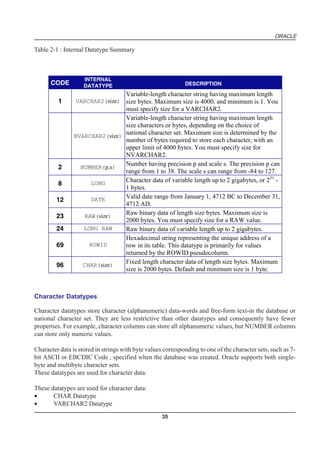
  • 26.
    ORACLE Database Triggers Oracle allowsyou to write procedures that are automatically executed as a result of an insert in, update to, or delete from a table. These procedures are called database triggers. Database triggers can be used in a variety of ways for the information management of your database. For example, they can be used to automate data generation, audit data modifications, enforce complex integrity constraints, and customize complex security authorizations. Methods A method is a procedure or function that is part of the definition of a user-defined datatype (object type, nested table, or variable array). Methods are different from stored procedures in two ways: • You invoke a method by referring to an object of its associated type. • A method has complete access to the attributes of its associated object and to information about its type. Every user-defined datatype has a system-defined constructor method, that is, a method that makes a new object according to the datatype’s specification. The name of the constructor method is the name of the user-defined type. In the case of an object type, the constructor method’s parameters have the names and types of the object type’s attributes. The constructor method is a function that returns the new object as its value. Nested tables and arrays also have constructor methods. Comparison methods define an order relationship among objects of a given object type. A map method uses Oracle’s ability to compare built-in types. For example, Oracle can compare two rectangles by comparing their areas if an object type called RECTANGLE has attributes HEIGHT and WIDTH and you define a map method area that returns a number, namely the product of the rectangle’s HEIGHT and WIDTH attributes. An order method uses its own internal logic to compare two objects of a given object type. It returns a value that encodes the order relationship. For example, it may return -1 if the first is smaller, 0 if they are equal, and 1 if the first is larger. DATA INTEGRITY It is very important to guarantee that data adheres to certain business rules, as determined by the data- base administrator or application developer. For example, assume that a business rule says that no row in the INVENTORY table can contain a numeric value greater than 9 in the SALE_DISCOUNT col- umn. If an INSERT or UPDATE statement attempts to violate this integrity rule, Oracle must roll back the invalid statement and return an error to the application. Oracle provides integrity constraints and database triggers as solutions to manage a database’s data integrity rules. Integrity Constraints An integrity constraint is a declarative way to define a business rule for a column of a table. An integrity constraint is a statement about a table’s data that is always true: 26
  • 27.
    ORACLE • If an integrity constraint is created for a table and some existing table data does not satisfy the constraint, the constraint cannot be enforced. • After a constraint is defined, if any of the results of a DML statement violate the integrity constraint, the statement is rolled back and an error is returned. Integrity constraints are defined with a table and are stored as part of the table’s definition, centrally in the database’s data dictionary, so that all database applications must adhere to the same set of rules. If a rule changes, it need only be changed once at the database level and not many times for each applica- tion. The following integrity constraints are supported by Oracle: NOT NULL Disallows nulls (empty entries) in a table’s column. UNIQUE Disallows duplicate values in a column or set of columns. PRIMARY KEY Disallows duplicate values and nulls in a column or set of columns. FOREIGN KEY Requires each value in a column or set of columns match a value in a related table’s UNIQUE or PRIMARY KEY (FOREIGN KEY integrity constraints also define referential integrity actions that dictate what Oracle should do with dependent data if the data it references is altered). CHECK Disallows values that do not satisfy the logical expression of the constraint. Keys The term “key” is used in the definitions of several types of integrity constraints. A key is the column or set of columns included in the definition of certain types of integrity constraints. Keys describe the relationships between the different tables and columns of a relational database. The different types of keys include: primary key The column or set of columns included in the definition of a table’s PRIMARY KEY constraint. A primary key’s values uniquely identify the rows in a table. Only one primary key may be defined per table. unique key The column or set of columns included in the definition of a UNIQUE constraint. foreign key The column or set of columns included in the definition of a referential integrity constraint. Referenced key The unique key or primary key of the same or different table that is referenced by a foreign key. Individual values in a key are called key values. Database Triggers Centralized actions can be defined using a non-declarative approach (writing PL/SQL code) with database triggers. A database trigger is a stored procedure that is fired (implicitly executed) when an INSERT, UPDATE, or DELETE statement is issued against the associated table. Database triggers can be used to customize a database management system with such features as value-based auditing and the enforcement 27
  • 28.
    ORACLE of complex securitychecks and integrity rules. For example, a database trigger might be created to allow a table to be modified only during normal business hours. Note: While database triggers allow you to define and enforce integrity rules, a database trigger is not the same as an integrity constraint. Among other things, a database trigger defined to enforce an integrity rule does not check data already loaded into a table. Therefore, it is strongly recommended that you use database triggers only when the integrity rule cannot be enforced by integrity constraints. 28
  • 29.
    ORACLE SQL - AN INTRODUCTION COMPETENCY OBJECTIVES This chapter covers the following topics v SQL - An Introduction v Data types in SQL v SQL - Queries v SQL Commands 29
  • 30.
  • 31.
    ORACLE CHAPTER - 2 SQL - AN INTRODUCTION The language, Structured English Query Language (“SEQUEL”) was developed by IBM Corporation, Inc., to use Codd’s model. SEQUEL later became SQL (still pronounced “sequel”). In 1979, Relational Software, Inc. (now Oracle Corporation) introduced the first commercially available implementation of SQL. Today, SQL is accepted as the standard RDBMS language. Working of SQL The strengths of SQL benefit all types of users, including application programmers, database adminis- trators, management, and end users. Technically speaking, SQL is a data sublanguage: the purpose of SQL is to provide an interface to a relational database such as Oracle, and all SQL statements are instructions to the database. In this it differs from general-purpose programming languages like C and BASIC. Among the features of SQL are the following: • It processes sets of data as groups rather than as individual units. • It provides automatic navigation to the data. Essentially, SQL lets you work with data at the logical level. You need to be concerned with the imple- mentation details only when you want to manipulate the data. For example, to retrieve a set of rows from a table, you define a condition used to filter the rows. All rows satisfying the condition are re- trieved in a single step and can be passed as a unit to the user, to another SQL statement, or to an application. You need not deal with the rows one by one, nor do you have to worry about how they are physically stored or retrieved. All SQL statements use the optimizer, a part of Oracle that determines a fast means of accessing the specified data. Oracle also provides techniques you can use to make the optimizer perform its job better. SQL provides commands for a variety of tasks, including: • querying data • inserting, updating, and deleting rows in a table • creating, replacing, altering, and dropping objects • controlling access to the database and its objects • guaranteeing database consistency and integrity SQL unifies all of the above tasks in one consistent language. 31
  • 32.
    ORACLE Language for AllRelational Databases All major relational database management systems support SQL, so you can transfer all skills you have gained with SQL from one database to another. In addition, all programs written in SQL are portable: they can often be moved from one database to another with very little modification. EMBEDDED SQL Embedded SQL refers to the use of standard SQL commands embedded within a procedural programming language. Embedded SQL is a collection of these commands: • all SQL commands, such as SELECT and INSERT, available with SQL with interactive tools • dynamic SQL execution commands, such as PREPARE and OPEN, which integrate the standard SQL commands with a procedural programming language Embedded SQL also includes extensions to some standard SQL commands. Embedded SQL is supported by the Oracle precompilers. The Oracle precompilers interpret embedded SQL statements and translate them into statements that can be understood by procedural language compilers. Each of these Oracle precompilers translates embedded SQL programs into a different procedural language: • the Pro*C/C++ precompiler • the Pro*COBOL precompiler • the Pro*FORTRAN precompiler • the SQL*Module for ADA ELEMENTS OF SQL LANGUAGE Basic elements of Oracle SQL : • Literals • Text • Integer • Number • Datatypes • Nulls • Pseudocolumns • Comments Literals The terms literal and constant value are synonymous and refer to a fixed data value. For example, ‘JACK’, ‘BLUE ISLAND’, and ‘101’ are all character literals; 5001 is a numeric literal. Note that character literals are enclosed in single quotation marks, which enable Oracle to distinguish them from schema object names. Many SQL statements and functions require you to specify character and numeric literal values. You can also specify literals as part of expressions and conditions. You can specify character literals with 32
  • 33.
    ORACLE the ‘text’ notation,national character literals with the N’text’ notation, and numeric literals with the integer or number notation, depending on the context of the literal. The syntactic forms of these notations appear in the following sections. Text Text specifies a text or character literal. You must use this notation to specify values whenever ‘text’ or char appear in expressions, conditions, SQL functions, and SQL commands in other parts of this refer- ence. A text literal must be enclosed in single quotation marks. This reference uses the terms text literal and character literal interchangeably. Text literals have properties of both the CHAR and VARCHAR2 datatypes: • Within expressions and conditions, Oracle treats text literals as though they have the datatype CHAR by comparing them using blank-padded comparison semantics. • A text literal can have a maximum length of 4000 bytes. Here are some valid text literals: ‘Hello’ ‘ORACLE.dbs’ ‘Jackie’’s raincoat’ ’09-MAR-92' N’nchar literal’ Integer You must use the integer notation to specify an integer whenever integer appears in expressions, conditions, SQL functions, and SQL commands described in other parts of this reference. An integer can store a maximum of 38 digits of precision. Here are some valid integers: 7 +255 Number You must use the number notation to specify values whenever number appears in expressions, condi- tions, SQL functions, and SQL commands in other parts of this reference. A number can store a maximum of 38 digits of precision. If you have established a decimal character other than a period (.) with the initialization parameter NLS_NUMERIC_CHARACTERS, you must specify numeric literals with ‘text’ notation. In such cases, Oracle automatically converts the text literal to a numeric value. 33
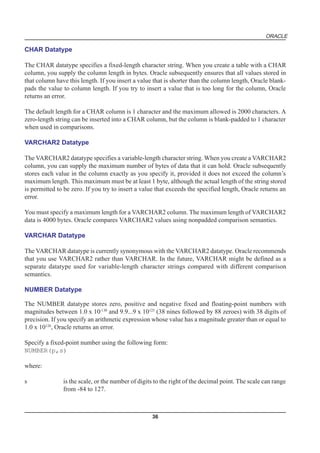
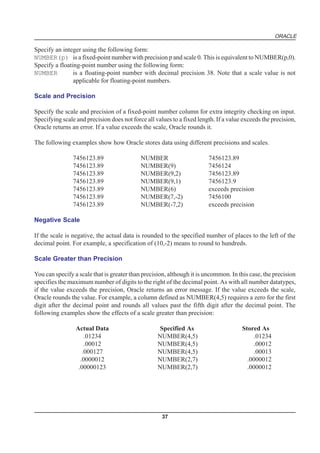
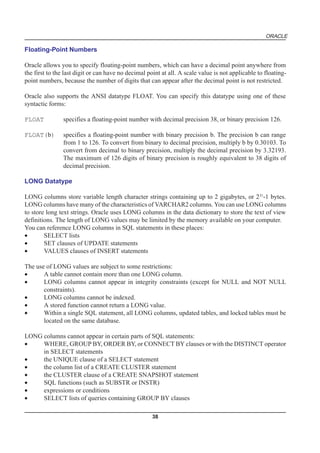
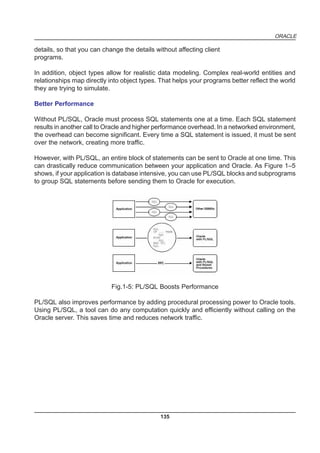
  • 34.
    ORACLE For example, ifthe NLS_NUMERIC_CHARACTERS parameter specifies a decimal character of comma, specify the number 5.123 as follows: ‘5,123’ Here are some valid representations of number: 25 +6.34 0.5 25e-03 -1 Datatypes Each literal or column value manipulated by Oracle has a datatype. A value’s datatype associates a fixed set of properties with the value. These properties cause Oracle to treat values of one datatype differently from values of another. For example, you can add values of NUMBER datatype, but not values of RAW datatype. When you create a table or cluster, you must specify an internal datatype for each of its columns. When you create a procedure or stored function, you must specify an internal datatype for each of its arguments. These datatypes define the domain of values that each column can contain or each argument can have. For example, DATE columns cannot accept the value February 29 (except for a leap year) or the values 2 or ‘SHOE’. Each value subsequently placed in a column assumes the column’s datatype. For example, if you insert ’01-JAN-92' into a DATE column, Oracle treats the ’01-JAN-92' character string as a DATE value after verifying that it translates to a valid date. Table 2-1 summarizes Oracle internal datatypes. The rest of this section describes these datatypes in detail. 34
  • 35.
    ORACLE Table 2-1 :Internal Datatype Summary INTERNAL CODE DATATYPE DESCRIPTION Variable-length character string having maximum length 1 VARCHAR2(size) size bytes. Maximum size is 4000, and minimum is 1. You must specify size for a VARCHAR2. Variable-length character string having maximum length size characters or bytes, depending on the choice of NVARCHAR2(size) national character set. Maximum size is determined by the number of bytes required to store each character, with an upper limit of 4000 bytes. You must specify size for NVARCHAR2. Number having precision p and scale s. The precision p can 2 NUMBER(p,s) range from 1 to 38. The scale s can range from -84 to 127. Character data of variable length up to 2 gigabytes, or 231 - 8 LONG 1 bytes. Valid date range from January 1, 4712 BC to December 31, 12 DATE 4712 AD. Raw binary data of length size bytes. Maximum size is 23 RAW(size) 2000 bytes. You must specify size for a RAW value. 24 LONG RAW Raw binary data of variable length up to 2 gigabytes. Hexadecimal string representing the unique address of a 69 ROWID row in its table. This datatype is primarily for values returned by the ROWID pseudocolumn. Fixed length character data of length size bytes. Maximum 96 CHAR(size) size is 2000 bytes. Default and minimum size is 1 byte. Character Datatypes Character datatypes store character (alphanumeric) data-words and free-form text-in the database or national character set. They are less restrictive than other datatypes and consequently have fewer properties. For example, character columns can store all alphanumeric values, but NUMBER columns can store only numeric values. Character data is stored in strings with byte values corresponding to one of the character sets, such as 7- bit ASCII or EBCDIC Code , specified when the database was created. Oracle supports both single- byte and multibyte character sets. These datatypes are used for character data: These datatypes are used for character data: • CHAR Datatype • VARCHAR2 Datatype 35
  • 36.
    ORACLE CHAR Datatype The CHARdatatype specifies a fixed-length character string. When you create a table with a CHAR column, you supply the column length in bytes. Oracle subsequently ensures that all values stored in that column have this length. If you insert a value that is shorter than the column length, Oracle blank- pads the value to column length. If you try to insert a value that is too long for the column, Oracle returns an error. The default length for a CHAR column is 1 character and the maximum allowed is 2000 characters. A zero-length string can be inserted into a CHAR column, but the column is blank-padded to 1 character when used in comparisons. VARCHAR2 Datatype The VARCHAR2 datatype specifies a variable-length character string. When you create a VARCHAR2 column, you can supply the maximum number of bytes of data that it can hold. Oracle subsequently stores each value in the column exactly as you specify it, provided it does not exceed the column’s maximum length. This maximum must be at least 1 byte, although the actual length of the string stored is permitted to be zero. If you try to insert a value that exceeds the specified length, Oracle returns an error. You must specify a maximum length for a VARCHAR2 column. The maximum length of VARCHAR2 data is 4000 bytes. Oracle compares VARCHAR2 values using nonpadded comparison semantics. VARCHAR Datatype The VARCHAR datatype is currently synonymous with the VARCHAR2 datatype. Oracle recommends that you use VARCHAR2 rather than VARCHAR. In the future, VARCHAR might be defined as a separate datatype used for variable-length character strings compared with different comparison semantics. NUMBER Datatype The NUMBER datatype stores zero, positive and negative fixed and floating-point numbers with magnitudes between 1.0 x 10-130 and 9.9...9 x 10125 (38 nines followed by 88 zeroes) with 38 digits of precision. If you specify an arithmetic expression whose value has a magnitude greater than or equal to 1.0 x 10126, Oracle returns an error. Specify a fixed-point number using the following form: NUMBER(p,s) where: s is the scale, or the number of digits to the right of the decimal point. The scale can range from -84 to 127. 36
  • 37.
    ORACLE Specify an integerusing the following form: NUMBER(p) is a fixed-point number with precision p and scale 0. This is equivalent to NUMBER(p,0). Specify a floating-point number using the following form: NUMBER is a floating-point number with decimal precision 38. Note that a scale value is not applicable for floating-point numbers. Scale and Precision Specify the scale and precision of a fixed-point number column for extra integrity checking on input. Specifying scale and precision does not force all values to a fixed length. If a value exceeds the precision, Oracle returns an error. If a value exceeds the scale, Oracle rounds it. The following examples show how Oracle stores data using different precisions and scales. 7456123.89 NUMBER 7456123.89 7456123.89 NUMBER(9) 7456124 7456123.89 NUMBER(9,2) 7456123.89 7456123.89 NUMBER(9,1) 7456123.9 7456123.89 NUMBER(6) exceeds precision 7456123.89 NUMBER(7,-2) 7456100 7456123.89 NUMBER(-7,2) exceeds precision Negative Scale If the scale is negative, the actual data is rounded to the specified number of places to the left of the decimal point. For example, a specification of (10,-2) means to round to hundreds. Scale Greater than Precision You can specify a scale that is greater than precision, although it is uncommon. In this case, the precision specifies the maximum number of digits to the right of the decimal point. As with all number datatypes, if the value exceeds the precision, Oracle returns an error message. If the value exceeds the scale, Oracle rounds the value. For example, a column defined as NUMBER(4,5) requires a zero for the first digit after the decimal point and rounds all values past the fifth digit after the decimal point. The following examples show the effects of a scale greater than precision: Actual Data Specified As Stored As .01234 NUMBER(4,5) .01234 .00012 NUMBER(4,5) .00012 .000127 NUMBER(4,5) .00013 .0000012 NUMBER(2,7) .0000012 .00000123 NUMBER(2,7) .0000012 37
  • 38.
    ORACLE Floating-Point Numbers Oracle allowsyou to specify floating-point numbers, which can have a decimal point anywhere from the first to the last digit or can have no decimal point at all. A scale value is not applicable to floating- point numbers, because the number of digits that can appear after the decimal point is not restricted. Oracle also supports the ANSI datatype FLOAT. You can specify this datatype using one of these syntactic forms: FLOAT specifies a floating-point number with decimal precision 38, or binary precision 126. FLOAT(b) specifies a floating-point number with binary precision b. The precision b can range from 1 to 126. To convert from binary to decimal precision, multiply b by 0.30103. To convert from decimal to binary precision, multiply the decimal precision by 3.32193. The maximum of 126 digits of binary precision is roughly equivalent to 38 digits of decimal precision. LONG Datatype LONG columns store variable length character strings containing up to 2 gigabytes, or 231-1 bytes. LONG columns have many of the characteristics of VARCHAR2 columns. You can use LONG columns to store long text strings. Oracle uses LONG columns in the data dictionary to store the text of view definitions. The length of LONG values may be limited by the memory available on your computer. You can reference LONG columns in SQL statements in these places: • SELECT lists • SET clauses of UPDATE statements • VALUES clauses of INSERT statements The use of LONG values are subject to some restrictions: • A table cannot contain more than one LONG column. • LONG columns cannot appear in integrity constraints (except for NULL and NOT NULL constraints). • LONG columns cannot be indexed. • A stored function cannot return a LONG value. • Within a single SQL statement, all LONG columns, updated tables, and locked tables must be located on the same database. LONG columns cannot appear in certain parts of SQL statements: • WHERE, GROUP BY, ORDER BY, or CONNECT BY clauses or with the DISTINCT operator in SELECT statements • the UNIQUE clause of a SELECT statement • the column list of a CREATE CLUSTER statement • the CLUSTER clause of a CREATE SNAPSHOT statement • SQL functions (such as SUBSTR or INSTR) • expressions or conditions • SELECT lists of queries containing GROUP BY clauses 38
  • 39.
    ORACLE • SELECT lists of subqueries or queries combined by set operators • SELECT lists of CREATE TABLE ... AS SELECT statements • SELECT lists in subqueries in INSERT statements Triggers can use the LONG datatype in the following manner: • A SQL statement within a trigger can insert data into a LONG column. • If data from a LONG column can be converted to a constrained datatype (such as CHAR and VARCHAR2), a LONG column can be referenced in a SQL statement within a trigger. Note that the maximum length for these datatypes is 32K. • Variables in triggers cannot be declared using the LONG datatype. • :NEW and :OLD cannot be used with LONG columns. . DATE DATATYPE The DATE datatype stores date and time information. Although date and time information can be represented in both CHAR and NUMBER datatypes, the DATE datatype has special associated properties. For each DATE value, Oracle stores the following information: century, year, month, day, hour, minute, and second. To specify a date value, you must convert a character or numeric value to a date value with the TO_DATE function. Oracle automatically converts character values that are in the default date format into date values when they are used in date expressions. The default date format is specified by the initialization parameter NLS_DATE_FORMAT and is a string such as ‘DD-MON-YY’. This example date format includes a two-digit number for the day of the month, an abbreviation of the month name, and the last two digits of the year. If you specify a date value without a time component, the default time is 12:00:00 am (midnight). If you specify a date value without a date, the default date is the first day of the current month. The date function SYSDATE returns the current date and time. For information on the SYSDATE and TO_DATE functions and the default date format. Date Arithmetic You can add and subtract number constants as well as other dates from dates. Oracle interprets number constants in arithmetic date expressions as numbers of days. For example, SYSDATE + 1 is tomorrow. SYSDATE - 7 is one week ago. SYSDATE + (10/1440) is ten minutes from now. Subtracting the HIREDATE column of the EMP table from SYSDATE returns the number of days since each employee was hired. You cannot multiply or divide DATE values. Oracle provides functions for many of the common date operations. For example, the ADD_MONTHS function allows you to add or subtract months from a date. The MONTHS_BETWEEN function returns the number of months between two dates. The fractional portion of the result represents that portion of a 31-day month. Because each date contains a time component, most results of date operations include a fraction. This fraction means a portion of one day. For example, 1.5 days is 36 hours. 39
  • 40.
    ORACLE Using Julian Dates AJulian date is the number of days since January 1, 4712 bc. Julian dates allow continuous dating from a common reference. You can use the date format model “J” with date functions TO_DATE and TO_CHAR to convert between Oracle DATE values and their Julian equivalents. Example This statement returns the Julian equivalent of January 1, 1997: SELECT TO_CHAR(TO_DATE(’01-01-1997', ‘MM-DD-YYYY’),’J’) FROM DUAL; TO_CHAR ———— 2450450 RAW and LONG RAW Datatypes The RAW and LONG RAW datatypes store data that is not to be interpreted (not explicitly converted when moving data between different systems) by Oracle. These datatypes are intended for binary data or byte strings. For example, you can use LONG RAW to store graphics, sound, documents, or arrays of binary data; the interpretation is dependent on the use. RAW is a variable-length datatype like the VARCHAR2 character datatype, except that Net8 (which connects user sessions to the instance) and the Import and Export utilities do not perform character conversion when transmitting RAW or LONG RAW data. In contrast, Net8 and Import/Export auto- matically convert CHAR, VARCHAR2, and LONG data from the database character set to the user session character set (set by the NLS_LANGUAGE parameter of the ALTER SESSION command), if the two character sets are different. When Oracle automatically converts RAW or LONG RAW data to and from CHAR data, the binary data is represented in hexadecimal form with one hexadecimal character representing every four bits of RAW data. For example, one byte of RAW data with bits 11001011 is displayed and entered as ‘CB’. You can index RAW data, but not LONG RAW data. ROWID Datatype Each row in the database has an address. You can examine a row’s address by querying the pseudocolumn ROWID. Values of this pseudocolumn are hexadecimal strings representing the address of each row. These strings have the datatype ROWID. You can also create tables and clusters that contain actual columns having the ROWID datatype. Oracle does not guarantee that the values of such columns are valid ROWIDs. Datatype Comparison Rules This section describes how Oracle compares values of each datatype. 40
  • 41.
    ORACLE Number Values A largervalue is considered greater than a smaller one. All negative numbers are less than zero and all positive numbers. Thus, -1 is less than 100; -100 is less than -1. Date Values A later date is considered greater than an earlier one. For example, the date equivalent of ’29-MAR- 1991' is less than that of ’05-JAN-1992' and ’05-JAN-1992 1:35pm’ is greater than ’05-JAN-1992 10:09am’. Character String Values Character values are compared using one of these comparison rules: • blank-padded comparison semantics • nonpadded comparison semantics The following sections explain these comparison semantics. The results of comparing two character values using different comparison semantics may be different. Table 2-5 shows the results of compar- ing five pairs of character values using each comparison semantic. Usually, the results of blank-padded and nonpadded comparisons are the same.The last comparison in the table illustrates the differences between the blank-padded and nonpadded comparison semantics. Blank-Padded Nonpadded 'ab' > 'aa' 'ab' > 'aa' 'ab' > 'a ' 'ab' > 'a ' 'ab' > 'a' 'ab' > 'a' 'ab' = 'ab' 'ab' = 'ab' 'a ' = 'a' 'a ' > 'a' Blank-Padded Comparison Semantics If the two values have different lengths, Oracle first adds blanks to the end of the shorter one so their lengths are equal. Oracle then compares the values character by character up to the first character that differs. The value with the greater character in the first differing position is considered greater. If two values have no differing characters, then they are considered equal. This rule means that two values are equal if they differ only in the number of trailing blanks. Oracle uses blank-padded comparison seman- tics only when both values in the comparison are either expressions of datatype CHAR, NCHAR, text literals, or values returned by the USER function. Nonpadded Comparison Semantics Oracle compares two values character by character up to the first character that differs. The value with the greater character in that position is considered greater. If two values of different length are identical up to the end of the shorter one, the longer value is considered greater. If two values of equal length have no differing characters, then the values are considered equal. Oracle uses nonpadded comparison semantics whenever one or both values in the comparison have the datatype VARCHAR2 or NVARCHAR2. 41
  • 42.
    ORACLE Single Characters Oracle comparessingle characters according to their numeric values in the database character set. One character is greater than another if it has a greater numeric value than the other in the character set. Oracle considers blanks to be less than any character, which is true in most character sets. These are some common character sets: • 7-bit ASCII (American Standard Code for Information Interchange) • EBCDIC Code (Extended Binary Coded Decimal Interchange Code) • ISO 8859/1 (International Standards Organization) • JEUC Japan Extended UNIX Portions of the ASCII and EBCDIC character sets appear in Table 2-6 and Table 2-7. Note that upper- case and lowercase letters are not equivalent. Also, note that the numeric values for the characters of a character set may not match the linguistic sequence for a particular language. Table 2-6: ASCII Character Set Symbol Decimal value Symbol Decimal value blank 32 ; 59 ! 33 < 60 " 34 = 61 # 35 > 62 $ 36 ? 63 % 37 @ 64 & 38 A-Z 65-90 ' 39 [ 91 ( 40 92 ) 41 ] 93 * 42 ^^ 94 + 43 _ 95 , 44 ` 96 - 45 a-z 97-122 . 46 { 123 / 47 | 124 0-9 48-57 } 125 : 58 ~ 126 42
  • 43.
    ORACLE Symbol Decimal value Symbol Decimal value blank 64 % 108 ¢ 74 _ 109 . 75 > 110 < 76 ? 111 ( 77 : 122 + 78 # 123 | 79 @ 124 & 80 ' 125 ! 90 = 126 $ 91 " 127 * 92 a-i 129-137 ) 93 j-r 145-153 ; 94 s-z 162-169 ÿ 95 A-I 193-201 - 96 J-R 209-217 / 97 S-Z 226-233 Data Conversion Generally an expression cannot contain values of different datatypes. For example, an expression can- not multiply 5 by 10 and then add ‘JAMES’. However, Oracle supports both implicit and explicit conversion of values from one datatype to another. Implicit Data Conversion Oracle automatically converts a value from one datatype to another when such a conversion makes sense. Oracle performs conversions in these cases: • When an INSERT or UPDATE statement assigns a value of one datatype to a column of an- other, Oracle converts the value to the datatype of the column. • When you use a SQL function or operator with an argument with a datatype other than the one it accepts, Oracle converts the argument to the accepted datatype. • When you use a comparison operator on values of different datatypes, Oracle converts one of the expressions to the datatype of the other. Example 1 The text literal ‘10’ has datatype CHAR. Oracle implicitly converts it to the NUMBER datatype if it appears in a numeric expression as in the following statement: SELECT sal + ‘10’ FROM emp; Example 2 When a condition compares a character value and a NUMBER value, Oracle implicitly converts the character value to a NUMBER value, rather than converting the NUMBER value to a character value. 43
  • 44.
    ORACLE In the followingstatement, Oracle implicitly converts ‘7936’ to 7936: SELECT ename FROM emp WHERE empno = ‘7936’; Example 3 In the following statement, Oracle implicitly converts ’12-MAR-1993' to a DATE value using the default date format ‘DD-MON-YYYY’: SELECT ename FROM emp WHERE hiredate = ’12-MAR-1993'; Example 4 In the following statement, Oracle implicitly converts the text literal ‘AAAAZ8AABAAABvlAAA’ to a ROWID value: SELECT ename FROM emp WHERE ROWID = ‘AAAAZ8AABAAABvlAAA’; Explicit Data Conversion You can also explicitly specify datatype conversions using SQL conversion functions. Table 2-8 shows SQL functions that explicitly convert a value from one datatype to another Table 2-8 SQL Functions for Datatype Conversion TO: FROM: CHAR NUMBER DATE RAW ROWID CHAR - TO_NUMBER TO_DATE HEXTORAW CHARTOROWID NUMBER TO_CHAR - TO_DATE (number, 'J') DATE TO_CHAR TO_CHAR - (date,'J') RAW RAWTOHEX - ROWID ROWIDTOCHAR - Implicit vs. Explicit Data Conversion Oracle recommends that you specify explicit conversions rather than rely on implicit or automatic conversions for these reasons: • SQL statements are easier to understand when you use explicit datatype conversions functions. • Automatic datatype conversion can have a negative impact on performance, especially if the datatype of a column value is converted to that of a constant rather than the other way around. 44
  • 45.
    ORACLE • Implicit conversion depends on the context in which it occurs and may not work the same way in every case. • Algorithms for implicit conversion are subject to change across software releases and among Oracle products. Behavior of explicit conversions is more predictable. Nulls If a column in a row has no value, then column is said to be null, or to contain a null. Nulls can appear in columns of any datatype that are not restricted by NOT NULL or PRIMARY KEY integrity constraints. Use a null when the actual value is not known or when a value would not be meaningful. Do not use null to represent a value of zero, because they are not equivalent. (Oracle currently treats a character value with a length of zero as null. However, this may not continue to be true in future releases, and Oracle recommends that you do not treat empty strings the same as NULLs.) Any arithmetic expression containing a null always evaluates to null. For example, null added to 10 is null. In fact, all operators (except concatenation) return null when given a null operand. Nulls in SQL Functions All scalar functions (except NVL and TRANSLATE) return null when given a null argument. The NVL function can be used to return a value when a null occurs. For example, the expression NVL(COMM,0) returns 0 if COMM is null or the value of COMM if it is not null. Most group functions ignore nulls. For example, consider a query that averages the five values 1000, null, null, null, and 2000. Such a query ignores the nulls and calculates the average to be (1000+2000)/ 2 = 1500. Nulls with Comparison Operators To test for nulls, use only the comparison operators IS NULL and IS NOT NULL. If you use any other operator with nulls and the result depends on the value of the null, the result is UNKNOWN. Because null represents a lack of data, a null cannot be equal or unequal to any value or to another null. However, note that Oracle considers two nulls to be equal when evaluating a DECODE expression. Oracle also considers two nulls to be equal if they appear in compound keys. That is, Oracle considers identical two compound keys containing nulls if all the non-null components of the keys are equal. Nulls in Conditions A condition that evaluates to UNKNOWN acts almost like FALSE. For example, a SELECT statement with a condition in the WHERE clause that evaluates to UNKNOWN returns no rows. However, a condition evaluating to UNKNOWN differs from FALSE in that further operations on an UNKNOWN condition evaluation will evaluate to UNKNOWN. Thus, NOT FALSE evaluates to TRUE, but NOT UNKNOWN evaluates to UNKNOWN. 45
  • 46.
    ORACLE Table 2-9 showsexamples of various evaluations involving nulls in conditions. If the conditions evaluating to UNKNOWN were used in a WHERE clause of a SELECT statement, then no rows would be returned for that query. Table 2-9: Conditions containing Nulls If A is: Condition Evaluates to: 10 a IS NULL FALSE 10 a IS NOT NULL TRUE NULL a IS NULL TRUE NULL a IS NOT NULL FALSE 10 a = NULL UNKNOWN 10 a != NULL UNKNOWN NULL a = NULL UNKNOWN NULL a != NULL UNKNOWN NULL a = 10 UNKNOWN NULL a != 10 UNKNOWN PSEUDOCOLUMNS A pseudocolumn behaves like a table column, but is not actually stored in the table. You can select from pseudocolumns, but you cannot insert, update, or delete their values. This section describes these pseudocolumns: • CURRVAL and NEXTVAL • LEVEL • ROWID • ROWNUM CURRVAL and NEXTVAL A sequence is a schema object that can generate unique sequential values. These values are often used for primary and unique keys. You can refer to sequence values in SQL statements with these pseudocolumns: CURRVAL returns the current value of a sequence. NEXTVAL increments the sequence and returns the next value. You must qualify CURRVAL and NEXTVAL with the name of the sequence: sequence.CURRVAL sequence.NEXTVAL To refer to the current or next value of a sequence in the schema of another user, you must have been granted either SELECT object privilege on the sequence or SELECT ANY SEQUENCE system privi- lege, and you must qualify the sequence with the schema containing it: 46
  • 47.
    ORACLE schema.sequence.CURRVAL schema.sequence.NEXTVAL To refer tothe value of a sequence on a remote database, you must qualify the sequence with a complete or partial name of a database link: schema.sequence.CURRVAL@dblink schema.sequence.NEXTVAL@dblink Where to Use Sequence Values You can use CURRVAL and NEXTVAL in these places: • the SELECT list of a SELECT statement that is not contained in a subquery, snapshot, or view • the SELECT list of a subquery in an INSERT statement • the VALUES clause of an INSERT statement • the SET clause of an UPDATE statement You cannot use CURRVAL and NEXTVAL in these places: • a subquery in a DELETE, SELECT, or UPDATE statement • a view’s query or snapshot’s query • a SELECT statement with the DISTINCT operator • a SELECT statement with a GROUP BY or ORDER BY clause • a SELECT statement that is combined with another SELECT statement with the UNION, IN- TERSECT, or MINUS set operator • the WHERE clause of a SELECT statement • DEFAULT value of a column in a CREATE TABLE or ALTER TABLE statement • the condition of a CHECK constraint Also, within a single SQL statement that uses CURVAL or NEXTVAL, all referenced LONG columns, updated tables, and locked tables must be located on the same database. How to Use Sequence Values When you create a sequence, you can define its initial value and the increment between its values. The first reference to NEXTVAL returns the sequence’s initial value. Subsequent references to NEXTVAL increment the sequence value by the defined increment and return the new value. Any reference to CURRVAL always returns the sequence’s current value, which is the value returned by the last refer- ence to NEXTVAL. Note that before you use CURRVAL for a sequence in your session, you must first initialize the sequence with NEXTVAL. Within a single SQL statement, Oracle will increment the sequence only once. If a statement contains more than one reference to NEXTVAL for a sequence, Oracle increments the sequence once and re- turns the same value for all occurrences of NEXTVAL. If a statement contains references to both CURRVAL and NEXTVAL, Oracle increments the sequence and returns the same value for both CURRVAL and NEXTVAL regardless of their order within the statement. A sequence can be accessed by many users concurrently with no waiting or locking. 47
  • 48.
    ORACLE Example 1 This exampleselects the current value of the employee sequence: SELECT empseq.currval FROM DUAL; Example 2 This example increments the employee sequence and uses its value for a new employee inserted into the employee table: INSERT INTO emp VALUES (empseq.nextval, ‘LEWIS’, ‘CLERK’, 7902, SYSDATE, 1200, NULL, 20); Example 3 This example adds a new order with the next order number to the master order table. It then adds suborders with this number to the detail order table: INSERT INTO master_order(orderno, customer, orderdate) VALUES (orderseq.nextval, ‘Al’’s Auto Shop’, SYSDATE); INSERT INTO detail_order (orderno, part, quantity) VALUES (orderseq.currval, ‘SPARKPLUG’, 4); INSERT INTO detail_order (orderno, part, quantity) VALUES (orderseq.currval, ‘FUEL PUMP’, 1); INSERT INTO detail_order (orderno, part, quantity) VALUES (orderseq.currval, ‘TAILPIPE’, 2); LEVEL For each row returned by a hierarchical query, the LEVEL pseudocolumn returns 1 for a root node, 2 for a child of a root, and so on. A root node is the highest node within an inverted tree. A child node is any nonroot node. A parent node is any node that has children. A leaf node is any node without children. Figure 2-1 shows the nodes of an inverted tree with their LEVEL values Fig. 2-1 : Hierarchical Tree To define a hierarchical relationship in a query, you must use the START WITH and CONNECT BY clauses. 48
  • 49.
    ORACLE ROWID For each rowin the database, the ROWID pseudocolumn returns a row’s address. ROWID values contain information necessary to locate a row: • the data object number of the object • which data block in the datafile • which row in the data block (first row is 0) • which datafile (first file is 1). The file number is relative to the tablespace. Usually, a ROWID value uniquely identifies a row in the database. However, rows in different tables that are stored together in the same cluster can have the same ROWID. Values of the ROWID pseudocolumn have the datatype ROWID. ROWID values have several important uses: • They are the fastest way to access a single row. • They can show you how a table’s rows are stored. • They are unique identifiers for rows in a table. You should not use ROWID as a table’s primary key. If you delete and reinsert a row with the Import and Export utilities, for example, its ROWID may change. If you delete a row, Oracle may reassign its ROWID to a new row inserted later. Although you can use the ROWID pseudocolumn in the SELECT and WHERE clauses of a query, these pseudocolumn values are not actually stored in the database. You cannot insert, update, or delete a value of the ROWID pseudocolumn. Example This statement selects the address of all rows that contain data for employees in department 20: SELECT ROWID, ename FROM emp WHERE deptno = 20; ROWID ENAME ————————— ———-—- AAAAfSAABAAAClaAAA SMITH AAAAfSAABAAAClaAAD JONES AAAAfSAABAAAClaAAH SCOTT AAAAfSAABAAAClaAAK ADAMS AAAAfSAABAAAClaAAM FORD ROWNUM For each row returned by a query, the ROWNUM pseudocolumn returns a number indicating the order in which Oracle selects the row from a table or set of joined rows. The first row selected has a ROWNUM of 1, the second has 2, and so on. 49
  • 50.
    ORACLE You can useROWNUM to limit the number of rows returned by a query, as in this example: SELECT * FROM emp WHERE ROWNUM < 10; Note that conditions testing for ROWNUM values greater than a positive integer are always false. For example, this query returns no rows: SELECT * FROM emp WHERE ROWNUM > 1; The first row fetched is assigned a ROWNUM of 1 and makes the condition false. The second row to be fetched is now the first row and is also assigned a ROWNUM of 1 and makes the condition false. All rows subsequently fail to satisfy the condition, so no rows are returned. You can also use ROWNUM to assign unique values to each row of a table, as in this example: UPDATE tabx SET col1 = ROWNUM; Oracle assigns a ROWNUM value to each row as it is retrieved, before rows are sorted for an ORDER BY clause, so an ORDER BY clause normally does not affect the ROWNUM of each row. However, if an ORDER BY clause causes Oracle to use an index to access the data, Oracle may retrieve the rows in a different order than without the index, so the ROWNUMs may be different than they would be without the ORDER BY clause. 50
  • 51.
    ORACLE SQL - AN INTRODUCTION COMPETENCY OBJECTIVES This chapter covers the following topics v SQL Operators v SQL Functions v SQL Queries 51
  • 52.
  • 53.
    ORACLE CHAPTER - 3 OPERATORS USED IN SQL LANGUAGE An operator manipulates individual data items and returns a result. The data items are called operands or arguments. Operators are represented by special characters or by keywords. For example, the multiplication operator is represented by an asterisk (*) and the operator that tests for nulls is represented by the keywords IS NULL. Tables in this section list SQL operators. ARITHMETIC OPERATORS IN SQL You can use an arithmetic operator in an expression to negate, add, subtract, multiply, and divide numeric values. The result of the operation is also a numeric value. Some of these operators are also used in date arithmetic. Table 3-2 lists arithmetic operators. Oper Purpose Example ator + or Denotes a positive or negative expression. These SELECT * FROM orders - are unary operators. WHERE qtysold = -1; SELECT * FROM emp WHERE -sal < 0; */ Multiplies, divides. These are binary operators. UPDATE emp SET sal = sal * 1.1; +- Adds, subtracts. These are binary operators. SELECT sal + comm FROM emp WHERE SYSDATE - hiredate > 365; Table 3-2: Arithmetic Operators You are advised not to use two consecutive minus signs with no separation (—) in arithmetic expressions for indicating double negation or the subtraction of a negative value. The characters — are used to begin comments within SQL statements. Two consecutive minus signs should be separated with a space or a parenthesis. 53
  • 54.
    ORACLE Concatenation Operator inSQL The concatenation operator manipulates character strings. Table 3-3 describes the concatenation operator. Operator Purpose Example || Concatenates character SELECT 'Name is ' || strings. ename FROM emp; Table 3-3 : Concatenation Operator The result of concatenating two character strings is another character string. If both character strings are of datatype CHAR, the result has datatype CHAR and is limited to 2000 characters. If either string is of datatype VARCHAR2, the result has datatype VARCHAR2 and is limited to 4000 characters. Trailing blanks in character strings are preserved by concatenation, regardless of the strings’ datatypes. Example This example creates a table with both CHAR and VARCHAR2 columns, inserts values both with and without trailing blanks, and then selects these values, concatenating them. Note that for both CHAR and VARCHAR2 columns, the trailing blanks are preserved. CREATE TABLE tab1 (col1 VARCHAR2(6), col2 CHAR(6), col3 VARCHAR2(6), col4 CHAR(6) ); Table created. INSERT INTO tab1 (col1, col2, col3, col4) VALUES (‘abc’, ‘def ‘, ‘ghi ‘, ‘jkl’); 1 row created. SELECT col1||col2||col3||col4 “Concatenation” FROM tab1; Concatenation ———————————— abcdef ghi jkl Comparison Operators Comparison operators compare one expression with another. The result of such a comparison can be TRUE, FALSE, or UNKNOWN Equality test . SELECT * FROM emp WHERE sal = 1500; 54
  • 55.
    ORACLE Inequality test. Someforms of the inequality operator may be unavailable on some platforms. SELECT * FROM emp WHERE sal != 1500; “Greater than” and “less than” tests. SELECT * FROM emp WHERE sal > 1500; SELECT * FROM emp WHERE sal < 1500; “Greater than or equal to” and “less than or equal to” tests. SELECT * FROM emp WHERE sal >= 1500; SELECT * FROM emp WHERE sal <= 1500; IN “Equal to any member of” test. Equivalent to “= ANY”. SELECT * FROM emp WHERE job IN (‘CLERK’,’ANALYST’); SELECT * FROM emp WHERE sal IN (SELECT sal FROM emp WHERE deptno = 30); NOT IN Equivalent to “!=ALL”. Evaluates to FALSE if any member of the set is NULL. SELECT * FROM emp WHERE sal NOT IN (SELECT sal FROM emp WHERE deptno = 30); SELECT * FROM emp WHERE job NOT IN (‘CLERK’, ANALYST’); ANY SOME Compares a value to each value in a list or returned by a query. Must be preceded by =, !=, >, <, <=, >=. 55
  • 56.
    ORACLE Evaluates to FALSEif the query returns no rows. SELECT * FROM emp WHERE sal = ANY (SELECT sal FROM emp WHERE deptno = 30); ALL Compares a value to every value in a list or returned by a query. Must be preceded by =, !=, >, <, <=, >=. Evaluates to TRUE if the query returns no rows. SELECT * FROM emp WHERE sal >= ALL ( 1400, 3000); [NOT] BETWEEN x AND y [Not] greater than or equal to x and less than or equal to y. SELECT * FROM emp WHERE sal BETWEEN 2000 AND 3000; EXISTS TRUE if a subquery returns at least one row. SELECT ename, deptno FROM dept WHERE EXISTS (SELECT * FROM emp WHERE dept.deptno = emp.deptno); x [NOT] LIKE y [ESCAPE ‘z’] TRUE if x does [not] match the pattern y. Within y, the character “%” matches any string of zero or more characters except null. The character “_” matches any single character. Any character, excepting percent (%) and underbar (_) may follow ESCAPE; a wildcard character is treated as a literal if preceded by the character designated as the escape character. See “LIKE Operator”. 56
  • 57.
    ORACLE SELECT * FROMtab1 WHERE col1 LIKE ‘A_C/%E%’ ESCAPE ‘/’; IS [NOT] NULL Tests for nulls. This is the only operator that you should use to test for nulls. See “Nulls”. SELECT ename, deptno FROM emp WHERE comm IS NULL; Additional information on the NOT IN and LIKE operators appears in the sections that follow. NOT IN Operator If any item in the list following a NOT IN operation is null, all rows evaluate to UNKNOWN (and no rows are returned). For example, the following statement returns the string ‘TRUE’ for each row: SELECT ‘TRUE’ FROM emp WHERE deptno NOT IN (5,15); However, the following statement returns no rows: SELECT ‘TRUE’ FROM emp WHERE deptno NOT IN (5,15,null); The above example returns no rows because the WHERE clause condition evaluates to: deptno != 5 AND deptno != 15 AND deptno != null Because all conditions that compare a null result in a null, the entire expression results in a null. This behavior can easily be overlooked, especially when the NOT IN operator references a subquery. LIKE Operator The LIKE operator is used in character string comparisons with pattern matching. The syntax for a condition using the LIKE operator is shown in this diagram: where: char1 is a value to be compared with a pattern. This value can have datatype CHAR or VARCHAR2. 57
  • 58.
    ORACLE NOT logically inverts theresult of the condition, returning FALSE if the condition evaluates to TRUE and TRUE if it evaluates to FALSE. char2 is the pattern to which char1 is compared. The pattern is a value of datatype CHAR or VARCHAR2 and can contain the special pattern matching characters % and _. ESCAPE identifies a single character as the escape character. The escape character can be used to cause Oracle to interpret % or _ literally, rather than as a special character, in the pattern. If you wish to search for strings containing an escape character, you must specify this character twice. For example, if the escape character is ‘/’, to search for the string ‘client/server’, you must specify, ‘client//server’. While the equal (=) operator exactly matches one character value to another, the LIKE operator matches a portion of one character value to another by searching the first value for the pattern specified by the second. Note that blank padding is not used for LIKE comparisons. With the LIKE operator, you can compare a value to a pattern rather than to a constant. The pattern can only appear after the LIKE keyword. For example, you can issue the following query to find the salaries of all employees with names beginning with ‘SM’: SELECT sal FROM emp WHERE ename LIKE ‘SM%’; The following query uses the = operator, rather than the LIKE operator, to find the salaries of all employees with the name ‘SM%’: SELECT sal FROM emp WHERE ename = ‘SM%’; The following query finds the salaries of all employees with the name ‘SM%’. Oracle interprets ‘SM%’ as a text literal, rather than as a pattern, because it precedes the LIKE operator: SELECT sal FROM emp WHERE ‘SM%’ LIKE ename; Patterns usually use special characters that Oracle matches with different characters in the value: An underscore (_) in the pattern matches exactly one character (as opposed to one byte in a multibyte character set) in the value. 58
  • 59.
    ORACLE A percent sign(%) in the pattern can match zero or more characters (as opposed to bytes in a multibyte character set) in the value. Note that the pattern ‘%’ cannot match a null. Case Sensitivity and Pattern Matching Case is significant in all conditions comparing character expressions including the LIKE and equality (=) operators. You can use the UPPER() function to perform a case-insensitive match, as in this condition: UPPER(ename) LIKE ‘SM%’ Pattern Matching on Indexed Columns When LIKE is used to search an indexed column for a pattern, Oracle can use the index to improve the statement’s performance if the leading character in the pattern is not “%” or “_”. In this case, Oracle can scan the index by this leading character. If the first character in the pattern is “%” or “_”, the index cannot improve the query’s performance because Oracle cannot scan the index. Example 1 This condition is true for all ENAME values beginning with “MA”: ename LIKE ‘MA%’ All of these ENAME values make the condition TRUE: MARTIN, MA, MARK, MARY Case is significant, so ENAME values beginning with “Ma,” “ma,” and “mA” make the condition FALSE. Example 2 Consider this condition: ename LIKE ‘SMITH_’ This condition is true for these ENAME values: SMITHE, SMITHY, SMITHS This condition is false for ‘SMITH’, since the special character “_” must match exactly one character of the ENAME value. ESCAPE Option You can include the actual characters “%” or “_” in the pattern by using the ESCAPE option. The ESCAPE option identifies the escape character. If the escape character appears in the pattern before the character “%” or “_” then Oracle interprets this character literally in the pattern, rather than as a special pattern matching character. 59
  • 60.
    ORACLE Example: To search forany employees with the pattern ‘A_B’ in their name: SELECT ename FROM emp WHERE ename LIKE ‘%A_B%’ ESCAPE ‘’; The ESCAPE option identifies the backslash () as the escape character. In the pattern, the escape character precedes the underscore (_). This causes Oracle to interpret the underscore literally, rather than as a special pattern matching character. Patterns Without % If a pattern does not contain the “%” character, the condition can be TRUE only if both operands have the same length. Example: Consider the definition of this table and the values inserted into it: CREATE TABLE freds (f CHAR(6), v VARCHAR2(6)); INSERT INTO freds VALUES (‘FRED’, ‘FRED’); Because Oracle blank-pads CHAR values, the value of F is blank-padded to 6 bytes. V is not blank- padded and has length 4. Logical Operators A logical operator combines the results of two component conditions to produce a single result based on them or to invert the result of a single condition. Table 3-5 lists logical operators. Table 3-5 Logical Operators Operator Function Example NOT Returns TRUE if the following condition is FALSE. Returns FALSE if it is TRUE. If it is UNKNOWN, it remains UNKNOWN. SELECT * FROM emp WHERE NOT (job IS NULL); SELECT * FROM emp WHERE NOT (sal BETWEEN 1000 AND 2000); AND Returns TRUE if both component conditions are TRUE. Returns FALSE if either is FALSE. Otherwise returns UNKNOWN. SELECT * FROM emp 60
  • 61.
    ORACLE WHERE job= ‘CLERK’ AND deptno = 10; OR Returns TRUE if either component condition is TRUE. Returns FALSE if both are FALSE. Otherwise returns UNKNOWN. SELECT * FROM emp WHERE job = ‘CLERK’ OR deptno = 10; For example, in the WHERE clause of the following SELECT statement, the AND logical operator is used to ensure that only those hired before 1984 and earning more than $1000 a month are returned: SELECT * FROM emp WHERE hiredate < TO_DATE(’01-JAN-1984', ‘DD-MON-YYYY’) AND sal > 1000; NOT Operator AND Operator OR Operator Set Operators Set operators combine the results of two component queries into a single result. Queries containing set operators are called compound queries. Table 3-9 lists SQL set operators. UNION All rows selected by either query. UNION ALL All rows selected by either query, including all duplicates. INTERSECT All distinct rows selected by both queries. MINUS All distinct rows selected by the first query but not the second. All set operators have equal precedence. If a SQL statement contains multiple set operators, Oracle evaluates them from the left to right if no parentheses explicitly specify another order. To comply with emerging SQL standards, a future release of Oracle will give the INTERSECT operator greater precedence than the other set operators. Therefore, you should use parentheses to specify order of evaluation in queries that use the INTERSECT operator with other set operators. 61
  • 62.
    ORACLE The corresponding expressionsin the select lists of the component queries of a compound query must match in number and datatype. If component queries select character data, the datatype of the return values are determined as follows: If both queries select values of datatype CHAR, the returned values have datatype CHAR. If either or both of the queries select values of datatype VARCHAR2, the returned values have datatype VARCHAR2. Examples Consider these two queries and their results: SELECT part FROM orders_list1; PART ————— SPARKPLUG FUEL PUMP FUEL PUMP TAILPIPE SELECT part FROM orders_list2; PART ————— CRANKSHAFT TAILPIPE TAILPIPE The following examples combine the two query results with each of the set operators. UNION Example The following statement combines the results with the UNION operator, which eliminates duplicate selected rows. This statement shows how datatype must match when columns do not exist in one or the other table: SELECT part, partnum, to_date(null) date_in FROM orders_list1 UNION SELECT part, to_null(null), date_in FROM orders_list2; 62
  • 63.
    ORACLE PART PARTNUM DATE_IN ————— ——— ———— SPARKPLUG 3323165 SPARKPLUG 10/24/98 FUEL PUMP 3323162 FUEL PUMP 12/24/99 TAILPIPE 1332999 TAILPIPE 01/01/01 CRANKSHAFT 9394991 CRANKSHAFT 09/12/02 SELECT part FROM orders_list1 UNION SELECT part FROM orders_list2; PART ————— SPARKPLUG FUEL PUMP TAILPIPE CRANKSHAFT UNION ALL Example The following statement combines the results with the UNION ALL operator, which does not eliminate duplicate selected rows: SELECT part FROM orders_list1 UNION ALL SELECT part FROM orders_list2; PART ————— SPARKPLUG FUEL PUMP FUEL PUMP TAILPIPE CRANKSHAFT TAILPIPE TAILPIPE 63
  • 64.
    ORACLE Note that theUNION operator returns only distinct rows that appear in either result, while the UNION ALL operator returns all rows. A PART value that appears multiple times in either or both queries (such as ‘FUEL PUMP’) is returned only once by the UNION operator, but multiple times by the UNION ALL operator. INTERSECT Example The following statement combines the results with the INTERSECT operator which returns only those rows returned by both queries: SELECT part FROM orders_list1 INTERSECT SELECT part FROM orders_list2; PART ————— TAILPIPE MINUS Example The following statement combines results with the MINUS operator, which returns only rows returned by the first query but not by the second: SELECT part FROM orders_list1 MINUS SELECT part FROM orders_list2; PART ————— SPARKPLUG FUEL PUMP Other Operators Table 3-10 lists other SQL operators. (+) Indicates that the preceding column is the outer join column in a join. See “Outer Joins”. SELECT ename, dname FROM emp, dept WHERE dept.deptno = emp.deptno(+); 64
  • 65.
    ORACLE PRIOR Evaluates the followingexpression for the parent row of the current row in a hierarchical, or tree- structured, query. In such a query, you must use this operator in the CONNECT BY clause to define the relationship between parent and child rows. You can also use this operator in other parts of a SELECT statement that performs a hierarchical query. The PRIOR operator is a unary operator and has the same precedence as the unary + and - arithmetic operators. See “Hierarchical Queries”. SELECT empno, ename, mgr FROM emp CONNECT BY PRIOR empno = mgr; SQL Functions A SQL function is similar to an operator in that it manipulates data items and returns a result. SQL functions differ from operators in the format in which they appear with their arguments. This format allows them to operate on zero, one, two, or more arguments: function(argument, argument, ...) If you call a SQL function with an argument of a datatype other than the datatype expected by the SQL function, Oracle implicitly converts the argument to the expected datatype before performing the SQL function. See “Data Conversion”. If you call a SQL function with a null argument, the SQL function automatically returns null. The only SQL functions that do not follow this rule are CONCAT, DECODE, DUMP, NVL, and REPLACE. SQL functions should not be confused with user functions written in PL/SQL. User functions are described in “User Functions”. In the syntax diagrams for SQL functions, arguments are indicated with their datatypes following the conventions described in “Syntax Diagrams and Notation” in the Preface of this reference. SQL functions are of these general types: single-row (or scalar) functions group (or aggregate) functions The two types of SQL functions differ in the number of rows upon which they act. A single-row function returns a single result row for every row of a queried table or view; a group function returns a single result row for a group of queried rows. Single-row functions can appear in select lists (if the SELECT statement does not contain a GROUP BY clause), WHERE clauses, START WITH clauses, and CONNECT BY clauses. 65
  • 66.
    ORACLE Group functions canappear in select lists and HAVING clauses. If you use the GROUP BY clause in a SELECT statement, Oracle divides the rows of a queried table or view into groups. In a query containing a GROUP BY clause, all elements of the select list must be expressions from the GROUP BY clause, expressions containing group functions, or constants. Oracle applies the group functions in the select list to each group of rows and returns a single result row for each group. If you omit the GROUP BY clause, Oracle applies group functions in the select list to all the rows in the queried table or view. You use group functions in the HAVING clause to eliminate groups from the output based on the results of the group functions, rather than on the values of the individual rows of the queried table or view. For more information on the GROUP BY and HAVING clauses, see the GROUP BY Clause and the HAVING Clause. In the sections that follow, functions are grouped by the datatypes of their arguments and return values. Number Functions Number functions accept numeric input and return numeric values. This section lists the SQL number functions. Most of these functions return values that are accurate to 38 decimal digits. The transcendental functions COS, COSH, EXP, LN, LOG, SIN, SINH, SQRT, TAN, and TANH are accurate to 36 decimal digits. The transcendental functions ACOS, ASIN, ATAN, and ATAN2 are accurate to 30 decimal digits. ABS Purpose Returns the absolute value of n. Example SELECT ABS(-15) “Absolute” FROM DUAL; Absolute ————— 15 ACOS Purpose Returns the arc cosine of n. Inputs are in the range of -1 to 1, and outputs are in the range of 0 to and are expressed in radians. Example SELECT ACOS(.3)”Arc_Cosine” FROM DUAL; Arc_Cosine ————— 1.26610367 66
  • 67.
    ORACLE ASIN Purpose Returns the arcsine of n. Inputs are in the range of -1 to 1, and outputs are in the range of -/2 to /2 and are expressed in radians. Example SELECT ASIN(.3) “Arc_Sine” FROM DUAL; Arc_Sine ————— .304692654 ATAN Purpose Returns the arc tangent of n. Inputs are in an unbounded range, and outputs are in the range of -/2 to /2 and are expressed in radians. Example SELECT ATAN(.3) “Arc_Tangent” FROM DUAL; Arc_Tangent ————— .291456794 ATAN2 Purpose Returns the arc tangent of n and m. Inputs are in an unbounded range, and outputs are in the range of - to , depending on the signs of n and m, and are expressed in radians. Atan2(n,m) is the same as atan2(n/ m) Example SELECT ATAN2(.3, .2) “Arc_Tangent2” FROM DUAL; Arc_Tangent2 —————— .982793723 CEIL Purpose Returns smallest integer greater than or equal to n. Example SELECT CEIL(15.7) “Ceiling” FROM DUAL; Ceiling ————— 16 67
  • 68.
    ORACLE COS Purpose Returns the cosineof n (an angle expressed in radians). Example SELECT COS(180 * 3.14159265359/180) “Cosine of 180 degrees” FROM DUAL; Cosine of 180 degrees ——————————- -1 COSH Purpose Returns the hyperbolic cosine of n. Example SELECT COSH(0) “Hyperbolic cosine of 0” FROM DUAL; Hyperbolic cosine of 0 ————————— 1 EXP Purpose Returns e raised to the nth power; e = 2.71828183 ... Example SELECT EXP(4) “e to the 4th power” FROM DUAL; e to the 4th power ————————— 54.59815 FLOOR Purpose Returns largest integer equal to or less than n. Example SELECT FLOOR(15.7) “Floor” FROM DUAL; Floor ————— 15 68
  • 69.
    ORACLE LN Purpose Returns the naturallogarithm of n, where n is greater than 0. Example SELECT LN(95) “Natural log of 95” FROM DUAL; Natural log of 95 ————————— 4.55387689 LOG Purpose Returns the logarithm, base m, of n. The base m can be any positive number other than 0 or 1 and n can be any positive number. Example SELECT LOG(10,100) “Log base 10 of 100” FROM DUAL; Log base 10 of 100 ————————— 2 MOD Syntax MOD(m,n) Purpose Returns remainder of m divided by n. Returns m if n is 0. Example SELECT MOD(11,4) “Modulus” FROM DUAL; Modulus ————— 3 This function behaves differently from the classical mathematical modulus function when m is negative. The classical modulus can be expressed using the MOD function with this formula: m - n * FLOOR(m/n) The following statement illustrates the difference between the MOD function and the classical modulus: SELECT m, n, MOD(m, n), m - n * FLOOR(m/n) “Classical Modulus” FROM test_mod_table; 69
  • 70.
    ORACLE M N MOD(M,N) Classical Modulus 11 4 3 3 11 –4 3 –1 –11 4 –3 1 –11 –4 –3 –3 POWER Purpose Returns m raised to the nth power. The base m and the exponent n can be any numbers, but if m is negative, n must be an integer. Example SELECT POWER(3,2) “Raised” FROM DUAL; Raised ————— 9 ROUND Syntax ROUND(n[,m]) Purpose Returns n rounded to m places right of the decimal point; if m is omitted, to 0 places. m can be negative to round off digits left of the decimal point. m must be an integer. Example 1 SELECT ROUND(15.193,1) “Round” FROM DUAL; Round ————— 15.2 Example 2 SELECT ROUND(15.193,-1) “Round” FROM DUAL; Round ————— 20 SIGN Syntax SIGN(n) Purpose If n<0, the function returns -1; if n=0, the function returns 0; if n>0, the function returns 1. 70
  • 71.
    ORACLE Example SELECT SIGN(-15) “Sign”FROM DUAL; Sign ————— -1 SIN Purpose Returns the sine of n (an angle expressed in radians). Example SELECT SIN(30 * 3.14159265359/180) “Sine of 30 degrees” FROM DUAL; Sine of 30 degrees ————————— .5 SINH Purpose Returns the hyperbolic sine of n. Example SELECT SINH(1) “Hyperbolic sine of 1” FROM DUAL; Hyperbolic sine of 1 —————————— 1.17520119 SQRT Purpose Returns square root of n. The value n cannot be negative. SQRT returns a “real” result. Example SELECT SQRT(26) “Square root” FROM DUAL; Square root —————– 5.09901951 TAN Purpose Returns the tangent of n (an angle expressed in radians). 71
  • 72.
    ORACLE Example SELECT TAN(135 *3.14159265359/180) “Tangent of 135 degrees” FROM DUAL; Tangent of 135 degrees ——————————— -1 TANH Purpose Returns the hyperbolic tangent of n. Example SELECT TANH(.5) “Hyperbolic tangent of .5” FROM DUAL; Hyperbolic tangent of .5 ———————————— .462117157 TRUNC Purpose Returns n truncated to m decimal places; if m is omitted, to 0 places. m can be negative to truncate (make zero) m digits left of the decimal point. Examples SELECT TRUNC(15.79,1) “Truncate” FROM DUAL; Truncate ————— 15.7 SELECT TRUNC(15.79,-1) “Truncate” FROM DUAL; Truncate ————— 10 Character Functions Single-row character functions accept character input and can return either character or number values. Character Functions Returning Character Values This section lists character functions that return character values. Unless otherwise noted, these functions all return values with the datatype VARCHAR2 and are limited in length to 4000 bytes. Functions that return values of datatype CHAR are limited in length to 2000 bytes. If the length of the return value 72
  • 73.
    ORACLE exceeds the limit,Oracle truncates it and returns the result without an error message. CHR Syntax CHR(n [USING NCHAR_CS]) Purpose Returns the character having the binary equivalent to n in either the database character set or the national character set. If the USING NCHAR_CS clause is not specified, this function returns the character having the binary equivalent to n as a VARCHAR2 value in the database character set. If the USING NCHAR_CS clause is specified, this function returns the character having the binary equivalent to n as a NVARCHAR2 value in the national character set. Example 1 SELECT CHR(67)||CHR(65)||CHR(84) “Dog” FROM DUAL; Dog –––— CAT Example 2 SELECT CHR(16705 USING NCHAR_CS) FROM DUAL; C –– A CONCAT Syntax CONCAT(char1, char2) Purpose Returns char1 concatenated with char2. This function is equivalent to the concatenation operator (||). For information on this operator, see “Concatenation Operator”. Example This example uses nesting to concatenate three character strings: SELECT CONCAT( CONCAT(ename, ‘ is a ‘), job) “Job” FROM emp WHERE empno = 7900; 73
  • 74.
    ORACLE Job ————————- JAMES is a CLERK INITCAP Purpose Returns char, with the first letter of each word in uppercase, all other letters in lowercase. Words are delimited by white space or characters that are not alphanumeric. Example SELECT INITCAP(‘the soap’) “Capitals” FROM DUAL; Capitals ————- The Soap LOWER Purpose Returns char, with all letters lowercase. The return value has the same datatype as the argument char (CHAR or VARCHAR2). Example SELECT LOWER(‘MR. SCOTT MCMILLAN’) “Lowercase” FROM DUAL; Lowercase —————————— mr. scott mcmillan LPAD Purpose Returns char1, left-padded to length n with the sequence of characters in char2; char2 defaults to a single blank. If char1 is longer than n, this function returns the portion of char1 that fits in n. The argument n is the total length of the return value as it is displayed on your terminal screen. In most character sets, this is also the number of characters in the return value. However, in some multibyte character sets, the display length of a character string can differ from the number of characters in the string. Example SELECT LPAD(‘Page 1’,15,’*.’) “LPAD example” FROM DUAL; LPAD example ———————- *.*.*.*.*Page 1 74
  • 75.
    ORACLE LTRIM Syntax LTRIM(char [,set]) Purpose Removes characters from the left of char, with all the leftmost characters that appear in set removed; set defaults to a single blank. Oracle begins scanning char from its first character and removes all characters that appear in set until reaching a character not in set and then returns the result. Example SELECT LTRIM(‘xyxXxyLAST WORD’,’xy’) “LTRIM example” FROM DUAL; LTRIM exampl —————— XxyLAST WORD NLS_INITCAP Purpose Returns char, with the first letter of each word in uppercase, all other letters in lowercase. Words are delimited by white space or characters that are not alphanumeric. The value of ‘nlsparams’ can have this form: ‘NLS_SORT = sort’ where sort is either a linguistic sort sequence or BINARY. The linguistic sort sequence handles special linguistic requirements for case conversions. Note that these requirements can result in a return value of a different length than the char. If you omit ‘nlsparams’, this function uses the default sort sequence for your session. Example SELECT NLS_INITCAP (‘ijsland’, ‘NLS_SORT = XDutch’) “Capitalized” FROM DUAL; Capital ———– IJsland NLS_LOWER Syntax NLS_LOWER(char [, ‘nlsparams’] ) Purpose Returns char, with all letters lowercase. The ‘nlsparams’ can have the same form and serve the same purpose as in the NLS_INITCAP function. 75
  • 76.
    ORACLE Example SELECT NLS_LOWER (‘CITTA’’’,‘NLS_SORT = XGerman’) “Lowercase” FROM DUAL; Lower ––––– cittá NLS_UPPER Syntax NLS_UPPER(char [, ‘nlsparams’] ) Purpose Returns char, with all letters uppercase. The ‘nlsparams’ can have the same form and serve the same purpose as in the NLS_INITCAP function. Example SELECT NLS_UPPER (‘groe’, ‘NLS_SORT = XGerman’) “Uppercase” FROM DUAL; Upper ——– GROSS REPLACE Syntax REPLACE(char,search_string[,replacement_string]) Purpose Returns char with every occurrence of search_string replaced with replacement_string. If replacement_string is omitted or null, all occurrences of search_string are removed. If search_string is null, char is returned. This function provides a superset of the functionality provided by the TRANSLATE function. TRANSLATE provides single-character, one-to-one substitution. REPLACE allows you to substitute one string for another as well as to remove character strings. Example SELECT REPLACE(‘JACK and JUE’,’J’,’BL’) “Changes” FROM DUAL; Changes ——————— BLACK and BLUE 76
  • 77.
    ORACLE RPAD Syntax RPAD(char1, n [,char2]) Purpose Returns char1, right-padded to length n with char2, replicated as many times as necessary; char2 defaults to a single blank. If char1 is longer than n, this function returns the portion of char1 that fits in n. The argument n is the total length of the return value as it is displayed on your terminal screen. In most character sets, this is also the number of characters in the return value. However, in some multibyte character sets, the display length of a character string can differ from the number of characters in the string. Example SELECT RPAD(‘MORRISON’,12,’ab’) “RPAD example” FROM DUAL; RPAD example ————————– MORRISONabab RTRIM Syntax RTRIM(char [,set] Purpose Returns char, with all the rightmost characters that appear in set removed; set defaults to a single blank. RTRIM works similarly to LTRIM. Example SELECT RTRIM(‘BROWNINGyxXxy’,’xy’) “RTRIM e.g.” FROM DUAL; RTRIM e.g —————–– BROWNINGyxX SOUNDEX Syntax SOUNDEX(char) Purpose Returns a character string containing the phonetic representation of char. This function allows you to compare words that are spelled differently, but sound alike in English. 77
  • 78.
    ORACLE The phonetic representationis defined in The Art of Computer Programming, Volume 3: Sorting and Searching, by Donald E. Knuth, as follows: Retain the first letter of the string and remove all other occurrences of the following letters: a, e, h, i, o, u, w, y. Assign numbers to the remaining letters (after the first) as follows: b, f, p, v = 1 c, g, j, k, q, s, x, z = 2 d, t = 3 l=4 m, n = 5 r=6 If two or more letters with the same assigned number are adjacent, remove all but the first. Return the first four bytes padded with 0. Example SELECT ename FROM emp WHERE SOUNDEX(ename) = SOUNDEX(‘SMYTHE’); ENAME ————— SMITH SUBSTR Syntax SUBSTR(char, m [,n]) Purpose Returns a portion of char, beginning at character m, n characters long. If m is 0, it is treated as 1. If m is positive, Oracle counts from the beginning of char to find the first character. If m is negative, Oracle counts backwards from the end of char. If n is omitted, Oracle returns all characters to the end of char. If n is less than 1, a null is returned. Floating-point numbers passed as arguments to substr are automatically converted to integers. Example 1 SELECT SUBSTR(‘ABCDEFG’,3.1,4) “Subs” FROM DUAL; Subs —— CDEF 78
  • 79.
    ORACLE Example 2 SELECT SUBSTR(‘ABCDEFG’,-5,4)“Subs” FROM DUAL; Subs —— CDEF SUBSTRB Syntax SUBSTR(char, m [,n]) Purpose The same as SUBSTR, except that the arguments m and n are expressed in bytes, rather than in characters. For a single-byte database character set, SUBSTRB is equivalent to SUBSTR. Floating-point numbers passed as arguments to substrb are automatically converted to integers. Example Assume a double-byte database character set: SELECT SUBSTRB(‘ABCDEFG’,5,4.2) “Substring with bytes” FROM DUAL; Substring with bytes ———————— CD TRANSLATE Syntax TRANSLATE(char, from, to) Purpose Returns char with all occurrences of each character in from replaced by its corresponding character in to. Characters in char that are not in from are not replaced. The argument from can contain more characters than to. In this case, the extra characters at the end of from have no corresponding characters in to. If these extra characters appear in char, they are removed from the return value. You cannot use an empty string for to to remove all characters in from from the return value. Oracle interprets the empty string as null, and if this function has a null argument, it returns null. 79
  • 80.
    ORACLE Example 1 The followingstatement translates a license number. All letters ‘ABC...Z’ are translated to ‘X’ and all digits ‘012 . . . 9’ are translated to ‘9’: SELECT TRANSLATE(‘2KRW229’, ‘0123456789ABCDEFGHIJKLMNOPQRSTUVWXYZ’, ‘9999999999XXXXXXXXXXXXXXXXXXXXXXXXXX’) “License” FROM DUAL; License ———— 9XXX999 Example 2 The following statement returns a license number with the characters removed and the digits remaining: SELECT TRANSLATE(‘2KRW229’, ‘0123456789ABCDEFGHIJKLMNOPQRSTUVWXYZ’, ‘0123456789’) “Translate example” FROM DUAL; Translate example ———————– 2229 UPPER Syntax UPPER(char) Purpose Returns char, with all letters uppercase. The return value has the same datatype as the argument char. Example SELECT UPPER(‘Large’) “Uppercase” FROM DUAL; Upper ——– LARGE Character Functions Returning Number Values This section lists character functions that return number values. ASCII Syntax ASCII(char) 80
  • 81.
    ORACLE Purpose Returns the decimalrepresentation in the database character set of the first character of char. If your database character set is 7-bit ASCII, this function returns an ASCII value. If your database character set is EBCDIC Code Page 500, this function returns an EBCDIC value. Note that there is no similar EBCDIC character function. Example SELECT ASCII(‘Q’) FROM DUAL; ASCII(‘Q’) ————— 81 INSTR Syntax INSTR (char1,char2 [,n[,m]]) Purpose Searches char1 beginning with its nth character for the mth occurrence of char2 and returns the position of the character in char1 that is the first character of this occurrence. If n is negative, Oracle counts and searches backward from the end of char1. The value of m must be positive. The default values of both n and m are 1, meaning Oracle begins searching at the first character of char1 for the first occurrence of char2. The return value is relative to the beginning of char1, regardless of the value of n, and is expressed in characters. If the search is unsuccessful (if char2 does not appear m times after the nth character of char1) the return value is 0. Example 1 SELECT INSTR(‘CORPORATE FLOOR’,’OR’, 3, 2) “Instring” FROM DUAL; Instring ————— 14 Example 2 SELECT INSTR(‘CORPORATE FLOOR’,’OR’, -3, 2) “Reversed Instring” FROM DUAL; Reversed Instring ———————— 2 INSTRB Syntax INSTRB(char1,char2[,n[,m]]) 81
  • 82.
    ORACLE Purpose The same asINSTR, except that n and the return value are expressed in bytes, rather than in characters. For a single-byte database character set, INSTRB is equivalent to INSTR. Example This example assumes a double-byte database character set. SELECT INSTRB(‘CORPORATE FLOOR’,’OR’,5,2) “Instring in bytes” FROM DUAL; Instring in bytes ———————— 27 LENGTH Syntax LENGTH(char) Purpose Returns the length of char in characters. If char has datatype CHAR, the length includes all trailing blanks. If char is null, this function returns null. Example SELECT LENGTH(‘CANDIDE’) “Length in characters” FROM DUAL; Length in characters ————————— 7 LENGTHB Syntax LENGTHB(char) Purpose Returns the length of char in bytes. If char is null, this function returns null. For a single-byte database character set, LENGTHB is equivalent to LENGTH. Example This example assumes a double-byte database character set. SELECT LENGTHB (‘CANDIDE’) “Length in bytes” FROM DUAL; Length in bytes ——————— 14 82
  • 83.
    ORACLE NLSSORT Syntax NLSSORT(char [, ‘nlsparams’]) Purpose Returns the string of bytes used to sort char. The value of ‘nlsparams’ can have the form ‘NLS_SORT = sort’ where sort is a linguistic sort sequence or BINARY. If you omit ‘nlsparams’, this function uses the default sort sequence for your session. If you specify BINARY, this function returns char. Example This function can be used to specify comparisons based on a linguistic sort sequence rather on the binary value of a string: SELECT ename FROM emp WHERE NLSSORT (ename, ‘NLS_SORT = German’) > NLSSORT (‘S’, ‘NLS_SORT = German’) ORDER BY ename; ENAME ————— SCOTT SMITH TURNER WARD Date Functions Date functions operate on values of the DATE datatype. All date functions return a value of DATE datatype, except the MONTHS_BETWEEN function, which returns a number. ADD_MONTHS Syntax ADD_MONTHS(d,n) Purpose Returns the date d plus n months. The argument n can be any integer. If d is the last day of the month or if the resulting month has fewer days than the day component of d, then the result is the last day of the resulting month. Otherwise, the result has the same day component as d. Example SELECT TO_CHAR( ADD_MONTHS(hiredate,1), ‘DD-MON-YYYY’) “Next month” FROM emp WHERE ename = ‘SMITH’; 83
  • 84.
    ORACLE Next Month —————– 17-JAN-1981 LAST_DAY Syntax LAST_DAY(d) Purpose Returns the date of the last day of the month that contains d. You might use this function to determine how many days are left in the current month. Example 1 SELECT SYSDATE, LAST_DAY(SYSDATE) “Last”, LAST_DAY(SYSDATE) - SYSDATE “Days Left” FROM DUAL; SYSDATE Last Days Left ———— ———— ————— 23-OCT-97 31-OCT-97 8 Example 2 SELECT TO_CHAR( ADD_MONTHS( LAST_DAY(hiredate),5), ‘DD-MON-YYYY’) “Five months” FROM emp WHERE ename = ‘MARTIN’; Five months —————– 28-FEB-1982 MONTHS_BETWEEN Syntax MONTHS_BETWEEN(d1, d2) Purpose Returns number of months between dates d1 and d2. If d1 is later than d2, result is positive; if earlier, negative. If d1 and d2 are either the same days of the month or both last days of months, the result is always an integer; otherwise Oracle calculates the fractional portion of the result based on a 31-day month and considers the difference in time components of d1 and d2. 84
  • 85.
    ORACLE Example SELECT MONTHS_BETWEEN (TO_DATE(’02-02-1995',’MM-DD-YYYY’), TO_DATE(’01-01-1995',’MM-DD-YYYY’) ) “Months” FROM DUAL; Months ————— 1.03225806 ROUND Syntax ROUND(d[,fmt]) Purpose Returns d rounded to the unit specified by the format model fmt. If you omit fmt, d is rounded to the nearest day. See “ROUND and TRUNC” for the permitted format models to use in fmt. Example SELECT ROUND (TO_DATE (’27-OCT-92'),’YEAR’) “New Year” FROM DUAL; New Year ————- 01-JAN-93 SYSDATE Syntax SYSDATE Purpose Returns the current date and time. Requires no arguments. In distributed SQL statements, this function returns the date and time on your local database. You cannot use this function in the condition of a CHECK constraint. Example SELECT TO_CHAR (SYSDATE, ‘MM-DD-YYYY HH24:MI:SS’)”NOW” FROM DUAL; NOW ————————— 10-29-1993 20:27:11 TRUNC Syntax 1TRUNC(d,[fmt]) 85
  • 86.
    ORACLE Purpose Returns d withthe time portion of the day truncated to the unit specified by the format model fmt. If you omit fmt, d is truncated to the nearest day. See “ROUND and TRUNC” for the permitted format models to use in fmt. Example SELECT TRUNC(TO_DATE(’27-OCT-92',’DD-MON-YY’), ‘YEAR’) “New Year” FROM DUAL; New Year ———— 01-JAN-92 CHARTOROWID Syntax CHARTOROWID(char) Purpose Converts a value from CHAR or VARCHAR2 datatype to ROWID datatype. Example SELECT ename FROM emp WHERE ROWID = CHARTOROWID(‘AAAAfZAABAAACp8AAO’); ENAME ———— LEWIS CONVERT Syntax CONVERT(char, dest_char_set [,source_char_set] ) Purpose Converts a character string from one character set to another. The char argument is the value to be converted. The dest_char_set argument is the name of the character set to which char is converted. The source_char_set argument is the name of the character set in which char is stored in the database. The default value is the database character set. Both the destination and source character set arguments can be either literals or columns containing the name of the character set. 86
  • 87.
    ORACLE For complete correspondencein character conversion, it is essential that the destination character set contains a representation of all the characters defined in the source character set. Where a character does not exist in the destination character set, a replacement character appears. Replacement characters can be defined as part of a character set definition. Example SELECT CONVERT(‘Groß’, ‘US7ASCII’, ‘WE8HP’) “Conversion” FROM DUAL; Conversion ————— Gross Common character sets include: US7ASCII WE8DEC WE8HP F7DEC WE8EBCDIC500 WE8PC850 WE8ISO8859P1 US 7-bit ASCII character set DEC West European 8-bit character set HP West European Laserjet 8-bit character set DEC French 7-bit character set IBM West European EBCDIC Code Page 500 IBM PC Code Page 850 ISO 8859-1 West European 8-bit character set HEXTORAW Syntax HEXTORAW(char) Purpose Converts char containing hexadecimal digits to a raw value. Example INSERT INTO graphics (raw_column) SELECT HEXTORAW(‘7D’) FROM DUAL; RAWTOHEX Syntax RAWTOHEX(raw) Purpose Converts raw to a character value containing its hexadecimal equivalent. 87
  • 88.
    ORACLE Example SELECT RAWTOHEX(raw_column) “Graphics” FROM graphics; Graphics ———— 7D ROWIDTOCHAR Syntax ROWIDTOCHAR(rowid) Purpose Converts a ROWID value to VARCHAR2 datatype. The result of this conversion is always 18 characters long. Example SELECT ROWID FROM offices WHERE ROWIDTOCHAR(ROWID) LIKE ‘%Br1AAB%’; ROWID —————————–––––– AAAAZ6AABAAABr1AAB TO_CHAR, date conversion Syntax TO_CHAR(d [, fmt [, ‘nlsparams’] ]) Purpose Converts d of DATE datatype to a value of VARCHAR2 datatype in the format specified by the date format fmt. If you omit fmt, d is converted to a VARCHAR2 value in the default date format. The ‘nlsparams’ specifies the language in which month and day names and abbreviations are returned. This argument can have this form: ‘NLS_DATE_LANGUAGE = language’ If you omit nlsparams, this function uses the default date language for your session. Example SELECT TO_CHAR(HIREDATE, ‘Month DD, YYYY’) “New date format” FROM emp WHERE ename = ‘BLAKE’; 88
  • 89.
    ORACLE New date format ——————— May 01, 1981 TO_CHAR, number conversion Syntax TO_CHAR(n [, fmt [, ‘nlsparams’] ]) Purpose Converts n of NUMBER datatype to a value of VARCHAR2 datatype, using the optional number format fmt. If you omit fmt, n is converted to a VARCHAR2 value exactly long enough to hold its significant digits. The ‘nlsparams’ specifies these characters that are returned by number format elements: - decimal character - group separator - local currency symbol - international currency symbol This argument can have this form: ‘NLS_NUMERIC_CHARACTERS = ‘’dg’’ NLS_CURRENCY = ‘’text’’ NLS_ISO_CURRENCY = territory ‘ The characters d and g represent the decimal character and group separator, respectively. They must be different single-byte characters. Note that within the quoted string, you must use two single quotation marks around the parameter values. Ten characters are available for the currency symbol. If you omit ‘nlsparams’ or any one of the parameters, this function uses the default parameter values for your session. Example 1 In this example, the output is blank padded to the left of the currency symbol. SELECT TO_CHAR(-10000,’L99G999D99MI’) “Amount” FROM DUAL; Amount ————— $10,000.00- Example 2 SELECT TO_CHAR(-10000,’L99G999D99MI’, ‘NLS_NUMERIC_CHARACTERS = ‘’,.’’ NLS_CURRENCY = ‘’AusDollars’’ ‘) “Amount” FROM DUAL; 89
  • 90.
    ORACLE Amount ————————— AusDollars10.000,00- Notes In the optionalnumber format fmt, L designates local currency symbol and MI designates a trailing minus sign. See Table 3-13 for a complete listing of number format elements. During a conversion of Oracle numbers to string, if a rounding operation occurs that overflows or underflows the Oracle NUMBER range, then ~ or -~ may be returned, representing infinity and negative infinity, respectively. This event typically occurs when you are using TO_CHAR() with a restrictive number format string, causing a rounding operation. TO_DATE Syntax TO_DATE(char [, fmt [, ‘nlsparams’] ]) Purpose Converts char of CHAR or VARCHAR2 datatype to a value of DATE datatype. The fmt is a date format specifying the format of char. If you omit fmt, char must be in the default date format. If fmt is ‘J’, for Julian, then char must be an integer. The ‘nlsparams’ has the same purpose in this function as in the TO_CHAR function for date conversion. Do not use the TO_DATE function with a DATE value for the char argument. The returned DATE value can have a different century value than the original char, depending on fmt or the default date format. Example INSERT INTO bonus (bonus_date) SELECT TO_DATE( ‘January 15, 1989, 11:00 A.M.’, ‘Month dd, YYYY, HH:MI A.M.’, ‘NLS_DATE_LANGUAGE = American’) FROM DUAL; TO_MULTI_BYTE Syntax TO_MULTI_BYTE(char) Purpose Returns char with all of its single-byte characters converted to their corresponding multibyte characters. Any single-byte characters in char that have no multibyte equivalents appear in the output string as single-byte characters. This function is only useful if your database character set contains both single- byte and multibyte characters. 90
  • 91.
    ORACLE TO_NUMBER Syntax TO_NUMBER(char [,fmt [, ‘nlsparams’] ]) Purpose Converts char, a value of CHAR or VARCHAR2 datatype containing a number in the format specified by the optional format model fmt, to a value of NUMBER datatype. Example 1 UPDATE emp SET sal = sal + TO_NUMBER(‘100.00’, ‘9G999D99’) WHERE ename = ‘BLAKE’; The ‘nlsparams’ string in this function has the same purpose as it does in the TO_CHAR function for number conversions. Example 2 SELECT TO_NUMBER(‘-AusDollars100’,’L9G999D99', ‘ NLS_NUMERIC_CHARACTERS = ‘’,.’’ NLS_CURRENCY = ‘’AusDollars’’ ‘) “Amount” FROM DUAL; Amount ————— -100 TO_SINGLE_BYTE Syntax TO_SINGLE_BYTE(char) Purpose Returns char with all of its multibyte character converted to their corresponding single-byte characters. Any multibyte characters in char that have no single-byte equivalents appear in the output as multibyte characters. This function is only useful if your database character set contains both single-byte and multibyte characters. TRANSLATE USING Syntax TRANSLATE(text USING {CHAR_CS | NCHAR_CS }) Purpose Converts text into the character set specified for conversions between the database character set and the national character set. The text argument is the expression to be converted. 91
  • 92.
    ORACLE Specifying the USINGCHAR_CS argument converts text into the database character set. The output datatype is VARCHAR2. Specifying the USING NCHAR_CS argument converts text into the national character set. The output datatype is NVARCHAR2. This function is similar to the Oracle CONVERT function, but must be used instead of CONVERT if either the input or the output datatype is being used as NCHAR or NVARCHAR2. Example 1 CREATE TABLE t1 (char_col CHAR(20), nchar_col nchar(20)); INSERT INTO t1 VALUES (‘Hi’, N’Bye’); SELECT * FROM t1; CHAR_COL NCHAR_COL ———— ————––––– Hi Bye Example 2 UPDATE t1 SET nchar_col = TRANSLATE(char_col USING NCHAR_CS); UPDATE t1 SET char_col = TRANSLATE(nchar_col USING CHAR_CS); SELECT * FROM t1; CHAR_COL NCHAR_COL ———— ———–––––– Hi Hi Example 3 UPDATE t1 SET nchar_col = TRANSLATE(‘deo’ USING NCHAR_CS); UPDATE t1 SET char_col = TRANSLATE(N’deo’ USING CHAR_CS); CHAR_COL NCHAR_COL ———— ––––———— deo deo UID Syntax UID Purpose Returns an integer that uniquely identifies the current user. 92
  • 93.
    ORACLE USER Syntax USER Purpose Returns the current Oracle user with the datatype VARCHAR2. Oracle compares values of this function with blank-padded comparison semantics. a distributed SQL statement, the UID and USER functions identify the r on your local database. You cannot use these functions in the dition of a CHECK constraint. Example SELECT USER, UID FROM DUAL; UID ------------------------- ---------- 19 USERENV Syntax USERENV(option) Purpose Returns information of VARCHAR2 datatype about the current session. This information can be useful for writing an application-specific audit trail table or for determining the language-specific characters currently used by your session. You cannot use USERENV in the condition of a CHECK constraint. The argument option can have any of these values: 'ISDBA' returns 'TRUE' if you currently have the ISDBA role enabled and 'FALSE' if you do not. 'LANGUAGE' returns the language and territory currently used by your session along with the database character set in this form: _territory.characterset 'TERMINAL' returns the operating system identifier for your current session's terminal. In distributed SQL statements, this option returns the identifier for your local session. In a distributed environment, this is supported only for remote SELECTs, not for remote INSERTs, UPDATEs, or DELETEs. 'SESSIONID' returns your auditing session identifier. You cannot use this option in distributed SQL statements. To use this keyword in USERENV, the initialization parameter AUDIT_TRAIL must be set to TRUE. 'ENTRYID' returns available auditing entry identifier. You cannot use this option in distributed SQL statements. To use this keyword in USERENV, the initialization parameter AUDIT_TRAIL must be set to TRUE. 'LANG' Returns the ISO abbreviation for the language name, a shorter form than the existing 'LANGUAGE' parameter. 'INSTANCE' Returns the instance identification number of the current instance. Example SELECT USERENV('LANGUAGE') "Language" FROM DUAL; ----------------------------------- AMERICAN_AMERICA.WE8DEC 93
  • 94.
    ORACLE VSIZE SyntaxVSIZE(expr) Purpose Returns the number of bytes in the internal representation of expr. If expr is null, this function returns null. Example SELECT ename, VSIZE (ename) "BYTES" WHERE deptno = 10; ENAME BYTES ---------- ---------- CLARK 5 KING 4 MILLER 6 Group Functions Group functions return results based on groups of rows, rather than on single rows. In this way, group functions are different from single-row functions. Many group functions accept these options: DISTINCT This option causes a group function to consider only distinct values of the argument expression. ALL This option causes a group function to consider all values, including all duplicates. For example, the DISTINCT average of 1, 1, 1, and 3 is 2; the ALL average is 1.5. If neither option is specified, the default is ALL. All group functions except COUNT(*) ignore nulls. You can use the NVL in the argument to a group function to substitute a value for a null. If a query with a group function returns no rows or only rows with nulls for the argument to the group function, the group function returns null. AVG Syntax AVG([DISTINCT|ALL] n) Purpose Returns average value of n. Example SELECT AVG(sal) "Average" FROM emp; Average ---------- 2077.21429 94
  • 95.
    ORACLE COUNT Syntax COUNT({* | [DISTINCT|ALL] expr}) Purpose Returns the number of rows in the query. If you specify expr, this function returns rows where expr is not null. You can count either all rows, or only distinct values of expr. If you specify the asterisk (*), this function returns all rows, including duplicates and nulls. Example 1 SELECT COUNT(*) "Total" from FROM emp; Total ---------- 18 Example 2 SELECT COUNT(job) "Count" FROM emp; Count ---------- 14 Example 3 SELECT COUNT(DISTINCT job) "Jobs" FROM emp; Jobs ---------- 5 MAX Syntax MAX([DISTINCT|ALL] expr) Purpose Returns maximum value of expr. Example SELECT MAX(sal) "Maximum" FROM emp; Maximum ---------- 5000 95
  • 96.
    ORACLE MIN Syntax MIN([DISTINCT|ALL] expr) Purpose Returns minimum value of expr. Example SELECT MIN(hiredate) "Earliest" FROM emp; Earliest --------- 17-DEC-80 STDDEV Syntax STDDEV([DISTINCT|ALL] x) Purpose Returns standard deviation of x, a number. Oracle calculates the standard deviation as the square root of the variance defined for the VARIANCE group function. Example SELECT STDDEV(sal) "Deviation" FROM emp; Deviation ---------- 1182.50322 SUM Syntax SUM([DISTINCT|ALL] n) Purpose Returns sum of values of n. Example SELECT SUM(sal) "Total" FROM emp; Total ---------- 29081 96
  • 97.
    ORACLE DATA MANIPULATION LANGUAGE COMPETENCY OBJECTIVES This chapter covers the following topics v Data Manipulation commands in SQL. 97
  • 98.
  • 99.
    ORACLE CHAPTER - 4 DATA MANIPULATION LANGUAGE ALTER INDEX Purpose Use ALTER INDEX to: change storage allocation for, rebuild, or rename an index Example: This statement alters SCOTT’S CUSTOMER index so that future data blocks within this index use 5 initial transaction entries and an incremental extent of 100 kilobytes: ALTER INDEX scott.customer INITRANS 5 STORAGE (NEXT 100K); ALTER SEQUENCE Purpose To change the sequence by • changing the increment between future sequence values • setting or eliminating the minimum or maximum value • changing the number of cached sequence numbers • specifying whether the sequence continues to generate numbers after reaching • the maximum or minimum value • specifying whether sequence numbers must be ordered Example: This statement sets a new maximum value for the ESEQ sequence: ALTER SEQUENCE eseq MAXVALUE 1500; ALTER TABLE Purpose To alter the definition of a table in one of the following ways: 99
  • 100.
    ORACLE l add a column l add an integrity constraint l redefine a column (datatype, size, default value) l modify storage characteristics or other parameters l modify the real storage attributes of a nonpartitioned table or the default attributes of a partitioned table l enable, disable, or drop an integrity constraint or trigger l explicitly allocate an extent l explicitly deallocate the unused space of a table l allow or disallow writing to a table Example I. The following statement adds a column named THRIFTPLAN of datatype NUMBER with a maximum of seven digits and two decimal places and a column named LOANCODE of datatype CHAR with a size of one and a NOT NULL integrity constraint: ALTER TABLE emp ADD (thriftplan NUMBER(7,2), loancode CHAR(1) NOT NULL); Example II. The following statement increases the size of the THRIFTPLAN column to nine digits: ALTER TABLE emp MODIFY (thriftplan NUMBER(9,2)); Because the MODIFY clause contains only one column definition, the parentheses around the definition are optional. Example III. The following statement changes the values of the PCTFREE and PCTUSED parameters for the EMP table to 30 and 60, respectively: ALTER TABLE emp PCTFREE 30 PCTUSED 60; Example IV. The following statement allocates an extent of 5 kilobytes for the EMP table and makes it available to instance 4: ALTER TABLE emp ALLOCATE EXTENT (SIZE 5K INSTANCE 4); Because this command omits the DATAFILE parameter, Oracle allocates the extent in one of the datafiles belonging to the tablespace containing the table. Example V. This example modifies the BAL column of the ACCOUNTS table so that it has a default value of 0: ALTER TABLE accounts MODIFY (bal DEFAULT 0); If you subsequently add a new row to the ACCOUNTS table and do not specify a value for the BAL column, the value of the BAL column is automatically 0: 100
  • 101.
    ORACLE INSERT INTO accounts(accno,accname) VALUES (accseq.nextval, ’LEWIS’) SELECT * FROM accounts WHERE accname = ’LEWIS’; ACCNO ACCNAME BAL ——— ——— —- 815234 LEWIS 0 ALTER TABLESPACE Purpose To alter an existing tablespace in one of the following ways: l add datafile(s) l rename datafiles l change default storage parameters l take the tablespace online or offline l begin or end a backup l allow or disallow writing to a tablespace l change the default logging attribute of the tablespace l change the minimum tablespace extent length Prerequisites If you have ALTER TABLESPACE system privilege, you can perform any of this command’s operations. If you have MANAGE TABLESPACE system privilege, you can only perform the following operations: l take the tablespace online or offline l begin or end a backup l make the tablespace read-only or read-write Before you can make a tablespace read-only, the following conditions must be met. Performing this function in restricted mode may help you meet these restrictions, since only users with RESTRICTED SESSION system privilege can be logged on. l The tablespace must be online. l There must not be any active transactions in the entire database. This is necessary to ensure that no undo information needs to be applied to the tablespace. l The tablespace must not contain any active rollback segments. For this reason, the SYSTEM tablespace can never be made read-only, because it contains the SYSTEM rollback segment. Additionally, because the rollback segments of a read-only tablespace are not accessible, Oracle recommends that you drop the rollback segments before you make a tablespace read-only. 101
  • 102.
    ORACLE USING ALTER TABLESPACE Thefollowing examples illustrate the use of the ALTER TABLESPACE COMMAND. Example IV. The following statement adds a datafile to the tablespace and changes the default logging attribute to NOLOGGING; when more space is needed new extents of size 10 kilobytes will be added up to a maximum of 100 kilobytes: ALTER TABLESPACE accounting NOLOGGING ADD DATAFILE ’disk3:pay3.dbf’ AUTOEXTEND ON NEXT 10 K MAXSIZE 100 K; ALTER USER Purpose To change any of the following characteristics of a database user: • authentication mechanism of the user • password • default tablespace for object creation • tablespace for temporary segments created for the user • tablespace access and tablespace quotas • limits on database resources • default roles Example I. The following statement changes the user SCOTT’s password to LION and default tablespace to the tablespace TSTEST: ALTER USER scott IDENTIFIED BY lion DEFAULT TABLESPACE tstest; CREATE DATABASE Purpose To create a database, making it available for general use, with the following options: • to establish a maximum number of instances, datafiles, redo log files groups, or • redo log file members • to specify names and sizes of datafiles and redo log files • to choose a mode of use for the redo log • to specify the national and database character sets This command erases all data in any specified datafiles that already exist to prepare them for initial database use. If you use the command on an existing database, all data in the datafiles is lost. 102
  • 103.
    ORACLE After creating thedatabase, this command mounts it in the mode specified by the PARALLEL_SERVER initialization parameter and opens it, making it available for normal use. Keyword and Parameters Database is the name of the database to be created and can be up to eight bytes long. The database name can contain only ASCII characters. Oracle writes this name into the control file. If you subsequently issue an ALTER DATABASE statement and that explicitly specifies a database name, Oracle verifies that name with the name in the control file. Note: You cannot use special characters from European or Asian character sets in a database name. For example, the umlaut is not allowed. If you omit the database name from a CREATE DATABASE statement, Oracle uses the name specified by the initialization parameter DB_NAME. CONTROLFILE REUSE reuses existing control files identified by the initialization parameter CONTROL_FILES, thus ignoring and overwriting any information they currently contain. Normally you use this option only when you are re-creating a database, rather than creating one for the first time. You cannot use this option if you also specify a parameter value that requires that the control file be larger than the existing files. These parameters are MAXLOGFILES, MAXLOGMEMBERS, MAXLOGHISTORY, MAXDATAFILES, and MAXINSTANCES. If you omit this option and any of the files specified by CONTROL_FILES already exist, Oracle returns an error message. LOGFILE specifies one or more files to be used as redo log files. Each filespec specifies a redo log file group containing one or more redo log file members, or copies.. All redo log files specified in a CREATE DATABASE statement are added to redo log thread number 1. GROUP uniquely identifies a redo log file group and can range from 1 to the value of the MAXLOGFILES parameter. You cannot specify multiple redo log file groups having the same GROUP value. If you omit this parameter, Oracle generates its value automatically. You can examine the GROUP value for a redo log file group through the dynamic performance table V$LOG. If you omit the LOGFILE clause, Oracle creates two redo log file groups by default. The names and sizes of the default files depends on your operating system. MAXLOGFILES specifies the maximum number of redo log file groups that can ever be created for the database. Oracle uses this value to determine how much space in the control file to allocate for the names of redo log files. The default, minimum, and maximum values depends on your operating system. 103
  • 104.
    ORACLE The number ofredo log file groups accessible to your instance is also limited by the initialization parameter LOG_FILES. MAXLOGMEMBERS specifies the maximum number of members, or copies, for a redo log file group. Oracle uses this value to determine how much space in the control file to allocate for the names of redo log files. The minimum value is 1. The maximum and default values depend on your operating system. MAXLOGHISTORY specifies the maximum number of archived redo log files for automatic media recovery of Oracle with the Parallel Server option. Oracle uses this value to determine how much space in the control file to allocate for the names of archived redo log files. The minimum value is 0. The default value is a multiple of the MAXINSTANCES value and depends on your operating system. The maximum value is limited only by the maximum size of the control file. Note: This parameter is useful only if you are using Oracle with the Parallel Server option in parallel mode, and archivelog mode enabled. MAXDATAFILES specifies the initial sizing of the datafiles section of the control file at CREATE DATABASE or CREATE CONTROLFILE time. An attempt to add a file whose number is greater than MAXDATAFILES, but less than or equal to DB_FILES, causes the Oracle8 control file to expand automatically so that the datafiles section can accommodate more files. Note that the number of datafiles accessible to your instance is also limited by the initialization parameter DB_FILES. MAXINSTANCES specifies the maximum number of instances that can simultaneously have this database mounted and open. This value takes precedence over the value of initialization parameter INSTANCES. The minimum value is 1. The maximum and default values depend on your operating system. ARCHIVELOG establishes archivelog mode for redo log file groups. In this mode, the contents of a redo log file group must be archived before the group can be reused. This option prepares for the possibility of media recovery. NOARCHIVELOG establishes noarchivelog mode for redo log files groups. In this mode, the contents of a redo log file group need not be archived before the group can be reused. This option does not prepare for the possibility of media recovery. The default is noarchivelog mode. After creating the database, you can change between archivelog mode and noarchivelog mode with the ALTER DATABASE command. CHARACTER SET specifies the character set the database uses to store data. You cannot change the database character set after creating the database. The supported character sets and default value of this parameter depend on your operating system. Examples Example I. The following statement creates a small database using defaults for all arguments: CREATE DATABASE; 104
  • 105.
    ORACLE Example II. Thefollowing statement creates a database and fully specifies each argument: CREATE DATABASE newtest CONTROLFILE REUSE LOGFILE GROUP 1 (’diskb:log1.log’, ’diskc:log1.log’) SIZE 50K, GROUP 2 (’diskb:log2.log’, ’diskc:log2.log’) SIZE 50K MAXLOGFILES 5 MAXLOGHISTORY 100 DATAFILE ’diska:dbone.dat’ SIZE 2M MAXDATAFILES 10 MAXINSTANCES 2 ARCHIVELOG CHARACTER SET US7ASCII NATIONAL CHARACTER SET JA16SJISFIXED DATAFILE ’disk1:df1.dbf’ AUTOEXTEND ON ’disk2:df2.dbf’ AUTOEXTEND ON NEXT 10M MAXSIZE UNLIMITED; CREATE USER Purpose To create a database user, or an account through which you can log in to the database and establish the means by which Oracle permits access by the user. You can assign the following optional properties to the user: l default tablespace l temporary tablespace l quotas for allocating space in tablespaces l profile containing resource limits Example I. If you create a new user with PASSWORD EXPIRE, the user’s password must be changed before attempting to log in to the database. You can create the user SIDNEY by issuing the following statement: CREATE USER sidney IDENTIFIED BY carton DEFAULT TABLESPACE cases_ts QUOTA 10M ON cases_ts QUOTA 5M ON temp_ts QUOTA 5M ON system PROFILE engineer PASSWORD EXPIRE; The user SIDNEY has the following characteristics: 105
  • 106.
    ORACLE l the password CARTON l default tablespace CASES_TS, with a quota of 10 megabytes l temporary tablespace TEMP_TS, with a quota of 5 megabytes l access to the tablespace SYSTEM, with a quota of 5 megabytes l limits on database resources defined by the profile ENGINEER l an expired password, which must be changed before attempting to log in to the database Example II. To create a user accessible only by the operating system account GEORGE, prefix GEORGE by the value of the initialization parameter OS_AUTHENT_PREFIX. For example, if this value is “OPS$”, you can create the user OPS$GEORGE with the following statement: CREATE USER ops$george IDENTIFIED EXTERNALLY DEFAULT TABLESPACE accs_ts TEMPORARY TABLESPACE temp_ts QUOTA UNLIMITED ON accs_ts QUOTA UNLIMITED ON temp_ts; The user OPS$GEORGE has the following additional characteristics: l default tablespace ACCS_TS l default temporary tablespace TEMP_TS l unlimited space on the tablespaces ACCS_TS and TEMP_TS l limits on database resources defined by the DEFAULT profile Example III. The following example creates user CINDY as a global user: CREATE USER cindy IDENTIFIED GLOBALLY AS ’CN=cindyuser’ DEFAULT TABLESPACE legal_ts QUOTA 20M ON legal_ts CREATE VIEW Purpose To define a view, a logical table based on one or more tables or views. CREATE INDEX Purpose To create an index on: l one or more columns of a table, a partitioned table, or a cluster l one or more scalar typed object attributes of a table or a cluster l a nested table storage table for indexing a nested table column An index is a schema object that contains an entry for each value that appears in the indexed column(s) of the table or cluster and provides direct, fast access to rows. A partitioned index consists of partitions containing an entry for each value that appears in the indexed column(s) of the table. 106
  • 107.
    ORACLE Index Columns An indexcan contain a maximum of 32 columns. The index entry becomes the concatenation of all data values from each column. You can specify the columns in any order. The order you choose is important to how Oracle uses the index. When appropriate, Oracle uses the entire index or a leading portion of the index. Assume an index named IDX1 is created on columns A, B, and C of table TAB1 (in the order A, B, C). Oracle uses the index for references to columns A, B, C (the entire index); A, B; or just column A. References to columns B and C do not use the IDX1 index. Of course, you can also create another index just for columns B and C. Multiple Indexes Per Table You can create unlimited indexes for a table provided that the combination of columns differs for each index. You can create more than one index using the same columns provided that you specify distinctly different combinations of the columns. For example, the following statements specify valid combinations: CREATE INDEX emp_idx1 ON emp (ename, job); CREATE INDEX emp_idx2 ON emp (job, ename); You cannot create an index that references only one column in a table if another such index already exists. Note that each index increases the processing time needed to maintain the table during updates to indexed data. Thus, updating a table with a single index will take less time than if the table had five indexes. CREATE SEQUENCE Purpose To create a sequence. A sequence is a database object from which multiple users may generate unique integers. You can use sequences to automatically generate primary key values. Accessing Sequence Values Once a sequence is created, you can access its values in SQL statements with the following pseudocolumns: CURRVAL returns the current value of the sequence. NEXTVAL increments the sequence and returns the new value. Example. The following statement creates the sequence ESEQ: CREATE SEQUENCE eseq INCREMENT BY 10 107
  • 108.
    ORACLE CREATE SYNONYM Purpose To createa synonym. A synonym is an alternative name for a table, view, sequence, procedure, stored function, package, snapshot, or another synonym. Scope of Synonyms A private synonym name must be unique in its schema. Oracle attempts to resolve references to objects at the schema level before resolving them at the PUBLIC synonym level. Oracle uses a public synonym only when resolving references to an object if both of the following cases are true: l the object is not prefaced by a schema l the object is not followed by a database link For example, assume the schemas SCOTT and BLAKE each contain tables named DEPT and the user SYSTEM creates a PUBLIC synonym named DEPT for BLAKE.DEPT. If the user SCOTT then issues the following statement, Oracle returns rows from SCOTT.DEPT: SELECT * FROM dept; To retrieve rows from BLAKE.DEPT, the user SCOTT must preface DEPT with the schema name: SELECT * FROM blake.dept; If the user ADAM’s schema does not contain an object named DEPT, then ADAM can access the DEPT table in BLAKE’s schema by using the public synonym DEPT: SELECT * FROM dept; Example I. To define the synonym MARKET for the table MARKET_RESEARCH in the schema SCOTT, issue the following statement: CREATE SYNONYM market FOR scott.market_research; Example II. To create a PUBLIC synonym for the EMP table in the schema SCOTT on the remote SALES database, you could issue the following statement: CREATE PUBLIC SYNONYM emp FOR scott.emp@sales; Note that a synonym may have the same name as the base table, provided the base table is contained in another schema. 108
  • 109.
    ORACLE CREATE TABLE Purpose To createa table, the basic structure to hold user data, specifying the following information: l column definitions l table organization definition l column definitions using objects l integrity constraints l the table’s tablespace l storage characteristics Example I. To define the EMP table owned by SCOTT, you could issue the following statement: CREATE TABLE scott.emp (empno NUMBER CONSTRAINT pk_emp PRIMARY KEY, ename VARCHAR2(10) CONSTRAINT nn_ename NOT NULL CONSTRAINT upper_ename CHECK (ename = UPPER(ename)), job VARCHAR2(9), mgr NUMBER CONSTRAINT fk_mgr REFERENCES scott.emp(empno), hiredate DATE DEFAULT SYSDATE, sal NUMBER(10,2) CONSTRAINT ck_sal CHECK (sal > 500), comm NUMBER(9,0) DEFAULT NULL, deptno NUMBER(2) CONSTRAINT nn_deptno NOT NULL CONSTRAINT fk_deptno REFERENCES scott.dept(deptno) ) PCTFREE 5 PCTUSED 75; This table contains 8 columns. The EMPNO column is of datatype NUMBER and has an associated integrity constraint named PK_EMP. The HIRDEDATE column is of datatype DATE and has a default value of SYSDATE, and so on. This table definition specifies a PCTFREE of 5 and a PCTUSED of 75, which is appropriate for a relatively static table. The definition also defines integrity constraints on some columns of the EMP table. Example II. To define the sample table SALGRADE in the HUMAN_RESOURCE tablespace with a small storage capacity and limited allocation potential, issue the following statement: CREATE TABLE salgrade ( grade NUMBER CONSTRAINT pk_salgrade USING INDEX TABLESPACE users_a, losal NUMBER, hisal NUMBER ) TABLESPACE human_resource STORAGE (INITIAL 6144 NEXT 6144 109
  • 110.
    ORACLE MINEXTENTS 1 MAXEXTENTS 5 PCTINCREASE5); The above statement also defines a PRIMARY KEY constraint on the GRADE column and specifies that the index Oracle creates to enforce this constraint is created in the USERS_A tablespace. CREATE TABLESPACE Purpose To create a tablespace. A tablespace is an allocation of space in the database that can contain schema objects. About Tablespaces A tablespace is an allocation of space in the database that can contain any of the following segments: l index segments l rollback segments l temporary segments All databases have at least one tablespace, SYSTEM, which Oracle creates automatically when you create the database. When you create a tablespace, it is initially a read-write tablespace. After creating the tablespace, you can subsequently use the ALTER TABLESPACE command to take it offline or online, add datafiles to it, or make it a read-only tablespace. Many schema objects have associated segments that occupy space in the database. These objects are located in tablespaces. The user creating such an object can optionally specify the tablespace to contain the object. The owner of the schema containing the object must have space quota on the object’s tablespace. You can assign space quota on a tablespace to a user with the QUOTA clause of the CREATE USER or ALTER USER commands. Example I. This command creates a tablespace named TABSPACE_2 with one data file: CREATE TABLESPACE tabspace_2 DATAFILE ’diska:tabspace_file2.dat’ SIZE 20M DEFAULT STORAGE (INITIAL 10K NEXT 50K MINEXTENTS 1 MAXEXTENTS 999 PCTINCREASE 10) ONLINE; Example II. This command creates a tablespace named TABSPACE_3 with one data file; when more space is required, 50 kilobyte extents will be added up to a maximum size of 10 megabytes: CREATE TABLESPACE tabspace_5 DATAFILE ’diskb:tabspace_file3.dat’ SIZE 500K REUSE AUTOEXTEND ON NEXT 500K MAXSIZE 10M; 110
  • 111.
    ORACLE Example III. Thiscommand creates tablespace TABSPACE_5 with one data file and allocates every extent as a multiple of 64K: CREATE TABLESPACE tabspace_3 DATAFILE ’tabspace_file5.dbf’ SIZE 2M MINIMUM EXTENT 64K DEFAULT STORAGE (INITIAL 128K NEXT 128K) LOGGING; CREATE VIEW Purpose To define a view, a logical table based on one or more tables or views. Using Views A view is a logical table that allows you to access data from other tables and views. A view contains no data itself. The tables upon which a view is based are called base tables. Views are used for the following purposes: l To provide an additional level of table security, by restricting access to a predetermined set of rows and/or columns of a base table. l To hide data complexity. For example, a view may be used to act as one table when actually several tables are used to construct the result. l To present data from another perspective. For example, views provide a means of renaming columns without actually changing the base table’s definition. l To cause Oracle to perform some operations, such as joins, on the database containing the view, rather than another database referenced in the same SQL statement. You can use a view anywhere you can use a table in these SQL statements: l COMMENT l DELETE l INSERT l LOCK TABLE l UPDATE l SELECT l A view’s query cannot select the CURRVAL or NEXTVAL pseudocolumns. l If a view’s query selects the ROWID, ROWNUM, or LEVEL pseudocolumns, they must have aliases in the view’s query. l You can define a view with a query that uses an asterisk (*) to select all the columns of a table: CREATE VIEW emp_vu AS SELECT * FROM emp; Oracle translates the asterisk into a list of all the columns in the table at the time the CREATE VIEW statement is issued. If you subsequently add new columns to the table, the view will not contain these columns unless you recreate the view by issuing another CREATE VIEW statement with the OR REPLACE option. Oracle recommends that you explicitly specify all columns in the select list of a view query, rather than use the asterisk. 111
  • 112.
    ORACLE Join Views A joinview is a view with a subquery containing a join. You can query USER_UPDATABLE_COLUMNS to see whether the columns in a join view are updatable. For example: CREATE VIEW ed AS SELECT e.empno, e.ename, d.deptno, d.loc FROM emp e, dept d WHERE e.deptno = d.deptno View created. SELECT column_name, updatable FROM user_updatable_columns WHERE table_name = ’ED’; COLUMN_NAME UPD ——————— —- ENAME YES DEPTNO NO EMPNO YES LOC NO In the above example, note the unique index on the DEPTNO column of the DEPT table. You can insert, update or delete a row from the EMP base table, because all the columns in the view mapping to the emp table are marked as updatable and because the primary key of emp is included in the view. Updatable Join Views A join view is a view that contains a join. Join views are updatable under the conditions discussed in this section. A key-preserved table is a table in a join view, all of whose key columns are present as keys in the join view. This means the keys must not only be in the join view, but must still be unique and not null in the join view. This implies that a key-preserved table generally cannot be an outer-joined table. A key-preserved table could be an outer- joined table only if the outer join did not in fact generate any nulls. This, however, is a function of the data and therefore inadmissible as a basis for operations. Therefore, you can execute the DML statements INSERT, UPDATE, and DELETE on a join view only provided that all of the following are true: l The DML statement affects only one of the tables underlying the join. l If the statement is UPDATE, then all columns updated are extracted from a key- preserved table. In addition, if the view has the CHECK OPTION, join columns and columns taken from tables that are referenced more than once in the view are shielded from UPDATE. l If the statement is DELETE, then there is one and only one key-preserved table in the join. This table may be present more than once in the join, unless the view has the CHECK OPTION. l If the statement is INSERT, then all columns into which values are inserted come from a key-preserved table, and the view does not have the CHECK OPTION. 112
  • 113.
    ORACLE Examples Example I. Thefollowing statement creates a view of the EMP table named DEPT20. The view shows the employees in Department 20 and their annual salary: CREATE VIEW dept20 AS SELECT ename, sal*12 annual_salary FROM emp WHERE deptno = 20; Note that the view declaration need not define a name for the column based on the expression SAL*12, because the subquery uses a column alias (ANNUAL_SALARY) for this expression. Example II. The following statement creates an updatable view named CLERKS of all clerks in the EMP table; only the employees’ IDs, names, and department numbers are visible in this view and only these columns can be updated in rows identified as clerks: CREATE VIEW clerk (id_number, person, department, position) AS SELECT empno, ename, deptno, job FROM emp WHERE job = ’CLERK’ WITH CHECK OPTION CONSTRAINT wco; Because of the CHECK OPTION, you cannot subsequently insert a new row into CLERK if the new employee is not a clerk. Example III. The following statement creates a read-only view named CLERKS of all clerks in the EMP table; only the employee’s IDs, names, and department numbers are visible in this view: CREATE VIEW clerk (id_number, person, department, position) AS SELECT empno, ename, deptno, job FROM emp WHERE job = ’CLERK’ WITH READ ONLY; INSERT Purpose To add rows to: l a table l a view’s base table Examples Example I. The following statement inserts a row into the DEPT table: INSERT INTO dept VALUES (50, ’PRODUCTION’, ’SAN FRANCISCO’); 113
  • 114.
    ORACLE Example II. Thefollowing statement inserts a row with six columns into the EMP table. One of these columns is assigned NULL and another is assigned a number in scientific notation: INSERT INTO emp (empno, ename, job, sal, comm, deptno) VALUES (7890, ’JINKS’, ’CLERK’, 1.2E3, NULL, 40); Example III. The following statement has the same effect as Example II: INSERT INTO (select empno, ename, job, sal, comm, deptno from emp) VALUES (7890, ’JINKS’, ’CLERK’, 1.2E3, NULL, 40); Example IV. The following statement copies managers and presidents or employees whose commission exceeds 25% of their salary into the BONUS table: INSERT INTO bonus SELECT ename, job, sal, comm FROM emp WHERE comm > 0.25 * sal OR job IN (’PRESIDENT’, ’MANAGER’); LOCK TABLE Purpose To lock one or more tables in a specified mode. This lock manually overrides automatic locking and permits or denies access to a table or view by other users for the duration of your operation. Lockmode is one of the following: ROW SHARE allows concurrent access to the locked table, but prohibits users from locking the entire table for exclusive access. ROW SHARE is synonymous with SHARE UPDATE, which is included for compatibility with earlier versions of Oracle. ROW EXCLUSIVE is the same as ROW SHARE, but also prohibits locking in SHARE mode. Row Exclusive locks are automatically obtained when updating, inserting, or deleting. SHARE UPDATE—see ROW SHARE. SHARE allows concurrent queries but prohibits updates to the locked table. SHARE ROW EXCLUSIVE is used to look at a whole table and to allow others to look at rows in the table but to prohibit others from locking the table in SHARE mode or updating rows. EXCLUSIVE allows queries on the locked table but prohibits any other activity on it. NOWAIT specifies that Oracle returns control to you immediately if the specified table is already locked by another user. In this case, Oracle returns a message indicating that the table is already locked by another user. 114
  • 115.
    ORACLE If you omitthis clause, Oracle waits until the table is available, locks it, and returns control to you. Locking Tables Some forms of locks can be placed on the same table at the same time; other locks only allow one lock per table. For example, multiple users can place SHARE locks on the same table at the same time, but only one user can place an EXCLUSIVE lock on a table at a time. For a complete description of the interaction of lock modes, see Oracle8 Concepts. When you lock a table, you choose how other users can access it. A locked table remains locked until you either commit your transaction or roll it back, either entirely or to a savepoint before you locked the table. A lock never prevents other users from querying the table. A query never places a lock on a table. Readers never block writers and writers never block readers. Example I. The following statement locks the EMP table in exclusive mode, but does not wait if another user already has locked the table: LOCK TABLE emp IN EXCLUSIVE MODE NOWAIT; Example II. The following statement locks the remote ACCOUNTS table that is accessible through the database link BOSTON: LOCK TABLE accounts@boston IN SHARE MODE; UPDATE Purpose To change existing values in a table or in a view’s base table. Example I. The following statement gives null commissions to all employees with the job TRAINEE: UPDATE emp SET comm = NULL WHERE job = ’TRAINEE’; Example II. The following statement promotes JONES to manager of Department 20 with a $1,000 raise (assuming there is only one JONES): UPDATE emp SET job = ’MANAGER’, sal = sal + 1000, deptno = 20 WHERE ename = ’JONES’; 115
  • 116.
  • 117.
    ORACLE PL/SQL AND ITS FEATURES COMPETENCY OBJECTIVES This chapter covers the following topics v PL/SQL advantages & structure of PL/SQL block v Variables & constants v Conditional structures v Unconditional branching v Cursors v SQL implicit cursor v Error handling exceptions v Procedures & functions v Parameter passing 117
  • 118.
  • 119.
    ORACLE CHAPTER - 5 PL/SQL AND ITS FEATURES PL/SQL is Oracle’s programmatic language (PL extension to the structured query language.) This chapter provides you with an introduction to PL/SQL. A good way to get familiar with PL/SQL is to look at a sample program. The program below processes an order for tennis rackets. First, it declares a variable of type NUMBER to store the quantity of tennis rackets on hand. Then, it retrieves the quantity on hand from a database table named inventory. If the quantity is greater than zero, the program updates the table and inserts a purchase record into another table named purchase_record. Otherwise, the program inserts an out-of-stock record into the purchase_record table. DECLARE Qty1 NUMBER(5); BEGIN SELECT quantity INTO qty FROM inventory WHERE product = ’TENNIS RACKET’ FOR UPDATE OF quantity; IF qty1 > 0 THEN — check quantity UPDATE inventory SET quantity = quantity - 1 WHERE product = ’TENNIS RACKET’; INSERT INTO purchase_record VALUES (’Tennis racket purchased’, SYSDATE); ELSE INSERT INTO purchase_record VALUES (’Out of tennis rackets’, SYSDATE); END IF; COMMIT; END; With PL/SQL, you can use SQL statements to manipulate Oracle data and flow-of-control statements to process the data. Moreover, you can declare constants and variables, define procedures and functions, and trap runtime errors. Thus, PL/SQL combines the data manipulating power of SQL with the data processing power of procedural languages. 119
  • 120.
    ORACLE Block Structure PL/SQL isa block-structured language. That is, the basic units (procedures, functions, and anonymous blocks) that make up a PL/SQL program are logical blocks, which can contain any number of nested sub-blocks. Typically, each logical block corresponds to a problem or subproblem to be solved. Thus, PL/SQL supports the divide-and- conquer approach to problem solving called stepwise refinement. A block (or sub-block) lets you group logically related declarations and statements. That way, you can place declarations close to where they are used. The declarations are local to the block and cease to exist when the block completes. As Figure 1–1 shows, a PL/SQL block has three parts: a declarative part, an executable part, and an exception-handling part. (In PL/SQL, a warning or error condition is called an exception.) Only the executable part is required. The order of the parts is logical. First comes the declarative part, in which items can be declared. Once declared, items can be manipulated in the executable part. Exceptions raised during execution can be dealt with in the exception-handling part. You can nest sub-blocks in the executable and exception-handling parts of a PL/SQL block or subprogram but not in the declarative part. Also, you can define local subprograms in the declarative part of any block. However, you can call local subprograms only from the block in which they are defined. Fig. 1-1: Block Structure Variables and Constants in PL/SQL PL/SQL allows you to declare constants and variables, then use them in SQL and procedural statements anywhere an expression can be used. However, forward references are not allowed. So, you must declare a constant or variable before referencing it in other statements, including other declarative statements. Declaring Variables in PL/SQL Variables in PL/SQL can have any SQL datatype, such as CHAR, DATE, and NUMBER, or any PL/SQL datatype, such as BOOLEAN and BINARY_INTEGER. For example, assume that you want to declare a variable named part_no to hold 4-digit numbers and a variable named in_stock to hold the Boolean value TRUE or FALSE. You declare these variables as follows: part NUMBER(4); stock_status BOOLEAN; 120
  • 121.
    ORACLE You can alsodeclare nested tables, variable-size arrays (varrays for short), and records using the TABLE, VARRAY, and RECORD composite datatypes. Assigning Values to a Variable You can assign values to a variable in two ways. The first way uses the assignment operator (:=), a colon followed by an equal sign. You place the variable to the left of the operator and an expression to the right. Some examples follow: x := sale_value * tax_rate; bonus := sal * 0.10; amount := TO_NUMBER(SUBSTR(’750 rupees’, 1, 3)); valid := FALSE; The second way to assign values to a variable is to select or fetch database values into it. In the following example, you have Oracle compute a 10% bonus when you select the salary of an employee: SELECT sal * 0.10 INTO bonus FROM emp WHERE empno = emp_id; Then, you can use the variable bonus in another computation or insert its value into a database table. Declaring Constants Declaring a constant is like declaring a variable except that you must add the keyword CONSTANT and immediately assign a value to the constant. Thereafter, no more assignments to the constant are allowed. In the following example, you declare a constant named credit: credit CONSTANT REAL := 1000.00; Cursors Oracle uses work areas to execute SQL statements and store processing information. A PL/ SQL construct called a cursor lets you name a work area and access its stored information. There are two kinds of cursors: implicit and explicit. PL/SQL implicitly declares a cursor for all SQL data manipulation statements, including queries that return only one row. For queries that return more than one row, you can explicitly declare a cursor to process the rows individually. An example follows: DECLARE CURSOR c1 IS SELECT empno, ename, job FROM emp WHERE deptno = 20; The set of rows returned by a multi-row query is called the result set. Its size is the number of rows that meet your search criteria. As Figure 1–2 shows, an explicit cursor “points” to the current row in the result set. This allows your program to process the rows one at a time. 121
  • 122.
    ORACLE Fig.1-2: Query Processing Multi-row query processing is somewhat like file processing. For example, a COBOL program opens a file, processes records, then closes the file. Likewise, a PL/SQL program opens a cursor, processes rows returned by a query, then closes the cursor. Just as a file pointer marks the current position in an open file, a cursor marks the current position in a result set. You use the OPEN, FETCH, and CLOSE statements to control a cursor. The OPEN statement executes the query associated with the cursor, identifies the result set, and positions the cursor before the first row. The FETCH statement retrieves the current row and advances the cursor to the next row. When the last row has been processed, the CLOSE statement disables the cursor. Cursor FOR Loops In most situations that require an explicit cursor, you can simplify coding by using a cursor FOR loop instead of the OPEN, FETCH, and CLOSE statements. A cursor FOR loop implicitly declares its loop index as a record that represents a row in a database table, opens a cursor, repeatedly fetches rows of values from the result set into fields in the record, then closes the cursor when all rows have been processed. In the following example, the cursor FOR loop implicitly declares emp_rec as a record: DECLARE CURSOR c1 IS SELECT ename, sal, hiredate, deptno FROM emp; ... BEGIN FOR emp_rec IN c1 LOOP ... salary_total := salary_total + emp_rec.sal; END LOOP; To reference individual fields in the record, you use dot notation, in which a dot (.) serves as the component (field) selector. Cursor Variables Like a cursor, a cursor variable points to the current row in the result set of a multi-row query. But, unlike a cursor, a cursor variable can be opened for any type-compatible query. It is not tied to a specific query. Cursor variables are true PL/SQL variables, to which you can assign new values and which you can pass to subprograms stored in an Oracle database. This gives 122
  • 123.
    ORACLE you more flexibilityand a convenient way to centralize data retrieval. Typically, you open a cursor variable by passing it to a stored procedure that declares a cursor variable as one of its formal parameters. The following procedure opens the cursor variable generic_cv for the chosen query: PROCEDURE open_cv (generic_cv IN OUT GenericCurTyp, choice IN NUMBER) IS BEGIN IF choice = 1 THEN OPEN generic_cv FOR SELECT * FROM emp; ELSIF choice = 2 THEN OPEN generic_cv FOR SELECT * FROM dept; ELSIF choice = 3 THEN OPEN generic_cv FOR SELECT * FROM salgrade; END IF; Attributes PL/SQL variables and cursors have attributes, which are properties that let you reference the datatype and structure of an item without repeating its definition. Database columns and tables have similar attributes, which you can use to ease maintenance. A percent sign (%) serves as the attribute indicator. %TYPE The %TYPE attribute provides the datatype of a variable or database column. This is particularly useful when declaring variables that will hold database values. For example, assume there is a column named title in a table named books. To declare a variable named my_title that has the same datatype as column title, you use dot notation and the %TYPE attribute, as follows: my_title books.title%TYPE; Declaring my_title with %TYPE has two advantages. First, you need not know the exact datatype of title. Second, if you change the database definition of title (make it a longer character string, for example), the datatype of my_title changes accordingly at run time. %ROWTYPE In PL/SQL, records are used to group data. A record consists of a number of related fields in which data values can be stored. The %ROWTYPE attribute provides a record type that represents a row in a table. The record can store an entire row of data selected from the table or fetched from a cursor or cursor variable. Columns in a row and corresponding fields in a record have the same names and datatypes. In the example below, you declare a record named dept_rec. Its fields have the same names and datatypes as the columns in the dept table. 123
  • 124.
    ORACLE DECLARE dept_rec dept%ROWTYPE; —declare record variable You use dot notation to reference fields, as the following example shows: my_deptno := dept_rec.deptno; If you declare a cursor that retrieves the last name, salary, hire date, and job title of an employee, you can use %ROWTYPE to declare a record that stores the same information, as follows: DECLARE CURSOR c1 IS SELECT ename, sal, hiredate, job FROM emp; emp_rec c1%ROWTYPE; — declare record variable that — represents a row in the emp table When you execute the statement FETCH c1 INTO emp_rec; the value in the ename column of the emp table is assigned to the ename field of emp_rec, the value in the sal column is assigned to the sal field, and so on. Figure 1–3 shows how the result might appear. Fig.1-3: %ROWTYPE Record Control Structures in PL/SQL Control structures are the most important PL/SQL extension to SQL. Not only does PL/SQL let you manipulate Oracle data, it lets you process the data using conditional, iterative, and sequential flow-of-control statements such as IF-THEN-ELSE, FOR-LOOP, WHILE-LOOP, EXIT- WHEN, and GOTO. Collectively, these statements can handle any situation. Conditional Control Often, it is necessary to take alternative actions depending on circumstances. The IF-THEN- ELSE statement lets you execute a sequence of statements conditionally. The IF clause checks a condition; the THEN clause defines what to do if the condition is true; the ELSE clause defines what to do if the condition is false or null. 124
  • 125.
    ORACLE Consider the programbelow, which processes a bank transaction. Before allowing you to withdraw $500 from account 3, it makes sure the account has sufficient funds to cover the withdrawal. If the funds are available, the program debits the account; otherwise, the program inserts a record into an audit table. DECLARE acct_balance NUMBER(11,2); acct CONSTANT NUMBER(4) := 3; debit_amt CONSTANT NUMBER(5,2) := 500.00; BEGIN SELECT bal INTO acct_balance FROM accounts WHERE account_id = acct FOR UPDATE OF bal; IF acct_balance >= debit_amt THEN UPDATE accounts SET bal = bal - debit_amt WHERE account_id = acct; ELSE INSERT INTO temp VALUES (acct, acct_balance, ’Insufficient funds’); — insert account, current balance, and message END IF; COMMIT; END; A sequence of statements that uses query results to select alternative actions is common in database applications. Another common sequence inserts or deletes a row only if an associated entry is found in another table. You can bundle these common sequences into a PL/SQL block using conditional logic. This can improve performance and simplify the integrity checks built into Oracle Forms applications. Iterative Control LOOP statements let you execute a sequence of statements multiple times. You place the keyword LOOP before the first statement in the sequence and the keywords END LOOP after the last statement in the sequence. The following example shows the simplest kind of loop, which repeats a sequence of statements continually: LOOP — sequence of statements END LOOP; The FOR-LOOP statement lets you specify a range of integers, then execute a sequence of statements once for each integer in the range. For example, suppose that you are a manufacturer of custom-made cars and that each car has a serial number. To keep track of which customer buys each car, you might use the following FOR loop: 125
  • 126.
    ORACLE FOR i IN1..order_qty LOOP UPDATE sales SET custno = customer_id WHERE serial_num = serial_num_seq.NEXTVAL; END LOOP; The WHILE-LOOP statement associates a condition with a sequence of statements. Before each iteration of the loop, the condition is evaluated. If the condition yields TRUE, the sequence of statements is executed, then control resumes at the top of the loop. If the condition yields FALSE or NULL, the loop is bypassed and control passes to the next statement. In the following example, you find the first employee who has a salary over $4000 and is higher in the chain of command than employee 7902: DECLARE salary emp.sal%TYPE; mgr_num emp.mgr%TYPE; last_name emp.ename%TYPE; starting_empno CONSTANT NUMBER(4) := 7902; BEGIN SELECT sal, mgr INTO salary, mgr_num FROM emp WHERE empno = starting_empno; WHILE salary < 4000 LOOP SELECT sal, mgr, ename INTO salary, mgr_num, last_name FROM emp WHERE empno = mgr_num; END LOOP; INSERT INTO temp VALUES (NULL, salary, last_name); COMMIT; END; The EXIT-WHEN statement lets you complete a loop if further processing is impossible or undesirable. When the EXIT statement is encountered, the condition in the WHEN clause is evaluated. If the condition yields TRUE, the loop completes and control passes to the next statement. In the following example, the loop completes when the value of total exceeds 25,000: LOOP ... total := total + salary; EXIT WHEN total > 25000; — exit loop if condition is true END LOOP; — control resumes here Sequential Control The GOTO statement lets you branch to a label unconditionally. The label, an undeclared identifier enclosed by double angle brackets, must precede an executable statement or a PL/ SQL block. When executed, the GOTO statement transfers control to the labeled statement or block, as the following example shows: 126
  • 127.
    ORACLE IF rating >90 THEN GOTO calc_raise; — branch to label END IF; ... <<calc_raise>> IF job_title = ’SALESMAN’ THEN — control resumes here amount := commission * 0.25; ELSE amount := salary * 0.10; END IF; Modularity Modularity lets you break an application down into manageable, well-defined logic modules. Through successive refinement, you can reduce a complex problem to a set of simple problems that have easy-to-implement solutions. PL/SQL meets this need with program units. Besides blocks and subprograms, PL/SQL provides the package, which allows you to group related program items into larger units. Subprograms PL/SQL has two types of subprograms called procedures and functions, which can take parameters and be invoked (called). As the following example shows, a subprogram is like a miniature program, beginning with a header followed by an optional declarative part, an executable part, and an optional exception-handling part: PROCEDURE award_bonus (emp_id NUMBER) IS bonus REAL; comm_missing EXCEPTION; BEGIN SELECT comm * 0.15 INTO bonus FROM emp WHERE empno = emp_id; IF bonus IS NULL THEN RAISE comm_missing; ELSE UPDATE payroll SET pay = pay + bonus WHERE empno = emp_id; END IF; EXCEPTION WHEN comm_missing THEN ... END award_bonus; When called, this procedure accepts an employee number. It uses the number to select the employee’s commission from a database table and, at the same time, compute a 15% bonus. Then, it checks the bonus amount. If the bonus is null, an exception is raised; otherwise, the employee’s payroll record is updated. 127
  • 128.
    ORACLE External Procedures Some programmingtasks are more quickly or easily done in a lower-level language such as C, which is more efficient at machine-precision calculations. For example, a Fast Fourier Transform (FFT) routine written in C runs faster than one written in PL/SQL. To support such special-purpose processing, PL/SQL provides an interface for calling routines written in other languages. This makes the strengths and capabilities of those languages available to you. An external procedure is a third-generation-language routine stored in a dynamic link library (DLL), registered with PL/SQL, and called by you to do special-purpose processing. At run time, PL/SQL loads the library dynamically, then calls the routine as if it were a PL/SQL subprogram. Typically, external procedures are used to interface with embedded systems, solve scientific and engineering problems, analyze data, or control real-time devices and processes. In the following example, you write a PL/SQL stand-alone function named interp that registers the C routine c_interp as an external function: CREATE FUNCTION interp ( — find the value of y at x degrees using Lagrange interpolation x FLOAT, y FLOAT) RETURN FLOAT AS EXTERNAL LIBRARY mathlib NAME “c_interp” LANGUAGE C; Packages PL/SQL lets you bundle logically related types, variables, cursors, and subprograms into a package. Each package is easy to understand and the interfaces between packages are simple, clear, and well defined. This aids application development. Packages usually have two parts: a specification and a body. The specification is the interface to your applications; it declares the types, constants, variables, exceptions, cursors, and subprograms available for use. The body defines cursors and subprograms and so implements the specification. In the following example, you package two employment procedures: CREATE PACKAGE emp_actions AS — package specification PROCEDURE hire_employee (empno NUMBER, ename CHAR, ...); PROCEDURE fire_employee (emp_id NUMBER); END emp_actions; CREATE PACKAGE BODY emp_actions AS — package body PROCEDURE hire_employee (empno NUMBER, ename CHAR, ...) IS BEGIN INSERT INTO emp VALUES (empno, ename, ...); END hire_employee; PROCEDURE fire_employee (emp_id NUMBER) IS BEGIN 128
  • 129.
    ORACLE DELETE FROM empWHERE empno = emp_id; END fire_employee; END emp_actions; Only the declarations in the package specification are visible and accessible to applications. Implementation details in the package body are hidden and inaccessible. Packages can be compiled and stored in an Oracle database, where their contents can be shared by many applications. When you call a packaged subprogram for the first time, the whole package is loaded into memory. So, subsequent calls to related subprograms in the package require no disk I/O. Thus, packages can enhance productivity and improve performance. Data Abstraction Data abstraction lets you extract the essential properties of data while ignoring unnecessary details. Once you design a data structure, you can forget the details and focus on designing algorithms that manipulate the data structure. Collections The collection types TABLE and VARRAY allow you to declare nested tables and variable- size arrays (varrays for short). A collection is an ordered group of elements, all of the same type. Each element has a unique subscript that determines its position in the collection. To reference an element, you use standard subscripting syntax. For example, the following call references the fifth element in the nested table (of type Staff) returned by function new_hires: DECLARE TYPE Staff IS TABLE OF Employee; staffer Employee; FUNCTION new_hires (hiredate DATE) RETURN Staff IS BEGIN ... END; BEGIN staffer := new_hires(’10-NOV-96’)(5); ... END; Collections work like the arrays found in most third-generation programming languages. They can store instances of an object type and, conversely, can be attributes of an object type. Also, collections can be passed as parameters. So, you can use them to move columns of data into and out of database tables or between client-side applications and stored subprograms. 129
  • 130.
    ORACLE Records You can usethe %ROWTYPE attribute to declare a record that represents a row in a table or a row fetched from a cursor. But, with a user-defined record, you can declare fields of your own. Records contain uniquely named fields, which can have different datatypes. Suppose you have various data about an employee such as name, salary, and hire date. These items are dissimilar in type but logically related. A record containing a field for each item lets you treat the data as a logical unit. Consider the following example: DECLARE TYPE TimeRec IS RECORD (minutes SMALLINT, hours SMALLINT); TYPE MeetingTyp IS RECORD ( day DATE, time TimeRec, — nested record place VARCHAR2(20), purpose VARCHAR2(50)); Notice that you can nest records. That is, a record can be the component of another record. Object Types In PL/SQL, object-oriented programming is based on object types. An object type encapsulates a data structure along with the functions and procedures needed to manipulate the data. The variables that form the data structure are called attributes. The functions and procedures that characterize the behavior of the object type are called methods. Object types reduce complexity by breaking down a large system into logical entities. This allows you to create software components that are modular, maintainable, and reusable. When you define an object type using the CREATE TYPE statement (in SQL*Plus for example), you create an abstract template for some real-world object. As the following example of a bank account shows, the template specifies only those attributes and behaviors the object will need in the application environment: CREATE TYPE Bank_Account AS OBJECT ( acct_number INTEGER(5), balance REAL, status VARCHAR2(10), MEMBER PROCEDURE open (amount IN REAL), MEMBER PROCEDURE verify_acct (num IN INTEGER), MEMBER PROCEDURE close (num IN INTEGER, amount OUT REAL), MEMBER PROCEDURE deposit (num IN INTEGER, amount IN REAL), MEMBER PROCEDURE withdraw (num IN INTEGER, amount IN REAL), MEMBER FUNCTION curr_bal (num IN INTEGER) RETURN REAL ); 130
  • 131.
    ORACLE At run time,when the data structure is filled with values, you have created an instance of an abstract bank account. You can create as many instances (called objects) as you need. Each object has the number, balance, and status of an actual bank account. Information Hiding With information hiding, you see only the details that are relevant at a given level of algorithm and data structure design. Information hiding keeps high-level design decisions separate from low-level design details, which are more likely to change. Algorithms You implement information hiding for algorithms through top-down design. Once you define the purpose and interface specifications of a low-level procedure, you can ignore the implementation details. They are hidden at higher levels. For example, the implementation of a procedure named raise_salary is hidden. All you need to know is that the procedure will increase a specific employee salary by a given amount. Any changes to the definition of raise_salary are transparent to calling applications. Data Structures You implement information hiding for data structures though data encapsulation. By developing a set of utility subprograms for a data structure, you insulate it from users and other developers. That way, other developers know how to use the subprograms that operate on the data structure but not how the structure is represented. With PL/SQL packages, you can specify whether subprograms are public or private. Thus, packages enforce data encapsulation by letting you put subprogram definitions in a black box. A private definition is hidden and inaccessible. Only the package, not your application, is affected if the definition changes. This simplifies maintenance and enhancement. Error Handling PL/SQL makes it easy to detect and process predefined and user-defined error conditions called exceptions. When an error occurs, an exception is raised. That is, normal execution stops and control transfers to the exception-handling part of your PL/SQL block or subprogram. To handle raised exceptions, you write separate routines called exception handlers. Predefined exceptions are raised implicitly by the runtime system. For example, if you try to divide a number by zero, PL/SQL raises the predefined exception ZERO_DIVIDE automatically. You must raise user-defined exceptions explicitly with the RAISE statement. You can define exceptions of your own in the declarative part of any PL/SQL block or subprogram. In the executable part, you check for the condition that needs special attention. If you find that the condition exists, you execute a RAISE statement. In the example below, you compute the bonus earned by a salesperson. 131
  • 132.
    ORACLE The bonus isbased on salary and commission. So, if the commission is null, you raise the exception comm_missing. DECLARE ... comm_missing EXCEPTION; — declare exception BEGIN ... IF commission IS NULL THEN RAISE comm_missing; — raise exception ELSE bonus := (salary * 0.10) + (commission * 0.15); END IF; EXCEPTION WHEN comm_missing THEN n process error Architecture The PL/SQL runtime system is a technology, not an independent product. Think of this technology as an engine that executes PL/SQL blocks and subprograms. The engine can be installed in an Oracle server or in an application development tool such as Oracle Forms or Oracle Reports. So, PL/SQL can reside in two environments: l the Oracle server l Oracle tools These two environments are independent. PL/SQL might be available in the Oracle server but unavailable in tools, or the other way around. In either environment, the PL/SQL engine accepts as input any valid PL/SQL block or subprogram. Figure 1–4 shows the PL/SQL engine processing an anonymous block. The engine executes procedural statements but sends SQL statements to the SQL Statement Executor in the Oracle server. Fig.1-4 : PL/SQL Engine 132
  • 133.
    ORACLE In the OracleServer Application development tools that lack a local PL/SQL engine must rely on Oracle to rocess PL/SQL blocks and subprograms. When it contains the PL/SQL engine, an Oracle server can process PL/SQL blocks and subprograms as well as single SQL statements. The Oracle server passes the blocks and subprograms to its local PL/SQL engine. Anonymous Blocks Anonymous PL/SQL blocks can be embedded in an Oracle Precompiler or OCI program. At run time, the program, lacking a local PL/SQL engine, sends these blocks to the Oracle server, where they are compiled and executed. Likewise, interactive tools such as SQL*Plus and Enterprise Manager, lacking a local PL/SQL engine, must send anonymous blocks to Oracle. Stored Subprograms Subprograms can be compiled separately and stored permanently in an Oracle database, ready to be executed. A subprogram explicitly CREATEd using an Oracle tool is called a stored subprogram. Once compiled and stored in the data dictionary, it is a schema object, which can be referenced by any number of applications connected to that database. Stored subprograms defined within a package are called packaged subprograms; those defined independently are called stand-alone subprograms. (Subprograms defined within another subprogram or within a PL/SQL block are called local subprograms. They cannot be referenced by other applications and exist only for the convenience of the enclosing block.) Stored subprograms offer higher productivity, better performance, memory savings, application integrity, and tighter security. For example, by designing applications around a library of stored procedures and functions, you can avoid redundant coding and increase your productivity. You can call stored subprograms from a database trigger, another stored subprogram, an Oracle Precompiler application, an OCI application, or interactively from SQL*Plus or Enterprise Manager. For example, you might call the stand-alone procedure create_dept from SQL*Plus as follows: SQL> EXECUTE create_dept(’FINANCE’, ’NEW YORK’); Subprograms are stored in parsed, compiled form. So, when called, they are loaded and passed to the PL/SQL engine immediately. Also, they take advantage of shared memory. So, only one copy of a subprogram need be loaded into memory for execution by multiple users. Database Triggers in Oracle A database trigger is a stored subprogram associated with a table. You can have Oracle automatically fire the database trigger before or after an INSERT, UPDATE, or DELETE statement affects the table. One of the many uses for database triggers is to audit data modifications. 133
  • 134.
    ORACLE For example, thefollowing database trigger fires whenever salaries in the emp table are updated: CREATE TRIGGER audit_sal AFTER UPDATE OF sal ON emp FOR EACH ROW BEGIN INSERT INTO emp_audit VALUES ... END; You can use all the SQL data manipulation statements and any procedural statement in the executable part of a database trigger. Advantages of PL/SQL PL/SQL is a completely portable, high-performance transaction processing language that offers the following advantages: • support for SQL • support for object-oriented programming • better performance • portability • higher productivity • integration with Oracle Support for SQL SQL has become the standard database language because it is flexible, powerful, and easy to learn. A few English-like commands such as INSERT, UPDATE, and DELETE make it easy to manipulate the data stored in a relational database. SQL is non-procedural, meaning that you can state what you want done without stating how to do it. Oracle determines the best way to carry out your request. There is no necessary connection between consecutive statements because Oracle executes SQL statements one at a time. PL/SQL lets you use all the SQL data manipulation, cursor control, and transaction control commands, as well as all the SQL functions, operators, and pseudocolumns. So, you can manipulate Oracle data flexibly and safely. Also, PL/SQL fully supports SQL datatypes. That reduces the need to convert data passed between your applications and the database. Object-Oriented Programming (OOP) in PL/SQL Object types are an ideal object-oriented modeling tool, which you can use to reduce the cost and time required to build complex applications. Besides allowing you to create software components that are modular, maintainable, and reusable, object types allow different teams of programmers to develop software components concurrently. By encapsulating operations with data, object types let you move data-maintenance code out of SQL scripts and PL/SQL blocks into methods. Also, object types hide implementation 134
  • 135.
    ORACLE details, so thatyou can change the details without affecting client programs. In addition, object types allow for realistic data modeling. Complex real-world entities and relationships map directly into object types. That helps your programs better reflect the world they are trying to simulate. Better Performance Without PL/SQL, Oracle must process SQL statements one at a time. Each SQL statement results in another call to Oracle and higher performance overhead. In a networked environment, the overhead can become significant. Every time a SQL statement is issued, it must be sent over the network, creating more traffic. However, with PL/SQL, an entire block of statements can be sent to Oracle at one time. This can drastically reduce communication between your application and Oracle. As Figure 1–5 shows, if your application is database intensive, you can use PL/SQL blocks and subprograms to group SQL statements before sending them to Oracle for execution. Fig.1-5: PL/SQL Boosts Performance PL/SQL also improves performance by adding procedural processing power to Oracle tools. Using PL/SQL, a tool can do any computation quickly and efficiently without calling on the Oracle server. This saves time and reduces network traffic. 135