Sub-Flowsheet Operations 2-23 
2-23 
The transfer basis only becomes significant when the sub-flowsheet and 
Parent flowsheet fluid packages consist of different property methods. 
Refer to Section 2.2.3 - Transfer Basis Tab for more Information. 
2.5.4 Mapping Tab 
You can map fluid component composition across fluid package 
boundaries on the Mapping tab. Refer to Section 2.2.4 - Mapping Tab 
for information. 
Figure 2.16 
To attach a component map to inlet and outlet streams, simply specify 
the name of the inlet component map in the In to Sub-Flowsheet field 
and the name of the outlet component map in the Out of Sub-Flowsheet 
field of the desired stream. 
Component Maps can be created and edited in the Basis environment. 
Click the Overall Imbalance Into Sub-Flowsheet or Overall Imbalance 
Out of Sub-Flowsheet button to open the Untransferred Component 
Info view. The Untransferred Component Info view allows you to 
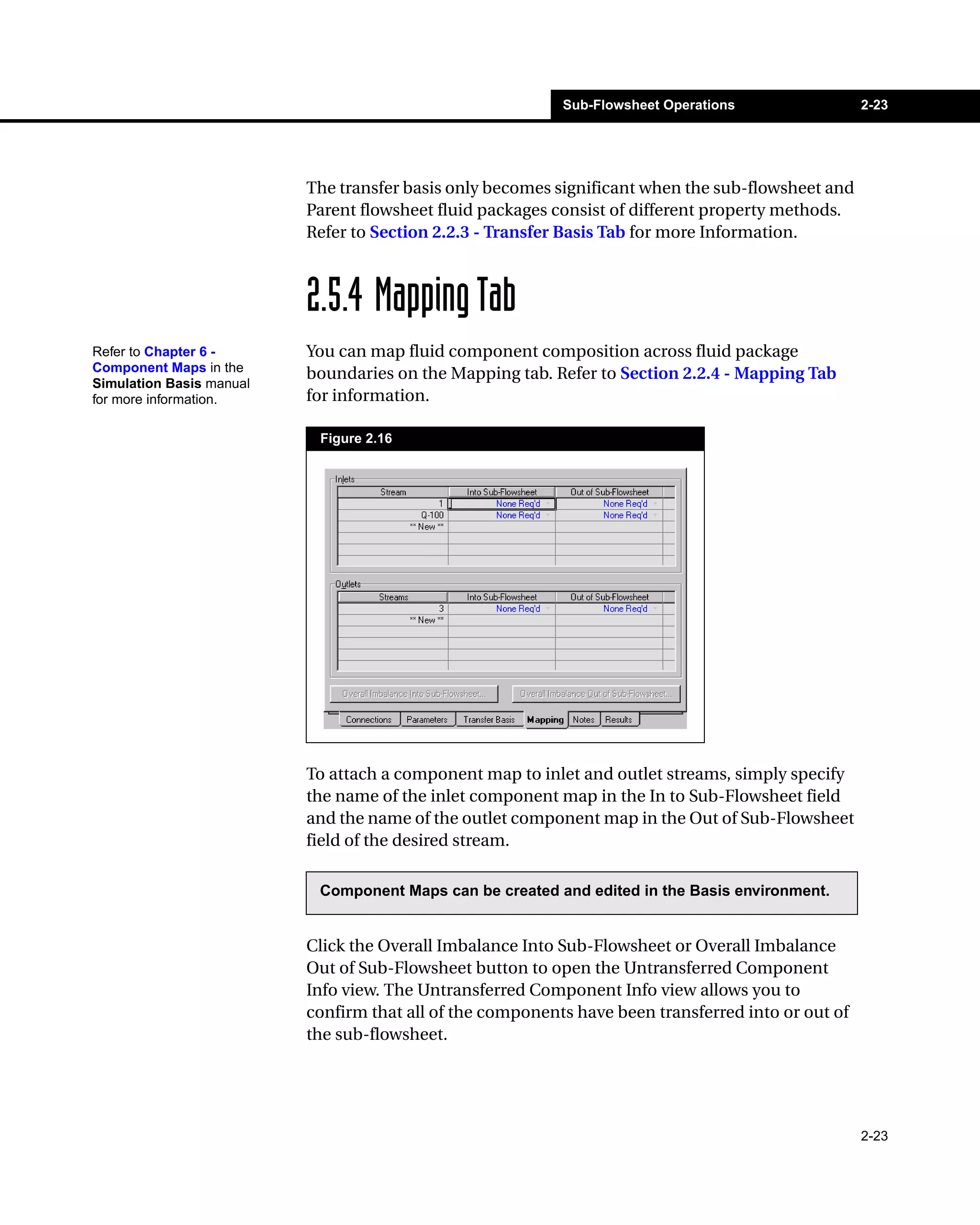
confirm that all of the components have been transferred into or out of 
the sub-flowsheet. 
Refer to Chapter 6 - 
Component Maps in the 
Simulation Basis manual 
for more information.

Operations guide39

  • 1.
    Sub-Flowsheet Operations 2-23 2-23 The transfer basis only becomes significant when the sub-flowsheet and Parent flowsheet fluid packages consist of different property methods. Refer to Section 2.2.3 - Transfer Basis Tab for more Information. 2.5.4 Mapping Tab You can map fluid component composition across fluid package boundaries on the Mapping tab. Refer to Section 2.2.4 - Mapping Tab for information. Figure 2.16 To attach a component map to inlet and outlet streams, simply specify the name of the inlet component map in the In to Sub-Flowsheet field and the name of the outlet component map in the Out of Sub-Flowsheet field of the desired stream. Component Maps can be created and edited in the Basis environment. Click the Overall Imbalance Into Sub-Flowsheet or Overall Imbalance Out of Sub-Flowsheet button to open the Untransferred Component Info view. The Untransferred Component Info view allows you to confirm that all of the components have been transferred into or out of the sub-flowsheet. Refer to Chapter 6 - Component Maps in the Simulation Basis manual for more information.