More Related Content

PPT

PPTX
ch1-IntroductiontoOS_edited.pptx 
PPTX
ch1 operating system chapter 1 to OS.pptx 
PPTX

PDF

PPT
ch1-introduction-to-os operating system .ppt 
PPTX
Ch1-Operating System Concept 
PPTX
Ch1-Operating System Concepts Similar to OPERATING SYSTEM FUNDAMENTALS THAT YOU NEED

PPTX

PPTX
operating system basic and windows versions and types of operating system 
PPTX
Operating System Chapter One Introduction 
PPTX
module1module1module1module1module1ch1.pptx 
PPTX
Operating system chapter 1 of module 1 and notes 
PPT
chapter 1 operating system and introduct 
PPT

PPT

PPT
UNIT 1 OS.ppt UNIT 1 OS.ppt UNIT 1 OS.ppt 
PDF

PDF

PDF

PPT
Week-01-26092022-095635am (4).ppt 
PPT
4.8.2025_Operating system power point presentation 
PPTX
operating system of the computer/PC/laptop.pptx 
PPT
CHAPTER ONE Introduction of operating system .ppt 
PPT
Operating System Chapter Introduction 1 
PPT
introduction to operating system 9th.ppt 
PPT
Operating Systems Introduction From Silberchatz 
PPT
Operating system power point chapter 2 introduction Recently uploaded
![[Deck] What's New in Spark-Iceberg Integration via DSV2.pptx](https://cdn.slidesharecdn.com/ss_thumbnails/deckwhatsnewinspark-icebergintegrationviadsv2-260210005337-25955b12-thumbnail.jpg?width=640&height=640&fit=bounds)
PPTX
[Deck] What's New in Spark-Iceberg Integration via DSV2.pptx 
PDF
engineering management chapter 5 ppt presentation 
PDF
PROBLEM SLOVING AND PYTHON PROGRAMMING UNIT 3.pdf 
PDF
Microcontroller Notes Final 2016 April june.pdf 
PDF
Plasticity and Structure of Soil/Atterberg Limits.pdf 
PDF
Industrial Tools Manufacturers In India : Torso Tools 
PDF
Shear Strength of Soil (Direct shear test).pdf 
PDF
NS unit wise unit wise 1 -5 so prepare,. 
PPTX
Presentation-WPS Office.pptx afgouvhyhgfccf 
PPTX
The Hidden Cost of Bad Spare Parts Planning (And How AI CMMS Fixes It) 
PPTX
Why Most SAP PM Implementations Fail — And How High-Reliability Plants Fix It 
PDF
Rajesh Prasad- Brief Profile with educational, professional highlights 
PPTX
How Does LNG Regasification Work | INOXCVA 
PDF
DAA Lab Manual ssit -kavya r.pdf or Digital Design and Analysis of Algorithm ... 
PPTX
Why TPM Succeeds in Some Plants and Struggles in Others | MaintWiz 
PDF
Microeconomics Theory and Market Structure.pdf 
PPTX
A professional presentation on Cosmos Bank Heist 
PDF
AWS Re:Invent 2025 Recap by FivexL - Guilherme, Vladimir, Andrey 
PDF
Basics of Electronics Task by Vivaan Jo Varghese.pdf 
PDF
Applications of AI in Civil Engineering - Dr. Rohan Dasgupta OPERATING SYSTEM FUNDAMENTALS THAT YOU NEED
- 1.
- 2.
1.2 Silberschatz, Galvinand Gagne ©2009
Operating System Concepts with Java – 8th
Edition
Syllabus
Unit 1: Operating Systems Overview and Process Management
Unit 2: Process Scheduling and Synchronization
Unit 3: Deadlocks
Unit 4: Memory Management
Unit 5: File system, System Protection and Security
- 3.
1.3 Silberschatz, Galvinand Gagne ©2009
Operating System Concepts with Java – 8th
Edition
SYLLABUS
Unit – I Operating Systems Overview and Process Management
Introduction-What operating system do, Operating system structure
(uniprogrammed and multi programmed), Operating system operations,
Operating system services, System calls, Types of System calls,
Operating system structure. Process Management- Process concepts,
Process scheduling, Operations on processes, Inter process
communication. (TB-1,Ch-1,Ch-2, Ch-3)
Unit – II Process Scheduling and Synchronization Multithreaded
programming: Overview, Multithreading models. Process Scheduling –
Basic concepts, Scheduling criteria, Scheduling algorithms, Thread
scheduling. (TB-1,Ch-4,Ch-5) Process coordination: Synchronization –
Background, The critical section problem, Peterson’s solution,
Synchronization hardware, Semaphore, Classical problems of
synchronization, Monitors. (TB-1,Ch-6)
- 4.
1.4 Silberschatz, Galvinand Gagne ©2009
Operating System Concepts with Java – 8th
Edition
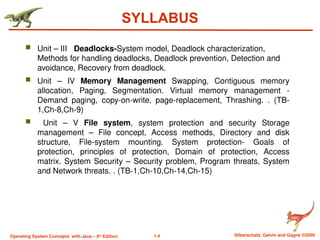
SYLLABUS
Unit – III Deadlocks-System model, Deadlock characterization,
Methods for handling deadlocks, Deadlock prevention, Detection and
avoidance, Recovery from deadlock.
Unit – IV Memory Management Swapping, Contiguous memory
allocation, Paging, Segmentation. Virtual memory management -
Demand paging, copy-on-write, page-replacement, Thrashing. . (TB-
1,Ch-8,Ch-9)
Unit – V File system, system protection and security Storage
management – File concept, Access methods, Directory and disk
structure, File-system mounting. System protection- Goals of
protection, principles of protection, Domain of protection, Access
matrix. System Security – Security problem, Program threats, System
and Network threats. . (TB-1,Ch-10,Ch-14,Ch-15)
- 5.
1.5 Silberschatz, Galvinand Gagne ©2009
Operating System Concepts with Java – 8th
Edition
Text Books and Reference Books
Text Books
1. Abraham Silberchatz, Peter B. Galvin, Greg Gagne, Operating
System Concepts, 9th edition ,John Wiley, 2016.
Suggested / Reference Books
1. D.M. Dharmdhere, Operating Systems – A Concept based
Approach, 2nd Edition. TMH, 2007.
2. Andrew S Tanenbaum, Modern Operating Systems, 3rd Edition, PHI,
2008.
3 Behrouz A. Forouzan,Richard F. Gilberg, Unix and shell
programming, cengage Learning 2009.
- 6.
1.6 Silberschatz, Galvinand Gagne ©2009
Operating System Concepts with Java – 8th
Edition
Course Outcomes
CO1: Summarize operating system and process management
concepts
CO2: Apply process scheduling and synchronization related
issues
CO3: Explain Deadlock prevention, avoidance, detection,
recovery mechanisms
CO4: Analyze effectively memory management concepts
CO5: Illustrate various protection and security measures.
- 7.
1.7 Silberschatz, Galvinand Gagne ©2009
Operating System Concepts with Java – 8th
Edition
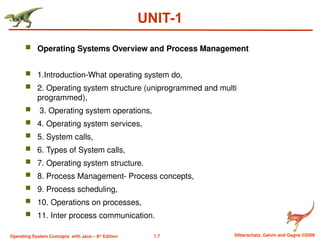
UNIT-1
Operating Systems Overview and Process Management
1.Introduction-What operating system do,
2. Operating system structure (uniprogrammed and multi
programmed),
3. Operating system operations,
4. Operating system services,
5. System calls,
6. Types of System calls,
7. Operating system structure.
8. Process Management- Process concepts,
9. Process scheduling,
10. Operations on processes,
11. Inter process communication.
- 8.
1.8 Silberschatz, Galvinand Gagne ©2009
Operating System Concepts with Java – 8th
Edition
What is an Operating System?
A program that acts as an intermediary between a user of a
computer and the computer hardware
Operating system goals:
Execute user programs and make solving user problems easier
Make the computer system convenient to use
Use the computer hardware in an efficient manner
- 9.
1.9 Silberschatz, Galvinand Gagne ©2009
Operating System Concepts with Java – 8th
Edition
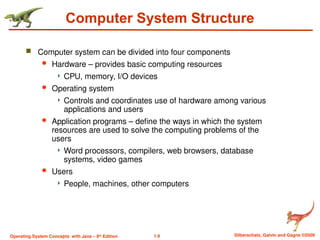
Computer System Structure
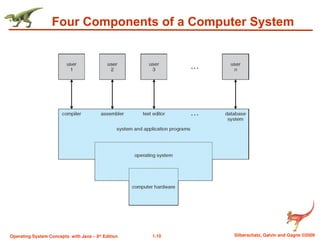
Computer system can be divided into four components
Hardware – provides basic computing resources
CPU, memory, I/O devices
Operating system
Controls and coordinates use of hardware among various
applications and users
Application programs – define the ways in which the system
resources are used to solve the computing problems of the
users
Word processors, compilers, web browsers, database
systems, video games
Users
People, machines, other computers
- 10.
1.10 Silberschatz, Galvinand Gagne ©2009
Operating System Concepts with Java – 8th
Edition
Four Components of a Computer System
- 11.
1.11 Silberschatz, Galvinand Gagne ©2009
Operating System Concepts with Java – 8th
Edition
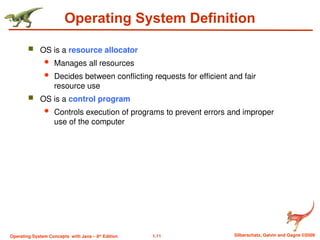
Operating System Definition
OS is a resource allocator
Manages all resources
Decides between conflicting requests for efficient and fair
resource use
OS is a control program
Controls execution of programs to prevent errors and improper
use of the computer
- 12.
1.12 Silberschatz, Galvinand Gagne ©2009
Operating System Concepts with Java – 8th
Edition
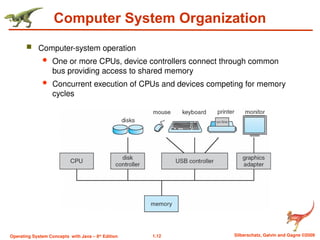
Computer System Organization
Computer-system operation
One or more CPUs, device controllers connect through common
bus providing access to shared memory
Concurrent execution of CPUs and devices competing for memory
cycles
- 13.
1.13 Silberschatz, Galvinand Gagne ©2009
Operating System Concepts with Java – 8th
Edition
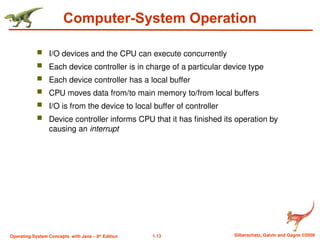
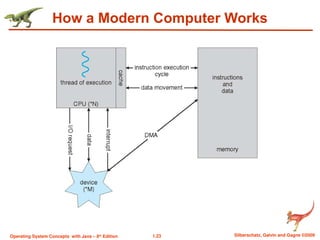
Computer-System Operation
I/O devices and the CPU can execute concurrently
Each device controller is in charge of a particular device type
Each device controller has a local buffer
CPU moves data from/to main memory to/from local buffers
I/O is from the device to local buffer of controller
Device controller informs CPU that it has finished its operation by
causing an interrupt
- 14.
1.14 Silberschatz, Galvinand Gagne ©2009
Operating System Concepts with Java – 8th
Edition
Computer Startup
bootstrap program is loaded at power-up or reboot
Typically stored in ROM or EPROM, generally known as
firmware
Initializes all aspects of system including the CPU
registers, device controllers, and memory contents
Locates and loads operating system kernel and starts
execution of the first process (such as “init”) and waits for
events to occur.
- 15.
1.15 Silberschatz, Galvinand Gagne ©2009
Operating System Concepts with Java – 8th
Edition
Common Functions of Interrupts
Interrupt transfers control to the interrupt service routine
generally, through the interrupt vector, which contains the
addresses of all the service routines
Interrupt architecture must save the address of the interrupted
instruction
Incoming interrupts are disabled while another interrupt is being
processed to prevent a lost interrupt
A trap is a software-generated interrupt caused either by an error
such as divide by 0 or a user request (system call).
An operating system is interrupt driven
- 16.
1.16 Silberschatz, Galvinand Gagne ©2009
Operating System Concepts with Java – 8th
Edition
Interrupt Handling
The operating system preserves the state of the CPU by storing
registers and the program counter
Separate segments of code determine what action should be
taken for each type of interrupt
- 17.
1.17 Silberschatz, Galvinand Gagne ©2009
Operating System Concepts with Java – 8th
Edition
I/O Structure
After I/O starts, control returns to user program without
waiting for I/O completion
System call – request to the operating system to allow
user to wait for I/O completion
Device-status table contains entry for each I/O device
indicating its type, address, and state
Operating system indexes into I/O device table to
determine device status and to modify table entry to
include interrupt
- 18.
1.18 Silberschatz, Galvinand Gagne ©2009
Operating System Concepts with Java – 8th
Edition
Direct Memory Access Structure
Used for high-speed I/O devices able to transmit information at
close to memory speeds
Device controller transfers blocks of data from buffer storage
directly to main memory without CPU intervention
Only one interrupt is generated per block, rather than the one
interrupt per byte
- 19.
1.19 Silberschatz, Galvinand Gagne ©2009
Operating System Concepts with Java – 8th
Edition
Storage Structure
Main memory – only large storage media that the CPU can access directly
Programs and data cannot reside in main memory permanently because:
Main memory is limited (too small) to store all programs and data
permanently
Main memory is volatile
So secondary storage is provided – extension of main memory that
provides large nonvolatile storage capacity
Magnetic disks – rigid metal or glass platters covered with magnetic
recording material
Disk surface is logically divided into tracks, which are subdivided into
sectors
The disk controller determines the logical interaction between the
device and the computer
- 20.
1.20 Silberschatz, Galvinand Gagne ©2009
Operating System Concepts with Java – 8th
Edition
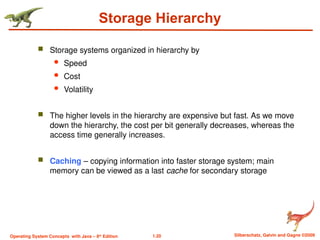
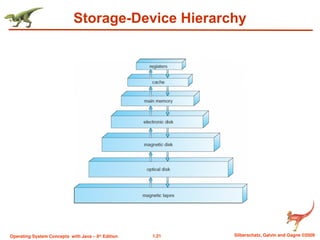
Storage Hierarchy
Storage systems organized in hierarchy by
Speed
Cost
Volatility
The higher levels in the hierarchy are expensive but fast. As we move
down the hierarchy, the cost per bit generally decreases, whereas the
access time generally increases.
Caching – copying information into faster storage system; main
memory can be viewed as a last cache for secondary storage
- 21.
- 22.
1.22 Silberschatz, Galvinand Gagne ©2009
Operating System Concepts with Java – 8th
Edition
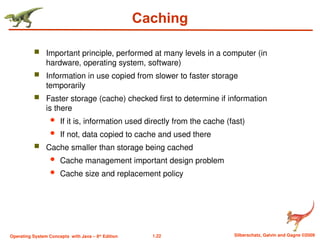
Caching
Important principle, performed at many levels in a computer (in
hardware, operating system, software)
Information in use copied from slower to faster storage
temporarily
Faster storage (cache) checked first to determine if information
is there
If it is, information used directly from the cache (fast)
If not, data copied to cache and used there
Cache smaller than storage being cached
Cache management important design problem
Cache size and replacement policy
- 23.
- 24.
1.24 Silberschatz, Galvinand Gagne ©2009
Operating System Concepts with Java – 8th
Edition
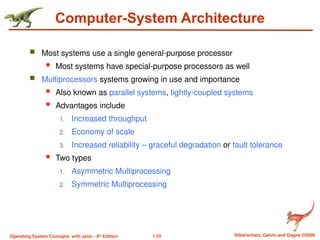
Computer-System Architecture
Most systems use a single general-purpose processor
Most systems have special-purpose processors as well
Multiprocessors systems growing in use and importance
Also known as parallel systems, tightly-coupled systems
Advantages include
1. Increased throughput
2. Economy of scale
3. Increased reliability – graceful degradation or fault tolerance
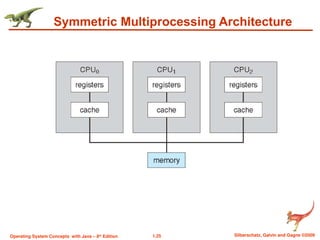
Two types
1. Asymmetric Multiprocessing
2. Symmetric Multiprocessing
- 25.
1.25 Silberschatz, Galvinand Gagne ©2009
Operating System Concepts with Java – 8th
Edition
Symmetric Multiprocessing Architecture
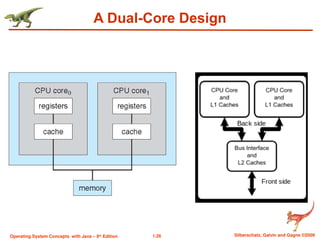
- 26.
- 27.
1.27 Silberschatz, Galvinand Gagne ©2009
Operating System Concepts with Java – 8th
Edition
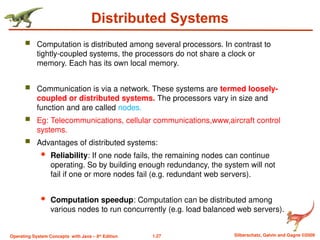
Distributed Systems
Computation is distributed among several processors. In contrast to
tightly-coupled systems, the processors do not share a clock or
memory. Each has its own local memory.
Communication is via a network. These systems are termed loosely-
coupled or distributed systems. The processors vary in size and
function and are called nodes.
Eg: Telecommunications, cellular communications,www,aircraft control
systems.
Advantages of distributed systems:
Reliability: If one node fails, the remaining nodes can continue
operating. So by building enough redundancy, the system will not
fail if one or more nodes fail (e.g. redundant web servers).
Computation speedup: Computation can be distributed among
various nodes to run concurrently (e.g. load balanced web servers).
- 28.
1.28 Silberschatz, Galvinand Gagne ©2009
Operating System Concepts with Java – 8th
Edition
Distributed Systems (contd.)
Resource Sharing: Software, data, and hardware resources can be
shared. E.g. data files in node A can be accessed by a user at node
B. Files can be printed at a shared laser printer.
Communication: Processes at various nodes can exchange
information.
- 29.
1.29 Silberschatz, Galvinand Gagne ©2009
Operating System Concepts with Java – 8th
Edition
Clustered Systems
Are a form of distributed systems. Composed of 2 or more
independent machines coupled together.
Usually sharing storage via a storage-area network (SAN)
Provides a high-availability service which survives failures
Asymmetric clustering has one machine in hot-standby mode
while other machine/server run applications. The hot-standby
machine only monitors the active server. If it fails, the hot-
standby machine becomes the active server.
Symmetric clustering has multiple nodes running applications,
monitoring each other
Some clusters are for high-performance computing (HPC)
Applications must be written to use parallelization
- 30.
1.30 Silberschatz, Galvinand Gagne ©2009
Operating System Concepts with Java – 8th
Edition
2.Operating System Structure
Uniprogramming
means one program sits in the main memory at a time.
Less efficient.
Eg: Batch processing in old computers.
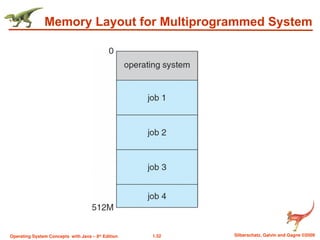
Multiprogramming needed for efficiency
Single user cannot keep CPU and I/O devices busy at all times
Multiprogramming organizes jobs (code and data) so CPU always
has one to execute
A subset of total jobs in system is kept in memory
One job selected and run via job scheduling
When it has to wait (for I/O for example), OS switches to another
job
Eg: Windows XP, Windows 7,8,10,
- 31.
1.31 Silberschatz, Galvinand Gagne ©2009
Operating System Concepts with Java – 8th
Edition
2. Operating System Structure (Cont.)
Timesharing (multitasking) is logical extension in which CPU switches
jobs so frequently that users can interact with each job while it is running,
creating interactive computing
Response time should be < 1 second
Each user has at least one program executing in memory process
If several jobs ready to run at the same time CPU scheduling
If processes don’t fit in memory, swapping moves them in and out to
run
Virtual memory allows execution of processes not completely in
memory..
Note: multiprogramming operating system allows more than one
program to run simultaneously using a single CPU,
a multitasking operating system allows multiple processes or tasks to
be executed at the same time utilizing multiple CPUs.
- 32.
1.32 Silberschatz, Galvinand Gagne ©2009
Operating System Concepts with Java – 8th
Edition
Memory Layout for Multiprogrammed System
- 33.
1.33 Silberschatz, Galvinand Gagne ©2009
Operating System Concepts with Java – 8th
Edition
3. Operating-System Operations
Interrupt driven by hardware
Software error or request creates exception or trap
Division by zero, request for operating system service
Other process problems include infinite loop, processes modifying
each other or the operating system
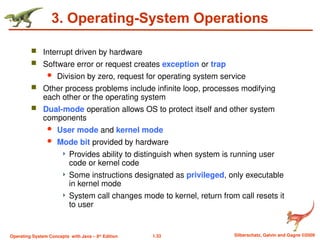
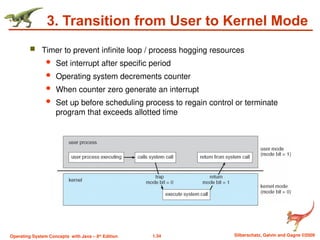
Dual-mode operation allows OS to protect itself and other system
components
User mode and kernel mode
Mode bit provided by hardware
Provides ability to distinguish when system is running user
code or kernel code
Some instructions designated as privileged, only executable
in kernel mode
System call changes mode to kernel, return from call resets it
to user
- 34.
1.34 Silberschatz, Galvinand Gagne ©2009
Operating System Concepts with Java – 8th
Edition
3. Transition from User to Kernel Mode
Timer to prevent infinite loop / process hogging resources
Set interrupt after specific period
Operating system decrements counter
When counter zero generate an interrupt
Set up before scheduling process to regain control or terminate
program that exceeds allotted time
- 35.
1.35 Silberschatz, Galvinand Gagne ©2009
Operating System Concepts with Java – 8th
Edition
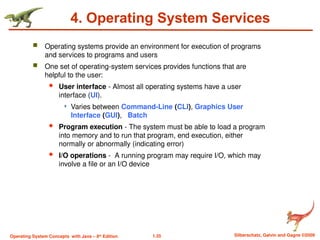
4. Operating System Services
Operating systems provide an environment for execution of programs
and services to programs and users
One set of operating-system services provides functions that are
helpful to the user:
User interface - Almost all operating systems have a user
interface (UI).
Varies between Command-Line (CLI), Graphics User
Interface (GUI), Batch
Program execution - The system must be able to load a program
into memory and to run that program, end execution, either
normally or abnormally (indicating error)
I/O operations - A running program may require I/O, which may
involve a file or an I/O device
- 36.
1.36 Silberschatz, Galvinand Gagne ©2009
Operating System Concepts with Java – 8th
Edition
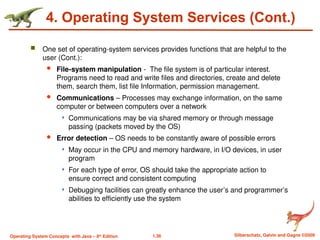
4. Operating System Services (Cont.)
One set of operating-system services provides functions that are helpful to the
user (Cont.):
File-system manipulation - The file system is of particular interest.
Programs need to read and write files and directories, create and delete
them, search them, list file Information, permission management.
Communications – Processes may exchange information, on the same
computer or between computers over a network
Communications may be via shared memory or through message
passing (packets moved by the OS)
Error detection – OS needs to be constantly aware of possible errors
May occur in the CPU and memory hardware, in I/O devices, in user
program
For each type of error, OS should take the appropriate action to
ensure correct and consistent computing
Debugging facilities can greatly enhance the user’s and programmer’s
abilities to efficiently use the system
- 37.
1.37 Silberschatz, Galvinand Gagne ©2009
Operating System Concepts with Java – 8th
Edition
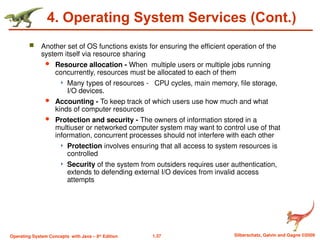
4. Operating System Services (Cont.)
Another set of OS functions exists for ensuring the efficient operation of the
system itself via resource sharing
Resource allocation - When multiple users or multiple jobs running
concurrently, resources must be allocated to each of them
Many types of resources - CPU cycles, main memory, file storage,
I/O devices.
Accounting - To keep track of which users use how much and what
kinds of computer resources
Protection and security - The owners of information stored in a
multiuser or networked computer system may want to control use of that
information, concurrent processes should not interfere with each other
Protection involves ensuring that all access to system resources is
controlled
Security of the system from outsiders requires user authentication,
extends to defending external I/O devices from invalid access
attempts
- 38.
1.38 Silberschatz, Galvinand Gagne ©2009
Operating System Concepts with Java – 8th
Edition
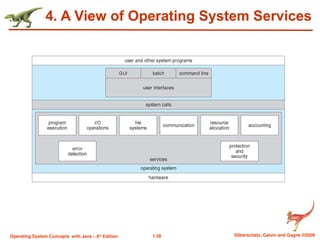
4. A View of Operating System Services
- 39.
1.39 Silberschatz, Galvinand Gagne ©2009
Operating System Concepts with Java – 8th
Edition
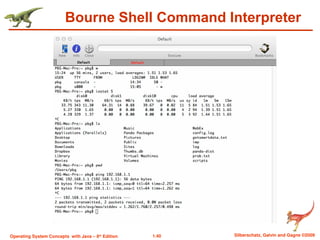
User Operating System Interface - CLI
CLI or command interpreter allows direct command entry
Sometimes implemented in kernel, sometimes by systems
program
Sometimes multiple flavors implemented – shells
Primarily fetches a command from user and executes it
Sometimes commands built-in, sometimes just names of
programs
If the latter, adding new features doesn’t require shell
modification
- 40.
- 41.
1.41 Silberschatz, Galvinand Gagne ©2009
Operating System Concepts with Java – 8th
Edition
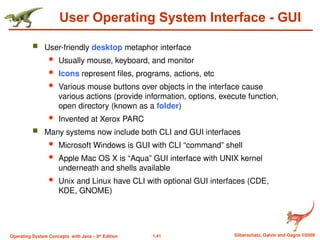
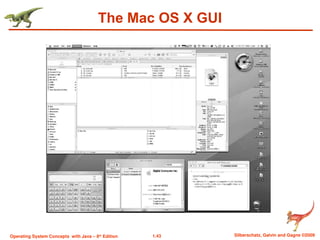
User Operating System Interface - GUI
User-friendly desktop metaphor interface
Usually mouse, keyboard, and monitor
Icons represent files, programs, actions, etc
Various mouse buttons over objects in the interface cause
various actions (provide information, options, execute function,
open directory (known as a folder)
Invented at Xerox PARC
Many systems now include both CLI and GUI interfaces
Microsoft Windows is GUI with CLI “command” shell
Apple Mac OS X is “Aqua” GUI interface with UNIX kernel
underneath and shells available
Unix and Linux have CLI with optional GUI interfaces (CDE,
KDE, GNOME)
- 42.
1.42 Silberschatz, Galvinand Gagne ©2009
Operating System Concepts with Java – 8th
Edition
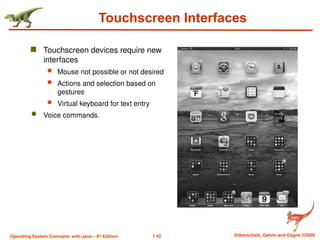
Touchscreen Interfaces
Touchscreen devices require new
interfaces
Mouse not possible or not desired
Actions and selection based on
gestures
Virtual keyboard for text entry
Voice commands.
- 43.
- 44.
1.44 Silberschatz, Galvinand Gagne ©2009
Operating System Concepts with Java – 8th
Edition
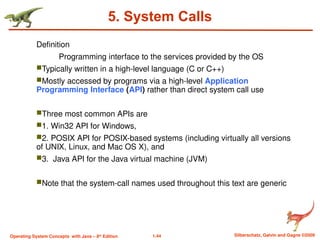
5. System Calls
Definition
Programming interface to the services provided by the OS
Typically written in a high-level language (C or C++)
Mostly accessed by programs via a high-level Application
Programming Interface (API) rather than direct system call use
Three most common APIs are
1. Win32 API for Windows,
2. POSIX API for POSIX-based systems (including virtually all versions
of UNIX, Linux, and Mac OS X), and
3. Java API for the Java virtual machine (JVM)
Note that the system-call names used throughout this text are generic
- 45.
1.45 Silberschatz, Galvinand Gagne ©2009
Operating System Concepts with Java – 8th
Edition
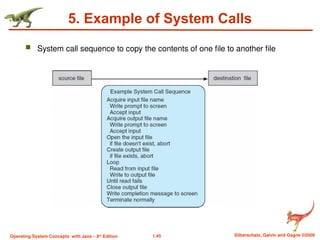
5. Example of System Calls
System call sequence to copy the contents of one file to another file
- 46.
1.46 Silberschatz, Galvinand Gagne ©2009
Operating System Concepts with Java – 8th
Edition
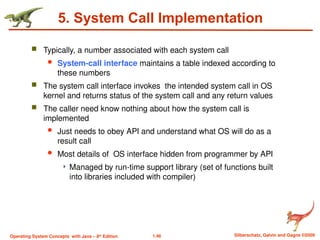
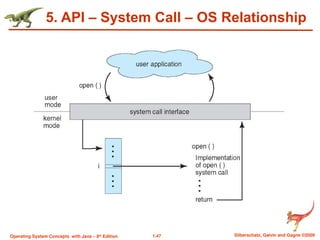
5. System Call Implementation
Typically, a number associated with each system call
System-call interface maintains a table indexed according to
these numbers
The system call interface invokes the intended system call in OS
kernel and returns status of the system call and any return values
The caller need know nothing about how the system call is
implemented
Just needs to obey API and understand what OS will do as a
result call
Most details of OS interface hidden from programmer by API
Managed by run-time support library (set of functions built
into libraries included with compiler)
- 47.
1.47 Silberschatz, Galvinand Gagne ©2009
Operating System Concepts with Java – 8th
Edition
5. API – System Call – OS Relationship
- 48.
1.48 Silberschatz, Galvinand Gagne ©2009
Operating System Concepts with Java – 8th
Edition
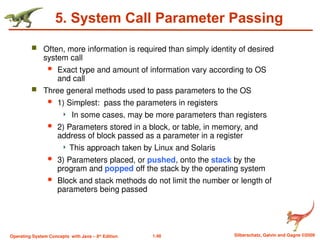
5. System Call Parameter Passing
Often, more information is required than simply identity of desired
system call
Exact type and amount of information vary according to OS
and call
Three general methods used to pass parameters to the OS
1) Simplest: pass the parameters in registers
In some cases, may be more parameters than registers
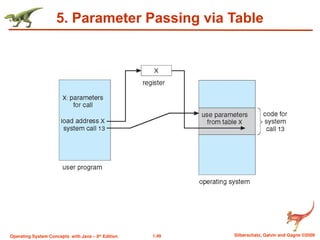
2) Parameters stored in a block, or table, in memory, and
address of block passed as a parameter in a register
This approach taken by Linux and Solaris
3) Parameters placed, or pushed, onto the stack by the
program and popped off the stack by the operating system
Block and stack methods do not limit the number or length of
parameters being passed
- 49.
- 50.
1.50 Silberschatz, Galvinand Gagne ©2009
Operating System Concepts with Java – 8th
Edition
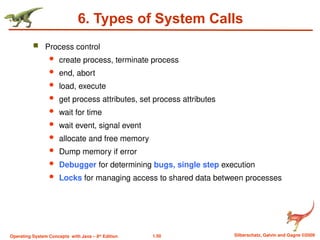
6. Types of System Calls
Process control
create process, terminate process
end, abort
load, execute
get process attributes, set process attributes
wait for time
wait event, signal event
allocate and free memory
Dump memory if error
Debugger for determining bugs, single step execution
Locks for managing access to shared data between processes
- 51.
1.51 Silberschatz, Galvinand Gagne ©2009
Operating System Concepts with Java – 8th
Edition
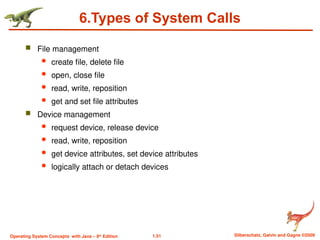
6.Types of System Calls
File management
create file, delete file
open, close file
read, write, reposition
get and set file attributes
Device management
request device, release device
read, write, reposition
get device attributes, set device attributes
logically attach or detach devices
- 52.
1.52 Silberschatz, Galvinand Gagne ©2009
Operating System Concepts with Java – 8th
Edition
6.Types of System Calls (Cont.)
Information maintenance
get time or date, set time or date
get system data, set system data
get and set process, file, or device attributes
Communications
create, delete communication connection
send, receive messages if message passing model to host
name or process name
From client to server
Shared-memory model create and gain access to memory
regions
transfer status information
attach and detach remote devices
- 53.
1.53 Silberschatz, Galvinand Gagne ©2009
Operating System Concepts with Java – 8th
Edition
6.Types of System Calls (Cont.)
Protection
Control access to resources
Get and set permissions
Allow and deny user access
- 54.
1.54 Silberschatz, Galvinand Gagne ©2009
Operating System Concepts with Java – 8th
Edition
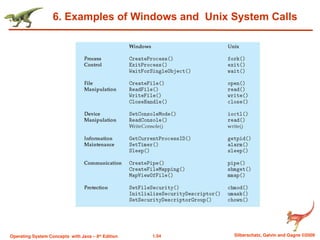
6. Examples of Windows and Unix System Calls
- 55.
1.55 Silberschatz, Galvinand Gagne ©2009
Operating System Concepts with Java – 8th
Edition
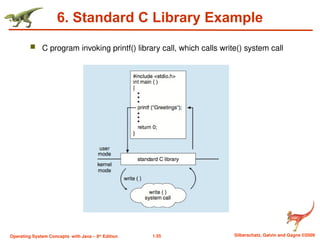
6. Standard C Library Example
C program invoking printf() library call, which calls write() system call
- 56.
1.56 Silberschatz, Galvinand Gagne ©2009
Operating System Concepts with Java – 8th
Edition
7. Operating System Structure
General-purpose OS is very large program
Various ways to structure ones
Simple structure – MS-DOS
More complex -- UNIX
Layered – an abstrcation
Microkernel -Mach
- 57.
1.57 Silberschatz, Galvinand Gagne ©2009
Operating System Concepts with Java – 8th
Edition
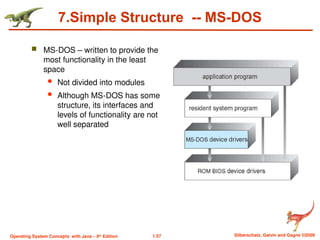
7.Simple Structure -- MS-DOS
MS-DOS – written to provide the
most functionality in the least
space
Not divided into modules
Although MS-DOS has some
structure, its interfaces and
levels of functionality are not
well separated
- 58.
1.58 Silberschatz, Galvinand Gagne ©2009
Operating System Concepts with Java – 8th
Edition
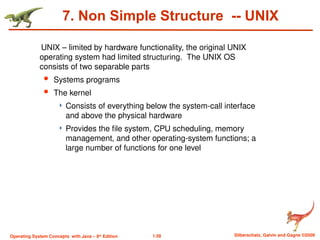
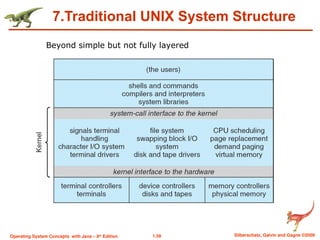
7. Non Simple Structure -- UNIX
UNIX – limited by hardware functionality, the original UNIX
operating system had limited structuring. The UNIX OS
consists of two separable parts
Systems programs
The kernel
Consists of everything below the system-call interface
and above the physical hardware
Provides the file system, CPU scheduling, memory
management, and other operating-system functions; a
large number of functions for one level
- 59.
1.59 Silberschatz, Galvinand Gagne ©2009
Operating System Concepts with Java – 8th
Edition
7.Traditional UNIX System Structure
Beyond simple but not fully layered
- 60.
1.60 Silberschatz, Galvinand Gagne ©2009
Operating System Concepts with Java – 8th
Edition
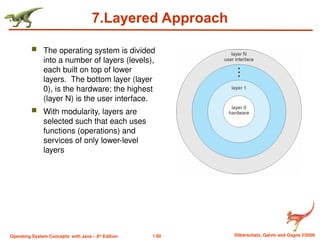
7.Layered Approach
The operating system is divided
into a number of layers (levels),
each built on top of lower
layers. The bottom layer (layer
0), is the hardware; the highest
(layer N) is the user interface.
With modularity, layers are
selected such that each uses
functions (operations) and
services of only lower-level
layers
- 61.
1.61 Silberschatz, Galvinand Gagne ©2009
Operating System Concepts with Java – 8th
Edition
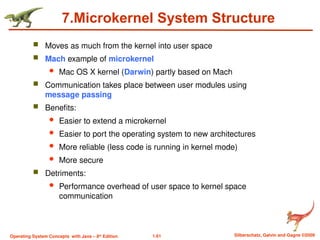
7.Microkernel System Structure
Moves as much from the kernel into user space
Mach example of microkernel
Mac OS X kernel (Darwin) partly based on Mach
Communication takes place between user modules using
message passing
Benefits:
Easier to extend a microkernel
Easier to port the operating system to new architectures
More reliable (less code is running in kernel mode)
More secure
Detriments:
Performance overhead of user space to kernel space
communication
- 62.
- 63.
1.63 Silberschatz, Galvinand Gagne ©2009
Operating System Concepts with Java – 8th
Edition
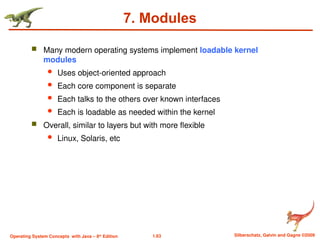
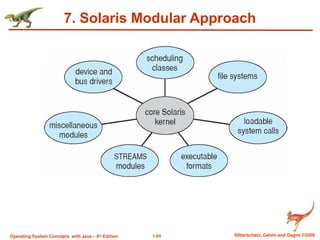
7. Modules
Many modern operating systems implement loadable kernel
modules
Uses object-oriented approach
Each core component is separate
Each talks to the others over known interfaces
Each is loadable as needed within the kernel
Overall, similar to layers but with more flexible
Linux, Solaris, etc
- 64.
- 65.
1.65 Silberschatz, Galvinand Gagne ©2009
Operating System Concepts with Java – 8th
Edition
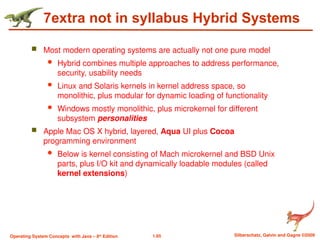
7extra not in syllabus Hybrid Systems
Most modern operating systems are actually not one pure model
Hybrid combines multiple approaches to address performance,
security, usability needs
Linux and Solaris kernels in kernel address space, so
monolithic, plus modular for dynamic loading of functionality
Windows mostly monolithic, plus microkernel for different
subsystem personalities
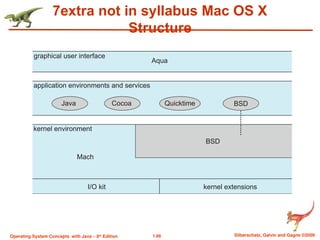
Apple Mac OS X hybrid, layered, Aqua UI plus Cocoa
programming environment
Below is kernel consisting of Mach microkernel and BSD Unix
parts, plus I/O kit and dynamically loadable modules (called
kernel extensions)
- 66.
1.66 Silberschatz, Galvinand Gagne ©2009
Operating System Concepts with Java – 8th
Edition
7extra not in syllabus Mac OS X
Structure
- 67.
1.67 Silberschatz, Galvinand Gagne ©2009
Operating System Concepts with Java – 8th
Edition
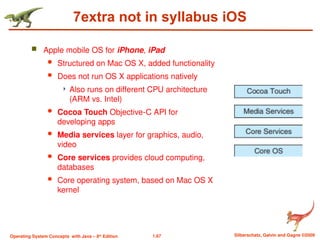
7extra not in syllabus iOS
Apple mobile OS for iPhone, iPad
Structured on Mac OS X, added functionality
Does not run OS X applications natively
Also runs on different CPU architecture
(ARM vs. Intel)
Cocoa Touch Objective-C API for
developing apps
Media services layer for graphics, audio,
video
Core services provides cloud computing,
databases
Core operating system, based on Mac OS X
kernel
- 68.
1.68 Silberschatz, Galvinand Gagne ©2009
Operating System Concepts with Java – 8th
Edition
7extra not in syllabus Android
Developed by Open Handset Alliance (mostly Google)
Open Source
Similar stack to IOS
Based on Linux kernel but modified
Provides process, memory, device-driver management
Adds power management
Runtime environment includes core set of libraries and Dalvik
virtual machine
Apps developed in Java plus Android API
Java class files compiled to Java bytecode then translated
to executable than runs in Dalvik VM
Libraries include frameworks for web browser (webkit), database
(SQLite), multimedia, smaller libc
- 69.
1.69 Silberschatz, Galvinand Gagne ©2009
Operating System Concepts with Java – 8th
Edition
8.Process Management
A process is a program in execution. It is a unit of work within the
system.
Program is a passive entity, process is an active entity.
Process needs resources to accomplish its task
CPU, memory, I/O, files
Initialization data
Process termination requires reclaim of any reusable resources
Single-threaded process has one program counter specifying
location of next instruction to execute
Process executes instructions sequentially, one at a time, until
completion
Multi-threaded process has one program counter per thread
- 70.
1.70 Silberschatz, Galvinand Gagne ©2009
Operating System Concepts with Java – 8th
Edition
8. Process Management Activities
The operating system is responsible for the following activities in
connection with process management:
Creating and deleting both user and system processes
Suspending and resuming processes
Providing mechanisms for process synchronization
Providing mechanisms for process communication
Providing mechanisms for deadlock handling
- 71.
1.71 Silberschatz, Galvinand Gagne ©2009
Operating System Concepts with Java – 8th
Edition
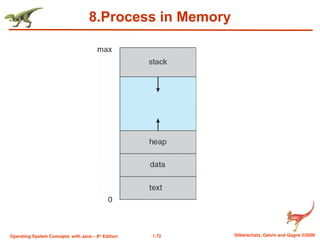
8.Process Concept
An operating system executes a variety of programs:
Batch system – jobs
Time-shared systems – user programs or tasks
Textbook uses the terms job and process almost interchangeably
Process – a program in execution; process execution must
progress in sequential fashion
Multiple parts
The program code, also called text section
Current activity including program counter, processor registers
Stack containing temporary data
Function parameters, return addresses, local variables
Data section containing global variables
Heap containing memory dynamically allocated during run time
- 72.
- 73.
1.73 Silberschatz, Galvinand Gagne ©2009
Operating System Concepts with Java – 8th
Edition
8.Process Concept (Cont.)
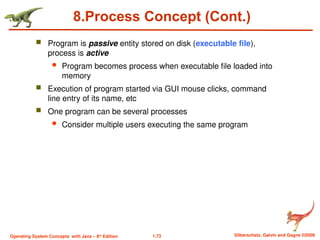
Program is passive entity stored on disk (executable file),
process is active
Program becomes process when executable file loaded into
memory
Execution of program started via GUI mouse clicks, command
line entry of its name, etc
One program can be several processes
Consider multiple users executing the same program
- 74.
1.74 Silberschatz, Galvinand Gagne ©2009
Operating System Concepts with Java – 8th
Edition
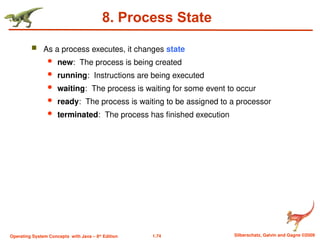
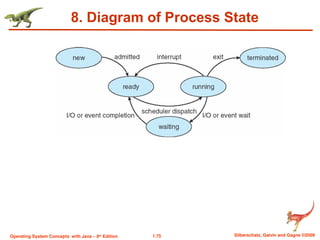
8. Process State
As a process executes, it changes state
new: The process is being created
running: Instructions are being executed
waiting: The process is waiting for some event to occur
ready: The process is waiting to be assigned to a processor
terminated: The process has finished execution
- 75.
- 76.
1.76 Silberschatz, Galvinand Gagne ©2009
Operating System Concepts with Java – 8th
Edition
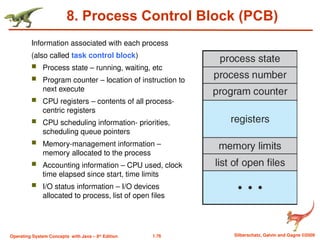
8. Process Control Block (PCB)
Information associated with each process
(also called task control block)
Process state – running, waiting, etc
Program counter – location of instruction to
next execute
CPU registers – contents of all process-
centric registers
CPU scheduling information- priorities,
scheduling queue pointers
Memory-management information –
memory allocated to the process
Accounting information – CPU used, clock
time elapsed since start, time limits
I/O status information – I/O devices
allocated to process, list of open files
- 77.
1.77 Silberschatz, Galvinand Gagne ©2009
Operating System Concepts with Java – 8th
Edition
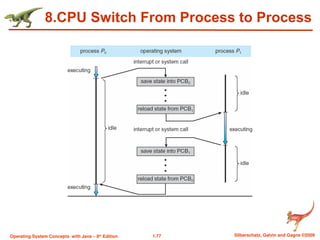
8.CPU Switch From Process to Process
- 78.
1.78 Silberschatz, Galvinand Gagne ©2009
Operating System Concepts with Java – 8th
Edition
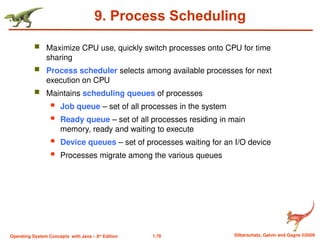
9. Process Scheduling
Maximize CPU use, quickly switch processes onto CPU for time
sharing
Process scheduler selects among available processes for next
execution on CPU
Maintains scheduling queues of processes
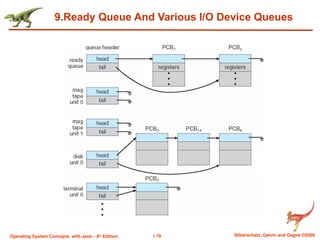
Job queue – set of all processes in the system
Ready queue – set of all processes residing in main
memory, ready and waiting to execute
Device queues – set of processes waiting for an I/O device
Processes migrate among the various queues
- 79.
1.79 Silberschatz, Galvinand Gagne ©2009
Operating System Concepts with Java – 8th
Edition
9.Ready Queue And Various I/O Device Queues
- 80.
1.80 Silberschatz, Galvinand Gagne ©2009
Operating System Concepts with Java – 8th
Edition
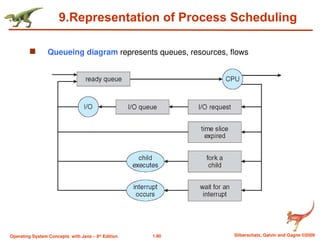
9.Representation of Process Scheduling
Queueing diagram represents queues, resources, flows
- 81.
1.81 Silberschatz, Galvinand Gagne ©2009
Operating System Concepts with Java – 8th
Edition
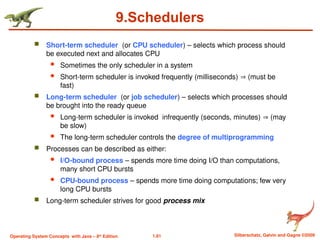
9.Schedulers
Short-term scheduler (or CPU scheduler) – selects which process should
be executed next and allocates CPU
Sometimes the only scheduler in a system
Short-term scheduler is invoked frequently (milliseconds) (must be
fast)
Long-term scheduler (or job scheduler) – selects which processes should
be brought into the ready queue
Long-term scheduler is invoked infrequently (seconds, minutes) (may
be slow)
The long-term scheduler controls the degree of multiprogramming
Processes can be described as either:
I/O-bound process – spends more time doing I/O than computations,
many short CPU bursts
CPU-bound process – spends more time doing computations; few very
long CPU bursts
Long-term scheduler strives for good process mix
- 82.
1.82 Silberschatz, Galvinand Gagne ©2009
Operating System Concepts with Java – 8th
Edition
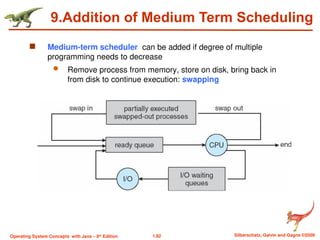
9.Addition of Medium Term Scheduling
Medium-term scheduler can be added if degree of multiple
programming needs to decrease
Remove process from memory, store on disk, bring back in
from disk to continue execution: swapping
- 83.
1.83 Silberschatz, Galvinand Gagne ©2009
Operating System Concepts with Java – 8th
Edition
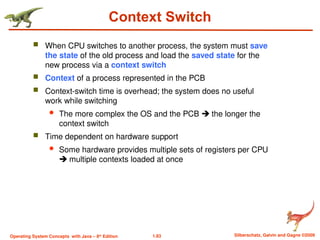
Context Switch
When CPU switches to another process, the system must save
the state of the old process and load the saved state for the
new process via a context switch
Context of a process represented in the PCB
Context-switch time is overhead; the system does no useful
work while switching
The more complex the OS and the PCB the longer the
context switch
Time dependent on hardware support
Some hardware provides multiple sets of registers per CPU
multiple contexts loaded at once
- 84.
1.84 Silberschatz, Galvinand Gagne ©2009
Operating System Concepts with Java – 8th
Edition
10. Operations on Processes
System must provide mechanisms for:
process creation,
process termination,
- 85.
1.85 Silberschatz, Galvinand Gagne ©2009
Operating System Concepts with Java – 8th
Edition
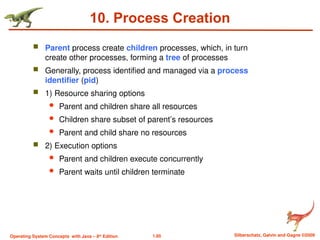
10. Process Creation
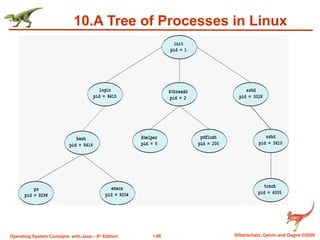
Parent process create children processes, which, in turn
create other processes, forming a tree of processes
Generally, process identified and managed via a process
identifier (pid)
1) Resource sharing options
Parent and children share all resources
Children share subset of parent’s resources
Parent and child share no resources
2) Execution options
Parent and children execute concurrently
Parent waits until children terminate
- 86.
- 87.
1.87 Silberschatz, Galvinand Gagne ©2009
Operating System Concepts with Java – 8th
Edition
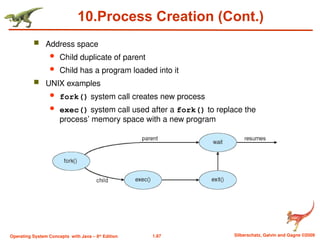
10.Process Creation (Cont.)
Address space
Child duplicate of parent
Child has a program loaded into it
UNIX examples
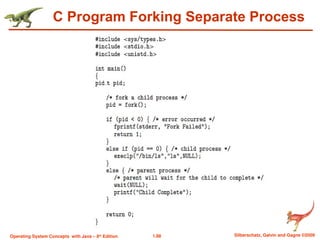
fork() system call creates new process
exec() system call used after a fork() to replace the
process’ memory space with a new program
- 88.
1.88 Silberschatz, Galvinand Gagne ©2009
Operating System Concepts with Java – 8th
Edition
C Program Forking Separate Process
- 89.
1.89 Silberschatz, Galvinand Gagne ©2009
Operating System Concepts with Java – 8th
Edition
10.Process Termination
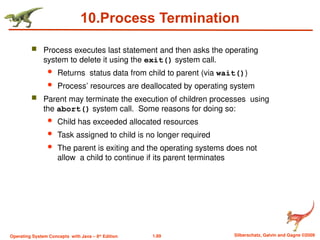
Process executes last statement and then asks the operating
system to delete it using the exit() system call.
Returns status data from child to parent (via wait())
Process’ resources are deallocated by operating system
Parent may terminate the execution of children processes using
the abort() system call. Some reasons for doing so:
Child has exceeded allocated resources
Task assigned to child is no longer required
The parent is exiting and the operating systems does not
allow a child to continue if its parent terminates
- 90.
1.90 Silberschatz, Galvinand Gagne ©2009
Operating System Concepts with Java – 8th
Edition
10.Process Termination
Some operating systems do not allow child to exists if its parent has
terminated. If a process terminates, then all its children must also
be terminated.
cascading termination. All children, grandchildren, etc. are
terminated.
The termination is initiated by the operating system.
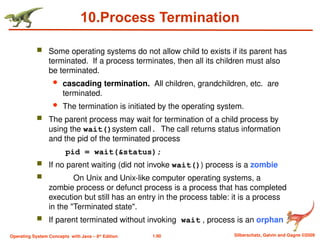
The parent process may wait for termination of a child process by
using the wait()system call. The call returns status information
and the pid of the terminated process
pid = wait(&status);
If no parent waiting (did not invoke wait()) process is a zombie
On Unix and Unix-like computer operating systems, a
zombie process or defunct process is a process that has completed
execution but still has an entry in the process table: it is a process
in the "Terminated state".
If parent terminated without invoking wait , process is an orphan
- 91.
1.91 Silberschatz, Galvinand Gagne ©2009
Operating System Concepts with Java – 8th
Edition
11.Interprocess Communication
Processes within a system may be independent or cooperating
Cooperating process can affect or be affected by other processes,
including sharing data
Reasons for cooperating processes:
Information sharing
Computation speedup
Modularity
Convenience
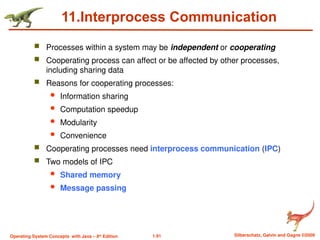
Cooperating processes need interprocess communication (IPC)
Two models of IPC
Shared memory
Message passing
- 92.
1.92 Silberschatz, Galvinand Gagne ©2009
Operating System Concepts with Java – 8th
Edition
11.Communications Models
(a) Message passing. (b) shared memory.
- 93.
1.93 Silberschatz, Galvinand Gagne ©2009
Operating System Concepts with Java – 8th
Edition
11.Interprocess Communication – 1) Shared Memory
An area of memory shared among the processes that wish
to communicate
The communication is under the control of the users
processes not the operating system.
Major issues is to provide mechanism that will allow the user
processes to synchronize their actions when they access
shared memory.
- 94.
1.94 Silberschatz, Galvinand Gagne ©2009
Operating System Concepts with Java – 8th
Edition
11 Eg:Producer-Consumer Problem
Paradigm for cooperating processes, producer process
produces information that is consumed by a consumer
process
Eg: 1) Client-server
server-producer, client –consumer
A buffer is needed to fill the items which resides in memory
and shared by producer and consumer.
Two types of buffers
unbounded-buffer places no practical limit on the size
of the buffer(producer can produce any no of items)
bounded-buffer assumes that there is a fixed buffer
size(producer wait if buffer is full,consumer wait if buffer
is empty)
- 95.
1.95 Silberschatz, Galvinand Gagne ©2009
Operating System Concepts with Java – 8th
Edition
11.Interprocess Communication – 2)Message Passing
Mechanism for processes to communicate and to synchronize
their actions
Message system – processes communicate with each other
without resorting to shared variables
Eg: chat in www
IPC facility provides two operations:
send(message)
receive(message)
The message size is either fixed or variable
- 96.
1.96 Silberschatz, Galvinand Gagne ©2009
Operating System Concepts with Java – 8th
Edition
11.Message Passing (Cont.)
If processes P and Q wish to communicate, they need to:
Establish a communication link between them
Exchange messages via send/receive
Implementation issues:
How are links established?
Can a link be associated with more than two processes?
How many links can there be between every pair of communicating
processes?
What is the capacity of a link?
Is the size of a message that the link can accommodate fixed or
variable?
Is a link unidirectional or bi-directional?
- 97.
1.97 Silberschatz, Galvinand Gagne ©2009
Operating System Concepts with Java – 8th
Edition
11.Message Passing (Cont.)
Implementation of communication link
Physical:
Shared memory
Hardware bus
Network
Logical:
Direct or indirect
Synchronous or asynchronous
Automatic or explicit buffering
Several issues related to above logical methods.
1)Naming
2)Synchronous
3) Buffering
- 98.
1.98 Silberschatz, Galvinand Gagne ©2009
Operating System Concepts with Java – 8th
Edition
11. Naming issue in Direct Communication(logical conn)
Processes must name each other explicitly:
send (P, message) – send a message to process P
receive(Q, message) – receive a message from process Q
- 99.
1.99 Silberschatz, Galvinand Gagne ©2009
Operating System Concepts with Java – 8th
Edition
11. Naming issue in Indirect Communication
Messages are directed and received from mailboxes (also referred
to as ports)
Each mailbox has a unique id
Processes can communicate only if they share a mailbox
- 100.
1.100 Silberschatz, Galvinand Gagne ©2009
Operating System Concepts with Java – 8th
Edition
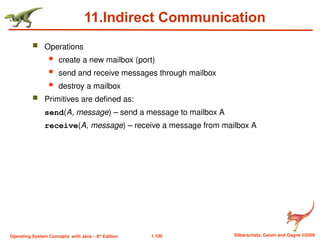
11.Indirect Communication
Operations
create a new mailbox (port)
send and receive messages through mailbox
destroy a mailbox
Primitives are defined as:
send(A, message) – send a message to mailbox A
receive(A, message) – receive a message from mailbox A
- 101.
1.101 Silberschatz, Galvinand Gagne ©2009
Operating System Concepts with Java – 8th
Edition
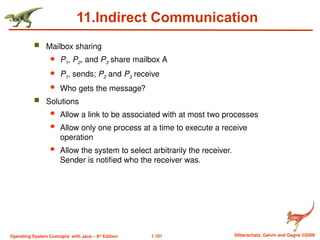
11.Indirect Communication
Mailbox sharing
P1, P2, and P3 share mailbox A
P1, sends; P2 and P3 receive
Who gets the message?
Solutions
Allow a link to be associated with at most two processes
Allow only one process at a time to execute a receive
operation
Allow the system to select arbitrarily the receiver.
Sender is notified who the receiver was.
- 102.
1.102 Silberschatz, Galvinand Gagne ©2009
Operating System Concepts with Java – 8th
Edition
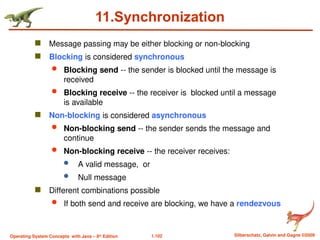
11.Synchronization
Message passing may be either blocking or non-blocking
Blocking is considered synchronous
Blocking send -- the sender is blocked until the message is
received
Blocking receive -- the receiver is blocked until a message
is available
Non-blocking is considered asynchronous
Non-blocking send -- the sender sends the message and
continue
Non-blocking receive -- the receiver receives:
A valid message, or
Null message
Different combinations possible
If both send and receive are blocking, we have a rendezvous
- 103.
1.103 Silberschatz, Galvinand Gagne ©2009
Operating System Concepts with Java – 8th
Edition
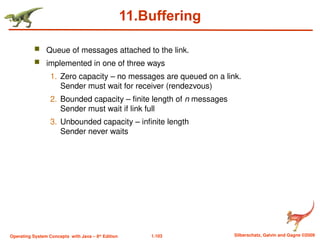
11.Buffering
Queue of messages attached to the link.
implemented in one of three ways
1. Zero capacity – no messages are queued on a link.
Sender must wait for receiver (rendezvous)
2. Bounded capacity – finite length of n messages
Sender must wait if link full
3. Unbounded capacity – infinite length
Sender never waits
- 104.
1.104 Silberschatz, Galvinand Gagne ©2009
Operating System Concepts with Java – 8th
Edition
Bounded-Buffer – Shared-Memory Solution
Shared data
#define BUFFER_SIZE 10
typedef struct {
. . .
} item;
item buffer[BUFFER_SIZE];
int in = 0;
int out = 0;
Solution is correct, but can only use BUFFER_SIZE-1 elements
- 105.
1.105 Silberschatz, Galvinand Gagne ©2009
Operating System Concepts with Java – 8th
Edition
Bounded-Buffer – Producer
item next_produced; cond whether any empty slot present
while (true) {
/* produce an item in next produced */
while (((in + 1) % BUFFER_SIZE) == out) //full
; /* do nothing */
buffer[in] = next_produced;
in = (in + 1) % BUFFER_SIZE;
}
- 106.
1.106 Silberschatz, Galvinand Gagne ©2009
Operating System Concepts with Java – 8th
Edition
Bounded Buffer – Consumer
item next_consumed; // atleast one slot is filled
while (true) {
while (in == out) // empty
; /* do nothing */
next_consumed = buffer[out];
out = (out + 1) % BUFFER_SIZE;
/* consume the item in next consumed */
}
- 107.

![1.104 Silberschatz, Galvin and Gagne ©2009
Operating System Concepts with Java – 8th
Edition
Bounded-Buffer – Shared-Memory Solution
Shared data
#define BUFFER_SIZE 10
typedef struct {
. . .
} item;
item buffer[BUFFER_SIZE];
int in = 0;
int out = 0;
Solution is correct, but can only use BUFFER_SIZE-1 elements](https://image.slidesharecdn.com/unit-1-250425144139-c7ae87a0/85/OPERATING-SYSTEM-FUNDAMENTALS-THAT-YOU-NEED-104-320.jpg)
![1.105 Silberschatz, Galvin and Gagne ©2009
Operating System Concepts with Java – 8th
Edition
Bounded-Buffer – Producer
item next_produced; cond whether any empty slot present
while (true) {
/* produce an item in next produced */
while (((in + 1) % BUFFER_SIZE) == out) //full
; /* do nothing */
buffer[in] = next_produced;
in = (in + 1) % BUFFER_SIZE;
}](https://image.slidesharecdn.com/unit-1-250425144139-c7ae87a0/85/OPERATING-SYSTEM-FUNDAMENTALS-THAT-YOU-NEED-105-320.jpg)
![1.106 Silberschatz, Galvin and Gagne ©2009
Operating System Concepts with Java – 8th
Edition
Bounded Buffer – Consumer
item next_consumed; // atleast one slot is filled
while (true) {
while (in == out) // empty
; /* do nothing */
next_consumed = buffer[out];
out = (out + 1) % BUFFER_SIZE;
/* consume the item in next consumed */
}](https://image.slidesharecdn.com/unit-1-250425144139-c7ae87a0/85/OPERATING-SYSTEM-FUNDAMENTALS-THAT-YOU-NEED-106-320.jpg)