Download free for 30 days
Sign in
Upload
Language (EN)
Support
Business
Mobile
Social Media
Marketing
Technology
Art & Photos
Career
Design
Education
Presentations & Public Speaking
Government & Nonprofit
Healthcare
Internet
Law
Leadership & Management
Automotive
Engineering
Software
Recruiting & HR
Retail
Sales
Services
Science
Small Business & Entrepreneurship
Food
Environment
Economy & Finance
Data & Analytics
Investor Relations
Sports
Spiritual
News & Politics
Travel
Self Improvement
Real Estate
Entertainment & Humor
Health & Medicine
Devices & Hardware
Lifestyle
Change Language
Language
English
Español
Português
Français
Deutsche
Cancel
Save
EN
Uploaded by
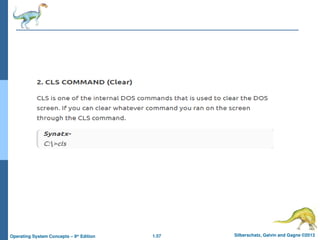
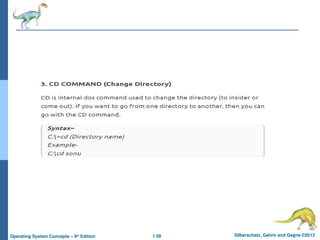
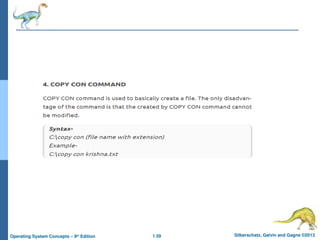
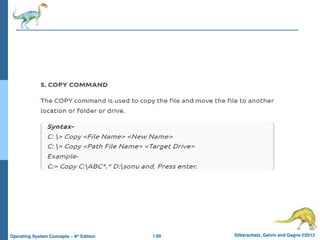
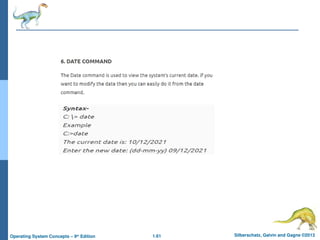
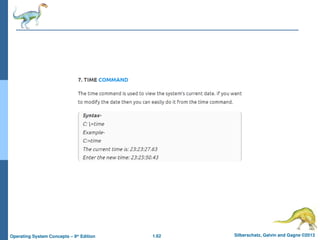
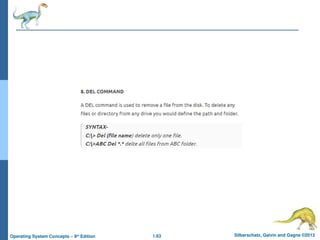
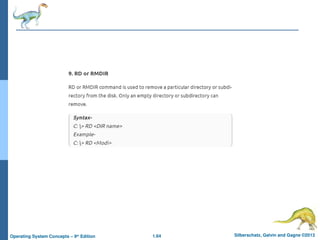
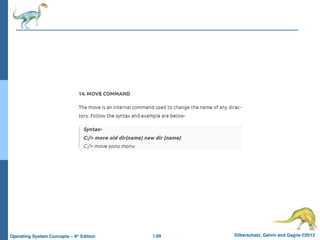
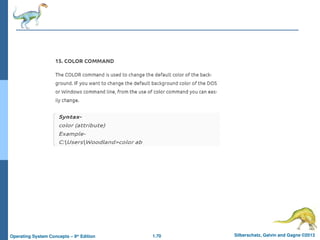
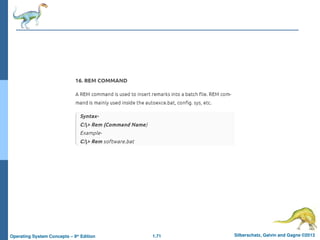
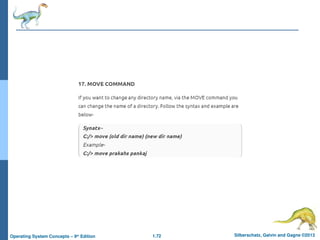
YoomifTube
PPT, PDF
44 views
CHAPTER ONE Introduction of operating system .ppt
Introduction of operating system, types of operating system
Devices & Hardware
◦
Read more
0
Save
Share
Embed
Embed presentation
Download
Download to read offline
1
/ 72
2
/ 72
3
/ 72
4
/ 72
5
/ 72
6
/ 72
7
/ 72
8
/ 72
9
/ 72
10
/ 72
11
/ 72
12
/ 72
13
/ 72
14
/ 72
15
/ 72
16
/ 72
17
/ 72
18
/ 72
19
/ 72
20
/ 72
21
/ 72
22
/ 72
23
/ 72
24
/ 72
25
/ 72
26
/ 72
27
/ 72
28
/ 72
29
/ 72
30
/ 72
31
/ 72
32
/ 72
33
/ 72
34
/ 72
35
/ 72
36
/ 72
37
/ 72
38
/ 72
39
/ 72
40
/ 72
41
/ 72
42
/ 72
43
/ 72
44
/ 72
45
/ 72
46
/ 72
47
/ 72
48
/ 72
49
/ 72
50
/ 72
51
/ 72
52
/ 72
53
/ 72
54
/ 72
55
/ 72
56
/ 72
57
/ 72
58
/ 72
59
/ 72
60
/ 72
61
/ 72
62
/ 72
63
/ 72
64
/ 72
65
/ 72
66
/ 72
67
/ 72
68
/ 72
69
/ 72
70
/ 72
71
/ 72
72
/ 72
More Related Content
PPT
ch1.ppt
by
MuhammadHussain552860
PPT
ch1.ppt
by
ssuserea967d
PPTX
ch1.pptx
by
SAVITHRIMC
PPT
Operating Systemmjjjjjjjjjjjjjjjjjjjvvvv
by
zoraizsaad50
PPT
ch1.ppt
by
Murali Krishna Kanajam
PPT
ch1.ppt
by
GMSakhawatHossain
PPT
ch1.ppt
by
GomathiShanmugam5
PPT
ch1.ppt
by
JamelPandiin2
ch1.ppt
by
MuhammadHussain552860
ch1.ppt
by
ssuserea967d
ch1.pptx
by
SAVITHRIMC
Operating Systemmjjjjjjjjjjjjjjjjjjjvvvv
by
zoraizsaad50
ch1.ppt
by
Murali Krishna Kanajam
ch1.ppt
by
GMSakhawatHossain
ch1.ppt
by
GomathiShanmugam5
ch1.ppt
by
JamelPandiin2
Similar to CHAPTER ONE Introduction of operating system .ppt
PPT
ch1.ppt
by
MalikNuman8
PPT
ch1.ppt
by
ssuserfdf7272
PPT
ch1.ppt
by
RishabhSharma846139
PPT
Operating system Introduction ch1 (1).ppt
by
nagaraju423282
PPT
ch1.ppt
by
Sami Mughal
PPT
Linux operating system fundamentals of Operating System
by
IraqReshi
PPT
ch1.ppt operating system from computer science for BSCs
by
IqraHanif27
PPT
ch1.ppthjhgjhghjghjgjhgugugugmhjgh iyuyuy
by
pavan402055
PPTX
cs8493 - operating systems unit 1
by
SIMONTHOMAS S
PPT
Ch1
by
neelamoberoi1030
PPT
Operating system introduction
by
SandeepKumar484971
PPTX
OS CH1.pptx Dayananda Sagar College Standard
by
namithabyrav06
PPT
Chapter 5 Networking ddddddddddddddddddd
by
cayewe7787
PPT
Operating systems Processes and concepts
by
Rajasekhar364622
PPT
operating system os chapter 1 ch 1 ch 1
by
sharmilabe1
PPT
OPERATING SYSTEM CHAPTER 1 FROM GALVIN BOOK
by
Sheba56
PPT
operating_syatem_bacis_introduction_to_operating_syatem.ppt
by
alistairb358
PPTX
ch1.pptxghhjvivuvuvuvftxtxgxycycycycygccyc
by
AvishekSanyal2
PPT
operating system galvin chapter 1 slides
by
geetanjaligarg3
PPT
Computer Operating Systems Management Chapter 1
by
aky888881
ch1.ppt
by
MalikNuman8
ch1.ppt
by
ssuserfdf7272
ch1.ppt
by
RishabhSharma846139
Operating system Introduction ch1 (1).ppt
by
nagaraju423282
ch1.ppt
by
Sami Mughal
Linux operating system fundamentals of Operating System
by
IraqReshi
ch1.ppt operating system from computer science for BSCs
by
IqraHanif27
ch1.ppthjhgjhghjghjgjhgugugugmhjgh iyuyuy
by
pavan402055
cs8493 - operating systems unit 1
by
SIMONTHOMAS S
Ch1
by
neelamoberoi1030
Operating system introduction
by
SandeepKumar484971
OS CH1.pptx Dayananda Sagar College Standard
by
namithabyrav06
Chapter 5 Networking ddddddddddddddddddd
by
cayewe7787
Operating systems Processes and concepts
by
Rajasekhar364622
operating system os chapter 1 ch 1 ch 1
by
sharmilabe1
OPERATING SYSTEM CHAPTER 1 FROM GALVIN BOOK
by
Sheba56
operating_syatem_bacis_introduction_to_operating_syatem.ppt
by
alistairb358
ch1.pptxghhjvivuvuvuvftxtxgxycycycycygccyc
by
AvishekSanyal2
operating system galvin chapter 1 slides
by
geetanjaligarg3
Computer Operating Systems Management Chapter 1
by
aky888881
More from YoomifTube
PPTX
Barreeffama teknikaa presentations .pptx
by
YoomifTube
PPTX
Ogwalaloo Sirnakkoo Oromoo (Oromo Ecopotics) 1-1.pptx
by
YoomifTube
PPTX
pp identify network equipment and hand tools.pptx
by
YoomifTube
PDF
ADMINISTRATT_AND_HARDWARE_NETWORK.ppt.pdf
by
YoomifTube
PPTX
pp level IV Provide Ntw Admin system.pptx
by
YoomifTube
PPTX
Lesson 1 - Computer and Mobile Fundamentals.pptx
by
YoomifTube
PPTX
Query and optimizing operating system.pptx
by
YoomifTube
PPTX
PowerPoint Leenjii dargaggoota kennamuu-1.pptx
by
YoomifTube
PPT
Chapter Five main management of memory .ppt
by
YoomifTube
PPTX
Chapter One Method of Teaching.pptx
by
YoomifTube
PPTX
Chapter Three Motivation.pptx
by
YoomifTube
PPT
Betselot liberalism and Neo liberalism.ppt
by
YoomifTube
Barreeffama teknikaa presentations .pptx
by
YoomifTube
Ogwalaloo Sirnakkoo Oromoo (Oromo Ecopotics) 1-1.pptx
by
YoomifTube
pp identify network equipment and hand tools.pptx
by
YoomifTube
ADMINISTRATT_AND_HARDWARE_NETWORK.ppt.pdf
by
YoomifTube
pp level IV Provide Ntw Admin system.pptx
by
YoomifTube
Lesson 1 - Computer and Mobile Fundamentals.pptx
by
YoomifTube
Query and optimizing operating system.pptx
by
YoomifTube
PowerPoint Leenjii dargaggoota kennamuu-1.pptx
by
YoomifTube
Chapter Five main management of memory .ppt
by
YoomifTube
Chapter One Method of Teaching.pptx
by
YoomifTube
Chapter Three Motivation.pptx
by
YoomifTube
Betselot liberalism and Neo liberalism.ppt
by
YoomifTube
CHAPTER ONE Introduction of operating system .ppt
1.
Silberschatz, Galvin and
Gagne ©2013 Operating System Concepts – 9th Edit9on Chapter 1: Introduction
2.
1.2 Silberschatz, Galvin
and Gagne ©2013 Operating System Concepts – 9th Edition Chapter 1: Introduction What Operating Systems Do Computer-System Organization Computer-System Architecture Operating-System Structure Operating-System Operations Process Management Memory Management Storage Management
3.
1.3 Silberschatz, Galvin
and Gagne ©2013 Operating System Concepts – 9th Edition Objectives To describe the basic organization of computer systems To provide a grand tour of the major components of operating systems To give an overview of the many types of computing environments To explore several open-source operating systems
4.
1.4 Silberschatz, Galvin
and Gagne ©2013 Operating System Concepts – 9th Edition What is an Operating System? A program that acts as an intermediary between a user of a computer and the computer hardware Operating system goals: Execute user programs and make solving user problems easier Make the computer system convenient to use Use the computer hardware in an efficient manner
5.
1.5 Silberschatz, Galvin
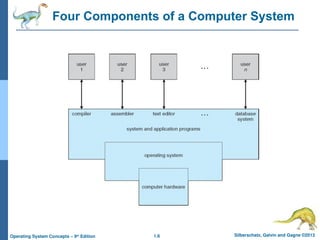
and Gagne ©2013 Operating System Concepts – 9th Edition Computer System Structure Computer system can be divided into four components: Hardware – provides basic computing resources CPU, memory, I/O devices Operating system Controls and coordinates use of hardware among various applications and users Application programs – define the ways in which the system resources are used to solve the computing problems of the users Word processors, compilers, web browsers, database systems, video games Users People, machines, other computers
6.
1.6 Silberschatz, Galvin
and Gagne ©2013 Operating System Concepts – 9th Edition Four Components of a Computer System
7.
1.7 Silberschatz, Galvin
and Gagne ©2013 Operating System Concepts – 9th Edition What Operating Systems Do Depends on the point of view Users want convenience, ease of use and good performance Don’t care about resource utilization But shared computer such as mainframe or minicomputer must keep all users happy Users of dedicate systems such as workstations have dedicated resources but frequently use shared resources from servers Handheld computers are resource poor, optimized for usability and battery life Some computers have little or no user interface, such as embedded computers in devices and automobiles
8.
1.8 Silberschatz, Galvin
and Gagne ©2013 Operating System Concepts – 9th Edition Operating System Definition OS is a resource allocator Manages all resources Decides between conflicting requests for efficient and fair resource use OS is a control program Controls execution of programs to prevent errors and improper use of the computer
9.
1.9 Silberschatz, Galvin
and Gagne ©2013 Operating System Concepts – 9th Edition Operating System Definition (Cont.) No universally accepted definition “Everything a vendor ships when you order an operating system” is a good approximation But varies wildly “The one program running at all times on the computer” is the kernel. Everything else is either a system program (ships with the operating system) , or an application program.
10.
1.10 Silberschatz, Galvin
and Gagne ©2013 Operating System Concepts – 9th Edition Computer Startup bootstrap program is loaded at power-up or reboot Typically stored in ROM or EPROM, generally known as firmware Initializes all aspects of system Loads operating system kernel and starts execution
11.
1.11 Silberschatz, Galvin
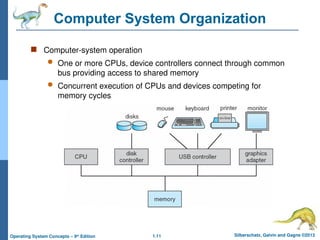
and Gagne ©2013 Operating System Concepts – 9th Edition Computer System Organization Computer-system operation One or more CPUs, device controllers connect through common bus providing access to shared memory Concurrent execution of CPUs and devices competing for memory cycles
12.
1.12 Silberschatz, Galvin
and Gagne ©2013 Operating System Concepts – 9th Edition Computer-System Operation I/O devices and the CPU can execute concurrently Each device controller is in charge of a particular device type Each device controller has a local buffer CPU moves data from/to main memory to/from local buffers I/O is from the device to local buffer of controller Device controller informs CPU that it has finished its operation by causing an interrupt
13.
1.13 Silberschatz, Galvin
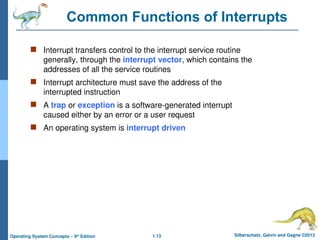
and Gagne ©2013 Operating System Concepts – 9th Edition Common Functions of Interrupts Interrupt transfers control to the interrupt service routine generally, through the interrupt vector, which contains the addresses of all the service routines Interrupt architecture must save the address of the interrupted instruction A trap or exception is a software-generated interrupt caused either by an error or a user request An operating system is interrupt driven
14.
1.14 Silberschatz, Galvin
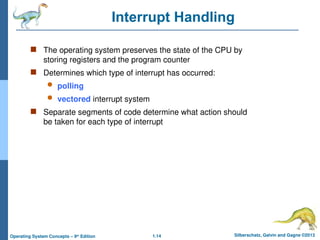
and Gagne ©2013 Operating System Concepts – 9th Edition Interrupt Handling The operating system preserves the state of the CPU by storing registers and the program counter Determines which type of interrupt has occurred: polling vectored interrupt system Separate segments of code determine what action should be taken for each type of interrupt
15.
1.15 Silberschatz, Galvin
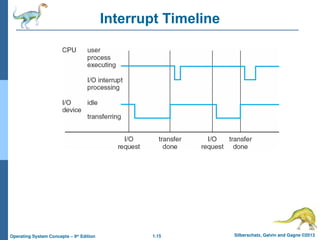
and Gagne ©2013 Operating System Concepts – 9th Edition Interrupt Timeline
16.
1.16 Silberschatz, Galvin
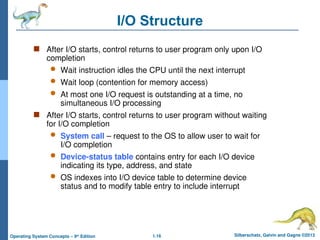
and Gagne ©2013 Operating System Concepts – 9th Edition I/O Structure After I/O starts, control returns to user program only upon I/O completion Wait instruction idles the CPU until the next interrupt Wait loop (contention for memory access) At most one I/O request is outstanding at a time, no simultaneous I/O processing After I/O starts, control returns to user program without waiting for I/O completion System call – request to the OS to allow user to wait for I/O completion Device-status table contains entry for each I/O device indicating its type, address, and state OS indexes into I/O device table to determine device status and to modify table entry to include interrupt
17.
1.17 Silberschatz, Galvin
and Gagne ©2013 Operating System Concepts – 9th Edition Storage Definitions and Notation Review The basic unit of computer storage is the bit. A bit can contain one of two values, 0 and 1. All other storage in a computer is based on collections of bits. Given enough bits, it is amazing how many things a computer can represent: numbers, letters, images, movies, sounds, documents, and programs, to name a few. A byte is 8 bits, and on most computers it is the smallest convenient chunk of storage. For example, most computers don’t have an instruction to move a bit but do have one to move a byte. A less common term is word, which is a given computer architecture’s native unit of data. A word is made up of one or more bytes. For example, a computer that has 64-bit registers and 64-bit memory addressing typically has 64-bit (8-byte) words. A computer executes many operations in its native word size rather than a byte at a time. Computer storage, along with most computer throughput, is generally measured and manipulated in bytes and collections of bytes. A kilobyte, or KB, is 1,024 bytes a megabyte, or MB, is 1,0242 bytes a gigabyte, or GB, is 1,0243 bytes a terabyte, or TB, is 1,0244 bytes a petabyte, or PB, is 1,0245 bytes Computer manufacturers often round off these numbers and say that a megabyte is 1 million bytes and a gigabyte is 1 billion bytes. Networking measurements are an exception to this general rule; they are given in bits (because networks move data a bit at a time).
18.
1.18 Silberschatz, Galvin
and Gagne ©2013 Operating System Concepts – 9th Edition Storage Structure Main memory – only large storage media that the CPU can access directly Random access Typically volatile Secondary storage – extension of main memory that provides large nonvolatile storage capacity Hard disks – rigid metal or glass platters covered with magnetic recording material Disk surface is logically divided into tracks, which are subdivided into sectors The disk controller determines the logical interaction between the device and the computer Solid-state disks – faster than hard disks, nonvolatile Various technologies Becoming more popular
19.
1.19 Silberschatz, Galvin
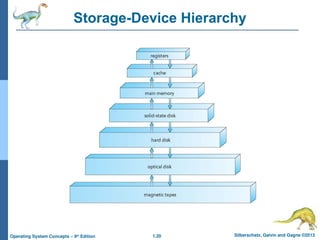
and Gagne ©2013 Operating System Concepts – 9th Edition Storage Hierarchy Storage systems organized in hierarchy Speed Cost Volatility Caching – copying information into faster storage system; main memory can be viewed as a cache for secondary storage Device Driver for each device controller to manage I/O Provides uniform interface between controller and kernel
20.
1.20 Silberschatz, Galvin
and Gagne ©2013 Operating System Concepts – 9th Edition Storage-Device Hierarchy
21.
1.21 Silberschatz, Galvin
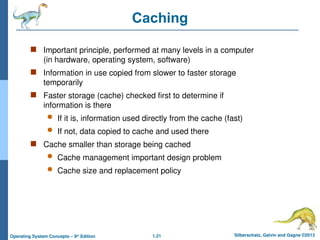
and Gagne ©2013 Operating System Concepts – 9th Edition Caching Important principle, performed at many levels in a computer (in hardware, operating system, software) Information in use copied from slower to faster storage temporarily Faster storage (cache) checked first to determine if information is there If it is, information used directly from the cache (fast) If not, data copied to cache and used there Cache smaller than storage being cached Cache management important design problem Cache size and replacement policy
22.
1.22 Silberschatz, Galvin
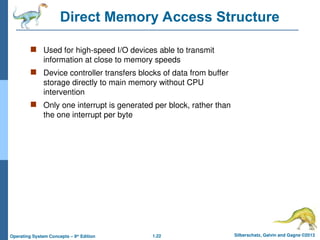
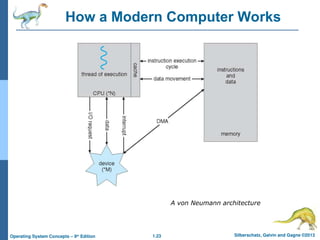
and Gagne ©2013 Operating System Concepts – 9th Edition Direct Memory Access Structure Used for high-speed I/O devices able to transmit information at close to memory speeds Device controller transfers blocks of data from buffer storage directly to main memory without CPU intervention Only one interrupt is generated per block, rather than the one interrupt per byte
23.
1.23 Silberschatz, Galvin
and Gagne ©2013 Operating System Concepts – 9th Edition How a Modern Computer Works A von Neumann architecture
24.
1.24 Silberschatz, Galvin
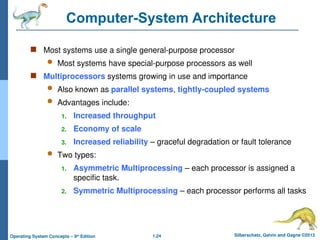
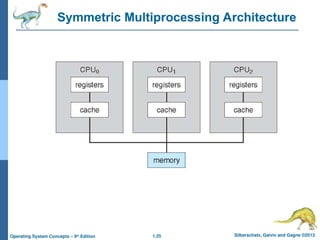
and Gagne ©2013 Operating System Concepts – 9th Edition Computer-System Architecture Most systems use a single general-purpose processor Most systems have special-purpose processors as well Multiprocessors systems growing in use and importance Also known as parallel systems, tightly-coupled systems Advantages include: 1. Increased throughput 2. Economy of scale 3. Increased reliability – graceful degradation or fault tolerance Two types: 1. Asymmetric Multiprocessing – each processor is assigned a specific task. 2. Symmetric Multiprocessing – each processor performs all tasks
25.
1.25 Silberschatz, Galvin
and Gagne ©2013 Operating System Concepts – 9th Edition Symmetric Multiprocessing Architecture
26.
1.26 Silberschatz, Galvin
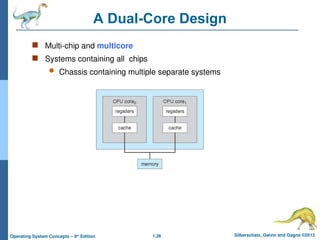
and Gagne ©2013 Operating System Concepts – 9th Edition A Dual-Core Design Multi-chip and multicore Systems containing all chips Chassis containing multiple separate systems
27.
1.27 Silberschatz, Galvin
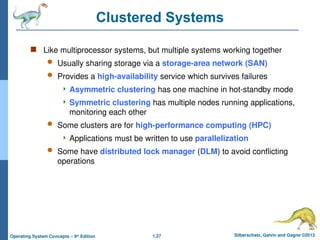
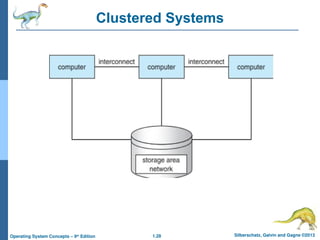
and Gagne ©2013 Operating System Concepts – 9th Edition Clustered Systems Like multiprocessor systems, but multiple systems working together Usually sharing storage via a storage-area network (SAN) Provides a high-availability service which survives failures Asymmetric clustering has one machine in hot-standby mode Symmetric clustering has multiple nodes running applications, monitoring each other Some clusters are for high-performance computing (HPC) Applications must be written to use parallelization Some have distributed lock manager (DLM) to avoid conflicting operations
28.
1.28 Silberschatz, Galvin
and Gagne ©2013 Operating System Concepts – 9th Edition Clustered Systems
29.
1.29 Silberschatz, Galvin
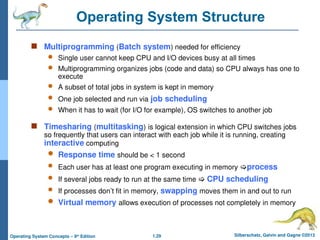
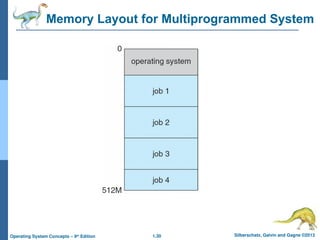
and Gagne ©2013 Operating System Concepts – 9th Edition Operating System Structure Multiprogramming (Batch system) needed for efficiency Single user cannot keep CPU and I/O devices busy at all times Multiprogramming organizes jobs (code and data) so CPU always has one to execute A subset of total jobs in system is kept in memory One job selected and run via job scheduling When it has to wait (for I/O for example), OS switches to another job Timesharing (multitasking) is logical extension in which CPU switches jobs so frequently that users can interact with each job while it is running, creating interactive computing Response time should be < 1 second Each user has at least one program executing in memory process If several jobs ready to run at the same time CPU scheduling If processes don’t fit in memory, swapping moves them in and out to run Virtual memory allows execution of processes not completely in memory
30.
1.30 Silberschatz, Galvin
and Gagne ©2013 Operating System Concepts – 9th Edition Memory Layout for Multiprogrammed System
31.
1.31 Silberschatz, Galvin
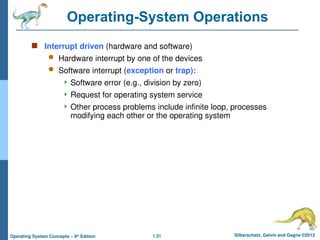
and Gagne ©2013 Operating System Concepts – 9th Edition Operating-System Operations Interrupt driven (hardware and software) Hardware interrupt by one of the devices Software interrupt (exception or trap): Software error (e.g., division by zero) Request for operating system service Other process problems include infinite loop, processes modifying each other or the operating system
32.
1.32 Silberschatz, Galvin
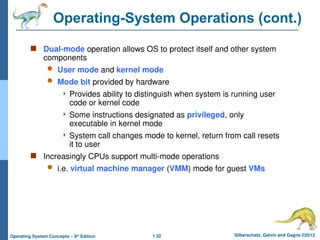
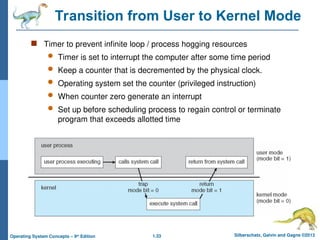
and Gagne ©2013 Operating System Concepts – 9th Edition Operating-System Operations (cont.) Dual-mode operation allows OS to protect itself and other system components User mode and kernel mode Mode bit provided by hardware Provides ability to distinguish when system is running user code or kernel code Some instructions designated as privileged, only executable in kernel mode System call changes mode to kernel, return from call resets it to user Increasingly CPUs support multi-mode operations i.e. virtual machine manager (VMM) mode for guest VMs
33.
1.33 Silberschatz, Galvin
and Gagne ©2013 Operating System Concepts – 9th Edition Transition from User to Kernel Mode Timer to prevent infinite loop / process hogging resources Timer is set to interrupt the computer after some time period Keep a counter that is decremented by the physical clock. Operating system set the counter (privileged instruction) When counter zero generate an interrupt Set up before scheduling process to regain control or terminate program that exceeds allotted time
34.
1.34 Silberschatz, Galvin
and Gagne ©2013 Operating System Concepts – 9th Edition Process Management A process is a program in execution. It is a unit of work within the system. Program is a passive entity, process is an active entity. Process needs resources to accomplish its task CPU, memory, I/O, files Initialization data Process termination requires reclaim of any reusable resources Single-threaded process has one program counter specifying location of next instruction to execute Process executes instructions sequentially, one at a time, until completion Multi-threaded process has one program counter per thread Typically system has many processes, some user, some operating system running concurrently on one or more CPUs Concurrency by multiplexing the CPUs among the processes / threads
35.
1.35 Silberschatz, Galvin
and Gagne ©2013 Operating System Concepts – 9th Edition Process Management Activities Creating and deleting both user and system processes Suspending and resuming processes Providing mechanisms for process synchronization Providing mechanisms for process communication Providing mechanisms for deadlock handling The operating system is responsible for the following activities in connection with process management:
36.
1.36 Silberschatz, Galvin
and Gagne ©2013 Operating System Concepts – 9th Edition Memory Management To execute a program all (or part) of the instructions must be in memory All (or part) of the data that is needed by the program must be in memory. Memory management determines what is in memory and when Optimizing CPU utilization and computer response to users Memory management activities Keeping track of which parts of memory are currently being used and by whom Deciding which processes (or parts thereof) and data to move into and out of memory Allocating and deallocating memory space as needed
37.
1.37 Silberschatz, Galvin
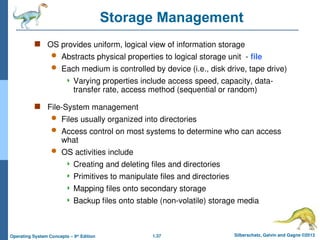
and Gagne ©2013 Operating System Concepts – 9th Edition Storage Management OS provides uniform, logical view of information storage Abstracts physical properties to logical storage unit - file Each medium is controlled by device (i.e., disk drive, tape drive) Varying properties include access speed, capacity, data- transfer rate, access method (sequential or random) File-System management Files usually organized into directories Access control on most systems to determine who can access what OS activities include Creating and deleting files and directories Primitives to manipulate files and directories Mapping files onto secondary storage Backup files onto stable (non-volatile) storage media
38.
1.38 Silberschatz, Galvin
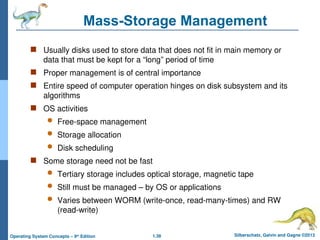
and Gagne ©2013 Operating System Concepts – 9th Edition Mass-Storage Management Usually disks used to store data that does not fit in main memory or data that must be kept for a “long” period of time Proper management is of central importance Entire speed of computer operation hinges on disk subsystem and its algorithms OS activities Free-space management Storage allocation Disk scheduling Some storage need not be fast Tertiary storage includes optical storage, magnetic tape Still must be managed – by OS or applications Varies between WORM (write-once, read-many-times) and RW (read-write)
39.
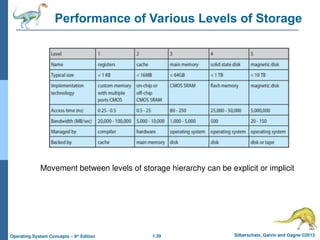
1.39 Silberschatz, Galvin
and Gagne ©2013 Operating System Concepts – 9th Edition Performance of Various Levels of Storage Movement between levels of storage hierarchy can be explicit or implicit
40.
Silberschatz, Galvin and
Gagne ©2013 Operating System Concepts – 9th Edit9on End of Chapter 1
41.
Silberschatz, Galvin and
Gagne ©2013 Operating System Concepts – 9th Edit9on Operating-System Structures
42.
1.42 Silberschatz, Galvin
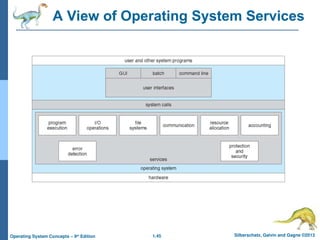
and Gagne ©2013 Operating System Concepts – 9th Edition Operating System Services Operating systems provide an environment for execution of programs and services to programs and users One set of operating-system services provides functions that are helpful to the user: User interface - Almost all operating systems have a user interface (UI). Varies between Command-Line (CLI), Graphics User Interface (GUI), Batch Program execution - The system must be able to load a program into memory and to run that program, end execution, either normally or abnormally (indicating error) I/O operations - A running program may require I/O, which may involve a file or an I/O device
43.
1.43 Silberschatz, Galvin
and Gagne ©2013 Operating System Concepts – 9th Edition Operating System Services (Cont.) One set of operating-system services provides functions that are helpful to the user (Cont.): File-system manipulation - The file system is of particular interest. Programs need to read and write files and directories, create and delete them, search them, list file Information, permission management. Communications – Processes may exchange information, on the same computer or between computers over a network Communications may be via shared memory or through message passing (packets moved by the OS) Error detection – OS needs to be constantly aware of possible errors May occur in the CPU and memory hardware, in I/O devices, in user program For each type of error, OS should take the appropriate action to ensure correct and consistent computing Debugging facilities can greatly enhance the user’s and programmer’s abilities to efficiently use the system
44.
1.44 Silberschatz, Galvin
and Gagne ©2013 Operating System Concepts – 9th Edition Operating System Services (Cont.) Another set of OS functions exists for ensuring the efficient operation of the system itself via resource sharing Resource allocation - When multiple users or multiple jobs running concurrently, resources must be allocated to each of them Many types of resources - CPU cycles, main memory, file storage, I/O devices. Accounting - To keep track of which users use how much and what kinds of computer resources Protection and security - The owners of information stored in a multiuser or networked computer system may want to control use of that information, concurrent processes should not interfere with each other Protection involves ensuring that all access to system resources is controlled Security of the system from outsiders requires user authentication, extends to defending external I/O devices from invalid access attempts
45.
1.45 Silberschatz, Galvin
and Gagne ©2013 Operating System Concepts – 9th Edition A View of Operating System Services
46.
1.46 Silberschatz, Galvin
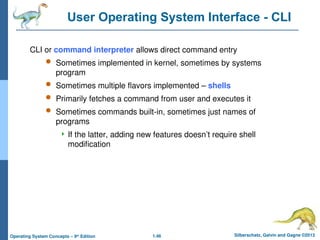
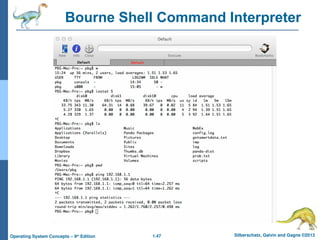
and Gagne ©2013 Operating System Concepts – 9th Edition User Operating System Interface - CLI CLI or command interpreter allows direct command entry Sometimes implemented in kernel, sometimes by systems program Sometimes multiple flavors implemented – shells Primarily fetches a command from user and executes it Sometimes commands built-in, sometimes just names of programs If the latter, adding new features doesn’t require shell modification
47.
1.47 Silberschatz, Galvin
and Gagne ©2013 Operating System Concepts – 9th Edition Bourne Shell Command Interpreter
48.
1.48 Silberschatz, Galvin
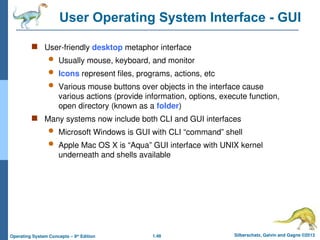
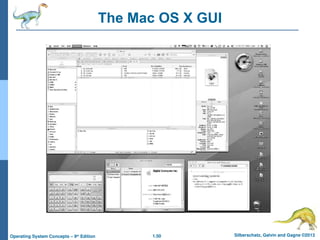
and Gagne ©2013 Operating System Concepts – 9th Edition User Operating System Interface - GUI User-friendly desktop metaphor interface Usually mouse, keyboard, and monitor Icons represent files, programs, actions, etc Various mouse buttons over objects in the interface cause various actions (provide information, options, execute function, open directory (known as a folder) Many systems now include both CLI and GUI interfaces Microsoft Windows is GUI with CLI “command” shell Apple Mac OS X is “Aqua” GUI interface with UNIX kernel underneath and shells available
49.
1.49 Silberschatz, Galvin
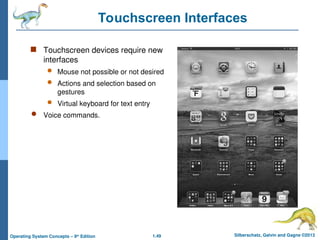
and Gagne ©2013 Operating System Concepts – 9th Edition Touchscreen Interfaces Touchscreen devices require new interfaces Mouse not possible or not desired Actions and selection based on gestures Virtual keyboard for text entry Voice commands.
50.
1.50 Silberschatz, Galvin
and Gagne ©2013 Operating System Concepts – 9th Edition The Mac OS X GUI
51.
1.51 Silberschatz, Galvin
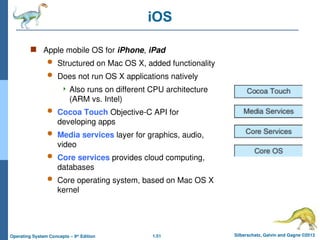
and Gagne ©2013 Operating System Concepts – 9th Edition iOS Apple mobile OS for iPhone, iPad Structured on Mac OS X, added functionality Does not run OS X applications natively Also runs on different CPU architecture (ARM vs. Intel) Cocoa Touch Objective-C API for developing apps Media services layer for graphics, audio, video Core services provides cloud computing, databases Core operating system, based on Mac OS X kernel
52.
1.52 Silberschatz, Galvin
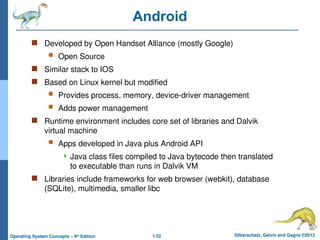
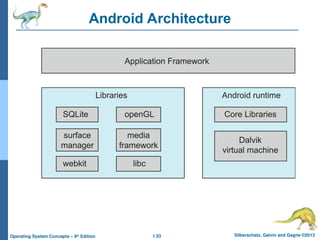
and Gagne ©2013 Operating System Concepts – 9th Edition Android Developed by Open Handset Alliance (mostly Google) Open Source Similar stack to IOS Based on Linux kernel but modified Provides process, memory, device-driver management Adds power management Runtime environment includes core set of libraries and Dalvik virtual machine Apps developed in Java plus Android API Java class files compiled to Java bytecode then translated to executable than runs in Dalvik VM Libraries include frameworks for web browser (webkit), database (SQLite), multimedia, smaller libc
53.
1.53 Silberschatz, Galvin
and Gagne ©2013 Operating System Concepts – 9th Edition Android Architecture
54.
1.54 Silberschatz, Galvin
and Gagne ©2013 Operating System Concepts – 9th Edition DOS with Syntax and Examples
55.
1.55 Silberschatz, Galvin
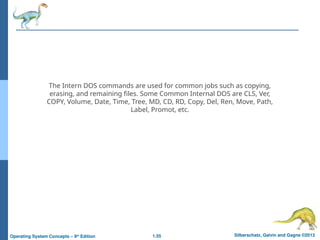
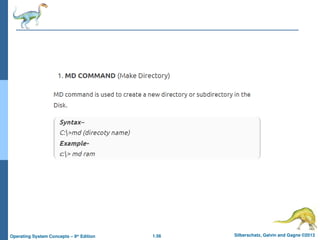
and Gagne ©2013 Operating System Concepts – 9th Edition The Intern DOS commands are used for common jobs such as copying, erasing, and remaining files. Some Common Internal DOS are CLS, Ver, COPY, Volume, Date, Time, Tree, MD, CD, RD, Copy, Del, Ren, Move, Path, Label, Promot, etc.
56.
1.56 Silberschatz, Galvin
and Gagne ©2013 Operating System Concepts – 9th Edition
57.
1.57 Silberschatz, Galvin
and Gagne ©2013 Operating System Concepts – 9th Edition
58.
1.58 Silberschatz, Galvin
and Gagne ©2013 Operating System Concepts – 9th Edition
59.
1.59 Silberschatz, Galvin
and Gagne ©2013 Operating System Concepts – 9th Edition
60.
1.60 Silberschatz, Galvin
and Gagne ©2013 Operating System Concepts – 9th Edition
61.
1.61 Silberschatz, Galvin
and Gagne ©2013 Operating System Concepts – 9th Edition
62.
1.62 Silberschatz, Galvin
and Gagne ©2013 Operating System Concepts – 9th Edition
63.
1.63 Silberschatz, Galvin
and Gagne ©2013 Operating System Concepts – 9th Edition
64.
1.64 Silberschatz, Galvin
and Gagne ©2013 Operating System Concepts – 9th Edition
65.
1.65 Silberschatz, Galvin
and Gagne ©2013 Operating System Concepts – 9th Edition
66.
1.66 Silberschatz, Galvin
and Gagne ©2013 Operating System Concepts – 9th Edition
67.
1.67 Silberschatz, Galvin
and Gagne ©2013 Operating System Concepts – 9th Edition
68.
1.68 Silberschatz, Galvin
and Gagne ©2013 Operating System Concepts – 9th Edition
69.
1.69 Silberschatz, Galvin
and Gagne ©2013 Operating System Concepts – 9th Edition
70.
1.70 Silberschatz, Galvin
and Gagne ©2013 Operating System Concepts – 9th Edition
71.
1.71 Silberschatz, Galvin
and Gagne ©2013 Operating System Concepts – 9th Edition
72.
1.72 Silberschatz, Galvin
and Gagne ©2013 Operating System Concepts – 9th Edition
Download