OBJECT ORIENTEDPROGRAMMING
UNIT-IV
MULTITHREADING AND GENERIC
PROGRAMMING
Inter Thread Communication
Thread Synchronization
Thread Deamon
THREAD SYNCHRONIZATION
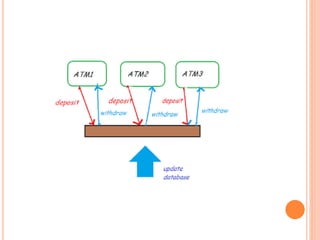
 Multi threaded Programming
 Pbm:
 When multiple threads try to access the same
resource
produce erroneous and unforeseen results.
 Soln:
 Synchronized keyword or method
 is used to provide mutually exclusive access to a
shared resource with multiple threads
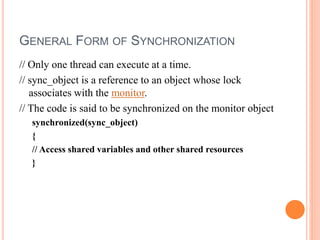
GENERAL FORM OF SYNCHRONIZATION
// Only one thread can execute at a time.
// sync_object is a reference to an object whose lock
associates with the monitor.
// The code is said to be synchronized on the monitor object
synchronized(sync_object)
{
// Access shared variables and other shared resources
}
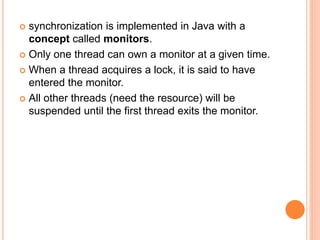
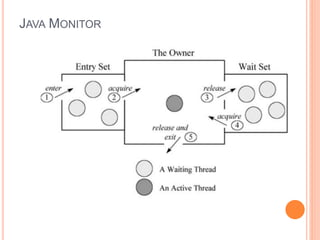
 synchronization is implemented in Java with a
concept called monitors.
 Only one thread can own a monitor at a given time.
 When a thread acquires a lock, it is said to have
entered the monitor.
 All other threads (need the resource) will be
suspended until the first thread exits the monitor.
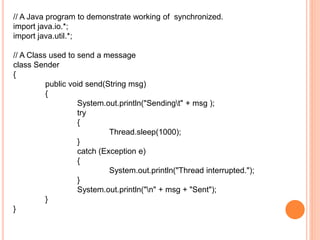
// A Java program to demonstrate working of synchronized.
import java.io.*;
import java.util.*;
// A Class used to send a message
class Sender
{
public void send(String msg)
{
System.out.println("Sendingt" + msg );
try
{
Thread.sleep(1000);
}
catch (Exception e)
{
System.out.println("Thread interrupted.");
}
System.out.println("n" + msg + "Sent");
}
}
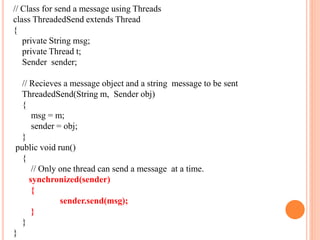
// Class for send a message using Threads
class ThreadedSend extends Thread
{
private String msg;
private Thread t;
Sender sender;
// Recieves a message object and a string message to be sent
ThreadedSend(String m, Sender obj)
{
msg = m;
sender = obj;
}
public void run()
{
// Only one thread can send a message at a time.
synchronized(sender)
{
sender.send(msg);
}
}
}
// Driver class
class SyncDemo
{
public static void main(String args[])
{
Sender snd = new Sender();
ThreadedSend S1 = new ThreadedSend( " Hi " , snd );
ThreadedSend S2 = new ThreadedSend( " Bye " , snd );
S1.start();
S2.start();
try
{
// wait for threads to end
S1.join(); S2.join();
}
catch(Exception e)
{ System.out.println("Interrupted"); }
}
}
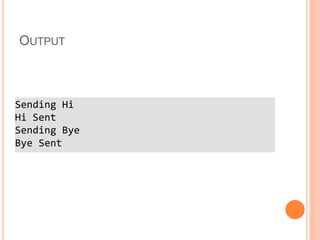
OUTPUT
Sending Hi
Hi Sent
Sending Bye
Bye Sent
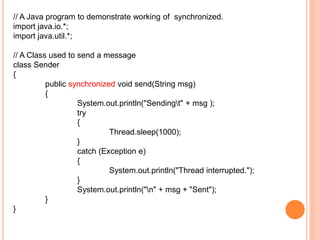
// A Java program to demonstrate working of synchronized.
import java.io.*;
import java.util.*;
// A Class used to send a message
class Sender
{
public synchronized void send(String msg)
{
System.out.println("Sendingt" + msg );
try
{
Thread.sleep(1000);
}
catch (Exception e)
{
System.out.println("Thread interrupted.");
}
System.out.println("n" + msg + "Sent");
}
}
JAVA MONITOR
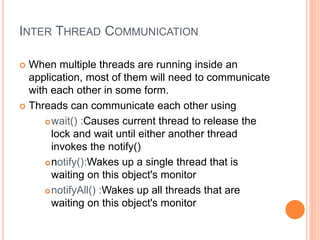
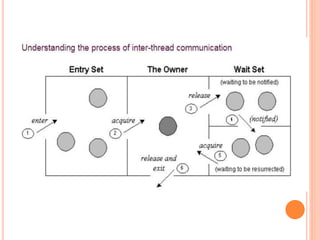
INTER THREAD COMMUNICATION
 When multiple threads are running inside an
application, most of them will need to communicate
with each other in some form.
 Threads can communicate each other using
wait() :Causes current thread to release the
lock and wait until either another thread
invokes the notify()
notify():Wakes up a single thread that is
waiting on this object's monitor
notifyAll() :Wakes up all threads that are
waiting on this object's monitor
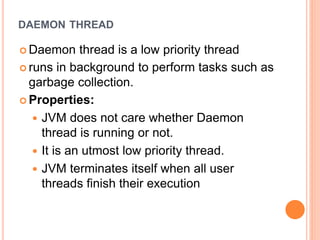
DAEMON THREAD
 Daemon thread is a low priority thread
 runs in background to perform tasks such as
garbage collection.
 Properties:
 JVM does not care whether Daemon
thread is running or not.
 It is an utmost low priority thread.
 JVM terminates itself when all user
threads finish their execution
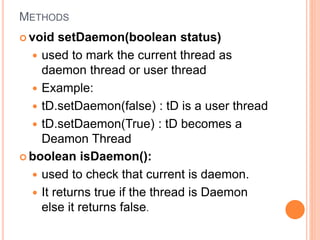
METHODS
 void setDaemon(boolean status)
 used to mark the current thread as
daemon thread or user thread
 Example:
 tD.setDaemon(false) : tD is a user thread
 tD.setDaemon(True) : tD becomes a
Deamon Thread
 boolean isDaemon():
 used to check that current is daemon.
 It returns true if the thread is Daemon
else it returns false.
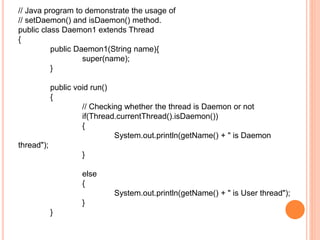
// Java program to demonstrate the usage of
// setDaemon() and isDaemon() method.
public class Daemon1 extends Thread
{
public Daemon1(String name){
super(name);
}
public void run()
{
// Checking whether the thread is Daemon or not
if(Thread.currentThread().isDaemon())
{
System.out.println(getName() + " is Daemon
thread");
}
else
{
System.out.println(getName() + " is User thread");
}
}
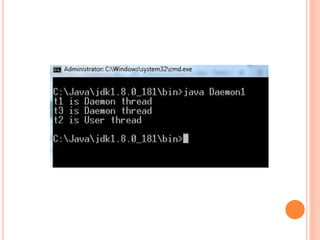
public static void main(String[] args)
{
Daemon1 t1 = new Daemon1("t1");
Daemon1 t2 = new Daemon1("t2");
Daemon1 t3 = new Daemon1("t3");
// Setting user thread t1 to Daemon
t1.setDaemon(true);
// starting first 2 threads
t1.start();
t2.start();
// Setting user thread t3 to Daemon
t3.setDaemon(true);
t3.start();
}
}
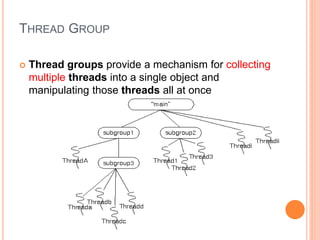
THREAD GROUP
 Thread groups provide a mechanism for collecting
multiple threads into a single object and
manipulating those threads all at once
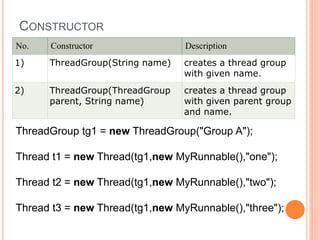
CONSTRUCTOR
No. Constructor Description
1) ThreadGroup(String name) creates a thread group
with given name.
2) ThreadGroup(ThreadGroup
parent, String name)
creates a thread group
with given parent group
and name.
ThreadGroup tg1 = new ThreadGroup("Group A");
Thread t1 = new Thread(tg1,new MyRunnable(),"one");
Thread t2 = new Thread(tg1,new MyRunnable(),"two");
Thread t3 = new Thread(tg1,new MyRunnable(),"three");

oop-unit-iv-ppt.ppt

  • 1.
    OBJECT ORIENTEDPROGRAMMING UNIT-IV MULTITHREADING ANDGENERIC PROGRAMMING Inter Thread Communication Thread Synchronization Thread Deamon
  • 2.
    THREAD SYNCHRONIZATION  Multithreaded Programming  Pbm:  When multiple threads try to access the same resource produce erroneous and unforeseen results.  Soln:  Synchronized keyword or method  is used to provide mutually exclusive access to a shared resource with multiple threads
  • 4.
    GENERAL FORM OFSYNCHRONIZATION // Only one thread can execute at a time. // sync_object is a reference to an object whose lock associates with the monitor. // The code is said to be synchronized on the monitor object synchronized(sync_object) { // Access shared variables and other shared resources }
  • 5.
     synchronization isimplemented in Java with a concept called monitors.  Only one thread can own a monitor at a given time.  When a thread acquires a lock, it is said to have entered the monitor.  All other threads (need the resource) will be suspended until the first thread exits the monitor.
  • 6.
    // A Javaprogram to demonstrate working of synchronized. import java.io.*; import java.util.*; // A Class used to send a message class Sender { public void send(String msg) { System.out.println("Sendingt" + msg ); try { Thread.sleep(1000); } catch (Exception e) { System.out.println("Thread interrupted."); } System.out.println("n" + msg + "Sent"); } }
  • 7.
    // Class forsend a message using Threads class ThreadedSend extends Thread { private String msg; private Thread t; Sender sender; // Recieves a message object and a string message to be sent ThreadedSend(String m, Sender obj) { msg = m; sender = obj; } public void run() { // Only one thread can send a message at a time. synchronized(sender) { sender.send(msg); } } }
  • 8.
    // Driver class classSyncDemo { public static void main(String args[]) { Sender snd = new Sender(); ThreadedSend S1 = new ThreadedSend( " Hi " , snd ); ThreadedSend S2 = new ThreadedSend( " Bye " , snd ); S1.start(); S2.start(); try { // wait for threads to end S1.join(); S2.join(); } catch(Exception e) { System.out.println("Interrupted"); } } }
  • 9.
  • 10.
    // A Javaprogram to demonstrate working of synchronized. import java.io.*; import java.util.*; // A Class used to send a message class Sender { public synchronized void send(String msg) { System.out.println("Sendingt" + msg ); try { Thread.sleep(1000); } catch (Exception e) { System.out.println("Thread interrupted."); } System.out.println("n" + msg + "Sent"); } }
  • 11.
  • 12.
    INTER THREAD COMMUNICATION When multiple threads are running inside an application, most of them will need to communicate with each other in some form.  Threads can communicate each other using wait() :Causes current thread to release the lock and wait until either another thread invokes the notify() notify():Wakes up a single thread that is waiting on this object's monitor notifyAll() :Wakes up all threads that are waiting on this object's monitor
  • 14.
    DAEMON THREAD  Daemonthread is a low priority thread  runs in background to perform tasks such as garbage collection.  Properties:  JVM does not care whether Daemon thread is running or not.  It is an utmost low priority thread.  JVM terminates itself when all user threads finish their execution
  • 15.
    METHODS  void setDaemon(booleanstatus)  used to mark the current thread as daemon thread or user thread  Example:  tD.setDaemon(false) : tD is a user thread  tD.setDaemon(True) : tD becomes a Deamon Thread  boolean isDaemon():  used to check that current is daemon.  It returns true if the thread is Daemon else it returns false.
  • 16.
    // Java programto demonstrate the usage of // setDaemon() and isDaemon() method. public class Daemon1 extends Thread { public Daemon1(String name){ super(name); } public void run() { // Checking whether the thread is Daemon or not if(Thread.currentThread().isDaemon()) { System.out.println(getName() + " is Daemon thread"); } else { System.out.println(getName() + " is User thread"); } }
  • 17.
    public static voidmain(String[] args) { Daemon1 t1 = new Daemon1("t1"); Daemon1 t2 = new Daemon1("t2"); Daemon1 t3 = new Daemon1("t3"); // Setting user thread t1 to Daemon t1.setDaemon(true); // starting first 2 threads t1.start(); t2.start(); // Setting user thread t3 to Daemon t3.setDaemon(true); t3.start(); } }
  • 19.
    THREAD GROUP  Threadgroups provide a mechanism for collecting multiple threads into a single object and manipulating those threads all at once
  • 20.
    CONSTRUCTOR No. Constructor Description 1)ThreadGroup(String name) creates a thread group with given name. 2) ThreadGroup(ThreadGroup parent, String name) creates a thread group with given parent group and name. ThreadGroup tg1 = new ThreadGroup("Group A"); Thread t1 = new Thread(tg1,new MyRunnable(),"one"); Thread t2 = new Thread(tg1,new MyRunnable(),"two"); Thread t3 = new Thread(tg1,new MyRunnable(),"three");