2
Contents
• Introduction toFunctions
• Types of Functions
• Built in Functions
• User defined Functions
• User defined Functions
• Function Declaration
• Function Definition
• Calling a Function
3.
3
Introduction to Functions
•Functions can be used to define reusable code and
organize and simplify code.
• C++ allows programmers to define functions to divide the
large program into smaller units.
• When the no of lines of code is large, then it is difficult to
understand the program, so functions are created in the
program to improve the quality of the program design.
• Each function performs some specific task.
• For example , if we have a calculator program, we can create
a separate function for each operation such as addition,
subtraction, multiplication etc.
4.
4
Introduction to Functions
•Functions avoids the repetition of code in the program.
• Function can be reused many times in a program, thus
reducing the size of the program.
6
1. Built inFunctions
• These are functions which are predefined in a
programming language that can be used in any program.
• They are also known as library functions.
• There are different categories of built in functions such
as: math functions , input/output and string functions.
7.
7
2. User definedFunctions
• These functions are written by the programmers
according to their requirements for the specific use.
• User defined functions contains three parts:
i. Function Prototype
ii. Function Definition
iii. Calling a Function
8.
8
Function Prototype
• Itis also called as function declaration .
• It provides the model of a function.
• In function prototype, the following information about
the function is provided to the compiler:
– Name of function
– The return type of a function (type of output)
– The number and types of arguments (parameters) of
function. (type of input data for the function)
• Function prototype is an optional part .
9.
9
Examples of FunctionPrototype
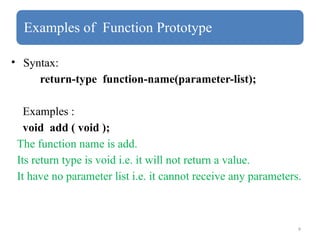
• Syntax:
return-type function-name(parameter-list);
Examples :
void add ( void );
The function name is add.
Its return type is void i.e. it will not return a value.
It have no parameter list i.e. it cannot receive any parameters.
10.
10
Examples of FunctionPrototype
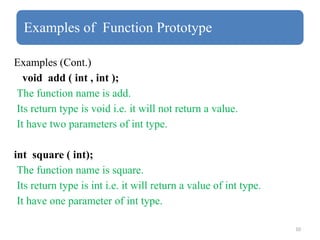
Examples (Cont.)
void add ( int , int );
The function name is add.
Its return type is void i.e. it will not return a value.
It have two parameters of int type.
int square ( int);
The function name is square.
Its return type is int i.e. it will return a value of int type.
It have one parameter of int type.
11.
11
Function Definition
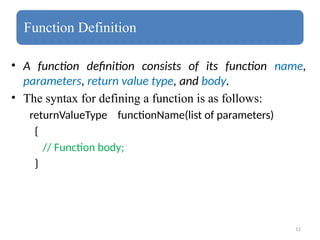
• Afunction definition consists of its function name,
parameters, return value type, and body.
• The syntax for defining a function is as follows:
returnValueType functionName(list of parameters)
{
// Function body;
}
12.
12
Example of FunctionDefinition
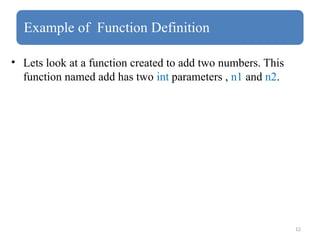
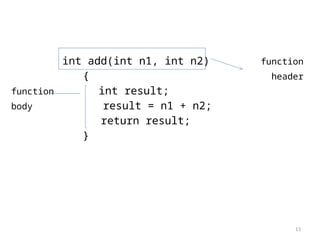
• Lets look at a function created to add two numbers. This
function named add has two int parameters , n1 and n2.
13.
13
int add(int n1,int n2) function
{ header
function int result;
body result = n1 + n2;
return result;
}
14.
14
Function Definition (Cont.)
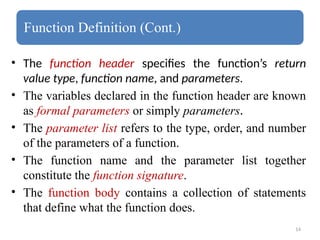
•The function header specifies the function’s return
value type, function name, and parameters.
• The variables declared in the function header are known
as formal parameters or simply parameters.
• The parameter list refers to the type, order, and number
of the parameters of a function.
• The function name and the parameter list together
constitute the function signature.
• The function body contains a collection of statements
that define what the function does.
15.
15
Calling a Function
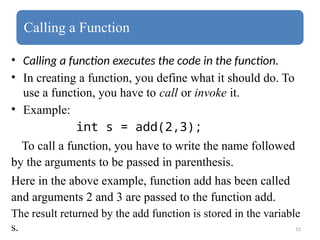
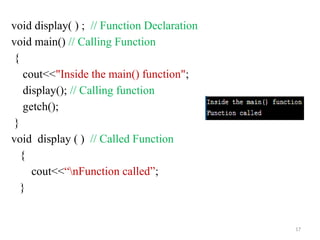
•Calling a function executes the code in the function.
• In creating a function, you define what it should do. To
use a function, you have to call or invoke it.
• Example:
int s = add(2,3);
To call a function, you have to write the name followed
by the arguments to be passed in parenthesis.
Here in the above example, function add has been called
and arguments 2 and 3 are passed to the function add.
The result returned by the add function is stored in the variable
s.
19
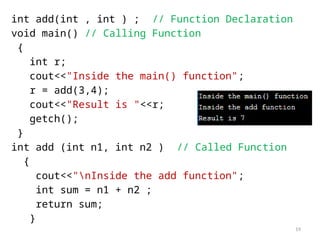
int add(int ,int ) ; // Function Declaration
void main() // Calling Function
{
int r;
cout<<"Inside the main() function";
r = add(3,4);
cout<<"Result is "<<r;
getch();
}
int add (int n1, int n2 ) // Called Function
{
cout<<"nInside the add function";
int sum = n1 + n2 ;
return sum;
}



![Chapter_1.__Functions_in_C++[1].pdf](https://cdn.slidesharecdn.com/ss_thumbnails/chapter1-230901115452-13a8ca1c-thumbnail.jpg?width=640&height=640&fit=bounds)


