Chapter 2: Functionsin C++
Contents
2.1 Basic concept and need of function
2.2 Declaring and defining a function
2.3 Function components (parameters and arguments)
2.4 Calling /invoking function by value and reference parameters
2.5 functions Recursion
2.
What is aFunction?
• A function in C++ is a block of code that performs a specific
task.
• It is a self-contained module that can be used to execute a
particular operation, and it can be called (or invoked) from other
parts of a program.
• Functions help in organizing code, reducing redundancy, and
making programs more modular and easier to understand.
3.
2.1 Basic conceptand need of function
Modularity
▪ Modular programming
▪ Breaking down the design of a program into individual
components (modules) that can be programmed and
tested independently.
▪ Modules
▪ Can be written and tested separately.
▪ Testing is easier (smaller).
▪ Doesn't need to be retested.
▪ Reduces length of program.
3
4.
Functions in C++
▪Modules in C++ are called functions.
▪ Function – is a sub program that can act on data and return a value.
▪ Function is a block of organized and reusable code that usually
perform a single and related action.
▪ Every C++ program has at least one function, main(). It is called when a
program starts.
▪ A C++ program might contain more than one function.
▪ Functions may interact using function call.
4
5.
Needs of function
▪Functions are essential in programming for several reasons:
▪ Modularity
▪ Functions allow you to break down complex problems into
smaller, manageable pieces (easier to understand and maintain).
▪ Reusability
▪ Once a function is defined, it can be reused throughout the
program without needing to rewrite code.
▪ Abstraction
▪Functions enable you to hide complex implementation
details. Users can call the function without needing to
understand its inner workings.
6.
…continued
▪ Testing andDebugging
✓Functions can be tested independently, which helps identify bugs
more easily.
✓By breaking the program into smaller functions, it is easier to
isolate and fix errors. If a function is not working correctly, it can be
debugged independently.
▪ Organization
✓Grouping related code into functions helps in organizing code
logically.
▪Parameterization
✓Functions can take parameters, allowing for flexible input and
behavior.
▪ Scope Management
✓Functions help manage variable scope, reducing the likelihood
of variable name conflicts and unintended interactions between
different parts of your code.
7.
Types of function
Functionsin C++ come in two varieties:
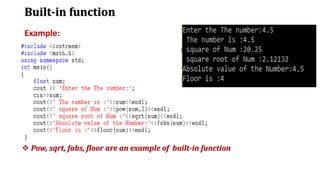
▪ built-in:
✓ part of your compiler package.
✓ E.g. pow(), sqrt()….
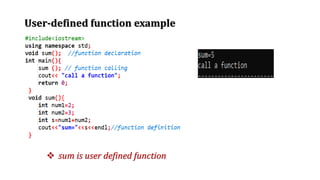
▪ user-defined:
✓ Functions defined by a user.
✓ These are the functions which are created by the C++
programmer.
✓ It reduces complexity of a big program and optimizes the
code
7
2.2 Declaring anddefining a function
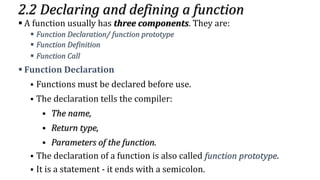
▪ A function usually has three components. They are:
▪ Function Declaration/ function prototype
▪ Function Definition
▪ Function Call
▪ Function Declaration
▪ Functions must be declared before use.
▪ The declaration tells the compiler:
▪ The name,
▪ Return type,
▪ Parameters of the function.
▪ The declaration of a function is also called function prototype.
▪ It is a statement - it ends with a semicolon.
11.
…continued
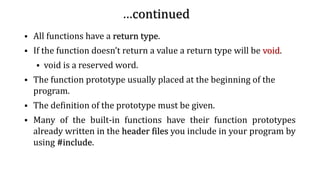
▪ All functionshave a return type.
▪ If the function doesn’t return a value a return type will be void.
▪ void is a reserved word.
▪ The function prototype usually placed at the beginning of the
program.
▪ The definition of the prototype must be given.
▪ Many of the built-in functions have their function prototypes
already written in the header files you include in your program by
using #include.
11
12.
…continued
▪ Syntax forfunction declaration:
▪ Return type function_name (type [parameterName1],type
[ParameterName2],…… );
▪ Example: long Area(int, int); Or
long Area(int length, int width);
void sum(float x, float y);
▪ The function return type: specifies the type of value the function
returns.
▪ The function name is simply a unique identifier
13.
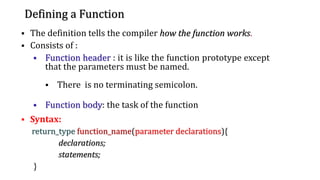
Defining a Function
▪The definition tells the compiler how the function works.
▪ Consists of :
▪ Function header : it is like the function prototype except
that the parameters must be named.
▪ There is no terminating semicolon.
▪ Function body: the task of the function
▪ Syntax:
return_type function_name(parameter declarations){
declarations;
statements;
}
13
14.
…continued
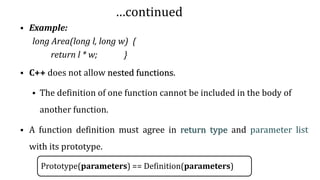
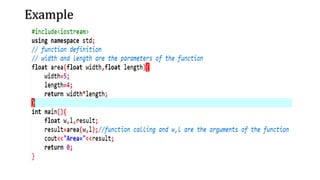
▪ Example:
long Area(longl, long w) {
return l * w; }
▪ C++ does not allow nested functions.
▪ The definition of one function cannot be included in the body of
another function.
▪ A function definition must agree in return type and parameter list
with its prototype.
Prototype(parameters) == Definition(parameters)
14
15.
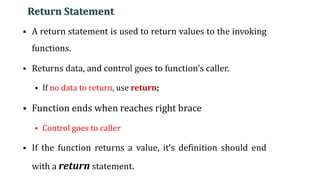
Return Statement
▪ Areturn statement is used to return values to the invoking
functions.
▪ Returns data, and control goes to function’s caller.
▪ If no data to return, use return;
▪ Function ends when reaches right brace
▪ Control goes to caller
▪ If the function returns a value, it’s definition should end
with a return statement.
15
16.
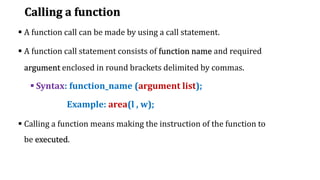
Calling a function
▪A function call can be made by using a call statement.
▪ A function call statement consists of function name and required
argument enclosed in round brackets delimited by commas.
▪ Syntax: function_name (argument list);
Example: area(l , w);
▪ Calling a function means making the instruction of the function to
be executed.
17.
…continue…continued…continued
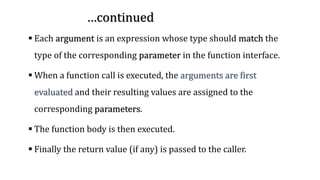
▪ Each argumentis an expression whose type should match the
type of the corresponding parameter in the function interface.
▪ When a function call is executed, the arguments are first
evaluated and their resulting values are assigned to the
corresponding parameters.
▪ The function body is then executed.
▪ Finally the return value (if any) is passed to the caller.
18.
2.3 Function components(parameters and arguments)
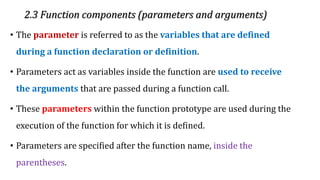
• The parameter is referred to as the variables that are defined
during a function declaration or definition.
• Parameters act as variables inside the function are used to receive
the arguments that are passed during a function call.
• These parameters within the function prototype are used during the
execution of the function for which it is defined.
• Parameters are specified after the function name, inside the
parentheses.
19.
…continued…continued…continued
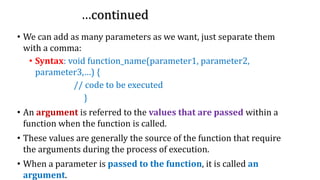
• We canadd as many parameters as we want, just separate them
with a comma:
• Syntax: void function_name(parameter1, parameter2,
parameter3,…) {
// code to be executed
}
• An argument is referred to the values that are passed within a
function when the function is called.
• These values are generally the source of the function that require
the arguments during the process of execution.
• When a parameter is passed to the function, it is called an
argument.
20.
…continued…continued…continued
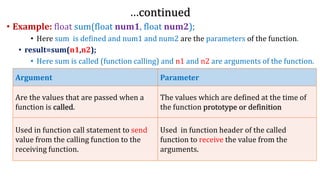
• Example: floatsum(float num1, float num2);
• Here sum is defined and num1 and num2 are the parameters of the function.
• result=sum(n1,n2);
• Here sum is called (function calling) and n1 and n2 are arguments of the function.
Argument Parameter
Are the values that are passed when a
function is called.
The values which are defined at the time of
the function prototype or definition
Used in function call statement to send
value from the calling function to the
receiving function.
Used in function header of the called
function to receive the value from the
arguments.
Function with DefaultArgument
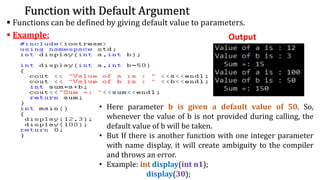
▪ Functions can be defined by giving default value to parameters.
▪ Example: Output
• Here parameter b is given a default value of 50. So,
whenever the value of b is not provided during calling, the
default value of b will be taken.
• But If there is another function with one integer parameter
with name display, it will create ambiguity to the compiler
and throws an error.
• Example: int display(int n1);
display(30);
23.
2.4 Calling /invokingfunction by value and reference parameters
• To call a function, you simply need to pass the required parameters
along with function name.
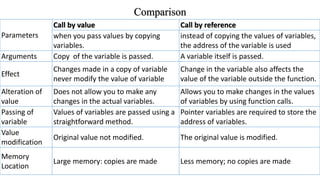
• There are Two methods of passing arguments as parameters when
function is called:
• Call by value: copy of the variable value is passed
• Call by Reference: Address of actual argument is passed
24.
…continued
▪ Formal parameters:These are those parameters that are passed
during the declaration/ definition of a function.
▪ Formal arguments: the arguments we use during a function
definition.
▪ Actual parameters: These are those parameters that are passed
while calling the function.
▪ Actual arguments : Arguments passed to the function during
function call
25.
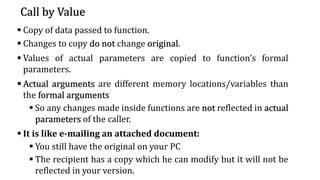
Call by Value
▪Copy of data passed to function.
▪ Changes to copy do not change original.
▪ Values of actual parameters are copied to function’s formal
parameters.
▪ Actual arguments are different memory locations/variables than
the formal arguments
▪ So any changes made inside functions are not reflected in actual
parameters of the caller.
▪ It is like e-mailing an attached document:
▪ You still have the original on your PC
▪ The recipient has a copy which he can modify but it will not be
reflected in your version.
26.
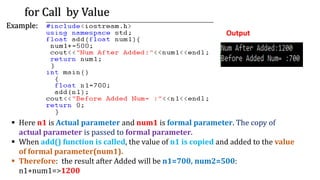
for Call byValue
Example:
Output
▪ Here n1 is Actual parameter and num1 is formal parameter. The copy of
actual parameter is passed to formal parameter.
▪ When add() function is called, the value of n1 is copied and added to the value
of formal parameter(num1).
▪ Therefore: the result after Added will be n1=700, num2=500:
n1+num1=>1200
27.
Call by Reference
▪Call by Reference is a method in which it passes the reference
or address of the actual parameter to the function's formal
parameters.
▪ If there is any change in the values inside the function, it
reflects that change in the actual values.
▪ Using "pass by reference", the formal parameter receives a
reference (or pointer) to the actual data in the calling
environment.
▪ Hence any changes to the formal parameter are reflected in the
actual parameter in the calling environment.
▪ Call by Reference means that we deal with addresses where the
values are stored
28.
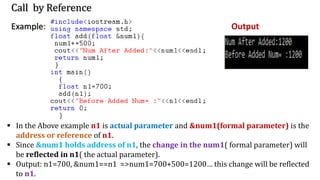
Call by Reference
Example:Output
▪ In the Above example n1 is actual parameter and &num1(formal parameter) is the
address or reference of n1.
▪ Since &num1 holds address of n1, the change in the num1( formal parameter) will
be reflected in n1( the actual parameter).
▪ Output: n1=700, &num1==n1 =>num1=700+500=1200… this change will be reflected
to n1.
29.
Comparison
Parameters
Call by valueCall by reference
when you pass values by copying
variables.
instead of copying the values of variables,
the address of the variable is used
Arguments Copy of the variable is passed. A variable itself is passed.
Effect
Changes made in a copy of variable
never modify the value of variable
Change in the variable also affects the
value of the variable outside the function.
Alteration of
value
Does not allow you to make any
changes in the actual variables.
Allows you to make changes in the values
of variables by using function calls.
Passing of
variable
Values of variables are passed using a
straightforward method.
Pointer variables are required to store the
address of variables.
Value
modification
Original value not modified. The original value is modified.
Memory
Location
Large memory: copies are made Less memory; no copies are made
30.
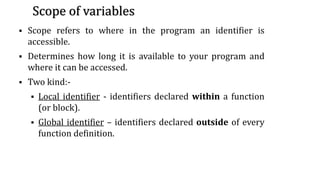
Scope of variables
▪Scope refers to where in the program an identifier is
accessible.
▪ Determines how long it is available to your program and
where it can be accessed.
▪ Two kind:-
▪ Local identifier - identifiers declared within a function
(or block).
▪ Global identifier – identifiers declared outside of every
function definition.
30
31.
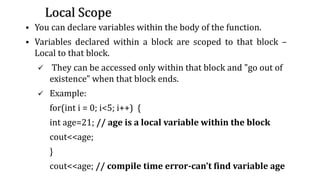
Local Scope
▪ Youcan declare variables within the body of the function.
▪ Variables declared within a block are scoped to that block –
Local to that block.
✓ They can be accessed only within that block and "go out of
existence" when that block ends.
✓ Example:
for(int i = 0; i<5; i++) {
int age=21; // age is a local variable within the block
cout<<age;
}
cout<<age; // compile time error-can’t find variable age
31
32.
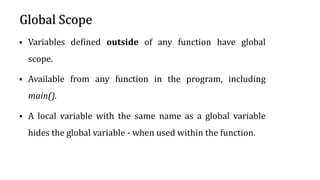
Global Scope
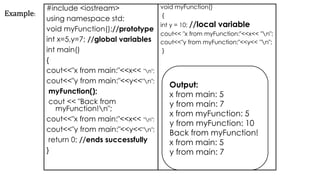
▪ Variablesdefined outside of any function have global
scope.
▪ Available from any function in the program, including
main().
▪ A local variable with the same name as a global variable
hides the global variable - when used within the function.
32
33.
#include <iostream>
using namespacestd;
void myFunction();//prototype
int x=5,y=7; //global variables
int main()
{
cout<<"x from main:"<<x<< "n";
cout<<"y from main:"<<y<<"n";
myFunction();
cout << "Back from
myFunction!n";
cout<<"x from main:"<<x<< "n";
cout<<"y from main:"<<y<<"n";
return 0; //ends successfully
}
void myFunction()
{
int y = 10; //local variable
cout<< "x from myFunction:"<<x<< "n";
cout<<"y from myFunction:"<<y<< "n";
}
Output:
x from main: 5
y from main: 7
x from myFunction: 5
y from myFunction: 10
Back from myFunction!
x from main: 5
y from main: 7
Example:
34.
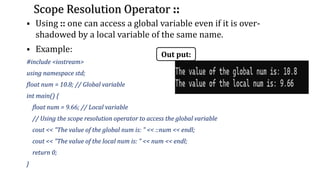
Scope Resolution Operator::
▪ Using :: one can access a global variable even if it is over-
shadowed by a local variable of the same name.
▪ Example:
#include <iostream>
using namespace std;
float num = 10.8; // Global variable
int main() {
float num = 9.66; // Local variable
// Using the scope resolution operator to access the global variable
cout << "The value of the global num is: " << ::num << endl;
cout << "The value of the local num is: " << num << endl;
return 0;
}
Out put:
35.
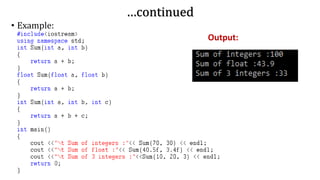
Function overloading
▪ Itis the process of having two or more function with the same
name, but different in parameters.
▪ Functions with the same name are called overloaded functions.
C++ requires that each overloaded functions differ in its argument
list or type.
▪ It increases the readability of the program because you don't need
to use different names for the same action.
▪ A call-time c++ complier selects the proper function by examining
the number, type and order of the parameters.
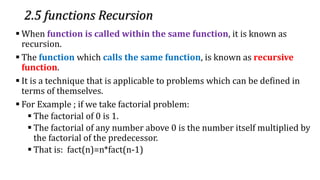
2.5 functions Recursion
▪When function is called within the same function, it is known as
recursion.
▪ The function which calls the same function, is known as recursive
function.
▪ It is a technique that is applicable to problems which can be defined in
terms of themselves.
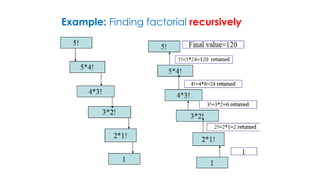
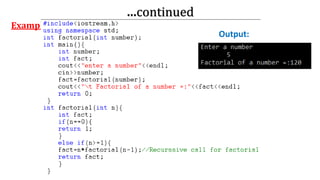
▪ For Example ; if we take factorial problem:
▪ The factorial of 0 is 1.
▪ The factorial of any number above 0 is the number itself multiplied by
the factorial of the predecessor.
▪ That is: fact(n)=n*fact(n-1)
![…continued
▪ Syntax for function declaration:
▪ Return type function_name (type [parameterName1],type
[ParameterName2],…… );
▪ Example: long Area(int, int); Or
long Area(int length, int width);
void sum(float x, float y);
▪ The function return type: specifies the type of value the function
returns.
▪ The function name is simply a unique identifier](https://image.slidesharecdn.com/chapter2function-251126090533-be0e39d3/85/Chapter-2-Function-Elementary-Programming-pdf-12-320.jpg)


![Chapter_1.__Functions_in_C++[1].pdf](https://cdn.slidesharecdn.com/ss_thumbnails/chapter1-230901115452-13a8ca1c-thumbnail.jpg?width=640&height=640&fit=bounds)


![Cardio vascular_ system-1[1].pdf](https://cdn.slidesharecdn.com/ss_thumbnails/cardiovascularsystem-11-251126110900-78e18dd1-thumbnail.jpg?width=640&height=640&fit=bounds)


