10월 24일
제 생일 -_-;;
자전거 타기
균형을 잡아야지!
자빠지지 말아야지! 라고 외우면…
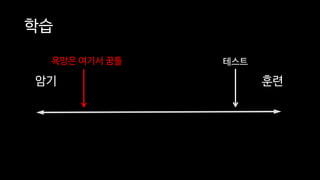
학습
훈련암기
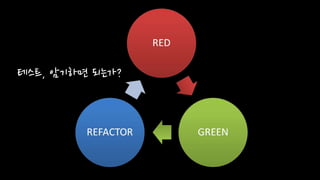
테스트, 암기하면 되는가?
학습
욕망은 여기서 꿈틀 테스트
훈련암기
테스트는 암기가 아니라 훈련이다.
테스트에는 많은 장애물을 있을텐데...
장애물 없는 길로 다닐 수 없을까요?
테스트하기 쉬운 코드로
개발하기
• 정진욱
• 백앤드
• 언어: F# / C#
• 운영환경: Azure
• 아키텍처: CQRS
(with Event Sourcing)
• 정진욱
• 최근 관심 분야
• Domain Modeling Made Functional
• Property-based testing
• 페이스북
• jinwook.chung.167
• 이메일
• jwchung@hotmail.com
• 블로그
• https://jwchung.github.io
예제 코드를 C#으로 작성하였습니다.
C#에 익숙하지 않으시다면…
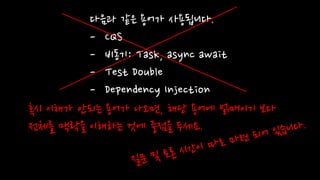
다음과 같은 용어가 사용됩니다.
- CQS
- 비동기: Task, async await
- Test Double
- Dependency Injection
혹시 이해가 안되는 용어가 나오면, 해당 용어에 얽매이기 보다
전체를 맥락을 이해하는 것에 중점을 두세요.
테스트하기 쉬운 코드란?
테스트 장애물은?
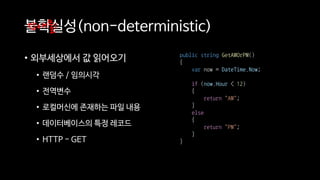
불확실성(non-deterministic)
• 외부세상에서 값 읽어오기
• 랜덤수 / 임의시각
• 전역변수
• 로컬머신에 존재하는 파일 내용
• 데이터베이스의 특정 레코드
• HTTP - GET
장애물1
public string GetAMOrPM()
{
var now = DateTime.Now;
if (now.Hour < 12)
{
return "AM";
}
else
{
return "PM";
}
}
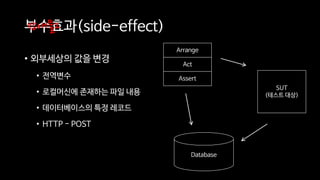
부수효과(side-effect)
• 외부세상의 값을 변경
• 전역변수
• 로컬머신에 존재하는 파일 내용
• 데이터베이스의 특정 레코드
• HTTP - POST
장애물2
Arrange
Act
Assert
SUT
(테스트 대상)
Database
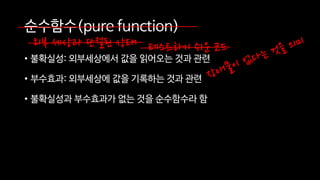
순수함수(pure function)
• 불확실성: 외부세상에서 값을 읽어오는 것과 관련
• 부수효과: 외부세상에 값을 기록하는 것과 관련
• 불확실성과 부수효과가 없는 것을 순수함수라 함
테스트하기 쉬운 코드외부 세상과 단절된 상태
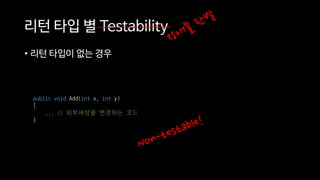
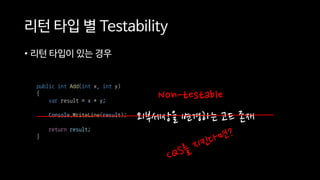
리턴 타입 별 Testability
• 리턴 타입이 없는 경우
public void Add(int x, int y)
{
... // 외부세상을 변경하는 코드
}
리턴 타입 별 Testability
• 리턴 타입이 있는 경우
외부세상을 변경하는 코드 존재
public int Add(int x, int y)
{
var result = x + y;
Console.WriteLine(result);
return result;
}
Non-testable
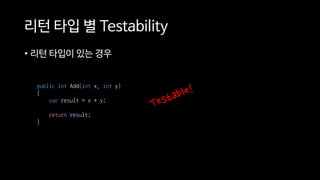
리턴 타입 별 Testability
• 리턴 타입이 있는 경우
public int Add(int x, int y)
{
var result = x + y;
return result;
}
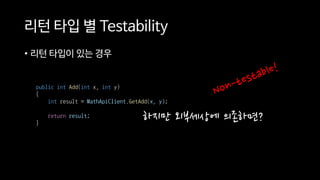
리턴 타입 별 Testability
• 리턴 타입이 있는 경우
public int Add(int x, int y)
{
int result = MathApiClient.GetAdd(x, y);
return result;
}
하지만 외부세상에 의존하면?
외부세상에 의존하지 않고
값을 리턴하는 경우
테스트하기 쉬운 코드란?
하스켈: IO<T>
C#: Task<T>
자바: Future<T>
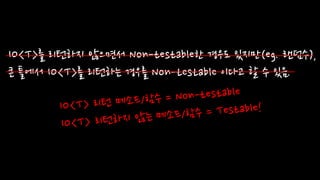
IO<T>를 리턴하지 않으면서 Non-testable한 경우도 있지만(eg. 랜덤수),
큰 틀에서 IO<T>를 리턴하는 경우를 Non-testable 이다고 할 수 있음.
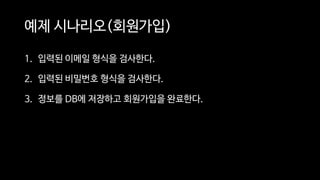
예제 시나리오(회원가입)
1. 입력된 이메일 형식을 검사한다.
2. 입력된 비밀번호 형식을 검사한다.
3. 정보를 DB에 저장하고 회원가입을 완료한다.
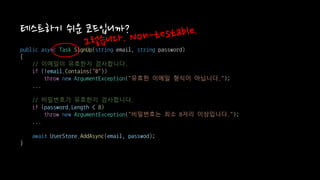
public async Task SignUp(string email, string password)
{
// 이메일이 유효한지 검사합니다.
if (!email.Contains("@"))
throw new ArgumentException("유효한 이메일 형식이 아닙니다.");
...
// 비밀번호가 유효한지 검사합니다.
if (password.Length < 8)
throw new ArgumentException("비밀번호는 최소 8자리 이상입니다.");
...
await UserStore.AddAsync(email, passwod);
}

테스트하기 쉬운 코드입니까?
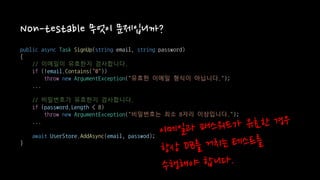
Non-testable 무엇이 문제입니까?
public async Task SignUp(string email, string password)
{
// 이메일이 유효한지 검사합니다.
if (!email.Contains("@"))
throw new ArgumentException("유효한 이메일 형식이 아닙니다.");
...
// 비밀번호가 유효한지 검사합니다.
if (password.Length < 8)
throw new ArgumentException("비밀번호는 최소 8자리 이상입니다.");
...
await UserStore.AddAsync(email, passwod);
}

어떻게 비용을 낮출 수 있을까요?
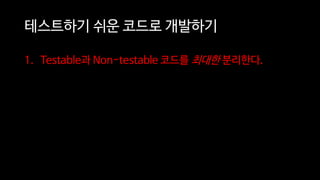
테스트하기 쉬운 코드로 개발하기
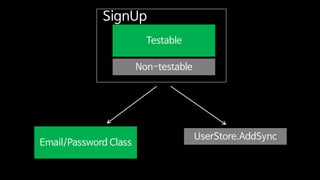
1. Testable과 Non-testable 코드를 최대한 분리한다.
Testable
Non-testable
SignUp
Email/Password Class
UserStore.AddSync
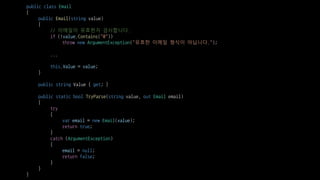
public class Email
{
public Email(string value)
{
// 이메일이 유효한지 검사합니다.
if (!value.Contains("@"))
throw new ArgumentException("유효한 이메일 형식이 아닙니다.");
...
this.Value = value;
}
public string Value { get; }
public static bool TryParse(string value, out Email email)
{
try
{
var email = new Email(value);
return true;
}
catch (ArgumentException)
{
email = null;
return false;
}
}
}
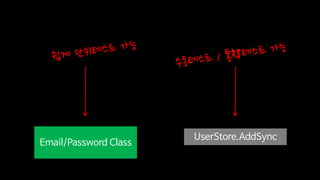
Email/Password Class
UserStore.AddSync
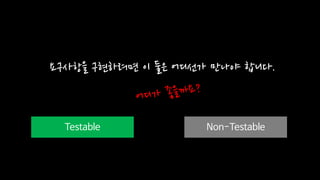
Testable Non-Testable
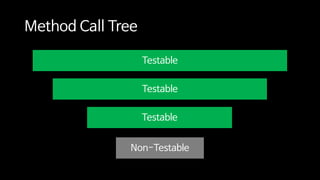
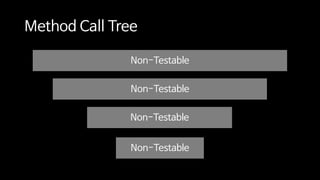
요구사항을 구현하려면 이 둘은 어디선가 만나야 합니다.
Testable
Testable
Testable
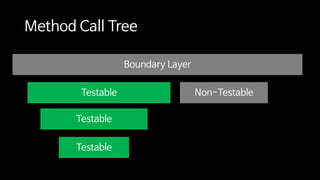
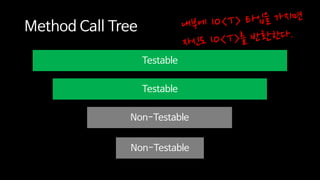
Method Call Tree
Non-Testable
Testable
Testable
Non-Testable
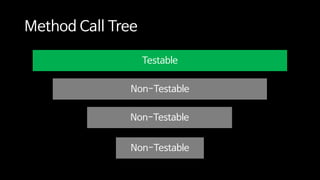
Method Call Tree
Non-Testable
Testable
Non-Testable
Non-Testable
Method Call Tree
Non-Testable
Non-Testable
Non-Testable
Non-Testable
Method Call Tree
Non-Testable
어디서 만나야 Testable 코드를
작성할 수 있을까요?
최대한 많이
Testable
Testable
Testable
Method Call Tree
Non-Testable
Boundary Layer
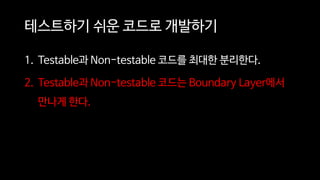
테스트하기 쉬운 코드로 개발하기
1. Testable과 Non-testable 코드를 최대한 분리한다.
2. Testable과 Non-testable 코드는 Boundary Layer에서
만나게 한다.
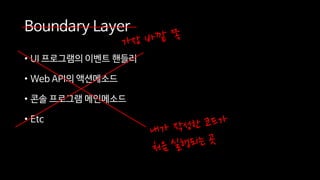
Boundary Layer
• UI 프로그램의 이벤트 핸들러
• Web API의 액션메소드
• 콘솔 프로그램 메인메소드
• Etc
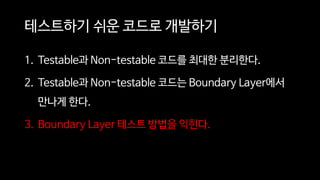
테스트하기 쉬운 코드로 개발하기
1. Testable과 Non-testable 코드를 최대한 분리한다.
2. Testable과 Non-testable 코드는 Boundary Layer에서
만나게 한다.
3. Boundary Layer 테스트 방법을 익힌다.
Boundary Layer 테스트란?
public class AccountController : ApiController
{
[HttpPost]
public async Task<IHttpActionResult> SignUpAsync(
string email, string password)
{
try
{
var emailObj = new Email(email);
var passwordObj = new Password(password);
await new UserStore().AddAsync(emailObj, passwordObj);
await new EmailConfirmation().SendAsync(emailObj);
return this.Ok();
}
catch (ArgumentException exception)
{
return this.BadRequest(exception.Message);
}
}
}
단위테스트 완료!
수동/통합테스트 완료!
Boundary Layer를 단위테스트하는
방법은?
public class AccountController : ApiController
{
public AccountController(
IUserStore userStore, IEmailConfirmation emailConfirmation)
{
this.UserStore = userStore
?? throw new ArgumentNullException(nameof(userStore));
this.EmailConfirmation = emailConfirmation
?? throw new ArgumentNullException(nameof(emailConfirmation));
}
public IUserStore UserStore { get; }
public IEmailConfirmation EmailConfirmation { get; }
[HttpPost]
public async Task<IHttpActionResult> SignUpAsync(
string email, string password)
{
try
{
var emailObj = new Email(email);
var passwordObj = new Password(password);
await this.UserStore.AddAsync(emailObj, passwordObj);
await this.EmailConfirmation.SendAsync(emailObj);
return this.Ok();
}
catch (ArgumentException exception)
{
return this.BadRequest(exception.Message);
}
}
}
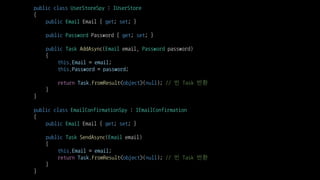
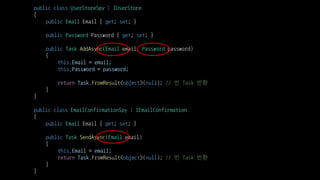
public class UserStoreSpy : IUserStore
{
public Email Email { get; set; }
public Password Password { get; set; }
public Task AddAsync(Email email, Password password)
{
this.Email = email;
this.Password = password;
return Task.FromResult<object>(null); // 빈 Task 반환
}
}
public class EmailConfirmationSpy : IEmailConfirmation
{
public Email Email { get; set; }
public Task SendAsync(Email email)
{
this.Email = email;
return Task.FromResult<object>(null); // 빈 Task 반환
}
}
[Fact]
public async Task SignUpAsyncWithValidEmailAndPassowordReturnsOkResult()
{
// Arrange
var userStoreSpy = new UserStoreSpy();
var emailConfirmationSpy = new EmailConfirmationSpy();
var sut = new AccountController(userStoreSpy, emailConfirmationSpy);
string email = "jwchung@hotmail.com";
string password = "P@assW0rd";
// Act
await sut.SignUpAsync(email, password);
// Assert
Assert.Equal(new Email(email), userStoreSpy.Email);
Assert.Equals(new Password(password), userStoreSpy.Password);
Assert.Equal(new Email(email), emailConfirmationSpy.Email);
}
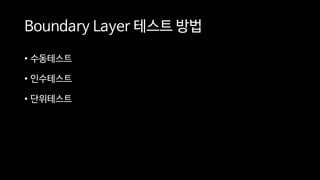
Boundary Layer 테스트 방법
• 수동테스트
• 인수테스트
• 단위테스트
정리
테스트하기 쉬운 코드로 개발하는 방법?
정리
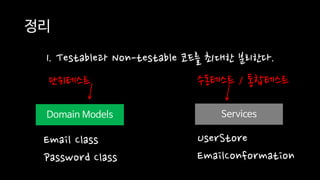
1. Testable과 Non-testable 코드를 최대한 분리한다.
Domain Models Services
Email Class
Password Class
UserStore
EmailConformation
단위테스트 수동테스트 / 통합테스트
정리
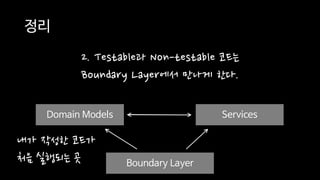
2. Testable과 Non-testable 코드는
Boundary Layer에서 만나게 한다.
Domain Models Services
Boundary Layer
Domain Models
내가 작성한 코드가
처음 실행되는 곳
public class UserStoreSpy : IUserStore
{
public Email Email { get; set; }
public Password Password { get; set; }
public Task AddAsync(Email email, Password password)
{
this.Email = email;
this.Password = password;
return Task.FromResult<object>(null); // 빈 Task 반환
}
}
public class EmailConfirmationSpy : IEmailConfirmation
{
public Email Email { get; set; }
public Task SendAsync(Email email)
{
this.Email = email;
return Task.FromResult<object>(null); // 빈 Task 반환
}
}
정리
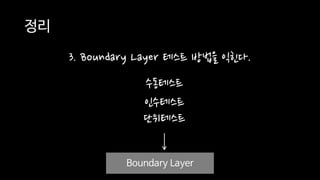
3. Boundary Layer 테스트 방법을 익힌다.
Boundary Layer
수동테스트
인수테스트
단위테스트
감사합니다.

[OKKY 세미나] 정진욱 - 테스트하기 쉬운 코드로 개발하기

  • 1.
  • 2.
  • 3.
  • 4.
  • 5.
    학습 욕망은 여기서 꿈틀테스트 훈련암기
  • 6.
  • 7.
  • 8.
    장애물 없는 길로다닐 수 없을까요?
  • 9.
  • 10.
  • 12.
    • 백앤드 • 언어:F# / C# • 운영환경: Azure • 아키텍처: CQRS (with Event Sourcing)
  • 13.
    • 정진욱 • 최근관심 분야 • Domain Modeling Made Functional • Property-based testing • 페이스북 • jinwook.chung.167 • 이메일 • jwchung@hotmail.com • 블로그 • https://jwchung.github.io
  • 14.
    예제 코드를 C#으로작성하였습니다. C#에 익숙하지 않으시다면…
  • 15.
    다음과 같은 용어가사용됩니다. - CQS - 비동기: Task, async await - Test Double - Dependency Injection 혹시 이해가 안되는 용어가 나오면, 해당 용어에 얽매이기 보다 전체를 맥락을 이해하는 것에 중점을 두세요.
  • 16.
  • 17.
    불확실성(non-deterministic) • 외부세상에서 값읽어오기 • 랜덤수 / 임의시각 • 전역변수 • 로컬머신에 존재하는 파일 내용 • 데이터베이스의 특정 레코드 • HTTP - GET 장애물1 public string GetAMOrPM() { var now = DateTime.Now; if (now.Hour < 12) { return "AM"; } else { return "PM"; } }
  • 18.
    부수효과(side-effect) • 외부세상의 값을변경 • 전역변수 • 로컬머신에 존재하는 파일 내용 • 데이터베이스의 특정 레코드 • HTTP - POST 장애물2 Arrange Act Assert SUT (테스트 대상) Database
  • 19.
    순수함수(pure function) • 불확실성:외부세상에서 값을 읽어오는 것과 관련 • 부수효과: 외부세상에 값을 기록하는 것과 관련 • 불확실성과 부수효과가 없는 것을 순수함수라 함 테스트하기 쉬운 코드외부 세상과 단절된 상태
  • 20.
    리턴 타입 별Testability • 리턴 타입이 없는 경우 public void Add(int x, int y) { ... // 외부세상을 변경하는 코드 }
  • 21.
    리턴 타입 별Testability • 리턴 타입이 있는 경우 외부세상을 변경하는 코드 존재 public int Add(int x, int y) { var result = x + y; Console.WriteLine(result); return result; } Non-testable
  • 22.
    리턴 타입 별Testability • 리턴 타입이 있는 경우 public int Add(int x, int y) { var result = x + y; return result; }
  • 23.
    리턴 타입 별Testability • 리턴 타입이 있는 경우 public int Add(int x, int y) { int result = MathApiClient.GetAdd(x, y); return result; } 하지만 외부세상에 의존하면?
  • 24.
    외부세상에 의존하지 않고 값을리턴하는 경우 테스트하기 쉬운 코드란? 하스켈: IO<T> C#: Task<T> 자바: Future<T>
  • 25.
    IO<T>를 리턴하지 않으면서Non-testable한 경우도 있지만(eg. 랜덤수), 큰 틀에서 IO<T>를 리턴하는 경우를 Non-testable 이다고 할 수 있음.
  • 26.
    예제 시나리오(회원가입) 1. 입력된이메일 형식을 검사한다. 2. 입력된 비밀번호 형식을 검사한다. 3. 정보를 DB에 저장하고 회원가입을 완료한다.
  • 27.
    public async TaskSignUp(string email, string password) { // 이메일이 유효한지 검사합니다. if (!email.Contains("@")) throw new ArgumentException("유효한 이메일 형식이 아닙니다."); ... // 비밀번호가 유효한지 검사합니다. if (password.Length < 8) throw new ArgumentException("비밀번호는 최소 8자리 이상입니다."); ... await UserStore.AddAsync(email, passwod); } 테스트하기 쉬운 코드입니까?

  • 28.
    Non-testable 무엇이 문제입니까? publicasync Task SignUp(string email, string password) { // 이메일이 유효한지 검사합니다. if (!email.Contains("@")) throw new ArgumentException("유효한 이메일 형식이 아닙니다."); ... // 비밀번호가 유효한지 검사합니다. if (password.Length < 8) throw new ArgumentException("비밀번호는 최소 8자리 이상입니다."); ... await UserStore.AddAsync(email, passwod); }
  • 29.
    어떻게 비용을 낮출수 있을까요?
  • 30.
    테스트하기 쉬운 코드로개발하기 1. Testable과 Non-testable 코드를 최대한 분리한다.
  • 31.
  • 32.
    public class Email { publicEmail(string value) { // 이메일이 유효한지 검사합니다. if (!value.Contains("@")) throw new ArgumentException("유효한 이메일 형식이 아닙니다."); ... this.Value = value; } public string Value { get; } public static bool TryParse(string value, out Email email) { try { var email = new Email(value); return true; } catch (ArgumentException) { email = null; return false; } } }
  • 33.
  • 34.
    Testable Non-Testable 요구사항을 구현하려면이 둘은 어디선가 만나야 합니다.
  • 35.
  • 36.
  • 37.
  • 38.
  • 39.
    어디서 만나야 Testable코드를 작성할 수 있을까요? 최대한 많이
  • 40.
  • 41.
    테스트하기 쉬운 코드로개발하기 1. Testable과 Non-testable 코드를 최대한 분리한다. 2. Testable과 Non-testable 코드는 Boundary Layer에서 만나게 한다.
  • 42.
    Boundary Layer • UI프로그램의 이벤트 핸들러 • Web API의 액션메소드 • 콘솔 프로그램 메인메소드 • Etc
  • 43.
    테스트하기 쉬운 코드로개발하기 1. Testable과 Non-testable 코드를 최대한 분리한다. 2. Testable과 Non-testable 코드는 Boundary Layer에서 만나게 한다. 3. Boundary Layer 테스트 방법을 익힌다.
  • 44.
  • 45.
    public class AccountController: ApiController { [HttpPost] public async Task<IHttpActionResult> SignUpAsync( string email, string password) { try { var emailObj = new Email(email); var passwordObj = new Password(password); await new UserStore().AddAsync(emailObj, passwordObj); await new EmailConfirmation().SendAsync(emailObj); return this.Ok(); } catch (ArgumentException exception) { return this.BadRequest(exception.Message); } } } 단위테스트 완료! 수동/통합테스트 완료!
  • 46.
  • 47.
    public class AccountController: ApiController { public AccountController( IUserStore userStore, IEmailConfirmation emailConfirmation) { this.UserStore = userStore ?? throw new ArgumentNullException(nameof(userStore)); this.EmailConfirmation = emailConfirmation ?? throw new ArgumentNullException(nameof(emailConfirmation)); } public IUserStore UserStore { get; } public IEmailConfirmation EmailConfirmation { get; } [HttpPost] public async Task<IHttpActionResult> SignUpAsync( string email, string password) { try { var emailObj = new Email(email); var passwordObj = new Password(password); await this.UserStore.AddAsync(emailObj, passwordObj); await this.EmailConfirmation.SendAsync(emailObj); return this.Ok(); } catch (ArgumentException exception) { return this.BadRequest(exception.Message); } } }
  • 48.
    public class UserStoreSpy: IUserStore { public Email Email { get; set; } public Password Password { get; set; } public Task AddAsync(Email email, Password password) { this.Email = email; this.Password = password; return Task.FromResult<object>(null); // 빈 Task 반환 } } public class EmailConfirmationSpy : IEmailConfirmation { public Email Email { get; set; } public Task SendAsync(Email email) { this.Email = email; return Task.FromResult<object>(null); // 빈 Task 반환 } }
  • 49.
    [Fact] public async TaskSignUpAsyncWithValidEmailAndPassowordReturnsOkResult() { // Arrange var userStoreSpy = new UserStoreSpy(); var emailConfirmationSpy = new EmailConfirmationSpy(); var sut = new AccountController(userStoreSpy, emailConfirmationSpy); string email = "jwchung@hotmail.com"; string password = "P@assW0rd"; // Act await sut.SignUpAsync(email, password); // Assert Assert.Equal(new Email(email), userStoreSpy.Email); Assert.Equals(new Password(password), userStoreSpy.Password); Assert.Equal(new Email(email), emailConfirmationSpy.Email); }
  • 50.
    Boundary Layer 테스트방법 • 수동테스트 • 인수테스트 • 단위테스트
  • 51.
  • 52.
    정리 1. Testable과 Non-testable코드를 최대한 분리한다. Domain Models Services Email Class Password Class UserStore EmailConformation 단위테스트 수동테스트 / 통합테스트
  • 53.
    정리 2. Testable과 Non-testable코드는 Boundary Layer에서 만나게 한다. Domain Models Services Boundary Layer Domain Models 내가 작성한 코드가 처음 실행되는 곳
  • 54.
    public class UserStoreSpy: IUserStore { public Email Email { get; set; } public Password Password { get; set; } public Task AddAsync(Email email, Password password) { this.Email = email; this.Password = password; return Task.FromResult<object>(null); // 빈 Task 반환 } } public class EmailConfirmationSpy : IEmailConfirmation { public Email Email { get; set; } public Task SendAsync(Email email) { this.Email = email; return Task.FromResult<object>(null); // 빈 Task 반환 } }
  • 55.
    정리 3. Boundary Layer테스트 방법을 익힌다. Boundary Layer 수동테스트 인수테스트 단위테스트
  • 56.