OCA EXAM 8
CHAPTER 2 – Operators & Statements
By İbrahim Kürce
Brief of OCA: Oracle Certified Associate Java SE 8 Programmer I Study Guide: Exam 1Z0-808
Jeanne Boyarsky, Scott Selikoff
Operators and Statements
 A Java operator is a special symbol that can be applied to a set of
variables, values, or literals— referred to as operands— and that returns a
result. Three flavors of operators are available in Java: unary, binary, and
ternary.
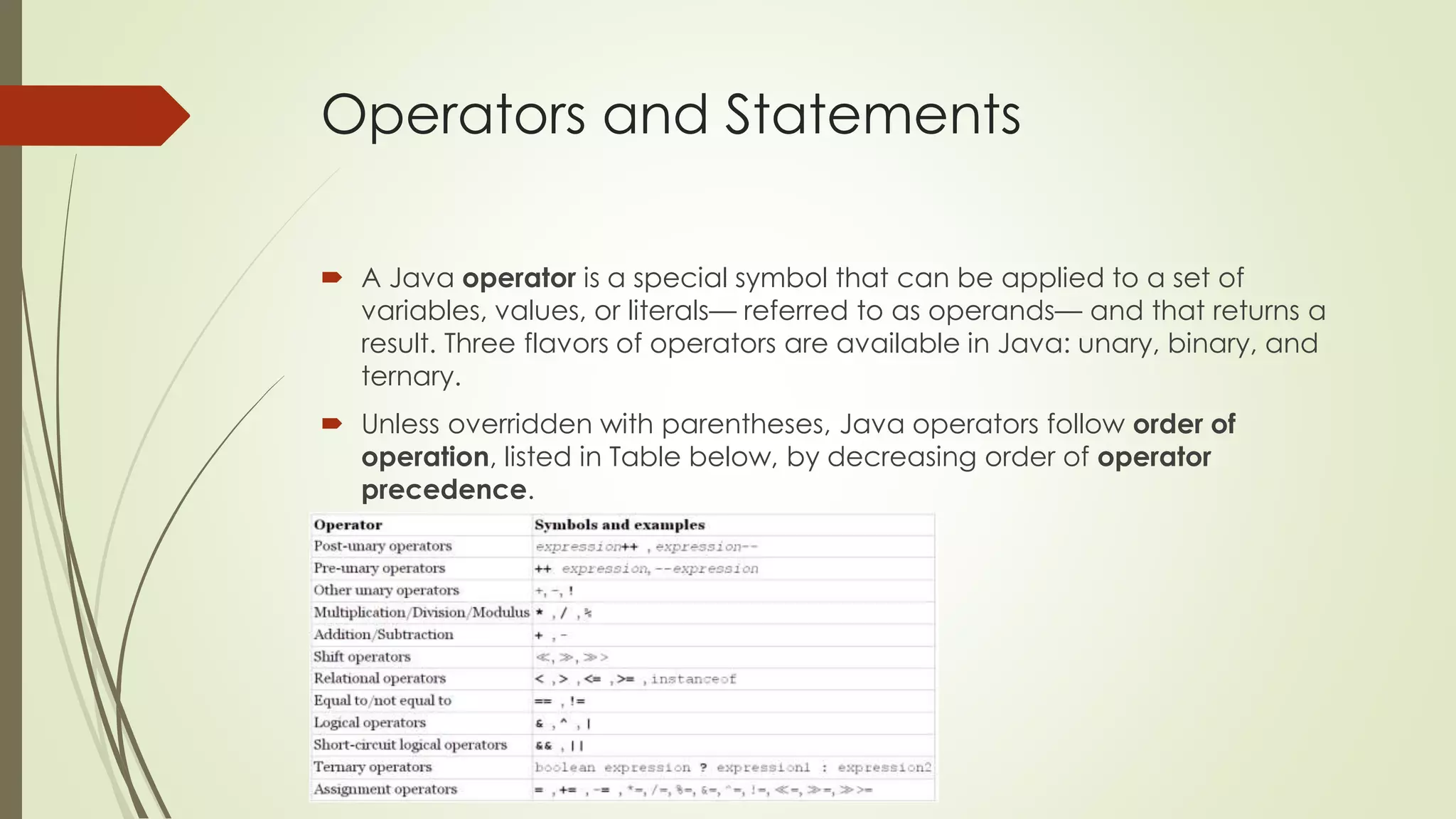
 Unless overridden with parentheses, Java operators follow order of
operation, listed in Table below, by decreasing order of operator
precedence.
Working with Binary Arithmetic Operators
Arithmetic Operators
 Arithmetic operators are often encountered in early mathematics and
include addition (+), subtraction (-), multiplication (*), division (/), and
modulus (%).
 They also include the unary operators, + + and –
 The multiplicative operators (*, /, %) have a higher order of precedence
than the additive operators (+, -).
Numeric Promotion
 Numeric Promotion Rules
 If two values have different data types, Java will automatically promote one of
the values to the larger of the two data types.
 If one of the values is integral and the other is floating-point, Java will
automatically promote the integral value to the floating-point value's data type.
 Smaller data types, namely byte, short, and char, are first promoted to int any
time they're used with a Java binary arithmetic operator, even if neither of the
operands is int.
 After all promotion has occurred and the operands have the same data type,
the resulting value will have the same data type as its promoted operands.
Numeric Promotion
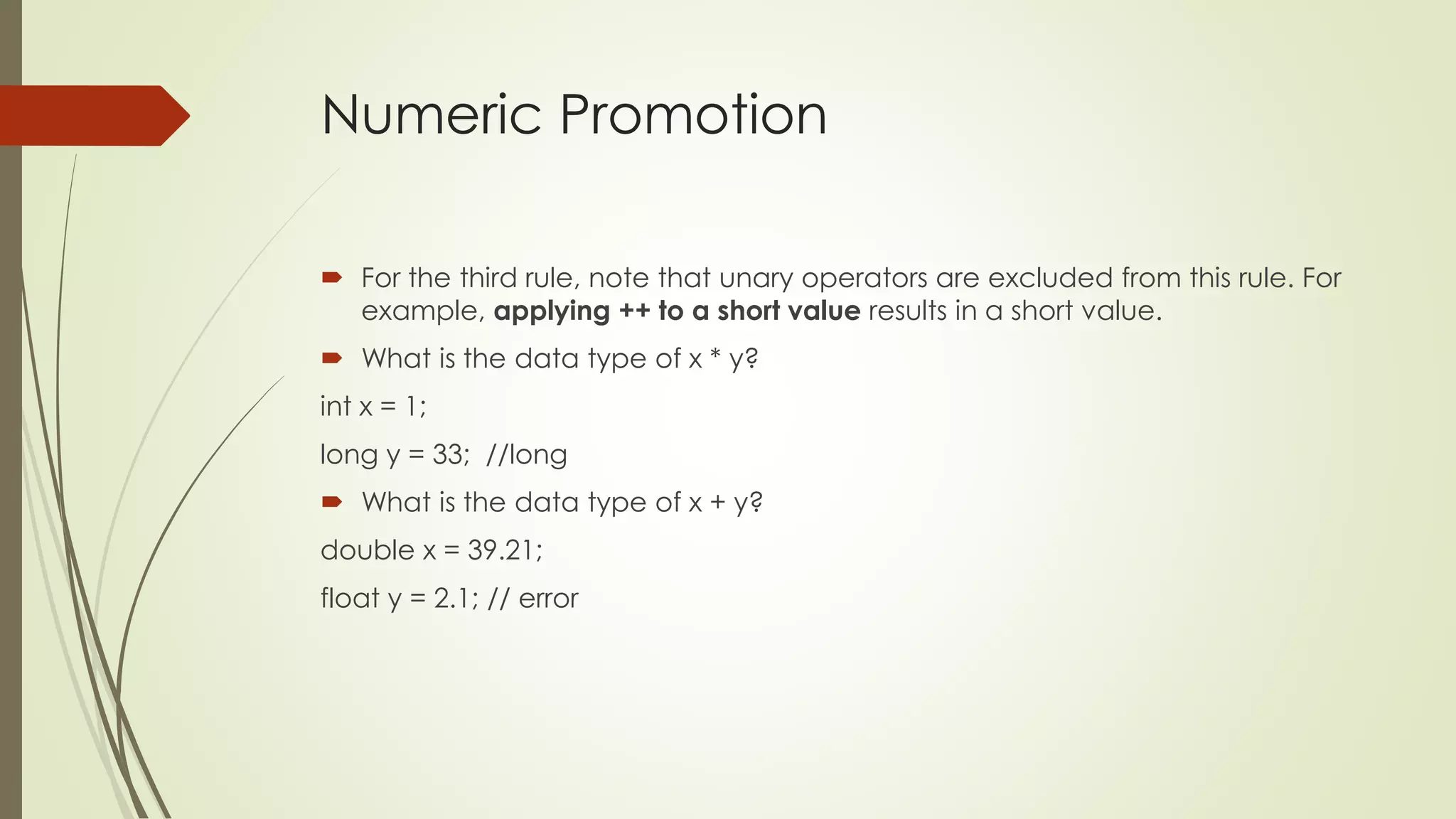
 For the third rule, note that unary operators are excluded from this rule. For
example, applying ++ to a short value results in a short value.
 What is the data type of x * y?
int x = 1;
long y = 33; //long
 What is the data type of x + y?
double x = 39.21;
float y = 2.1; // error
Numeric Promotion
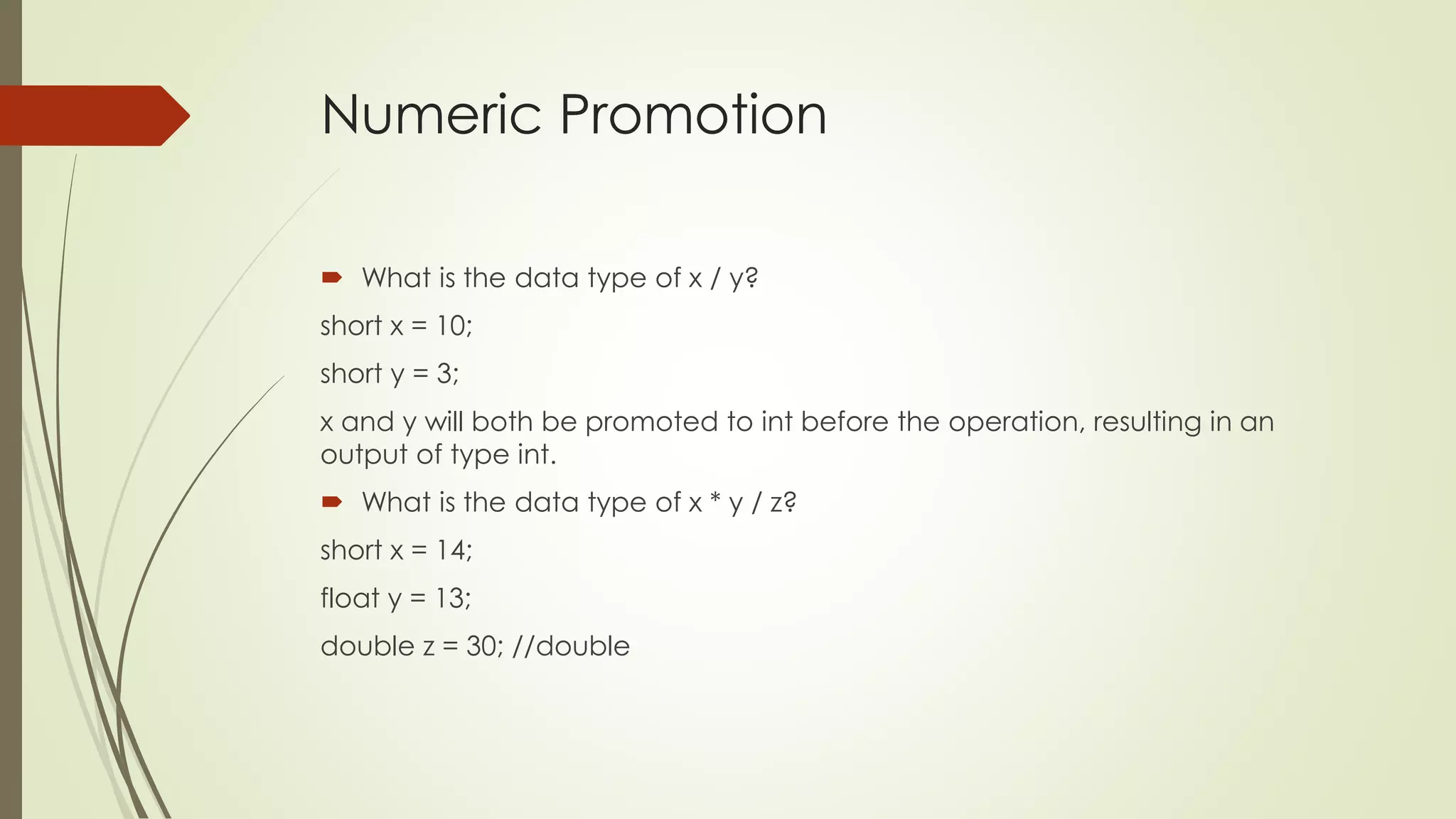
 What is the data type of x / y?
short x = 10;
short y = 3;
x and y will both be promoted to int before the operation, resulting in an
output of type int.
 What is the data type of x * y / z?
short x = 14;
float y = 13;
double z = 30; //double
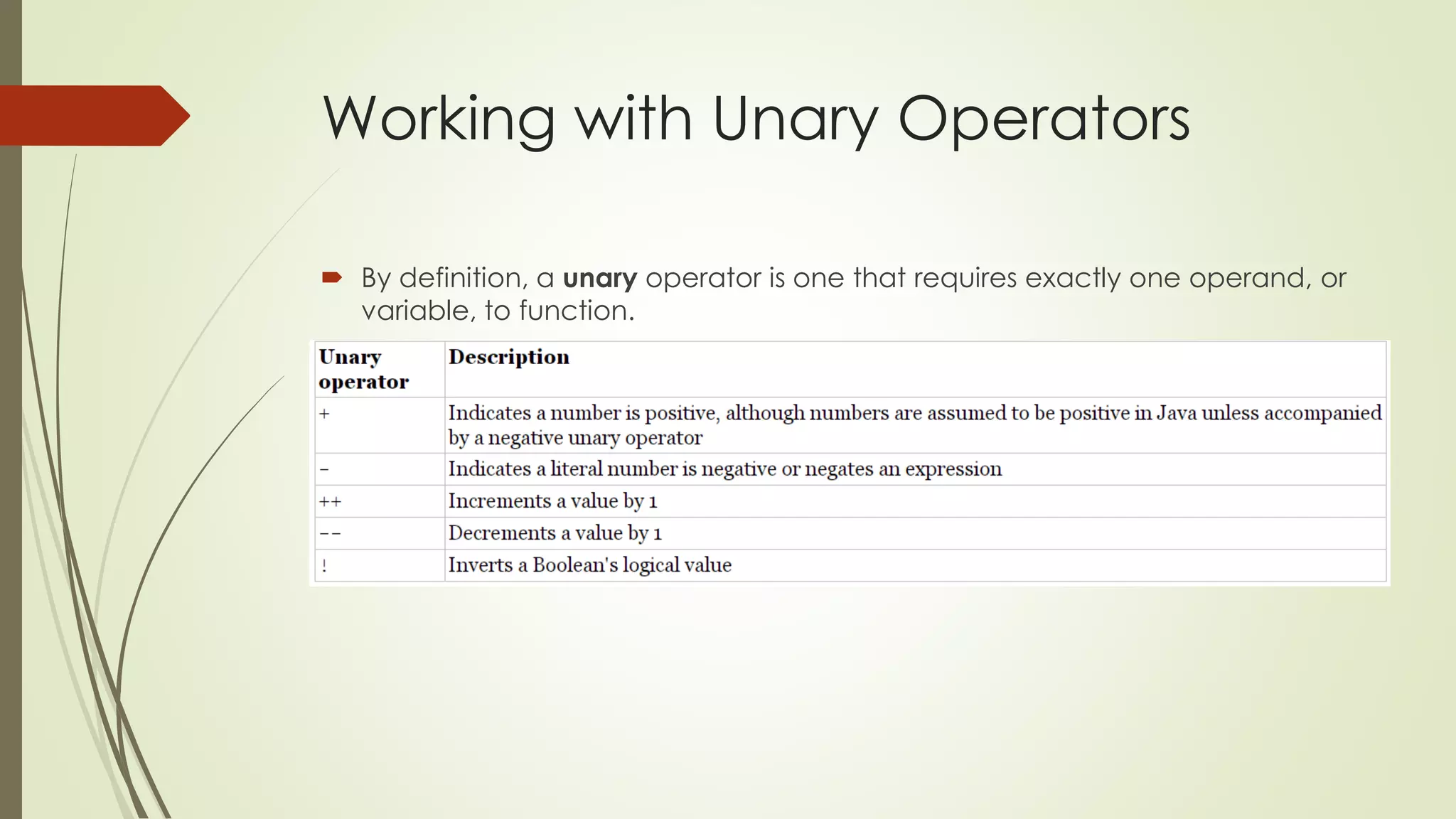
Working with Unary Operators
 By definition, a unary operator is one that requires exactly one operand, or
variable, to function.
Logical Complement and
Negation Operators
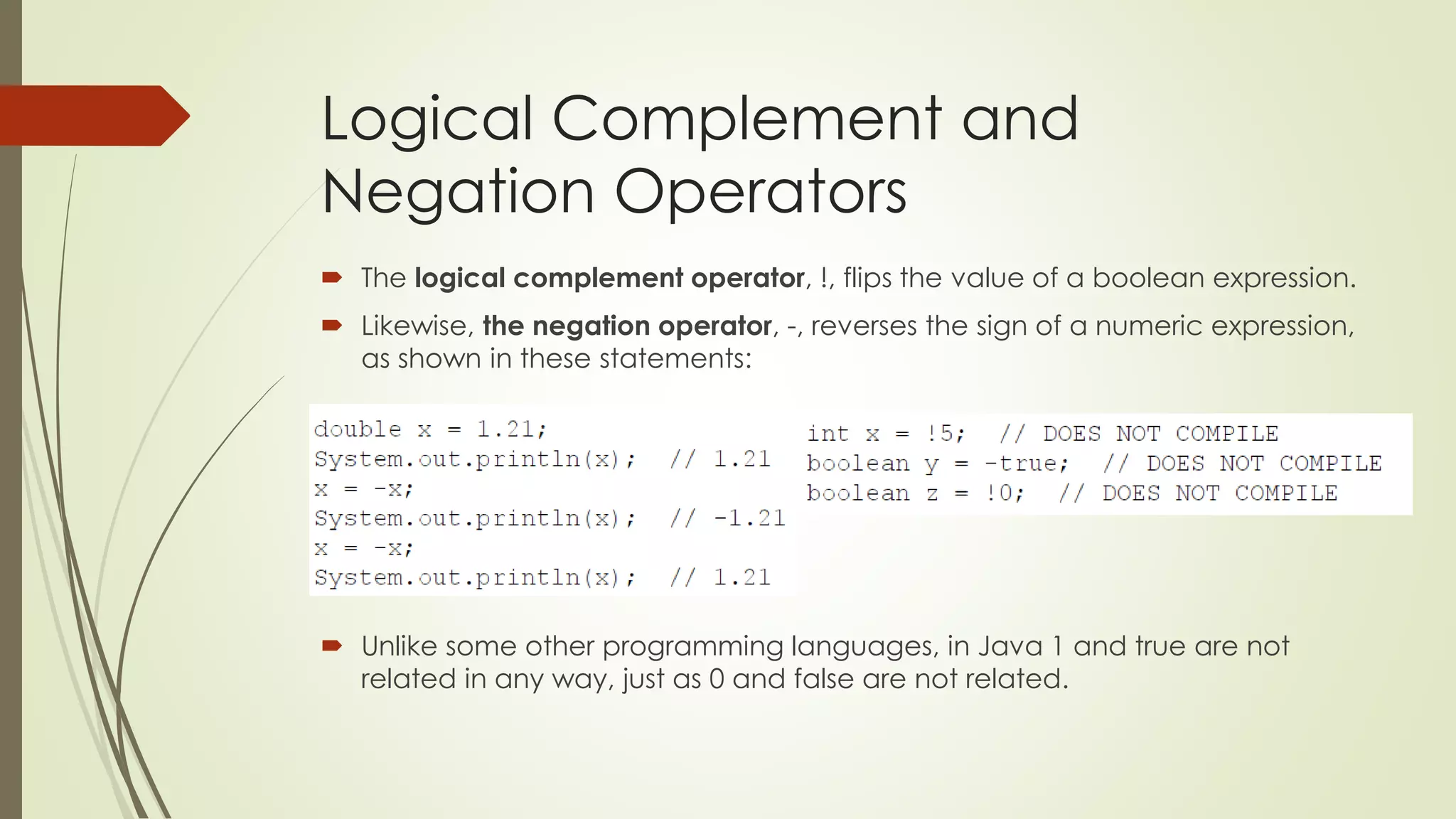
 The logical complement operator, !, flips the value of a boolean expression.
 Likewise, the negation operator, -, reverses the sign of a numeric expression,
as shown in these statements:
 Unlike some other programming languages, in Java 1 and true are not
related in any way, just as 0 and false are not related.
Increment and Decrement
Operators
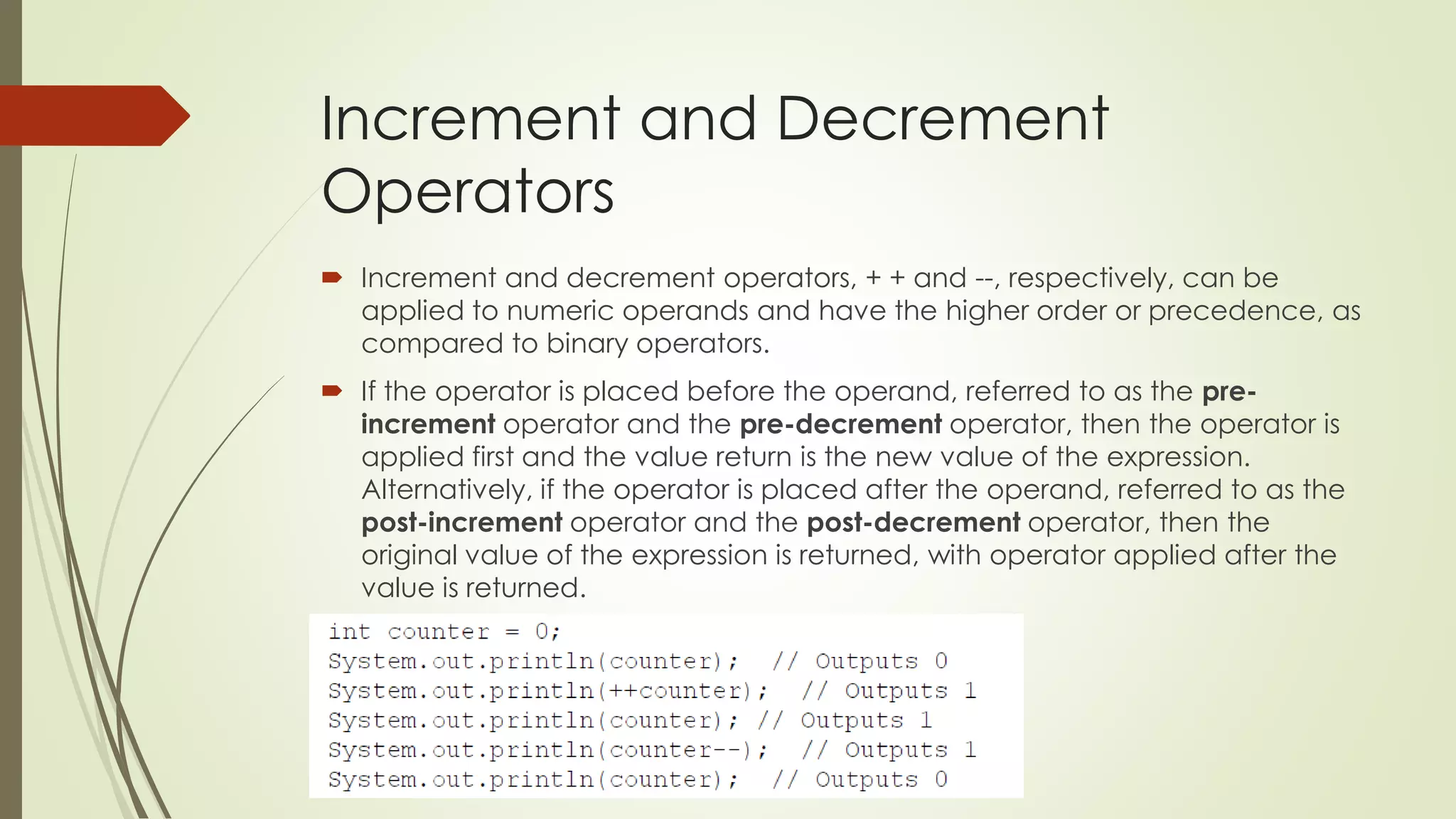
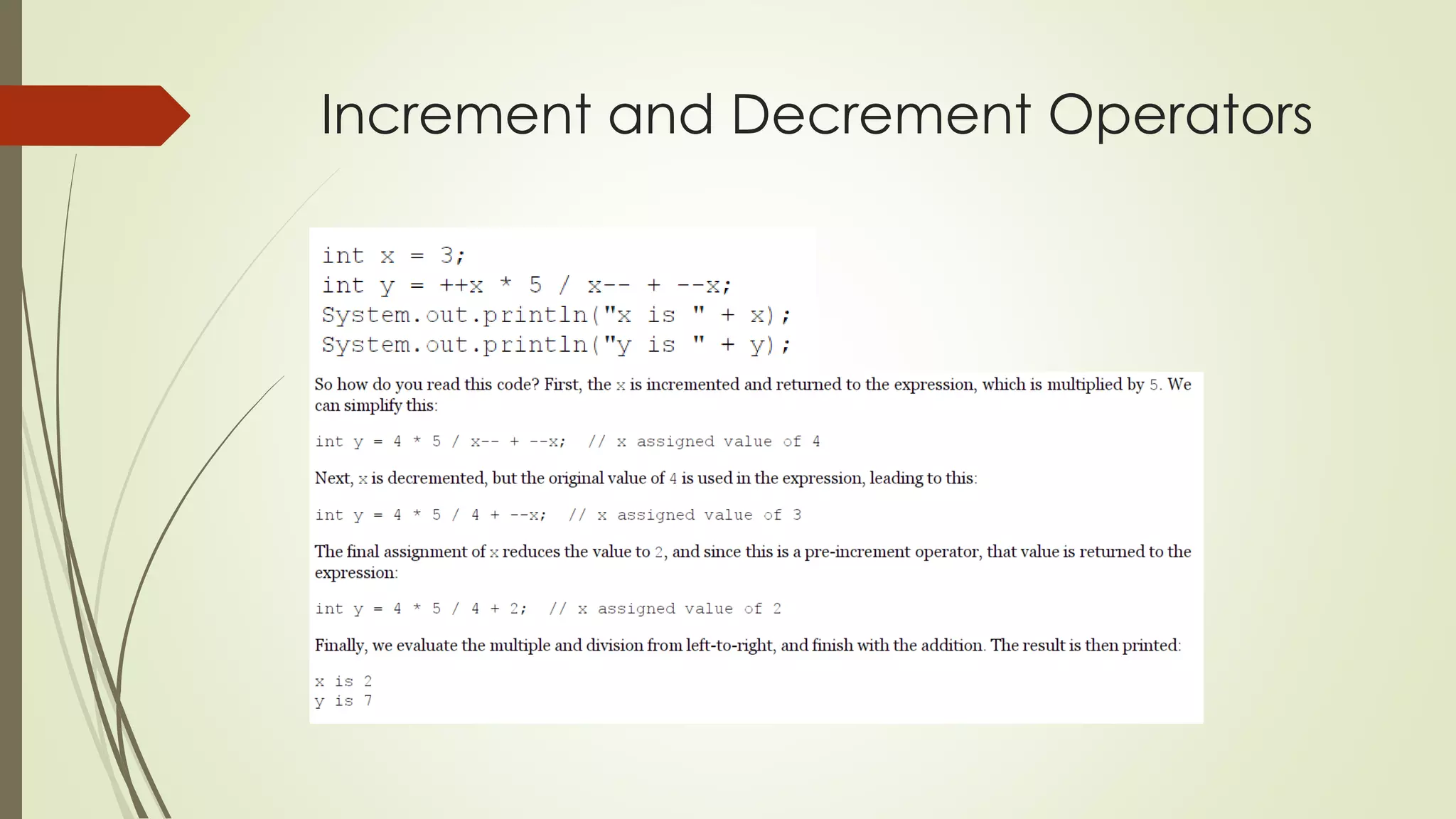
 Increment and decrement operators, + + and --, respectively, can be
applied to numeric operands and have the higher order or precedence, as
compared to binary operators.
 If the operator is placed before the operand, referred to as the pre-
increment operator and the pre-decrement operator, then the operator is
applied first and the value return is the new value of the expression.
Alternatively, if the operator is placed after the operand, referred to as the
post-increment operator and the post-decrement operator, then the
original value of the expression is returned, with operator applied after the
value is returned.
Increment and Decrement Operators
Assignment Operators
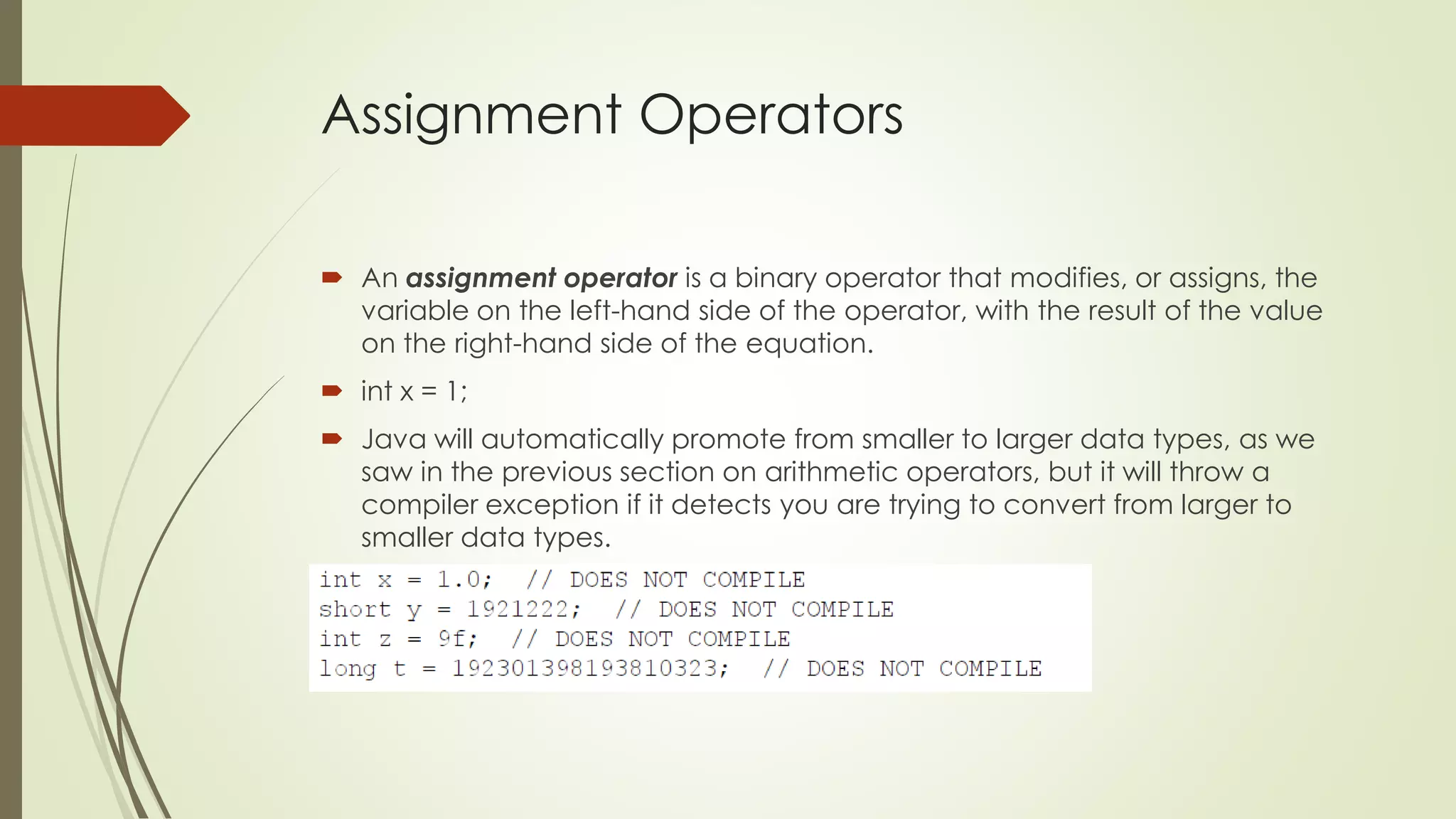
 An assignment operator is a binary operator that modifies, or assigns, the
variable on the left-hand side of the operator, with the result of the value
on the right-hand side of the equation.
 int x = 1;
 Java will automatically promote from smaller to larger data types, as we
saw in the previous section on arithmetic operators, but it will throw a
compiler exception if it detects you are trying to convert from larger to
smaller data types.
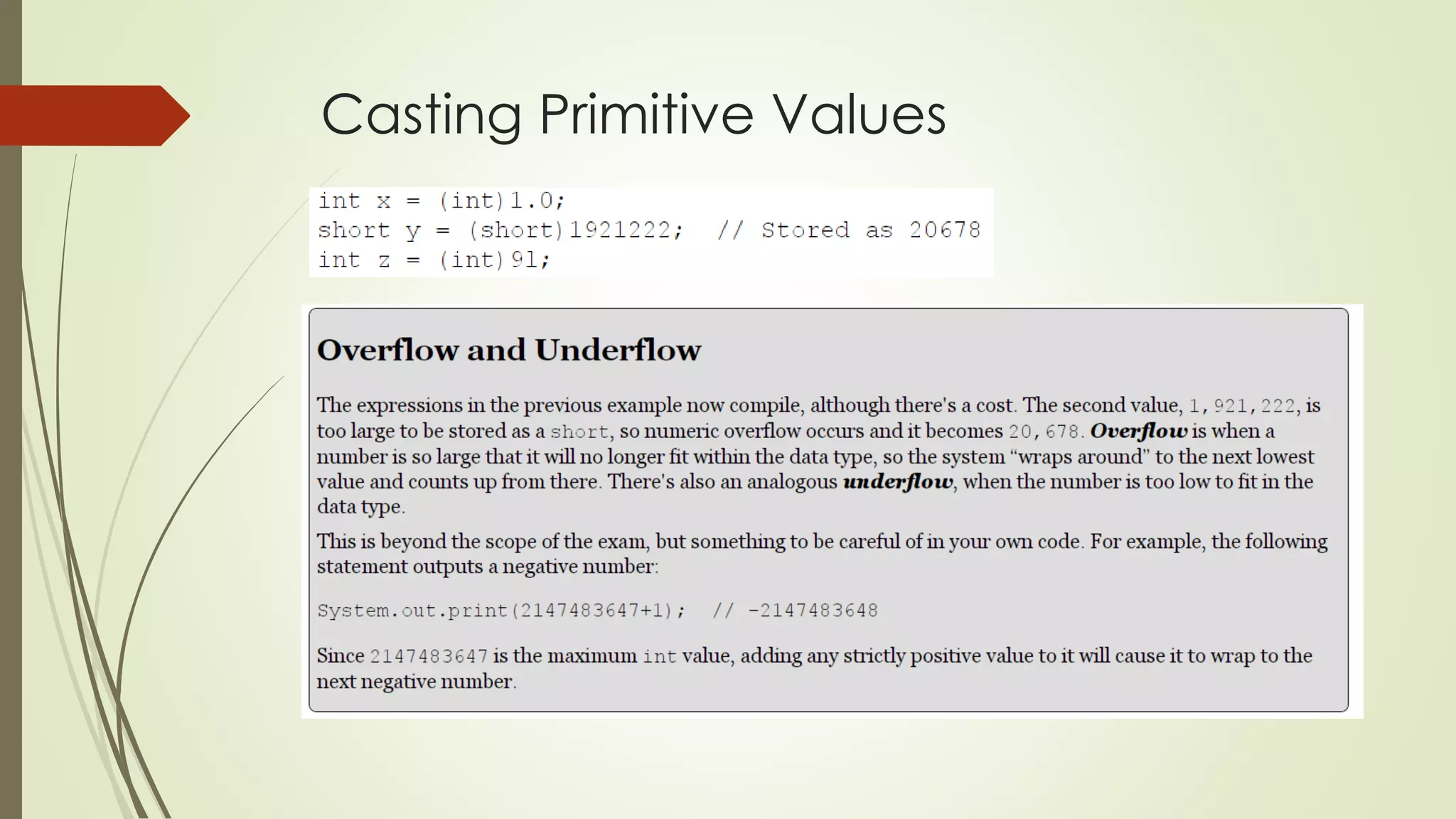
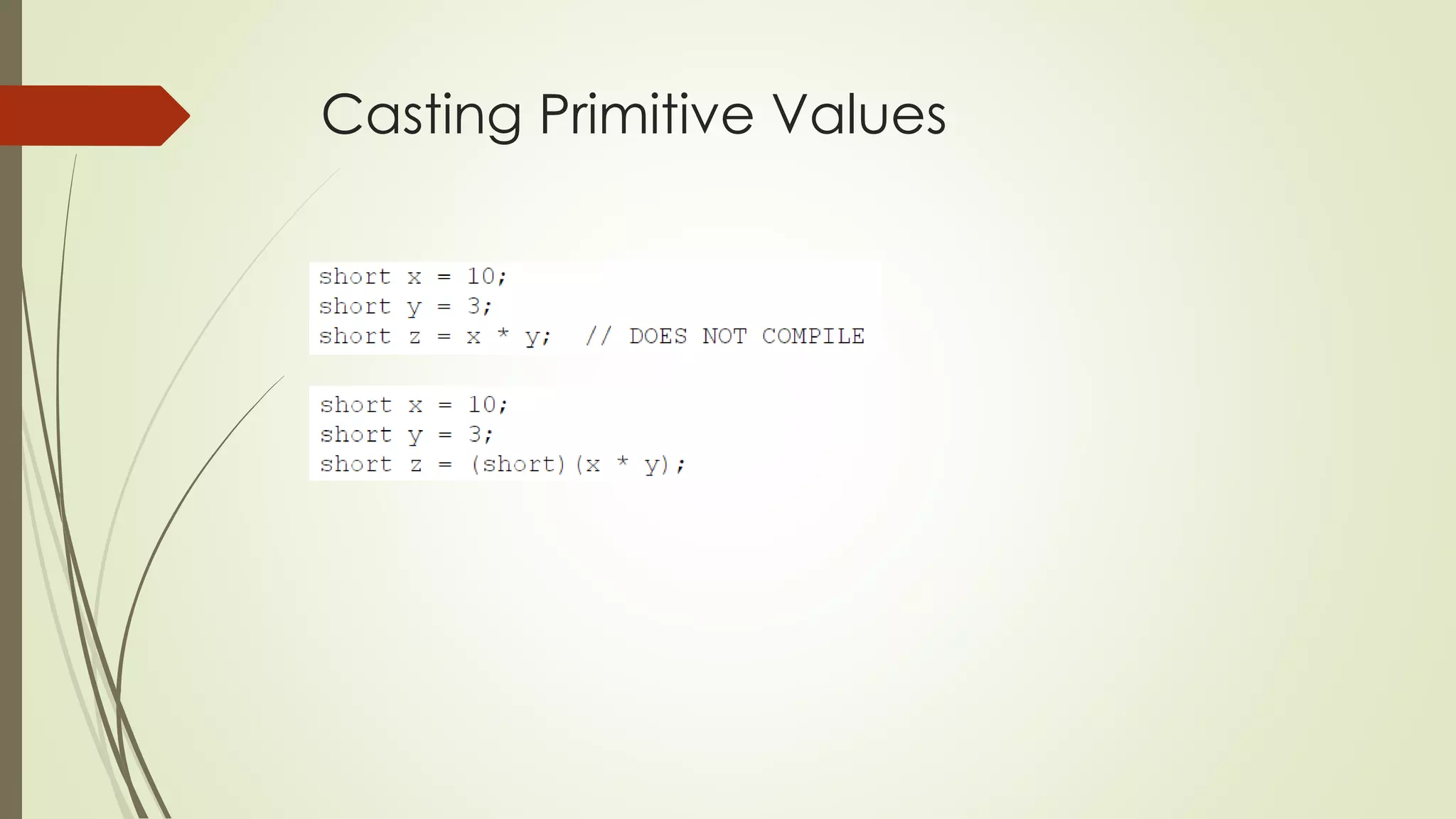
Casting Primitive Values
Compound Assignment Operators
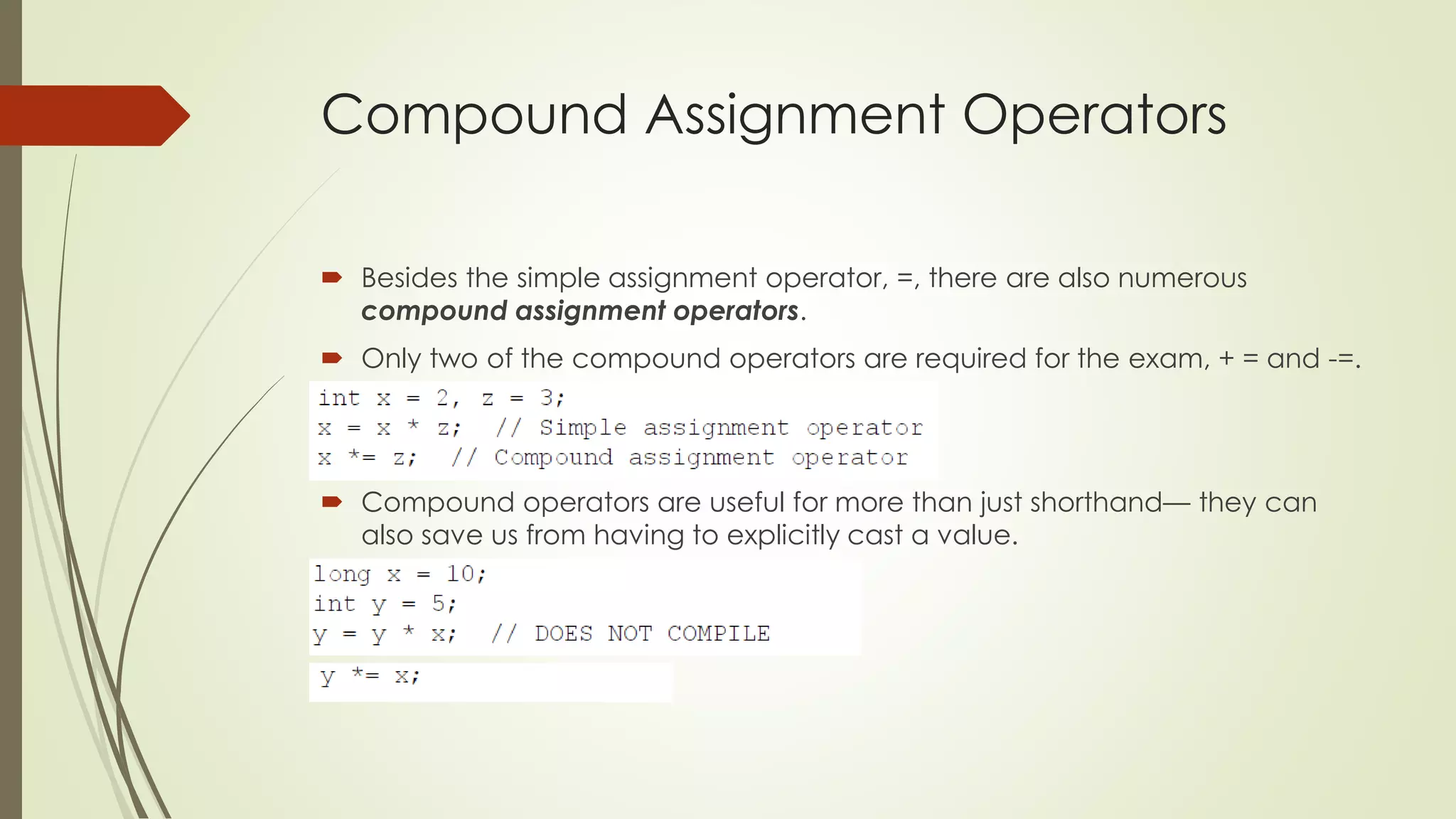
 Besides the simple assignment operator, =, there are also numerous
compound assignment operators.
 Only two of the compound operators are required for the exam, + = and -=.
 Compound operators are useful for more than just shorthand— they can
also save us from having to explicitly cast a value.
Compound Assignment Operators
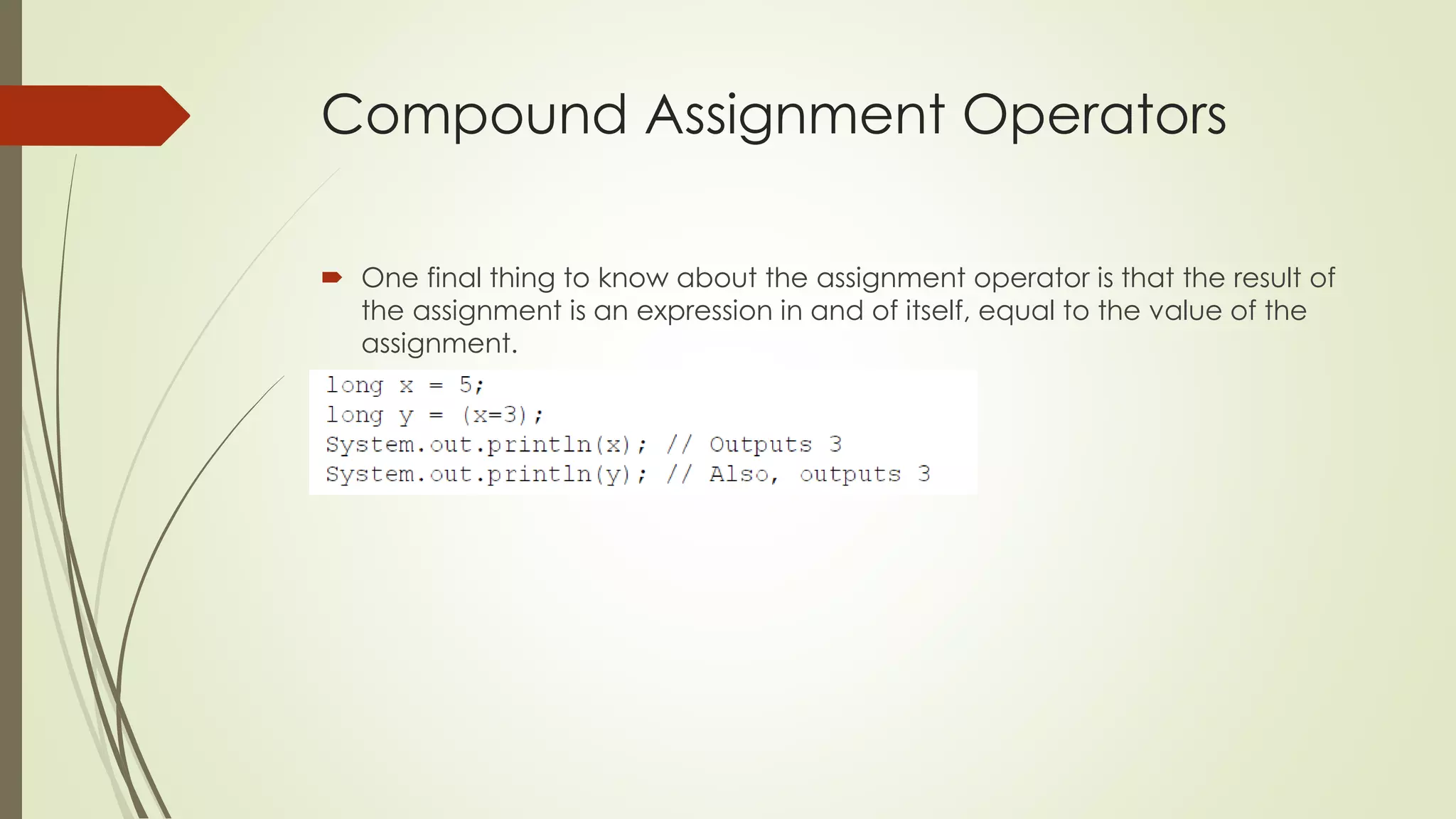
 One final thing to know about the assignment operator is that the result of
the assignment is an expression in and of itself, equal to the value of the
assignment.
Relational Operators
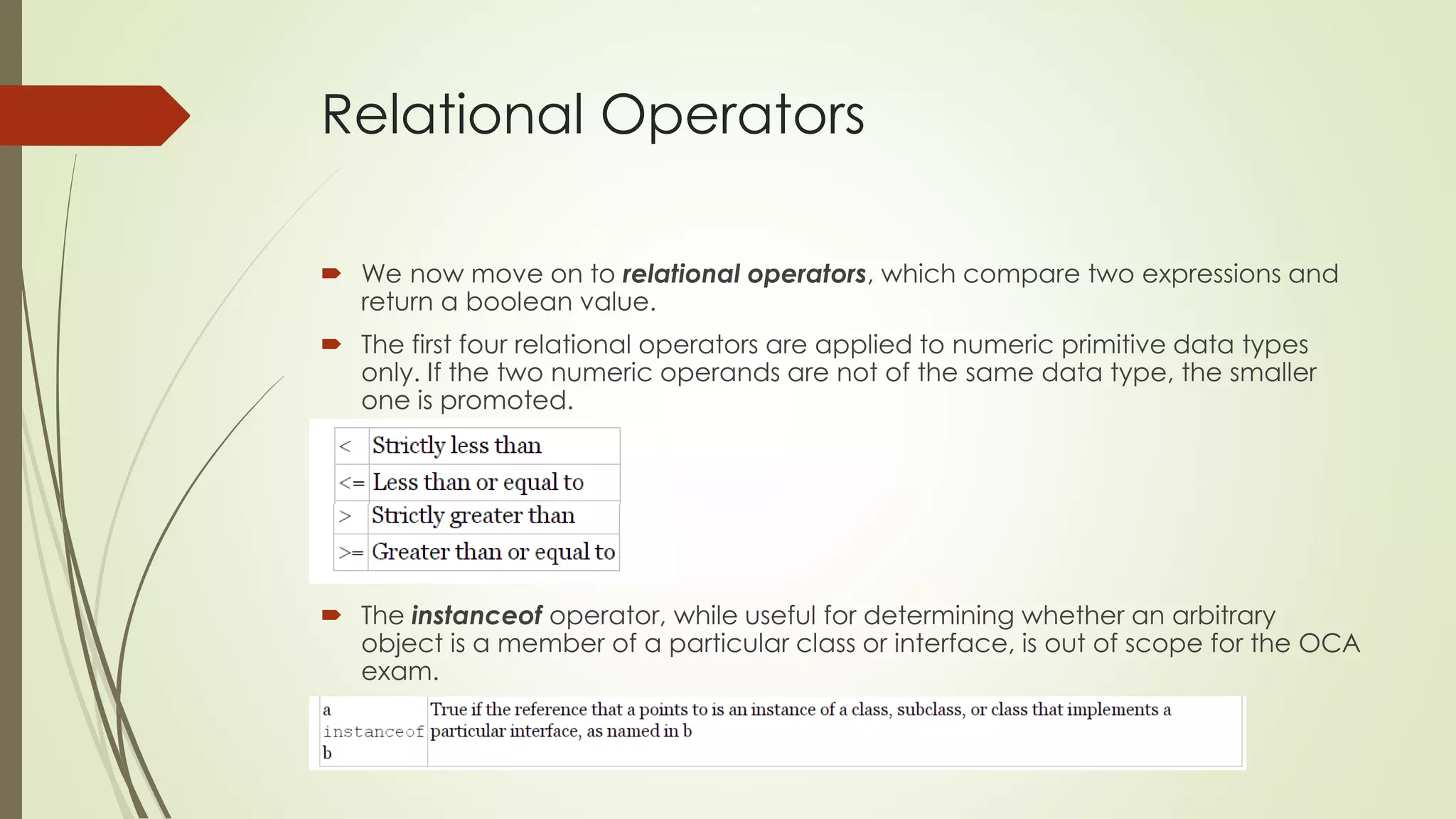
 We now move on to relational operators, which compare two expressions and
return a boolean value.
 The first four relational operators are applied to numeric primitive data types
only. If the two numeric operands are not of the same data type, the smaller
one is promoted.
 The instanceof operator, while useful for determining whether an arbitrary
object is a member of a particular class or interface, is out of scope for the OCA
exam.
Logical Operators
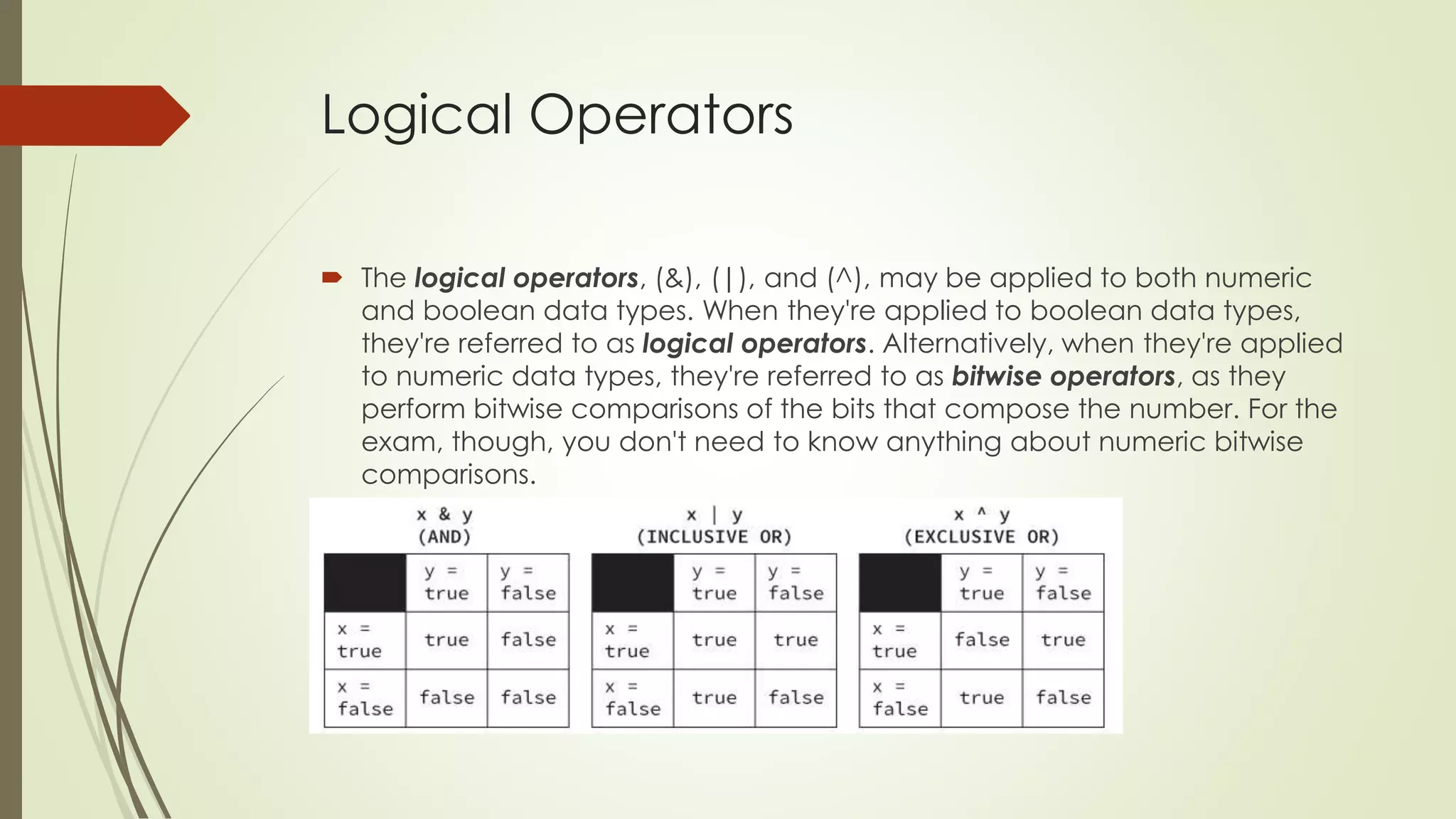
 The logical operators, (&), (|), and (^), may be applied to both numeric
and boolean data types. When they're applied to boolean data types,
they're referred to as logical operators. Alternatively, when they're applied
to numeric data types, they're referred to as bitwise operators, as they
perform bitwise comparisons of the bits that compose the number. For the
exam, though, you don't need to know anything about numeric bitwise
comparisons.
Logical Operators
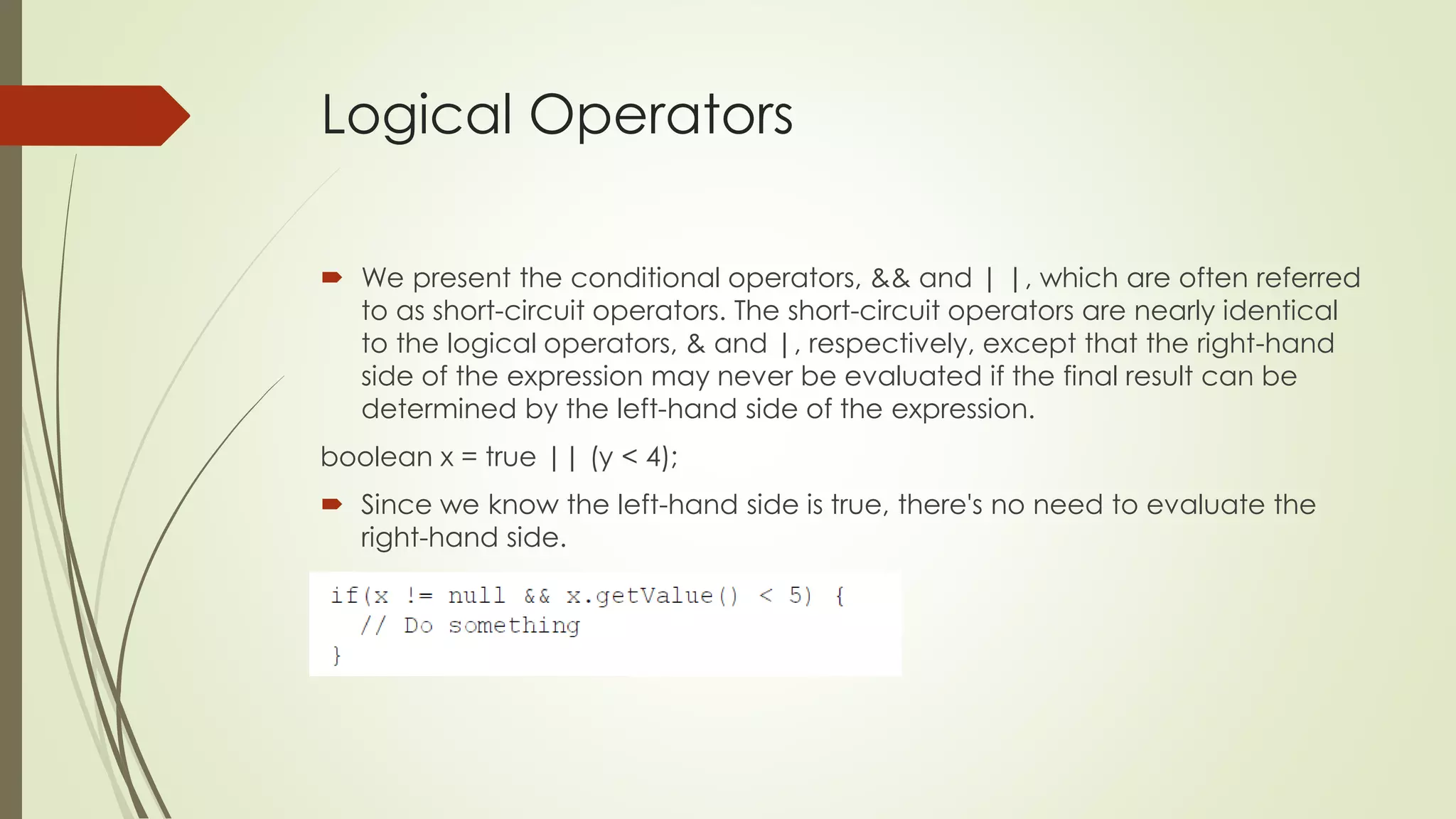
 We present the conditional operators, && and | |, which are often referred
to as short-circuit operators. The short-circuit operators are nearly identical
to the logical operators, & and |, respectively, except that the right-hand
side of the expression may never be evaluated if the final result can be
determined by the left-hand side of the expression.
boolean x = true || (y < 4);
 Since we know the left-hand side is true, there's no need to evaluate the
right-hand side.
Logical Operators
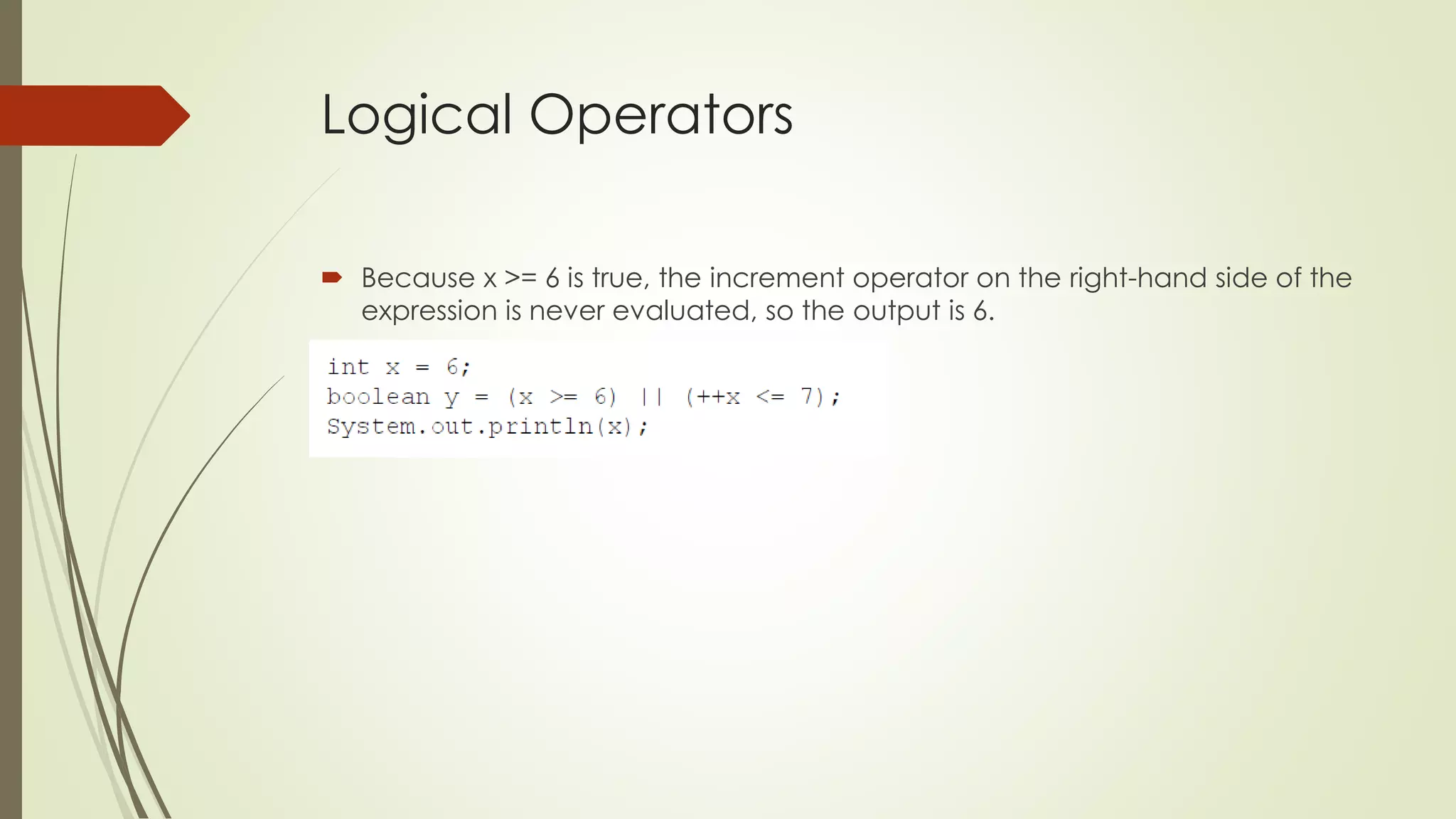
 Because x >= 6 is true, the increment operator on the right-hand side of the
expression is never evaluated, so the output is 6.
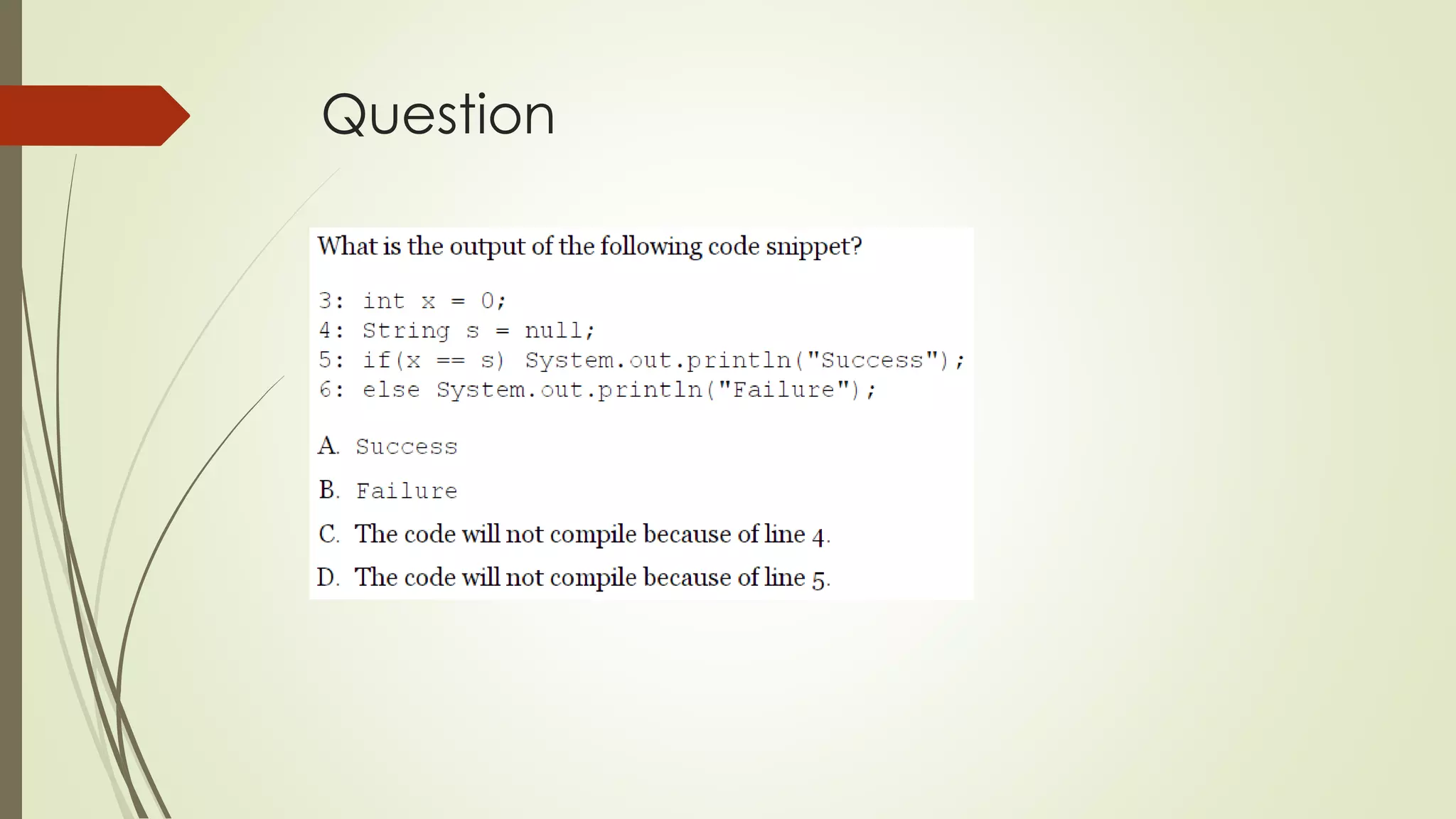
Equality Operators
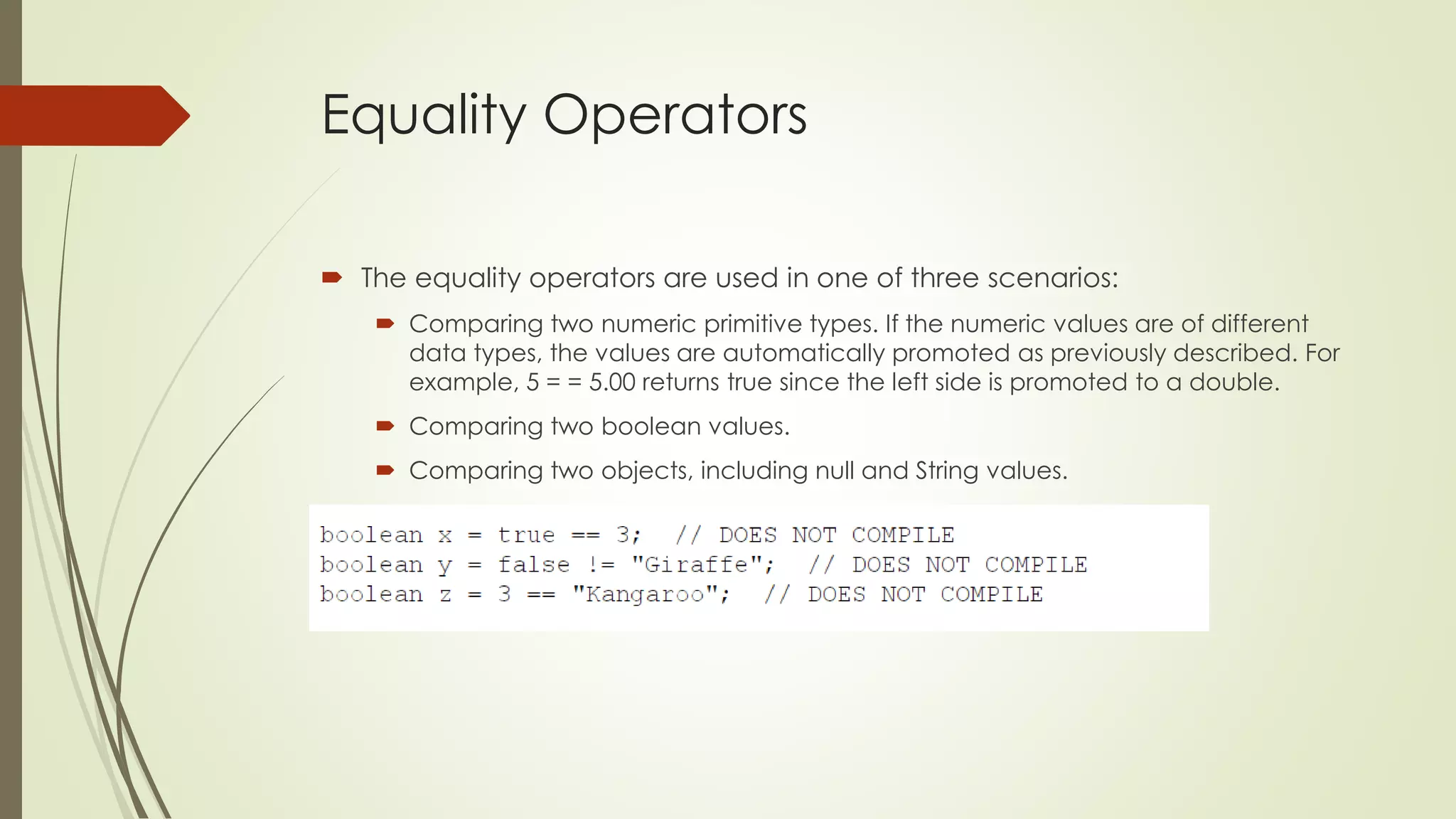
 The equality operators are used in one of three scenarios:
 Comparing two numeric primitive types. If the numeric values are of different
data types, the values are automatically promoted as previously described. For
example, 5 = = 5.00 returns true since the left side is promoted to a double.
 Comparing two boolean values.
 Comparing two objects, including null and String values.
Equality Operators
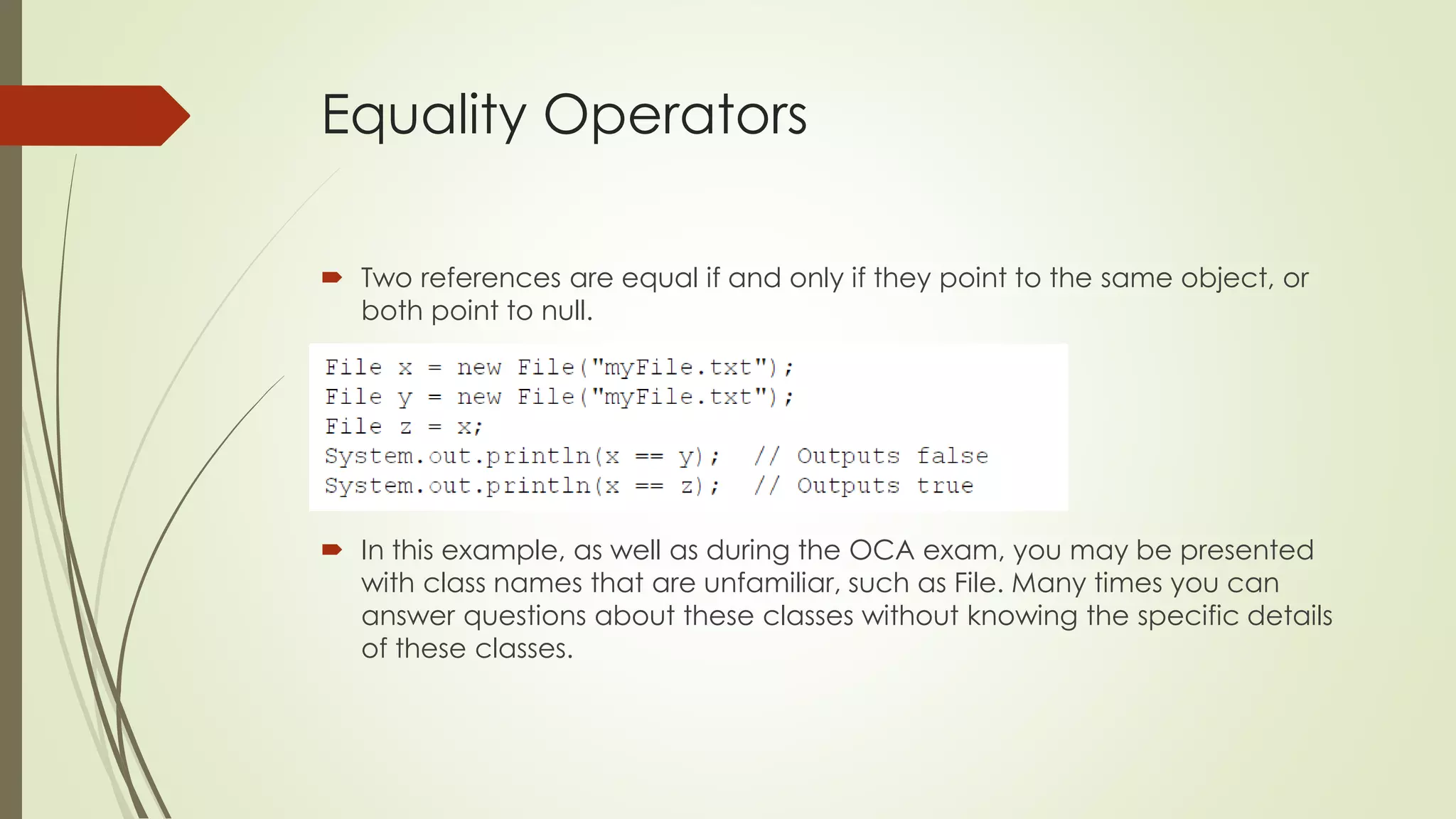
 Two references are equal if and only if they point to the same object, or
both point to null.
 In this example, as well as during the OCA exam, you may be presented
with class names that are unfamiliar, such as File. Many times you can
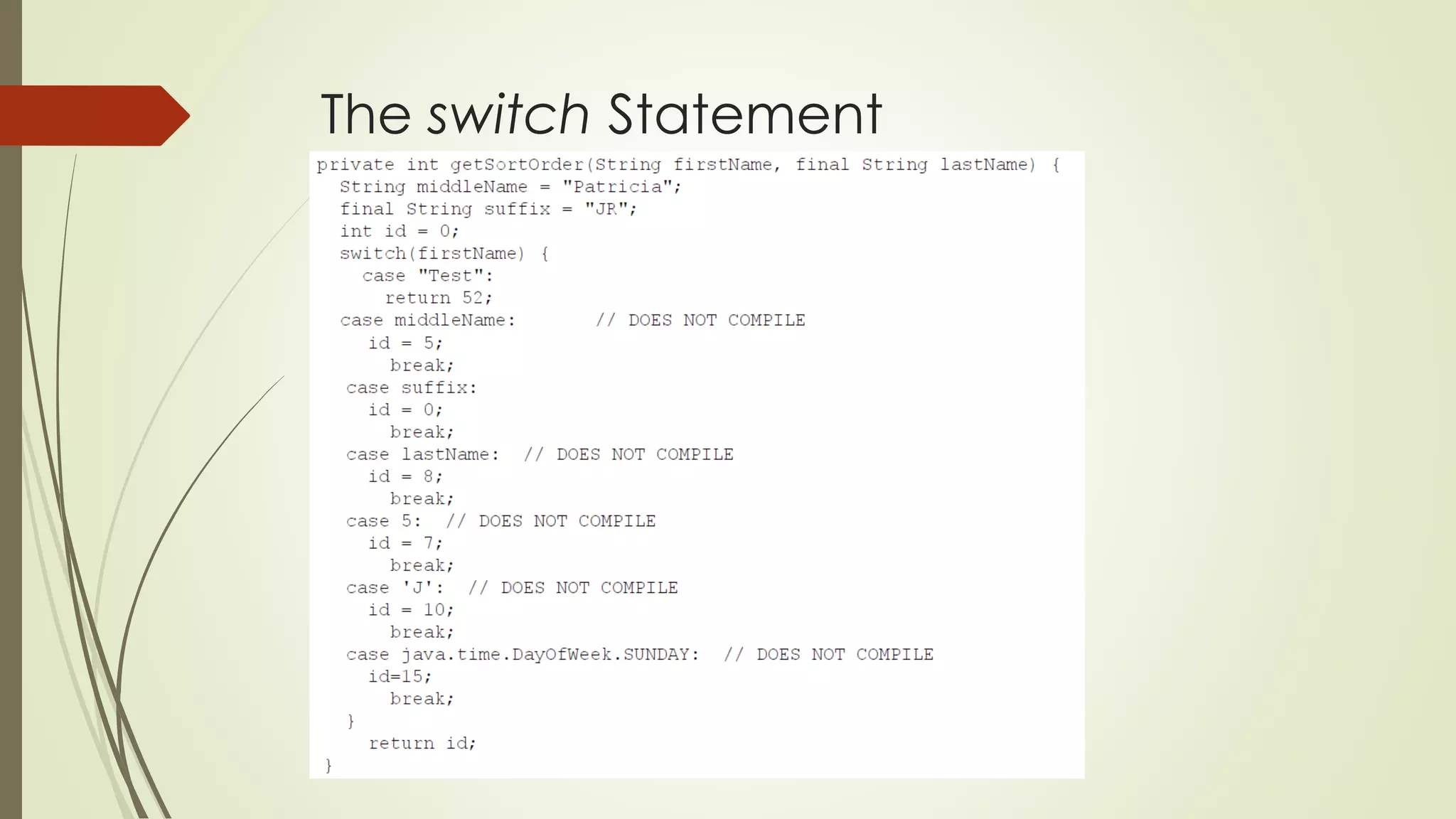
answer questions about these classes without knowing the specific details
of these classes.
Understanding Java Statements
 a Java statement is a complete unit of execution in Java, terminated with a
semicolon (;).
 Control flow statements break up the flow of execution by using decision
making, looping, and branching, allowing the application to selectively
execute particular segments of code.
 a block of code in Java is a group of zero or more statements between
balanced braces, ({}), and can be used anywhere a single statement is
allowed.
The if-then Statement
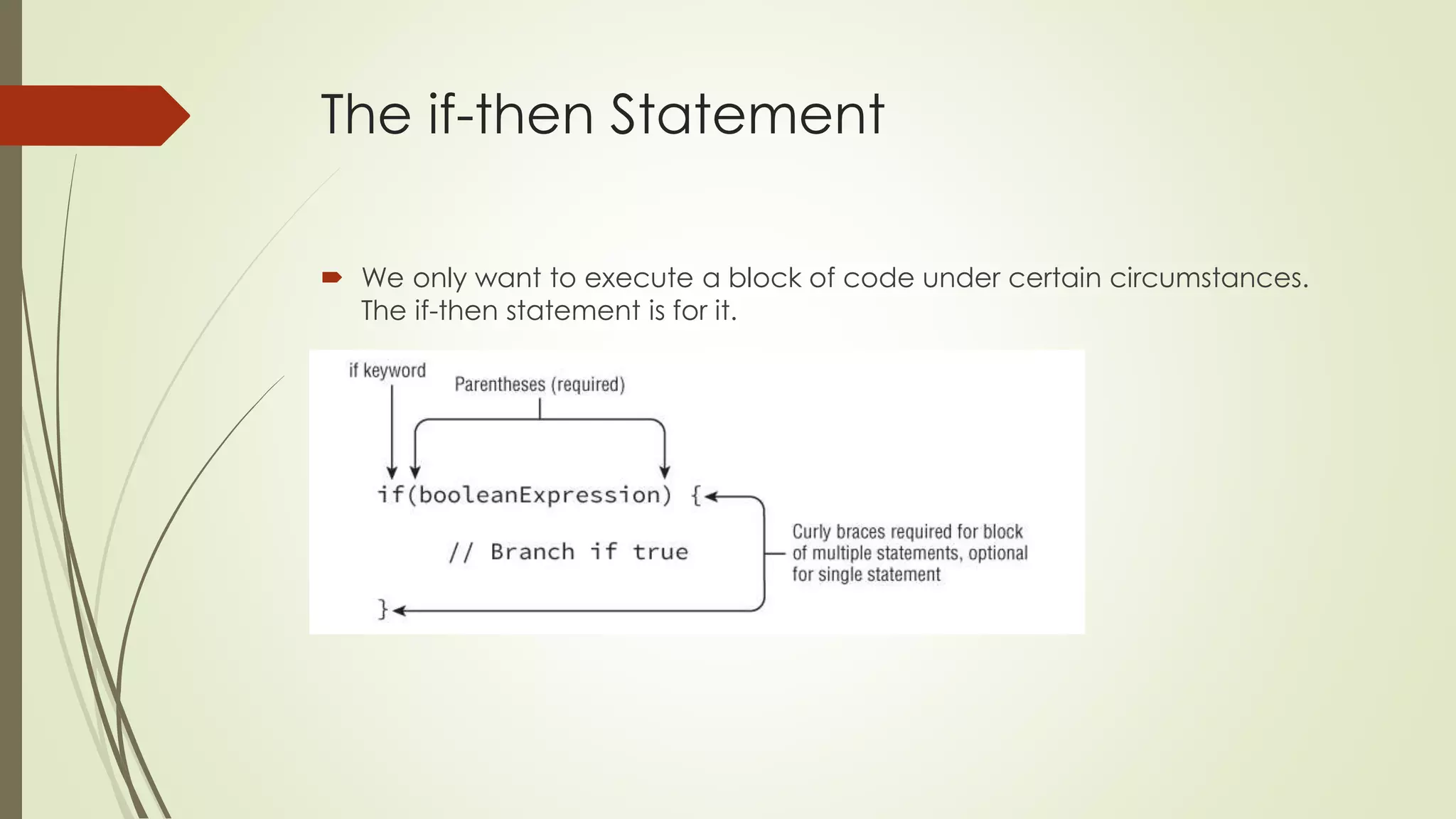
 We only want to execute a block of code under certain circumstances.
The if-then statement is for it.
The if-then Statement
 Watch Indentation and Braces
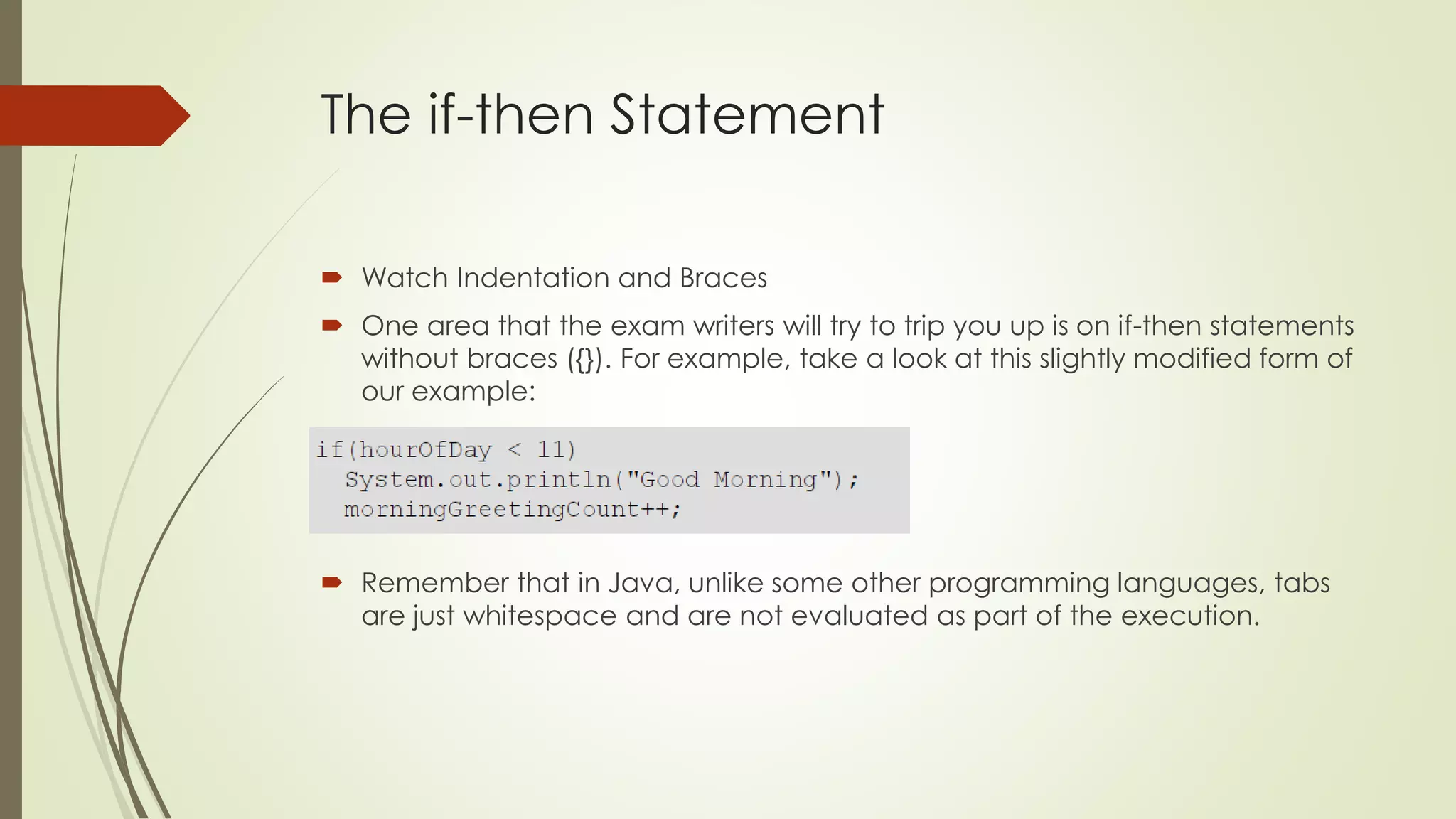
 One area that the exam writers will try to trip you up is on if-then statements
without braces ({}). For example, take a look at this slightly modified form of
our example:
 Remember that in Java, unlike some other programming languages, tabs
are just whitespace and are not evaluated as part of the execution.
The if-then-else Statement
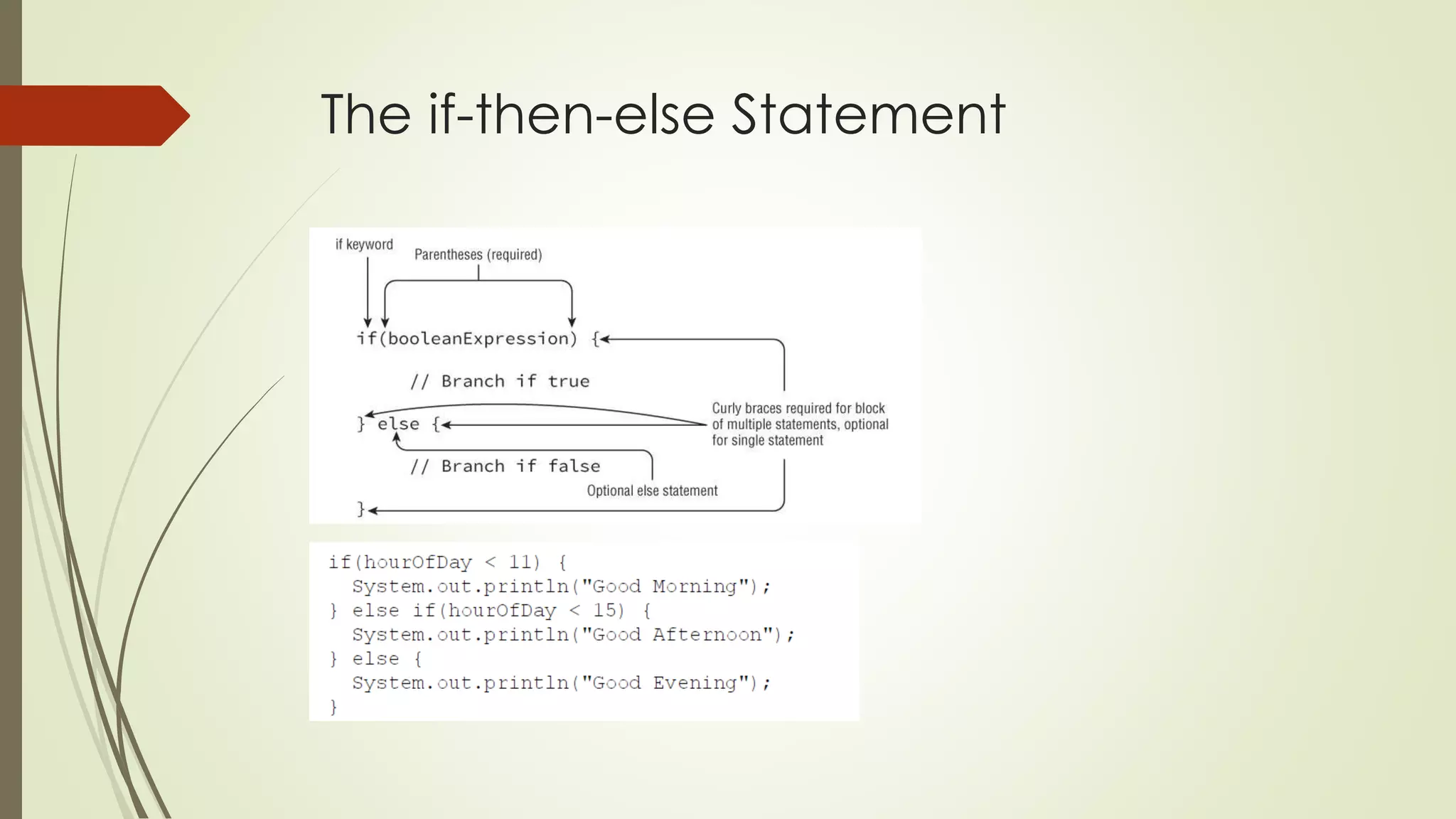
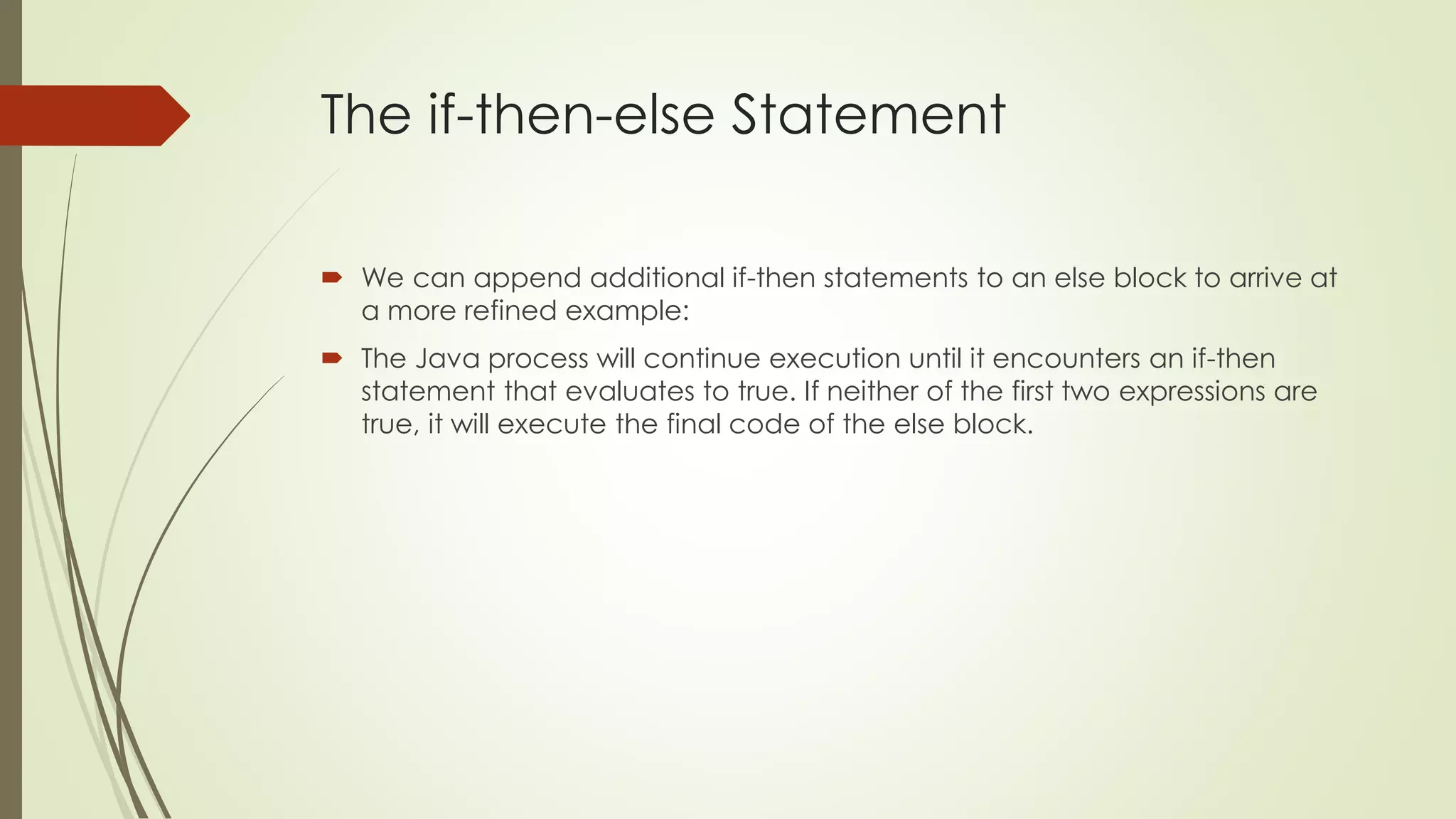
 We can append additional if-then statements to an else block to arrive at
a more refined example:
 The Java process will continue execution until it encounters an if-then
statement that evaluates to true. If neither of the first two expressions are
true, it will execute the final code of the else block.
The if-then-else Statement
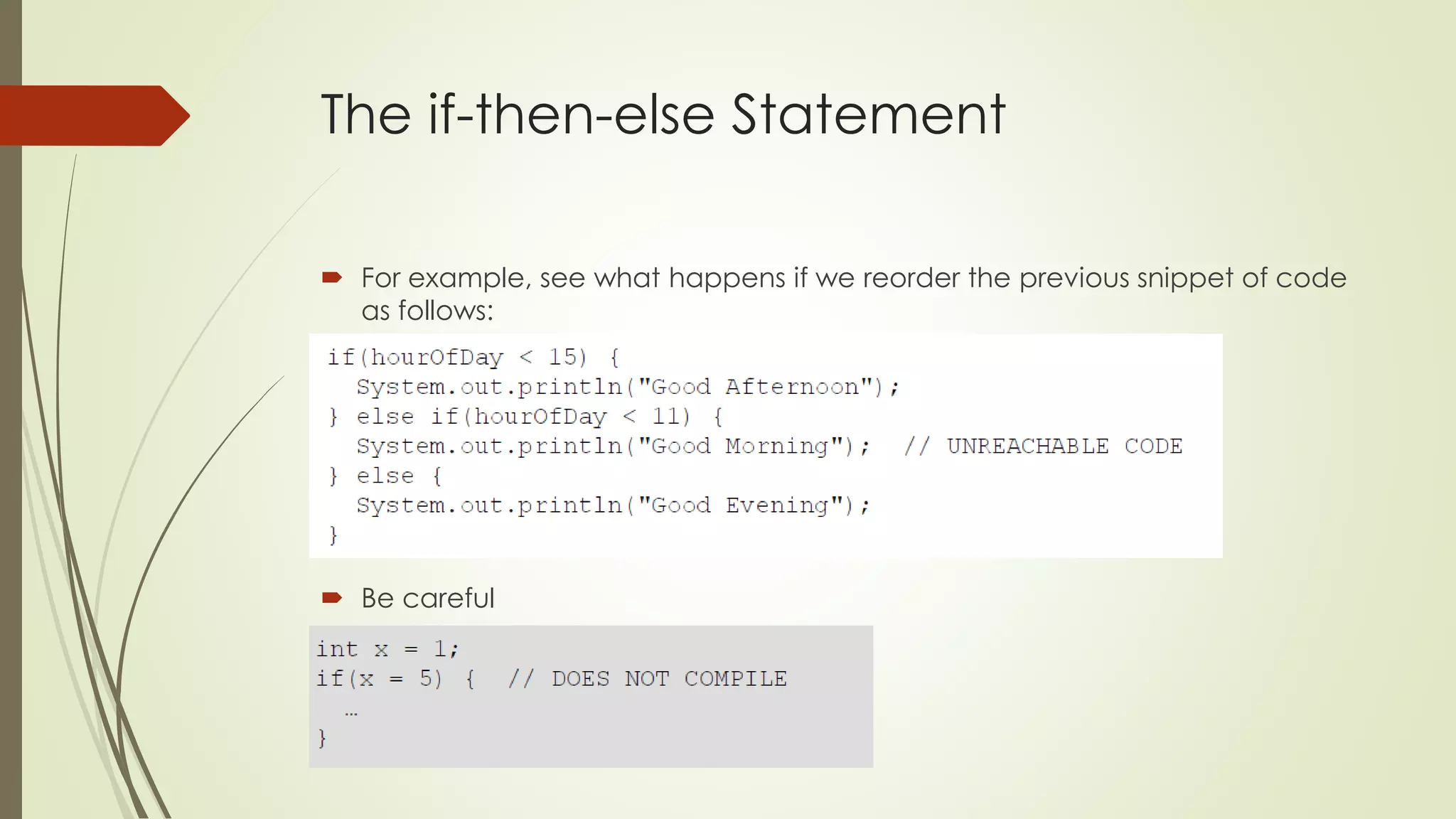
 For example, see what happens if we reorder the previous snippet of code
as follows:
 Be careful
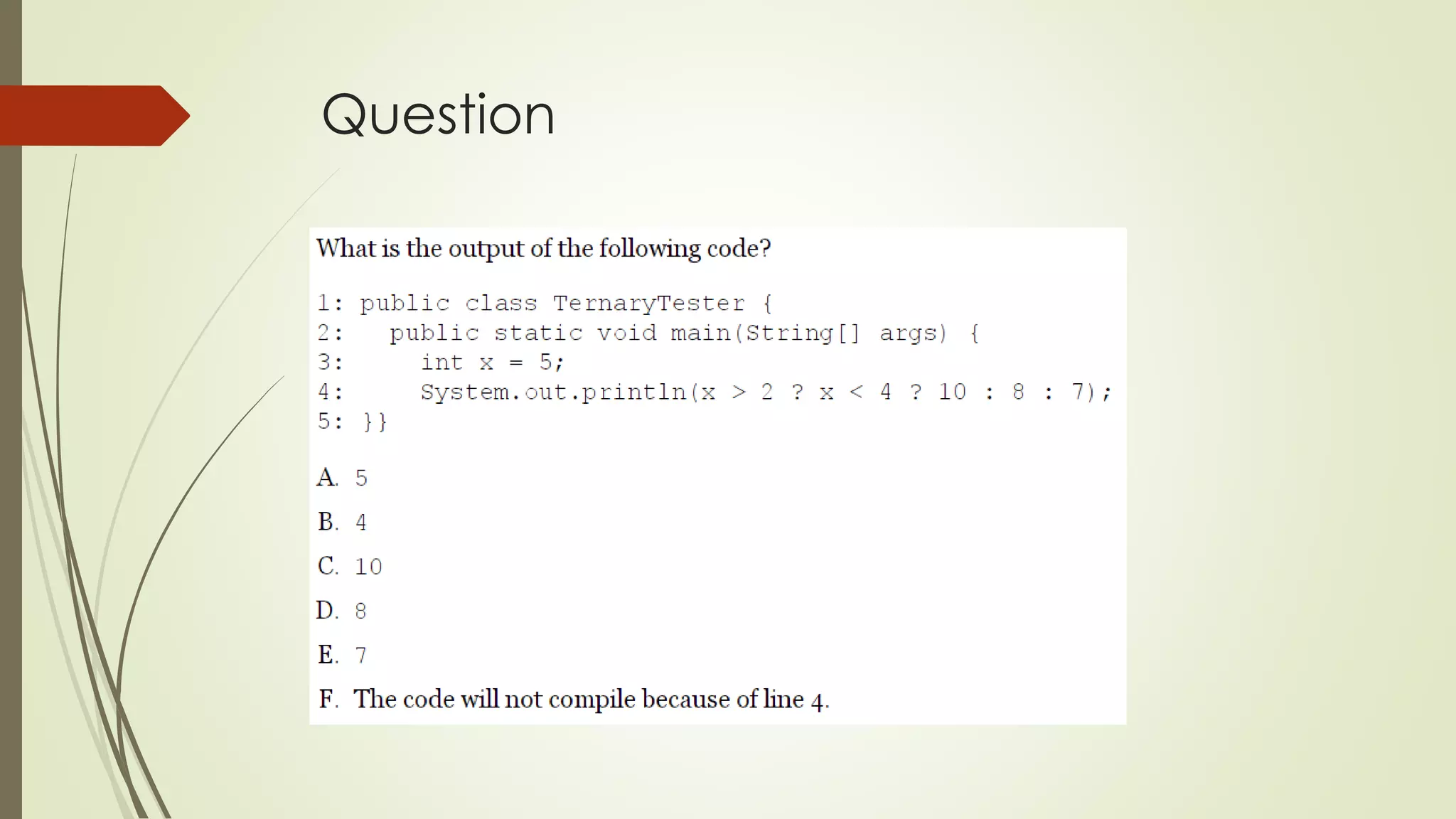
Ternary Operator
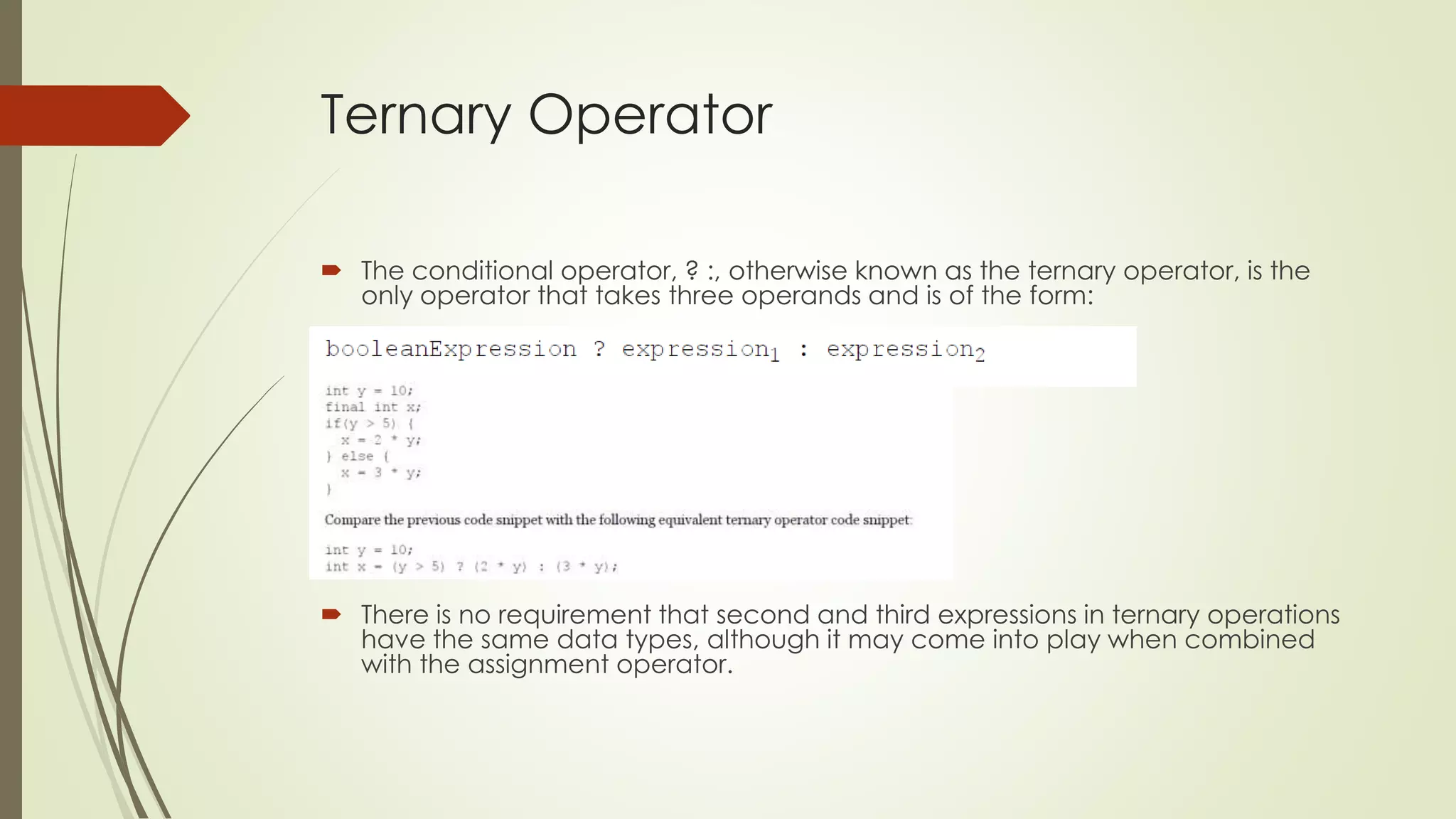
 The conditional operator, ? :, otherwise known as the ternary operator, is the
only operator that takes three operands and is of the form:
 There is no requirement that second and third expressions in ternary operations
have the same data types, although it may come into play when combined
with the assignment operator.
Ternary Operator
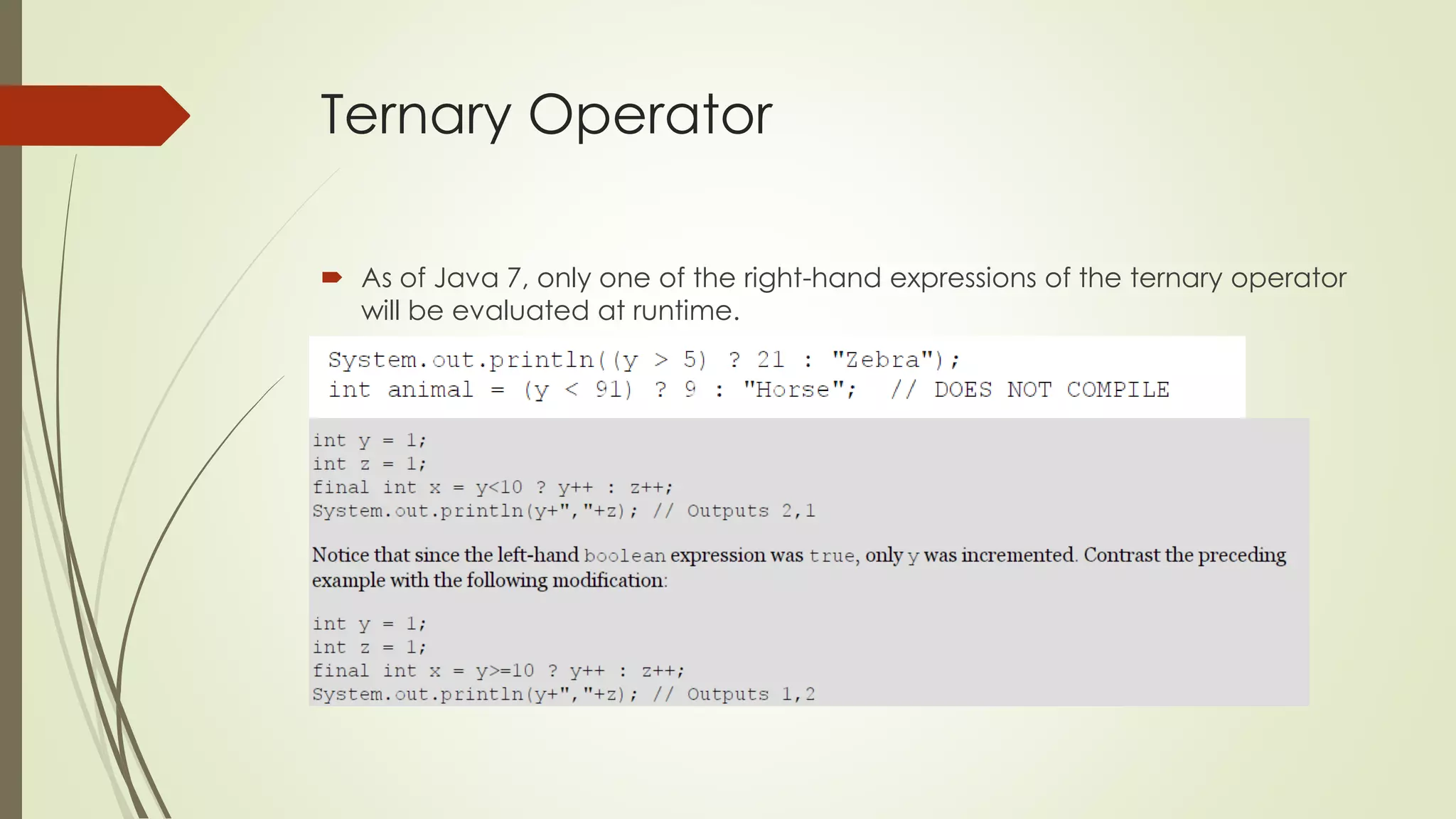
 As of Java 7, only one of the right-hand expressions of the ternary operator
will be evaluated at runtime.
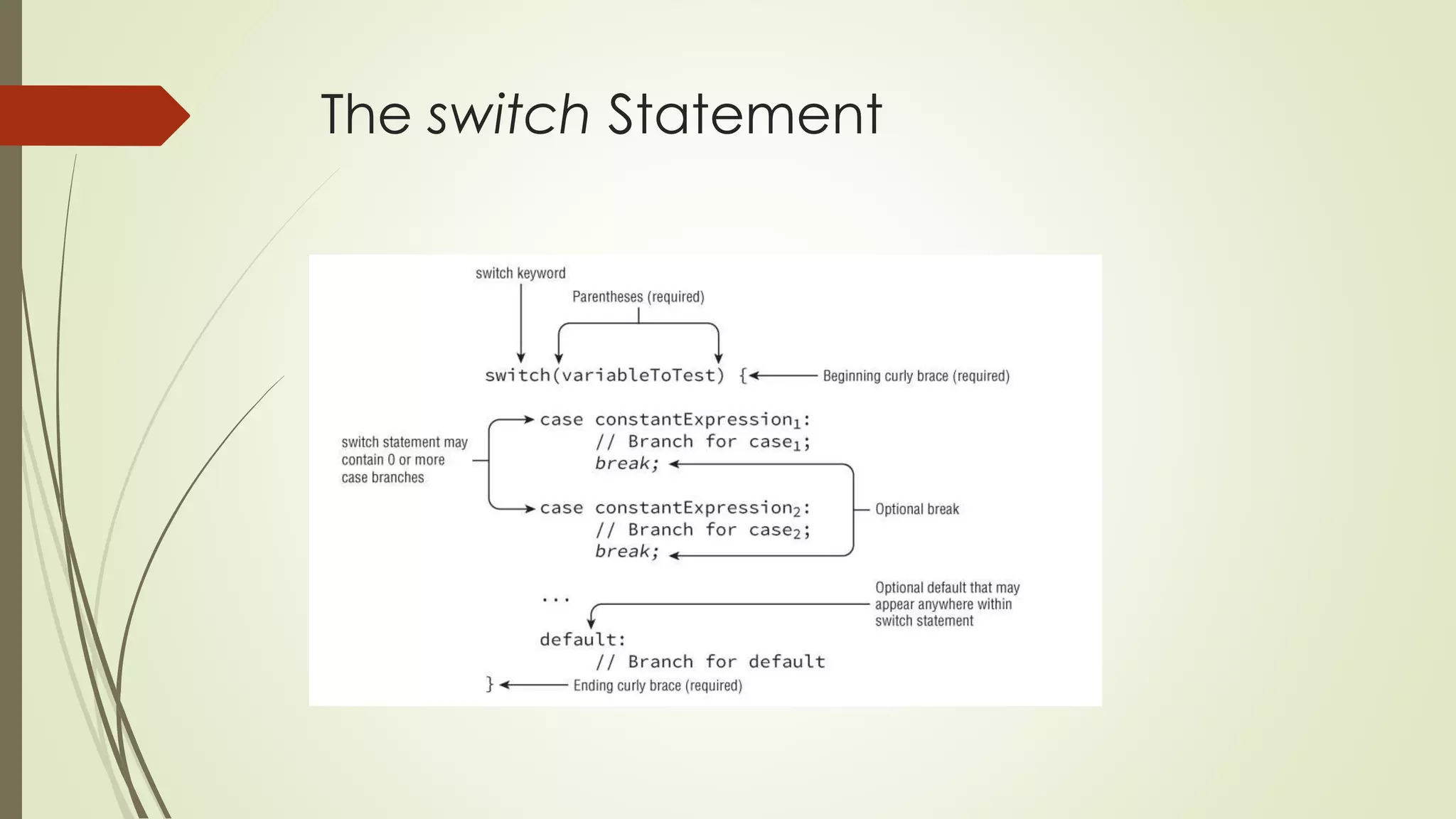
The switch Statement
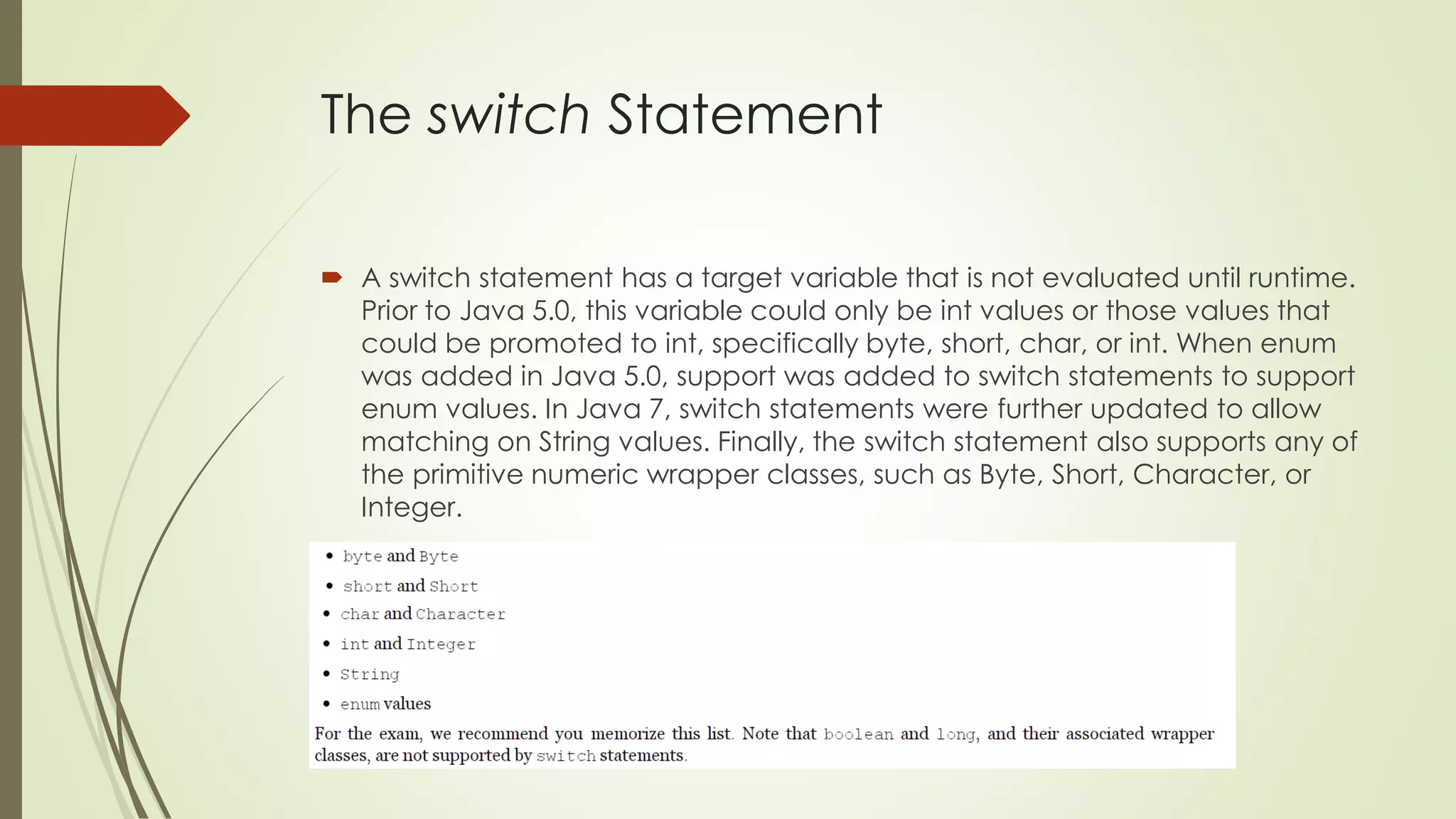
 A switch statement has a target variable that is not evaluated until runtime.
Prior to Java 5.0, this variable could only be int values or those values that
could be promoted to int, specifically byte, short, char, or int. When enum
was added in Java 5.0, support was added to switch statements to support
enum values. In Java 7, switch statements were further updated to allow
matching on String values. Finally, the switch statement also supports any of
the primitive numeric wrapper classes, such as Byte, Short, Character, or
Integer.
The switch Statement
 The values in each case statement must be compile-time constant values
of the same data type as the switch value. This means you can use only
literals, enum constants, or final constant variables of the same data type.
 As we'll soon see, if you leave out the break statement, flow will continue to
the next proceeding case or default block automatically.
 Another thing you might notice is that the default block is not at the end of
the switch statement. There is no requirement that the case or default
statements be in a particular order.
The switch Statement
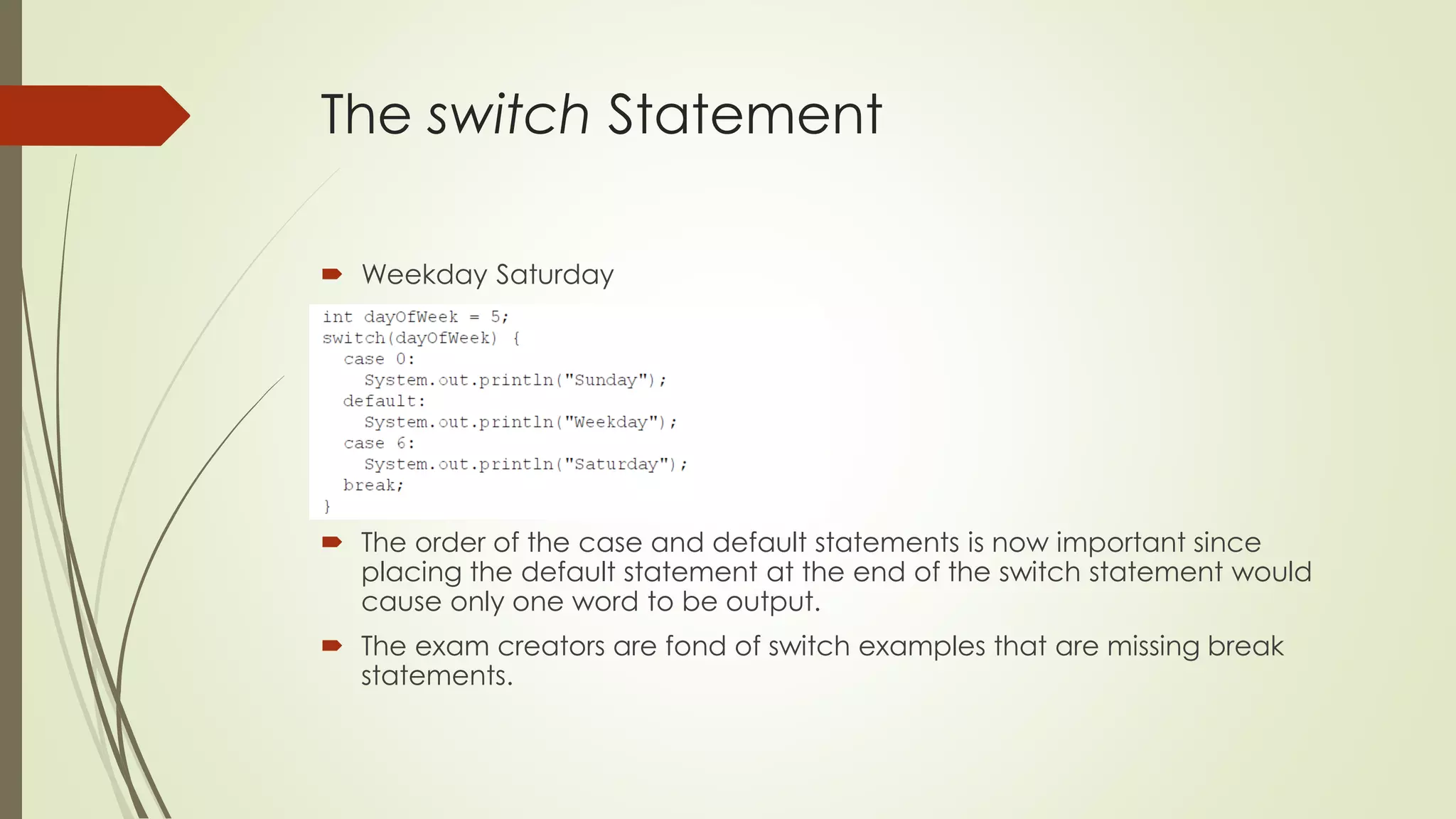
 Weekday Saturday
 The order of the case and default statements is now important since
placing the default statement at the end of the switch statement would
cause only one word to be output.
 The exam creators are fond of switch examples that are missing break
statements.
The switch Statement
The while Statement
 A repetition control structure, which we refer to as a loop, executes a
statement of code multiple times in succession.
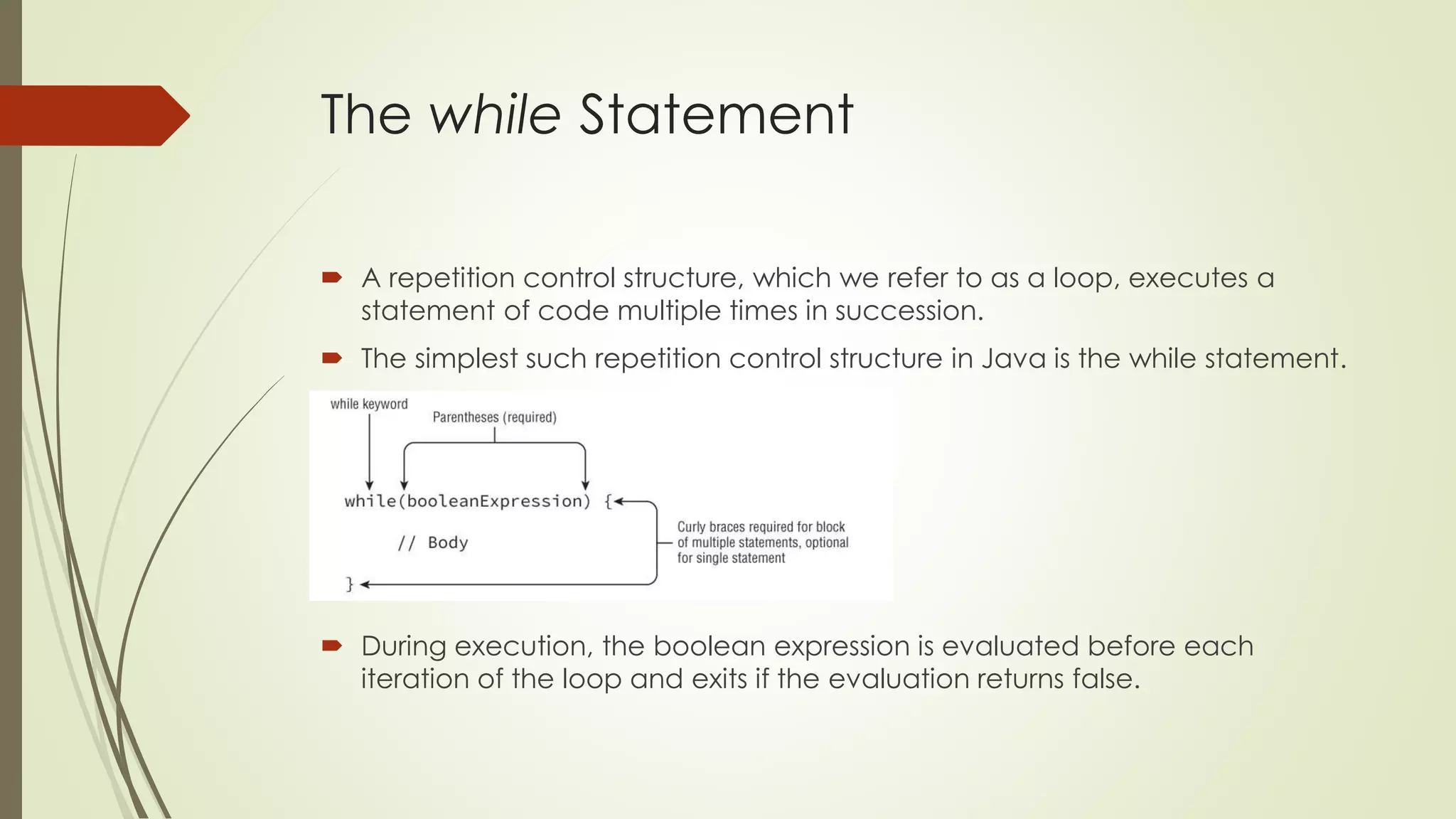
 The simplest such repetition control structure in Java is the while statement.
 During execution, the boolean expression is evaluated before each
iteration of the loop and exits if the evaluation returns false.
The while Statement
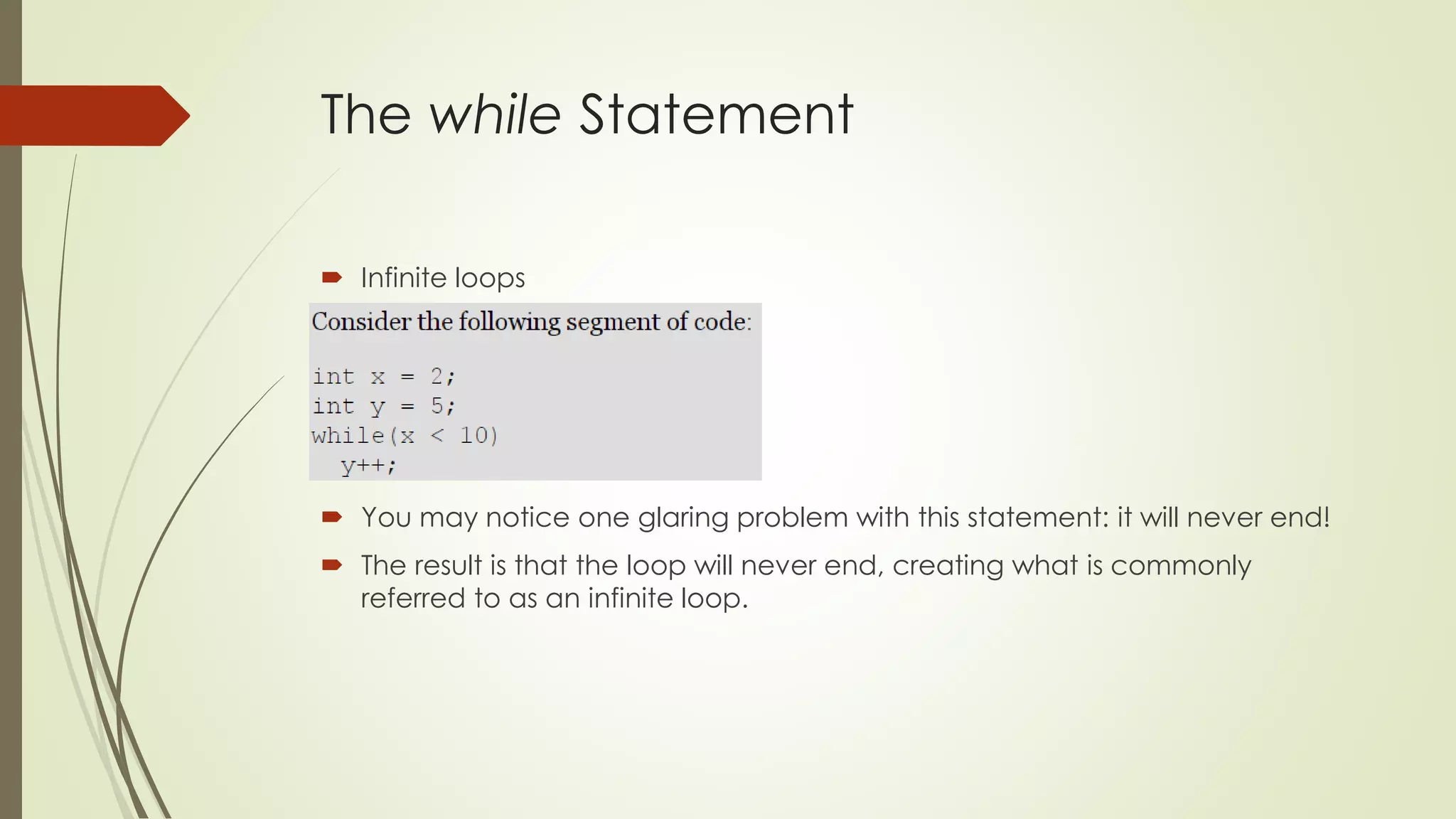
 Infinite loops
 You may notice one glaring problem with this statement: it will never end!
 The result is that the loop will never end, creating what is commonly
referred to as an infinite loop.
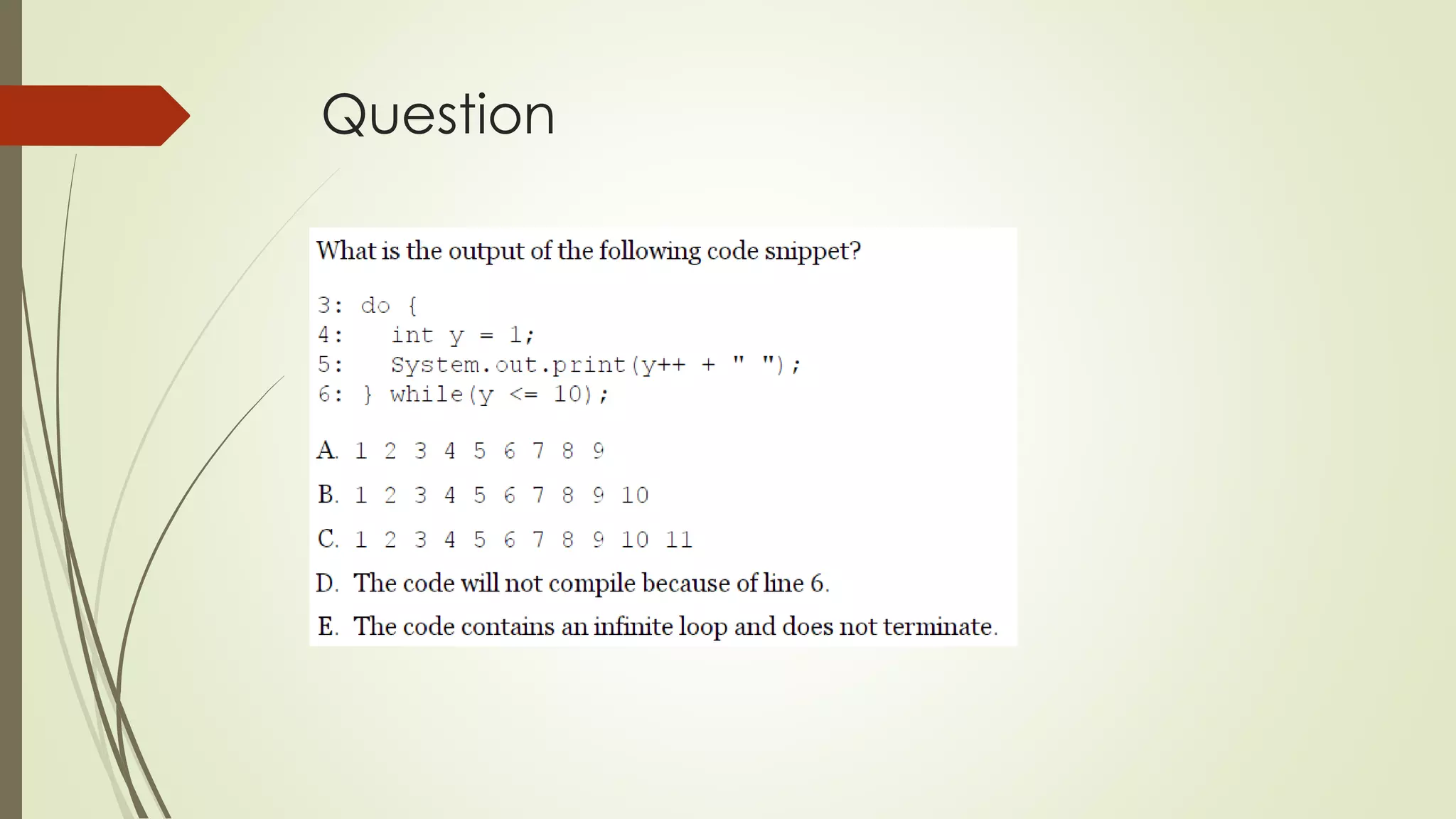
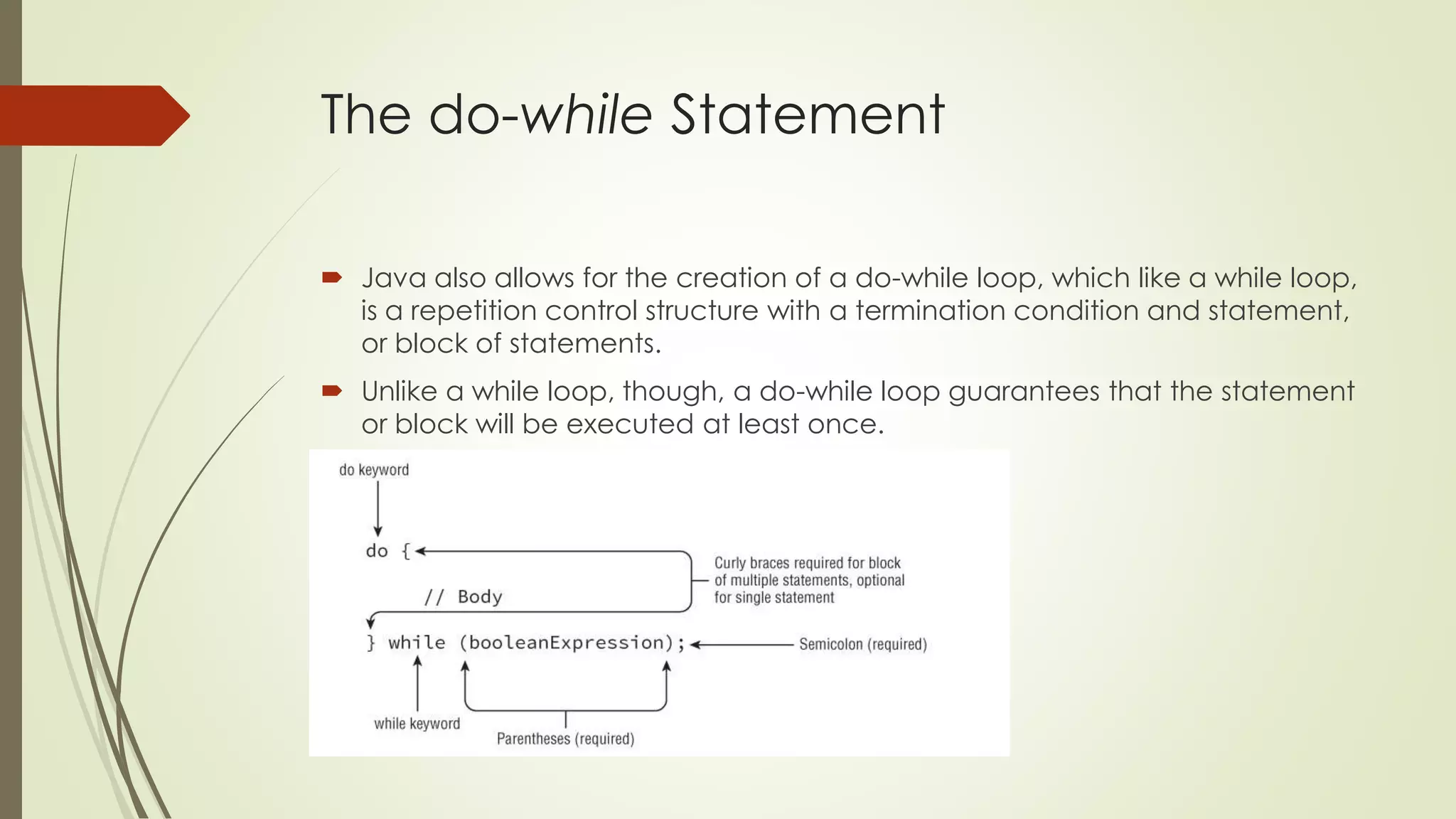
The do-while Statement
 Java also allows for the creation of a do-while loop, which like a while loop,
is a repetition control structure with a termination condition and statement,
or block of statements.
 Unlike a while loop, though, a do-while loop guarantees that the statement
or block will be executed at least once.
The do-while Statement
 Java will execute the statement block first, and then check the loop
condition. Even though the loop exits right away, the statement block was
still executed once.
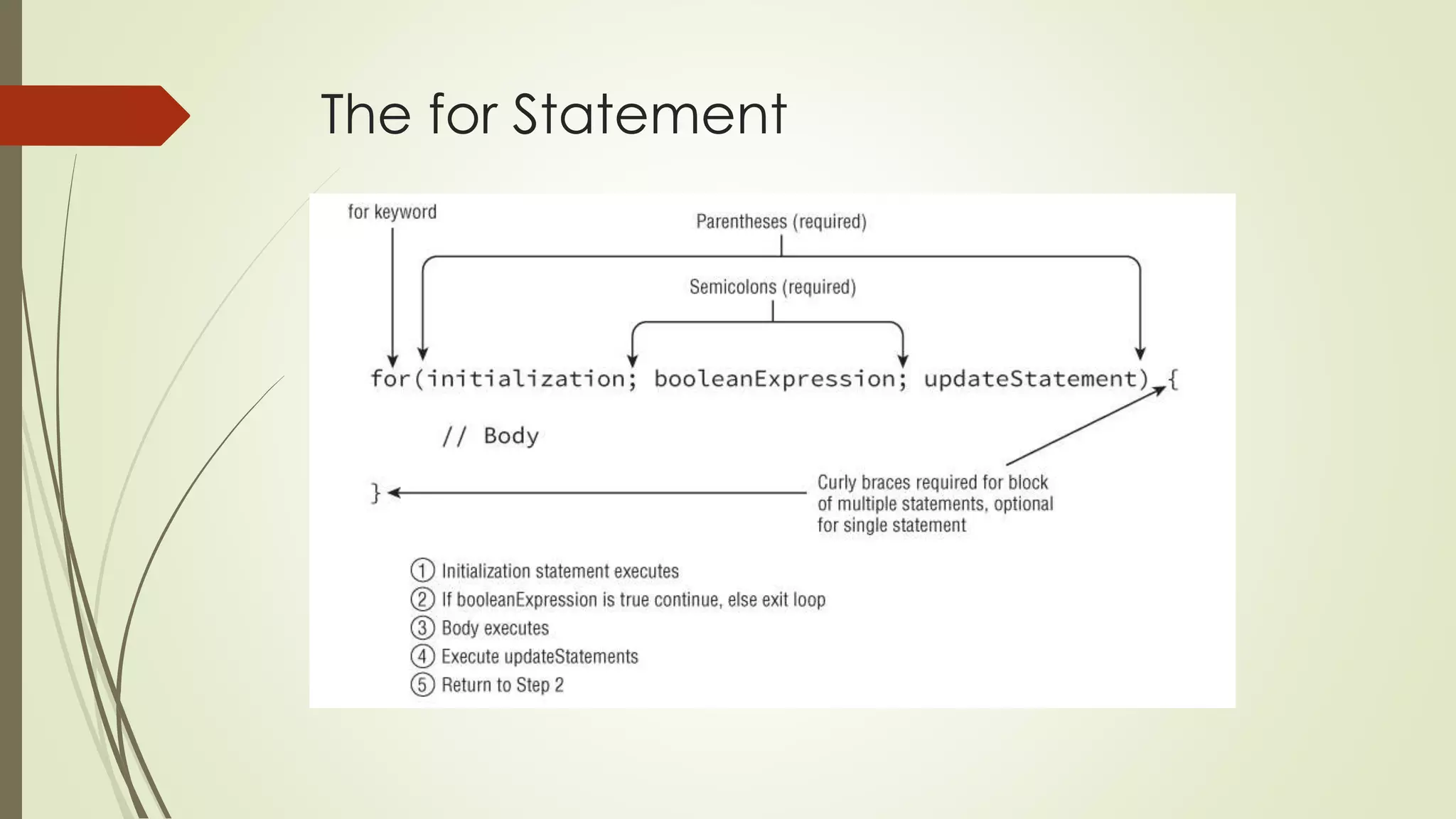
The for Statement
 Starting in Java 5.0, there are now two types of for statements. The first is
referred to as the basic for loop, and the second is often called the
enhanced for loop.
 For clarity, we'll refer to the enhanced for loop as the for-each statement
throughout the book.
 A basic for loop has the same conditional boolean expression and
statement, or block of statements, as the other loops you have seen, as well
as two new sections: an initialization block and an update statement.
The for Statement
The for Statement
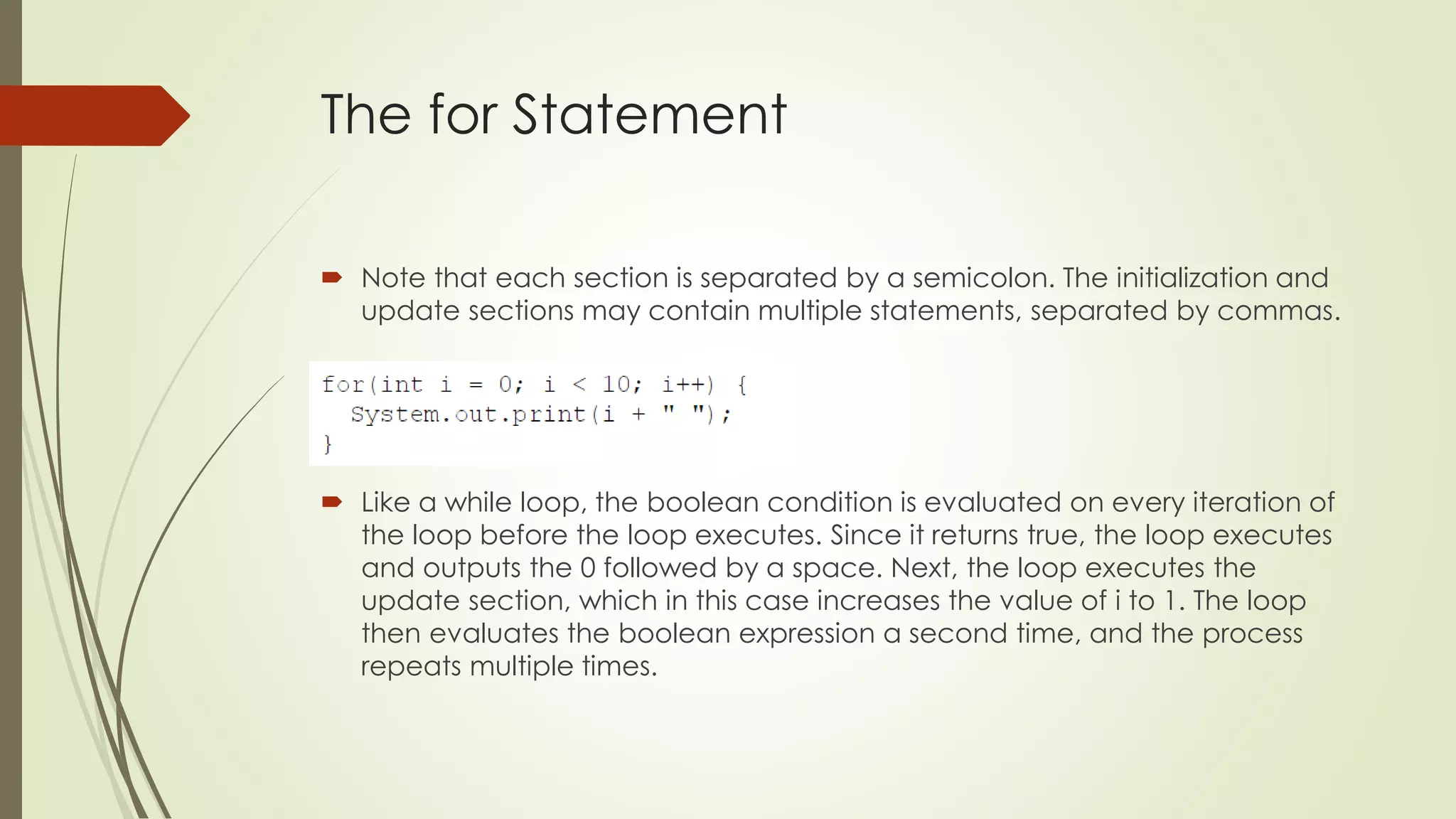
 Note that each section is separated by a semicolon. The initialization and
update sections may contain multiple statements, separated by commas.
 Like a while loop, the boolean condition is evaluated on every iteration of
the loop before the loop executes. Since it returns true, the loop executes
and outputs the 0 followed by a space. Next, the loop executes the
update section, which in this case increases the value of i to 1. The loop
then evaluates the boolean expression a second time, and the process
repeats multiple times.
The for Statement
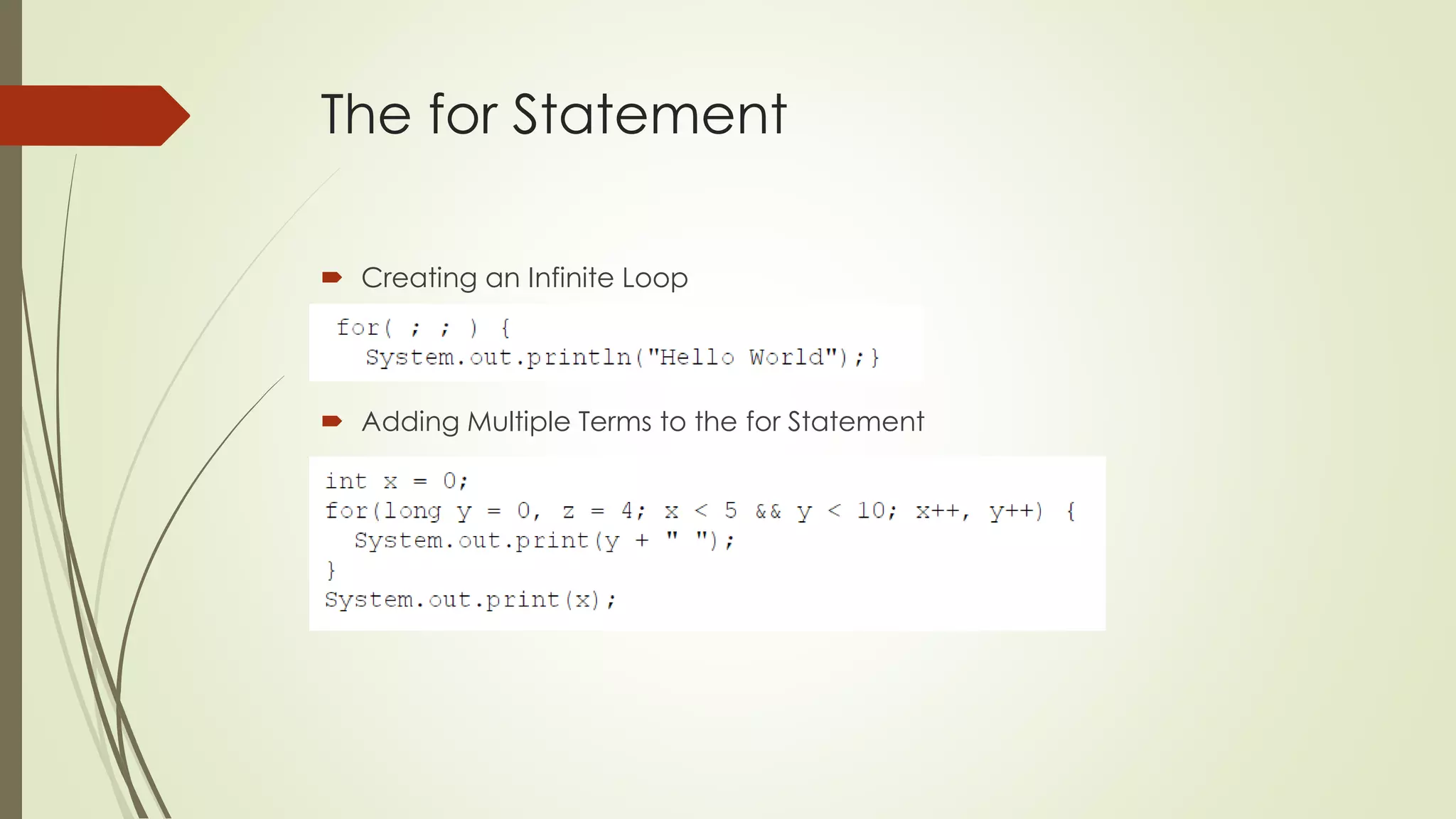
 Creating an Infinite Loop
 Adding Multiple Terms to the for Statement
The for-each Statement
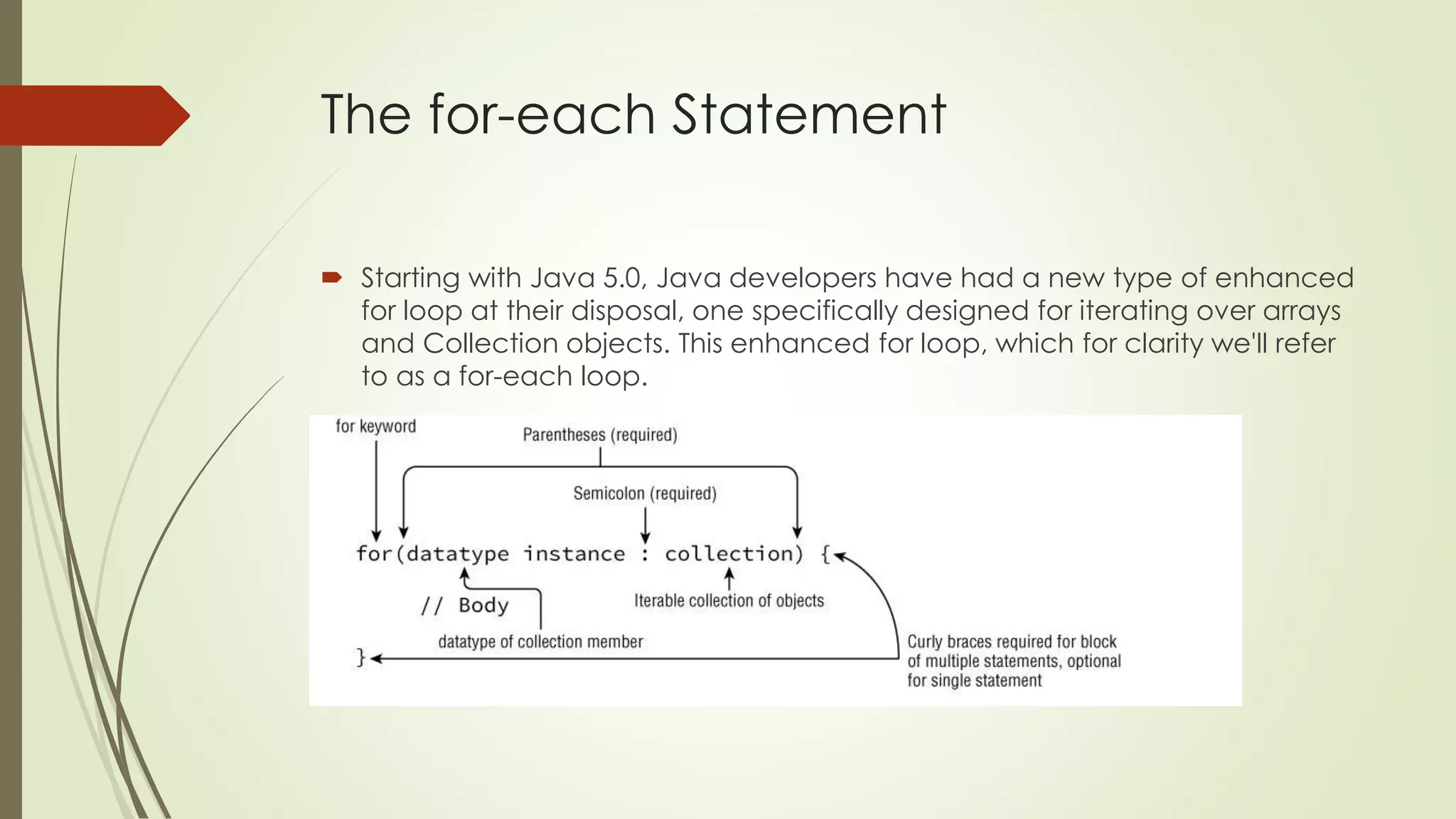
 Starting with Java 5.0, Java developers have had a new type of enhanced
for loop at their disposal, one specifically designed for iterating over arrays
and Collection objects. This enhanced for loop, which for clarity we'll refer
to as a for-each loop.
The for-each Statement
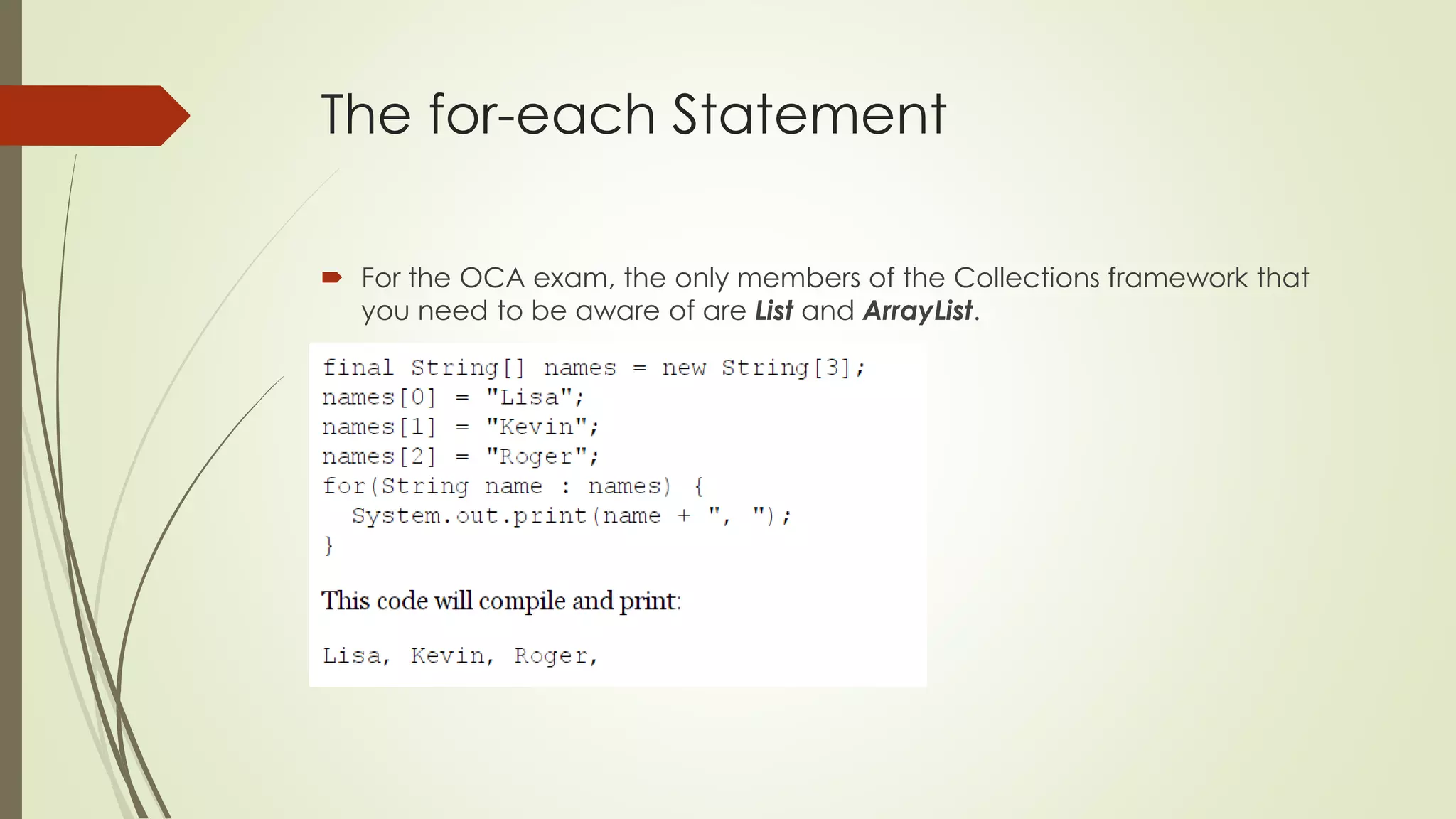
 For the OCA exam, the only members of the Collections framework that
you need to be aware of are List and ArrayList.
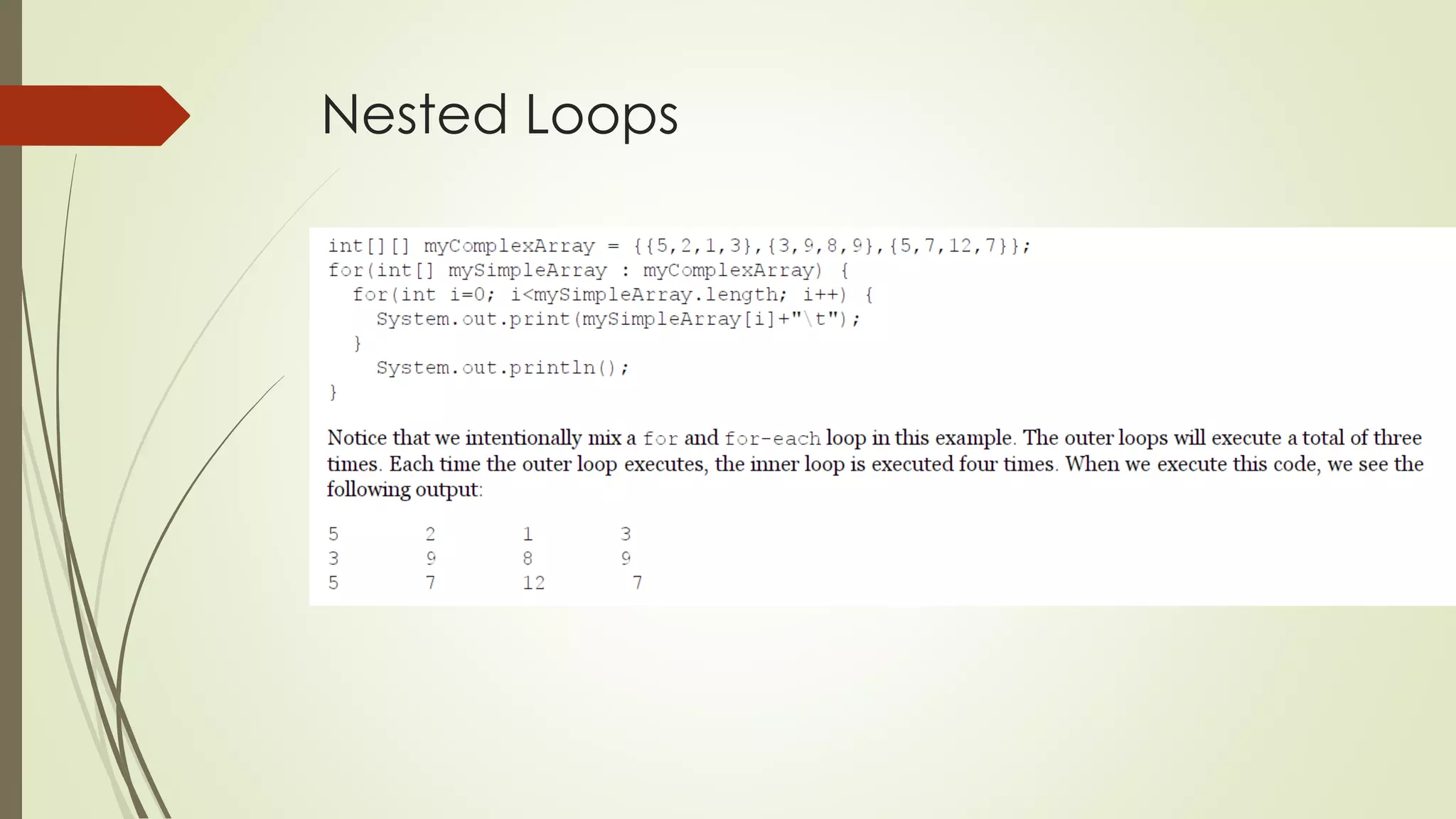
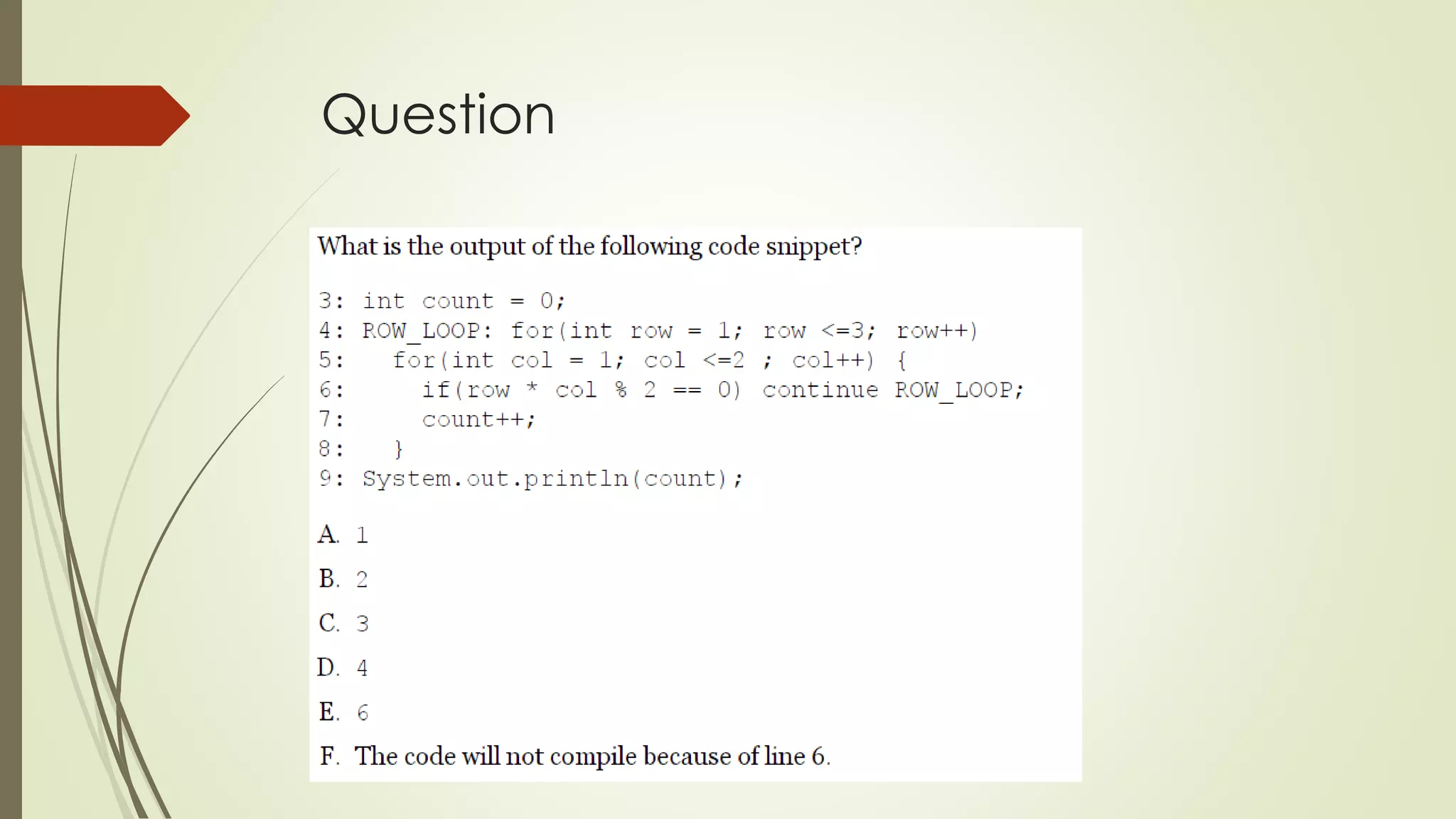
Nested Loops
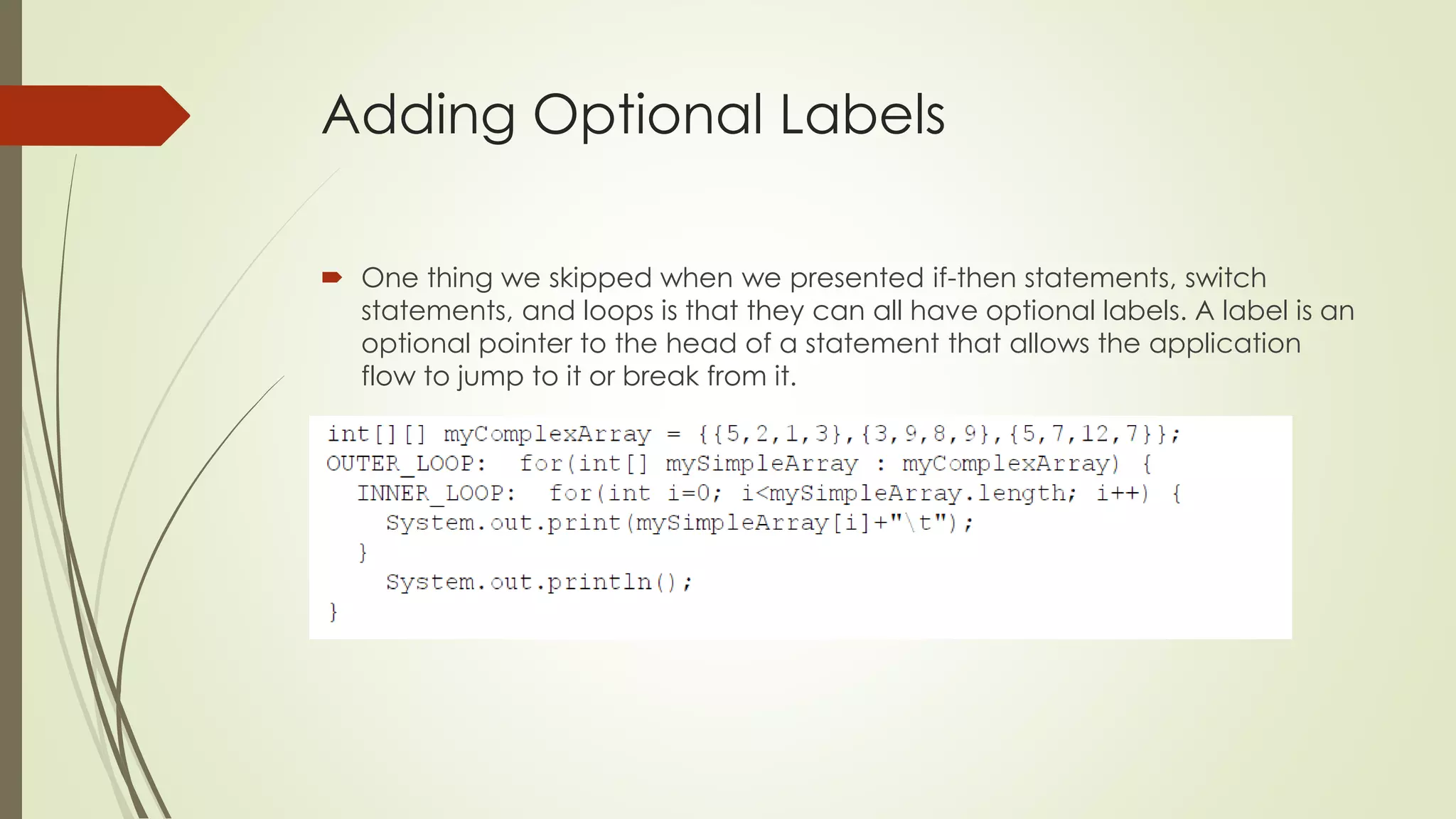
Adding Optional Labels
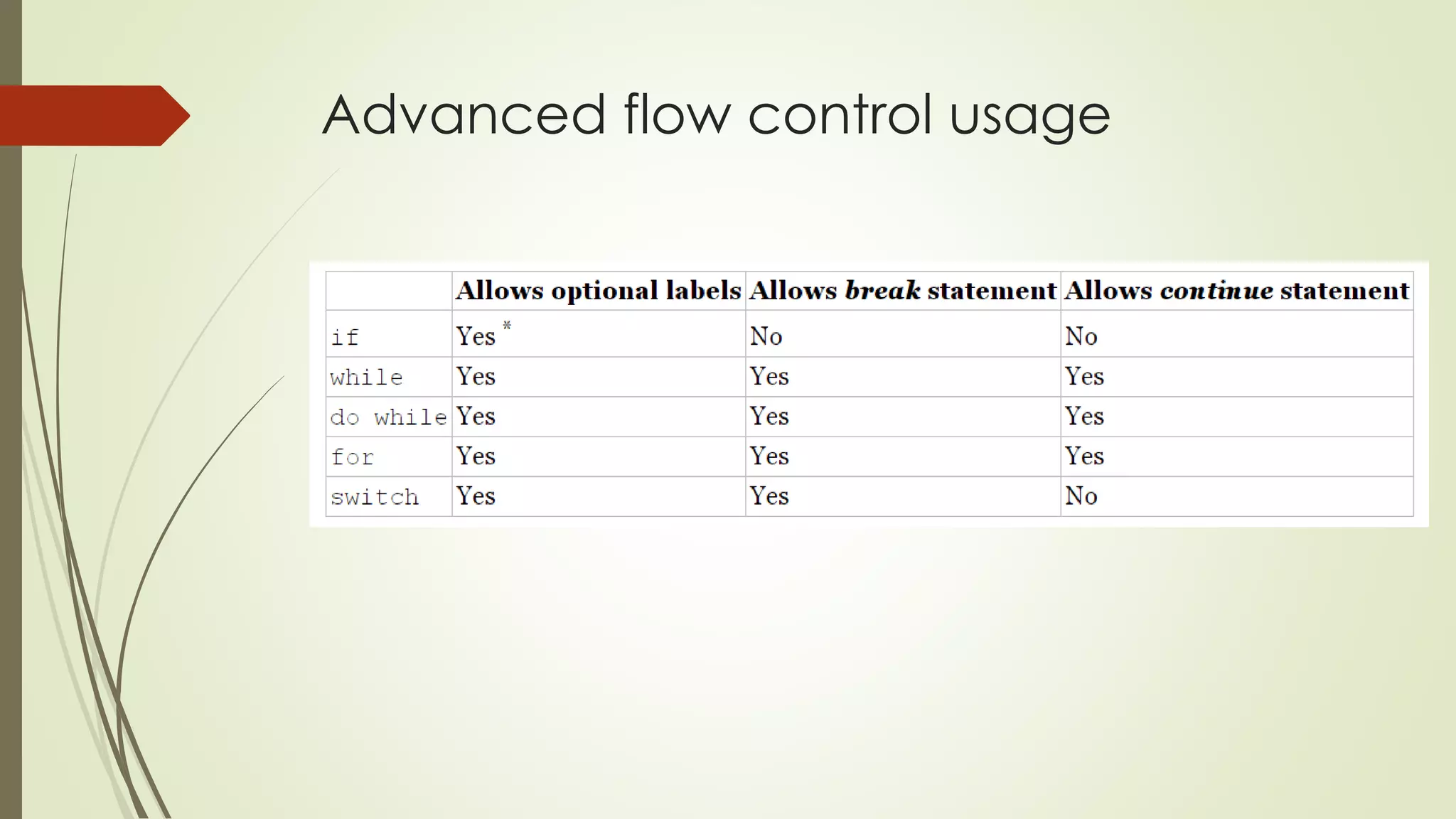
 One thing we skipped when we presented if-then statements, switch
statements, and loops is that they can all have optional labels. A label is an
optional pointer to the head of a statement that allows the application
flow to jump to it or break from it.
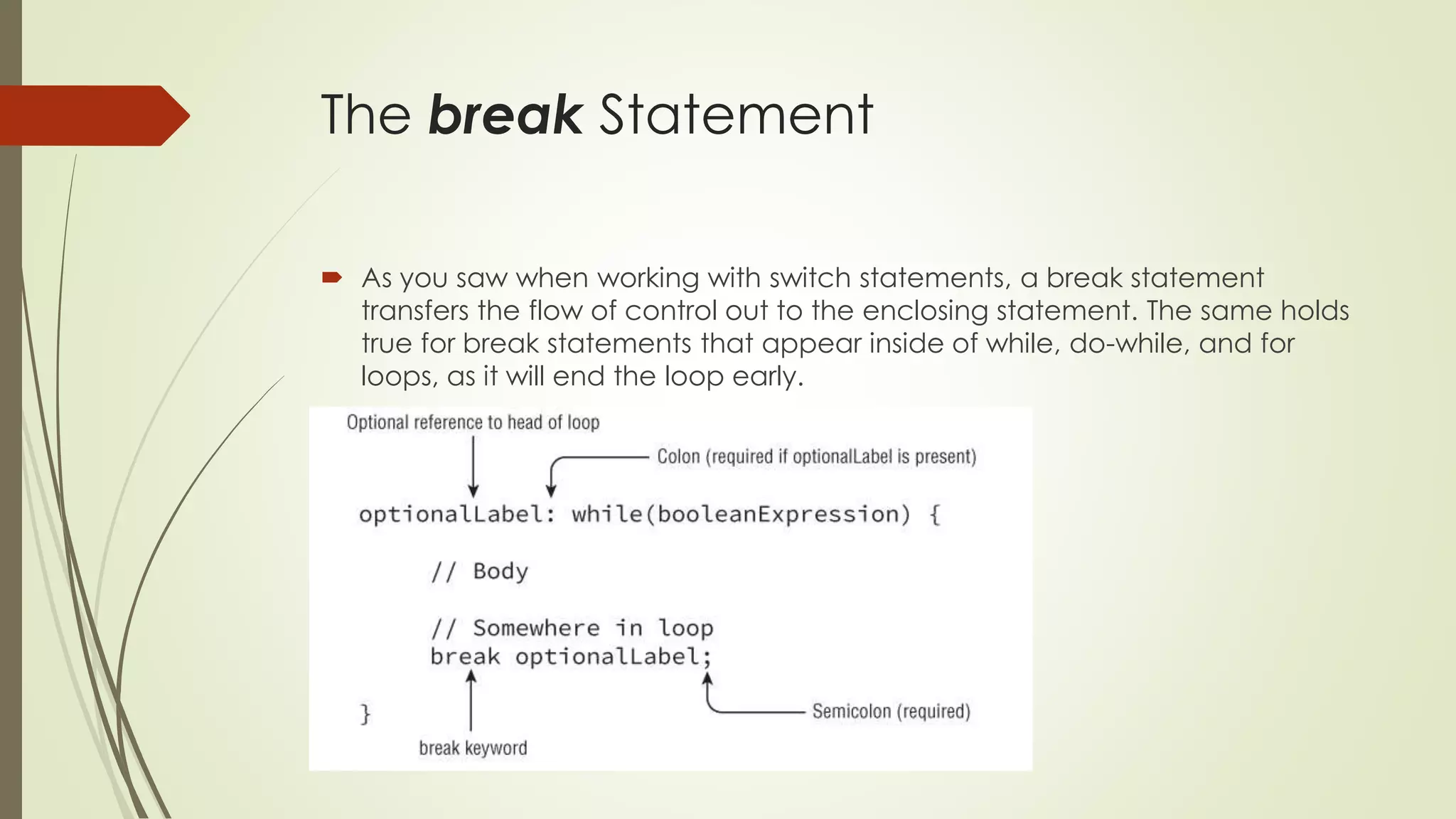
The break Statement
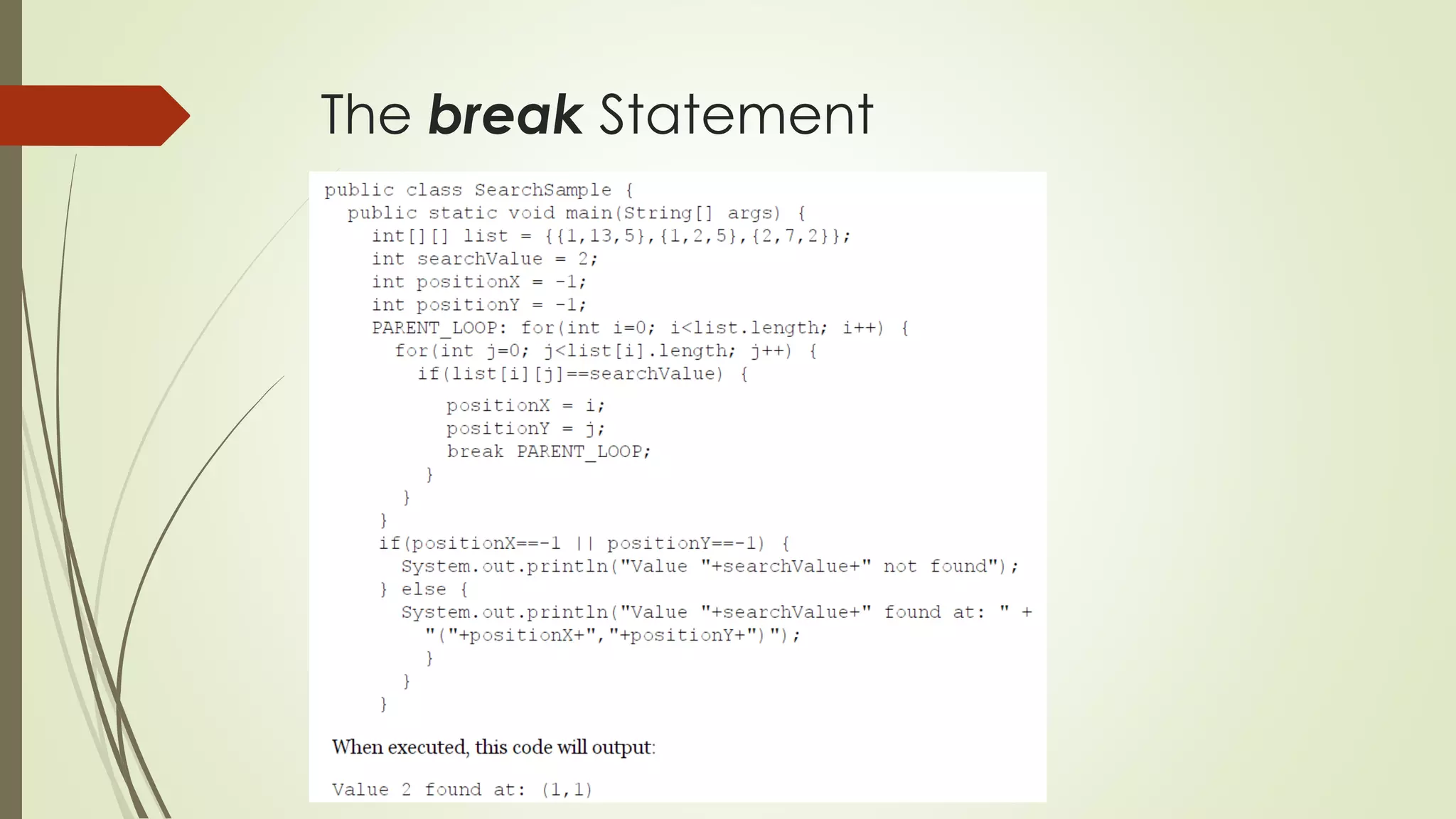
 As you saw when working with switch statements, a break statement
transfers the flow of control out to the enclosing statement. The same holds
true for break statements that appear inside of while, do-while, and for
loops, as it will end the loop early.
The break Statement
The continue Statement
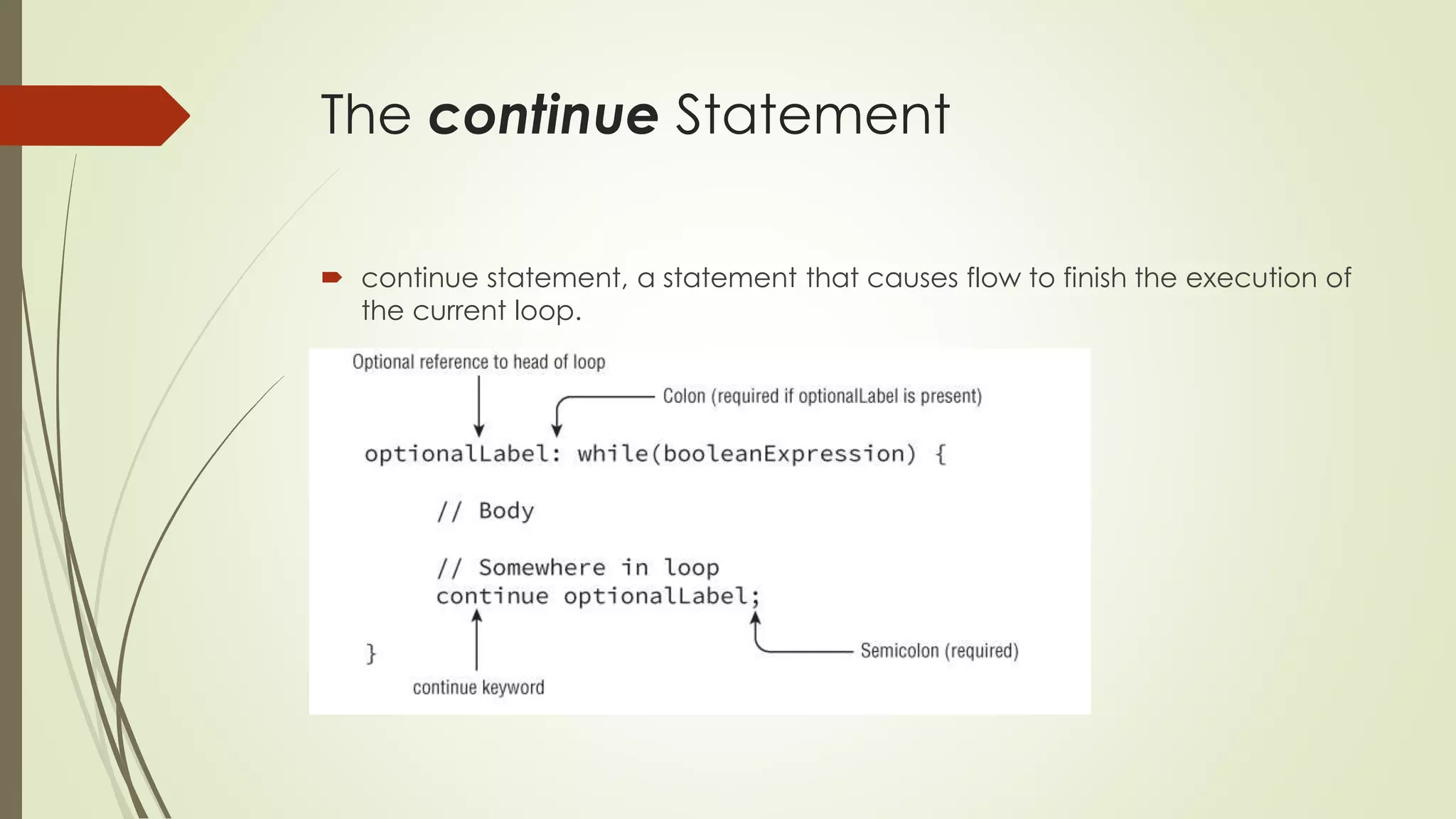
 continue statement, a statement that causes flow to finish the execution of
the current loop.
The continue Statement
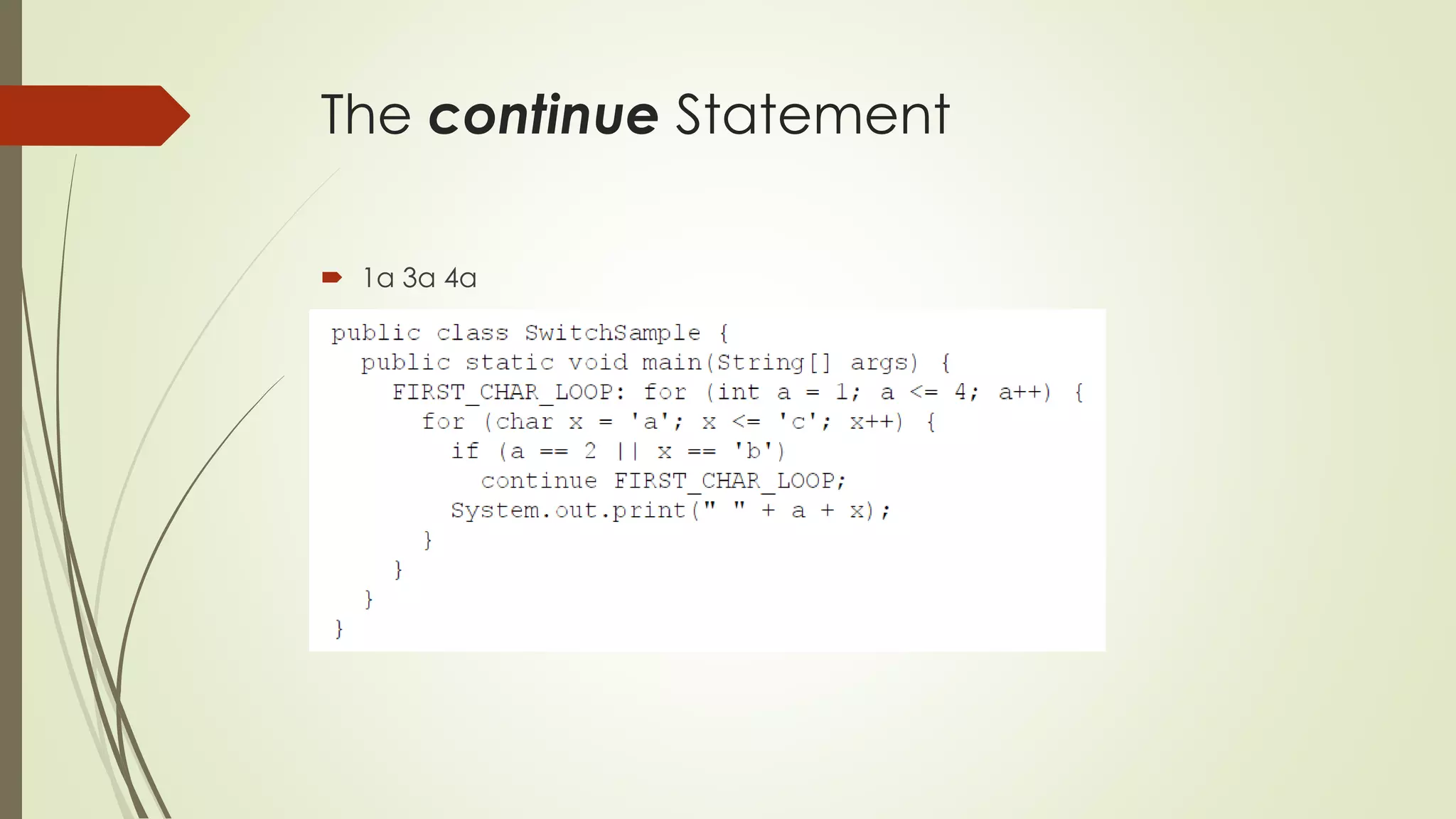
 1a 3a 4a
Advanced flow control usage
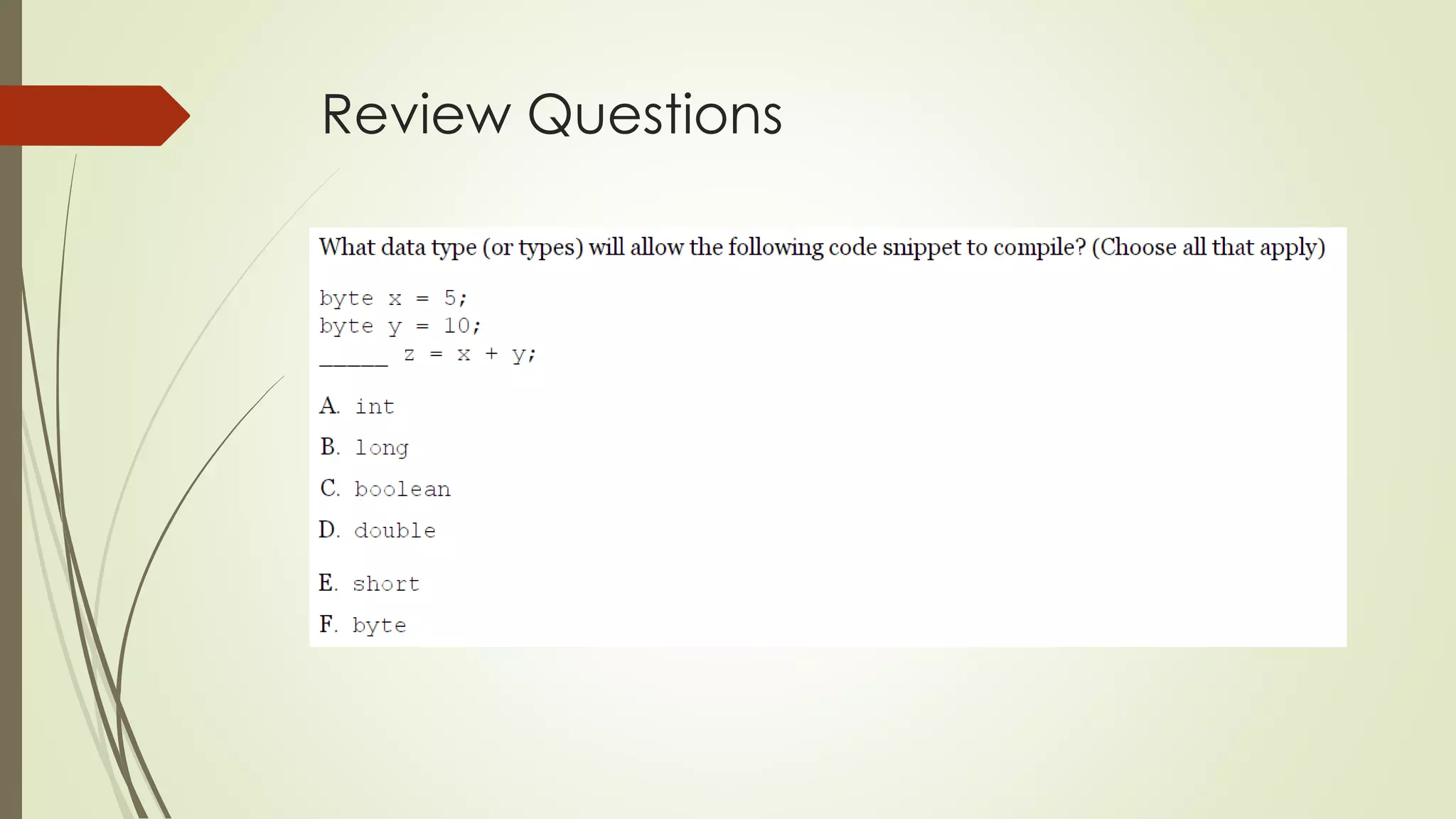
Review Questions
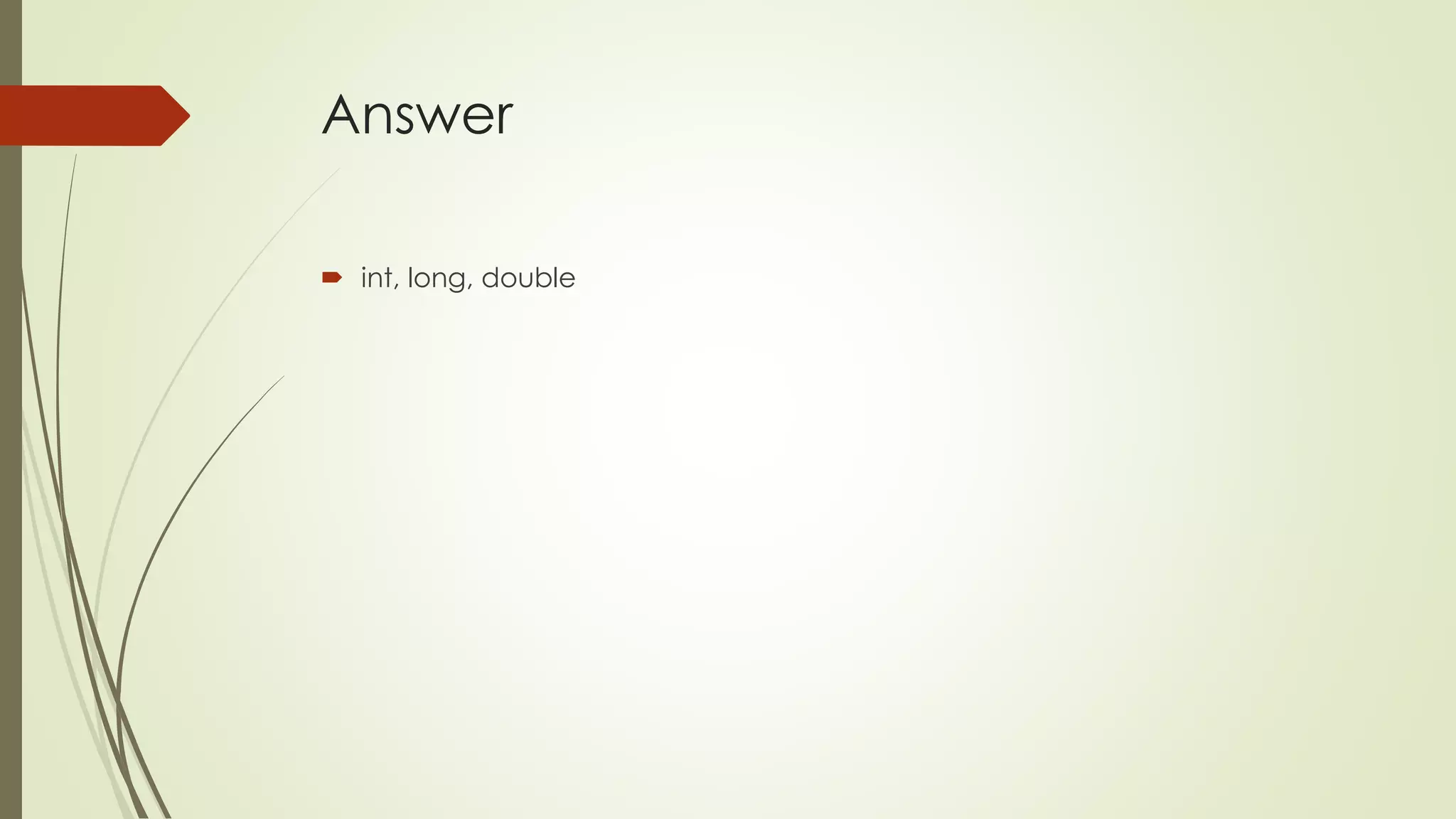
Answer
 int, long, double
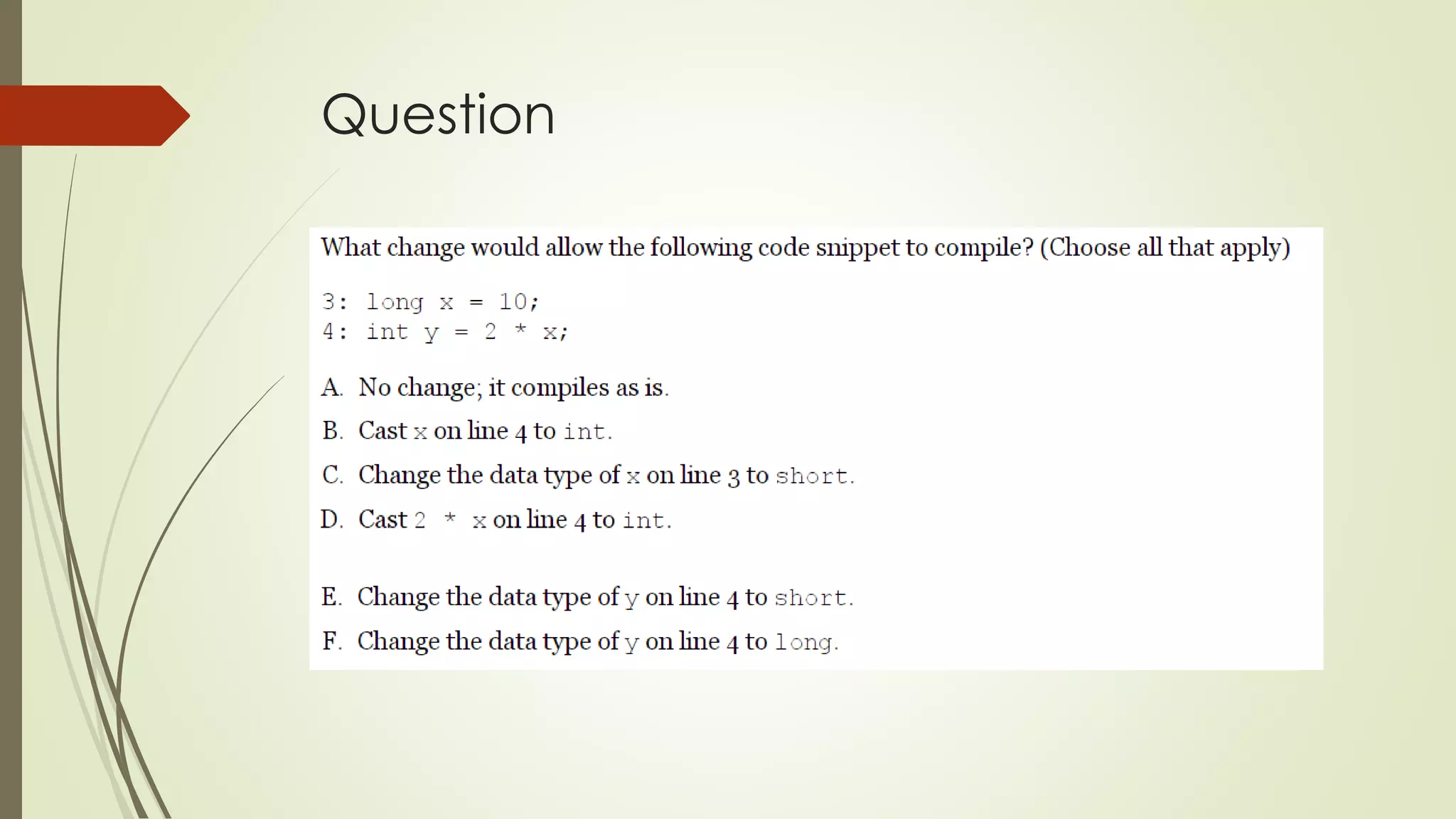
Question
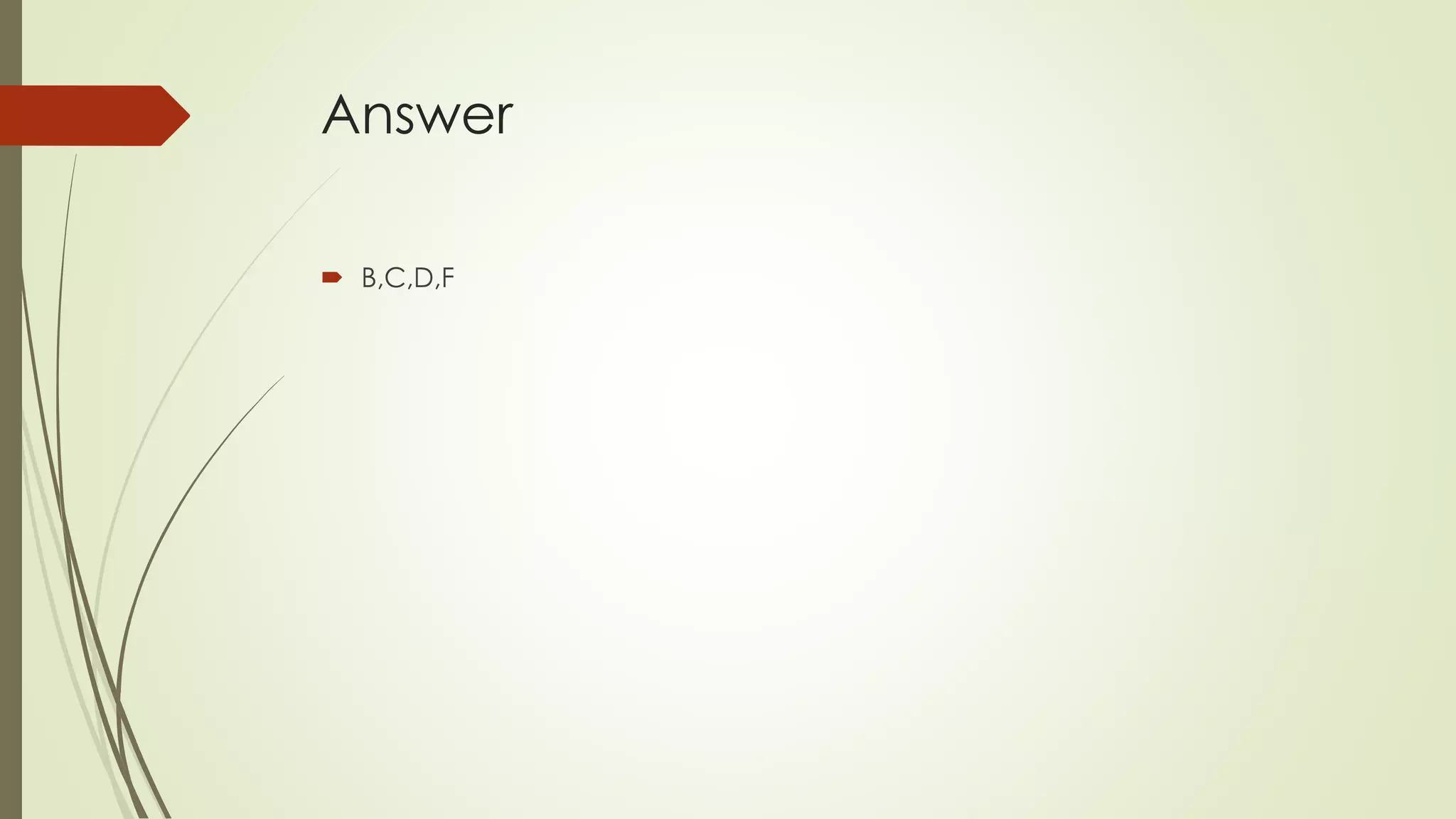
Answer
 B,C,D,F
Question
Answer
 D=8
Question
Answer
 D
Question
Answer
 D
Question
Answer
 B=2

OCA Java SE 8 Exam Chapter 2 Operators & Statements

  • 1.
    OCA EXAM 8 CHAPTER2 – Operators & Statements By İbrahim Kürce Brief of OCA: Oracle Certified Associate Java SE 8 Programmer I Study Guide: Exam 1Z0-808 Jeanne Boyarsky, Scott Selikoff
  • 2.
    Operators and Statements A Java operator is a special symbol that can be applied to a set of variables, values, or literals— referred to as operands— and that returns a result. Three flavors of operators are available in Java: unary, binary, and ternary.  Unless overridden with parentheses, Java operators follow order of operation, listed in Table below, by decreasing order of operator precedence.
  • 3.
    Working with BinaryArithmetic Operators Arithmetic Operators  Arithmetic operators are often encountered in early mathematics and include addition (+), subtraction (-), multiplication (*), division (/), and modulus (%).  They also include the unary operators, + + and –  The multiplicative operators (*, /, %) have a higher order of precedence than the additive operators (+, -).
  • 4.
    Numeric Promotion  NumericPromotion Rules  If two values have different data types, Java will automatically promote one of the values to the larger of the two data types.  If one of the values is integral and the other is floating-point, Java will automatically promote the integral value to the floating-point value's data type.  Smaller data types, namely byte, short, and char, are first promoted to int any time they're used with a Java binary arithmetic operator, even if neither of the operands is int.  After all promotion has occurred and the operands have the same data type, the resulting value will have the same data type as its promoted operands.
  • 5.
    Numeric Promotion  Forthe third rule, note that unary operators are excluded from this rule. For example, applying ++ to a short value results in a short value.  What is the data type of x * y? int x = 1; long y = 33; //long  What is the data type of x + y? double x = 39.21; float y = 2.1; // error
  • 6.
    Numeric Promotion  Whatis the data type of x / y? short x = 10; short y = 3; x and y will both be promoted to int before the operation, resulting in an output of type int.  What is the data type of x * y / z? short x = 14; float y = 13; double z = 30; //double
  • 7.
    Working with UnaryOperators  By definition, a unary operator is one that requires exactly one operand, or variable, to function.
  • 8.
    Logical Complement and NegationOperators  The logical complement operator, !, flips the value of a boolean expression.  Likewise, the negation operator, -, reverses the sign of a numeric expression, as shown in these statements:  Unlike some other programming languages, in Java 1 and true are not related in any way, just as 0 and false are not related.
  • 9.
    Increment and Decrement Operators Increment and decrement operators, + + and --, respectively, can be applied to numeric operands and have the higher order or precedence, as compared to binary operators.  If the operator is placed before the operand, referred to as the pre- increment operator and the pre-decrement operator, then the operator is applied first and the value return is the new value of the expression. Alternatively, if the operator is placed after the operand, referred to as the post-increment operator and the post-decrement operator, then the original value of the expression is returned, with operator applied after the value is returned.
  • 10.
  • 11.
    Assignment Operators  Anassignment operator is a binary operator that modifies, or assigns, the variable on the left-hand side of the operator, with the result of the value on the right-hand side of the equation.  int x = 1;  Java will automatically promote from smaller to larger data types, as we saw in the previous section on arithmetic operators, but it will throw a compiler exception if it detects you are trying to convert from larger to smaller data types.
  • 12.
  • 13.
  • 14.
    Compound Assignment Operators Besides the simple assignment operator, =, there are also numerous compound assignment operators.  Only two of the compound operators are required for the exam, + = and -=.  Compound operators are useful for more than just shorthand— they can also save us from having to explicitly cast a value.
  • 15.
    Compound Assignment Operators One final thing to know about the assignment operator is that the result of the assignment is an expression in and of itself, equal to the value of the assignment.
  • 16.
    Relational Operators  Wenow move on to relational operators, which compare two expressions and return a boolean value.  The first four relational operators are applied to numeric primitive data types only. If the two numeric operands are not of the same data type, the smaller one is promoted.  The instanceof operator, while useful for determining whether an arbitrary object is a member of a particular class or interface, is out of scope for the OCA exam.
  • 17.
    Logical Operators  Thelogical operators, (&), (|), and (^), may be applied to both numeric and boolean data types. When they're applied to boolean data types, they're referred to as logical operators. Alternatively, when they're applied to numeric data types, they're referred to as bitwise operators, as they perform bitwise comparisons of the bits that compose the number. For the exam, though, you don't need to know anything about numeric bitwise comparisons.
  • 18.
    Logical Operators  Wepresent the conditional operators, && and | |, which are often referred to as short-circuit operators. The short-circuit operators are nearly identical to the logical operators, & and |, respectively, except that the right-hand side of the expression may never be evaluated if the final result can be determined by the left-hand side of the expression. boolean x = true || (y < 4);  Since we know the left-hand side is true, there's no need to evaluate the right-hand side.
  • 19.
    Logical Operators  Becausex >= 6 is true, the increment operator on the right-hand side of the expression is never evaluated, so the output is 6.
  • 20.
    Equality Operators  Theequality operators are used in one of three scenarios:  Comparing two numeric primitive types. If the numeric values are of different data types, the values are automatically promoted as previously described. For example, 5 = = 5.00 returns true since the left side is promoted to a double.  Comparing two boolean values.  Comparing two objects, including null and String values.
  • 21.
    Equality Operators  Tworeferences are equal if and only if they point to the same object, or both point to null.  In this example, as well as during the OCA exam, you may be presented with class names that are unfamiliar, such as File. Many times you can answer questions about these classes without knowing the specific details of these classes.
  • 22.
    Understanding Java Statements a Java statement is a complete unit of execution in Java, terminated with a semicolon (;).  Control flow statements break up the flow of execution by using decision making, looping, and branching, allowing the application to selectively execute particular segments of code.  a block of code in Java is a group of zero or more statements between balanced braces, ({}), and can be used anywhere a single statement is allowed.
  • 23.
    The if-then Statement We only want to execute a block of code under certain circumstances. The if-then statement is for it.
  • 24.
    The if-then Statement Watch Indentation and Braces  One area that the exam writers will try to trip you up is on if-then statements without braces ({}). For example, take a look at this slightly modified form of our example:  Remember that in Java, unlike some other programming languages, tabs are just whitespace and are not evaluated as part of the execution.
  • 25.
  • 26.
    The if-then-else Statement We can append additional if-then statements to an else block to arrive at a more refined example:  The Java process will continue execution until it encounters an if-then statement that evaluates to true. If neither of the first two expressions are true, it will execute the final code of the else block.
  • 27.
    The if-then-else Statement For example, see what happens if we reorder the previous snippet of code as follows:  Be careful
  • 28.
    Ternary Operator  Theconditional operator, ? :, otherwise known as the ternary operator, is the only operator that takes three operands and is of the form:  There is no requirement that second and third expressions in ternary operations have the same data types, although it may come into play when combined with the assignment operator.
  • 29.
    Ternary Operator  Asof Java 7, only one of the right-hand expressions of the ternary operator will be evaluated at runtime.
  • 30.
  • 31.
    The switch Statement A switch statement has a target variable that is not evaluated until runtime. Prior to Java 5.0, this variable could only be int values or those values that could be promoted to int, specifically byte, short, char, or int. When enum was added in Java 5.0, support was added to switch statements to support enum values. In Java 7, switch statements were further updated to allow matching on String values. Finally, the switch statement also supports any of the primitive numeric wrapper classes, such as Byte, Short, Character, or Integer.
  • 32.
    The switch Statement The values in each case statement must be compile-time constant values of the same data type as the switch value. This means you can use only literals, enum constants, or final constant variables of the same data type.  As we'll soon see, if you leave out the break statement, flow will continue to the next proceeding case or default block automatically.  Another thing you might notice is that the default block is not at the end of the switch statement. There is no requirement that the case or default statements be in a particular order.
  • 33.
    The switch Statement Weekday Saturday  The order of the case and default statements is now important since placing the default statement at the end of the switch statement would cause only one word to be output.  The exam creators are fond of switch examples that are missing break statements.
  • 34.
  • 35.
    The while Statement A repetition control structure, which we refer to as a loop, executes a statement of code multiple times in succession.  The simplest such repetition control structure in Java is the while statement.  During execution, the boolean expression is evaluated before each iteration of the loop and exits if the evaluation returns false.
  • 36.
    The while Statement Infinite loops  You may notice one glaring problem with this statement: it will never end!  The result is that the loop will never end, creating what is commonly referred to as an infinite loop.
  • 37.
    The do-while Statement Java also allows for the creation of a do-while loop, which like a while loop, is a repetition control structure with a termination condition and statement, or block of statements.  Unlike a while loop, though, a do-while loop guarantees that the statement or block will be executed at least once.
  • 38.
    The do-while Statement Java will execute the statement block first, and then check the loop condition. Even though the loop exits right away, the statement block was still executed once.
  • 39.
    The for Statement Starting in Java 5.0, there are now two types of for statements. The first is referred to as the basic for loop, and the second is often called the enhanced for loop.  For clarity, we'll refer to the enhanced for loop as the for-each statement throughout the book.  A basic for loop has the same conditional boolean expression and statement, or block of statements, as the other loops you have seen, as well as two new sections: an initialization block and an update statement.
  • 40.
  • 41.
    The for Statement Note that each section is separated by a semicolon. The initialization and update sections may contain multiple statements, separated by commas.  Like a while loop, the boolean condition is evaluated on every iteration of the loop before the loop executes. Since it returns true, the loop executes and outputs the 0 followed by a space. Next, the loop executes the update section, which in this case increases the value of i to 1. The loop then evaluates the boolean expression a second time, and the process repeats multiple times.
  • 42.
    The for Statement Creating an Infinite Loop  Adding Multiple Terms to the for Statement
  • 43.
    The for-each Statement Starting with Java 5.0, Java developers have had a new type of enhanced for loop at their disposal, one specifically designed for iterating over arrays and Collection objects. This enhanced for loop, which for clarity we'll refer to as a for-each loop.
  • 44.
    The for-each Statement For the OCA exam, the only members of the Collections framework that you need to be aware of are List and ArrayList.
  • 45.
  • 46.
    Adding Optional Labels One thing we skipped when we presented if-then statements, switch statements, and loops is that they can all have optional labels. A label is an optional pointer to the head of a statement that allows the application flow to jump to it or break from it.
  • 47.
    The break Statement As you saw when working with switch statements, a break statement transfers the flow of control out to the enclosing statement. The same holds true for break statements that appear inside of while, do-while, and for loops, as it will end the loop early.
  • 48.
  • 49.
    The continue Statement continue statement, a statement that causes flow to finish the execution of the current loop.
  • 50.
  • 51.
  • 52.
  • 53.
  • 54.
  • 55.
  • 56.
  • 57.
  • 58.
  • 59.
  • 60.
  • 61.
  • 62.
  • 63.