
The Objective-C Programming Language
Tools & Languages: Objective-C


          2010-12-08
OR WRITTEN, EXPRESS OR IMPLIED. No Apple
                                                    dealer, agent, or employee is authorized to make
Apple Inc.                                          any modification, extension, or addition to this
© 2010 Apple Inc.                                   warranty.
All rights reserved.                                Some states do not allow the exclusion or limitation
                                                    of implied warranties or liability for incidental or
                                                    consequential damages, so the above limitation or
No part of this publication may be reproduced,      exclusion may not apply to you. This warranty gives
stored in a retrieval system, or transmitted, in    you specific legal rights, and you may also have
                                                    other rights which vary from state to state.
any form or by any means, mechanical,
electronic, photocopying, recording, or
otherwise, without prior written permission of
Apple Inc., with the following exceptions: Any
person is hereby authorized to store
documentation on a single computer for
personal use only and to print copies of
documentation for personal use provided that
the documentation contains Apple’s copyright
notice.
The Apple logo is a trademark of Apple Inc.
No licenses, express or implied, are granted
with respect to any of the technology described
in this document. Apple retains all intellectual
property rights associated with the technology
described in this document. This document is
intended to assist application developers to
develop applications only for Apple-labeled
computers.
Apple Inc.
1 Infinite Loop
Cupertino, CA 95014
408-996-1010

Apple, the Apple logo, Cocoa, iBook, iBooks,
Instruments, Mac, Mac OS, and Objective-C are
trademarks of Apple Inc., registered in the
United States and other countries.
IOS is a trademark or registered trademark of
Cisco in the U.S. and other countries and is used
under license.
Java is a registered trademark of Oracle and/or
its affiliates.
Times is a registered trademark of Heidelberger
Druckmaschinen AG, available from Linotype
Library GmbH.
Even though Apple has reviewed this document,
APPLE MAKES NO WARRANTY OR REPRESENTATION,
EITHER EXPRESS OR IMPLIED, WITH RESPECT TO
THIS DOCUMENT, ITS QUALITY, ACCURACY,
MERCHANTABILITY, OR FITNESS FOR A PARTICULAR
PURPOSE. AS A RESULT, THIS DOCUMENT IS
PROVIDED “AS IS,” AND YOU, THE READER, ARE
ASSUMING THE ENTIRE RISK AS TO ITS QUALITY
AND ACCURACY.
IN NO EVENT WILL APPLE BE LIABLE FOR DIRECT,
INDIRECT, SPECIAL, INCIDENTAL, OR
CONSEQUENTIAL DAMAGES RESULTING FROM ANY
DEFECT OR INACCURACY IN THIS DOCUMENT, even
if advised of the possibility of such damages.
THE WARRANTY AND REMEDIES SET FORTH ABOVE
ARE EXCLUSIVE AND IN LIEU OF ALL OTHERS, ORAL
Contents

Introduction          Introduction 9

                      Who Should Read This Document 9
                      Organization of This Document 9
                      Conventions 10
                      See Also 11
                        The Runtime System 11
                        Memory Management 11


Chapter 1             Objects, Classes, and Messaging 13

                      The Runtime System 13
                      Objects 13
                         Object Basics 13
                         id 14
                         Dynamic Typing 14
                         Memory Management 15
                      Object Messaging 15
                         Message Syntax 15
                         Sending Messages to nil 17
                         The Receiver’s Instance Variables 18
                         Polymorphism 18
                         Dynamic Binding 19
                         Dynamic Method Resolution 19
                         Dot Syntax 19
                      Classes 23
                         Inheritance 23
                         Class Types 26
                         Class Objects 28
                         Class Names in Source Code 32
                         Testing Class Equality 33


Chapter 2             Defining a Class 35

                      Source Files 35
                      Class Interface 35
                         Importing the Interface 37
                         Referring to Other Classes 37
                         The Role of the Interface 38
                      Class Implementation 38
                         Referring to Instance Variables 39
                         The Scope of Instance Variables 40


                                                                  3
            2010-12-08 | © 2010 Apple Inc. All Rights Reserved.
CONTENTS


                      Messages to self and super 43
                        An Example: Using self and super 44
                        Using super 45
                        Redefining self 46


Chapter 3             Allocating and Initializing Objects 49

                      Allocating and Initializing Objects 49
                      The Returned Object 49
                      Implementing an Initializer 50
                         Constraints and Conventions 50
                         Handling Initialization Failure 52
                         Coordinating Classes 53
                      The Designated Initializer 55
                      Combining Allocation and Initialization 57


Chapter 4             Protocols 59

                      Declaring Interfaces for Others to Implement 59
                      Methods for Others to Implement 60
                      Declaring Interfaces for Anonymous Objects 61
                      Nonhierarchical Similarities 61
                      Formal Protocols 62
                         Declaring a Protocol 62
                         Optional Protocol Methods 62
                      Informal Protocols 63
                      Protocol Objects 64
                      Adopting a Protocol 64
                      Conforming to a Protocol 65
                      Type Checking 65
                      Protocols Within Protocols 66
                      Referring to Other Protocols 67


Chapter 5             Declared Properties 69

                      Overview 69
                      Property Declaration and Implementation 69
                         Property Declaration 70
                         Property Declaration Attributes 70
                         Property Implementation Directives 73
                      Using Properties 74
                         Supported Types 74
                         Property Redeclaration 75
                         Copy 75
                         dealloc 76
                         Core Foundation 77


4
            2010-12-08 | © 2010 Apple Inc. All Rights Reserved.
CONTENTS


                          Example: Declaring Properties and Synthesizing Accessors 77
                       Subclassing with Properties 79
                       Performance and Threading 79
                       Runtime Difference 80


Chapter 6              Categories and Extensions 81

                       Adding Methods to Classes 81
                       How You Can Use Categories 82
                       Categories of the Root Class 83
                       Extensions 83


Chapter 7              Associative References 87

                       Adding Storage Outside a Class Definition 87
                       Creating Associations 87
                       Retrieving Associated Objects 88
                       Breaking Associations 88
                       Complete Example 88


Chapter 8              Fast Enumeration 91

                       The for…in Syntax 91
                       Adopting Fast Enumeration 91
                       Using Fast Enumeration 92


Chapter 9              Enabling Static Behavior 95

                       Default Dynamic Behavior 95
                       Static Typing 95
                       Type Checking 96
                       Return and Parameter Types 97
                       Static Typing to an Inherited Class 97


Chapter 10             Selectors 99

                       Methods and Selectors 99
                          SEL and @selector 99
                          Methods and Selectors 100
                          Method Return and Parameter Types 100
                       Varying the Message at Runtime 100
                       The Target-Action Design Pattern 101
                       Avoiding Messaging Errors 101


                                                                                        5
             2010-12-08 | © 2010 Apple Inc. All Rights Reserved.
CONTENTS


Chapter 11             Exception Handling 103

                       Enabling Exception-Handling 103
                       Exception Handling 103
                       Catching Different Types of Exception 104
                       Throwing Exceptions 104


Chapter 12             Threading 107

                       Document Revision History 109

                       Glossary 113


6
             2010-12-08 | © 2010 Apple Inc. All Rights Reserved.
Figures and Listings

Chapter 1              Objects, Classes, and Messaging 13

                       Figure 1-1         Some drawing program classes 24
                       Figure 1-2         Rectangle instance variables 25
                       Figure 1-3         The inheritance hierarchy for NSCell 30
                       Listing 1-1        Accessing properties using dot syntax 20
                       Listing 1-2        Accessing properties using bracket syntax 20
                       Listing 1-3        Implementation of the initialize method 32


Chapter 2              Defining a Class 35

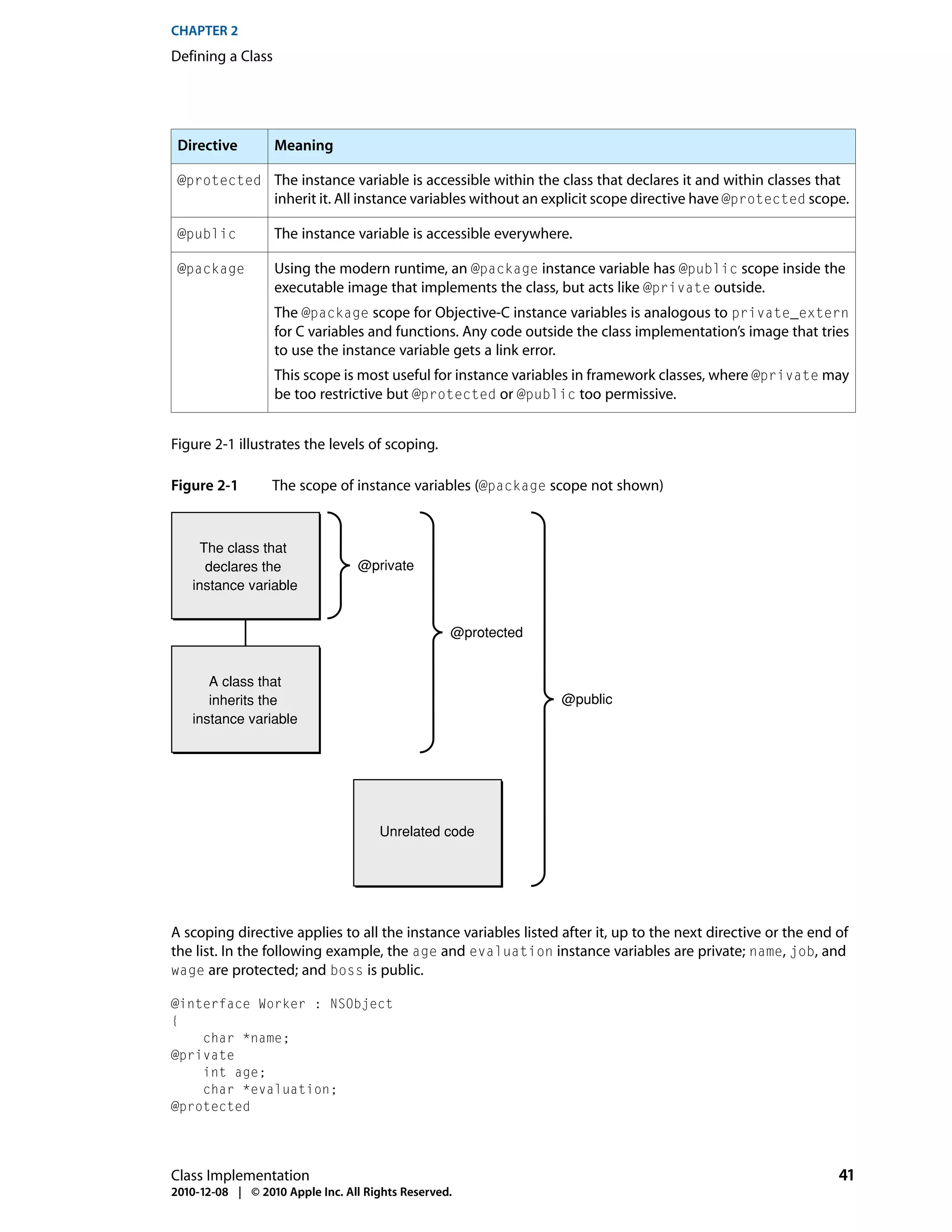
                       Figure 2-1         The scope of instance variables (@package scope not shown) 41
                       Figure 2-2         The hierarchy of High, Mid, and Low 44


Chapter 3              Allocating and Initializing Objects 49

                       Figure 3-1         Incorporating an inherited initialization method 54
                       Figure 3-2         Covering an inherited initialization method 55
                       Figure 3-3         Covering the designated initializer 56
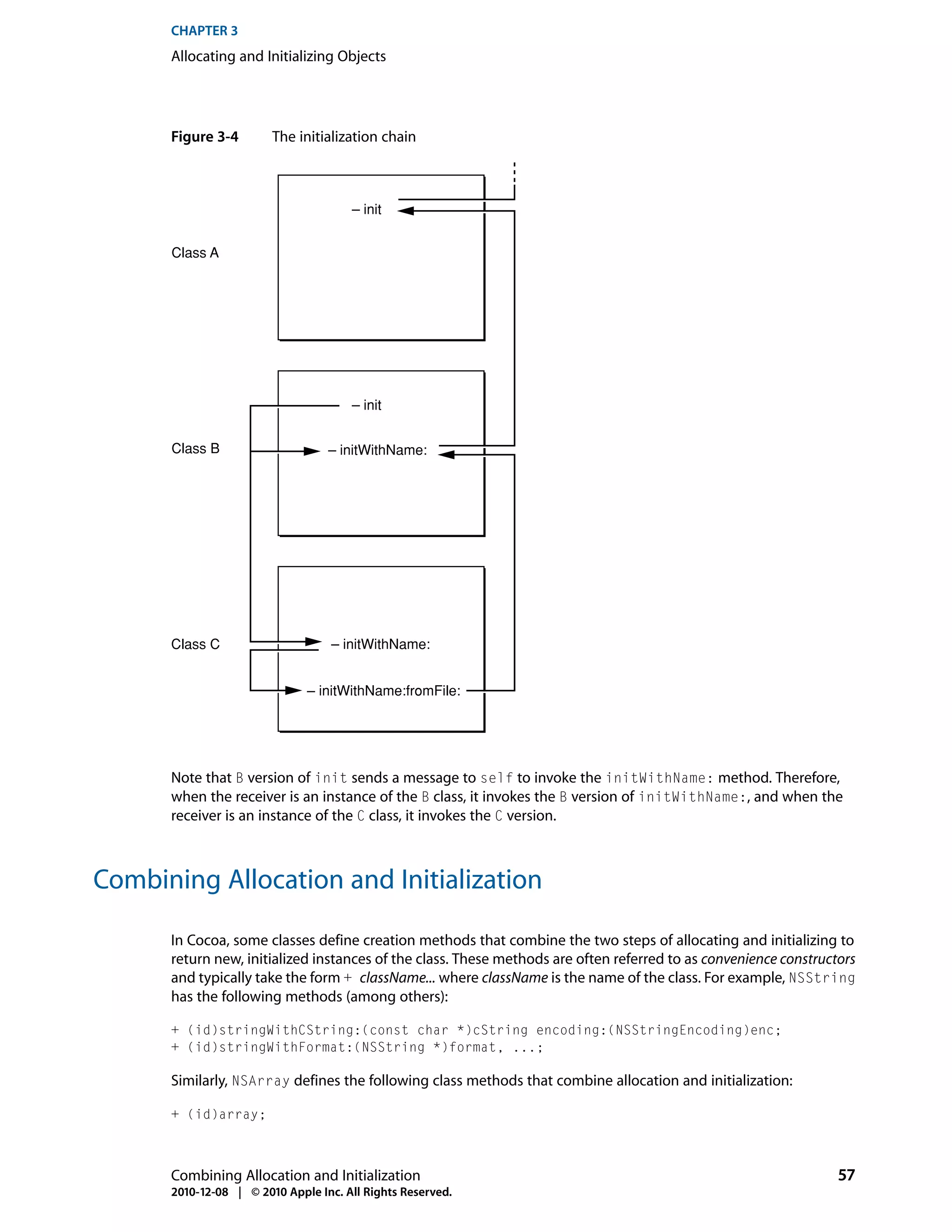
                       Figure 3-4         The initialization chain 57


Chapter 5              Declared Properties 69

                       Listing 5-1        Declaring a simple property 70
                       Listing 5-2        Using @synthesize 73
                       Listing 5-3        Using @dynamic with NSManagedObject 74
                       Listing 5-4        Declaring properties for a class 78


Chapter 7              Associative References 87

                       Listing 7-1        Establishing an association between an array and a string 87


Chapter 11             Exception Handling 103

                       Listing 11-1       An exception handler 104


Chapter 12             Threading 107

                       Listing 12-1       Locking a method using self 107
                       Listing 12-2       Locking a method using a custom semaphore 107


                                                                                                          7
             2010-12-08 | © 2010 Apple Inc. All Rights Reserved.
FIGURES AND LISTINGS


8
    2010-12-08 | © 2010 Apple Inc. All Rights Reserved.
INTRODUCTION


      Introduction


      The Objective-C language is a simple computer language designed to enable sophisticated object-oriented
      programming. Objective-C is defined as a small but powerful set of extensions to the standard ANSI C
      language. Its additions to C are mostly based on Smalltalk, one of the first object-oriented programming
      languages. Objective-C is designed to give C full object-oriented programming capabilities, and to do so in
      a simple and straightforward way.

      Most object-oriented development environments consist of several parts:

      ●    An object-oriented programming language

      ●    A library of objects

      ●    A suite of development tools

      ●    A runtime environment


      This document is about the first component of the development environment—the programming language.
      It fully describes the version of the Objective-C language released in Mac OS X v10.6 and iOS 4.0. This document
      also provides a foundation for learning about the second component, the Objective-C application
      frameworks—collectively known as Cocoa. The runtime environment is described in a separate document,
      Objective-C Runtime Programming Guide.


Who Should Read This Document

      The document is intended for readers who might be interested in:

      ●    Programming in Objective-C

      ●    Finding out about the basis for the Cocoa application frameworks


      This document both introduces the object-oriented model that Objective-C is based upon and fully documents
      the language. It concentrates on the Objective-C extensions to C, not on the C language itself.

      Because this isn’t a document about C, it assumes some prior acquaintance with that language. Object-oriented
      programming in Objective-C is, however, sufficiently different from procedural programming in ANSI C that
      you won’t be hampered if you’re not an experienced C programmer.


Organization of This Document

      The following chapters cover all the features Objective-C adds to standard C.


      Who Should Read This Document                                                                                 9
      2010-12-08 | © 2010 Apple Inc. All Rights Reserved.
INTRODUCTION
     Introduction


      ●   “Objects, Classes, and Messaging” (page 13)

      ●   “Defining a Class” (page 35)

      ●   “Allocating and Initializing Objects” (page 49)

      ●   “Protocols” (page 59)

      ●   “Declared Properties” (page 69)

      ●   “Categories and Extensions” (page 81)

      ●   “Associative References” (page 87)

      ●   “Fast Enumeration” (page 91)

      ●   “Enabling Static Behavior” (page 95)

      ●   “Selectors” (page 99)

      ●   “Exception Handling” (page 103)

      ●   “Threading” (page 107)


     A glossary at the end of this document provides definitions of terms specific to Objective-C and object-oriented
     programming.


Conventions

     This document makes special use of computer voice and italic fonts. Computer voice denotes words or
     characters that are to be taken literally (typed as they appear). Italic denotes words that represent something
     else or can be varied. For example, the syntax:

     @interfaceClassName(CategoryName)

     means that @interface and the two parentheses are required, but that you can choose the class name and
     category name.

     Where example code is shown, ellipsis points indicates the parts, often substantial parts, that have been
     omitted:

     - (void)encodeWithCoder:(NSCoder *)coder
     {
         [super encodeWithCoder:coder];
         ...
     }


10   Conventions
     2010-12-08 | © 2010 Apple Inc. All Rights Reserved.
INTRODUCTION
      Introduction


See Also

      If you have never used object-oriented programming to create applications, you should read Object-Oriented
      Programming with Objective-C. You should also consider reading it if you have used other object-oriented
      development environments such as C++ and Java because they have many expectations and conventions
      different from those of Objective-C. Object-Oriented Programming with Objective-C is designed to help you
      become familiar with object-oriented development from the perspective of an Objective-C developer. It
      spells out some of the implications of object-oriented design and gives you a flavor of what writing an
      object-oriented program is really like.


      The Runtime System
      Objective-C Runtime Programming Guide describes aspects of the Objective-C runtime and how you can use
      it.

      Objective-C Runtime Reference describes the data structures and functions of the Objective-C runtime support
      library. Your programs can use these interfaces to interact with the Objective-C runtime system. For example,
      you can add classes or methods, or obtain a list of all class definitions for loaded classes.


      Memory Management
      Objective-C supports two mechanisms for memory management: automatic garbage collection and reference
      counting:

      ●    Garbage Collection Programming Guide describes the garbage collection system used in Mac OS X. (Not
           available for iOS—you cannot access this document through the iOS Dev Center.)

      ●    Memory Management Programming Guide describes the reference counting system used in iOS and
           Mac OS X.


      See Also                                                                                                  11
      2010-12-08 | © 2010 Apple Inc. All Rights Reserved.
INTRODUCTION
     Introduction


12   See Also
     2010-12-08 | © 2010 Apple Inc. All Rights Reserved.
CHAPTER 1


      Objects, Classes, and Messaging


      This chapter describes the fundamentals of objects, classes, and messaging as used and implemented by the
      Objective-C language. It also introduces the Objective-C runtime.


The Runtime System

      The Objective-C language defers as many decisions as it can from compile time and link time to runtime.
      Whenever possible, it dynamically performs operations such as creating objects and determining what
      method to invoke. Therefore, the language requires not just a compiler, but also a runtime system to execute
      the compiled code. The runtime system acts as a kind of operating system for the Objective-C language; it’s
      what makes the language work. Typically, however, you don’t need to interact with the runtime directly. To
      understand more about the functionality it offers, though, see Objective-C Runtime Programming Guide.


Objects

      As the name implies, object-oriented programs are built around objects. An object associates data with the
      particular operations that can use or affect that data. Objective-C provides a data type to identify an object
      variable without specifying a particular class of the object.


      Object Basics
      An object associates data with the particular operations that can use or affect that data. In Objective-C, these
      operations are known as the object’s methods; the data they affect are its instance variables (in other
      environments they may be referred to as ivars or member variables). In essence, an object bundles a data
      structure (instance variables) and a group of procedures (methods) into a self-contained programming unit.

      In Objective-C, an object’s instance variables are internal to the object; generally, you get access to an object’s
      state only through the object’s methods (you can specify whether subclasses or other objects can access
      instance variables directly by using scope directives, see “The Scope of Instance Variables” (page 40)). For
      others to find out something about an object, there has to be a method to supply the information. For
      example, a rectangle would have methods that reveal its size and position.

      Moreover, an object sees only the methods that were designed for it; it can’t mistakenly perform methods
      intended for other types of objects. Just as a C function protects its local variables, hiding them from the rest
      of the program, an object hides both its instance variables and its method implementations.


      The Runtime System                                                                                              13
      2010-12-08 | © 2010 Apple Inc. All Rights Reserved.
CHAPTER 1
     Objects, Classes, and Messaging


     id
     In Objective-C, object identifiers are of a distinct data type: id. This type is the general type for any kind of
     object regardless of class and can be used for instances of a class and for class objects themselves.

     id anObject;

     For the object-oriented constructs of Objective-C, such as method return values, id replaces int as the
     default data type. (For strictly C constructs, such as function return values, int remains the default type.)

     The keyword nil is defined as a null object, an id with a value of 0. id, nil, and the other basic types of
     Objective-C are defined in the header file objc/objc.h.

     id is defined as pointer to an object data structure:

     typedef struct objc_object {
         Class isa;
     } *id;

     Every object thus has an isa variable that tells it of what class it is an instance. Since the Class type is itself
     defined as a pointer:

     typedef struct objc_class *Class;

     the isa variable is frequently referred to as the “isa pointer.”


     Dynamic Typing
     The id type is completely nonrestrictive. By itself, it yields no information about an object, except that it is
     an object. At some point, a program typically needs to find more specific information about the objects it
     contains. Since the id type designator can’t supply this specific information to the compiler, each object has
     to be able to supply it at runtime.

     The isa instance variable identifies the object’s class—what kind of object it is. Objects with the same
     behavior (methods) and the same kinds of data (instance variables) are members of the same class.

     Objects are thus dynamically typed at runtime. Whenever it needs to, the runtime system can find the exact
     class that an object belongs to, just by asking the object. (To learn more about the runtime, see Objective-C
     Runtime Programming Guide.) Dynamic typing in Objective-C serves as the foundation for dynamic binding,
     discussed later.

     The isa variable also enables objects to perform introspection—to find out about themselves (or other
     objects). The compiler records information about class definitions in data structures for the runtime system
     to use. The functions of the runtime system use isa to find this information at runtime. Using the runtime
     system, you can, for example, determine whether an object implements a particular method or discover the
     name of its superclass.

     Object classes are discussed in more detail under “Classes” (page 23).

     It’s also possible to give the compiler information about the class of an object by statically typing it in source
     code using the class name. Classes are particular kinds of objects, and the class name can serve as a type
     name. See “Class Types” (page 26) and “Enabling Static Behavior” (page 95).


14   Objects
     2010-12-08 | © 2010 Apple Inc. All Rights Reserved.
CHAPTER 1
      Objects, Classes, and Messaging


      Memory Management
      In any program, it is important to ensure that objects are deallocated when they are no longer
      needed—otherwise your application’s memory footprint becomes larger than necessary. It is also important
      to ensure that you do not deallocate objects while they’re still being used.

      Objective-C offers two mechanisms for memory management that allow you to meet these goals:

      ●    Reference counting, where you are ultimately responsible for determining the lifetime of objects.

           Reference counting is described in Memory Management Programming Guide.

      ●    Garbage collection, where you pass responsibility for determining the lifetime of objects to an automatic
           “collector.”

           Garbage collection is described in Garbage Collection Programming Guide. (Not available for iOS—you
           cannot access this document through the iOS Dev Center.)


Object Messaging

      This section explains the syntax of sending messages, including how you can nest message expressions. It
      also discusses the scope or “visibility” of an object’s instance variables, and the concepts of polymorphism
      and dynamic binding.


      Message Syntax
      To get an object to do something, you send it a message telling it to apply a method. In Objective-C, message
      expressions are enclosed in brackets:

      [receiver message]

      The receiver is an object, and the message tells it what to do. In source code, the message is simply the name
      of a method and any parameters that are passed to it. When a message is sent, the runtime system selects
      the appropriate method from the receiver’s repertoire and invokes it.

      For example, this message tells the myRectangle object to perform its display method, which causes the
      rectangle to display itself:

      [myRectangle display];

      The message is followed by a “;” as is normal for any statement in C.

      Because the method name in a message serves to “select” a method implementation, method names in
      messages are often referred to as selectors.

      Methods can also take parameters, sometimes called arguments. A message with a single parameter affixes
      a colon (:) to the name and puts the parameter right after the colon:

      [myRectangle setWidth:20.0];


      Object Messaging                                                                                           15
      2010-12-08 | © 2010 Apple Inc. All Rights Reserved.
CHAPTER 1
     Objects, Classes, and Messaging


     For methods with multiple parameters, Objective-C's method names are interleaved with the parameters
     such that the method’s name naturally describes the parameters expected by the method. The imaginary
     message below tells the myRectangle object to set its origin to the coordinates (30.0, 50.0):

     [myRectangle setOriginX: 30.0 y: 50.0]; // This is a good example of
                                             // multiple parameters

     A selector name includes all the parts of the name, including the colons, so the selector in the preceding
     example is named setOriginX:y:. It has two colons, because it takes two parameters. The selector name
     does not, however, include anything else, such as return type or parameter types.

     Important: The subparts of an Objective-C selector name are not optional, nor can their order be varied. In
     some languages, the terms “named parameters” and “keyword parameters” carry the implications that the
     parameters can vary at runtime, can have default values, can be in a different order, and can possibly have
     additional named parameters. None of these characteristics about parameters are true for Objective-C.
     For all intents and purposes, an Objective-C method declaration is simply a C function that prepends two
     additional parameters (see “Messaging” in the Objective-C Runtime Programming Guide). Thus, the structure
     of an Objective-C method declaration differs from the structure of a method that uses named or keyword
     parameters in a language like Python, as the following Python example illustrates:
     def func(a, b, NeatMode=SuperNeat, Thing=DefaultThing):
         pass

     In this Python example, Thing and NeatMode might be omitted or might have different values when called.


     In principle, a Rectangle class could instead implement a setOrigin:: method with no label for the
     second parameter, which would be invoked as follows:

     [myRectangle setOrigin:30.0 :50.0]; // This is a bad example of multiple
     parameters

     While syntactically legal, setOrigin:: does not interleave the method name with the parameters. Thus,
     the second parameter is effectively unlabeled and it is difficult for a reader of this code to determine the kind
     or purpose of the method’s parameters.

     Methods that take a variable number of parameters are also possible, though they’re somewhat rare. Extra
     parameters are separated by commas after the end of the method name. (Unlike colons, the commas are
     not considered part of the name.) In the following example, the imaginary makeGroup: method is passed
     one required parameter (group) and three parameters that are optional:

     [receiver makeGroup:group, memberOne, memberTwo, memberThree];

     Like standard C functions, methods can return values. The following example sets the variable isFilled to
     YES if myRectangle is drawn as a solid rectangle, or NO if it’s drawn in outline form only.

     BOOL isFilled;
     isFilled = [myRectangle isFilled];

     Note that a variable and a method can have the same name.

     One message expression can be nested inside another. Here, the color of one rectangle is set to the color of
     another:

     [myRectangle setPrimaryColor:[otherRect primaryColor]];


16   Object Messaging
     2010-12-08 | © 2010 Apple Inc. All Rights Reserved.
CHAPTER 1
Objects, Classes, and Messaging


Objective-C also provides a dot (.) operator that offers a compact and convenient syntax for invoking an
object’s accessor methods. The dot operator is typically used in conjunction with the declared properties
feature (see “Declared Properties” (page 69)) and is described in “Dot Syntax” (page 19).


Sending Messages to nil
In Objective-C, it is valid to send a message to nil—it simply has no effect at runtime. There are several
patterns in Cocoa that take advantage of this fact. The value returned from a message to nil may also be
valid:

●    If the method returns an object, then a message sent to nil returns 0 (nil). For example:

     Person *motherInLaw = [[aPerson spouse] mother];

     If the spouse object here is nil, then mother is sent to nil and the method returns nil.

●    If the method returns any pointer type, any integer scalar of size less than or equal to sizeof(void*),
     a float, a double, a long double, or a long long, then a message sent to nil returns 0.

●    If the method returns a struct, as defined by the Mac OS X ABI Function Call Guide to be returned in
     registers, then a message sent to nil returns 0.0 for every field in the struct. Other struct data types
     will not be filled with zeros.

●    If the method returns anything other than the aforementioned value types, the return value of a message
     sent to nil is undefined.


The following code fragment illustrates a valid use of sending a message to nil.

id anObjectMaybeNil = nil;

// this is valid
if ([anObjectMaybeNil methodThatReturnsADouble] == 0.0)
{
    // implementation continues...
}


Object Messaging                                                                                          17
2010-12-08 | © 2010 Apple Inc. All Rights Reserved.
CHAPTER 1
     Objects, Classes, and Messaging


     Note: The behavior of sending messages to nil changed slightly with Mac OS X v10.5.
     In Mac OS X v10.4 and earlier, a message to nil also is valid, as long as the message returns an object, any
     pointer type, void, or any integer scalar of size less than or equal to sizeof(void*); if it does, a message
     sent to nil returns nil. If the message sent to nil returns anything other than the aforementioned value
     types (for example, if it returns any struct type, any floating-point type, or any vector type) the return value
     is undefined. Therefore, in Mac OS X v10.4 and earlier, you should not rely on the return value of messages
     sent to nil unless the method’s return type is an object, any pointer type, or any integer scalar of size less
     than or equal to sizeof(void*).


     The Receiver’s Instance Variables
     A method has automatic access to the receiving object’s instance variables. You don’t need to pass them to
     the method as parameters. For example, the primaryColor method illustrated above takes no parameters,
     yet it can find the primary color for otherRect and return it. Every method assumes the receiver and its
     instance variables, without having to declare them as parameters.

     This convention simplifies Objective-C source code. It also supports the way object-oriented programmers
     think about objects and messages. Messages are sent to receivers much as letters are delivered to your home.
     Message parameters bring information from the outside to the receiver; they don’t need to bring the receiver
     to itself.

     A method has automatic access only to the receiver’s instance variables. If it requires information about a
     variable stored in another object, it must send a message to the object asking it to reveal the contents of
     the variable. The primaryColor and isFilled methods shown earlier are used for just this purpose.

     See “Defining a Class” (page 35) for more information on referring to instance variables.


     Polymorphism
     As the earlier examples illustrate, messages in Objective-C appear in the same syntactic positions as function
     calls in standard C. But, because methods “belong to” an object, messages don’t behave in the same way
     that function calls do.

     In particular, an object can be operated on by only those methods that were defined for it. It can’t confuse
     them with methods defined for other kinds of object, even if another object has a method with the same
     name. Therefore, two objects can respond differently to the same message. For example, each kind of object
     that receives a display message could display itself in a unique way. A Circle and a Rectangle would
     respond differently to identical instructions to track the cursor.

     This feature, referred to as polymorphism, plays a significant role in the design of object-oriented programs.
     Together with dynamic binding, it permits you to write code that might apply to any number of different
     kinds of objects, without you having to choose at the time you write the code what kinds of objects they
     might be. They might even be objects that will be developed later, by other programmers working on other
     projects. If you write code that sends a display message to an id variable, any object that has a display
     method is a potential receiver.


18   Object Messaging
     2010-12-08 | © 2010 Apple Inc. All Rights Reserved.
CHAPTER 1
Objects, Classes, and Messaging


Dynamic Binding
A crucial difference between function calls and messages is that a function and its parameters are joined
together in the compiled code, but a message and a receiving object aren’t united until the program is
running and the message is sent. Therefore, the exact method invoked to respond to a message can be
determined only at runtime, not when the code is compiled.

When a message is sent, a runtime messaging routine looks at the receiver and at the method named in the
message. It locates the receiver’s implementation of a method matching the name, “calls” the method, and
passes it a pointer to the receiver’s instance variables. (For more on this routine, see “Messaging” in Objective-C
Runtime Programming Guide.)

This dynamic binding of methods to messages works hand in hand with polymorphism to give object-oriented
programming much of its flexibility and power. Because each object can have its own version of a method,
an Objective-C statement can achieve a variety of results, not by varying the message but by varying the
object that receives the message. Receivers can be decided as the program runs; the choice of receiver can
be made dependent on factors such as user actions.

When executing code based upon the Application Kit (AppKit), for example, users determine which objects
receive messages from menu commands such as Cut, Copy, and Paste. The message goes to whatever object
controls the current selection. An object that displays text would react to a copy message differently from
an object that displays scanned images. An object that represents a set of shapes would respond differently
to a copy message than a Rectangle would. Because messages do not select methods until runtime (from
another perspective, because binding of methods to messages does not occur until runtime), these differences
in behavior are isolated to the methods themselves. The code that sends the message doesn’t have to be
concerned with them; it doesn’t even have to enumerate the possibilities. An application’s objects can each
respond in its own way to copy messages.

Objective-C takes dynamic binding one step further and allows even the message that’s sent (the method
selector) to be a variable determined at runtime. This mechanism is discussed in the section “Messaging” in
Objective-C Runtime Programming Guide.


Dynamic Method Resolution
You can provide implementations of class and instance methods at runtime using dynamic method resolution.
See “Dynamic Method Resolution” in Objective-C Runtime Programming Guide for more details.


Dot Syntax
Objective-C provides a dot (.) operator that offers an alternative to square bracket notation ([]) to invoke
accessor methods. Dot syntax uses the same pattern that accessing C structure elements uses:

myInstance.value = 10;
printf("myInstance value: %d", myInstance.value);

When used with objects, however, dot syntax acts as “syntactic sugar”—it is transformed by the compiler
into an invocation of an accessor method. Dot syntax does not directly get or set an instance variable. The
code example above is exactly equivalent to the following:

[myInstance setValue:10];
printf("myInstance value: %d", [myInstance value]);


Object Messaging                                                                                                19
2010-12-08 | © 2010 Apple Inc. All Rights Reserved.
CHAPTER 1
     Objects, Classes, and Messaging


     As a corollary, if you want to access an object’s own instance variable using accessor methods, you must
     explicitly call out self, for example:

     self.age = 10;

     or the equivalent:

     [self setAge:10];

     If you do not use self., you access the instance variable directly. In the following example, the set accessor
     method for age is not invoked:

     age = 10;

     An advantage of dot syntax is that its representation is more compact and may be more readable than the
     corresponding square bracket notation, particularly when you want to access or modify a property that is a
     property of another object (that is a property of another object, and so on). A further advantage is that the
     compiler can signal an error when it detects an attempt to write to a read-only declared property. If you
     instead use square bracket syntax for accessing variables, the compiler—at best—generates only an undeclared
     method warning that you invoked a nonexistent setter method, and the code fails at runtime.


     General Use

     When you use dot syntax to get a value, the system calls the associated getter accessor method. By default,
     the getter method has the same name as the symbol following the dot. Using dot syntax to set a value calls
     the associated setter accessor method. By default, the setter method is named by capitalizing the symbol
     following the dot and prefixing it with “set.” If you don’t want to use default accessor names, you can change
     them by using the declared properties feature (see “Declared Properties” (page 69)).

     Listing 1-1 illustrates several use cases.

     Listing 1-1       Accessing properties using dot syntax
     Graphic *graphic = [[Graphic alloc] init];

     NSColor *color = graphic.color;
     CGFloat xLoc = graphic.xLoc;
     BOOL hidden = graphic.hidden;
     int textCharacterLength = graphic.text.length;

     if (graphic.textHidden != YES) {
         graphic.text = @"Hello"; // @"Hello" is a constant NSString object.
     }
     graphic.bounds = NSMakeRect(10.0, 10.0, 20.0, 120.0);

     The statements in Listing 1-2 compile to exactly the same code as the statements using dot syntax shown
     in Listing 1-1 (page 20), but instead use square bracket syntax.

     Listing 1-2       Accessing properties using bracket syntax
     Graphic *graphic = [[Graphic alloc] init];

     NSColor *color = [graphic color];
     CGFloat xLoc = [graphic xLoc];
     BOOL hidden = [graphic hidden];
     int textCharacterLength = [[graphic text] length];


20   Object Messaging
     2010-12-08 | © 2010 Apple Inc. All Rights Reserved.
CHAPTER 1
Objects, Classes, and Messaging


if ([graphic isTextHidden] != YES) {
    [graphic setText:@"Hello"];
}
[graphic setBounds:NSMakeRect(10.0, 10.0, 20.0, 120.0)];

For properties of the appropriate C language type, the meaning of compound assignments is well defined.
For example, say you have an instance of the NSMutableData class:

NSMutableData *data = [NSMutableData dataWithLength:1024];

You could update the length property of the instance using dot syntax and compound assignments:

data.length += 1024;
data.length *= 2;
data.length /= 4;

which is equivalent to the following square bracket statements:

[data setLength:[data length] + 1024];
[data setLength:[data length] * 2];
[data setLength:[data length] / 4];


nil Values

If a nil value is encountered during property traversal, the result is the same as sending the equivalent
message to nil. For example, the following pairs are all equivalent:

// Each member of the path is an object.
x = person.address.street.name;
x = [[[person address] street] name];

// The path contains a C struct.
// This will crash if window is nil or -contentView returns nil.
y = window.contentView.bounds.origin.y;
y = [[window contentView] bounds].origin.y;

// An example of using a setter.
person.address.street.name = @"Oxford Road";
[[[person address] street] setName: @"Oxford Road"];


Performance and Threading

Whether you invoke accessor methods with dot syntax or square bracket syntax, the compiler generates
equivalent code. As a result, the two coding techniques result in exactly the same performance. Because
using dot syntax is simply a way to invoke accessor methods, doing so introduces no additional thread
dependencies.


Dot Syntax Usage

Use the Objective-C dot syntax to invoke an accessor method, as an alternative to using square bracket
syntax.

●    The following statement invokes the aProperty getter method and assigns the return value to
     aVariable:


Object Messaging                                                                                            21
2010-12-08 | © 2010 Apple Inc. All Rights Reserved.
CHAPTER 1
     Objects, Classes, and Messaging


          aVariable = anObject.aProperty;

          The type of the aProperty property and the type of the aVariable variable must be compatible,
          otherwise the compiler issues a warning.

     ●    The following statement invokes the setName: setter method on the anObject object, passing @"New
          Name" as the method’s parameter:

          anObject.name = @"New Name";

          The compiler issues a warning if the setName: method does not exist, if the property name does not
          exist, or if the setName: method returns anything but void.

     ●    The following statement invokes the bounds method on the aView object. It then assigns to the xOrigin
          variable the value of the origin.x structure element of the NSRect object returned by the bounds
          method.

          xOrigin = aView.bounds.origin.x;

     ●    The following statements result in the assignment of the value of 11 to two properties: the
          integerProperty property of the anObject object and the floatProperty property of the
          anotherObject object.

          NSInteger i = 10;
          anObject.integerProperty = anotherObject.floatProperty = ++i;

          That is, the rightmost assignment is preevaluated and the result is passed to the setIntegerProperty:
          and setFloatProperty: setter methods. The data type of the preevaluated result is coerced as required
          at each point of assignment.


     Incorrect Use of Dot Syntax

     The code patterns that follow are strongly discouraged because they do not conform to the intended use of
     dot syntax, namely for invoking an accessor method.

     ●    The following statement generates a compiler warning (warning: value returned from property
          not used.).

          anObject.retain;

     ●    The following code generates a compiler warning that setFooIfYouCan: does not appear to be a setter
          method because it does not return (void).

          /* Method declaration. */
          - (BOOL) setFooIfYouCan: (MyClass *)newFoo;

          /* Code fragment. */
          anObject.fooIfYouCan = myInstance;

     ●    The following statement invokes the lockFocusIfCanDraw method and assigns the return value to
          flag. It does not generate a compiler warning unless there is a mismatch between the type for flag
          and the method’s return type. Nonetheless, this pattern is strongly discouraged.

          flag = aView.lockFocusIfCanDraw;


22   Object Messaging
     2010-12-08 | © 2010 Apple Inc. All Rights Reserved.
CHAPTER 1
      Objects, Classes, and Messaging


      ●    The following code generates a compiler warning because the readonlyProperty property is declared
           with readonly access (warning: assignment to readonly property 'readonlyProperty').

           /* Property declaration. */
           @property(readonly) NSInteger readonlyProperty;

           /* Method declaration. */
           - (void) setReadonlyProperty: (NSInteger)newValue;

           /* Code fragment. */
           self.readonlyProperty = 5;

           Even so, because the setter method is present, this code works at runtime. This pattern is strongly
           discouraged because simply adding a setter for a property does not imply readwrite access. Be sure
           to explicitly set property access correctly in a property’s declaration statement.


Classes

      An object-oriented program is typically built from a variety of objects. A program based on the Cocoa
      frameworks might use NSMatrix objects, NSWindow objects, NSDictionary objects, NSFont objects,
      NSText objects, and many others. Programs often use more than one object of the same kind or class—several
      NSArray objects or NSWindow objects, for example.

      In Objective-C, you define objects by defining their class. The class definition is a prototype for a kind of
      object; it declares the instance variables that become part of every member of the class, and it defines a set
      of methods that all objects in the class can use.

      The compiler creates just one accessible object for each class, a class object that knows how to build new
      objects belonging to the class. (For this reason it’s traditionally called a factory object.) The class object is the
      compiled version of the class; the objects it builds are instances of the class. The objects that do the main
      work of your program are instances created by the class object at runtime.

      All instances of a class have the same set of methods, and they all have a set of instance variables cut from
      the same mold. Each object gets its own instance variables, but the methods are shared.

      By convention, class names begin with an uppercase letter (such as Rectangle); the names of instances
      typically begin with a lowercase letter (such as myRectangle).


      Inheritance
      Class definitions are additive; each new class that you define is based on another class from which it inherits
      methods and instance variables. The new class simply adds to or modifies what it inherits. It doesn’t need to
      duplicate inherited code.

      Inheritance links all classes together in a hierarchical tree with a single class at its root. When writing code
      that is based upon the Foundation framework, that root class is typically NSObject. Every class (except a
      root class) has a superclass one step nearer the root, and any class (including a root class) can be the superclass
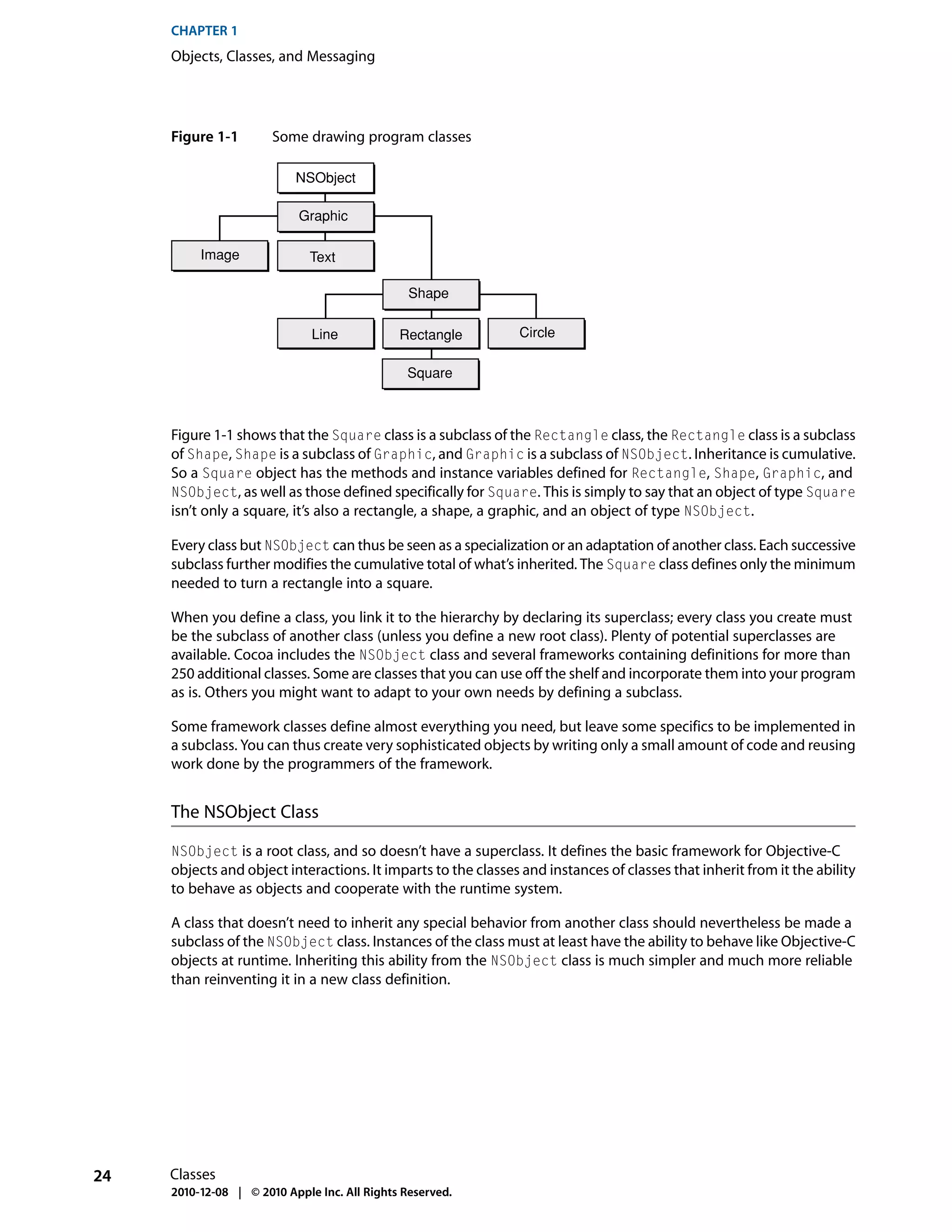
      for any number of subclasses one step farther from the root. Figure 1-1 illustrates the hierarchy for a few of
      the classes used in a drawing program.


      Classes                                                                                                          23
      2010-12-08 | © 2010 Apple Inc. All Rights Reserved.
CHAPTER 1
     Objects, Classes, and Messaging


     Figure 1-1        Some drawing program classes

                           NSObject

                            Graphic

          Image               Text

                                                Shape

                              Line            Rectangle         Circle

                                               Square


     Figure 1-1 shows that the Square class is a subclass of the Rectangle class, the Rectangle class is a subclass
     of Shape, Shape is a subclass of Graphic, and Graphic is a subclass of NSObject. Inheritance is cumulative.
     So a Square object has the methods and instance variables defined for Rectangle, Shape, Graphic, and
     NSObject, as well as those defined specifically for Square. This is simply to say that an object of type Square
     isn’t only a square, it’s also a rectangle, a shape, a graphic, and an object of type NSObject.

     Every class but NSObject can thus be seen as a specialization or an adaptation of another class. Each successive
     subclass further modifies the cumulative total of what’s inherited. The Square class defines only the minimum
     needed to turn a rectangle into a square.

     When you define a class, you link it to the hierarchy by declaring its superclass; every class you create must
     be the subclass of another class (unless you define a new root class). Plenty of potential superclasses are
     available. Cocoa includes the NSObject class and several frameworks containing definitions for more than
     250 additional classes. Some are classes that you can use off the shelf and incorporate them into your program
     as is. Others you might want to adapt to your own needs by defining a subclass.

     Some framework classes define almost everything you need, but leave some specifics to be implemented in
     a subclass. You can thus create very sophisticated objects by writing only a small amount of code and reusing
     work done by the programmers of the framework.


     The NSObject Class

     NSObject is a root class, and so doesn’t have a superclass. It defines the basic framework for Objective-C
     objects and object interactions. It imparts to the classes and instances of classes that inherit from it the ability
     to behave as objects and cooperate with the runtime system.

     A class that doesn’t need to inherit any special behavior from another class should nevertheless be made a
     subclass of the NSObject class. Instances of the class must at least have the ability to behave like Objective-C
     objects at runtime. Inheriting this ability from the NSObject class is much simpler and much more reliable
     than reinventing it in a new class definition.


24   Classes
     2010-12-08 | © 2010 Apple Inc. All Rights Reserved.
CHAPTER 1
Objects, Classes, and Messaging


Note: Implementing a new root class is a delicate task and one with many hidden hazards. The class must
duplicate much of what the NSObject class does, such as allocate instances, connect them to their class,
and identify them to the runtime system. For this reason, you should generally use the NSObject class
provided with Cocoa as the root class. For more information, see NSObject Class Reference and the NSObject
Protocol Reference.


Inheriting Instance Variables

When a class object creates a new instance, the new object contains not only the instance variables that
were defined for its class but also the instance variables defined for its superclass and for its superclass’s
superclass, all the way back to the root class. Thus, the isa instance variable defined in the NSObject class
becomes part of every object. isa connects each object to its class.

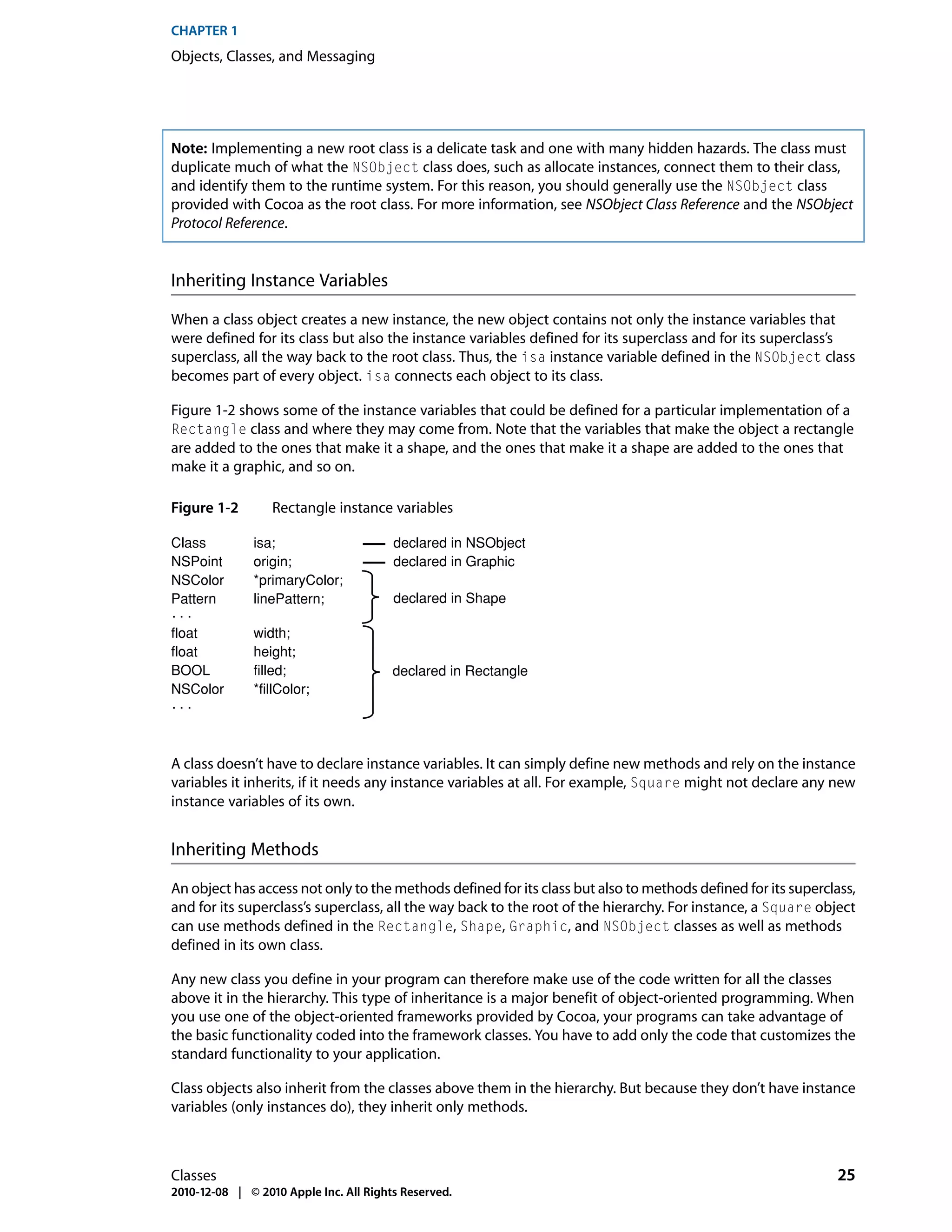
Figure 1-2 shows some of the instance variables that could be defined for a particular implementation of a
Rectangle class and where they may come from. Note that the variables that make the object a rectangle
are added to the ones that make it a shape, and the ones that make it a shape are added to the ones that
make it a graphic, and so on.

Figure 1-2        Rectangle instance variables

Class         isa;                      declared in NSObject
NSPoint       origin;                   declared in Graphic
NSColor       *primaryColor;
Pattern       linePattern;              declared in Shape
...
float         width;
float         height;
BOOL          filled;                   declared in Rectangle
NSColor       *fillColor;
...


A class doesn’t have to declare instance variables. It can simply define new methods and rely on the instance
variables it inherits, if it needs any instance variables at all. For example, Square might not declare any new
instance variables of its own.


Inheriting Methods

An object has access not only to the methods defined for its class but also to methods defined for its superclass,
and for its superclass’s superclass, all the way back to the root of the hierarchy. For instance, a Square object
can use methods defined in the Rectangle, Shape, Graphic, and NSObject classes as well as methods
defined in its own class.

Any new class you define in your program can therefore make use of the code written for all the classes
above it in the hierarchy. This type of inheritance is a major benefit of object-oriented programming. When
you use one of the object-oriented frameworks provided by Cocoa, your programs can take advantage of
the basic functionality coded into the framework classes. You have to add only the code that customizes the
standard functionality to your application.

Class objects also inherit from the classes above them in the hierarchy. But because they don’t have instance
variables (only instances do), they inherit only methods.


Classes                                                                                                       25
2010-12-08 | © 2010 Apple Inc. All Rights Reserved.
CHAPTER 1
     Objects, Classes, and Messaging


     Overriding One Method with Another

     There’s one useful exception to inheritance: When you define a new class, you can implement a new method
     with the same name as one defined in a class farther up the hierarchy. The new method overrides the original;
     instances of the new class perform it rather than the original, and subclasses of the new class inherit it rather
     than the original.

     For example, Graphic defines a display method that Rectangle overrides by defining its own version of
     display. The Graphic method is available to all kinds of objects that inherit from the Graphic class—but
     not to Rectangle objects, which instead perform the Rectangle version of display.

     Although overriding a method blocks the original version from being inherited, other methods defined in
     the new class can skip over the redefined method and find the original (see “Messages to self and super” (page
     43) to learn how).

     A redefined method can also incorporate the very method it overrides. When it does, the new method serves
     only to refine or modify the method it overrides, rather than replace it outright. When several classes in the
     hierarchy define the same method, but each new version incorporates the version it overrides, the
     implementation of the method is effectively spread over all the classes.

     Although a subclass can override inherited methods, it can’t override inherited instance variables. Because
     an object has memory allocated for every instance variable it inherits, you can’t override an inherited variable
     by declaring a new one with the same name. If you try, the compiler will complain.


     Abstract Classes

     Some classes are designed only or primarily so that other classes can inherit from them. These abstract
     classes group methods and instance variables that can be used by a number of subclasses into a common
     definition. The abstract class is typically incomplete by itself, but contains useful code that reduces the
     implementation burden of its subclasses. (Because abstract classes must have subclasses to be useful, they’re
     sometimes also called abstract superclasses.)

     Unlike some other languages, Objective-C does not have syntax to mark classes as abstract, nor does it
     prevent you from creating an instance of an abstract class.

     The NSObject class is the canonical example of an abstract class in Cocoa. You never use instances of the
     NSObject class in an application—it wouldn’t be good for anything; it would be a generic object with the
     ability to do nothing in particular.

     The NSView class, on the other hand, provides an example of an abstract class, instances of which you might
     occasionally use directly.

     Abstract classes often contain code that helps define the structure of an application. When you create
     subclasses of these classes, instances of your new classes fit effortlessly into the application structure and
     work automatically with other objects.


     Class Types
     A class definition is a specification for a kind of object. The class, in effect, defines a data type. The type is
     based not just on the data structure the class defines (instance variables), but also on the behavior included
     in the definition (methods).


26   Classes
     2010-12-08 | © 2010 Apple Inc. All Rights Reserved.
CHAPTER 1
Objects, Classes, and Messaging


A class name can appear in source code wherever a type specifier is permitted in C—for example, as an
argument to the sizeof operator:

int i = sizeof(Rectangle);


Static Typing

You can use a class name in place of id to designate an object’s type:

Rectangle *myRectangle;

Because this way of declaring an object type gives the compiler information about the kind of object it is,
it’s known as static typing. Just as id is actually a pointer, objects are statically typed as pointers to a class.
Objects are always typed by a pointer. Static typing makes the pointer explicit; id hides it.

Static typing permits the compiler to do some type checking—for example, to warn if an object could receive
a message that it appears not to be able to respond to—and to loosen some restrictions that apply to objects
generically typed id. In addition, it can make your intentions clearer to others who read your source code.
However, it doesn’t defeat dynamic binding or alter the dynamic determination of a receiver’s class at runtime.

An object can be statically typed to its own class or to any class that it inherits from. For example, because
inheritance makes a Rectangle object a kind of Graphic object (as shown in the example hierarchy in
Figure 1-1 (page 24)), a Rectangle instance can be statically typed to the Graphic class:

Graphic *myRectangle;

Static typing to the superclass is possible here because a Rectangle object is a Graphic object. In addition,
it’s more than that because it also has the instance variables and method capabilities of Shape and Rectangle
objects, but it’s a Graphic object nonetheless. For purposes of type checking, given the declaration described
here, the compiler considers myRectangle to be of type Graphic. At runtime, however, if the myRectangle
object is allocated and initialized as an instance of Rectangle, it is treated as one.

See “Enabling Static Behavior” (page 95) for more on static typing and its benefits.


Type Introspection

Instances can reveal their types at runtime. The isMemberOfClass: method, defined in the NSObject class,
checks whether the receiver is an instance of a particular class:

if ( [anObject isMemberOfClass:someClass] )
    ...

The isKindOfClass: method, also defined in the NSObject class, checks more generally whether the
receiver inherits from or is a member of a particular class (whether it has the class in its inheritance path):

if ( [anObject isKindOfClass:someClass] )
    ...

The set of classes for which isKindOfClass: returns YES is the same set to which the receiver can be
statically typed.

Introspection isn’t limited to type information. Later sections of this chapter discuss methods that return the
class object, report whether an object can respond to a message, and reveal other information.

See NSObject Class Reference for more on isKindOfClass:, isMemberOfClass:, and related methods.


Classes                                                                                                         27
2010-12-08 | © 2010 Apple Inc. All Rights Reserved.
CHAPTER 1
     Objects, Classes, and Messaging


     Class Objects
     A class definition contains various kinds of information, much of it about instances of the class:

     ●    The name of the class and its superclass

     ●    A template describing a set of instance variables

     ●    The declarations of method names and their return and parameter types

     ●    The method implementations


     This information is compiled and recorded in data structures made available to the runtime system. The
     compiler creates just one object, a class object, to represent the class. The class object has access to all the
     information about the class, which means mainly information about what instances of the class are like. It’s
     able to produce new instances according to the plan put forward in the class definition.

     Although a class object keeps the prototype of a class instance, it’s not an instance itself. It has no instance
     variables of its own and it can’t perform methods intended for instances of the class. However, a class definition
     can include methods intended specifically for the class object—class methods as opposed to instance
     methods. A class object inherits class methods from the classes above it in the hierarchy, just as instances
     inherit instance methods.

     In source code, the class object is represented by the class name. In the following example, the Rectangle
     class returns the class version number using a method inherited from the NSObject class:

     int versionNumber = [Rectangle version];

     However, the class name stands for the class object only as the receiver in a message expression. Elsewhere,
     you need to ask an instance or the class to return the class id. Both respond to a class message:

     id aClass = [anObject class];
     id rectClass = [Rectangle class];

     As these examples show, class objects can, like all other objects, be typed id. But class objects can also be
     more specifically typed to the Class data type:

     Class aClass = [anObject class];
     Class rectClass = [Rectangle class];

     All class objects are of type Class. Using this type name for a class is equivalent to using the class name to
     statically type an instance.

     Class objects are thus full-fledged objects that can be dynamically typed, receive messages, and inherit
     methods from other classes. They’re special only in that they’re created by the compiler, lack data structures
     (instance variables) of their own other than those built from the class definition, and are the agents for
     producing instances at runtime.


28   Classes
     2010-12-08 | © 2010 Apple Inc. All Rights Reserved.
CHAPTER 1
Objects, Classes, and Messaging


Note: The compiler also builds a metaclass object for each class. It describes the class object just as the class
object describes instances of the class. But while you can send messages to instances and to the class object,
the metaclass object is used only internally by the runtime system.


Creating Instances

A principal function of a class object is to create new instances. This code tells the Rectangle class to create
a new rectangle instance and assign it to the myRectangle variable:

id myRectangle;
myRectangle = [Rectangle alloc];

The alloc method dynamically allocates memory for the new object’s instance variables and initializes them
all to 0—all, that is, except the isa variable that connects the new instance to its class. For an object to be
useful, it generally needs to be more completely initialized. That’s the function of an init method. Initialization
typically follows immediately after allocation:

myRectangle = [[Rectangle alloc] init];

This line of code, or one like it, would be necessary before myRectangle could receive any of the messages
that were illustrated in previous examples in this chapter. The alloc method returns a new instance and
that instance performs an init method to set its initial state. Every class object has at least one method (like
alloc) that enables it to produce new objects, and every instance has at least one method (like init) that
prepares it for use. Initialization methods often take parameters to allow particular values to be passed and
have keywords to label the parameters (initWithPosition:size:, for example, is a method that might
initialize a new Rectangle instance), but every initialization method begins with “init”     .


Customization with Class Objects

It’s not just a whim of the Objective-C language that classes are treated as objects. It’s a choice that has
intended, and sometimes surprising, benefits for design. It’s possible, for example, to customize an object
with a class, where the class belongs to an open-ended set. In AppKit, for example, an NSMatrix object can
be customized with a particular kind of NSCell object.

An NSMatrix object can take responsibility for creating the individual objects that represent its cells. It can
do this when the matrix is first initialized and later when new cells are needed. The visible matrix that an
NSMatrix object draws on the screen can grow and shrink at runtime, perhaps in response to user actions.
When it grows, the matrix needs to be able to produce new objects to fill the new slots that are added.

But what kind of objects should they be? Each matrix displays just one kind of NSCell, but there are many
different kinds. The inheritance hierarchy in Figure 1-3 shows some of those provided by AppKit. All inherit
from the generic NSCell class.


Classes                                                                                                        29
2010-12-08 | © 2010 Apple Inc. All Rights Reserved.
CHAPTER 1
     Objects, Classes, and Messaging


     Figure 1-3        The inheritance hierarchy for NSCell

                           NSObject


                             NSCell


      NSBrowserCell                          NSActionCell


                          NSButtonCell      NSTextFieldCell   NSSliderCell   NSFormCell


                          NSMenuCell


     When a matrix creates NSCell objects, should they be NSButtonCell objects to display a bank of buttons
     or switches, NSTextFieldCell objects to display fields where the user can enter and edit text, or some
     other kind of NSCell? The NSMatrix object must allow for any kind of cell, even types that haven’t been
     invented yet.

     One solution to this problem would be to define the NSMatrix class as abstract and require everyone who
     uses it to declare a subclass and implement the methods that produce new cells. Because they would be
     implementing the methods, users could make certain that the objects they created were of the right type.

     But this solution would require users of the NSMatrix class to do work that ought to be done in the NSMatrix
     class itself, and it unnecessarily proliferates the number of classes. Because an application might need more
     than one kind of matrix, each with a different kind of cell, it could become cluttered with NSMatrix subclasses.
     Every time you invented a new kind of NSCell, you’d also have to define a new kind of NSMatrix. Moreover,
     programmers on different projects would be writing virtually identical code to do the same job, all to make
     up for the failure of NSMatrix to do it.

     A better solution, and the solution the NSMatrix class adopts, is to allow NSMatrix instances to be initialized
     with a kind of NSCell—that is, with a class object. The NSMatrix class also defines a setCellClass:
     method that passes the class object for the kind of NSCell object an NSMatrix should use to fill empty
     slots:

     [myMatrix setCellClass:[NSButtonCell class]];

     The NSMatrix object uses the class object to produce new cells when it’s first initialized and whenever it’s
     resized to contain more cells. This kind of customization would be difficult if classes weren’t objects that
     could be passed in messages and assigned to variables.


     Variables and Class Objects

     When you define a new class, you can specify instance variables. Every instance of the class can maintain its
     own copy of the variables you declare—each object controls its own data. There is, however, no class variable
     counterpart to an instance variable. Only internal data structures, initialized from the class definition, are
     provided for the class. Moreover, a class object has no access to the instance variables of any instances; it
     can’t initialize, read, or alter them.

     For all the instances of a class to share data, you must define an external variable of some sort. The simplest
     way to do this is to declare a variable in the class implementation file:

     int MCLSGlobalVariable;


30   Classes
     2010-12-08 | © 2010 Apple Inc. All Rights Reserved.
CHAPTER 1
Objects, Classes, and Messaging


@implementation MyClass
// implementation continues

In a more sophisticated implementation, you can declare a variable to be static, and provide class methods
to manage it. Declaring a variable static limits its scope to just the class—and to just the part of the class
that’s implemented in the file. (Thus unlike instance variables, static variables cannot be inherited by, or
directly manipulated by, subclasses.) This pattern is commonly used to define shared instances of a class
(such as singletons; see “Creating a Singleton Instance” in Cocoa Fundamentals Guide).

static MyClass *MCLSSharedInstance;

@implementation MyClass

+ (MyClass *)sharedInstance
{
    // check for existence of shared instance
    // create if necessary
    return MCLSSharedInstance;
}
// implementation continues

Static variables help give the class object more functionality than just that of a factory producing instances;
it can approach being a complete and versatile object in its own right. A class object can be used to coordinate
the instances it creates, dispense instances from lists of objects already created, or manage other processes
essential to the application. In the case when you need only one object of a particular class, you can put all
the object’s state into static variables and use only class methods. This saves the step of allocating and
initializing an instance.

Note: It is also possible to use external variables that are not declared static, but the limited scope of static
variables better serves the purpose of encapsulating data into separate objects.


Initializing a Class Object

If you want to use a class object for anything besides allocating instances, you may need to initialize it just
as you would an instance. Although programs don’t allocate class objects, Objective-C does provide a way
for programs to initialize them.

If a class makes use of static or global variables, the initialize method is a good place to set their initial
values. For example, if a class maintains an array of instances, the initialize method could set up the
array and even allocate one or two default instances to have them ready.

The runtime system sends an initialize message to every class object before the class receives any other
messages and after its superclass has received the initialize message. This sequence gives the class a
chance to set up its runtime environment before it’s used. If no initialization is required, you don’t need to
write an initialize method to respond to the message.

Because of inheritance, an initialize message sent to a class that doesn’t implement the initialize
method is forwarded to the superclass, even though the superclass has already received the initialize
message. For example, assume class A implements the initialize method, and class B inherits from class
A but does not implement the initialize method. Just before class B is to receive its first message, the
runtime system sends initialize to it. But, because class B doesn’t implement initialize, class A’s
initialize is executed instead. Therefore, class A should ensure that its initialization logic is performed
only once, and for the appropriate class.


Classes                                                                                                       31
2010-12-08 | © 2010 Apple Inc. All Rights Reserved.
CHAPTER 1
     Objects, Classes, and Messaging


     To avoid performing initialization logic more than once, use the template in Listing 1-3 when implementing
     the initialize method.

     Listing 1-3       Implementation of the initialize method
     + (void)initialize
     {
       if (self == [ThisClass class]) {
             // Perform initialization here.
             ...
         }
     }


     Note: Remember that the runtime system sends initialize to each class individually. Therefore, in a class’s
     implementation of the initialize method, you must not send the initialize message to its superclass.


     Methods of the Root Class

     All objects, classes and instances alike, need an interface to the runtime system. Both class objects and
     instances should be able to introspect about their abilities and to report their place in the inheritance hierarchy.
     It’s the province of the NSObject class to provide this interface.

     So that NSObject methods don’t have to be implemented twice—once to provide a runtime interface for
     instances and again to duplicate that interface for class objects—class objects are given special dispensation
     to perform instance methods defined in the root class. When a class object receives a message that it can’t
     respond to with a class method, the runtime system determines whether there’s a root instance method that
     can respond. The only instance methods that a class object can perform are those defined in the root class,
     and only if there’s no class method that can do the job.

     For more on this peculiar ability of class objects to perform root instance methods, see NSObject Class Reference.


     Class Names in Source Code
     In source code, class names can be used in only two very different contexts. These contexts reflect the dual
     role of a class as a data type and as an object:

     ●    The class name can be used as a type name for a kind of object. For example:

          Rectangle *anObject;

          Here anObject is statically typed to be a pointer to a Rectangle object. The compiler expects it to
          have the data structure of a Rectangle instance and to have the instance methods defined and inherited
          by the Rectangle class. Static typing enables the compiler to do better type checking and makes source
          code more self-documenting. See “Enabling Static Behavior” (page 95) for details.

          Only instances can be statically typed; class objects can’t be, because they aren’t members of a class,
          but rather belong to the Class data type.

     ●    As the receiver in a message expression, the class name refers to the class object. This usage was illustrated
          in several of the earlier examples. The class name can stand for the class object only as a message receiver.
          In any other context, you must ask the class object to reveal its id (by sending it a class message). This
          example passes the Rectangle class as a parameter in an isKindOfClass: message:


32   Classes
     2010-12-08 | © 2010 Apple Inc. All Rights Reserved.
CHAPTER 1
Objects, Classes, and Messaging


     if ( [anObject isKindOfClass:[Rectangle class]] )
         ...

     It would have been illegal to simply use the name “Rectangle” as the parameter. The class name can
     only be a receiver.

     If you don’t know the class name at compile time but have it as a string at runtime, you can use
     NSClassFromString to return the class object:

     NSString *className;
         ...
     if ( [anObject isKindOfClass:NSClassFromString(className)] )
         ...

     This function returns nil if the string it’s passed is not a valid class name.


Class names exist in the same namespace as global variables and function names. A class and a global variable
can’t have the same name. Class names are the only names with global visibility in Objective-C.


Testing Class Equality
You can test two class objects for equality using a direct pointer comparison. It is important, though, to get
the correct class. There are several features in the Cocoa frameworks that dynamically and transparently
subclass existing classes to extend their functionality (for example, key-value observing and Core Data do
this—see Key-Value Observing Programming Guide and Core Data Programming Guide respectively). In a
dynamically-created subclass, the class method is typically overridden such that the subclass masquerades
as the class it replaces. When testing for class equality, you should therefore compare the values returned
by the class method rather than those returned by lower-level functions. Put in terms of API, the following
inequalities pertain for dynamic subclasses:

[object class] != object_getClass(object) != *((Class*)object)

You should therefore test two classes for equality as follows:

if ([objectA class] == [objectB class]) { //...


Classes                                                                                                    33
2010-12-08 | © 2010 Apple Inc. All Rights Reserved.
CHAPTER 1
     Objects, Classes, and Messaging


34   Classes
     2010-12-08 | © 2010 Apple Inc. All Rights Reserved.
CHAPTER 2


       Defining a Class


       Much of object-oriented programming consists of writing the code for new objects—defining new classes.
       In Objective-C, classes are defined in two parts:

       ●    An interface that declares the methods and instance variables of the class and names its superclass

       ●    An implementation that actually defines the class (contains the code that implements its methods)


       Each of these parts is typically in its own file. Sometimes, however, a class definition spans several files through
       the use of a feature called a category. Categories can compartmentalize a class definition or extend an existing
       one. Categories are described in “Categories and Extensions” (page 81).


Source Files

       Although the compiler doesn’t require it, class interface and implementation are usually in two different files.
       The interface file must be made available to anyone who uses the class.

       A single file can declare or implement more than one class. Nevertheless, it’s customary to have a separate
       interface file for each class, if not also a separate implementation file. Keeping class interfaces separate better
       reflects their status as independent entities.

       Interface and implementation files typically are named after the class. The name of the implementation file
       has the .m extension, indicating that it contains Objective-C source code. The interface file can be assigned
       any other extension. Because it’s included in other source files, the name of the interface file usually has the
       .h extension typical of header files. For example, the Rectangle class would be declared in Rectangle.h
       and defined in Rectangle.m.

       Separating an object’s interface from its implementation fits well with the design of object-oriented programs.
       An object is a self-contained entity that can be viewed from the outside almost as a black box. Once you’ve
       determined how an object interacts with other elements in your program—that is, once you’ve declared its
       interface—you can freely alter its implementation without affecting any other part of the application.


Class Interface

       The declaration of a class interface begins with the compiler directive @interface and ends with the directive
       @end. (All Objective-C directives to the compiler begin with “@”   .)

       @interface ClassName : ItsSuperclass
       {
           instance variable declarations
       }
       method declarations


       Source Files                                                                                                    35
       2010-12-08 | © 2010 Apple Inc. All Rights Reserved.
CHAPTER 2
     Defining a Class


     @end

     The first line of the declaration presents the new class name and links it to its superclass. The superclass
     defines the position of the new class in the inheritance hierarchy, as discussed under “Inheritance” (page
     23). If the colon and superclass name are omitted, the new class is declared as a root class, a rival to the
     NSObject class.

     Following the first part of the class declaration, braces enclose declarations of instance variables, the data
     structures that are part of each instance of the class. Here’s a partial list of instance variables that might be
     declared in the Rectangle class:

     float width;
     float height;
     BOOL filled;
     NSColor *fillColor;

     Methods for the class are declared next, after the braces enclosing instance variables and before the end of
     the class declaration. The names of methods that can be used by class objects, class methods, are preceded
     by a plus sign:

     + alloc;

     The methods that instances of a class can use, instance methods, are marked with a minus sign:

     - (void)display;

     Although it’s not a common practice, you can define a class method and an instance method with the same
     name. A method can also have the same name as an instance variable, which is more common, especially if
     the method returns the value in the variable. For example, Circle has a radius method that could match
     a radius instance variable.

     Method return types are declared using the standard C syntax for casting one type to another:

     - (float)radius;

     Parameter types are declared in the same way:

     - (void)setRadius:(float)aRadius;

     If a return or parameter type isn’t explicitly declared, it’s assumed to be the default type for methods and
     messages—an id. The alloc method illustrated earlier returns id.

     When there’s more than one parameter, the parameters are declared within the method name after the
     colons. Parameters break the name apart in the declaration, just as in a message. For example:

     - (void)setWidth:(float)width height:(float)height;

     Methods that take a variable number of parameters declare them using a comma and ellipsis points, just as
     a function would:

     - makeGroup:group, ...;


36   Class Interface
     2010-12-08 | © 2010 Apple Inc. All Rights Reserved.
CHAPTER 2
Defining a Class


Importing the Interface
The interface file must be included in any source module that depends on the class interface—that includes
any module that creates an instance of the class, sends a message to invoke a method declared for the class,
or mentions an instance variable declared in the class. The interface is usually included with the #import
directive:

#import "Rectangle.h"

This directive is identical to #include, except that it makes sure that the same file is never included more
than once. It’s therefore preferred and is used in place of #include in code examples throughout
Objective-C–based documentation.

To reflect the fact that a class definition builds on the definitions of inherited classes, an interface file begins
by importing the interface for its superclass:

#import "ItsSuperclass.h"

@interface ClassName : ItsSuperclass
{
     instance variable declarations
}
method declarations
@end

This convention means that every interface file includes, indirectly, the interface files for all inherited classes.
When a source module imports a class interface, it gets interfaces for the entire inheritance hierarchy that
the class is built upon.

Note that if there is a precomp—a precompiled header—that supports the superclass, you may prefer to
import the precomp instead.


Referring to Other Classes
An interface file declares a class and, by importing its superclass, implicitly contains declarations for all
inherited classes, from NSObject on down through its superclass. If the interface mentions classes not in
this hierarchy, it must import them explicitly or declare them with the @class directive:

@class Rectangle, Circle;

This directive simply informs the compiler that “Rectangle” and “Circle” are class names. It doesn’t import
their interface files.

An interface file mentions class names when it statically types instance variables, return values, and parameters.
For example, this declaration

- (void)setPrimaryColor:(NSColor *)aColor;

mentions the NSColor class.

Because declarations like this simply use the class name as a type and don’t depend on any details of the
class interface (its methods and instance variables), the @class directive gives the compiler sufficient
forewarning of what to expect. However, when the interface to a class is actually used (instances created,


Class Interface                                                                                                  37
2010-12-08 | © 2010 Apple Inc. All Rights Reserved.
CHAPTER 2
      Defining a Class


      messages sent), the class interface must be imported. Typically, an interface file uses @class to declare
      classes, and the corresponding implementation file imports their interfaces (since it needs to create instances
      of those classes or send them messages).

      The @class directive minimizes the amount of code seen by the compiler and linker, and is therefore the
      simplest way to give a forward declaration of a class name. Being simple, it avoids potential problems that
      may come with importing files that import still other files. For example, if one class declares a statically typed
      instance variable of another class, and their two interface files import each other, neither class may compile
      correctly.


      The Role of the Interface
      The purpose of the interface file is to declare the new class to other source modules (and to other
      programmers). It contains information they need to work with the class (programmers might also appreciate
      a little documentation).

      ●    The interface file tells users how the class is connected into the inheritance hierarchy and what other
           classes—inherited or simply referred to somewhere in the class—are needed.

      ●    The interface file also lets the compiler know what instance variables an object contains, and tells
           programmers what variables subclasses inherit. Although instance variables are most naturally viewed
           as a matter of the implementation of a class rather than its interface, they must nevertheless be declared
           in the interface file. This declaration is necessary because the compiler must be aware of the structure
           of an object where it’s used, not just where it’s defined. As a programmer, however, you can generally
           ignore the instance variables of the classes you use, except when defining a subclass.

      ●    Finally, through its list of method declarations, the interface file lets other modules know what messages
           can be sent to the class object and instances of the class. Every method that can be used outside the
           class definition is declared in the interface file; methods that are internal to the class implementation
           can be omitted.


Class Implementation

      The definition of a class is structured very much like its declaration. It begins with the @implementation
      directive and ends with the @end directive:

      @implementation ClassName : ItsSuperclass
      {
           instance variable declarations
      }
      method definitions
      @end

      However, every implementation file must import its own interface. For example, Rectangle.m imports
      Rectangle.h. Because the implementation doesn’t need to repeat any of the declarations it imports, it can
      safely omit:

      ●    The name of the superclass

      ●    The declarations of instance variables


38    Class Implementation
      2010-12-08 | © 2010 Apple Inc. All Rights Reserved.
CHAPTER 2
Defining a Class


Importing the interface file simplifies the implementation and makes it mainly devoted to method definitions:

#import "ClassName.h"

@implementation ClassName
method definitions
@end

Methods for a class are defined, like C functions, within a pair of braces. Before the braces, they’re declared
in the same manner as in the interface file, but without the semicolon. For example:

+ (id)alloc
{
    ...
}

- (BOOL)isFilled
{
    ...
}

- (void)setFilled:(BOOL)flag
{
    ...
}

Methods that take a variable number of parameters handle them just as a function would:

#import <stdarg.h>

 ...

- getGroup:group, ...
{
    va_list ap;
    va_start(ap, group);
    ...
}


Referring to Instance Variables
By default, the definition of an instance method has all the instance variables of the object within its scope.
It can refer to them simply by name. Although the compiler creates the equivalent of C structures to store
instance variables, the exact nature of the structure is hidden. You don’t need either of the structure operators
(. or ->) to refer to an object’s data. For example, this method definition refers to the receiver’s filled
instance variable:

- (void)setFilled:(BOOL)flag
{
    filled = flag;
    ...
}

Neither the receiving object nor its filled instance variable is declared as a parameter to this method, yet
the instance variable falls within its scope. This simplification of method syntax is a significant shorthand in
the writing of Objective-C code.


Class Implementation                                                                                          39
2010-12-08 | © 2010 Apple Inc. All Rights Reserved.
CHAPTER 2
     Defining a Class


     When the instance variable belongs to an object that’s not the receiver, the object’s type must be made
     explicit to the compiler through static typing. In referring to the instance variable of a statically typed object,
     the structure pointer operator (->) is used.

     Suppose, for example, that the Sibling class declares a statically typed object, twin, as an instance variable:

     @interface Sibling : NSObject
     {
         Sibling *twin;
         int gender;
         struct features *appearance;
     }

     As long as the instance variables of the statically typed object are within the scope of the class (as they are
     here because twin is typed to the same class), a Sibling method can set them directly:

     - makeIdenticalTwin
     {
         if ( !twin ) {
             twin = [[Sibling alloc] init];
             twin->gender = gender;
             twin->appearance = appearance;
         }
         return twin;
     }


     The Scope of Instance Variables
     Although they’re declared in the class interface, instance variables are more a matter of the way a class is
     implemented than of the way it’s used. An object’s interface lies in its methods, not in its internal data
     structures.

     Often there’s a one-to-one correspondence between a method and an instance variable, as in the following
     example:

     - (BOOL)isFilled
     {
         return filled;
     }

     But this need not be the case. Some methods might return information not stored in instance variables, and
     some instance variables might store information that an object is unwilling to reveal.

     As a class is revised from time to time, the choice of instance variables may change, even though the methods
     it declares remain the same. As long as messages are the vehicle for interacting with instances of the class,
     these changes won’t really affect its interface.

     To enforce the ability of an object to hide its data, the compiler limits the scope of instance variables—that
     is, limits their visibility within the program. But to provide flexibility, it also lets you explicitly set the scope
     at four levels. Each level is marked by a compiler directive:

      Directive         Meaning

      @private          The instance variable is accessible only within the class that declares it.


40   Class Implementation
     2010-12-08 | © 2010 Apple Inc. All Rights Reserved.
CHAPTER 2
Defining a Class


 Directive         Meaning

 @protected The instance variable is accessible within the class that declares it and within classes that
            inherit it. All instance variables without an explicit scope directive have @protected scope.

 @public           The instance variable is accessible everywhere.

 @package          Using the modern runtime, an @package instance variable has @public scope inside the
                   executable image that implements the class, but acts like @private outside.
                   The @package scope for Objective-C instance variables is analogous to private_extern
                   for C variables and functions. Any code outside the class implementation’s image that tries
                   to use the instance variable gets a link error.
                   This scope is most useful for instance variables in framework classes, where @private may
                   be too restrictive but @protected or @public too permissive.


Figure 2-1 illustrates the levels of scoping.

Figure 2-1        The scope of instance variables (@package scope not shown)


     The class that
      declares the               @private
   instance variable


                                                  @protected


      A class that
      inherits the                                               @public
   instance variable


                                     Unrelated code


A scoping directive applies to all the instance variables listed after it, up to the next directive or the end of
the list. In the following example, the age and evaluation instance variables are private; name, job, and
wage are protected; and boss is public.

@interface Worker : NSObject
{
    char *name;
@private
    int age;
    char *evaluation;
@protected


Class Implementation                                                                                           41
2010-12-08 | © 2010 Apple Inc. All Rights Reserved.
CHAPTER 2
     Defining a Class


         id job;
         float wage;
     @public
         id boss;
     }

     By default, all unmarked instance variables (like name above) are @protected.

     All instance variables that a class declares, no matter how they’re marked, are within the scope of the class
     definition. For example, a class that declares a job instance variable, such as the Worker class shown above,
     can refer to it in a method definition:

     - promoteTo:newPosition
     {
         id old = job;
         job = newPosition;
         return old;
     }

     Obviously, if a class couldn’t access its own instance variables, the instance variables would be of no use
     whatsoever.

     Normally, a class also has access to the instance variables it inherits. The ability to refer to an instance variable
     is usually inherited along with the variable. It makes sense for classes to have their entire data structures
     within their scope, especially if you think of a class definition as merely an elaboration of the classes it inherits
     from. The promoteTo: method illustrated earlier could just as well have been defined in any class that
     inherits the job instance variable from the Worker class.

     However, there are reasons why you might want to restrict inheriting classes from directly accessing an
     instance variable:

     ●    Once a subclass accesses an inherited instance variable, the class that declares the variable is tied to that
          part of its implementation. In later versions, it can’t eliminate the variable or alter the role it plays without
          inadvertently breaking the subclass.

     ●    Moreover, if a subclass accesses an inherited instance variable and alters its value, it may inadvertently
          introduce bugs in the class that declares the variable, especially if the variable is involved in class-internal
          dependencies.


     To limit an instance variable’s scope to just the class that declares it, you must mark it @private. Instance
     variables marked @private are only available to subclasses by calling public accessor methods, if they exist.

     At the other extreme, marking a variable @public makes it generally available, even outside of class definitions
     that inherit or declare the variable. Normally, to get information stored in an instance variable, other objects
     must send a message requesting it. However, a public instance variable can be accessed anywhere as if it
     were a field in a C structure. For example:

     Worker *ceo = [[Worker alloc] init];
     ceo->boss = nil;

     Note that the object must be statically typed.

     Marking instance variables @public defeats the ability of an object to hide its data. It runs counter to a
     fundamental principle of object-oriented programming—the encapsulation of data within objects where
     it’s protected from view and inadvertent error. Public instance variables should therefore be avoided except
     in extraordinary cases.


42   Class Implementation
     2010-12-08 | © 2010 Apple Inc. All Rights Reserved.
CHAPTER 2
      Defining a Class


Messages to self and super

      Objective-C provides two terms that can be used within a method definition to refer to the object that
      performs the method—self and super.

      Suppose, for example, that you define a reposition method that needs to change the coordinates of
      whatever object it acts on. It can invoke the setOrigin:: method to make the change. All it needs to do
      is send a setOrigin:: message to the same object that the reposition message itself was sent to. When
      you’re writing the reposition code, you can refer to that object as either self or super. The reposition
      method could read either:

      - reposition
      {
          ...
          [self setOrigin:someX :someY];
          ...
      }

      or:

      - reposition
      {
          ...
          [super setOrigin:someX :someY];
          ...
      }

      Here, self and super both refer to the object receiving a reposition message, whatever object that may
      happen to be. The two terms are quite different, however. self is one of the hidden parameters that the
      messaging routine passes to every method; it’s a local variable that can be used freely within a method
      implementation, just as the names of instance variables can be. super is a term that substitutes for self
      only as the receiver in a message expression. As receivers, the two terms differ principally in how they affect
      the messaging process:

      ●     self searches for the method implementation in the usual manner, starting in the dispatch table of
            the receiving object’s class. In the example above, it would begin with the class of the object receiving
            the reposition message.

      ●     super starts the search for the method implementation in a very different place. It begins in the superclass
            of the class that defines the method where super appears. In the example above, it would begin with
            the superclass of the class where reposition is defined.


      Wherever super receives a message, the compiler substitutes another messaging routine for the
      objc_msgSend function. The substitute routine looks directly to the superclass of the defining class—that
      is, to the superclass of the class sending the message to super—rather than to the class of the object receiving
      the message.


      Messages to self and super                                                                                    43
      2010-12-08 | © 2010 Apple Inc. All Rights Reserved.
CHAPTER 2
     Defining a Class


     An Example: Using self and super
     The difference between self and super becomes clear when using a hierarchy of three classes. Suppose,
     for example, that we create an object belonging to a class called Low. The superclass of Low is Mid; the
     superclass of Mid is High. All three classes define a method called negotiate, which each class uses for its
     own purpose. In addition, Mid defines an ambitious method called makeLastingPeace, which itself employs
     the negotiate method. The classes and those methods are illustrated in Figure 2-2.

     Figure 2-2        The hierarchy of High, Mid, and Low


                     superclass


     High           – negotiate


                     superclass


     Mid           – negotiate
                – makeLastingPeace


                     superclass


     Low            – negotiate


     Suppose that the implementation of makeLastingPeace (in the Mid class) uses self to indicate the object
     to send the negotiate message to:

     - makeLastingPeace
     {
         [self negotiate];
         ...
     }

     When a message is sent to a Low object to perform the makeLastingPeace method, makeLastingPeace
     sends a negotiate message to the same Low object. The messaging routine finds the version of negotiate
     defined in Low, the class of self.


44   Messages to self and super
     2010-12-08 | © 2010 Apple Inc. All Rights Reserved.
CHAPTER 2
Defining a Class


However, if the implementation of makeLastingPeace instead uses super as the receiver,

- makeLastingPeace
{
    [super negotiate];
    ...
}

the messaging routine finds the version of negotiate defined in High. It ignores the class (Low) of the
object that received the makeLastingPeace message and skips to the superclass of Mid, because Mid is
where makeLastingPeace is defined. Neither implementation finds the Mid version of negotiate.

As this example illustrates, super provides a way to bypass a method that overrides another method. Here,
the use of super enabled makeLastingPeace to bypass the Mid version of negotiate that redefined the
High version of that method.

Not being able to reach the Mid version of negotiate, as just described, may seem like a flaw, but under
the circumstances it’s intentional:

●    The author of the Low class intentionally overrode the Mid version of negotiate so that instances of
     Low (and its subclasses) would invoke the redefined version of the method instead. The designer of Low
     didn’t want Low objects to perform the inherited method.

●    The author of the Mid method makeLastingPeace, in sending the negotiate message to super (as
     shown in the second implementation), intentionally skipped over the Mid version of negotiate (and
     over any versions that might be defined in classes like Low that inherit from Mid) to perform the version
     defined in the High class. The designer of the second implementation of makeLastingPeace wanted
     to use the High version of negotiate and no other.


The Mid version of negotiate could still be used, but it would take a direct message to a Mid instance to
do so.


Using super
Messages to super allow method implementations to be distributed over more than one class. You can
override an existing method to modify or add to it and still incorporate the original method in the modification:

- negotiate
{
    ...
    return [super negotiate];
}

For some tasks, each class in the inheritance hierarchy can implement a method that does part of the job
and passes the message on to super for the rest. The init method, which initializes a newly allocated
instance, is designed to work like this. Each init method has responsibility for initializing the instance
variables defined in its class. But before doing so, it sends an init message to super to have the classes it
inherits from initialize their instance variables. Each version of init follows this procedure, so classes initialize
their instance variables in the order of inheritance:

- (id)init
{
    self = [super init];


Messages to self and super                                                                                       45
2010-12-08 | © 2010 Apple Inc. All Rights Reserved.
CHAPTER 2
     Defining a Class


          if (self) {
              ...
          }
     }

     Initializer methods have some additional constraints; they are described in more detail in “Allocating and
     Initializing Objects” (page 49).

     It’s also possible to concentrate core functionality in one method defined in a superclass and have subclasses
     incorporate the method through messages to super. For example, every class method that creates an instance
     must allocate storage for the new object and initialize its isa variable to the class structure. Allocation is
     typically left to the alloc and allocWithZone: methods defined in the NSObject class. If another class
     overrides these methods (a rare case), it can still get the basic functionality by sending a message to super.


     Redefining self
     super is simply a flag to the compiler telling it where to begin searching for the method to perform; it’s used
     only as the receiver of a message. But self is a variable name that can be used in any number of ways, even
     assigned a new value.

     There’s a tendency to do just that in definitions of class methods. Class methods are often concerned not
     with the class object, but with instances of the class. For example, many class methods combine allocation
     and initialization of an instance, often setting up instance variable values at the same time. In such a method,
     it might be tempting to send messages to the newly allocated instance and to call the instance self, just
     as in an instance method. But that would be an error. self and super both refer to the receiving object—the
     object that gets a message telling it to perform the method. Inside an instance method, self refers to the
     instance; but inside a class method, self refers to the class object. This is an example of what not to do:

     + (Rectangle *)rectangleOfColor:(NSColor *) color
     {
         self = [[Rectangle alloc] init]; // BAD
         [self setColor:color];
         return [self autorelease];
     }

     To avoid confusion, it’s usually better to use a variable other than self to refer to an instance inside a class
     method:

     + (id)rectangleOfColor:(NSColor *)color
     {
         id newInstance = [[Rectangle alloc] init]; // GOOD
         [newInstance setColor:color];
         return [newInstance autorelease];
     }

     In fact, rather than sending the alloc message to the class in a class method, it’s often better to send alloc
     to self. This way, if the class is subclassed, and the rectangleOfColor: message is received by a subclass,
     the instance returned is the same type as the subclass (for example, the array method of NSArray is inherited
     by NSMutableArray).

     + (id)rectangleOfColor:(NSColor *)color
     {
         id newInstance = [[self alloc] init]; // EXCELLENT
         [newInstance setColor:color];
         return [newInstance autorelease];


46   Messages to self and super
     2010-12-08 | © 2010 Apple Inc. All Rights Reserved.
CHAPTER 2
Defining a Class


}

See “Allocating and Initializing Objects” (page 49) for more information about object allocation.


Messages to self and super                                                                          47
2010-12-08 | © 2010 Apple Inc. All Rights Reserved.
CHAPTER 2
     Defining a Class


48   Messages to self and super
     2010-12-08 | © 2010 Apple Inc. All Rights Reserved.
CHAPTER 3


       Allocating and Initializing Objects


Allocating and Initializing Objects

       It takes two steps to create an object using Objective-C. You must:

       ●    Dynamically allocate memory for the new object

       ●    Initialize the newly allocated memory to appropriate values


       An object isn’t fully functional until both steps have been completed. Each step is accomplished by a separate
       method but typically in a single line of code:

       id anObject = [[Rectangle alloc] init];

       Separating allocation from initialization gives you control over each step so that each can be modified
       independently of the other. The following sections look first at allocation and then at initialization and discuss
       how they are controlled and modified.

       In Objective-C, memory for new objects is allocated using class methods defined in the NSObject class.
       NSObject defines two principal methods for this purpose, alloc and allocWithZone:.

       These methods allocate enough memory to hold all the instance variables for an object belonging to the
       receiving class. They don’t need to be overridden and modified in subclasses.

       The alloc and allocWithZone: methods initialize a newly allocated object’s isa instance variable so that
       it points to the object’s class (the class object). All other instance variables are set to 0. Usually, an object
       needs to be more specifically initialized before it can be safely used.

       This initialization is the responsibility of class-specific instance methods that, by convention, begin with the
       abbreviation “init” If the method takes no parameters, the method name is just those four letters, init. If
                           .
       it takes parameters, labels for the parameters follow the “init” prefix. For example, an NSView object can be
       initialized with an initWithFrame: method.

       Every class that declares instance variables must provide an init... method to initialize them. The NSObject
       class declares the isa variable and defines an init method. However, because isa is initialized when
       memory for an object is allocated, all the init method of NSObject does is return self. NSObject declares
       the method mainly to establish the naming convention described earlier.


The Returned Object

       An init... method normally initializes the instance variables of the receiver and then returns it. It’s the
       responsibility of the method to return an object that can be used without error.


       Allocating and Initializing Objects                                                                           49
       2010-12-08 | © 2010 Apple Inc. All Rights Reserved.
CHAPTER 3
      Allocating and Initializing Objects


      However, in some cases, this responsibility can mean returning a different object than the receiver. For
      example, if a class keeps a list of named objects, it might provide an initWithName: method to initialize
      new instances. If there can be no more than one object per name, initWithName: might refuse to assign
      the same name to two objects. When asked to assign a name to a new instance, and the name is already
      being used by another object, it might free the newly allocated instance and return the other object—thus
      ensuring the uniqueness of the name while at the same time providing what was asked for, an instance with
      the requested name.

      In a few cases, it might be impossible for an init... method to do what it’s asked to do. For example, an
      initFromFile: method might get the data it needs from a file passed as a parameter. If the filename it’s
      passed doesn’t correspond to an actual file, it won’t be able to complete the initialization. In such a case, the
      init... method could free the receiver and return nil, indicating that the requested object can’t be created.

      Because an init... method might return an object other than the newly allocated receiver, or even return
      nil, it’s important that programs use the value returned by the initialization method, not just that returned
      by alloc or allocWithZone:. The following code is very dangerous, since it ignores the return of init.

      id anObject = [SomeClass alloc];
      [anObject init];
      [anObject someOtherMessage];

      Instead, to safely initialize an object, you should combine allocation and initialization messages in one line
      of code.

      id anObject = [[SomeClass alloc] init];
      [anObject someOtherMessage];

      If there’s a chance that the init... method might return nil (see “Handling Initialization Failure” (page
      52)), then you should check the return value before proceeding:

      id anObject = [[SomeClass alloc] init];
      if ( anObject )
           [anObject someOtherMessage];
      else
           ...


Implementing an Initializer

      When a new object is created, all bits of memory (except for isa)—and hence the values for all its instance
      variables—are set to 0. In some situations, this may be all you require when an object is initialized; in many
      others, you want to provide other default values for an object’s instance variables, or you want to pass values
      as parameters to the initializer. In these other cases, you need to write a custom initializer. In Objective-C,
      custom initializers are subject to more constraints and conventions than are most other methods.


      Constraints and Conventions
      There are several constraints and conventions that apply to initializer methods that do not apply to other
      methods:

       ●   By convention, the name of a custom initializer method begins with init.


50    Implementing an Initializer
      2010-12-08 | © 2010 Apple Inc. All Rights Reserved.
CHAPTER 3
Allocating and Initializing Objects


     Examples from the Foundation framework include initWithFormat:, initWithObjects:, and
     initWithObjectsAndKeys:.

●    The return type of an initializer method should be id.

     The return type should be id because id gives an indication that the class is purposely not
     considered—that the class is unspecified and subject to change, depending on context of invocation.
     For example, NSString provides the method initWithFormat:. When sent to an instance of
     NSMutableString (a subclass of NSString), however, the message returns an instance of
     NSMutableString, not NSString. (See also, though, the singleton example given in “Combining
     Allocation and Initialization” (page 57).)

●    In the implementation of a custom initializer, you must ultimately invoke a designated initializer.

     Designated initializers are described in “The Designated Initializer” (page 55); a full explanation of this
     issue is given in “Coordinating Classes” (page 53).

     In brief, if you are implementing a new designated initializer, it must invoke the superclass’s designated
     initializer. If you are implementing any other initializer, it should invoke its own class’s designated
     initializer, or another of its own initializers that ultimately invokes the designated initializer.

     By default (such as with NSObject), the designated initializer is init.

●    You should assign self to the value returned by the initializer because the initializer could return an
     object different from the one returned by the original receiver.

●    If you set the value of an instance variable, you typically do so using direct assignment rather than using
     an accessor method.

     Direct assignment avoids the possibility of triggering unwanted side effects in the accessors.

●    At the end of the initializer, you must return self unless the initializer fails, in which case you return
     nil.

     Failed initializers are discussed in more detail in “Handling Initialization Failure” (page 52).


The following example illustrates the implementation of a custom initializer for a class that inherits from
NSObject and has an instance variable, creationDate, that represents the time when the object was
created:

- (id)init {
    // Assign self to value returned by super's designated initializer
    // Designated initializer for NSObject is init
    self = [super init];
    if (self) {
        creationDate = [[NSDate alloc] init];
    }
    return self;
}

(The reason for using the if (self) pattern is discussed in “Handling Initialization Failure” (page 52).)


Implementing an Initializer                                                                                   51
2010-12-08 | © 2010 Apple Inc. All Rights Reserved.
CHAPTER 3
     Allocating and Initializing Objects


     An initializer doesn’t need to provide a parameter for each variable. For example, if a class requires its instances
     to have a name and a data source, it might provide an initWithName:fromURL: method, but set nonessential
     instance variables to arbitrary values or allow them to have the null values set by default. It could then rely
     on methods like setEnabled:, setFriend:, and setDimensions: to modify default values after the
     initialization phase had been completed.

     The next example illustrates the implementation of a custom initializer that takes a single parameter. In this
     case, the class inherits from NSView. It shows that you can do work before invoking the super class’s designated
     initializer.

     - (id)initWithImage:(NSImage *)anImage {

          // Find the size for the new instance from the image
          NSSize size = anImage.size;
          NSRect frame = NSMakeRect(0.0, 0.0, size.width, size.height);

          // Assign self to value returned by super's designated initializer
          // Designated initializer for NSView is initWithFrame:
          self = [super initWithFrame:frame];
          if (self) {
              image = [anImage retain];
          }
          return self;
     }

     This example doesn’t show what to do if there are any problems during initialization; how to handle such
     problems is discussed in the next section.


     Handling Initialization Failure
     In general, if there is a problem during an initialization method, you should call the release method on
     self and return nil.

     There are two main consequences of this policy:

     ●    Any object (whether your own class, a subclass, or an external caller) that receives nil from an initializer
          method should be able to deal with it. In the unlikely case that the caller has established any external
          references to the object before the call, you must undo any connections.

     ●    You must make sure that dealloc methods are safe in the presence of partially initialized objects.


     Note: You should call the release method on self only at the point of failure. If you get nil back from
     an invocation of the superclass’s initializer, you should not also call release. You should simply clean up
     any references you had set up that are not dealt with in dealloc and return nil. These steps are typically
     handled by the pattern of performing initialization within a block dependent on a test of the return value of
     the superclass’s initializer—as seen in previous examples:
     - (id)init {
         self = [super init];
         if (self) {
             creationDate = [[NSDate alloc] init];
         }
         return self;
     }


52   Implementing an Initializer
     2010-12-08 | © 2010 Apple Inc. All Rights Reserved.
CHAPTER 3
Allocating and Initializing Objects


The following example builds on that shown in “Constraints and Conventions” (page 50) to show how to
handle an inappropriate value passed as the parameter:

- (id)initWithImage:(NSImage *)anImage {

     if (anImage == nil) {
         [self release];
         return nil;
     }

     // Find the size for the new instance from the image
     NSSize size = anImage.size;
     NSRect frame = NSMakeRect(0.0, 0.0, size.width, size.height);

     // Assign self to value returned by super's designated initializer
     // Designated initializer for NSView is initWithFrame:
     self = [super initWithFrame:frame];
     if (self) {

         image = [anImage retain];
     }
     return self;
}

The next example illustrates best practice where, in the case of a problem, there is a possibility of returning
meaningful information in the form of an NSError object returned by reference:

- (id)initWithURL:(NSURL *)aURL error:(NSError **)errorPtr {

     self = [super init];
     if (self) {

           NSData *data = [[NSData alloc] initWithContentsOfURL:aURL
                                          options:NSUncachedRead error:errorPtr];

           if (data == nil) {
              // In this case the error object is created in the NSData initializer
               [self release];
               return nil;
           }
           // implementation continues...

You should typically not use exceptions to signify errors of this sort—for more information, see Error Handling
Programming Guide.


Coordinating Classes
The init... methods a class defines typically initialize only those variables declared in that class. Inherited
instance variables are initialized by sending a message to super to perform an initialization method defined
somewhere farther up the inheritance hierarchy:

- (id)initWithName:(NSString *)string {
    self = [super init];
    if (self) {
        name = [string copy];
    }


Implementing an Initializer                                                                                 53
2010-12-08 | © 2010 Apple Inc. All Rights Reserved.
CHAPTER 3
     Allocating and Initializing Objects


          return self;
     }

     The message to super chains together initialization methods in all inherited classes. Because it comes first,
     it ensures that superclass variables are initialized before those declared in subclasses. For example, a
     Rectangle object must be initialized as an NSObject, a Graphic object, and a Shape object before it’s
     initialized as a Rectangle object.

     The connection between the initWithName: method illustrated above and the inherited init method it
     incorporates is illustrated in Figure 3-1.

     Figure 3-1        Incorporating an inherited initialization method


                                     – init


     Class A


     Class B                     – initWithName:


     A class must also make sure that all inherited initialization methods work. For example, if class A defines an
     init method and its subclass B defines an initWithName: method, as shown in Figure 3-1, B must also
     make sure that an init message successfully initializes B instances. The easiest way to do that is to replace
     the inherited init method with a version that invokes initWithName::

     - init {
         return [self initWithName:"default"];
     }

     The initWithName: method would, in turn, invoke the inherited method, as shown earlier. Figure 3-2
     includes the B version of init.


54   Implementing an Initializer
     2010-12-08 | © 2010 Apple Inc. All Rights Reserved.
CHAPTER 3
      Allocating and Initializing Objects


      Figure 3-2        Covering an inherited initialization method


                                      – init


      Class A


                                      – init


      Class B                     – initWithName:


      Covering inherited initialization methods makes the class you define more portable to other applications. If
      you leave an inherited method uncovered, someone else may use it to produce incorrectly initialized instances
      of your class.


The Designated Initializer

      In the example given in “Coordinating Classes” (page 53), initWithName: would be the designated
      initializer for its class (class B). The designated initializer is the method in each class that guarantees inherited
      instance variables are initialized (by sending a message to super to perform an inherited method). It’s also
      the method that does most of the work, and the one that other initialization methods in the same class
      invoke. It’s a Cocoa convention that the designated initializer is always the method that allows the most
      freedom to determine the character of a new instance (usually this is the one with the most parameters, but
      not always).

      It’s important to know the designated initializer when defining a subclass. For example, class C, a subclass
      of B, implements an initWithName:fromFile: method. In addition to this method, you have to make
      sure that the inherited init and initWithName: methods of class B also work for instances of C, which you
      can do just by covering the B class’s initWithName: method with a version that invokes
      initWithName:fromFile:.

      - initWithName:(char *)string {
          return [self initWithName:string fromFile:NULL];
      }

      For an instance of the C class, the inherited init method invokes this new version of initWithName:, which
      invokes initWithName:fromFile:. The relationship between these methods is shown in Figure 3-3.


      The Designated Initializer                                                                                       55
      2010-12-08 | © 2010 Apple Inc. All Rights Reserved.
CHAPTER 3
     Allocating and Initializing Objects


     Figure 3-3        Covering the designated initializer


                                     – init


     Class B                     – initWithName:


     Class C                      – initWithName:


                             – initWithName:fromFile:


     This figure omits an important detail. The initWithName:fromFile: method, being the designated
     initializer for the C class, sends a message to super to invoke an inherited initialization method. But which
     of B’s methods should it invoke, init or initWithName:? It can’t invoke init, for two reasons:

     ●    Circularity would result (init invokes C’s initWithName:, which invokes initWithName:fromFile:,
          which invokes init again).

     ●    It won’t be able to take advantage of the initialization code in B’s version of initWithName:.


     Therefore, initWithName:fromFile: must invoke initWithName::

     - initWithName:(char *)string fromFile:(char *)pathname {
         self = [super initWithName:string];
         if (self) {
             ...
     }


     General principle: The designated initializer in a class must, through a message to super, invoke the
     designated initializer in a superclass.


     Designated initializers are chained to each other through messages to super, while other initialization
     methods are chained to designated initializers through messages to self.

     Figure 3-4 shows how all the initialization methods in classes A, B, and C are linked. Messages to self are
     shown on the left and messages to super are shown on the right.


56   The Designated Initializer
     2010-12-08 | © 2010 Apple Inc. All Rights Reserved.
CHAPTER 3
      Allocating and Initializing Objects


      Figure 3-4        The initialization chain


                                      – init


      Class A


                                      – init


      Class B                     – initWithName:


      Class C                      – initWithName:


                              – initWithName:fromFile:


      Note that B version of init sends a message to self to invoke the initWithName: method. Therefore,
      when the receiver is an instance of the B class, it invokes the B version of initWithName:, and when the
      receiver is an instance of the C class, it invokes the C version.


Combining Allocation and Initialization

      In Cocoa, some classes define creation methods that combine the two steps of allocating and initializing to
      return new, initialized instances of the class. These methods are often referred to as convenience constructors
      and typically take the form + className... where className is the name of the class. For example, NSString
      has the following methods (among others):

      + (id)stringWithCString:(const char *)cString encoding:(NSStringEncoding)enc;
      + (id)stringWithFormat:(NSString *)format, ...;

      Similarly, NSArray defines the following class methods that combine allocation and initialization:

      + (id)array;


      Combining Allocation and Initialization                                                                     57
      2010-12-08 | © 2010 Apple Inc. All Rights Reserved.
CHAPTER 3
     Allocating and Initializing Objects


     + (id)arrayWithObject:(id)anObject;
     + (id)arrayWithObjects:(id)firstObj, ...;


     Important: You must understand the memory management implications of using these methods if you do
     not use garbage collection (see “Memory Management” (page 15)). You must read Memory Management
     Programming Guide to understand the policy that applies to these convenience constructors.


     The return type of convenience constructors is id for the same reason it is id for initializer methods, as
     discussed in “Constraints and Conventions” (page 50).

     Methods that combine allocation and initialization are particularly valuable if the allocation must somehow
     be informed by the initialization. For example, if the data for the initialization is taken from a file, and the file
     might contain enough data to initialize more than one object, it would be impossible to know how many
     objects to allocate until the file is opened. In this case, you might implement a listFromFile: method that
     takes the name of the file as a parameter. It would open the file, see how many objects to allocate, and create
     a List object large enough to hold all the new objects. It would then allocate and initialize the objects from
     data in the file, put them in the list, and finally return the list.

     It also makes sense to combine allocation and initialization in a single method if you want to avoid the step
     of blindly allocating memory for a new object that you might not use. As mentioned in “The Returned
     Object” (page 49), an init... method might sometimes substitute another object for the receiver. For
     example, when initWithName: is passed a name that’s already taken, it might free the receiver and in its
     place return the object that was previously assigned the name. This means, of course, that an object is
     allocated and freed immediately without ever being used.

     If the code that determines whether the receiver should be initialized is placed inside the method that does
     the allocation instead of inside init..., you can avoid the step of allocating a new instance when one isn’t
     needed.

     In the following example, the soloist method ensures that there’s no more than one instance of the
     Soloist class. It allocates and initializes a single shared instance:

     + (Soloist *)soloist {
         static Soloist *instance = nil;

          if ( instance == nil ) {
              instance = [[self alloc] init];
          }
          return instance;
     }

     Notice that in this case the return type is Soloist *. Because this method returns a singleton share instance,
     strong typing is appropriate—there is no expectation that this method will be overridden.


58   Combining Allocation and Initialization
     2010-12-08 | © 2010 Apple Inc. All Rights Reserved.
CHAPTER 4


      Protocols


      Protocols declare methods that can be implemented by any class. Protocols are useful in at least three
      situations:

      ●    To declare methods that others are expected to implement

      ●    To declare the interface to an object while concealing its class

      ●    To capture similarities among classes that are not hierarchically related


Declaring Interfaces for Others to Implement

      Class and category interfaces declare methods that are associated with a particular class—mainly methods
      that the class implements. Informal and formal protocols, on the other hand, declare methods that are
      independent of any specific class, but which any class, and perhaps many classes, might implement.

      A protocol is simply a list of method declarations, unattached to a class definition. For example, these methods
      that report user actions on the mouse could be gathered into a protocol:

      - (void)mouseDown:(NSEvent *)theEvent;
      - (void)mouseDragged:(NSEvent *)theEvent;
      - (void)mouseUp:(NSEvent *)theEvent;

      Any class that wanted to respond to mouse events could adopt the protocol and implement its methods.

      Protocols free method declarations from dependency on the class hierarchy, so they can be used in ways
      that classes and categories cannot. Protocols list methods that are (or may be) implemented somewhere,
      but the identity of the class that implements them is not of interest. What is of interest is whether or not a
      particular class conforms to the protocol—whether it has implementations of the methods the protocol
      declares. Thus objects can be grouped into types not just on the basis of similarities resulting from inheriting
      from the same class, but also on the basis of their similarity in conforming to the same protocol. Classes in
      unrelated branches of the inheritance hierarchy might be typed alike because they conform to the same
      protocol.

      Protocols can play a significant role in object-oriented design, especially when a project is divided among
      many implementors or it incorporates objects developed in other projects. Cocoa software uses protocols
      heavily to support interprocess communication through Objective-C messages.

      However, an Objective-C program doesn’t need to use protocols. Unlike class definitions and message
      expressions, they’re optional. Some Cocoa frameworks use them; some don’t. It all depends on the task at
      hand.


      Declaring Interfaces for Others to Implement                                                                 59
      2010-12-08 | © 2010 Apple Inc. All Rights Reserved.
CHAPTER 4
      Protocols


Methods for Others to Implement

      If you know the class of an object, you can look at its interface declaration (and the interface declarations of
      the classes it inherits from) to find what messages it responds to. These declarations advertise the messages
      it can receive. Protocols provide a way for it to also advertise the messages it sends.

      Communication works both ways; objects send messages as well as receive them. For example, an object
      might delegate responsibility for a certain operation to another object, or it may on occasion simply need
      to ask another object for information. In some cases, an object might be willing to notify other objects of its
      actions so that they can take whatever collateral measures might be required.

      If you develop the class of the sender and the class of the receiver as part of the same project (or if someone
      else has supplied you with the receiver and its interface file), this communication is easily coordinated. The
      sender simply imports the interface file of the receiver. The imported file declares the method selectors the
      sender uses in the messages it sends.

      However, if you develop an object that sends messages to objects that aren’t yet defined—objects that you’re
      leaving for others to implement—you won’t have the receiver’s interface file. You need another way to
      declare the methods you use in messages but don’t implement. A protocol serves this purpose. It informs
      the compiler about methods the class uses and also informs other implementors of the methods they need
      to define to have their objects work with yours.

      Suppose, for example, that you develop an object that asks for the assistance of another object by sending
      it helpOut: and other messages. You provide an assistant instance variable to record the outlet for these
      messages and define a companion method to set the instance variable. This method lets other objects register
      themselves as potential recipients of your object’s messages:

      - setAssistant:anObject
      {
          assistant = anObject;
      }

      Then, whenever a message is to be sent to the assistant, a check is made to be sure that the receiver
      implements a method that can respond:

      - (BOOL)doWork
      {
          ...
          if ( [assistant respondsToSelector:@selector(helpOut:)] ) {
              [assistant helpOut:self];
              return YES;
          }
          return NO;
      }

      Because, at the time you write this code, you can’t know what kind of object might register itself as the
      assistant, you can only declare a protocol for the helpOut: method; you can’t import the interface file
      of the class that implements it.


60    Methods for Others to Implement
      2010-12-08 | © 2010 Apple Inc. All Rights Reserved.
CHAPTER 4
      Protocols


Declaring Interfaces for Anonymous Objects

      A protocol can be used to declare the methods of an anonymous object, an object of unknown class. An
      anonymous object may represent a service or handle a limited set of functions, especially when only one
      object of its kind is needed. (Objects that play a fundamental role in defining an application’s architecture
      and objects that you must initialize before using are not good candidates for anonymity.)

      Objects are not anonymous to their developers, of course, but they are anonymous when the developer
      supplies them to someone else. For example, consider the following situations:

       ●   Someone who supplies a framework or a suite of objects for others to use can include objects that are
           not identified by a class name or an interface file. Lacking the name and class interface, users have no
           way of creating instances of the class. Instead, the supplier must provide a ready-made instance. Typically,
           a method in another class returns a usable object:

           id formatter = [receiver formattingService];

           The object returned by the method is an object without a class identity, at least not one the supplier is
           willing to reveal. For it to be of any use at all, the supplier must be willing to identify at least some of
           the messages that it can respond to. The messages are identified by associating the object with a list of
           methods declared in a protocol.

       ●   You can send Objective-C messages to remote objects—objects in other applications. (“Remote
           Messaging” in the Objective-C Runtime Programming Guide, discusses this possibility in more detail.)

           Each application has its own structure, classes, and internal logic. But you don’t need to know how
           another application works or what its components are to communicate with it. As an outsider, all you
           need to know is what messages you can send (the protocol) and where to send them (the receiver).

           An application that publishes one of its objects as a potential receiver of remote messages must also
           publish a protocol declaring the methods the object will use to respond to those messages. It doesn’t
           have to disclose anything else about the object. The sending application doesn’t need to know the class
           of the object or use the class in its own design. All it needs is the protocol.


      Protocols make anonymous objects possible. Without a protocol, there would be no way to declare an
      interface to an object without identifying its class.

      Note: Even though the supplier of an anonymous object doesn’t reveal its class, the object itself reveals it
      at runtime. A class message returns the anonymous object’s class. However, there’s usually little point in
      discovering this extra information; the information in the protocol is sufficient.


Nonhierarchical Similarities

      If more than one class implements a set of methods, those classes are often grouped under an abstract class
      that declares the methods they have in common. Each subclass can reimplement the methods in its own
      way, but the inheritance hierarchy and the common declaration in the abstract class capture the essential
      similarity between the subclasses.


      Declaring Interfaces for Anonymous Objects                                                                    61
      2010-12-08 | © 2010 Apple Inc. All Rights Reserved.
CHAPTER 4
      Protocols


      However, sometimes it’s not possible to group common methods in an abstract class. Classes that are unrelated
      in most respects might nevertheless need to implement some similar methods. This limited similarity may
      not justify a hierarchical relationship. For example, you might want to add support for creating XML
      representations of objects in your application and for initializing objects from an XML representation:

      - (NSXMLElement *)XMLRepresentation;
      - initFromXMLRepresentation:(NSXMLElement *)xmlString;

      These methods could be grouped into a protocol and the similarity between implementing classes accounted
      for by noting that they all conform to the same protocol.

      Objects can be typed by this similarity (the protocols they conform to), rather than by their class. For example,
      an NSMatrix instance must communicate with the objects that represent its cells. The matrix could require
      each of these objects to be a kind of NSCell (a type based on class) and rely on the fact that all objects that
      inherit from the NSCell class have the methods needed to respond to NSMatrix messages. Alternatively,
      the NSMatrix object could require objects representing cells to have methods that can respond to a particular
      set of messages (a type based on protocol). In this case, the NSMatrix object wouldn’t care what class a cell
      object belonged to, just that it implemented the methods.


Formal Protocols

      The Objective-C language provides a way to formally declare a list of methods (including declared properties)
      as a protocol. Formal protocols are supported by the language and the runtime system. For example, the
      compiler can check for types based on protocols, and objects can introspect at runtime to report whether
      or not they conform to a protocol.


      Declaring a Protocol
      You declare formal protocols with the @protocol directive:

      @protocol ProtocolName
      method declarations
      @end

      For example, you could declare an XML representation protocol like this:

      @protocol MyXMLSupport
      - initFromXMLRepresentation:(NSXMLElement *)XMLElement;
      - (NSXMLElement *)XMLRepresentation;
      @end

      Unlike class names, protocol names don’t have global visibility. They live in their own namespace.


      Optional Protocol Methods
      Protocol methods can be marked as optional using the @optional keyword. Corresponding to the @optional
      modal keyword, there is a @required keyword to formally denote the semantics of the default behavior.
      You can use @optional and @required to partition your protocol into sections as you see fit. If you do not
      specify any keyword, the default is @required.


62    Formal Protocols
      2010-12-08 | © 2010 Apple Inc. All Rights Reserved.
CHAPTER 4
      Protocols


      @protocol MyProtocol

      - (void)requiredMethod;

      @optional
      - (void)anOptionalMethod;
      - (void)anotherOptionalMethod;

      @required
      - (void)anotherRequiredMethod;

      @end


      Note: In Mac OS X v10.5, protocols cannot include optional declared properties. This constraint is removed
      in Mac OS X v10.6 and later.


Informal Protocols

      In addition to formal protocols, you can also define an informal protocol by grouping the methods in a
      category declaration:

      @interface NSObject ( MyXMLSupport )
      - initFromXMLRepresentation:(NSXMLElement *)XMLElement;
      - (NSXMLElement *)XMLRepresentation;
      @end

      Informal protocols are typically declared as categories of the NSObject class, because that broadly associates
      the method names with any class that inherits from NSObject. Because all classes inherit from the root class,
      the methods aren’t restricted to any part of the inheritance hierarchy. (It is also possible to declare an
      informal protocol as a category of another class to limit it to a certain branch of the inheritance hierarchy,
      but there is little reason to do so.)

      When used to declare a protocol, a category interface doesn’t have a corresponding implementation. Instead,
      classes that implement the protocol declare the methods again in their own interface files and define them
      along with other methods in their implementation files.

      An informal protocol bends the rules of category declarations to list a group of methods but not associate
      them with any particular class or implementation.

      Being informal, protocols declared in categories don’t receive much language support. There’s no type
      checking at compile time nor a check at runtime to see whether an object conforms to the protocol. To get
      these benefits, you must use a formal protocol. An informal protocol may be useful when all the methods
      are optional, such as for a delegate, but (in Mac OS X v10.5 and later) it is typically better to use a formal
      protocol with optional methods.


      Informal Protocols                                                                                         63
      2010-12-08 | © 2010 Apple Inc. All Rights Reserved.
CHAPTER 4
      Protocols


Protocol Objects

      Just as classes are represented at runtime by class objects and methods by selector codes, formal protocols
      are represented by a special data type—instances of the Protocol class. Source code that deals with a
      protocol (other than to use it in a type specification) must refer to the corresponding protocol object.

      In many ways, protocols are similar to class definitions. They both declare methods, and at runtime they’re
      both represented by objects—classes by instances of Class and protocols by instances of Protocol. Like
      class objects, protocol objects are created automatically from the definitions and declarations found in source
      code and are used by the runtime system. They’re not allocated and initialized in program source code.

      Source code can refer to a protocol object using the @protocol() directive—the same directive that declares
      a protocol, except that here it has a set of trailing parentheses. The parentheses enclose the protocol name:

      Protocol *myXMLSupportProtocol = @protocol(MyXMLSupport);

      This is the only way that source code can conjure up a protocol object. Unlike a class name, a protocol name
      doesn’t designate the object—except inside @protocol().

      The compiler creates a protocol object for each protocol declaration it encounters, but only if the protocol
      is also:

      ●    Adopted by a class, or

      ●    Referred to somewhere in source code (using @protocol())


      Protocols that are declared but not used (except for type checking as described below) aren’t represented
      by protocol objects at runtime.


Adopting a Protocol

      Adopting a protocol is similar in some ways to declaring a superclass. Both assign methods to the class. The
      superclass declaration assigns it inherited methods; the protocol assigns it methods declared in the protocol
      list. A class is said to adopt a formal protocol if in its declaration it lists the protocol within angle brackets
      after the superclass name:

      @interface ClassName : ItsSuperclass < protocol list >

      Categories adopt protocols in much the same way:

      @interface ClassName ( CategoryName ) < protocol list >

      A class can adopt more than one protocol; names in the protocol list are separated by commas.

      @interface Formatter : NSObject < Formatting, Prettifying >

      A class or category that adopts a protocol must implement all the required methods the protocol declares,
      otherwise the compiler issues a warning. The Formatter class above would define all the required methods
      declared in the two protocols it adopts, in addition to any it might have declared itself.


64    Protocol Objects
      2010-12-08 | © 2010 Apple Inc. All Rights Reserved.
CHAPTER 4
      Protocols


      A class or category that adopts a protocol must import the header file where the protocol is declared. The
      methods declared in the adopted protocol are not declared elsewhere in the class or category interface.

      It’s possible for a class to simply adopt protocols and declare no other methods. For example, the following
      class declaration adopts the Formatting and Prettifying protocols, but declares no instance variables
      or methods of its own:

      @interface Formatter : NSObject < Formatting, Prettifying >
      @end


Conforming to a Protocol

      A class is said to conform to a formal protocol if it adopts the protocol or inherits from another class that
      adopts it. An instance of a class is said to conform to the same set of protocols its class conforms to.

      Because a class must implement all the required methods declared in the protocols it adopts, saying that a
      class or an instance conforms to a protocol is equivalent to saying that it has in its repertoire all the methods
      the protocol declares.

      It’s possible to check whether an object conforms to a protocol by sending it a conformsToProtocol:
      message.

      if ( ! [receiver conformsToProtocol:@protocol(MyXMLSupport)] ) {
          // Object does not conform to MyXMLSupport protocol
          // If you are expecting receiver to implement methods declared in the
          // MyXMLSupport protocol, this is probably an error
      }

      (Note that there is also a class method with the same name—conformsToProtocol:.)

      The conformsToProtocol: test is like the respondsToSelector: test for a single method, except that
      it tests whether a protocol has been adopted (and presumably all the methods it declares implemented)
      rather than just whether one particular method has been implemented. Because it checks for all the methods
      in the protocol, conformsToProtocol: can be more efficient than respondsToSelector:.

      The conformsToProtocol: test is also like the isKindOfClass: test, except that it tests for a type based
      on a protocol rather than a type based on the inheritance hierarchy.


Type Checking

      Type declarations for objects can be extended to include formal protocols. Protocols thus offer the possibility
      of another level of type checking by the compiler, one that’s more abstract since it’s not tied to particular
      implementations.

      In a type declaration, protocol names are listed between angle brackets after the type name:

      - (id <Formatting>)formattingService;
      id <MyXMLSupport> anObject;


      Conforming to a Protocol                                                                                     65
      2010-12-08 | © 2010 Apple Inc. All Rights Reserved.
CHAPTER 4
      Protocols


      Just as static typing permits the compiler to test for a type based on the class hierarchy, this syntax permits
      the compiler to test for a type based on conformance to a protocol.

      For example, if Formatter is an abstract class, the declaration

      Formatter *anObject;

      groups all objects that inherit from Formatter into a type and permits the compiler to check assignments
      against that type.

      Similarly, the declaration

      id <Formatting> anObject;

      groups all objects that conform to the Formatting protocol into a type, regardless of their positions in the
      class hierarchy. The compiler can make sure only objects that conform to the protocol are assigned to the
      type.

      In each case, the type groups similar objects—either because they share a common inheritance, or because
      they converge on a common set of methods.

      The two types can be combined in a single declaration:

      Formatter <Formatting> *anObject;

      Protocols can’t be used to type class objects. Only instances can be statically typed to a protocol, just as only
      instances can be statically typed to a class. (However, at runtime, both classes and instances respond to a
      conformsToProtocol: message.)


Protocols Within Protocols

      One protocol can incorporate other protocols using the same syntax that classes use to adopt a protocol:

      @protocol ProtocolName < protocol list >

      All the protocols listed between angle brackets are considered part of the ProtocolName protocol. For example,
      if the Paging protocol incorporates the Formatting protocol

      @protocol Paging < Formatting >

      any object that conforms to the Paging protocol also conforms to Formatting. Type declarations such as

      id <Paging> someObject;

      and conformsToProtocol: messages such as

      if ( [anotherObject conformsToProtocol:@protocol(Paging)] )
          ...

      need to mention only the Paging protocol to test for conformance to Formatting as well.


66    Protocols Within Protocols
      2010-12-08 | © 2010 Apple Inc. All Rights Reserved.
CHAPTER 4
      Protocols


      When a class adopts a protocol, it must implement the required methods the protocol declares, as mentioned
      earlier. In addition, it must conform to any protocols the adopted protocol incorporates. If an incorporated
      protocol incorporates still other protocols, the class must also conform to them. A class can conform to an
      incorporated protocol using either of these techniques:

       ●   Implementing the methods the protocol declares

       ●   Inheriting from a class that adopts the protocol and implements the methods


      Suppose, for example, that the Pager class adopts the Paging protocol. If Pager is a subclass of NSObject
      as shown here:

      @interface Pager : NSObject < Paging >

      it must implement all the Paging methods, including those declared in the incorporated Formatting
      protocol. It adopts the Formatting protocol along with Paging.

      On the other hand, if Pager is a subclass of Formatter (a class that independently adopts the Formatting
      protocol) as shown here:

      @interface Pager : Formatter < Paging >

      it must implement all the methods declared in the Paging protocol proper, but not those declared in
      Formatting. Pager inherits conformance to the Formatting protocol from Formatter.

      Note that a class can conform to a protocol without formally adopting it, simply by implementing the methods
      declared in the protocol.


Referring to Other Protocols

      When working on complex applications, you occasionally find yourself writing code that looks like this:

      #import "B.h"

      @protocol A
      - foo:(id <B>)anObject;
      @end

      where protocol B is declared like this:

      #import "A.h"

      @protocol B
      - bar:(id <A>)anObject;
      @end

      In such a situation, circularity results and neither file will compile correctly. To break this recursive cycle, you
      must use the @protocol directive to make a forward reference to the needed protocol instead of importing
      the interface file where the protocol is defined:

      @protocol B;

      @protocol A


      Referring to Other Protocols                                                                                    67
      2010-12-08 | © 2010 Apple Inc. All Rights Reserved.
CHAPTER 4
     Protocols


     - foo:(id <B>)anObject;
     @end

     Note that using the @protocol directive in this manner simply informs the compiler that B is a protocol to
     be defined later. It doesn’t import the interface file where protocol B is defined.


68   Referring to Other Protocols
     2010-12-08 | © 2010 Apple Inc. All Rights Reserved.
CHAPTER 5


      Declared Properties


      The Objective-C declared properties feature provides a simple way to declare and implement an object’s
      accessor methods.


Overview

      There are two aspects to this language feature: the syntactic elements you use to specify and optionally
      synthesize declared properties, and a related syntactic element that is described in “Dot Syntax” (page 19).

      You typically access an object’s properties (in the sense of its attributes and relationships) through a pair of
      accessor (getter/setter) methods. By using accessor methods, you adhere to the principle of encapsulation
      (see “Mechanisms Of Abstraction” in Object-Oriented Programming with Objective-C). You can exercise tight
      control of the behavior of the getter/setter pair and the underlying state management while clients of the
      API remain insulated from the implementation changes.

      Although using accessor methods has significant advantages, writing accessor methods is nevertheless a
      tedious process—particularly if you have to write code to support both garbage-collected and
      reference-counted environments. Moreover, aspects of the property that may be important to consumers
      of the API are left obscured—such as whether the accessor methods are thread-safe or whether new values
      are copied when set.

      Declared properties address the problems with standard accessor methods by providing the following
      features:

      ●    The property declaration provides a clear, explicit specification of how the accessor methods behave.

      ●    The compiler can synthesize accessor methods for you, according to the specification you provide in the
           declaration. This means you have less code to write and maintain.

      ●    Properties are represented syntactically as identifiers and are scoped, so the compiler can detect use of
           undeclared properties.


Property Declaration and Implementation

      There are two parts to a declared property, its declaration and its implementation.


      Overview                                                                                                     69
      2010-12-08 | © 2010 Apple Inc. All Rights Reserved.
CHAPTER 5
     Declared Properties


     Property Declaration
     A property declaration begins with the keyword @property. @property can appear anywhere in the method
     declaration list found in the @interface block of a class. @property can also appear in the declaration of
     a protocol or category.

     @property(attributes) type name;

     The @property directive declares a property. An optional parenthesized set of attributes provides additional
     details about the storage semantics and other behaviors of the property—see “Property Declaration
     Attributes” (page 70) for possible values. Like any other Objective-C type, each property has a type specification
     and a name.

     Listing 5-1 illustrates the declaration of a simple property.

     Listing 5-1         Declaring a simple property
     @interface MyClass : NSObject
     {
          float value;
     }
     @property float value;
     @end

     You can think of a property declaration as being equivalent to declaring two accessor methods. Thus

     @property float value;

     is equivalent to:

     - (float)value;
     - (void)setValue:(float)newValue;

     A property declaration, however, provides additional information about how the accessor methods are
     implemented (as described in “Property Declaration Attributes” (page 70)).


     Property Declaration Attributes
     You can decorate a property with attributes by using the form @property(attribute [, attribute2,
     ...]). Like methods, properties are scoped to their enclosing interface declaration. For property declarations
     that use a comma delimited list of variable names, the property attributes apply to all of the named properties.

     If you use the @synthesize directive to tell the compiler to create the accessor methods, the code it generates
     matches the specification given by the keywords. If you implement the accessor methods yourself, you should
     ensure that it matches the specification (for example, if you specify copy you must make sure that you do
     copy the input value in the setter method).


     Accessor Method Names

     The default names for the getter and setter methods associated with a property are propertyName and
     setPropertyName: respectively—for example, given a property “foo” the accessors would be foo and
                                                                        ,
     setFoo:. The following attributes allow you to specify custom names instead. They are both optional and
     can appear with any other attribute (except for readonly in the case of setter=).


70   Property Declaration and Implementation
     2010-12-08 | © 2010 Apple Inc. All Rights Reserved.
CHAPTER 5
Declared Properties


getter=getterName
        Specifies the name of the get accessor for the property. The getter must return a type matching the
        property’s type and take no parameters.
setter=setterName
        Specifies the name of the set accessor for the property. The setter method must take a single parameter
        of a type matching the property’s type and must return void.
        If you specify that a property is readonly and also specify a setter with setter=, you get a compiler
        warning.
Typically you should specify accessor method names that are key-value coding compliant (see Key-Value
Coding Programming Guide)—a common reason for using the getter decorator is to adhere to the
isPropertyName convention for Boolean values.


Writability

These attributes specify whether or not a property has an associated set accessor. They are mutually exclusive.

readwrite
        Indicates that the property should be treated as read/write. This attribute is the default.
        Both a getter and setter method are required in the @implementation block. If you use the
        @synthesize directive in the implementation block, the getter and setter methods are synthesized.
readonly
        Indicates that the property is read-only.
        If you specify readonly, only a getter method is required in the @implementation block. If you use
        the @synthesize directive in the implementation block, only the getter method is synthesized.
        Moreover, if you attempt to assign a value using the dot syntax, you get a compiler error.


Setter Semantics

These attributes specify the semantics of a set accessor. They are mutually exclusive.

assign
        Specifies that the setter uses simple assignment. This attribute is the default.
        You typically use this attribute for scalar types such as NSInteger and CGRect, or (in a
        reference-counted environment) for objects you don’t own, such as delegates.
        retain and assign are effectively the same in a garbage-collected environment.
retain
        Specifies that retain should be invoked on the object upon assignment. (The default is assign.)
        The previous value is sent a release message.
        Prior to Mac OS X v10.6, this attribute is valid only for Objective-C object types (so you cannot specify
        retain for Core Foundation objects—see “Core Foundation” (page 77)).
        In Mac OS X v10.6 and later, you can use the __attribute__ keyword to specify that a Core
        Foundation property should be treated like an Objective-C object for memory management:
        @property(retain) __attribute__((NSObject)) CFDictionaryRef myDictionary;


Property Declaration and Implementation                                                                       71
2010-12-08 | © 2010 Apple Inc. All Rights Reserved.
CHAPTER 5
     Declared Properties


     copy
             Specifies that a copy of the object should be used for assignment. (The default is assign.)
             The previous value is sent a release message.
             The copy is made by invoking the copy method. This attribute is valid only for object types, which
             must implement the NSCopying protocol. For further discussion, see “Copy” (page 75).
     Different constraints apply depending on whether or not you use garbage collection:

     ●    If you do not use garbage collection, for object properties you must explicitly specify one of assign,
          retain, or copy—otherwise you get a compiler warning. (This constraint encourages you to think about
          what memory management behavior you want and to type the behavior explicitly.)

          To decide which you should choose, you need to understand Cocoa memory management policy (see
          Memory Management Programming Guide).

     ●    If you use garbage collection, you don't get a warning if you use the default (that is, if you don’t specify
          any of assign, retain, or copy) unless the property's type is a class that conforms to NSCopying. The
          default is usually what you want; if the property type can be copied, however, to preserve encapsulation
          you often want to make a private copy of the object.


     Atomicity

     You can use this attribute to specify that accessor methods are not atomic. (There is no keyword to denote
     atomic.)

     nonatomic
             Specifies that accessors are nonatomic. By default, accessors are atomic.
     Properties are atomic by default so that synthesized accessors provide robust access to properties in a
     multithreaded environment—that is, the value returned from the getter or set via the setter is always fully
     retrieved or set regardless of what other threads are executing concurrently. For more details, see “Performance
     and Threading” (page 79).

     If you specify retain or copy and do not specify nonatomic, then in a reference-counted environment, a
     synthesized get accessor for an object property uses a lock and retains and autoreleases the returned
     value—the implementation will be similar to the following:

     [_internal lock]; // lock using an object-level lock
     id result = [[value retain] autorelease];
     [_internal unlock];
     return result;

     If you specify nonatomic, a synthesized accessor for an object property simply returns the value directly.


     Markup and Deprecation

     Properties support the full range of C-style decorators. Properties can be deprecated and support
     __attribute__ style markup:

     @property CGFloat x
     AVAILABLE_MAC_OS_X_VERSION_10_1_AND_LATER_BUT_DEPRECATED_IN_MAC_OS_X_VERSION_10_4;
     @property CGFloat y __attribute__((...));


72   Property Declaration and Implementation
     2010-12-08 | © 2010 Apple Inc. All Rights Reserved.
CHAPTER 5
Declared Properties


If you want to specify that a property is an Interface Builder outlet, you can use the IBOutlet identifier:

@property (nonatomic, retain) IBOutlet NSButton *myButton;

IBOutlet is not, though, a formal part of the list of attributes.

If you use garbage collection, you can use the storage modifiers __weak and __strong in a property’s
declaration:

@property (nonatomic, retain) __weak Link *parent;

But again, storage modifiers are not a formal part of the list of attributes.


Property Implementation Directives
You can use the @synthesize and @dynamic directives in @implementation blocks to trigger specific
compiler actions. Note that neither is required for any given @property declaration.

Important: If you do not specify either @synthesize or @dynamic for a particular property, you must
provide a getter and setter (or just a getter in the case of a readonly property) method implementation for
that property. If you do not, the compiler generates a warning.


@synthesize
        You use the @synthesize directive to tell the compiler that it should synthesize the setter and/or
        getter methods for a property if you do not supply them within the @implementation block.

Listing 5-2       Using @synthesize
        @interface MyClass : NSObject
        {
             NSString *value;
        }
        @property(copy, readwrite) NSString *value;
        @end

        @implementation MyClass
        @synthesize value;
        @end

        You can use the form property=ivar to indicate that a particular instance variable should be used
        for the property, for example:
        @synthesize firstName, lastName, age = yearsOld;

        This specifies that the accessor methods for firstName, lastName, and age should be synthesized
        and that the property age is represented by the instance variable yearsOld. Other aspects of the
        synthesized methods are determined by the optional attributes (see “Property Declaration
        Attributes” (page 70)).
        Whether or not you specify the name of the instance variable, the @synthesize directive can use
        an instance variable only from the current class, not a superclass.
        There are differences in the behavior of accessor synthesis that depend on the runtime (see also
        “Runtime Difference” (page 80)):


Property Declaration and Implementation                                                                    73
2010-12-08 | © 2010 Apple Inc. All Rights Reserved.
CHAPTER 5
      Declared Properties


               ●    For the legacy runtimes, instance variables must already be declared in the @interface block
                    of the current class. If an instance variable of the same name as the property exists, and if its type
                    is compatible with the property’s type, it is used—otherwise, you get a compiler error.

               ●    For the modern runtimes (see “Runtime Versions and Platforms” in Objective-C Runtime
                    Programming Guide), instance variables are synthesized as needed. If an instance variable of the
                    same name already exists, it is used.

      @dynamic
              You use the @dynamic keyword to tell the compiler that you will fulfill the API contract implied by a
              property either by providing method implementations directly or at runtime using other mechanisms
              such as dynamic loading of code or dynamic method resolution. It suppresses the warnings that the
              compiler would otherwise generate if it can’t find suitable implementations. You should use it only
              if you know that the methods will be available at runtime.
              The example shown in Listing 5-3 illustrates using @dynamic with a subclass of NSManagedObject.

      Listing 5-3       Using @dynamic with NSManagedObject
              @interface MyClass : NSManagedObject
              {
              }
              @property(nonatomic, retain) NSString *value;
              @end

              @implementation MyClass
              @dynamic value;
              @end

              NSManagedObject is provided by the Core Data framework. A managed object class has a
              corresponding schema that defines attributes and relationships for the class; at runtime, the Core
              Data framework generates accessor methods for these as necessary. You therefore typically declare
              properties for the attributes and relationships, but you don’t have to implement the accessor methods
              yourself and shouldn’t ask the compiler to do so. If you just declared the property without providing
              any implementation, however, the compiler would generate a warning. Using @dynamic suppresses
              the warning.


Using Properties

      Supported Types
      You can declare a property for any Objective-C class, Core Foundation data type, or “plain old data” (POD)
      type (see C++ Language Note: POD Types). For constraints on using Core Foundation types, however, see
      “Core Foundation” (page 77).


74    Using Properties
      2010-12-08 | © 2010 Apple Inc. All Rights Reserved.
CHAPTER 5
Declared Properties


Property Redeclaration
You can redeclare a property in a subclass, but (with the exception of readonly versus readwrite) you
must repeat its attributes in whole in the subclasses. The same holds true for a property declared in a category
or protocol—while the property may be redeclared in a category or protocol, the property’s attributes must
be repeated in whole.

If you declare a property in one class as readonly, you can redeclare it as readwrite in a class extension
(see “Extensions” (page 83)), in a protocol, or in a subclass (see “Subclassing with Properties” (page 79)). In
the case of a class extension redeclaration, the fact that the property was redeclared prior to any @synthesize
statement causes the setter to be synthesized. The ability to redeclare a read-only property as read/write
enables two common implementation patterns: a mutable subclass of an immutable class (NSString,
NSArray, and NSDictionary are all examples) and a property that has a public API that is readonly but
a private readwrite implementation internal to the class. The following example shows using a class
extension to provide a property that is declared as read-only in the public header but is redeclared privately
as read/write.

// public header file
@interface MyObject : NSObject {
     NSString *language;
}
@property (readonly, copy) NSString *language;
@end

// private implementation file
@interface MyObject ()
@property (readwrite, copy) NSString *language;
@end

@implementation MyObject
@synthesize language;
@end


Copy
If you use the copy declaration attribute, you specify that a value is copied during assignment. If you synthesize
the corresponding accessor, the synthesized method uses the copy method. Copying is useful for attributes
such as string objects where there is a possibility that the new value passed in a setter may be mutable (for
example, an instance of NSMutableString) and you want to ensure that your object has its own private
immutable copy. For example, if you declare a property as follows:

@property (nonatomic, copy) NSString *string;

then the synthesized setter method is similar to the following:

-(void)setString:(NSString *)newString {
    if (string != newString) {
        [string release];
        string = [newString copy];
    }
}


Using Properties                                                                                               75
2010-12-08 | © 2010 Apple Inc. All Rights Reserved.
CHAPTER 5
     Declared Properties


     Although this pattern works well for strings, it may present a problem if the attribute is a collection such as
     an array or a set. Typically you want such collections to be mutable, but the copy method returns an immutable
     version of the collection. In this situation, you have to provide your own implementation of the setter method,
     as illustrated in the following example.

     @interface MyClass : NSObject {
          NSMutableArray *myArray;
     }
     @property (nonatomic, copy) NSMutableArray *myArray;
     @end

     @implementation MyClass

     @synthesize myArray;

     - (void)setMyArray:(NSMutableArray *)newArray {
         if (myArray != newArray) {
             [myArray release];
             myArray = [newArray mutableCopy];
         }
     }

     @end


     dealloc
     Declared properties, along with the @synthesize directive, take the place of accessor method declarations;
     when you synthesize a property, the compiler creates accessor methods as needed. However, there is no
     direct interaction between property declaration and the dealloc method—properties are not automatically
     released for you. Declared properties do, however, provide a useful way to cross-check the implementation
     of your dealloc method: you can look for all the property declarations in your header file and make sure
     that object properties not marked assign are released, and those marked assign are not released.

     Note: Typically in a dealloc method you should release object instance variables directly (rather than
     invoking a set accessor and passing nil as the parameter), as illustrated in this example:
     - (void)dealloc {
         [property release];
         [super dealloc];
     }

     If you are using the modern runtime and synthesizing the instance variable, however, you cannot access the
     instance variable directly, so you must invoke the accessor method:
     - (void)dealloc {
         [self setProperty:nil];
         [super dealloc];
     }


76   Using Properties
     2010-12-08 | © 2010 Apple Inc. All Rights Reserved.
CHAPTER 5
Declared Properties


Core Foundation
As noted in “Property Declaration Attributes” (page 70), prior to Mac OS X v10.6 you cannot specify the
retain attribute for non-object types. If, therefore, you declare a property whose type is a CFType and
synthesize the accessors as illustrated in the following example:

@interface MyClass : NSObject
{
     CGImageRef myImage;
}
@property(readwrite) CGImageRef myImage;
@end

@implementation MyClass
@synthesize myImage;
@end

then in a reference-counted environment, the synthesized set accessor simply assigns the new value to the
instance variable (the new value is not retained and the old value is not released). Simple assignment is
typically incorrect for Core Foundation objects; you should not synthesize the methods but rather implement
them yourself.

In a garbage collected environment, if the image variable is declared __strong:

...
__strong CGImageRef myImage;
...
@property CGImageRef myImage;

then the accessors are synthesized appropriately—the image in this example is not retained by CFRetain,
but the synthesized setter method triggers a write barrier.


Example: Declaring Properties and Synthesizing Accessors
The example in Listing 5-4 illustrates the use of properties in several different ways:

●    The Link protocol declares a property, next.

●    MyClass adopts the Link protocol, so it implicitly also declares the property next. MyClass also declares
     several other properties.

●    creationTimestamp and next are synthesized but use existing instance variables with different names.

●    name is synthesized and uses instance variable synthesis (recall that instance variable synthesis is not
     supported using the legacy runtime—see “Property Implementation Directives” (page 73) and “Runtime
     Difference” (page 80)).

●    gratuitousFloat has a dynamic directive—it is supported using direct method implementations.

●    nameAndAge does not have a dynamic directive, but this is the default value; it is supported using a
     direct method implementation (since it is read-only, it requires only a getter) with a specified name
     (nameAndAgeAsString).


Using Properties                                                                                             77
2010-12-08 | © 2010 Apple Inc. All Rights Reserved.
CHAPTER 5
     Declared Properties


     Listing 5-4       Declaring properties for a class
     @protocol Link
     @property id <Link> next;
     @end


     @interface MyClass : NSObject <Link>
     {
         NSTimeInterval intervalSinceReferenceDate;
         CGFloat gratuitousFloat;
         id <Link> nextLink;
     }
     @property(readonly) NSTimeInterval creationTimestamp;
     @property(copy) NSString *name;
     @property CGFloat gratuitousFloat;
     @property(readonly, getter=nameAndAgeAsString) NSString *nameAndAge;

     @end


     @implementation MyClass

     @synthesize creationTimestamp = intervalSinceReferenceDate, name;
     // Synthesizing 'name' is an error in legacy runtimes;
     // in modern runtimes, the instance variable is synthesized.

     @synthesize next = nextLink;
     // Uses instance variable "nextLink" for storage.

     @dynamic gratuitousFloat;
     // This directive is not strictly necessary.

     - (CGFloat)gratuitousFloat {
         return gratuitousFloat;
     }
     - (void)setGratuitousFloat:(CGFloat)aValue {
         gratuitousFloat = aValue;
     }


     - (NSString *)nameAndAgeAsString {
         return [NSString stringWithFormat:@"%@ (%fs)", [self name],
                    [NSDate timeIntervalSinceReferenceDate] -
     intervalSinceReferenceDate];
     }


      - (id)init {
         self = [super init];
         if (self) {
             intervalSinceReferenceDate = [NSDate timeIntervalSinceReferenceDate];
         }
         return self;
     }

     - (void)dealloc {
         [nextLink release];


78   Using Properties
     2010-12-08 | © 2010 Apple Inc. All Rights Reserved.
CHAPTER 5
      Declared Properties


           [name release];
           [super dealloc];
      }

      @end


Subclassing with Properties

      You can override a readonly property to make it writable. For example, you could define a class MyInteger
      with a readonly property, value:

      @interface MyInteger : NSObject
      {
           NSInteger value;
      }
      @property(readonly) NSInteger value;
      @end

      @implementation MyInteger
      @synthesize value;
      @end

      You could then implement a subclass, MyMutableInteger, which redefines the property to make it writable:

      @interface MyMutableInteger : MyInteger
      @property(readwrite) NSInteger value;
      @end

      @implementation MyMutableInteger
      @dynamic value;

      - (void)setValue:(NSInteger)newX {
           value = newX;
      }
      @end


Performance and Threading

      If you supply your own accessor method implementation, the fact that you declared a property has no effect
      on the method’s efficiency or thread safety.

      If you use a synthesized accessor, the method implementation generated by the compiler depends on the
      specification you supply in the property declaration. The declaration attributes that affect performance and
      threading are retain, assign, copy, and nonatomic. The first three of these affect only the implementation
      of the assignment part of the set method, as illustrated below in a possible implementation:

      // assign
      property = newValue;

      // retain
      if (property != newValue) {


      Subclassing with Properties                                                                              79
      2010-12-08 | © 2010 Apple Inc. All Rights Reserved.
CHAPTER 5
      Declared Properties


           [property release];
           property = [newValue retain];
      }

      // copy
      if (property != newValue) {
          [property release];
          property = [newValue copy];
      }

      The effect of the nonatomic attribute depends on the environment. By default, synthesized accessors are
      atomic. In a reference-counted environment, guaranteeing atomic behavior requires the use of a lock;
      moreover a returned object is retained and autoreleased, as illustrated in “Atomicity” (page 72). If such
      accessors are invoked frequently, guaranteeing atomicity may have a significant negative impact on
      performance. In a garbage-collected environment, most synthesized methods are atomic without incurring
      this overhead.

      It is important to understand that the goal of the atomic implementation is to provide robust accessors—it
      does not guarantee correctness of your code. Although “atomic” means that access to the property is
      thread-safe, simply making all the properties in your class atomic does not mean that your class or more
      generally your object graph is “thread-safe”—thread safety cannot be expressed at the level of individual
      accessor methods. For more about multithreading, see Threading Programming Guide.


Runtime Difference

      In general the behavior of properties is identical on both modern and legacy runtimes (see “Runtime Versions
      and Platforms” in Objective-C Runtime Programming Guide). There is one key difference: the modern runtime
      supports instance variable synthesis whereas the legacy runtime does not.

      For @synthesize to work in the legacy runtime, you must either provide an instance variable with the same
      name and compatible type of the property or specify another existing instance variable in the @synthesize
      statement. With the modern runtime, if you do not provide an instance variable, the compiler adds one for
      you. For example, given the following class declaration and implementation:

      @interface MyClass : NSObject {
           float sameName;
           float otherName;
      }
      @property float sameName;
      @property float differentName;
      @property float noDeclaredIvar;
      @end

      @implementation MyClass
      @synthesize sameName;
      @synthesize differentName=otherName;
      @synthesize noDeclaredIvar;
      @end

      the compiler for the legacy runtime would generate an error at @synthesize noDeclaredIvar; whereas
      the compiler for the modern runtime would add an instance variable to represent noDeclaredIvar.


80    Runtime Difference
      2010-12-08 | © 2010 Apple Inc. All Rights Reserved.
CHAPTER 6


      Categories and Extensions


      A category allows you to add methods to an existing class—even to one for which you do not have the
      source. Categories are a powerful feature that allows you to extend the functionality of existing classes
      without subclassing. Using categories, you can also distribute the implementation of your own classes among
      several files. Class extensions are similar, but allow additional required APIs to be declared for a class in
      locations other than within the primary class @interface block.


Adding Methods to Classes

      You can add methods to a class by declaring them in an interface file under a category name and defining
      them in an implementation file under the same name. The category name indicates that the methods are
      additions to a class declared elsewhere, not a new class. You cannot, however, use a category to add additional
      instance variables to a class.

      The methods the category adds become part of the class type. For example, methods added to the NSArray
      class in a category are included as methods the compiler expects an NSArray instance to have in its repertoire.
      Methods added to the NSArray class in a subclass, however, are not included in the NSArray type. (This
      matters only for statically typed objects because static typing is the only way the compiler can know an
      object’s class.)

      Category methods can do anything that methods defined in the class proper can do. At runtime, there’s no
      difference. The methods the category adds to the class are inherited by all the class’s subclasses, just like
      other methods.

      The declaration of a category interface looks very much like a class interface declaration—except the category
      name is listed within parentheses after the class name and the superclass isn’t mentioned. Unless its methods
      don’t access any instance variables of the class, the category must import the interface file for the class it
      extends:

      #import "ClassName.h"

      @interface ClassName ( CategoryName )
      // method declarations
      @end

      The implementation, as usual, imports its own interface. A common naming convention is that the base
      filename of the category is the name of the class the category extends followed by “+” followed by the name
      of the category. A category implementation (in a file named ClassName+CategoryName.m) might therefore
      look like this:

      #import "ClassName+CategoryName.h"

      @implementation ClassName ( CategoryName )
      // method definitions
      @end


      Adding Methods to Classes                                                                                   81
      2010-12-08 | © 2010 Apple Inc. All Rights Reserved.
CHAPTER 6
      Categories and Extensions


      Note that a category can’t declare additional instance variables for the class; it includes only methods.
      However, all instance variables within the scope of the class are also within the scope of the category. That
      includes all instance variables declared by the class, even ones declared @private.

      There’s no limit to the number of categories that you can add to a class, but each category name must be
      different, and each should declare and define a different set of methods.


How You Can Use Categories

      There are several ways in which you can use categories:

      ●    To extend classes defined by other implementors

           For example, you can add methods to the classes defined in the Cocoa frameworks. The added methods
           are inherited by subclasses and are indistinguishable at runtime from the original methods of the class.

      ●    As an alternative to a subclass

           Rather than define a subclass to extend an existing class, through a category you can add methods to
           the class directly. For example, you could add categories to NSArray and other Cocoa classes. As in the
           case of a subclass, you don’t need source code for the class you’re extending.

      ●    To distribute the implementation of a new class into multiple source files

           For example, you could group the methods of a large class into several categories and put each category
           in its own file. When used like this, categories can benefit the development process in a number of
           ways—they:

            ●   Provide a simple way of grouping related methods. Similar methods defined in different classes can
                be kept together in the same source file.

            ●   Simplify the management of a large class when several developers contribute to the class definition.

            ●   Let you achieve some of the benefits of incremental compilation for a very large class.

            ●   Can help improve locality of reference for commonly used methods.

            ●   Enable you to configure a class differently for separate applications, without having to maintain
                different versions of the same source code.


      ●    To declare informal protocols

           See “Informal Protocols ” (page 63), as discussed under “Declaring Interfaces for Others to
           Implement” (page 59).


      Although the Objective-C language currently allows you to use a category to override methods the class
      inherits, or even methods declared in the class interface, you are strongly discouraged from doing so. A
      category is not a substitute for a subclass. There are several significant shortcomings to using a category to
      override methods:


82    How You Can Use Categories
      2010-12-08 | © 2010 Apple Inc. All Rights Reserved.
CHAPTER 6
      Categories and Extensions


       ●   When a category overrides an inherited method, the method in the category can, as usual, invoke the
           inherited implementation via a message to super. However, if a category overrides a method that exists
           in the category's class, there is no way to invoke the original implementation.

       ●   A category cannot reliably override methods declared in another category of the same class.

           This issue is of particular significance because many of the Cocoa classes are implemented using categories.
           A framework-defined method you try to override may itself have been implemented in a category, and
           so which implementation takes precedence is not defined.

       ●   The very presence of some category methods may cause behavior changes across all frameworks. For
           example, if you override the windowWillClose: delegate method in a category on NSObject, all
           window delegates in your program then respond using the category method; the behavior of all your
           instances of NSWindow may change. Categories you add on a framework class may cause mysterious
           changes in behavior and lead to crashes.


Categories of the Root Class

      A category can add methods to any class, including the root class. Methods added to NSObject become
      available to all classes that are linked to your code. Adding methods to the root class with a category can be
      useful at times, but it can also be quite dangerous. Although it may seem that the modifications the category
      makes are well understood and of limited impact, inheritance gives them a wide scope. You may be making
      unintended changes to unseen classes in your application; you may not know all the consequences of what
      you’re doing. Moreover, others working on your application, who are unaware of your changes, won’t
      understand what they’re doing.

      In addition, there are two other considerations to keep in mind when implementing methods for the root
      class:

       ●   Messages to super are invalid (there is no superclass of NSObject).

       ●   Class objects can perform instance methods defined in the root class.


      Normally, class objects can perform only class methods. But instance methods defined in the root class are
      a special case. They define an interface to the runtime system that all objects inherit. Class objects are
      full-fledged objects and need to share the same interface.

      This feature means that you need to take into account the possibility that an instance method you define in
      a category of the NSObject class might be performed not only by instances but by class objects as well. For
      example, within the body of the method, self might mean a class object as well as an instance. See NSObject
      Class Reference for more information on class access to root instance methods.


Extensions

      Class extensions are like anonymous categories, except that the methods they declare must be implemented
      in the main @implementation block for the corresponding class.


      Categories of the Root Class                                                                                  83
      2010-12-08 | © 2010 Apple Inc. All Rights Reserved.
CHAPTER 6
     Categories and Extensions


     It is common for a class to have a publicly declared API and to then have additional methods declared privately
     for use solely by the class or the framework within which the class resides. You can declare such methods in
     a category (or in more than one category) in a private header file or implementation file as mentioned above.
     This works, but the compiler cannot verify that all declared methods are implemented.

     For example, the following declarations and implementation compile without error, even though the
     setNumber: method has no implementation:

     @interface MyObject : NSObject
     {
          NSNumber *number;
     }
     - (NSNumber *)number;
     @end

     @interface MyObject (Setter)
     - (void)setNumber:(NSNumber *)newNumber;
     @end


     @implementation MyObject

     - (NSNumber *)number {
          return number;
     }
     @end

     Invoking setNumber: at runtime, however, would generate an error.

     Class extensions allow you to declare additional required methods for a class in locations other than within
     the primary class @interface block, as illustrated in the following example:

     @interface MyObject : NSObject
     {
          NSNumber *number;
     }
     - (NSNumber *)number;
     @end

     @interface MyObject ()
     - (void)setNumber:(NSNumber *)newNumber;
     @end


     @implementation MyObject

     - (NSNumber *)number {
          return number;
     }
     - (void)setNumber:(NSNumber *)newNumber {
          number = newNumber;
     }
     @end

     Notice that in this case:

     ●    No name is given in the parentheses in the second @interface block.


84   Extensions
     2010-12-08 | © 2010 Apple Inc. All Rights Reserved.
CHAPTER 6
Categories and Extensions


●    The implementation of the setNumber: method appears within the main @implementation block for
     the class.


The implementation of the setNumber: method must appear within the main @implementation block for
the class (you cannot implement it in a category). If this is not the case, the compiler emits a warning that it
cannot find a method definition for setNumber:.


Extensions                                                                                                   85
2010-12-08 | © 2010 Apple Inc. All Rights Reserved.
CHAPTER 6
     Categories and Extensions


86   Extensions
     2010-12-08 | © 2010 Apple Inc. All Rights Reserved.
CHAPTER 7


      Associative References


      You use associative references to simulate the addition of object instance variables to an existing class.

      Associative references are available only in iOS and in Mac OS X v10.6 and later.


Adding Storage Outside a Class Definition

      Using associative references, you can add storage to an object without modifying the class declaration. This
      may be useful if you do not have access to the source code for the class, or if for binary-compatibility reasons
      you cannot alter the layout of the object.

      Associations are based on a key, so for any object you can add as many associations as you want, each using
      a different key. An association can also ensure that the associated object remains valid for at least the lifetime
      of the source object (without the possibility of introducing uncollectible cycles in a garbage-collected
      environment).


Creating Associations

      You use the Objective-C runtime function objc_setAssociatedObject to make an association between
      one object and another. The function takes four parameters: the source object, a key, the value, and an
      association policy constant. Of these, the key and the association policy merit further discussion.

      ●    The key is a void pointer. The key for each association must be unique. A typical pattern is to use a
           static variable.

      ●    The policy specifies whether the associated object is assigned, retained, or copied, and whether the
           association is be made atomically or non-atomically. This pattern is similar to that of the attributes of a
           declared property (see “Property Declaration Attributes” (page 70)). You specify the policy for the
           relationship using a constant (see objc_AssociationPolicy and Associative Object Behaviors).


      Listing 7-1 shows how you can establish an association between an array and a string.

      Listing 7-1       Establishing an association between an array and a string
      static char overviewKey;

      NSArray *array =
          [[NSArray alloc] initWithObjects:@"One", @"Two", @"Three", nil];
      // For the purposes of illustration, use initWithFormat: to ensure
      // the string can be deallocated
      NSString *overview =
          [[NSString alloc] initWithFormat:@"%@", @"First three numbers"];


      Adding Storage Outside a Class Definition                                                                     87
      2010-12-08 | © 2010 Apple Inc. All Rights Reserved.
CHAPTER 7
      Associative References


      objc_setAssociatedObject (
          array,
          &overviewKey,
          overview,
          OBJC_ASSOCIATION_RETAIN
      );

      [overview release];
      // (1) overview valid
      [array release];
      // (2) overview invalid

      At point 1, the string overview is still valid because the OBJC_ASSOCIATION_RETAIN policy specifies that
      the array retains the associated object. When the array is deallocated, however (at point 2), overview is
      released and so in this case also deallocated. If you try to, for example, log the value of overview, you
      generate a runtime exception.


Retrieving Associated Objects

      You retrieve an associated object using the Objective-C runtime function objc_getAssociatedObject.
      Continuing the example shown in Listing 7-1 (page 87), you could retrieve the overview from the array using
      the following line of code:

      NSString *associatedObject =
          (NSString *)objc_getAssociatedObject(array, &overviewKey);


Breaking Associations

      To break an association, you typically call objc_setAssociatedObject, passing nil as the value.

      Continuing the example shown in Listing 7-1 (page 87), you could break the association between the array
      and the string overview using the following line of code:

      objc_setAssociatedObject(array, &overviewKey, nil, OBJC_ASSOCIATION_ASSIGN);

      Given that the associated object is being set to nil, the policy isn’t actually important.

      To break all associations for an object, you can call objc_removeAssociatedObjects. In general, however,
      you are discouraged from using this function because it breaks all associations for all clients. Use this function
      only if you need to restore an object to “pristine condition.”


Complete Example

      The following program combines code from the preceding sections.

      #import <Foundation/Foundation.h>
      #import <objc/runtime.h>


88    Retrieving Associated Objects
      2010-12-08 | © 2010 Apple Inc. All Rights Reserved.
CHAPTER 7
Associative References


int main (int argc, const char * argv[]) {
    NSAutoreleasePool * pool = [[NSAutoreleasePool alloc] init];

     static char overviewKey;

     NSArray *array = [[NSArray alloc]
         initWithObjects:@ "One", @"Two", @"Three", nil];
     // For the purposes of illustration, use initWithFormat: to ensure
     // we get a deallocatable string
     NSString *overview = [[NSString alloc]
         initWithFormat:@"%@", @"First three numbers"];

     objc_setAssociatedObject (
         array,
         &overviewKey,
         overview,
         OBJC_ASSOCIATION_RETAIN
     );
     [overview release];

     NSString *associatedObject =
         (NSString *) objc_getAssociatedObject (array, &overviewKey);
     NSLog(@"associatedObject: %@", associatedObject);

     objc_setAssociatedObject (
         array,
         &overviewKey,
         nil,
         OBJC_ASSOCIATION_ASSIGN
     );
     [array release];

     [pool drain];
     return 0;
}


Complete Example                                                          89
2010-12-08 | © 2010 Apple Inc. All Rights Reserved.
CHAPTER 7
     Associative References


90   Complete Example
     2010-12-08 | © 2010 Apple Inc. All Rights Reserved.
CHAPTER 8


      Fast Enumeration


      Fast enumeration is a language feature that allows you to efficiently and safely enumerate over the contents
      of a collection using a concise syntax.


The for…in Syntax

      The syntax for fast enumeration is defined as follows:

      for ( Type newVariable in expression ) { statements }

      or

      Type existingItem;
      for ( existingItem in expression ) { statements }

      In both cases, expression yields an object that conforms to the NSFastEnumeration protocol (see “Adopting
      Fast Enumeration” (page 91)). The iterating variable is set to each item in the returned object in turn, and
      the code defined by statements is executed. The iterating variable is set to nil when the loop ends by
      exhausting the source pool of objects. If the loop is terminated early, the iterating variable is left pointing to
      the last iteration item.

      There are several advantages to using fast enumeration:

      ●    The enumeration is considerably more efficient than, for example, using NSEnumerator directly.

      ●    The syntax is concise.

      ●    Enumeration is “safe”—the enumerator has a mutation guard so that if you attempt to modify the
           collection during enumeration, an exception is raised.


      Because mutation of the object during iteration is forbidden, you can perform multiple enumerations
      concurrently.


Adopting Fast Enumeration

      Any class whose instances provide access to a collection of other objects can adopt the NSFastEnumeration
      protocol. The collection classes in the Foundation framework—NSArray, NSDictionary, and NSSet—adopt
      this protocol, as does NSEnumerator. It should be obvious that in the cases of NSArray and NSSet the
      enumeration is over their contents. For other classes, the corresponding documentation should make clear
      what property is iterated over—for example, NSDictionary and the Core Data class NSManagedObjectModel
      provide support for fast enumeration; NSDictionary enumerates its keys, and NSManagedObjectModel
      enumerates its entities.


      The for…in Syntax                                                                                              91
      2010-12-08 | © 2010 Apple Inc. All Rights Reserved.
CHAPTER 8
      Fast Enumeration


Using Fast Enumeration

      The following code example illustrates using fast enumeration with NSArray and NSDictionary objects.

      NSArray *array = [NSArray arrayWithObjects:
              @"One", @"Two", @"Three", @"Four", nil];

      for (NSString *element in array) {
          NSLog(@"element: %@", element);
      }

      NSDictionary *dictionary = [NSDictionary dictionaryWithObjectsAndKeys:
          @"quattuor", @"four", @"quinque", @"five", @"sex", @"six", nil];

      NSString *key;
      for (key in dictionary) {
          NSLog(@"English: %@, Latin: %@", key, [dictionary objectForKey:key]);
      }

      You can also use NSEnumerator objects with fast enumeration, as illustrated in this example:

      NSArray *array = [NSArray arrayWithObjects:
              @"One", @"Two", @"Three", @"Four", nil];

      NSEnumerator *enumerator = [array reverseObjectEnumerator];
      for (NSString *element in enumerator) {
          if ([element isEqualToString:@"Three"]) {
              break;
          }
      }

      NSString *next = [enumerator nextObject];
      // next = "Two"

      For collections or enumerators that have a well-defined order—such as an NSArray or an NSEnumerator
      instance derived from an array—the enumeration proceeds in that order, so simply counting iterations gives
      you the proper index into the collection if you need it.

      NSArray *array = /* assume this exists */;
      NSUInteger index = 0;

      for (id element in array) {
          NSLog(@"Element at index %u is: %@", index, element);
          index++;
      }

      In other respects, the feature behaves like a standard for loop. You can use break to interrupt the iteration;
      and if you want to skip elements, you can use a nested conditional statement:

      NSArray *array = /* assume this exists */;

      for (id element in array) {
          if (/* some test for element */) {
              // statements that apply only to elements passing test
          }
      }


92    Using Fast Enumeration
      2010-12-08 | © 2010 Apple Inc. All Rights Reserved.
CHAPTER 8
Fast Enumeration


If you want to skip the first element and then process no more than five further elements, you could do so
as shown in this example:

NSArray *array = /* assume this exists */;
NSUInteger index = 0;

for (id element in array) {
     if (index != 0) {
          NSLog(@"Element at index %u is: %@", index, element);
     }

       if (++index >= 6) {
            break;
       }
}


Using Fast Enumeration                                                                                  93
2010-12-08 | © 2010 Apple Inc. All Rights Reserved.
CHAPTER 8
     Fast Enumeration


94   Using Fast Enumeration
     2010-12-08 | © 2010 Apple Inc. All Rights Reserved.
CHAPTER 9


      Enabling Static Behavior


      This chapter explains how static typing works and discusses some other features of Objective-C, including
      ways to temporarily overcome its inherent dynamism.


Default Dynamic Behavior

      By design, Objective-C objects are dynamic entities. As many decisions about them as possible are pushed
      from compile time to runtime:

       ●   The memory for objects is dynamically allocated at runtime by class methods that create new instances.

       ●   Objects are dynamically typed. In source code (at compile time), any object variable can be of type id
           no matter what the object’s class is. The exact class of an id variable (and therefore its particular methods
           and data structure) isn’t determined until the program runs.

       ●   Messages and methods are dynamically bound, as described in “Dynamic Binding” (page 19). A runtime
           procedure matches the method selector in the message to a method implementation that “belongs to”
           the receiver.


      These features give object-oriented programs a great deal of flexibility and power, but there’s a price to pay.
      In particular, the compiler can’t check the exact types (classes) of id variables. To permit better compile-time
      type checking, and to make code more self-documenting, Objective-C allows objects to be statically typed
      with a class name rather than generically typed as id. Objective-C also lets you turn off some of its
      object-oriented features in order to shift operations from runtime back to compile time.

      Note: Messages are somewhat slower than function calls, typically incurring an insignificant amount of
      overhead compared to actual work performed. The exceptionally rare case where bypassing the dynamism
      of Objective-C might be warranted can be proven by use of analysis tools like Shark or Instruments.


Static Typing

      If a pointer to a class name is used in place of id in an object declaration such as

      Rectangle *thisObject;

      the compiler restricts the value of the declared variable to be either an instance of the class named in the
      declaration or an instance of a class that inherits from the named class. In the example above, thisObject
      can be only a Rectangle object of some kind.


      Default Dynamic Behavior                                                                                       95
      2010-12-08 | © 2010 Apple Inc. All Rights Reserved.
CHAPTER 9
     Enabling Static Behavior


     Statically typed objects have the same internal data structures as objects declared to be of type id. The type
     doesn’t affect the object; it affects only the amount of information given to the compiler about the object
     and the amount of information available to those reading the source code.

     Static typing also doesn’t affect how the object is treated at runtime. Statically typed objects are dynamically
     allocated by the same class methods that create instances of type id. If Square is a subclass of Rectangle,
     the following code would still produce an object with all the instance variables of a Square object, not just
     those of a Rectangle object:

     Rectangle *thisObject = [[Square alloc] init];

     Messages sent to statically typed objects are dynamically bound, just as messages to objects typed id are.
     The exact type of a statically typed receiver is still determined at runtime as part of the messaging process.
     A display message sent to the thisObject object:

     [thisObject display];

     performs the version of the method defined in the Square class, not the one in its Rectangle superclass.

     By giving the compiler more information about an object, static typing opens up possibilities that are absent
     for objects typed id:

      ●   In certain situations, it allows for compile-time type checking.

      ●   It can free objects from the restriction that identically named methods must have identical return and
          parameter types.

      ●   It permits you to use the structure pointer operator to directly access an object’s instance variables.


     The first two possibilities are discussed in the sections that follow. The third is covered in “Defining a
     Class” (page 35).


Type Checking

     With the additional information provided by static typing, the compiler can deliver better type-checking
     services in two situations:

      ●   When a message is sent to a statically typed receiver, the compiler can make sure the receiver can
          respond. A warning is issued if the receiver doesn’t have access to the method named in the message.

      ●   When a statically typed object is assigned to a statically typed variable, the compiler makes sure the
          types are compatible. A warning is issued if they’re not.


     An assignment can be made without warning, provided the class of the object being assigned is identical
     to, or inherits from, the class of the variable receiving the assignment. The following example illustrates this:

     Shape     *aShape;
     Rectangle *aRect;

     aRect = [[Rectangle alloc] init];
     aShape = aRect;


96   Type Checking
     2010-12-08 | © 2010 Apple Inc. All Rights Reserved.
CHAPTER 9
      Enabling Static Behavior


      Here aRect can be assigned to aShape because a rectangle is a kind of shape—the Rectangle class inherits
      from Shape. However, if the roles of the two variables are reversed and aShape is assigned to aRect, the
      compiler generates a warning; not every shape is a rectangle. (For reference, see Figure 1-2 (page 25), which
      shows the class hierarchy including Shape and Rectangle.)

      There’s no check when the expression on either side of the assignment operator is of type id. A statically
      typed object can be freely assigned to an id object, or an id object to a statically typed object. Because
      methods like alloc and init return objects of type id, the compiler doesn’t ensure that a compatible object
      is returned to a statically typed variable. The following code is error-prone, but is allowed nonetheless:

      Rectangle *aRect;
      aRect = [[Shape alloc] init];


Return and Parameter Types

      In general, methods in different classes that have the same selector (the same name) must also share the
      same return and parameter types. This constraint is imposed by the compiler to allow dynamic binding.
      Because the class of a message receiver (and therefore class-specific details about the method it’s asked to
      perform), can’t be known at compile time, the compiler must treat all methods with the same name alike.
      When it prepares information on method return and parameter types for the runtime system, it creates just
      one method description for each method selector.

      However, when a message is sent to a statically typed object, the class of the receiver is known by the
      compiler. The compiler has access to class-specific information about the methods. Therefore, the message
      is freed from the restrictions on its return and parameter types.


Static Typing to an Inherited Class

      An instance can be statically typed to its own class or to any class that it inherits from. All instances, for
      example, can be statically typed as NSObject.

      However, the compiler understands the class of a statically typed object only from the class name in the type
      designation, and it does its type checking accordingly. Typing an instance to an inherited class can therefore
      result in discrepancies between what the compiler thinks would happen at runtime and what actually happens.

      For example, if you statically type a Rectangle instance as Shape as shown here:

      Shape *myRectangle = [[Rectangle alloc] init];

      the compiler treats it as a Shape instance. If you send the object a message to perform a Rectangle method,

      BOOL solid = [myRectangle isFilled];

      the compiler complains. The isFilled method is defined in the Rectangle class, not in Shape.

      However, if you send it a message to perform a method that the Shape class knows about such as

      [myRectangle display];


      Return and Parameter Types                                                                                       97
      2010-12-08 | © 2010 Apple Inc. All Rights Reserved.
CHAPTER 9
     Enabling Static Behavior


     the compiler doesn’t complain, even though Rectangle overrides the method. At runtime, the Rectangle
     version of the method is performed.

     Similarly, suppose that the Upper class declares a worry method that returns a double as shown here:

     - (double)worry;

     and the Middle subclass of Upper overrides the method and declares a new return type:

     - (int)worry;

     If an instance is statically typed to the Upper class, the compiler thinks that its worry method returns a
     double, and if an instance is typed to the Middle class, the compiler thinks that worry returns an int. Errors
     result if a Middle instance is typed to the Upper class: The compiler informs the runtime system that a worry
     message sent to the object returns a double, but at runtime it actually returns an int and generates an
     error.

     Static typing can free identically named methods from the restriction that they must have identical return
     and parameter types, but it can do so reliably only if the methods are declared in different branches of the
     class hierarchy.


98   Static Typing to an Inherited Class
     2010-12-08 | © 2010 Apple Inc. All Rights Reserved.
CHAPTER 10


      Selectors


      In Objective-C, selector has two meanings. It can be used to refer simply to the name of a method when it’s
      used in a source-code message to an object. It also, though, refers to the unique identifier that replaces the
      name when the source code is compiled. Compiled selectors are of type SEL. All methods with the same
      name have the same selector. You can use a selector to invoke a method on an object—this provides the
      basis for the implementation of the target-action design pattern in Cocoa.


Methods and Selectors

      For efficiency, full ASCII names are not used as method selectors in compiled code. Instead, the compiler
      writes each method name into a table, then pairs the name with a unique identifier that represents the
      method at runtime. The runtime system makes sure each identifier is unique: No two selectors are the same,
      and all methods with the same name have the same selector.


      SEL and @selector
      Compiled selectors are assigned to a special type, SEL, to distinguish them from other data. Valid selectors
      are never 0. You must let the system assign SEL identifiers to methods; it’s futile to assign them arbitrarily.

      The @selector() directive lets you refer to the compiled selector, rather than to the full method name.
      Here, the selector for setWidth:height: is assigned to the setWidthHeight variable:

      SEL setWidthHeight;
      setWidthHeight = @selector(setWidth:height:);

      It’s most efficient to assign values to SEL variables at compile time with the @selector() directive. However,
      in some cases, you may need to convert a character string to a selector at runtime. You can do this with the
      NSSelectorFromString function:

      setWidthHeight = NSSelectorFromString(aBuffer);

      Conversion in the opposite direction is also possible. The NSStringFromSelector function returns a method
      name for a selector:

      NSString *method;
      method = NSStringFromSelector(setWidthHeight);


      Methods and Selectors                                                                                       99
      2010-12-08 | © 2010 Apple Inc. All Rights Reserved.
CHAPTER 10
      Selectors


      Methods and Selectors
      Compiled selectors identify method names, not method implementations. The display method for one
      class, for example, has the same selector as display methods defined in other classes. This is essential for
      polymorphism and dynamic binding; it lets you send the same message to receivers belonging to different
      classes. If there were one selector per method implementation, a message would be no different from a
      function call.

      A class method and an instance method with the same name are assigned the same selector. However,
      because of their separate domains, there’s no confusion between the two. A class could define a display
      class method in addition to a display instance method.


      Method Return and Parameter Types
      The messaging routine has access to method implementations only through selectors, so it treats all methods
      with the same selector alike. It discovers the return type of a method, and the data types of its parameters,
      from the selector. Therefore, except for messages sent to statically typed receivers, dynamic binding requires
      all implementations of identically named methods to have the same return type and the same parameter
      types. (Statically typed receivers are an exception to this rule because the compiler can learn about the
      method implementation from the class type.)

      Although identically named class methods and instance methods are represented by the same selector, they
      can have different parameter types and return types.


Varying the Message at Runtime

      The performSelector:, performSelector:withObject:, and
      performSelector:withObject:withObject: methods, defined in the NSObject protocol, take SEL
      identifiers as their initial parameters. All three methods map directly into the messaging function. For example,

      [friend performSelector:@selector(gossipAbout:)
          withObject:aNeighbor];

      is equivalent to:

      [friend gossipAbout:aNeighbor];

      These methods make it possible to vary a message at runtime, just as it’s possible to vary the object that
      receives the message. Variable names can be used in both halves of a message expression:

      id   helper = getTheReceiver();
      SEL request = getTheSelector();
      [helper performSelector:request];

      In this example, the receiver (helper) is chosen at runtime (by the fictitious getTheReceiver function),
      and the method the receiver is asked to perform (request) is also determined at runtime (by the equally
      fictitious getTheSelector function).


100   Varying the Message at Runtime
      2010-12-08 | © 2010 Apple Inc. All Rights Reserved.
CHAPTER 10
      Selectors


      Note: performSelector: and its companion methods return an object of type id. If the method that’s
      performed returns a different type, it should be cast to the proper type. (However, casting doesn’t work for
      all types; the method should return a pointer or a type compatible with a pointer.)


The Target-Action Design Pattern

      In its treatment of user-interface controls, AppKit makes good use of the ability to vary both the receiver and
      the message at runtime.

      NSControl objects are graphical devices that can be used to give instructions to an application. Most
      resemble real-world control devices such as buttons, switches, knobs, text fields, dials, menu items, and the
      like. In software, these devices stand between the application and the user. They interpret events coming
      from hardware devices such as the keyboard and mouse and translate them into application-specific
      instructions. For example, a button labeled “Find” would translate a mouse click into an instruction for the
      application to start searching for something.

      AppKit defines a template for creating control devices and defines a few off-the-shelf devices of its own. For
      example, the NSButtonCell class defines an object that you can assign to an NSMatrix instance and
      initialize with a size, a label, a picture, a font, and a keyboard shortcut. When the user clicks the button (or
      uses the keyboard shortcut), the NSButtonCell object sends a message instructing the application to do
      something. To do this, an NSButtonCell object must be initialized not just with an image, a size, and a
      label, but with directions on what message to send and who to send it to. Accordingly, an NSButtonCell
      instance can be initialized for an action message (the method selector it should use in the message it sends)
      and a target (the object that should receive the message).

      [myButtonCell setAction:@selector(reapTheWind:)];
      [myButtonCell setTarget:anObject];

      When the user clicks the corresponding button, the button cell sends the message using the NSObject
      protocol method performSelector:withObject:. All action messages take a single parameter, the id
      of the control device sending the message.

      If Objective-C didn’t allow the message to be varied, all NSButtonCell objects would have to send the same
      message; the name of the method would be frozen in the NSButtonCell source code. Instead of simply
      implementing a mechanism for translating user actions into action messages, button cells and other controls
      would have to constrain the content of the message. Constrained messaging would make it difficult for any
      object to respond to more than one button cell. There would either have to be one target for each button,
      or the target object would have to discover which button the message came from and act accordingly. Each
      time you rearranged the user interface, you would also have to reimplement the method that responds to
      the action message. An absence of dynamic messaging would create an unnecessary complication that
      Objective-C happily avoids.


Avoiding Messaging Errors

      If an object receives a message to perform a method that isn’t in its repertoire, an error results. It’s the same
      sort of error as calling a nonexistent function. But because messaging occurs at runtime, the error often isn’t
      evident until the program executes.


      The Target-Action Design Pattern                                                                            101
      2010-12-08 | © 2010 Apple Inc. All Rights Reserved.
CHAPTER 10
      Selectors


      It’s relatively easy to avoid this error when the message selector is constant and the class of the receiving
      object is known. As you write your programs, you can make sure that the receiver is able to respond. If the
      receiver is statically typed, the compiler performs this test for you.

      However, if the message selector or the class of the receiver varies, it may be necessary to postpone this test
      until runtime. The respondsToSelector: method, defined in the NSObject class, tests whether a receiver
      can respond to a message. It takes the method selector as a parameter and returns whether the receiver has
      access to a method matching the selector:

      if ( [anObject respondsToSelector:@selector(setOrigin::)] )
           [anObject setOrigin:0.0 :0.0];
      else
           fprintf(stderr, "%s can’t be placedn",
               [NSStringFromClass([anObject class]) UTF8String]);

      The respondsToSelector: runtime test is especially important when you send messages to objects that
      you don’t have control over at compile time. For example, if you write code that sends a message to an object
      represented by a variable that others can set, you should make sure the receiver implements a method that
      can respond to the message.

      Note: An object can also arrange to have messages it receives forwarded to other objects if it doesn’t respond
      to them directly itself. In that case, from the caller’s perspective, the object appears to handle the message
      directly, even though it handles the message indirectly by forwarding it to another object. See “Message
      Forwarding” in Objective-C Runtime Programming Guide for more information.


102   Avoiding Messaging Errors
      2010-12-08 | © 2010 Apple Inc. All Rights Reserved.
CHAPTER 11


      Exception Handling


      The Objective-C language has an exception-handling syntax similar to that of Java and C++. By using this
      syntax with the NSException, NSError, or custom classes, you can add robust error-handling to your
      programs. This chapter provides a summary of exception syntax and handling; for more details, see Exception
      Programming Topics.


Enabling Exception-Handling

      Using GNU Compiler Collection (GCC) version 3.3 and later, Objective-C provides language-level support for
      exception handling. To turn on support for these features, use the -fobjc-exceptions switch of the GNU
      Compiler Collection (GCC) version 3.3 and later. (Note that this switch renders the application runnable only
      in Mac OS X v10.3 and later because runtime support for exception handling and synchronization is not
      present in earlier versions of the software.)


Exception Handling

      An exception is a special condition that interrupts the normal flow of program execution. There are a variety
      of reasons why an exception may be generated (exceptions are typically said to be raised or thrown), by
      hardware as well as software. Examples include arithmetical errors such as division by zero, underflow or
      overflow, calling undefined instructions (such as attempting to invoke an unimplemented method), and
      attempting to access a collection element out of bounds.

      Objective-C exception support involves four compiler directives: @try, @catch, @throw, and @finally:

      ●    Code that can potentially throw an exception is enclosed in a @try{} block.

      ●    A @catch{} block contains exception-handling logic for exceptions thrown in a @try{} block. You can
           have multiple @catch{} blocks to catch different types of exception. (For a code example, see “Catching
           Different Types of Exception” (page 104).)

      ●    You use the @throw directive to throw an exception, which is essentially an Objective-C object. You
           typically use an NSException object, but you are not required to.

      ●    A @finally{} block contains code that must be executed whether an exception is thrown or not.


      This example depicts a simple exception-handling algorithm:

      Cup *cup = [[Cup alloc] init];

      @try {
          [cup fill];
      }


      Enabling Exception-Handling                                                                             103
      2010-12-08 | © 2010 Apple Inc. All Rights Reserved.
CHAPTER 11
      Exception Handling


      @catch (NSException *exception) {
          NSLog(@"main: Caught %@: %@", [exception name], [exception reason]);
      }
      @finally {
          [cup release];
      }


Catching Different Types of Exception

      To catch an exception thrown in a @try{} block, use one or more @catch{}blocks following the @try{}
      block. The @catch{} blocks should be ordered from most-specific to least-specific. That way you can tailor
      the processing of exceptions as groups, as shown in Listing 11-1.

      Listing 11-1      An exception handler
      @try {
          ...
      }
      @catch (CustomException *ce) {   // 1
          ...
      }
      @catch (NSException *ne) {       // 2
          // Perform processing necessary at this level.
          ...

      }
      @catch (id ue) {
          ...
      }
      @finally {                       // 3
          // Perform processing necessary whether an exception occurred or not.
          ...
      }

      The following list describes the numbered code lines:

      1.   Catches the most specific exception type.

      2.   Catches a more general exception type.

      3.   Performs any clean-up processing that must always be performed, whether exceptions were thrown or
           not.


Throwing Exceptions

      To throw an exception, you must instantiate an object with the appropriate information, such as the exception
      name and the reason it was thrown.

      NSException *exception = [NSException exceptionWithName: @"HotTeaException"
                                                       reason: @"The tea is too hot"


104   Catching Different Types of Exception
      2010-12-08 | © 2010 Apple Inc. All Rights Reserved.
CHAPTER 11
Exception Handling


                                                           userInfo: nil];
@throw exception;


Important: In many environments, use of exceptions is fairly commonplace. For example, you might throw
an exception to signal that a routine could not execute normally—such as when a file is missing or data
could not be parsed correctly. Exceptions are resource-intensive in Objective-C. You should not use exceptions
for general flow-control, or simply to signify errors. Instead you should use the return value of a method or
function to indicate that an error has occurred, and provide information about the problem in an error object.
For more information, see Error Handling Programming Guide.


Inside a @catch{} block, you can rethrow the caught exception using the @throw directive without providing
an argument. Leaving out the argument in this case can help make your code more readable.

You are not limited to throwing NSException objects. You can throw any Objective-C object as an exception
object. The NSException class provides methods that help in exception processing, but you can implement
your own if you so desire. You can also subclass NSException to implement specialized types of exceptions,
such as file-system exceptions or communications exceptions.


Throwing Exceptions                                                                                      105
2010-12-08 | © 2010 Apple Inc. All Rights Reserved.
CHAPTER 11
      Exception Handling


106   Throwing Exceptions
      2010-12-08 | © 2010 Apple Inc. All Rights Reserved.
CHAPTER 12


Threading


Objective-C provides support for thread synchronization and exception handling, which are explained in this
chapter and in “Exception Handling” (page 103). To turn on support for these features, use the
-fobjc-exceptions switch of the GNU Compiler Collection (GCC) version 3.3 and later.


Note: Using either of these features in a program renders the application runnable only in Mac OS X v10.3
and later because runtime support for exception handling and synchronization is not present in earlier
versions of the software.


Objective-C supports multithreading in applications. Therefore, two threads can try to modify the same object
at the same time, a situation that can cause serious problems in a program. To protect sections of code from
being executed by more than one thread at a time, Objective-C provides the @synchronized() directive.

The @synchronized()directive locks a section of code for use by a single thread. Other threads are blocked
until the thread exits the protected code—that is, when execution continues past the last statement in the
@synchronized() block.

The @synchronized() directive takes as its only argument any Objective-C object, including self. This
object is known as a mutual exclusion semaphore or mutex. It allows a thread to lock a section of code to
prevent its use by other threads. You should use separate semaphores to protect different critical sections
of a program. It’s safest to create all the mutual exclusion objects before the application becomes
multithreaded, to avoid race conditions.

Listing 12-1 shows code that uses self as the mutex to synchronize access to the instance methods of the
current object. You can take a similar approach to synchronize the class methods of the associated class,
using the class object instead of self. In the latter case, of course, only one thread at a time is allowed to
execute a class method because there is only one class object that is shared by all callers.

Listing 12-1      Locking a method using self
- (void)criticalMethod
{
    @synchronized(self) {
        // Critical code.
        ...
    }
}

Listing 12-2 shows a general approach. Before executing a critical process, the code obtains a semaphore
from the Account class and uses it to lock the critical section. The Account class could create the semaphore
in its initialize method.

Listing 12-2      Locking a method using a custom semaphore
Account *account = [Account accountFromString:[accountField stringValue]];

// Get the semaphore.


                                                                                                          107
2010-12-08 | © 2010 Apple Inc. All Rights Reserved.
CHAPTER 12
      Threading


      id accountSemaphore = [Account semaphore];

      @synchronized(accountSemaphore) {
          // Critical code.
          ...
      }

      The Objective-C synchronization feature supports recursive and reentrant code. A thread can use a single
      semaphore several times in a recursive manner; other threads are blocked from using it until the thread
      releases all the locks obtained with it; that is, every @synchronized() block is exited normally or through
      an exception.

      When code in an @synchronized() block throws an exception, the Objective-C runtime catches the
      exception, releases the semaphore (so that the protected code can be executed by other threads), and
      rethrows the exception to the next exception handler.


108
      2010-12-08 | © 2010 Apple Inc. All Rights Reserved.
REVISION HISTORY


Document Revision History


This table describes the changes to The Objective-C Programming Language.

 Date                           Notes

 2010-12-08                     Edited for content and clarity.

 2010-07-13                     Updated to show the revised initialization pattern.

 2009-10-19                     Added discussion of associative references.

 2009-08-12                     Corrected minor errors.

 2009-05-06                     Updated article on Mixing Objective-C and C++.

 2009-02-04                     Updated description of categories.

 2008-11-19                     Significant reorganization, with several sections moved to a new Runtime Guide.

 2008-10-15                     Corrected typographical errors.

 2008-07-08                     Corrected typographical errors.

 2008-06-09                     Made several minor bug fixes and clarifications, particularly in the "Properties"
                                chapter.

 2008-02-08                     Extended the discussion of properties to include mutable objects.

 2007-12-11                     Corrected minor errors.

 2007-10-31                     Provided an example of fast enumeration for dictionaries and enhanced the
                                description of properties.

 2007-07-22                     Added references to documents describing new features in Objective-C 2.

 2007-03-26                     Corrected minor typographical errors.

 2007-02-08                     Clarified the discussion of sending messages to nil.

 2006-12-05                     Clarified the description of Code Listing 3-3.

 2006-05-23                     Moved the discussion of memory management to "Memory Management
                                Programming Guide for Cocoa."

 2006-04-04                     Corrected minor typographical errors.

 2006-02-07                     Corrected minor typographical errors.

 2006-01-10                     Clarified use of the static specifier for global variables used by a class.


                                                                                                              109
2010-12-08 | © 2010 Apple Inc. All Rights Reserved.
REVISION HISTORY
      Document Revision History


       Date                           Notes

       2005-10-04                     Clarified effect of sending messages to nil; noted use of ".mm" extension to
                                      signal Objective-C++ to compiler.

       2005-04-08                     Corrected typo in language grammar specification and modified a code example.

                                      Corrected the grammar for the protocol-declaration-list declaration in “External
                                      Declarations”
                                                  .

                                      Clarified example in “Using C++ and Objective-C instances as instance variables”
                                                                                                                     .

       2004-08-31                     Removed function and data structure reference. Added exception and
                                      synchronization grammar. Made technical corrections and minor editorial
                                      changes.

                                      Moved function and data structure reference to Objective-C Runtime Reference.

                                      Added examples of thread synchronization approaches to “Synchronizing Thread
                                      Execution”
                                               .

                                      Clarified when the initialize method is called and provided a template for
                                      its implementation in “Initializing a Class Object”
                                                                                        .

                                      Added exception and synchronization grammar to “Grammar”
                                                                                             .

                                      Replaced conformsTo: with conformsToProtocol: throughout document.

       2004-02-02                     Corrected typos in “An exception handler”
                                                                              .

       2003-09-16                     Corrected definition of id.

       2003-08-14                     Documented the Objective-C exception and synchronization support available
                                      in Mac OS X version 10.3 and later in “Exception Handling and Thread
                                      Synchronization”.

                                      Documented the language support for concatenating constant strings in
                                      “Compiler Directives”
                                                          .

                                      Moved “Memory Management” before “Retaining Objects”
                                                                                         .

                                      Corrected the descriptions for the Ivar structure and the objc_ivar_list
                                      structure.

                                      Changed the font of function result in class_getInstanceMethod and
                                      class_getClassMethod.

                                      Corrected definition of the term conform in the glossary.

                                      Corrected definition of method_getArgumentInfo.

                                      Renamed from Inside Mac OS X: The Objective-C Programming Language to The
                                      Objective-C Programming Language.


110
      2010-12-08 | © 2010 Apple Inc. All Rights Reserved.
REVISION HISTORY
Document Revision History


 Date                           Notes

 2003-01-01                     Documented the language support for declaring constant strings. Fixed several
                                typographical errors. Added an index.

 2002-05-01                     Mac OS X 10.1 introduces a compiler for Objective-C++, which allows C++
                                constructs to be called from Objective-C classes, and vice versa.

                                Added runtime library reference material.

                                Fixed a bug in the Objective-C language grammar’s description of instance
                                variable declarations.

                                Updated grammar and section names throughout the book to reduce
                                ambiguities, passive voice, and archaic tone. Restructured some sections to
                                improve cohesiveness.

                                Renamed from Object Oriented Programming and the Objective-C Language to
                                Inside Mac OS X: The Objective-C Programming Language.


                                                                                                              111
2010-12-08 | © 2010 Apple Inc. All Rights Reserved.
REVISION HISTORY
      Document Revision History


112
      2010-12-08 | © 2010 Apple Inc. All Rights Reserved.
Glossary


abstract class A class that’s defined solely so that          types of instance variables and have access to the
other classes can inherit from it. Programs don’t use         same methods belong to the same class. See also class
instances of an abstract class; they use only instances       object.
of its subclasses.
                                                              class method In the Objective-C language, a method
abstract superclass Same as abstract class.                   that can operate on class objects rather than instances
                                                              of the class.
adopt In the Objective-C language, a class is said to
adopt a protocol if it declares that it implements all        class object In the Objective-C language, an object
the methods in the protocol. Protocols are adopted            that represents a class and knows how to create new
by listing their names between angle brackets in a            instances of the class. Class objects are created by the
class or category declaration.                                compiler, lack instance variables, and can’t be
                                                              statically typed, but otherwise behave like all other
anonymous object An object of unknown class. The              objects. As the receiver in a message expression, a
interface to an anonymous object is published                 class object is represented by the class name.
through a protocol declaration.
                                                              Cocoa An advanced object-oriented development
AppKit Sometimes called Application Kit. A Cocoa              platform in Mac OS X. Cocoa is a set of frameworks
framework that implements an application's user               whose primary programming interfaces are in
interface. AppKit provides a basic program structure          Objective-C.
for applications that draw on the screen and respond
to events.                                                    compile time The time when source code is
                                                              compiled. Decisions made at compile time are
asynchronous message A remote message that                    constrained by the amount and kind of information
returns immediately, without waiting for the                  encoded in source files.
application that receives the message to respond. The
sending application and the receiving application act         conform In the Objective-C language, a class is said
independently, and are therefore not in sync.                 to conform to a protocol if it (or a superclass)
Compare synchronous message.                                  implements the methods declared in the protocol.
                                                              An instance conforms to a protocol if its class does.
category In the Objective-C language, a set of                Thus, an instance that conforms to a protocol can
method definitions that is segregated from the rest           perform any of the instance methods declared in the
of the class definition. Categories can be used to split      protocol.
a class definition into parts or to add methods to an
existing class.                                               delegate An object that acts on behalf of another
                                                              object.
class In the Objective-C language, a prototype for a
particular kind of object. A class definition declares        designated initializer The init... method that
instance variables and defines methods for all                has primary responsibility for initializing new instances
members of the class. Objects that have the same              of a class. Each class defines or inherits its own
                                                              designated initializer. Through messages to self,
                                                              other init... methods in the same class directly or


                                                                                                                   113
        2010-12-08 | © 2010 Apple Inc. All Rights Reserved.
GLOSSARY


      indirectly invoke the designated initializer, and the         id In the Objective-C language, the general type for
      designated initializer, through a message to super,           any kind of object regardless of class. id is defined
      invokes the designated initializer of its superclass.         as a pointer to an object data structure. It can be used
                                                                    for both class objects and instances of a class.
      dispatch table The Objective-C runtime table that
      contains entries that associate method selectors with         implementation The part of an Objective-C class
      the class-specific addresses of the methods they              specification that defines public methods (those
      identify.                                                     declared in the class’s interface) as well as private
                                                                    methods (those not declared in the class’s interface).
      distributed objects An architecture that facilitates
      communication between objects in different address            informal protocol In the Objective-C language, a
      spaces.                                                       protocol declared as a category, usually as a category
                                                                    of the NSObject class. The language gives explicit
      dynamic allocation A technique used in C-based                support to formal protocols, but not to informal ones.
      languages where the operating system provides
      memory to a running application as it needs it, instead       inheritance In object-oriented programming, the
      of when it launches.                                          ability of a superclass to pass its characteristics
                                                                    (methods and instance variables) on to its subclasses.
      dynamic binding Binding a method to a
      message—that is, finding the method implementation            inheritance hierarchy In object-oriented
      to invoke in response to the message—at runtime,              programming, the hierarchy of classes that’s defined
      rather than at compile time.                                  by the arrangement of superclasses and subclasses.
                                                                    Every class (except root classes such as NSObject)
      dynamic typing Discovering the class of an object             has a superclass, and any class may have an unlimited
      at runtime rather than at compile time.                       number of subclasses. Through its superclass, each
                                                                    class inherits from those above it in the hierarchy.
      encapsulation A programming technique that hides
      the implementation of an operation from its users             instance In the Objective-C language, an object that
      behind an abstract interface. It allows the                   belongs to (is a member of ) a particular class.
      implementation to be updated or changed without               Instances are created at runtime according to the
      impacting the users of the interface.                         specification in the class definition.

      event The direct or indirect report of external activity,     instance method In the Objective-C language, any
      especially user activity on the keyboard and mouse.           method that can be used by an instance of a class
                                                                    rather than by the class object.
      factory Same as class object.
                                                                    instance variable In the Objective-C language, any
      factory object Same as class object.                          variable that’s part of the internal data structure of
                                                                    an instance. Instance variables are declared in a class
      formal protocol In the Objective-C language, a                definition and become part of all objects that are
      protocol that’s declared with the @protocol directive.        members of or inherit from the class.
      Classes can adopt formal protocols, objects can
      respond at runtime when asked if they conform to a            interface The part of an Objective-C class
      formal protocol, and instances can be typed by the            specification that declares its public interface, which
      formal protocols they conform to.                             includes its superclass name, instances variables, and
                                                                    public-method prototypes.
      framework A way to package a logically related set
      of classes, protocols, and functions together with            Interface Builder A tool that lets you graphically
      localized strings, online documentation, and other            specify your application’s user interface. It sets up the
      pertinent files. Cocoa provides the Foundation                corresponding objects for you and makes it easy for
      framework and the AppKit framework, among others.             you to establish connections between these objects
                                                                    and your own code where needed.


114
              2010-12-08 | © 2010 Apple Inc. All Rights Reserved.
GLOSSARY


link time The time when files compiled from different         procedural programming language A language,
source modules are linked into a single program.              such as C, that organizes a program as a set of
Decisions made by the linker are constrained by the           procedures that have definite beginnings and ends.
compiled code and ultimately by the information
contained in source code.                                     protocol In the Objective-C language, the declaration
                                                              of a group of methods not associated with any
message In object-oriented programming, the                   particular class. See also formal protocol, informal
method selector (name) and accompanying                       protocol.
parameters that tell the receiving object in a message
expression what to do.                                        receiver In object-oriented programming, the object
                                                              that is sent a message.
message expression In object-oriented
programming, an expression that sends a message               reference counting A memory-management
to an object. In the Objective-C language, message            technique in which each entity that claims ownership
expressions are enclosed within square brackets and           of an object increments the object’s reference count
consist of a receiver followed by a message (method           and later decrements it. When the object’s reference
selector and parameters).                                     count reaches zero, the object is deallocated. This
                                                              technique allows one instance of an object to be
method In object-oriented programming, a                      safely shared among several other objects.
procedure that can be executed by an object.
                                                              remote message A message sent from one
mutex Short for mutual exclusion semaphore. An                application to an object in another application.
object used to synchronize thread execution.
                                                              remote object An object in another application, one
namespace A logical subdivision of a program within           that’s a potential receiver for a remote message.
which all names must be unique. Symbols in one
namespace do not conflict with identically named              runtime The time after a program is launched and
symbols in another namespace. For example, in                 while it’s running. Decisions made at runtime can be
Objective-C, the instance methods of a class are in a         influenced by choices the user makes.
unique namespace for the class. Similarly, the class
methods of a class are in their own namespace, and            selector In the Objective-C language, the name of a
the instance variables of a class are in their own            method when it’s used in a source-code message to
namespace.                                                    an object, or the unique identifier that replaces the
                                                              name when the source code is compiled. Compiled
nil In the Objective-C language, an object id with a          selectors are of type SEL.
value of 0.
                                                              static typing In the Objective-C language, giving the
object A programming unit that groups together a              compiler information about what kind of object an
data structure (instance variables) and the operations        instance is, by typing it as a pointer to a class.
(methods) that can use or affect that data. Objects
are the principal building blocks of object-oriented          subclass In the Objective-C language, any class that’s
programs.                                                     one step below another class in the inheritance
                                                              hierarchy. Occasionally used more generally to mean
outlet An instance variable that points to another            any class that inherits from another class. Also used
object. Outlet instance variables are a way for an            as a verb to mean the process of defining a subclass
object to keep track of the other objects to which it         of another class.
may need to send messages.
                                                              superclass In the Objective-C language, a class that’s
polymorphism In object-oriented programming, the              one step above another class in the inheritance
ability of different objects to respond, each in its own      hierarchy; the class through which a subclass inherits
way, to the same message.                                     methods and instance variables.


                                                                                                                 115
        2010-12-08 | © 2010 Apple Inc. All Rights Reserved.
GLOSSARY


      synchronous message A remote message that
      doesn’t return until the receiving application finishes
      responding to the message. Because the application
      that sends the message waits for an acknowledgment
      or return information from the receiving application,
      the two applications are kept in sync. Compare
      asynchronous message.


116
              2010-12-08 | © 2010 Apple Inc. All Rights Reserved.

Obj c

  • 1.
    The Objective-C ProgrammingLanguage Tools & Languages: Objective-C 2010-12-08
  • 2.
    OR WRITTEN, EXPRESSOR IMPLIED. No Apple dealer, agent, or employee is authorized to make Apple Inc. any modification, extension, or addition to this © 2010 Apple Inc. warranty. All rights reserved. Some states do not allow the exclusion or limitation of implied warranties or liability for incidental or consequential damages, so the above limitation or No part of this publication may be reproduced, exclusion may not apply to you. This warranty gives stored in a retrieval system, or transmitted, in you specific legal rights, and you may also have other rights which vary from state to state. any form or by any means, mechanical, electronic, photocopying, recording, or otherwise, without prior written permission of Apple Inc., with the following exceptions: Any person is hereby authorized to store documentation on a single computer for personal use only and to print copies of documentation for personal use provided that the documentation contains Apple’s copyright notice. The Apple logo is a trademark of Apple Inc. No licenses, express or implied, are granted with respect to any of the technology described in this document. Apple retains all intellectual property rights associated with the technology described in this document. This document is intended to assist application developers to develop applications only for Apple-labeled computers. Apple Inc. 1 Infinite Loop Cupertino, CA 95014 408-996-1010 Apple, the Apple logo, Cocoa, iBook, iBooks, Instruments, Mac, Mac OS, and Objective-C are trademarks of Apple Inc., registered in the United States and other countries. IOS is a trademark or registered trademark of Cisco in the U.S. and other countries and is used under license. Java is a registered trademark of Oracle and/or its affiliates. Times is a registered trademark of Heidelberger Druckmaschinen AG, available from Linotype Library GmbH. Even though Apple has reviewed this document, APPLE MAKES NO WARRANTY OR REPRESENTATION, EITHER EXPRESS OR IMPLIED, WITH RESPECT TO THIS DOCUMENT, ITS QUALITY, ACCURACY, MERCHANTABILITY, OR FITNESS FOR A PARTICULAR PURPOSE. AS A RESULT, THIS DOCUMENT IS PROVIDED “AS IS,” AND YOU, THE READER, ARE ASSUMING THE ENTIRE RISK AS TO ITS QUALITY AND ACCURACY. IN NO EVENT WILL APPLE BE LIABLE FOR DIRECT, INDIRECT, SPECIAL, INCIDENTAL, OR CONSEQUENTIAL DAMAGES RESULTING FROM ANY DEFECT OR INACCURACY IN THIS DOCUMENT, even if advised of the possibility of such damages. THE WARRANTY AND REMEDIES SET FORTH ABOVE ARE EXCLUSIVE AND IN LIEU OF ALL OTHERS, ORAL
  • 3.
    Contents Introduction Introduction 9 Who Should Read This Document 9 Organization of This Document 9 Conventions 10 See Also 11 The Runtime System 11 Memory Management 11 Chapter 1 Objects, Classes, and Messaging 13 The Runtime System 13 Objects 13 Object Basics 13 id 14 Dynamic Typing 14 Memory Management 15 Object Messaging 15 Message Syntax 15 Sending Messages to nil 17 The Receiver’s Instance Variables 18 Polymorphism 18 Dynamic Binding 19 Dynamic Method Resolution 19 Dot Syntax 19 Classes 23 Inheritance 23 Class Types 26 Class Objects 28 Class Names in Source Code 32 Testing Class Equality 33 Chapter 2 Defining a Class 35 Source Files 35 Class Interface 35 Importing the Interface 37 Referring to Other Classes 37 The Role of the Interface 38 Class Implementation 38 Referring to Instance Variables 39 The Scope of Instance Variables 40 3 2010-12-08 | © 2010 Apple Inc. All Rights Reserved.
  • 4.
    CONTENTS Messages to self and super 43 An Example: Using self and super 44 Using super 45 Redefining self 46 Chapter 3 Allocating and Initializing Objects 49 Allocating and Initializing Objects 49 The Returned Object 49 Implementing an Initializer 50 Constraints and Conventions 50 Handling Initialization Failure 52 Coordinating Classes 53 The Designated Initializer 55 Combining Allocation and Initialization 57 Chapter 4 Protocols 59 Declaring Interfaces for Others to Implement 59 Methods for Others to Implement 60 Declaring Interfaces for Anonymous Objects 61 Nonhierarchical Similarities 61 Formal Protocols 62 Declaring a Protocol 62 Optional Protocol Methods 62 Informal Protocols 63 Protocol Objects 64 Adopting a Protocol 64 Conforming to a Protocol 65 Type Checking 65 Protocols Within Protocols 66 Referring to Other Protocols 67 Chapter 5 Declared Properties 69 Overview 69 Property Declaration and Implementation 69 Property Declaration 70 Property Declaration Attributes 70 Property Implementation Directives 73 Using Properties 74 Supported Types 74 Property Redeclaration 75 Copy 75 dealloc 76 Core Foundation 77 4 2010-12-08 | © 2010 Apple Inc. All Rights Reserved.
  • 5.
    CONTENTS Example: Declaring Properties and Synthesizing Accessors 77 Subclassing with Properties 79 Performance and Threading 79 Runtime Difference 80 Chapter 6 Categories and Extensions 81 Adding Methods to Classes 81 How You Can Use Categories 82 Categories of the Root Class 83 Extensions 83 Chapter 7 Associative References 87 Adding Storage Outside a Class Definition 87 Creating Associations 87 Retrieving Associated Objects 88 Breaking Associations 88 Complete Example 88 Chapter 8 Fast Enumeration 91 The for…in Syntax 91 Adopting Fast Enumeration 91 Using Fast Enumeration 92 Chapter 9 Enabling Static Behavior 95 Default Dynamic Behavior 95 Static Typing 95 Type Checking 96 Return and Parameter Types 97 Static Typing to an Inherited Class 97 Chapter 10 Selectors 99 Methods and Selectors 99 SEL and @selector 99 Methods and Selectors 100 Method Return and Parameter Types 100 Varying the Message at Runtime 100 The Target-Action Design Pattern 101 Avoiding Messaging Errors 101 5 2010-12-08 | © 2010 Apple Inc. All Rights Reserved.
  • 6.
    CONTENTS Chapter 11 Exception Handling 103 Enabling Exception-Handling 103 Exception Handling 103 Catching Different Types of Exception 104 Throwing Exceptions 104 Chapter 12 Threading 107 Document Revision History 109 Glossary 113 6 2010-12-08 | © 2010 Apple Inc. All Rights Reserved.
  • 7.
    Figures and Listings Chapter1 Objects, Classes, and Messaging 13 Figure 1-1 Some drawing program classes 24 Figure 1-2 Rectangle instance variables 25 Figure 1-3 The inheritance hierarchy for NSCell 30 Listing 1-1 Accessing properties using dot syntax 20 Listing 1-2 Accessing properties using bracket syntax 20 Listing 1-3 Implementation of the initialize method 32 Chapter 2 Defining a Class 35 Figure 2-1 The scope of instance variables (@package scope not shown) 41 Figure 2-2 The hierarchy of High, Mid, and Low 44 Chapter 3 Allocating and Initializing Objects 49 Figure 3-1 Incorporating an inherited initialization method 54 Figure 3-2 Covering an inherited initialization method 55 Figure 3-3 Covering the designated initializer 56 Figure 3-4 The initialization chain 57 Chapter 5 Declared Properties 69 Listing 5-1 Declaring a simple property 70 Listing 5-2 Using @synthesize 73 Listing 5-3 Using @dynamic with NSManagedObject 74 Listing 5-4 Declaring properties for a class 78 Chapter 7 Associative References 87 Listing 7-1 Establishing an association between an array and a string 87 Chapter 11 Exception Handling 103 Listing 11-1 An exception handler 104 Chapter 12 Threading 107 Listing 12-1 Locking a method using self 107 Listing 12-2 Locking a method using a custom semaphore 107 7 2010-12-08 | © 2010 Apple Inc. All Rights Reserved.
  • 8.
    FIGURES AND LISTINGS 8 2010-12-08 | © 2010 Apple Inc. All Rights Reserved.
  • 9.
    INTRODUCTION Introduction The Objective-C language is a simple computer language designed to enable sophisticated object-oriented programming. Objective-C is defined as a small but powerful set of extensions to the standard ANSI C language. Its additions to C are mostly based on Smalltalk, one of the first object-oriented programming languages. Objective-C is designed to give C full object-oriented programming capabilities, and to do so in a simple and straightforward way. Most object-oriented development environments consist of several parts: ● An object-oriented programming language ● A library of objects ● A suite of development tools ● A runtime environment This document is about the first component of the development environment—the programming language. It fully describes the version of the Objective-C language released in Mac OS X v10.6 and iOS 4.0. This document also provides a foundation for learning about the second component, the Objective-C application frameworks—collectively known as Cocoa. The runtime environment is described in a separate document, Objective-C Runtime Programming Guide. Who Should Read This Document The document is intended for readers who might be interested in: ● Programming in Objective-C ● Finding out about the basis for the Cocoa application frameworks This document both introduces the object-oriented model that Objective-C is based upon and fully documents the language. It concentrates on the Objective-C extensions to C, not on the C language itself. Because this isn’t a document about C, it assumes some prior acquaintance with that language. Object-oriented programming in Objective-C is, however, sufficiently different from procedural programming in ANSI C that you won’t be hampered if you’re not an experienced C programmer. Organization of This Document The following chapters cover all the features Objective-C adds to standard C. Who Should Read This Document 9 2010-12-08 | © 2010 Apple Inc. All Rights Reserved.
  • 10.
    INTRODUCTION Introduction ● “Objects, Classes, and Messaging” (page 13) ● “Defining a Class” (page 35) ● “Allocating and Initializing Objects” (page 49) ● “Protocols” (page 59) ● “Declared Properties” (page 69) ● “Categories and Extensions” (page 81) ● “Associative References” (page 87) ● “Fast Enumeration” (page 91) ● “Enabling Static Behavior” (page 95) ● “Selectors” (page 99) ● “Exception Handling” (page 103) ● “Threading” (page 107) A glossary at the end of this document provides definitions of terms specific to Objective-C and object-oriented programming. Conventions This document makes special use of computer voice and italic fonts. Computer voice denotes words or characters that are to be taken literally (typed as they appear). Italic denotes words that represent something else or can be varied. For example, the syntax: @interfaceClassName(CategoryName) means that @interface and the two parentheses are required, but that you can choose the class name and category name. Where example code is shown, ellipsis points indicates the parts, often substantial parts, that have been omitted: - (void)encodeWithCoder:(NSCoder *)coder { [super encodeWithCoder:coder]; ... } 10 Conventions 2010-12-08 | © 2010 Apple Inc. All Rights Reserved.
  • 11.
    INTRODUCTION Introduction See Also If you have never used object-oriented programming to create applications, you should read Object-Oriented Programming with Objective-C. You should also consider reading it if you have used other object-oriented development environments such as C++ and Java because they have many expectations and conventions different from those of Objective-C. Object-Oriented Programming with Objective-C is designed to help you become familiar with object-oriented development from the perspective of an Objective-C developer. It spells out some of the implications of object-oriented design and gives you a flavor of what writing an object-oriented program is really like. The Runtime System Objective-C Runtime Programming Guide describes aspects of the Objective-C runtime and how you can use it. Objective-C Runtime Reference describes the data structures and functions of the Objective-C runtime support library. Your programs can use these interfaces to interact with the Objective-C runtime system. For example, you can add classes or methods, or obtain a list of all class definitions for loaded classes. Memory Management Objective-C supports two mechanisms for memory management: automatic garbage collection and reference counting: ● Garbage Collection Programming Guide describes the garbage collection system used in Mac OS X. (Not available for iOS—you cannot access this document through the iOS Dev Center.) ● Memory Management Programming Guide describes the reference counting system used in iOS and Mac OS X. See Also 11 2010-12-08 | © 2010 Apple Inc. All Rights Reserved.
  • 12.
    INTRODUCTION Introduction 12 See Also 2010-12-08 | © 2010 Apple Inc. All Rights Reserved.
  • 13.
    CHAPTER 1 Objects, Classes, and Messaging This chapter describes the fundamentals of objects, classes, and messaging as used and implemented by the Objective-C language. It also introduces the Objective-C runtime. The Runtime System The Objective-C language defers as many decisions as it can from compile time and link time to runtime. Whenever possible, it dynamically performs operations such as creating objects and determining what method to invoke. Therefore, the language requires not just a compiler, but also a runtime system to execute the compiled code. The runtime system acts as a kind of operating system for the Objective-C language; it’s what makes the language work. Typically, however, you don’t need to interact with the runtime directly. To understand more about the functionality it offers, though, see Objective-C Runtime Programming Guide. Objects As the name implies, object-oriented programs are built around objects. An object associates data with the particular operations that can use or affect that data. Objective-C provides a data type to identify an object variable without specifying a particular class of the object. Object Basics An object associates data with the particular operations that can use or affect that data. In Objective-C, these operations are known as the object’s methods; the data they affect are its instance variables (in other environments they may be referred to as ivars or member variables). In essence, an object bundles a data structure (instance variables) and a group of procedures (methods) into a self-contained programming unit. In Objective-C, an object’s instance variables are internal to the object; generally, you get access to an object’s state only through the object’s methods (you can specify whether subclasses or other objects can access instance variables directly by using scope directives, see “The Scope of Instance Variables” (page 40)). For others to find out something about an object, there has to be a method to supply the information. For example, a rectangle would have methods that reveal its size and position. Moreover, an object sees only the methods that were designed for it; it can’t mistakenly perform methods intended for other types of objects. Just as a C function protects its local variables, hiding them from the rest of the program, an object hides both its instance variables and its method implementations. The Runtime System 13 2010-12-08 | © 2010 Apple Inc. All Rights Reserved.
  • 14.
    CHAPTER 1 Objects, Classes, and Messaging id In Objective-C, object identifiers are of a distinct data type: id. This type is the general type for any kind of object regardless of class and can be used for instances of a class and for class objects themselves. id anObject; For the object-oriented constructs of Objective-C, such as method return values, id replaces int as the default data type. (For strictly C constructs, such as function return values, int remains the default type.) The keyword nil is defined as a null object, an id with a value of 0. id, nil, and the other basic types of Objective-C are defined in the header file objc/objc.h. id is defined as pointer to an object data structure: typedef struct objc_object { Class isa; } *id; Every object thus has an isa variable that tells it of what class it is an instance. Since the Class type is itself defined as a pointer: typedef struct objc_class *Class; the isa variable is frequently referred to as the “isa pointer.” Dynamic Typing The id type is completely nonrestrictive. By itself, it yields no information about an object, except that it is an object. At some point, a program typically needs to find more specific information about the objects it contains. Since the id type designator can’t supply this specific information to the compiler, each object has to be able to supply it at runtime. The isa instance variable identifies the object’s class—what kind of object it is. Objects with the same behavior (methods) and the same kinds of data (instance variables) are members of the same class. Objects are thus dynamically typed at runtime. Whenever it needs to, the runtime system can find the exact class that an object belongs to, just by asking the object. (To learn more about the runtime, see Objective-C Runtime Programming Guide.) Dynamic typing in Objective-C serves as the foundation for dynamic binding, discussed later. The isa variable also enables objects to perform introspection—to find out about themselves (or other objects). The compiler records information about class definitions in data structures for the runtime system to use. The functions of the runtime system use isa to find this information at runtime. Using the runtime system, you can, for example, determine whether an object implements a particular method or discover the name of its superclass. Object classes are discussed in more detail under “Classes” (page 23). It’s also possible to give the compiler information about the class of an object by statically typing it in source code using the class name. Classes are particular kinds of objects, and the class name can serve as a type name. See “Class Types” (page 26) and “Enabling Static Behavior” (page 95). 14 Objects 2010-12-08 | © 2010 Apple Inc. All Rights Reserved.
  • 15.
    CHAPTER 1 Objects, Classes, and Messaging Memory Management In any program, it is important to ensure that objects are deallocated when they are no longer needed—otherwise your application’s memory footprint becomes larger than necessary. It is also important to ensure that you do not deallocate objects while they’re still being used. Objective-C offers two mechanisms for memory management that allow you to meet these goals: ● Reference counting, where you are ultimately responsible for determining the lifetime of objects. Reference counting is described in Memory Management Programming Guide. ● Garbage collection, where you pass responsibility for determining the lifetime of objects to an automatic “collector.” Garbage collection is described in Garbage Collection Programming Guide. (Not available for iOS—you cannot access this document through the iOS Dev Center.) Object Messaging This section explains the syntax of sending messages, including how you can nest message expressions. It also discusses the scope or “visibility” of an object’s instance variables, and the concepts of polymorphism and dynamic binding. Message Syntax To get an object to do something, you send it a message telling it to apply a method. In Objective-C, message expressions are enclosed in brackets: [receiver message] The receiver is an object, and the message tells it what to do. In source code, the message is simply the name of a method and any parameters that are passed to it. When a message is sent, the runtime system selects the appropriate method from the receiver’s repertoire and invokes it. For example, this message tells the myRectangle object to perform its display method, which causes the rectangle to display itself: [myRectangle display]; The message is followed by a “;” as is normal for any statement in C. Because the method name in a message serves to “select” a method implementation, method names in messages are often referred to as selectors. Methods can also take parameters, sometimes called arguments. A message with a single parameter affixes a colon (:) to the name and puts the parameter right after the colon: [myRectangle setWidth:20.0]; Object Messaging 15 2010-12-08 | © 2010 Apple Inc. All Rights Reserved.
  • 16.
    CHAPTER 1 Objects, Classes, and Messaging For methods with multiple parameters, Objective-C's method names are interleaved with the parameters such that the method’s name naturally describes the parameters expected by the method. The imaginary message below tells the myRectangle object to set its origin to the coordinates (30.0, 50.0): [myRectangle setOriginX: 30.0 y: 50.0]; // This is a good example of // multiple parameters A selector name includes all the parts of the name, including the colons, so the selector in the preceding example is named setOriginX:y:. It has two colons, because it takes two parameters. The selector name does not, however, include anything else, such as return type or parameter types. Important: The subparts of an Objective-C selector name are not optional, nor can their order be varied. In some languages, the terms “named parameters” and “keyword parameters” carry the implications that the parameters can vary at runtime, can have default values, can be in a different order, and can possibly have additional named parameters. None of these characteristics about parameters are true for Objective-C. For all intents and purposes, an Objective-C method declaration is simply a C function that prepends two additional parameters (see “Messaging” in the Objective-C Runtime Programming Guide). Thus, the structure of an Objective-C method declaration differs from the structure of a method that uses named or keyword parameters in a language like Python, as the following Python example illustrates: def func(a, b, NeatMode=SuperNeat, Thing=DefaultThing): pass In this Python example, Thing and NeatMode might be omitted or might have different values when called. In principle, a Rectangle class could instead implement a setOrigin:: method with no label for the second parameter, which would be invoked as follows: [myRectangle setOrigin:30.0 :50.0]; // This is a bad example of multiple parameters While syntactically legal, setOrigin:: does not interleave the method name with the parameters. Thus, the second parameter is effectively unlabeled and it is difficult for a reader of this code to determine the kind or purpose of the method’s parameters. Methods that take a variable number of parameters are also possible, though they’re somewhat rare. Extra parameters are separated by commas after the end of the method name. (Unlike colons, the commas are not considered part of the name.) In the following example, the imaginary makeGroup: method is passed one required parameter (group) and three parameters that are optional: [receiver makeGroup:group, memberOne, memberTwo, memberThree]; Like standard C functions, methods can return values. The following example sets the variable isFilled to YES if myRectangle is drawn as a solid rectangle, or NO if it’s drawn in outline form only. BOOL isFilled; isFilled = [myRectangle isFilled]; Note that a variable and a method can have the same name. One message expression can be nested inside another. Here, the color of one rectangle is set to the color of another: [myRectangle setPrimaryColor:[otherRect primaryColor]]; 16 Object Messaging 2010-12-08 | © 2010 Apple Inc. All Rights Reserved.
  • 17.
    CHAPTER 1 Objects, Classes,and Messaging Objective-C also provides a dot (.) operator that offers a compact and convenient syntax for invoking an object’s accessor methods. The dot operator is typically used in conjunction with the declared properties feature (see “Declared Properties” (page 69)) and is described in “Dot Syntax” (page 19). Sending Messages to nil In Objective-C, it is valid to send a message to nil—it simply has no effect at runtime. There are several patterns in Cocoa that take advantage of this fact. The value returned from a message to nil may also be valid: ● If the method returns an object, then a message sent to nil returns 0 (nil). For example: Person *motherInLaw = [[aPerson spouse] mother]; If the spouse object here is nil, then mother is sent to nil and the method returns nil. ● If the method returns any pointer type, any integer scalar of size less than or equal to sizeof(void*), a float, a double, a long double, or a long long, then a message sent to nil returns 0. ● If the method returns a struct, as defined by the Mac OS X ABI Function Call Guide to be returned in registers, then a message sent to nil returns 0.0 for every field in the struct. Other struct data types will not be filled with zeros. ● If the method returns anything other than the aforementioned value types, the return value of a message sent to nil is undefined. The following code fragment illustrates a valid use of sending a message to nil. id anObjectMaybeNil = nil; // this is valid if ([anObjectMaybeNil methodThatReturnsADouble] == 0.0) { // implementation continues... } Object Messaging 17 2010-12-08 | © 2010 Apple Inc. All Rights Reserved.
  • 18.
    CHAPTER 1 Objects, Classes, and Messaging Note: The behavior of sending messages to nil changed slightly with Mac OS X v10.5. In Mac OS X v10.4 and earlier, a message to nil also is valid, as long as the message returns an object, any pointer type, void, or any integer scalar of size less than or equal to sizeof(void*); if it does, a message sent to nil returns nil. If the message sent to nil returns anything other than the aforementioned value types (for example, if it returns any struct type, any floating-point type, or any vector type) the return value is undefined. Therefore, in Mac OS X v10.4 and earlier, you should not rely on the return value of messages sent to nil unless the method’s return type is an object, any pointer type, or any integer scalar of size less than or equal to sizeof(void*). The Receiver’s Instance Variables A method has automatic access to the receiving object’s instance variables. You don’t need to pass them to the method as parameters. For example, the primaryColor method illustrated above takes no parameters, yet it can find the primary color for otherRect and return it. Every method assumes the receiver and its instance variables, without having to declare them as parameters. This convention simplifies Objective-C source code. It also supports the way object-oriented programmers think about objects and messages. Messages are sent to receivers much as letters are delivered to your home. Message parameters bring information from the outside to the receiver; they don’t need to bring the receiver to itself. A method has automatic access only to the receiver’s instance variables. If it requires information about a variable stored in another object, it must send a message to the object asking it to reveal the contents of the variable. The primaryColor and isFilled methods shown earlier are used for just this purpose. See “Defining a Class” (page 35) for more information on referring to instance variables. Polymorphism As the earlier examples illustrate, messages in Objective-C appear in the same syntactic positions as function calls in standard C. But, because methods “belong to” an object, messages don’t behave in the same way that function calls do. In particular, an object can be operated on by only those methods that were defined for it. It can’t confuse them with methods defined for other kinds of object, even if another object has a method with the same name. Therefore, two objects can respond differently to the same message. For example, each kind of object that receives a display message could display itself in a unique way. A Circle and a Rectangle would respond differently to identical instructions to track the cursor. This feature, referred to as polymorphism, plays a significant role in the design of object-oriented programs. Together with dynamic binding, it permits you to write code that might apply to any number of different kinds of objects, without you having to choose at the time you write the code what kinds of objects they might be. They might even be objects that will be developed later, by other programmers working on other projects. If you write code that sends a display message to an id variable, any object that has a display method is a potential receiver. 18 Object Messaging 2010-12-08 | © 2010 Apple Inc. All Rights Reserved.
  • 19.
    CHAPTER 1 Objects, Classes,and Messaging Dynamic Binding A crucial difference between function calls and messages is that a function and its parameters are joined together in the compiled code, but a message and a receiving object aren’t united until the program is running and the message is sent. Therefore, the exact method invoked to respond to a message can be determined only at runtime, not when the code is compiled. When a message is sent, a runtime messaging routine looks at the receiver and at the method named in the message. It locates the receiver’s implementation of a method matching the name, “calls” the method, and passes it a pointer to the receiver’s instance variables. (For more on this routine, see “Messaging” in Objective-C Runtime Programming Guide.) This dynamic binding of methods to messages works hand in hand with polymorphism to give object-oriented programming much of its flexibility and power. Because each object can have its own version of a method, an Objective-C statement can achieve a variety of results, not by varying the message but by varying the object that receives the message. Receivers can be decided as the program runs; the choice of receiver can be made dependent on factors such as user actions. When executing code based upon the Application Kit (AppKit), for example, users determine which objects receive messages from menu commands such as Cut, Copy, and Paste. The message goes to whatever object controls the current selection. An object that displays text would react to a copy message differently from an object that displays scanned images. An object that represents a set of shapes would respond differently to a copy message than a Rectangle would. Because messages do not select methods until runtime (from another perspective, because binding of methods to messages does not occur until runtime), these differences in behavior are isolated to the methods themselves. The code that sends the message doesn’t have to be concerned with them; it doesn’t even have to enumerate the possibilities. An application’s objects can each respond in its own way to copy messages. Objective-C takes dynamic binding one step further and allows even the message that’s sent (the method selector) to be a variable determined at runtime. This mechanism is discussed in the section “Messaging” in Objective-C Runtime Programming Guide. Dynamic Method Resolution You can provide implementations of class and instance methods at runtime using dynamic method resolution. See “Dynamic Method Resolution” in Objective-C Runtime Programming Guide for more details. Dot Syntax Objective-C provides a dot (.) operator that offers an alternative to square bracket notation ([]) to invoke accessor methods. Dot syntax uses the same pattern that accessing C structure elements uses: myInstance.value = 10; printf("myInstance value: %d", myInstance.value); When used with objects, however, dot syntax acts as “syntactic sugar”—it is transformed by the compiler into an invocation of an accessor method. Dot syntax does not directly get or set an instance variable. The code example above is exactly equivalent to the following: [myInstance setValue:10]; printf("myInstance value: %d", [myInstance value]); Object Messaging 19 2010-12-08 | © 2010 Apple Inc. All Rights Reserved.
  • 20.
    CHAPTER 1 Objects, Classes, and Messaging As a corollary, if you want to access an object’s own instance variable using accessor methods, you must explicitly call out self, for example: self.age = 10; or the equivalent: [self setAge:10]; If you do not use self., you access the instance variable directly. In the following example, the set accessor method for age is not invoked: age = 10; An advantage of dot syntax is that its representation is more compact and may be more readable than the corresponding square bracket notation, particularly when you want to access or modify a property that is a property of another object (that is a property of another object, and so on). A further advantage is that the compiler can signal an error when it detects an attempt to write to a read-only declared property. If you instead use square bracket syntax for accessing variables, the compiler—at best—generates only an undeclared method warning that you invoked a nonexistent setter method, and the code fails at runtime. General Use When you use dot syntax to get a value, the system calls the associated getter accessor method. By default, the getter method has the same name as the symbol following the dot. Using dot syntax to set a value calls the associated setter accessor method. By default, the setter method is named by capitalizing the symbol following the dot and prefixing it with “set.” If you don’t want to use default accessor names, you can change them by using the declared properties feature (see “Declared Properties” (page 69)). Listing 1-1 illustrates several use cases. Listing 1-1 Accessing properties using dot syntax Graphic *graphic = [[Graphic alloc] init]; NSColor *color = graphic.color; CGFloat xLoc = graphic.xLoc; BOOL hidden = graphic.hidden; int textCharacterLength = graphic.text.length; if (graphic.textHidden != YES) { graphic.text = @"Hello"; // @"Hello" is a constant NSString object. } graphic.bounds = NSMakeRect(10.0, 10.0, 20.0, 120.0); The statements in Listing 1-2 compile to exactly the same code as the statements using dot syntax shown in Listing 1-1 (page 20), but instead use square bracket syntax. Listing 1-2 Accessing properties using bracket syntax Graphic *graphic = [[Graphic alloc] init]; NSColor *color = [graphic color]; CGFloat xLoc = [graphic xLoc]; BOOL hidden = [graphic hidden]; int textCharacterLength = [[graphic text] length]; 20 Object Messaging 2010-12-08 | © 2010 Apple Inc. All Rights Reserved.
  • 21.
    CHAPTER 1 Objects, Classes,and Messaging if ([graphic isTextHidden] != YES) { [graphic setText:@"Hello"]; } [graphic setBounds:NSMakeRect(10.0, 10.0, 20.0, 120.0)]; For properties of the appropriate C language type, the meaning of compound assignments is well defined. For example, say you have an instance of the NSMutableData class: NSMutableData *data = [NSMutableData dataWithLength:1024]; You could update the length property of the instance using dot syntax and compound assignments: data.length += 1024; data.length *= 2; data.length /= 4; which is equivalent to the following square bracket statements: [data setLength:[data length] + 1024]; [data setLength:[data length] * 2]; [data setLength:[data length] / 4]; nil Values If a nil value is encountered during property traversal, the result is the same as sending the equivalent message to nil. For example, the following pairs are all equivalent: // Each member of the path is an object. x = person.address.street.name; x = [[[person address] street] name]; // The path contains a C struct. // This will crash if window is nil or -contentView returns nil. y = window.contentView.bounds.origin.y; y = [[window contentView] bounds].origin.y; // An example of using a setter. person.address.street.name = @"Oxford Road"; [[[person address] street] setName: @"Oxford Road"]; Performance and Threading Whether you invoke accessor methods with dot syntax or square bracket syntax, the compiler generates equivalent code. As a result, the two coding techniques result in exactly the same performance. Because using dot syntax is simply a way to invoke accessor methods, doing so introduces no additional thread dependencies. Dot Syntax Usage Use the Objective-C dot syntax to invoke an accessor method, as an alternative to using square bracket syntax. ● The following statement invokes the aProperty getter method and assigns the return value to aVariable: Object Messaging 21 2010-12-08 | © 2010 Apple Inc. All Rights Reserved.
  • 22.
    CHAPTER 1 Objects, Classes, and Messaging aVariable = anObject.aProperty; The type of the aProperty property and the type of the aVariable variable must be compatible, otherwise the compiler issues a warning. ● The following statement invokes the setName: setter method on the anObject object, passing @"New Name" as the method’s parameter: anObject.name = @"New Name"; The compiler issues a warning if the setName: method does not exist, if the property name does not exist, or if the setName: method returns anything but void. ● The following statement invokes the bounds method on the aView object. It then assigns to the xOrigin variable the value of the origin.x structure element of the NSRect object returned by the bounds method. xOrigin = aView.bounds.origin.x; ● The following statements result in the assignment of the value of 11 to two properties: the integerProperty property of the anObject object and the floatProperty property of the anotherObject object. NSInteger i = 10; anObject.integerProperty = anotherObject.floatProperty = ++i; That is, the rightmost assignment is preevaluated and the result is passed to the setIntegerProperty: and setFloatProperty: setter methods. The data type of the preevaluated result is coerced as required at each point of assignment. Incorrect Use of Dot Syntax The code patterns that follow are strongly discouraged because they do not conform to the intended use of dot syntax, namely for invoking an accessor method. ● The following statement generates a compiler warning (warning: value returned from property not used.). anObject.retain; ● The following code generates a compiler warning that setFooIfYouCan: does not appear to be a setter method because it does not return (void). /* Method declaration. */ - (BOOL) setFooIfYouCan: (MyClass *)newFoo; /* Code fragment. */ anObject.fooIfYouCan = myInstance; ● The following statement invokes the lockFocusIfCanDraw method and assigns the return value to flag. It does not generate a compiler warning unless there is a mismatch between the type for flag and the method’s return type. Nonetheless, this pattern is strongly discouraged. flag = aView.lockFocusIfCanDraw; 22 Object Messaging 2010-12-08 | © 2010 Apple Inc. All Rights Reserved.
  • 23.
    CHAPTER 1 Objects, Classes, and Messaging ● The following code generates a compiler warning because the readonlyProperty property is declared with readonly access (warning: assignment to readonly property 'readonlyProperty'). /* Property declaration. */ @property(readonly) NSInteger readonlyProperty; /* Method declaration. */ - (void) setReadonlyProperty: (NSInteger)newValue; /* Code fragment. */ self.readonlyProperty = 5; Even so, because the setter method is present, this code works at runtime. This pattern is strongly discouraged because simply adding a setter for a property does not imply readwrite access. Be sure to explicitly set property access correctly in a property’s declaration statement. Classes An object-oriented program is typically built from a variety of objects. A program based on the Cocoa frameworks might use NSMatrix objects, NSWindow objects, NSDictionary objects, NSFont objects, NSText objects, and many others. Programs often use more than one object of the same kind or class—several NSArray objects or NSWindow objects, for example. In Objective-C, you define objects by defining their class. The class definition is a prototype for a kind of object; it declares the instance variables that become part of every member of the class, and it defines a set of methods that all objects in the class can use. The compiler creates just one accessible object for each class, a class object that knows how to build new objects belonging to the class. (For this reason it’s traditionally called a factory object.) The class object is the compiled version of the class; the objects it builds are instances of the class. The objects that do the main work of your program are instances created by the class object at runtime. All instances of a class have the same set of methods, and they all have a set of instance variables cut from the same mold. Each object gets its own instance variables, but the methods are shared. By convention, class names begin with an uppercase letter (such as Rectangle); the names of instances typically begin with a lowercase letter (such as myRectangle). Inheritance Class definitions are additive; each new class that you define is based on another class from which it inherits methods and instance variables. The new class simply adds to or modifies what it inherits. It doesn’t need to duplicate inherited code. Inheritance links all classes together in a hierarchical tree with a single class at its root. When writing code that is based upon the Foundation framework, that root class is typically NSObject. Every class (except a root class) has a superclass one step nearer the root, and any class (including a root class) can be the superclass for any number of subclasses one step farther from the root. Figure 1-1 illustrates the hierarchy for a few of the classes used in a drawing program. Classes 23 2010-12-08 | © 2010 Apple Inc. All Rights Reserved.
  • 24.
    CHAPTER 1 Objects, Classes, and Messaging Figure 1-1 Some drawing program classes NSObject Graphic Image Text Shape Line Rectangle Circle Square Figure 1-1 shows that the Square class is a subclass of the Rectangle class, the Rectangle class is a subclass of Shape, Shape is a subclass of Graphic, and Graphic is a subclass of NSObject. Inheritance is cumulative. So a Square object has the methods and instance variables defined for Rectangle, Shape, Graphic, and NSObject, as well as those defined specifically for Square. This is simply to say that an object of type Square isn’t only a square, it’s also a rectangle, a shape, a graphic, and an object of type NSObject. Every class but NSObject can thus be seen as a specialization or an adaptation of another class. Each successive subclass further modifies the cumulative total of what’s inherited. The Square class defines only the minimum needed to turn a rectangle into a square. When you define a class, you link it to the hierarchy by declaring its superclass; every class you create must be the subclass of another class (unless you define a new root class). Plenty of potential superclasses are available. Cocoa includes the NSObject class and several frameworks containing definitions for more than 250 additional classes. Some are classes that you can use off the shelf and incorporate them into your program as is. Others you might want to adapt to your own needs by defining a subclass. Some framework classes define almost everything you need, but leave some specifics to be implemented in a subclass. You can thus create very sophisticated objects by writing only a small amount of code and reusing work done by the programmers of the framework. The NSObject Class NSObject is a root class, and so doesn’t have a superclass. It defines the basic framework for Objective-C objects and object interactions. It imparts to the classes and instances of classes that inherit from it the ability to behave as objects and cooperate with the runtime system. A class that doesn’t need to inherit any special behavior from another class should nevertheless be made a subclass of the NSObject class. Instances of the class must at least have the ability to behave like Objective-C objects at runtime. Inheriting this ability from the NSObject class is much simpler and much more reliable than reinventing it in a new class definition. 24 Classes 2010-12-08 | © 2010 Apple Inc. All Rights Reserved.
  • 25.
    CHAPTER 1 Objects, Classes,and Messaging Note: Implementing a new root class is a delicate task and one with many hidden hazards. The class must duplicate much of what the NSObject class does, such as allocate instances, connect them to their class, and identify them to the runtime system. For this reason, you should generally use the NSObject class provided with Cocoa as the root class. For more information, see NSObject Class Reference and the NSObject Protocol Reference. Inheriting Instance Variables When a class object creates a new instance, the new object contains not only the instance variables that were defined for its class but also the instance variables defined for its superclass and for its superclass’s superclass, all the way back to the root class. Thus, the isa instance variable defined in the NSObject class becomes part of every object. isa connects each object to its class. Figure 1-2 shows some of the instance variables that could be defined for a particular implementation of a Rectangle class and where they may come from. Note that the variables that make the object a rectangle are added to the ones that make it a shape, and the ones that make it a shape are added to the ones that make it a graphic, and so on. Figure 1-2 Rectangle instance variables Class isa; declared in NSObject NSPoint origin; declared in Graphic NSColor *primaryColor; Pattern linePattern; declared in Shape ... float width; float height; BOOL filled; declared in Rectangle NSColor *fillColor; ... A class doesn’t have to declare instance variables. It can simply define new methods and rely on the instance variables it inherits, if it needs any instance variables at all. For example, Square might not declare any new instance variables of its own. Inheriting Methods An object has access not only to the methods defined for its class but also to methods defined for its superclass, and for its superclass’s superclass, all the way back to the root of the hierarchy. For instance, a Square object can use methods defined in the Rectangle, Shape, Graphic, and NSObject classes as well as methods defined in its own class. Any new class you define in your program can therefore make use of the code written for all the classes above it in the hierarchy. This type of inheritance is a major benefit of object-oriented programming. When you use one of the object-oriented frameworks provided by Cocoa, your programs can take advantage of the basic functionality coded into the framework classes. You have to add only the code that customizes the standard functionality to your application. Class objects also inherit from the classes above them in the hierarchy. But because they don’t have instance variables (only instances do), they inherit only methods. Classes 25 2010-12-08 | © 2010 Apple Inc. All Rights Reserved.
  • 26.
    CHAPTER 1 Objects, Classes, and Messaging Overriding One Method with Another There’s one useful exception to inheritance: When you define a new class, you can implement a new method with the same name as one defined in a class farther up the hierarchy. The new method overrides the original; instances of the new class perform it rather than the original, and subclasses of the new class inherit it rather than the original. For example, Graphic defines a display method that Rectangle overrides by defining its own version of display. The Graphic method is available to all kinds of objects that inherit from the Graphic class—but not to Rectangle objects, which instead perform the Rectangle version of display. Although overriding a method blocks the original version from being inherited, other methods defined in the new class can skip over the redefined method and find the original (see “Messages to self and super” (page 43) to learn how). A redefined method can also incorporate the very method it overrides. When it does, the new method serves only to refine or modify the method it overrides, rather than replace it outright. When several classes in the hierarchy define the same method, but each new version incorporates the version it overrides, the implementation of the method is effectively spread over all the classes. Although a subclass can override inherited methods, it can’t override inherited instance variables. Because an object has memory allocated for every instance variable it inherits, you can’t override an inherited variable by declaring a new one with the same name. If you try, the compiler will complain. Abstract Classes Some classes are designed only or primarily so that other classes can inherit from them. These abstract classes group methods and instance variables that can be used by a number of subclasses into a common definition. The abstract class is typically incomplete by itself, but contains useful code that reduces the implementation burden of its subclasses. (Because abstract classes must have subclasses to be useful, they’re sometimes also called abstract superclasses.) Unlike some other languages, Objective-C does not have syntax to mark classes as abstract, nor does it prevent you from creating an instance of an abstract class. The NSObject class is the canonical example of an abstract class in Cocoa. You never use instances of the NSObject class in an application—it wouldn’t be good for anything; it would be a generic object with the ability to do nothing in particular. The NSView class, on the other hand, provides an example of an abstract class, instances of which you might occasionally use directly. Abstract classes often contain code that helps define the structure of an application. When you create subclasses of these classes, instances of your new classes fit effortlessly into the application structure and work automatically with other objects. Class Types A class definition is a specification for a kind of object. The class, in effect, defines a data type. The type is based not just on the data structure the class defines (instance variables), but also on the behavior included in the definition (methods). 26 Classes 2010-12-08 | © 2010 Apple Inc. All Rights Reserved.
  • 27.
    CHAPTER 1 Objects, Classes,and Messaging A class name can appear in source code wherever a type specifier is permitted in C—for example, as an argument to the sizeof operator: int i = sizeof(Rectangle); Static Typing You can use a class name in place of id to designate an object’s type: Rectangle *myRectangle; Because this way of declaring an object type gives the compiler information about the kind of object it is, it’s known as static typing. Just as id is actually a pointer, objects are statically typed as pointers to a class. Objects are always typed by a pointer. Static typing makes the pointer explicit; id hides it. Static typing permits the compiler to do some type checking—for example, to warn if an object could receive a message that it appears not to be able to respond to—and to loosen some restrictions that apply to objects generically typed id. In addition, it can make your intentions clearer to others who read your source code. However, it doesn’t defeat dynamic binding or alter the dynamic determination of a receiver’s class at runtime. An object can be statically typed to its own class or to any class that it inherits from. For example, because inheritance makes a Rectangle object a kind of Graphic object (as shown in the example hierarchy in Figure 1-1 (page 24)), a Rectangle instance can be statically typed to the Graphic class: Graphic *myRectangle; Static typing to the superclass is possible here because a Rectangle object is a Graphic object. In addition, it’s more than that because it also has the instance variables and method capabilities of Shape and Rectangle objects, but it’s a Graphic object nonetheless. For purposes of type checking, given the declaration described here, the compiler considers myRectangle to be of type Graphic. At runtime, however, if the myRectangle object is allocated and initialized as an instance of Rectangle, it is treated as one. See “Enabling Static Behavior” (page 95) for more on static typing and its benefits. Type Introspection Instances can reveal their types at runtime. The isMemberOfClass: method, defined in the NSObject class, checks whether the receiver is an instance of a particular class: if ( [anObject isMemberOfClass:someClass] ) ... The isKindOfClass: method, also defined in the NSObject class, checks more generally whether the receiver inherits from or is a member of a particular class (whether it has the class in its inheritance path): if ( [anObject isKindOfClass:someClass] ) ... The set of classes for which isKindOfClass: returns YES is the same set to which the receiver can be statically typed. Introspection isn’t limited to type information. Later sections of this chapter discuss methods that return the class object, report whether an object can respond to a message, and reveal other information. See NSObject Class Reference for more on isKindOfClass:, isMemberOfClass:, and related methods. Classes 27 2010-12-08 | © 2010 Apple Inc. All Rights Reserved.
  • 28.
    CHAPTER 1 Objects, Classes, and Messaging Class Objects A class definition contains various kinds of information, much of it about instances of the class: ● The name of the class and its superclass ● A template describing a set of instance variables ● The declarations of method names and their return and parameter types ● The method implementations This information is compiled and recorded in data structures made available to the runtime system. The compiler creates just one object, a class object, to represent the class. The class object has access to all the information about the class, which means mainly information about what instances of the class are like. It’s able to produce new instances according to the plan put forward in the class definition. Although a class object keeps the prototype of a class instance, it’s not an instance itself. It has no instance variables of its own and it can’t perform methods intended for instances of the class. However, a class definition can include methods intended specifically for the class object—class methods as opposed to instance methods. A class object inherits class methods from the classes above it in the hierarchy, just as instances inherit instance methods. In source code, the class object is represented by the class name. In the following example, the Rectangle class returns the class version number using a method inherited from the NSObject class: int versionNumber = [Rectangle version]; However, the class name stands for the class object only as the receiver in a message expression. Elsewhere, you need to ask an instance or the class to return the class id. Both respond to a class message: id aClass = [anObject class]; id rectClass = [Rectangle class]; As these examples show, class objects can, like all other objects, be typed id. But class objects can also be more specifically typed to the Class data type: Class aClass = [anObject class]; Class rectClass = [Rectangle class]; All class objects are of type Class. Using this type name for a class is equivalent to using the class name to statically type an instance. Class objects are thus full-fledged objects that can be dynamically typed, receive messages, and inherit methods from other classes. They’re special only in that they’re created by the compiler, lack data structures (instance variables) of their own other than those built from the class definition, and are the agents for producing instances at runtime. 28 Classes 2010-12-08 | © 2010 Apple Inc. All Rights Reserved.
  • 29.
    CHAPTER 1 Objects, Classes,and Messaging Note: The compiler also builds a metaclass object for each class. It describes the class object just as the class object describes instances of the class. But while you can send messages to instances and to the class object, the metaclass object is used only internally by the runtime system. Creating Instances A principal function of a class object is to create new instances. This code tells the Rectangle class to create a new rectangle instance and assign it to the myRectangle variable: id myRectangle; myRectangle = [Rectangle alloc]; The alloc method dynamically allocates memory for the new object’s instance variables and initializes them all to 0—all, that is, except the isa variable that connects the new instance to its class. For an object to be useful, it generally needs to be more completely initialized. That’s the function of an init method. Initialization typically follows immediately after allocation: myRectangle = [[Rectangle alloc] init]; This line of code, or one like it, would be necessary before myRectangle could receive any of the messages that were illustrated in previous examples in this chapter. The alloc method returns a new instance and that instance performs an init method to set its initial state. Every class object has at least one method (like alloc) that enables it to produce new objects, and every instance has at least one method (like init) that prepares it for use. Initialization methods often take parameters to allow particular values to be passed and have keywords to label the parameters (initWithPosition:size:, for example, is a method that might initialize a new Rectangle instance), but every initialization method begins with “init” . Customization with Class Objects It’s not just a whim of the Objective-C language that classes are treated as objects. It’s a choice that has intended, and sometimes surprising, benefits for design. It’s possible, for example, to customize an object with a class, where the class belongs to an open-ended set. In AppKit, for example, an NSMatrix object can be customized with a particular kind of NSCell object. An NSMatrix object can take responsibility for creating the individual objects that represent its cells. It can do this when the matrix is first initialized and later when new cells are needed. The visible matrix that an NSMatrix object draws on the screen can grow and shrink at runtime, perhaps in response to user actions. When it grows, the matrix needs to be able to produce new objects to fill the new slots that are added. But what kind of objects should they be? Each matrix displays just one kind of NSCell, but there are many different kinds. The inheritance hierarchy in Figure 1-3 shows some of those provided by AppKit. All inherit from the generic NSCell class. Classes 29 2010-12-08 | © 2010 Apple Inc. All Rights Reserved.
  • 30.
    CHAPTER 1 Objects, Classes, and Messaging Figure 1-3 The inheritance hierarchy for NSCell NSObject NSCell NSBrowserCell NSActionCell NSButtonCell NSTextFieldCell NSSliderCell NSFormCell NSMenuCell When a matrix creates NSCell objects, should they be NSButtonCell objects to display a bank of buttons or switches, NSTextFieldCell objects to display fields where the user can enter and edit text, or some other kind of NSCell? The NSMatrix object must allow for any kind of cell, even types that haven’t been invented yet. One solution to this problem would be to define the NSMatrix class as abstract and require everyone who uses it to declare a subclass and implement the methods that produce new cells. Because they would be implementing the methods, users could make certain that the objects they created were of the right type. But this solution would require users of the NSMatrix class to do work that ought to be done in the NSMatrix class itself, and it unnecessarily proliferates the number of classes. Because an application might need more than one kind of matrix, each with a different kind of cell, it could become cluttered with NSMatrix subclasses. Every time you invented a new kind of NSCell, you’d also have to define a new kind of NSMatrix. Moreover, programmers on different projects would be writing virtually identical code to do the same job, all to make up for the failure of NSMatrix to do it. A better solution, and the solution the NSMatrix class adopts, is to allow NSMatrix instances to be initialized with a kind of NSCell—that is, with a class object. The NSMatrix class also defines a setCellClass: method that passes the class object for the kind of NSCell object an NSMatrix should use to fill empty slots: [myMatrix setCellClass:[NSButtonCell class]]; The NSMatrix object uses the class object to produce new cells when it’s first initialized and whenever it’s resized to contain more cells. This kind of customization would be difficult if classes weren’t objects that could be passed in messages and assigned to variables. Variables and Class Objects When you define a new class, you can specify instance variables. Every instance of the class can maintain its own copy of the variables you declare—each object controls its own data. There is, however, no class variable counterpart to an instance variable. Only internal data structures, initialized from the class definition, are provided for the class. Moreover, a class object has no access to the instance variables of any instances; it can’t initialize, read, or alter them. For all the instances of a class to share data, you must define an external variable of some sort. The simplest way to do this is to declare a variable in the class implementation file: int MCLSGlobalVariable; 30 Classes 2010-12-08 | © 2010 Apple Inc. All Rights Reserved.
  • 31.
    CHAPTER 1 Objects, Classes,and Messaging @implementation MyClass // implementation continues In a more sophisticated implementation, you can declare a variable to be static, and provide class methods to manage it. Declaring a variable static limits its scope to just the class—and to just the part of the class that’s implemented in the file. (Thus unlike instance variables, static variables cannot be inherited by, or directly manipulated by, subclasses.) This pattern is commonly used to define shared instances of a class (such as singletons; see “Creating a Singleton Instance” in Cocoa Fundamentals Guide). static MyClass *MCLSSharedInstance; @implementation MyClass + (MyClass *)sharedInstance { // check for existence of shared instance // create if necessary return MCLSSharedInstance; } // implementation continues Static variables help give the class object more functionality than just that of a factory producing instances; it can approach being a complete and versatile object in its own right. A class object can be used to coordinate the instances it creates, dispense instances from lists of objects already created, or manage other processes essential to the application. In the case when you need only one object of a particular class, you can put all the object’s state into static variables and use only class methods. This saves the step of allocating and initializing an instance. Note: It is also possible to use external variables that are not declared static, but the limited scope of static variables better serves the purpose of encapsulating data into separate objects. Initializing a Class Object If you want to use a class object for anything besides allocating instances, you may need to initialize it just as you would an instance. Although programs don’t allocate class objects, Objective-C does provide a way for programs to initialize them. If a class makes use of static or global variables, the initialize method is a good place to set their initial values. For example, if a class maintains an array of instances, the initialize method could set up the array and even allocate one or two default instances to have them ready. The runtime system sends an initialize message to every class object before the class receives any other messages and after its superclass has received the initialize message. This sequence gives the class a chance to set up its runtime environment before it’s used. If no initialization is required, you don’t need to write an initialize method to respond to the message. Because of inheritance, an initialize message sent to a class that doesn’t implement the initialize method is forwarded to the superclass, even though the superclass has already received the initialize message. For example, assume class A implements the initialize method, and class B inherits from class A but does not implement the initialize method. Just before class B is to receive its first message, the runtime system sends initialize to it. But, because class B doesn’t implement initialize, class A’s initialize is executed instead. Therefore, class A should ensure that its initialization logic is performed only once, and for the appropriate class. Classes 31 2010-12-08 | © 2010 Apple Inc. All Rights Reserved.
  • 32.
    CHAPTER 1 Objects, Classes, and Messaging To avoid performing initialization logic more than once, use the template in Listing 1-3 when implementing the initialize method. Listing 1-3 Implementation of the initialize method + (void)initialize { if (self == [ThisClass class]) { // Perform initialization here. ... } } Note: Remember that the runtime system sends initialize to each class individually. Therefore, in a class’s implementation of the initialize method, you must not send the initialize message to its superclass. Methods of the Root Class All objects, classes and instances alike, need an interface to the runtime system. Both class objects and instances should be able to introspect about their abilities and to report their place in the inheritance hierarchy. It’s the province of the NSObject class to provide this interface. So that NSObject methods don’t have to be implemented twice—once to provide a runtime interface for instances and again to duplicate that interface for class objects—class objects are given special dispensation to perform instance methods defined in the root class. When a class object receives a message that it can’t respond to with a class method, the runtime system determines whether there’s a root instance method that can respond. The only instance methods that a class object can perform are those defined in the root class, and only if there’s no class method that can do the job. For more on this peculiar ability of class objects to perform root instance methods, see NSObject Class Reference. Class Names in Source Code In source code, class names can be used in only two very different contexts. These contexts reflect the dual role of a class as a data type and as an object: ● The class name can be used as a type name for a kind of object. For example: Rectangle *anObject; Here anObject is statically typed to be a pointer to a Rectangle object. The compiler expects it to have the data structure of a Rectangle instance and to have the instance methods defined and inherited by the Rectangle class. Static typing enables the compiler to do better type checking and makes source code more self-documenting. See “Enabling Static Behavior” (page 95) for details. Only instances can be statically typed; class objects can’t be, because they aren’t members of a class, but rather belong to the Class data type. ● As the receiver in a message expression, the class name refers to the class object. This usage was illustrated in several of the earlier examples. The class name can stand for the class object only as a message receiver. In any other context, you must ask the class object to reveal its id (by sending it a class message). This example passes the Rectangle class as a parameter in an isKindOfClass: message: 32 Classes 2010-12-08 | © 2010 Apple Inc. All Rights Reserved.
  • 33.
    CHAPTER 1 Objects, Classes,and Messaging if ( [anObject isKindOfClass:[Rectangle class]] ) ... It would have been illegal to simply use the name “Rectangle” as the parameter. The class name can only be a receiver. If you don’t know the class name at compile time but have it as a string at runtime, you can use NSClassFromString to return the class object: NSString *className; ... if ( [anObject isKindOfClass:NSClassFromString(className)] ) ... This function returns nil if the string it’s passed is not a valid class name. Class names exist in the same namespace as global variables and function names. A class and a global variable can’t have the same name. Class names are the only names with global visibility in Objective-C. Testing Class Equality You can test two class objects for equality using a direct pointer comparison. It is important, though, to get the correct class. There are several features in the Cocoa frameworks that dynamically and transparently subclass existing classes to extend their functionality (for example, key-value observing and Core Data do this—see Key-Value Observing Programming Guide and Core Data Programming Guide respectively). In a dynamically-created subclass, the class method is typically overridden such that the subclass masquerades as the class it replaces. When testing for class equality, you should therefore compare the values returned by the class method rather than those returned by lower-level functions. Put in terms of API, the following inequalities pertain for dynamic subclasses: [object class] != object_getClass(object) != *((Class*)object) You should therefore test two classes for equality as follows: if ([objectA class] == [objectB class]) { //... Classes 33 2010-12-08 | © 2010 Apple Inc. All Rights Reserved.
  • 34.
    CHAPTER 1 Objects, Classes, and Messaging 34 Classes 2010-12-08 | © 2010 Apple Inc. All Rights Reserved.
  • 35.
    CHAPTER 2 Defining a Class Much of object-oriented programming consists of writing the code for new objects—defining new classes. In Objective-C, classes are defined in two parts: ● An interface that declares the methods and instance variables of the class and names its superclass ● An implementation that actually defines the class (contains the code that implements its methods) Each of these parts is typically in its own file. Sometimes, however, a class definition spans several files through the use of a feature called a category. Categories can compartmentalize a class definition or extend an existing one. Categories are described in “Categories and Extensions” (page 81). Source Files Although the compiler doesn’t require it, class interface and implementation are usually in two different files. The interface file must be made available to anyone who uses the class. A single file can declare or implement more than one class. Nevertheless, it’s customary to have a separate interface file for each class, if not also a separate implementation file. Keeping class interfaces separate better reflects their status as independent entities. Interface and implementation files typically are named after the class. The name of the implementation file has the .m extension, indicating that it contains Objective-C source code. The interface file can be assigned any other extension. Because it’s included in other source files, the name of the interface file usually has the .h extension typical of header files. For example, the Rectangle class would be declared in Rectangle.h and defined in Rectangle.m. Separating an object’s interface from its implementation fits well with the design of object-oriented programs. An object is a self-contained entity that can be viewed from the outside almost as a black box. Once you’ve determined how an object interacts with other elements in your program—that is, once you’ve declared its interface—you can freely alter its implementation without affecting any other part of the application. Class Interface The declaration of a class interface begins with the compiler directive @interface and ends with the directive @end. (All Objective-C directives to the compiler begin with “@” .) @interface ClassName : ItsSuperclass { instance variable declarations } method declarations Source Files 35 2010-12-08 | © 2010 Apple Inc. All Rights Reserved.
  • 36.
    CHAPTER 2 Defining a Class @end The first line of the declaration presents the new class name and links it to its superclass. The superclass defines the position of the new class in the inheritance hierarchy, as discussed under “Inheritance” (page 23). If the colon and superclass name are omitted, the new class is declared as a root class, a rival to the NSObject class. Following the first part of the class declaration, braces enclose declarations of instance variables, the data structures that are part of each instance of the class. Here’s a partial list of instance variables that might be declared in the Rectangle class: float width; float height; BOOL filled; NSColor *fillColor; Methods for the class are declared next, after the braces enclosing instance variables and before the end of the class declaration. The names of methods that can be used by class objects, class methods, are preceded by a plus sign: + alloc; The methods that instances of a class can use, instance methods, are marked with a minus sign: - (void)display; Although it’s not a common practice, you can define a class method and an instance method with the same name. A method can also have the same name as an instance variable, which is more common, especially if the method returns the value in the variable. For example, Circle has a radius method that could match a radius instance variable. Method return types are declared using the standard C syntax for casting one type to another: - (float)radius; Parameter types are declared in the same way: - (void)setRadius:(float)aRadius; If a return or parameter type isn’t explicitly declared, it’s assumed to be the default type for methods and messages—an id. The alloc method illustrated earlier returns id. When there’s more than one parameter, the parameters are declared within the method name after the colons. Parameters break the name apart in the declaration, just as in a message. For example: - (void)setWidth:(float)width height:(float)height; Methods that take a variable number of parameters declare them using a comma and ellipsis points, just as a function would: - makeGroup:group, ...; 36 Class Interface 2010-12-08 | © 2010 Apple Inc. All Rights Reserved.
  • 37.
    CHAPTER 2 Defining aClass Importing the Interface The interface file must be included in any source module that depends on the class interface—that includes any module that creates an instance of the class, sends a message to invoke a method declared for the class, or mentions an instance variable declared in the class. The interface is usually included with the #import directive: #import "Rectangle.h" This directive is identical to #include, except that it makes sure that the same file is never included more than once. It’s therefore preferred and is used in place of #include in code examples throughout Objective-C–based documentation. To reflect the fact that a class definition builds on the definitions of inherited classes, an interface file begins by importing the interface for its superclass: #import "ItsSuperclass.h" @interface ClassName : ItsSuperclass { instance variable declarations } method declarations @end This convention means that every interface file includes, indirectly, the interface files for all inherited classes. When a source module imports a class interface, it gets interfaces for the entire inheritance hierarchy that the class is built upon. Note that if there is a precomp—a precompiled header—that supports the superclass, you may prefer to import the precomp instead. Referring to Other Classes An interface file declares a class and, by importing its superclass, implicitly contains declarations for all inherited classes, from NSObject on down through its superclass. If the interface mentions classes not in this hierarchy, it must import them explicitly or declare them with the @class directive: @class Rectangle, Circle; This directive simply informs the compiler that “Rectangle” and “Circle” are class names. It doesn’t import their interface files. An interface file mentions class names when it statically types instance variables, return values, and parameters. For example, this declaration - (void)setPrimaryColor:(NSColor *)aColor; mentions the NSColor class. Because declarations like this simply use the class name as a type and don’t depend on any details of the class interface (its methods and instance variables), the @class directive gives the compiler sufficient forewarning of what to expect. However, when the interface to a class is actually used (instances created, Class Interface 37 2010-12-08 | © 2010 Apple Inc. All Rights Reserved.
  • 38.
    CHAPTER 2 Defining a Class messages sent), the class interface must be imported. Typically, an interface file uses @class to declare classes, and the corresponding implementation file imports their interfaces (since it needs to create instances of those classes or send them messages). The @class directive minimizes the amount of code seen by the compiler and linker, and is therefore the simplest way to give a forward declaration of a class name. Being simple, it avoids potential problems that may come with importing files that import still other files. For example, if one class declares a statically typed instance variable of another class, and their two interface files import each other, neither class may compile correctly. The Role of the Interface The purpose of the interface file is to declare the new class to other source modules (and to other programmers). It contains information they need to work with the class (programmers might also appreciate a little documentation). ● The interface file tells users how the class is connected into the inheritance hierarchy and what other classes—inherited or simply referred to somewhere in the class—are needed. ● The interface file also lets the compiler know what instance variables an object contains, and tells programmers what variables subclasses inherit. Although instance variables are most naturally viewed as a matter of the implementation of a class rather than its interface, they must nevertheless be declared in the interface file. This declaration is necessary because the compiler must be aware of the structure of an object where it’s used, not just where it’s defined. As a programmer, however, you can generally ignore the instance variables of the classes you use, except when defining a subclass. ● Finally, through its list of method declarations, the interface file lets other modules know what messages can be sent to the class object and instances of the class. Every method that can be used outside the class definition is declared in the interface file; methods that are internal to the class implementation can be omitted. Class Implementation The definition of a class is structured very much like its declaration. It begins with the @implementation directive and ends with the @end directive: @implementation ClassName : ItsSuperclass { instance variable declarations } method definitions @end However, every implementation file must import its own interface. For example, Rectangle.m imports Rectangle.h. Because the implementation doesn’t need to repeat any of the declarations it imports, it can safely omit: ● The name of the superclass ● The declarations of instance variables 38 Class Implementation 2010-12-08 | © 2010 Apple Inc. All Rights Reserved.
  • 39.
    CHAPTER 2 Defining aClass Importing the interface file simplifies the implementation and makes it mainly devoted to method definitions: #import "ClassName.h" @implementation ClassName method definitions @end Methods for a class are defined, like C functions, within a pair of braces. Before the braces, they’re declared in the same manner as in the interface file, but without the semicolon. For example: + (id)alloc { ... } - (BOOL)isFilled { ... } - (void)setFilled:(BOOL)flag { ... } Methods that take a variable number of parameters handle them just as a function would: #import <stdarg.h> ... - getGroup:group, ... { va_list ap; va_start(ap, group); ... } Referring to Instance Variables By default, the definition of an instance method has all the instance variables of the object within its scope. It can refer to them simply by name. Although the compiler creates the equivalent of C structures to store instance variables, the exact nature of the structure is hidden. You don’t need either of the structure operators (. or ->) to refer to an object’s data. For example, this method definition refers to the receiver’s filled instance variable: - (void)setFilled:(BOOL)flag { filled = flag; ... } Neither the receiving object nor its filled instance variable is declared as a parameter to this method, yet the instance variable falls within its scope. This simplification of method syntax is a significant shorthand in the writing of Objective-C code. Class Implementation 39 2010-12-08 | © 2010 Apple Inc. All Rights Reserved.
  • 40.
    CHAPTER 2 Defining a Class When the instance variable belongs to an object that’s not the receiver, the object’s type must be made explicit to the compiler through static typing. In referring to the instance variable of a statically typed object, the structure pointer operator (->) is used. Suppose, for example, that the Sibling class declares a statically typed object, twin, as an instance variable: @interface Sibling : NSObject { Sibling *twin; int gender; struct features *appearance; } As long as the instance variables of the statically typed object are within the scope of the class (as they are here because twin is typed to the same class), a Sibling method can set them directly: - makeIdenticalTwin { if ( !twin ) { twin = [[Sibling alloc] init]; twin->gender = gender; twin->appearance = appearance; } return twin; } The Scope of Instance Variables Although they’re declared in the class interface, instance variables are more a matter of the way a class is implemented than of the way it’s used. An object’s interface lies in its methods, not in its internal data structures. Often there’s a one-to-one correspondence between a method and an instance variable, as in the following example: - (BOOL)isFilled { return filled; } But this need not be the case. Some methods might return information not stored in instance variables, and some instance variables might store information that an object is unwilling to reveal. As a class is revised from time to time, the choice of instance variables may change, even though the methods it declares remain the same. As long as messages are the vehicle for interacting with instances of the class, these changes won’t really affect its interface. To enforce the ability of an object to hide its data, the compiler limits the scope of instance variables—that is, limits their visibility within the program. But to provide flexibility, it also lets you explicitly set the scope at four levels. Each level is marked by a compiler directive: Directive Meaning @private The instance variable is accessible only within the class that declares it. 40 Class Implementation 2010-12-08 | © 2010 Apple Inc. All Rights Reserved.
  • 41.
    CHAPTER 2 Defining aClass Directive Meaning @protected The instance variable is accessible within the class that declares it and within classes that inherit it. All instance variables without an explicit scope directive have @protected scope. @public The instance variable is accessible everywhere. @package Using the modern runtime, an @package instance variable has @public scope inside the executable image that implements the class, but acts like @private outside. The @package scope for Objective-C instance variables is analogous to private_extern for C variables and functions. Any code outside the class implementation’s image that tries to use the instance variable gets a link error. This scope is most useful for instance variables in framework classes, where @private may be too restrictive but @protected or @public too permissive. Figure 2-1 illustrates the levels of scoping. Figure 2-1 The scope of instance variables (@package scope not shown) The class that declares the @private instance variable @protected A class that inherits the @public instance variable Unrelated code A scoping directive applies to all the instance variables listed after it, up to the next directive or the end of the list. In the following example, the age and evaluation instance variables are private; name, job, and wage are protected; and boss is public. @interface Worker : NSObject { char *name; @private int age; char *evaluation; @protected Class Implementation 41 2010-12-08 | © 2010 Apple Inc. All Rights Reserved.
  • 42.
    CHAPTER 2 Defining a Class id job; float wage; @public id boss; } By default, all unmarked instance variables (like name above) are @protected. All instance variables that a class declares, no matter how they’re marked, are within the scope of the class definition. For example, a class that declares a job instance variable, such as the Worker class shown above, can refer to it in a method definition: - promoteTo:newPosition { id old = job; job = newPosition; return old; } Obviously, if a class couldn’t access its own instance variables, the instance variables would be of no use whatsoever. Normally, a class also has access to the instance variables it inherits. The ability to refer to an instance variable is usually inherited along with the variable. It makes sense for classes to have their entire data structures within their scope, especially if you think of a class definition as merely an elaboration of the classes it inherits from. The promoteTo: method illustrated earlier could just as well have been defined in any class that inherits the job instance variable from the Worker class. However, there are reasons why you might want to restrict inheriting classes from directly accessing an instance variable: ● Once a subclass accesses an inherited instance variable, the class that declares the variable is tied to that part of its implementation. In later versions, it can’t eliminate the variable or alter the role it plays without inadvertently breaking the subclass. ● Moreover, if a subclass accesses an inherited instance variable and alters its value, it may inadvertently introduce bugs in the class that declares the variable, especially if the variable is involved in class-internal dependencies. To limit an instance variable’s scope to just the class that declares it, you must mark it @private. Instance variables marked @private are only available to subclasses by calling public accessor methods, if they exist. At the other extreme, marking a variable @public makes it generally available, even outside of class definitions that inherit or declare the variable. Normally, to get information stored in an instance variable, other objects must send a message requesting it. However, a public instance variable can be accessed anywhere as if it were a field in a C structure. For example: Worker *ceo = [[Worker alloc] init]; ceo->boss = nil; Note that the object must be statically typed. Marking instance variables @public defeats the ability of an object to hide its data. It runs counter to a fundamental principle of object-oriented programming—the encapsulation of data within objects where it’s protected from view and inadvertent error. Public instance variables should therefore be avoided except in extraordinary cases. 42 Class Implementation 2010-12-08 | © 2010 Apple Inc. All Rights Reserved.
  • 43.
    CHAPTER 2 Defining a Class Messages to self and super Objective-C provides two terms that can be used within a method definition to refer to the object that performs the method—self and super. Suppose, for example, that you define a reposition method that needs to change the coordinates of whatever object it acts on. It can invoke the setOrigin:: method to make the change. All it needs to do is send a setOrigin:: message to the same object that the reposition message itself was sent to. When you’re writing the reposition code, you can refer to that object as either self or super. The reposition method could read either: - reposition { ... [self setOrigin:someX :someY]; ... } or: - reposition { ... [super setOrigin:someX :someY]; ... } Here, self and super both refer to the object receiving a reposition message, whatever object that may happen to be. The two terms are quite different, however. self is one of the hidden parameters that the messaging routine passes to every method; it’s a local variable that can be used freely within a method implementation, just as the names of instance variables can be. super is a term that substitutes for self only as the receiver in a message expression. As receivers, the two terms differ principally in how they affect the messaging process: ● self searches for the method implementation in the usual manner, starting in the dispatch table of the receiving object’s class. In the example above, it would begin with the class of the object receiving the reposition message. ● super starts the search for the method implementation in a very different place. It begins in the superclass of the class that defines the method where super appears. In the example above, it would begin with the superclass of the class where reposition is defined. Wherever super receives a message, the compiler substitutes another messaging routine for the objc_msgSend function. The substitute routine looks directly to the superclass of the defining class—that is, to the superclass of the class sending the message to super—rather than to the class of the object receiving the message. Messages to self and super 43 2010-12-08 | © 2010 Apple Inc. All Rights Reserved.
  • 44.
    CHAPTER 2 Defining a Class An Example: Using self and super The difference between self and super becomes clear when using a hierarchy of three classes. Suppose, for example, that we create an object belonging to a class called Low. The superclass of Low is Mid; the superclass of Mid is High. All three classes define a method called negotiate, which each class uses for its own purpose. In addition, Mid defines an ambitious method called makeLastingPeace, which itself employs the negotiate method. The classes and those methods are illustrated in Figure 2-2. Figure 2-2 The hierarchy of High, Mid, and Low superclass High – negotiate superclass Mid – negotiate – makeLastingPeace superclass Low – negotiate Suppose that the implementation of makeLastingPeace (in the Mid class) uses self to indicate the object to send the negotiate message to: - makeLastingPeace { [self negotiate]; ... } When a message is sent to a Low object to perform the makeLastingPeace method, makeLastingPeace sends a negotiate message to the same Low object. The messaging routine finds the version of negotiate defined in Low, the class of self. 44 Messages to self and super 2010-12-08 | © 2010 Apple Inc. All Rights Reserved.
  • 45.
    CHAPTER 2 Defining aClass However, if the implementation of makeLastingPeace instead uses super as the receiver, - makeLastingPeace { [super negotiate]; ... } the messaging routine finds the version of negotiate defined in High. It ignores the class (Low) of the object that received the makeLastingPeace message and skips to the superclass of Mid, because Mid is where makeLastingPeace is defined. Neither implementation finds the Mid version of negotiate. As this example illustrates, super provides a way to bypass a method that overrides another method. Here, the use of super enabled makeLastingPeace to bypass the Mid version of negotiate that redefined the High version of that method. Not being able to reach the Mid version of negotiate, as just described, may seem like a flaw, but under the circumstances it’s intentional: ● The author of the Low class intentionally overrode the Mid version of negotiate so that instances of Low (and its subclasses) would invoke the redefined version of the method instead. The designer of Low didn’t want Low objects to perform the inherited method. ● The author of the Mid method makeLastingPeace, in sending the negotiate message to super (as shown in the second implementation), intentionally skipped over the Mid version of negotiate (and over any versions that might be defined in classes like Low that inherit from Mid) to perform the version defined in the High class. The designer of the second implementation of makeLastingPeace wanted to use the High version of negotiate and no other. The Mid version of negotiate could still be used, but it would take a direct message to a Mid instance to do so. Using super Messages to super allow method implementations to be distributed over more than one class. You can override an existing method to modify or add to it and still incorporate the original method in the modification: - negotiate { ... return [super negotiate]; } For some tasks, each class in the inheritance hierarchy can implement a method that does part of the job and passes the message on to super for the rest. The init method, which initializes a newly allocated instance, is designed to work like this. Each init method has responsibility for initializing the instance variables defined in its class. But before doing so, it sends an init message to super to have the classes it inherits from initialize their instance variables. Each version of init follows this procedure, so classes initialize their instance variables in the order of inheritance: - (id)init { self = [super init]; Messages to self and super 45 2010-12-08 | © 2010 Apple Inc. All Rights Reserved.
  • 46.
    CHAPTER 2 Defining a Class if (self) { ... } } Initializer methods have some additional constraints; they are described in more detail in “Allocating and Initializing Objects” (page 49). It’s also possible to concentrate core functionality in one method defined in a superclass and have subclasses incorporate the method through messages to super. For example, every class method that creates an instance must allocate storage for the new object and initialize its isa variable to the class structure. Allocation is typically left to the alloc and allocWithZone: methods defined in the NSObject class. If another class overrides these methods (a rare case), it can still get the basic functionality by sending a message to super. Redefining self super is simply a flag to the compiler telling it where to begin searching for the method to perform; it’s used only as the receiver of a message. But self is a variable name that can be used in any number of ways, even assigned a new value. There’s a tendency to do just that in definitions of class methods. Class methods are often concerned not with the class object, but with instances of the class. For example, many class methods combine allocation and initialization of an instance, often setting up instance variable values at the same time. In such a method, it might be tempting to send messages to the newly allocated instance and to call the instance self, just as in an instance method. But that would be an error. self and super both refer to the receiving object—the object that gets a message telling it to perform the method. Inside an instance method, self refers to the instance; but inside a class method, self refers to the class object. This is an example of what not to do: + (Rectangle *)rectangleOfColor:(NSColor *) color { self = [[Rectangle alloc] init]; // BAD [self setColor:color]; return [self autorelease]; } To avoid confusion, it’s usually better to use a variable other than self to refer to an instance inside a class method: + (id)rectangleOfColor:(NSColor *)color { id newInstance = [[Rectangle alloc] init]; // GOOD [newInstance setColor:color]; return [newInstance autorelease]; } In fact, rather than sending the alloc message to the class in a class method, it’s often better to send alloc to self. This way, if the class is subclassed, and the rectangleOfColor: message is received by a subclass, the instance returned is the same type as the subclass (for example, the array method of NSArray is inherited by NSMutableArray). + (id)rectangleOfColor:(NSColor *)color { id newInstance = [[self alloc] init]; // EXCELLENT [newInstance setColor:color]; return [newInstance autorelease]; 46 Messages to self and super 2010-12-08 | © 2010 Apple Inc. All Rights Reserved.
  • 47.
    CHAPTER 2 Defining aClass } See “Allocating and Initializing Objects” (page 49) for more information about object allocation. Messages to self and super 47 2010-12-08 | © 2010 Apple Inc. All Rights Reserved.
  • 48.
    CHAPTER 2 Defining a Class 48 Messages to self and super 2010-12-08 | © 2010 Apple Inc. All Rights Reserved.
  • 49.
    CHAPTER 3 Allocating and Initializing Objects Allocating and Initializing Objects It takes two steps to create an object using Objective-C. You must: ● Dynamically allocate memory for the new object ● Initialize the newly allocated memory to appropriate values An object isn’t fully functional until both steps have been completed. Each step is accomplished by a separate method but typically in a single line of code: id anObject = [[Rectangle alloc] init]; Separating allocation from initialization gives you control over each step so that each can be modified independently of the other. The following sections look first at allocation and then at initialization and discuss how they are controlled and modified. In Objective-C, memory for new objects is allocated using class methods defined in the NSObject class. NSObject defines two principal methods for this purpose, alloc and allocWithZone:. These methods allocate enough memory to hold all the instance variables for an object belonging to the receiving class. They don’t need to be overridden and modified in subclasses. The alloc and allocWithZone: methods initialize a newly allocated object’s isa instance variable so that it points to the object’s class (the class object). All other instance variables are set to 0. Usually, an object needs to be more specifically initialized before it can be safely used. This initialization is the responsibility of class-specific instance methods that, by convention, begin with the abbreviation “init” If the method takes no parameters, the method name is just those four letters, init. If . it takes parameters, labels for the parameters follow the “init” prefix. For example, an NSView object can be initialized with an initWithFrame: method. Every class that declares instance variables must provide an init... method to initialize them. The NSObject class declares the isa variable and defines an init method. However, because isa is initialized when memory for an object is allocated, all the init method of NSObject does is return self. NSObject declares the method mainly to establish the naming convention described earlier. The Returned Object An init... method normally initializes the instance variables of the receiver and then returns it. It’s the responsibility of the method to return an object that can be used without error. Allocating and Initializing Objects 49 2010-12-08 | © 2010 Apple Inc. All Rights Reserved.
  • 50.
    CHAPTER 3 Allocating and Initializing Objects However, in some cases, this responsibility can mean returning a different object than the receiver. For example, if a class keeps a list of named objects, it might provide an initWithName: method to initialize new instances. If there can be no more than one object per name, initWithName: might refuse to assign the same name to two objects. When asked to assign a name to a new instance, and the name is already being used by another object, it might free the newly allocated instance and return the other object—thus ensuring the uniqueness of the name while at the same time providing what was asked for, an instance with the requested name. In a few cases, it might be impossible for an init... method to do what it’s asked to do. For example, an initFromFile: method might get the data it needs from a file passed as a parameter. If the filename it’s passed doesn’t correspond to an actual file, it won’t be able to complete the initialization. In such a case, the init... method could free the receiver and return nil, indicating that the requested object can’t be created. Because an init... method might return an object other than the newly allocated receiver, or even return nil, it’s important that programs use the value returned by the initialization method, not just that returned by alloc or allocWithZone:. The following code is very dangerous, since it ignores the return of init. id anObject = [SomeClass alloc]; [anObject init]; [anObject someOtherMessage]; Instead, to safely initialize an object, you should combine allocation and initialization messages in one line of code. id anObject = [[SomeClass alloc] init]; [anObject someOtherMessage]; If there’s a chance that the init... method might return nil (see “Handling Initialization Failure” (page 52)), then you should check the return value before proceeding: id anObject = [[SomeClass alloc] init]; if ( anObject ) [anObject someOtherMessage]; else ... Implementing an Initializer When a new object is created, all bits of memory (except for isa)—and hence the values for all its instance variables—are set to 0. In some situations, this may be all you require when an object is initialized; in many others, you want to provide other default values for an object’s instance variables, or you want to pass values as parameters to the initializer. In these other cases, you need to write a custom initializer. In Objective-C, custom initializers are subject to more constraints and conventions than are most other methods. Constraints and Conventions There are several constraints and conventions that apply to initializer methods that do not apply to other methods: ● By convention, the name of a custom initializer method begins with init. 50 Implementing an Initializer 2010-12-08 | © 2010 Apple Inc. All Rights Reserved.
  • 51.
    CHAPTER 3 Allocating andInitializing Objects Examples from the Foundation framework include initWithFormat:, initWithObjects:, and initWithObjectsAndKeys:. ● The return type of an initializer method should be id. The return type should be id because id gives an indication that the class is purposely not considered—that the class is unspecified and subject to change, depending on context of invocation. For example, NSString provides the method initWithFormat:. When sent to an instance of NSMutableString (a subclass of NSString), however, the message returns an instance of NSMutableString, not NSString. (See also, though, the singleton example given in “Combining Allocation and Initialization” (page 57).) ● In the implementation of a custom initializer, you must ultimately invoke a designated initializer. Designated initializers are described in “The Designated Initializer” (page 55); a full explanation of this issue is given in “Coordinating Classes” (page 53). In brief, if you are implementing a new designated initializer, it must invoke the superclass’s designated initializer. If you are implementing any other initializer, it should invoke its own class’s designated initializer, or another of its own initializers that ultimately invokes the designated initializer. By default (such as with NSObject), the designated initializer is init. ● You should assign self to the value returned by the initializer because the initializer could return an object different from the one returned by the original receiver. ● If you set the value of an instance variable, you typically do so using direct assignment rather than using an accessor method. Direct assignment avoids the possibility of triggering unwanted side effects in the accessors. ● At the end of the initializer, you must return self unless the initializer fails, in which case you return nil. Failed initializers are discussed in more detail in “Handling Initialization Failure” (page 52). The following example illustrates the implementation of a custom initializer for a class that inherits from NSObject and has an instance variable, creationDate, that represents the time when the object was created: - (id)init { // Assign self to value returned by super's designated initializer // Designated initializer for NSObject is init self = [super init]; if (self) { creationDate = [[NSDate alloc] init]; } return self; } (The reason for using the if (self) pattern is discussed in “Handling Initialization Failure” (page 52).) Implementing an Initializer 51 2010-12-08 | © 2010 Apple Inc. All Rights Reserved.
  • 52.
    CHAPTER 3 Allocating and Initializing Objects An initializer doesn’t need to provide a parameter for each variable. For example, if a class requires its instances to have a name and a data source, it might provide an initWithName:fromURL: method, but set nonessential instance variables to arbitrary values or allow them to have the null values set by default. It could then rely on methods like setEnabled:, setFriend:, and setDimensions: to modify default values after the initialization phase had been completed. The next example illustrates the implementation of a custom initializer that takes a single parameter. In this case, the class inherits from NSView. It shows that you can do work before invoking the super class’s designated initializer. - (id)initWithImage:(NSImage *)anImage { // Find the size for the new instance from the image NSSize size = anImage.size; NSRect frame = NSMakeRect(0.0, 0.0, size.width, size.height); // Assign self to value returned by super's designated initializer // Designated initializer for NSView is initWithFrame: self = [super initWithFrame:frame]; if (self) { image = [anImage retain]; } return self; } This example doesn’t show what to do if there are any problems during initialization; how to handle such problems is discussed in the next section. Handling Initialization Failure In general, if there is a problem during an initialization method, you should call the release method on self and return nil. There are two main consequences of this policy: ● Any object (whether your own class, a subclass, or an external caller) that receives nil from an initializer method should be able to deal with it. In the unlikely case that the caller has established any external references to the object before the call, you must undo any connections. ● You must make sure that dealloc methods are safe in the presence of partially initialized objects. Note: You should call the release method on self only at the point of failure. If you get nil back from an invocation of the superclass’s initializer, you should not also call release. You should simply clean up any references you had set up that are not dealt with in dealloc and return nil. These steps are typically handled by the pattern of performing initialization within a block dependent on a test of the return value of the superclass’s initializer—as seen in previous examples: - (id)init { self = [super init]; if (self) { creationDate = [[NSDate alloc] init]; } return self; } 52 Implementing an Initializer 2010-12-08 | © 2010 Apple Inc. All Rights Reserved.
  • 53.
    CHAPTER 3 Allocating andInitializing Objects The following example builds on that shown in “Constraints and Conventions” (page 50) to show how to handle an inappropriate value passed as the parameter: - (id)initWithImage:(NSImage *)anImage { if (anImage == nil) { [self release]; return nil; } // Find the size for the new instance from the image NSSize size = anImage.size; NSRect frame = NSMakeRect(0.0, 0.0, size.width, size.height); // Assign self to value returned by super's designated initializer // Designated initializer for NSView is initWithFrame: self = [super initWithFrame:frame]; if (self) { image = [anImage retain]; } return self; } The next example illustrates best practice where, in the case of a problem, there is a possibility of returning meaningful information in the form of an NSError object returned by reference: - (id)initWithURL:(NSURL *)aURL error:(NSError **)errorPtr { self = [super init]; if (self) { NSData *data = [[NSData alloc] initWithContentsOfURL:aURL options:NSUncachedRead error:errorPtr]; if (data == nil) { // In this case the error object is created in the NSData initializer [self release]; return nil; } // implementation continues... You should typically not use exceptions to signify errors of this sort—for more information, see Error Handling Programming Guide. Coordinating Classes The init... methods a class defines typically initialize only those variables declared in that class. Inherited instance variables are initialized by sending a message to super to perform an initialization method defined somewhere farther up the inheritance hierarchy: - (id)initWithName:(NSString *)string { self = [super init]; if (self) { name = [string copy]; } Implementing an Initializer 53 2010-12-08 | © 2010 Apple Inc. All Rights Reserved.
  • 54.
    CHAPTER 3 Allocating and Initializing Objects return self; } The message to super chains together initialization methods in all inherited classes. Because it comes first, it ensures that superclass variables are initialized before those declared in subclasses. For example, a Rectangle object must be initialized as an NSObject, a Graphic object, and a Shape object before it’s initialized as a Rectangle object. The connection between the initWithName: method illustrated above and the inherited init method it incorporates is illustrated in Figure 3-1. Figure 3-1 Incorporating an inherited initialization method – init Class A Class B – initWithName: A class must also make sure that all inherited initialization methods work. For example, if class A defines an init method and its subclass B defines an initWithName: method, as shown in Figure 3-1, B must also make sure that an init message successfully initializes B instances. The easiest way to do that is to replace the inherited init method with a version that invokes initWithName:: - init { return [self initWithName:"default"]; } The initWithName: method would, in turn, invoke the inherited method, as shown earlier. Figure 3-2 includes the B version of init. 54 Implementing an Initializer 2010-12-08 | © 2010 Apple Inc. All Rights Reserved.
  • 55.
    CHAPTER 3 Allocating and Initializing Objects Figure 3-2 Covering an inherited initialization method – init Class A – init Class B – initWithName: Covering inherited initialization methods makes the class you define more portable to other applications. If you leave an inherited method uncovered, someone else may use it to produce incorrectly initialized instances of your class. The Designated Initializer In the example given in “Coordinating Classes” (page 53), initWithName: would be the designated initializer for its class (class B). The designated initializer is the method in each class that guarantees inherited instance variables are initialized (by sending a message to super to perform an inherited method). It’s also the method that does most of the work, and the one that other initialization methods in the same class invoke. It’s a Cocoa convention that the designated initializer is always the method that allows the most freedom to determine the character of a new instance (usually this is the one with the most parameters, but not always). It’s important to know the designated initializer when defining a subclass. For example, class C, a subclass of B, implements an initWithName:fromFile: method. In addition to this method, you have to make sure that the inherited init and initWithName: methods of class B also work for instances of C, which you can do just by covering the B class’s initWithName: method with a version that invokes initWithName:fromFile:. - initWithName:(char *)string { return [self initWithName:string fromFile:NULL]; } For an instance of the C class, the inherited init method invokes this new version of initWithName:, which invokes initWithName:fromFile:. The relationship between these methods is shown in Figure 3-3. The Designated Initializer 55 2010-12-08 | © 2010 Apple Inc. All Rights Reserved.
  • 56.
    CHAPTER 3 Allocating and Initializing Objects Figure 3-3 Covering the designated initializer – init Class B – initWithName: Class C – initWithName: – initWithName:fromFile: This figure omits an important detail. The initWithName:fromFile: method, being the designated initializer for the C class, sends a message to super to invoke an inherited initialization method. But which of B’s methods should it invoke, init or initWithName:? It can’t invoke init, for two reasons: ● Circularity would result (init invokes C’s initWithName:, which invokes initWithName:fromFile:, which invokes init again). ● It won’t be able to take advantage of the initialization code in B’s version of initWithName:. Therefore, initWithName:fromFile: must invoke initWithName:: - initWithName:(char *)string fromFile:(char *)pathname { self = [super initWithName:string]; if (self) { ... } General principle: The designated initializer in a class must, through a message to super, invoke the designated initializer in a superclass. Designated initializers are chained to each other through messages to super, while other initialization methods are chained to designated initializers through messages to self. Figure 3-4 shows how all the initialization methods in classes A, B, and C are linked. Messages to self are shown on the left and messages to super are shown on the right. 56 The Designated Initializer 2010-12-08 | © 2010 Apple Inc. All Rights Reserved.
  • 57.
    CHAPTER 3 Allocating and Initializing Objects Figure 3-4 The initialization chain – init Class A – init Class B – initWithName: Class C – initWithName: – initWithName:fromFile: Note that B version of init sends a message to self to invoke the initWithName: method. Therefore, when the receiver is an instance of the B class, it invokes the B version of initWithName:, and when the receiver is an instance of the C class, it invokes the C version. Combining Allocation and Initialization In Cocoa, some classes define creation methods that combine the two steps of allocating and initializing to return new, initialized instances of the class. These methods are often referred to as convenience constructors and typically take the form + className... where className is the name of the class. For example, NSString has the following methods (among others): + (id)stringWithCString:(const char *)cString encoding:(NSStringEncoding)enc; + (id)stringWithFormat:(NSString *)format, ...; Similarly, NSArray defines the following class methods that combine allocation and initialization: + (id)array; Combining Allocation and Initialization 57 2010-12-08 | © 2010 Apple Inc. All Rights Reserved.
  • 58.
    CHAPTER 3 Allocating and Initializing Objects + (id)arrayWithObject:(id)anObject; + (id)arrayWithObjects:(id)firstObj, ...; Important: You must understand the memory management implications of using these methods if you do not use garbage collection (see “Memory Management” (page 15)). You must read Memory Management Programming Guide to understand the policy that applies to these convenience constructors. The return type of convenience constructors is id for the same reason it is id for initializer methods, as discussed in “Constraints and Conventions” (page 50). Methods that combine allocation and initialization are particularly valuable if the allocation must somehow be informed by the initialization. For example, if the data for the initialization is taken from a file, and the file might contain enough data to initialize more than one object, it would be impossible to know how many objects to allocate until the file is opened. In this case, you might implement a listFromFile: method that takes the name of the file as a parameter. It would open the file, see how many objects to allocate, and create a List object large enough to hold all the new objects. It would then allocate and initialize the objects from data in the file, put them in the list, and finally return the list. It also makes sense to combine allocation and initialization in a single method if you want to avoid the step of blindly allocating memory for a new object that you might not use. As mentioned in “The Returned Object” (page 49), an init... method might sometimes substitute another object for the receiver. For example, when initWithName: is passed a name that’s already taken, it might free the receiver and in its place return the object that was previously assigned the name. This means, of course, that an object is allocated and freed immediately without ever being used. If the code that determines whether the receiver should be initialized is placed inside the method that does the allocation instead of inside init..., you can avoid the step of allocating a new instance when one isn’t needed. In the following example, the soloist method ensures that there’s no more than one instance of the Soloist class. It allocates and initializes a single shared instance: + (Soloist *)soloist { static Soloist *instance = nil; if ( instance == nil ) { instance = [[self alloc] init]; } return instance; } Notice that in this case the return type is Soloist *. Because this method returns a singleton share instance, strong typing is appropriate—there is no expectation that this method will be overridden. 58 Combining Allocation and Initialization 2010-12-08 | © 2010 Apple Inc. All Rights Reserved.
  • 59.
    CHAPTER 4 Protocols Protocols declare methods that can be implemented by any class. Protocols are useful in at least three situations: ● To declare methods that others are expected to implement ● To declare the interface to an object while concealing its class ● To capture similarities among classes that are not hierarchically related Declaring Interfaces for Others to Implement Class and category interfaces declare methods that are associated with a particular class—mainly methods that the class implements. Informal and formal protocols, on the other hand, declare methods that are independent of any specific class, but which any class, and perhaps many classes, might implement. A protocol is simply a list of method declarations, unattached to a class definition. For example, these methods that report user actions on the mouse could be gathered into a protocol: - (void)mouseDown:(NSEvent *)theEvent; - (void)mouseDragged:(NSEvent *)theEvent; - (void)mouseUp:(NSEvent *)theEvent; Any class that wanted to respond to mouse events could adopt the protocol and implement its methods. Protocols free method declarations from dependency on the class hierarchy, so they can be used in ways that classes and categories cannot. Protocols list methods that are (or may be) implemented somewhere, but the identity of the class that implements them is not of interest. What is of interest is whether or not a particular class conforms to the protocol—whether it has implementations of the methods the protocol declares. Thus objects can be grouped into types not just on the basis of similarities resulting from inheriting from the same class, but also on the basis of their similarity in conforming to the same protocol. Classes in unrelated branches of the inheritance hierarchy might be typed alike because they conform to the same protocol. Protocols can play a significant role in object-oriented design, especially when a project is divided among many implementors or it incorporates objects developed in other projects. Cocoa software uses protocols heavily to support interprocess communication through Objective-C messages. However, an Objective-C program doesn’t need to use protocols. Unlike class definitions and message expressions, they’re optional. Some Cocoa frameworks use them; some don’t. It all depends on the task at hand. Declaring Interfaces for Others to Implement 59 2010-12-08 | © 2010 Apple Inc. All Rights Reserved.
  • 60.
    CHAPTER 4 Protocols Methods for Others to Implement If you know the class of an object, you can look at its interface declaration (and the interface declarations of the classes it inherits from) to find what messages it responds to. These declarations advertise the messages it can receive. Protocols provide a way for it to also advertise the messages it sends. Communication works both ways; objects send messages as well as receive them. For example, an object might delegate responsibility for a certain operation to another object, or it may on occasion simply need to ask another object for information. In some cases, an object might be willing to notify other objects of its actions so that they can take whatever collateral measures might be required. If you develop the class of the sender and the class of the receiver as part of the same project (or if someone else has supplied you with the receiver and its interface file), this communication is easily coordinated. The sender simply imports the interface file of the receiver. The imported file declares the method selectors the sender uses in the messages it sends. However, if you develop an object that sends messages to objects that aren’t yet defined—objects that you’re leaving for others to implement—you won’t have the receiver’s interface file. You need another way to declare the methods you use in messages but don’t implement. A protocol serves this purpose. It informs the compiler about methods the class uses and also informs other implementors of the methods they need to define to have their objects work with yours. Suppose, for example, that you develop an object that asks for the assistance of another object by sending it helpOut: and other messages. You provide an assistant instance variable to record the outlet for these messages and define a companion method to set the instance variable. This method lets other objects register themselves as potential recipients of your object’s messages: - setAssistant:anObject { assistant = anObject; } Then, whenever a message is to be sent to the assistant, a check is made to be sure that the receiver implements a method that can respond: - (BOOL)doWork { ... if ( [assistant respondsToSelector:@selector(helpOut:)] ) { [assistant helpOut:self]; return YES; } return NO; } Because, at the time you write this code, you can’t know what kind of object might register itself as the assistant, you can only declare a protocol for the helpOut: method; you can’t import the interface file of the class that implements it. 60 Methods for Others to Implement 2010-12-08 | © 2010 Apple Inc. All Rights Reserved.
  • 61.
    CHAPTER 4 Protocols Declaring Interfaces for Anonymous Objects A protocol can be used to declare the methods of an anonymous object, an object of unknown class. An anonymous object may represent a service or handle a limited set of functions, especially when only one object of its kind is needed. (Objects that play a fundamental role in defining an application’s architecture and objects that you must initialize before using are not good candidates for anonymity.) Objects are not anonymous to their developers, of course, but they are anonymous when the developer supplies them to someone else. For example, consider the following situations: ● Someone who supplies a framework or a suite of objects for others to use can include objects that are not identified by a class name or an interface file. Lacking the name and class interface, users have no way of creating instances of the class. Instead, the supplier must provide a ready-made instance. Typically, a method in another class returns a usable object: id formatter = [receiver formattingService]; The object returned by the method is an object without a class identity, at least not one the supplier is willing to reveal. For it to be of any use at all, the supplier must be willing to identify at least some of the messages that it can respond to. The messages are identified by associating the object with a list of methods declared in a protocol. ● You can send Objective-C messages to remote objects—objects in other applications. (“Remote Messaging” in the Objective-C Runtime Programming Guide, discusses this possibility in more detail.) Each application has its own structure, classes, and internal logic. But you don’t need to know how another application works or what its components are to communicate with it. As an outsider, all you need to know is what messages you can send (the protocol) and where to send them (the receiver). An application that publishes one of its objects as a potential receiver of remote messages must also publish a protocol declaring the methods the object will use to respond to those messages. It doesn’t have to disclose anything else about the object. The sending application doesn’t need to know the class of the object or use the class in its own design. All it needs is the protocol. Protocols make anonymous objects possible. Without a protocol, there would be no way to declare an interface to an object without identifying its class. Note: Even though the supplier of an anonymous object doesn’t reveal its class, the object itself reveals it at runtime. A class message returns the anonymous object’s class. However, there’s usually little point in discovering this extra information; the information in the protocol is sufficient. Nonhierarchical Similarities If more than one class implements a set of methods, those classes are often grouped under an abstract class that declares the methods they have in common. Each subclass can reimplement the methods in its own way, but the inheritance hierarchy and the common declaration in the abstract class capture the essential similarity between the subclasses. Declaring Interfaces for Anonymous Objects 61 2010-12-08 | © 2010 Apple Inc. All Rights Reserved.
  • 62.
    CHAPTER 4 Protocols However, sometimes it’s not possible to group common methods in an abstract class. Classes that are unrelated in most respects might nevertheless need to implement some similar methods. This limited similarity may not justify a hierarchical relationship. For example, you might want to add support for creating XML representations of objects in your application and for initializing objects from an XML representation: - (NSXMLElement *)XMLRepresentation; - initFromXMLRepresentation:(NSXMLElement *)xmlString; These methods could be grouped into a protocol and the similarity between implementing classes accounted for by noting that they all conform to the same protocol. Objects can be typed by this similarity (the protocols they conform to), rather than by their class. For example, an NSMatrix instance must communicate with the objects that represent its cells. The matrix could require each of these objects to be a kind of NSCell (a type based on class) and rely on the fact that all objects that inherit from the NSCell class have the methods needed to respond to NSMatrix messages. Alternatively, the NSMatrix object could require objects representing cells to have methods that can respond to a particular set of messages (a type based on protocol). In this case, the NSMatrix object wouldn’t care what class a cell object belonged to, just that it implemented the methods. Formal Protocols The Objective-C language provides a way to formally declare a list of methods (including declared properties) as a protocol. Formal protocols are supported by the language and the runtime system. For example, the compiler can check for types based on protocols, and objects can introspect at runtime to report whether or not they conform to a protocol. Declaring a Protocol You declare formal protocols with the @protocol directive: @protocol ProtocolName method declarations @end For example, you could declare an XML representation protocol like this: @protocol MyXMLSupport - initFromXMLRepresentation:(NSXMLElement *)XMLElement; - (NSXMLElement *)XMLRepresentation; @end Unlike class names, protocol names don’t have global visibility. They live in their own namespace. Optional Protocol Methods Protocol methods can be marked as optional using the @optional keyword. Corresponding to the @optional modal keyword, there is a @required keyword to formally denote the semantics of the default behavior. You can use @optional and @required to partition your protocol into sections as you see fit. If you do not specify any keyword, the default is @required. 62 Formal Protocols 2010-12-08 | © 2010 Apple Inc. All Rights Reserved.
  • 63.
    CHAPTER 4 Protocols @protocol MyProtocol - (void)requiredMethod; @optional - (void)anOptionalMethod; - (void)anotherOptionalMethod; @required - (void)anotherRequiredMethod; @end Note: In Mac OS X v10.5, protocols cannot include optional declared properties. This constraint is removed in Mac OS X v10.6 and later. Informal Protocols In addition to formal protocols, you can also define an informal protocol by grouping the methods in a category declaration: @interface NSObject ( MyXMLSupport ) - initFromXMLRepresentation:(NSXMLElement *)XMLElement; - (NSXMLElement *)XMLRepresentation; @end Informal protocols are typically declared as categories of the NSObject class, because that broadly associates the method names with any class that inherits from NSObject. Because all classes inherit from the root class, the methods aren’t restricted to any part of the inheritance hierarchy. (It is also possible to declare an informal protocol as a category of another class to limit it to a certain branch of the inheritance hierarchy, but there is little reason to do so.) When used to declare a protocol, a category interface doesn’t have a corresponding implementation. Instead, classes that implement the protocol declare the methods again in their own interface files and define them along with other methods in their implementation files. An informal protocol bends the rules of category declarations to list a group of methods but not associate them with any particular class or implementation. Being informal, protocols declared in categories don’t receive much language support. There’s no type checking at compile time nor a check at runtime to see whether an object conforms to the protocol. To get these benefits, you must use a formal protocol. An informal protocol may be useful when all the methods are optional, such as for a delegate, but (in Mac OS X v10.5 and later) it is typically better to use a formal protocol with optional methods. Informal Protocols 63 2010-12-08 | © 2010 Apple Inc. All Rights Reserved.
  • 64.
    CHAPTER 4 Protocols Protocol Objects Just as classes are represented at runtime by class objects and methods by selector codes, formal protocols are represented by a special data type—instances of the Protocol class. Source code that deals with a protocol (other than to use it in a type specification) must refer to the corresponding protocol object. In many ways, protocols are similar to class definitions. They both declare methods, and at runtime they’re both represented by objects—classes by instances of Class and protocols by instances of Protocol. Like class objects, protocol objects are created automatically from the definitions and declarations found in source code and are used by the runtime system. They’re not allocated and initialized in program source code. Source code can refer to a protocol object using the @protocol() directive—the same directive that declares a protocol, except that here it has a set of trailing parentheses. The parentheses enclose the protocol name: Protocol *myXMLSupportProtocol = @protocol(MyXMLSupport); This is the only way that source code can conjure up a protocol object. Unlike a class name, a protocol name doesn’t designate the object—except inside @protocol(). The compiler creates a protocol object for each protocol declaration it encounters, but only if the protocol is also: ● Adopted by a class, or ● Referred to somewhere in source code (using @protocol()) Protocols that are declared but not used (except for type checking as described below) aren’t represented by protocol objects at runtime. Adopting a Protocol Adopting a protocol is similar in some ways to declaring a superclass. Both assign methods to the class. The superclass declaration assigns it inherited methods; the protocol assigns it methods declared in the protocol list. A class is said to adopt a formal protocol if in its declaration it lists the protocol within angle brackets after the superclass name: @interface ClassName : ItsSuperclass < protocol list > Categories adopt protocols in much the same way: @interface ClassName ( CategoryName ) < protocol list > A class can adopt more than one protocol; names in the protocol list are separated by commas. @interface Formatter : NSObject < Formatting, Prettifying > A class or category that adopts a protocol must implement all the required methods the protocol declares, otherwise the compiler issues a warning. The Formatter class above would define all the required methods declared in the two protocols it adopts, in addition to any it might have declared itself. 64 Protocol Objects 2010-12-08 | © 2010 Apple Inc. All Rights Reserved.
  • 65.
    CHAPTER 4 Protocols A class or category that adopts a protocol must import the header file where the protocol is declared. The methods declared in the adopted protocol are not declared elsewhere in the class or category interface. It’s possible for a class to simply adopt protocols and declare no other methods. For example, the following class declaration adopts the Formatting and Prettifying protocols, but declares no instance variables or methods of its own: @interface Formatter : NSObject < Formatting, Prettifying > @end Conforming to a Protocol A class is said to conform to a formal protocol if it adopts the protocol or inherits from another class that adopts it. An instance of a class is said to conform to the same set of protocols its class conforms to. Because a class must implement all the required methods declared in the protocols it adopts, saying that a class or an instance conforms to a protocol is equivalent to saying that it has in its repertoire all the methods the protocol declares. It’s possible to check whether an object conforms to a protocol by sending it a conformsToProtocol: message. if ( ! [receiver conformsToProtocol:@protocol(MyXMLSupport)] ) { // Object does not conform to MyXMLSupport protocol // If you are expecting receiver to implement methods declared in the // MyXMLSupport protocol, this is probably an error } (Note that there is also a class method with the same name—conformsToProtocol:.) The conformsToProtocol: test is like the respondsToSelector: test for a single method, except that it tests whether a protocol has been adopted (and presumably all the methods it declares implemented) rather than just whether one particular method has been implemented. Because it checks for all the methods in the protocol, conformsToProtocol: can be more efficient than respondsToSelector:. The conformsToProtocol: test is also like the isKindOfClass: test, except that it tests for a type based on a protocol rather than a type based on the inheritance hierarchy. Type Checking Type declarations for objects can be extended to include formal protocols. Protocols thus offer the possibility of another level of type checking by the compiler, one that’s more abstract since it’s not tied to particular implementations. In a type declaration, protocol names are listed between angle brackets after the type name: - (id <Formatting>)formattingService; id <MyXMLSupport> anObject; Conforming to a Protocol 65 2010-12-08 | © 2010 Apple Inc. All Rights Reserved.
  • 66.
    CHAPTER 4 Protocols Just as static typing permits the compiler to test for a type based on the class hierarchy, this syntax permits the compiler to test for a type based on conformance to a protocol. For example, if Formatter is an abstract class, the declaration Formatter *anObject; groups all objects that inherit from Formatter into a type and permits the compiler to check assignments against that type. Similarly, the declaration id <Formatting> anObject; groups all objects that conform to the Formatting protocol into a type, regardless of their positions in the class hierarchy. The compiler can make sure only objects that conform to the protocol are assigned to the type. In each case, the type groups similar objects—either because they share a common inheritance, or because they converge on a common set of methods. The two types can be combined in a single declaration: Formatter <Formatting> *anObject; Protocols can’t be used to type class objects. Only instances can be statically typed to a protocol, just as only instances can be statically typed to a class. (However, at runtime, both classes and instances respond to a conformsToProtocol: message.) Protocols Within Protocols One protocol can incorporate other protocols using the same syntax that classes use to adopt a protocol: @protocol ProtocolName < protocol list > All the protocols listed between angle brackets are considered part of the ProtocolName protocol. For example, if the Paging protocol incorporates the Formatting protocol @protocol Paging < Formatting > any object that conforms to the Paging protocol also conforms to Formatting. Type declarations such as id <Paging> someObject; and conformsToProtocol: messages such as if ( [anotherObject conformsToProtocol:@protocol(Paging)] ) ... need to mention only the Paging protocol to test for conformance to Formatting as well. 66 Protocols Within Protocols 2010-12-08 | © 2010 Apple Inc. All Rights Reserved.
  • 67.
    CHAPTER 4 Protocols When a class adopts a protocol, it must implement the required methods the protocol declares, as mentioned earlier. In addition, it must conform to any protocols the adopted protocol incorporates. If an incorporated protocol incorporates still other protocols, the class must also conform to them. A class can conform to an incorporated protocol using either of these techniques: ● Implementing the methods the protocol declares ● Inheriting from a class that adopts the protocol and implements the methods Suppose, for example, that the Pager class adopts the Paging protocol. If Pager is a subclass of NSObject as shown here: @interface Pager : NSObject < Paging > it must implement all the Paging methods, including those declared in the incorporated Formatting protocol. It adopts the Formatting protocol along with Paging. On the other hand, if Pager is a subclass of Formatter (a class that independently adopts the Formatting protocol) as shown here: @interface Pager : Formatter < Paging > it must implement all the methods declared in the Paging protocol proper, but not those declared in Formatting. Pager inherits conformance to the Formatting protocol from Formatter. Note that a class can conform to a protocol without formally adopting it, simply by implementing the methods declared in the protocol. Referring to Other Protocols When working on complex applications, you occasionally find yourself writing code that looks like this: #import "B.h" @protocol A - foo:(id <B>)anObject; @end where protocol B is declared like this: #import "A.h" @protocol B - bar:(id <A>)anObject; @end In such a situation, circularity results and neither file will compile correctly. To break this recursive cycle, you must use the @protocol directive to make a forward reference to the needed protocol instead of importing the interface file where the protocol is defined: @protocol B; @protocol A Referring to Other Protocols 67 2010-12-08 | © 2010 Apple Inc. All Rights Reserved.
  • 68.
    CHAPTER 4 Protocols - foo:(id <B>)anObject; @end Note that using the @protocol directive in this manner simply informs the compiler that B is a protocol to be defined later. It doesn’t import the interface file where protocol B is defined. 68 Referring to Other Protocols 2010-12-08 | © 2010 Apple Inc. All Rights Reserved.
  • 69.
    CHAPTER 5 Declared Properties The Objective-C declared properties feature provides a simple way to declare and implement an object’s accessor methods. Overview There are two aspects to this language feature: the syntactic elements you use to specify and optionally synthesize declared properties, and a related syntactic element that is described in “Dot Syntax” (page 19). You typically access an object’s properties (in the sense of its attributes and relationships) through a pair of accessor (getter/setter) methods. By using accessor methods, you adhere to the principle of encapsulation (see “Mechanisms Of Abstraction” in Object-Oriented Programming with Objective-C). You can exercise tight control of the behavior of the getter/setter pair and the underlying state management while clients of the API remain insulated from the implementation changes. Although using accessor methods has significant advantages, writing accessor methods is nevertheless a tedious process—particularly if you have to write code to support both garbage-collected and reference-counted environments. Moreover, aspects of the property that may be important to consumers of the API are left obscured—such as whether the accessor methods are thread-safe or whether new values are copied when set. Declared properties address the problems with standard accessor methods by providing the following features: ● The property declaration provides a clear, explicit specification of how the accessor methods behave. ● The compiler can synthesize accessor methods for you, according to the specification you provide in the declaration. This means you have less code to write and maintain. ● Properties are represented syntactically as identifiers and are scoped, so the compiler can detect use of undeclared properties. Property Declaration and Implementation There are two parts to a declared property, its declaration and its implementation. Overview 69 2010-12-08 | © 2010 Apple Inc. All Rights Reserved.
  • 70.
    CHAPTER 5 Declared Properties Property Declaration A property declaration begins with the keyword @property. @property can appear anywhere in the method declaration list found in the @interface block of a class. @property can also appear in the declaration of a protocol or category. @property(attributes) type name; The @property directive declares a property. An optional parenthesized set of attributes provides additional details about the storage semantics and other behaviors of the property—see “Property Declaration Attributes” (page 70) for possible values. Like any other Objective-C type, each property has a type specification and a name. Listing 5-1 illustrates the declaration of a simple property. Listing 5-1 Declaring a simple property @interface MyClass : NSObject { float value; } @property float value; @end You can think of a property declaration as being equivalent to declaring two accessor methods. Thus @property float value; is equivalent to: - (float)value; - (void)setValue:(float)newValue; A property declaration, however, provides additional information about how the accessor methods are implemented (as described in “Property Declaration Attributes” (page 70)). Property Declaration Attributes You can decorate a property with attributes by using the form @property(attribute [, attribute2, ...]). Like methods, properties are scoped to their enclosing interface declaration. For property declarations that use a comma delimited list of variable names, the property attributes apply to all of the named properties. If you use the @synthesize directive to tell the compiler to create the accessor methods, the code it generates matches the specification given by the keywords. If you implement the accessor methods yourself, you should ensure that it matches the specification (for example, if you specify copy you must make sure that you do copy the input value in the setter method). Accessor Method Names The default names for the getter and setter methods associated with a property are propertyName and setPropertyName: respectively—for example, given a property “foo” the accessors would be foo and , setFoo:. The following attributes allow you to specify custom names instead. They are both optional and can appear with any other attribute (except for readonly in the case of setter=). 70 Property Declaration and Implementation 2010-12-08 | © 2010 Apple Inc. All Rights Reserved.
  • 71.
    CHAPTER 5 Declared Properties getter=getterName Specifies the name of the get accessor for the property. The getter must return a type matching the property’s type and take no parameters. setter=setterName Specifies the name of the set accessor for the property. The setter method must take a single parameter of a type matching the property’s type and must return void. If you specify that a property is readonly and also specify a setter with setter=, you get a compiler warning. Typically you should specify accessor method names that are key-value coding compliant (see Key-Value Coding Programming Guide)—a common reason for using the getter decorator is to adhere to the isPropertyName convention for Boolean values. Writability These attributes specify whether or not a property has an associated set accessor. They are mutually exclusive. readwrite Indicates that the property should be treated as read/write. This attribute is the default. Both a getter and setter method are required in the @implementation block. If you use the @synthesize directive in the implementation block, the getter and setter methods are synthesized. readonly Indicates that the property is read-only. If you specify readonly, only a getter method is required in the @implementation block. If you use the @synthesize directive in the implementation block, only the getter method is synthesized. Moreover, if you attempt to assign a value using the dot syntax, you get a compiler error. Setter Semantics These attributes specify the semantics of a set accessor. They are mutually exclusive. assign Specifies that the setter uses simple assignment. This attribute is the default. You typically use this attribute for scalar types such as NSInteger and CGRect, or (in a reference-counted environment) for objects you don’t own, such as delegates. retain and assign are effectively the same in a garbage-collected environment. retain Specifies that retain should be invoked on the object upon assignment. (The default is assign.) The previous value is sent a release message. Prior to Mac OS X v10.6, this attribute is valid only for Objective-C object types (so you cannot specify retain for Core Foundation objects—see “Core Foundation” (page 77)). In Mac OS X v10.6 and later, you can use the __attribute__ keyword to specify that a Core Foundation property should be treated like an Objective-C object for memory management: @property(retain) __attribute__((NSObject)) CFDictionaryRef myDictionary; Property Declaration and Implementation 71 2010-12-08 | © 2010 Apple Inc. All Rights Reserved.
  • 72.
    CHAPTER 5 Declared Properties copy Specifies that a copy of the object should be used for assignment. (The default is assign.) The previous value is sent a release message. The copy is made by invoking the copy method. This attribute is valid only for object types, which must implement the NSCopying protocol. For further discussion, see “Copy” (page 75). Different constraints apply depending on whether or not you use garbage collection: ● If you do not use garbage collection, for object properties you must explicitly specify one of assign, retain, or copy—otherwise you get a compiler warning. (This constraint encourages you to think about what memory management behavior you want and to type the behavior explicitly.) To decide which you should choose, you need to understand Cocoa memory management policy (see Memory Management Programming Guide). ● If you use garbage collection, you don't get a warning if you use the default (that is, if you don’t specify any of assign, retain, or copy) unless the property's type is a class that conforms to NSCopying. The default is usually what you want; if the property type can be copied, however, to preserve encapsulation you often want to make a private copy of the object. Atomicity You can use this attribute to specify that accessor methods are not atomic. (There is no keyword to denote atomic.) nonatomic Specifies that accessors are nonatomic. By default, accessors are atomic. Properties are atomic by default so that synthesized accessors provide robust access to properties in a multithreaded environment—that is, the value returned from the getter or set via the setter is always fully retrieved or set regardless of what other threads are executing concurrently. For more details, see “Performance and Threading” (page 79). If you specify retain or copy and do not specify nonatomic, then in a reference-counted environment, a synthesized get accessor for an object property uses a lock and retains and autoreleases the returned value—the implementation will be similar to the following: [_internal lock]; // lock using an object-level lock id result = [[value retain] autorelease]; [_internal unlock]; return result; If you specify nonatomic, a synthesized accessor for an object property simply returns the value directly. Markup and Deprecation Properties support the full range of C-style decorators. Properties can be deprecated and support __attribute__ style markup: @property CGFloat x AVAILABLE_MAC_OS_X_VERSION_10_1_AND_LATER_BUT_DEPRECATED_IN_MAC_OS_X_VERSION_10_4; @property CGFloat y __attribute__((...)); 72 Property Declaration and Implementation 2010-12-08 | © 2010 Apple Inc. All Rights Reserved.
  • 73.
    CHAPTER 5 Declared Properties Ifyou want to specify that a property is an Interface Builder outlet, you can use the IBOutlet identifier: @property (nonatomic, retain) IBOutlet NSButton *myButton; IBOutlet is not, though, a formal part of the list of attributes. If you use garbage collection, you can use the storage modifiers __weak and __strong in a property’s declaration: @property (nonatomic, retain) __weak Link *parent; But again, storage modifiers are not a formal part of the list of attributes. Property Implementation Directives You can use the @synthesize and @dynamic directives in @implementation blocks to trigger specific compiler actions. Note that neither is required for any given @property declaration. Important: If you do not specify either @synthesize or @dynamic for a particular property, you must provide a getter and setter (or just a getter in the case of a readonly property) method implementation for that property. If you do not, the compiler generates a warning. @synthesize You use the @synthesize directive to tell the compiler that it should synthesize the setter and/or getter methods for a property if you do not supply them within the @implementation block. Listing 5-2 Using @synthesize @interface MyClass : NSObject { NSString *value; } @property(copy, readwrite) NSString *value; @end @implementation MyClass @synthesize value; @end You can use the form property=ivar to indicate that a particular instance variable should be used for the property, for example: @synthesize firstName, lastName, age = yearsOld; This specifies that the accessor methods for firstName, lastName, and age should be synthesized and that the property age is represented by the instance variable yearsOld. Other aspects of the synthesized methods are determined by the optional attributes (see “Property Declaration Attributes” (page 70)). Whether or not you specify the name of the instance variable, the @synthesize directive can use an instance variable only from the current class, not a superclass. There are differences in the behavior of accessor synthesis that depend on the runtime (see also “Runtime Difference” (page 80)): Property Declaration and Implementation 73 2010-12-08 | © 2010 Apple Inc. All Rights Reserved.
  • 74.
    CHAPTER 5 Declared Properties ● For the legacy runtimes, instance variables must already be declared in the @interface block of the current class. If an instance variable of the same name as the property exists, and if its type is compatible with the property’s type, it is used—otherwise, you get a compiler error. ● For the modern runtimes (see “Runtime Versions and Platforms” in Objective-C Runtime Programming Guide), instance variables are synthesized as needed. If an instance variable of the same name already exists, it is used. @dynamic You use the @dynamic keyword to tell the compiler that you will fulfill the API contract implied by a property either by providing method implementations directly or at runtime using other mechanisms such as dynamic loading of code or dynamic method resolution. It suppresses the warnings that the compiler would otherwise generate if it can’t find suitable implementations. You should use it only if you know that the methods will be available at runtime. The example shown in Listing 5-3 illustrates using @dynamic with a subclass of NSManagedObject. Listing 5-3 Using @dynamic with NSManagedObject @interface MyClass : NSManagedObject { } @property(nonatomic, retain) NSString *value; @end @implementation MyClass @dynamic value; @end NSManagedObject is provided by the Core Data framework. A managed object class has a corresponding schema that defines attributes and relationships for the class; at runtime, the Core Data framework generates accessor methods for these as necessary. You therefore typically declare properties for the attributes and relationships, but you don’t have to implement the accessor methods yourself and shouldn’t ask the compiler to do so. If you just declared the property without providing any implementation, however, the compiler would generate a warning. Using @dynamic suppresses the warning. Using Properties Supported Types You can declare a property for any Objective-C class, Core Foundation data type, or “plain old data” (POD) type (see C++ Language Note: POD Types). For constraints on using Core Foundation types, however, see “Core Foundation” (page 77). 74 Using Properties 2010-12-08 | © 2010 Apple Inc. All Rights Reserved.
  • 75.
    CHAPTER 5 Declared Properties PropertyRedeclaration You can redeclare a property in a subclass, but (with the exception of readonly versus readwrite) you must repeat its attributes in whole in the subclasses. The same holds true for a property declared in a category or protocol—while the property may be redeclared in a category or protocol, the property’s attributes must be repeated in whole. If you declare a property in one class as readonly, you can redeclare it as readwrite in a class extension (see “Extensions” (page 83)), in a protocol, or in a subclass (see “Subclassing with Properties” (page 79)). In the case of a class extension redeclaration, the fact that the property was redeclared prior to any @synthesize statement causes the setter to be synthesized. The ability to redeclare a read-only property as read/write enables two common implementation patterns: a mutable subclass of an immutable class (NSString, NSArray, and NSDictionary are all examples) and a property that has a public API that is readonly but a private readwrite implementation internal to the class. The following example shows using a class extension to provide a property that is declared as read-only in the public header but is redeclared privately as read/write. // public header file @interface MyObject : NSObject { NSString *language; } @property (readonly, copy) NSString *language; @end // private implementation file @interface MyObject () @property (readwrite, copy) NSString *language; @end @implementation MyObject @synthesize language; @end Copy If you use the copy declaration attribute, you specify that a value is copied during assignment. If you synthesize the corresponding accessor, the synthesized method uses the copy method. Copying is useful for attributes such as string objects where there is a possibility that the new value passed in a setter may be mutable (for example, an instance of NSMutableString) and you want to ensure that your object has its own private immutable copy. For example, if you declare a property as follows: @property (nonatomic, copy) NSString *string; then the synthesized setter method is similar to the following: -(void)setString:(NSString *)newString { if (string != newString) { [string release]; string = [newString copy]; } } Using Properties 75 2010-12-08 | © 2010 Apple Inc. All Rights Reserved.
  • 76.
    CHAPTER 5 Declared Properties Although this pattern works well for strings, it may present a problem if the attribute is a collection such as an array or a set. Typically you want such collections to be mutable, but the copy method returns an immutable version of the collection. In this situation, you have to provide your own implementation of the setter method, as illustrated in the following example. @interface MyClass : NSObject { NSMutableArray *myArray; } @property (nonatomic, copy) NSMutableArray *myArray; @end @implementation MyClass @synthesize myArray; - (void)setMyArray:(NSMutableArray *)newArray { if (myArray != newArray) { [myArray release]; myArray = [newArray mutableCopy]; } } @end dealloc Declared properties, along with the @synthesize directive, take the place of accessor method declarations; when you synthesize a property, the compiler creates accessor methods as needed. However, there is no direct interaction between property declaration and the dealloc method—properties are not automatically released for you. Declared properties do, however, provide a useful way to cross-check the implementation of your dealloc method: you can look for all the property declarations in your header file and make sure that object properties not marked assign are released, and those marked assign are not released. Note: Typically in a dealloc method you should release object instance variables directly (rather than invoking a set accessor and passing nil as the parameter), as illustrated in this example: - (void)dealloc { [property release]; [super dealloc]; } If you are using the modern runtime and synthesizing the instance variable, however, you cannot access the instance variable directly, so you must invoke the accessor method: - (void)dealloc { [self setProperty:nil]; [super dealloc]; } 76 Using Properties 2010-12-08 | © 2010 Apple Inc. All Rights Reserved.
  • 77.
    CHAPTER 5 Declared Properties CoreFoundation As noted in “Property Declaration Attributes” (page 70), prior to Mac OS X v10.6 you cannot specify the retain attribute for non-object types. If, therefore, you declare a property whose type is a CFType and synthesize the accessors as illustrated in the following example: @interface MyClass : NSObject { CGImageRef myImage; } @property(readwrite) CGImageRef myImage; @end @implementation MyClass @synthesize myImage; @end then in a reference-counted environment, the synthesized set accessor simply assigns the new value to the instance variable (the new value is not retained and the old value is not released). Simple assignment is typically incorrect for Core Foundation objects; you should not synthesize the methods but rather implement them yourself. In a garbage collected environment, if the image variable is declared __strong: ... __strong CGImageRef myImage; ... @property CGImageRef myImage; then the accessors are synthesized appropriately—the image in this example is not retained by CFRetain, but the synthesized setter method triggers a write barrier. Example: Declaring Properties and Synthesizing Accessors The example in Listing 5-4 illustrates the use of properties in several different ways: ● The Link protocol declares a property, next. ● MyClass adopts the Link protocol, so it implicitly also declares the property next. MyClass also declares several other properties. ● creationTimestamp and next are synthesized but use existing instance variables with different names. ● name is synthesized and uses instance variable synthesis (recall that instance variable synthesis is not supported using the legacy runtime—see “Property Implementation Directives” (page 73) and “Runtime Difference” (page 80)). ● gratuitousFloat has a dynamic directive—it is supported using direct method implementations. ● nameAndAge does not have a dynamic directive, but this is the default value; it is supported using a direct method implementation (since it is read-only, it requires only a getter) with a specified name (nameAndAgeAsString). Using Properties 77 2010-12-08 | © 2010 Apple Inc. All Rights Reserved.
  • 78.
    CHAPTER 5 Declared Properties Listing 5-4 Declaring properties for a class @protocol Link @property id <Link> next; @end @interface MyClass : NSObject <Link> { NSTimeInterval intervalSinceReferenceDate; CGFloat gratuitousFloat; id <Link> nextLink; } @property(readonly) NSTimeInterval creationTimestamp; @property(copy) NSString *name; @property CGFloat gratuitousFloat; @property(readonly, getter=nameAndAgeAsString) NSString *nameAndAge; @end @implementation MyClass @synthesize creationTimestamp = intervalSinceReferenceDate, name; // Synthesizing 'name' is an error in legacy runtimes; // in modern runtimes, the instance variable is synthesized. @synthesize next = nextLink; // Uses instance variable "nextLink" for storage. @dynamic gratuitousFloat; // This directive is not strictly necessary. - (CGFloat)gratuitousFloat { return gratuitousFloat; } - (void)setGratuitousFloat:(CGFloat)aValue { gratuitousFloat = aValue; } - (NSString *)nameAndAgeAsString { return [NSString stringWithFormat:@"%@ (%fs)", [self name], [NSDate timeIntervalSinceReferenceDate] - intervalSinceReferenceDate]; } - (id)init { self = [super init]; if (self) { intervalSinceReferenceDate = [NSDate timeIntervalSinceReferenceDate]; } return self; } - (void)dealloc { [nextLink release]; 78 Using Properties 2010-12-08 | © 2010 Apple Inc. All Rights Reserved.
  • 79.
    CHAPTER 5 Declared Properties [name release]; [super dealloc]; } @end Subclassing with Properties You can override a readonly property to make it writable. For example, you could define a class MyInteger with a readonly property, value: @interface MyInteger : NSObject { NSInteger value; } @property(readonly) NSInteger value; @end @implementation MyInteger @synthesize value; @end You could then implement a subclass, MyMutableInteger, which redefines the property to make it writable: @interface MyMutableInteger : MyInteger @property(readwrite) NSInteger value; @end @implementation MyMutableInteger @dynamic value; - (void)setValue:(NSInteger)newX { value = newX; } @end Performance and Threading If you supply your own accessor method implementation, the fact that you declared a property has no effect on the method’s efficiency or thread safety. If you use a synthesized accessor, the method implementation generated by the compiler depends on the specification you supply in the property declaration. The declaration attributes that affect performance and threading are retain, assign, copy, and nonatomic. The first three of these affect only the implementation of the assignment part of the set method, as illustrated below in a possible implementation: // assign property = newValue; // retain if (property != newValue) { Subclassing with Properties 79 2010-12-08 | © 2010 Apple Inc. All Rights Reserved.
  • 80.
    CHAPTER 5 Declared Properties [property release]; property = [newValue retain]; } // copy if (property != newValue) { [property release]; property = [newValue copy]; } The effect of the nonatomic attribute depends on the environment. By default, synthesized accessors are atomic. In a reference-counted environment, guaranteeing atomic behavior requires the use of a lock; moreover a returned object is retained and autoreleased, as illustrated in “Atomicity” (page 72). If such accessors are invoked frequently, guaranteeing atomicity may have a significant negative impact on performance. In a garbage-collected environment, most synthesized methods are atomic without incurring this overhead. It is important to understand that the goal of the atomic implementation is to provide robust accessors—it does not guarantee correctness of your code. Although “atomic” means that access to the property is thread-safe, simply making all the properties in your class atomic does not mean that your class or more generally your object graph is “thread-safe”—thread safety cannot be expressed at the level of individual accessor methods. For more about multithreading, see Threading Programming Guide. Runtime Difference In general the behavior of properties is identical on both modern and legacy runtimes (see “Runtime Versions and Platforms” in Objective-C Runtime Programming Guide). There is one key difference: the modern runtime supports instance variable synthesis whereas the legacy runtime does not. For @synthesize to work in the legacy runtime, you must either provide an instance variable with the same name and compatible type of the property or specify another existing instance variable in the @synthesize statement. With the modern runtime, if you do not provide an instance variable, the compiler adds one for you. For example, given the following class declaration and implementation: @interface MyClass : NSObject { float sameName; float otherName; } @property float sameName; @property float differentName; @property float noDeclaredIvar; @end @implementation MyClass @synthesize sameName; @synthesize differentName=otherName; @synthesize noDeclaredIvar; @end the compiler for the legacy runtime would generate an error at @synthesize noDeclaredIvar; whereas the compiler for the modern runtime would add an instance variable to represent noDeclaredIvar. 80 Runtime Difference 2010-12-08 | © 2010 Apple Inc. All Rights Reserved.
  • 81.
    CHAPTER 6 Categories and Extensions A category allows you to add methods to an existing class—even to one for which you do not have the source. Categories are a powerful feature that allows you to extend the functionality of existing classes without subclassing. Using categories, you can also distribute the implementation of your own classes among several files. Class extensions are similar, but allow additional required APIs to be declared for a class in locations other than within the primary class @interface block. Adding Methods to Classes You can add methods to a class by declaring them in an interface file under a category name and defining them in an implementation file under the same name. The category name indicates that the methods are additions to a class declared elsewhere, not a new class. You cannot, however, use a category to add additional instance variables to a class. The methods the category adds become part of the class type. For example, methods added to the NSArray class in a category are included as methods the compiler expects an NSArray instance to have in its repertoire. Methods added to the NSArray class in a subclass, however, are not included in the NSArray type. (This matters only for statically typed objects because static typing is the only way the compiler can know an object’s class.) Category methods can do anything that methods defined in the class proper can do. At runtime, there’s no difference. The methods the category adds to the class are inherited by all the class’s subclasses, just like other methods. The declaration of a category interface looks very much like a class interface declaration—except the category name is listed within parentheses after the class name and the superclass isn’t mentioned. Unless its methods don’t access any instance variables of the class, the category must import the interface file for the class it extends: #import "ClassName.h" @interface ClassName ( CategoryName ) // method declarations @end The implementation, as usual, imports its own interface. A common naming convention is that the base filename of the category is the name of the class the category extends followed by “+” followed by the name of the category. A category implementation (in a file named ClassName+CategoryName.m) might therefore look like this: #import "ClassName+CategoryName.h" @implementation ClassName ( CategoryName ) // method definitions @end Adding Methods to Classes 81 2010-12-08 | © 2010 Apple Inc. All Rights Reserved.
  • 82.
    CHAPTER 6 Categories and Extensions Note that a category can’t declare additional instance variables for the class; it includes only methods. However, all instance variables within the scope of the class are also within the scope of the category. That includes all instance variables declared by the class, even ones declared @private. There’s no limit to the number of categories that you can add to a class, but each category name must be different, and each should declare and define a different set of methods. How You Can Use Categories There are several ways in which you can use categories: ● To extend classes defined by other implementors For example, you can add methods to the classes defined in the Cocoa frameworks. The added methods are inherited by subclasses and are indistinguishable at runtime from the original methods of the class. ● As an alternative to a subclass Rather than define a subclass to extend an existing class, through a category you can add methods to the class directly. For example, you could add categories to NSArray and other Cocoa classes. As in the case of a subclass, you don’t need source code for the class you’re extending. ● To distribute the implementation of a new class into multiple source files For example, you could group the methods of a large class into several categories and put each category in its own file. When used like this, categories can benefit the development process in a number of ways—they: ● Provide a simple way of grouping related methods. Similar methods defined in different classes can be kept together in the same source file. ● Simplify the management of a large class when several developers contribute to the class definition. ● Let you achieve some of the benefits of incremental compilation for a very large class. ● Can help improve locality of reference for commonly used methods. ● Enable you to configure a class differently for separate applications, without having to maintain different versions of the same source code. ● To declare informal protocols See “Informal Protocols ” (page 63), as discussed under “Declaring Interfaces for Others to Implement” (page 59). Although the Objective-C language currently allows you to use a category to override methods the class inherits, or even methods declared in the class interface, you are strongly discouraged from doing so. A category is not a substitute for a subclass. There are several significant shortcomings to using a category to override methods: 82 How You Can Use Categories 2010-12-08 | © 2010 Apple Inc. All Rights Reserved.
  • 83.
    CHAPTER 6 Categories and Extensions ● When a category overrides an inherited method, the method in the category can, as usual, invoke the inherited implementation via a message to super. However, if a category overrides a method that exists in the category's class, there is no way to invoke the original implementation. ● A category cannot reliably override methods declared in another category of the same class. This issue is of particular significance because many of the Cocoa classes are implemented using categories. A framework-defined method you try to override may itself have been implemented in a category, and so which implementation takes precedence is not defined. ● The very presence of some category methods may cause behavior changes across all frameworks. For example, if you override the windowWillClose: delegate method in a category on NSObject, all window delegates in your program then respond using the category method; the behavior of all your instances of NSWindow may change. Categories you add on a framework class may cause mysterious changes in behavior and lead to crashes. Categories of the Root Class A category can add methods to any class, including the root class. Methods added to NSObject become available to all classes that are linked to your code. Adding methods to the root class with a category can be useful at times, but it can also be quite dangerous. Although it may seem that the modifications the category makes are well understood and of limited impact, inheritance gives them a wide scope. You may be making unintended changes to unseen classes in your application; you may not know all the consequences of what you’re doing. Moreover, others working on your application, who are unaware of your changes, won’t understand what they’re doing. In addition, there are two other considerations to keep in mind when implementing methods for the root class: ● Messages to super are invalid (there is no superclass of NSObject). ● Class objects can perform instance methods defined in the root class. Normally, class objects can perform only class methods. But instance methods defined in the root class are a special case. They define an interface to the runtime system that all objects inherit. Class objects are full-fledged objects and need to share the same interface. This feature means that you need to take into account the possibility that an instance method you define in a category of the NSObject class might be performed not only by instances but by class objects as well. For example, within the body of the method, self might mean a class object as well as an instance. See NSObject Class Reference for more information on class access to root instance methods. Extensions Class extensions are like anonymous categories, except that the methods they declare must be implemented in the main @implementation block for the corresponding class. Categories of the Root Class 83 2010-12-08 | © 2010 Apple Inc. All Rights Reserved.
  • 84.
    CHAPTER 6 Categories and Extensions It is common for a class to have a publicly declared API and to then have additional methods declared privately for use solely by the class or the framework within which the class resides. You can declare such methods in a category (or in more than one category) in a private header file or implementation file as mentioned above. This works, but the compiler cannot verify that all declared methods are implemented. For example, the following declarations and implementation compile without error, even though the setNumber: method has no implementation: @interface MyObject : NSObject { NSNumber *number; } - (NSNumber *)number; @end @interface MyObject (Setter) - (void)setNumber:(NSNumber *)newNumber; @end @implementation MyObject - (NSNumber *)number { return number; } @end Invoking setNumber: at runtime, however, would generate an error. Class extensions allow you to declare additional required methods for a class in locations other than within the primary class @interface block, as illustrated in the following example: @interface MyObject : NSObject { NSNumber *number; } - (NSNumber *)number; @end @interface MyObject () - (void)setNumber:(NSNumber *)newNumber; @end @implementation MyObject - (NSNumber *)number { return number; } - (void)setNumber:(NSNumber *)newNumber { number = newNumber; } @end Notice that in this case: ● No name is given in the parentheses in the second @interface block. 84 Extensions 2010-12-08 | © 2010 Apple Inc. All Rights Reserved.
  • 85.
    CHAPTER 6 Categories andExtensions ● The implementation of the setNumber: method appears within the main @implementation block for the class. The implementation of the setNumber: method must appear within the main @implementation block for the class (you cannot implement it in a category). If this is not the case, the compiler emits a warning that it cannot find a method definition for setNumber:. Extensions 85 2010-12-08 | © 2010 Apple Inc. All Rights Reserved.
  • 86.
    CHAPTER 6 Categories and Extensions 86 Extensions 2010-12-08 | © 2010 Apple Inc. All Rights Reserved.
  • 87.
    CHAPTER 7 Associative References You use associative references to simulate the addition of object instance variables to an existing class. Associative references are available only in iOS and in Mac OS X v10.6 and later. Adding Storage Outside a Class Definition Using associative references, you can add storage to an object without modifying the class declaration. This may be useful if you do not have access to the source code for the class, or if for binary-compatibility reasons you cannot alter the layout of the object. Associations are based on a key, so for any object you can add as many associations as you want, each using a different key. An association can also ensure that the associated object remains valid for at least the lifetime of the source object (without the possibility of introducing uncollectible cycles in a garbage-collected environment). Creating Associations You use the Objective-C runtime function objc_setAssociatedObject to make an association between one object and another. The function takes four parameters: the source object, a key, the value, and an association policy constant. Of these, the key and the association policy merit further discussion. ● The key is a void pointer. The key for each association must be unique. A typical pattern is to use a static variable. ● The policy specifies whether the associated object is assigned, retained, or copied, and whether the association is be made atomically or non-atomically. This pattern is similar to that of the attributes of a declared property (see “Property Declaration Attributes” (page 70)). You specify the policy for the relationship using a constant (see objc_AssociationPolicy and Associative Object Behaviors). Listing 7-1 shows how you can establish an association between an array and a string. Listing 7-1 Establishing an association between an array and a string static char overviewKey; NSArray *array = [[NSArray alloc] initWithObjects:@"One", @"Two", @"Three", nil]; // For the purposes of illustration, use initWithFormat: to ensure // the string can be deallocated NSString *overview = [[NSString alloc] initWithFormat:@"%@", @"First three numbers"]; Adding Storage Outside a Class Definition 87 2010-12-08 | © 2010 Apple Inc. All Rights Reserved.
  • 88.
    CHAPTER 7 Associative References objc_setAssociatedObject ( array, &overviewKey, overview, OBJC_ASSOCIATION_RETAIN ); [overview release]; // (1) overview valid [array release]; // (2) overview invalid At point 1, the string overview is still valid because the OBJC_ASSOCIATION_RETAIN policy specifies that the array retains the associated object. When the array is deallocated, however (at point 2), overview is released and so in this case also deallocated. If you try to, for example, log the value of overview, you generate a runtime exception. Retrieving Associated Objects You retrieve an associated object using the Objective-C runtime function objc_getAssociatedObject. Continuing the example shown in Listing 7-1 (page 87), you could retrieve the overview from the array using the following line of code: NSString *associatedObject = (NSString *)objc_getAssociatedObject(array, &overviewKey); Breaking Associations To break an association, you typically call objc_setAssociatedObject, passing nil as the value. Continuing the example shown in Listing 7-1 (page 87), you could break the association between the array and the string overview using the following line of code: objc_setAssociatedObject(array, &overviewKey, nil, OBJC_ASSOCIATION_ASSIGN); Given that the associated object is being set to nil, the policy isn’t actually important. To break all associations for an object, you can call objc_removeAssociatedObjects. In general, however, you are discouraged from using this function because it breaks all associations for all clients. Use this function only if you need to restore an object to “pristine condition.” Complete Example The following program combines code from the preceding sections. #import <Foundation/Foundation.h> #import <objc/runtime.h> 88 Retrieving Associated Objects 2010-12-08 | © 2010 Apple Inc. All Rights Reserved.
  • 89.
    CHAPTER 7 Associative References intmain (int argc, const char * argv[]) { NSAutoreleasePool * pool = [[NSAutoreleasePool alloc] init]; static char overviewKey; NSArray *array = [[NSArray alloc] initWithObjects:@ "One", @"Two", @"Three", nil]; // For the purposes of illustration, use initWithFormat: to ensure // we get a deallocatable string NSString *overview = [[NSString alloc] initWithFormat:@"%@", @"First three numbers"]; objc_setAssociatedObject ( array, &overviewKey, overview, OBJC_ASSOCIATION_RETAIN ); [overview release]; NSString *associatedObject = (NSString *) objc_getAssociatedObject (array, &overviewKey); NSLog(@"associatedObject: %@", associatedObject); objc_setAssociatedObject ( array, &overviewKey, nil, OBJC_ASSOCIATION_ASSIGN ); [array release]; [pool drain]; return 0; } Complete Example 89 2010-12-08 | © 2010 Apple Inc. All Rights Reserved.
  • 90.
    CHAPTER 7 Associative References 90 Complete Example 2010-12-08 | © 2010 Apple Inc. All Rights Reserved.
  • 91.
    CHAPTER 8 Fast Enumeration Fast enumeration is a language feature that allows you to efficiently and safely enumerate over the contents of a collection using a concise syntax. The for…in Syntax The syntax for fast enumeration is defined as follows: for ( Type newVariable in expression ) { statements } or Type existingItem; for ( existingItem in expression ) { statements } In both cases, expression yields an object that conforms to the NSFastEnumeration protocol (see “Adopting Fast Enumeration” (page 91)). The iterating variable is set to each item in the returned object in turn, and the code defined by statements is executed. The iterating variable is set to nil when the loop ends by exhausting the source pool of objects. If the loop is terminated early, the iterating variable is left pointing to the last iteration item. There are several advantages to using fast enumeration: ● The enumeration is considerably more efficient than, for example, using NSEnumerator directly. ● The syntax is concise. ● Enumeration is “safe”—the enumerator has a mutation guard so that if you attempt to modify the collection during enumeration, an exception is raised. Because mutation of the object during iteration is forbidden, you can perform multiple enumerations concurrently. Adopting Fast Enumeration Any class whose instances provide access to a collection of other objects can adopt the NSFastEnumeration protocol. The collection classes in the Foundation framework—NSArray, NSDictionary, and NSSet—adopt this protocol, as does NSEnumerator. It should be obvious that in the cases of NSArray and NSSet the enumeration is over their contents. For other classes, the corresponding documentation should make clear what property is iterated over—for example, NSDictionary and the Core Data class NSManagedObjectModel provide support for fast enumeration; NSDictionary enumerates its keys, and NSManagedObjectModel enumerates its entities. The for…in Syntax 91 2010-12-08 | © 2010 Apple Inc. All Rights Reserved.
  • 92.
    CHAPTER 8 Fast Enumeration Using Fast Enumeration The following code example illustrates using fast enumeration with NSArray and NSDictionary objects. NSArray *array = [NSArray arrayWithObjects: @"One", @"Two", @"Three", @"Four", nil]; for (NSString *element in array) { NSLog(@"element: %@", element); } NSDictionary *dictionary = [NSDictionary dictionaryWithObjectsAndKeys: @"quattuor", @"four", @"quinque", @"five", @"sex", @"six", nil]; NSString *key; for (key in dictionary) { NSLog(@"English: %@, Latin: %@", key, [dictionary objectForKey:key]); } You can also use NSEnumerator objects with fast enumeration, as illustrated in this example: NSArray *array = [NSArray arrayWithObjects: @"One", @"Two", @"Three", @"Four", nil]; NSEnumerator *enumerator = [array reverseObjectEnumerator]; for (NSString *element in enumerator) { if ([element isEqualToString:@"Three"]) { break; } } NSString *next = [enumerator nextObject]; // next = "Two" For collections or enumerators that have a well-defined order—such as an NSArray or an NSEnumerator instance derived from an array—the enumeration proceeds in that order, so simply counting iterations gives you the proper index into the collection if you need it. NSArray *array = /* assume this exists */; NSUInteger index = 0; for (id element in array) { NSLog(@"Element at index %u is: %@", index, element); index++; } In other respects, the feature behaves like a standard for loop. You can use break to interrupt the iteration; and if you want to skip elements, you can use a nested conditional statement: NSArray *array = /* assume this exists */; for (id element in array) { if (/* some test for element */) { // statements that apply only to elements passing test } } 92 Using Fast Enumeration 2010-12-08 | © 2010 Apple Inc. All Rights Reserved.
  • 93.
    CHAPTER 8 Fast Enumeration Ifyou want to skip the first element and then process no more than five further elements, you could do so as shown in this example: NSArray *array = /* assume this exists */; NSUInteger index = 0; for (id element in array) { if (index != 0) { NSLog(@"Element at index %u is: %@", index, element); } if (++index >= 6) { break; } } Using Fast Enumeration 93 2010-12-08 | © 2010 Apple Inc. All Rights Reserved.
  • 94.
    CHAPTER 8 Fast Enumeration 94 Using Fast Enumeration 2010-12-08 | © 2010 Apple Inc. All Rights Reserved.
  • 95.
    CHAPTER 9 Enabling Static Behavior This chapter explains how static typing works and discusses some other features of Objective-C, including ways to temporarily overcome its inherent dynamism. Default Dynamic Behavior By design, Objective-C objects are dynamic entities. As many decisions about them as possible are pushed from compile time to runtime: ● The memory for objects is dynamically allocated at runtime by class methods that create new instances. ● Objects are dynamically typed. In source code (at compile time), any object variable can be of type id no matter what the object’s class is. The exact class of an id variable (and therefore its particular methods and data structure) isn’t determined until the program runs. ● Messages and methods are dynamically bound, as described in “Dynamic Binding” (page 19). A runtime procedure matches the method selector in the message to a method implementation that “belongs to” the receiver. These features give object-oriented programs a great deal of flexibility and power, but there’s a price to pay. In particular, the compiler can’t check the exact types (classes) of id variables. To permit better compile-time type checking, and to make code more self-documenting, Objective-C allows objects to be statically typed with a class name rather than generically typed as id. Objective-C also lets you turn off some of its object-oriented features in order to shift operations from runtime back to compile time. Note: Messages are somewhat slower than function calls, typically incurring an insignificant amount of overhead compared to actual work performed. The exceptionally rare case where bypassing the dynamism of Objective-C might be warranted can be proven by use of analysis tools like Shark or Instruments. Static Typing If a pointer to a class name is used in place of id in an object declaration such as Rectangle *thisObject; the compiler restricts the value of the declared variable to be either an instance of the class named in the declaration or an instance of a class that inherits from the named class. In the example above, thisObject can be only a Rectangle object of some kind. Default Dynamic Behavior 95 2010-12-08 | © 2010 Apple Inc. All Rights Reserved.
  • 96.
    CHAPTER 9 Enabling Static Behavior Statically typed objects have the same internal data structures as objects declared to be of type id. The type doesn’t affect the object; it affects only the amount of information given to the compiler about the object and the amount of information available to those reading the source code. Static typing also doesn’t affect how the object is treated at runtime. Statically typed objects are dynamically allocated by the same class methods that create instances of type id. If Square is a subclass of Rectangle, the following code would still produce an object with all the instance variables of a Square object, not just those of a Rectangle object: Rectangle *thisObject = [[Square alloc] init]; Messages sent to statically typed objects are dynamically bound, just as messages to objects typed id are. The exact type of a statically typed receiver is still determined at runtime as part of the messaging process. A display message sent to the thisObject object: [thisObject display]; performs the version of the method defined in the Square class, not the one in its Rectangle superclass. By giving the compiler more information about an object, static typing opens up possibilities that are absent for objects typed id: ● In certain situations, it allows for compile-time type checking. ● It can free objects from the restriction that identically named methods must have identical return and parameter types. ● It permits you to use the structure pointer operator to directly access an object’s instance variables. The first two possibilities are discussed in the sections that follow. The third is covered in “Defining a Class” (page 35). Type Checking With the additional information provided by static typing, the compiler can deliver better type-checking services in two situations: ● When a message is sent to a statically typed receiver, the compiler can make sure the receiver can respond. A warning is issued if the receiver doesn’t have access to the method named in the message. ● When a statically typed object is assigned to a statically typed variable, the compiler makes sure the types are compatible. A warning is issued if they’re not. An assignment can be made without warning, provided the class of the object being assigned is identical to, or inherits from, the class of the variable receiving the assignment. The following example illustrates this: Shape *aShape; Rectangle *aRect; aRect = [[Rectangle alloc] init]; aShape = aRect; 96 Type Checking 2010-12-08 | © 2010 Apple Inc. All Rights Reserved.
  • 97.
    CHAPTER 9 Enabling Static Behavior Here aRect can be assigned to aShape because a rectangle is a kind of shape—the Rectangle class inherits from Shape. However, if the roles of the two variables are reversed and aShape is assigned to aRect, the compiler generates a warning; not every shape is a rectangle. (For reference, see Figure 1-2 (page 25), which shows the class hierarchy including Shape and Rectangle.) There’s no check when the expression on either side of the assignment operator is of type id. A statically typed object can be freely assigned to an id object, or an id object to a statically typed object. Because methods like alloc and init return objects of type id, the compiler doesn’t ensure that a compatible object is returned to a statically typed variable. The following code is error-prone, but is allowed nonetheless: Rectangle *aRect; aRect = [[Shape alloc] init]; Return and Parameter Types In general, methods in different classes that have the same selector (the same name) must also share the same return and parameter types. This constraint is imposed by the compiler to allow dynamic binding. Because the class of a message receiver (and therefore class-specific details about the method it’s asked to perform), can’t be known at compile time, the compiler must treat all methods with the same name alike. When it prepares information on method return and parameter types for the runtime system, it creates just one method description for each method selector. However, when a message is sent to a statically typed object, the class of the receiver is known by the compiler. The compiler has access to class-specific information about the methods. Therefore, the message is freed from the restrictions on its return and parameter types. Static Typing to an Inherited Class An instance can be statically typed to its own class or to any class that it inherits from. All instances, for example, can be statically typed as NSObject. However, the compiler understands the class of a statically typed object only from the class name in the type designation, and it does its type checking accordingly. Typing an instance to an inherited class can therefore result in discrepancies between what the compiler thinks would happen at runtime and what actually happens. For example, if you statically type a Rectangle instance as Shape as shown here: Shape *myRectangle = [[Rectangle alloc] init]; the compiler treats it as a Shape instance. If you send the object a message to perform a Rectangle method, BOOL solid = [myRectangle isFilled]; the compiler complains. The isFilled method is defined in the Rectangle class, not in Shape. However, if you send it a message to perform a method that the Shape class knows about such as [myRectangle display]; Return and Parameter Types 97 2010-12-08 | © 2010 Apple Inc. All Rights Reserved.
  • 98.
    CHAPTER 9 Enabling Static Behavior the compiler doesn’t complain, even though Rectangle overrides the method. At runtime, the Rectangle version of the method is performed. Similarly, suppose that the Upper class declares a worry method that returns a double as shown here: - (double)worry; and the Middle subclass of Upper overrides the method and declares a new return type: - (int)worry; If an instance is statically typed to the Upper class, the compiler thinks that its worry method returns a double, and if an instance is typed to the Middle class, the compiler thinks that worry returns an int. Errors result if a Middle instance is typed to the Upper class: The compiler informs the runtime system that a worry message sent to the object returns a double, but at runtime it actually returns an int and generates an error. Static typing can free identically named methods from the restriction that they must have identical return and parameter types, but it can do so reliably only if the methods are declared in different branches of the class hierarchy. 98 Static Typing to an Inherited Class 2010-12-08 | © 2010 Apple Inc. All Rights Reserved.
  • 99.
    CHAPTER 10 Selectors In Objective-C, selector has two meanings. It can be used to refer simply to the name of a method when it’s used in a source-code message to an object. It also, though, refers to the unique identifier that replaces the name when the source code is compiled. Compiled selectors are of type SEL. All methods with the same name have the same selector. You can use a selector to invoke a method on an object—this provides the basis for the implementation of the target-action design pattern in Cocoa. Methods and Selectors For efficiency, full ASCII names are not used as method selectors in compiled code. Instead, the compiler writes each method name into a table, then pairs the name with a unique identifier that represents the method at runtime. The runtime system makes sure each identifier is unique: No two selectors are the same, and all methods with the same name have the same selector. SEL and @selector Compiled selectors are assigned to a special type, SEL, to distinguish them from other data. Valid selectors are never 0. You must let the system assign SEL identifiers to methods; it’s futile to assign them arbitrarily. The @selector() directive lets you refer to the compiled selector, rather than to the full method name. Here, the selector for setWidth:height: is assigned to the setWidthHeight variable: SEL setWidthHeight; setWidthHeight = @selector(setWidth:height:); It’s most efficient to assign values to SEL variables at compile time with the @selector() directive. However, in some cases, you may need to convert a character string to a selector at runtime. You can do this with the NSSelectorFromString function: setWidthHeight = NSSelectorFromString(aBuffer); Conversion in the opposite direction is also possible. The NSStringFromSelector function returns a method name for a selector: NSString *method; method = NSStringFromSelector(setWidthHeight); Methods and Selectors 99 2010-12-08 | © 2010 Apple Inc. All Rights Reserved.
  • 100.
    CHAPTER 10 Selectors Methods and Selectors Compiled selectors identify method names, not method implementations. The display method for one class, for example, has the same selector as display methods defined in other classes. This is essential for polymorphism and dynamic binding; it lets you send the same message to receivers belonging to different classes. If there were one selector per method implementation, a message would be no different from a function call. A class method and an instance method with the same name are assigned the same selector. However, because of their separate domains, there’s no confusion between the two. A class could define a display class method in addition to a display instance method. Method Return and Parameter Types The messaging routine has access to method implementations only through selectors, so it treats all methods with the same selector alike. It discovers the return type of a method, and the data types of its parameters, from the selector. Therefore, except for messages sent to statically typed receivers, dynamic binding requires all implementations of identically named methods to have the same return type and the same parameter types. (Statically typed receivers are an exception to this rule because the compiler can learn about the method implementation from the class type.) Although identically named class methods and instance methods are represented by the same selector, they can have different parameter types and return types. Varying the Message at Runtime The performSelector:, performSelector:withObject:, and performSelector:withObject:withObject: methods, defined in the NSObject protocol, take SEL identifiers as their initial parameters. All three methods map directly into the messaging function. For example, [friend performSelector:@selector(gossipAbout:) withObject:aNeighbor]; is equivalent to: [friend gossipAbout:aNeighbor]; These methods make it possible to vary a message at runtime, just as it’s possible to vary the object that receives the message. Variable names can be used in both halves of a message expression: id helper = getTheReceiver(); SEL request = getTheSelector(); [helper performSelector:request]; In this example, the receiver (helper) is chosen at runtime (by the fictitious getTheReceiver function), and the method the receiver is asked to perform (request) is also determined at runtime (by the equally fictitious getTheSelector function). 100 Varying the Message at Runtime 2010-12-08 | © 2010 Apple Inc. All Rights Reserved.
  • 101.
    CHAPTER 10 Selectors Note: performSelector: and its companion methods return an object of type id. If the method that’s performed returns a different type, it should be cast to the proper type. (However, casting doesn’t work for all types; the method should return a pointer or a type compatible with a pointer.) The Target-Action Design Pattern In its treatment of user-interface controls, AppKit makes good use of the ability to vary both the receiver and the message at runtime. NSControl objects are graphical devices that can be used to give instructions to an application. Most resemble real-world control devices such as buttons, switches, knobs, text fields, dials, menu items, and the like. In software, these devices stand between the application and the user. They interpret events coming from hardware devices such as the keyboard and mouse and translate them into application-specific instructions. For example, a button labeled “Find” would translate a mouse click into an instruction for the application to start searching for something. AppKit defines a template for creating control devices and defines a few off-the-shelf devices of its own. For example, the NSButtonCell class defines an object that you can assign to an NSMatrix instance and initialize with a size, a label, a picture, a font, and a keyboard shortcut. When the user clicks the button (or uses the keyboard shortcut), the NSButtonCell object sends a message instructing the application to do something. To do this, an NSButtonCell object must be initialized not just with an image, a size, and a label, but with directions on what message to send and who to send it to. Accordingly, an NSButtonCell instance can be initialized for an action message (the method selector it should use in the message it sends) and a target (the object that should receive the message). [myButtonCell setAction:@selector(reapTheWind:)]; [myButtonCell setTarget:anObject]; When the user clicks the corresponding button, the button cell sends the message using the NSObject protocol method performSelector:withObject:. All action messages take a single parameter, the id of the control device sending the message. If Objective-C didn’t allow the message to be varied, all NSButtonCell objects would have to send the same message; the name of the method would be frozen in the NSButtonCell source code. Instead of simply implementing a mechanism for translating user actions into action messages, button cells and other controls would have to constrain the content of the message. Constrained messaging would make it difficult for any object to respond to more than one button cell. There would either have to be one target for each button, or the target object would have to discover which button the message came from and act accordingly. Each time you rearranged the user interface, you would also have to reimplement the method that responds to the action message. An absence of dynamic messaging would create an unnecessary complication that Objective-C happily avoids. Avoiding Messaging Errors If an object receives a message to perform a method that isn’t in its repertoire, an error results. It’s the same sort of error as calling a nonexistent function. But because messaging occurs at runtime, the error often isn’t evident until the program executes. The Target-Action Design Pattern 101 2010-12-08 | © 2010 Apple Inc. All Rights Reserved.
  • 102.
    CHAPTER 10 Selectors It’s relatively easy to avoid this error when the message selector is constant and the class of the receiving object is known. As you write your programs, you can make sure that the receiver is able to respond. If the receiver is statically typed, the compiler performs this test for you. However, if the message selector or the class of the receiver varies, it may be necessary to postpone this test until runtime. The respondsToSelector: method, defined in the NSObject class, tests whether a receiver can respond to a message. It takes the method selector as a parameter and returns whether the receiver has access to a method matching the selector: if ( [anObject respondsToSelector:@selector(setOrigin::)] ) [anObject setOrigin:0.0 :0.0]; else fprintf(stderr, "%s can’t be placedn", [NSStringFromClass([anObject class]) UTF8String]); The respondsToSelector: runtime test is especially important when you send messages to objects that you don’t have control over at compile time. For example, if you write code that sends a message to an object represented by a variable that others can set, you should make sure the receiver implements a method that can respond to the message. Note: An object can also arrange to have messages it receives forwarded to other objects if it doesn’t respond to them directly itself. In that case, from the caller’s perspective, the object appears to handle the message directly, even though it handles the message indirectly by forwarding it to another object. See “Message Forwarding” in Objective-C Runtime Programming Guide for more information. 102 Avoiding Messaging Errors 2010-12-08 | © 2010 Apple Inc. All Rights Reserved.
  • 103.
    CHAPTER 11 Exception Handling The Objective-C language has an exception-handling syntax similar to that of Java and C++. By using this syntax with the NSException, NSError, or custom classes, you can add robust error-handling to your programs. This chapter provides a summary of exception syntax and handling; for more details, see Exception Programming Topics. Enabling Exception-Handling Using GNU Compiler Collection (GCC) version 3.3 and later, Objective-C provides language-level support for exception handling. To turn on support for these features, use the -fobjc-exceptions switch of the GNU Compiler Collection (GCC) version 3.3 and later. (Note that this switch renders the application runnable only in Mac OS X v10.3 and later because runtime support for exception handling and synchronization is not present in earlier versions of the software.) Exception Handling An exception is a special condition that interrupts the normal flow of program execution. There are a variety of reasons why an exception may be generated (exceptions are typically said to be raised or thrown), by hardware as well as software. Examples include arithmetical errors such as division by zero, underflow or overflow, calling undefined instructions (such as attempting to invoke an unimplemented method), and attempting to access a collection element out of bounds. Objective-C exception support involves four compiler directives: @try, @catch, @throw, and @finally: ● Code that can potentially throw an exception is enclosed in a @try{} block. ● A @catch{} block contains exception-handling logic for exceptions thrown in a @try{} block. You can have multiple @catch{} blocks to catch different types of exception. (For a code example, see “Catching Different Types of Exception” (page 104).) ● You use the @throw directive to throw an exception, which is essentially an Objective-C object. You typically use an NSException object, but you are not required to. ● A @finally{} block contains code that must be executed whether an exception is thrown or not. This example depicts a simple exception-handling algorithm: Cup *cup = [[Cup alloc] init]; @try { [cup fill]; } Enabling Exception-Handling 103 2010-12-08 | © 2010 Apple Inc. All Rights Reserved.
  • 104.
    CHAPTER 11 Exception Handling @catch (NSException *exception) { NSLog(@"main: Caught %@: %@", [exception name], [exception reason]); } @finally { [cup release]; } Catching Different Types of Exception To catch an exception thrown in a @try{} block, use one or more @catch{}blocks following the @try{} block. The @catch{} blocks should be ordered from most-specific to least-specific. That way you can tailor the processing of exceptions as groups, as shown in Listing 11-1. Listing 11-1 An exception handler @try { ... } @catch (CustomException *ce) { // 1 ... } @catch (NSException *ne) { // 2 // Perform processing necessary at this level. ... } @catch (id ue) { ... } @finally { // 3 // Perform processing necessary whether an exception occurred or not. ... } The following list describes the numbered code lines: 1. Catches the most specific exception type. 2. Catches a more general exception type. 3. Performs any clean-up processing that must always be performed, whether exceptions were thrown or not. Throwing Exceptions To throw an exception, you must instantiate an object with the appropriate information, such as the exception name and the reason it was thrown. NSException *exception = [NSException exceptionWithName: @"HotTeaException" reason: @"The tea is too hot" 104 Catching Different Types of Exception 2010-12-08 | © 2010 Apple Inc. All Rights Reserved.
  • 105.
    CHAPTER 11 Exception Handling userInfo: nil]; @throw exception; Important: In many environments, use of exceptions is fairly commonplace. For example, you might throw an exception to signal that a routine could not execute normally—such as when a file is missing or data could not be parsed correctly. Exceptions are resource-intensive in Objective-C. You should not use exceptions for general flow-control, or simply to signify errors. Instead you should use the return value of a method or function to indicate that an error has occurred, and provide information about the problem in an error object. For more information, see Error Handling Programming Guide. Inside a @catch{} block, you can rethrow the caught exception using the @throw directive without providing an argument. Leaving out the argument in this case can help make your code more readable. You are not limited to throwing NSException objects. You can throw any Objective-C object as an exception object. The NSException class provides methods that help in exception processing, but you can implement your own if you so desire. You can also subclass NSException to implement specialized types of exceptions, such as file-system exceptions or communications exceptions. Throwing Exceptions 105 2010-12-08 | © 2010 Apple Inc. All Rights Reserved.
  • 106.
    CHAPTER 11 Exception Handling 106 Throwing Exceptions 2010-12-08 | © 2010 Apple Inc. All Rights Reserved.
  • 107.
    CHAPTER 12 Threading Objective-C providessupport for thread synchronization and exception handling, which are explained in this chapter and in “Exception Handling” (page 103). To turn on support for these features, use the -fobjc-exceptions switch of the GNU Compiler Collection (GCC) version 3.3 and later. Note: Using either of these features in a program renders the application runnable only in Mac OS X v10.3 and later because runtime support for exception handling and synchronization is not present in earlier versions of the software. Objective-C supports multithreading in applications. Therefore, two threads can try to modify the same object at the same time, a situation that can cause serious problems in a program. To protect sections of code from being executed by more than one thread at a time, Objective-C provides the @synchronized() directive. The @synchronized()directive locks a section of code for use by a single thread. Other threads are blocked until the thread exits the protected code—that is, when execution continues past the last statement in the @synchronized() block. The @synchronized() directive takes as its only argument any Objective-C object, including self. This object is known as a mutual exclusion semaphore or mutex. It allows a thread to lock a section of code to prevent its use by other threads. You should use separate semaphores to protect different critical sections of a program. It’s safest to create all the mutual exclusion objects before the application becomes multithreaded, to avoid race conditions. Listing 12-1 shows code that uses self as the mutex to synchronize access to the instance methods of the current object. You can take a similar approach to synchronize the class methods of the associated class, using the class object instead of self. In the latter case, of course, only one thread at a time is allowed to execute a class method because there is only one class object that is shared by all callers. Listing 12-1 Locking a method using self - (void)criticalMethod { @synchronized(self) { // Critical code. ... } } Listing 12-2 shows a general approach. Before executing a critical process, the code obtains a semaphore from the Account class and uses it to lock the critical section. The Account class could create the semaphore in its initialize method. Listing 12-2 Locking a method using a custom semaphore Account *account = [Account accountFromString:[accountField stringValue]]; // Get the semaphore. 107 2010-12-08 | © 2010 Apple Inc. All Rights Reserved.
  • 108.
    CHAPTER 12 Threading id accountSemaphore = [Account semaphore]; @synchronized(accountSemaphore) { // Critical code. ... } The Objective-C synchronization feature supports recursive and reentrant code. A thread can use a single semaphore several times in a recursive manner; other threads are blocked from using it until the thread releases all the locks obtained with it; that is, every @synchronized() block is exited normally or through an exception. When code in an @synchronized() block throws an exception, the Objective-C runtime catches the exception, releases the semaphore (so that the protected code can be executed by other threads), and rethrows the exception to the next exception handler. 108 2010-12-08 | © 2010 Apple Inc. All Rights Reserved.
  • 109.
    REVISION HISTORY Document RevisionHistory This table describes the changes to The Objective-C Programming Language. Date Notes 2010-12-08 Edited for content and clarity. 2010-07-13 Updated to show the revised initialization pattern. 2009-10-19 Added discussion of associative references. 2009-08-12 Corrected minor errors. 2009-05-06 Updated article on Mixing Objective-C and C++. 2009-02-04 Updated description of categories. 2008-11-19 Significant reorganization, with several sections moved to a new Runtime Guide. 2008-10-15 Corrected typographical errors. 2008-07-08 Corrected typographical errors. 2008-06-09 Made several minor bug fixes and clarifications, particularly in the "Properties" chapter. 2008-02-08 Extended the discussion of properties to include mutable objects. 2007-12-11 Corrected minor errors. 2007-10-31 Provided an example of fast enumeration for dictionaries and enhanced the description of properties. 2007-07-22 Added references to documents describing new features in Objective-C 2. 2007-03-26 Corrected minor typographical errors. 2007-02-08 Clarified the discussion of sending messages to nil. 2006-12-05 Clarified the description of Code Listing 3-3. 2006-05-23 Moved the discussion of memory management to "Memory Management Programming Guide for Cocoa." 2006-04-04 Corrected minor typographical errors. 2006-02-07 Corrected minor typographical errors. 2006-01-10 Clarified use of the static specifier for global variables used by a class. 109 2010-12-08 | © 2010 Apple Inc. All Rights Reserved.
  • 110.
    REVISION HISTORY Document Revision History Date Notes 2005-10-04 Clarified effect of sending messages to nil; noted use of ".mm" extension to signal Objective-C++ to compiler. 2005-04-08 Corrected typo in language grammar specification and modified a code example. Corrected the grammar for the protocol-declaration-list declaration in “External Declarations” . Clarified example in “Using C++ and Objective-C instances as instance variables” . 2004-08-31 Removed function and data structure reference. Added exception and synchronization grammar. Made technical corrections and minor editorial changes. Moved function and data structure reference to Objective-C Runtime Reference. Added examples of thread synchronization approaches to “Synchronizing Thread Execution” . Clarified when the initialize method is called and provided a template for its implementation in “Initializing a Class Object” . Added exception and synchronization grammar to “Grammar” . Replaced conformsTo: with conformsToProtocol: throughout document. 2004-02-02 Corrected typos in “An exception handler” . 2003-09-16 Corrected definition of id. 2003-08-14 Documented the Objective-C exception and synchronization support available in Mac OS X version 10.3 and later in “Exception Handling and Thread Synchronization”. Documented the language support for concatenating constant strings in “Compiler Directives” . Moved “Memory Management” before “Retaining Objects” . Corrected the descriptions for the Ivar structure and the objc_ivar_list structure. Changed the font of function result in class_getInstanceMethod and class_getClassMethod. Corrected definition of the term conform in the glossary. Corrected definition of method_getArgumentInfo. Renamed from Inside Mac OS X: The Objective-C Programming Language to The Objective-C Programming Language. 110 2010-12-08 | © 2010 Apple Inc. All Rights Reserved.
  • 111.
    REVISION HISTORY Document RevisionHistory Date Notes 2003-01-01 Documented the language support for declaring constant strings. Fixed several typographical errors. Added an index. 2002-05-01 Mac OS X 10.1 introduces a compiler for Objective-C++, which allows C++ constructs to be called from Objective-C classes, and vice versa. Added runtime library reference material. Fixed a bug in the Objective-C language grammar’s description of instance variable declarations. Updated grammar and section names throughout the book to reduce ambiguities, passive voice, and archaic tone. Restructured some sections to improve cohesiveness. Renamed from Object Oriented Programming and the Objective-C Language to Inside Mac OS X: The Objective-C Programming Language. 111 2010-12-08 | © 2010 Apple Inc. All Rights Reserved.
  • 112.
    REVISION HISTORY Document Revision History 112 2010-12-08 | © 2010 Apple Inc. All Rights Reserved.
  • 113.
    Glossary abstract class Aclass that’s defined solely so that types of instance variables and have access to the other classes can inherit from it. Programs don’t use same methods belong to the same class. See also class instances of an abstract class; they use only instances object. of its subclasses. class method In the Objective-C language, a method abstract superclass Same as abstract class. that can operate on class objects rather than instances of the class. adopt In the Objective-C language, a class is said to adopt a protocol if it declares that it implements all class object In the Objective-C language, an object the methods in the protocol. Protocols are adopted that represents a class and knows how to create new by listing their names between angle brackets in a instances of the class. Class objects are created by the class or category declaration. compiler, lack instance variables, and can’t be statically typed, but otherwise behave like all other anonymous object An object of unknown class. The objects. As the receiver in a message expression, a interface to an anonymous object is published class object is represented by the class name. through a protocol declaration. Cocoa An advanced object-oriented development AppKit Sometimes called Application Kit. A Cocoa platform in Mac OS X. Cocoa is a set of frameworks framework that implements an application's user whose primary programming interfaces are in interface. AppKit provides a basic program structure Objective-C. for applications that draw on the screen and respond to events. compile time The time when source code is compiled. Decisions made at compile time are asynchronous message A remote message that constrained by the amount and kind of information returns immediately, without waiting for the encoded in source files. application that receives the message to respond. The sending application and the receiving application act conform In the Objective-C language, a class is said independently, and are therefore not in sync. to conform to a protocol if it (or a superclass) Compare synchronous message. implements the methods declared in the protocol. An instance conforms to a protocol if its class does. category In the Objective-C language, a set of Thus, an instance that conforms to a protocol can method definitions that is segregated from the rest perform any of the instance methods declared in the of the class definition. Categories can be used to split protocol. a class definition into parts or to add methods to an existing class. delegate An object that acts on behalf of another object. class In the Objective-C language, a prototype for a particular kind of object. A class definition declares designated initializer The init... method that instance variables and defines methods for all has primary responsibility for initializing new instances members of the class. Objects that have the same of a class. Each class defines or inherits its own designated initializer. Through messages to self, other init... methods in the same class directly or 113 2010-12-08 | © 2010 Apple Inc. All Rights Reserved.
  • 114.
    GLOSSARY indirectly invoke the designated initializer, and the id In the Objective-C language, the general type for designated initializer, through a message to super, any kind of object regardless of class. id is defined invokes the designated initializer of its superclass. as a pointer to an object data structure. It can be used for both class objects and instances of a class. dispatch table The Objective-C runtime table that contains entries that associate method selectors with implementation The part of an Objective-C class the class-specific addresses of the methods they specification that defines public methods (those identify. declared in the class’s interface) as well as private methods (those not declared in the class’s interface). distributed objects An architecture that facilitates communication between objects in different address informal protocol In the Objective-C language, a spaces. protocol declared as a category, usually as a category of the NSObject class. The language gives explicit dynamic allocation A technique used in C-based support to formal protocols, but not to informal ones. languages where the operating system provides memory to a running application as it needs it, instead inheritance In object-oriented programming, the of when it launches. ability of a superclass to pass its characteristics (methods and instance variables) on to its subclasses. dynamic binding Binding a method to a message—that is, finding the method implementation inheritance hierarchy In object-oriented to invoke in response to the message—at runtime, programming, the hierarchy of classes that’s defined rather than at compile time. by the arrangement of superclasses and subclasses. Every class (except root classes such as NSObject) dynamic typing Discovering the class of an object has a superclass, and any class may have an unlimited at runtime rather than at compile time. number of subclasses. Through its superclass, each class inherits from those above it in the hierarchy. encapsulation A programming technique that hides the implementation of an operation from its users instance In the Objective-C language, an object that behind an abstract interface. It allows the belongs to (is a member of ) a particular class. implementation to be updated or changed without Instances are created at runtime according to the impacting the users of the interface. specification in the class definition. event The direct or indirect report of external activity, instance method In the Objective-C language, any especially user activity on the keyboard and mouse. method that can be used by an instance of a class rather than by the class object. factory Same as class object. instance variable In the Objective-C language, any factory object Same as class object. variable that’s part of the internal data structure of an instance. Instance variables are declared in a class formal protocol In the Objective-C language, a definition and become part of all objects that are protocol that’s declared with the @protocol directive. members of or inherit from the class. Classes can adopt formal protocols, objects can respond at runtime when asked if they conform to a interface The part of an Objective-C class formal protocol, and instances can be typed by the specification that declares its public interface, which formal protocols they conform to. includes its superclass name, instances variables, and public-method prototypes. framework A way to package a logically related set of classes, protocols, and functions together with Interface Builder A tool that lets you graphically localized strings, online documentation, and other specify your application’s user interface. It sets up the pertinent files. Cocoa provides the Foundation corresponding objects for you and makes it easy for framework and the AppKit framework, among others. you to establish connections between these objects and your own code where needed. 114 2010-12-08 | © 2010 Apple Inc. All Rights Reserved.
  • 115.
    GLOSSARY link time Thetime when files compiled from different procedural programming language A language, source modules are linked into a single program. such as C, that organizes a program as a set of Decisions made by the linker are constrained by the procedures that have definite beginnings and ends. compiled code and ultimately by the information contained in source code. protocol In the Objective-C language, the declaration of a group of methods not associated with any message In object-oriented programming, the particular class. See also formal protocol, informal method selector (name) and accompanying protocol. parameters that tell the receiving object in a message expression what to do. receiver In object-oriented programming, the object that is sent a message. message expression In object-oriented programming, an expression that sends a message reference counting A memory-management to an object. In the Objective-C language, message technique in which each entity that claims ownership expressions are enclosed within square brackets and of an object increments the object’s reference count consist of a receiver followed by a message (method and later decrements it. When the object’s reference selector and parameters). count reaches zero, the object is deallocated. This technique allows one instance of an object to be method In object-oriented programming, a safely shared among several other objects. procedure that can be executed by an object. remote message A message sent from one mutex Short for mutual exclusion semaphore. An application to an object in another application. object used to synchronize thread execution. remote object An object in another application, one namespace A logical subdivision of a program within that’s a potential receiver for a remote message. which all names must be unique. Symbols in one namespace do not conflict with identically named runtime The time after a program is launched and symbols in another namespace. For example, in while it’s running. Decisions made at runtime can be Objective-C, the instance methods of a class are in a influenced by choices the user makes. unique namespace for the class. Similarly, the class methods of a class are in their own namespace, and selector In the Objective-C language, the name of a the instance variables of a class are in their own method when it’s used in a source-code message to namespace. an object, or the unique identifier that replaces the name when the source code is compiled. Compiled nil In the Objective-C language, an object id with a selectors are of type SEL. value of 0. static typing In the Objective-C language, giving the object A programming unit that groups together a compiler information about what kind of object an data structure (instance variables) and the operations instance is, by typing it as a pointer to a class. (methods) that can use or affect that data. Objects are the principal building blocks of object-oriented subclass In the Objective-C language, any class that’s programs. one step below another class in the inheritance hierarchy. Occasionally used more generally to mean outlet An instance variable that points to another any class that inherits from another class. Also used object. Outlet instance variables are a way for an as a verb to mean the process of defining a subclass object to keep track of the other objects to which it of another class. may need to send messages. superclass In the Objective-C language, a class that’s polymorphism In object-oriented programming, the one step above another class in the inheritance ability of different objects to respond, each in its own hierarchy; the class through which a subclass inherits way, to the same message. methods and instance variables. 115 2010-12-08 | © 2010 Apple Inc. All Rights Reserved.
  • 116.
    GLOSSARY synchronous message A remote message that doesn’t return until the receiving application finishes responding to the message. Because the application that sends the message waits for an acknowledgment or return information from the receiving application, the two applications are kept in sync. Compare asynchronous message. 116 2010-12-08 | © 2010 Apple Inc. All Rights Reserved.