Note-Taking (or maybe better yet,
Note-Making)
Taking Good Notes Is Crucial for Academic Success
“Educational research clearly shows that the
completeness of lecture notes is positively related to
academic achievement.” –Bonnie Armbruster, University
of Illinois
All activities associated with note-taking aid in learning:
 Listening
 Selecting
 Interpreting
 Discerning
 Writing
 Reviewing
 Studying
Why Take Notes?
 Creates a record for study and exam-prep materials
 Promotes active learning
 Boosts comprehension and retention
 Practices prioritizing and organizing information
 Increases alertness, focuses attention and extends attention span
 Enhances creativity
So, go to class and take your own notes. There’s no substitute!
How to Take Notes
Note-taking involves listening to the
teacher, selecting the important
information, and writing it down. And, to
some extent, discerning what’s important
from what’s not is intuitive. Simple, right?
But like most things associated with
being a student, you can get better at
taking notes with just a little attention to
detail and a willingness to experiment,
going beyond what comes natural to you
to find what helps you learn best.
Fundamentals:
 Preview before Class
 Focus in Class! Minimize
Internal and External
Distractions
 Implement a System
Take Notes Electronically?
 If you take notes on a laptop or iPad,
be careful to avoid becoming a
transcriber. You don’t have to write
down everything your instructor says.
In fact, it’s better not to. Think
critically about what you include and
omit, and take notes in your own
words. When you engage in the
cognitive process of distilling content
and writing it in your own words, you
are learning!
 Still want to use a laptop or your
iPad?
 If so, there’s an app for that:
https://apps.apple.com/app/apple
-store/id778658393
Preview Class Content before Class
 Check the Syllabus to See What Will
Be Covered in the Upcoming Class
 Look Back at Notes from Last Class
 Read/Look Over Textbook/Reading
Materials that Correspond to Material
to be Covered in Class
Previewing makes it easier to:
 Discern What’s Important from What’s
Not As Important
 Know What to Record in Notes
 Make Connections to Other Course
Material
 Stay Focused during Lecture (We lose
focus/concentration when we don’t
understand something. Previewing
makes that less likely.)
Note-Making Systems
Cornell Notes
Outline
Mapping
Flow
T-Notes (for Math)
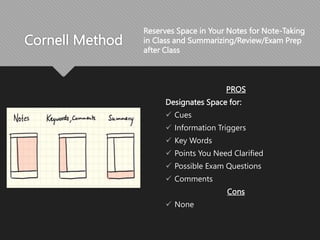
Cornell Method
PROS
Designates Space for:
 Cues
 Information Triggers
 Key Words
 Points You Need Clarified
 Possible Exam Questions
 Comments
Cons
 None
Reserves Space in Your Notes for Note-Taking
in Class and Summarizing/Review/Exam Prep
after Class
Outline Method
PROS
 Highlights relationships between
major points, supporting
materials and examples
 Makes revision/review easy by
presenting information in an
order of importance
 Could be done electronically
CONS
 Requires students to recognize
hierarchy of information on the
spot
Create a hierarchy of information, with
main points in bold on the left hand
side of the page and subpoints or
examples below and to the right
Mapping
PROS
 Great for visual learners
 Encourages Creativity
 Helps Make Connections to
Related Info
 Easy to Edit/Revise and Add
Features Like Color-Coding
A graphic instead of textual representation
of the lecture
Start with a central point and sketch
related information around it
CONS
 Less Complete, Requiring
More to Be Added after Class
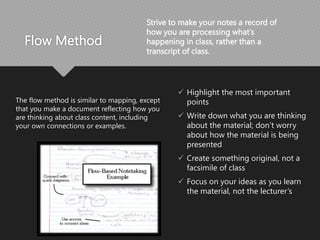
Flow Method
The flow method is similar to mapping, except
that you make a document reflecting how you
are thinking about class content, including
your own connections or examples.
 Highlight the most important
points
 Write down what you are thinking
about the material; don’t worry
about how the material is being
presented
 Create something original, not a
facsimile of class
 Focus on your ideas as you learn
the material, not the lecturer’s
Strive to make your notes a record of
how you are processing what’s
happening in class, rather than a
transcript of class.
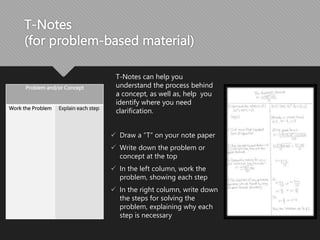
T-Notes
(for problem-based material)
Problem and/or Concept
Work the Problem Explain each step
 Draw a “T” on your note paper
 Write down the problem or
concept at the top
 In the left column, work the
problem, showing each step
 In the right column, write down
the steps for solving the
problem, explaining why each
step is necessary
T-Notes can help you
understand the process behind
a concept, as well as, help you
identify where you need
clarification.
In Class
Be Prepared to Focus
 Bring the Materials You Need
 Sit Up Front
 Don’t Show Up Tired, Distracted,
Hungry or Thirsty If You Can Help
It
 Leave Outside-of-Class Concerns
at the Door
 Refocus When Your Mind
Wanders
Make Your Notes Review-Ready
 Date Your Notes
 Use Headings
 Write in Phrases
 Develop Your Own Shorthand
 Try to Identify Main Points, Supporting
Details and Examples
 Note When the Instructor Emphasizes
Concepts
(i.e. Repetition, Pauses, Summary,
Statements of Importance, etc.)
After Class
 Do something with your notes
 Complete
 Edit
 Revise
 Convert to study materials
 Speculate about what problems or
exam questions your instructor could
create based on this content
 Find answers to anything you have
questions about or need clarification
on; email or visit your instructor if
necessary.
IMPORTANT
REVIEW YOUR NOTES to stay ahead
of the Curve
Final Tips
 Go to class; the act of making notes
contributes to the learning process
 Focus in class; work to eliminate internal and
external distractions
 Write in your own words. Be interpretive; don’t
try to write everything down. You aren’t a
transcriber.
 Implement a system that works for you (even
if it’s your own
 Do something with your notes within 24 hours
after class (edit/review/clarify/convert to study
materials)
 Compare your notes to a classmate’s

Note taking side.pptx

  • 1.
    Note-Taking (or maybebetter yet, Note-Making)
  • 2.
    Taking Good NotesIs Crucial for Academic Success “Educational research clearly shows that the completeness of lecture notes is positively related to academic achievement.” –Bonnie Armbruster, University of Illinois All activities associated with note-taking aid in learning:  Listening  Selecting  Interpreting  Discerning  Writing  Reviewing  Studying
  • 3.
    Why Take Notes? Creates a record for study and exam-prep materials  Promotes active learning  Boosts comprehension and retention  Practices prioritizing and organizing information  Increases alertness, focuses attention and extends attention span  Enhances creativity So, go to class and take your own notes. There’s no substitute!
  • 4.
    How to TakeNotes Note-taking involves listening to the teacher, selecting the important information, and writing it down. And, to some extent, discerning what’s important from what’s not is intuitive. Simple, right? But like most things associated with being a student, you can get better at taking notes with just a little attention to detail and a willingness to experiment, going beyond what comes natural to you to find what helps you learn best. Fundamentals:  Preview before Class  Focus in Class! Minimize Internal and External Distractions  Implement a System
  • 5.
    Take Notes Electronically? If you take notes on a laptop or iPad, be careful to avoid becoming a transcriber. You don’t have to write down everything your instructor says. In fact, it’s better not to. Think critically about what you include and omit, and take notes in your own words. When you engage in the cognitive process of distilling content and writing it in your own words, you are learning!  Still want to use a laptop or your iPad?  If so, there’s an app for that: https://apps.apple.com/app/apple -store/id778658393
  • 6.
    Preview Class Contentbefore Class  Check the Syllabus to See What Will Be Covered in the Upcoming Class  Look Back at Notes from Last Class  Read/Look Over Textbook/Reading Materials that Correspond to Material to be Covered in Class Previewing makes it easier to:  Discern What’s Important from What’s Not As Important  Know What to Record in Notes  Make Connections to Other Course Material  Stay Focused during Lecture (We lose focus/concentration when we don’t understand something. Previewing makes that less likely.)
  • 7.
  • 8.
    Cornell Method PROS Designates Spacefor:  Cues  Information Triggers  Key Words  Points You Need Clarified  Possible Exam Questions  Comments Cons  None Reserves Space in Your Notes for Note-Taking in Class and Summarizing/Review/Exam Prep after Class
  • 9.
    Outline Method PROS  Highlightsrelationships between major points, supporting materials and examples  Makes revision/review easy by presenting information in an order of importance  Could be done electronically CONS  Requires students to recognize hierarchy of information on the spot Create a hierarchy of information, with main points in bold on the left hand side of the page and subpoints or examples below and to the right
  • 10.
    Mapping PROS  Great forvisual learners  Encourages Creativity  Helps Make Connections to Related Info  Easy to Edit/Revise and Add Features Like Color-Coding A graphic instead of textual representation of the lecture Start with a central point and sketch related information around it CONS  Less Complete, Requiring More to Be Added after Class
  • 11.
    Flow Method The flowmethod is similar to mapping, except that you make a document reflecting how you are thinking about class content, including your own connections or examples.  Highlight the most important points  Write down what you are thinking about the material; don’t worry about how the material is being presented  Create something original, not a facsimile of class  Focus on your ideas as you learn the material, not the lecturer’s Strive to make your notes a record of how you are processing what’s happening in class, rather than a transcript of class.
  • 12.
    T-Notes (for problem-based material) Problemand/or Concept Work the Problem Explain each step  Draw a “T” on your note paper  Write down the problem or concept at the top  In the left column, work the problem, showing each step  In the right column, write down the steps for solving the problem, explaining why each step is necessary T-Notes can help you understand the process behind a concept, as well as, help you identify where you need clarification.
  • 13.
    In Class Be Preparedto Focus  Bring the Materials You Need  Sit Up Front  Don’t Show Up Tired, Distracted, Hungry or Thirsty If You Can Help It  Leave Outside-of-Class Concerns at the Door  Refocus When Your Mind Wanders Make Your Notes Review-Ready  Date Your Notes  Use Headings  Write in Phrases  Develop Your Own Shorthand  Try to Identify Main Points, Supporting Details and Examples  Note When the Instructor Emphasizes Concepts (i.e. Repetition, Pauses, Summary, Statements of Importance, etc.)
  • 14.
    After Class  Dosomething with your notes  Complete  Edit  Revise  Convert to study materials  Speculate about what problems or exam questions your instructor could create based on this content  Find answers to anything you have questions about or need clarification on; email or visit your instructor if necessary. IMPORTANT REVIEW YOUR NOTES to stay ahead of the Curve
  • 15.
    Final Tips  Goto class; the act of making notes contributes to the learning process  Focus in class; work to eliminate internal and external distractions  Write in your own words. Be interpretive; don’t try to write everything down. You aren’t a transcriber.  Implement a system that works for you (even if it’s your own  Do something with your notes within 24 hours after class (edit/review/clarify/convert to study materials)  Compare your notes to a classmate’s

Editor's Notes

  • #3 Armbruster (now deceased) is a widely published author in the field of learning. This quote comes from