Node JS For Starters
Design, implement and deploy a web service in mere minutes
Take that, JAVA!
What is Node?
● Node is a server that runs JS -
imagine a headless chrome on a
remote machine and that’s it (it does
use chrome’s v8 engine to run JS)
● Script is run in an event-driven non-
blocking loop
● It’s great for asynchronous tasks
● NodeJS is really just javascript
running on the server, so you get all
the goodies JS provides, and more
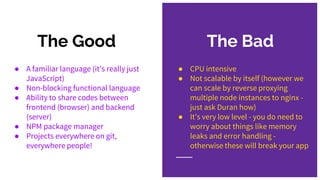
The Bad
● CPU intensive
● Not scalable by itself (however we
can scale by reverse proxying
multiple node instances to nginx -
just ask Duran how)
● It’s very low level - you do need to
worry about things like memory
leaks and error handling -
otherwise these will break your app
The Good
● A familiar language (it’s really just
JavaScript)
● Non-blocking functional language
● Ability to share codes between
frontend (browser) and backend
(server)
● NPM package manager
● Projects everywhere on git,
everywhere people!
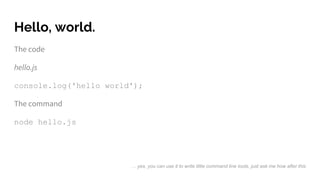
Hello, world.
The code
hello.js
console.log('hello world');
The command
node hello.js
… yes, you can use it to write little command line tools, just ask me how after this
Let’s talk structure
A typical nodejs app consists of:
● An entry point (usually index.js)
● A package.json file for dependencies and project details
● A node_modules directory where the dependencies will be stored (vendors
directory for php coders)
● A src or app directory for your own code source (I prefer app - I keep src for
resources that need build)
● A .gitignore, of course, and don’t forget your readme.md too.
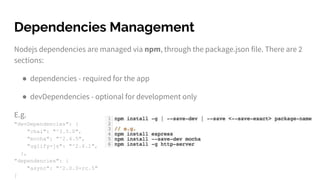
Dependencies Management
Nodejs dependencies are managed via npm, through the package.json file. There are 2
sections:
● dependencies - required for the app
● devDependencies - optional for development only
E.g.
"devDependencies": {
"chai": "^3.5.0",
"mocha": "^2.4.5",
"uglify-js": "^2.6.1",
},
"dependencies": {
"async": "^2.0.0-rc.5"
}
Our first NodeJS web service!
Now let’s try to make a little web service that takes 2 numbers and return the result of
first number multiplying the second one, and we’ll make:
● The web service itself that takes input and sends out json outputs
● A little module that does the calculation
We’ll also need to manage the different configurations for different environments, and
A package for unit tests, but we’ll get on those later.
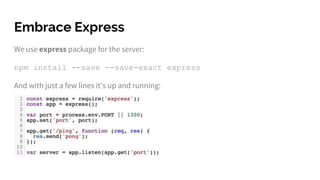
Embrace Express
We use express package for the server:
npm install --save --save-exact express
And with just a few lines it’s up and running:
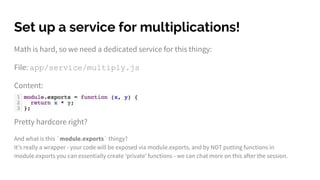
Set up a service for multiplications!
Math is hard, so we need a dedicated service for this thingy:
File: app/service/multiply.js
Content:
Pretty hardcore right?
And what is this `module.exports` thingy?
It’s really a wrapper - your code will be exposed via module.exports, and by NOT putting functions in
module.exports you can essentially create ‘private’ functions - we can chat more on this after the session.
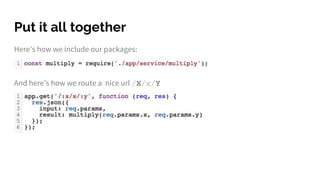
Put it all together
Here’s how we include our packages:
And here’s how we route a nice url /X/x/Y
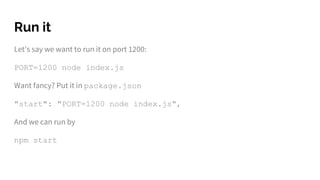
Run it
Let’s say we want to run it on port 1200:
PORT=1200 node index.js
Want fancy? Put it in package.json
"start": "PORT=1200 node index.js",
And we can run by
npm start
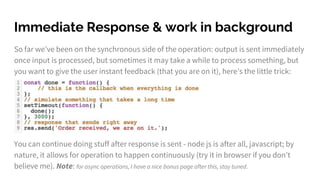
So far we’ve been on the synchronous side of the operation: output is sent immediately
once input is processed, but sometimes it may take a while to process something, but
you want to give the user instant feedback (that you are on it), here’s the little trick:
You can continue doing stuff after response is sent - node js is after all, javascript; by
nature, it allows for operation to happen continuously (try it in browser if you don’t
believe me). Note: for async operations, I have a nice bonus page after this, stay tuned.
Immediate Response & work in background
NodeJS best practices
I’ll list only a few here, for the full list go here: https://devcenter.heroku.com/articles/node-best-practices
● Always start project with npm init.
● Adapt to ECMAScript6 standards (https://nodejs.org/en/docs/es6/), you can thank
me later when you start learning modern languages such as swift.
● Keep all lib file names in lowercase and use dash(-) instead of camel case, e.g.
service-sapi.js
● Use 2 spaces indentation (BTW, for php, please use PSR2 - 4 spaces unless you are
in drupal…)
● It’s better to fix the version of your dependencies (Duran/Lito will be super happy if
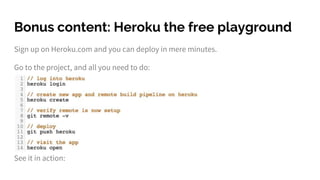
Bonus content: Heroku the free playground
Sign up on Heroku.com and you can deploy in mere minutes.
Go to the project, and all you need to do:
See it in action:
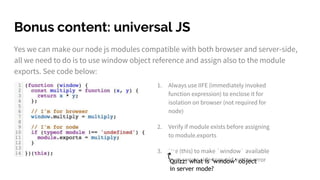
Bonus content: universal JS
Yes we can make our node js modules compatible with both browser and server-side,
all we need to do is to use window object reference and assign also to the module
exports. See code below:
1. Always use IIFE (immediately invoked
function expression) to enclose it for
isolation on browser (not required for
node)
2. Verify if module exists before assigning
to module.exports
3. Use (this) to make `window` available
from server-side to avoid syntax errorQuizz: what is ‘window’ object
in server mode?
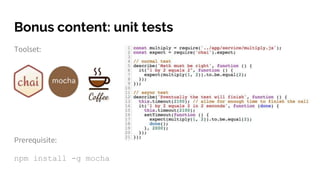
Bonus content: unit tests
Toolset:
Prerequisite:
npm install -g mocha
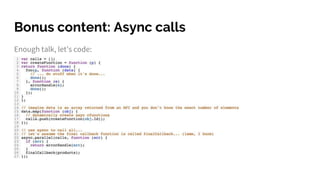
Bonus content: Async calls
Enough talk, let’s code:
Useful resources
Deploy nodejs app with heroku
https://devcenter.heroku.com/articles/getting-started-with-nodejs#introduction
Free mongodb host (up to 500mb storage, perfect for personal projects)
https://mlab.com/
NPM
https://www.npmjs.com/
Best practice (actual practical advice)
https://github.com/mattdesl/module-best-practices
Udemy Course:
https://www.udemy.com/nodejs-for-beginning-programmers-100-practical/
Dora the explorer...
Beginners:
● Find out how to serve static web pages
● Write a piece of code that connects to a mongodb instance
ABOVE & BEYOND:
● Rewrite the editorial review page with nodejs
● Rewrite the BAC search results page with nodejs

Nodejs web service for starters

  • 1.
    Node JS ForStarters Design, implement and deploy a web service in mere minutes Take that, JAVA!
  • 2.
    What is Node? ●Node is a server that runs JS - imagine a headless chrome on a remote machine and that’s it (it does use chrome’s v8 engine to run JS) ● Script is run in an event-driven non- blocking loop ● It’s great for asynchronous tasks ● NodeJS is really just javascript running on the server, so you get all the goodies JS provides, and more
  • 3.
    The Bad ● CPUintensive ● Not scalable by itself (however we can scale by reverse proxying multiple node instances to nginx - just ask Duran how) ● It’s very low level - you do need to worry about things like memory leaks and error handling - otherwise these will break your app The Good ● A familiar language (it’s really just JavaScript) ● Non-blocking functional language ● Ability to share codes between frontend (browser) and backend (server) ● NPM package manager ● Projects everywhere on git, everywhere people!
  • 4.
    Hello, world. The code hello.js console.log('helloworld'); The command node hello.js … yes, you can use it to write little command line tools, just ask me how after this
  • 5.
    Let’s talk structure Atypical nodejs app consists of: ● An entry point (usually index.js) ● A package.json file for dependencies and project details ● A node_modules directory where the dependencies will be stored (vendors directory for php coders) ● A src or app directory for your own code source (I prefer app - I keep src for resources that need build) ● A .gitignore, of course, and don’t forget your readme.md too.
  • 6.
    Dependencies Management Nodejs dependenciesare managed via npm, through the package.json file. There are 2 sections: ● dependencies - required for the app ● devDependencies - optional for development only E.g. "devDependencies": { "chai": "^3.5.0", "mocha": "^2.4.5", "uglify-js": "^2.6.1", }, "dependencies": { "async": "^2.0.0-rc.5" }
  • 7.
    Our first NodeJSweb service! Now let’s try to make a little web service that takes 2 numbers and return the result of first number multiplying the second one, and we’ll make: ● The web service itself that takes input and sends out json outputs ● A little module that does the calculation We’ll also need to manage the different configurations for different environments, and A package for unit tests, but we’ll get on those later.
  • 8.
    Embrace Express We useexpress package for the server: npm install --save --save-exact express And with just a few lines it’s up and running:
  • 9.
    Set up aservice for multiplications! Math is hard, so we need a dedicated service for this thingy: File: app/service/multiply.js Content: Pretty hardcore right? And what is this `module.exports` thingy? It’s really a wrapper - your code will be exposed via module.exports, and by NOT putting functions in module.exports you can essentially create ‘private’ functions - we can chat more on this after the session.
  • 10.
    Put it alltogether Here’s how we include our packages: And here’s how we route a nice url /X/x/Y
  • 11.
    Run it Let’s saywe want to run it on port 1200: PORT=1200 node index.js Want fancy? Put it in package.json "start": "PORT=1200 node index.js", And we can run by npm start
  • 12.
    So far we’vebeen on the synchronous side of the operation: output is sent immediately once input is processed, but sometimes it may take a while to process something, but you want to give the user instant feedback (that you are on it), here’s the little trick: You can continue doing stuff after response is sent - node js is after all, javascript; by nature, it allows for operation to happen continuously (try it in browser if you don’t believe me). Note: for async operations, I have a nice bonus page after this, stay tuned. Immediate Response & work in background
  • 13.
    NodeJS best practices I’lllist only a few here, for the full list go here: https://devcenter.heroku.com/articles/node-best-practices ● Always start project with npm init. ● Adapt to ECMAScript6 standards (https://nodejs.org/en/docs/es6/), you can thank me later when you start learning modern languages such as swift. ● Keep all lib file names in lowercase and use dash(-) instead of camel case, e.g. service-sapi.js ● Use 2 spaces indentation (BTW, for php, please use PSR2 - 4 spaces unless you are in drupal…) ● It’s better to fix the version of your dependencies (Duran/Lito will be super happy if
  • 14.
    Bonus content: Herokuthe free playground Sign up on Heroku.com and you can deploy in mere minutes. Go to the project, and all you need to do: See it in action:
  • 15.
    Bonus content: universalJS Yes we can make our node js modules compatible with both browser and server-side, all we need to do is to use window object reference and assign also to the module exports. See code below: 1. Always use IIFE (immediately invoked function expression) to enclose it for isolation on browser (not required for node) 2. Verify if module exists before assigning to module.exports 3. Use (this) to make `window` available from server-side to avoid syntax errorQuizz: what is ‘window’ object in server mode?
  • 16.
    Bonus content: unittests Toolset: Prerequisite: npm install -g mocha
  • 17.
    Bonus content: Asynccalls Enough talk, let’s code:
  • 18.
    Useful resources Deploy nodejsapp with heroku https://devcenter.heroku.com/articles/getting-started-with-nodejs#introduction Free mongodb host (up to 500mb storage, perfect for personal projects) https://mlab.com/ NPM https://www.npmjs.com/ Best practice (actual practical advice) https://github.com/mattdesl/module-best-practices Udemy Course: https://www.udemy.com/nodejs-for-beginning-programmers-100-practical/
  • 19.
    Dora the explorer... Beginners: ●Find out how to serve static web pages ● Write a piece of code that connects to a mongodb instance ABOVE & BEYOND: ● Rewrite the editorial review page with nodejs ● Rewrite the BAC search results page with nodejs