On-Demand Delivery iOS App:
Features, Admin Panel, and Launch
Plan
On-Demand Delivery iOS App Features, Admin Panel, and Launch Plan
An on-demand delivery iOS app allows businesses to deliver products or services quickly while
giving users full control over their orders. Customers want instant access, clear updates, and
fast support. Businesses need operational control, accurate tracking, and flexible pricing
supported by professional iOS App Development Services.
Effective on-demand delivery app development focuses on three core areas. First, the app must
deliver a smooth user experience. Second, the admin panel must support daily operations
without manual effort. Third, the launch plan must reduce early-stage failures.
This guide explains how to build a delivery iOS app that meets user expectations and business
goals.
What is an On-demand delivery iOS app?
An on-demand delivery iOS app lets users place an order, track it in real time, receive updates,
and communicate with drivers or support. At the same time, a backend system manages orders,
drivers, payments, and reports.
The system usually includes:
● A customer-facing iOS app
● A delivery partner app
● A web-based admin panel
All three components operate together in real time.
Also read: Social Login & Sharing Integration in iOS Apps: Cost, Benefits, and Best
Practices
On-demand delivery app development: how the system
works
On-demand delivery app development how the system works
A delivery app follows a fixed workflow. Each step must execute without delay.
Standard delivery flow
1. User places an order
2. Payment gets authorized
3. System assigns a nearby driver
4. Driver accepts and picks up the order
5. User tracks delivery live
6. Order reaches destination
7. User rates the experience
Any failure during this process affects trust and retention. That is why backend logic, real-time
communication, and monitoring matter.
On-demand delivery app features users expect
Users compare every delivery app with major platforms. Missing features often result in low
ratings and uninstallations.
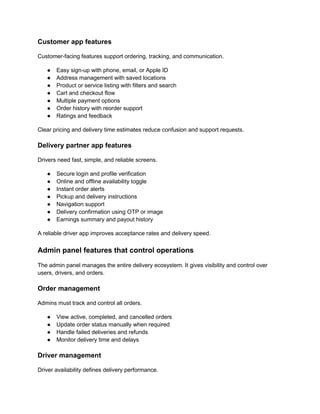
Customer app features
Customer-facing features support ordering, tracking, and communication.
● Easy sign-up with phone, email, or Apple ID
● Address management with saved locations
● Product or service listing with filters and search
● Cart and checkout flow
● Multiple payment options
● Order history with reorder support
● Ratings and feedback
Clear pricing and delivery time estimates reduce confusion and support requests.
Delivery partner app features
Drivers need fast, simple, and reliable screens.
● Secure login and profile verification
● Online and offline availability toggle
● Instant order alerts
● Pickup and delivery instructions
● Navigation support
● Delivery confirmation using OTP or image
● Earnings summary and payout history
A reliable driver app improves acceptance rates and delivery speed.
Admin panel features that control operations
The admin panel manages the entire delivery ecosystem. It gives visibility and control over
users, drivers, and orders.
Order management
Admins must track and control all orders.
● View active, completed, and cancelled orders
● Update order status manually when required
● Handle failed deliveries and refunds
● Monitor delivery time and delays
Driver management
Driver availability defines delivery performance.
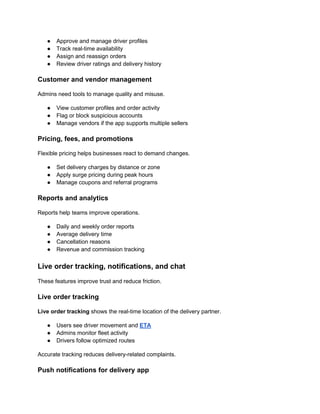
● Approve and manage driver profiles
● Track real-time availability
● Assign and reassign orders
● Review driver ratings and delivery history
Customer and vendor management
Admins need tools to manage quality and misuse.
● View customer profiles and order activity
● Flag or block suspicious accounts
● Manage vendors if the app supports multiple sellers
Pricing, fees, and promotions
Flexible pricing helps businesses react to demand changes.
● Set delivery charges by distance or zone
● Apply surge pricing during peak hours
● Manage coupons and referral programs
Reports and analytics
Reports help teams improve operations.
● Daily and weekly order reports
● Average delivery time
● Cancellation reasons
● Revenue and commission tracking
Live order tracking, notifications, and chat
These features improve trust and reduce friction.
Live order tracking
Live order tracking shows the real-time location of the delivery partner.
● Users see driver movement and ETA
● Admins monitor fleet activity
● Drivers follow optimized routes
Accurate tracking reduces delivery-related complaints.
Push notifications for delivery app
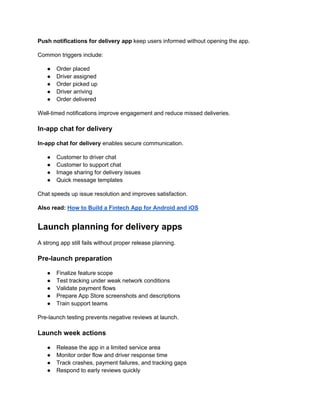
Push notifications for delivery app keep users informed without opening the app.
Common triggers include:
● Order placed
● Driver assigned
● Order picked up
● Driver arriving
● Order delivered
Well-timed notifications improve engagement and reduce missed deliveries.
In-app chat for delivery
In-app chat for delivery enables secure communication.
● Customer to driver chat
● Customer to support chat
● Image sharing for delivery issues
● Quick message templates
Chat speeds up issue resolution and improves satisfaction.
Also read: How to Build a Fintech App for Android and iOS
Launch planning for delivery apps
A strong app still fails without proper release planning.
Pre-launch preparation
● Finalize feature scope
● Test tracking under weak network conditions
● Validate payment flows
● Prepare App Store screenshots and descriptions
● Train support teams
Pre-launch testing prevents negative reviews at launch.
Launch week actions
● Release the app in a limited service area
● Monitor order flow and driver response time
● Track crashes, payment failures, and tracking gaps
● Respond to early reviews quickly
A controlled rollout exposes real-world issues early.
Post-launch improvements
The first month matters most.
● Improve routing using live data
● Adjust notification frequency
● Add retry logic for failed payments
● Improve chat response time
Early updates protect ratings and retention.
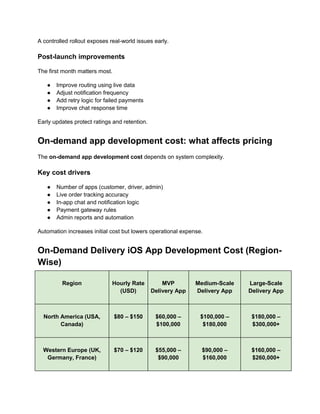
On-demand app development cost: what affects pricing
The on-demand app development cost depends on system complexity.
Key cost drivers
● Number of apps (customer, driver, admin)
● Live order tracking accuracy
● In-app chat and notification logic
● Payment gateway rules
● Admin reports and automation
Automation increases initial cost but lowers operational expense.
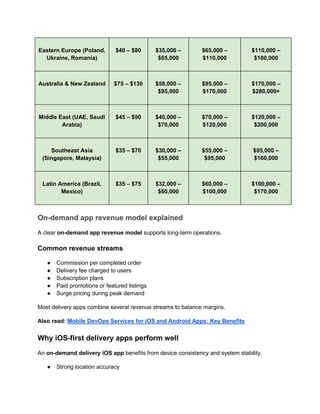
On-Demand Delivery iOS App Development Cost (Region-
Wise)
Region Hourly Rate
(USD)
MVP
Delivery App
Medium-Scale
Delivery App
Large-Scale
Delivery App
North America (USA,
Canada)
$80 – $150 $60,000 –
$100,000
$100,000 –
$180,000
$180,000 –
$300,000+
Western Europe (UK,
Germany, France)
$70 – $120 $55,000 –
$90,000
$90,000 –
$160,000
$160,000 –
$260,000+
Eastern Europe (Poland,
Ukraine, Romania)
$40 – $80 $35,000 –
$65,000
$65,000 –
$110,000
$110,000 –
$180,000
Australia & New Zealand $75 – $130 $58,000 –
$95,000
$95,000 –
$170,000
$170,000 –
$280,000+
Middle East (UAE, Saudi
Arabia)
$45 – $90 $40,000 –
$70,000
$70,000 –
$120,000
$120,000 –
$200,000
Southeast Asia
(Singapore, Malaysia)
$35 – $70 $30,000 –
$55,000
$55,000 –
$95,000
$95,000 –
$160,000
Latin America (Brazil,
Mexico)
$35 – $75 $32,000 –
$60,000
$60,000 –
$100,000
$100,000 –
$170,000
On-demand app revenue model explained
A clear on-demand app revenue model supports long-term operations.
Common revenue streams
● Commission per completed order
● Delivery fee charged to users
● Subscription plans
● Paid promotions or featured listings
● Surge pricing during peak demand
Most delivery apps combine several revenue streams to balance margins.
Also read: Mobile DevOps Services for iOS and Android Apps: Key Benefits
Why iOS-first delivery apps perform well
An on-demand delivery iOS app benefits from device consistency and system stability.
● Strong location accuracy
● Reliable background tracking
● Secure payment environment
● Predictable performance
These factors help maintain delivery accuracy and user trust.
Why Shiv Technolabs for on-demand delivery app development
Shiv Technolabs builds delivery apps that support real business operations and daily logistics
workflows. Our focus stays on performance, reliability, and smooth user experience across
every touchpoint.
We offer:
● Native iOS delivery app development
● Driver apps with real-time tracking
● Admin panels for full operational control
● Push notifications and in-app chat integration
● Ongoing maintenance and support
Our team works with tested workflows, stable architecture, and clear timelines to reduce
delivery risks and operational issues. Contact us to discuss your on-demand delivery app
requirements and get a solution aligned with your business goals.
Conclusion
A successful delivery platform depends on more than design. Strong on-demand delivery app
features, a reliable admin panel, and a structured launch plan define long-term success.
Live order tracking builds trust. Notifications keep users informed. Chat resolves issues quickly.
A clear revenue model supports growth.
Businesses that invest in structured on-demand delivery app development reduce operational
risk and improve retention from day one.

Complete iOS Delivery App Features & Admin Tools

  • 1.
    On-Demand Delivery iOSApp: Features, Admin Panel, and Launch Plan On-Demand Delivery iOS App Features, Admin Panel, and Launch Plan An on-demand delivery iOS app allows businesses to deliver products or services quickly while giving users full control over their orders. Customers want instant access, clear updates, and fast support. Businesses need operational control, accurate tracking, and flexible pricing supported by professional iOS App Development Services. Effective on-demand delivery app development focuses on three core areas. First, the app must deliver a smooth user experience. Second, the admin panel must support daily operations without manual effort. Third, the launch plan must reduce early-stage failures. This guide explains how to build a delivery iOS app that meets user expectations and business goals.
  • 2.
    What is anOn-demand delivery iOS app? What is an On-demand delivery iOS app? An on-demand delivery iOS app lets users place an order, track it in real time, receive updates, and communicate with drivers or support. At the same time, a backend system manages orders, drivers, payments, and reports. The system usually includes: ● A customer-facing iOS app ● A delivery partner app ● A web-based admin panel All three components operate together in real time. Also read: Social Login & Sharing Integration in iOS Apps: Cost, Benefits, and Best Practices
  • 3.
    On-demand delivery appdevelopment: how the system works On-demand delivery app development how the system works A delivery app follows a fixed workflow. Each step must execute without delay. Standard delivery flow 1. User places an order 2. Payment gets authorized 3. System assigns a nearby driver 4. Driver accepts and picks up the order 5. User tracks delivery live 6. Order reaches destination 7. User rates the experience Any failure during this process affects trust and retention. That is why backend logic, real-time communication, and monitoring matter. On-demand delivery app features users expect Users compare every delivery app with major platforms. Missing features often result in low ratings and uninstallations.
  • 4.
    Customer app features Customer-facingfeatures support ordering, tracking, and communication. ● Easy sign-up with phone, email, or Apple ID ● Address management with saved locations ● Product or service listing with filters and search ● Cart and checkout flow ● Multiple payment options ● Order history with reorder support ● Ratings and feedback Clear pricing and delivery time estimates reduce confusion and support requests. Delivery partner app features Drivers need fast, simple, and reliable screens. ● Secure login and profile verification ● Online and offline availability toggle ● Instant order alerts ● Pickup and delivery instructions ● Navigation support ● Delivery confirmation using OTP or image ● Earnings summary and payout history A reliable driver app improves acceptance rates and delivery speed. Admin panel features that control operations The admin panel manages the entire delivery ecosystem. It gives visibility and control over users, drivers, and orders. Order management Admins must track and control all orders. ● View active, completed, and cancelled orders ● Update order status manually when required ● Handle failed deliveries and refunds ● Monitor delivery time and delays Driver management Driver availability defines delivery performance.
  • 5.
    ● Approve andmanage driver profiles ● Track real-time availability ● Assign and reassign orders ● Review driver ratings and delivery history Customer and vendor management Admins need tools to manage quality and misuse. ● View customer profiles and order activity ● Flag or block suspicious accounts ● Manage vendors if the app supports multiple sellers Pricing, fees, and promotions Flexible pricing helps businesses react to demand changes. ● Set delivery charges by distance or zone ● Apply surge pricing during peak hours ● Manage coupons and referral programs Reports and analytics Reports help teams improve operations. ● Daily and weekly order reports ● Average delivery time ● Cancellation reasons ● Revenue and commission tracking Live order tracking, notifications, and chat These features improve trust and reduce friction. Live order tracking Live order tracking shows the real-time location of the delivery partner. ● Users see driver movement and ETA ● Admins monitor fleet activity ● Drivers follow optimized routes Accurate tracking reduces delivery-related complaints. Push notifications for delivery app
  • 6.
    Push notifications fordelivery app keep users informed without opening the app. Common triggers include: ● Order placed ● Driver assigned ● Order picked up ● Driver arriving ● Order delivered Well-timed notifications improve engagement and reduce missed deliveries. In-app chat for delivery In-app chat for delivery enables secure communication. ● Customer to driver chat ● Customer to support chat ● Image sharing for delivery issues ● Quick message templates Chat speeds up issue resolution and improves satisfaction. Also read: How to Build a Fintech App for Android and iOS Launch planning for delivery apps A strong app still fails without proper release planning. Pre-launch preparation ● Finalize feature scope ● Test tracking under weak network conditions ● Validate payment flows ● Prepare App Store screenshots and descriptions ● Train support teams Pre-launch testing prevents negative reviews at launch. Launch week actions ● Release the app in a limited service area ● Monitor order flow and driver response time ● Track crashes, payment failures, and tracking gaps ● Respond to early reviews quickly
  • 7.
    A controlled rolloutexposes real-world issues early. Post-launch improvements The first month matters most. ● Improve routing using live data ● Adjust notification frequency ● Add retry logic for failed payments ● Improve chat response time Early updates protect ratings and retention. On-demand app development cost: what affects pricing The on-demand app development cost depends on system complexity. Key cost drivers ● Number of apps (customer, driver, admin) ● Live order tracking accuracy ● In-app chat and notification logic ● Payment gateway rules ● Admin reports and automation Automation increases initial cost but lowers operational expense. On-Demand Delivery iOS App Development Cost (Region- Wise) Region Hourly Rate (USD) MVP Delivery App Medium-Scale Delivery App Large-Scale Delivery App North America (USA, Canada) $80 – $150 $60,000 – $100,000 $100,000 – $180,000 $180,000 – $300,000+ Western Europe (UK, Germany, France) $70 – $120 $55,000 – $90,000 $90,000 – $160,000 $160,000 – $260,000+
  • 8.
    Eastern Europe (Poland, Ukraine,Romania) $40 – $80 $35,000 – $65,000 $65,000 – $110,000 $110,000 – $180,000 Australia & New Zealand $75 – $130 $58,000 – $95,000 $95,000 – $170,000 $170,000 – $280,000+ Middle East (UAE, Saudi Arabia) $45 – $90 $40,000 – $70,000 $70,000 – $120,000 $120,000 – $200,000 Southeast Asia (Singapore, Malaysia) $35 – $70 $30,000 – $55,000 $55,000 – $95,000 $95,000 – $160,000 Latin America (Brazil, Mexico) $35 – $75 $32,000 – $60,000 $60,000 – $100,000 $100,000 – $170,000 On-demand app revenue model explained A clear on-demand app revenue model supports long-term operations. Common revenue streams ● Commission per completed order ● Delivery fee charged to users ● Subscription plans ● Paid promotions or featured listings ● Surge pricing during peak demand Most delivery apps combine several revenue streams to balance margins. Also read: Mobile DevOps Services for iOS and Android Apps: Key Benefits Why iOS-first delivery apps perform well An on-demand delivery iOS app benefits from device consistency and system stability. ● Strong location accuracy
  • 9.
    ● Reliable backgroundtracking ● Secure payment environment ● Predictable performance These factors help maintain delivery accuracy and user trust. Why Shiv Technolabs for on-demand delivery app development Shiv Technolabs builds delivery apps that support real business operations and daily logistics workflows. Our focus stays on performance, reliability, and smooth user experience across every touchpoint. We offer: ● Native iOS delivery app development ● Driver apps with real-time tracking ● Admin panels for full operational control ● Push notifications and in-app chat integration ● Ongoing maintenance and support Our team works with tested workflows, stable architecture, and clear timelines to reduce delivery risks and operational issues. Contact us to discuss your on-demand delivery app requirements and get a solution aligned with your business goals. Conclusion A successful delivery platform depends on more than design. Strong on-demand delivery app features, a reliable admin panel, and a structured launch plan define long-term success. Live order tracking builds trust. Notifications keep users informed. Chat resolves issues quickly. A clear revenue model supports growth. Businesses that invest in structured on-demand delivery app development reduce operational risk and improve retention from day one.