Next Gen Automation
Frameworks
Kumarswamy Dontamsetti
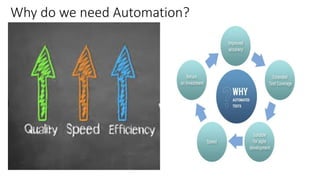
Why do we need Automation?
Terminology alignment
• Three Broad types of Test Automation
– UI /Web Client Based testing
• Typical setup involves one or more web/UI clients and web/UI servers
• Controlling clients though pixel references or xPath references
• Controlling Servers through HTML Posts/Rest API/ SOAP UI e.t.c
• Sometimes one need to maintain some automation code at server side to simulate some situations at server
side. This is referred as remote server automation code
– Embedded Systems testing
• Typical setup involves more than one device or equipment
• Need to control these devices by executing telnet/ssh/ADB/AT e.t.c commands via
serialport/usb/ethernet/JTAG e.t.c interfaces
• Sometimes you need to maintain code at remote device to maintain context .
– Few Examples: Serial Port access on remote equipment, To open windows applications from Linux box . This is referred as remote
device automation code.
– Combination of UI/Web and Embedded system testing
• Ex: Customer Deployment testing
• Typical setup involves 1+ device or equipment and 1+ UI/Web clients and servers
• DUT – Device Under Test
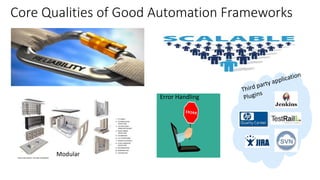
Core Qualities of Good Automation Frameworks
Error Handling
Modular
How Good is ‘Good Enough’ ?
Good
Next Gen
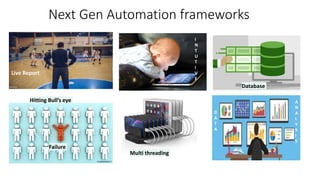
Next Gen Automation frameworks
Live Report
I
N
T
U
T
I
V
E
Failure
Hitting Bull’s eye
Database
D
A
T
A
A
N
A
L
Y
S
I
S
Multi threading
Next Gen automation framework- Cont
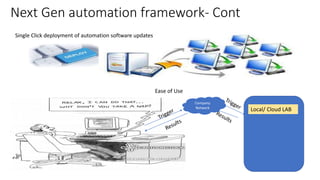
Single Click deployment of automation software updates
Company
Network
Local/ Cloud LAB
Ease of Use
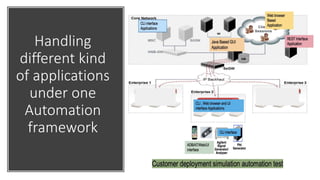
Handling
different kind
of applications
under one
Automation
framework
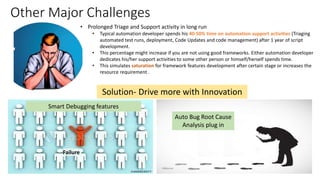
Other Major Challenges
• Prolonged Triage and Support activity in long run
• Typical automation developer spends his 40-50% time on automation support activities (Triaging
automated test runs, deployment, Code Updates and code management) after 1 year of script
development.
• This percentage might increase if you are not using good frameworks. Either automation developer
dedicates his/her support activities to some other person or himself/herself spends time.
• This simulates saturation for framework features development after certain stage or increases the
resource requirement .
Failure
Solution- Drive more with Innovation
Auto Bug Root Cause
Analysis plug in
Smart Debugging features
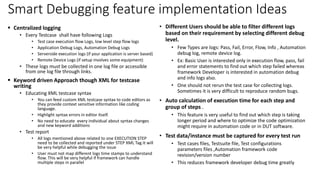
Smart Debugging feature implementation Ideas
 Centralized logging
• Every Testcase shall have following Logs
• Test case execution flow Logs, low level step flow logs
• Application Debug Logs, Automation Debug Logs
• Serverside execution logs (if your application is server based)
• Remote Device Logs (if setup involves some equipment)
• These logs must be collected in one log file or accessible
from one log file through links.
 Keyword driven Approach though XML for testcase
writing
• Educating XML testcase syntax
• You can feed custom XML testcase syntax to code editors as
they provide context sensitive information like coding
language.
• Highlight syntax errors in editor itself.
• No need to educate every individual about syntax changes
and new keyword additions
• Test report
• All logs mentioned above related to one EXECUTION STEP
need to be collected and reported under STEP XML Tag.It will
be very helpful while debugging the issue
• User must not map different logs time stamps to understand
flow. This will be very helpful if framework can handle
multiple steps in parallel
• Different Users should be able to filter different logs
based on their requirement by selecting different debug
level.
• Few Types are logs: Pass, Fail, Error, Flow, Info , Automation
debug log, remote device log.
• Ex: Basic User is interested only in execution flow, pass, fail
and error statements to find out which step failed whereas
framework Developer is interested in automation debug
and info logs also.
• One should not rerun the test case for collecting logs.
Sometimes it is very difficult to reproduce random bugs.
• Auto calculation of execution time for each step and
group of steps .
• This feature is very useful to find out which step is taking
longer period and where to optimize the code optimization
might require in automation code or in DUT software.
• Test data/instance must be captured for every test run
• Test cases files, Testsuite file, Test configurations
parameters files ,Automation framework code
revision/version number
• This reduces framework developer debug time greatly
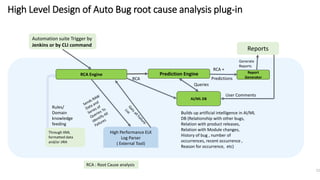
High Level Design of Auto Bug root cause analysis plug-in
11
Rules/
Domain
knowledge
feeding
Builds up artificial intelligence in AI/ML
DB (Relationship with other bugs,
Relation with product releases,
Relation with Module changes,
History of bug , number of
occurrences, recent occurrence ,
Reason for occurrence, etc)
AI/ML DB
Automation suite Trigger by
Jenkins or by CLI command
High Performance ELK
Log Parser
( External Tool)
Reports
Generate
Reports
Through XML
formatted data
and/or JIRA
RCA Engine Prediction Engine Report
GeneratorRCA
Queries
RCA +
Predictions
User Comments
RCA : Root Cause analysis
Thank you
Kumarswamy
Dontamsetti

Next-gen Automation Framework

  • 1.
  • 2.
    Why do weneed Automation?
  • 3.
    Terminology alignment • ThreeBroad types of Test Automation – UI /Web Client Based testing • Typical setup involves one or more web/UI clients and web/UI servers • Controlling clients though pixel references or xPath references • Controlling Servers through HTML Posts/Rest API/ SOAP UI e.t.c • Sometimes one need to maintain some automation code at server side to simulate some situations at server side. This is referred as remote server automation code – Embedded Systems testing • Typical setup involves more than one device or equipment • Need to control these devices by executing telnet/ssh/ADB/AT e.t.c commands via serialport/usb/ethernet/JTAG e.t.c interfaces • Sometimes you need to maintain code at remote device to maintain context . – Few Examples: Serial Port access on remote equipment, To open windows applications from Linux box . This is referred as remote device automation code. – Combination of UI/Web and Embedded system testing • Ex: Customer Deployment testing • Typical setup involves 1+ device or equipment and 1+ UI/Web clients and servers • DUT – Device Under Test
  • 4.
    Core Qualities ofGood Automation Frameworks Error Handling Modular
  • 5.
    How Good is‘Good Enough’ ? Good Next Gen
  • 6.
    Next Gen Automationframeworks Live Report I N T U T I V E Failure Hitting Bull’s eye Database D A T A A N A L Y S I S Multi threading
  • 7.
    Next Gen automationframework- Cont Single Click deployment of automation software updates Company Network Local/ Cloud LAB Ease of Use
  • 8.
  • 9.
    Other Major Challenges •Prolonged Triage and Support activity in long run • Typical automation developer spends his 40-50% time on automation support activities (Triaging automated test runs, deployment, Code Updates and code management) after 1 year of script development. • This percentage might increase if you are not using good frameworks. Either automation developer dedicates his/her support activities to some other person or himself/herself spends time. • This simulates saturation for framework features development after certain stage or increases the resource requirement . Failure Solution- Drive more with Innovation Auto Bug Root Cause Analysis plug in Smart Debugging features
  • 10.
    Smart Debugging featureimplementation Ideas  Centralized logging • Every Testcase shall have following Logs • Test case execution flow Logs, low level step flow logs • Application Debug Logs, Automation Debug Logs • Serverside execution logs (if your application is server based) • Remote Device Logs (if setup involves some equipment) • These logs must be collected in one log file or accessible from one log file through links.  Keyword driven Approach though XML for testcase writing • Educating XML testcase syntax • You can feed custom XML testcase syntax to code editors as they provide context sensitive information like coding language. • Highlight syntax errors in editor itself. • No need to educate every individual about syntax changes and new keyword additions • Test report • All logs mentioned above related to one EXECUTION STEP need to be collected and reported under STEP XML Tag.It will be very helpful while debugging the issue • User must not map different logs time stamps to understand flow. This will be very helpful if framework can handle multiple steps in parallel • Different Users should be able to filter different logs based on their requirement by selecting different debug level. • Few Types are logs: Pass, Fail, Error, Flow, Info , Automation debug log, remote device log. • Ex: Basic User is interested only in execution flow, pass, fail and error statements to find out which step failed whereas framework Developer is interested in automation debug and info logs also. • One should not rerun the test case for collecting logs. Sometimes it is very difficult to reproduce random bugs. • Auto calculation of execution time for each step and group of steps . • This feature is very useful to find out which step is taking longer period and where to optimize the code optimization might require in automation code or in DUT software. • Test data/instance must be captured for every test run • Test cases files, Testsuite file, Test configurations parameters files ,Automation framework code revision/version number • This reduces framework developer debug time greatly
  • 11.
    High Level Designof Auto Bug root cause analysis plug-in 11 Rules/ Domain knowledge feeding Builds up artificial intelligence in AI/ML DB (Relationship with other bugs, Relation with product releases, Relation with Module changes, History of bug , number of occurrences, recent occurrence , Reason for occurrence, etc) AI/ML DB Automation suite Trigger by Jenkins or by CLI command High Performance ELK Log Parser ( External Tool) Reports Generate Reports Through XML formatted data and/or JIRA RCA Engine Prediction Engine Report GeneratorRCA Queries RCA + Predictions User Comments RCA : Root Cause analysis
  • 12.