New Leads
NEVER MISS A LEAD. EVER.
WELCOME • THE ISSUE • THE SOLUTION • OPTIONS
As soon as a lead is created in Salesforce,
it’s your responsibility to contact them fast.
WELCOME • THE ISSUE • THE SOLUTION • OPTIONS
You need to minimize the response time.
WELCOME • THE ISSUE • THE SOLUTION • OPTIONS
Factors such as:
• When they were created
• Activity history
• Qualification information
Decides who to contact first.
WELCOME • THE ISSUE • THE SOLUTION • OPTIONS
If you can get a better overview,
and combine these factors
– you’ll be able to work much faster.
WELCOME • THE ISSUE • THE SOLUTION • OPTIONS
Make sure you have all of your
new leads in one place, and
decide who to prioritize.
WELCOME • THE ISSUE • THE SOLUTION • OPTIONS
LET US PRESENT:
New leads
WELCOME • THE ISSUE • THE SOLUTION • OPTIONS
This card serves your new leads.
Wherever they’re created or
assigned to you, they’ll be here
for you to act upon.
Start with an overview to get the
information you need to qualify
the lead. How important is this
lead to you?
WELCOME • THE ISSUE • THE SOLUTION • OPTIONS
Click within this area to
get more details
WELCOME • THE ISSUE • THE SOLUTION • OPTIONS
Click to edit status
Click on the email to send
a mail, or give them a call
Add tasks, log calls,
or book meetings
WELCOME • THE ISSUE • THE SOLUTION • OPTIONS
Click “More details” to
read more about the lead
You can edit basic
information
WELCOME • THE ISSUE • THE SOLUTION • OPTIONS
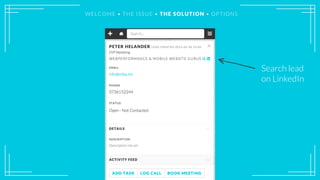
Search lead
on LinkedIn
WELCOME • THE ISSUE • THE SOLUTION • OPTIONS
Change the
lead status
WELCOME • THE ISSUE • THE SOLUTION • OPTIONS
Add or edit the
description
WELCOME • THE ISSUE • THE SOLUTION • OPTIONS
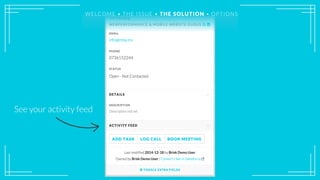
See your activity feed
WELCOME • THE ISSUE • THE SOLUTION • OPTIONSWELCOME • THE ISSUE • THE SOLUTION • OPTIONS
Add tasks, log calls,
or book meetings
WELCOME • THE ISSUE • THE SOLUTION • OPTIONS
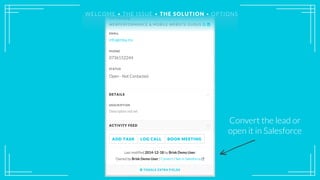
Convert the lead or
open it in Salesforce
WELCOME • THE ISSUE • THE SOLUTION • OPTIONS
Add more fields here
WELCOME • THE ISSUE • THE SOLUTION • OPTIONS
Time to filter and prioritize your leads.
WELCOME • THE ISSUE • THE SOLUTION • OPTIONS
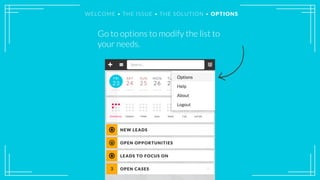
Go to options to modify the list to
your needs.
WELCOME • THE ISSUE • THE SOLUTION • OPTIONS
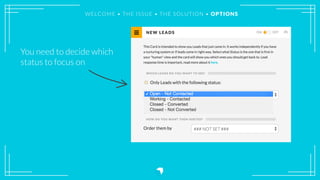
You need to decide which
status to focus on
WELCOME • THE ISSUE • THE SOLUTION • OPTIONS
You need to decide which
status to focus on
WELCOME • THE ISSUE • THE SOLUTION • OPTIONS
Future tasks
probably mean
that you’re on
top of a lead
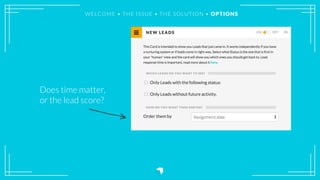
Does time matter,
or the lead score?
WELCOME • THE ISSUE • THE SOLUTION • OPTIONS
Does time matter,
or the lead score?
WELCOME • THE ISSUE • THE SOLUTION • OPTIONS
When you decide what to see, you’re
making it easier for yourself to work.
WELCOME • THE ISSUE • THE SOLUTION • OPTIONS
Now you’ll be able to work more
efficiently with your leads.
WELCOME • THE ISSUE • THE SOLUTION • OPTIONS
FOR SALESFORCE.COM
FOLLOW US ON SOCIAL MEDIA
OR VISIT OUR WEBSITE BRISK.IO

Work with your new leads

  • 1.
    New Leads NEVER MISSA LEAD. EVER. WELCOME • THE ISSUE • THE SOLUTION • OPTIONS
  • 2.
    As soon asa lead is created in Salesforce, it’s your responsibility to contact them fast. WELCOME • THE ISSUE • THE SOLUTION • OPTIONS
  • 3.
    You need tominimize the response time. WELCOME • THE ISSUE • THE SOLUTION • OPTIONS
  • 4.
    Factors such as: •When they were created • Activity history • Qualification information Decides who to contact first. WELCOME • THE ISSUE • THE SOLUTION • OPTIONS
  • 5.
    If you canget a better overview, and combine these factors – you’ll be able to work much faster. WELCOME • THE ISSUE • THE SOLUTION • OPTIONS
  • 6.
    Make sure youhave all of your new leads in one place, and decide who to prioritize. WELCOME • THE ISSUE • THE SOLUTION • OPTIONS
  • 7.
    WELCOME • THEISSUE • THE SOLUTION • OPTIONS LET US PRESENT: New leads
  • 8.
    WELCOME • THEISSUE • THE SOLUTION • OPTIONS This card serves your new leads. Wherever they’re created or assigned to you, they’ll be here for you to act upon.
  • 9.
    Start with anoverview to get the information you need to qualify the lead. How important is this lead to you? WELCOME • THE ISSUE • THE SOLUTION • OPTIONS
  • 10.
    WELCOME • THEISSUE • THE SOLUTION • OPTIONS Click within this area to get more details
  • 11.
    WELCOME • THEISSUE • THE SOLUTION • OPTIONS Click to edit status Click on the email to send a mail, or give them a call Add tasks, log calls, or book meetings
  • 12.
    WELCOME • THEISSUE • THE SOLUTION • OPTIONS Click “More details” to read more about the lead
  • 13.
    You can editbasic information WELCOME • THE ISSUE • THE SOLUTION • OPTIONS
  • 14.
    Search lead on LinkedIn WELCOME• THE ISSUE • THE SOLUTION • OPTIONS
  • 15.
    Change the lead status WELCOME• THE ISSUE • THE SOLUTION • OPTIONS
  • 16.
    Add or editthe description WELCOME • THE ISSUE • THE SOLUTION • OPTIONS
  • 17.
    See your activityfeed WELCOME • THE ISSUE • THE SOLUTION • OPTIONSWELCOME • THE ISSUE • THE SOLUTION • OPTIONS
  • 18.
    Add tasks, logcalls, or book meetings WELCOME • THE ISSUE • THE SOLUTION • OPTIONS
  • 19.
    Convert the leador open it in Salesforce WELCOME • THE ISSUE • THE SOLUTION • OPTIONS
  • 20.
    Add more fieldshere WELCOME • THE ISSUE • THE SOLUTION • OPTIONS
  • 21.
    Time to filterand prioritize your leads. WELCOME • THE ISSUE • THE SOLUTION • OPTIONS
  • 22.
    Go to optionsto modify the list to your needs. WELCOME • THE ISSUE • THE SOLUTION • OPTIONS
  • 23.
    WELCOME • THEISSUE • THE SOLUTION • OPTIONS You need to decide which status to focus on
  • 24.
    WELCOME • THEISSUE • THE SOLUTION • OPTIONS You need to decide which status to focus on
  • 25.
    WELCOME • THEISSUE • THE SOLUTION • OPTIONS Future tasks probably mean that you’re on top of a lead
  • 26.
    Does time matter, orthe lead score? WELCOME • THE ISSUE • THE SOLUTION • OPTIONS
  • 27.
    Does time matter, orthe lead score? WELCOME • THE ISSUE • THE SOLUTION • OPTIONS
  • 28.
    When you decidewhat to see, you’re making it easier for yourself to work. WELCOME • THE ISSUE • THE SOLUTION • OPTIONS
  • 29.
    Now you’ll beable to work more efficiently with your leads. WELCOME • THE ISSUE • THE SOLUTION • OPTIONS
  • 30.
    FOR SALESFORCE.COM FOLLOW USON SOCIAL MEDIA OR VISIT OUR WEBSITE BRISK.IO