Module 7: Authentication,
Authorization, and
Accounting (AAA)
Networking Security v1.0
(NETSEC)
2
© 2021 Cisco and/or its affiliates. All rights reserved. Cisco Confidential
Module Objectives
Module Title: Authentication, Authorization, and Accounting (AAA)
Module Objective: Configure AAA to secure a network.
Topic Title Topic Objective
AAA Characteristics Describe AAA.
Configure Local AAA Authentication Configure AAA authentication to validate users against a local database.
Server-Based AAA Characteristics
and Protocols
Describe the server-based AAA protocols.
Configure Server-Based
Authentication
Configure server-based AAA authentication on Cisco routers.
Configure Server-Based Authorization
and Accounting
Use the correct command to configure server-based AAA authorization and
Accounting
© 2021 Cisco and/or its affiliates. All rights reserved. Cisco Confidential
7.1 AAA Characteristics
3
© 2021 Cisco and/or its affiliates. All rights reserved. Cisco Confidential
AAA Characteristics
Authentication without AAA
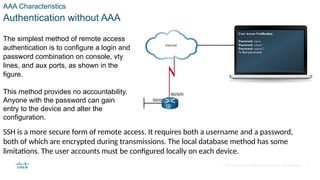
The simplest method of remote access
authentication is to configure a login and
password combination on console, vty
lines, and aux ports, as shown in the
figure.
This method provides no accountability.
Anyone with the password can gain
entry to the device and alter the
configuration.
SSH is a more secure form of remote access. It requires both a username and a password,
both of which are encrypted during transmissions. The local database method has some
limitations. The user accounts must be configured locally on each device.
4
© 2021 Cisco and/or its affiliates. All rights reserved. Cisco Confidential
AAA Characteristics
AAA Components
Network and administrative AAA security in the Cisco environment has three functional
components:
• Authentication - Users and administrators must prove their identity before accessing the
network and network resources. Authentication can be established using username and
password combinations, challenge and response questions, token cards, and other
methods. For example: “I am user ‘student’ and I know the password to prove it.”
• Authorization - After the user is authenticated, authorization services determine which
resources the user can access and which operations the user is allowed to perform. An
example is “User ‘student’ can access host serverXYZ using SSH only.”
• Accounting and auditing - Accounting records what the user does, including what is
accessed, the amount of time the resource is accessed, and any changes that were made.
Accounting keeps track of how network resources are used. An example is "User 'student'
accessed host serverXYZ using SSH for 15 minutes." 5
© 2021 Cisco and/or its affiliates. All rights reserved. Cisco Confidential
AAA Characteristics
Authentication Modes
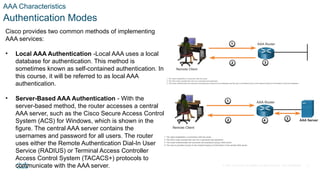
Cisco provides two common methods of implementing
AAA services:
• Local AAA Authentication -Local AAA uses a local
database for authentication. This method is
sometimes known as self-contained authentication. In
this course, it will be referred to as local AAA
authentication.
• Server-Based AAA Authentication - With the
server-based method, the router accesses a central
AAA server, such as the Cisco Secure Access Control
System (ACS) for Windows, which is shown in the
figure. The central AAA server contains the
usernames and password for all users. The router
uses either the Remote Authentication Dial-In User
Service (RADIUS) or Terminal Access Controller
Access Control System (TACACS+) protocols to
communicate with the AAA server. 6
© 2021 Cisco and/or its affiliates. All rights reserved. Cisco Confidential
AAA Characteristics
Authorization
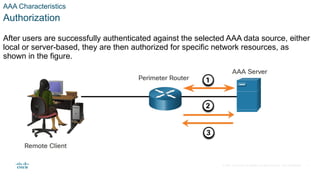
After users are successfully authenticated against the selected AAA data source, either
local or server-based, they are then authorized for specific network resources, as
shown in the figure.
7
© 2021 Cisco and/or its affiliates. All rights reserved. Cisco Confidential
AAA Characteristics
Accounting
Accounting is implemented using a AAA server. This service reports usage statistics
back to the ACS server. These statistics can be extracted to create detailed reports
about the configuration of the network.
The types of accounting information that can be collected are as follows:
• Network accounting
• Connection accounting
• EXEC accounting
• System accounting
• Command accounting
8
© 2021 Cisco and/or its affiliates. All rights reserved. Cisco Confidential
7.2 Configure Local AAA
Authentication
9
© 2021 Cisco and/or its affiliates. All rights reserved. Cisco Confidential
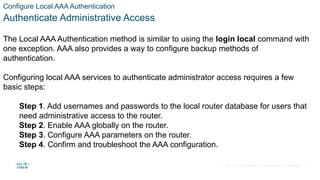
Configure Local AAA Authentication
Authenticate Administrative Access
The Local AAA Authentication method is similar to using the login local command with
one exception. AAA also provides a way to configure backup methods of
authentication.
Configuring local AAA services to authenticate administrator access requires a few
basic steps:
Step 1. Add usernames and passwords to the local router database for users that
need administrative access to the router.
Step 2. Enable AAA globally on the router.
Step 3. Configure AAA parameters on the router.
Step 4. Confirm and troubleshoot the AAA configuration.
10
© 2021 Cisco and/or its affiliates. All rights reserved. Cisco Confidential
Configure Local AAA Authentication
Authentication Methods
Use the aaa authentication login command, shown below, to enable authentication of the
console, aux, and vty lines. The default keyword applies authentication to all lines.
Alternatively, a custom authentication method can be configured using a list-name.
Command Description
default Uses the listed authentication methods that follow this keyword as the default list of methods when a
user logs in.
list-name Character string used to name the list of authentication methods activated when a user logs in.
method1...[method4] Identifies the list of methods that the AAA authentication process will query in the given sequence. At
least one method must be specified. A maximum of four methods may be specified.
11
© 2021 Cisco and/or its affiliates. All rights reserved. Cisco Confidential
Configure Local AAA Authentication
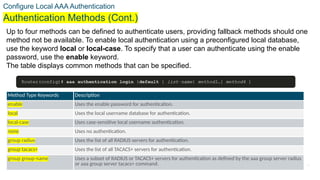
Authentication Methods (Cont.)
Up to four methods can be defined to authenticate users, providing fallback methods should one
method not be available. To enable local authentication using a preconfigured local database,
use the keyword local or local-case. To specify that a user can authenticate using the enable
password, use the enable keyword.
The table displays common methods that can be specified.
Method Type Keywords Description
enable Uses the enable password for authentication.
local Uses the local username database for authentication.
local-case Uses case-sensitive local username authentication.
none Uses no authentication.
group radius Uses the list of all RADIUS servers for authentication.
group tacacs+ Uses the list of all TACACS+ servers for authentication.
group group-name Uses a subset of RADIUS or TACACS+ servers for authentication as defined by the aaa group server radius
or aaa group server tacacs+ command. 12
© 2021 Cisco and/or its affiliates. All rights reserved. Cisco Confidential
Configure Local AAA Authentication
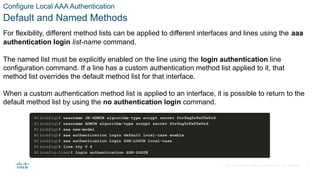
Default and Named Methods
For flexibility, different method lists can be applied to different interfaces and lines using the aaa
authentication login list-name command.
The named list must be explicitly enabled on the line using the login authentication line
configuration command. If a line has a custom authentication method list applied to it, that
method list overrides the default method list for that interface.
When a custom authentication method list is applied to an interface, it is possible to return to the
default method list by using the no authentication login command.
13
© 2021 Cisco and/or its affiliates. All rights reserved. Cisco Confidential
Configure Local AAA Authentication
Fine-Tuning the Authentication Configuration
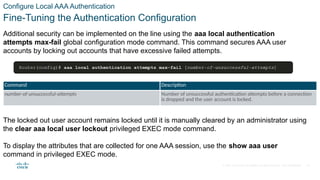
Additional security can be implemented on the line using the aaa local authentication
attempts max-fail global configuration mode command. This command secures AAA user
accounts by locking out accounts that have excessive failed attempts.
Command Description
number-of-unsuccessful-attempts Number of unsuccessful authentication attempts before a connection
is dropped and the user account is locked.
The locked out user account remains locked until it is manually cleared by an administrator using
the clear aaa local user lockout privileged EXEC mode command.
To display the attributes that are collected for one AAA session, use the show aaa user
command in privileged EXEC mode.
14
© 2021 Cisco and/or its affiliates. All rights reserved. Cisco Confidential
Configure Local AAA Authentication
Lab - Configure Local AAA Authentication
In this lab, you will complete the following objectives:
• Part 1: Configure Basic Device Settings
• Part 2: Configure Local Authentication
• Part 3: Configure Local Authentication using AAA.
15
© 2021 Cisco and/or its affiliates. All rights reserved. Cisco Confidential
Configure Local AAA Authentication
Packet Tracer - Configure Local AAA for Console and VTY Access
In this PT activity, you will configure AAA local authentication on the console line and
VTY lines with SSH.
16
© 2021 Cisco and/or its affiliates. All rights reserved. Cisco Confidential
7.3 Server-Based AAA
Characteristics and Protocols
17
© 2021 Cisco and/or its affiliates. All rights reserved. Cisco Confidential
Server-Based AAA Characteristics and Protocols
Compare Local AAA and Server-Based AAA Implementations
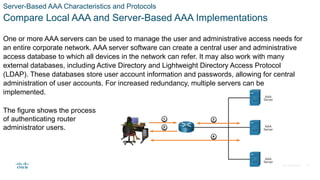
One or more AAA servers can be used to manage the user and administrative access needs for
an entire corporate network. AAA server software can create a central user and administrative
access database to which all devices in the network can refer. It may also work with many
external databases, including Active Directory and Lightweight Directory Access Protocol
(LDAP). These databases store user account information and passwords, allowing for central
administration of user accounts. For increased redundancy, multiple servers can be
implemented.
The figure shows the process
of authenticating router
administrator users.
18
© 2021 Cisco and/or its affiliates. All rights reserved. Cisco Confidential
Server-Based AAA Characteristics and Protocols
Cisco Identity Services Engine (ISE)
Cisco Identity Services Engine (ISE) is an identity and access control policy platform
that enables enterprises to enforce compliance, enhance infrastructure security, and
streamline their service operations. Cisco ISE combines policy definition, control, and
reporting in one appliance. Cisco ISE defines fair access policies and enforces
compliance for all end devices including BYOD.
Several features of ISE are:
• Asset Visibility
• Posture assessment
• Segmentation
• Guest management and secure wireless
• Threat Containment
19
© 2021 Cisco and/or its affiliates. All rights reserved. Cisco Confidential
Server-Based AAA Characteristics and Protocols
The TACACS+ and RADIUS Protocols
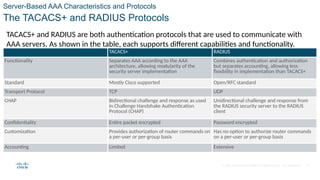
TACACS+ and RADIUS are both authentication protocols that are used to communicate with
AAA servers. As shown in the table, each supports different capabilities and functionality.
TACACS+ RADIUS
Functionality Separates AAA according to the AAA
architecture, allowing modularity of the
security server implementation
Combines authentication and authorization
but separates accounting, allowing less
flexibility in implementation than TACACS+
Standard Mostly Cisco supported Open/RFC standard
Transport Protocol TCP UDP
CHAP Bidirectional challenge and response as used
in Challenge Handshake Authentication
Protocol (CHAP)
Unidirectional challenge and response from
the RADIUS security server to the RADIUS
client
Confidentiality Entire packet encrypted Password encrypted
Customization Provides authorization of router commands on
a per-user or per-group basis
Has no option to authorize router commands
on a per-user or per-group basis
Accounting Limited Extensive
20
© 2021 Cisco and/or its affiliates. All rights reserved. Cisco Confidential
Server-Based AAA Characteristics and Protocols
TACACS+ Authentication
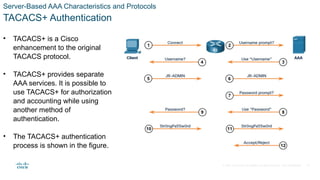
• TACACS+ is a Cisco
enhancement to the original
TACACS protocol.
• TACACS+ provides separate
AAA services. It is possible to
use TACACS+ for authorization
and accounting while using
another method of
authentication.
• The TACACS+ authentication
process is shown in the figure.
21
© 2021 Cisco and/or its affiliates. All rights reserved. Cisco Confidential
Server-Based AAA Characteristics and Protocols
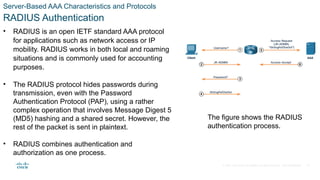
RADIUS Authentication
• RADIUS is an open IETF standard AAA protocol
for applications such as network access or IP
mobility. RADIUS works in both local and roaming
situations and is commonly used for accounting
purposes.
• The RADIUS protocol hides passwords during
transmission, even with the Password
Authentication Protocol (PAP), using a rather
complex operation that involves Message Digest 5
(MD5) hashing and a shared secret. However, the
rest of the packet is sent in plaintext.
• RADIUS combines authentication and
authorization as one process.
The figure shows the RADIUS
authentication process.
22
© 2021 Cisco and/or its affiliates. All rights reserved. Cisco Confidential
7.4 Configure Server-Based
Authentication
23
© 2021 Cisco and/or its affiliates. All rights reserved. Cisco Confidential
Configure Server-Based Authentication
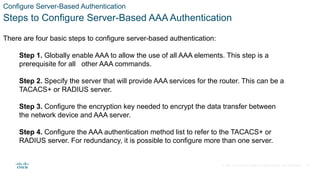
Steps to Configure Server-Based AAA Authentication
There are four basic steps to configure server-based authentication:
Step 1. Globally enable AAA to allow the use of all AAA elements. This step is a
prerequisite for all other AAA commands.
Step 2. Specify the server that will provide AAA services for the router. This can be a
TACACS+ or RADIUS server.
Step 3. Configure the encryption key needed to encrypt the data transfer between
the network device and AAA server.
Step 4. Configure the AAA authentication method list to refer to the TACACS+ or
RADIUS server. For redundancy, it is possible to configure more than one server.
24
© 2021 Cisco and/or its affiliates. All rights reserved. Cisco Confidential
Configure Server-Based Authentication
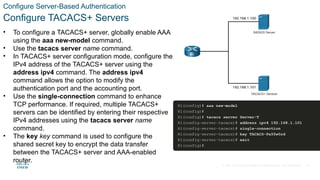
Configure TACACS+ Servers
• To configure a TACACS+ server, globally enable AAA
using the aaa new-model command.
• Use the tacacs server name command.
• In TACACS+ server configuration mode, configure the
IPv4 address of the TACACS+ server using the
address ipv4 command. The address ipv4
command allows the option to modify the
authentication port and the accounting port.
• Use the single-connection command to enhance
TCP performance. If required, multiple TACACS+
servers can be identified by entering their respective
IPv4 addresses using the tacacs server name
command.
• The key key command is used to configure the
shared secret key to encrypt the data transfer
between the TACACS+ server and AAA-enabled
router.
25
© 2021 Cisco and/or its affiliates. All rights reserved. Cisco Confidential
Configure Server-Based Authentication
Configure RADIUS Servers
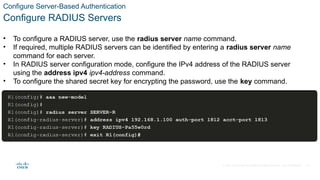
• To configure a RADIUS server, use the radius server name command.
• If required, multiple RADIUS servers can be identified by entering a radius server name
command for each server.
• In RADIUS server configuration mode, configure the IPv4 address of the RADIUS server
using the address ipv4 ipv4-address command.
• To configure the shared secret key for encrypting the password, use the key command.
26
© 2021 Cisco and/or its affiliates. All rights reserved. Cisco Confidential
Configure Server-Based Authentication
Authenticate to the AAA Server Configuration Commands
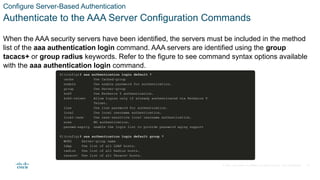
When the AAA security servers have been identified, the servers must be included in the method
list of the aaa authentication login command. AAA servers are identified using the group
tacacs+ or group radius keywords. Refer to the figure to see command syntax options available
with the aaa authentication login command.
27
© 2021 Cisco and/or its affiliates. All rights reserved. Cisco Confidential
Configure Server-Based Authentication
Authenticate to the AAA Server Configuration Commands (Cont.)
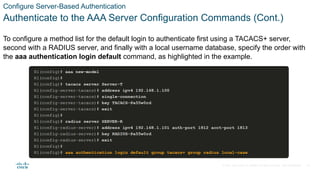
To configure a method list for the default login to authenticate first using a TACACS+ server,
second with a RADIUS server, and finally with a local username database, specify the order with
the aaa authentication login default command, as highlighted in the example.
28
© 2021 Cisco and/or its affiliates. All rights reserved. Cisco Confidential
Configure Server-Based Authentication
Video Demonstration - Configure a Cisco Router to Access a AAA
RADIUS Server
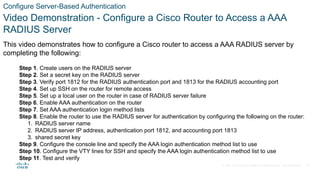
This video demonstrates how to configure a Cisco router to access a AAA RADIUS server by
completing the following:
Step 1. Create users on the RADIUS server
Step 2. Set a secret key on the RADIUS server
Step 3. Verify port 1812 for the RADIUS authentication port and 1813 for the RADIUS accounting port
Step 4. Set up SSH on the router for remote access
Step 5. Set up a local user on the router in case of RADIUS server failure
Step 6. Enable AAA authentication on the router
Step 7. Set AAA authentication login method lists
Step 8. Enable the router to use the RADIUS server for authentication by configuring the following on the router:
1. RADIUS server name
2. RADIUS server IP address, authentication port 1812, and accounting port 1813
3. shared secret key
Step 9. Configure the console line and specify the AAA login authentication method list to use
Step 10. Configure the VTY lines for SSH and specify the AAA login authentication method list to use
Step 11. Test and verify
29
© 2021 Cisco and/or its affiliates. All rights reserved. Cisco Confidential 30
In this lab, you will install the virtual machine.
Lab – Install the Virtual Machine
Configure Server-Based Authentication
© 2021 Cisco and/or its affiliates. All rights reserved. Cisco Confidential
Configure Server-Based Authentication
Lab -Configure Server-Based Authentication with RADIUS
In this lab, you will complete the following objective:
Configure Centralized Authentication Using AAA and RADIUS
31
© 2021 Cisco and/or its affiliates. All rights reserved. Cisco Confidential
Configure Server-Based Authentication
Packet Tracer -Configure Server-Based Authentication with TACACS+
and RADIUS
In this Packet Tracer activity, you will complete the following objectives:
• Configure server-based AAA authentication using TACACS+.
• Verify server-based AAA authentication from the PC-B client.
• Configure server-based AAA authentication using RADIUS.
• Verify server-based AAA authentication from the PC-C client.
32
© 2021 Cisco and/or its affiliates. All rights reserved. Cisco Confidential
7.5 Configure Server-Based
Authorization and Accounting
33
© 2021 Cisco and/or its affiliates. All rights reserved. Cisco Confidential
Configure Server-Based Authorization and Accounting
Introduction to Server-Based AAA Authorization
Authorization is concerned with allowing and disallowing authenticated users access to
functions of the network device interface. The TACACS+ protocol allows the separation
of authentication from authorization. A router can be configured to restrict the user to
performing only certain functions after successful authentication. Keep in mind that
RADIUS does not separate the authentication from the authorization process.
Another important aspect of authorization is the ability to control user access to specific
services.
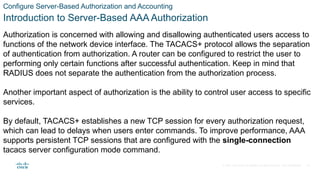
By default, TACACS+ establishes a new TCP session for every authorization request,
which can lead to delays when users enter commands. To improve performance, AAA
supports persistent TCP sessions that are configured with the single-connection
tacacs server configuration mode command.
34
© 2021 Cisco and/or its affiliates. All rights reserved. Cisco Confidential
Configure Server-Based Authorization and Accounting
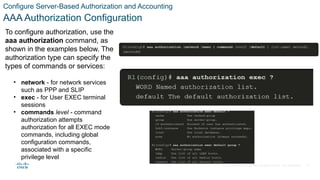
AAA Authorization Configuration
To configure authorization, use the
aaa authorization command, as
shown in the examples below. The
authorization type can specify the
types of commands or services:
• network - for network services
such as PPP and SLIP
• exec - for User EXEC terminal
sessions
• commands level - command
authorization attempts
authorization for all EXEC mode
commands, including global
configuration commands,
associated with a specific
privilege level
35
© 2021 Cisco and/or its affiliates. All rights reserved. Cisco Confidential
Configure Server-Based Authorization and Accounting
Introduction to Server-Based AAA Accounting
AAA accounting enables usage tracking.
• When accounting is configured on a AAA server it functions as a central repository for
accounting information.
• Each session that is established through Cisco Secure ACS can be fully accounted for and
stored on the server.
• Like authentication and authorization method lists, method lists for accounting define the
way accounting is performed and the sequence in which these methods are performed. After
it is enabled, the default accounting method list is automatically applied to all interfaces,
except those that have a user-defined, or custom, accounting method list that has been
explicitly defined.
36
© 2021 Cisco and/or its affiliates. All rights reserved. Cisco Confidential
Configure Server-Based Authorization and Accounting
AAA Accounting Configuration
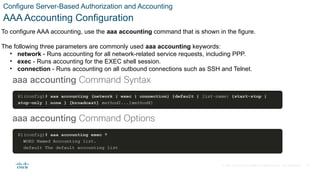
To configure AAA accounting, use the aaa accounting command that is shown in the figure.
The following three parameters are commonly used aaa accounting keywords:
• network - Runs accounting for all network-related service requests, including PPP.
• exec - Runs accounting for the EXEC shell session.
• connection - Runs accounting on all outbound connections such as SSH and Telnet.
37
© 2021 Cisco and/or its affiliates. All rights reserved. Cisco Confidential
Configure Server-Based Authorization and Accounting
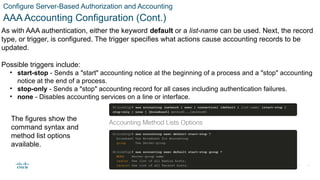
AAA Accounting Configuration (Cont.)
As with AAA authentication, either the keyword default or a list-name can be used. Next, the record
type, or trigger, is configured. The trigger specifies what actions cause accounting records to be
updated.
Possible triggers include:
• start-stop - Sends a "start" accounting notice at the beginning of a process and a "stop" accounting
notice at the end of a process.
• stop-only - Sends a "stop" accounting record for all cases including authentication failures.
• none - Disables accounting services on a line or interface.
The figures show the
command syntax and
method list options
available.
38
© 2021 Cisco and/or its affiliates. All rights reserved. Cisco Confidential
7.6 Authentication,
Authorization, and Accounting
(AAA) Summary
39
© 2021 Cisco and/or its affiliates. All rights reserved. Cisco Confidential
Authentication, Authorization, and Accounting (AAA) Summary
What Did I Learn in this Module?
• AAA authentication provides a means by which users can be authenticated against a
centralized database of users.
• AAA authorization can be used to limit the access of users or groups of users to only the
network resources that they need to access.
• AAA accounting records user actions including when the user accessed the network or
device, the length of time for the session, and the resources or functions that were
accessed by the user.
• Local AAA authentication should be configured for smaller networks. Server-based AAA
should be used for larger networks.
• The TACACS+ and RADIUS protocols provide communication between a network device
and a AAA server. The choice of protocol defends on the needs of the enterprise.
40
© 2021 Cisco and/or its affiliates. All rights reserved. Cisco Confidential
Authentication, Authorization, and Accounting (AAA) Summary
What Did I Learn in this Module? (Cont.)
• There are four basic steps to configuring AAA server-based authentication: (1) globally enabled AAA on
the device; (2) specify the AAA server IP address and protocol; (3) specify the matching encryption key
that will be used by the network device and AAA server; and (4) specify the AAA server or servers in the
method lists.
• The type of authorization is configured with the aaa authorization command.
• The type of accounting is configured with the aaa accounting command.
41
© 2021 Cisco and/or its affiliates. All rights reserved. Cisco Confidential 42
• authentication, authorization, and accounting
• Local AAA Authentication
• Server-Based AAA Authentication
• Remote Authentication Dial-In User Service
(RADIUS)
• Terminal Access Controller Access Control System
(TACACS+)
• aaa authentication login {default | list-name}
method1…[ method4 ]
• login authentication list-name
• aaa local authentication attempts max-fail
[number-of-unsuccessful-attempts]
• clear aaa local user lockout
• show aaa user
• show aaa sessions
• Identity Services Engine (ISE)
• tacacs server name
• address ipv4 ipv4-address
• single-connection
• key key
• radius server name
• aaa authentication login default group tacacs+
• aaa authentication login default group radius
• aaa authorization {network | exec | commands level}
{default | list-name} method1… [method4]
• aaa accounting {network | exec | connection} {default
| list-name} {start-stop | stop-only | none } [broadcast]
method1...[method4]
• aaa accounting exec default start-stop group { group-
name | radius | tacacs+ }
New Terms and Commands
Secure Device Access Summary
Network Security v1.0 -network Module 7.pptx

Network Security v1.0 -network Module 7.pptx

  • 1.
    Module 7: Authentication, Authorization,and Accounting (AAA) Networking Security v1.0 (NETSEC)
  • 2.
    2 © 2021 Ciscoand/or its affiliates. All rights reserved. Cisco Confidential Module Objectives Module Title: Authentication, Authorization, and Accounting (AAA) Module Objective: Configure AAA to secure a network. Topic Title Topic Objective AAA Characteristics Describe AAA. Configure Local AAA Authentication Configure AAA authentication to validate users against a local database. Server-Based AAA Characteristics and Protocols Describe the server-based AAA protocols. Configure Server-Based Authentication Configure server-based AAA authentication on Cisco routers. Configure Server-Based Authorization and Accounting Use the correct command to configure server-based AAA authorization and Accounting
  • 3.
    © 2021 Ciscoand/or its affiliates. All rights reserved. Cisco Confidential 7.1 AAA Characteristics 3
  • 4.
    © 2021 Ciscoand/or its affiliates. All rights reserved. Cisco Confidential AAA Characteristics Authentication without AAA The simplest method of remote access authentication is to configure a login and password combination on console, vty lines, and aux ports, as shown in the figure. This method provides no accountability. Anyone with the password can gain entry to the device and alter the configuration. SSH is a more secure form of remote access. It requires both a username and a password, both of which are encrypted during transmissions. The local database method has some limitations. The user accounts must be configured locally on each device. 4
  • 5.
    © 2021 Ciscoand/or its affiliates. All rights reserved. Cisco Confidential AAA Characteristics AAA Components Network and administrative AAA security in the Cisco environment has three functional components: • Authentication - Users and administrators must prove their identity before accessing the network and network resources. Authentication can be established using username and password combinations, challenge and response questions, token cards, and other methods. For example: “I am user ‘student’ and I know the password to prove it.” • Authorization - After the user is authenticated, authorization services determine which resources the user can access and which operations the user is allowed to perform. An example is “User ‘student’ can access host serverXYZ using SSH only.” • Accounting and auditing - Accounting records what the user does, including what is accessed, the amount of time the resource is accessed, and any changes that were made. Accounting keeps track of how network resources are used. An example is "User 'student' accessed host serverXYZ using SSH for 15 minutes." 5
  • 6.
    © 2021 Ciscoand/or its affiliates. All rights reserved. Cisco Confidential AAA Characteristics Authentication Modes Cisco provides two common methods of implementing AAA services: • Local AAA Authentication -Local AAA uses a local database for authentication. This method is sometimes known as self-contained authentication. In this course, it will be referred to as local AAA authentication. • Server-Based AAA Authentication - With the server-based method, the router accesses a central AAA server, such as the Cisco Secure Access Control System (ACS) for Windows, which is shown in the figure. The central AAA server contains the usernames and password for all users. The router uses either the Remote Authentication Dial-In User Service (RADIUS) or Terminal Access Controller Access Control System (TACACS+) protocols to communicate with the AAA server. 6
  • 7.
    © 2021 Ciscoand/or its affiliates. All rights reserved. Cisco Confidential AAA Characteristics Authorization After users are successfully authenticated against the selected AAA data source, either local or server-based, they are then authorized for specific network resources, as shown in the figure. 7
  • 8.
    © 2021 Ciscoand/or its affiliates. All rights reserved. Cisco Confidential AAA Characteristics Accounting Accounting is implemented using a AAA server. This service reports usage statistics back to the ACS server. These statistics can be extracted to create detailed reports about the configuration of the network. The types of accounting information that can be collected are as follows: • Network accounting • Connection accounting • EXEC accounting • System accounting • Command accounting 8
  • 9.
    © 2021 Ciscoand/or its affiliates. All rights reserved. Cisco Confidential 7.2 Configure Local AAA Authentication 9
  • 10.
    © 2021 Ciscoand/or its affiliates. All rights reserved. Cisco Confidential Configure Local AAA Authentication Authenticate Administrative Access The Local AAA Authentication method is similar to using the login local command with one exception. AAA also provides a way to configure backup methods of authentication. Configuring local AAA services to authenticate administrator access requires a few basic steps: Step 1. Add usernames and passwords to the local router database for users that need administrative access to the router. Step 2. Enable AAA globally on the router. Step 3. Configure AAA parameters on the router. Step 4. Confirm and troubleshoot the AAA configuration. 10
  • 11.
    © 2021 Ciscoand/or its affiliates. All rights reserved. Cisco Confidential Configure Local AAA Authentication Authentication Methods Use the aaa authentication login command, shown below, to enable authentication of the console, aux, and vty lines. The default keyword applies authentication to all lines. Alternatively, a custom authentication method can be configured using a list-name. Command Description default Uses the listed authentication methods that follow this keyword as the default list of methods when a user logs in. list-name Character string used to name the list of authentication methods activated when a user logs in. method1...[method4] Identifies the list of methods that the AAA authentication process will query in the given sequence. At least one method must be specified. A maximum of four methods may be specified. 11
  • 12.
    © 2021 Ciscoand/or its affiliates. All rights reserved. Cisco Confidential Configure Local AAA Authentication Authentication Methods (Cont.) Up to four methods can be defined to authenticate users, providing fallback methods should one method not be available. To enable local authentication using a preconfigured local database, use the keyword local or local-case. To specify that a user can authenticate using the enable password, use the enable keyword. The table displays common methods that can be specified. Method Type Keywords Description enable Uses the enable password for authentication. local Uses the local username database for authentication. local-case Uses case-sensitive local username authentication. none Uses no authentication. group radius Uses the list of all RADIUS servers for authentication. group tacacs+ Uses the list of all TACACS+ servers for authentication. group group-name Uses a subset of RADIUS or TACACS+ servers for authentication as defined by the aaa group server radius or aaa group server tacacs+ command. 12
  • 13.
    © 2021 Ciscoand/or its affiliates. All rights reserved. Cisco Confidential Configure Local AAA Authentication Default and Named Methods For flexibility, different method lists can be applied to different interfaces and lines using the aaa authentication login list-name command. The named list must be explicitly enabled on the line using the login authentication line configuration command. If a line has a custom authentication method list applied to it, that method list overrides the default method list for that interface. When a custom authentication method list is applied to an interface, it is possible to return to the default method list by using the no authentication login command. 13
  • 14.
    © 2021 Ciscoand/or its affiliates. All rights reserved. Cisco Confidential Configure Local AAA Authentication Fine-Tuning the Authentication Configuration Additional security can be implemented on the line using the aaa local authentication attempts max-fail global configuration mode command. This command secures AAA user accounts by locking out accounts that have excessive failed attempts. Command Description number-of-unsuccessful-attempts Number of unsuccessful authentication attempts before a connection is dropped and the user account is locked. The locked out user account remains locked until it is manually cleared by an administrator using the clear aaa local user lockout privileged EXEC mode command. To display the attributes that are collected for one AAA session, use the show aaa user command in privileged EXEC mode. 14
  • 15.
    © 2021 Ciscoand/or its affiliates. All rights reserved. Cisco Confidential Configure Local AAA Authentication Lab - Configure Local AAA Authentication In this lab, you will complete the following objectives: • Part 1: Configure Basic Device Settings • Part 2: Configure Local Authentication • Part 3: Configure Local Authentication using AAA. 15
  • 16.
    © 2021 Ciscoand/or its affiliates. All rights reserved. Cisco Confidential Configure Local AAA Authentication Packet Tracer - Configure Local AAA for Console and VTY Access In this PT activity, you will configure AAA local authentication on the console line and VTY lines with SSH. 16
  • 17.
    © 2021 Ciscoand/or its affiliates. All rights reserved. Cisco Confidential 7.3 Server-Based AAA Characteristics and Protocols 17
  • 18.
    © 2021 Ciscoand/or its affiliates. All rights reserved. Cisco Confidential Server-Based AAA Characteristics and Protocols Compare Local AAA and Server-Based AAA Implementations One or more AAA servers can be used to manage the user and administrative access needs for an entire corporate network. AAA server software can create a central user and administrative access database to which all devices in the network can refer. It may also work with many external databases, including Active Directory and Lightweight Directory Access Protocol (LDAP). These databases store user account information and passwords, allowing for central administration of user accounts. For increased redundancy, multiple servers can be implemented. The figure shows the process of authenticating router administrator users. 18
  • 19.
    © 2021 Ciscoand/or its affiliates. All rights reserved. Cisco Confidential Server-Based AAA Characteristics and Protocols Cisco Identity Services Engine (ISE) Cisco Identity Services Engine (ISE) is an identity and access control policy platform that enables enterprises to enforce compliance, enhance infrastructure security, and streamline their service operations. Cisco ISE combines policy definition, control, and reporting in one appliance. Cisco ISE defines fair access policies and enforces compliance for all end devices including BYOD. Several features of ISE are: • Asset Visibility • Posture assessment • Segmentation • Guest management and secure wireless • Threat Containment 19
  • 20.
    © 2021 Ciscoand/or its affiliates. All rights reserved. Cisco Confidential Server-Based AAA Characteristics and Protocols The TACACS+ and RADIUS Protocols TACACS+ and RADIUS are both authentication protocols that are used to communicate with AAA servers. As shown in the table, each supports different capabilities and functionality. TACACS+ RADIUS Functionality Separates AAA according to the AAA architecture, allowing modularity of the security server implementation Combines authentication and authorization but separates accounting, allowing less flexibility in implementation than TACACS+ Standard Mostly Cisco supported Open/RFC standard Transport Protocol TCP UDP CHAP Bidirectional challenge and response as used in Challenge Handshake Authentication Protocol (CHAP) Unidirectional challenge and response from the RADIUS security server to the RADIUS client Confidentiality Entire packet encrypted Password encrypted Customization Provides authorization of router commands on a per-user or per-group basis Has no option to authorize router commands on a per-user or per-group basis Accounting Limited Extensive 20
  • 21.
    © 2021 Ciscoand/or its affiliates. All rights reserved. Cisco Confidential Server-Based AAA Characteristics and Protocols TACACS+ Authentication • TACACS+ is a Cisco enhancement to the original TACACS protocol. • TACACS+ provides separate AAA services. It is possible to use TACACS+ for authorization and accounting while using another method of authentication. • The TACACS+ authentication process is shown in the figure. 21
  • 22.
    © 2021 Ciscoand/or its affiliates. All rights reserved. Cisco Confidential Server-Based AAA Characteristics and Protocols RADIUS Authentication • RADIUS is an open IETF standard AAA protocol for applications such as network access or IP mobility. RADIUS works in both local and roaming situations and is commonly used for accounting purposes. • The RADIUS protocol hides passwords during transmission, even with the Password Authentication Protocol (PAP), using a rather complex operation that involves Message Digest 5 (MD5) hashing and a shared secret. However, the rest of the packet is sent in plaintext. • RADIUS combines authentication and authorization as one process. The figure shows the RADIUS authentication process. 22
  • 23.
    © 2021 Ciscoand/or its affiliates. All rights reserved. Cisco Confidential 7.4 Configure Server-Based Authentication 23
  • 24.
    © 2021 Ciscoand/or its affiliates. All rights reserved. Cisco Confidential Configure Server-Based Authentication Steps to Configure Server-Based AAA Authentication There are four basic steps to configure server-based authentication: Step 1. Globally enable AAA to allow the use of all AAA elements. This step is a prerequisite for all other AAA commands. Step 2. Specify the server that will provide AAA services for the router. This can be a TACACS+ or RADIUS server. Step 3. Configure the encryption key needed to encrypt the data transfer between the network device and AAA server. Step 4. Configure the AAA authentication method list to refer to the TACACS+ or RADIUS server. For redundancy, it is possible to configure more than one server. 24
  • 25.
    © 2021 Ciscoand/or its affiliates. All rights reserved. Cisco Confidential Configure Server-Based Authentication Configure TACACS+ Servers • To configure a TACACS+ server, globally enable AAA using the aaa new-model command. • Use the tacacs server name command. • In TACACS+ server configuration mode, configure the IPv4 address of the TACACS+ server using the address ipv4 command. The address ipv4 command allows the option to modify the authentication port and the accounting port. • Use the single-connection command to enhance TCP performance. If required, multiple TACACS+ servers can be identified by entering their respective IPv4 addresses using the tacacs server name command. • The key key command is used to configure the shared secret key to encrypt the data transfer between the TACACS+ server and AAA-enabled router. 25
  • 26.
    © 2021 Ciscoand/or its affiliates. All rights reserved. Cisco Confidential Configure Server-Based Authentication Configure RADIUS Servers • To configure a RADIUS server, use the radius server name command. • If required, multiple RADIUS servers can be identified by entering a radius server name command for each server. • In RADIUS server configuration mode, configure the IPv4 address of the RADIUS server using the address ipv4 ipv4-address command. • To configure the shared secret key for encrypting the password, use the key command. 26
  • 27.
    © 2021 Ciscoand/or its affiliates. All rights reserved. Cisco Confidential Configure Server-Based Authentication Authenticate to the AAA Server Configuration Commands When the AAA security servers have been identified, the servers must be included in the method list of the aaa authentication login command. AAA servers are identified using the group tacacs+ or group radius keywords. Refer to the figure to see command syntax options available with the aaa authentication login command. 27
  • 28.
    © 2021 Ciscoand/or its affiliates. All rights reserved. Cisco Confidential Configure Server-Based Authentication Authenticate to the AAA Server Configuration Commands (Cont.) To configure a method list for the default login to authenticate first using a TACACS+ server, second with a RADIUS server, and finally with a local username database, specify the order with the aaa authentication login default command, as highlighted in the example. 28
  • 29.
    © 2021 Ciscoand/or its affiliates. All rights reserved. Cisco Confidential Configure Server-Based Authentication Video Demonstration - Configure a Cisco Router to Access a AAA RADIUS Server This video demonstrates how to configure a Cisco router to access a AAA RADIUS server by completing the following: Step 1. Create users on the RADIUS server Step 2. Set a secret key on the RADIUS server Step 3. Verify port 1812 for the RADIUS authentication port and 1813 for the RADIUS accounting port Step 4. Set up SSH on the router for remote access Step 5. Set up a local user on the router in case of RADIUS server failure Step 6. Enable AAA authentication on the router Step 7. Set AAA authentication login method lists Step 8. Enable the router to use the RADIUS server for authentication by configuring the following on the router: 1. RADIUS server name 2. RADIUS server IP address, authentication port 1812, and accounting port 1813 3. shared secret key Step 9. Configure the console line and specify the AAA login authentication method list to use Step 10. Configure the VTY lines for SSH and specify the AAA login authentication method list to use Step 11. Test and verify 29
  • 30.
    © 2021 Ciscoand/or its affiliates. All rights reserved. Cisco Confidential 30 In this lab, you will install the virtual machine. Lab – Install the Virtual Machine Configure Server-Based Authentication
  • 31.
    © 2021 Ciscoand/or its affiliates. All rights reserved. Cisco Confidential Configure Server-Based Authentication Lab -Configure Server-Based Authentication with RADIUS In this lab, you will complete the following objective: Configure Centralized Authentication Using AAA and RADIUS 31
  • 32.
    © 2021 Ciscoand/or its affiliates. All rights reserved. Cisco Confidential Configure Server-Based Authentication Packet Tracer -Configure Server-Based Authentication with TACACS+ and RADIUS In this Packet Tracer activity, you will complete the following objectives: • Configure server-based AAA authentication using TACACS+. • Verify server-based AAA authentication from the PC-B client. • Configure server-based AAA authentication using RADIUS. • Verify server-based AAA authentication from the PC-C client. 32
  • 33.
    © 2021 Ciscoand/or its affiliates. All rights reserved. Cisco Confidential 7.5 Configure Server-Based Authorization and Accounting 33
  • 34.
    © 2021 Ciscoand/or its affiliates. All rights reserved. Cisco Confidential Configure Server-Based Authorization and Accounting Introduction to Server-Based AAA Authorization Authorization is concerned with allowing and disallowing authenticated users access to functions of the network device interface. The TACACS+ protocol allows the separation of authentication from authorization. A router can be configured to restrict the user to performing only certain functions after successful authentication. Keep in mind that RADIUS does not separate the authentication from the authorization process. Another important aspect of authorization is the ability to control user access to specific services. By default, TACACS+ establishes a new TCP session for every authorization request, which can lead to delays when users enter commands. To improve performance, AAA supports persistent TCP sessions that are configured with the single-connection tacacs server configuration mode command. 34
  • 35.
    © 2021 Ciscoand/or its affiliates. All rights reserved. Cisco Confidential Configure Server-Based Authorization and Accounting AAA Authorization Configuration To configure authorization, use the aaa authorization command, as shown in the examples below. The authorization type can specify the types of commands or services: • network - for network services such as PPP and SLIP • exec - for User EXEC terminal sessions • commands level - command authorization attempts authorization for all EXEC mode commands, including global configuration commands, associated with a specific privilege level 35
  • 36.
    © 2021 Ciscoand/or its affiliates. All rights reserved. Cisco Confidential Configure Server-Based Authorization and Accounting Introduction to Server-Based AAA Accounting AAA accounting enables usage tracking. • When accounting is configured on a AAA server it functions as a central repository for accounting information. • Each session that is established through Cisco Secure ACS can be fully accounted for and stored on the server. • Like authentication and authorization method lists, method lists for accounting define the way accounting is performed and the sequence in which these methods are performed. After it is enabled, the default accounting method list is automatically applied to all interfaces, except those that have a user-defined, or custom, accounting method list that has been explicitly defined. 36
  • 37.
    © 2021 Ciscoand/or its affiliates. All rights reserved. Cisco Confidential Configure Server-Based Authorization and Accounting AAA Accounting Configuration To configure AAA accounting, use the aaa accounting command that is shown in the figure. The following three parameters are commonly used aaa accounting keywords: • network - Runs accounting for all network-related service requests, including PPP. • exec - Runs accounting for the EXEC shell session. • connection - Runs accounting on all outbound connections such as SSH and Telnet. 37
  • 38.
    © 2021 Ciscoand/or its affiliates. All rights reserved. Cisco Confidential Configure Server-Based Authorization and Accounting AAA Accounting Configuration (Cont.) As with AAA authentication, either the keyword default or a list-name can be used. Next, the record type, or trigger, is configured. The trigger specifies what actions cause accounting records to be updated. Possible triggers include: • start-stop - Sends a "start" accounting notice at the beginning of a process and a "stop" accounting notice at the end of a process. • stop-only - Sends a "stop" accounting record for all cases including authentication failures. • none - Disables accounting services on a line or interface. The figures show the command syntax and method list options available. 38
  • 39.
    © 2021 Ciscoand/or its affiliates. All rights reserved. Cisco Confidential 7.6 Authentication, Authorization, and Accounting (AAA) Summary 39
  • 40.
    © 2021 Ciscoand/or its affiliates. All rights reserved. Cisco Confidential Authentication, Authorization, and Accounting (AAA) Summary What Did I Learn in this Module? • AAA authentication provides a means by which users can be authenticated against a centralized database of users. • AAA authorization can be used to limit the access of users or groups of users to only the network resources that they need to access. • AAA accounting records user actions including when the user accessed the network or device, the length of time for the session, and the resources or functions that were accessed by the user. • Local AAA authentication should be configured for smaller networks. Server-based AAA should be used for larger networks. • The TACACS+ and RADIUS protocols provide communication between a network device and a AAA server. The choice of protocol defends on the needs of the enterprise. 40
  • 41.
    © 2021 Ciscoand/or its affiliates. All rights reserved. Cisco Confidential Authentication, Authorization, and Accounting (AAA) Summary What Did I Learn in this Module? (Cont.) • There are four basic steps to configuring AAA server-based authentication: (1) globally enabled AAA on the device; (2) specify the AAA server IP address and protocol; (3) specify the matching encryption key that will be used by the network device and AAA server; and (4) specify the AAA server or servers in the method lists. • The type of authorization is configured with the aaa authorization command. • The type of accounting is configured with the aaa accounting command. 41
  • 42.
    © 2021 Ciscoand/or its affiliates. All rights reserved. Cisco Confidential 42 • authentication, authorization, and accounting • Local AAA Authentication • Server-Based AAA Authentication • Remote Authentication Dial-In User Service (RADIUS) • Terminal Access Controller Access Control System (TACACS+) • aaa authentication login {default | list-name} method1…[ method4 ] • login authentication list-name • aaa local authentication attempts max-fail [number-of-unsuccessful-attempts] • clear aaa local user lockout • show aaa user • show aaa sessions • Identity Services Engine (ISE) • tacacs server name • address ipv4 ipv4-address • single-connection • key key • radius server name • aaa authentication login default group tacacs+ • aaa authentication login default group radius • aaa authorization {network | exec | commands level} {default | list-name} method1… [method4] • aaa accounting {network | exec | connection} {default | list-name} {start-stop | stop-only | none } [broadcast] method1...[method4] • aaa accounting exec default start-stop group { group- name | radius | tacacs+ } New Terms and Commands Secure Device Access Summary

Editor's Notes

  • #1 Networking Security (NETSEC) Module 7: Authentication, Authorization, and Accounting (AAA)
  • #3 7: Authentication, Authorization, and Accounting (AAA) 7.1: AAA Characteristics
  • #4 7: Authentication, Authorization, and Accounting (AAA) 7.1: AAA Characteristics 7.1.1: Authentication without AAA
  • #5 7: Authentication, Authorization, and Accounting (AAA) 7.1: AAA Characteristics 7.1.2: AAA Components
  • #6 7: Authentication, Authorization, and Accounting (AAA) 7.1: AAA Characteristics 7.1.3: Authentication Modes
  • #7 7: Authentication, Authorization, and Accounting (AAA) 7.1: AAA Characteristics 7.1.4: Authorization
  • #8 7: Authentication, Authorization, and Accounting (AAA) 7.1: AAA Characteristics 7.1.5: Accounting 7.1.6: Check Your Understanding - Identify the Characteristics of AAA
  • #9 7: Authentication, Authorization, and Accounting (AAA) 7.2: Configure Local AAA Authentication
  • #10 7: Authentication, Authorization, and Accounting (AAA) 7.2: Configure Local AAA Authentication 7.2.1: Authenticate Administrative Access
  • #11 7: Authentication, Authorization, and Accounting (AAA) 7.2: Configure Local AAA Authentication 7.2.2: Authentication Methods
  • #12 7: Authentication, Authorization, and Accounting (AAA) 7.2: Configure Local AAA Authentication 7.2.2: Authentication Methods
  • #13 7: Authentication, Authorization, and Accounting (AAA) 7.2: Configure Local AAA Authentication 7.2.3: Default and Named Methods
  • #14 7: Authentication, Authorization, and Accounting (AAA) 7.2: Configure Local AAA Authentication 7.2.4: Fine-Tuning the Authentication Configuration
  • #15 7: Authentication, Authorization, and Accounting (AAA) 7.2: Configure Local AAA Authentication 7.2.5: Lab - Configure Local AAA Authentication
  • #16 7: Authentication, Authorization, and Accounting (AAA) 7.2: Configure Local AAA Authentication 7.2.6: Packet Tracer - Configure Local AAA for Console and VTY Access
  • #17 7: Authentication, Authorization, and Accounting (AAA) 7.3: Server-Based AAA Characteristics and Protocols
  • #18 7: Authentication, Authorization, and Accounting (AAA) 7.3: Server-Based AAA Characteristics and Protocols 7.3.1: Compare Local AAA and Server-Based AAA Implementations
  • #19 7: Authentication, Authorization, and Accounting (AAA) 7.3: Server-Based AAA Characteristics and Protocols 7.3.2: Cisco Identity Services Engine (ISE)
  • #20 7: Authentication, Authorization, and Accounting (AAA) 7.3: Server-Based AAA Characteristics and Protocols 7.3.3: The TACACS+ and RADIUS Protocols
  • #21 7: Authentication, Authorization, and Accounting (AAA) 7.3: Server-Based AAA Characteristics and Protocols 7.3.4: TACACS+ Authentication
  • #22 7: Authentication, Authorization, and Accounting (AAA) 7.3: Server-Based AAA Characteristics and Protocols 7.3.5: RADIUS Authentication 7.3.6: Check Your Understanding - Identify the AAA Communication Protocol
  • #23 7: Authentication, Authorization, and Accounting (AAA) 7.4: Configure Server-Based Authentication
  • #24 7: Authentication, Authorization, and Accounting (AAA) 7.4: Configure Server-Based Authentication 7.4.1: Steps to Configure Server-Based AAA Authentication
  • #25 7: Authentication, Authorization, and Accounting (AAA) 7.4: Configure Server-Based Authentication 7.4.2: Configure TACACS+ Servers
  • #26 7: Authentication, Authorization, and Accounting (AAA) 7.4: Configure Server-Based Authentication 7.4.3: Configure RADIUS Servers
  • #27 7: Authentication, Authorization, and Accounting (AAA) 7.4: Configure Server-Based Authentication 7.4.4: Authenticate to the AAA Server Configuration Commands 7.4.5: Syntax Checker - Configure Server-Based AAA Authentication
  • #28 7: Authentication, Authorization, and Accounting (AAA) 7.4: Configure Server-Based Authentication 7.4.4: Authenticate to the AAA Server Configuration Commands 7.4.5: Syntax Checker - Configure Server-Based AAA Authentication
  • #29 7: Authentication, Authorization, and Accounting (AAA) 7.4: Configure Server-Based Authentication 7.4.6: Video Demonstration - Configure a Cisco Router to Access a AAA RADIUS Server
  • #30 7: Authentication, Authorization, and Accounting (AAA) 7.4: Configure Server-Based Authentication 7.4.7: Lab – Install the Virtual Machine
  • #31 7: Authentication, Authorization, and Accounting (AAA) 7.4: Configure Server-Based Authentication 7.4.8: Lab -Configure Server-Based Authentication with RADIUS
  • #32 7: Authentication, Authorization, and Accounting (AAA) 7.4: Configure Server-Based Authentication 7.4.9: Packet Tracer -Configure Server-Based Authentication with TACACS+ and RADIUS
  • #33 7: Authentication, Authorization, and Accounting (AAA) 7.5: Configure Server-Based Authorization and Accounting
  • #34 7: Authentication, Authorization, and Accounting (AAA) 7.5: Configure Server-Based Authorization and Accounting 7.5.1: Introduction to Server-Based AAA Authorization
  • #35 7: Authentication, Authorization, and Accounting (AAA) 7.5: Configure Server-Based Authorization and Accounting 7.5.2: AAA Authorization Configuration
  • #36 7: Authentication, Authorization, and Accounting (AAA) 7.5: Configure Server-Based Authorization and Accounting 7.5.3: Introduction to Server-Based AAA Accounting
  • #37 7: Authentication, Authorization, and Accounting (AAA) 7.5: Configure Server-Based Authorization and Accounting 7.5.4: AAA Accounting Configuration
  • #38 7: Authentication, Authorization, and Accounting (AAA) 7.5: Configure Server-Based Authorization and Accounting 7.5.4: AAA Accounting Configuration 7.5.5: Syntax Checker - Configure AAA Accounting
  • #39 7: Authentication, Authorization, and Accounting (AAA) 7.6: Authentication, Authorization, and Accounting (AAA) Summary
  • #40 7: Authentication, Authorization, and Accounting (AAA) 7.6: Authentication, Authorization, and Accounting (AAA) Summary 7.6.1: What Did I Learn in this Module?
  • #41 7: Authentication, Authorization, and Accounting (AAA) 7.6: Authentication, Authorization, and Accounting (AAA) Summary 7.6.1: What Did I Learn in this Module? 7.6.2: Module Quiz
  • #42 7 – Authentication, Authorization, and Accounting (AAA)New Terms and Commands