Tran Minh Triet – Nguyen Khac Huy Faculty of Information Technology University of Science, VNU-HCM
This slide is based on  Chapter 25 and 26 of  Microsoft® XNA™ Game Studio 3.0 Unleashed by Chad Carter, SAMS (2009)
Client/Server Peer to Peer Hybrid
One machine (server) acts as the host, other machines (clients) connect to the host.  All the data is passed to the server. The server then sends the messages to the individual clients.  This scenario is common on Windows because cheating by modifying the packets is possible. The server can ignore any attempts at modifying the data because it knows exactly where all the players are and the status of each player. Typically when trying to join a session, a particular machine needs to be the server so everyone who wants to join the game can find the game. Each client sends a ready command, and the host will start the game by sending a start command to each client.
The peer-to-peer approach broadcasts data from one peer to all the other peers. Or it can send a private message to one peer.  The data can travel quicker in this environment because it does not have to be re-sent from a central location.  Cheating: Each peer can modify the packet to cheat the game.  Xbox LIVE helps us with these concerns because the network traffic is secure. The data is encrypted, which makes it really difficult for anyone to decrypt a packet, modify it, encrypt it again, and then process it.
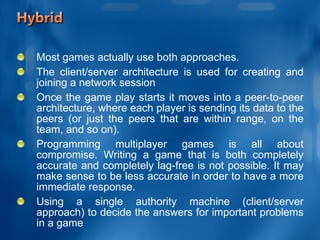
Most games actually use both approaches.  The client/server architecture is used for creating and joining a network session Once the game play starts it moves into a peer-to-peer architecture, where each player is sending its data to the peers (or just the peers that are within range, on the team, and so on). Programming multiplayer games is all about compromise. Writing a game that is both completely accurate and completely lag-free is not possible. It may make sense to be less accurate in order to have a more immediate response. Using a single authority machine (client/server approach) to decide the answers for important problems in a game
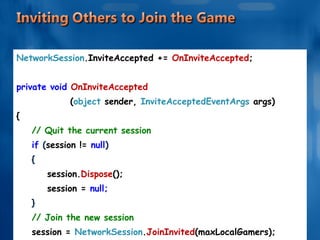
NetworkSession .InviteAccepted +=  OnInviteAccepted ; private void  OnInviteAccepted  ( object   sender,  InviteAcceptedEventArgs  args) { // Quit the current session if  ( session !=  null ) { session. Dispose (); session =  null; } // Join the new session session =  NetworkSession . JoinInvited (maxLocalGamers); }
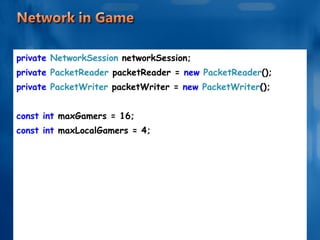
private  NetworkSession  networkSession; private  PacketReader  packetReader =  new  PacketReader (); private  PacketWriter  packetWriter =  new  PacketWriter (); const int  maxGamers = 16; const int  maxLocalGamers = 4;
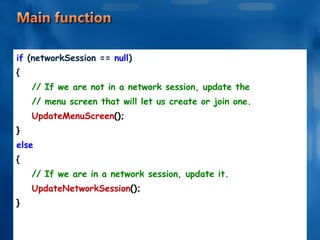
if  (networkSession ==  null ) { // If we are not in a network session, update the // menu screen that will let us create or join one. UpdateMenuScreen (); } else { // If we are in a network session, update it. UpdateNetworkSession (); }
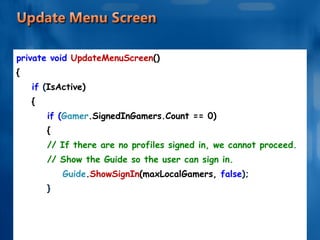
private void  UpdateMenuScreen () { if  ( IsActive) { if ( Gamer .SignedInGamers.Count == 0) { // If there are no profiles signed in, we cannot proceed. // Show the Guide so the user can sign in. Guide . ShowSignIn (maxLocalGamers,  false ); } . . . . . .
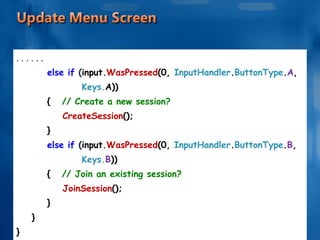
. . . . . . else if  ( input. WasPressed (0,  InputHandler . ButtonType . A ,  Keys. A)) {   // Create a new session? CreateSession (); } else if  ( input. WasPressed (0,  InputHandler . ButtonType . B ,  Keys. B )) {   // Join an existing session? JoinSession (); } } }
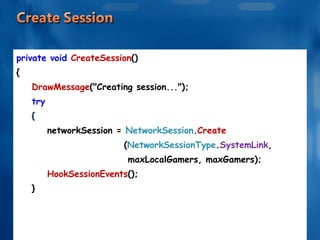
private void  CreateSession () { DrawMessage ("Creating session..."); try { networkSession =  NetworkSession . Create  ( NetworkSessionType . SystemLink ,  maxLocalGamers, maxGamers); HookSessionEvents (); } . . . . . .
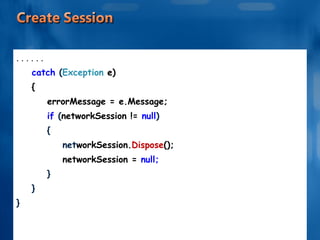
. . . . . . catch  ( Exception  e) { errorMessage = e.Message; if  ( networkSession !=  null ) { net workSession. Dispose (); networkSession =  null; } } }
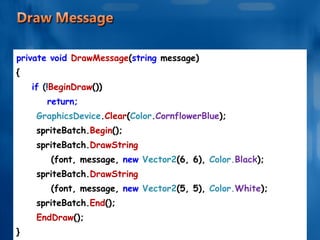
private void  DrawMessage ( string  message) { if  (! BeginDraw ()) return; GraphicsDevice . Clear ( Color . CornflowerBlue ); spriteBatch. Begin (); spriteBatch. DrawString (font, message,  new  Vector2 (6, 6),  Color. Black ); spriteBatch. DrawString (font, message,  new  Vector2 (5, 5),  Color. White ); spriteBatch. End (); EndDraw (); }
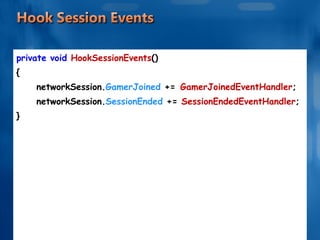
private void  HookSessionEvents () { networkSession. GamerJoined  +=   GamerJoinedEventHandler ; networkSession. SessionEnded  +=  SessionEndedEventHandler ; }
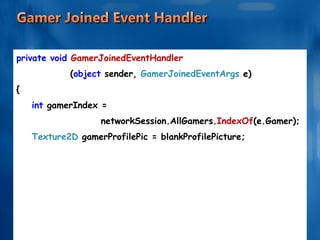
private void  GamerJoinedEventHandler ( object  sender,  GamerJoinedEventArgs  e) { int  gamerIndex =  networkSession.AllGamers. IndexOf (e.Gamer); Texture2D  gamerProfilePic = blankProfilePicture; . . . . . .
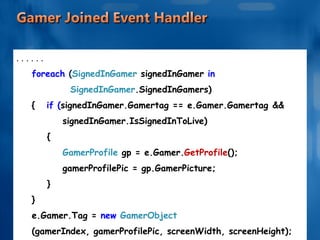
. . . . . . foreach  ( SignedInGamer  signedInGamer  in  SignedInGamer .SignedInGamers) {   if ( signedInGamer.Gamertag == e.Gamer.Gamertag  &&  signedInGamer.IsSignedInToLive) { GamerProfile  gp = e.Gamer. GetProfile (); gamerProfilePic = gp.GamerPicture; } } e.Gamer.Tag =  new  GamerObject  (gamerIndex, gamerProfilePic, screenWidth, screenHeight); }
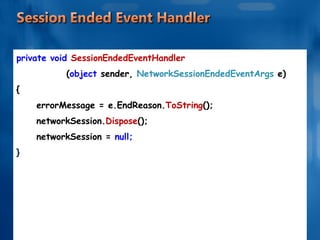
private void  SessionEndedEventHandler   ( object  sender,  NetworkSessionEndedEventArgs  e) { errorMessage = e.EndReason. ToString (); networkSession. Dispose (); networkSession =  null; }
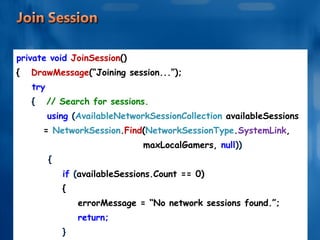
private void  JoinSession () {   DrawMessage (“Joining session...”); try {   // Search for sessions. using  ( AvailableNetworkSessionCollection  availableSessions  =  NetworkSession . Find ( NetworkSessionType . SystemLink , maxLocalGamers,  null )) { if  ( availableSessions.Count == 0) { errorMessage = “No network sessions found.”; return; } . . . . . .
. . . . . . // Join the first session we found. networkSession =  NetworkSession . Join (availableSessions[0]); HookSessionEvents (); } } catch  ( Exception  e) {  errorMessage = e.Message; if  ( networkSession !=  null) {   networkSession. Dispose (); networkSession =  null; } } }
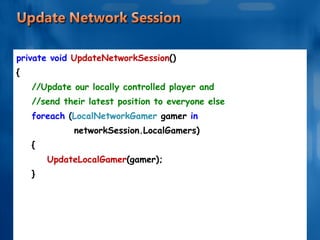
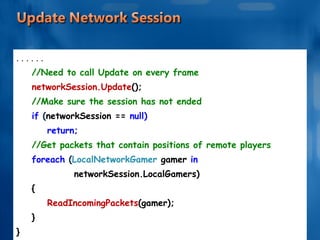
private void  UpdateNetworkSession () { //Update our locally controlled player and //send their latest position to everyone else foreach  ( LocalNetworkGamer  gamer  in  networkSession.LocalGamers) { UpdateLocalGamer (gamer); } . . . . . .
. . . . . . //Need to call Update on every frame networkSession.Update (); //Make sure the session has not ended if  ( networkSession ==  null) return; //Get packets that contain positions of remote players foreach  ( LocalNetworkGamer  gamer  in  networkSession.LocalGamers) { ReadIncomingPackets (gamer); } }
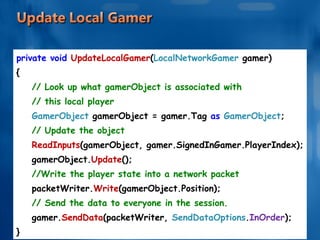
private void  UpdateLocalGamer ( LocalNetworkGamer  gamer) { // Look up what gamerObject is associated with  // this local player GamerObject  gamerObject = gamer.Tag  as  GamerObject ; // Update the object ReadInputs (gamerObject, gamer.SignedInGamer.PlayerIndex); gamerObject. Update (); //Write the player state into a network packet packetWriter. Write (gamerObject.Position); // Send the data to everyone in the session. gamer. SendData (packetWriter,  SendDataOptions . InOrder ); }
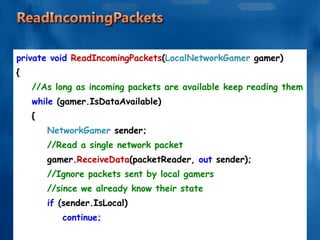
private void  ReadIncomingPackets ( LocalNetworkGamer  gamer) { //As long as incoming packets are available keep reading them while  ( gamer.IsDataAvailable) { NetworkGamer  sender; //Read a single network packet gamer. ReceiveData (packetReader,  out  sender); //Ignore packets sent by local gamers //since we already know their state if  ( sender.IsLocal) continue; . . . . . .
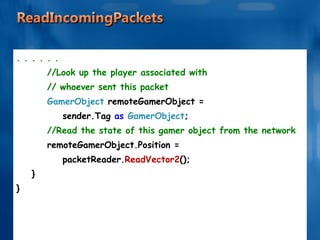
. . . . . . //Look up the player associated with  // whoever sent this packet GamerObject  remoteGamerObject =  sender.Tag  as  GamerObject ; //Read the state of this gamer object from the network remoteGamerObject.Position =  packetReader. ReadVector2 (); } }

Network

  • 1.
    Tran Minh Triet– Nguyen Khac Huy Faculty of Information Technology University of Science, VNU-HCM
  • 2.
    This slide isbased on Chapter 25 and 26 of Microsoft® XNA™ Game Studio 3.0 Unleashed by Chad Carter, SAMS (2009)
  • 3.
  • 4.
    One machine (server)acts as the host, other machines (clients) connect to the host. All the data is passed to the server. The server then sends the messages to the individual clients. This scenario is common on Windows because cheating by modifying the packets is possible. The server can ignore any attempts at modifying the data because it knows exactly where all the players are and the status of each player. Typically when trying to join a session, a particular machine needs to be the server so everyone who wants to join the game can find the game. Each client sends a ready command, and the host will start the game by sending a start command to each client.
  • 5.
    The peer-to-peer approachbroadcasts data from one peer to all the other peers. Or it can send a private message to one peer. The data can travel quicker in this environment because it does not have to be re-sent from a central location. Cheating: Each peer can modify the packet to cheat the game. Xbox LIVE helps us with these concerns because the network traffic is secure. The data is encrypted, which makes it really difficult for anyone to decrypt a packet, modify it, encrypt it again, and then process it.
  • 6.
    Most games actuallyuse both approaches. The client/server architecture is used for creating and joining a network session Once the game play starts it moves into a peer-to-peer architecture, where each player is sending its data to the peers (or just the peers that are within range, on the team, and so on). Programming multiplayer games is all about compromise. Writing a game that is both completely accurate and completely lag-free is not possible. It may make sense to be less accurate in order to have a more immediate response. Using a single authority machine (client/server approach) to decide the answers for important problems in a game
  • 7.
    NetworkSession .InviteAccepted += OnInviteAccepted ; private void OnInviteAccepted ( object sender, InviteAcceptedEventArgs args) { // Quit the current session if ( session != null ) { session. Dispose (); session = null; } // Join the new session session = NetworkSession . JoinInvited (maxLocalGamers); }
  • 8.
    private NetworkSession networkSession; private PacketReader packetReader = new PacketReader (); private PacketWriter packetWriter = new PacketWriter (); const int maxGamers = 16; const int maxLocalGamers = 4;
  • 9.
    if (networkSession== null ) { // If we are not in a network session, update the // menu screen that will let us create or join one. UpdateMenuScreen (); } else { // If we are in a network session, update it. UpdateNetworkSession (); }
  • 10.
    private void UpdateMenuScreen () { if ( IsActive) { if ( Gamer .SignedInGamers.Count == 0) { // If there are no profiles signed in, we cannot proceed. // Show the Guide so the user can sign in. Guide . ShowSignIn (maxLocalGamers, false ); } . . . . . .
  • 11.
    . . .. . . else if ( input. WasPressed (0, InputHandler . ButtonType . A , Keys. A)) { // Create a new session? CreateSession (); } else if ( input. WasPressed (0, InputHandler . ButtonType . B , Keys. B )) { // Join an existing session? JoinSession (); } } }
  • 12.
    private void CreateSession () { DrawMessage ("Creating session..."); try { networkSession = NetworkSession . Create ( NetworkSessionType . SystemLink , maxLocalGamers, maxGamers); HookSessionEvents (); } . . . . . .
  • 13.
    . . .. . . catch ( Exception e) { errorMessage = e.Message; if ( networkSession != null ) { net workSession. Dispose (); networkSession = null; } } }
  • 14.
    private void DrawMessage ( string message) { if (! BeginDraw ()) return; GraphicsDevice . Clear ( Color . CornflowerBlue ); spriteBatch. Begin (); spriteBatch. DrawString (font, message, new Vector2 (6, 6), Color. Black ); spriteBatch. DrawString (font, message, new Vector2 (5, 5), Color. White ); spriteBatch. End (); EndDraw (); }
  • 15.
    private void HookSessionEvents () { networkSession. GamerJoined += GamerJoinedEventHandler ; networkSession. SessionEnded += SessionEndedEventHandler ; }
  • 16.
    private void GamerJoinedEventHandler ( object sender, GamerJoinedEventArgs e) { int gamerIndex = networkSession.AllGamers. IndexOf (e.Gamer); Texture2D gamerProfilePic = blankProfilePicture; . . . . . .
  • 17.
    . . .. . . foreach ( SignedInGamer signedInGamer in SignedInGamer .SignedInGamers) { if ( signedInGamer.Gamertag == e.Gamer.Gamertag && signedInGamer.IsSignedInToLive) { GamerProfile gp = e.Gamer. GetProfile (); gamerProfilePic = gp.GamerPicture; } } e.Gamer.Tag = new GamerObject (gamerIndex, gamerProfilePic, screenWidth, screenHeight); }
  • 18.
    private void SessionEndedEventHandler ( object sender, NetworkSessionEndedEventArgs e) { errorMessage = e.EndReason. ToString (); networkSession. Dispose (); networkSession = null; }
  • 19.
    private void JoinSession () { DrawMessage (“Joining session...”); try { // Search for sessions. using ( AvailableNetworkSessionCollection availableSessions = NetworkSession . Find ( NetworkSessionType . SystemLink , maxLocalGamers, null )) { if ( availableSessions.Count == 0) { errorMessage = “No network sessions found.”; return; } . . . . . .
  • 20.
    . . .. . . // Join the first session we found. networkSession = NetworkSession . Join (availableSessions[0]); HookSessionEvents (); } } catch ( Exception e) { errorMessage = e.Message; if ( networkSession != null) { networkSession. Dispose (); networkSession = null; } } }
  • 21.
    private void UpdateNetworkSession () { //Update our locally controlled player and //send their latest position to everyone else foreach ( LocalNetworkGamer gamer in networkSession.LocalGamers) { UpdateLocalGamer (gamer); } . . . . . .
  • 22.
    . . .. . . //Need to call Update on every frame networkSession.Update (); //Make sure the session has not ended if ( networkSession == null) return; //Get packets that contain positions of remote players foreach ( LocalNetworkGamer gamer in networkSession.LocalGamers) { ReadIncomingPackets (gamer); } }
  • 23.
    private void UpdateLocalGamer ( LocalNetworkGamer gamer) { // Look up what gamerObject is associated with // this local player GamerObject gamerObject = gamer.Tag as GamerObject ; // Update the object ReadInputs (gamerObject, gamer.SignedInGamer.PlayerIndex); gamerObject. Update (); //Write the player state into a network packet packetWriter. Write (gamerObject.Position); // Send the data to everyone in the session. gamer. SendData (packetWriter, SendDataOptions . InOrder ); }
  • 24.
    private void ReadIncomingPackets ( LocalNetworkGamer gamer) { //As long as incoming packets are available keep reading them while ( gamer.IsDataAvailable) { NetworkGamer sender; //Read a single network packet gamer. ReceiveData (packetReader, out sender); //Ignore packets sent by local gamers //since we already know their state if ( sender.IsLocal) continue; . . . . . .
  • 25.
    . . .. . . //Look up the player associated with // whoever sent this packet GamerObject remoteGamerObject = sender.Tag as GamerObject ; //Read the state of this gamer object from the network remoteGamerObject.Position = packetReader. ReadVector2 (); } }

Editor's Notes

  • #2 Control the objects on the screen and give your application some user interaction. Mouse input is never available on the Xbox360,and The Zune only supports its emulated controls—you won’t be plugging a mouse, a keyboard, or any other input devices into a Zune anytime soon.