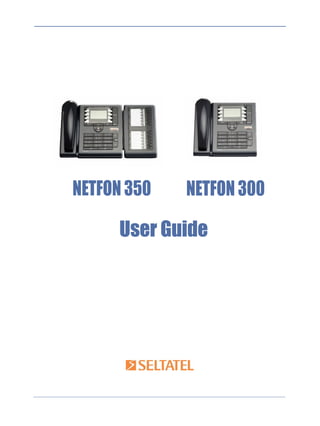
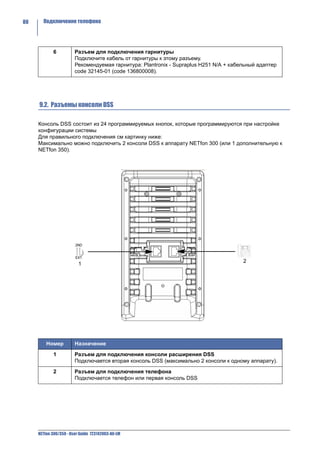
NETFON 350   NETFON 300

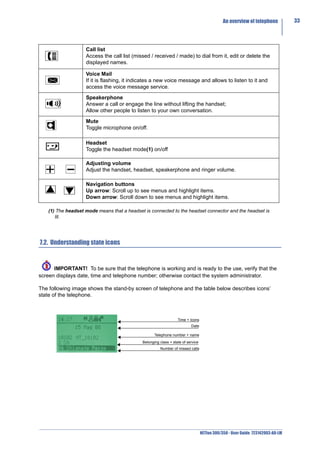
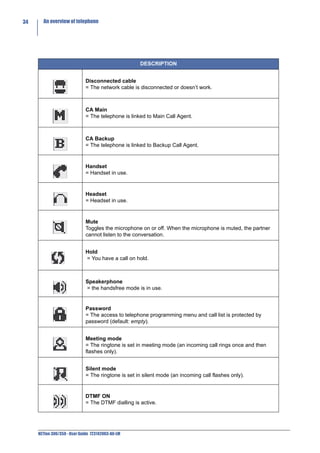
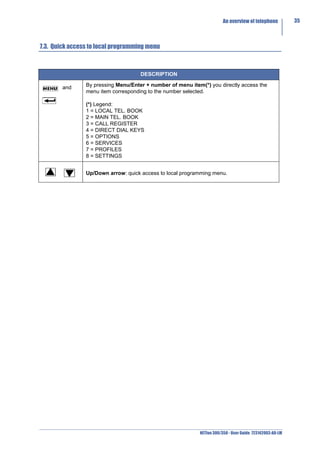
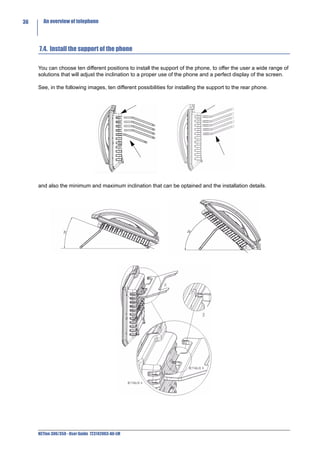
     User Guide
SELTATEL RESERVES THE RIGHT TO MODIFY THE CONTENTS OF THIS
      MANUAL WITHOUT NOTICE AND DECLINES ALL RESPONSIBILITY FOR
                     ANY ERROR OR OMISSION WITHIN


Seltatel S.p.A              Selta S.p.A.             Selta Espana, S.A.
Via Nazionale, km 404,500   Via Emilia, 231          C/ Puerto Guadarrama, 50

64018 Tortoreto Lido (TE)   29010 Cadeo (PC)         Pol.Ind. Las Nieves
Tel. +39 0861772511         Tel. +39 052350161       28935 Mostoles (Madrid)
fax +39 0861772555          fax +39 05235016333      Tel. +34 916160825
e-mail: info@seltatel.it    e-mail: info@selta.it    fax +34 916657759
web site: www.seltatel.it   web site: www.selta.it   e-mail: selta@selta.es
                                                     web site: www.selta.es


                                                          code 723142003-A0-LM ed.3.0
                                                          September 2009
Index       I


                        ITALIANO                                   NETfon 300/350 - Istruzioni per l’uso
1. Premessa .............................................................................................................................................................................................................. 1

2. Sicurezza.............................................................................................................................................................................................................. 2

3. Dichiarazione di conformità ..................................................................................................................................................................... 2

4. Indicazioni di classe A.................................................................................................................................................................................. 3

5. Indicazioni di sicurezza ............................................................................................................................................................................... 3

6. Impatto ambientale ....................................................................................................................................................................................... 3

7. Descrizione del telefono.............................................................................................................................................................................. 4
              7.1. Descrizione della tastiera del telefono.................................................................................................................. 4
              7.2. Descrizione delle icone del display grafico........................................................................................................... 5
              7.3. Utility per accesso rapido al menu locale ............................................................................................................. 7
              7.4. Posizionamento del piede di appoggio al corpo del telefono ............................................................................... 8

8. Operazioni di utente ...................................................................................................................................................................................... 9
              8.1. Personalizzare il proprio telefono ......................................................................................................................... 9
                           8.1.1. Modificare password per accesso al menu ed ai registri di chiamata.................................................... 9
                           8.1.2. Suonerie................................................................................................................................................. 9
                           8.1.3. Contrasto display ................................................................................................................................. 10
                           8.1.4. Lingua .................................................................................................................................................. 10
                           8.1.5. Modi d’uso............................................................................................................................................ 10
                           8.1.6. Regolazione volume microtelefono, altoparlante, suoneria e cuffia..................................................... 11
              8.2. Gestire una chiamata ......................................................................................................................................... 12
              8.3. Consultare la propria casella vocale .................................................................................................................. 14
              8.4. Servizi a disposizione dell’utente con il telefono a riposo .................................................................................. 14
                           8.4.1. Chiamata enblock ................................................................................................................................ 14
                           8.4.2. Deviare le chiamate ............................................................................................................................. 14
                           8.4.3. Impostare il servizio Non Disturbare .................................................................................................... 16
                           8.4.4. Modificare la classe personale di appartenenza.................................................................................. 18
              8.5. Servizi di menu a disposizione dell’utente con microtelefono sollevato ............................................................. 19
              8.6. Personalizzare la rubrica locale e i tasti per la chiamata diretta ........................................................................ 21
                           8.6.1. Da telefono tramite tasto <MENU>/ENTER......................................................................................... 21
                               8.6.1.1. Tasti Diretti .................................................................................................................................... 22
              8.7. Gestire il registro delle chiamate (tasto Call List) ............................................................................................... 23
              8.8. Ulteriori utility a disposizione dell’utente............................................................................................................ 23
                           8.8.1. Cancella liste........................................................................................................................................ 24
                           8.8.2. Cancella dati ........................................................................................................................................ 24
                           8.8.3. Cancella tasti ....................................................................................................................................... 24
                           8.8.4. Filtro ..................................................................................................................................................... 24

9. Istruzioni riservate all’amministratore di sistema/installatore ........................................................................................ 25
              9.1. Connessione del telefono................................................................................................................................... 25
              9.2. Connessione del modulo DSS ........................................................................................................................... 26
              9.3. Dati di amministrazione del telefono .................................................................................................................. 27
                           9.3.1. Descrizione del menu <IMPOSTAZIONI> ........................................................................................... 27


                                                                                                                                                     NETfon 300/350 - User Guide 723142003-A0-LM
II       Index


                                                ENGLISH                                    NETfon 300/350 - User guide
     1. Performance information......................................................................................................................................................................... 29

     2. Safety .................................................................................................................................................................................................................. 30

     3. Conformity declaration............................................................................................................................................................................. 30

     4. Class A information product................................................................................................................................................................... 30

     5. Safety declaration ........................................................................................................................................................................................ 31

     6. Environmental impacts and end life disposal ............................................................................................................................... 31

     7. An overview of telephone.......................................................................................................................................................................... 32
                   7.1. Understanding buttons....................................................................................................................................... 32
                   7.2. Understanding state icons ................................................................................................................................. 33
                   7.3. Quick access to local programming menu......................................................................................................... 35
                   7.4. Install the support of the phone ......................................................................................................................... 36

     8. User operations.............................................................................................................................................................................................. 37
                   8.1. Changing settings .............................................................................................................................................. 37
                                8.1.1. Customizing your password ................................................................................................................ 37
                                8.1.2. Customizing the rings.......................................................................................................................... 37
                                8.1.3. Customizing the screen....................................................................................................................... 38
                                8.1.4. Customizing the language................................................................................................................... 38
                                8.1.5. Customizing call ring pattern ............................................................................................................... 38
                                8.1.6. Adjusting handset, headset, speakerphone and ringer volume .......................................................... 39
                   8.2. Call handling ...................................................................................................................................................... 40
                   8.3. Listening to your voice messages...................................................................................................................... 42
                   8.4. Available features with the handset in place...................................................................................................... 42
                                8.4.1. Enblock call ......................................................................................................................................... 42
                                8.4.2. Forwarding calls .................................................................................................................................. 42
                                8.4.3. Do Not Disturb..................................................................................................................................... 44
                                8.4.4. Changing the class of service of your phone ...................................................................................... 46
                   8.5. Available features by lifting the handset ............................................................................................................ 47
                   8.6. Managing your personal directory and configuring direct call buttons.............................................................. 49
                                8.6.1. From local programming menu by pressing <MENU>/ENTER .......................................................... 49
                                    8.6.1.1. Direct buttons ............................................................................................................................... 50
                   8.7. Managing the Call List ....................................................................................................................................... 51
                   8.8. Additional options ............................................................................................................................................. 51
                                8.8.1. Delete lists........................................................................................................................................... 51
                                8.8.2. Delete data .......................................................................................................................................... 52
                                8.8.3. Delete keys.......................................................................................................................................... 52
                                8.8.4. Filter .................................................................................................................................................... 52

     9. System administrator and installer operations.......................................................................................................................... 53
                   9.1. Connecting the telephone.................................................................................................................................. 53
                   9.2. Connecting the DSS module ............................................................................................................................. 54
                   9.3. Settings data...................................................................................................................................................... 55
                                9.3.1. Description of <SETTINGS> menu ..................................................................................................... 55


     NETfon 300/350 - User Guide 723142003-A0-LM
Index       III


   Русский                                      NETfon 300/350 - Руководство пользователя
1. Введение .......................................................................................................................................................................................................... 57

2. Безопасность............................................................................................................................................................................................... 58

3. Заявление о соответствии ................................................................................................................................................................. 58

4. Информация о продукте Класса A ................................................................................................................................................. 59

5. Заявление о безопасности ................................................................................................................................................................ 59

6. Утилизация и влияние на окружающую среду. .................................................................................................................. 59

7. Внешний вид телефона NETfon 300............................................................................................................................................... 60
              7.1. Назначение кнопок ........................................................................................................................................... 60
              7.2. Описание символов статуса телефона .......................................................................................................... 61
              7.3. Быстрый доступ к настройке телефона.......................................................................................................... 63

8. Операции пользователя ...................................................................................................................................................................... 64
              8.1. Настройки аппарата NETfon 300/350 .............................................................................................................. 64
                          8.1.1. Установка пароля............................................................................................................................... 64
                          8.1.2. Настройка звонка ............................................................................................................................... 64
                          8.1.3. Настройка дисплея ............................................................................................................................ 65
                          8.1.4. Настройка языка................................................................................................................................. 65
                          8.1.5. Режим звонка...................................................................................................................................... 65
                          8.1.6. Регулировка громкости трубки, гарнитуры, спикерфона и громкости звонка ............................... 66
              8.2. Управление вызовом........................................................................................................................................ 67
              8.3. Прослушивание голосовых сообщений .......................................................................................................... 69
              8.4. Возможные функции при положенной трубке ................................................................................................ 69
                          8.4.1. Набор блоком ..................................................................................................................................... 69
                          8.4.2. Переадресация вызовов.................................................................................................................... 70
                          8.4.3. Не Беспокоить .................................................................................................................................... 71
                          8.4.4. Изменить класс обслуживания вашего телефона........................................................................... 72
              8.5. Услуги, доступные при снятой трубке............................................................................................................. 73
              8.6. Программирование локального справочника и кнопок быстрого набора .................................................... 75
                          8.6.1. Программирование локального справочника .................................................................................. 75
                               8.6.1.1. Кнопки быстрого набора ............................................................................................................. 76
              8.7. Журнал вызовов ............................................................................................................................................... 76
              8.8. Дополнительные опции.................................................................................................................................... 77
                          8.8.1. Очистить Журнал ............................................................................................................................... 77
                          8.8.2. Очистить Данные ............................................................................................................................... 77
                          8.8.3. Очистить кнопки ................................................................................................................................. 77
                          8.8.4. Фильтр................................................................................................................................................. 78

9. Подключение телефона ....................................................................................................................................................................... 79
              9.1. Разъемы телефона .......................................................................................................................................... 79
              9.2. Разъемы консоли DSS ..................................................................................................................................... 80
              9.3. Установка телефона ........................................................................................................................................ 81
                          9.3.1. Описание пунктов меню УСТАНОВКИ ............................................................................................. 81


                                                                                                                                                   NETfon 300/350 - User Guide 723142003-A0-LM
IV     Index


     NETfon 300/350 - User Guide 723142003-A0-LM
Premessa         1


                                               ITALIANO

                      NETfon 300/350 - Istruzioni per l’uso


1. Premessa


Il terminale telefonico NETfon 300/350 è un telefono IP multifunzione progettato per la famiglia di
sistemi SAMIP SELTATEL.

Le caratteristiche generali sono le seguenti:
      •    Display 128x64 grafico con back light
      •    Piede regolabile a 10 posizioni
      •    8 tasti programmabili con led multicolore
      •    13 tasti funzione predefiniti con led multicolore
      •    Lampada messaggio VM
      •    Led blu centrale attivo in alcune delle fasi della comunicazione
      •    Viva Voce full duplex
      •    Switch integrato 2 I/F Lan Ethernet 10/100 Mbit/s
      •    Connettore cuffia con tasto dedicato di attuazione
      •    13 suonerie polifoniche
      •    PoE 802.3af - Class Power Level 0
      •    Modulo DSS con 24 tasti programmabili (opzionale)
      •    Alimentazione da rete esterna (opzionale)
      •    Montaggio a muro (kit opzionale per il NETfon 300)

Il NETfon 350 si differenzia dal NETfon 300 per la presenza del modulo DSS che fornisce
un’espansione di ulteriori 24 tasti programmabili oltre agli 8 presenti nel telefono base. Per tale motivo
le descrizioni contenute in questa guida sono valide per entrambi i modelli.

Il manuale dedica la prima parte alla descrizione fisica del telefono ossia alle funzionalità legate ai tasti
messi a disposizione dell’utente e delle icone grafiche che appaiono sul display; la seconda parte
descrive le operazioni di base che permettono all’utente di utilizzare l’apparecchio immediatamente e
di seguito le operazioni avanzate come la consultazione dei messaggi vocali e la gestione della rubrica
locale e centrale; infine la terza parte descrive i collegamenti e le configurazioni per l’attivazione del
telefono ed è principalmente dedicata agli installatori ed agli amministratori di sistema.


       IMPORTANTE! L’esecuzione di tutte le operazioni descritte nel seguito sono subordinate alla
corretta personalizzazione del telefono e del sistema a cui esso è connesso, da parte
dell'amministratore di sistema.


                                                                        NETfon 300/350 - User Guide 723142003-A0-LM
2     Sicurezza


    2. Sicurezza


    Leggere attentamente le seguenti istruzioni di sicurezza prima di utilizzare l’apparecchio telefonico:

            •    Leggere le istruzioni per l’uso e conservarle con cura.
            •    Conservare l’imballo del telefono.
            •    Non aprire l’apparecchio, rivolgersi esclusivamente a personale tecnico specializzato.
            •    Posizionare l’apparecchio su superfici piane e non scivolose.
            •    Non esporre l’apparecchio in modo diretto ai raggi del sole o ad altre sorgenti di calore.
            •    Non installare o utilizzare l’apparecchio in ambienti con pericolo di esplosione.
            •    Proteggere l’apparecchio da umidità, acqua, vapore, polvere e liquidi chimicamente aggressivi.
            •    Non esporre l’apparecchio a campi elettromagnetici (motori elettrici, elettrodomestici).
                 L’esposizione potrebbe provocare una perdita di qualità della conversazione.
            •    Evitare di utilizzare l’apparecchio nelle immediate vicinanze di apparati TV, radio, video.
            •    Non utilizzare l’apparecchio se ci si trova nelle immediate vicinanze di acqua o si hanno le mani
                 bagnate.
            •    Pulire l’apparecchio, dopo aver scollegato l’alimentatore, con un panno morbido, leggermente
                 inumidito o antistatico.
            •    Per pulire l’apparecchio non utilizzare detersivi, diluenti, alcool, benzina o altre sostanze
                 chimiche.
            •    Utilizzare l’apparecchio ad una temperatura ambiente da +5°C a +40°C.
            •    Per l’alimentazione utilizzare esclusivamente l’apposito alimentatore fornito.

    Attenzione! Per apparecchiature collegate con spine di corrente: le prese di corrente devono essere
    installate in prossimità dell’apparecchiatura ed essere facilmente accessibili.
    L’apparecchio è stato progettato per esclusivo utilizzo con sistemi telefonici SAMIP Seltatel.


    3. Dichiarazione di conformità


    La SELTATEL spa - Via Nazionale, Km 404,500 - 64018 Tortoreto Lido (TE) Italia, dichiara sotto la propria
    responsabilità che i prodotti NETfon 300/NETfon 350 sono conformi alla direttiva 1999/05/CE del
    Parlamento Europeo e del Consiglio del 9 Marzo 1999 per le apparecchiature radio e le apparecchiature
    terminali di telecomunicazioni ed il reciproco riconoscimento delle loro conformità.
    La dichiarazione di conformità originale è conservata presso l’archivio SELTATEL spa - Via Nazionale, Km
    404,500 - 64018 Tortoreto Lido (TE) Italia.

    L'apposizione del marchio:


    sui prodotti oggetto della presente dichiarazione garantisce il rispetto della Direttiva 1999/05/CE".


    NETfon 300/350 - User Guide 723142003-A0-LM
Indicazioni di classe A        3


4. Indicazioni di classe A

Questo è un apparecchio di Classe A. In un ambiente residenziale questo apparecchio può provocare
radiodisturbi. In questo caso può essere richiesto all’utilizzatore di prendere misure adeguate.


5. Indicazioni di sicurezza

Se il telefono è alimentato direttamente sulla presa LAN (Power over Ethernet) l'apparecchiatura che
fornisce l'alimentazione deve essere conforme allo standard IEEE 802.3af e classificata come
Sorgente a Potenza Limitata secondo la definizione della IEC 60950-1 (2001).


6. Impatto ambientale


Ai sensi dell'art. 13 del Decreto Legislativo 25 luglio 2005, n. 151"Attuazione delle Direttive 2002/95/
CE, 2002/96/CE e 2003/108/CE, relative alla riduzione dell'uso di sostanze pericolose nelle
apparecchiature elettriche ed elettroniche, nonché allo smaltimento dei rifiuti".
Il simbolo del cassonetto barrato riportato sull'apparecchiatura o sulla sua confezione e nella figura
seguente


indica che il prodotto alla fine della propria vita utile deve essere raccolto separatamente dagli altri
rifiuti. La raccolta differenziata della presente apparecchiatura giunta a fine vita è organizzata e gestita
dal produttore. L'utente che vorrà disfarsi della presente apparecchiatura dovrà quindi contattare il
produttore e seguire il sistema che questo ha adottato per consentire la raccolta separata
dell'apparecchiatura giunta a fine vita. L'adeguata raccolta differenziata per l'avvio successivo
dell'apparecchiatura dismessa al riciclaggio, al trattamento e allo smaltimento ambientalmente
compatibile contribuisce ad evitare possibili effetti negativi sull'ambiente e sulla salute e favorisce il
reimpiego e/o riciclo dei materiali di cui è composta l'apparecchiatura. Lo smaltimento abusivo del
prodotto da parte del detentore comporta l'applicazione delle sanzioni amministrative previste dalla
normativa vigente.


                                                                        NETfon 300/350 - User Guide 723142003-A0-LM
4     Descrizione del telefono


    7. Descrizione del telefono

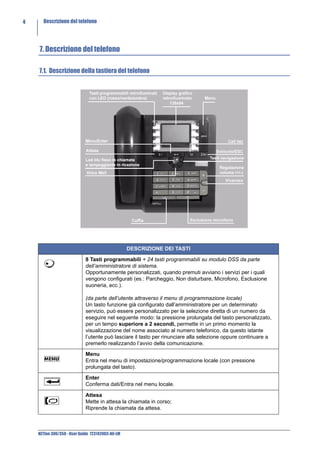
    7.1. Descrizione della tastiera del telefono


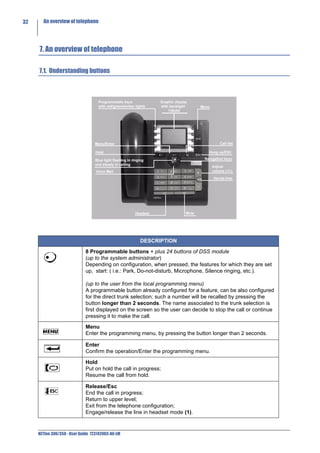
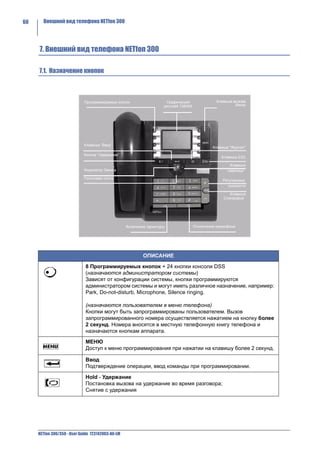
                                                  DESCRIZIONE DEI TASTI

                            8 Tasti programmabili + 24 tasti programmabili su modulo DSS da parte
                            dell’amministratore di sistema.
                            Opportunamente personalizzati, quando premuti avviano i servizi per i quali
                            vengono configurati (es.: Parcheggio, Non disturbare, Microfono, Esclusione
                            suoneria, ecc.).

                            (da parte dell’utente attraverso il menu di programmazione locale)
                            Un tasto funzione già configurato dall’amministratore per un determinato
                            servizio, può essere personalizzato per la selezione diretta di un numero da
                            eseguire nel seguente modo: la pressione prolungata del tasto personalizzato,
                            per un tempo superiore a 2 secondi, permette in un primo momento la
                            visualizzazione del nome associato al numero telefonico, da questo istante
                            l’utente può lasciare il tasto per rinunciare alla selezione oppure continuare a
                            premerlo realizzando l’avvio della comunicazione.

                            Menu
                            Entra nel menu di impostazione/programmazione locale (con pressione
                            prolungata del tasto).

                            Enter
                            Conferma dati/Entra nel menu locale.

                            Attesa
                            Mette in attesa la chiamata in corso;
                            Riprende la chiamata da attesa.


    NETfon 300/350 - User Guide 723142003-A0-LM
Descrizione del telefono          5


                      Svincolo/Esc
                      Svincola la chiamata in corso;
                      Accede al menu di livello superiore;
                      Esce dal menu di impostazione/programmazione locale;
                      Impegna/svincola la linea in modalità cuffia(1).

                      Call list
                      Entra nel registro delle chiamate (perse / in uscita / risposte) per richiamare,
                      consultare e cancellare le liste.

                      Voice Mail
                      Se acceso, permette di ascoltare i messaggi lasciati in casella vocale e quindi
                      accedere al servizio di messaggistica vocale.

                      Viva voce
                      Risponde ad una chiamata o impegna una linea senza sganciare il
                      microtelefono;
                      Permette ad altri di ascoltare la propria conversazione.

                      Esclusione microfono
                      Attiva/disattiva l’esclusione del microfono.

                      Cuffia
                      Attiva/disattiva la modalità cuffia(1)

                      Regolazione volume
                      Regola il volume del microtelefono, dell’altoparlante, della suoneria e della
                      cuffia.

                      Tasti di navigazione
                      Freccia in alto: scorre le voci del menu in alto.
                      Freccia in basso: scorre le voci del menu in basso.

    (1) Il telefono si intende in modalità cuffia se è collegata una cuffia al connettore dedicato e il tasto cuffia
       è acceso.


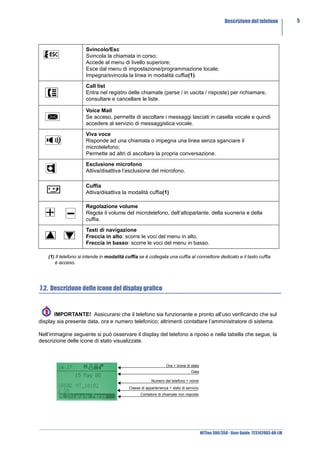
7.2. Descrizione delle icone del display grafico


       IMPORTANTE! Assicurarsi che il telefono sia funzionante e pronto all’uso verificando che sul
display sia presente data, ora e numero telefonico; altrimenti contattare l’amministratore di sistema.

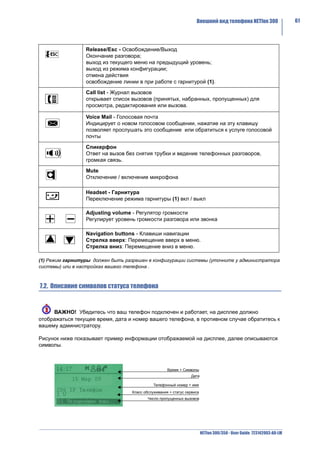
Nell’immagine seguente si può osservare il display del telefono a riposo e nella tabella che segue, la
descrizione delle icone di stato visualizzate.


                                                                  Ora + Icone di stato
                                                                                 Data

                                                         Numero del telefono + nome
                                            Classe di appartenenza + stato di servizio
                                                  Contatore di chiamate non risposte


                                                                                         NETfon 300/350 - User Guide 723142003-A0-LM
6     Descrizione del telefono


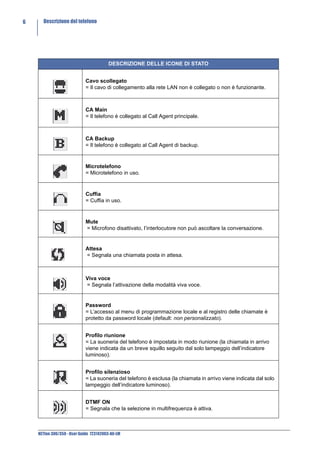
                                        DESCRIZIONE DELLE ICONE DI STATO


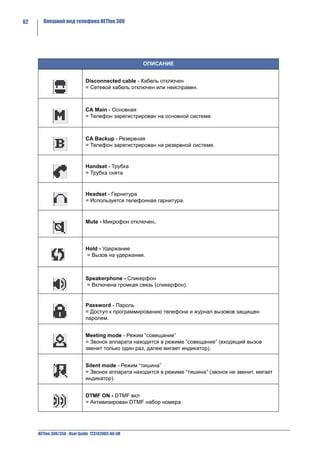
                            Cavo scollegato
                            = Il cavo di collegamento alla rete LAN non è collegato o non è funzionante.


                            CA Main
                            = Il telefono è collegato al Call Agent principale.


                            CA Backup
                            = Il telefono è collegato al Call Agent di backup.


                            Microtelefono
                            = Microtelefono in uso.


                            Cuffia
                            = Cuffia in uso.


                            Mute
                            = Microfono disattivato, l’interlocutore non può ascoltare la conversazione.


                            Attesa
                            = Segnala una chiamata posta in attesa.


                            Viva voce
                            = Segnala l’attivazione della modalità viva voce.


                            Password
                            = L’accesso al menu di programmazione locale e al registro delle chiamate è
                            protetto da password locale (default: non personalizzato).


                            Profilo riunione
                            = La suoneria del telefono è impostata in modo riunione (la chiamata in arrivo
                            viene indicata da un breve squillo seguito dal solo lampeggio dell’indicatore
                            luminoso).


                            Profilo silenzioso
                            = La suoneria del telefono è esclusa (la chiamata in arrivo viene indicata dal solo
                            lampeggio dell’indicatore luminoso).


                            DTMF ON
                            = Segnala che la selezione in multifrequenza è attiva.


    NETfon 300/350 - User Guide 723142003-A0-LM
Descrizione del telefono          7


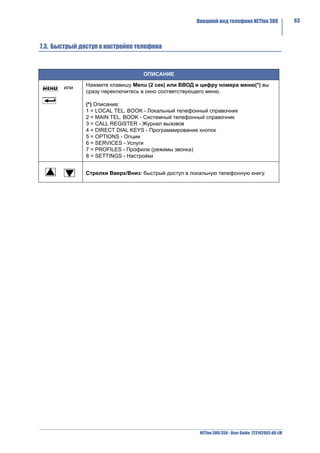
7.3. Utility per accesso rapido al menu locale


                            ACCESSO RAPIDO ALLE FUNZIONI

        e        Menu/Enter + numero della voce di menu(*)
                 permette l’accesso direttamente all’interno della voce di menu prescelta.

                 (*) Legenda:
                 1 = RUBRICA LOCALE
                 2 = RUBRICA CENTRALE
                 3 = REGISTRO CHIAMATE
                 4 = TASTI DIRETTI
                 5 = OPZIONI
                 6 = SERVIZI
                 7 = MODI D’USO
                 8 = IMPOSTAZIONI


                 Freccia in alto/in basso: accesso rapido alla rubrica locale del telefono.


                                                                 NETfon 300/350 - User Guide 723142003-A0-LM
8     Descrizione del telefono


    7.4. Posizionamento del piede di appoggio al corpo del telefono

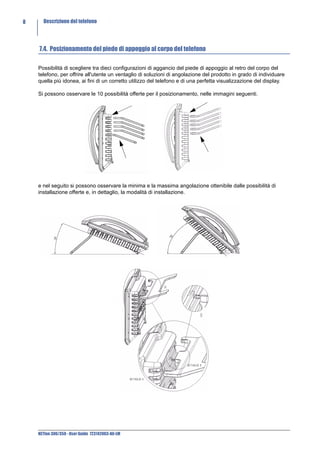
    Possibilità di scegliere tra dieci configurazioni di aggancio del piede di appoggio al retro del corpo del
    telefono, per offrire all'utente un ventaglio di soluzioni di angolazione del prodotto in grado di individuare
    quella più idonea, ai fini di un corretto utilizzo del telefono e di una perfetta visualizzazione del display.

    Si possono osservare le 10 possibilità offerte per il posizionamento, nelle immagini seguenti.


    e nel seguito si possono osservare la minima e la massima angolazione ottenibile dalle possibilità di
    installazione offerte e, in dettaglio, la modalità di installazione.


    NETfon 300/350 - User Guide 723142003-A0-LM
Operazioni di utente         9


8. Operazioni di utente

8.1. Personalizzare il proprio telefono


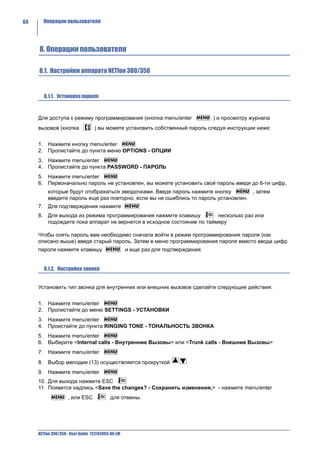
   8.1.1. Modificare password per accesso al menu ed ai registri di chiamata


E’ possibile proteggere l’accesso al menu locale (tasti menu/enter) e ai registri di chiamata (tasto call
list        ) con una password personalizzabile nel seguente modo:

1. entrare nel menu di impostazione locale premendo i tasti menu/enter
2. scorrere con i tasti freccia le opzioni fino alla voce OPZIONI
3. confermare premendo il tasto enter
4. scorrere con i tasti freccia le opzioni fino alla voce PASSWORD
5. confermare la scelta premendo il tasto enter
6. se la password non è mai stata impostata si possono digitare fino a 6 cifre (sul display
   compariranno solo “*”), quindi confermarle digitandole nuovamente (se le cifre non corrispondono
   verrà indicato “Conferma errata”); se la password è stata precedentemente impostata, è possibile
   modificarla inserendone una nuova sia al primo livello (Password_) che al secondo (Conferma_)
       oppure eliminarla premendo il tasto enter         senza digitare alcun numero, sia al primo livello
       (Password_) che al secondo (Conferma_)
7. confermare le impostazioni premendo il tasto enter
8. uscire da menu premendo più volte il tasto ESC              o a timeout.


   8.1.2. Suonerie


E' possibile scegliere, sia per il tono di chiamata interna che per il tono di chiamata esterna, tra 13
suonerie disponibili, nel seguente modo:
1. entrare nel menu di impostazione locale premendo i tasti menu/enter
2. scorrere con i tasti freccia le opzioni fino alla voce IMPOSTAZIONI
3. confermare premendo il tasto enter
4. scorrere con i tasti freccia le opzioni fino alla voce TONO DI CHIAMATA
5. confermare premendo il tasto enter
6. scegliere tra <Tono Chiam. Interna> e <Tono Chiam.Esterna>
7. scegliere tra le due opzioni e confermare la scelta premendo il tasto enter
8. scorrere con i tasti freccia le 13 suonerie
9. confermare la scelta premendo il tasto enter
10. uscire da menu premendo il tasto ESC
11. alla domanda <Salvare le modifiche?> confermare premendo il tasto enter                       oppure
       annullare le impostazioni premendo il tasto ESC         .


                                                                         NETfon 300/350 - User Guide 723142003-A0-LM
10     Operazioni di utente


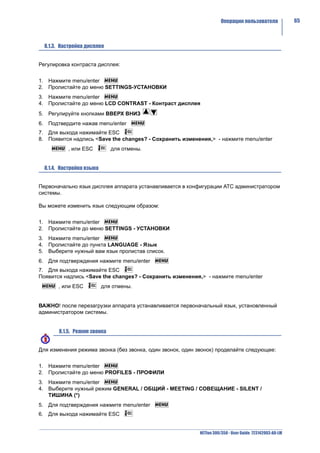
        8.1.3. Contrasto display


     Per regolare il contrasto del display seguire le seguenti istruzioni:

     1. entrare nel menu di impostazione locale premendo i tasti menu/enter
     2. scorrere con i tasti freccia le opzioni fino alla voce IMPOSTAZIONI
     3. confermare premendo il tasto enter
     4. scorrere con i tasti freccia le opzioni fino alla voce CONTRASTO DISPLAY
     5. confermare premendo il tasto enter
     6. sul display appare una barra che indica il contrasto attuale, per aumentarlo o diminuirlo premere i tasti
        freccia
     7. confermare la scelta premendo il tasto enter
     8. uscire da menu premendo il tasto ESC
     9. alla domanda <Salvare le modifiche?> confermare premendo il tasto enter                 oppure annullare
          le impostazioni premendo il tasto ESC         .


        8.1.4. Lingua


     Per modificare la lingua delle stringhe seguire le seguenti istruzioni:

     1. entrare nel menu di impostazione locale premendo i tasti menu/enter
     2. scorrere con i tasti freccia le opzioni fino alla voce IMPOSTAZIONI
     3. confermare premendo il tasto enter
     4. scorrere con i tasti freccia le opzioni fino alla voce LINGUA
     5. apparirà la lingua attualmente in uso, per modificarla scorrere le lingue proposte con i tasti freccia
     6. confermare la scelta premendo il tasto enter
     7. uscire da menu premendo il tasto ESC
     8. alla domanda <Salvare le modifiche?> confermare premendo il tasto enter                 oppure annullare
          le impostazioni premendo il tasto ESC         .


        8.1.5. Modi d’uso


     Per modificare la suoneria, seguire le seguenti istruzioni:

     1. entrare nel menu di impostazione locale premendo i tasti menu/enter
     2. scorrere con i tasti freccia le opzioni fino alla voce MODI D’USO
     3. confermare premendo il tasto enter
     4. selezionare una delle tre opzioni proposte con i tasti freccia tra NORMALE - RIUNIONE -
        SILENZIOSO (*)
     5. confermare la scelta premendo il tasto enter
     6. uscire da menu premendo il tasto ESC                o a timeout.


     NETfon 300/350 - User Guide 723142003-A0-LM
Operazioni di utente         11


(*)
Normale
Il profilo Normale corrisponde al profilo di default e non altera in alcun modo la suoneria impostata
dall’utente.
Riunione
Il profilo Riunione fa in modo che, in caso di chiamata, la suoneria duri solo 2 secondi. Questa
impostazione è utile per ridurre il disturbo della suoneria in particolari situazioni come ad esempio una
“riunione di lavoro”.
Silenzioso
Il profilo Silenzioso fa in modo che, in caso di chiamata, non si senta alcuna suoneria; viene segnalata
dal lampeggio blu della chiamata in arrivo. Questa impostazione è utile nel caso in cui non si voglia
essere disturbati dalla suoneria.


  8.1.6. Regolazione volume microtelefono, altoparlante, suoneria e cuffia


Per regolare il volume microtelefono, altoparlante e suoneria, seguire le seguenti istruzioni:

1. entrare nel menu di impostazione locale premendo i tasti menu/enter
2. scorrere con i tasti freccia le opzioni fino alla voce IMPOSTAZIONI
3. confermare premendo il tasto enter
4. scorrere con i tasti freccia le opzioni e selezionare una delle seguenti voci: VOLUME
   MICROTELEFONO / VOLUME SPEAKER / VOLUME SUONERIA / VOLUME CUFFIA
5. confermare premendo il tasto enter
6. sul display appare una barra che indica, per ognuno, il volume attuale, per aumentarlo o diminuirlo
   premere i tasti freccia
7. confermare la scelta premendo il tasto enter
8. uscire da menu premendo il tasto ESC
9. alla domanda <Salvare le modifiche?> confermare premendo il tasto enter                       oppure
    annullare le impostazioni premendo il tasto ESC            .


                                                                        NETfon 300/350 - User Guide 723142003-A0-LM
12     Operazioni di utente


     8.2. Gestire una chiamata

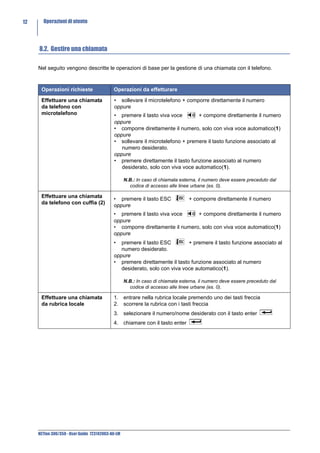
     Nel seguito vengono descritte le operazioni di base per la gestione di una chiamata con il telefono.


      Operazioni richieste                  Operazioni da effetturare

      Effettuare una chiamata               • sollevare il microtelefono + comporre direttamente il numero
      da telefono con                       oppure
      microtelefono                         • premere il tasto viva voce       + comporre direttamente il numero
                                            oppure
                                            • comporre direttamente il numero, solo con viva voce automatico(1)
                                            oppure
                                            • sollevare il microtelefono + premere il tasto funzione associato al
                                               numero desiderato.
                                            oppure
                                            • premere direttamente il tasto funzione associato al numero
                                               desiderato, solo con viva voce automatico(1).

                                                   N.B.: In caso di chiamata esterna, il numero deve essere preceduto dal
                                                     codice di accesso alle linee urbane (es. 0).

      Effettuare una chiamata
                                            • premere il tasto ESC              + comporre direttamente il numero
      da telefono con cuffia (2)
                                            oppure
                                            • premere il tasto viva voce     + comporre direttamente il numero
                                            oppure
                                            • comporre direttamente il numero, solo con viva voce automatico(1)
                                            oppure
                                            •  premere il tasto ESC        + premere il tasto funzione associato al
                                               numero desiderato.
                                            oppure
                                            • premere direttamente il tasto funzione associato al numero
                                               desiderato, solo con viva voce automatico(1).

                                                   N.B.: In caso di chiamata esterna, il numero deve essere preceduto dal
                                                     codice di accesso alle linee urbane (es. 0).

      Effettuare una chiamata               1. entrare nella rubrica locale premendo uno dei tasti freccia
      da rubrica locale                     2. scorrere la rubrica con i tasti freccia
                                            3. selezionare il numero/nome desiderato con il tasto enter
                                            4. chiamare con il tasto enter


     NETfon 300/350 - User Guide 723142003-A0-LM
Operazioni di utente         13


Effettuare una chiamata            E’ possibile effettuare una chiamata attraverso la rubrica centralizzata del
da rubrica centrale                sistema (numeri brevi[*]). I nomi in rubrica centrale possono essere
                                   ricercati attraverso i tasti freccia oppure inserendo, tramite i tasti
                                   alfanumerici, un nome o parte di esso seguito dal tasto enter       .
                                   Successivamente vengono visualizzati, a partire dal nome inserito, in
                                   sequenza alfabetica tutti i nominativi memorizzati.
                                   1. entrare nella rubrica centrale premendo i tasti menu/enter
                                   2. scorrere con i tasti freccia le opzioni fino alla voce RUBRICA
                                       CENTRALE
                                   3. scorrere la rubrica con i tasti freccia
                                   4. chiamare con il tasto enter

                                   [*] Il telefono deve essere abilitato all’accesso alla tabella dei numeri
                                   brevi in cui è contenuto il nominativo prescelto, accanto al nome trovato
                                   nella rubrica centrale, nell’ultima posizione del display se compare una
                                   “X” indica l’impossibilità di leggere il numero e di effettuare la chiamata
                                   verso tale numero (a cura dell’amministratore di sistema).

Terminare una                      • riagganciare il microtelefono
conversazione                      oppure
                                   • premere il tasto viva voce               (se si è in modalità viva voce)
                                   oppure
                                   • premere il tasto ESC
                                   oppure
                                   • in modalità cuffia(2): premere il tasto ESC                 .

Rispondere ad una                  • sganciare il microtelefono
chiamata                           oppure
                                   • premere il tasto viva voce
                                   oppure
                                   • in modalità cuffia(2): premere il tasto ESC

Mettere/Riprendere
                                   1. mettere in attesa l’interlocutore premendo il tasto attesa
dall’attesa la chiamata in
corso                              2. riprendere dall’attesa l’interlocutore premendo il tasto attesa

Attiva/Disattiva
microfono (mute)                   1. attivare/disattivare premendo il tasto microfono                .

Trasferire una chiamata
                                   1. mettere in attesa l’interlocutore premendo il tasto attesa
in corso
                                   2. comporre il numero dell’utente che si vuole chiamare
                                   3. attendere la risposta e riagganciare oppure senza attendere la
                                      risposta, riagganciare, se si è abilitati alla trasferta automatica(1).

Ripetere ultimo numero             1. premere il tasto [#] (cancelletto).
selezionato


  (1) Dato di personalizzazione, da applicativo SAMBuilder (rivolgersi all’amministratore di sistema).
  (2) Il telefono si intende in modalità cuffia se è collegata una cuffia al connettore dedicato e il tasto cuffia
     è acceso.


                                                                              NETfon 300/350 - User Guide 723142003-A0-LM
14     Operazioni di utente


     8.3. Consultare la propria casella vocale

     Il tasto Voice Mail acceso segnala la presenza di messaggi nella propria casella vocale, per ascoltare il

     messaggio premere il tasto Voice Mail                  e seguire le istruzioni vocali.


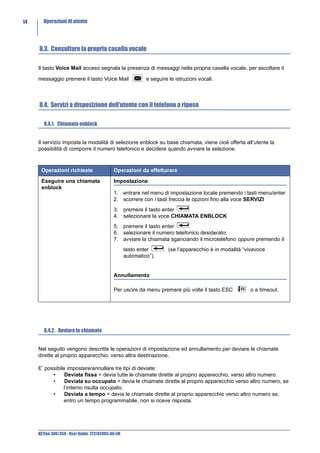
     8.4. Servizi a disposizione dell’utente con il telefono a riposo

        8.4.1. Chiamata enblock


     Il servizio imposta la modalità di selezione enblock su base chiamata, viene cioè offerta all’utente la
     possibilità di comporre il numero telefonico e decidere quando avviare la selezione.


      Operazioni richieste                  Operazioni da effetturare

      Eseguire una chiamata                 Impostazione
      enblock
                                            1. entrare nel menu di impostazione locale premendo i tasti menu/enter
                                            2. scorrere con i tasti freccia le opzioni fino alla voce SERVIZI
                                            3. premere il tasto enter
                                            4. selezionare la voce CHIAMATA ENBLOCK
                                            5. premere il tasto enter
                                            6. selezionare il numero telefonico desiderato;
                                            7. avviare la chiamata sganciando il microtelefono oppure premendo il
                                                   tasto enter        (se l’apparecchio è in modalità “vivavoce
                                                   automatico”).


                                            Annullamento

                                            Per uscire da menu premere più volte il tasto ESC           o a timeout.


        8.4.2. Deviare le chiamate


     Nel seguito vengono descritte le operazioni di impostazione ed annullamento per deviare le chiamate
     dirette al proprio apparecchio, verso altra destinazione.

     E’ possibile impostare/annullare tre tipi di deviate:
           •     Deviata fissa = devia tutte le chiamate dirette al proprio apparecchio, verso altro numero.
           •     Deviata su occupato = devia le chiamate dirette al proprio apparecchio verso altro numero, se
                l’interno risulta occupato.
           •     Deviata a tempo = devia le chiamate dirette al proprio apparecchio verso altro numero se,
                entro un tempo programmabile, non si riceve risposta.


     NETfon 300/350 - User Guide 723142003-A0-LM
Operazioni di utente         15


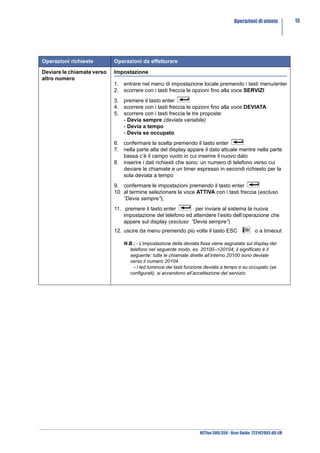
Operazioni richieste        Operazioni da effetturare

Deviare le chiamate verso   Impostazione
altro numero
                            1. entrare nel menu di impostazione locale premendo i tasti menu/enter
                            2. scorrere con i tasti freccia le opzioni fino alla voce SERVIZI
                            3. premere il tasto enter
                            4. scorrere con i tasti freccia le opzioni fino alla voce DEVIATA
                            5. scorrere con i tasti freccia le tre proposte:
                               - Devia sempre (deviata variabile)
                               - Devia a tempo
                               - Devia se occupato
                            6. confermare la scelta premendo il tasto enter
                            7. nella parte alta del display appare il dato attuale mentre nella parte
                               bassa c’è il campo vuoto in cui inserire il nuovo dato
                            8. inserire i dati richiesti che sono: un numero di telefono verso cui
                               deviare le chiamate e un timer espresso in secondi richiesto per la
                               sola deviata a tempo
                            9. confermare le impostazioni premendo il tasto enter
                            10. al termine selezionare la voce ATTIVA con i tasti freccia (escluso
                                “Devia sempre”);
                            11. premere il tasto enter        per inviare al sistema la nuova
                                impostazione del telefono ed attendere l’esito dell’operazione che
                                appare sul display (escluso “Devia sempre”)
                            12. uscire da menu premendo più volte il tasto ESC                  o a timeout

                                N.B.: - L’impostazione della deviata fissa viene segnalata sul display del
                                  telefono nel seguente modo, es. 20100-->20104; il significato è il
                                  seguente: tutte le chiamate dirette all’interno 20100 sono deviate
                                  verso il numero 20104.
                                    - I led luminosi dei tasti funzione deviata a tempo e su occupato (se
                                  configurati), si accendono all’accettazione del servizio.


                                                                    NETfon 300/350 - User Guide 723142003-A0-LM
16     Operazioni di utente


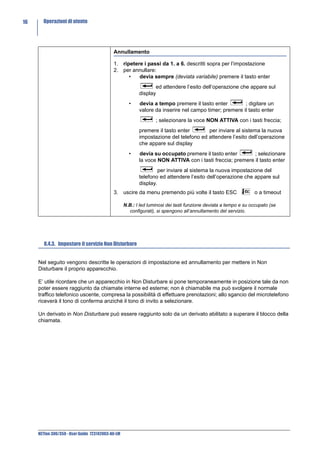
                                            Annullamento

                                            1. ripetere i passi da 1. a 6. descritti sopra per l’impostazione
                                            2. per annullare:
                                                  •   devia sempre (deviata variabile) premere il tasto enter
                                                                 ed attendere l’esito dell’operazione che appare sul
                                                          display
                                                     •    devia a tempo premere il tasto enter         ; digitare un
                                                          valore da inserire nel campo timer; premere il tasto enter
                                                                  ; selezionare la voce NON ATTIVA con i tasti freccia;
                                                          premere il tasto enter       per inviare al sistema la nuova
                                                          impostazione del telefono ed attendere l’esito dell’operazione
                                                          che appare sul display
                                                     •    devia su occupato premere il tasto enter        ; selezionare
                                                          la voce NON ATTIVA con i tasti freccia; premere il tasto enter
                                                                   per inviare al sistema la nuova impostazione del
                                                          telefono ed attendere l’esito dell’operazione che appare sul
                                                          display.
                                            3. uscire da menu premendo più volte il tasto ESC                    o a timeout

                                                   N.B.: I led luminosi dei tasti funzione deviata a tempo e su occupato (se
                                                     configurati), si spengono all’annullamento del servizio.


        8.4.3. Impostare il servizio Non Disturbare


     Nel seguito vengono descritte le operazioni di impostazione ed annullamento per mettere in Non
     Disturbare il proprio apparecchio.

     E’ utile ricordare che un apparecchio in Non Disturbare si pone temporaneamente in posizione tale da non
     poter essere raggiunto da chiamate interne ed esterne; non è chiamabile ma può svolgere il normale
     traffico telefonico uscente, compresa la possibilità di effettuare prenotazioni; allo sgancio del microtelefono
     riceverà il tono di conferma anziché il tono di invito a selezionare.

     Un derivato in Non Disturbare può essere raggiunto solo da un derivato abilitato a superare il blocco della
     chiamata.


     NETfon 300/350 - User Guide 723142003-A0-LM
Operazioni di utente         17


Operazioni richieste         Operazioni da effetturare

Mettere il telefono in Non   Impostazione
disturbare
                             1. entrare nel menu di impostazione locale premendo i tasti menu/enter
                             2. scorrere con i tasti freccia le opzioni fino alla voce SERVIZI
                             3. premere il tasto enter
                             4. selezionare la voce NON DISTURBARE
                             5. premere il tasto enter
                             6. selezionare la voce ATTIVA con i tasti freccia;
                             7. premere il tasto enter       per inviare al sistema la nuova
                                impostazione del telefono ed attendere l’esito dell’operazione che
                                appare sul display
                             8. uscire da menu premendo più volte il tasto ESC               o a timeout


                             Annullamento

                             1. ripetere i passi da 1. a 5. descritti sopra per l’impostazione
                             2. selezionare la voce NON ATTIVA con i tasti freccia
                             3. premere il tasto enter       per inviare al sistema la nuova
                                impostazione del telefono ed attendere l’esito dell’operazione che
                                appare sul display
                             4. uscire da menu premendo più volte il tasto ESC               o a timeout


                                                                 NETfon 300/350 - User Guide 723142003-A0-LM
18     Operazioni di utente


        8.4.4. Modificare la classe personale di appartenenza


     Nel seguito vengono descritte le operazioni per modificare la propria classe di servizio.


      Operazioni richieste                  Operazioni da effetturare

      Modificare la classe di               Impostazione
      appartenenza del
      telefono                              1. entrare nel menu di impostazione locale premendo i tasti menu/enter
                                            2. scorrere con i tasti freccia le opzioni fino alla voce SERVIZI
                                            3. premere il tasto enter
                                            4. selezionare la voce CLASSE
                                            5. premere il tasto enter
                                            6. selezionare la classe (1 - 2 - 3) in cui si vuole transitare con i tasti
                                               freccia;
                                            7. premere il tasto enter
                                            8. inserire la propria password (default “numero-telefonico-interno”)
                                            9. premere il tasto enter       per inviare al sistema la nuova
                                               impostazione del telefono ed attendere l’esito dell’operazione che
                                               appare sul display
                                            10. uscire da menu premendo più volte il tasto ESC           o a timeout
                                            11. sul display a riposo si può osservare la variazione della classe di
                                                appartenenza (penultima riga del display)

                                                   N.B. La lettera che appare accanto alla classe (es. 1A) ha il seguente
                                                     significato: A = Area (il cambio di classe è stato effettuato da
                                                     programma di personalizzazione) e U = Utente (il cambio di classe è
                                                     stato effettuato dall’utente).


     NETfon 300/350 - User Guide 723142003-A0-LM
Operazioni di utente         19


8.5. Servizi di menu a disposizione dell’utente con microtelefono sollevato

Per accedere ai seguenti servizi premere i tasti menu/enter con il microtelefono sollevato oppure
durante la conversazione con un interlocutore oppure se il chiamato è occupato.

NOTA: Alcuni servizi elencati nel seguito sono soggetti ad abilitazione; in caso di non attuazione degli
stessi rivolgersi all’amministratore di sistema.


 Servizio             Disponibile se        Operazioni da effetturare

 Prenotazione         Il chiamato è         Se l’interno/linea urbana è occupato/non risponde, per essere
                      occupato o            richiamati:
                      assente               1. premere i tasti menu/enter
                                            2. selezionare la voce “Prenotazione”
                                            3. attendere il tono di conferma.

 Inclusione           Il chiamato è in      Per inserirsi in una conversazione in corso tra interni o linee:
                      conversazione         1. premere i tasti menu/enter
                      con altro             2. selezionare la voce “Inclusione” per inserirsi subito nella
                      interlocutore             conversazione.

 Sblocco forzato      In seguito ad         Per eseguire l'incapsulamento del partner dell'incluso e
                      inclusione, il        l'immediato passaggio in conversazione tra inclusore ed incluso:
                      richiedente è         1. premere i tasti menu/enter
                      incluso in            2. selezionare la voce “Sblocco forzato”
                      conversazione

 Superare il Non      Il chiamato ha        Per superare il blocco "Non disturbare" attivato da un interno:
 Disturbare           attivo il Non         1. premere i tasti menu/enter
                      Disturbare            2. selezionare la voce “Superare il Non Disturbare”

 Conferenza a tre     Il richiedente è in   Per entrare in conversazione simultanea con altri 2 utenti interni o
                      conversazione         esterni con sovrapposizione di un segnale di avviso:
                                            1. mettere in attesa il primo interlocutore premendo il tasto
                                               attesa
                                            2. comporre il numero dell’utente che si vuole fare intervenire
                                               nella conferenza
                                            3. alla risposta premere i tasti menu/enter
                                            4. selezionare la voce “Conferenza a tre”
                                            N.B. per escludersi dalla conferenza è sufficiente riagganciare.

 Attesa su            Il chiamato è in      Per segnalare all'utente occupato in conversazione la propria
 occupato             conversazione e       urgenza mediante apposito segnale acustico ed avviso sul display
                      si desidera           (se l'utente occupato ne è fornito):
                      segnalargli la        1. premere i tasti menu/enter
                      propria attesa        2. selezionare la voce “Attesa su occupato”

 Richiamata           Il richiedente è in   Per permette al derivato di mettere e tenere in posizione di attesa
 alternata            conversazione         una comunicazione, senza possibilità di ascolto, per stabilirne una
                                            seconda e passare alternativamente ed indifferentemente dall'una
                                            all'altra:
                                            1. mettere in attesa il primo interlocutore premendo il tasto
                                               attesa
                                            2. comporre il numero dell’utente che si desidera contattare
                                            3. per passare quindi da una comunicazione all’altra, premere i
                                               tasti menu/enter:
                                            4. selezionare la voce “Richiamata alternata”


                                                                       NETfon 300/350 - User Guide 723142003-A0-LM
20     Operazioni di utente


      Disconnessione            Il richiedente è in   Simula il tasto ESC (svincolo); es. per terminare una
                                conversazione         conversazione:
                                                      1. premere i tasti menu/enter
                                                      2. selezionare la voce “Disconnessione”

      Attesa                    Il richiedente è in   Simula il tasto Attesa; es. per mettere in attesa un interlocutore:
                                conversazione         1. premere i tasti menu/enter
                                                      2. selezionare la voce “Attesa”

      Risposta per              Il richiedente è in   Per rispondere ad una chiamata diretta verso un altro derivato:
      assente                   stato di libero       1. Alzare il microtelefono oppure premere il tasto Vivavoce
                                                      2. premere i tasti menu/enter
                                                      3. selezionare la voce “Risposta per assente”
                                                      4. comporre il numero del chiamato
                                                      5. premere il tasto enter

      Inoltro (Trasferta)       Il richiedente è in   Per effettuare la trasferta:
                                conversazione         1. mettere in attesa l'interlocutore
                                                      2. selezionare il numero desiderato
                                                      3. attendere la risposta e offrire il collegamento
                                                      4. premere i tasti menu/enter
                                                      5. selezionare la voce “Inoltro”

      Mute                      Il richiedente è in   Per escludere il microfono:
      (escl.microfono)          conversazione         1. premere i tasti menu/enter
                                                      2. selezionare la voce “Mute”

      DTMF ON/OFF               Il richiedente è in   Per attivare/disattivare la selezione in multifrequenza.
                                conversazione


     NETfon 300/350 - User Guide 723142003-A0-LM
Operazioni di utente         21


8.6. Personalizzare la rubrica locale e i tasti per la chiamata diretta

La personalizzazione della rubrica locale dell’apparecchio, che consiste nell’aggiungere, modificare o
cancellare i contatti in rubrica locale, e l’associazione tasti funzione/chiamata diretta, sono operazioni
realizzabili dall’utente tramite i tasti menu/enter.


  8.6.1. Da telefono tramite tasto <MENU>/ENTER


Accedere alla rubrica locale premendo i tasti menu/enter.
Nella rubrica locale del telefono è possibile archiviare fino a 250 numeri telefonici e nomi
corrispondenti (fino ad un massimo di 12 caratteri) nonché associare ad essi un tasto di chiamata
diretta ed una suoneria dedicata.
I nomi possono essere ricercati attraverso i tasti freccia oppure inserendo, tramite i tasti alfanumerici,
un nome o parte di esso seguito dal tasto enter           . Successivamente con i tasti freccia vengono
visualizzati, a partire dal nome inserito, in sequenza alfabetica tutti i nominativi memorizzati.

Le opzioni disponibili sono:

      •     Aggiungi
          - visualizzazione elenco nomi
          • Chiama
          • Leggi
          • Modifica
          • Cancella

L’opzione Aggiungi permette la personalizzazione di:
       •  numero di telefono
       •  nome
       •  indicazione su tipo di rete di appartenenza (pubblica o interna)
       •  associazione tasto (*)
       •  associazione suoneria dedicata scelta tra la lista di quelle disponibili nel telefono.

(Sul display viene indicato il numero di utenti memorizzati sui 250 disponibili, es. 19/250)

(*) La fase di associazione tasto permette di associare un tasto funzione per chiamare direttamente il
contatto che si sta aggiungendo. Degli opportuni messaggi che appaiono sul display permettono
all’utente di sapere se un tasto è già occupato da altra associazione e quindi se cambiare o
confermare la programmazione).


                                                                       NETfon 300/350 - User Guide 723142003-A0-LM
22     Operazioni di utente


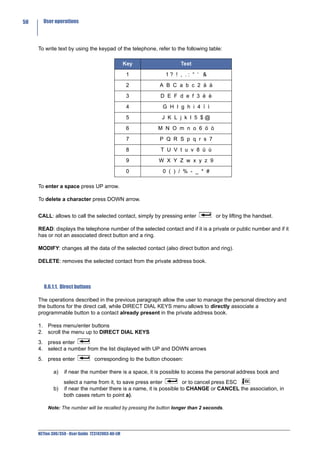
     Per inserire caratteri alfanumerici utilizzando i tasti numerici del telefono, riferirsi alla seguente tabella:

                                                   Tasto      Caratteri visualizzati nell’ordine

                                                    1                   1? ! , .: “ ‘ &

                                                    2                 A B C a b c 2 ä à

                                                    3                 D E F d e f 3 ë è

                                                    4                  G H I g h i 4 ï ì

                                                    5                  J K L j k l 5 $@

                                                    6                 M N O m n o 6 ö ò

                                                    7                 P Q R S p q r s 7

                                                    8                 T U V t u v 8 ü ù

                                                    9                 W X Y Z w x y z 9

                                                    0                  0 ( ) / % - _ * #

     Per inserire uno spazio premere il tasto freccia sù.

     Per cancellare una lettera premere il tasto freccia sinistra giù.

     L’opzione Chiama permette di effettuare la chiamata verso l’utente della rubrica locale selezionato,
     semplicemente premendo il tasto enter                      o sollevando il microtelefono.

     L’opzione Leggi permette di visualizzare il numero telefonico dell’utente della rubrica locale selezionato,
     se è un numero di rete interna o pubblica, se ha o meno un tasto associato e una suoneria dedicata.

     L’opzione Modifica permette di modificare tutti i dati dell’utente selezionato (compreso tasto di chiamata
     diretta e suoneria).

     L’opzione Cancella permette di eliminare l’utente selezionato dalla rubrica locale.


        8.6.1.1. Tasti Diretti

     Le operazioni descritte nel paragrafo precedente hanno permesso all’utente sia l’aggiornamento della
     rubrica locale che l’associazione dei tasti per la chiamata diretta, mentre il menu TASTI DIRETTI permette
     di associare direttamente un tasto funzione, ad un contratto già presente nella rubrica locale del telefono.

     1. Entrare nel menu di impostazione locale premendo i tasti menu/enter
     2. scorrere con i tasti freccia le opzioni fino alla voce TASTI DIRETTI
     3. premere il tasto enter
     4. selezionare con i tasti freccia un numero dall’elenco dei tasti che appare
     5. premere il tasto enter                in corrispondenza del tasto prescelto:

             a)   se accanto al numero scelto c’è uno spazio vuoto, il menu accede alla rubrica locale dalla quale
                  occorre selezionare un nome, confermare con il tasto enter                     o uscire da menu premendo
                  più volte il tasto ESC                o a timeout


     NETfon 300/350 - User Guide 723142003-A0-LM
Operazioni di utente         23


      b)   se accanto al numero scelto c’è un nome, viene data la possibilita di effettuare un CAMBIO
           oppure di CANCELLARE l’associazione, in entrambi i casi si torna alla situazione descritta
           nel punto a).


           IMPORTANTE! La chiamata diretta potrà essere effettuata tramite la pressione del tasto
       associato per un tempo superiore a 2 secondi; in un primo momento viene visualizzato il nome
       associato al numero telefonico, da questo istante l’utente può lasciare il tasto per rinunciare alla
       selezione oppure continuare a premerlo realizzando l’avvio della comunicazione.


8.7. Gestire il registro delle chiamate (tasto Call List)

Per accedere al registro delle chiamate occorre premere il tasto Call List                dove sono memorizzate
le ultime 10 chiamate perse, in uscita e risposte, ordinate cronologicamente dalla più recente alla più
vecchia.

La presenza del contatore delle chiamate perse non ancora visionate è segnalata nell’ultima riga del
display a riposo.
In caso di più chiamate perse, in uscita e risposte verso e da uno stesso utente, il sistema memorizza
solo l’ultima chiamata effettuata.
Una volta entrati nella lista delle chiamate (perse, in uscita o risposte), premendo il tasto enter
in corrispondenza di un qualunque numero, si ha la possibilità di eseguire una delle seguenti
operazioni:

      •    Chiama
      •    Leggi
      •    Cancella
      •    Memorizza (presente solo se il numero visualizzato non è già registrato in rubrica locale)


L’opzione Chiama permette di effettuare la chiamata semplicemente premendo il tasto enter
o sollevando il microtelefono.
L’opzione Leggi permette di visualizzare sul display il numero telefonico del chiamante, l’orario della
chiamata e se il chiamante è interno o esterno (E = esterno; I = interno).
L’opzione Cancella permette di cancellare il numero telefonico selezionato dalla lista di appartenenza.
L’opzione Memorizza permette di memorizzare il numero telefonico selezionato, nella rubrica
telefonica locale.


8.8. Ulteriori utility a disposizione dell’utente

In aggiunta ai già numerosi servizi offerti del telefono, in questo paragrafo è descritto il menu OPZIONI
che contiene un’ulteriore serie di utility alle quali può accedere l’utente per la manutenzione dei dati
contenuti nel proprio apparecchio.

1. Entrare nel menu di impostazione locale premendo i tasti menu/enter
2. scorrere con i tasti freccia le opzioni fino alla voce OPZIONI
3. premere il tasto enter
4. selezionare una delle tre opzioni proposte con i tasti freccia tra
     •    Password (v. paragrafo Modificare password per accesso al menu ed ai registri di chiamata)
     •    Cancella liste
     •    Cancella dati


                                                                              NETfon 300/350 - User Guide 723142003-A0-LM
24     Operazioni di utente


             •    Cancella tasti
             •    Filtro
     5. confermare la scelta premendo il tasto enter
     6. uscire da menu premendo il tasto ESC


        8.8.1. Cancella liste


     Nel menu Cancella liste si può scegliere di cancellare le liste delle chiamate, selezionando nell’ordine:
           •  Canc. ch. uscita (cancella la lista chiamate in uscita)
           •  Canc. ch. risposte (cancella la lista chiamate risposte)
           •  Canc. ch. perse (cancella la lista chiamate perse)
     Confermando l’operazione dopo la scelta della lista da cancellare.


        8.8.2. Cancella dati


     Tramite il menu Cancella dati è possibile cancellare tutti i dati dei servizi programmati localmente sul
     telefono (rubrica personale, liste chiamate in uscita/risposte/perse, tasti associati, impostazione filtri,
     password). Prima di effettuare la cancellazione viene richiesta la conferma.


        8.8.3. Cancella tasti


     Tramite il menu Cancella tasti è possibile cancellare tutti i tasti associati. Prima di effettuare la
     cancellazione viene richiesta la conferma.


        8.8.4. Filtro


     L’opzione Filtro permette di scegliere la tipologia delle chiamate da memorizzare per ogni lista di chiamata,
     scegliendo nell’ordine le seguenti tre opzioni:
            •   Filtro ch. uscita (filtro chiamate in uscita)
            •   Filtro ch. risposte (filtro chiamate risposte)
            •   Filtro ch. perse (filtro chiamate perse)

     quindi la tipologia di filtro, per le prime tre opzioni, è la seguente:
            •     Urb. no Int. no (nessuna memorizzazione)
            •     Urb. no Int. si (memorizza solo chiamate interne)
            •     Urb. si Int. si (memorizza tutte le chiamate)
            •     Urb. si Int. no (memorizza solo le chiamate urbane)

     oppure, come quarta opzione, la tipologia delle chiamate da visualizzare scegliendo:
           •   Filtro ch. sconosciute (filtro chiamate sconosciute in entrata)

     la tipologia di filtro in questo caso è la seguente:
             •   Identificativo int. (si visualizza l’identificativo interno della linea urbana, ad esempio “8001
                 URBANA 1”)
             •   Messaggio fisso (si visualizza “CHIAMATA SCONOSCIUTA”)


     NETfon 300/350 - User Guide 723142003-A0-LM
Istruzioni riservate all’amministratore di sistema/installatore          25


9. Istruzioni riservate all’amministratore di sistema/installatore

9.1. Connessione del telefono
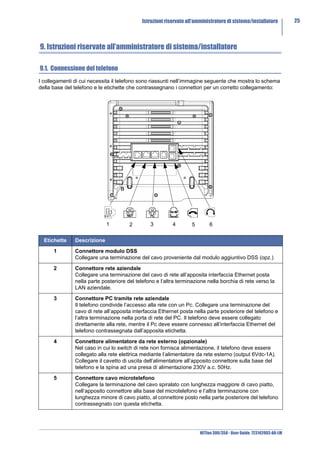
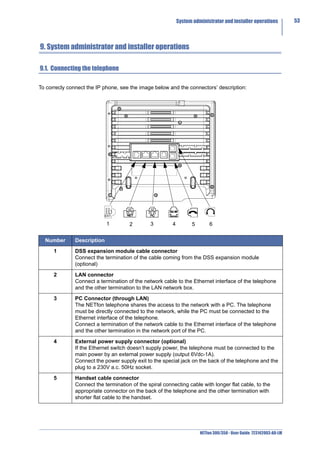
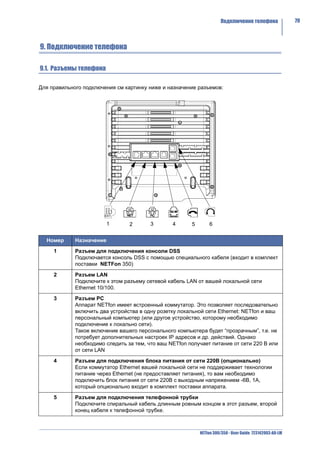
I collegamenti di cui necessita il telefono sono riassunti nell’immagine seguente che mostra lo schema
della base del telefono e le etichette che contrassegnano i connettori per un corretto collegamento:


                             1         2        3         4        5        6

  Etichette    Descrizione

      1        Connettore modulo DSS
               Collegare una terminazione del cavo proveniente dal modulo aggiuntivo DSS (opz.)

      2        Connettore rete aziendale
               Collegare una terminazione del cavo di rete all’apposita interfaccia Ethernet posta
               nella parte posteriore del telefono e l’altra terminazione nella borchia di rete verso la
               LAN aziendale.

      3        Connettore PC tramite rete aziendale
               Il telefono condivide l’accesso alla rete con un Pc. Collegare una terminazione del
               cavo di rete all’apposita interfaccia Ethernet posta nella parte posteriore del telefono e
               l’altra terminazione nella porta di rete del PC. Il telefono deve essere collegato
               direttamente alla rete, mentre il Pc deve essere connesso all’interfaccia Ethernet del
               telefono contrassegnata dall’apposita etichetta.

      4        Connettore alimentatore da rete esterno (opzionale)
               Nel caso in cui lo switch di rete non fornisca alimentazione, il telefono deve essere
               collegato alla rete elettrica mediante l’alimentatore da rete esterno (output 6Vdc-1A).
               Collegare il cavetto di uscita dell’alimentatore all’apposito connettore sulla base del
               telefono e la spina ad una presa di alimentazione 230V a.c. 50Hz.

      5        Connettore cavo microtelefono
               Collegare la terminazione del cavo spiralato con lunghezza maggiore di cavo piatto,
               nell’apposito connettore alla base del microtelefono e l’altra terminazione con
               lunghezza minore di cavo piatto, al connettore posto nella parte posteriore del telefono
               contrassegnato con questa etichetta.


                                                                       NETfon 300/350 - User Guide 723142003-A0-LM
26     Istruzioni riservate all’amministratore di sistema/installatore


            6           Connettore cavo cuffia
                        Collegare la terminazioni del cavo della cuffia nell’apposito connettore posto nella
                        parte posteriore del telefono contrassegnato con questa etichetta.
                        La cuffia da utilizzare è la seguente: Plantronix - Supraplus H251 N/A + cavo
                        adattatore cod. 32145-01 (codice 136800008).


     9.2. Connessione del modulo DSS

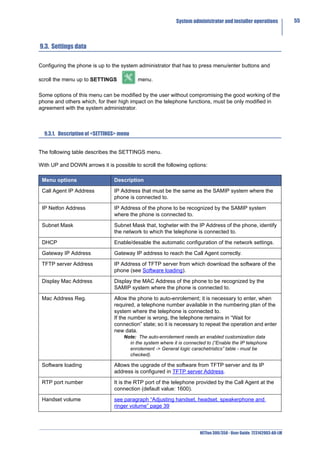
     Il modulo di espansione DSS fornisce 24 tasti programmabili (oltre agli 8 presenti nell’apparecchio di base)
     che, opportunamente personalizzati, quando premuti avviano i servizi per i quali sono stati configurati.
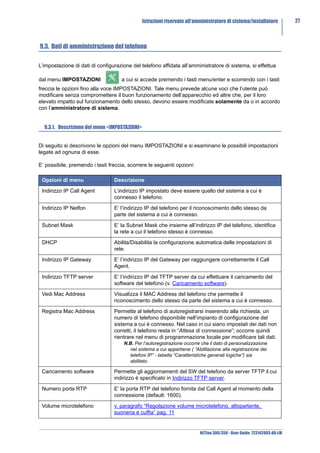
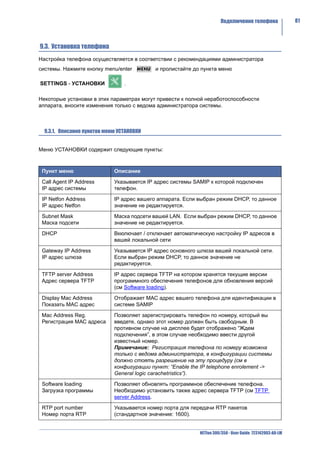
     Nell’immagine seguente viene mostrato lo schema della base del DSS e le etichette che contrassegnano i
     connettori per un corretto collegamento.

     Il numero massimo di moduli opzionali DSS è di 1 per il NETfon 350 e di 2 per il NETfon 300.


                                                                                                 2
                          1


       Etichette        Descrizione

            1           Connettore verso modulo DSS
                        Permette di collegare il modulo DSS ad un ulterione modulo DSS (il telefono supporta
                        in totale 2 DSS).

            2           Connettore verso telefono
                        Permette di collegare il modulo DSS al telefono di base (sia esso un NETfon 300 o un
                        NETfon 350).


     NETfon 300/350 - User Guide 723142003-A0-LM
Istruzioni riservate all’amministratore di sistema/installatore         27


9.3. Dati di amministrazione del telefono

L’impostazione di dati di configurazione del telefono affidata all’amministratore di sistema, si effettua

dal menu IMPOSTAZIONI               a cui si accede premendo i tasti menu/enter e scorrendo con i tasti
freccia le opzioni fino alla voce IMPOSTAZIONI. Tale menu prevede alcune voci che l’utente può
modificare senza compromettere il buon funzionamento dell’apparecchio ed altre che, per il loro
elevato impatto sul funzionamento dello stesso, devono essere modificate solamente da o in accordo
con l’amministratore di sistema.


  9.3.1. Descrizione del menu <IMPOSTAZIONI>


Di seguito si descrivono le opzioni del menu IMPOSTAZIONI e si esaminano le possibili impostazioni
legate ad ognuna di esse.

E’ possibile, premendo i tasti freccia, scorrere le seguenti opzioni:

 Opzioni di menu                 Descrizione

 Indirizzo IP Call Agent         L’indirizzo IP impostato deve essere quello del sistema a cui è
                                 connesso il telefono.

 Indirizzo IP Netfon             E’ l’indirizzo IP del telefono per il riconoscimento dello stesso da
                                 parte del sistema a cui è connesso.

 Subnet Mask                     E’ la Subnet Mask che insieme all’indirizzo IP del telefono, identifica
                                 la rete a cui il telefono stesso è connesso.

 DHCP                            Abilita/Disabilita la configurazione automatica delle impostazioni di
                                 rete.

 Indirizzo IP Gateway            E’ l’indirizzo IP del Gateway per raggiungere correttamente il Call
                                 Agent.

 Indirizzo TFTP server           E’ l’indirizzo IP del TFTP server da cui effettuare il caricamento del
                                 software del telefono (v. Caricamento software).

 Vedi Mac Address                Visualizza il MAC Address del telefono che permette il
                                 riconoscimento dello stesso da parte del sistema a cui è connesso.

 Registra Mac Address            Permette al telefono di autoregistrarsi inserendo alla richiesta, un
                                 numero di telefono disponibile nell’impianto di configurazione del
                                 sistema a cui è connesso. Nel caso in cui siano impostati dei dati non
                                 corretti, il telefono resta in “Attesa di connessione”; occorre quindi
                                 rientrare nel menu di programmazione locale per modificare tali dati.
                                     N.B. Per l’autoregistrazione occorre che il dato di personalizzazione
                                       nel sistema a cui appartiene ( “Abilitazione alla registrazione dei
                                       telefoni IP” - tabella “Caratteristiche generali logiche”) sia
                                       abilitato.

 Caricamento software            Permette gli aggiornamenti del SW del telefono da server TFTP il cui
                                 indirizzo è specificato in Indirizzo TFTP server.

 Numero porta RTP                E’ la porta RTP del telefono fornita dal Call Agent al momento della
                                 connessione (default: 1600).

 Volume microtelefono            v. paragrafo “Regolazione volume microtelefono, altoparlante,
                                 suoneria e cuffia” pag. 11


                                                                         NETfon 300/350 - User Guide 723142003-A0-LM
28     Istruzioni riservate all’amministratore di sistema/installatore


      Volume speaker                        v. paragrafo “Regolazione volume microtelefono, altoparlante,
                                            suoneria e cuffia” pag. 11

      Abilitazione cuffia                   Attiva/disattiva la modalità cuffia(1).

      Volume cuffia                         v. paragrafo “Regolazione volume microtelefono, altoparlante,
                                            suoneria e cuffia” pag. 11

      Volume suoneria                       v. paragrafo “Regolazione volume microtelefono, altoparlante,
                                            suoneria e cuffia” pag. 11

      Tono di chiamata                      v. paragrafo “Suonerie” pag. 9

      Contrasto display                     v. paragrafo “Contrasto display” pag. 10

      Lingua                                v. paragrafo “Lingua” pag. 10

      Quality of service                    Disattiva/attiva il servizio di Quality Of Service.

      Informazioni                          Permette la visualizzazione delle versioni del firmware, del kernel e
                                            dell’uBoot caricate nel telefono.

      Call Agent backup                     E’ l'indirizzo del Call Agent secondario (di backup) che permette al
                                            telefono che non riesce a collegarsi al Call Agent principale dopo un
                                            certo numero di tentativi, tenta il collegamento verso l'indirizzo del
                                            Call Agent secondario. In caso di mancata risposta anche del Call
                                            Agent secondario, il telefono torna ad interrogare il Call Agent
                                            principale e così via.

      Vedi connessione                      Permette la visualizzazione del tipo di connessione che può essere
                                            PRINCIPALE (se il telefono è collegato al Call Agent principale)
                                            oppure SECONDARIA (se il telefono è collegato al Call Agent di
                                            backup)

          (1) Il telefono si intende in modalità cuffia se è collegata una cuffia al connettore dedicato e il tasto cuffia è
             acceso.


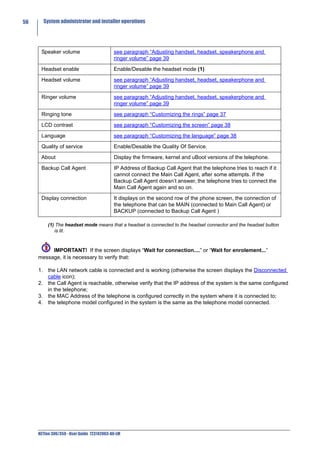
           IMPORTANTE! Se sul display compare la scritta “Attesa connessione....” oppure “Attesa
     registrazione...” occorre verificare che:

     1. il cavo di collegamento alla rete LAN sia collegato e funzionante (in caso contrario appare sul display
        l’icona Cavo scollegato);
     2. il Call Agent sia raggiungibile, altrimenti verificare che l’indirizzo IP del sistema sia lo stesso
        configurato nel telefono;
     3. il MAC Address del telefono sia configurato correttamente nel sistema a cui appartiene;
     4. il modello del telefono configurato nel sistema sia uguale al modello collegato.


     NETfon 300/350 - User Guide 723142003-A0-LM
Performance information            29


                                              ENGLISH

                             NETfon 300/350 - User guide


1. Performance information


NETfon 300/350 phone is an IP full-feature telephone planned for SAMIP SELTATEL family systems.

See below the main physical specifications:
     •    Graphic Display 128x64
     •    Adjustable phone base angle up to 10 positions
     •    8 programmable buttons illuminate
     •    13 pre-programmed buttons
     •    Led for VM messages
     •    Central blue light active in different communication phases
     •    Handsfree full duplex
     •    Switch 10/100 Mbit/s
     •    Headset connector and dedicated button to use it
     •    13 polyphonic ringtones
     •    PoE 802.3af - Class Power Level 0
     •    DSS expansion module with 24 programmable buttons (optional)
     •    External power supply (optional)
     •    Wall mounting kit (optional for NETfon 300)

NETfon 350 is different from NETfon 300 because one DSS module is included and provides an
expansion module with 24 programmable buttons; so user instructions described in this guide are
valide for both models.

The first part of this guide describes the physical specification of the telephone, the functions available
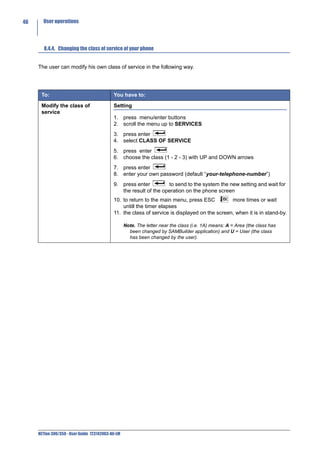
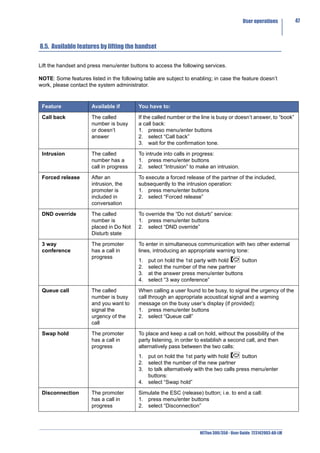
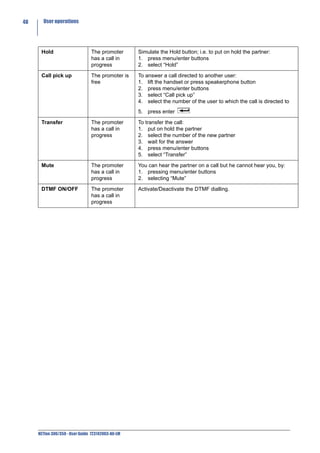
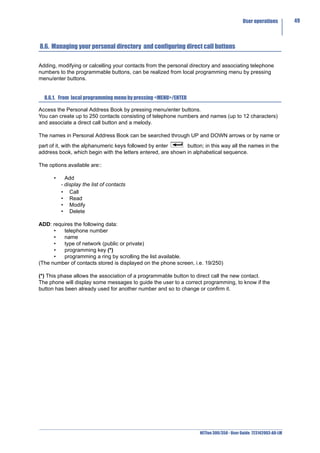
by pressing the buttons and the graphic icons on the phone screen; the second part describes the
operations which allow the operator to use the telephone immediately and then the advanced
operations as the consultation of the vocal messages and the management of the corporate and
personal directory; finally, the third part describes the physical connections and the configurations of
the IP phone and it is mainly dedicated to the installers and the system administrators.


        IMPORTANT!
The correct functionality of the IP phone is subject to the correct SAMIP system customization to which
it is connected to, by the system administrator.


                                                                       NETfon 300/350 - User Guide 723142003-A0-LM
30     Safety


     2. Safety


     Please, read the following safety advice carefully before using the telephone:
           •    Read these instructions and keep them in a safe place.
           •    Keep the containing box of the telephone.
           •    Never open up the telephone yourself and have your service work carried out by a specialist.
           •    Place your telephone on a flat and non-slip surface.
           •    Ensure that your telephone is not positioned in direct sunlight or near other heat sources.
           •    Do not install or use your telephone in areas where there is a risk of explosion.
           •    Protect the telephone from humidity, water, steam, dust and aggressive liquids.
           •    Do not place the telephone near electromagnetic fields (electric engines, household units). This
               could impair voice quality.
           •    Avoid using the telephone near radios, TV and video units.
           •    Do not use the telephone in the vicinity of water or if your hands are wet.
           •    You can clean your telephone, after having disconnected it, using a soft, slightly damp or
               antistatic cloth.
           •    Never use cleaning solvents, alcohol, petrol or any other chemical substances to clean the
               telephone.
           •    Use the telephone in a temperature range from +5°C to +40°C.
           •    To power, only connect the provvided power supply.

     Warning! For pluggable equipment: that the socket-outlet shall be installed near the equipment and shall
     easily accessible.
     This telephone is intended exclusively for the use with Seltatel SAMIP platforms.


     3. Conformity declaration

     The SELTATEL spa - Via Nazionale, Km 404,500 - 64018 Tortoreto Lido (TE), Italy, declares under its
     responsibility that the product NETfon 300/NETfon 350 is compliant to the CE directive 1999/05/CE of the
     European Parliament and the European Commission dated 9th of March 1999 for radio equipment and for
     telecommunications terminal equipment and the reciprocal recognition of their conformity.
     The original conformity declaration is conserved in the Seltatel archive - Via Nazionale, Km 404,500 -
     64018 Tortoreto Lido (TE), Italy.
     Affixing the mark:


     on the product, object of the present declaration, guarantees the observance of the directive 1999/05/CE".


     4. Class A information product

     This is a Class A product. In a domestic environment this product may cause radio interference in which
     case the user may be required to take adequate measures.


     NETfon 300/350 - User Guide 723142003-A0-LM
Safety declaration         31


5. Safety declaration

If the phone is powered directly from the LAN connector (Power over Ethernet) the power sourcing
equipment shall conform to the standard IEEE 802.3af and classified as a Limited Power Source in
accordance with IEC 60950-1:2001.


6. Environmental impacts and end life disposal


The product, at the end of its life-cycle must not be disposed of in the environment; its disposal must
occur according to article 13 of the Law Decree 25th July 2005, n. 151 “Implementation of the directive
2002/95/CE, 2002/96/CE and 2003/108/CE, relative to the reduction in the use of dangerous
substances in electrical and electronic equipment, as well as the disposal of refuse”.
The crossed refuse bin symbol shown on the equipment or on its packing and also in the following
figure, indicates that the product at the end of its useful life must be collected separately from other
refuse.


The differential collection of this equipment when it has reached the end of its life-cycle is organized
and managed by the supplier. The user that wants to dispose of this equipment must contact the
supplier and follow the method that they have adopted for the separated collection of the equipment
that has reached the end of its life-cycle.
A suitable separated collection to start off the process of equipment recycling, its treatment and a
compatible environmental disposal helps to avoid possible negative effects on the environment and on
health, and encourages the reuse and/or recycle of the materials forming the equipment.
The abusive disposal of the product by the owner brings the application of administrative sanctions
defined by the laws in force.


                                                                     NETfon 300/350 - User Guide 723142003-A0-LM
32     An overview of telephone


     7. An overview of telephone

     7.1. Understanding buttons


                                                    DESCRIPTION

                             8 Programmable buttons + plus 24 buttons of DSS module
                             (up to the system administrator)
                             Depending on configuration, when pressed, the features for which they are set
                             up, start: ( i.e.: Park, Do-not-disturb, Microphone, Silence ringing, etc.).

                             (up to the user from the local programming menu)
                             A programmable button already configured for a feature, can be also configured
                             for the direct trunk selection; such a number will be recalled by pressing the
                             button longer than 2 seconds. The name associated to the trunk selection is
                             first displayed on the screen so the user can decide to stop the call or continue
                             pressing it to make the call.

                             Menu
                             Enter the programming menu, by pressing the button longer than 2 seconds.

                             Enter
                             Confirm the operation/Enter the programming menu.

                             Hold
                             Put on hold the call in progress;
                             Resume the call from hold.

                             Release/Esc
                             End the call in progress;
                             Return to upper level;
                             Exit from the telephone configuration;
                             Engage/release the line in headset mode (1).


     NETfon 300/350 - User Guide 723142003-A0-LM
An overview of telephone          33


                   Call list
                   Access the call list (missed / received / made) to dial from it, edit or delete the
                   displayed names.

                   Voice Mail
                   If it is flashing, it indicates a new voice message and allows to listen to it and
                   access the voice message service.

                   Speakerphone
                   Answer a call or engage the line without lifting the handset;
                   Allow other people to listen to your own conversation.

                   Mute
                   Toggle microphone on/off.

                   Headset
                   Toggle the headset mode(1) on/off

                   Adjusting volume
                   Adjust the handset, headset, speakerphone and ringer volume.

                   Navigation buttons
                   Up arrow: Scroll up to see menus and highlight items.
                   Down arrow: Scroll down to see menus and highlight items.

   (1) The headset mode means that a headset is connected to the headset connector and the headset is
      lit.


7.2. Understanding state icons


      IMPORTANT! To be sure that the telephone is working and is ready to the use, verify that the
screen displays date, time and telephone number; otherwise contact the system administrator.

The following image shows the stand-by screen of telephone and the table below describes icons’
state of the telephone.


                                                                 Time + Icons
                                                                         Date

                                                   Telephone number + name
                                            Belonging class + state of service
                                                      Number of missed calls


                                                                                 NETfon 300/350 - User Guide 723142003-A0-LM
34     An overview of telephone


                                                    DESCRIPTION


                             Disconnected cable
                             = The network cable is disconnected or doesn’t work.


                             CA Main
                             = The telephone is linked to Main Call Agent.


                             CA Backup
                             = The telephone is linked to Backup Call Agent.


                             Handset
                             = Handset in use.


                             Headset
                             = Headset in use.


                             Mute
                             Toggles the microphone on or off. When the microphone is muted, the partner
                             cannot listen to the conversation.


                             Hold
                             = You have a call on hold.


                             Speakerphone
                             = the handsfree mode is in use.


                             Password
                             = The access to telephone programming menu and call list is protected by
                             password (default: empty).


                             Meeting mode
                             = The ringtone is set in meeting mode (an incoming call rings once and then
                             flashes only).


                             Silent mode
                             = The ringtone is set in silent mode (an incoming call flashes only).


                             DTMF ON
                             = The DTMF dialling is active.


     NETfon 300/350 - User Guide 723142003-A0-LM
An overview of telephone          35


7.3. Quick access to local programming menu


                                     DESCRIPTION

        and     By pressing Menu/Enter + number of menu item(*) you directly access the
                menu item corresponding to the number selected.

                (*) Legend:
                1 = LOCAL TEL. BOOK
                2 = MAIN TEL. BOOK
                3 = CALL REGISTER
                4 = DIRECT DIAL KEYS
                5 = OPTIONS
                6 = SERVICES
                7 = PROFILES
                8 = SETTINGS


                Up/Down arrow: quick access to local programming menu.


                                                            NETfon 300/350 - User Guide 723142003-A0-LM
36     An overview of telephone


     7.4. Install the support of the phone

     You can choose ten different positions to install the support of the phone, to offer the user a wide range of
     solutions that will adjust the inclination to a proper use of the phone and a perfect display of the screen.

     See, in the following images, ten different possibilities for installing the support to the rear phone.


     and also the minimum and maximum inclination that can be optained and the installation details.


     NETfon 300/350 - User Guide 723142003-A0-LM
User operations        37


8. User operations

8.1. Changing settings


  8.1.1. Customizing your password


To access the programming local menu (menu/enter buttons) and the call list (call list           button) you
can customize a password in the following way:

1. press menu/enter buttons
2. scroll the menu up to OPTIONS
3. press enter
4. scroll the menu up to PASSWORD
5. press enter
6. the first time you change the password you can enter up to 6 digits (view only asterisks “*”), then
   enter the same password again to confirm it (if the digits are wrong the screen indicates the
   message “Confirm error”); the following times it is possible to change it by entering a new one both
    for (Password_) and (Confirm_) or cancel it by pressing enter            both for (Password_) and
    (Confirm_), without entering any digits
7. to confirm press enter
8. to return to the main menu, press ESC            more times or wait untill the timer elapses.


  8.1.2. Customizing the rings


Set the rings from 13 melodies, for internal and trunk calls, in the following way:

1. press menu/enter buttons
2. scroll the menu up to SETTINGS
3. press enter
4. scroll the menu up to RINGING TONE
5. press enter
6. choose between <Internal calls> and <Trunk calls>
7. to confirm press enter
8. to choose scroll the 13 melodies
9. to confirm press enter
10. to exit the menu press ESC
11. <Save the changes?> to save press enter              , to cancel press ESC           .


                                                                      NETfon 300/350 - User Guide 723142003-A0-LM
38     User operations


        8.1.3. Customizing the screen


     Adjust the contrast of the screen in the following way:

     1. press menu/enter buttons
     2. scroll the menu up to SETTINGS
     3. press enter
     4. scroll the menu up to LCD CONTRAST
     5. press enter
     6. to make adjustment press UP or DOWN arrows
     7. to confirm press enter
     8. to exit the menu press ESC
     9. <Save the changes?> to save press enter                    , to cancel press ESC      .


        8.1.4. Customizing the language


     Change the language of the screen in the following way:

     1. press menu/enter buttons
     2. scroll the menu up to SETTINGS
     3. press enter
     4. scroll the menu up to LANGUAGE
     5. the language in use is displayed, to choose the new language scroll the list
     6. to confirm press enter
     7. to exit the menu press ESC
     8. <Save the changes?> to save press enter                    , to cancel press ESC      .


        8.1.5. Customizing call ring pattern


     Change the ring pattern (flash-only, ring once, beep-only, etc.) in the following way:

     1. press menu/enter buttons
     2. scroll the menu up to PROFILES
     3. press enter
     4. choose one of the three options GENERAL - MEETING - SILENT (*)
     5. to confirm press enter
     6. to exit the menu press ESC                 or wait untill the timer elapses

     (*)
     General
     It is the default ring pattern and does not change the ring set up by the user.
     Meeting
     It makes the ringer last only 2 seconds.
     Silent
     The ringer is off, the incoming call is signalled by the led flashing blue.


     NETfon 300/350 - User Guide 723142003-A0-LM
User operations        39


  8.1.6. Adjusting handset, headset, speakerphone and ringer volume


Adjust the volume in the following way:

1. press menu/enter buttons
2. scroll the menu up to SETTINGS
3. press enter
4. choose one of the options: HANDSET VOLUME / SPEAKER VOLUME / RINGER VOLUME /
   HEADSET VOLUME
5. press enter
6. the screen displays a status bar with the actual value, to make adjustment press UP or DOWN
   arrows
7. to confirm press enter
8. to exit the menu press ESC
9. <Save the changes?> to save press enter              , to cancel press ESC            .


                                                                      NETfon 300/350 - User Guide 723142003-A0-LM
40     User operations


     8.2. Call handling

     The following instructions describe the basic operations to handle a call with the telephone.


      To:                                   You have to:

      Make a phone call using               • lift the handset and dial the telephone number
      the handset                           or
                                            • press speakerphone           button and dial the telephone number
                                            or
                                            • directly dial the telephone number, only with automatic handsfree (1)
                                            or
                                            • lift the handset and press the button programmed with the number
                                               required
                                            or
                                            • directly press the button programmed with the number required, only
                                               with automatic handsfree (1).

                                                   Note: For outgoing trunk calls, the telephone number must be preceded
                                                     by the generic trunk line access digit (i.e. 0).

      Make a phone call using a
                                            • press ESC              and dial the telephone number
      headset (2)
                                            or
                                            • press speakerphone           button and dial the telephone number
                                            or
                                            • directly dial the telephone number, only with automatic handsfree (1)
                                            or
                                            •      press ESC         and press the button programmed with the number
                                                   required
                                            or
                                            • directly press the button programmed with the number required, only
                                               with automatic handsfree (1).

                                                   Note: For outgoing trunk calls, the telephone number must be preceded
                                                     by the generic trunk line access digit (i.e. 0).

      Make a phone call from                1. press one of the arrows buttons to access the personal directory
      personal directory                    2. scoll the names/numbers
                                            3. choose the name/number and confirm with enter
                                            4. make the phone call by pressing enter


     NETfon 300/350 - User Guide 723142003-A0-LM
User operations       41


Make a phone call from        It is possible to make a phone call from the address book of SAMIP
corporate directory           system (speed numbers[*]). Search the names in the corporate directory
                              by scrolling the list with the UP and DOWN arrows button or by editing,
                              with the alphanumeric keys, a name or a part of it and then press enter
                                     . Subsequently all the stored names, alphabetically ordered, are
                              displayed starting from the name required.
                              1. press menu/enter buttons to access the corporate directory
                              2. scroll the menu up to MAIN TEL. BOOK
                              3. scroll the name/number with UP and DOWN arrows
                              4. make the phone call by pressing enter

                              [*] The telephone must be enabled to access the speed numbers table
                              which contains the name to call; if near the name there is an “X”, it
                              indicates that the number cannot be read and the call cannot be made
                              (up to the system administrator).

End a phone call               • return the handset to its cradle.
                               or
                               • from automatic handsfree mode press speakerphone
                               or
                               • press ESC
                               or
                               • from headset mode(2): press ESC               .

Answer a phone call            • lift the handset
                               or
                               • press speakerphone
                               or
                               • from headset mode(2): press ESC

Hold and resume the call
                              1. put the call on hold with hold        button
                              2. resume the call from hold with hold            button.

Enable/Disable
microphone (mute)             1. enable and desable the feature with               button.

Transfer the phone call in
                              1. put on hold the call in progress with hold     button
progress
                              2. dial the number of the extension to call
                              3. wait for the answer and hang up or without waiting for the answer,
                                 hang up, only if the telephone is enabled to automatic transfer (1).

Redial last number            1. press pound [#].

  (1) It is a SAMBuilder customation data from (contact your system administrator).
  (2) The headset mode means that a headset is connected to the headset connector and the headset
     button is lit.


                                                                     NETfon 300/350 - User Guide 723142003-A0-LM
42     User operations


     8.3. Listening to your voice messages

     The flashing Voice Mail button indicates a new voice message in your voice mailbox, to listen to it press

     the voice mail            button and follow the voice instructions.


     8.4. Available features with the handset in place


        8.4.1. Enblock call


     The service enables the user to enter the telephone number to be called and then dial it after pressing the
     enter button; when the call is released, the service is desabled.


      To:                                   You have to:

      Make an enblock call                  Setting

                                            1. press menu/enter buttons
                                            2. scroll the menu up to SERVICES
                                            3. press enter
                                            4. choose ENBLOCK CALL
                                            5. press enter
                                            6. enter the telephone number to call
                                            7. dial the number by lifting the handset or by pressing enter
                                                       (only from automatic handsfree mode).
                                            8. to return to the main menu or cancel, press ESC          more times
                                               or wait untill the timer elapses.


        8.4.2. Forwarding calls


     The user can set up and cancel the service in the following way.

     It is possible to set up / cancel three types of forwarding calls:
             •   Always = the call is forwarded immediately on its arrival to another number.
             •   On busy = the call is forwarded on its arrival to another number if the called is busy.
             •   On no reply = the call is forwarded on its arrival to another number if it remains unanswered
                 after a programmable period of time.


     NETfon 300/350 - User Guide 723142003-A0-LM
User operations         43


To:                   You have to:

Forwarding calls to   Setting
another number
                      1. press menu/enter buttons
                      2. scroll the menu up to SERVICES
                      3. press enter
                      4. scroll the menu up to CALL FORWARD
                      5. scroll the three options:
                         - Always
                         - On busy
                         - On no reply
                      6. choose one of them and confirm with enter
                      7. the actual data displays at the top of the screen while at the bottom of
                         the screen there is the empty field
                      8. enter the data required: a telephone number and a timer in seconds
                         (only used for the forwarding on no reply)
                      9. confirm with enter
                      10. with UP and DOWN arrows select ACTIVE (ecluded “Always”)
                      11. press enter            to send to the system the new setting and wait
                          for the result of the operation on the phone screen (ecluded
                          “Always”)
                      12. to return to the main menu, press ESC              more times or wait
                          untill the timer elapses

                          Note: - The setting of a “forwarding calls always” is indicated on the
                            phone screen in the following way, i.e. 20100-->20104; the meaning
                            is: all the calls directed to 20100 are diverted to 20104.
                              - The led of bottons, if programmed with forward on busy and on no
                            reply, are lit when the required service is accepted by the system.


                                                            NETfon 300/350 - User Guide 723142003-A0-LM
44     User operations


                                            Cancel

                                            1. repeat from step 1. to 6. above described
                                            2. to cancel:
                                                     •    forward always press enter        and wait for the result of
                                                          the operation on the phone screen
                                                     •    forward on no reply press enter            and enter a value in
                                                          the timer field; press enter       ; select NOT ACTIVE with
                                                          UP and Down arrows; press enter           to send to the
                                                          system the new setting and wait for the result of the operation
                                                          on the phone screen
                                                     •    forward on busy press enter            ; select NOT ACTIVE
                                                          with UP and Down arrows; press enter            to send to the
                                                          system the new setting and wait for the result of the operation
                                                          on the phone screen.
                                            3. to return to the main menu, press ESC               more times or wait
                                               untill the timer elapses

                                                   Note: - The led of bottons programmed with forward on busy and on no
                                                     reply, turn off when the service is cancelled.


        8.4.3. Do Not Disturb


     The user can set up and cancel the Do Not Disturb service in the following way.

     A user placed in the “Do Not Disturb” state, cannot be called, but can perform normal outgoing telephone
     traffic, including the possibility to book a call completion upon finding a line/ user busy; by lifting the
     handset, the difference consists of the tone: confirmation tone can be heard instead of dialling tone.

     An enabled user can call a user placed in the “Do Not Disturb” state, by overriding the block imposed on
     calls.


     NETfon 300/350 - User Guide 723142003-A0-LM
User operations         45


To:                       You have to:

Activate Do Not Disturb   Setting

                          1. press menu/enter buttons
                          2. scroll the menu up to SERVICES
                          3. press enter
                          4. select DO NOT DISTURB
                          5. confirm with enter
                          6. with UP and DOWN arrows select ACTIVE
                          7.    press enter           to send to the system the new setting and wait
                               for the result of the operation on the phone screen
                          8. to return to the main menu, press ESC               more times or wait
                             untill the timer elapses


                          Cancel

                          1. repeat from step 1. to 5. above described
                          2. select NOT ACTIVE with UP and Down arrows
                          3.    press enter           to send to the system the new setting and wait
                               for the result of the operation on the phone screen
                          4. to return to the main menu, press ESC               more times or wait
                             untill the timer elapses


                                                                NETfon 300/350 - User Guide 723142003-A0-LM
46     User operations


        8.4.4. Changing the class of service of your phone


     The user can modify his own class of service in the following way.


      To:                                   You have to:

      Modify the class of                   Setting
      service
                                            1. press menu/enter buttons
                                            2. scroll the menu up to SERVICES
                                            3. press enter
                                            4. select CLASS OF SERVICE
                                            5. press enter
                                            6. choose the class (1 - 2 - 3) with UP and DOWN arrows
                                            7. press enter
                                            8. enter your own password (default “your-telephone-number”)
                                            9. press enter         to send to the system the new setting and wait for
                                               the result of the operation on the phone screen
                                            10. to return to the main menu, press ESC          more times or wait
                                                untill the timer elapses
                                            11. the class of service is displayed on the screen, when it is in stand-by.

                                                   Note. The letter near the class (i.e. 1A) means: A = Area (the class has
                                                     been changed by SAMBuilder application) and U = User (the class
                                                     has been changed by the user).


     NETfon 300/350 - User Guide 723142003-A0-LM
User operations         47


8.5. Available features by lifting the handset

Lift the handset and press menu/enter buttons to access the following services.

NOTE: Some features listed in the following table are subject to enabling; in case the feature doesn’t
work, please contact the system administrator.


 Feature              Available if        You have to:

 Call back            The called          If the called number or the line is busy or doesn’t answer, to “book”
                      number is busy      a call back:
                      or doesn’t          1. presso menu/enter buttons
                      answer              2. select “Call back”
                                          3. wait for the confirmation tone.

 Intrusion            The called          To intrude into calls in progress:
                      number has a        1. press menu/enter buttons
                      call in progress    2. select “Intrusion” to make an intrusion.

 Forced release       After an            To execute a forced release of the partner of the included,
                      intrusion, the      subsequently to the intrusion operation:
                      promoter is         1. press menu/enter buttons
                      included in         2. select “Forced release”
                      conversation

 DND override         The called          To override the “Do not disturb” service:
                      number is           1. press menu/enter buttons
                      placed in Do Not    2. select “DND override”
                      Disturb state

 3 way                The promoter        To enter in simultaneous communication with two other external
 conference           has a call in       lines, introducing an appropriate warning tone:
                      progress
                                          1.   put on hold the 1st party with hold   button
                                          2.   select the number of the new partner
                                          3.   at the answer press menu/enter buttons
                                          4.   select “3 way conference”

 Queue call           The called          When calling a user found to be busy, to signal the urgency of the
                      number is busy      call through an appropriate acoustical signal and a warning
                      and you want to     message on the busy user’s display (if provided):
                      signal the          1. press menu/enter buttons
                      urgency of the      2. select “Queue call”
                      call

 Swap hold            The promoter        To place and keep a call on hold, without the possibility of the
                      has a call in       party listening, in order to establish a second call, and then
                      progress            alternatively pass between the two calls:
                                          1. put on hold the 1st party with hold        button
                                          2. select the number of the new partner
                                          3. to talk alternatively with the two calls press menu/enter
                                             buttons:
                                          4. select “Swap hold”

 Disconnection        The promoter        Simulate the ESC (release) button; i.e. to end a call:
                      has a call in       1. press menu/enter buttons
                      progress            2. select “Disconnection”


                                                                     NETfon 300/350 - User Guide 723142003-A0-LM
48     User operations


      Hold                      The promoter       Simulate the Hold button; i.e. to put on hold the partner:
                                has a call in      1. press menu/enter buttons
                                progress           2. select “Hold”

      Call pick up              The promoter is    To answer a call directed to another user:
                                free               1. lift the handset or press speakerphone button
                                                   2. press menu/enter buttons
                                                   3. select “Call pick up”
                                                   4. select the number of the user to which the call is directed to
                                                   5. press enter

      Transfer                  The promoter       To transfer the call:
                                has a call in      1. put on hold the partner
                                progress           2. select the number of the new partner
                                                   3. wait for the answer
                                                   4. press menu/enter buttons
                                                   5. select “Transfer”

      Mute                      The promoter       You can hear the partner on a call but he cannot hear you, by:
                                has a call in      1. pressing menu/enter buttons
                                progress           2. selecting “Mute”

      DTMF ON/OFF               The promoter       Activate/Deactivate the DTMF dialling.
                                has a call in
                                progress


     NETfon 300/350 - User Guide 723142003-A0-LM
User operations         49


8.6. Managing your personal directory and configuring direct call buttons

Adding, modifying or calcelling your contacts from the personal directory and associating telephone
numbers to the programmable buttons, can be realized from local programming menu by pressing
menu/enter buttons.


  8.6.1. From local programming menu by pressing <MENU>/ENTER

Access the Personal Address Book by pressing menu/enter buttons.
You can create up to 250 contacts consisting of telephone numbers and names (up to 12 characters)
and associate a direct call button and a melody.

The names in Personal Address Book can be searched through UP and DOWN arrows or by name or
part of it, with the alphanumeric keys followed by enter      button; in this way all the names in the
address book, which begin with the letters entered, are shown in alphabetical sequence.

The options available are::

      •     Add
          - display the list of contacts
          • Call
          • Read
          • Modify
          • Delete

ADD: requires the following data:
      •  telephone number
      •  name
      •  type of network (public or private)
      •  programming key (*)
      •  programming a ring by scrolling the list available.
(The number of contacts stored is displayed on the phone screen, i.e. 19/250)

(*) This phase allows the association of a programmable button to direct call the new contact.
The phone will display some messages to guide the user to a correct programming, to know if the
button has been already used for another number and so to change or confirm it.


                                                                    NETfon 300/350 - User Guide 723142003-A0-LM
50     User operations


     To write text by using the keypad of the telephone, refer to the following table:

                                                   Key               Text

                                                    1         1? ! , .: “ ‘ &

                                                    2       A B C a b c 2 ä à

                                                    3       D E F d e f 3 ë è

                                                    4        G H I g h i 4 ï ì

                                                    5        J K L j k l 5 $@

                                                    6      M N O m n o 6 ö ò

                                                    7       P Q R S p q r s 7

                                                    8       T U V t u v 8 ü ù

                                                    9       W X Y Z w x y z 9

                                                    0        0 ( ) / % - _ * #

     To enter a space press UP arrow.

     To delete a character press DOWN arrow.


     CALL: allows to call the selected contact, simply by pressing enter             or by lifting the handset.

     READ: displays the telephone number of the selected contact and if it is a private or public number and if it
     has or not an associated direct button and a ring.

     MODIFY: changes all the data of the selected contact (also direct button and ring).

     DELETE: removes the selected contact from the private address book.


        8.6.1.1. Direct buttons

     The operations described in the previous paragraph allow the user to manage the personal directory and
     the buttons for the direct call, while DIRECT DIAL KEYS menu allows to directly associate a
     programmable button to a contact already present in the private address book.

     1. Press menu/enter buttons
     2. scroll the menu up to DIRECT DIAL KEYS
     3. press enter
     4. select a number from the list displayed with UP and DOWN arrows
     5. press enter               corresponding to the button choosen:

             a)   if near the number there is a space, it is possible to access the personal address book and
                  select a name from it, to save press enter          or to cancel press ESC
             b)   if near the number there is a name, it is possible to CHANGE or CANCEL the association, in
                  both cases return to point a).

          Note: The number will be recalled by pressing the button longer than 2 seconds.


     NETfon 300/350 - User Guide 723142003-A0-LM
User operations         51


8.7. Managing the Call List

Access the call list by pressing the Call List      where the last 10 missed, received and made calls
are chronologically ordered from the most recent to the oldest.
The number of missed calls is displayed on the last row of the phone screen, until they will be
controlled.
Only the last call missed, received or made from/to the same Caller-ID is stored by the system.


From the Call List, the following operations are possible, by pressing enter            :

      •    Call
      •    Read
      •    Delete
      •    Store (only present if the displayed number is not already stored in the personal address
           book)


CALL: allow to make the call towards the selected number, simply by pressing enter                or by
lifting the handset.
READ: display the telephone number of the caller, if it is internal or external (E or I), time and date of
the call.
DELETE: cancel the selected telephone number from the list.
STORE: memorize the selected telephone number, in the personal address book.


8.8. Additional options

This paragraph describes the OPTIONS menu which provides some additional features to manage the
data of the telephone.

1. Press menu/enter buttons
2. scroll the menu up to OPTIONS
3. press enter
4. select one of the items:
     •    Password (see paragraph Customizing your password)
     •    Delete lists
     •    Delete data
     •    Delete keys
     •    Filter
5. confirm the selection by pressing enter
6. press ESC            to return to main menu.


  8.8.1. Delete lists


The items of Delete lists are:
       •  Delete outg. calls (cancel the list of made calls)
       •  Delete ans. calls (cancel the list of received calls)
       •  Delete unans. calls (cancel the list of missed calls)

Confirm the operation after having choosen the list to be deleted.

                                                                       NETfon 300/350 - User Guide 723142003-A0-LM
52     User operations


        8.8.2. Delete data


     It is possible to delete all the data of the services programmed locally on the telephone (address book, call
     list, direct keys, filter, password setting). Before deleting, the confirmation is required.


        8.8.3. Delete keys


     It is possible to delete all the buttons associated to the direct calls. Before deleting, the confirmation is
     required.


        8.8.4. Filter


     Choose one of the following call list to apply a filter:
          •   Ans. call filter (received call list)
          •   Unan. call filter (missed call list)
          •   Out. call filter (made call list)

     Then the filter typology of the first three options is the following:
           •    No trunk No int. (no storage)
           •    No trunk Yes int. (store only internal calls)
           •    Yes trunk Yes int. (store all calls)
           •    Yes trunk No int. (store only trunk calls)

     Or, as fourth option, the:
            •    Unknown call filter (unknown incoming call list)

     While the filter typology of the fourth option is the following:
           •    Local identifier (the local number of the trunk line is displayed, i.e. “8001 LINE 1”)
           •    Fixed message (“UNKNOWN CALL” is displayed)


     NETfon 300/350 - User Guide 723142003-A0-LM
System administrator and installer operations           53


9. System administrator and installer operations

9.1. Connecting the telephone

To correcly connect the IP phone, see the image below and the connectors’ description:


                             1        2        3         4         5        6


  Number       Description

      1        DSS expansion module cable connector
               Connect the termination of the cable coming from the DSS expansion module
               (optional)

      2        LAN connector
               Connect a termination of the network cable to the Ethernet interface of the telephone
               and the other termination to the LAN network box.

      3        PC Connector (through LAN)
               The NETfon telephone shares the access to the network with a PC. The telephone
               must be directly connected to the network, while the PC must be connected to the
               Ethernet interface of the telephone.
               Connect a termination of the network cable to the Ethernet interface of the telephone
               and the other termination in the network port of the PC.

      4        External power supply connector (optional)
               If the Ethernet switch doesn’t supply power, the telephone must be connected to the
               main power by an external power supply (output 6Vdc-1A).
               Connect the power supply exit to the special jack on the back of the telephone and the
               plug to a 230V a.c. 50Hz socket.

      5        Handset cable connector
               Connect the termination of the spiral connecting cable with longer flat cable, to the
               appropriate connector on the back of the telephone and the other termination with
               shorter flat cable to the handset.


                                                                       NETfon 300/350 - User Guide 723142003-A0-LM
54     System administrator and installer operations


            6           Headset cable connector
                        Connect the cable of the headset to the appropriate connector on the back of the
                        telephone.
                        Use the following headset: Plantronix - Supraplus H251 N/A + adapter cable code
                        32145-01 (code 136800008).


     9.2. Connecting the DSS module

     The DSS module provides 24 programmable buttons (besides the 8 already present in the base phone)
     that when pressed, depending on configuration, the features for which they are set up, start.
     To correcly connect the DSS module, see the image below and the connectors’ description.

     The maximum number of optional DSS modules is 1 for NETfon 350 and 2 for NETfon 300.


                                                                                             2
                          1


        Number          Description

            1           DSS expansion module connector
                        Connect the DSS module to another one (max two expansion modules each IP
                        phone).

            2           Telephone connector
                        Connect the DSS module to the IP phone (both NETfon 300 and NETfon 350).


     NETfon 300/350 - User Guide 723142003-A0-LM
System administrator and installer operations            55


9.3. Settings data

Configuring the phone is up to the system administrator that has to press menu/enter buttons and

scroll the menu up to SETTINGS            menu.

Some options of this menu can be modified by the user without compromising the good working of the
phone and others which, for their high impact on the telephone functions, must be only modified in
agreement with the system administrator.


  9.3.1. Description of <SETTINGS> menu


The following table describes the SETTINGS menu.

With UP and DOWN arrows it is possible to scroll the following options:

 Menu options                   Description

 Call Agent IP Address          IP Address that must be the same as the SAMIP system where the
                                phone is connected to.

 IP Netfon Address              IP Address of the phone to be recognized by the SAMIP system
                                where the phone is connected to.

 Subnet Mask                    Subnet Mask that, togheter with the IP Address of the phone, identify
                                the network to which the telephone is connected to.

 DHCP                           Enable/desable the automatic configuration of the network settings.

 Gateway IP Address             Gateway IP address to reach the Call Agent correctly.

 TFTP server Address            IP Address of TFTP server from which download the software of the
                                phone (see Software loading).

 Display Mac Address            Display the MAC Address of the phone to be recognized by the
                                SAMIP system where the phone is connected to.

 Mac Address Reg.               Allow the phone to auto-enrolement; it is necessary to enter, when
                                required, a telephone number available in the numbering plan of the
                                system where the telephone is connected to.
                                If the number is wrong, the telephone remains in “Wait for
                                connection” state; so it is necessary to repeat the operation and enter
                                new data.
                                    Note: The auto-enrolement needs an enabled customization data
                                      in the system where it is connected to (“Enable the IP telephone
                                      enrolement -> General logic carachetristics” table - must be
                                      checked).

 Software loading               Allows the upgrade of the software from TFTP server and its IP
                                address is configured in TFTP server Address.

 RTP port number                It is the RTP port of the telephone provided by the Call Agent at the
                                connection (default value: 1600).

 Handset volume                 see paragraph “Adjusting handset, headset, speakerphone and
                                ringer volume” page 39


                                                                       NETfon 300/350 - User Guide 723142003-A0-LM
56     System administrator and installer operations


      Speaker volume                        see paragraph “Adjusting handset, headset, speakerphone and
                                            ringer volume” page 39

      Headset enable                        Enable/Desable the headset mode (1)

      Headset volume                        see paragraph “Adjusting handset, headset, speakerphone and
                                            ringer volume” page 39

      Ringer volume                         see paragraph “Adjusting handset, headset, speakerphone and
                                            ringer volume” page 39

      Ringing tone                          see paragraph “Customizing the rings” page 37

      LCD contrast                          see paragraph “Customizing the screen” page 38

      Language                              see paragraph “Customizing the language” page 38

      Quality of service                    Enable/Desable the Quality Of Service.

      About                                 Display the firmware, kernel and uBoot versions of the telephone.

      Backup Call Agent                     IP Address of Backup Call Agent that the telephone tries to reach if it
                                            cannot connect the Main Call Agent, after some attempts. If the
                                            Backup Call Agent doesn’t answer, the telephone tries to connect the
                                            Main Call Agent again and so on.

      Display connection                    It displays on the second row of the phone screen, the connection of
                                            the telephone that can be MAIN (connected to Main Call Agent) or
                                            BACKUP (connected to Backup Call Agent )

          (1) The headset mode means that a headset is connected to the headset connector and the headset button
             is lit.


          IMPORTANT! If the screen displays “Wait for connection....” or “Wait for enrolement...”
     message, it is necessary to verify that:

     1. the LAN network cable is connected and is working (otherwise the screen displays the Disconnected
        cable icon);
     2. the Call Agent is reachable, otherwise verify that the IP address of the system is the same configured
        in the telephone;
     3. the MAC Address of the telephone is configured correctly in the system where it is connected to;
     4. the telephone model configured in the system is the same as the telephone model connected.


     NETfon 300/350 - User Guide 723142003-A0-LM
Введение          57


                                      Русский

          NETfon 300/350 - Руководство пользователя


1. Введение


Телефон NETfon 300/350 является системным IP телефоном, который обеспечивает всю
функциональность стандартных системных телефонов АТС семейства SAMIP SELTATEL.

Основные характеристики:
     •  Графический дисплей 128x64
     •  Регулируемый угол наклона до 10 позиций
     •  8 свободно программируемых кнопок с трехцветным индикатором
     •  10 кнопок запрограммированных функций
     •  Индикатор сообщений голосовой почты
     •  Индикатор активности (звонок / разговор)
     •  Полнодуплексный спикерфон
     •  Встроенный коммутатор Ethernet 10/100 Mbit/s
     •  13 полифонических звучаний звонка
     •  PoE 802.3af - Class Power Level 0
     •  Внешний блок питания (дополнительно)
     •  Настенное крепление (дополнительно)

NETfon 350 отличается от NETfon 300 только наличием консоли DSS (24 дополнительных
программируемых кнопок), которая включается в комплект поставки. Данное Руководство
распространяется на оба типа телефона.
В первой части этого руководства описывается внешний вид телефона, назначение кнопок и их
функциональность и графические символы на дисплее телефона. Во второй части описываются
операции, которые можно выполнять на этом телефоне со стандартными настройками, а также
дополнительные операции, такие как управление персональной и общей телефонной книгой,
обработка голосовых сообщений, индивидуальная настройка функций телефона и др. В третьей
части описывается назначение разъемов, процесс установки телефона и его конфигурирование
для работы в системе SAM IP.


     ВАЖНО!
Корректная работа IP телефона обеспечивается правильными настройками в конфигурации
системы SAMIP, к которой он подключен.


                                                           NETfon 300/350 - User Guide 723142003-A0-LM
58     Безопасность


     2. Безопасность


     Пожалуйста прочитайте этот раздел перед использованием телефона NETfon 300:
          •  Прочитайте это руководство и храните его доступном месте
          •  Сохраните упаковочную коробку телефона.
          •  Никогда не ремонтируйте телефон самостоятельно, сервисное обслуживание должно
             осуществляться только сертифицированными специалистами
          •  Установите телефон на ровной, твердой и не скользкой поверхности
          •  Избегайте установки телефона в местах под прямыми солнечными лучами и в отдалении
             от источников повышенного тепла
          •  Не используйте телефон в помещениях с повышенной взрывоопасностью
          •  Защищайте телефон от попадания воды, пыли и агрессивных жидкостей.
          •  Не устанавливайте телефон в местах с повышенным электромагнитным полем. Это
             может привести к ухудшению качества передачи речи и нарушению работоспособности
          •  Избегайте использование телефона в непосредственной близости от теле и
             радиоприемников.
          •  Если вы хотите почистить ваш телефон отключите его от линии и питания (если
             используется внешний блок питания), используйте мягкую, слегка влажную салфетку или
             ткань с антистатиком.
          •  Не используйте для чистки телефона чистящие салфетки с содержанием бензина, спирта
             и других химически агрессивных средств или растворителей.
          •  Используйте только штатный блок питания, поставляемый с телефоном.

     Внимание! Розетки для подключения телефона и блока питания должны находится вблизи
     телефона и должны быть легко доступны
     Этот телефон разработан исключительно для работы в составе АТС Seltatel SAMIP.


     3. Заявление о соответствии

     Компания SELTATEL spa - Via Nazionale, Km 404,500 - 64018 Tortoreto Lido (TE), Italy, заявляет, что
     данный продукт NETfon 300/350 соответствует директивам EC 1999/05/EC of the European
     Parliament and the European Commission от 9 Марта 1999 для радио оборудования и
     телекоммникационным терминалам по электромагнитной совместимости.
     Оригинал этого документа хранится в архиве компании Seltatel - Via Nazionale, Km 404,500 - 64018
     Tortoreto Lido (TE), Italy.

     Маркировка на продукте:


     является предметом существующей декларации, гарантирующей соблюдение директивы 1999/05/
     EC.


     NETfon 300/350 - User Guide 723142003-A0-LM
Информация о продукте Класса A                59


4. Информация о продукте Класса A

Телефон является оборудованием класса A. В местных условиях окружающей среды продукт
может оказаться источником радиоинтерференции, в этом случае пользователям необходимо
провести адекватные измерения.


5. Заявление о безопасности

Если телефон получает электропитание из разъема LAN (Power over Ethernet) то источник
питания должен соответствовать стандарту IEEE 802.3af и классифицирован как Limited Power
Source в соответствии с IEC 60950-1:2001.


6. Утилизация и влияние на окружающую среду.

Данный продукт по истечении срока эксплуатации должен быть утилизирован согласно статье
13 постановления от 25 Июля 2005, п.. 151 “Применение директив 2002/95/CE, 2002/96/CE и
2003/108/CE, относительно использованных опасных субстанций в электрических устройствах и
электронном оборудовании, а также условия утилизации”.
Маркировочный символ приведенный ниже сообщает, что данный продукт должен быть
утилизирован отдельно от бытовых отходов.


Сбор и переработку отслужившего срок эксплуатации оборудования должен организовать
поставщик оборудования. Пользователь должен согласовать свои действия по утилизации
отслужившего оборудования с поставщиком.
Соответствующая утилизация и переработка оборудования позволяют избежать негативного
влияния на окружающую среду и здоровье человека, а также экономит материалы при
изготовлении нового оборудования или при повторном использовании или переработке данного
оборудования.
Самовольное утилизация данного вида оборудования может повлечь административные
санкции определенные законами вашей страны


                                                           NETfon 300/350 - User Guide 723142003-A0-LM
60     Внешний вид телефона NETfon 300


     7. Внешний вид телефона NETfon 300

     7.1. Назначение кнопок


                             Программируемые кнопки                   Графический                Клавиша вызова
                                                                     дисплей 128Х64                       Меню


                             Клавиша “Ввод”
                                                                                               Клавиша “Журнал”

                             Кнопка “Удержание”
                                                                                                   Клавиша ESC

                                                                                                       Клавиши
                             Индикатор Звонка                                                         навигаци

                             Голосовая почта
                                                                                                    Регулировка
                                                                                                       громкости

                                                                                                       Клавиша
                                                                                                    Спикерфоа


                                                   Включение гарнитуры                Отключение микрофона


                                                           ОПИСАНИЕ

                             8 Программируемых кнопок + 24 кнопки консоли DSS
                             (назначаются администратором системы)
                             Зависят от конфигурации системы, кнопки программируются
                             администратором системы и могут иметь различное назначение, например:
                             Park, Do-not-disturb, Microphone, Silence ringing.

                             (назначаются пользователем в меню телефона)
                             Кнопки могут быть запрограммированы пользователем. Вызов
                             запрограммированного номера осуществляется нажатием на кнопку более
                             2 секунд. Номера вносятся в местную телефонную книгу телефона и
                             назначаются кнопкам аппарата.

                             МЕНЮ
                             Доступ к меню программирования при нажатии на клавишу более 2 секунд.

                             Ввод
                             Подтверждение операции, ввод команды при программировании.

                             Hold - Удержание
                             Постановка вызова на удержание во время разговора;
                             Снятие с удержания


     NETfon 300/350 - User Guide 723142003-A0-LM
Внешний вид телефона NETfon 300                    61


                 Release/Esc - Освобождение/Выход
                 Окончание разговора;
                 выход из текущего меню на предыдущий уровень;
                 выход из режима конфигурации;
                 отмена действия
                 освобождение линии в при работе с гарнитурой (1).

                 Call list - Журнал вызовов
                 открывает список вызовов (принятых, набранных, пропущенных) для
                 просмотра, редактирования или вызова.

                 Voice Mail - Голосовая почта
                 Индицирует о новом голосовом сообщении, нажатие на эту клавишу
                 позволяет прослушать это сообщение или обратиться к услуге голосовой
                 почты

                 Спикерфон
                 Ответ на вызов без снятия трубки и ведение телефонных разговоров,
                 громкая связь.

                 Mute
                 Отключение / включение микрофона

                 Headset - Гарнитура
                 Переключение режима гарнитуры (1) вкл / выкл

                 Adjusting volume - Регулятор громкости
                 Регулирует уровень громкости разговора или звонка

                 Navigation buttons - Клавиши навигации
                 Стрелка вверх: Перемещение вверх в меню.
                 Стрелка вниз: Перемещение вниз в меню.

(1) Режим гарнитуры должен быть разрешен в конфигурации системы (уточните у администратора
системы) или в настройках вашего телефона .


7.2. Описание символов статуса телефона


     ВАЖНО! Убедитесь что ваш телефон подключен и работает, на дисплее должно
отображаться текущее время, дата и номер вашего телефона, в противном случае обратитесь к
вашему администратору.

Рисунок ниже показывает пример информации отображаемой на дисплее, далее описываются
символы.


                                                    Время + Символы
                                                                Дата

                                             Телефонный номер + имя
                                  Класс обслуживания + статус сервиса
                                          Число пропущенных вызовов


                                                                        NETfon 300/350 - User Guide 723142003-A0-LM
62     Внешний вид телефона NETfon 300


                                                   ОПИСАНИЕ


                             Disconnected cable - Кабель отключен
                             = Сетевой кабель отключен или неисправен.


                             CA Main - Основная
                             = Телефон зарегистрирован на основной системе.


                             CA Backup - Резервная
                             = Телефон зарегистрирован на резервной системе.


                             Handset - Трубка
                             = Трубка снята


                             Headset - Гарнитура
                             = Используется телефонная гарнитура.


                             Mute - Микрофон отключен.


                             Hold - Удержание
                             = Вызов на удержании.


                             Speakerphone - Спикерфон
                             = Включена громкая связь (спикерфон).


                             Password - Пароль
                             = Доступ к программированию телефона и журнал вызовов защищен
                             паролем.


                             Meeting mode - Режим “совещание”
                             = Звонок аппарата находится в режиме “совещание” (входящий вызов
                             звенит только один раз, далее мигает индикатор).


                             Silent mode - Режим “тишина”
                             = Звонок аппарата находится в режиме “тишина” (звонок не звенит, мигает
                             индикатор).


                             DTMF ON - DTMF вкл
                             = Активизирован DTMF набор номера.


     NETfon 300/350 - User Guide 723142003-A0-LM
Внешний вид телефона NETfon 300                63


7.3. Быстрый доступ к настройке телефона


                                   ОПИСАНИЕ

       или     Нажмите клавишу Menu (2 сек) или ВВОД и цифру номера меню(*) вы
               сразу переключитесь в окно соответствующего меню.

               (*) Описание:
               1 = LOCAL TEL. BOOK - Локальный телефонный справочник
               2 = MAIN TEL. BOOK - Системный телефонный справочник
               3 = CALL REGISTER - Журнал вызовов
               4 = DIRECT DIAL KEYS - Программирование кнопок
               5 = OPTIONS - Опции
               6 = SERVICES - Услуги
               7 = PROFILES - Профили (режимы звонка)
               8 = SETTINGS - Настройки


               Стрелки Вверх/Вниз: быстрый доступ в локальную телефонную книгу.


                                                       NETfon 300/350 - User Guide 723142003-A0-LM
64     Операции пользователя


     8. Операции пользователя

     8.1. Настройки аппарата NETfon 300/350


        8.1.1. Установка пароля


     Для доступа к режиму программирования (кнопка menu/enter                     ) и просмотру журнала
     вызовов (кнопка              ) вы можете установить собственный пароль следуя инструкции ниже:


     1. Нажмите кнопку menu/enter
     2. Пролистайте до пункта меню OPTIONS - ОПЦИИ
     3. Нажмите menu/enter
     4. Пролистайте до пункта PASSWORD - ПАРОЛЬ
     5. Нажмите menu/enter
     6. Первоначально пароль не установлен, вы можете установить свой пароль введя до 6-ти цифр,
          которые будут отображаться звездочками. Введя пароль нажмите кнопку        , затем
          введите пароль еще раз повторно, если вы не ошиблись то пароль установлен.
     7. Для подтверждения нажмите
     8. Для выхода из режима программирования нажмите клавишу          несколько раз или
        подождите пока аппарат не вернется в исходное состояние по таймеру

     Чтобы снять пароль вам необходимо сначала войти в режим программирования пароля (как
     описано выше) введя старый пароль. Затем в меню программирования пароля вместо ввода цифр
     пароля нажмите клавишу                        и еще раз для подтверждения.


        8.1.2. Настройка звонка


     Установить тип звонка для внутренних или внешних вызовов сделайте следующие действия:


     1. Нажмите menu/enter
     2. Пролистайте до меню SETTINGS - УСТАНОВКИ
     3. Нажмите menu/enter
     4. Проистайте до пункта RINGING TONE - ТОНАЛЬНОСТЬ ЗВОНКА
     5. Нажмите menu/enter
     6. Выберите <Internal calls - Внутренние Вызовы> или <Trunk calls - Внешние Вызовы>
     7. Нажмите menu/enter
     8. Выбор мелодии (13) осуществляется прокруткой
     9. Нажмите menu/enter
     10. Для выхода нажмите ESC
     11. Появится надпись <Save the changes? - Сохранить изменения,> - нажмите menu/enter
                    , или ESC             для отмены.


     NETfon 300/350 - User Guide 723142003-A0-LM
Операции пользователя               65


  8.1.3. Настройка дисплея


Регулировка контраста дисплея:


1. Нажмите menu/enter
2. Пролистайте до меню SETTINGS-УСТАНОВКИ
3. Нажмите menu/enter
4. Пролистайте до меню LCD CONTRAST - Контраст дисплея
5. Регулируйте кнопками ВВЕРХ ВНИЗ
6. Подтвердите нажав menu/enter
7. Для выхода нажимайте ESC
8. Появится надпись <Save the changes? - Сохранить изменения,> - нажмите menu/enter
           , или ESC          для отмены.


  8.1.4. Настройка языка


Первоначально язык дисплея аппарата устанавливается в конфигурации АТС администратором
системы.

Вы можете изменить язык следующим образом:


1. Нажмите menu/enter
2. Пролистайте до меню SETTINGS - УСТАНОВКИ
3. Нажмите menu/enter
4. Пролистайте до пункта LANGUAGE - Язык
5. Выберите нужный вам язык пролистав список.
6. Для подтверждения нажмите menu/enter
7. Для выхода нажимайте ESC
Появится надпись <Save the changes? - Сохранить изменения,> - нажмите menu/enter
       , или ESC           для отмены.


ВАЖНО! после перезагрузки аппарата устанавливается первоначальный язык, установленный
администратором системы.


       8.1.5. Режим звонка


Для изменения режима звонка (без звонка, один звонок, один звонок) проделайте следующее:


1. Нажмите menu/enter
2. Пролистайте до меню PROFILES - ПРОФИЛИ
3. Нажмите menu/enter
4. Выберите нужный режим GENERAL / ОБЩИЙ - MEETING / СОВЕЩАНИЕ - SILENT /
   ТИШИНА (*)
5. Для подтверждения нажмите menu/enter
6. Для выхода нажимайте ESC


                                                           NETfon 300/350 - User Guide 723142003-A0-LM
66     Операции пользователя


     7. Появится надпись <Save the changes? - Сохранить изменения,> - нажмите menu/enter
                    , или ESC             для отмены.

     (*)
     General / Общий
     Это стандартный повторяющийся звонок.

     Meeting / Совещание
     Это звонок, который звучит один раз в течение 2 секунд после начала вызова, затем только мигает
     индикатор вызова.

     Silent / Тишина
     Звонок отключен, мигает индикатор вызова.


        8.1.6. Регулировка громкости трубки, гарнитуры, спикерфона и громкости звонка


     Для регулировки проделайте следующее:


     1. Нажмите menu/enter
     2. Пролистайте до меню SETTINGS - УСТАНОВКИ
     3. Нажмите menu/enter
     4. Выберите один из пунктов: HANDSET VOLUME - Громкость трубки, SPEAKER VOLUME -
        Громкость динамика, RINGER VOLUME - Громкость звонка, HEADSET VOLUME - Громкость
        гарнитуры.
     5. На дисплее отобразится индикатор громкости, используя кнопки ВВЕРХ / ВНИЗ установите
        нужный уровень громкости
     6. Для подтверждения нажмите menu/enter
     7. Для выхода нажимайте ESC
     8. Появится надпись <Save the changes? - Сохранить изменения,> - нажмите menu/enter
                    , или ESC             для отмены


     NETfon 300/350 - User Guide 723142003-A0-LM
Операции пользователя               67


8.2. Управление вызовом

Следующие инструкции описывают базовые операции по управлению вызовом


 Для:                     Сделайте:

 Сделать звонок           • снимите трубку и наберите номер
                          или
                          • нажмите кнопку спикерфона        и наберите номер
                          или
                          • наберите номер не снимая трубки и нажатия на кнопку
                             спикерфона (1)
                          или
                          • снимите трубку и нажмите запрограммированную кнопку с
                             требуемым номером
                          или
                          • нажмите запрограммированную кнопку с требуемым номером не
                             снимая трубки(1).

                              Примечание: для набора городских номеров набирайте сначала
                                код доступа к городской сети (т.е. 9).

 Сделать звонок с
                          • Нажмите кнопку ESC          и наберите номер
 использованием
                          или
 гарнитуры (2)
                          • нажмите кнопку спикерфона        и наберите номер
                          или
                          • наберите номер без нажатия на кнопку спикерфона (1)
                          или
                          •  Нажмите кнопку ESC       и нажмите запрограммированную
                             кнопку с требуемым номером
                          или
                          • нажмите запрограммированную кнопку с требуемым номером (1).

                              Примечание: для набора городских номеров набирайте сначала
                                код доступа к городской сети (т.е. 9).

 Сделать звонок из        1. Нажмите любую кнопку со стрелкой ВВЕРХ / ВНИЗ для доступа в
 локального                  локальный телефонный справочник
 телефонного              2. Пролистайте до нужной вам записи имя/номер или введите
 справочника                 первые буквы имени для поиска
                          3. Нажмите кнопку
                          4. Нажмите кнопку           для вызова


                                                           NETfon 300/350 - User Guide 723142003-A0-LM
68     Операции пользователя


      Сделать звонок из                     Вы можете сделать звонок из общего телефонного справочника
      системного                            системы SAMIP (см также скоростной набор[*]). Поиск необходимого
      телефонного                           номера по имени осуществляется пролистыванием списка имен с
      справочника                           помощью кнопок ВВЕРХ / ВНИЗ или вводом первых букв имени с
                                            клавиатуры аппарата и нажатием на кнопку menu/enter        .
                                            Последовательность всех имен, которые начинаются с этой буквы,
                                            будут отображены в алфавитном порядке на дисплее вашего
                                            телефона.
                                            1. Нажмите кнопку menu/enter
                                            2. Пролистайте до меню MAIN TEL. BOOK - Сист. Справочник
                                            3. Нажмите кнопку menu/enter      для входа в справочник
                                            4. Отыщите необходимое имя кнопками ВВЕРХ / ВНИЗ или вводом
                                               букв.
                                            5. Для вызова нажмите кнопку menu/enter

                                            [*] Ваш телефон должен иметь доступ к системному скоростному
                                            набору для просмотра и вызова номеров; если в системном
                                            справочнике вы видите имена со значком “X”, то это означает, что
                                            вам запрещено набирать этот номер (проконсультируйтесь у
                                            администратора системы).

      Завершение                            • Положите трубку на рычаг телефона.
      телефонного вызова                    или
                                            • Нажмите кнопку спикерфона       , если вы разговаривали по
                                              спикерфону,
                                            или
                                            • Нажмите кнопку ESC
                                            или
                                            • При работе с гарнитурой (2): нажмите ESC         .

      Ответ на звонок                        • Снимите трубку
                                             или
                                             • Нажмите кнопку спикерфона
                                             или
                                             • При работе с гарнитурой (2): нажмите ESC

      Удержание вызова и                    1. Для постановки на удержание во время разговора нажмите
      снятие с удержания                           кнопку
                                            2. Для снятия с удержания нажмите кнопку       .

      Включить / отключить                  1. Включение / Отключение микрофона осуществляется нажатием
      микрофон (mute)                          на запрограммированную кнопку “Microphone”, уточните у
                                               администратора системы.

      Перевод вызова в                      1. Во время разговора нажмите кнопку удержания
      процессе разговора                    2. Наберите номер, на который вы хотите перевести разговор
                                            3. Дождитесь ответа абонентом или без ожидания ответа положите
                                               трубку.
                                            4. Если вы ошиблись в наборе или номер не отвечает, вы можете
                                               снять предыдущий разговор с удержания нажав кнопку   и
                                               повторить операцию перевода
                                            Данная операция возможна если вашему телефону разрешена
                                            функция автоматического перевода вызова(1).


     NETfon 300/350 - User Guide 723142003-A0-LM
Операции пользователя               69


 Набор последнего           1. Нажмите кнопку [#].
 номера

   (1) Зависит от конфигурации системы (уточните у администратора АТС).
   (2) Режим гарнитуры означает, что данный режим установлен для вашего телефонного
      аппарата в конфигурации системы (уточните у администратора АТС) или
      запрограммирован в настройках вашего аппарата


8.3. Прослушивание голосовых сообщений

Если вам поступило голосовое сообщение, то на аппарате будет мигать индикатор Voice Mail -
Голосовая Почта      . Для прослушивания сообщений нажмите эту кнопку и следуйте
голосовым подсказкам.


8.4. Возможные функции при положенной трубке


  8.4.1. Набор блоком


Услуга позволяет пользователю набрать номер и затем дать команду для установления
соединения, нажав клавишу ввода (номер в линию уходит одним блоком, актуально для вызовов
по линиям ISDN или IP). После набора номера данная услуга не активна.


 Для:                       Сделайте:

 Набор блоком
                            1. нажмите клавишу menu/enter
                            2. пролистайте до меню SERVICES - УСЛУГИ
                            3. нажмите клавишу menu/enter
                            4. выберите пункт ENBLOCK CALL - Набор блоком
                            5. нажмите клавишу menu/enter
                            6. Введите телефонный номер для вызова, при наборе номера вы
                               можете удалять введенные цифры клавишей “Стрелка вниз”.
                               Для городских номеров перед номером введите код доступа к
                               городским линиям
                            7. Установление соединения осуществляется снятием трубки или
                                нажатием на клавишу menu/enter              (только в режиме
                                автоматического спикерфона).
                            8. Для отмены нажмите клавишу ESC               или дождитесь когда
                               сработает таймер.


                                                             NETfon 300/350 - User Guide 723142003-A0-LM
70     Операции пользователя


        8.4.2. Переадресация вызовов


     Пользователь может заказать или отменить услугу переадресации входящих вызовов на другой
     телефонный номер.

     Существует три типа переадресации (П.А.):
         •    Always - Всегда = любой входящий вызов сразу звонит на указанном номере телефона.
         •    On busy - Занято = Входящий вызов звонит на другом номере телефона, если ваш
             телефон занят.
         •    On no reply - Не отвечает = Входящий вызов переадресуется на указанный номер
             телефона если вы не ответили на него в течение некоторого времени (период времени
             программируется)


      Для:                                  Сделайте:

      Установить
                                            1. Нажмите menu/enter
      переадресацию на
                                            2. Пролистайте до меню SERVICES - УСЛУГИ
      другой телефонный
      номер                                 3. Нажмите кнопку menu/enter
                                            4. Выберите пункт Переадресация
                                            5. Нажмите кнопку menu/enter
                                            6. Выберите один из типов переадресации:
                                               - Always - Всегда
                                               - On busy - Занято
                                               - On no reply - Не отвечает
                                            7. Нажмите кнопку menu/enter
                                            8. На дисплее отображается:
                                                 •   Номер П.А. - указан номер если переадресация уже
                                                    установлена
                                                 •   Новый номер - введите новый номер для переадресации,
                                                    для отмены переадресации оставьте это поле пустым
                                            9. Нажмите кнопку menu/enter
                                                  •  Для режима Не отвечает вам необходимо ввести время в
                                                     секундах, в течение которого ваш телефон будет звонить.
                                            10. Затем стрелками выберите пункт Вкл для активации услуги (для
                                                переадресации ВСЕГДА этот пункт не применим)
                                            11. Нажмите кнопку menu/enter             и подождите подтверждения
                                                операции.
                                            12. Для отмены нажмите клавишу ESC               или дождитесь когда
                                                сработает таймер

                                                   Примечание: - если у вас установлена переадресация ВСЕГДА,
                                                     то на дисплее вашего аппарата отображается строка:
                                                          20100-->20104;
                                                     Это означает что все вызовы адресованные на ваш номер
                                                     20100 автоматически будут звонить на номере 20104.
                                                     - Если у вас запрограммирована кнопка переадресации ЗАНЯТО
                                                     или НЕ ОТВЕЧАЕТ, то индикатор этой кнопки постоянно
                                                     светится при активной услуге.
                                                     - Переадресация ВСЕГДА возможна только при неактивной
                                                     услуге переадресации ЗАНЯТО и НЕ ОТВЕЧАЕТ


     NETfon 300/350 - User Guide 723142003-A0-LM
Операции пользователя               71


 Отменить                   1. Повторите шаги с 1 по 6 описанные выше.
 переадресацию на           2. Для отмены:
 другой телефонный               •   П.А. Всегда оставьте поле Новый номер пустым и
 номер
                                      нажмите кнопку menu/enter              и подождите
                                      окончания операции.
                                  •   П.А. Не отвечает нажмите кнопку menu/enter       и
                                      введите любое значение времени, нажмите кнопку menu/
                                      enter        ; выберите пункт ВЫКЛ. и нажмите кнопку
                                      menu/enter         . Дождитесь подтверждения операции.
                                  •   П.А Занято нажмите кнопку menu/enter                 ; выберите
                                     пункт ВЫКЛ. и нажмите кнопку menu/enter        .
                                     Дождитесь подтверждения операции.
                            3. Для возврата в исходное состояние нажимайте кнопку ESC
                                      или дождитесь когда сработает таймер возврата в
                                исходное состояние

                                Примечание: - Индикатор кнопки переадресации отключен если
                                  услуга не активна.


  8.4.3. Не Беспокоить


Пользователям разрешается использовать услугу “Не беспокоить” (Do Not Disturb).

Если у вас эта услуга активна, то вам нельзя позвонить с другого телефона (за исключением
запрограммированных номеров, которые обходят это правило - проконсультируйтесь у
администратора АТС). Однако вы можете звонить по любому из разрешенных вам номеров
обычным образом, при активной услуге при снятии трубки вы будете слышать специальный
сигнал напоминания, что услуга активна.


 Для:                       Сделайте:

 Установить услугу “Не
                            1. Нажмите кнопку menu/enter
 беспокоить”
                            2. Пролистайте до пункта SERVICES _ УСЛУГИ
                            3. Нажмите кнопку menu/enter
                            4. Выберите DO NOT DISTURB - Не Беспокоить
                            5. Нажмите кнопку menu/enter
                            6. Выберите ACTIVE - ВКЛ.
                            7. Нажмите кнопку menu/enter          и дождитесь
                               подтверждения операции
                            8. Для возврата в исходное состояние нажимайте кнопку ESC
                                      или дождитесь когда сработает таймер возврата в
                                исходное состояние


                                                             NETfon 300/350 - User Guide 723142003-A0-LM
72     Операции пользователя


      Отменить услугу “Не                   1. Повторите шаги с 1 по 5 описанные выше
      беспокоить”                           2. Выберите пункт ВЫКЛ
                                            3. Нажмите кнопку menu/enter          и дождитесь
                                               подтверждения операции
                                            4. Для возврата в исходное состояние нажимайте кнопку ESC
                                                         или дождитесь когда сработает таймер возврата в
                                                   исходное состояние

                                            Примечание: - Если у вас запрограммирована кнопка DND (Не
                                            Беспокоить), то индикатор этой кнопки показывает состояние этой
                                            функции. Включить или выключить эту услугу можно также нажатием на
                                            эту кнопку


        8.4.4. Изменить класс обслуживания вашего телефона


     Пользователь может изменить класс обслуживания своего телефона.


      Для:                                  Сделайте:

      Изменить класс
                                            1. Нажмите кнопку menu/enter
      обслуживания
                                            2. Пролистайте до пункта SERVICES _ УСЛУГИ
                                            3. Нажмите кнопку menu/enter
                                            4. Выберите CLASS OF SERVICE - Класс Обслуживания
                                            5. Нажмите кнопку menu/enter
                                            6. Выберите класс (1 - 2 - 3) кнопками со стрелкой
                                            7. Нажмите кнопку menu/enter
                                            8. Введите пароль вашего телефона (уточните у администратора
                                               АТС, обычно это номер вашего телефона)
                                            9. Нажмите кнопку menu/enter           и дождитесь
                                                подтверждения операции
                                            10. Для возврата в исходное состояние нажимайте кнопку ESC
                                                      или дождитесь когда сработает таймер возврата в
                                                исходное состояние
                                            11. Класс обслуживания вашего аппарата отображается на дисплее
                                                в исходном состоянии

                                                   Примечание. Буква рядом с номером класса обслуживания (1 А)
                                                      означает:
                                                   A = Area (класс обслуживания установленный администратором)
                                                      и
                                                   U = User (класс обслуживания установленный пользователем).


     NETfon 300/350 - User Guide 723142003-A0-LM
Операции пользователя               73


8.5. Услуги, доступные при снятой трубке


Снимите трубку и нажмите кнопку menu/enter         , вам будут доступны следующие услуги.

Примечание: Некоторые услуги могут быть вам запрещены при программировании АТС, за
консультацией обратитесь к администратору системы

 Функция            Доступна если     Сделать:

 Call back -        Набранный         Чтобы заказать Обратный вызов:
 Обратный           номер занят
                                      1. Нажмите menu/enter
 вызов              или не отвечает
                                      2. Выберите “Call back - Обратный вызов”
                                      3. Дождитесь сигнала подтверждения.

 Внедрение          Вызываемый        Чтобы вторгнуться в разговор:
                    номер занят
                                      1. Нажмите menu/enter
                    разговором
                                      2. Выберите “Intrusion - Внедрение”.

 Forced release -   После             Чтобы освободить (исключить из разговора) второго
 Освобождение       внедрения в       участника из разговора с абонентом к которому вы звонили и
                    разговор вы       внедрились:
                    можете
                                      1. Нажмите menu/enter
                    отключить
                                      2. Выберите “Forced release - Освобождение”
                    второго
                    участника

 Обход “Не          Вызываемы         Чтобы обойти услугу “Не беспокоить”:
 Беспокоить”        абонент в
                                      1. Нажмите menu/enter
 (DND)              режиме “Не
                                      2. Выберите “Обход DND”
                    Беспокоить”

 3-х сторонняя      Инициатор в       Для создания трехсторонней конференции:
 конференция        состоянии         1. Позвоните первому частнику и поставьте его на
                    разговора
                                         удержание, нажав кнопку hold-удержание
                                      2. Наберите номер второго участника
                                      3. После ответа нажмите кнопку menu/enter
                                      4. Выберите “3 way conference - 3-х сторонняя конференция”

 Заказ линии        Набранный         Когда вызываемый абонент занят, вы можете уведомить его о
                    номер занят, а    втором звонке акустическим сигналом и отображением
                    вы хотите         информации на его дисплее, для этого:
                    уведомить
                                      1. Нажмите menu/enter
                    абонента о
                                      2. Выберите “Queue call - Заказ линии”
                    вашем звонке

 Переключить        Инициатор в       Чтобы удержать один разговор и поговорить с другим
 линии (на          состоянии         абонентом, а затем переключить разговор на первого
 удержании)         разговора         абонента удерживая второго:
                                      1. Поставьте первого абонента на удержание нажав кнопку
                                         hold- удержание
                                      2. Наберите номер второго абонента
                                      3. Для переключения разговора между абонентами нажмите
                                         menu/enter       :
                                      4. Выберите “Swap hold - Переключить линии”


                                                             NETfon 300/350 - User Guide 723142003-A0-LM
74     Операции пользователя


      Отключение                Инициатор в        Разъединение текущего разговора:
                                состоянии
                                                   1. Нажмите menu/enter
                                разговора
                                                   2. Выберите “Disconnection - Отключение”

      Удержание                 Инициатор в        Удержание текущего разговора:
                                состоянии
                                                   1. Нажмите menu/enter
                                разговора
                                                   2. Выберите “Hold - Удержание”

      Перехват                  Инициатор в        Ответить на вызов, адресованный другому абоненту:
      вызова                    исходном           1. Снимите трубку или нажмите кнопку спикерфона
                                состоянии
                                                   2. Нажмите menu/enter
                                (свободен)
                                                   3. Выберите “Call pick up - Перехват вызова”
                                                   4. Наберите номер абонента у которого звонит телефон
                                                   5. Нажмите menu/enter

      Перевод                   Инициатор в        Чтобы перевести разговор другому абоненту:
      вызова                    состоянии          1. Поставьте первого абонента на удержание, нажав кнопку
                                разговора
                                                      hold- удержание
                                                   2. Наберите номер абонента, которому нужно перевести
                                                      разговор
                                                   3. Дождитесь ответа
                                                   4. Нажмите menu/enter
                                                   5. Выберите “Transfer - Перевод вызова”

      Отключение                Инициатор в        Вы можете отключить свой микрофон, чтобы ваш собеседник
      микрофона                 состоянии          вас не слышал:
                                разговора
                                                   Нажмите клавишу MUTE

      DTMF вкл/выкл             Инициатор в        Включить/Выключить режим тонального DTMF набора
                                состоянии          номера.
                                разговора


     NETfon 300/350 - User Guide 723142003-A0-LM
Операции пользователя               75


8.6. Программирование локального справочника и кнопок быстрого набора

  8.6.1. Программирование локального справочника

Доступ к локальному справочнику (вашей персональной телефонной книги) осуществляется
двойным нажатием кнопки menu/enter          . (или одним нажатием на одну из кнопок со
стрелкой Вверх / Вниз)
Вы можете записать до 250 контактов, включающих телефонный номер и имя (до 12 знаков) и
назначить кнопки быстрого набора и мелодию звонка.
Поиск имен в вашем справочнике осуществляется прокруткой списка или путем ввода первых
букв имени. В этом случае на дисплее будут отображаться имена начинающиеся с этих букв в
алфавитном порядке.

Возможные опции программирования:

При вызове локального справочника отображается:
      •    Add - ДОБАВИТЬ
         - отображается список существующих контактов в локальном справочнике
При вызове контакта отображается:
      •    Call - ВЫЗВАТЬ
      •    Read - ПРОСМОТР
      •    Modify - ИЗМЕНИТЬ
      •    Delete - УДАЛИТЬ
ADD - ДОБАВИТЬ: потребуется следующая информация:
      •    Телефонный номер
      •    Имя
      •    Тип номера (городской или местный)
      •    Кнопка быстрого набора (*) - необязательный параметр
      •    Мелодия (из списка) - необязательный параметр.
(число существующих записей отображается на дисплее, например 24/250 - 24 записано из 10
возможных)
(*) Вы можете запрограммировать кнопку быстрого набора, в этом случае при длительном
нажатии (3 сек) на эту кнопку будет вызываться запрограммированный номер.

Для записи имен используется клавиатура телефона, каждой цифре соответствует несколько
букв (см таблицу ниже). Русские буквы в данной версии не поддерживаются

                                Key                     Text

                                 1                 1? ! , .: “ ‘ &

                                 2                 A B C a b c 2

                                 3                 D E F d e f 3

                                 4                 G H I g h i 4

                                 5                  J K L j k l 5

                                 6                 M N O m n o 6

                                 7            P Q R S p q r s 7

                                 8                 T U V t u v 8

                                 9            W X Y Z w x y z 9

                                 0             0 ( ) / % - _ * #


                                                               NETfon 300/350 - User Guide 723142003-A0-LM
76     Операции пользователя


     Для ввода пробела нажмите кнопку ВВЕРХ.
     Для удаления последнего знака нажмите кнопку ВНИЗ.


     CALL - ВЫЗОВ: позволяет вызвать контакт простым нажатием на кнопку menu/enter    или
     снятием трубки.
     READ - ПРОСМОТР: отображает информацию, содержащуюся в данной записи, включая номер,
     имя, назначенную кнопку и мелодию (для просмотра нажимайте кнопку ВВЕРХ).
     MODIFY - ИЗМЕНИТЬ: Изменение данных выбранного контакта
     DELETE - УДАЛИТЬ: Удаляет выбранный контакт из справочника.


        8.6.1.1. Кнопки быстрого набора

     В предыдущей главе описывалось как настроить локальный телефонный справочник и назначить
     кнопки быстрого набора для каждого контакта. Меню Прогр. Кнопки (DIRECT DIAL KEYS)
     позволяет напрямую программировать и редактировать программируемые кнопки назначая для
     каждой кнопки уже существующую запись контакта в локальном справочнике.

     1. Нажмите menu/enter
     2. Пролистайте до DIRECT DIAL KEYS - Прогр. Кнопки
     3. Нажмите menu/enter
     4. Выберите номер кнопки, которую вы хотите изменить
     5. Нажмите menu/enter                         :

             a)   Если кнопка не была запрограммирована, вам сразу будет предложен список имен
                  локального справочника, выберите необходимое имя и нажмите menu/enter             для
                  отмены нажмите ESC
             b)   Если кнопка уже запрограммирована, то вам будет предложено ИЗМЕНИТЬ или
                  УДАЛИТЬ текущую запись.

          Примечание: Номер, назначенный для данной кнопки, будет вызван если вы нажали и удерживаете
            ее более 2 сек


     8.7. Журнал вызовов

     Доступ к Журналу вызовов осуществляется нажатием на конопку Call List         . В журнале хранится
     по 10 записей для пропущенных вызовов, отвеченных и набранных вами в хронологическом
     порядке от самых новых к самым старым.
     Напротив строки упущенных вызовов указывается цифра - количество вызовов которые вы
     пропустили и вы их еще не просматривали, если вы открыли этот список, то эта цифра обнуляется.


     Выбрав телефонный номер и нажав кнопку               вам предоставляется выбор действия:

             •    Call - ВЫЗВАТЬ
             •    Read - ПРОСМОТРЕТЬ
             •    Delete - УДАЛИТЬ
             •    Store - СОХРАНИТЬ (Если данный номер не записан в вашем локальном справочнике)


     CALL - Вызвать: Позволяет набрать данный номер нажатием кнопки menu/enter                 или при
     снятии трубки.


     NETfon 300/350 - User Guide 723142003-A0-LM
Операции пользователя               77


READ - Просмотреть: Отображает информацию о номере, указывается дата и время вызова и
тип этого номера - внешний (E) или внутренний (I).
DELETE - Удалить: Удаляет эту запись из журнала.
STORE - Сохранить: Сохраняет этот номер в локальном справочнике телефона.

Примечание: Городские номера записываются в журнале в том виде, в каком предоставлен АОН,
поэтому вызов данного номера нажатием на пункт ВЫЗВАТЬ может не привести к желаемому
результату.


8.8. Дополнительные опции
В этом параграфе разъясняются пункты меню ОПЦИИ.


1. Нажмите menu/enter
2. Пролистайте до пункта меню OPTIONS - ОПЦИИ
3. Нажмите menu/enter
4. Выберите один из пунктов:
     •  Password (см параграф Установка пароля)
     •  Очистить Журнал
     •  Очистить Данные
     •  Очистить кнопки
     •  Фильтр
5. Подтвердите выбор нажатием menu/enter
6. Нажимте ESC             для возврата в предыдущее меню или отмены действия.


  8.8.1. Очистить Журнал


При выборе пункта Delete lists - Очистить журнал вам предоставляется выбор:
     •   Delete outg. calls - Удалить Исходящие (вызовы, которые делали вы)
     •   Delete ans. calls - Удалить отвеченные вызовы (вызовы, на которые вы ответили)
     •   Delete unans. calls - Удалить упущенные вызовы (вызовы, на которые вы не
        ответили)

Подтвердите действие удаления или ESC для отмены.

  8.8.2. Очистить Данные


Позволяет удалить все данные сохраненные в вашем телефоне: локальный справочник,
журнал, фильтры, программируемые кнопки, пароль. Перед удалением потребуется
подтвердить ваше действие.


  8.8.3. Очистить кнопки


Позволяет стереть все назначения программируемых кнопок быстрого набора из локального
справочника. Перед удалением потребуется подтвердить ваше действие..


                                                               NETfon 300/350 - User Guide 723142003-A0-LM
78     Операции пользователя


        8.8.4. Фильтр


     Фильтр позволяет сохранять в журнале внутренние или внешние вызовы для каждого типа записи:
          •   Ans. call filter - Фильтр отвеченных
          •   Unan. call filter - Фильтр упущенных
          •   Out. call filter - Фильтр исходящих

           Для этих трех фильтров существует четыре варианта:
            •   No trunk No int. / СЛ нет - АБ нет (не записываются)
            •   No trunk Yes int. / СЛ нет - АБ да (записываются только внутренние вызовы)
            •   Yes trunk Yes int. / СЛ да - АБ да (записываются все вызовы)
            •   Yes trunk No int. / СЛ да - АБ нет (записываются только внешние вызовы)

     Четвертый тип записи:
          •   Unknown call filter - Фильтр неизвестных (информация АОН для входящих звонков не
              предоставлена)

     Для этого типа возможны два варианта фильтров:
           •   Local identifier - Номер СЛ (Будет отображаться только номер соединительной линии,
               например “8001 СЛ 1”)
           •   Fixed message - Метка ( отображается запись “Неизвестный”)


     NETfon 300/350 - User Guide 723142003-A0-LM
Подключение телефона                79


9. Подключение телефона

9.1. Разъемы телефона

Для правильного подключения см картинку ниже и назначение разъемов:


                          1      2       3       4      5        6


  Номер      Назначение

     1       Разъем для подключения консоли DSS
             Подключается консоль DSS с помощью специального кабеля (входит в комплект
             поставки NETFon 350)

     2       Разъем LAN
             Подключите к этом разъему сетевой кабель LAN от вашей локальной сети
             Ethernet 10/100.

     3       Разъем PC
             Аппарат NETfon имеет встроенный коммутатор. Это позволяет последовательно
             включить два устройства в одну розетку локальной сети Ethernet: NETfon и ваш
             персональный компьютер (или другое устройство, которому необходимо
             подключение к локально сети).
             Такое включение вашего персонального компьютера будет “прозрачным”, т.е. не
             потребует дополнительных настроек IP адресов и др. действий. Однако
             необходимо следить за тем, что ваш NETfon получает питание от сети 220 В или
             от сети LAN

     4       Разъем для подключения блока питания от сети 220В (опционально)
             Если коммутатор Ethernet вашей локальной сети не поддерживает технологии
             питание через Ethernet (не предоставляет питания), то вам необходимо
             подключить блок питания от сети 220В с выходным напряжением -6В, 1А,
             который опционально входит в комплект поставки аппарата.

     5       Разъем для подключения телефонной трубки
             Подключите спиральный кабель длинным ровным концом в этот разъем, второй
             конец кабеля к телефонной трубке.


                                                            NETfon 300/350 - User Guide 723142003-A0-LM
80     Подключение телефона


            6           Разъем для подключения гарнитуры
                        Подключите кабель от гарнитуры к этому разъему.
                        Рекомендуемая гарнитура: Plantronix - Supraplus H251 N/A + кабельный адаптер
                        code 32145-01 (code 136800008).


     9.2. Разъемы консоли DSS

     Консоль DSS состоит из 24 программируемых кнопок, которые программируются при настройке
     конфигурации системы
     Для правильного подключения см картинку ниже:
     Максимально можно подключить 2 консоли DSS к аппарату NETfon 300 (или 1 дополнительную к
     NETfon 350).


                                                                                       2
                          1


         Номер          Назначение

            1           Разъем для подключения консоли расширения DSS
                        Подключается вторая консоль DSS (максимально 2 консоли к одному аппарату).

            2           Разъем для подключения телефона
                        Подключается телефон или первая консоль DSS


     NETfon 300/350 - User Guide 723142003-A0-LM
Подключение телефона                81


9.3. Установка телефона
Настройка телефона осуществляется в соответствии с рекомендациями администратора
системы. Нажмите кнопку menu/enter          и пролистайте до пункта меню

SETTINGS - УСТАНОВКИ             .

Некоторые установки в этих параметрах могут привести к полной неработоспособности
аппарата, вносите изменения только с ведома администратора системы.


  9.3.1. Описание пунктов меню УСТАНОВКИ


Меню УСТАНОВКИ содержит следующие пункты:


 Пункт меню                  Описание

 Call Agent IP Address       Указывается IP адрес системы SAMIP к которой подключен
 IP адрес системы            телефон.

 IP Netfon Address           IP адрес вашего аппарата. Если выбран режим DHCP, то данное
 IP адрес Netfon             значение не редактируется.

 Subnet Mask                 Маска подсети вашей LAN. Если выбран режим DHCP, то данное
 Маска подсети               значение не редактируется.

 DHCP                        Вкюлючает / отключает автоматическую настройку IP адресов в
                             вашей локальной сети

 Gateway IP Address          Указывается IP адрес основного шлюза вашей локальной сети.
 IP адрес шлюза              Если выбран режим DHCP, то данное значение не
                             редактируется.

 TFTP server Address         IP адрес сервера TFTP на котором хранятся текущие версии
 Адрес сервера TFTP          программного обеспечения телефонов для обновления версий
                             (см Software loading).

 Display Mac Address         Отображает МАС адрес вашего телефона для идентификации в
 Показать MAC адрес          системе SAMIP

 Mac Address Reg.            Позволяет зарегистрировать телефон по номеру, который вы
 Регистрация МАС адреса      введете, однако этот номер должен быть свободным. В
                             противном случае на дисплее будет отображено “Ждем
                             подключения”, в этом случае необходимо ввести другой
                             известный номер.
                             Примечание: Регистрация телефона по номеру возможна
                             только с ведома администратора, в конфигурации системы
                             должно стоять разрешение на эту процедуру (см в
                             конфигурации пункт: “Enable the IP telephone enrolement ->
                             General logic carachetristics”).

 Software loading            Позволяет обновлять программное обеспечение телефона.
 Загрузка программы          Необходимо установить также адрес сервера TFTP (см TFTP
                             server Address.

 RTP port number             Указывается номер порта для передачи RTP пакетов
 Номер порта RTP             (стандартное значение: 1600).


                                                            NETfon 300/350 - User Guide 723142003-A0-LM
82     Подключение телефона


      Handset volume                        См Регулировка громкости трубки, гарнитуры, спикерфона и
      Громкость трубки                      громкости звонка

      Speaker volume                        См Регулировка громкости трубки, гарнитуры, спикерфона и
      Громкость динамика                    громкости звонка

      Headset enable                        Включить/Выключить режим гарнитуры (1)
      Включение гарнитуры

      Headset volume                        См Регулировка громкости трубки, гарнитуры, спикерфона и
      Громкость гарнитуры                   громкости звонка

      Ringer volume                         См Регулировка громкости трубки, гарнитуры, спикерфона и
      Громкость звонка                      громкости звонка

      Ringing tone                          См Настройка звонка
      Тональность звонка

      LCD contrast                          См Настройка дисплея
      Контраст дисплея

      Language                              См Настройка языка
      Язык

      Quality of service                    Отключение QOS при передаче пакетов
      Класс QOS

      About                                 Отображает номера версий ПО телефона
      О программе

      Backup Call Agent                     Укажите IP адрес резервной системы. Если телефон не может
      Резервная система                     подключиться к основной системе SAMIP или связь с основной
                                            системой будет потеряна, то аппарат автоматически
                                            переключится на резервную систему и наоборот

      Display connection                    Во второй строке отображается статус подключения аппарата -
      Статус подключения                    подключен к основной или резервной системе, ждет
                                            подключения и т.п.


          (1) Режим гарнитуры означает что данное разрешение определено в конфигурации системы в
             профайле телефона, проконсультируйтесь у администратора системы


          ВАЖНО! Если на дисплее долгое время отображается надпись “Wait for connection....”
     (Ждем подключения) то необходимо удостовериться что:

     1. Сетевой кабель LAN исправен и подключен (на дисплее может отображаться значок
        Disconnected cable - Кабель отключен );
     2. IP адрес системы доступен (пингуется) и корректно введен в настройках телефона;
     3. MAC адрес телефона совпадает с настройками в конфигурации системы;
     4. Модель телефона (NETfon 300) соответствует настройкам в конфигурации системы.


     NETfon 300/350 - User Guide 723142003-A0-LM

Netfon 300 User Guide Telefono

  • 1.
    NETFON 350 NETFON 300 User Guide
  • 2.
    SELTATEL RESERVES THERIGHT TO MODIFY THE CONTENTS OF THIS MANUAL WITHOUT NOTICE AND DECLINES ALL RESPONSIBILITY FOR ANY ERROR OR OMISSION WITHIN Seltatel S.p.A Selta S.p.A. Selta Espana, S.A. Via Nazionale, km 404,500 Via Emilia, 231 C/ Puerto Guadarrama, 50 64018 Tortoreto Lido (TE) 29010 Cadeo (PC) Pol.Ind. Las Nieves Tel. +39 0861772511 Tel. +39 052350161 28935 Mostoles (Madrid) fax +39 0861772555 fax +39 05235016333 Tel. +34 916160825 e-mail: info@seltatel.it e-mail: info@selta.it fax +34 916657759 web site: www.seltatel.it web site: www.selta.it e-mail: selta@selta.es web site: www.selta.es code 723142003-A0-LM ed.3.0 September 2009
  • 3.
    Index I ITALIANO NETfon 300/350 - Istruzioni per l’uso 1. Premessa .............................................................................................................................................................................................................. 1 2. Sicurezza.............................................................................................................................................................................................................. 2 3. Dichiarazione di conformità ..................................................................................................................................................................... 2 4. Indicazioni di classe A.................................................................................................................................................................................. 3 5. Indicazioni di sicurezza ............................................................................................................................................................................... 3 6. Impatto ambientale ....................................................................................................................................................................................... 3 7. Descrizione del telefono.............................................................................................................................................................................. 4 7.1. Descrizione della tastiera del telefono.................................................................................................................. 4 7.2. Descrizione delle icone del display grafico........................................................................................................... 5 7.3. Utility per accesso rapido al menu locale ............................................................................................................. 7 7.4. Posizionamento del piede di appoggio al corpo del telefono ............................................................................... 8 8. Operazioni di utente ...................................................................................................................................................................................... 9 8.1. Personalizzare il proprio telefono ......................................................................................................................... 9 8.1.1. Modificare password per accesso al menu ed ai registri di chiamata.................................................... 9 8.1.2. Suonerie................................................................................................................................................. 9 8.1.3. Contrasto display ................................................................................................................................. 10 8.1.4. Lingua .................................................................................................................................................. 10 8.1.5. Modi d’uso............................................................................................................................................ 10 8.1.6. Regolazione volume microtelefono, altoparlante, suoneria e cuffia..................................................... 11 8.2. Gestire una chiamata ......................................................................................................................................... 12 8.3. Consultare la propria casella vocale .................................................................................................................. 14 8.4. Servizi a disposizione dell’utente con il telefono a riposo .................................................................................. 14 8.4.1. Chiamata enblock ................................................................................................................................ 14 8.4.2. Deviare le chiamate ............................................................................................................................. 14 8.4.3. Impostare il servizio Non Disturbare .................................................................................................... 16 8.4.4. Modificare la classe personale di appartenenza.................................................................................. 18 8.5. Servizi di menu a disposizione dell’utente con microtelefono sollevato ............................................................. 19 8.6. Personalizzare la rubrica locale e i tasti per la chiamata diretta ........................................................................ 21 8.6.1. Da telefono tramite tasto <MENU>/ENTER......................................................................................... 21 8.6.1.1. Tasti Diretti .................................................................................................................................... 22 8.7. Gestire il registro delle chiamate (tasto Call List) ............................................................................................... 23 8.8. Ulteriori utility a disposizione dell’utente............................................................................................................ 23 8.8.1. Cancella liste........................................................................................................................................ 24 8.8.2. Cancella dati ........................................................................................................................................ 24 8.8.3. Cancella tasti ....................................................................................................................................... 24 8.8.4. Filtro ..................................................................................................................................................... 24 9. Istruzioni riservate all’amministratore di sistema/installatore ........................................................................................ 25 9.1. Connessione del telefono................................................................................................................................... 25 9.2. Connessione del modulo DSS ........................................................................................................................... 26 9.3. Dati di amministrazione del telefono .................................................................................................................. 27 9.3.1. Descrizione del menu <IMPOSTAZIONI> ........................................................................................... 27 NETfon 300/350 - User Guide 723142003-A0-LM
  • 4.
    II Index ENGLISH NETfon 300/350 - User guide 1. Performance information......................................................................................................................................................................... 29 2. Safety .................................................................................................................................................................................................................. 30 3. Conformity declaration............................................................................................................................................................................. 30 4. Class A information product................................................................................................................................................................... 30 5. Safety declaration ........................................................................................................................................................................................ 31 6. Environmental impacts and end life disposal ............................................................................................................................... 31 7. An overview of telephone.......................................................................................................................................................................... 32 7.1. Understanding buttons....................................................................................................................................... 32 7.2. Understanding state icons ................................................................................................................................. 33 7.3. Quick access to local programming menu......................................................................................................... 35 7.4. Install the support of the phone ......................................................................................................................... 36 8. User operations.............................................................................................................................................................................................. 37 8.1. Changing settings .............................................................................................................................................. 37 8.1.1. Customizing your password ................................................................................................................ 37 8.1.2. Customizing the rings.......................................................................................................................... 37 8.1.3. Customizing the screen....................................................................................................................... 38 8.1.4. Customizing the language................................................................................................................... 38 8.1.5. Customizing call ring pattern ............................................................................................................... 38 8.1.6. Adjusting handset, headset, speakerphone and ringer volume .......................................................... 39 8.2. Call handling ...................................................................................................................................................... 40 8.3. Listening to your voice messages...................................................................................................................... 42 8.4. Available features with the handset in place...................................................................................................... 42 8.4.1. Enblock call ......................................................................................................................................... 42 8.4.2. Forwarding calls .................................................................................................................................. 42 8.4.3. Do Not Disturb..................................................................................................................................... 44 8.4.4. Changing the class of service of your phone ...................................................................................... 46 8.5. Available features by lifting the handset ............................................................................................................ 47 8.6. Managing your personal directory and configuring direct call buttons.............................................................. 49 8.6.1. From local programming menu by pressing <MENU>/ENTER .......................................................... 49 8.6.1.1. Direct buttons ............................................................................................................................... 50 8.7. Managing the Call List ....................................................................................................................................... 51 8.8. Additional options ............................................................................................................................................. 51 8.8.1. Delete lists........................................................................................................................................... 51 8.8.2. Delete data .......................................................................................................................................... 52 8.8.3. Delete keys.......................................................................................................................................... 52 8.8.4. Filter .................................................................................................................................................... 52 9. System administrator and installer operations.......................................................................................................................... 53 9.1. Connecting the telephone.................................................................................................................................. 53 9.2. Connecting the DSS module ............................................................................................................................. 54 9.3. Settings data...................................................................................................................................................... 55 9.3.1. Description of <SETTINGS> menu ..................................................................................................... 55 NETfon 300/350 - User Guide 723142003-A0-LM
  • 5.
    Index III Русский NETfon 300/350 - Руководство пользователя 1. Введение .......................................................................................................................................................................................................... 57 2. Безопасность............................................................................................................................................................................................... 58 3. Заявление о соответствии ................................................................................................................................................................. 58 4. Информация о продукте Класса A ................................................................................................................................................. 59 5. Заявление о безопасности ................................................................................................................................................................ 59 6. Утилизация и влияние на окружающую среду. .................................................................................................................. 59 7. Внешний вид телефона NETfon 300............................................................................................................................................... 60 7.1. Назначение кнопок ........................................................................................................................................... 60 7.2. Описание символов статуса телефона .......................................................................................................... 61 7.3. Быстрый доступ к настройке телефона.......................................................................................................... 63 8. Операции пользователя ...................................................................................................................................................................... 64 8.1. Настройки аппарата NETfon 300/350 .............................................................................................................. 64 8.1.1. Установка пароля............................................................................................................................... 64 8.1.2. Настройка звонка ............................................................................................................................... 64 8.1.3. Настройка дисплея ............................................................................................................................ 65 8.1.4. Настройка языка................................................................................................................................. 65 8.1.5. Режим звонка...................................................................................................................................... 65 8.1.6. Регулировка громкости трубки, гарнитуры, спикерфона и громкости звонка ............................... 66 8.2. Управление вызовом........................................................................................................................................ 67 8.3. Прослушивание голосовых сообщений .......................................................................................................... 69 8.4. Возможные функции при положенной трубке ................................................................................................ 69 8.4.1. Набор блоком ..................................................................................................................................... 69 8.4.2. Переадресация вызовов.................................................................................................................... 70 8.4.3. Не Беспокоить .................................................................................................................................... 71 8.4.4. Изменить класс обслуживания вашего телефона........................................................................... 72 8.5. Услуги, доступные при снятой трубке............................................................................................................. 73 8.6. Программирование локального справочника и кнопок быстрого набора .................................................... 75 8.6.1. Программирование локального справочника .................................................................................. 75 8.6.1.1. Кнопки быстрого набора ............................................................................................................. 76 8.7. Журнал вызовов ............................................................................................................................................... 76 8.8. Дополнительные опции.................................................................................................................................... 77 8.8.1. Очистить Журнал ............................................................................................................................... 77 8.8.2. Очистить Данные ............................................................................................................................... 77 8.8.3. Очистить кнопки ................................................................................................................................. 77 8.8.4. Фильтр................................................................................................................................................. 78 9. Подключение телефона ....................................................................................................................................................................... 79 9.1. Разъемы телефона .......................................................................................................................................... 79 9.2. Разъемы консоли DSS ..................................................................................................................................... 80 9.3. Установка телефона ........................................................................................................................................ 81 9.3.1. Описание пунктов меню УСТАНОВКИ ............................................................................................. 81 NETfon 300/350 - User Guide 723142003-A0-LM
  • 6.
    IV Index NETfon 300/350 - User Guide 723142003-A0-LM
  • 7.
    Premessa 1 ITALIANO NETfon 300/350 - Istruzioni per l’uso 1. Premessa Il terminale telefonico NETfon 300/350 è un telefono IP multifunzione progettato per la famiglia di sistemi SAMIP SELTATEL. Le caratteristiche generali sono le seguenti: • Display 128x64 grafico con back light • Piede regolabile a 10 posizioni • 8 tasti programmabili con led multicolore • 13 tasti funzione predefiniti con led multicolore • Lampada messaggio VM • Led blu centrale attivo in alcune delle fasi della comunicazione • Viva Voce full duplex • Switch integrato 2 I/F Lan Ethernet 10/100 Mbit/s • Connettore cuffia con tasto dedicato di attuazione • 13 suonerie polifoniche • PoE 802.3af - Class Power Level 0 • Modulo DSS con 24 tasti programmabili (opzionale) • Alimentazione da rete esterna (opzionale) • Montaggio a muro (kit opzionale per il NETfon 300) Il NETfon 350 si differenzia dal NETfon 300 per la presenza del modulo DSS che fornisce un’espansione di ulteriori 24 tasti programmabili oltre agli 8 presenti nel telefono base. Per tale motivo le descrizioni contenute in questa guida sono valide per entrambi i modelli. Il manuale dedica la prima parte alla descrizione fisica del telefono ossia alle funzionalità legate ai tasti messi a disposizione dell’utente e delle icone grafiche che appaiono sul display; la seconda parte descrive le operazioni di base che permettono all’utente di utilizzare l’apparecchio immediatamente e di seguito le operazioni avanzate come la consultazione dei messaggi vocali e la gestione della rubrica locale e centrale; infine la terza parte descrive i collegamenti e le configurazioni per l’attivazione del telefono ed è principalmente dedicata agli installatori ed agli amministratori di sistema. IMPORTANTE! L’esecuzione di tutte le operazioni descritte nel seguito sono subordinate alla corretta personalizzazione del telefono e del sistema a cui esso è connesso, da parte dell'amministratore di sistema. NETfon 300/350 - User Guide 723142003-A0-LM
  • 8.
    2 Sicurezza 2. Sicurezza Leggere attentamente le seguenti istruzioni di sicurezza prima di utilizzare l’apparecchio telefonico: • Leggere le istruzioni per l’uso e conservarle con cura. • Conservare l’imballo del telefono. • Non aprire l’apparecchio, rivolgersi esclusivamente a personale tecnico specializzato. • Posizionare l’apparecchio su superfici piane e non scivolose. • Non esporre l’apparecchio in modo diretto ai raggi del sole o ad altre sorgenti di calore. • Non installare o utilizzare l’apparecchio in ambienti con pericolo di esplosione. • Proteggere l’apparecchio da umidità, acqua, vapore, polvere e liquidi chimicamente aggressivi. • Non esporre l’apparecchio a campi elettromagnetici (motori elettrici, elettrodomestici). L’esposizione potrebbe provocare una perdita di qualità della conversazione. • Evitare di utilizzare l’apparecchio nelle immediate vicinanze di apparati TV, radio, video. • Non utilizzare l’apparecchio se ci si trova nelle immediate vicinanze di acqua o si hanno le mani bagnate. • Pulire l’apparecchio, dopo aver scollegato l’alimentatore, con un panno morbido, leggermente inumidito o antistatico. • Per pulire l’apparecchio non utilizzare detersivi, diluenti, alcool, benzina o altre sostanze chimiche. • Utilizzare l’apparecchio ad una temperatura ambiente da +5°C a +40°C. • Per l’alimentazione utilizzare esclusivamente l’apposito alimentatore fornito. Attenzione! Per apparecchiature collegate con spine di corrente: le prese di corrente devono essere installate in prossimità dell’apparecchiatura ed essere facilmente accessibili. L’apparecchio è stato progettato per esclusivo utilizzo con sistemi telefonici SAMIP Seltatel. 3. Dichiarazione di conformità La SELTATEL spa - Via Nazionale, Km 404,500 - 64018 Tortoreto Lido (TE) Italia, dichiara sotto la propria responsabilità che i prodotti NETfon 300/NETfon 350 sono conformi alla direttiva 1999/05/CE del Parlamento Europeo e del Consiglio del 9 Marzo 1999 per le apparecchiature radio e le apparecchiature terminali di telecomunicazioni ed il reciproco riconoscimento delle loro conformità. La dichiarazione di conformità originale è conservata presso l’archivio SELTATEL spa - Via Nazionale, Km 404,500 - 64018 Tortoreto Lido (TE) Italia. L'apposizione del marchio: sui prodotti oggetto della presente dichiarazione garantisce il rispetto della Direttiva 1999/05/CE". NETfon 300/350 - User Guide 723142003-A0-LM
  • 9.
    Indicazioni di classeA 3 4. Indicazioni di classe A Questo è un apparecchio di Classe A. In un ambiente residenziale questo apparecchio può provocare radiodisturbi. In questo caso può essere richiesto all’utilizzatore di prendere misure adeguate. 5. Indicazioni di sicurezza Se il telefono è alimentato direttamente sulla presa LAN (Power over Ethernet) l'apparecchiatura che fornisce l'alimentazione deve essere conforme allo standard IEEE 802.3af e classificata come Sorgente a Potenza Limitata secondo la definizione della IEC 60950-1 (2001). 6. Impatto ambientale Ai sensi dell'art. 13 del Decreto Legislativo 25 luglio 2005, n. 151"Attuazione delle Direttive 2002/95/ CE, 2002/96/CE e 2003/108/CE, relative alla riduzione dell'uso di sostanze pericolose nelle apparecchiature elettriche ed elettroniche, nonché allo smaltimento dei rifiuti". Il simbolo del cassonetto barrato riportato sull'apparecchiatura o sulla sua confezione e nella figura seguente indica che il prodotto alla fine della propria vita utile deve essere raccolto separatamente dagli altri rifiuti. La raccolta differenziata della presente apparecchiatura giunta a fine vita è organizzata e gestita dal produttore. L'utente che vorrà disfarsi della presente apparecchiatura dovrà quindi contattare il produttore e seguire il sistema che questo ha adottato per consentire la raccolta separata dell'apparecchiatura giunta a fine vita. L'adeguata raccolta differenziata per l'avvio successivo dell'apparecchiatura dismessa al riciclaggio, al trattamento e allo smaltimento ambientalmente compatibile contribuisce ad evitare possibili effetti negativi sull'ambiente e sulla salute e favorisce il reimpiego e/o riciclo dei materiali di cui è composta l'apparecchiatura. Lo smaltimento abusivo del prodotto da parte del detentore comporta l'applicazione delle sanzioni amministrative previste dalla normativa vigente. NETfon 300/350 - User Guide 723142003-A0-LM
  • 10.
    4 Descrizione del telefono 7. Descrizione del telefono 7.1. Descrizione della tastiera del telefono DESCRIZIONE DEI TASTI 8 Tasti programmabili + 24 tasti programmabili su modulo DSS da parte dell’amministratore di sistema. Opportunamente personalizzati, quando premuti avviano i servizi per i quali vengono configurati (es.: Parcheggio, Non disturbare, Microfono, Esclusione suoneria, ecc.). (da parte dell’utente attraverso il menu di programmazione locale) Un tasto funzione già configurato dall’amministratore per un determinato servizio, può essere personalizzato per la selezione diretta di un numero da eseguire nel seguente modo: la pressione prolungata del tasto personalizzato, per un tempo superiore a 2 secondi, permette in un primo momento la visualizzazione del nome associato al numero telefonico, da questo istante l’utente può lasciare il tasto per rinunciare alla selezione oppure continuare a premerlo realizzando l’avvio della comunicazione. Menu Entra nel menu di impostazione/programmazione locale (con pressione prolungata del tasto). Enter Conferma dati/Entra nel menu locale. Attesa Mette in attesa la chiamata in corso; Riprende la chiamata da attesa. NETfon 300/350 - User Guide 723142003-A0-LM
  • 11.
    Descrizione del telefono 5 Svincolo/Esc Svincola la chiamata in corso; Accede al menu di livello superiore; Esce dal menu di impostazione/programmazione locale; Impegna/svincola la linea in modalità cuffia(1). Call list Entra nel registro delle chiamate (perse / in uscita / risposte) per richiamare, consultare e cancellare le liste. Voice Mail Se acceso, permette di ascoltare i messaggi lasciati in casella vocale e quindi accedere al servizio di messaggistica vocale. Viva voce Risponde ad una chiamata o impegna una linea senza sganciare il microtelefono; Permette ad altri di ascoltare la propria conversazione. Esclusione microfono Attiva/disattiva l’esclusione del microfono. Cuffia Attiva/disattiva la modalità cuffia(1) Regolazione volume Regola il volume del microtelefono, dell’altoparlante, della suoneria e della cuffia. Tasti di navigazione Freccia in alto: scorre le voci del menu in alto. Freccia in basso: scorre le voci del menu in basso. (1) Il telefono si intende in modalità cuffia se è collegata una cuffia al connettore dedicato e il tasto cuffia è acceso. 7.2. Descrizione delle icone del display grafico IMPORTANTE! Assicurarsi che il telefono sia funzionante e pronto all’uso verificando che sul display sia presente data, ora e numero telefonico; altrimenti contattare l’amministratore di sistema. Nell’immagine seguente si può osservare il display del telefono a riposo e nella tabella che segue, la descrizione delle icone di stato visualizzate. Ora + Icone di stato Data Numero del telefono + nome Classe di appartenenza + stato di servizio Contatore di chiamate non risposte NETfon 300/350 - User Guide 723142003-A0-LM
  • 12.
    6 Descrizione del telefono DESCRIZIONE DELLE ICONE DI STATO Cavo scollegato = Il cavo di collegamento alla rete LAN non è collegato o non è funzionante. CA Main = Il telefono è collegato al Call Agent principale. CA Backup = Il telefono è collegato al Call Agent di backup. Microtelefono = Microtelefono in uso. Cuffia = Cuffia in uso. Mute = Microfono disattivato, l’interlocutore non può ascoltare la conversazione. Attesa = Segnala una chiamata posta in attesa. Viva voce = Segnala l’attivazione della modalità viva voce. Password = L’accesso al menu di programmazione locale e al registro delle chiamate è protetto da password locale (default: non personalizzato). Profilo riunione = La suoneria del telefono è impostata in modo riunione (la chiamata in arrivo viene indicata da un breve squillo seguito dal solo lampeggio dell’indicatore luminoso). Profilo silenzioso = La suoneria del telefono è esclusa (la chiamata in arrivo viene indicata dal solo lampeggio dell’indicatore luminoso). DTMF ON = Segnala che la selezione in multifrequenza è attiva. NETfon 300/350 - User Guide 723142003-A0-LM
  • 13.
    Descrizione del telefono 7 7.3. Utility per accesso rapido al menu locale ACCESSO RAPIDO ALLE FUNZIONI e Menu/Enter + numero della voce di menu(*) permette l’accesso direttamente all’interno della voce di menu prescelta. (*) Legenda: 1 = RUBRICA LOCALE 2 = RUBRICA CENTRALE 3 = REGISTRO CHIAMATE 4 = TASTI DIRETTI 5 = OPZIONI 6 = SERVIZI 7 = MODI D’USO 8 = IMPOSTAZIONI Freccia in alto/in basso: accesso rapido alla rubrica locale del telefono. NETfon 300/350 - User Guide 723142003-A0-LM
  • 14.
    8 Descrizione del telefono 7.4. Posizionamento del piede di appoggio al corpo del telefono Possibilità di scegliere tra dieci configurazioni di aggancio del piede di appoggio al retro del corpo del telefono, per offrire all'utente un ventaglio di soluzioni di angolazione del prodotto in grado di individuare quella più idonea, ai fini di un corretto utilizzo del telefono e di una perfetta visualizzazione del display. Si possono osservare le 10 possibilità offerte per il posizionamento, nelle immagini seguenti. e nel seguito si possono osservare la minima e la massima angolazione ottenibile dalle possibilità di installazione offerte e, in dettaglio, la modalità di installazione. NETfon 300/350 - User Guide 723142003-A0-LM
  • 15.
    Operazioni di utente 9 8. Operazioni di utente 8.1. Personalizzare il proprio telefono 8.1.1. Modificare password per accesso al menu ed ai registri di chiamata E’ possibile proteggere l’accesso al menu locale (tasti menu/enter) e ai registri di chiamata (tasto call list ) con una password personalizzabile nel seguente modo: 1. entrare nel menu di impostazione locale premendo i tasti menu/enter 2. scorrere con i tasti freccia le opzioni fino alla voce OPZIONI 3. confermare premendo il tasto enter 4. scorrere con i tasti freccia le opzioni fino alla voce PASSWORD 5. confermare la scelta premendo il tasto enter 6. se la password non è mai stata impostata si possono digitare fino a 6 cifre (sul display compariranno solo “*”), quindi confermarle digitandole nuovamente (se le cifre non corrispondono verrà indicato “Conferma errata”); se la password è stata precedentemente impostata, è possibile modificarla inserendone una nuova sia al primo livello (Password_) che al secondo (Conferma_) oppure eliminarla premendo il tasto enter senza digitare alcun numero, sia al primo livello (Password_) che al secondo (Conferma_) 7. confermare le impostazioni premendo il tasto enter 8. uscire da menu premendo più volte il tasto ESC o a timeout. 8.1.2. Suonerie E' possibile scegliere, sia per il tono di chiamata interna che per il tono di chiamata esterna, tra 13 suonerie disponibili, nel seguente modo: 1. entrare nel menu di impostazione locale premendo i tasti menu/enter 2. scorrere con i tasti freccia le opzioni fino alla voce IMPOSTAZIONI 3. confermare premendo il tasto enter 4. scorrere con i tasti freccia le opzioni fino alla voce TONO DI CHIAMATA 5. confermare premendo il tasto enter 6. scegliere tra <Tono Chiam. Interna> e <Tono Chiam.Esterna> 7. scegliere tra le due opzioni e confermare la scelta premendo il tasto enter 8. scorrere con i tasti freccia le 13 suonerie 9. confermare la scelta premendo il tasto enter 10. uscire da menu premendo il tasto ESC 11. alla domanda <Salvare le modifiche?> confermare premendo il tasto enter oppure annullare le impostazioni premendo il tasto ESC . NETfon 300/350 - User Guide 723142003-A0-LM
  • 16.
    10 Operazioni di utente 8.1.3. Contrasto display Per regolare il contrasto del display seguire le seguenti istruzioni: 1. entrare nel menu di impostazione locale premendo i tasti menu/enter 2. scorrere con i tasti freccia le opzioni fino alla voce IMPOSTAZIONI 3. confermare premendo il tasto enter 4. scorrere con i tasti freccia le opzioni fino alla voce CONTRASTO DISPLAY 5. confermare premendo il tasto enter 6. sul display appare una barra che indica il contrasto attuale, per aumentarlo o diminuirlo premere i tasti freccia 7. confermare la scelta premendo il tasto enter 8. uscire da menu premendo il tasto ESC 9. alla domanda <Salvare le modifiche?> confermare premendo il tasto enter oppure annullare le impostazioni premendo il tasto ESC . 8.1.4. Lingua Per modificare la lingua delle stringhe seguire le seguenti istruzioni: 1. entrare nel menu di impostazione locale premendo i tasti menu/enter 2. scorrere con i tasti freccia le opzioni fino alla voce IMPOSTAZIONI 3. confermare premendo il tasto enter 4. scorrere con i tasti freccia le opzioni fino alla voce LINGUA 5. apparirà la lingua attualmente in uso, per modificarla scorrere le lingue proposte con i tasti freccia 6. confermare la scelta premendo il tasto enter 7. uscire da menu premendo il tasto ESC 8. alla domanda <Salvare le modifiche?> confermare premendo il tasto enter oppure annullare le impostazioni premendo il tasto ESC . 8.1.5. Modi d’uso Per modificare la suoneria, seguire le seguenti istruzioni: 1. entrare nel menu di impostazione locale premendo i tasti menu/enter 2. scorrere con i tasti freccia le opzioni fino alla voce MODI D’USO 3. confermare premendo il tasto enter 4. selezionare una delle tre opzioni proposte con i tasti freccia tra NORMALE - RIUNIONE - SILENZIOSO (*) 5. confermare la scelta premendo il tasto enter 6. uscire da menu premendo il tasto ESC o a timeout. NETfon 300/350 - User Guide 723142003-A0-LM
  • 17.
    Operazioni di utente 11 (*) Normale Il profilo Normale corrisponde al profilo di default e non altera in alcun modo la suoneria impostata dall’utente. Riunione Il profilo Riunione fa in modo che, in caso di chiamata, la suoneria duri solo 2 secondi. Questa impostazione è utile per ridurre il disturbo della suoneria in particolari situazioni come ad esempio una “riunione di lavoro”. Silenzioso Il profilo Silenzioso fa in modo che, in caso di chiamata, non si senta alcuna suoneria; viene segnalata dal lampeggio blu della chiamata in arrivo. Questa impostazione è utile nel caso in cui non si voglia essere disturbati dalla suoneria. 8.1.6. Regolazione volume microtelefono, altoparlante, suoneria e cuffia Per regolare il volume microtelefono, altoparlante e suoneria, seguire le seguenti istruzioni: 1. entrare nel menu di impostazione locale premendo i tasti menu/enter 2. scorrere con i tasti freccia le opzioni fino alla voce IMPOSTAZIONI 3. confermare premendo il tasto enter 4. scorrere con i tasti freccia le opzioni e selezionare una delle seguenti voci: VOLUME MICROTELEFONO / VOLUME SPEAKER / VOLUME SUONERIA / VOLUME CUFFIA 5. confermare premendo il tasto enter 6. sul display appare una barra che indica, per ognuno, il volume attuale, per aumentarlo o diminuirlo premere i tasti freccia 7. confermare la scelta premendo il tasto enter 8. uscire da menu premendo il tasto ESC 9. alla domanda <Salvare le modifiche?> confermare premendo il tasto enter oppure annullare le impostazioni premendo il tasto ESC . NETfon 300/350 - User Guide 723142003-A0-LM
  • 18.
    12 Operazioni di utente 8.2. Gestire una chiamata Nel seguito vengono descritte le operazioni di base per la gestione di una chiamata con il telefono. Operazioni richieste Operazioni da effetturare Effettuare una chiamata • sollevare il microtelefono + comporre direttamente il numero da telefono con oppure microtelefono • premere il tasto viva voce + comporre direttamente il numero oppure • comporre direttamente il numero, solo con viva voce automatico(1) oppure • sollevare il microtelefono + premere il tasto funzione associato al numero desiderato. oppure • premere direttamente il tasto funzione associato al numero desiderato, solo con viva voce automatico(1). N.B.: In caso di chiamata esterna, il numero deve essere preceduto dal codice di accesso alle linee urbane (es. 0). Effettuare una chiamata • premere il tasto ESC + comporre direttamente il numero da telefono con cuffia (2) oppure • premere il tasto viva voce + comporre direttamente il numero oppure • comporre direttamente il numero, solo con viva voce automatico(1) oppure • premere il tasto ESC + premere il tasto funzione associato al numero desiderato. oppure • premere direttamente il tasto funzione associato al numero desiderato, solo con viva voce automatico(1). N.B.: In caso di chiamata esterna, il numero deve essere preceduto dal codice di accesso alle linee urbane (es. 0). Effettuare una chiamata 1. entrare nella rubrica locale premendo uno dei tasti freccia da rubrica locale 2. scorrere la rubrica con i tasti freccia 3. selezionare il numero/nome desiderato con il tasto enter 4. chiamare con il tasto enter NETfon 300/350 - User Guide 723142003-A0-LM
  • 19.
    Operazioni di utente 13 Effettuare una chiamata E’ possibile effettuare una chiamata attraverso la rubrica centralizzata del da rubrica centrale sistema (numeri brevi[*]). I nomi in rubrica centrale possono essere ricercati attraverso i tasti freccia oppure inserendo, tramite i tasti alfanumerici, un nome o parte di esso seguito dal tasto enter . Successivamente vengono visualizzati, a partire dal nome inserito, in sequenza alfabetica tutti i nominativi memorizzati. 1. entrare nella rubrica centrale premendo i tasti menu/enter 2. scorrere con i tasti freccia le opzioni fino alla voce RUBRICA CENTRALE 3. scorrere la rubrica con i tasti freccia 4. chiamare con il tasto enter [*] Il telefono deve essere abilitato all’accesso alla tabella dei numeri brevi in cui è contenuto il nominativo prescelto, accanto al nome trovato nella rubrica centrale, nell’ultima posizione del display se compare una “X” indica l’impossibilità di leggere il numero e di effettuare la chiamata verso tale numero (a cura dell’amministratore di sistema). Terminare una • riagganciare il microtelefono conversazione oppure • premere il tasto viva voce (se si è in modalità viva voce) oppure • premere il tasto ESC oppure • in modalità cuffia(2): premere il tasto ESC . Rispondere ad una • sganciare il microtelefono chiamata oppure • premere il tasto viva voce oppure • in modalità cuffia(2): premere il tasto ESC Mettere/Riprendere 1. mettere in attesa l’interlocutore premendo il tasto attesa dall’attesa la chiamata in corso 2. riprendere dall’attesa l’interlocutore premendo il tasto attesa Attiva/Disattiva microfono (mute) 1. attivare/disattivare premendo il tasto microfono . Trasferire una chiamata 1. mettere in attesa l’interlocutore premendo il tasto attesa in corso 2. comporre il numero dell’utente che si vuole chiamare 3. attendere la risposta e riagganciare oppure senza attendere la risposta, riagganciare, se si è abilitati alla trasferta automatica(1). Ripetere ultimo numero 1. premere il tasto [#] (cancelletto). selezionato (1) Dato di personalizzazione, da applicativo SAMBuilder (rivolgersi all’amministratore di sistema). (2) Il telefono si intende in modalità cuffia se è collegata una cuffia al connettore dedicato e il tasto cuffia è acceso. NETfon 300/350 - User Guide 723142003-A0-LM
  • 20.
    14 Operazioni di utente 8.3. Consultare la propria casella vocale Il tasto Voice Mail acceso segnala la presenza di messaggi nella propria casella vocale, per ascoltare il messaggio premere il tasto Voice Mail e seguire le istruzioni vocali. 8.4. Servizi a disposizione dell’utente con il telefono a riposo 8.4.1. Chiamata enblock Il servizio imposta la modalità di selezione enblock su base chiamata, viene cioè offerta all’utente la possibilità di comporre il numero telefonico e decidere quando avviare la selezione. Operazioni richieste Operazioni da effetturare Eseguire una chiamata Impostazione enblock 1. entrare nel menu di impostazione locale premendo i tasti menu/enter 2. scorrere con i tasti freccia le opzioni fino alla voce SERVIZI 3. premere il tasto enter 4. selezionare la voce CHIAMATA ENBLOCK 5. premere il tasto enter 6. selezionare il numero telefonico desiderato; 7. avviare la chiamata sganciando il microtelefono oppure premendo il tasto enter (se l’apparecchio è in modalità “vivavoce automatico”). Annullamento Per uscire da menu premere più volte il tasto ESC o a timeout. 8.4.2. Deviare le chiamate Nel seguito vengono descritte le operazioni di impostazione ed annullamento per deviare le chiamate dirette al proprio apparecchio, verso altra destinazione. E’ possibile impostare/annullare tre tipi di deviate: • Deviata fissa = devia tutte le chiamate dirette al proprio apparecchio, verso altro numero. • Deviata su occupato = devia le chiamate dirette al proprio apparecchio verso altro numero, se l’interno risulta occupato. • Deviata a tempo = devia le chiamate dirette al proprio apparecchio verso altro numero se, entro un tempo programmabile, non si riceve risposta. NETfon 300/350 - User Guide 723142003-A0-LM
  • 21.
    Operazioni di utente 15 Operazioni richieste Operazioni da effetturare Deviare le chiamate verso Impostazione altro numero 1. entrare nel menu di impostazione locale premendo i tasti menu/enter 2. scorrere con i tasti freccia le opzioni fino alla voce SERVIZI 3. premere il tasto enter 4. scorrere con i tasti freccia le opzioni fino alla voce DEVIATA 5. scorrere con i tasti freccia le tre proposte: - Devia sempre (deviata variabile) - Devia a tempo - Devia se occupato 6. confermare la scelta premendo il tasto enter 7. nella parte alta del display appare il dato attuale mentre nella parte bassa c’è il campo vuoto in cui inserire il nuovo dato 8. inserire i dati richiesti che sono: un numero di telefono verso cui deviare le chiamate e un timer espresso in secondi richiesto per la sola deviata a tempo 9. confermare le impostazioni premendo il tasto enter 10. al termine selezionare la voce ATTIVA con i tasti freccia (escluso “Devia sempre”); 11. premere il tasto enter per inviare al sistema la nuova impostazione del telefono ed attendere l’esito dell’operazione che appare sul display (escluso “Devia sempre”) 12. uscire da menu premendo più volte il tasto ESC o a timeout N.B.: - L’impostazione della deviata fissa viene segnalata sul display del telefono nel seguente modo, es. 20100-->20104; il significato è il seguente: tutte le chiamate dirette all’interno 20100 sono deviate verso il numero 20104. - I led luminosi dei tasti funzione deviata a tempo e su occupato (se configurati), si accendono all’accettazione del servizio. NETfon 300/350 - User Guide 723142003-A0-LM
  • 22.
    16 Operazioni di utente Annullamento 1. ripetere i passi da 1. a 6. descritti sopra per l’impostazione 2. per annullare: • devia sempre (deviata variabile) premere il tasto enter ed attendere l’esito dell’operazione che appare sul display • devia a tempo premere il tasto enter ; digitare un valore da inserire nel campo timer; premere il tasto enter ; selezionare la voce NON ATTIVA con i tasti freccia; premere il tasto enter per inviare al sistema la nuova impostazione del telefono ed attendere l’esito dell’operazione che appare sul display • devia su occupato premere il tasto enter ; selezionare la voce NON ATTIVA con i tasti freccia; premere il tasto enter per inviare al sistema la nuova impostazione del telefono ed attendere l’esito dell’operazione che appare sul display. 3. uscire da menu premendo più volte il tasto ESC o a timeout N.B.: I led luminosi dei tasti funzione deviata a tempo e su occupato (se configurati), si spengono all’annullamento del servizio. 8.4.3. Impostare il servizio Non Disturbare Nel seguito vengono descritte le operazioni di impostazione ed annullamento per mettere in Non Disturbare il proprio apparecchio. E’ utile ricordare che un apparecchio in Non Disturbare si pone temporaneamente in posizione tale da non poter essere raggiunto da chiamate interne ed esterne; non è chiamabile ma può svolgere il normale traffico telefonico uscente, compresa la possibilità di effettuare prenotazioni; allo sgancio del microtelefono riceverà il tono di conferma anziché il tono di invito a selezionare. Un derivato in Non Disturbare può essere raggiunto solo da un derivato abilitato a superare il blocco della chiamata. NETfon 300/350 - User Guide 723142003-A0-LM
  • 23.
    Operazioni di utente 17 Operazioni richieste Operazioni da effetturare Mettere il telefono in Non Impostazione disturbare 1. entrare nel menu di impostazione locale premendo i tasti menu/enter 2. scorrere con i tasti freccia le opzioni fino alla voce SERVIZI 3. premere il tasto enter 4. selezionare la voce NON DISTURBARE 5. premere il tasto enter 6. selezionare la voce ATTIVA con i tasti freccia; 7. premere il tasto enter per inviare al sistema la nuova impostazione del telefono ed attendere l’esito dell’operazione che appare sul display 8. uscire da menu premendo più volte il tasto ESC o a timeout Annullamento 1. ripetere i passi da 1. a 5. descritti sopra per l’impostazione 2. selezionare la voce NON ATTIVA con i tasti freccia 3. premere il tasto enter per inviare al sistema la nuova impostazione del telefono ed attendere l’esito dell’operazione che appare sul display 4. uscire da menu premendo più volte il tasto ESC o a timeout NETfon 300/350 - User Guide 723142003-A0-LM
  • 24.
    18 Operazioni di utente 8.4.4. Modificare la classe personale di appartenenza Nel seguito vengono descritte le operazioni per modificare la propria classe di servizio. Operazioni richieste Operazioni da effetturare Modificare la classe di Impostazione appartenenza del telefono 1. entrare nel menu di impostazione locale premendo i tasti menu/enter 2. scorrere con i tasti freccia le opzioni fino alla voce SERVIZI 3. premere il tasto enter 4. selezionare la voce CLASSE 5. premere il tasto enter 6. selezionare la classe (1 - 2 - 3) in cui si vuole transitare con i tasti freccia; 7. premere il tasto enter 8. inserire la propria password (default “numero-telefonico-interno”) 9. premere il tasto enter per inviare al sistema la nuova impostazione del telefono ed attendere l’esito dell’operazione che appare sul display 10. uscire da menu premendo più volte il tasto ESC o a timeout 11. sul display a riposo si può osservare la variazione della classe di appartenenza (penultima riga del display) N.B. La lettera che appare accanto alla classe (es. 1A) ha il seguente significato: A = Area (il cambio di classe è stato effettuato da programma di personalizzazione) e U = Utente (il cambio di classe è stato effettuato dall’utente). NETfon 300/350 - User Guide 723142003-A0-LM
  • 25.
    Operazioni di utente 19 8.5. Servizi di menu a disposizione dell’utente con microtelefono sollevato Per accedere ai seguenti servizi premere i tasti menu/enter con il microtelefono sollevato oppure durante la conversazione con un interlocutore oppure se il chiamato è occupato. NOTA: Alcuni servizi elencati nel seguito sono soggetti ad abilitazione; in caso di non attuazione degli stessi rivolgersi all’amministratore di sistema. Servizio Disponibile se Operazioni da effetturare Prenotazione Il chiamato è Se l’interno/linea urbana è occupato/non risponde, per essere occupato o richiamati: assente 1. premere i tasti menu/enter 2. selezionare la voce “Prenotazione” 3. attendere il tono di conferma. Inclusione Il chiamato è in Per inserirsi in una conversazione in corso tra interni o linee: conversazione 1. premere i tasti menu/enter con altro 2. selezionare la voce “Inclusione” per inserirsi subito nella interlocutore conversazione. Sblocco forzato In seguito ad Per eseguire l'incapsulamento del partner dell'incluso e inclusione, il l'immediato passaggio in conversazione tra inclusore ed incluso: richiedente è 1. premere i tasti menu/enter incluso in 2. selezionare la voce “Sblocco forzato” conversazione Superare il Non Il chiamato ha Per superare il blocco "Non disturbare" attivato da un interno: Disturbare attivo il Non 1. premere i tasti menu/enter Disturbare 2. selezionare la voce “Superare il Non Disturbare” Conferenza a tre Il richiedente è in Per entrare in conversazione simultanea con altri 2 utenti interni o conversazione esterni con sovrapposizione di un segnale di avviso: 1. mettere in attesa il primo interlocutore premendo il tasto attesa 2. comporre il numero dell’utente che si vuole fare intervenire nella conferenza 3. alla risposta premere i tasti menu/enter 4. selezionare la voce “Conferenza a tre” N.B. per escludersi dalla conferenza è sufficiente riagganciare. Attesa su Il chiamato è in Per segnalare all'utente occupato in conversazione la propria occupato conversazione e urgenza mediante apposito segnale acustico ed avviso sul display si desidera (se l'utente occupato ne è fornito): segnalargli la 1. premere i tasti menu/enter propria attesa 2. selezionare la voce “Attesa su occupato” Richiamata Il richiedente è in Per permette al derivato di mettere e tenere in posizione di attesa alternata conversazione una comunicazione, senza possibilità di ascolto, per stabilirne una seconda e passare alternativamente ed indifferentemente dall'una all'altra: 1. mettere in attesa il primo interlocutore premendo il tasto attesa 2. comporre il numero dell’utente che si desidera contattare 3. per passare quindi da una comunicazione all’altra, premere i tasti menu/enter: 4. selezionare la voce “Richiamata alternata” NETfon 300/350 - User Guide 723142003-A0-LM
  • 26.
    20 Operazioni di utente Disconnessione Il richiedente è in Simula il tasto ESC (svincolo); es. per terminare una conversazione conversazione: 1. premere i tasti menu/enter 2. selezionare la voce “Disconnessione” Attesa Il richiedente è in Simula il tasto Attesa; es. per mettere in attesa un interlocutore: conversazione 1. premere i tasti menu/enter 2. selezionare la voce “Attesa” Risposta per Il richiedente è in Per rispondere ad una chiamata diretta verso un altro derivato: assente stato di libero 1. Alzare il microtelefono oppure premere il tasto Vivavoce 2. premere i tasti menu/enter 3. selezionare la voce “Risposta per assente” 4. comporre il numero del chiamato 5. premere il tasto enter Inoltro (Trasferta) Il richiedente è in Per effettuare la trasferta: conversazione 1. mettere in attesa l'interlocutore 2. selezionare il numero desiderato 3. attendere la risposta e offrire il collegamento 4. premere i tasti menu/enter 5. selezionare la voce “Inoltro” Mute Il richiedente è in Per escludere il microfono: (escl.microfono) conversazione 1. premere i tasti menu/enter 2. selezionare la voce “Mute” DTMF ON/OFF Il richiedente è in Per attivare/disattivare la selezione in multifrequenza. conversazione NETfon 300/350 - User Guide 723142003-A0-LM
  • 27.
    Operazioni di utente 21 8.6. Personalizzare la rubrica locale e i tasti per la chiamata diretta La personalizzazione della rubrica locale dell’apparecchio, che consiste nell’aggiungere, modificare o cancellare i contatti in rubrica locale, e l’associazione tasti funzione/chiamata diretta, sono operazioni realizzabili dall’utente tramite i tasti menu/enter. 8.6.1. Da telefono tramite tasto <MENU>/ENTER Accedere alla rubrica locale premendo i tasti menu/enter. Nella rubrica locale del telefono è possibile archiviare fino a 250 numeri telefonici e nomi corrispondenti (fino ad un massimo di 12 caratteri) nonché associare ad essi un tasto di chiamata diretta ed una suoneria dedicata. I nomi possono essere ricercati attraverso i tasti freccia oppure inserendo, tramite i tasti alfanumerici, un nome o parte di esso seguito dal tasto enter . Successivamente con i tasti freccia vengono visualizzati, a partire dal nome inserito, in sequenza alfabetica tutti i nominativi memorizzati. Le opzioni disponibili sono: • Aggiungi - visualizzazione elenco nomi • Chiama • Leggi • Modifica • Cancella L’opzione Aggiungi permette la personalizzazione di: • numero di telefono • nome • indicazione su tipo di rete di appartenenza (pubblica o interna) • associazione tasto (*) • associazione suoneria dedicata scelta tra la lista di quelle disponibili nel telefono. (Sul display viene indicato il numero di utenti memorizzati sui 250 disponibili, es. 19/250) (*) La fase di associazione tasto permette di associare un tasto funzione per chiamare direttamente il contatto che si sta aggiungendo. Degli opportuni messaggi che appaiono sul display permettono all’utente di sapere se un tasto è già occupato da altra associazione e quindi se cambiare o confermare la programmazione). NETfon 300/350 - User Guide 723142003-A0-LM
  • 28.
    22 Operazioni di utente Per inserire caratteri alfanumerici utilizzando i tasti numerici del telefono, riferirsi alla seguente tabella: Tasto Caratteri visualizzati nell’ordine 1 1? ! , .: “ ‘ & 2 A B C a b c 2 ä à 3 D E F d e f 3 ë è 4 G H I g h i 4 ï ì 5 J K L j k l 5 $@ 6 M N O m n o 6 ö ò 7 P Q R S p q r s 7 8 T U V t u v 8 ü ù 9 W X Y Z w x y z 9 0 0 ( ) / % - _ * # Per inserire uno spazio premere il tasto freccia sù. Per cancellare una lettera premere il tasto freccia sinistra giù. L’opzione Chiama permette di effettuare la chiamata verso l’utente della rubrica locale selezionato, semplicemente premendo il tasto enter o sollevando il microtelefono. L’opzione Leggi permette di visualizzare il numero telefonico dell’utente della rubrica locale selezionato, se è un numero di rete interna o pubblica, se ha o meno un tasto associato e una suoneria dedicata. L’opzione Modifica permette di modificare tutti i dati dell’utente selezionato (compreso tasto di chiamata diretta e suoneria). L’opzione Cancella permette di eliminare l’utente selezionato dalla rubrica locale. 8.6.1.1. Tasti Diretti Le operazioni descritte nel paragrafo precedente hanno permesso all’utente sia l’aggiornamento della rubrica locale che l’associazione dei tasti per la chiamata diretta, mentre il menu TASTI DIRETTI permette di associare direttamente un tasto funzione, ad un contratto già presente nella rubrica locale del telefono. 1. Entrare nel menu di impostazione locale premendo i tasti menu/enter 2. scorrere con i tasti freccia le opzioni fino alla voce TASTI DIRETTI 3. premere il tasto enter 4. selezionare con i tasti freccia un numero dall’elenco dei tasti che appare 5. premere il tasto enter in corrispondenza del tasto prescelto: a) se accanto al numero scelto c’è uno spazio vuoto, il menu accede alla rubrica locale dalla quale occorre selezionare un nome, confermare con il tasto enter o uscire da menu premendo più volte il tasto ESC o a timeout NETfon 300/350 - User Guide 723142003-A0-LM
  • 29.
    Operazioni di utente 23 b) se accanto al numero scelto c’è un nome, viene data la possibilita di effettuare un CAMBIO oppure di CANCELLARE l’associazione, in entrambi i casi si torna alla situazione descritta nel punto a). IMPORTANTE! La chiamata diretta potrà essere effettuata tramite la pressione del tasto associato per un tempo superiore a 2 secondi; in un primo momento viene visualizzato il nome associato al numero telefonico, da questo istante l’utente può lasciare il tasto per rinunciare alla selezione oppure continuare a premerlo realizzando l’avvio della comunicazione. 8.7. Gestire il registro delle chiamate (tasto Call List) Per accedere al registro delle chiamate occorre premere il tasto Call List dove sono memorizzate le ultime 10 chiamate perse, in uscita e risposte, ordinate cronologicamente dalla più recente alla più vecchia. La presenza del contatore delle chiamate perse non ancora visionate è segnalata nell’ultima riga del display a riposo. In caso di più chiamate perse, in uscita e risposte verso e da uno stesso utente, il sistema memorizza solo l’ultima chiamata effettuata. Una volta entrati nella lista delle chiamate (perse, in uscita o risposte), premendo il tasto enter in corrispondenza di un qualunque numero, si ha la possibilità di eseguire una delle seguenti operazioni: • Chiama • Leggi • Cancella • Memorizza (presente solo se il numero visualizzato non è già registrato in rubrica locale) L’opzione Chiama permette di effettuare la chiamata semplicemente premendo il tasto enter o sollevando il microtelefono. L’opzione Leggi permette di visualizzare sul display il numero telefonico del chiamante, l’orario della chiamata e se il chiamante è interno o esterno (E = esterno; I = interno). L’opzione Cancella permette di cancellare il numero telefonico selezionato dalla lista di appartenenza. L’opzione Memorizza permette di memorizzare il numero telefonico selezionato, nella rubrica telefonica locale. 8.8. Ulteriori utility a disposizione dell’utente In aggiunta ai già numerosi servizi offerti del telefono, in questo paragrafo è descritto il menu OPZIONI che contiene un’ulteriore serie di utility alle quali può accedere l’utente per la manutenzione dei dati contenuti nel proprio apparecchio. 1. Entrare nel menu di impostazione locale premendo i tasti menu/enter 2. scorrere con i tasti freccia le opzioni fino alla voce OPZIONI 3. premere il tasto enter 4. selezionare una delle tre opzioni proposte con i tasti freccia tra • Password (v. paragrafo Modificare password per accesso al menu ed ai registri di chiamata) • Cancella liste • Cancella dati NETfon 300/350 - User Guide 723142003-A0-LM
  • 30.
    24 Operazioni di utente • Cancella tasti • Filtro 5. confermare la scelta premendo il tasto enter 6. uscire da menu premendo il tasto ESC 8.8.1. Cancella liste Nel menu Cancella liste si può scegliere di cancellare le liste delle chiamate, selezionando nell’ordine: • Canc. ch. uscita (cancella la lista chiamate in uscita) • Canc. ch. risposte (cancella la lista chiamate risposte) • Canc. ch. perse (cancella la lista chiamate perse) Confermando l’operazione dopo la scelta della lista da cancellare. 8.8.2. Cancella dati Tramite il menu Cancella dati è possibile cancellare tutti i dati dei servizi programmati localmente sul telefono (rubrica personale, liste chiamate in uscita/risposte/perse, tasti associati, impostazione filtri, password). Prima di effettuare la cancellazione viene richiesta la conferma. 8.8.3. Cancella tasti Tramite il menu Cancella tasti è possibile cancellare tutti i tasti associati. Prima di effettuare la cancellazione viene richiesta la conferma. 8.8.4. Filtro L’opzione Filtro permette di scegliere la tipologia delle chiamate da memorizzare per ogni lista di chiamata, scegliendo nell’ordine le seguenti tre opzioni: • Filtro ch. uscita (filtro chiamate in uscita) • Filtro ch. risposte (filtro chiamate risposte) • Filtro ch. perse (filtro chiamate perse) quindi la tipologia di filtro, per le prime tre opzioni, è la seguente: • Urb. no Int. no (nessuna memorizzazione) • Urb. no Int. si (memorizza solo chiamate interne) • Urb. si Int. si (memorizza tutte le chiamate) • Urb. si Int. no (memorizza solo le chiamate urbane) oppure, come quarta opzione, la tipologia delle chiamate da visualizzare scegliendo: • Filtro ch. sconosciute (filtro chiamate sconosciute in entrata) la tipologia di filtro in questo caso è la seguente: • Identificativo int. (si visualizza l’identificativo interno della linea urbana, ad esempio “8001 URBANA 1”) • Messaggio fisso (si visualizza “CHIAMATA SCONOSCIUTA”) NETfon 300/350 - User Guide 723142003-A0-LM
  • 31.
    Istruzioni riservate all’amministratoredi sistema/installatore 25 9. Istruzioni riservate all’amministratore di sistema/installatore 9.1. Connessione del telefono I collegamenti di cui necessita il telefono sono riassunti nell’immagine seguente che mostra lo schema della base del telefono e le etichette che contrassegnano i connettori per un corretto collegamento: 1 2 3 4 5 6 Etichette Descrizione 1 Connettore modulo DSS Collegare una terminazione del cavo proveniente dal modulo aggiuntivo DSS (opz.) 2 Connettore rete aziendale Collegare una terminazione del cavo di rete all’apposita interfaccia Ethernet posta nella parte posteriore del telefono e l’altra terminazione nella borchia di rete verso la LAN aziendale. 3 Connettore PC tramite rete aziendale Il telefono condivide l’accesso alla rete con un Pc. Collegare una terminazione del cavo di rete all’apposita interfaccia Ethernet posta nella parte posteriore del telefono e l’altra terminazione nella porta di rete del PC. Il telefono deve essere collegato direttamente alla rete, mentre il Pc deve essere connesso all’interfaccia Ethernet del telefono contrassegnata dall’apposita etichetta. 4 Connettore alimentatore da rete esterno (opzionale) Nel caso in cui lo switch di rete non fornisca alimentazione, il telefono deve essere collegato alla rete elettrica mediante l’alimentatore da rete esterno (output 6Vdc-1A). Collegare il cavetto di uscita dell’alimentatore all’apposito connettore sulla base del telefono e la spina ad una presa di alimentazione 230V a.c. 50Hz. 5 Connettore cavo microtelefono Collegare la terminazione del cavo spiralato con lunghezza maggiore di cavo piatto, nell’apposito connettore alla base del microtelefono e l’altra terminazione con lunghezza minore di cavo piatto, al connettore posto nella parte posteriore del telefono contrassegnato con questa etichetta. NETfon 300/350 - User Guide 723142003-A0-LM
  • 32.
    26 Istruzioni riservate all’amministratore di sistema/installatore 6 Connettore cavo cuffia Collegare la terminazioni del cavo della cuffia nell’apposito connettore posto nella parte posteriore del telefono contrassegnato con questa etichetta. La cuffia da utilizzare è la seguente: Plantronix - Supraplus H251 N/A + cavo adattatore cod. 32145-01 (codice 136800008). 9.2. Connessione del modulo DSS Il modulo di espansione DSS fornisce 24 tasti programmabili (oltre agli 8 presenti nell’apparecchio di base) che, opportunamente personalizzati, quando premuti avviano i servizi per i quali sono stati configurati. Nell’immagine seguente viene mostrato lo schema della base del DSS e le etichette che contrassegnano i connettori per un corretto collegamento. Il numero massimo di moduli opzionali DSS è di 1 per il NETfon 350 e di 2 per il NETfon 300. 2 1 Etichette Descrizione 1 Connettore verso modulo DSS Permette di collegare il modulo DSS ad un ulterione modulo DSS (il telefono supporta in totale 2 DSS). 2 Connettore verso telefono Permette di collegare il modulo DSS al telefono di base (sia esso un NETfon 300 o un NETfon 350). NETfon 300/350 - User Guide 723142003-A0-LM
  • 33.
    Istruzioni riservate all’amministratoredi sistema/installatore 27 9.3. Dati di amministrazione del telefono L’impostazione di dati di configurazione del telefono affidata all’amministratore di sistema, si effettua dal menu IMPOSTAZIONI a cui si accede premendo i tasti menu/enter e scorrendo con i tasti freccia le opzioni fino alla voce IMPOSTAZIONI. Tale menu prevede alcune voci che l’utente può modificare senza compromettere il buon funzionamento dell’apparecchio ed altre che, per il loro elevato impatto sul funzionamento dello stesso, devono essere modificate solamente da o in accordo con l’amministratore di sistema. 9.3.1. Descrizione del menu <IMPOSTAZIONI> Di seguito si descrivono le opzioni del menu IMPOSTAZIONI e si esaminano le possibili impostazioni legate ad ognuna di esse. E’ possibile, premendo i tasti freccia, scorrere le seguenti opzioni: Opzioni di menu Descrizione Indirizzo IP Call Agent L’indirizzo IP impostato deve essere quello del sistema a cui è connesso il telefono. Indirizzo IP Netfon E’ l’indirizzo IP del telefono per il riconoscimento dello stesso da parte del sistema a cui è connesso. Subnet Mask E’ la Subnet Mask che insieme all’indirizzo IP del telefono, identifica la rete a cui il telefono stesso è connesso. DHCP Abilita/Disabilita la configurazione automatica delle impostazioni di rete. Indirizzo IP Gateway E’ l’indirizzo IP del Gateway per raggiungere correttamente il Call Agent. Indirizzo TFTP server E’ l’indirizzo IP del TFTP server da cui effettuare il caricamento del software del telefono (v. Caricamento software). Vedi Mac Address Visualizza il MAC Address del telefono che permette il riconoscimento dello stesso da parte del sistema a cui è connesso. Registra Mac Address Permette al telefono di autoregistrarsi inserendo alla richiesta, un numero di telefono disponibile nell’impianto di configurazione del sistema a cui è connesso. Nel caso in cui siano impostati dei dati non corretti, il telefono resta in “Attesa di connessione”; occorre quindi rientrare nel menu di programmazione locale per modificare tali dati. N.B. Per l’autoregistrazione occorre che il dato di personalizzazione nel sistema a cui appartiene ( “Abilitazione alla registrazione dei telefoni IP” - tabella “Caratteristiche generali logiche”) sia abilitato. Caricamento software Permette gli aggiornamenti del SW del telefono da server TFTP il cui indirizzo è specificato in Indirizzo TFTP server. Numero porta RTP E’ la porta RTP del telefono fornita dal Call Agent al momento della connessione (default: 1600). Volume microtelefono v. paragrafo “Regolazione volume microtelefono, altoparlante, suoneria e cuffia” pag. 11 NETfon 300/350 - User Guide 723142003-A0-LM
  • 34.
    28 Istruzioni riservate all’amministratore di sistema/installatore Volume speaker v. paragrafo “Regolazione volume microtelefono, altoparlante, suoneria e cuffia” pag. 11 Abilitazione cuffia Attiva/disattiva la modalità cuffia(1). Volume cuffia v. paragrafo “Regolazione volume microtelefono, altoparlante, suoneria e cuffia” pag. 11 Volume suoneria v. paragrafo “Regolazione volume microtelefono, altoparlante, suoneria e cuffia” pag. 11 Tono di chiamata v. paragrafo “Suonerie” pag. 9 Contrasto display v. paragrafo “Contrasto display” pag. 10 Lingua v. paragrafo “Lingua” pag. 10 Quality of service Disattiva/attiva il servizio di Quality Of Service. Informazioni Permette la visualizzazione delle versioni del firmware, del kernel e dell’uBoot caricate nel telefono. Call Agent backup E’ l'indirizzo del Call Agent secondario (di backup) che permette al telefono che non riesce a collegarsi al Call Agent principale dopo un certo numero di tentativi, tenta il collegamento verso l'indirizzo del Call Agent secondario. In caso di mancata risposta anche del Call Agent secondario, il telefono torna ad interrogare il Call Agent principale e così via. Vedi connessione Permette la visualizzazione del tipo di connessione che può essere PRINCIPALE (se il telefono è collegato al Call Agent principale) oppure SECONDARIA (se il telefono è collegato al Call Agent di backup) (1) Il telefono si intende in modalità cuffia se è collegata una cuffia al connettore dedicato e il tasto cuffia è acceso. IMPORTANTE! Se sul display compare la scritta “Attesa connessione....” oppure “Attesa registrazione...” occorre verificare che: 1. il cavo di collegamento alla rete LAN sia collegato e funzionante (in caso contrario appare sul display l’icona Cavo scollegato); 2. il Call Agent sia raggiungibile, altrimenti verificare che l’indirizzo IP del sistema sia lo stesso configurato nel telefono; 3. il MAC Address del telefono sia configurato correttamente nel sistema a cui appartiene; 4. il modello del telefono configurato nel sistema sia uguale al modello collegato. NETfon 300/350 - User Guide 723142003-A0-LM
  • 35.
    Performance information 29 ENGLISH NETfon 300/350 - User guide 1. Performance information NETfon 300/350 phone is an IP full-feature telephone planned for SAMIP SELTATEL family systems. See below the main physical specifications: • Graphic Display 128x64 • Adjustable phone base angle up to 10 positions • 8 programmable buttons illuminate • 13 pre-programmed buttons • Led for VM messages • Central blue light active in different communication phases • Handsfree full duplex • Switch 10/100 Mbit/s • Headset connector and dedicated button to use it • 13 polyphonic ringtones • PoE 802.3af - Class Power Level 0 • DSS expansion module with 24 programmable buttons (optional) • External power supply (optional) • Wall mounting kit (optional for NETfon 300) NETfon 350 is different from NETfon 300 because one DSS module is included and provides an expansion module with 24 programmable buttons; so user instructions described in this guide are valide for both models. The first part of this guide describes the physical specification of the telephone, the functions available by pressing the buttons and the graphic icons on the phone screen; the second part describes the operations which allow the operator to use the telephone immediately and then the advanced operations as the consultation of the vocal messages and the management of the corporate and personal directory; finally, the third part describes the physical connections and the configurations of the IP phone and it is mainly dedicated to the installers and the system administrators. IMPORTANT! The correct functionality of the IP phone is subject to the correct SAMIP system customization to which it is connected to, by the system administrator. NETfon 300/350 - User Guide 723142003-A0-LM
  • 36.
    30 Safety 2. Safety Please, read the following safety advice carefully before using the telephone: • Read these instructions and keep them in a safe place. • Keep the containing box of the telephone. • Never open up the telephone yourself and have your service work carried out by a specialist. • Place your telephone on a flat and non-slip surface. • Ensure that your telephone is not positioned in direct sunlight or near other heat sources. • Do not install or use your telephone in areas where there is a risk of explosion. • Protect the telephone from humidity, water, steam, dust and aggressive liquids. • Do not place the telephone near electromagnetic fields (electric engines, household units). This could impair voice quality. • Avoid using the telephone near radios, TV and video units. • Do not use the telephone in the vicinity of water or if your hands are wet. • You can clean your telephone, after having disconnected it, using a soft, slightly damp or antistatic cloth. • Never use cleaning solvents, alcohol, petrol or any other chemical substances to clean the telephone. • Use the telephone in a temperature range from +5°C to +40°C. • To power, only connect the provvided power supply. Warning! For pluggable equipment: that the socket-outlet shall be installed near the equipment and shall easily accessible. This telephone is intended exclusively for the use with Seltatel SAMIP platforms. 3. Conformity declaration The SELTATEL spa - Via Nazionale, Km 404,500 - 64018 Tortoreto Lido (TE), Italy, declares under its responsibility that the product NETfon 300/NETfon 350 is compliant to the CE directive 1999/05/CE of the European Parliament and the European Commission dated 9th of March 1999 for radio equipment and for telecommunications terminal equipment and the reciprocal recognition of their conformity. The original conformity declaration is conserved in the Seltatel archive - Via Nazionale, Km 404,500 - 64018 Tortoreto Lido (TE), Italy. Affixing the mark: on the product, object of the present declaration, guarantees the observance of the directive 1999/05/CE". 4. Class A information product This is a Class A product. In a domestic environment this product may cause radio interference in which case the user may be required to take adequate measures. NETfon 300/350 - User Guide 723142003-A0-LM
  • 37.
    Safety declaration 31 5. Safety declaration If the phone is powered directly from the LAN connector (Power over Ethernet) the power sourcing equipment shall conform to the standard IEEE 802.3af and classified as a Limited Power Source in accordance with IEC 60950-1:2001. 6. Environmental impacts and end life disposal The product, at the end of its life-cycle must not be disposed of in the environment; its disposal must occur according to article 13 of the Law Decree 25th July 2005, n. 151 “Implementation of the directive 2002/95/CE, 2002/96/CE and 2003/108/CE, relative to the reduction in the use of dangerous substances in electrical and electronic equipment, as well as the disposal of refuse”. The crossed refuse bin symbol shown on the equipment or on its packing and also in the following figure, indicates that the product at the end of its useful life must be collected separately from other refuse. The differential collection of this equipment when it has reached the end of its life-cycle is organized and managed by the supplier. The user that wants to dispose of this equipment must contact the supplier and follow the method that they have adopted for the separated collection of the equipment that has reached the end of its life-cycle. A suitable separated collection to start off the process of equipment recycling, its treatment and a compatible environmental disposal helps to avoid possible negative effects on the environment and on health, and encourages the reuse and/or recycle of the materials forming the equipment. The abusive disposal of the product by the owner brings the application of administrative sanctions defined by the laws in force. NETfon 300/350 - User Guide 723142003-A0-LM
  • 38.
    32 An overview of telephone 7. An overview of telephone 7.1. Understanding buttons DESCRIPTION 8 Programmable buttons + plus 24 buttons of DSS module (up to the system administrator) Depending on configuration, when pressed, the features for which they are set up, start: ( i.e.: Park, Do-not-disturb, Microphone, Silence ringing, etc.). (up to the user from the local programming menu) A programmable button already configured for a feature, can be also configured for the direct trunk selection; such a number will be recalled by pressing the button longer than 2 seconds. The name associated to the trunk selection is first displayed on the screen so the user can decide to stop the call or continue pressing it to make the call. Menu Enter the programming menu, by pressing the button longer than 2 seconds. Enter Confirm the operation/Enter the programming menu. Hold Put on hold the call in progress; Resume the call from hold. Release/Esc End the call in progress; Return to upper level; Exit from the telephone configuration; Engage/release the line in headset mode (1). NETfon 300/350 - User Guide 723142003-A0-LM
  • 39.
    An overview oftelephone 33 Call list Access the call list (missed / received / made) to dial from it, edit or delete the displayed names. Voice Mail If it is flashing, it indicates a new voice message and allows to listen to it and access the voice message service. Speakerphone Answer a call or engage the line without lifting the handset; Allow other people to listen to your own conversation. Mute Toggle microphone on/off. Headset Toggle the headset mode(1) on/off Adjusting volume Adjust the handset, headset, speakerphone and ringer volume. Navigation buttons Up arrow: Scroll up to see menus and highlight items. Down arrow: Scroll down to see menus and highlight items. (1) The headset mode means that a headset is connected to the headset connector and the headset is lit. 7.2. Understanding state icons IMPORTANT! To be sure that the telephone is working and is ready to the use, verify that the screen displays date, time and telephone number; otherwise contact the system administrator. The following image shows the stand-by screen of telephone and the table below describes icons’ state of the telephone. Time + Icons Date Telephone number + name Belonging class + state of service Number of missed calls NETfon 300/350 - User Guide 723142003-A0-LM
  • 40.
    34 An overview of telephone DESCRIPTION Disconnected cable = The network cable is disconnected or doesn’t work. CA Main = The telephone is linked to Main Call Agent. CA Backup = The telephone is linked to Backup Call Agent. Handset = Handset in use. Headset = Headset in use. Mute Toggles the microphone on or off. When the microphone is muted, the partner cannot listen to the conversation. Hold = You have a call on hold. Speakerphone = the handsfree mode is in use. Password = The access to telephone programming menu and call list is protected by password (default: empty). Meeting mode = The ringtone is set in meeting mode (an incoming call rings once and then flashes only). Silent mode = The ringtone is set in silent mode (an incoming call flashes only). DTMF ON = The DTMF dialling is active. NETfon 300/350 - User Guide 723142003-A0-LM
  • 41.
    An overview oftelephone 35 7.3. Quick access to local programming menu DESCRIPTION and By pressing Menu/Enter + number of menu item(*) you directly access the menu item corresponding to the number selected. (*) Legend: 1 = LOCAL TEL. BOOK 2 = MAIN TEL. BOOK 3 = CALL REGISTER 4 = DIRECT DIAL KEYS 5 = OPTIONS 6 = SERVICES 7 = PROFILES 8 = SETTINGS Up/Down arrow: quick access to local programming menu. NETfon 300/350 - User Guide 723142003-A0-LM
  • 42.
    36 An overview of telephone 7.4. Install the support of the phone You can choose ten different positions to install the support of the phone, to offer the user a wide range of solutions that will adjust the inclination to a proper use of the phone and a perfect display of the screen. See, in the following images, ten different possibilities for installing the support to the rear phone. and also the minimum and maximum inclination that can be optained and the installation details. NETfon 300/350 - User Guide 723142003-A0-LM
  • 43.
    User operations 37 8. User operations 8.1. Changing settings 8.1.1. Customizing your password To access the programming local menu (menu/enter buttons) and the call list (call list button) you can customize a password in the following way: 1. press menu/enter buttons 2. scroll the menu up to OPTIONS 3. press enter 4. scroll the menu up to PASSWORD 5. press enter 6. the first time you change the password you can enter up to 6 digits (view only asterisks “*”), then enter the same password again to confirm it (if the digits are wrong the screen indicates the message “Confirm error”); the following times it is possible to change it by entering a new one both for (Password_) and (Confirm_) or cancel it by pressing enter both for (Password_) and (Confirm_), without entering any digits 7. to confirm press enter 8. to return to the main menu, press ESC more times or wait untill the timer elapses. 8.1.2. Customizing the rings Set the rings from 13 melodies, for internal and trunk calls, in the following way: 1. press menu/enter buttons 2. scroll the menu up to SETTINGS 3. press enter 4. scroll the menu up to RINGING TONE 5. press enter 6. choose between <Internal calls> and <Trunk calls> 7. to confirm press enter 8. to choose scroll the 13 melodies 9. to confirm press enter 10. to exit the menu press ESC 11. <Save the changes?> to save press enter , to cancel press ESC . NETfon 300/350 - User Guide 723142003-A0-LM
  • 44.
    38 User operations 8.1.3. Customizing the screen Adjust the contrast of the screen in the following way: 1. press menu/enter buttons 2. scroll the menu up to SETTINGS 3. press enter 4. scroll the menu up to LCD CONTRAST 5. press enter 6. to make adjustment press UP or DOWN arrows 7. to confirm press enter 8. to exit the menu press ESC 9. <Save the changes?> to save press enter , to cancel press ESC . 8.1.4. Customizing the language Change the language of the screen in the following way: 1. press menu/enter buttons 2. scroll the menu up to SETTINGS 3. press enter 4. scroll the menu up to LANGUAGE 5. the language in use is displayed, to choose the new language scroll the list 6. to confirm press enter 7. to exit the menu press ESC 8. <Save the changes?> to save press enter , to cancel press ESC . 8.1.5. Customizing call ring pattern Change the ring pattern (flash-only, ring once, beep-only, etc.) in the following way: 1. press menu/enter buttons 2. scroll the menu up to PROFILES 3. press enter 4. choose one of the three options GENERAL - MEETING - SILENT (*) 5. to confirm press enter 6. to exit the menu press ESC or wait untill the timer elapses (*) General It is the default ring pattern and does not change the ring set up by the user. Meeting It makes the ringer last only 2 seconds. Silent The ringer is off, the incoming call is signalled by the led flashing blue. NETfon 300/350 - User Guide 723142003-A0-LM
  • 45.
    User operations 39 8.1.6. Adjusting handset, headset, speakerphone and ringer volume Adjust the volume in the following way: 1. press menu/enter buttons 2. scroll the menu up to SETTINGS 3. press enter 4. choose one of the options: HANDSET VOLUME / SPEAKER VOLUME / RINGER VOLUME / HEADSET VOLUME 5. press enter 6. the screen displays a status bar with the actual value, to make adjustment press UP or DOWN arrows 7. to confirm press enter 8. to exit the menu press ESC 9. <Save the changes?> to save press enter , to cancel press ESC . NETfon 300/350 - User Guide 723142003-A0-LM
  • 46.
    40 User operations 8.2. Call handling The following instructions describe the basic operations to handle a call with the telephone. To: You have to: Make a phone call using • lift the handset and dial the telephone number the handset or • press speakerphone button and dial the telephone number or • directly dial the telephone number, only with automatic handsfree (1) or • lift the handset and press the button programmed with the number required or • directly press the button programmed with the number required, only with automatic handsfree (1). Note: For outgoing trunk calls, the telephone number must be preceded by the generic trunk line access digit (i.e. 0). Make a phone call using a • press ESC and dial the telephone number headset (2) or • press speakerphone button and dial the telephone number or • directly dial the telephone number, only with automatic handsfree (1) or • press ESC and press the button programmed with the number required or • directly press the button programmed with the number required, only with automatic handsfree (1). Note: For outgoing trunk calls, the telephone number must be preceded by the generic trunk line access digit (i.e. 0). Make a phone call from 1. press one of the arrows buttons to access the personal directory personal directory 2. scoll the names/numbers 3. choose the name/number and confirm with enter 4. make the phone call by pressing enter NETfon 300/350 - User Guide 723142003-A0-LM
  • 47.
    User operations 41 Make a phone call from It is possible to make a phone call from the address book of SAMIP corporate directory system (speed numbers[*]). Search the names in the corporate directory by scrolling the list with the UP and DOWN arrows button or by editing, with the alphanumeric keys, a name or a part of it and then press enter . Subsequently all the stored names, alphabetically ordered, are displayed starting from the name required. 1. press menu/enter buttons to access the corporate directory 2. scroll the menu up to MAIN TEL. BOOK 3. scroll the name/number with UP and DOWN arrows 4. make the phone call by pressing enter [*] The telephone must be enabled to access the speed numbers table which contains the name to call; if near the name there is an “X”, it indicates that the number cannot be read and the call cannot be made (up to the system administrator). End a phone call • return the handset to its cradle. or • from automatic handsfree mode press speakerphone or • press ESC or • from headset mode(2): press ESC . Answer a phone call • lift the handset or • press speakerphone or • from headset mode(2): press ESC Hold and resume the call 1. put the call on hold with hold button 2. resume the call from hold with hold button. Enable/Disable microphone (mute) 1. enable and desable the feature with button. Transfer the phone call in 1. put on hold the call in progress with hold button progress 2. dial the number of the extension to call 3. wait for the answer and hang up or without waiting for the answer, hang up, only if the telephone is enabled to automatic transfer (1). Redial last number 1. press pound [#]. (1) It is a SAMBuilder customation data from (contact your system administrator). (2) The headset mode means that a headset is connected to the headset connector and the headset button is lit. NETfon 300/350 - User Guide 723142003-A0-LM
  • 48.
    42 User operations 8.3. Listening to your voice messages The flashing Voice Mail button indicates a new voice message in your voice mailbox, to listen to it press the voice mail button and follow the voice instructions. 8.4. Available features with the handset in place 8.4.1. Enblock call The service enables the user to enter the telephone number to be called and then dial it after pressing the enter button; when the call is released, the service is desabled. To: You have to: Make an enblock call Setting 1. press menu/enter buttons 2. scroll the menu up to SERVICES 3. press enter 4. choose ENBLOCK CALL 5. press enter 6. enter the telephone number to call 7. dial the number by lifting the handset or by pressing enter (only from automatic handsfree mode). 8. to return to the main menu or cancel, press ESC more times or wait untill the timer elapses. 8.4.2. Forwarding calls The user can set up and cancel the service in the following way. It is possible to set up / cancel three types of forwarding calls: • Always = the call is forwarded immediately on its arrival to another number. • On busy = the call is forwarded on its arrival to another number if the called is busy. • On no reply = the call is forwarded on its arrival to another number if it remains unanswered after a programmable period of time. NETfon 300/350 - User Guide 723142003-A0-LM
  • 49.
    User operations 43 To: You have to: Forwarding calls to Setting another number 1. press menu/enter buttons 2. scroll the menu up to SERVICES 3. press enter 4. scroll the menu up to CALL FORWARD 5. scroll the three options: - Always - On busy - On no reply 6. choose one of them and confirm with enter 7. the actual data displays at the top of the screen while at the bottom of the screen there is the empty field 8. enter the data required: a telephone number and a timer in seconds (only used for the forwarding on no reply) 9. confirm with enter 10. with UP and DOWN arrows select ACTIVE (ecluded “Always”) 11. press enter to send to the system the new setting and wait for the result of the operation on the phone screen (ecluded “Always”) 12. to return to the main menu, press ESC more times or wait untill the timer elapses Note: - The setting of a “forwarding calls always” is indicated on the phone screen in the following way, i.e. 20100-->20104; the meaning is: all the calls directed to 20100 are diverted to 20104. - The led of bottons, if programmed with forward on busy and on no reply, are lit when the required service is accepted by the system. NETfon 300/350 - User Guide 723142003-A0-LM
  • 50.
    44 User operations Cancel 1. repeat from step 1. to 6. above described 2. to cancel: • forward always press enter and wait for the result of the operation on the phone screen • forward on no reply press enter and enter a value in the timer field; press enter ; select NOT ACTIVE with UP and Down arrows; press enter to send to the system the new setting and wait for the result of the operation on the phone screen • forward on busy press enter ; select NOT ACTIVE with UP and Down arrows; press enter to send to the system the new setting and wait for the result of the operation on the phone screen. 3. to return to the main menu, press ESC more times or wait untill the timer elapses Note: - The led of bottons programmed with forward on busy and on no reply, turn off when the service is cancelled. 8.4.3. Do Not Disturb The user can set up and cancel the Do Not Disturb service in the following way. A user placed in the “Do Not Disturb” state, cannot be called, but can perform normal outgoing telephone traffic, including the possibility to book a call completion upon finding a line/ user busy; by lifting the handset, the difference consists of the tone: confirmation tone can be heard instead of dialling tone. An enabled user can call a user placed in the “Do Not Disturb” state, by overriding the block imposed on calls. NETfon 300/350 - User Guide 723142003-A0-LM
  • 51.
    User operations 45 To: You have to: Activate Do Not Disturb Setting 1. press menu/enter buttons 2. scroll the menu up to SERVICES 3. press enter 4. select DO NOT DISTURB 5. confirm with enter 6. with UP and DOWN arrows select ACTIVE 7. press enter to send to the system the new setting and wait for the result of the operation on the phone screen 8. to return to the main menu, press ESC more times or wait untill the timer elapses Cancel 1. repeat from step 1. to 5. above described 2. select NOT ACTIVE with UP and Down arrows 3. press enter to send to the system the new setting and wait for the result of the operation on the phone screen 4. to return to the main menu, press ESC more times or wait untill the timer elapses NETfon 300/350 - User Guide 723142003-A0-LM
  • 52.
    46 User operations 8.4.4. Changing the class of service of your phone The user can modify his own class of service in the following way. To: You have to: Modify the class of Setting service 1. press menu/enter buttons 2. scroll the menu up to SERVICES 3. press enter 4. select CLASS OF SERVICE 5. press enter 6. choose the class (1 - 2 - 3) with UP and DOWN arrows 7. press enter 8. enter your own password (default “your-telephone-number”) 9. press enter to send to the system the new setting and wait for the result of the operation on the phone screen 10. to return to the main menu, press ESC more times or wait untill the timer elapses 11. the class of service is displayed on the screen, when it is in stand-by. Note. The letter near the class (i.e. 1A) means: A = Area (the class has been changed by SAMBuilder application) and U = User (the class has been changed by the user). NETfon 300/350 - User Guide 723142003-A0-LM
  • 53.
    User operations 47 8.5. Available features by lifting the handset Lift the handset and press menu/enter buttons to access the following services. NOTE: Some features listed in the following table are subject to enabling; in case the feature doesn’t work, please contact the system administrator. Feature Available if You have to: Call back The called If the called number or the line is busy or doesn’t answer, to “book” number is busy a call back: or doesn’t 1. presso menu/enter buttons answer 2. select “Call back” 3. wait for the confirmation tone. Intrusion The called To intrude into calls in progress: number has a 1. press menu/enter buttons call in progress 2. select “Intrusion” to make an intrusion. Forced release After an To execute a forced release of the partner of the included, intrusion, the subsequently to the intrusion operation: promoter is 1. press menu/enter buttons included in 2. select “Forced release” conversation DND override The called To override the “Do not disturb” service: number is 1. press menu/enter buttons placed in Do Not 2. select “DND override” Disturb state 3 way The promoter To enter in simultaneous communication with two other external conference has a call in lines, introducing an appropriate warning tone: progress 1. put on hold the 1st party with hold button 2. select the number of the new partner 3. at the answer press menu/enter buttons 4. select “3 way conference” Queue call The called When calling a user found to be busy, to signal the urgency of the number is busy call through an appropriate acoustical signal and a warning and you want to message on the busy user’s display (if provided): signal the 1. press menu/enter buttons urgency of the 2. select “Queue call” call Swap hold The promoter To place and keep a call on hold, without the possibility of the has a call in party listening, in order to establish a second call, and then progress alternatively pass between the two calls: 1. put on hold the 1st party with hold button 2. select the number of the new partner 3. to talk alternatively with the two calls press menu/enter buttons: 4. select “Swap hold” Disconnection The promoter Simulate the ESC (release) button; i.e. to end a call: has a call in 1. press menu/enter buttons progress 2. select “Disconnection” NETfon 300/350 - User Guide 723142003-A0-LM
  • 54.
    48 User operations Hold The promoter Simulate the Hold button; i.e. to put on hold the partner: has a call in 1. press menu/enter buttons progress 2. select “Hold” Call pick up The promoter is To answer a call directed to another user: free 1. lift the handset or press speakerphone button 2. press menu/enter buttons 3. select “Call pick up” 4. select the number of the user to which the call is directed to 5. press enter Transfer The promoter To transfer the call: has a call in 1. put on hold the partner progress 2. select the number of the new partner 3. wait for the answer 4. press menu/enter buttons 5. select “Transfer” Mute The promoter You can hear the partner on a call but he cannot hear you, by: has a call in 1. pressing menu/enter buttons progress 2. selecting “Mute” DTMF ON/OFF The promoter Activate/Deactivate the DTMF dialling. has a call in progress NETfon 300/350 - User Guide 723142003-A0-LM
  • 55.
    User operations 49 8.6. Managing your personal directory and configuring direct call buttons Adding, modifying or calcelling your contacts from the personal directory and associating telephone numbers to the programmable buttons, can be realized from local programming menu by pressing menu/enter buttons. 8.6.1. From local programming menu by pressing <MENU>/ENTER Access the Personal Address Book by pressing menu/enter buttons. You can create up to 250 contacts consisting of telephone numbers and names (up to 12 characters) and associate a direct call button and a melody. The names in Personal Address Book can be searched through UP and DOWN arrows or by name or part of it, with the alphanumeric keys followed by enter button; in this way all the names in the address book, which begin with the letters entered, are shown in alphabetical sequence. The options available are:: • Add - display the list of contacts • Call • Read • Modify • Delete ADD: requires the following data: • telephone number • name • type of network (public or private) • programming key (*) • programming a ring by scrolling the list available. (The number of contacts stored is displayed on the phone screen, i.e. 19/250) (*) This phase allows the association of a programmable button to direct call the new contact. The phone will display some messages to guide the user to a correct programming, to know if the button has been already used for another number and so to change or confirm it. NETfon 300/350 - User Guide 723142003-A0-LM
  • 56.
    50 User operations To write text by using the keypad of the telephone, refer to the following table: Key Text 1 1? ! , .: “ ‘ & 2 A B C a b c 2 ä à 3 D E F d e f 3 ë è 4 G H I g h i 4 ï ì 5 J K L j k l 5 $@ 6 M N O m n o 6 ö ò 7 P Q R S p q r s 7 8 T U V t u v 8 ü ù 9 W X Y Z w x y z 9 0 0 ( ) / % - _ * # To enter a space press UP arrow. To delete a character press DOWN arrow. CALL: allows to call the selected contact, simply by pressing enter or by lifting the handset. READ: displays the telephone number of the selected contact and if it is a private or public number and if it has or not an associated direct button and a ring. MODIFY: changes all the data of the selected contact (also direct button and ring). DELETE: removes the selected contact from the private address book. 8.6.1.1. Direct buttons The operations described in the previous paragraph allow the user to manage the personal directory and the buttons for the direct call, while DIRECT DIAL KEYS menu allows to directly associate a programmable button to a contact already present in the private address book. 1. Press menu/enter buttons 2. scroll the menu up to DIRECT DIAL KEYS 3. press enter 4. select a number from the list displayed with UP and DOWN arrows 5. press enter corresponding to the button choosen: a) if near the number there is a space, it is possible to access the personal address book and select a name from it, to save press enter or to cancel press ESC b) if near the number there is a name, it is possible to CHANGE or CANCEL the association, in both cases return to point a). Note: The number will be recalled by pressing the button longer than 2 seconds. NETfon 300/350 - User Guide 723142003-A0-LM
  • 57.
    User operations 51 8.7. Managing the Call List Access the call list by pressing the Call List where the last 10 missed, received and made calls are chronologically ordered from the most recent to the oldest. The number of missed calls is displayed on the last row of the phone screen, until they will be controlled. Only the last call missed, received or made from/to the same Caller-ID is stored by the system. From the Call List, the following operations are possible, by pressing enter : • Call • Read • Delete • Store (only present if the displayed number is not already stored in the personal address book) CALL: allow to make the call towards the selected number, simply by pressing enter or by lifting the handset. READ: display the telephone number of the caller, if it is internal or external (E or I), time and date of the call. DELETE: cancel the selected telephone number from the list. STORE: memorize the selected telephone number, in the personal address book. 8.8. Additional options This paragraph describes the OPTIONS menu which provides some additional features to manage the data of the telephone. 1. Press menu/enter buttons 2. scroll the menu up to OPTIONS 3. press enter 4. select one of the items: • Password (see paragraph Customizing your password) • Delete lists • Delete data • Delete keys • Filter 5. confirm the selection by pressing enter 6. press ESC to return to main menu. 8.8.1. Delete lists The items of Delete lists are: • Delete outg. calls (cancel the list of made calls) • Delete ans. calls (cancel the list of received calls) • Delete unans. calls (cancel the list of missed calls) Confirm the operation after having choosen the list to be deleted. NETfon 300/350 - User Guide 723142003-A0-LM
  • 58.
    52 User operations 8.8.2. Delete data It is possible to delete all the data of the services programmed locally on the telephone (address book, call list, direct keys, filter, password setting). Before deleting, the confirmation is required. 8.8.3. Delete keys It is possible to delete all the buttons associated to the direct calls. Before deleting, the confirmation is required. 8.8.4. Filter Choose one of the following call list to apply a filter: • Ans. call filter (received call list) • Unan. call filter (missed call list) • Out. call filter (made call list) Then the filter typology of the first three options is the following: • No trunk No int. (no storage) • No trunk Yes int. (store only internal calls) • Yes trunk Yes int. (store all calls) • Yes trunk No int. (store only trunk calls) Or, as fourth option, the: • Unknown call filter (unknown incoming call list) While the filter typology of the fourth option is the following: • Local identifier (the local number of the trunk line is displayed, i.e. “8001 LINE 1”) • Fixed message (“UNKNOWN CALL” is displayed) NETfon 300/350 - User Guide 723142003-A0-LM
  • 59.
    System administrator andinstaller operations 53 9. System administrator and installer operations 9.1. Connecting the telephone To correcly connect the IP phone, see the image below and the connectors’ description: 1 2 3 4 5 6 Number Description 1 DSS expansion module cable connector Connect the termination of the cable coming from the DSS expansion module (optional) 2 LAN connector Connect a termination of the network cable to the Ethernet interface of the telephone and the other termination to the LAN network box. 3 PC Connector (through LAN) The NETfon telephone shares the access to the network with a PC. The telephone must be directly connected to the network, while the PC must be connected to the Ethernet interface of the telephone. Connect a termination of the network cable to the Ethernet interface of the telephone and the other termination in the network port of the PC. 4 External power supply connector (optional) If the Ethernet switch doesn’t supply power, the telephone must be connected to the main power by an external power supply (output 6Vdc-1A). Connect the power supply exit to the special jack on the back of the telephone and the plug to a 230V a.c. 50Hz socket. 5 Handset cable connector Connect the termination of the spiral connecting cable with longer flat cable, to the appropriate connector on the back of the telephone and the other termination with shorter flat cable to the handset. NETfon 300/350 - User Guide 723142003-A0-LM
  • 60.
    54 System administrator and installer operations 6 Headset cable connector Connect the cable of the headset to the appropriate connector on the back of the telephone. Use the following headset: Plantronix - Supraplus H251 N/A + adapter cable code 32145-01 (code 136800008). 9.2. Connecting the DSS module The DSS module provides 24 programmable buttons (besides the 8 already present in the base phone) that when pressed, depending on configuration, the features for which they are set up, start. To correcly connect the DSS module, see the image below and the connectors’ description. The maximum number of optional DSS modules is 1 for NETfon 350 and 2 for NETfon 300. 2 1 Number Description 1 DSS expansion module connector Connect the DSS module to another one (max two expansion modules each IP phone). 2 Telephone connector Connect the DSS module to the IP phone (both NETfon 300 and NETfon 350). NETfon 300/350 - User Guide 723142003-A0-LM
  • 61.
    System administrator andinstaller operations 55 9.3. Settings data Configuring the phone is up to the system administrator that has to press menu/enter buttons and scroll the menu up to SETTINGS menu. Some options of this menu can be modified by the user without compromising the good working of the phone and others which, for their high impact on the telephone functions, must be only modified in agreement with the system administrator. 9.3.1. Description of <SETTINGS> menu The following table describes the SETTINGS menu. With UP and DOWN arrows it is possible to scroll the following options: Menu options Description Call Agent IP Address IP Address that must be the same as the SAMIP system where the phone is connected to. IP Netfon Address IP Address of the phone to be recognized by the SAMIP system where the phone is connected to. Subnet Mask Subnet Mask that, togheter with the IP Address of the phone, identify the network to which the telephone is connected to. DHCP Enable/desable the automatic configuration of the network settings. Gateway IP Address Gateway IP address to reach the Call Agent correctly. TFTP server Address IP Address of TFTP server from which download the software of the phone (see Software loading). Display Mac Address Display the MAC Address of the phone to be recognized by the SAMIP system where the phone is connected to. Mac Address Reg. Allow the phone to auto-enrolement; it is necessary to enter, when required, a telephone number available in the numbering plan of the system where the telephone is connected to. If the number is wrong, the telephone remains in “Wait for connection” state; so it is necessary to repeat the operation and enter new data. Note: The auto-enrolement needs an enabled customization data in the system where it is connected to (“Enable the IP telephone enrolement -> General logic carachetristics” table - must be checked). Software loading Allows the upgrade of the software from TFTP server and its IP address is configured in TFTP server Address. RTP port number It is the RTP port of the telephone provided by the Call Agent at the connection (default value: 1600). Handset volume see paragraph “Adjusting handset, headset, speakerphone and ringer volume” page 39 NETfon 300/350 - User Guide 723142003-A0-LM
  • 62.
    56 System administrator and installer operations Speaker volume see paragraph “Adjusting handset, headset, speakerphone and ringer volume” page 39 Headset enable Enable/Desable the headset mode (1) Headset volume see paragraph “Adjusting handset, headset, speakerphone and ringer volume” page 39 Ringer volume see paragraph “Adjusting handset, headset, speakerphone and ringer volume” page 39 Ringing tone see paragraph “Customizing the rings” page 37 LCD contrast see paragraph “Customizing the screen” page 38 Language see paragraph “Customizing the language” page 38 Quality of service Enable/Desable the Quality Of Service. About Display the firmware, kernel and uBoot versions of the telephone. Backup Call Agent IP Address of Backup Call Agent that the telephone tries to reach if it cannot connect the Main Call Agent, after some attempts. If the Backup Call Agent doesn’t answer, the telephone tries to connect the Main Call Agent again and so on. Display connection It displays on the second row of the phone screen, the connection of the telephone that can be MAIN (connected to Main Call Agent) or BACKUP (connected to Backup Call Agent ) (1) The headset mode means that a headset is connected to the headset connector and the headset button is lit. IMPORTANT! If the screen displays “Wait for connection....” or “Wait for enrolement...” message, it is necessary to verify that: 1. the LAN network cable is connected and is working (otherwise the screen displays the Disconnected cable icon); 2. the Call Agent is reachable, otherwise verify that the IP address of the system is the same configured in the telephone; 3. the MAC Address of the telephone is configured correctly in the system where it is connected to; 4. the telephone model configured in the system is the same as the telephone model connected. NETfon 300/350 - User Guide 723142003-A0-LM
  • 63.
    Введение 57 Русский NETfon 300/350 - Руководство пользователя 1. Введение Телефон NETfon 300/350 является системным IP телефоном, который обеспечивает всю функциональность стандартных системных телефонов АТС семейства SAMIP SELTATEL. Основные характеристики: • Графический дисплей 128x64 • Регулируемый угол наклона до 10 позиций • 8 свободно программируемых кнопок с трехцветным индикатором • 10 кнопок запрограммированных функций • Индикатор сообщений голосовой почты • Индикатор активности (звонок / разговор) • Полнодуплексный спикерфон • Встроенный коммутатор Ethernet 10/100 Mbit/s • 13 полифонических звучаний звонка • PoE 802.3af - Class Power Level 0 • Внешний блок питания (дополнительно) • Настенное крепление (дополнительно) NETfon 350 отличается от NETfon 300 только наличием консоли DSS (24 дополнительных программируемых кнопок), которая включается в комплект поставки. Данное Руководство распространяется на оба типа телефона. В первой части этого руководства описывается внешний вид телефона, назначение кнопок и их функциональность и графические символы на дисплее телефона. Во второй части описываются операции, которые можно выполнять на этом телефоне со стандартными настройками, а также дополнительные операции, такие как управление персональной и общей телефонной книгой, обработка голосовых сообщений, индивидуальная настройка функций телефона и др. В третьей части описывается назначение разъемов, процесс установки телефона и его конфигурирование для работы в системе SAM IP. ВАЖНО! Корректная работа IP телефона обеспечивается правильными настройками в конфигурации системы SAMIP, к которой он подключен. NETfon 300/350 - User Guide 723142003-A0-LM
  • 64.
    58 Безопасность 2. Безопасность Пожалуйста прочитайте этот раздел перед использованием телефона NETfon 300: • Прочитайте это руководство и храните его доступном месте • Сохраните упаковочную коробку телефона. • Никогда не ремонтируйте телефон самостоятельно, сервисное обслуживание должно осуществляться только сертифицированными специалистами • Установите телефон на ровной, твердой и не скользкой поверхности • Избегайте установки телефона в местах под прямыми солнечными лучами и в отдалении от источников повышенного тепла • Не используйте телефон в помещениях с повышенной взрывоопасностью • Защищайте телефон от попадания воды, пыли и агрессивных жидкостей. • Не устанавливайте телефон в местах с повышенным электромагнитным полем. Это может привести к ухудшению качества передачи речи и нарушению работоспособности • Избегайте использование телефона в непосредственной близости от теле и радиоприемников. • Если вы хотите почистить ваш телефон отключите его от линии и питания (если используется внешний блок питания), используйте мягкую, слегка влажную салфетку или ткань с антистатиком. • Не используйте для чистки телефона чистящие салфетки с содержанием бензина, спирта и других химически агрессивных средств или растворителей. • Используйте только штатный блок питания, поставляемый с телефоном. Внимание! Розетки для подключения телефона и блока питания должны находится вблизи телефона и должны быть легко доступны Этот телефон разработан исключительно для работы в составе АТС Seltatel SAMIP. 3. Заявление о соответствии Компания SELTATEL spa - Via Nazionale, Km 404,500 - 64018 Tortoreto Lido (TE), Italy, заявляет, что данный продукт NETfon 300/350 соответствует директивам EC 1999/05/EC of the European Parliament and the European Commission от 9 Марта 1999 для радио оборудования и телекоммникационным терминалам по электромагнитной совместимости. Оригинал этого документа хранится в архиве компании Seltatel - Via Nazionale, Km 404,500 - 64018 Tortoreto Lido (TE), Italy. Маркировка на продукте: является предметом существующей декларации, гарантирующей соблюдение директивы 1999/05/ EC. NETfon 300/350 - User Guide 723142003-A0-LM
  • 65.
    Информация о продуктеКласса A 59 4. Информация о продукте Класса A Телефон является оборудованием класса A. В местных условиях окружающей среды продукт может оказаться источником радиоинтерференции, в этом случае пользователям необходимо провести адекватные измерения. 5. Заявление о безопасности Если телефон получает электропитание из разъема LAN (Power over Ethernet) то источник питания должен соответствовать стандарту IEEE 802.3af и классифицирован как Limited Power Source в соответствии с IEC 60950-1:2001. 6. Утилизация и влияние на окружающую среду. Данный продукт по истечении срока эксплуатации должен быть утилизирован согласно статье 13 постановления от 25 Июля 2005, п.. 151 “Применение директив 2002/95/CE, 2002/96/CE и 2003/108/CE, относительно использованных опасных субстанций в электрических устройствах и электронном оборудовании, а также условия утилизации”. Маркировочный символ приведенный ниже сообщает, что данный продукт должен быть утилизирован отдельно от бытовых отходов. Сбор и переработку отслужившего срок эксплуатации оборудования должен организовать поставщик оборудования. Пользователь должен согласовать свои действия по утилизации отслужившего оборудования с поставщиком. Соответствующая утилизация и переработка оборудования позволяют избежать негативного влияния на окружающую среду и здоровье человека, а также экономит материалы при изготовлении нового оборудования или при повторном использовании или переработке данного оборудования. Самовольное утилизация данного вида оборудования может повлечь административные санкции определенные законами вашей страны NETfon 300/350 - User Guide 723142003-A0-LM
  • 66.
    60 Внешний вид телефона NETfon 300 7. Внешний вид телефона NETfon 300 7.1. Назначение кнопок Программируемые кнопки Графический Клавиша вызова дисплей 128Х64 Меню Клавиша “Ввод” Клавиша “Журнал” Кнопка “Удержание” Клавиша ESC Клавиши Индикатор Звонка навигаци Голосовая почта Регулировка громкости Клавиша Спикерфоа Включение гарнитуры Отключение микрофона ОПИСАНИЕ 8 Программируемых кнопок + 24 кнопки консоли DSS (назначаются администратором системы) Зависят от конфигурации системы, кнопки программируются администратором системы и могут иметь различное назначение, например: Park, Do-not-disturb, Microphone, Silence ringing. (назначаются пользователем в меню телефона) Кнопки могут быть запрограммированы пользователем. Вызов запрограммированного номера осуществляется нажатием на кнопку более 2 секунд. Номера вносятся в местную телефонную книгу телефона и назначаются кнопкам аппарата. МЕНЮ Доступ к меню программирования при нажатии на клавишу более 2 секунд. Ввод Подтверждение операции, ввод команды при программировании. Hold - Удержание Постановка вызова на удержание во время разговора; Снятие с удержания NETfon 300/350 - User Guide 723142003-A0-LM
  • 67.
    Внешний вид телефонаNETfon 300 61 Release/Esc - Освобождение/Выход Окончание разговора; выход из текущего меню на предыдущий уровень; выход из режима конфигурации; отмена действия освобождение линии в при работе с гарнитурой (1). Call list - Журнал вызовов открывает список вызовов (принятых, набранных, пропущенных) для просмотра, редактирования или вызова. Voice Mail - Голосовая почта Индицирует о новом голосовом сообщении, нажатие на эту клавишу позволяет прослушать это сообщение или обратиться к услуге голосовой почты Спикерфон Ответ на вызов без снятия трубки и ведение телефонных разговоров, громкая связь. Mute Отключение / включение микрофона Headset - Гарнитура Переключение режима гарнитуры (1) вкл / выкл Adjusting volume - Регулятор громкости Регулирует уровень громкости разговора или звонка Navigation buttons - Клавиши навигации Стрелка вверх: Перемещение вверх в меню. Стрелка вниз: Перемещение вниз в меню. (1) Режим гарнитуры должен быть разрешен в конфигурации системы (уточните у администратора системы) или в настройках вашего телефона . 7.2. Описание символов статуса телефона ВАЖНО! Убедитесь что ваш телефон подключен и работает, на дисплее должно отображаться текущее время, дата и номер вашего телефона, в противном случае обратитесь к вашему администратору. Рисунок ниже показывает пример информации отображаемой на дисплее, далее описываются символы. Время + Символы Дата Телефонный номер + имя Класс обслуживания + статус сервиса Число пропущенных вызовов NETfon 300/350 - User Guide 723142003-A0-LM
  • 68.
    62 Внешний вид телефона NETfon 300 ОПИСАНИЕ Disconnected cable - Кабель отключен = Сетевой кабель отключен или неисправен. CA Main - Основная = Телефон зарегистрирован на основной системе. CA Backup - Резервная = Телефон зарегистрирован на резервной системе. Handset - Трубка = Трубка снята Headset - Гарнитура = Используется телефонная гарнитура. Mute - Микрофон отключен. Hold - Удержание = Вызов на удержании. Speakerphone - Спикерфон = Включена громкая связь (спикерфон). Password - Пароль = Доступ к программированию телефона и журнал вызовов защищен паролем. Meeting mode - Режим “совещание” = Звонок аппарата находится в режиме “совещание” (входящий вызов звенит только один раз, далее мигает индикатор). Silent mode - Режим “тишина” = Звонок аппарата находится в режиме “тишина” (звонок не звенит, мигает индикатор). DTMF ON - DTMF вкл = Активизирован DTMF набор номера. NETfon 300/350 - User Guide 723142003-A0-LM
  • 69.
    Внешний вид телефонаNETfon 300 63 7.3. Быстрый доступ к настройке телефона ОПИСАНИЕ или Нажмите клавишу Menu (2 сек) или ВВОД и цифру номера меню(*) вы сразу переключитесь в окно соответствующего меню. (*) Описание: 1 = LOCAL TEL. BOOK - Локальный телефонный справочник 2 = MAIN TEL. BOOK - Системный телефонный справочник 3 = CALL REGISTER - Журнал вызовов 4 = DIRECT DIAL KEYS - Программирование кнопок 5 = OPTIONS - Опции 6 = SERVICES - Услуги 7 = PROFILES - Профили (режимы звонка) 8 = SETTINGS - Настройки Стрелки Вверх/Вниз: быстрый доступ в локальную телефонную книгу. NETfon 300/350 - User Guide 723142003-A0-LM
  • 70.
    64 Операции пользователя 8. Операции пользователя 8.1. Настройки аппарата NETfon 300/350 8.1.1. Установка пароля Для доступа к режиму программирования (кнопка menu/enter ) и просмотру журнала вызовов (кнопка ) вы можете установить собственный пароль следуя инструкции ниже: 1. Нажмите кнопку menu/enter 2. Пролистайте до пункта меню OPTIONS - ОПЦИИ 3. Нажмите menu/enter 4. Пролистайте до пункта PASSWORD - ПАРОЛЬ 5. Нажмите menu/enter 6. Первоначально пароль не установлен, вы можете установить свой пароль введя до 6-ти цифр, которые будут отображаться звездочками. Введя пароль нажмите кнопку , затем введите пароль еще раз повторно, если вы не ошиблись то пароль установлен. 7. Для подтверждения нажмите 8. Для выхода из режима программирования нажмите клавишу несколько раз или подождите пока аппарат не вернется в исходное состояние по таймеру Чтобы снять пароль вам необходимо сначала войти в режим программирования пароля (как описано выше) введя старый пароль. Затем в меню программирования пароля вместо ввода цифр пароля нажмите клавишу и еще раз для подтверждения. 8.1.2. Настройка звонка Установить тип звонка для внутренних или внешних вызовов сделайте следующие действия: 1. Нажмите menu/enter 2. Пролистайте до меню SETTINGS - УСТАНОВКИ 3. Нажмите menu/enter 4. Проистайте до пункта RINGING TONE - ТОНАЛЬНОСТЬ ЗВОНКА 5. Нажмите menu/enter 6. Выберите <Internal calls - Внутренние Вызовы> или <Trunk calls - Внешние Вызовы> 7. Нажмите menu/enter 8. Выбор мелодии (13) осуществляется прокруткой 9. Нажмите menu/enter 10. Для выхода нажмите ESC 11. Появится надпись <Save the changes? - Сохранить изменения,> - нажмите menu/enter , или ESC для отмены. NETfon 300/350 - User Guide 723142003-A0-LM
  • 71.
    Операции пользователя 65 8.1.3. Настройка дисплея Регулировка контраста дисплея: 1. Нажмите menu/enter 2. Пролистайте до меню SETTINGS-УСТАНОВКИ 3. Нажмите menu/enter 4. Пролистайте до меню LCD CONTRAST - Контраст дисплея 5. Регулируйте кнопками ВВЕРХ ВНИЗ 6. Подтвердите нажав menu/enter 7. Для выхода нажимайте ESC 8. Появится надпись <Save the changes? - Сохранить изменения,> - нажмите menu/enter , или ESC для отмены. 8.1.4. Настройка языка Первоначально язык дисплея аппарата устанавливается в конфигурации АТС администратором системы. Вы можете изменить язык следующим образом: 1. Нажмите menu/enter 2. Пролистайте до меню SETTINGS - УСТАНОВКИ 3. Нажмите menu/enter 4. Пролистайте до пункта LANGUAGE - Язык 5. Выберите нужный вам язык пролистав список. 6. Для подтверждения нажмите menu/enter 7. Для выхода нажимайте ESC Появится надпись <Save the changes? - Сохранить изменения,> - нажмите menu/enter , или ESC для отмены. ВАЖНО! после перезагрузки аппарата устанавливается первоначальный язык, установленный администратором системы. 8.1.5. Режим звонка Для изменения режима звонка (без звонка, один звонок, один звонок) проделайте следующее: 1. Нажмите menu/enter 2. Пролистайте до меню PROFILES - ПРОФИЛИ 3. Нажмите menu/enter 4. Выберите нужный режим GENERAL / ОБЩИЙ - MEETING / СОВЕЩАНИЕ - SILENT / ТИШИНА (*) 5. Для подтверждения нажмите menu/enter 6. Для выхода нажимайте ESC NETfon 300/350 - User Guide 723142003-A0-LM
  • 72.
    66 Операции пользователя 7. Появится надпись <Save the changes? - Сохранить изменения,> - нажмите menu/enter , или ESC для отмены. (*) General / Общий Это стандартный повторяющийся звонок. Meeting / Совещание Это звонок, который звучит один раз в течение 2 секунд после начала вызова, затем только мигает индикатор вызова. Silent / Тишина Звонок отключен, мигает индикатор вызова. 8.1.6. Регулировка громкости трубки, гарнитуры, спикерфона и громкости звонка Для регулировки проделайте следующее: 1. Нажмите menu/enter 2. Пролистайте до меню SETTINGS - УСТАНОВКИ 3. Нажмите menu/enter 4. Выберите один из пунктов: HANDSET VOLUME - Громкость трубки, SPEAKER VOLUME - Громкость динамика, RINGER VOLUME - Громкость звонка, HEADSET VOLUME - Громкость гарнитуры. 5. На дисплее отобразится индикатор громкости, используя кнопки ВВЕРХ / ВНИЗ установите нужный уровень громкости 6. Для подтверждения нажмите menu/enter 7. Для выхода нажимайте ESC 8. Появится надпись <Save the changes? - Сохранить изменения,> - нажмите menu/enter , или ESC для отмены NETfon 300/350 - User Guide 723142003-A0-LM
  • 73.
    Операции пользователя 67 8.2. Управление вызовом Следующие инструкции описывают базовые операции по управлению вызовом Для: Сделайте: Сделать звонок • снимите трубку и наберите номер или • нажмите кнопку спикерфона и наберите номер или • наберите номер не снимая трубки и нажатия на кнопку спикерфона (1) или • снимите трубку и нажмите запрограммированную кнопку с требуемым номером или • нажмите запрограммированную кнопку с требуемым номером не снимая трубки(1). Примечание: для набора городских номеров набирайте сначала код доступа к городской сети (т.е. 9). Сделать звонок с • Нажмите кнопку ESC и наберите номер использованием или гарнитуры (2) • нажмите кнопку спикерфона и наберите номер или • наберите номер без нажатия на кнопку спикерфона (1) или • Нажмите кнопку ESC и нажмите запрограммированную кнопку с требуемым номером или • нажмите запрограммированную кнопку с требуемым номером (1). Примечание: для набора городских номеров набирайте сначала код доступа к городской сети (т.е. 9). Сделать звонок из 1. Нажмите любую кнопку со стрелкой ВВЕРХ / ВНИЗ для доступа в локального локальный телефонный справочник телефонного 2. Пролистайте до нужной вам записи имя/номер или введите справочника первые буквы имени для поиска 3. Нажмите кнопку 4. Нажмите кнопку для вызова NETfon 300/350 - User Guide 723142003-A0-LM
  • 74.
    68 Операции пользователя Сделать звонок из Вы можете сделать звонок из общего телефонного справочника системного системы SAMIP (см также скоростной набор[*]). Поиск необходимого телефонного номера по имени осуществляется пролистыванием списка имен с справочника помощью кнопок ВВЕРХ / ВНИЗ или вводом первых букв имени с клавиатуры аппарата и нажатием на кнопку menu/enter . Последовательность всех имен, которые начинаются с этой буквы, будут отображены в алфавитном порядке на дисплее вашего телефона. 1. Нажмите кнопку menu/enter 2. Пролистайте до меню MAIN TEL. BOOK - Сист. Справочник 3. Нажмите кнопку menu/enter для входа в справочник 4. Отыщите необходимое имя кнопками ВВЕРХ / ВНИЗ или вводом букв. 5. Для вызова нажмите кнопку menu/enter [*] Ваш телефон должен иметь доступ к системному скоростному набору для просмотра и вызова номеров; если в системном справочнике вы видите имена со значком “X”, то это означает, что вам запрещено набирать этот номер (проконсультируйтесь у администратора системы). Завершение • Положите трубку на рычаг телефона. телефонного вызова или • Нажмите кнопку спикерфона , если вы разговаривали по спикерфону, или • Нажмите кнопку ESC или • При работе с гарнитурой (2): нажмите ESC . Ответ на звонок • Снимите трубку или • Нажмите кнопку спикерфона или • При работе с гарнитурой (2): нажмите ESC Удержание вызова и 1. Для постановки на удержание во время разговора нажмите снятие с удержания кнопку 2. Для снятия с удержания нажмите кнопку . Включить / отключить 1. Включение / Отключение микрофона осуществляется нажатием микрофон (mute) на запрограммированную кнопку “Microphone”, уточните у администратора системы. Перевод вызова в 1. Во время разговора нажмите кнопку удержания процессе разговора 2. Наберите номер, на который вы хотите перевести разговор 3. Дождитесь ответа абонентом или без ожидания ответа положите трубку. 4. Если вы ошиблись в наборе или номер не отвечает, вы можете снять предыдущий разговор с удержания нажав кнопку и повторить операцию перевода Данная операция возможна если вашему телефону разрешена функция автоматического перевода вызова(1). NETfon 300/350 - User Guide 723142003-A0-LM
  • 75.
    Операции пользователя 69 Набор последнего 1. Нажмите кнопку [#]. номера (1) Зависит от конфигурации системы (уточните у администратора АТС). (2) Режим гарнитуры означает, что данный режим установлен для вашего телефонного аппарата в конфигурации системы (уточните у администратора АТС) или запрограммирован в настройках вашего аппарата 8.3. Прослушивание голосовых сообщений Если вам поступило голосовое сообщение, то на аппарате будет мигать индикатор Voice Mail - Голосовая Почта . Для прослушивания сообщений нажмите эту кнопку и следуйте голосовым подсказкам. 8.4. Возможные функции при положенной трубке 8.4.1. Набор блоком Услуга позволяет пользователю набрать номер и затем дать команду для установления соединения, нажав клавишу ввода (номер в линию уходит одним блоком, актуально для вызовов по линиям ISDN или IP). После набора номера данная услуга не активна. Для: Сделайте: Набор блоком 1. нажмите клавишу menu/enter 2. пролистайте до меню SERVICES - УСЛУГИ 3. нажмите клавишу menu/enter 4. выберите пункт ENBLOCK CALL - Набор блоком 5. нажмите клавишу menu/enter 6. Введите телефонный номер для вызова, при наборе номера вы можете удалять введенные цифры клавишей “Стрелка вниз”. Для городских номеров перед номером введите код доступа к городским линиям 7. Установление соединения осуществляется снятием трубки или нажатием на клавишу menu/enter (только в режиме автоматического спикерфона). 8. Для отмены нажмите клавишу ESC или дождитесь когда сработает таймер. NETfon 300/350 - User Guide 723142003-A0-LM
  • 76.
    70 Операции пользователя 8.4.2. Переадресация вызовов Пользователь может заказать или отменить услугу переадресации входящих вызовов на другой телефонный номер. Существует три типа переадресации (П.А.): • Always - Всегда = любой входящий вызов сразу звонит на указанном номере телефона. • On busy - Занято = Входящий вызов звонит на другом номере телефона, если ваш телефон занят. • On no reply - Не отвечает = Входящий вызов переадресуется на указанный номер телефона если вы не ответили на него в течение некоторого времени (период времени программируется) Для: Сделайте: Установить 1. Нажмите menu/enter переадресацию на 2. Пролистайте до меню SERVICES - УСЛУГИ другой телефонный номер 3. Нажмите кнопку menu/enter 4. Выберите пункт Переадресация 5. Нажмите кнопку menu/enter 6. Выберите один из типов переадресации: - Always - Всегда - On busy - Занято - On no reply - Не отвечает 7. Нажмите кнопку menu/enter 8. На дисплее отображается: • Номер П.А. - указан номер если переадресация уже установлена • Новый номер - введите новый номер для переадресации, для отмены переадресации оставьте это поле пустым 9. Нажмите кнопку menu/enter • Для режима Не отвечает вам необходимо ввести время в секундах, в течение которого ваш телефон будет звонить. 10. Затем стрелками выберите пункт Вкл для активации услуги (для переадресации ВСЕГДА этот пункт не применим) 11. Нажмите кнопку menu/enter и подождите подтверждения операции. 12. Для отмены нажмите клавишу ESC или дождитесь когда сработает таймер Примечание: - если у вас установлена переадресация ВСЕГДА, то на дисплее вашего аппарата отображается строка: 20100-->20104; Это означает что все вызовы адресованные на ваш номер 20100 автоматически будут звонить на номере 20104. - Если у вас запрограммирована кнопка переадресации ЗАНЯТО или НЕ ОТВЕЧАЕТ, то индикатор этой кнопки постоянно светится при активной услуге. - Переадресация ВСЕГДА возможна только при неактивной услуге переадресации ЗАНЯТО и НЕ ОТВЕЧАЕТ NETfon 300/350 - User Guide 723142003-A0-LM
  • 77.
    Операции пользователя 71 Отменить 1. Повторите шаги с 1 по 6 описанные выше. переадресацию на 2. Для отмены: другой телефонный • П.А. Всегда оставьте поле Новый номер пустым и номер нажмите кнопку menu/enter и подождите окончания операции. • П.А. Не отвечает нажмите кнопку menu/enter и введите любое значение времени, нажмите кнопку menu/ enter ; выберите пункт ВЫКЛ. и нажмите кнопку menu/enter . Дождитесь подтверждения операции. • П.А Занято нажмите кнопку menu/enter ; выберите пункт ВЫКЛ. и нажмите кнопку menu/enter . Дождитесь подтверждения операции. 3. Для возврата в исходное состояние нажимайте кнопку ESC или дождитесь когда сработает таймер возврата в исходное состояние Примечание: - Индикатор кнопки переадресации отключен если услуга не активна. 8.4.3. Не Беспокоить Пользователям разрешается использовать услугу “Не беспокоить” (Do Not Disturb). Если у вас эта услуга активна, то вам нельзя позвонить с другого телефона (за исключением запрограммированных номеров, которые обходят это правило - проконсультируйтесь у администратора АТС). Однако вы можете звонить по любому из разрешенных вам номеров обычным образом, при активной услуге при снятии трубки вы будете слышать специальный сигнал напоминания, что услуга активна. Для: Сделайте: Установить услугу “Не 1. Нажмите кнопку menu/enter беспокоить” 2. Пролистайте до пункта SERVICES _ УСЛУГИ 3. Нажмите кнопку menu/enter 4. Выберите DO NOT DISTURB - Не Беспокоить 5. Нажмите кнопку menu/enter 6. Выберите ACTIVE - ВКЛ. 7. Нажмите кнопку menu/enter и дождитесь подтверждения операции 8. Для возврата в исходное состояние нажимайте кнопку ESC или дождитесь когда сработает таймер возврата в исходное состояние NETfon 300/350 - User Guide 723142003-A0-LM
  • 78.
    72 Операции пользователя Отменить услугу “Не 1. Повторите шаги с 1 по 5 описанные выше беспокоить” 2. Выберите пункт ВЫКЛ 3. Нажмите кнопку menu/enter и дождитесь подтверждения операции 4. Для возврата в исходное состояние нажимайте кнопку ESC или дождитесь когда сработает таймер возврата в исходное состояние Примечание: - Если у вас запрограммирована кнопка DND (Не Беспокоить), то индикатор этой кнопки показывает состояние этой функции. Включить или выключить эту услугу можно также нажатием на эту кнопку 8.4.4. Изменить класс обслуживания вашего телефона Пользователь может изменить класс обслуживания своего телефона. Для: Сделайте: Изменить класс 1. Нажмите кнопку menu/enter обслуживания 2. Пролистайте до пункта SERVICES _ УСЛУГИ 3. Нажмите кнопку menu/enter 4. Выберите CLASS OF SERVICE - Класс Обслуживания 5. Нажмите кнопку menu/enter 6. Выберите класс (1 - 2 - 3) кнопками со стрелкой 7. Нажмите кнопку menu/enter 8. Введите пароль вашего телефона (уточните у администратора АТС, обычно это номер вашего телефона) 9. Нажмите кнопку menu/enter и дождитесь подтверждения операции 10. Для возврата в исходное состояние нажимайте кнопку ESC или дождитесь когда сработает таймер возврата в исходное состояние 11. Класс обслуживания вашего аппарата отображается на дисплее в исходном состоянии Примечание. Буква рядом с номером класса обслуживания (1 А) означает: A = Area (класс обслуживания установленный администратором) и U = User (класс обслуживания установленный пользователем). NETfon 300/350 - User Guide 723142003-A0-LM
  • 79.
    Операции пользователя 73 8.5. Услуги, доступные при снятой трубке Снимите трубку и нажмите кнопку menu/enter , вам будут доступны следующие услуги. Примечание: Некоторые услуги могут быть вам запрещены при программировании АТС, за консультацией обратитесь к администратору системы Функция Доступна если Сделать: Call back - Набранный Чтобы заказать Обратный вызов: Обратный номер занят 1. Нажмите menu/enter вызов или не отвечает 2. Выберите “Call back - Обратный вызов” 3. Дождитесь сигнала подтверждения. Внедрение Вызываемый Чтобы вторгнуться в разговор: номер занят 1. Нажмите menu/enter разговором 2. Выберите “Intrusion - Внедрение”. Forced release - После Чтобы освободить (исключить из разговора) второго Освобождение внедрения в участника из разговора с абонентом к которому вы звонили и разговор вы внедрились: можете 1. Нажмите menu/enter отключить 2. Выберите “Forced release - Освобождение” второго участника Обход “Не Вызываемы Чтобы обойти услугу “Не беспокоить”: Беспокоить” абонент в 1. Нажмите menu/enter (DND) режиме “Не 2. Выберите “Обход DND” Беспокоить” 3-х сторонняя Инициатор в Для создания трехсторонней конференции: конференция состоянии 1. Позвоните первому частнику и поставьте его на разговора удержание, нажав кнопку hold-удержание 2. Наберите номер второго участника 3. После ответа нажмите кнопку menu/enter 4. Выберите “3 way conference - 3-х сторонняя конференция” Заказ линии Набранный Когда вызываемый абонент занят, вы можете уведомить его о номер занят, а втором звонке акустическим сигналом и отображением вы хотите информации на его дисплее, для этого: уведомить 1. Нажмите menu/enter абонента о 2. Выберите “Queue call - Заказ линии” вашем звонке Переключить Инициатор в Чтобы удержать один разговор и поговорить с другим линии (на состоянии абонентом, а затем переключить разговор на первого удержании) разговора абонента удерживая второго: 1. Поставьте первого абонента на удержание нажав кнопку hold- удержание 2. Наберите номер второго абонента 3. Для переключения разговора между абонентами нажмите menu/enter : 4. Выберите “Swap hold - Переключить линии” NETfon 300/350 - User Guide 723142003-A0-LM
  • 80.
    74 Операции пользователя Отключение Инициатор в Разъединение текущего разговора: состоянии 1. Нажмите menu/enter разговора 2. Выберите “Disconnection - Отключение” Удержание Инициатор в Удержание текущего разговора: состоянии 1. Нажмите menu/enter разговора 2. Выберите “Hold - Удержание” Перехват Инициатор в Ответить на вызов, адресованный другому абоненту: вызова исходном 1. Снимите трубку или нажмите кнопку спикерфона состоянии 2. Нажмите menu/enter (свободен) 3. Выберите “Call pick up - Перехват вызова” 4. Наберите номер абонента у которого звонит телефон 5. Нажмите menu/enter Перевод Инициатор в Чтобы перевести разговор другому абоненту: вызова состоянии 1. Поставьте первого абонента на удержание, нажав кнопку разговора hold- удержание 2. Наберите номер абонента, которому нужно перевести разговор 3. Дождитесь ответа 4. Нажмите menu/enter 5. Выберите “Transfer - Перевод вызова” Отключение Инициатор в Вы можете отключить свой микрофон, чтобы ваш собеседник микрофона состоянии вас не слышал: разговора Нажмите клавишу MUTE DTMF вкл/выкл Инициатор в Включить/Выключить режим тонального DTMF набора состоянии номера. разговора NETfon 300/350 - User Guide 723142003-A0-LM
  • 81.
    Операции пользователя 75 8.6. Программирование локального справочника и кнопок быстрого набора 8.6.1. Программирование локального справочника Доступ к локальному справочнику (вашей персональной телефонной книги) осуществляется двойным нажатием кнопки menu/enter . (или одним нажатием на одну из кнопок со стрелкой Вверх / Вниз) Вы можете записать до 250 контактов, включающих телефонный номер и имя (до 12 знаков) и назначить кнопки быстрого набора и мелодию звонка. Поиск имен в вашем справочнике осуществляется прокруткой списка или путем ввода первых букв имени. В этом случае на дисплее будут отображаться имена начинающиеся с этих букв в алфавитном порядке. Возможные опции программирования: При вызове локального справочника отображается: • Add - ДОБАВИТЬ - отображается список существующих контактов в локальном справочнике При вызове контакта отображается: • Call - ВЫЗВАТЬ • Read - ПРОСМОТР • Modify - ИЗМЕНИТЬ • Delete - УДАЛИТЬ ADD - ДОБАВИТЬ: потребуется следующая информация: • Телефонный номер • Имя • Тип номера (городской или местный) • Кнопка быстрого набора (*) - необязательный параметр • Мелодия (из списка) - необязательный параметр. (число существующих записей отображается на дисплее, например 24/250 - 24 записано из 10 возможных) (*) Вы можете запрограммировать кнопку быстрого набора, в этом случае при длительном нажатии (3 сек) на эту кнопку будет вызываться запрограммированный номер. Для записи имен используется клавиатура телефона, каждой цифре соответствует несколько букв (см таблицу ниже). Русские буквы в данной версии не поддерживаются Key Text 1 1? ! , .: “ ‘ & 2 A B C a b c 2 3 D E F d e f 3 4 G H I g h i 4 5 J K L j k l 5 6 M N O m n o 6 7 P Q R S p q r s 7 8 T U V t u v 8 9 W X Y Z w x y z 9 0 0 ( ) / % - _ * # NETfon 300/350 - User Guide 723142003-A0-LM
  • 82.
    76 Операции пользователя Для ввода пробела нажмите кнопку ВВЕРХ. Для удаления последнего знака нажмите кнопку ВНИЗ. CALL - ВЫЗОВ: позволяет вызвать контакт простым нажатием на кнопку menu/enter или снятием трубки. READ - ПРОСМОТР: отображает информацию, содержащуюся в данной записи, включая номер, имя, назначенную кнопку и мелодию (для просмотра нажимайте кнопку ВВЕРХ). MODIFY - ИЗМЕНИТЬ: Изменение данных выбранного контакта DELETE - УДАЛИТЬ: Удаляет выбранный контакт из справочника. 8.6.1.1. Кнопки быстрого набора В предыдущей главе описывалось как настроить локальный телефонный справочник и назначить кнопки быстрого набора для каждого контакта. Меню Прогр. Кнопки (DIRECT DIAL KEYS) позволяет напрямую программировать и редактировать программируемые кнопки назначая для каждой кнопки уже существующую запись контакта в локальном справочнике. 1. Нажмите menu/enter 2. Пролистайте до DIRECT DIAL KEYS - Прогр. Кнопки 3. Нажмите menu/enter 4. Выберите номер кнопки, которую вы хотите изменить 5. Нажмите menu/enter : a) Если кнопка не была запрограммирована, вам сразу будет предложен список имен локального справочника, выберите необходимое имя и нажмите menu/enter для отмены нажмите ESC b) Если кнопка уже запрограммирована, то вам будет предложено ИЗМЕНИТЬ или УДАЛИТЬ текущую запись. Примечание: Номер, назначенный для данной кнопки, будет вызван если вы нажали и удерживаете ее более 2 сек 8.7. Журнал вызовов Доступ к Журналу вызовов осуществляется нажатием на конопку Call List . В журнале хранится по 10 записей для пропущенных вызовов, отвеченных и набранных вами в хронологическом порядке от самых новых к самым старым. Напротив строки упущенных вызовов указывается цифра - количество вызовов которые вы пропустили и вы их еще не просматривали, если вы открыли этот список, то эта цифра обнуляется. Выбрав телефонный номер и нажав кнопку вам предоставляется выбор действия: • Call - ВЫЗВАТЬ • Read - ПРОСМОТРЕТЬ • Delete - УДАЛИТЬ • Store - СОХРАНИТЬ (Если данный номер не записан в вашем локальном справочнике) CALL - Вызвать: Позволяет набрать данный номер нажатием кнопки menu/enter или при снятии трубки. NETfon 300/350 - User Guide 723142003-A0-LM
  • 83.
    Операции пользователя 77 READ - Просмотреть: Отображает информацию о номере, указывается дата и время вызова и тип этого номера - внешний (E) или внутренний (I). DELETE - Удалить: Удаляет эту запись из журнала. STORE - Сохранить: Сохраняет этот номер в локальном справочнике телефона. Примечание: Городские номера записываются в журнале в том виде, в каком предоставлен АОН, поэтому вызов данного номера нажатием на пункт ВЫЗВАТЬ может не привести к желаемому результату. 8.8. Дополнительные опции В этом параграфе разъясняются пункты меню ОПЦИИ. 1. Нажмите menu/enter 2. Пролистайте до пункта меню OPTIONS - ОПЦИИ 3. Нажмите menu/enter 4. Выберите один из пунктов: • Password (см параграф Установка пароля) • Очистить Журнал • Очистить Данные • Очистить кнопки • Фильтр 5. Подтвердите выбор нажатием menu/enter 6. Нажимте ESC для возврата в предыдущее меню или отмены действия. 8.8.1. Очистить Журнал При выборе пункта Delete lists - Очистить журнал вам предоставляется выбор: • Delete outg. calls - Удалить Исходящие (вызовы, которые делали вы) • Delete ans. calls - Удалить отвеченные вызовы (вызовы, на которые вы ответили) • Delete unans. calls - Удалить упущенные вызовы (вызовы, на которые вы не ответили) Подтвердите действие удаления или ESC для отмены. 8.8.2. Очистить Данные Позволяет удалить все данные сохраненные в вашем телефоне: локальный справочник, журнал, фильтры, программируемые кнопки, пароль. Перед удалением потребуется подтвердить ваше действие. 8.8.3. Очистить кнопки Позволяет стереть все назначения программируемых кнопок быстрого набора из локального справочника. Перед удалением потребуется подтвердить ваше действие.. NETfon 300/350 - User Guide 723142003-A0-LM
  • 84.
    78 Операции пользователя 8.8.4. Фильтр Фильтр позволяет сохранять в журнале внутренние или внешние вызовы для каждого типа записи: • Ans. call filter - Фильтр отвеченных • Unan. call filter - Фильтр упущенных • Out. call filter - Фильтр исходящих Для этих трех фильтров существует четыре варианта: • No trunk No int. / СЛ нет - АБ нет (не записываются) • No trunk Yes int. / СЛ нет - АБ да (записываются только внутренние вызовы) • Yes trunk Yes int. / СЛ да - АБ да (записываются все вызовы) • Yes trunk No int. / СЛ да - АБ нет (записываются только внешние вызовы) Четвертый тип записи: • Unknown call filter - Фильтр неизвестных (информация АОН для входящих звонков не предоставлена) Для этого типа возможны два варианта фильтров: • Local identifier - Номер СЛ (Будет отображаться только номер соединительной линии, например “8001 СЛ 1”) • Fixed message - Метка ( отображается запись “Неизвестный”) NETfon 300/350 - User Guide 723142003-A0-LM
  • 85.
    Подключение телефона 79 9. Подключение телефона 9.1. Разъемы телефона Для правильного подключения см картинку ниже и назначение разъемов: 1 2 3 4 5 6 Номер Назначение 1 Разъем для подключения консоли DSS Подключается консоль DSS с помощью специального кабеля (входит в комплект поставки NETFon 350) 2 Разъем LAN Подключите к этом разъему сетевой кабель LAN от вашей локальной сети Ethernet 10/100. 3 Разъем PC Аппарат NETfon имеет встроенный коммутатор. Это позволяет последовательно включить два устройства в одну розетку локальной сети Ethernet: NETfon и ваш персональный компьютер (или другое устройство, которому необходимо подключение к локально сети). Такое включение вашего персонального компьютера будет “прозрачным”, т.е. не потребует дополнительных настроек IP адресов и др. действий. Однако необходимо следить за тем, что ваш NETfon получает питание от сети 220 В или от сети LAN 4 Разъем для подключения блока питания от сети 220В (опционально) Если коммутатор Ethernet вашей локальной сети не поддерживает технологии питание через Ethernet (не предоставляет питания), то вам необходимо подключить блок питания от сети 220В с выходным напряжением -6В, 1А, который опционально входит в комплект поставки аппарата. 5 Разъем для подключения телефонной трубки Подключите спиральный кабель длинным ровным концом в этот разъем, второй конец кабеля к телефонной трубке. NETfon 300/350 - User Guide 723142003-A0-LM
  • 86.
    80 Подключение телефона 6 Разъем для подключения гарнитуры Подключите кабель от гарнитуры к этому разъему. Рекомендуемая гарнитура: Plantronix - Supraplus H251 N/A + кабельный адаптер code 32145-01 (code 136800008). 9.2. Разъемы консоли DSS Консоль DSS состоит из 24 программируемых кнопок, которые программируются при настройке конфигурации системы Для правильного подключения см картинку ниже: Максимально можно подключить 2 консоли DSS к аппарату NETfon 300 (или 1 дополнительную к NETfon 350). 2 1 Номер Назначение 1 Разъем для подключения консоли расширения DSS Подключается вторая консоль DSS (максимально 2 консоли к одному аппарату). 2 Разъем для подключения телефона Подключается телефон или первая консоль DSS NETfon 300/350 - User Guide 723142003-A0-LM
  • 87.
    Подключение телефона 81 9.3. Установка телефона Настройка телефона осуществляется в соответствии с рекомендациями администратора системы. Нажмите кнопку menu/enter и пролистайте до пункта меню SETTINGS - УСТАНОВКИ . Некоторые установки в этих параметрах могут привести к полной неработоспособности аппарата, вносите изменения только с ведома администратора системы. 9.3.1. Описание пунктов меню УСТАНОВКИ Меню УСТАНОВКИ содержит следующие пункты: Пункт меню Описание Call Agent IP Address Указывается IP адрес системы SAMIP к которой подключен IP адрес системы телефон. IP Netfon Address IP адрес вашего аппарата. Если выбран режим DHCP, то данное IP адрес Netfon значение не редактируется. Subnet Mask Маска подсети вашей LAN. Если выбран режим DHCP, то данное Маска подсети значение не редактируется. DHCP Вкюлючает / отключает автоматическую настройку IP адресов в вашей локальной сети Gateway IP Address Указывается IP адрес основного шлюза вашей локальной сети. IP адрес шлюза Если выбран режим DHCP, то данное значение не редактируется. TFTP server Address IP адрес сервера TFTP на котором хранятся текущие версии Адрес сервера TFTP программного обеспечения телефонов для обновления версий (см Software loading). Display Mac Address Отображает МАС адрес вашего телефона для идентификации в Показать MAC адрес системе SAMIP Mac Address Reg. Позволяет зарегистрировать телефон по номеру, который вы Регистрация МАС адреса введете, однако этот номер должен быть свободным. В противном случае на дисплее будет отображено “Ждем подключения”, в этом случае необходимо ввести другой известный номер. Примечание: Регистрация телефона по номеру возможна только с ведома администратора, в конфигурации системы должно стоять разрешение на эту процедуру (см в конфигурации пункт: “Enable the IP telephone enrolement -> General logic carachetristics”). Software loading Позволяет обновлять программное обеспечение телефона. Загрузка программы Необходимо установить также адрес сервера TFTP (см TFTP server Address. RTP port number Указывается номер порта для передачи RTP пакетов Номер порта RTP (стандартное значение: 1600). NETfon 300/350 - User Guide 723142003-A0-LM
  • 88.
    82 Подключение телефона Handset volume См Регулировка громкости трубки, гарнитуры, спикерфона и Громкость трубки громкости звонка Speaker volume См Регулировка громкости трубки, гарнитуры, спикерфона и Громкость динамика громкости звонка Headset enable Включить/Выключить режим гарнитуры (1) Включение гарнитуры Headset volume См Регулировка громкости трубки, гарнитуры, спикерфона и Громкость гарнитуры громкости звонка Ringer volume См Регулировка громкости трубки, гарнитуры, спикерфона и Громкость звонка громкости звонка Ringing tone См Настройка звонка Тональность звонка LCD contrast См Настройка дисплея Контраст дисплея Language См Настройка языка Язык Quality of service Отключение QOS при передаче пакетов Класс QOS About Отображает номера версий ПО телефона О программе Backup Call Agent Укажите IP адрес резервной системы. Если телефон не может Резервная система подключиться к основной системе SAMIP или связь с основной системой будет потеряна, то аппарат автоматически переключится на резервную систему и наоборот Display connection Во второй строке отображается статус подключения аппарата - Статус подключения подключен к основной или резервной системе, ждет подключения и т.п. (1) Режим гарнитуры означает что данное разрешение определено в конфигурации системы в профайле телефона, проконсультируйтесь у администратора системы ВАЖНО! Если на дисплее долгое время отображается надпись “Wait for connection....” (Ждем подключения) то необходимо удостовериться что: 1. Сетевой кабель LAN исправен и подключен (на дисплее может отображаться значок Disconnected cable - Кабель отключен ); 2. IP адрес системы доступен (пингуется) и корректно введен в настройках телефона; 3. MAC адрес телефона совпадает с настройками в конфигурации системы; 4. Модель телефона (NETfon 300) соответствует настройкам в конфигурации системы. NETfon 300/350 - User Guide 723142003-A0-LM