How to Use the  NSTP site A Walk-through the NSTP I site of UERMMMC College of Nursing
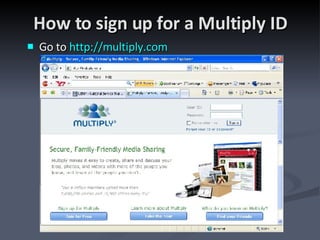
How to sign up for a Multiply ID Go to  http://multiply.com
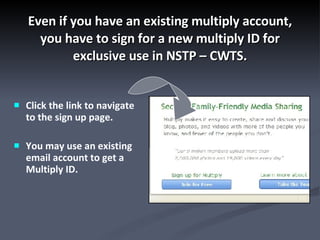
Even if you have an existing multiply account, you have to sign for a new multiply ID for exclusive use in NSTP – CWTS. Click the link to navigate to the sign up page. You may use an existing email account to get a Multiply ID.
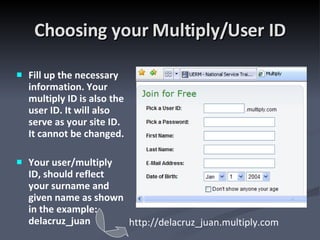
Choosing your Multiply/User ID Fill up the necessary information. Your multiply ID is also the user ID. It will also serve as your site ID. It cannot be changed. Your user/multiply ID, should reflect your surname and given name as shown in the example: delacruz_juan http://delacruz_juan.multiply.com
Checking Attendance Online During your scheduled weekday NSTP session, you are to log-in from the MISD computers. Log-in the attendance sheet in MISD. The actual time you access the NSTP site is logged in the site history, including all the pages you visit, as well as the time you post any comment. No student is allowed to log-in on behalf of other students. No student is allowed to answer, submit, and participate in online/offline discussions on behalf of other students. At the end of the session, log-out in the same sheet in MISD. This will serve as a means to verify your online attendance and participation. Violation of these rules will result to an automatic “5” in NSTP.
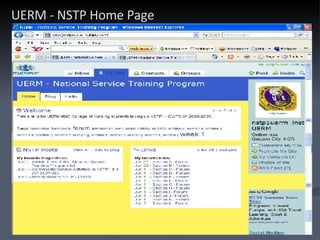
UERM - NSTP Home Page
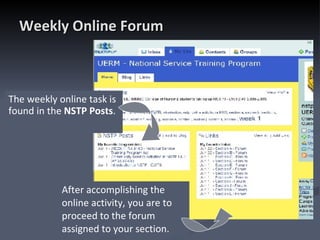
Weekly Online Forum  The weekly online task is found in the  NSTP Posts . After accomplishing the online activity, you are to proceed to the forum assigned to your section.
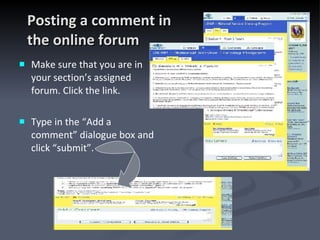
Posting a comment in  the online forum Make sure that you are in your section’s assigned forum. Click the link. Type in the “Add a comment” dialogue box and click “submit”.
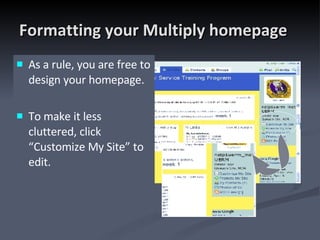
Formatting your Multiply homepage As a rule, you are free to design your homepage.  To make it less cluttered, click “Customize My Site” to edit.
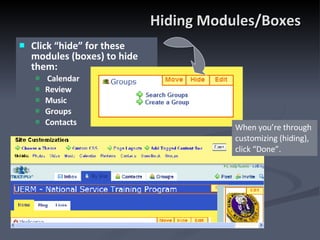
Hiding Modules/Boxes Click “hide” for these modules (boxes) to hide them:  Calendar Review Music Groups Contacts When you’re through customizing (hiding), click “Done”.
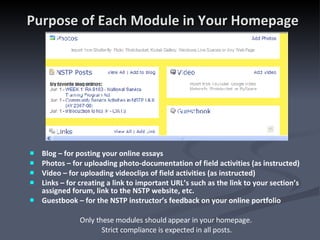
Purpose of Each Module in Your Homepage Blog – for posting your online essays Photos – for uploading photo-documentation of field activities (as instructed) Video – for uploading videoclips of field activities (as instructed)  Links – for creating a link to important URL’s such as the link to your section’s assigned forum, link to the NSTP website, etc. Guestbook – for the NSTP instructor’s feedback on your online portfolio Only these modules should appear in your homepage.  Strict compliance is expected in all posts.
Student’s Online NSTP Portfolio Online NSTP Portfolio is an individual requirement. In some of your weekly activities, you will be tasked to” write short essays as a blog post (e.g., reflection, analysis, your Multiply home page),  upload pictures  and/or video clips of yourfield activities (done in either your barangay, assigned community, and the like).  Follow the guidelines in constructing these requirements in your multiply site (to be posted based on schedule). This will serve as your self-assessment, as well as a means for the NSTP faculty to monitor and evaluate your performance.
WEEK 1 Online Activity For this week’s online activity, go to the UERM-NSTP homepage. Click each of the links in the ff. order: Introduction to NSTP-CWTS Comm. Service activities in NSTP I & II (AY 2007-08) WEEK 1: RA 9163 Instructions on the online worksheet  is in the NSTP Post: WEEK 1

How to Use the NSTP site

  • 1.
    How to Usethe NSTP site A Walk-through the NSTP I site of UERMMMC College of Nursing
  • 2.
    How to signup for a Multiply ID Go to http://multiply.com
  • 3.
    Even if youhave an existing multiply account, you have to sign for a new multiply ID for exclusive use in NSTP – CWTS. Click the link to navigate to the sign up page. You may use an existing email account to get a Multiply ID.
  • 4.
    Choosing your Multiply/UserID Fill up the necessary information. Your multiply ID is also the user ID. It will also serve as your site ID. It cannot be changed. Your user/multiply ID, should reflect your surname and given name as shown in the example: delacruz_juan http://delacruz_juan.multiply.com
  • 5.
    Checking Attendance OnlineDuring your scheduled weekday NSTP session, you are to log-in from the MISD computers. Log-in the attendance sheet in MISD. The actual time you access the NSTP site is logged in the site history, including all the pages you visit, as well as the time you post any comment. No student is allowed to log-in on behalf of other students. No student is allowed to answer, submit, and participate in online/offline discussions on behalf of other students. At the end of the session, log-out in the same sheet in MISD. This will serve as a means to verify your online attendance and participation. Violation of these rules will result to an automatic “5” in NSTP.
  • 6.
    UERM - NSTPHome Page
  • 7.
    Weekly Online Forum The weekly online task is found in the NSTP Posts . After accomplishing the online activity, you are to proceed to the forum assigned to your section.
  • 8.
    Posting a commentin the online forum Make sure that you are in your section’s assigned forum. Click the link. Type in the “Add a comment” dialogue box and click “submit”.
  • 9.
    Formatting your Multiplyhomepage As a rule, you are free to design your homepage. To make it less cluttered, click “Customize My Site” to edit.
  • 10.
    Hiding Modules/Boxes Click“hide” for these modules (boxes) to hide them: Calendar Review Music Groups Contacts When you’re through customizing (hiding), click “Done”.
  • 11.
    Purpose of EachModule in Your Homepage Blog – for posting your online essays Photos – for uploading photo-documentation of field activities (as instructed) Video – for uploading videoclips of field activities (as instructed) Links – for creating a link to important URL’s such as the link to your section’s assigned forum, link to the NSTP website, etc. Guestbook – for the NSTP instructor’s feedback on your online portfolio Only these modules should appear in your homepage. Strict compliance is expected in all posts.
  • 12.
    Student’s Online NSTPPortfolio Online NSTP Portfolio is an individual requirement. In some of your weekly activities, you will be tasked to” write short essays as a blog post (e.g., reflection, analysis, your Multiply home page), upload pictures and/or video clips of yourfield activities (done in either your barangay, assigned community, and the like). Follow the guidelines in constructing these requirements in your multiply site (to be posted based on schedule). This will serve as your self-assessment, as well as a means for the NSTP faculty to monitor and evaluate your performance.
  • 13.
    WEEK 1 OnlineActivity For this week’s online activity, go to the UERM-NSTP homepage. Click each of the links in the ff. order: Introduction to NSTP-CWTS Comm. Service activities in NSTP I & II (AY 2007-08) WEEK 1: RA 9163 Instructions on the online worksheet is in the NSTP Post: WEEK 1