© 2019 Nagarro – All rights reserved 1
© 2019 Nagarro – All rights reserved
Sanjeev Nirala
Dinesh Kumar
NAGP Session
Middleware & Services
© 2019 Nagarro – All rights reserved 2
Agenda
 Middleware
 Network Interaction Model
 Socket Programming
 Middleware Introduction
 Categories
 Types
• RPC, gRPC
• OOM
• MOM
• Enterprise Integration
 Services
 Introduction
 SOA, Microservice
 Web Services
 SOAP Web Services
 RESTful Web Services
 Enterprise Service Bus
 Apache ServiceMix
 Business Process Management
© 2019 Nagarro – All rights reserved 3
© 2019 Nagarro – All rights reserved
Middleware
01
© 2019 Nagarro – All rights reserved 4
Network Interaction Models
Applications of Middleware
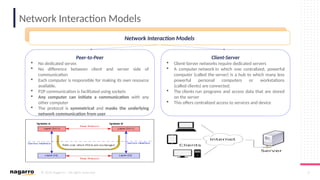
Peer-to-Peer
 No dedicated server.
 No difference between client and server side of
communication
 Each computer is responsible for making its own resource
available.
 P2P communication is facilitated using sockets
 Any computer can initiate a communication with any
other computer
 The protocol is symmetrical and masks the underlying
network communication from user
Client-Server
 Client-Server networks require dedicated servers
 A computer network in which one centralized, powerful
computer (called the server) is a hub to which many less
powerful personal computers or workstations
(called clients) are connected.
 The clients run programs and access data that are stored
on the server
 This offers centralized access to services and device
Network Interaction Models
© 2019 Nagarro – All rights reserved 5
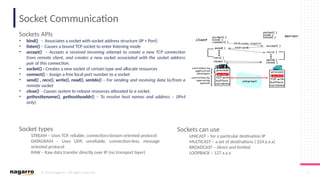
Socket Communication
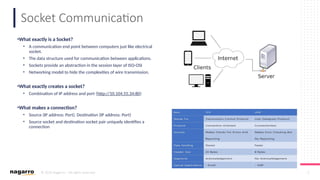
•What exactly is a Socket?
• A communication end point between computers just like electrical
socket.
• The data structure used for communication between applications.
• Sockets provide an abstraction in the session layer of ISO-OSI
• Networking model to hide the complexities of wire transmission.
•What exactly creates a socket?
• Combination of IP address and port (http://10.104.55.34:80)
•What makes a connection?
• Source (IP address: Port), Destination (IP address: Port)
• Source socket and destination socket pair uniquely identifies a
connection
© 2019 Nagarro – All rights reserved 6
Socket Communication
Sockets APIs
• bind() - Associates a socket with socket address structure (IP + Port)
• listen() - Causes a bound TCP socket to enter listening mode
• accept() – Accepts a received incoming attempt to create a new TCP connection
from remote client, and creates a new socket associated with the socket address
pair of this connection.
• socket() - Creates a new socket of certain type and allocate resources
• connect() – Assign a free local port number to a socket
• send() , recv(), write(), read(), sentdo() – For sending and receiving data to/from a
remote socket
• close() - Causes system to release resources allocated to a socket.
• gethostbyname(), gethostbyaddr() – To resolve host names and address – (IPv4
only)
Socket types
STREAM – Uses TCP, reliable, connection/stream oriented protocol
DATAGRAM – Uses UDP, unreliable, connection-less, message
oriented protocol
RAW – Raw data transfer directly over IP (no transport layer)
Sockets can use
UNICAST – for a particular destination IP
MULTICAST – a set of destinations ( 224.x.x.x)
BROADCAST – direct and limited
LOOPBACK – 127.x.x.x
© 2019 Nagarro – All rights reserved 7
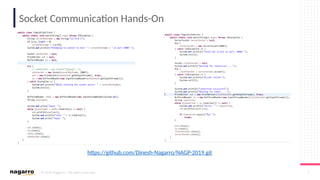
Socket Communication Hands-On
https://github.com/Dinesh-Nagarro/NAGP-2019.git
© 2019 Nagarro – All rights reserved 8
Middleware - Introduction
Features
 Layer between OS and distributed applications, bridges gap between low-level OS communications and programming
language abstractions
 Provides common programming abstraction and infrastructure for distributed applications
 Hides complexity and heterogeneity of distributed system
 Shield developers of distributed systems from low-level, tedious, and error-prone platform details – such as socket
programming
 Supports protocol handling, communication faults, QoS
 Access control, authentication
 Synchronisation, concurrency, transactions management, Storage management, load balancing
 Naming, location, service discovery, replication
 Includes web/app servers, DBMS, CMS and similar tools
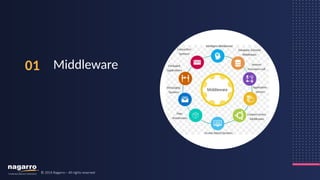
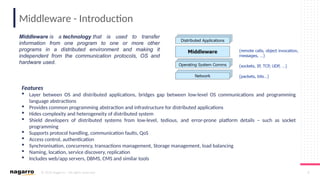
Middleware is a technology that is used to transfer
information from one program to one or more other
programs in a distributed environment and making it
independent from the communication protocols, OS and
hardware used.
© 2019 Nagarro – All rights reserved 9
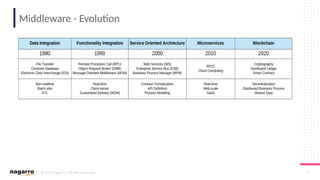
Middleware - Evolution
© 2019 Nagarro – All rights reserved 10
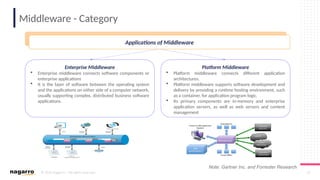
Middleware - Category
Applications of Middleware
Enterprise Middleware
 Enterprise middleware connects software components or
enterprise applications
 It is the layer of software between the operating system
and the applications on either side of a computer network,
usually supporting complex, distributed business software
applications.
Platform Middleware
 Platform middleware connects different application
architectures.
 Platform middleware supports software development and
delivery by providing a runtime hosting environment, such
as a container, for application program logic.
 Its primary components are in-memory and enterprise
application servers, as well as web servers and content
management
Applications of Middleware
Note: Gartner Inc. and Forrester Research
© 2019 Nagarro – All rights reserved 11
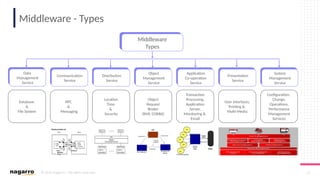
Middleware - Types
Database
&
File System
RPC
&
Messaging
Location
Time
&
Security
Object
Request
Broker
(RMI, CORBA)
Transaction
Processing,
Application
Server,
Monitoring &
Email
User Interfaces,
Printing &
Multi-Media
Configuration,
Change,
Operations,
Performance
Management
Services
Middleware
Types
Data
Management
Service
Communication
Service
Distribution
Service
Object
Management
Service
Application
Co-operation
Service
Presentation
Service
System
Management
Service
© 2019 Nagarro – All rights reserved 12
Blocking & Non-blocking
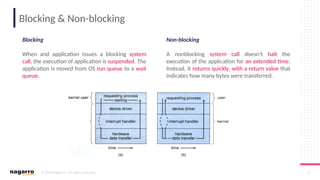
Blocking
When and application issues a blocking system
call, the execution of application is suspended. The
application is moved from OS run queue to a wait
queue.
Non-blocking
A nonblocking system call doesn’t halt the
execution of the application for an extended time.
Instead, it returns quickly, with a return value that
indicates how many bytes were transferred.
© 2019 Nagarro – All rights reserved 13
Synchronous & Asynchronous
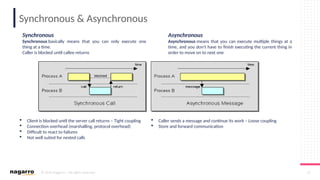
Synchronous
Synchronous basically means that you can only execute one
thing at a time.
Caller is blocked until callee returns
Asynchronous
Asynchronous means that you can execute multiple things at a
time, and you don't have to finish executing the current thing in
order to move on to next one
 Client is blocked until the server call returns – Tight coupling
 Connection overhead (marshalling, protocol overhead)
 Difficult to react to failures
 Not well suited for nested calls
 Caller sends a message and continue its work – Loose coupling
 Store and forward communication
© 2019 Nagarro – All rights reserved 14
Synchronous Vs Blocking, Asynchronous & Nonblocking
Asynchronous vs Nonblocking
Nonblocking read() returns immediately with whatever data are available –
the full number of byte requested, fewer or none at all.
An Async. read() call requests a transfer that will be performed in its entirety
but will complete and at some future time.
Synchronous vs Blocking
A Synchronous call may involve blocking behaviour or may not.
It depends on the underlying implementation (i.e. it may also be spinning,
meaning that you are simulating synchronous behaviour with asynchronous
call.
© 2019 Nagarro – All rights reserved 15
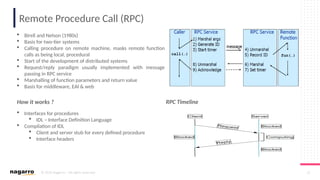
Remote Procedure Call (RPC)
 Birell and Nelson (1980s)
 Basis for two-tier systems
 Calling procedure on remote machine, masks remote function
calls as being local, procedural
 Start of the development of distributed systems
 Request/reply paradigm usually implemented with message
passing in RPC service
 Marshalling of function parameters and return value
 Basis for middleware, EAI & web
RPC Timeline
 Interfaces for procedures
 IDL – Interface Definition Language
 Compilation of IDL
 Client and server stub for every defined procedure
 Interface headers
How it works ?
© 2019 Nagarro – All rights reserved 16
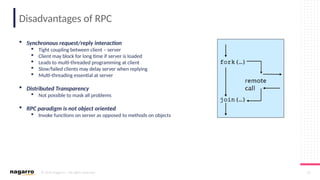
Disadvantages of RPC
 Synchronous request/reply interaction
 Tight coupling between client – server
 Client may block for long time if server is loaded
 Leads to multi-threaded programming at client
 Slow/failed clients may delay server when replying
 Multi-threading essential at server
 Distributed Transparency
 Not possible to mask all problems
 RPC paradigm is not object oriented
 Invoke functions on server as opposed to methods on objects
© 2019 Nagarro – All rights reserved 17
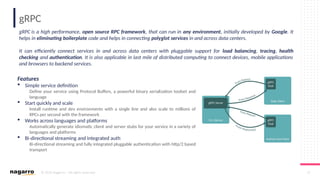
gRPC
gRPC is a high performance, open source RPC framework, that can run in any environment, initially developed by Google. It
helps in eliminating boilerplate code and helps in connecting polyglot services in and across data centers.
It can efficiently connect services in and across data centers with pluggable support for load balancing, tracing, health
checking and authentication. It is also applicable in last mile of distributed computing to connect devices, mobile applications
and browsers to backend services.
Features
 Simple service definition
Define your service using Protocol Buffers, a powerful binary serialization toolset and
language
 Start quickly and scale
Install runtime and dev environments with a single line and also scale to millions of
RPCs per second with the framework
 Works across languages and platforms
Automatically generate idiomatic client and server stubs for your service in a variety of
languages and platforms
 Bi-directional streaming and integrated auth
Bi-directional streaming and fully integrated pluggable authentication with http/2 based
transport
© 2019 Nagarro – All rights reserved 18
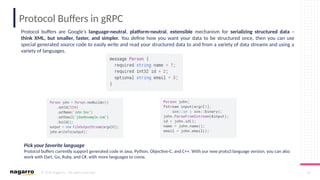
Protocol Buffers in gRPC
Protocol buffers are Google's language-neutral, platform-neutral, extensible mechanism for serializing structured data –
think XML, but smaller, faster, and simpler. You define how you want your data to be structured once, then you can use
special generated source code to easily write and read your structured data to and from a variety of data streams and using a
variety of languages.
Pick your favorite language
Protocol buffers currently support generated code in Java, Python, Objective-C, and C++. With our new proto3 language version, you can also
work with Dart, Go, Ruby, and C#, with more languages to come.
© 2019 Nagarro – All rights reserved 19
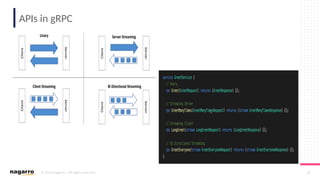
APIs in gRPC
© 2019 Nagarro – All rights reserved 20
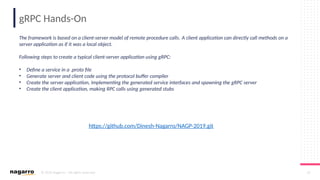
gRPC Hands-On
https://github.com/Dinesh-Nagarro/NAGP-2019.git
The framework is based on a client-server model of remote procedure calls. A client application can directly call methods on a
server application as if it was a local object.
Following steps to create a typical client-server application using gRPC:
• Define a service in a .proto file
• Generate server and client code using the protocol buffer compiler
• Create the server application, implementing the generated service interfaces and spawning the gRPC server
• Create the client application, making RPC calls using generated stubs
© 2019 Nagarro – All rights reserved 21
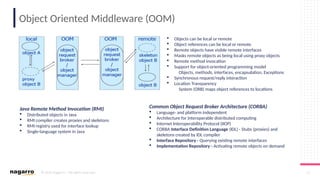
Object Oriented Middleware (OOM)
Java Remote Method Invocation (RMI)
 Distributed objects in Java
 RMI compiler creates proxies and skeletons
 RMI registry used for interface lookup
 Single-language system in Java
Common Object Request Broker Architecture (CORBA)
 Language- and platform independent
 Architecture for interoperable distributed computing
 Internet Interoperability Protocol (IIOP)
 CORBA Interface Definition Language (IDL) - Stubs (proxies) and
skeletons created by IDL compiler
 Interface Repository - Querying existing remote interfaces
 Implementation Repository - Activating remote objects on demand
 Objects can be local or remote
 Object references can be local or remote
 Remote objects have visible remote interfaces
 Masks remote objects as being local using proxy objects
 Remote method invocation
 Support for object-oriented programming model
Objects, methods, interfaces, encapsulation, Exceptions
 Synchronous request/reply interaction
 Location Transparency
System (ORB) maps object references to locations
© 2019 Nagarro – All rights reserved 22
Disadvantages of OOM
 Synchronous request/reply interaction only
 Asynchronous Method Invocation (AMI)
 But implementations may not be loosely coupled
 Distributed garbage collection
 Releasing memory for unused remote objects
 OOM rather static and heavy-weight
 Bad for ubiquitous systems and embedded devices
© 2019 Nagarro – All rights reserved 23
Message Oriented Middleware (MOM)
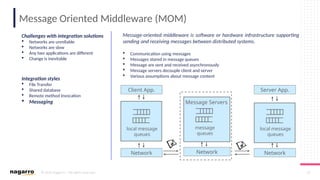
Message-oriented middleware is software or hardware infrastructure supporting
sending and receiving messages between distributed systems.
 Communication using messages
 Messages stored in message queues
 Message are sent and received asynchronously
 Message servers decouple client and server
 Various assumptions about message content
Challenges with integration solutions
 Networks are unreliable
 Networks are slow
 Any two applications are different
 Change is inevitable
Integration styles
 File Transfer
 Shared database
 Remote method Invocation
 Messaging
Client App.
local message
queues
Server App.
local message
queues
message
queues
Network Network Network
Message Servers
© 2019 Nagarro – All rights reserved 24
MOM Properties
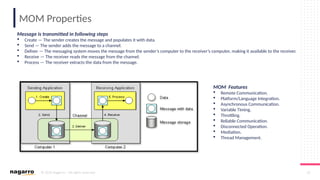
Message is transmitted in following steps
 Create — The sender creates the message and populates it with data.
 Send — The sender adds the message to a channel.
 Deliver — The messaging system moves the message from the sender’s computer to the receiver’s computer, making it available to the receiver.
 Receive — The receiver reads the message from the channel.
 Process — The receiver extracts the data from the message.
MOM Features
 Remote Communication.
 Platform/Language Integration.
 Asynchronous Communication.
 Variable Timing.
 Throttling.
 Reliable Communication.
 Disconnected Operation.
 Mediation.
 Thread Management.
© 2019 Nagarro – All rights reserved 25
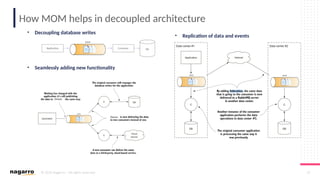
How MOM helps in decoupled architecture
• Decoupling database writes
• Seamlessly adding new functionality
• Replication of data and events
© 2019 Nagarro – All rights reserved 26
MOM models
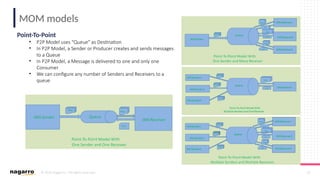
Point-To-Point
• P2P Model uses “Queue” as Destination
• In P2P Model, a Sender or Producer creates and sends messages
to a Queue
• In P2P Model, a Message is delivered to one and only one
Consumer
• We can configure any number of Senders and Receivers to a
queue
© 2019 Nagarro – All rights reserved 27
MOM models
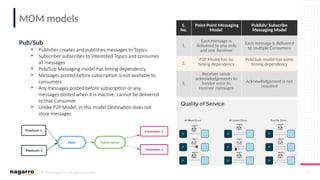
Pub/Sub
• Publisher creates and publishes messages to Topics
• Subscriber subscribes to interested Topics and consumes
all messages
• Pub/Sub Messaging model has timing dependency,
• Messages posted before subscription is not available to
consumers
• Any messages posted before subscription or any
messages posted when it is inactive, cannot be delivered
to that Consumer
• Unlike P2P Model, in this model Destination does not
store messages
S.
No.
Point-Point Messaging
Model
Publish/ Subscribe
Messaging Model
1.
Each Message is
delivered to one only
and one Receiver
Each message is delivered
to multiple Consumers
2.
P2P Model has no
timing dependency
Pub/Sub model has some
timing dependency
3.
Receiver sends
acknowledgements to
Sender once its
receiver messages
Acknowledgement is not
required
© 2019 Nagarro – All rights reserved 28
RabbitMQ – Messaging Middleware
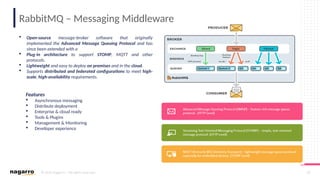
 Open-source message-broker software that originally
implemented the Advanced Message Queuing Protocol and has
since been extended with a
 Plug-in architecture to support STOMP, MQTT and other
protocols.
 Lightweight and easy to deploy on premises and in the cloud.
 Supports distributed and federated configurations to meet high-
scale, high-availability requirements.
Features
 Asynchronous messaging
 Distribute deployment
 Enterprise & cloud ready
 Tools & Plugins
 Management & Monitoring
 Developer experience
© 2019 Nagarro – All rights reserved 29
RabbitMQ – Hands-On
https://github.com/Dinesh-Nagarro/NAGP-2019.git
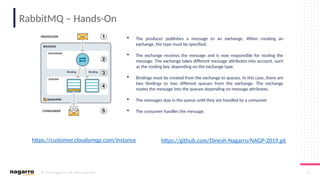
 The producer publishes a message to an exchange. When creating an
exchange, the type must be specified.
 The exchange receives the message and is now responsible for routing the
message. The exchange takes different message attributes into account, such
as the routing key, depending on the exchange type.
 Bindings must be created from the exchange to queues. In this case, there are
two bindings to two different queues from the exchange. The exchange
routes the message into the queues depending on message attributes.
 The messages stay in the queue until they are handled by a consumer
 The consumer handles the message.
https://customer.cloudamqp.com/instance
© 2019 Nagarro – All rights reserved 30
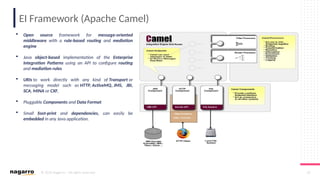
EI Framework (Apache Camel)
 Open source framework for message-oriented
middleware with a rule-based routing and mediation
engine
 Java object-based implementation of the Enterprise
Integration Patterns using an API to configure routing
and mediation rules
 URIs to work directly with any kind of Transport or
messaging model such as HTTP, ActiveMQ, JMS, JBI,
SCA, MINA or CXF,
 Pluggable Components and Data Format
 Small foot-print and dependencies, can easily be
embedded in any Java application.
© 2019 Nagarro – All rights reserved 31
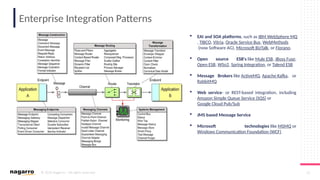
Enterprise Integration Patterns
 EAI and SOA platforms, such as IBM WebSphere MQ
, TIBCO, Vitria, Oracle Service Bus, WebMethods
(now Software AG), Microsoft BizTalk, or Fiorano.
 Open source ESB's like Mule ESB, JBoss Fuse,
Open ESB, WSo2, Spring Integration, or Talend ESB
 Message Brokers like ActiveMQ, Apache Kafka, or
RabbitMQ
 Web service- or REST-based integration, including
Amazon Simple Queue Service (SQS) or
Google Cloud Pub/Sub
 JMS based Message Service
 Microsoft technologies like MSMQ or
Windows Communication Foundation (WCF)
© 2019 Nagarro – All rights reserved 32
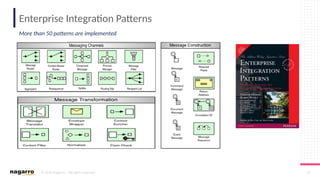
Enterprise Integration Patterns
More than 50 patterns are implemented
© 2019 Nagarro – All rights reserved 33
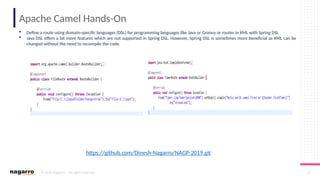
Apache Camel Hands-On
 Define a route using domain-specific languages (DSL) for programming languages like Java or Groovy or routes in XML with Spring DSL
 Java DSL offers a bit more features which are not supported in Spring DSL. However, Spring DSL is sometimes more beneficial as XML can be
changed without the need to recompile the code.
https://github.com/Dinesh-Nagarro/NAGP-2019.git
© 2019 Nagarro – All rights reserved 34
© 2019 Nagarro – All rights reserved
Services
02
© 2019 Nagarro – All rights reserved 35
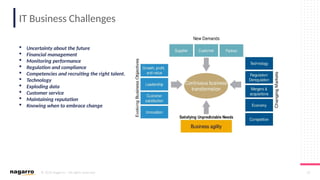
IT Business Challenges
 Uncertainty about the future
 Financial management
 Monitoring performance
 Regulation and compliance
 Competencies and recruiting the right talent.
 Technology
 Exploding data
 Customer service
 Maintaining reputation
 Knowing when to embrace change
© 2019 Nagarro – All rights reserved 36
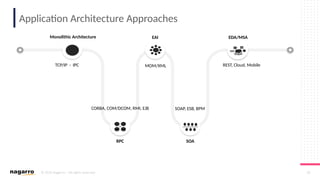
Application Architecture Approaches
TCP/IP - IPC MOM/XML
SOAP, ESB, BPM
REST, Cloud, Mobile
CORBA, COM/DCOM, RMI, EJB
Monolithic Architecture EAI EDA/MSA
SOA
RPC
© 2019 Nagarro – All rights reserved 37
Service Oriented Architecture
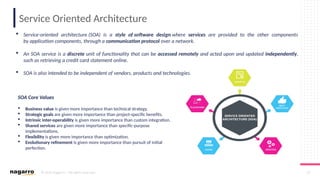
 Service-oriented architecture (SOA) is a style of software design where services are provided to the other components
by application components, through a communication protocol over a network.
 An SOA service is a discrete unit of functionality that can be accessed remotely and acted upon and updated independently,
such as retrieving a credit card statement online.
 SOA is also intended to be independent of vendors, products and technologies.
SOA Core Values
 Business value is given more importance than technical strategy.
 Strategic goals are given more importance than project-specific benefits.
 Intrinsic inter-operability is given more importance than custom integration.
 Shared services are given more importance than specific-purpose
implementations.
 Flexibility is given more importance than optimization.
 Evolutionary refinement is given more importance than pursuit of initial
perfection.
© 2019 Nagarro – All rights reserved 38
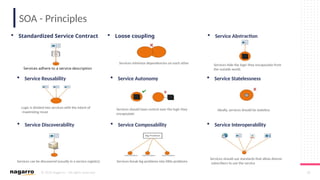
SOA - Principles
 Standardized Service Contract
Services adhere to a service-description
 Loose coupling
Services minimize dependencies on each other
 Service Abstraction
Services hide the logic they encapsulate from
the outside world.
 Service Reusability
Logic is divided into services with the intent of
maximizing reuse
 Service Autonomy
Services should have control over the logic they
encapsulate
 Service Statelessness
Ideally, services should be stateless
 Service Discoverability
Services can be discovered (usually in a service registry)
 Service Composability
Services break big problems into little problems
 Service Interoperability
Services should use standards that allow diverse
subscribers to use the service
© 2019 Nagarro – All rights reserved 39
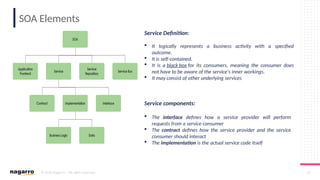
SOA Elements
Service Definition:
 It logically represents a business activity with a specified
outcome.
 It is self-contained.
 It is a black box for its consumers, meaning the consumer does
not have to be aware of the service's inner workings.
 It may consist of other underlying services
Service components:
 The interface defines how a service provider will perform
requests from a service consumer
 The contract defines how the service provider and the service
consumer should interact
 The implementation is the actual service code itself
© 2019 Nagarro – All rights reserved 41
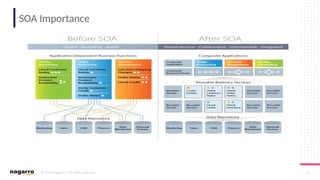
SOA Importance
© 2019 Nagarro – All rights reserved 42
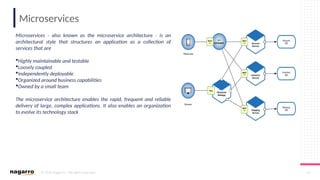
Microservices
Microservices - also known as the microservice architecture - is an
architectural style that structures an application as a collection of
services that are
Highly maintainable and testable
Loosely coupled
Independently deployable
Organized around business capabilities
Owned by a small team
The microservice architecture enables the rapid, frequent and reliable
delivery of large, complex applications. It also enables an organization
to evolve its technology stack
© 2019 Nagarro – All rights reserved 44
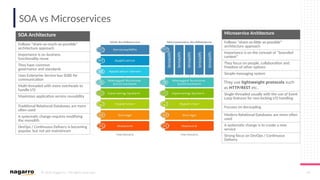
SOA vs Microservices
SOA Architecture
Follows “share-as-much-as-possible”
architecture approach
Importance is on business
functionality reuse
They have common
governance and standards
Uses Enterprise Service bus (ESB) for
communication
Multi-threaded with more overheads to
handle I/O
Maximizes application service reusability
Traditional Relational Databases are more
often used
A systematic change requires modifying
the monolith
DevOps / Continuous Delivery is becoming
popular, but not yet mainstream
Microservice Architecture
Follows “share-as-little-as-possible”
architecture approach
Importance is on the concept of “bounded
context”
They focus on people, collaboration and
freedom of other options
Simple messaging system
They use lightweight protocols such
as HTTP/REST etc.
Single-threaded usually with the use of Event
Loop features for non-locking I/O handling
Focuses on decoupling
Modern Relational Databases are more often
used
A systematic change is to create a new
service
Strong focus on DevOps / Continuous
Delivery
© 2019 Nagarro – All rights reserved 45
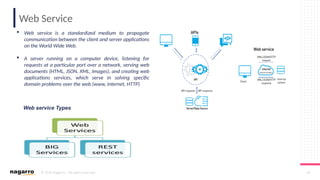
Web Service
 Web service is a standardized medium to propagate
communication between the client and server applications
on the World Wide Web.
 A server running on a computer device, listening for
requests at a particular port over a network, serving web
documents (HTML, JSON, XML, Images), and creating web
applications services, which serve in solving specific
domain problems over the web (www, internet, HTTP)
Web service Types
© 2019 Nagarro – All rights reserved 46
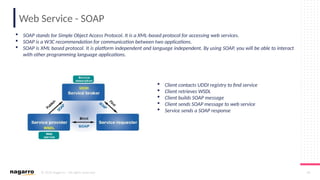
Web Service - SOAP
 SOAP stands for Simple Object Access Protocol. It is a XML-based protocol for accessing web services.
 SOAP is a W3C recommendation for communication between two applications.
 SOAP is XML based protocol. It is platform independent and language independent. By using SOAP, you will be able to interact
with other programming language applications.
 Client contacts UDDI registry to find service
 Client retrieves WSDL
 Client builds SOAP message
 Client sends SOAP message to web service
 Service sends a SOAP response
© 2019 Nagarro – All rights reserved 47
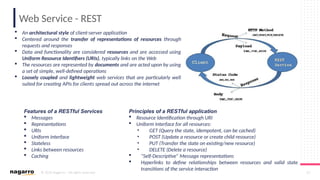
Web Service - REST
 An architectural style of client-server application
 Centered around the transfer of representations of resources through
requests and responses
 Data and functionality are considered resources and are accessed using
Uniform Resource Identifiers (URIs), typically links on the Web
 The resources are represented by documents and are acted upon by using
a set of simple, well-defined operations
 Loosely coupled and lightweight web services that are particularly well
suited for creating APIs for clients spread out across the internet
Features of a RESTful Services
 Messages
 Representations
 URIs
 Uniform interface
 Stateless
 Links between resources
 Caching
Principles of a RESTful application
 Resource Identification through URI
 Uniform Interface for all resources:
• GET (Query the state, idempotent, can be cached)
• POST (Update a resource or create child resource)
• PUT (Transfer the state on existing/new resource)
• DELETE (Delete a resource)
 “Self-Descriptive” Message representations
 Hyperlinks to define relationships between resources and valid state
transitions of the service interaction
© 2019 Nagarro – All rights reserved 48
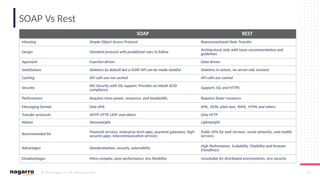
SOAP Vs Rest
SOAP REST
Meaning Simple Object Access Protocol Representational State Transfer
Design Standard protocol with predefined rules to follow Architectural style with loose recommendation and
guidelines
Approach Function-driven Data-driven
Statefulness Stateless by default but a SOAP API can be made stateful Stateless in nature, no server-side sessions
Caching API calls are not cached API calls are cached
Security WS-Security with SSL support. Provides an inbuilt ACID
compliance
Supports SSL and HTTPS
Performance Requires more power, resources, and bandwidth. Requires fewer resources
Messaging format Only XML XML, JSON, plain text, YAML, HTML and others
Transfer protocols SMTP, HTTP, UDP, and others Only HTTP
Nature Heavyweight Lightweight
Recommended for
Financial services, enterprise level apps, payment gateways, high-
security apps, telecommunication services.
Public APIs for web services, social networks, and mobile
services.
Advantages Standardization, security, extensibility High Performance, Scalability, Flexibility and browser
friendliness
Disadvantages More complex, poor performance, less flexibility Unsuitable for distributed environments, less security
© 2019 Nagarro – All rights reserved 49
Web Services Hands On
https://github.com/Dinesh-Nagarro/NAGP-2019.git
SOAP REST
© 2019 Nagarro – All rights reserved 50
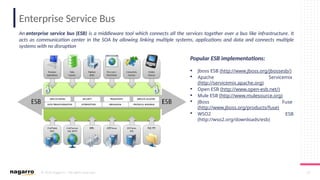
Enterprise Service Bus
An enterprise service bus (ESB) is a middleware tool which connects all the services together over a bus like infrastructure. It
acts as communication center in the SOA by allowing linking multiple systems, applications and data and connects multiple
systems with no disruption
Popular ESB implementations:
 Jboss ESB (http://www.jboss.org/jbossesb/)
 Apache Servicemix
(http://servicemix.apache.org)
 Open ESB (http://www.open-esb.net/)
 Mule ESB (http://www.mulesource.org)
 JBoss Fuse
(http://www.jboss.org/products/fuse)
 WSO2 ESB
(http://wso2.org/downloads/esb)
© 2019 Nagarro – All rights reserved 51
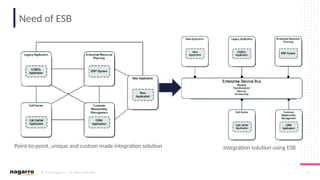
Need of ESB
Point-to-point, unique and custom made integration solution Integration solution using ESB
© 2019 Nagarro – All rights reserved 53
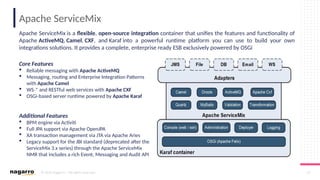
Apache ServiceMix
Apache ServiceMix is a flexible, open-source integration container that unifies the features and functionality of
Apache ActiveMQ, Camel, CXF, and Karaf into a powerful runtime platform you can use to build your own
integrations solutions. It provides a complete, enterprise ready ESB exclusively powered by OSGi
Core Features
 Reliable messaging with Apache ActiveMQ
 Messaging, routing and Enterprise Integration Patterns
with Apache Camel
 WS * and RESTful web services with
‐ Apache CXF
 OSGi-based server runtime powered by Apache Karaf
Additional Features
 BPM engine via Activiti
 Full JPA support via Apache OpenJPA
 XA transaction management via JTA via Apache Aries
 Legacy support for the JBI standard (deprecated after the
ServiceMix 3.x series) through the Apache ServiceMix
NMR that includes a rich Event, Messaging and Audit API
© 2019 Nagarro – All rights reserved 54
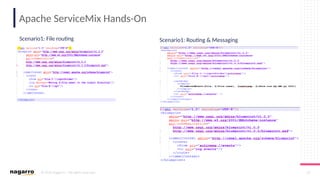
Apache ServiceMix Hands-On
Scenario1: File routing Scenario1: Routing & Messaging
© 2019 Nagarro – All rights reserved 55
THANK YOU

NAGP Service & Middleware presentation.pptx

  • 1.
    © 2019 Nagarro– All rights reserved 1 © 2019 Nagarro – All rights reserved Sanjeev Nirala Dinesh Kumar NAGP Session Middleware & Services
  • 2.
    © 2019 Nagarro– All rights reserved 2 Agenda  Middleware  Network Interaction Model  Socket Programming  Middleware Introduction  Categories  Types • RPC, gRPC • OOM • MOM • Enterprise Integration  Services  Introduction  SOA, Microservice  Web Services  SOAP Web Services  RESTful Web Services  Enterprise Service Bus  Apache ServiceMix  Business Process Management
  • 3.
    © 2019 Nagarro– All rights reserved 3 © 2019 Nagarro – All rights reserved Middleware 01
  • 4.
    © 2019 Nagarro– All rights reserved 4 Network Interaction Models Applications of Middleware Peer-to-Peer  No dedicated server.  No difference between client and server side of communication  Each computer is responsible for making its own resource available.  P2P communication is facilitated using sockets  Any computer can initiate a communication with any other computer  The protocol is symmetrical and masks the underlying network communication from user Client-Server  Client-Server networks require dedicated servers  A computer network in which one centralized, powerful computer (called the server) is a hub to which many less powerful personal computers or workstations (called clients) are connected.  The clients run programs and access data that are stored on the server  This offers centralized access to services and device Network Interaction Models
  • 5.
    © 2019 Nagarro– All rights reserved 5 Socket Communication •What exactly is a Socket? • A communication end point between computers just like electrical socket. • The data structure used for communication between applications. • Sockets provide an abstraction in the session layer of ISO-OSI • Networking model to hide the complexities of wire transmission. •What exactly creates a socket? • Combination of IP address and port (http://10.104.55.34:80) •What makes a connection? • Source (IP address: Port), Destination (IP address: Port) • Source socket and destination socket pair uniquely identifies a connection
  • 6.
    © 2019 Nagarro– All rights reserved 6 Socket Communication Sockets APIs • bind() - Associates a socket with socket address structure (IP + Port) • listen() - Causes a bound TCP socket to enter listening mode • accept() – Accepts a received incoming attempt to create a new TCP connection from remote client, and creates a new socket associated with the socket address pair of this connection. • socket() - Creates a new socket of certain type and allocate resources • connect() – Assign a free local port number to a socket • send() , recv(), write(), read(), sentdo() – For sending and receiving data to/from a remote socket • close() - Causes system to release resources allocated to a socket. • gethostbyname(), gethostbyaddr() – To resolve host names and address – (IPv4 only) Socket types STREAM – Uses TCP, reliable, connection/stream oriented protocol DATAGRAM – Uses UDP, unreliable, connection-less, message oriented protocol RAW – Raw data transfer directly over IP (no transport layer) Sockets can use UNICAST – for a particular destination IP MULTICAST – a set of destinations ( 224.x.x.x) BROADCAST – direct and limited LOOPBACK – 127.x.x.x
  • 7.
    © 2019 Nagarro– All rights reserved 7 Socket Communication Hands-On https://github.com/Dinesh-Nagarro/NAGP-2019.git
  • 8.
    © 2019 Nagarro– All rights reserved 8 Middleware - Introduction Features  Layer between OS and distributed applications, bridges gap between low-level OS communications and programming language abstractions  Provides common programming abstraction and infrastructure for distributed applications  Hides complexity and heterogeneity of distributed system  Shield developers of distributed systems from low-level, tedious, and error-prone platform details – such as socket programming  Supports protocol handling, communication faults, QoS  Access control, authentication  Synchronisation, concurrency, transactions management, Storage management, load balancing  Naming, location, service discovery, replication  Includes web/app servers, DBMS, CMS and similar tools Middleware is a technology that is used to transfer information from one program to one or more other programs in a distributed environment and making it independent from the communication protocols, OS and hardware used.
  • 9.
    © 2019 Nagarro– All rights reserved 9 Middleware - Evolution
  • 10.
    © 2019 Nagarro– All rights reserved 10 Middleware - Category Applications of Middleware Enterprise Middleware  Enterprise middleware connects software components or enterprise applications  It is the layer of software between the operating system and the applications on either side of a computer network, usually supporting complex, distributed business software applications. Platform Middleware  Platform middleware connects different application architectures.  Platform middleware supports software development and delivery by providing a runtime hosting environment, such as a container, for application program logic.  Its primary components are in-memory and enterprise application servers, as well as web servers and content management Applications of Middleware Note: Gartner Inc. and Forrester Research
  • 11.
    © 2019 Nagarro– All rights reserved 11 Middleware - Types Database & File System RPC & Messaging Location Time & Security Object Request Broker (RMI, CORBA) Transaction Processing, Application Server, Monitoring & Email User Interfaces, Printing & Multi-Media Configuration, Change, Operations, Performance Management Services Middleware Types Data Management Service Communication Service Distribution Service Object Management Service Application Co-operation Service Presentation Service System Management Service
  • 12.
    © 2019 Nagarro– All rights reserved 12 Blocking & Non-blocking Blocking When and application issues a blocking system call, the execution of application is suspended. The application is moved from OS run queue to a wait queue. Non-blocking A nonblocking system call doesn’t halt the execution of the application for an extended time. Instead, it returns quickly, with a return value that indicates how many bytes were transferred.
  • 13.
    © 2019 Nagarro– All rights reserved 13 Synchronous & Asynchronous Synchronous Synchronous basically means that you can only execute one thing at a time. Caller is blocked until callee returns Asynchronous Asynchronous means that you can execute multiple things at a time, and you don't have to finish executing the current thing in order to move on to next one  Client is blocked until the server call returns – Tight coupling  Connection overhead (marshalling, protocol overhead)  Difficult to react to failures  Not well suited for nested calls  Caller sends a message and continue its work – Loose coupling  Store and forward communication
  • 14.
    © 2019 Nagarro– All rights reserved 14 Synchronous Vs Blocking, Asynchronous & Nonblocking Asynchronous vs Nonblocking Nonblocking read() returns immediately with whatever data are available – the full number of byte requested, fewer or none at all. An Async. read() call requests a transfer that will be performed in its entirety but will complete and at some future time. Synchronous vs Blocking A Synchronous call may involve blocking behaviour or may not. It depends on the underlying implementation (i.e. it may also be spinning, meaning that you are simulating synchronous behaviour with asynchronous call.
  • 15.
    © 2019 Nagarro– All rights reserved 15 Remote Procedure Call (RPC)  Birell and Nelson (1980s)  Basis for two-tier systems  Calling procedure on remote machine, masks remote function calls as being local, procedural  Start of the development of distributed systems  Request/reply paradigm usually implemented with message passing in RPC service  Marshalling of function parameters and return value  Basis for middleware, EAI & web RPC Timeline  Interfaces for procedures  IDL – Interface Definition Language  Compilation of IDL  Client and server stub for every defined procedure  Interface headers How it works ?
  • 16.
    © 2019 Nagarro– All rights reserved 16 Disadvantages of RPC  Synchronous request/reply interaction  Tight coupling between client – server  Client may block for long time if server is loaded  Leads to multi-threaded programming at client  Slow/failed clients may delay server when replying  Multi-threading essential at server  Distributed Transparency  Not possible to mask all problems  RPC paradigm is not object oriented  Invoke functions on server as opposed to methods on objects
  • 17.
    © 2019 Nagarro– All rights reserved 17 gRPC gRPC is a high performance, open source RPC framework, that can run in any environment, initially developed by Google. It helps in eliminating boilerplate code and helps in connecting polyglot services in and across data centers. It can efficiently connect services in and across data centers with pluggable support for load balancing, tracing, health checking and authentication. It is also applicable in last mile of distributed computing to connect devices, mobile applications and browsers to backend services. Features  Simple service definition Define your service using Protocol Buffers, a powerful binary serialization toolset and language  Start quickly and scale Install runtime and dev environments with a single line and also scale to millions of RPCs per second with the framework  Works across languages and platforms Automatically generate idiomatic client and server stubs for your service in a variety of languages and platforms  Bi-directional streaming and integrated auth Bi-directional streaming and fully integrated pluggable authentication with http/2 based transport
  • 18.
    © 2019 Nagarro– All rights reserved 18 Protocol Buffers in gRPC Protocol buffers are Google's language-neutral, platform-neutral, extensible mechanism for serializing structured data – think XML, but smaller, faster, and simpler. You define how you want your data to be structured once, then you can use special generated source code to easily write and read your structured data to and from a variety of data streams and using a variety of languages. Pick your favorite language Protocol buffers currently support generated code in Java, Python, Objective-C, and C++. With our new proto3 language version, you can also work with Dart, Go, Ruby, and C#, with more languages to come.
  • 19.
    © 2019 Nagarro– All rights reserved 19 APIs in gRPC
  • 20.
    © 2019 Nagarro– All rights reserved 20 gRPC Hands-On https://github.com/Dinesh-Nagarro/NAGP-2019.git The framework is based on a client-server model of remote procedure calls. A client application can directly call methods on a server application as if it was a local object. Following steps to create a typical client-server application using gRPC: • Define a service in a .proto file • Generate server and client code using the protocol buffer compiler • Create the server application, implementing the generated service interfaces and spawning the gRPC server • Create the client application, making RPC calls using generated stubs
  • 21.
    © 2019 Nagarro– All rights reserved 21 Object Oriented Middleware (OOM) Java Remote Method Invocation (RMI)  Distributed objects in Java  RMI compiler creates proxies and skeletons  RMI registry used for interface lookup  Single-language system in Java Common Object Request Broker Architecture (CORBA)  Language- and platform independent  Architecture for interoperable distributed computing  Internet Interoperability Protocol (IIOP)  CORBA Interface Definition Language (IDL) - Stubs (proxies) and skeletons created by IDL compiler  Interface Repository - Querying existing remote interfaces  Implementation Repository - Activating remote objects on demand  Objects can be local or remote  Object references can be local or remote  Remote objects have visible remote interfaces  Masks remote objects as being local using proxy objects  Remote method invocation  Support for object-oriented programming model Objects, methods, interfaces, encapsulation, Exceptions  Synchronous request/reply interaction  Location Transparency System (ORB) maps object references to locations
  • 22.
    © 2019 Nagarro– All rights reserved 22 Disadvantages of OOM  Synchronous request/reply interaction only  Asynchronous Method Invocation (AMI)  But implementations may not be loosely coupled  Distributed garbage collection  Releasing memory for unused remote objects  OOM rather static and heavy-weight  Bad for ubiquitous systems and embedded devices
  • 23.
    © 2019 Nagarro– All rights reserved 23 Message Oriented Middleware (MOM) Message-oriented middleware is software or hardware infrastructure supporting sending and receiving messages between distributed systems.  Communication using messages  Messages stored in message queues  Message are sent and received asynchronously  Message servers decouple client and server  Various assumptions about message content Challenges with integration solutions  Networks are unreliable  Networks are slow  Any two applications are different  Change is inevitable Integration styles  File Transfer  Shared database  Remote method Invocation  Messaging Client App. local message queues Server App. local message queues message queues Network Network Network Message Servers
  • 24.
    © 2019 Nagarro– All rights reserved 24 MOM Properties Message is transmitted in following steps  Create — The sender creates the message and populates it with data.  Send — The sender adds the message to a channel.  Deliver — The messaging system moves the message from the sender’s computer to the receiver’s computer, making it available to the receiver.  Receive — The receiver reads the message from the channel.  Process — The receiver extracts the data from the message. MOM Features  Remote Communication.  Platform/Language Integration.  Asynchronous Communication.  Variable Timing.  Throttling.  Reliable Communication.  Disconnected Operation.  Mediation.  Thread Management.
  • 25.
    © 2019 Nagarro– All rights reserved 25 How MOM helps in decoupled architecture • Decoupling database writes • Seamlessly adding new functionality • Replication of data and events
  • 26.
    © 2019 Nagarro– All rights reserved 26 MOM models Point-To-Point • P2P Model uses “Queue” as Destination • In P2P Model, a Sender or Producer creates and sends messages to a Queue • In P2P Model, a Message is delivered to one and only one Consumer • We can configure any number of Senders and Receivers to a queue
  • 27.
    © 2019 Nagarro– All rights reserved 27 MOM models Pub/Sub • Publisher creates and publishes messages to Topics • Subscriber subscribes to interested Topics and consumes all messages • Pub/Sub Messaging model has timing dependency, • Messages posted before subscription is not available to consumers • Any messages posted before subscription or any messages posted when it is inactive, cannot be delivered to that Consumer • Unlike P2P Model, in this model Destination does not store messages S. No. Point-Point Messaging Model Publish/ Subscribe Messaging Model 1. Each Message is delivered to one only and one Receiver Each message is delivered to multiple Consumers 2. P2P Model has no timing dependency Pub/Sub model has some timing dependency 3. Receiver sends acknowledgements to Sender once its receiver messages Acknowledgement is not required
  • 28.
    © 2019 Nagarro– All rights reserved 28 RabbitMQ – Messaging Middleware  Open-source message-broker software that originally implemented the Advanced Message Queuing Protocol and has since been extended with a  Plug-in architecture to support STOMP, MQTT and other protocols.  Lightweight and easy to deploy on premises and in the cloud.  Supports distributed and federated configurations to meet high- scale, high-availability requirements. Features  Asynchronous messaging  Distribute deployment  Enterprise & cloud ready  Tools & Plugins  Management & Monitoring  Developer experience
  • 29.
    © 2019 Nagarro– All rights reserved 29 RabbitMQ – Hands-On https://github.com/Dinesh-Nagarro/NAGP-2019.git  The producer publishes a message to an exchange. When creating an exchange, the type must be specified.  The exchange receives the message and is now responsible for routing the message. The exchange takes different message attributes into account, such as the routing key, depending on the exchange type.  Bindings must be created from the exchange to queues. In this case, there are two bindings to two different queues from the exchange. The exchange routes the message into the queues depending on message attributes.  The messages stay in the queue until they are handled by a consumer  The consumer handles the message. https://customer.cloudamqp.com/instance
  • 30.
    © 2019 Nagarro– All rights reserved 30 EI Framework (Apache Camel)  Open source framework for message-oriented middleware with a rule-based routing and mediation engine  Java object-based implementation of the Enterprise Integration Patterns using an API to configure routing and mediation rules  URIs to work directly with any kind of Transport or messaging model such as HTTP, ActiveMQ, JMS, JBI, SCA, MINA or CXF,  Pluggable Components and Data Format  Small foot-print and dependencies, can easily be embedded in any Java application.
  • 31.
    © 2019 Nagarro– All rights reserved 31 Enterprise Integration Patterns  EAI and SOA platforms, such as IBM WebSphere MQ , TIBCO, Vitria, Oracle Service Bus, WebMethods (now Software AG), Microsoft BizTalk, or Fiorano.  Open source ESB's like Mule ESB, JBoss Fuse, Open ESB, WSo2, Spring Integration, or Talend ESB  Message Brokers like ActiveMQ, Apache Kafka, or RabbitMQ  Web service- or REST-based integration, including Amazon Simple Queue Service (SQS) or Google Cloud Pub/Sub  JMS based Message Service  Microsoft technologies like MSMQ or Windows Communication Foundation (WCF)
  • 32.
    © 2019 Nagarro– All rights reserved 32 Enterprise Integration Patterns More than 50 patterns are implemented
  • 33.
    © 2019 Nagarro– All rights reserved 33 Apache Camel Hands-On  Define a route using domain-specific languages (DSL) for programming languages like Java or Groovy or routes in XML with Spring DSL  Java DSL offers a bit more features which are not supported in Spring DSL. However, Spring DSL is sometimes more beneficial as XML can be changed without the need to recompile the code. https://github.com/Dinesh-Nagarro/NAGP-2019.git
  • 34.
    © 2019 Nagarro– All rights reserved 34 © 2019 Nagarro – All rights reserved Services 02
  • 35.
    © 2019 Nagarro– All rights reserved 35 IT Business Challenges  Uncertainty about the future  Financial management  Monitoring performance  Regulation and compliance  Competencies and recruiting the right talent.  Technology  Exploding data  Customer service  Maintaining reputation  Knowing when to embrace change
  • 36.
    © 2019 Nagarro– All rights reserved 36 Application Architecture Approaches TCP/IP - IPC MOM/XML SOAP, ESB, BPM REST, Cloud, Mobile CORBA, COM/DCOM, RMI, EJB Monolithic Architecture EAI EDA/MSA SOA RPC
  • 37.
    © 2019 Nagarro– All rights reserved 37 Service Oriented Architecture  Service-oriented architecture (SOA) is a style of software design where services are provided to the other components by application components, through a communication protocol over a network.  An SOA service is a discrete unit of functionality that can be accessed remotely and acted upon and updated independently, such as retrieving a credit card statement online.  SOA is also intended to be independent of vendors, products and technologies. SOA Core Values  Business value is given more importance than technical strategy.  Strategic goals are given more importance than project-specific benefits.  Intrinsic inter-operability is given more importance than custom integration.  Shared services are given more importance than specific-purpose implementations.  Flexibility is given more importance than optimization.  Evolutionary refinement is given more importance than pursuit of initial perfection.
  • 38.
    © 2019 Nagarro– All rights reserved 38 SOA - Principles  Standardized Service Contract Services adhere to a service-description  Loose coupling Services minimize dependencies on each other  Service Abstraction Services hide the logic they encapsulate from the outside world.  Service Reusability Logic is divided into services with the intent of maximizing reuse  Service Autonomy Services should have control over the logic they encapsulate  Service Statelessness Ideally, services should be stateless  Service Discoverability Services can be discovered (usually in a service registry)  Service Composability Services break big problems into little problems  Service Interoperability Services should use standards that allow diverse subscribers to use the service
  • 39.
    © 2019 Nagarro– All rights reserved 39 SOA Elements Service Definition:  It logically represents a business activity with a specified outcome.  It is self-contained.  It is a black box for its consumers, meaning the consumer does not have to be aware of the service's inner workings.  It may consist of other underlying services Service components:  The interface defines how a service provider will perform requests from a service consumer  The contract defines how the service provider and the service consumer should interact  The implementation is the actual service code itself
  • 40.
    © 2019 Nagarro– All rights reserved 41 SOA Importance
  • 41.
    © 2019 Nagarro– All rights reserved 42 Microservices Microservices - also known as the microservice architecture - is an architectural style that structures an application as a collection of services that are Highly maintainable and testable Loosely coupled Independently deployable Organized around business capabilities Owned by a small team The microservice architecture enables the rapid, frequent and reliable delivery of large, complex applications. It also enables an organization to evolve its technology stack
  • 42.
    © 2019 Nagarro– All rights reserved 44 SOA vs Microservices SOA Architecture Follows “share-as-much-as-possible” architecture approach Importance is on business functionality reuse They have common governance and standards Uses Enterprise Service bus (ESB) for communication Multi-threaded with more overheads to handle I/O Maximizes application service reusability Traditional Relational Databases are more often used A systematic change requires modifying the monolith DevOps / Continuous Delivery is becoming popular, but not yet mainstream Microservice Architecture Follows “share-as-little-as-possible” architecture approach Importance is on the concept of “bounded context” They focus on people, collaboration and freedom of other options Simple messaging system They use lightweight protocols such as HTTP/REST etc. Single-threaded usually with the use of Event Loop features for non-locking I/O handling Focuses on decoupling Modern Relational Databases are more often used A systematic change is to create a new service Strong focus on DevOps / Continuous Delivery
  • 43.
    © 2019 Nagarro– All rights reserved 45 Web Service  Web service is a standardized medium to propagate communication between the client and server applications on the World Wide Web.  A server running on a computer device, listening for requests at a particular port over a network, serving web documents (HTML, JSON, XML, Images), and creating web applications services, which serve in solving specific domain problems over the web (www, internet, HTTP) Web service Types
  • 44.
    © 2019 Nagarro– All rights reserved 46 Web Service - SOAP  SOAP stands for Simple Object Access Protocol. It is a XML-based protocol for accessing web services.  SOAP is a W3C recommendation for communication between two applications.  SOAP is XML based protocol. It is platform independent and language independent. By using SOAP, you will be able to interact with other programming language applications.  Client contacts UDDI registry to find service  Client retrieves WSDL  Client builds SOAP message  Client sends SOAP message to web service  Service sends a SOAP response
  • 45.
    © 2019 Nagarro– All rights reserved 47 Web Service - REST  An architectural style of client-server application  Centered around the transfer of representations of resources through requests and responses  Data and functionality are considered resources and are accessed using Uniform Resource Identifiers (URIs), typically links on the Web  The resources are represented by documents and are acted upon by using a set of simple, well-defined operations  Loosely coupled and lightweight web services that are particularly well suited for creating APIs for clients spread out across the internet Features of a RESTful Services  Messages  Representations  URIs  Uniform interface  Stateless  Links between resources  Caching Principles of a RESTful application  Resource Identification through URI  Uniform Interface for all resources: • GET (Query the state, idempotent, can be cached) • POST (Update a resource or create child resource) • PUT (Transfer the state on existing/new resource) • DELETE (Delete a resource)  “Self-Descriptive” Message representations  Hyperlinks to define relationships between resources and valid state transitions of the service interaction
  • 46.
    © 2019 Nagarro– All rights reserved 48 SOAP Vs Rest SOAP REST Meaning Simple Object Access Protocol Representational State Transfer Design Standard protocol with predefined rules to follow Architectural style with loose recommendation and guidelines Approach Function-driven Data-driven Statefulness Stateless by default but a SOAP API can be made stateful Stateless in nature, no server-side sessions Caching API calls are not cached API calls are cached Security WS-Security with SSL support. Provides an inbuilt ACID compliance Supports SSL and HTTPS Performance Requires more power, resources, and bandwidth. Requires fewer resources Messaging format Only XML XML, JSON, plain text, YAML, HTML and others Transfer protocols SMTP, HTTP, UDP, and others Only HTTP Nature Heavyweight Lightweight Recommended for Financial services, enterprise level apps, payment gateways, high- security apps, telecommunication services. Public APIs for web services, social networks, and mobile services. Advantages Standardization, security, extensibility High Performance, Scalability, Flexibility and browser friendliness Disadvantages More complex, poor performance, less flexibility Unsuitable for distributed environments, less security
  • 47.
    © 2019 Nagarro– All rights reserved 49 Web Services Hands On https://github.com/Dinesh-Nagarro/NAGP-2019.git SOAP REST
  • 48.
    © 2019 Nagarro– All rights reserved 50 Enterprise Service Bus An enterprise service bus (ESB) is a middleware tool which connects all the services together over a bus like infrastructure. It acts as communication center in the SOA by allowing linking multiple systems, applications and data and connects multiple systems with no disruption Popular ESB implementations:  Jboss ESB (http://www.jboss.org/jbossesb/)  Apache Servicemix (http://servicemix.apache.org)  Open ESB (http://www.open-esb.net/)  Mule ESB (http://www.mulesource.org)  JBoss Fuse (http://www.jboss.org/products/fuse)  WSO2 ESB (http://wso2.org/downloads/esb)
  • 49.
    © 2019 Nagarro– All rights reserved 51 Need of ESB Point-to-point, unique and custom made integration solution Integration solution using ESB
  • 50.
    © 2019 Nagarro– All rights reserved 53 Apache ServiceMix Apache ServiceMix is a flexible, open-source integration container that unifies the features and functionality of Apache ActiveMQ, Camel, CXF, and Karaf into a powerful runtime platform you can use to build your own integrations solutions. It provides a complete, enterprise ready ESB exclusively powered by OSGi Core Features  Reliable messaging with Apache ActiveMQ  Messaging, routing and Enterprise Integration Patterns with Apache Camel  WS * and RESTful web services with ‐ Apache CXF  OSGi-based server runtime powered by Apache Karaf Additional Features  BPM engine via Activiti  Full JPA support via Apache OpenJPA  XA transaction management via JTA via Apache Aries  Legacy support for the JBI standard (deprecated after the ServiceMix 3.x series) through the Apache ServiceMix NMR that includes a rich Event, Messaging and Audit API
  • 51.
    © 2019 Nagarro– All rights reserved 54 Apache ServiceMix Hands-On Scenario1: File routing Scenario1: Routing & Messaging
  • 52.
    © 2019 Nagarro– All rights reserved 55 THANK YOU

Editor's Notes

  • #6 Three types of sockets are supported: Stream sockets allow processes to communicate using TCP. A stream socket provides bidirectional, reliable, sequenced, and unduplicated flow of data with no record boundaries. After the connection has been established, data can be read from and written to these sockets as a byte stream. The socket type is SOCK_STREAM. Datagram sockets allow processes to use UDP to communicate. A datagram socket supports bidirectional flow of messages. A process on a datagram socket can receive messages in a different order from the sending sequence and can receive duplicate messages. Record boundaries in the data are preserved. The socket type is SOCK_DGRAM. Raw sockets provide access to ICMP. These sockets are normally datagram oriented, although their exact characteristics are dependent on the interface provided by the protocol. Raw sockets are not for most applications. They are provided to support developing new communication protocols or for access to more esoteric facilities of an existing protocol. Only superuser processes can use raw sockets. The socket type is SOCK_RAW. Local Loopback Address: Local Loopback Address is used to let a system send a message to itself to make sure that TCP/IP stack is installed correctly on the machine. In IPv4, IP addresses that start with decimal 127 or that has 01111111 in the first octet are loopback addresses(127.X.X.X). Typically 127.0.0.1 is used as the local loopback address. This leads to the wastage of many potential IP addresses. But in IPv6 ::1 is used as local loopback address and therefore there isn’t any wastage of addresses. The IP address 127.0.0.1 is a special-purpose IPv4 address called localhost or loopback address. All computers use this address as their own but it doesn't let them communicate with other devices as a real IP address does. Your computer might have the 192.168.1.115 private IP address assigned to it so that it can communicate with a router and other networked devices. However, it still has this special 127.0.0.1 address attached to it to mean "this computer," or the one you're currently on. The loopback address is only used by the computer you're on, and only for special circumstances — unlike a regular IP address that is used to transfer files to and from other networked devices. For example, a web server running on a computer can point to 127.0.0.1 so that the pages can be run locally and tested before it's deployed. In terms of IP addresses this means that any communications to that address effectively never leave or perhaps never actually enter your network interface card so that you always have a "connection". This allows you to test client/server software (for example) with both parts running on the same machine. A loopback address is "connected" to a virtual network card in your machine called the loopback adapter. Anything sent to the virtual loopback adapter comes right back out of it. It's like it's "connected to itself." For example, if I make a web request by typing "http://127.0.0.1/somesite.html" in my browser, that request goes through the (virtual) loopback adapter and then right back out of it. So, if you have web server running on your system, and it's listening on 127.0.0.1, it will receive the request from your browser, and also be able to communicate with your browser by sending its response back to 127.0.0.1. This is excellent for testing purposes, as you can see. Nothing going through the loopback adapter goes out to the Internet, or leaves your system. The loopback adapter is completely contained within your system.
  • #17 What are protocol buffers? Protocol buffers are a flexible, efficient, automated mechanism for serializing structured data – think XML, but smaller, faster, and simpler. You define how you want your data to be structured once, then you can use special generated source code to easily write and read your structured data to and from a variety of data streams and using a variety of languages. You can even update your data structure without breaking deployed programs that are compiled against the "old" format. How do they work? You specify how you want the information you're serializing to be structured by defining protocol buffer message types in .proto files. Each protocol buffer message is a small logical record of information, containing a series of name-value pairs. Here's a very basic example of a .proto file that defines a message containing information about a person: message Person { required string name = 1; required int32 id = 2; optional string email = 3; enum PhoneType { MOBILE = 0; HOME = 1; WORK = 2; } message PhoneNumber { required string number = 1; optional PhoneType type = 2 [default = HOME]; } repeated PhoneNumber phone = 4; } As you can see, the message format is simple – each message type has one or more uniquely numbered fields, and each field has a name and a value type, where value types can be numbers (integer or floating-point), booleans, strings, raw bytes, or even (as in the example above) other protocol buffer message types, allowing you to structure your data hierarchically. You can specify optional fields, required fields, and repeated fields. You can find more information about writing .proto files in the Protocol Buffer Language Guide. Once you've defined your messages, you run the protocol buffer compiler for your application's language on your .proto file to generate data access classes. These provide simple accessors for each field (like name() and set_name()) as well as methods to serialize/parse the whole structure to/from raw bytes – so, for instance, if your chosen language is C++, running the compiler on the above example will generate a class called Person. You can then use this class in your application to populate, serialize, and retrieve Person protocol buffer messages. You might then write some code like this: Person person; person.set_name("John Doe"); person.set_id(1234); person.set_email("jdoe@example.com"); fstream output("myfile", ios::out | ios::binary); person.SerializeToOstream(&output); Then, later on, you could read your message back in: fstream input("myfile", ios::in | ios::binary); Person person; person.ParseFromIstream(&input); cout << "Name: " << person.name() << endl; cout << "E-mail: " << person.email() << endl; You can add new fields to your message formats without breaking backwards-compatibility; old binaries simply ignore the new field when parsing. So if you have a communications protocol that uses protocol buffers as its data format, you can extend your protocol without having to worry about breaking existing code. You'll find a complete reference for using generated protocol buffer code in the API Reference section, and you can find out more about how protocol buffer messages are encoded in Protocol Buffer Encoding.
  • #18 What are protocol buffers? Protocol buffers are a flexible, efficient, automated mechanism for serializing structured data – think XML, but smaller, faster, and simpler. You define how you want your data to be structured once, then you can use special generated source code to easily write and read your structured data to and from a variety of data streams and using a variety of languages. You can even update your data structure without breaking deployed programs that are compiled against the "old" format. How do they work? You specify how you want the information you're serializing to be structured by defining protocol buffer message types in .proto files. Each protocol buffer message is a small logical record of information, containing a series of name-value pairs. Here's a very basic example of a .proto file that defines a message containing information about a person: message Person { required string name = 1; required int32 id = 2; optional string email = 3; enum PhoneType { MOBILE = 0; HOME = 1; WORK = 2; } message PhoneNumber { required string number = 1; optional PhoneType type = 2 [default = HOME]; } repeated PhoneNumber phone = 4; } As you can see, the message format is simple – each message type has one or more uniquely numbered fields, and each field has a name and a value type, where value types can be numbers (integer or floating-point), booleans, strings, raw bytes, or even (as in the example above) other protocol buffer message types, allowing you to structure your data hierarchically. You can specify optional fields, required fields, and repeated fields. You can find more information about writing .proto files in the Protocol Buffer Language Guide. Once you've defined your messages, you run the protocol buffer compiler for your application's language on your .proto file to generate data access classes. These provide simple accessors for each field (like name() and set_name()) as well as methods to serialize/parse the whole structure to/from raw bytes – so, for instance, if your chosen language is C++, running the compiler on the above example will generate a class called Person. You can then use this class in your application to populate, serialize, and retrieve Person protocol buffer messages. You might then write some code like this: Person person; person.set_name("John Doe"); person.set_id(1234); person.set_email("jdoe@example.com"); fstream output("myfile", ios::out | ios::binary); person.SerializeToOstream(&output); Then, later on, you could read your message back in: fstream input("myfile", ios::in | ios::binary); Person person; person.ParseFromIstream(&input); cout << "Name: " << person.name() << endl; cout << "E-mail: " << person.email() << endl; You can add new fields to your message formats without breaking backwards-compatibility; old binaries simply ignore the new field when parsing. So if you have a communications protocol that uses protocol buffers as its data format, you can extend your protocol without having to worry about breaking existing code. You'll find a complete reference for using generated protocol buffer code in the API Reference section, and you can find out more about how protocol buffer messages are encoded in Protocol Buffer Encoding.
  • #19 What are protocol buffers? Protocol buffers are a flexible, efficient, automated mechanism for serializing structured data – think XML, but smaller, faster, and simpler. You define how you want your data to be structured once, then you can use special generated source code to easily write and read your structured data to and from a variety of data streams and using a variety of languages. You can even update your data structure without breaking deployed programs that are compiled against the "old" format. How do they work? You specify how you want the information you're serializing to be structured by defining protocol buffer message types in .proto files. Each protocol buffer message is a small logical record of information, containing a series of name-value pairs. Here's a very basic example of a .proto file that defines a message containing information about a person: message Person { required string name = 1; required int32 id = 2; optional string email = 3; enum PhoneType { MOBILE = 0; HOME = 1; WORK = 2; } message PhoneNumber { required string number = 1; optional PhoneType type = 2 [default = HOME]; } repeated PhoneNumber phone = 4; } As you can see, the message format is simple – each message type has one or more uniquely numbered fields, and each field has a name and a value type, where value types can be numbers (integer or floating-point), booleans, strings, raw bytes, or even (as in the example above) other protocol buffer message types, allowing you to structure your data hierarchically. You can specify optional fields, required fields, and repeated fields. You can find more information about writing .proto files in the Protocol Buffer Language Guide. Once you've defined your messages, you run the protocol buffer compiler for your application's language on your .proto file to generate data access classes. These provide simple accessors for each field (like name() and set_name()) as well as methods to serialize/parse the whole structure to/from raw bytes – so, for instance, if your chosen language is C++, running the compiler on the above example will generate a class called Person. You can then use this class in your application to populate, serialize, and retrieve Person protocol buffer messages. You might then write some code like this: Person person; person.set_name("John Doe"); person.set_id(1234); person.set_email("jdoe@example.com"); fstream output("myfile", ios::out | ios::binary); person.SerializeToOstream(&output); Then, later on, you could read your message back in: fstream input("myfile", ios::in | ios::binary); Person person; person.ParseFromIstream(&input); cout << "Name: " << person.name() << endl; cout << "E-mail: " << person.email() << endl; You can add new fields to your message formats without breaking backwards-compatibility; old binaries simply ignore the new field when parsing. So if you have a communications protocol that uses protocol buffers as its data format, you can extend your protocol without having to worry about breaking existing code. You'll find a complete reference for using generated protocol buffer code in the API Reference section, and you can find out more about how protocol buffer messages are encoded in Protocol Buffer Encoding.
  • #27 at most once (aka “best e.ort”; guarantees no-duplicates): in this mode, under normal operating conditions, packets will be delivered, but during failure packet loss might occur. Trying to do better than this will always cost system resources, so this mode hasthe best throughput. at least once (guarantees no-loss): in this mode, the system will make sure that no packets get lost. Recovery from failures might cause duplicate packets to be sent, possibly out-of-order. exactly once (guarantees no-loss and no-duplicates): this requires an expensive end-to-end two phase commit. -------------------------- Ordering Guarantees ------------------------- no ordering: absence of ordering guarantees is an ideal case for performance. partitioned ordering: in this mode, a single partition can be defined for each message .ow that needs to be consumed in-order. While more expensive than the previous group, it can possibly have high performance implementations. global order: due to the synchronization overhead, imposing a global ordering guarantee across different channels requires significant additional resources and can severely penalize performance.
  • #33  import org.apache.camel.CamelContext; import org.apache.camel.builder.RouteBuilder; import org.apache.camel.impl.DefaultCamelContext; public class CamelHelloWorldTimerExample { public static void main(String[] args) throws Exception { CamelContext context = new DefaultCamelContext(); try { context.addRoutes(new RouteBuilder() { @Override public void configure() throws Exception { from("timer://myTimer?period=2000") .setBody() .simple("Hello World Camel fired at ${header.firedTime}") .to("stream:out"); } }); context.start(); Thread.sleep(10000); } finally { context.stop(); } } } import org.apache.camel.builder.RouteBuilder; import org.apache.camel.impl.DefaultCamelContext; import org.apache.camel.CamelContext;   public class CamelFileApp {           public static void main(final String[] args) throws Exception {         String folderA = "file:demo/copyFrom";         String folderB= "file:demo/copyTo";                             //First we get the CamelContext         CamelContext camelContext = new DefaultCamelContext();              //Next we provide the Route info and tell Camel to set    idempotent=true         //by adding "?noop=true" to the URI         camelContext.addRoutes(new RouteBuilder() {             @Override             public void configure() {                                   from(folderA+"?noop=true").to(folderB);             }         });         //initiate Camel         camelContext.start();         Thread.sleep(60000);         //remember to terminate!!!         camelContext.stop();     } }
  • #38  import org.apache.camel.CamelContext; import org.apache.camel.builder.RouteBuilder; import org.apache.camel.impl.DefaultCamelContext; public class CamelHelloWorldTimerExample { public static void main(String[] args) throws Exception { CamelContext context = new DefaultCamelContext(); try { context.addRoutes(new RouteBuilder() { @Override public void configure() throws Exception { from("timer://myTimer?period=2000") .setBody() .simple("Hello World Camel fired at ${header.firedTime}") .to("stream:out"); } }); context.start(); Thread.sleep(10000); } finally { context.stop(); } } } import org.apache.camel.builder.RouteBuilder; import org.apache.camel.impl.DefaultCamelContext; import org.apache.camel.CamelContext;   public class CamelFileApp {           public static void main(final String[] args) throws Exception {         String folderA = "file:demo/copyFrom";         String folderB= "file:demo/copyTo";                             //First we get the CamelContext         CamelContext camelContext = new DefaultCamelContext();              //Next we provide the Route info and tell Camel to set    idempotent=true         //by adding "?noop=true" to the URI         camelContext.addRoutes(new RouteBuilder() {             @Override             public void configure() {                                   from(folderA+"?noop=true").to(folderB);             }         });         //initiate Camel         camelContext.start();         Thread.sleep(60000);         //remember to terminate!!!         camelContext.stop();     } }
  • #39  import org.apache.camel.CamelContext; import org.apache.camel.builder.RouteBuilder; import org.apache.camel.impl.DefaultCamelContext; public class CamelHelloWorldTimerExample { public static void main(String[] args) throws Exception { CamelContext context = new DefaultCamelContext(); try { context.addRoutes(new RouteBuilder() { @Override public void configure() throws Exception { from("timer://myTimer?period=2000") .setBody() .simple("Hello World Camel fired at ${header.firedTime}") .to("stream:out"); } }); context.start(); Thread.sleep(10000); } finally { context.stop(); } } } import org.apache.camel.builder.RouteBuilder; import org.apache.camel.impl.DefaultCamelContext; import org.apache.camel.CamelContext;   public class CamelFileApp {           public static void main(final String[] args) throws Exception {         String folderA = "file:demo/copyFrom";         String folderB= "file:demo/copyTo";                             //First we get the CamelContext         CamelContext camelContext = new DefaultCamelContext();              //Next we provide the Route info and tell Camel to set    idempotent=true         //by adding "?noop=true" to the URI         camelContext.addRoutes(new RouteBuilder() {             @Override             public void configure() {                                   from(folderA+"?noop=true").to(folderB);             }         });         //initiate Camel         camelContext.start();         Thread.sleep(60000);         //remember to terminate!!!         camelContext.stop();     } }
  • #41  import org.apache.camel.CamelContext; import org.apache.camel.builder.RouteBuilder; import org.apache.camel.impl.DefaultCamelContext; public class CamelHelloWorldTimerExample { public static void main(String[] args) throws Exception { CamelContext context = new DefaultCamelContext(); try { context.addRoutes(new RouteBuilder() { @Override public void configure() throws Exception { from("timer://myTimer?period=2000") .setBody() .simple("Hello World Camel fired at ${header.firedTime}") .to("stream:out"); } }); context.start(); Thread.sleep(10000); } finally { context.stop(); } } } import org.apache.camel.builder.RouteBuilder; import org.apache.camel.impl.DefaultCamelContext; import org.apache.camel.CamelContext;   public class CamelFileApp {           public static void main(final String[] args) throws Exception {         String folderA = "file:demo/copyFrom";         String folderB= "file:demo/copyTo";                             //First we get the CamelContext         CamelContext camelContext = new DefaultCamelContext();              //Next we provide the Route info and tell Camel to set    idempotent=true         //by adding "?noop=true" to the URI         camelContext.addRoutes(new RouteBuilder() {             @Override             public void configure() {                                   from(folderA+"?noop=true").to(folderB);             }         });         //initiate Camel         camelContext.start();         Thread.sleep(60000);         //remember to terminate!!!         camelContext.stop();     } }
  • #50 ESB Core functionalities Below are some of the core functionalities of an ESB oriented architecture: DecouplingOne of the most important things that you can do via ESB is to decouple clients from service providers. Transport Protocol ConversionESB gives you the ability to accept one input protocol and communicate with another service provider on a different protocol. Message EnhancementESB allows you to isolate the client and make some basic changes to the message. For example, changing date format of incoming message or appending informational data to messages. Message TransformationESB lets you transform an incoming message into several outgoing formats and structure. For example, XML to JSON, XML to Java objects. RoutingESB has the ability to redirect a client request to a particular service provider based on deterministic or variable routing criteria. SecurityESB protects services from unauthorized access. Process Choreography & Service OrchestrationESB manages process flow and complex business services to perform a business operation. Process choreography is about business services while service orchestration is the ability to manage the coordination of their actual implementations. It is also capable of abstracting business services from actual implemented services. Transaction ManagementESB provides the ability to provide a single unit of work for a business request, providing framework for coordination of multiple disparate systems.
  • #51 ESB Core functionalities Below are some of the core functionalities of an ESB oriented architecture: DecouplingOne of the most important things that you can do via ESB is to decouple clients from service providers. Transport Protocol ConversionESB gives you the ability to accept one input protocol and communicate with another service provider on a different protocol. Message EnhancementESB allows you to isolate the client and make some basic changes to the message. For example, changing date format of incoming message or appending informational data to messages. Message TransformationESB lets you transform an incoming message into several outgoing formats and structure. For example, XML to JSON, XML to Java objects. RoutingESB has the ability to redirect a client request to a particular service provider based on deterministic or variable routing criteria. SecurityESB protects services from unauthorized access. Process Choreography & Service OrchestrationESB manages process flow and complex business services to perform a business operation. Process choreography is about business services while service orchestration is the ability to manage the coordination of their actual implementations. It is also capable of abstracting business services from actual implemented services. Transaction ManagementESB provides the ability to provide a single unit of work for a business request, providing framework for coordination of multiple disparate systems.
  • #53 Apache CXF™ is an open source services framework. CXF helps you build and develop services using frontend programming APIs, like JAX-WS and JAX-RS. These services can speak a variety of protocols such as SOAP, XML/HTTP, RESTful HTTP, or CORBA and work over a variety of transports such as HTTP, JMS or JBI. Karaf is a lightweight, powerful, and enterprise ready applications runtime. It provides all the ecosystem and bootstrapping options you need for your applications. It runs on premise or on cloud. By polymorphic, it means that Karaf can host any kind of applications: WAR, OSGi, Spring, and much more. The Java Business Integration spec (JBI) is a Java-based standard that defines a runtime architecture for plugins to interoperate via a mediated message exchange model.
  • #54 Apache CXF™ is an open source services framework. CXF helps you build and develop services using frontend programming APIs, like JAX-WS and JAX-RS. These services can speak a variety of protocols such as SOAP, XML/HTTP, RESTful HTTP, or CORBA and work over a variety of transports such as HTTP, JMS or JBI. Karaf is a lightweight, powerful, and enterprise ready applications runtime. It provides all the ecosystem and bootstrapping options you need for your applications. It runs on premise or on cloud. By polymorphic, it means that Karaf can host any kind of applications: WAR, OSGi, Spring, and much more. The Java Business Integration spec (JBI) is a Java-based standard that defines a runtime architecture for plugins to interoperate via a mediated message exchange model.