January 2016
Native to Native mobile code
conversion
By Kamal YOUBI
CEO & CTO of MyAppConverter.com
Summary
• What	is	MyAppConverter
• The	Core	Transformation	Engine
• Semantic	Driven	Transformations
• As	Developers,	why	would	you	care?
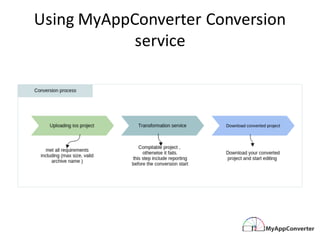
• Using	MyAppConverter Conversion	service
• Ios Applications	Lifecycle
• Generated	Android	Lifecycle
• The	native	structure	of	the	mobile	applications	:IOS
• The	native	structure	of	the	mobile	applications	:Android
• Mappings	method	signatures
• MyAppConverter language	Syntaxes	Mappings
• MyAppConverter Mapping	Platform	differences
What is MyAppConverter?
No SDK to download No Runtime
All platforms Peace of Mind
Instantly & Automatically
Native Code Conversion
(Online or via IDE plugin)
Your converted code is native
with no embedded runtime for
maximum performance
Currently supporting
iOS to Android & will be
extended to other platforms
We don't store nor share any
of your data and code
iOS project
code
Android project
code
Models
(Android)
Mapping
Parsing
Transformation
Automatic	Code	
Generation
The Core Transformation Engine
Models
(iOS)
Metamodels
(iOS)
Metamodels
(Android)
Technology
Architecture
Business
Semantic
Level	of	Abstraction
Source	Application																											 Target	Application																											
• Mapping	By	intent
• Transformation	as	a	service
• Native	to	native
• Readable	and	documented	code
• No	embedded	Runtime
• Multi-platform	coverage
• No	Editor	Dependency
• Low	scalability	
• No	useable	Code
• Embedded Runtime
• Strong	Editor	Dependency
if
(
A
A
=
=
A
A
)
t
h
e
n
{l
o
g(
“
t
e
s
t
“
) if
(
A
A
=
=
A
A
)
t
h
e
n
{l
o
g(
“
t
e
s
t
“
)
}
}
if
(
A
A
=
=
A
A
)
t
h
e
n
{l
o
g(
“
t
e
s
t
“
) if
(
A
A
=
=
A
A
)
t
h
e
n
{l
o
g(
“
t
e
s
t
“
)
}
}
Semantic DrivenTransformation
As Developers, why would you care?
• Total freedom to develop on your favourite platform without limiting
yourself to other platforms
• Your converted code is fully documented & readable
• Being platform and technology agnostic, we guarantee the
scalability of your code
• Enabling open source mapping will allow developers to benefit from
all the technologies and market innovation across all platforms
• You will be part of an active, vibrant and global community of
developers across borders and technologies
• You want to create mobile apps that can be available to anyone,
anywhere no matter what the smartphone is and with the best UX
Using	MyAppConverter Conversion	
service
Ios Applications	Lifecycle
An	iOS	application	goes	through	 a	set	of	states	as	it	runs.	
As	an	app	moves	through	 the	states	of	its	lifecycle,	the	state	of	the	app	is	defined	by	
its	level	of	activity	such	as	Not	Running,	 Active	or	Suspended.
Generated	Android	Lifecycle
The	generated	android	application	is	event	driven	and	goes	
throw	a	set	of	the	following	 set	of	events
The	native	structure	of	the	mobile	
applications	:IOS
• The	Ios application	structure	follow	a	model	view	Controller	pattern	.
The	native	structure	of	the	mobile	
applications	:IOS
• The	UIApplicationMain function	in	the	project	sets	up	several	key	objects	and	starts	the	app	
running.
• At	the	heart	of	every	iOS	app	is	the	UIApplication (AppDelegate)	object,	whose	job	is	to	
facilitate	the	interactions	between	the	system	and	other	objects	in	the	app.	
• The	AppDelegate start	the	initial	view	controller	and	load	its	UI	elements	from	the	
main.storyboard or	the	equivalent	.xib file.	
• Using	MyAppConversion service	gets	you	an	android	studio	project	that	have	an	almost	
equivalent	structure.
The	native	structure	of	the	mobile	
applications	:Android
• The	resulted	android	app	process	start	by	instantiating	the	Application	object,	and	
then	start	the	LauncherActivity.	
• The	LauncherActivity uses	the	Application	instance	to	start	the	initial	view	
controller,	and	load	its	view	and	finally	add	it	to	the	LauncherActivity view
Mappings	method	signatures
• The	generated		java	method	name	the	concatenation	of	iOS	
method	name	and	the	aliases
• The	first	letter	of	each	alias	is	capitalized.	
• The	types	of	the	parameters	in	iOS	are	converted	to	their	
mapped	equivalent.
MyAppConverter language	Syntaxes	
Mappings
• Classes
• Categories
• Enums
• Structs
• Pointers
• Memory	management
• Blocks
• Protocols
• Primitive	types
• Data	structures
• Casting
• Typedef
• Macros
When	converting	objective	c	to	java	MyAppConverter takes	care	of	all	the	
following	aspects	of	the	language.	The	Mapping	 knowledge	base	provide	an	
implementation	for	each	element	of	the	following	in	the	target	platform
MyAppConverter Mapping	Platform	
differences	
• Density-independent	pixels	(dp)	and	design	in	
vector	at	1x
– On	Android,	the	key	unit	of	measure	is	the	
density-independent	pixel
– When	converting	from	Ios	MyAppConverter	
transforms	points	on	iOS	and		CSS	pixels	to	DPs.
– Measuring	and	sizing	things	in	DPs	ensures	your	
designs	have	a	consistent	physical	size	across	
devices	of	varying	density.
MyAppConverter Mapping	Platform	
differences	
• The	system	Back	button
Android	 phones	have	a	back	button,	 which	can	be	used	to	return	to	previous	screens	
in	the	app.
iPhones don’t have this button, this is
usually done by a “back” chevron in the top
left of the screen, MyAppConverter
Convert itto a back button and mapps the
android back button to the same event
MyAppConverter Mapping	Platform	
differences	
• Bottom	tabs
– On	iOS,	it’s	common	to	use	a	bottom	tab	bar	to	switch	between	views	in	the	
app.	Android’s	 platform	convention	is	to	display	tabs	for	view	control	at	the	
top	of	the	screen	instead.	In	addition,	 Android	apps	may	use	bottom	bars	to	
display	actions.
• Gestures
– Offering	touch	gestures	to	operate	your	app	is	a	great	way	to	make	the	
experience	fast,	fluid	and	delightful.	 You	should	 always	be	mindful	 of	user	
expectations	for	gesture-based	interaction	on	a	platform.	On	Android,	 most	of	
the	common	gestures	have	very	standardized	behaviors,	so	users	will	expect	
your	app	to	support	those.	There’s	an	entire	section	in	the	material	design	
guidelines	 covering	gestures,	but	it’s	most	important	to	get	a	couple	of	the	key	
gestures	right.
MyAppConverter Mapping	Platform	
differences	
• Bottom	tabs
– On	iOS,	it’s	common	to	use	a	bottom	tab	bar	to	switch	between	views	in	the	
app.	Android’s	 platform	convention	is	to	display	tabs	for	view	control	at	the	
top	of	the	screen	instead.	In	addition,	 Android	apps	may	use	bottom	bars	to	
display	actions.
• Gestures
– Offering	touch	gestures	to	operate	your	app	is	a	great	way	to	make	the	
experience	fast,	fluid	and	delightful.	 You	should	 always	be	mindful	 of	user	
expectations	for	gesture-based	interaction	on	a	platform.	On	Android,	 most	of	
the	common	gestures	have	very	standardized	behaviors,	so	users	will	expect	
your	app	to	support	those.	There’s	an	entire	section	in	the	material	design	
guidelines	 covering	gestures,	but	it’s	most	important	to	get	a	couple	of	the	key	
gestures	right.

MyAppconverter platform mappings