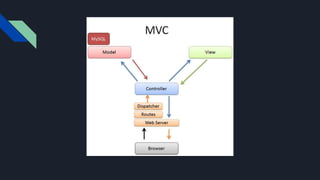
MVC
Model View Controller
MVC purpose?
● An architecture for separating
components of a large code block by
abstracting components of a large code
base into smaller manageable pieces.
● Can be used to structure code of any language
MVC components?
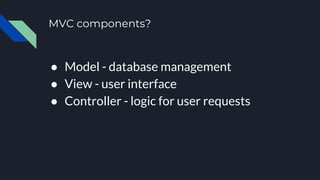
● Model - database management
● View - user interface
● Controller - logic for user requests
Model purpose?
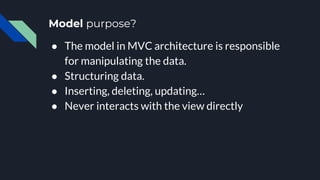
● The model in MVC architecture is responsible
for manipulating the data.
● Structuring data.
● Inserting, deleting, updating…
● Never interacts with the view directly
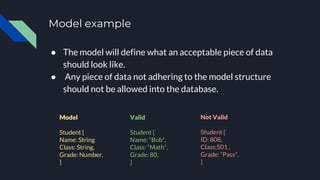
Model example
● The model will define what an acceptable piece of data
should look like.
● Any piece of data not adhering to the model structure
should not be allowed into the database.
Model
Student {
Name: String
Class: String,
Grade: Number,
}
Valid
Student {
Name: “Bob”,
Class: “Math”,
Grade: 80,
}
Not Valid
Student {
ID: 808,
Class:501 ,
Grade: “Pass”,
}
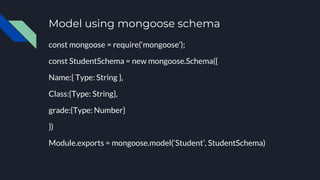
Model using mongoose schema
const mongoose = require(‘mongoose’);
const StudentSchema = new mongoose.Schema({
Name:{ Type: String },
Class:{Type: String},
grade:{Type: Number}
})
Module.exports = mongoose.model(‘Student’, StudentSchema)
View purpose?
● The view is responsible for displaying the
data
● The view never interacts directly with the
model, instead the controller proxys any
data the view may need
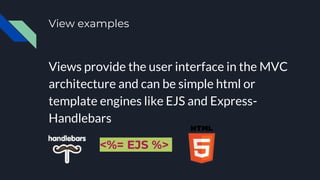
View examples
Views provide the user interface in the MVC
architecture and can be simple html or
template engines like EJS and Express-
Handlebars
<%= EJS %>
Controller
● Can be more than one controller in a
project
● Each controller has a specific route or
responsibility with a particular resource
Controller purpose?
● Handles any logic required from user
requests
● The controller acts as a hub for user
requests through the view and retrieval or
modification of the database by way of the
model
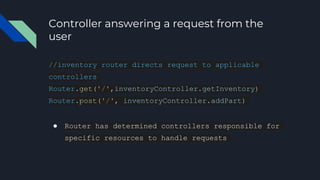
Controller answering a request from the
user
//inventory router directs request to applicable
controllers
Router.get('/',inventoryController.getInventory)
Router.post('/', inventoryController.addPart)
● Router has determined controllers responsible for
specific resources to handle requests
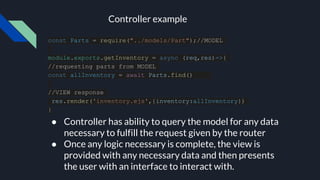
const Parts = require("../models/Part");//MODEL
module.exports.getInventory = async (req,res)=>{
//requesting parts from MODEL
const allInventory = await Parts.find()
//VIEW response
res.render('inventory.ejs',{inventory:allInventory})
}
● Controller has ability to query the model for any data
necessary to fulfill the request given by the router
● Once any logic necessary is complete, the view is
provided with any necessary data and then presents
the user with an interface to interact with.
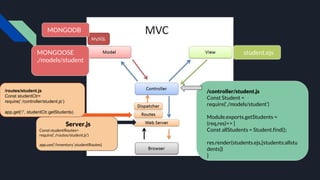
Controller example
student.ejs
MONGODB
/controller/student.js
Const Student =
require(‘./models/student’)
Module.exports.getStudents =
(req,res)=> {
Const allStudents = Student.find();
res.render(students.ejs,{students:allstu
dents})
}
MONGOOSE
./models/student
Server.js
Const studentRoutes=
require(‘./routes/student.js’)
app.use(‘/inventory’,studentRoutes)
/routes/student.js
Const studentCtr=
require(‘./controller/student.js’)
app.get(‘/’, studentCtr.getStudents)

MVC.pptx

  • 1.
  • 2.
    MVC purpose? ● Anarchitecture for separating components of a large code block by abstracting components of a large code base into smaller manageable pieces. ● Can be used to structure code of any language
  • 3.
    MVC components? ● Model- database management ● View - user interface ● Controller - logic for user requests
  • 5.
    Model purpose? ● Themodel in MVC architecture is responsible for manipulating the data. ● Structuring data. ● Inserting, deleting, updating… ● Never interacts with the view directly
  • 6.
    Model example ● Themodel will define what an acceptable piece of data should look like. ● Any piece of data not adhering to the model structure should not be allowed into the database. Model Student { Name: String Class: String, Grade: Number, } Valid Student { Name: “Bob”, Class: “Math”, Grade: 80, } Not Valid Student { ID: 808, Class:501 , Grade: “Pass”, }
  • 7.
    Model using mongooseschema const mongoose = require(‘mongoose’); const StudentSchema = new mongoose.Schema({ Name:{ Type: String }, Class:{Type: String}, grade:{Type: Number} }) Module.exports = mongoose.model(‘Student’, StudentSchema)
  • 8.
    View purpose? ● Theview is responsible for displaying the data ● The view never interacts directly with the model, instead the controller proxys any data the view may need
  • 9.
    View examples Views providethe user interface in the MVC architecture and can be simple html or template engines like EJS and Express- Handlebars <%= EJS %>
  • 10.
    Controller ● Can bemore than one controller in a project ● Each controller has a specific route or responsibility with a particular resource
  • 11.
    Controller purpose? ● Handlesany logic required from user requests ● The controller acts as a hub for user requests through the view and retrieval or modification of the database by way of the model
  • 12.
    Controller answering arequest from the user //inventory router directs request to applicable controllers Router.get('/',inventoryController.getInventory) Router.post('/', inventoryController.addPart) ● Router has determined controllers responsible for specific resources to handle requests
  • 13.
    const Parts =require("../models/Part");//MODEL module.exports.getInventory = async (req,res)=>{ //requesting parts from MODEL const allInventory = await Parts.find() //VIEW response res.render('inventory.ejs',{inventory:allInventory}) } ● Controller has ability to query the model for any data necessary to fulfill the request given by the router ● Once any logic necessary is complete, the view is provided with any necessary data and then presents the user with an interface to interact with. Controller example
  • 14.
    student.ejs MONGODB /controller/student.js Const Student = require(‘./models/student’) Module.exports.getStudents= (req,res)=> { Const allStudents = Student.find(); res.render(students.ejs,{students:allstu dents}) } MONGOOSE ./models/student Server.js Const studentRoutes= require(‘./routes/student.js’) app.use(‘/inventory’,studentRoutes) /routes/student.js Const studentCtr= require(‘./controller/student.js’) app.get(‘/’, studentCtr.getStudents)