USING PYTHON ANDTKINTER
By –Vinay Sharma
College Name- JMIETI
Raduar (Yamuna Nagar)
MUSIC PLAYER
TECHNOLOGY USED
PYTHON
TKINTER
PYTHON
 Python is a computer programming language often used
to build websites and software, automate tasks, and
conduct data analysis.
 Python is a general-purpose language, meaning it can be
used to create a variety of different programs and isn't
specialized for any specific problems.
 Python is a versatile and in-demand language that is one
of the easiest programming languages to learn.
FEATURES OF PYTHON
 Free and Open Source. ...
 Easy to code. ...
 Object-Oriented Language. ...
 GUI Programming Support. ...
 High-Level Language. ...
 Large Community Support. ...
 Python is a Portable language. ...
 Python is an Integrated language.
TKINTER
 Tkinter module in Python is a standard library in Python
used for creating Graphical User Interface (GUI) for
DesktopApplications.
 With the help of Tkinter developing desktop
applications is not a tough task.
 An important feature in favor ofTkinter is that it is cross-
platform, so the same code can easily work
on Windows, macOS, and Linux.
 Tkinter is a lightweight module.
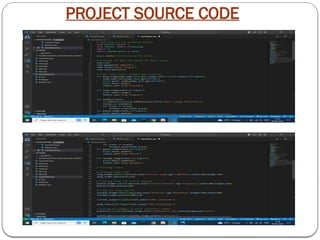
PROJECT SOURCE CODE
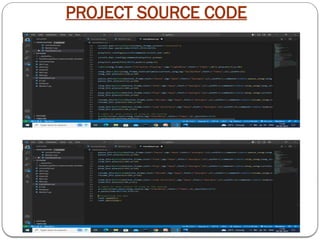
PROJECT SOURCE CODE
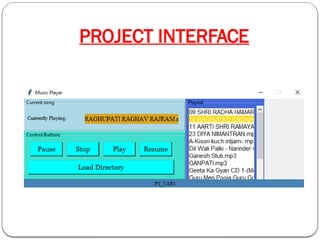
PROJECT INTERFACE
WORKING OF THE PROJECT
 Initialize the root window, and set the title, and dimensions of your music player. Initialize all the
imported PyGame modules along with the mixer module. Set track and status to be
of StringVar type.
 Define a LabelFrame that will contain the songttrack label and the trackstatus label.
Labelframe acts as a container and displays the labels inside a border area.
 Similarly, define a frame that will contain four buttons. Customize and organize it below the
trackframe. Define four buttons, Play, Pause, Unpause, and Stop.
 Use the Listbox widget to display the songs.
 Pack the scrollbar to the right-hand side of the window and fill it asY.This ensures that whenever
you expand the window, the Scrollbar expands in theY direction too.
 Change the current working directory to the specified path. Iterate over the songs and insert them
into the list box one by one.
 Define a function, playsong. Set the track to display the name of the song along with the status as -
Playing. Use the load() and play() functions of PyGame's mixer.music module to load music for
playback and start it.
 Similarly, define functions to stop, pause and unpause the songs using stop(), pause(),
and unpause()
ADVANTAGE OF MUSIC PLAYER
1. The MP3 player is a device for playing and listening to digital
audio files, which can be MP3 files or other audio files.
2. Simple and easy to use.
3. User Friendly GUI
4. Gives user various options like :
 Add Song to Playlist
 Play the song
 Pause or Resume song
 Stop the song
Music Player().pptx using python and tkinter

Music Player().pptx using python and tkinter

  • 1.
    USING PYTHON ANDTKINTER By–Vinay Sharma College Name- JMIETI Raduar (Yamuna Nagar) MUSIC PLAYER
  • 2.
  • 3.
    PYTHON  Python isa computer programming language often used to build websites and software, automate tasks, and conduct data analysis.  Python is a general-purpose language, meaning it can be used to create a variety of different programs and isn't specialized for any specific problems.  Python is a versatile and in-demand language that is one of the easiest programming languages to learn.
  • 4.
    FEATURES OF PYTHON Free and Open Source. ...  Easy to code. ...  Object-Oriented Language. ...  GUI Programming Support. ...  High-Level Language. ...  Large Community Support. ...  Python is a Portable language. ...  Python is an Integrated language.
  • 5.
    TKINTER  Tkinter modulein Python is a standard library in Python used for creating Graphical User Interface (GUI) for DesktopApplications.  With the help of Tkinter developing desktop applications is not a tough task.  An important feature in favor ofTkinter is that it is cross- platform, so the same code can easily work on Windows, macOS, and Linux.  Tkinter is a lightweight module.
  • 6.
  • 7.
  • 8.
  • 9.
    WORKING OF THEPROJECT  Initialize the root window, and set the title, and dimensions of your music player. Initialize all the imported PyGame modules along with the mixer module. Set track and status to be of StringVar type.  Define a LabelFrame that will contain the songttrack label and the trackstatus label. Labelframe acts as a container and displays the labels inside a border area.  Similarly, define a frame that will contain four buttons. Customize and organize it below the trackframe. Define four buttons, Play, Pause, Unpause, and Stop.  Use the Listbox widget to display the songs.  Pack the scrollbar to the right-hand side of the window and fill it asY.This ensures that whenever you expand the window, the Scrollbar expands in theY direction too.  Change the current working directory to the specified path. Iterate over the songs and insert them into the list box one by one.  Define a function, playsong. Set the track to display the name of the song along with the status as - Playing. Use the load() and play() functions of PyGame's mixer.music module to load music for playback and start it.  Similarly, define functions to stop, pause and unpause the songs using stop(), pause(), and unpause()
  • 10.
    ADVANTAGE OF MUSICPLAYER 1. The MP3 player is a device for playing and listening to digital audio files, which can be MP3 files or other audio files. 2. Simple and easy to use. 3. User Friendly GUI 4. Gives user various options like :  Add Song to Playlist  Play the song  Pause or Resume song  Stop the song