Chapter 12
How to work with cookies
and sessions
Murach's PHP and
MySQL, C12
© 2010, Mike Murach &
Associates, Inc.
Slide 1
Murach's PHP
and MySQL, C12
© 2010, Mike Murach &
Associates, Inc.
Slide 2
Objectives
Applied
1. Use any of the functions and techniques presented in this chapter
as you use cookies and session tracking in your applications.
Knowledge
1. Describe the use of cookies, and distinguish between per-session
and persistent cookies.
2. Describe the use of session tracking.
3. Describe the use of the $_COOKIE and $_SESSION variables.
4. Describe the use of the functions for working with cookies and
sessions.
Cookies
• Cookies are strings stored by the browser
• Examples of cookies:
▫ PHPSESSID=D1F15245171203E8670487F020544490
▫ user_id=87
▫ email=jsmith@hotmail.com
▫ userName=jsmith
▫ passwordCookie=opensesame
• Cookies allow users to skip login forms, customize pages, and
focus advertising
• Cookies cannot modify a user’s computer, create pop-up ads,
generate spam, or steal files
Murach's PHP and
MySQL, C12
© 2010, Mike Murach &
Associates, Inc.
Slide 3
Murach's PHP
and MySQL, C12
© 2010, Mike Murach &
Associates, Inc.
Slide 4
How cookies work
 A cookie is a name/value pair that is stored in a browser.
 On the server, a web application creates a cookie and sends it to the
browser.
 On the client, the browser saves the cookie and sends it back to the
server every time it accesses a page from that server.
 By default, cookies only last until the user closes his or her web
browser. However, cookies can be set to persist in the user’s
browser for up to three years.
 Some users disable cookies in their browsers.
 Browsers generally accept only 20 cookies from each site and 300
cookies total.
 Browsers can also limit each cookie to 4 kilobytes.
Murach's PHP
and MySQL, C12
© 2010, Mike Murach &
Associates, Inc.
Slide 5
The syntax of the setcookie function
setcookie($name, $value, $expire, $path,
$domain, $secure, $httponly)
Setting a cookie in the browser
$name = 'userid';
$value = 'rharris';
$expire = strtotime('+1 year');
$path = '/';
setcookie($name, $value, $expire, $path);
Getting the value of a cookie from the browser
$userid = $_COOKIE['userid']; // $userid is 'rharris'
Deleting a cookie from the browser
$expire = strtotime('-1 year');
setcookie('userid', '', $expire, '/');
setcookie must be
called before any
HTML output
Value: empty.
exp date: time in past
remaining parameters:
same value as when
created
Murach's PHP
and MySQL, C12
© 2010, Mike Murach &
Associates, Inc.
Slide 6
TESTING: enable/disable cookies in Firefox 3.6
1. Open the Tools menu and select the Options command.
2. Click on the Privacy tab.
3. Use the “Accept cookies from sites” check box to enable or
disable cookies.
How to enable or disable cookies in IE 8
1. Open the Tools menu and select the Internet Options command.
2. Click the Privacy tab.
3. Use the slider control to enable or disable cookies. To disable
cookies, set the security level to “Block All Cookies”. To enable
cookies, click the Default button to return to default privacy
settings.
How to reset default security settings in IE 8
1. Open the Tools menu and select the Internet Options command.
2. Click the Security tab.
3. If not disabled, click the “Reset all zones to default level” button.
Or use firefox add-
ons
Murach's PHP
and MySQL, C12
© 2010, Mike Murach &
Associates, Inc.
Slide 7
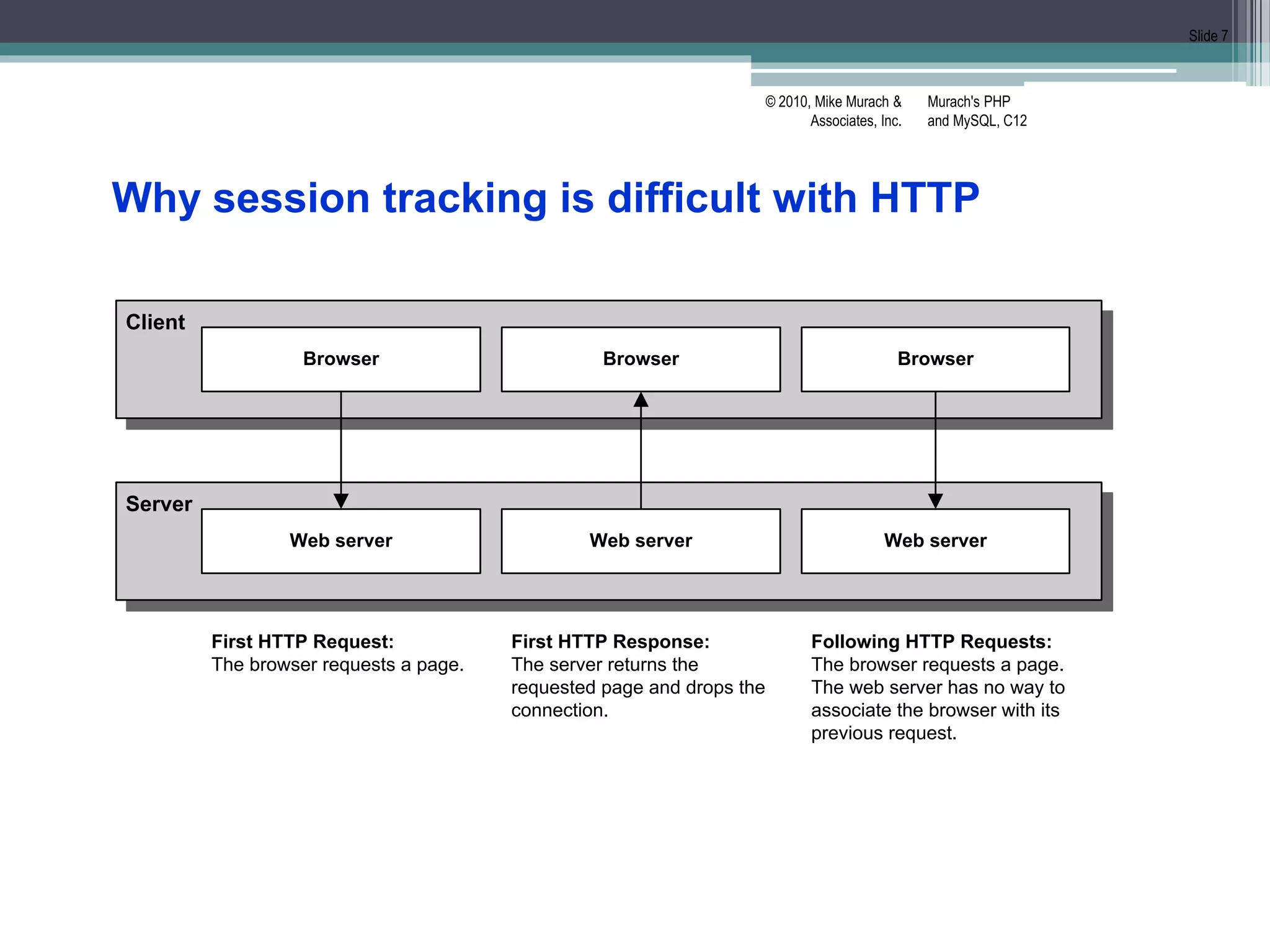
Client
Server
Browser
Web server
First HTTP Request:
The browser requests a page.
Browser
Web server
Browser
Web server
First HTTP Response:
The server returns the
requested page and drops the
connection.
Following HTTP Requests:
The browser requests a page.
The web server has no way to
associate the browser with its
previous request.
Why session tracking is difficult with HTTP
Murach's PHP
and MySQL, C12
© 2010, Mike Murach &
Associates, Inc.
Slide 8
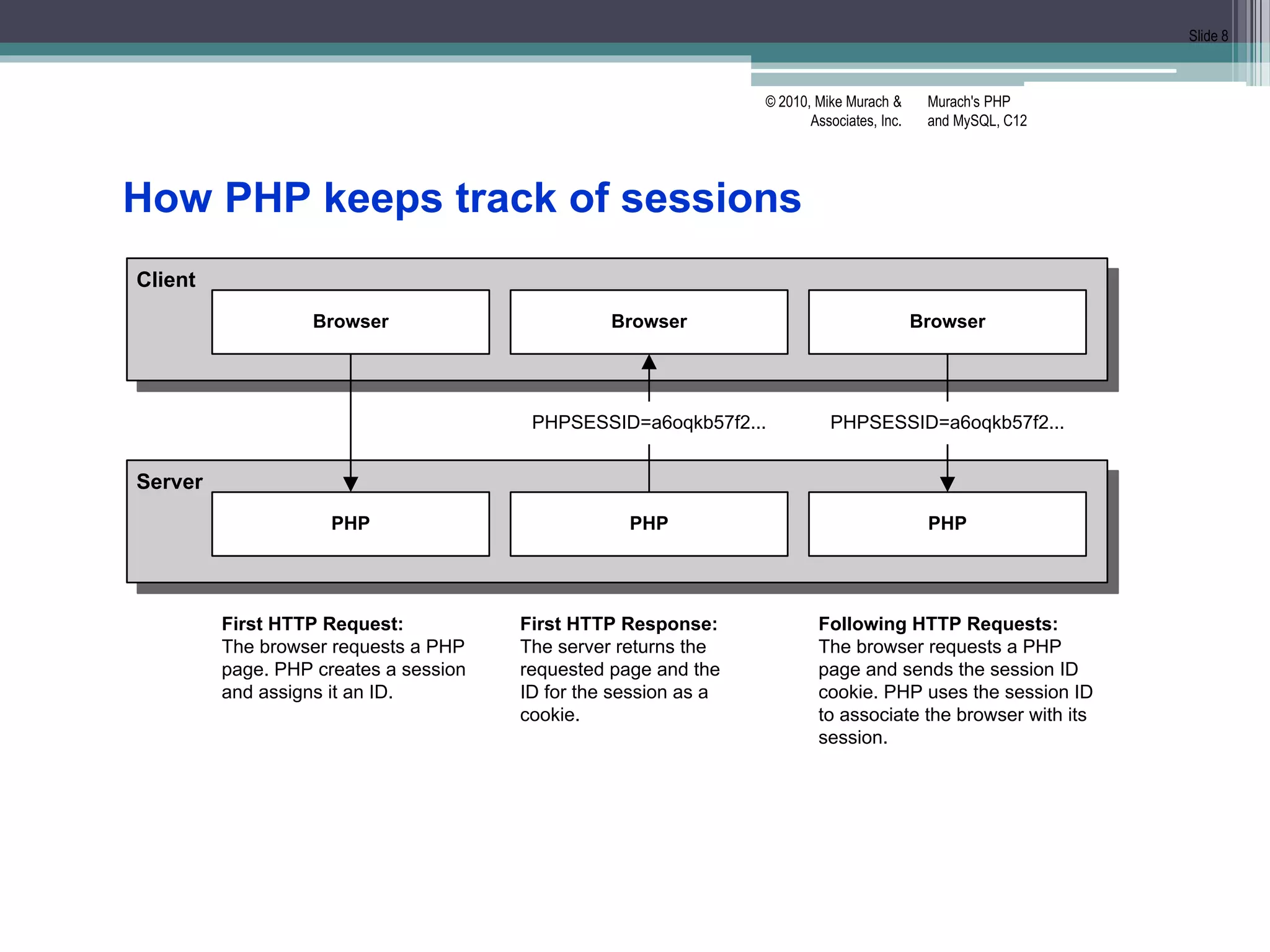
Client
Server
Browser
PHP
First HTTP Request:
The browser requests a PHP
page. PHP creates a session
and assigns it an ID.
Browser
PHP
Browser
PHP
First HTTP Response:
The server returns the
requested page and the
ID for the session as a
cookie.
Following HTTP Requests:
The browser requests a PHP
page and sends the session ID
cookie. PHP uses the session ID
to associate the browser with its
session.
PHPSESSID=a6oqkb57f2... PHPSESSID=a6oqkb57f2...
How PHP keeps track of sessions
Murach's PHP
and MySQL, C12
© 2010, Mike Murach &
Associates, Inc.
Slide 9
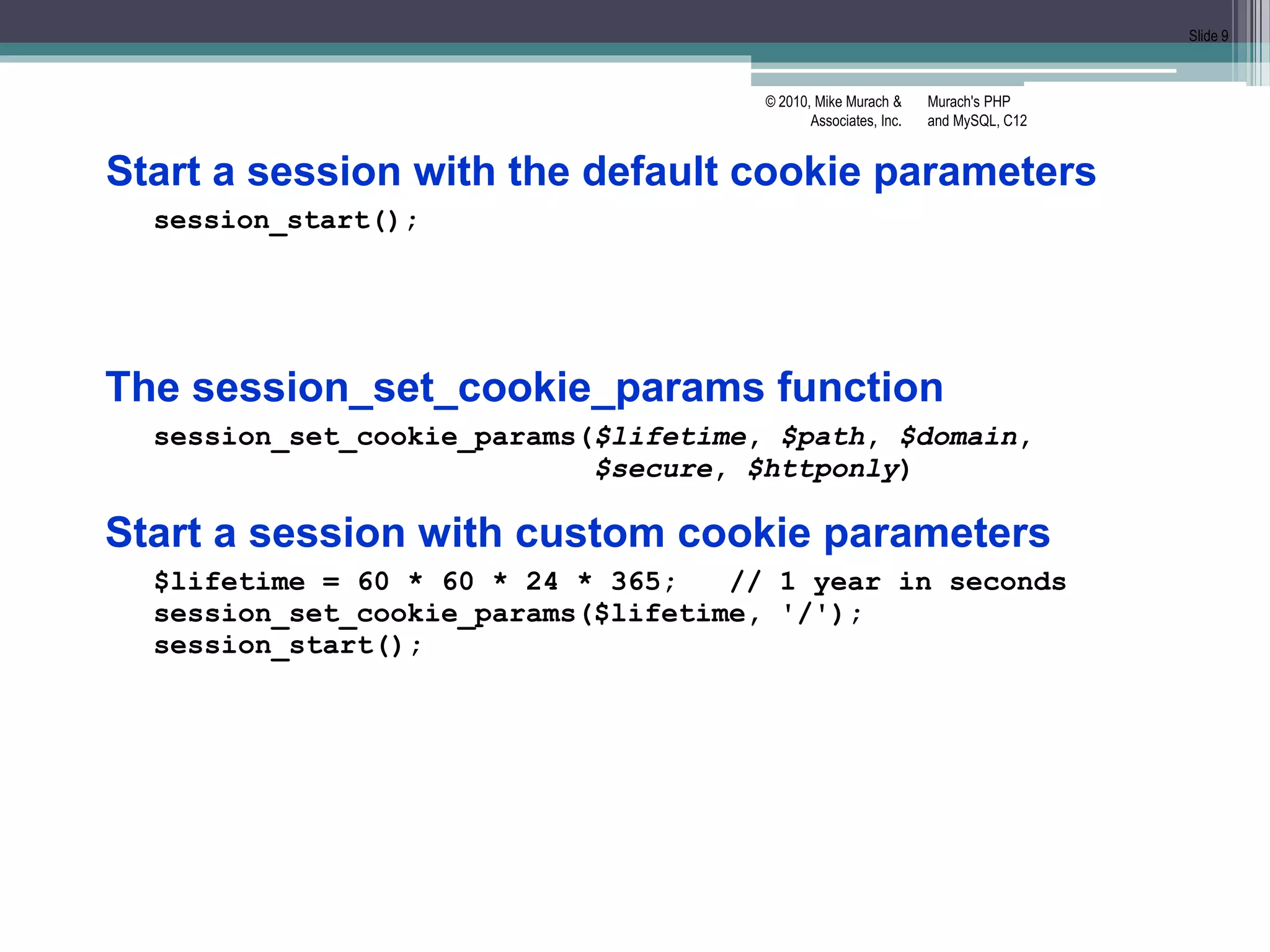
Start a session with the default cookie parameters
session_start();
The session_set_cookie_params function
session_set_cookie_params($lifetime, $path, $domain,
$secure, $httponly)
Start a session with custom cookie parameters
$lifetime = 60 * 60 * 24 * 365; // 1 year in seconds
session_set_cookie_params($lifetime, '/');
session_start();
Murach's PHP
and MySQL, C12
© 2010, Mike Murach &
Associates, Inc.
Slide 10
How to set and get arrays
Set an array in a session
if (!isset($_SESSION['cart'])) {
$_SESSION['cart'] = array();
}
Add an element to an array that’s stored in a session
$_SESSION['cart']['key1'] = 'value1';
$_SESSION['cart']['key2'] = 'value2';
Get and use an array that’s stored in a session
$cart = $_SESSION['cart'];
foreach ($cart as $item) {
echo '<li>' . $item . '</li>';
}
How to set and get scalar variables
Set a variable in a session
$_SESSION['product_code'] = 'MBT-1753';
Get a variable from a session
$product_code = $_SESSION['product_code'];
Murach's PHP
and MySQL, C12
© 2010, Mike Murach &
Associates, Inc.
Slide 11
How to remove variables from a session
Remove a session variable
unset($_SESSION['cart']);
Remove all session variables
$_SESSION = array();
Murach's PHP
and MySQL, C12
© 2010, Mike Murach &
Associates, Inc.
Slide 12
A function to end a session
session_destroy()
End a session
$_SESSION = array(); // Clear session data from memory
session_destroy(); // Clean up the session ID
Delete the session cookie from the browser
// Get name of session cookie
$name = session_name();
// Create expire date in past
$expire = strtotime('-1 year');
// Get session params
$params = session_get_cookie_params();
$path = $params['path'];
$domain = $params['domain'];
$secure = $params['secure'];
$httponly = $params['httponly'];
setcookie($name, '', $expire, $path, $domain,
$secure, $httponly);
Murach's PHP
and MySQL, C12
© 2010, Mike Murach &
Associates, Inc.
Slide 13
Functions to manage sessions
session_name()
session_id([$id])
session_write_close()
end session & save data (only needed for special
cases like redirects)
session_regenerate_id()
Create new session ID for current session.
Use after login or password change to
prevent session hijacking
Get the name of the session cookie
$name = session_name(); // By default, PHPSESSID
Get the value of the session ID
$id = session_id();
Set the session ID
session_id('abc123');
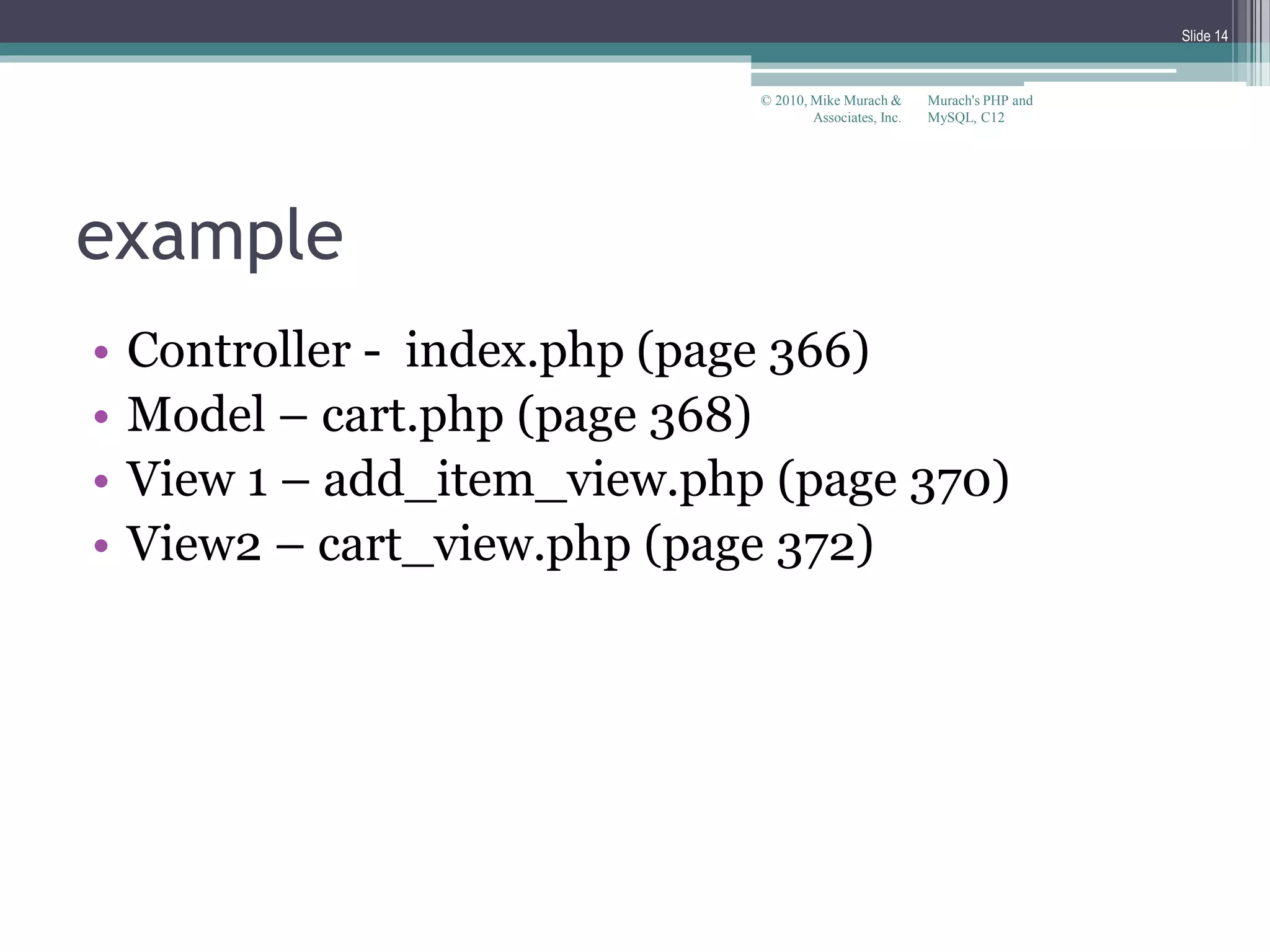
example
• Controller - index.php (page 366)
• Model – cart.php (page 368)
• View 1 – add_item_view.php (page 370)
• View2 – cart_view.php (page 372)
Murach's PHP and
MySQL, C12
© 2010, Mike Murach &
Associates, Inc.
Slide 14
Murach's PHP
and MySQL, C12
© 2010, Mike Murach &
Associates, Inc.
Slide 15
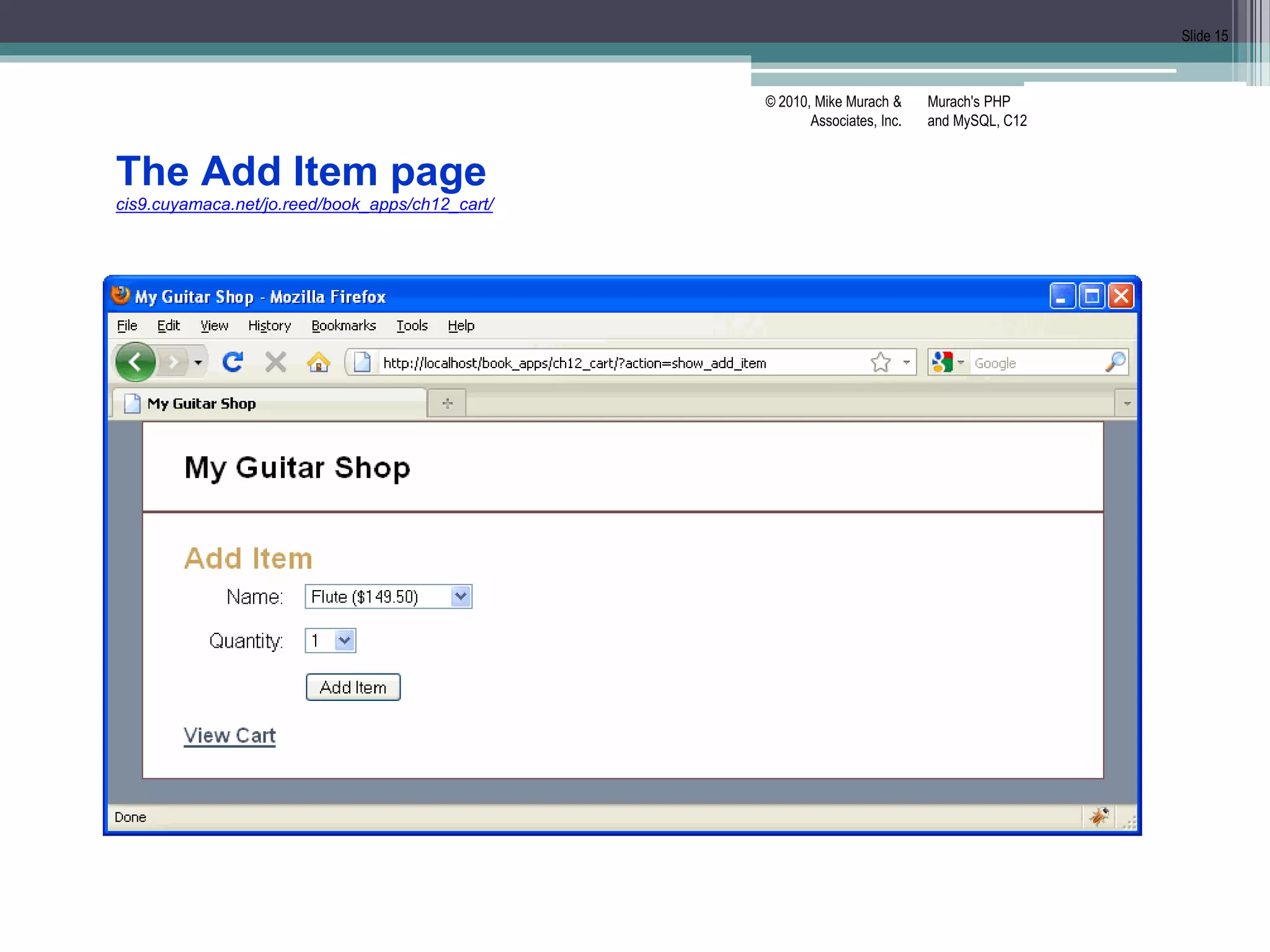
The Add Item page
cis9.cuyamaca.net/jo.reed/book_apps/ch12_cart/
Murach's PHP
and MySQL, C12
© 2010, Mike Murach &
Associates, Inc.
Slide 16
The Cart page
Murach's PHP
and MySQL, C12
© 2010, Mike Murach &
Associates, Inc.
Slide 17
The index.php file
<?php
// Start session management with a persistent cookie
$lifetime = 60 * 60 * 24 * 14; // 2 weeks in seconds
session_set_cookie_params($lifetime, '/');
session_start();
// Create a cart array if needed
if (empty($_SESSION['cart12']))
$_SESSION['cart12'] = array();
// Create a table of products
$products = array();
$products['MMS-1754'] =
array('name' => 'Flute', 'cost' => '149.50');
$products['MMS-6289'] =
array('name' => 'Trumpet', 'cost' => '199.50');
$products['MMS-3408'] =
array('name' => 'Clarinet', 'cost' => '299.50');
Murach's PHP
and MySQL, C12
© 2010, Mike Murach &
Associates, Inc.
Slide 18
The index.php file (continued)
// Include cart functions
require_once('cart.php');
// Get the action to perform
if (isset($_POST['action'])) {
$action = $_POST['action'];
} else if (isset($_GET['action'])) {
$action = $_GET['action'];
} else {
$action = 'show_add_item';
}
// Add or update cart as needed
switch($action) {
case 'add':
add_item($_POST['productkey'], $_POST['itemqty']);
include('cart_view.php');
break;
Murach's PHP
and MySQL, C12
© 2010, Mike Murach &
Associates, Inc.
Slide 19
The index.php file (continued)
case 'update':
$new_qty_list = $_POST['newqty'];
foreach($new_qty_list as $key => $qty) {
if ($_SESSION['cart12'][$key]['qty'] != $qty) {
update_item($key, $qty);
}
}
include('cart_view.php');
break;
case 'show_cart':
include('cart_view.php');
break;
case 'show_add_item':
include('add_item_view.php');
break;
case 'empty_cart':
unset($_SE[‘cart12’]);
include('cart_view.php');
break;
}
?>
Murach's PHP
and MySQL, C12
© 2010, Mike Murach &
Associates, Inc.
Slide 20
The cart.php file
<?php
// Add an item to the cart
function add_item($key, $quantity) {
global $products;
if ($quantity < 1) return;
// If item already exists in cart, update quantity
if (isset($_SESSION['cart12'][$key])) {
$quantity += $_SESSION['cart12'][$key]['qty'];
update_item($key, $quantity);
return;
}
Murach's PHP
and MySQL, C12
© 2010, Mike Murach &
Associates, Inc.
Slide 21
The cart.php file (continued)
// Add item
$cost = $products[$key]['cost'];
$total = $cost * $quantity;
$item = array(
'name' => $products[$key]['name'],
'cost' => $cost,
'qty' => $quantity,
'total' => $total
);
$_SESSION['cart12'][$key] = $item;
}
Murach's PHP
and MySQL, C12
© 2010, Mike Murach &
Associates, Inc.
Slide 22
The cart.php file (continued)
// Update an item in the cart
function update_item($key, $quantity) {
global $products;
$quantity = (int) $quantity;
if (isset($_SESSION['cart12'][$key])) {
if ($quantity <= 0) {
unset($_SESSION['cart12'][$key]);
} else {
$_SESSION['cart12'][$key]['qty'] = $quantity;
$total = $_SESSION['cart12'][$key]['cost'] *
$_SESSION['cart12'][$key]['qty'];
$_SESSION['cart12'][$key]['total'] = $total;
}
}
}
Murach's PHP
and MySQL, C12
© 2010, Mike Murach &
Associates, Inc.
Slide 23
The cart.php file (continued)
// Get cart subtotal
function get_subtotal () {
$subtotal = 0;
foreach ($_SESSION['cart12'] as $item) {
$subtotal += $item['total'];
}
$subtotal = number_format($subtotal, 2);
return $subtotal;
}
?>
Murach's PHP
and MySQL, C12
© 2010, Mike Murach &
Associates, Inc.
Slide 24
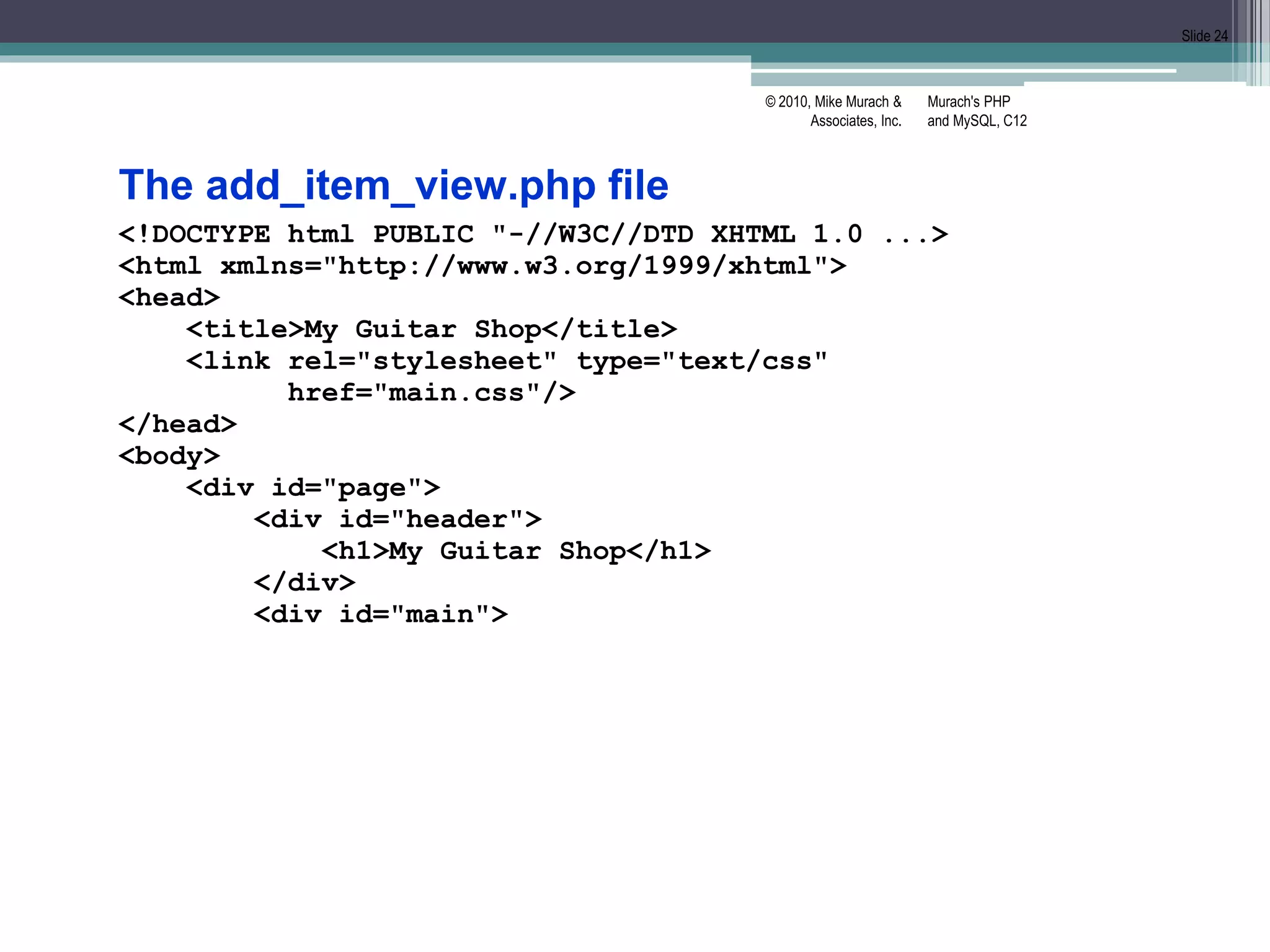
The add_item_view.php file
<!DOCTYPE html PUBLIC "-//W3C//DTD XHTML 1.0 ...>
<html xmlns="http://www.w3.org/1999/xhtml">
<head>
<title>My Guitar Shop</title>
<link rel="stylesheet" type="text/css"
href="main.css"/>
</head>
<body>
<div id="page">
<div id="header">
<h1>My Guitar Shop</h1>
</div>
<div id="main">
Murach's PHP
and MySQL, C12
© 2010, Mike Murach &
Associates, Inc.
Slide 25
The add_item_view.php file (continued)
<h1>Add Item</h1>
<form action="." method="post">
<input type="hidden" name="action"
value="add"/>
<label>Name:</label>
<select name="productkey">
<?php foreach($products as $key => $product) :
$cost = number_format($product['cost'], 2);
$name = $product['name'];
$item = $name . ' ($' . $cost . ')';
?>
<option value="<?php echo $key; ?>">
<?php echo $item; ?>
</option>
<?php endforeach; ?>
</select><br />
Murach's PHP
and MySQL, C12
© 2010, Mike Murach &
Associates, Inc.
Slide 26
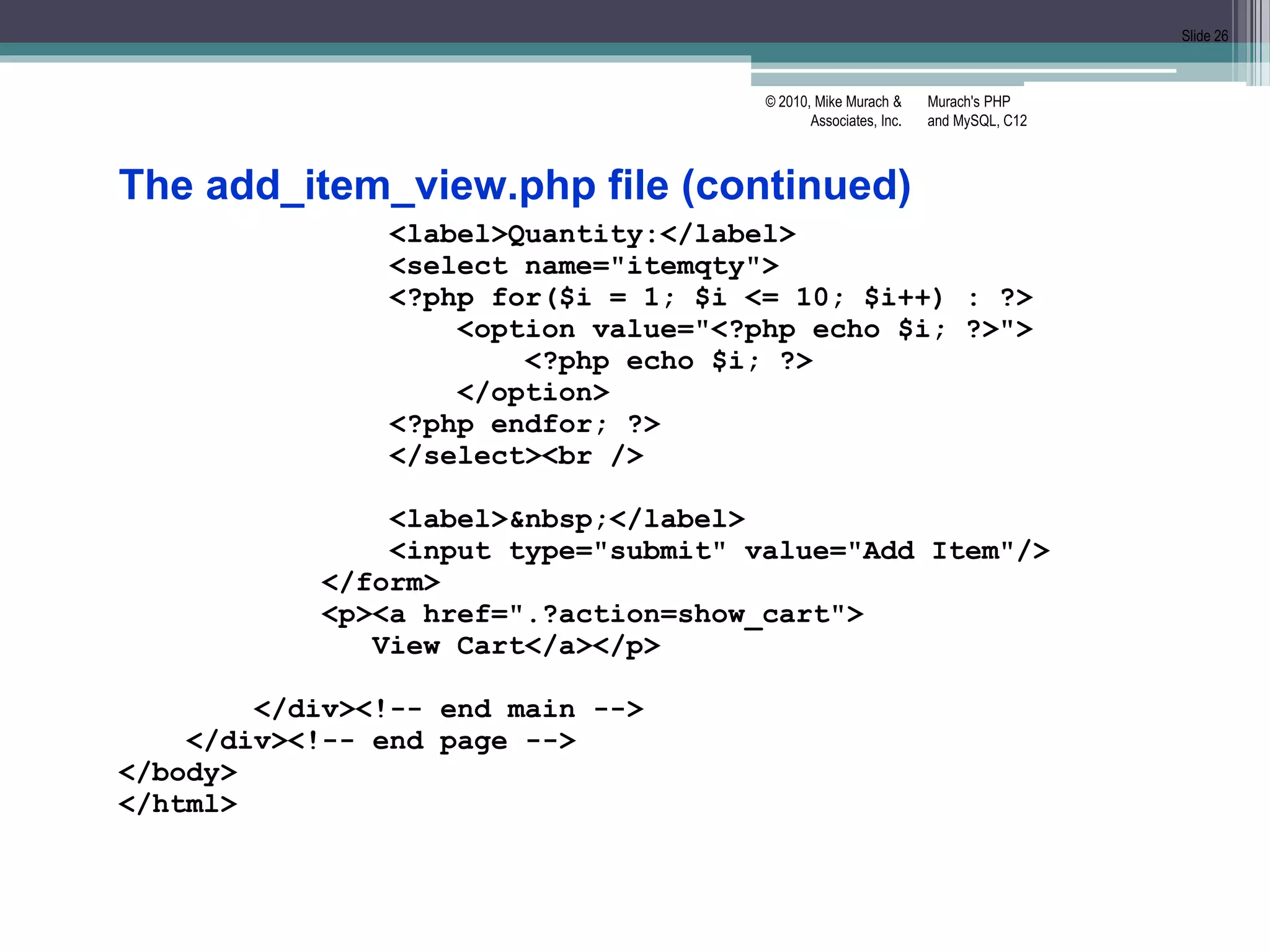
The add_item_view.php file (continued)
<label>Quantity:</label>
<select name="itemqty">
<?php for($i = 1; $i <= 10; $i++) : ?>
<option value="<?php echo $i; ?>">
<?php echo $i; ?>
</option>
<?php endfor; ?>
</select><br />
<label>&nbsp;</label>
<input type="submit" value="Add Item"/>
</form>
<p><a href=".?action=show_cart">
View Cart</a></p>
</div><!-- end main -->
</div><!-- end page -->
</body>
</html>
Murach's PHP
and MySQL, C12
© 2010, Mike Murach &
Associates, Inc.
Slide 27
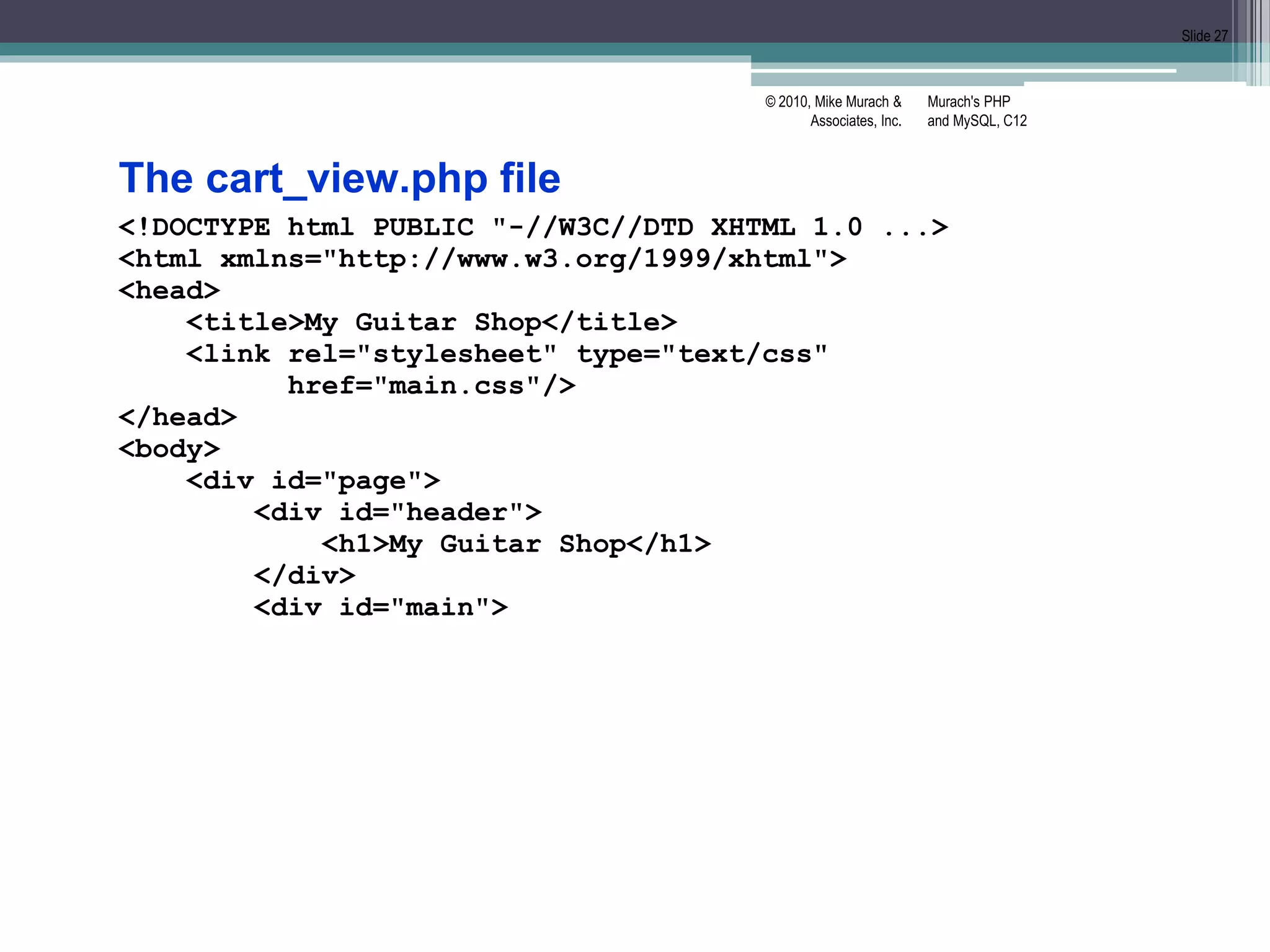
The cart_view.php file
<!DOCTYPE html PUBLIC "-//W3C//DTD XHTML 1.0 ...>
<html xmlns="http://www.w3.org/1999/xhtml">
<head>
<title>My Guitar Shop</title>
<link rel="stylesheet" type="text/css"
href="main.css"/>
</head>
<body>
<div id="page">
<div id="header">
<h1>My Guitar Shop</h1>
</div>
<div id="main">
Murach's PHP
and MySQL, C12
© 2010, Mike Murach &
Associates, Inc.
Slide 28
The cart_view.php file (continued)
<h1>Your Cart</h1>
<?php if (count($_SESSION['cart12']) == 0) : ?>
<p>There are no items in your cart.</p>
<?php else: ?>
<form action="." method="post">
<input type="hidden" name="action"
value="update"/>
<table>
<tr id="cart_header">
<th class="left">Item</th>
<th class="right">Item Cost</th>
<th class="right">Quantity</th>
<th class="right">Item Total</th>
</tr>
Murach's PHP
and MySQL, C12
© 2010, Mike Murach &
Associates, Inc.
Slide 29
The cart_view.php file (continued)
<?php foreach( $_SESSION['cart12']
as $key => $item ) :
$cost = number_format($item['cost'], 2);
$total = number_format($item['total'], 2);
?>
<tr>
<td>
<?php echo $item['name']; ?>
</td>
<td class="right">
$<?php echo $cost; ?>
</td>
<td class="right">
<input type="text"
class="cart_qty"
name=
"newqty[<?php echo $key; ?>]"
value=
"<?php echo $item['qty']; ?>"/>
</td>
Murach's PHP
and MySQL, C12
© 2010, Mike Murach &
Associates, Inc.
Slide 30
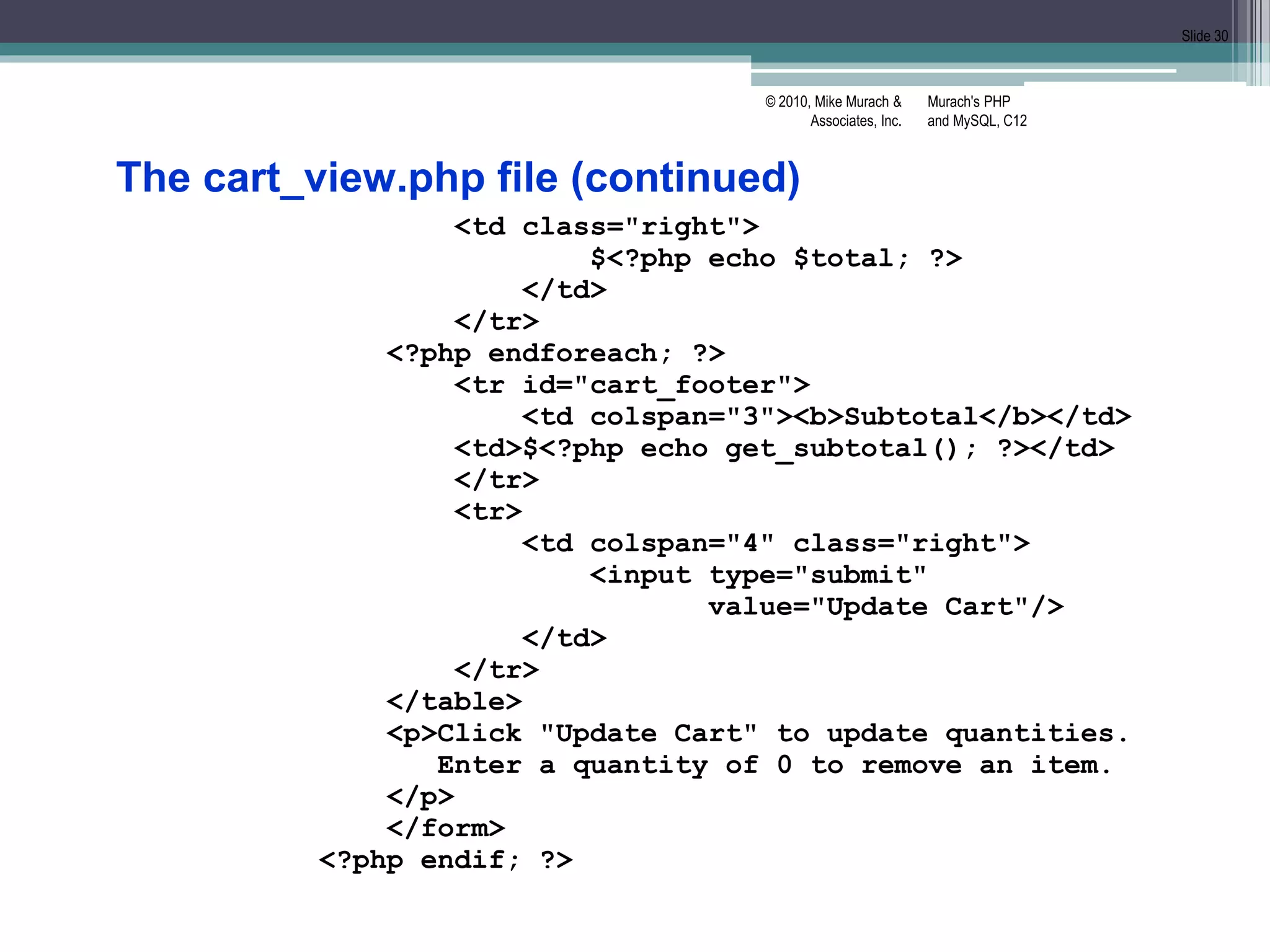
The cart_view.php file (continued)
<td class="right">
$<?php echo $total; ?>
</td>
</tr>
<?php endforeach; ?>
<tr id="cart_footer">
<td colspan="3"><b>Subtotal</b></td>
<td>$<?php echo get_subtotal(); ?></td>
</tr>
<tr>
<td colspan="4" class="right">
<input type="submit"
value="Update Cart"/>
</td>
</tr>
</table>
<p>Click "Update Cart" to update quantities.
Enter a quantity of 0 to remove an item.
</p>
</form>
<?php endif; ?>
Murach's PHP
and MySQL, C12
© 2010, Mike Murach &
Associates, Inc.
Slide 31
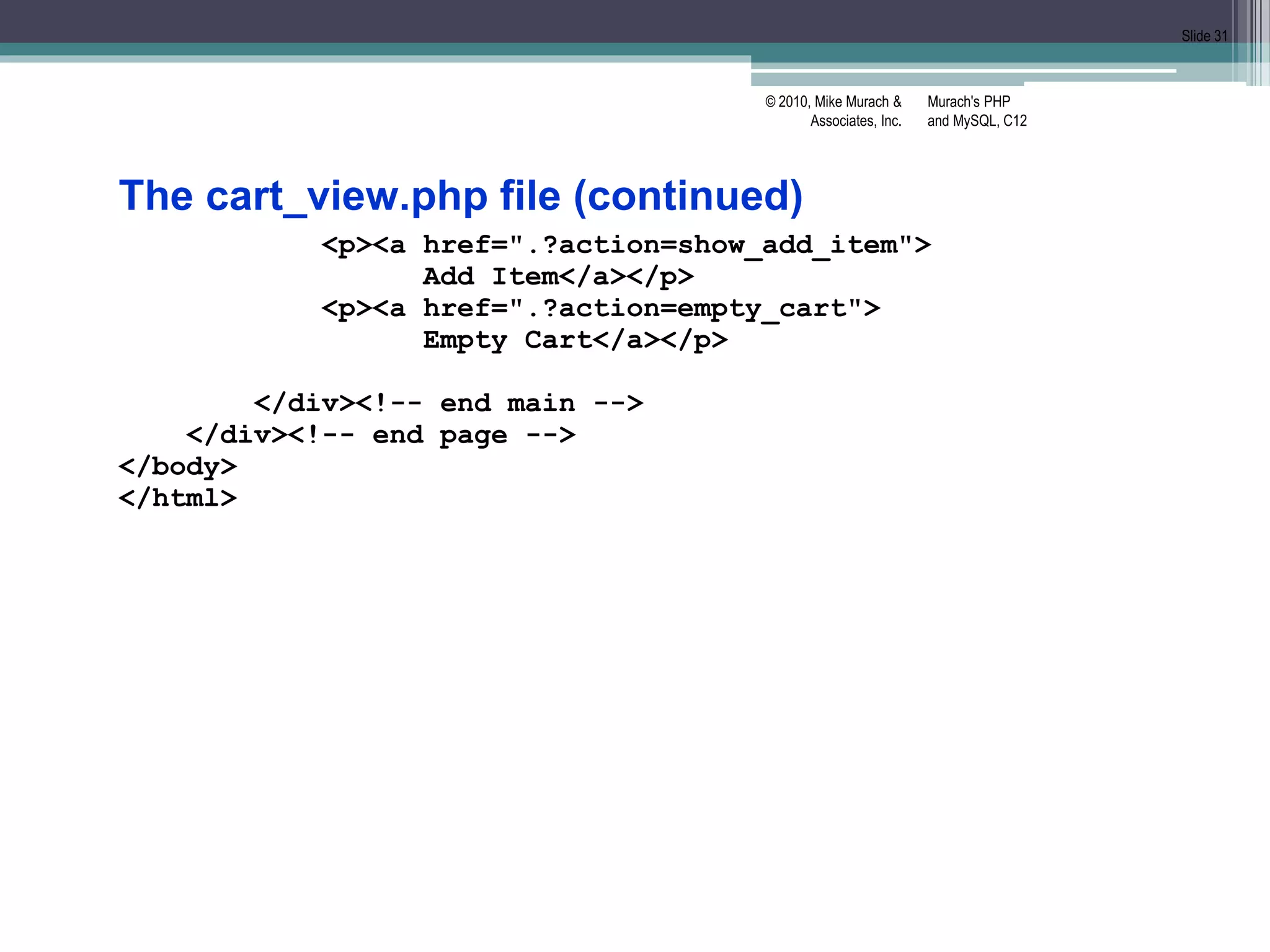
The cart_view.php file (continued)
<p><a href=".?action=show_add_item">
Add Item</a></p>
<p><a href=".?action=empty_cart">
Empty Cart</a></p>
</div><!-- end main -->
</div><!-- end page -->
</body>
</html>

murach12.pptx

  • 1.
    Chapter 12 How towork with cookies and sessions Murach's PHP and MySQL, C12 © 2010, Mike Murach & Associates, Inc. Slide 1
  • 2.
    Murach's PHP and MySQL,C12 © 2010, Mike Murach & Associates, Inc. Slide 2 Objectives Applied 1. Use any of the functions and techniques presented in this chapter as you use cookies and session tracking in your applications. Knowledge 1. Describe the use of cookies, and distinguish between per-session and persistent cookies. 2. Describe the use of session tracking. 3. Describe the use of the $_COOKIE and $_SESSION variables. 4. Describe the use of the functions for working with cookies and sessions.
  • 3.
    Cookies • Cookies arestrings stored by the browser • Examples of cookies: ▫ PHPSESSID=D1F15245171203E8670487F020544490 ▫ user_id=87 ▫ email=jsmith@hotmail.com ▫ userName=jsmith ▫ passwordCookie=opensesame • Cookies allow users to skip login forms, customize pages, and focus advertising • Cookies cannot modify a user’s computer, create pop-up ads, generate spam, or steal files Murach's PHP and MySQL, C12 © 2010, Mike Murach & Associates, Inc. Slide 3
  • 4.
    Murach's PHP and MySQL,C12 © 2010, Mike Murach & Associates, Inc. Slide 4 How cookies work  A cookie is a name/value pair that is stored in a browser.  On the server, a web application creates a cookie and sends it to the browser.  On the client, the browser saves the cookie and sends it back to the server every time it accesses a page from that server.  By default, cookies only last until the user closes his or her web browser. However, cookies can be set to persist in the user’s browser for up to three years.  Some users disable cookies in their browsers.  Browsers generally accept only 20 cookies from each site and 300 cookies total.  Browsers can also limit each cookie to 4 kilobytes.
  • 5.
    Murach's PHP and MySQL,C12 © 2010, Mike Murach & Associates, Inc. Slide 5 The syntax of the setcookie function setcookie($name, $value, $expire, $path, $domain, $secure, $httponly) Setting a cookie in the browser $name = 'userid'; $value = 'rharris'; $expire = strtotime('+1 year'); $path = '/'; setcookie($name, $value, $expire, $path); Getting the value of a cookie from the browser $userid = $_COOKIE['userid']; // $userid is 'rharris' Deleting a cookie from the browser $expire = strtotime('-1 year'); setcookie('userid', '', $expire, '/'); setcookie must be called before any HTML output Value: empty. exp date: time in past remaining parameters: same value as when created
  • 6.
    Murach's PHP and MySQL,C12 © 2010, Mike Murach & Associates, Inc. Slide 6 TESTING: enable/disable cookies in Firefox 3.6 1. Open the Tools menu and select the Options command. 2. Click on the Privacy tab. 3. Use the “Accept cookies from sites” check box to enable or disable cookies. How to enable or disable cookies in IE 8 1. Open the Tools menu and select the Internet Options command. 2. Click the Privacy tab. 3. Use the slider control to enable or disable cookies. To disable cookies, set the security level to “Block All Cookies”. To enable cookies, click the Default button to return to default privacy settings. How to reset default security settings in IE 8 1. Open the Tools menu and select the Internet Options command. 2. Click the Security tab. 3. If not disabled, click the “Reset all zones to default level” button. Or use firefox add- ons
  • 7.
    Murach's PHP and MySQL,C12 © 2010, Mike Murach & Associates, Inc. Slide 7 Client Server Browser Web server First HTTP Request: The browser requests a page. Browser Web server Browser Web server First HTTP Response: The server returns the requested page and drops the connection. Following HTTP Requests: The browser requests a page. The web server has no way to associate the browser with its previous request. Why session tracking is difficult with HTTP
  • 8.
    Murach's PHP and MySQL,C12 © 2010, Mike Murach & Associates, Inc. Slide 8 Client Server Browser PHP First HTTP Request: The browser requests a PHP page. PHP creates a session and assigns it an ID. Browser PHP Browser PHP First HTTP Response: The server returns the requested page and the ID for the session as a cookie. Following HTTP Requests: The browser requests a PHP page and sends the session ID cookie. PHP uses the session ID to associate the browser with its session. PHPSESSID=a6oqkb57f2... PHPSESSID=a6oqkb57f2... How PHP keeps track of sessions
  • 9.
    Murach's PHP and MySQL,C12 © 2010, Mike Murach & Associates, Inc. Slide 9 Start a session with the default cookie parameters session_start(); The session_set_cookie_params function session_set_cookie_params($lifetime, $path, $domain, $secure, $httponly) Start a session with custom cookie parameters $lifetime = 60 * 60 * 24 * 365; // 1 year in seconds session_set_cookie_params($lifetime, '/'); session_start();
  • 10.
    Murach's PHP and MySQL,C12 © 2010, Mike Murach & Associates, Inc. Slide 10 How to set and get arrays Set an array in a session if (!isset($_SESSION['cart'])) { $_SESSION['cart'] = array(); } Add an element to an array that’s stored in a session $_SESSION['cart']['key1'] = 'value1'; $_SESSION['cart']['key2'] = 'value2'; Get and use an array that’s stored in a session $cart = $_SESSION['cart']; foreach ($cart as $item) { echo '<li>' . $item . '</li>'; } How to set and get scalar variables Set a variable in a session $_SESSION['product_code'] = 'MBT-1753'; Get a variable from a session $product_code = $_SESSION['product_code'];
  • 11.
    Murach's PHP and MySQL,C12 © 2010, Mike Murach & Associates, Inc. Slide 11 How to remove variables from a session Remove a session variable unset($_SESSION['cart']); Remove all session variables $_SESSION = array();
  • 12.
    Murach's PHP and MySQL,C12 © 2010, Mike Murach & Associates, Inc. Slide 12 A function to end a session session_destroy() End a session $_SESSION = array(); // Clear session data from memory session_destroy(); // Clean up the session ID Delete the session cookie from the browser // Get name of session cookie $name = session_name(); // Create expire date in past $expire = strtotime('-1 year'); // Get session params $params = session_get_cookie_params(); $path = $params['path']; $domain = $params['domain']; $secure = $params['secure']; $httponly = $params['httponly']; setcookie($name, '', $expire, $path, $domain, $secure, $httponly);
  • 13.
    Murach's PHP and MySQL,C12 © 2010, Mike Murach & Associates, Inc. Slide 13 Functions to manage sessions session_name() session_id([$id]) session_write_close() end session & save data (only needed for special cases like redirects) session_regenerate_id() Create new session ID for current session. Use after login or password change to prevent session hijacking Get the name of the session cookie $name = session_name(); // By default, PHPSESSID Get the value of the session ID $id = session_id(); Set the session ID session_id('abc123');
  • 14.
    example • Controller -index.php (page 366) • Model – cart.php (page 368) • View 1 – add_item_view.php (page 370) • View2 – cart_view.php (page 372) Murach's PHP and MySQL, C12 © 2010, Mike Murach & Associates, Inc. Slide 14
  • 15.
    Murach's PHP and MySQL,C12 © 2010, Mike Murach & Associates, Inc. Slide 15 The Add Item page cis9.cuyamaca.net/jo.reed/book_apps/ch12_cart/
  • 16.
    Murach's PHP and MySQL,C12 © 2010, Mike Murach & Associates, Inc. Slide 16 The Cart page
  • 17.
    Murach's PHP and MySQL,C12 © 2010, Mike Murach & Associates, Inc. Slide 17 The index.php file <?php // Start session management with a persistent cookie $lifetime = 60 * 60 * 24 * 14; // 2 weeks in seconds session_set_cookie_params($lifetime, '/'); session_start(); // Create a cart array if needed if (empty($_SESSION['cart12'])) $_SESSION['cart12'] = array(); // Create a table of products $products = array(); $products['MMS-1754'] = array('name' => 'Flute', 'cost' => '149.50'); $products['MMS-6289'] = array('name' => 'Trumpet', 'cost' => '199.50'); $products['MMS-3408'] = array('name' => 'Clarinet', 'cost' => '299.50');
  • 18.
    Murach's PHP and MySQL,C12 © 2010, Mike Murach & Associates, Inc. Slide 18 The index.php file (continued) // Include cart functions require_once('cart.php'); // Get the action to perform if (isset($_POST['action'])) { $action = $_POST['action']; } else if (isset($_GET['action'])) { $action = $_GET['action']; } else { $action = 'show_add_item'; } // Add or update cart as needed switch($action) { case 'add': add_item($_POST['productkey'], $_POST['itemqty']); include('cart_view.php'); break;
  • 19.
    Murach's PHP and MySQL,C12 © 2010, Mike Murach & Associates, Inc. Slide 19 The index.php file (continued) case 'update': $new_qty_list = $_POST['newqty']; foreach($new_qty_list as $key => $qty) { if ($_SESSION['cart12'][$key]['qty'] != $qty) { update_item($key, $qty); } } include('cart_view.php'); break; case 'show_cart': include('cart_view.php'); break; case 'show_add_item': include('add_item_view.php'); break; case 'empty_cart': unset($_SE[‘cart12’]); include('cart_view.php'); break; } ?>
  • 20.
    Murach's PHP and MySQL,C12 © 2010, Mike Murach & Associates, Inc. Slide 20 The cart.php file <?php // Add an item to the cart function add_item($key, $quantity) { global $products; if ($quantity < 1) return; // If item already exists in cart, update quantity if (isset($_SESSION['cart12'][$key])) { $quantity += $_SESSION['cart12'][$key]['qty']; update_item($key, $quantity); return; }
  • 21.
    Murach's PHP and MySQL,C12 © 2010, Mike Murach & Associates, Inc. Slide 21 The cart.php file (continued) // Add item $cost = $products[$key]['cost']; $total = $cost * $quantity; $item = array( 'name' => $products[$key]['name'], 'cost' => $cost, 'qty' => $quantity, 'total' => $total ); $_SESSION['cart12'][$key] = $item; }
  • 22.
    Murach's PHP and MySQL,C12 © 2010, Mike Murach & Associates, Inc. Slide 22 The cart.php file (continued) // Update an item in the cart function update_item($key, $quantity) { global $products; $quantity = (int) $quantity; if (isset($_SESSION['cart12'][$key])) { if ($quantity <= 0) { unset($_SESSION['cart12'][$key]); } else { $_SESSION['cart12'][$key]['qty'] = $quantity; $total = $_SESSION['cart12'][$key]['cost'] * $_SESSION['cart12'][$key]['qty']; $_SESSION['cart12'][$key]['total'] = $total; } } }
  • 23.
    Murach's PHP and MySQL,C12 © 2010, Mike Murach & Associates, Inc. Slide 23 The cart.php file (continued) // Get cart subtotal function get_subtotal () { $subtotal = 0; foreach ($_SESSION['cart12'] as $item) { $subtotal += $item['total']; } $subtotal = number_format($subtotal, 2); return $subtotal; } ?>
  • 24.
    Murach's PHP and MySQL,C12 © 2010, Mike Murach & Associates, Inc. Slide 24 The add_item_view.php file <!DOCTYPE html PUBLIC "-//W3C//DTD XHTML 1.0 ...> <html xmlns="http://www.w3.org/1999/xhtml"> <head> <title>My Guitar Shop</title> <link rel="stylesheet" type="text/css" href="main.css"/> </head> <body> <div id="page"> <div id="header"> <h1>My Guitar Shop</h1> </div> <div id="main">
  • 25.
    Murach's PHP and MySQL,C12 © 2010, Mike Murach & Associates, Inc. Slide 25 The add_item_view.php file (continued) <h1>Add Item</h1> <form action="." method="post"> <input type="hidden" name="action" value="add"/> <label>Name:</label> <select name="productkey"> <?php foreach($products as $key => $product) : $cost = number_format($product['cost'], 2); $name = $product['name']; $item = $name . ' ($' . $cost . ')'; ?> <option value="<?php echo $key; ?>"> <?php echo $item; ?> </option> <?php endforeach; ?> </select><br />
  • 26.
    Murach's PHP and MySQL,C12 © 2010, Mike Murach & Associates, Inc. Slide 26 The add_item_view.php file (continued) <label>Quantity:</label> <select name="itemqty"> <?php for($i = 1; $i <= 10; $i++) : ?> <option value="<?php echo $i; ?>"> <?php echo $i; ?> </option> <?php endfor; ?> </select><br /> <label>&nbsp;</label> <input type="submit" value="Add Item"/> </form> <p><a href=".?action=show_cart"> View Cart</a></p> </div><!-- end main --> </div><!-- end page --> </body> </html>
  • 27.
    Murach's PHP and MySQL,C12 © 2010, Mike Murach & Associates, Inc. Slide 27 The cart_view.php file <!DOCTYPE html PUBLIC "-//W3C//DTD XHTML 1.0 ...> <html xmlns="http://www.w3.org/1999/xhtml"> <head> <title>My Guitar Shop</title> <link rel="stylesheet" type="text/css" href="main.css"/> </head> <body> <div id="page"> <div id="header"> <h1>My Guitar Shop</h1> </div> <div id="main">
  • 28.
    Murach's PHP and MySQL,C12 © 2010, Mike Murach & Associates, Inc. Slide 28 The cart_view.php file (continued) <h1>Your Cart</h1> <?php if (count($_SESSION['cart12']) == 0) : ?> <p>There are no items in your cart.</p> <?php else: ?> <form action="." method="post"> <input type="hidden" name="action" value="update"/> <table> <tr id="cart_header"> <th class="left">Item</th> <th class="right">Item Cost</th> <th class="right">Quantity</th> <th class="right">Item Total</th> </tr>
  • 29.
    Murach's PHP and MySQL,C12 © 2010, Mike Murach & Associates, Inc. Slide 29 The cart_view.php file (continued) <?php foreach( $_SESSION['cart12'] as $key => $item ) : $cost = number_format($item['cost'], 2); $total = number_format($item['total'], 2); ?> <tr> <td> <?php echo $item['name']; ?> </td> <td class="right"> $<?php echo $cost; ?> </td> <td class="right"> <input type="text" class="cart_qty" name= "newqty[<?php echo $key; ?>]" value= "<?php echo $item['qty']; ?>"/> </td>
  • 30.
    Murach's PHP and MySQL,C12 © 2010, Mike Murach & Associates, Inc. Slide 30 The cart_view.php file (continued) <td class="right"> $<?php echo $total; ?> </td> </tr> <?php endforeach; ?> <tr id="cart_footer"> <td colspan="3"><b>Subtotal</b></td> <td>$<?php echo get_subtotal(); ?></td> </tr> <tr> <td colspan="4" class="right"> <input type="submit" value="Update Cart"/> </td> </tr> </table> <p>Click "Update Cart" to update quantities. Enter a quantity of 0 to remove an item. </p> </form> <?php endif; ?>
  • 31.
    Murach's PHP and MySQL,C12 © 2010, Mike Murach & Associates, Inc. Slide 31 The cart_view.php file (continued) <p><a href=".?action=show_add_item"> Add Item</a></p> <p><a href=".?action=empty_cart"> Empty Cart</a></p> </div><!-- end main --> </div><!-- end page --> </body> </html>

Editor's Notes

  • #8 So far, we’ve used hidden fields for session tracking.
  • #10 Page 357 Session_start() - checks for session ID and creates new ID and session cookie if not found MUST BE CALLED before any html is sent to the browser Session cookie is per-session by default -- session ends when the browser is closed You can change default settings with session_set_cookie_params – lifetime is only required parameter. session_set_cookie_params MUST BE CALLED BEFORE session_start.
  • #11 As session runs, data is stored in memory When session ends, data is stored in a file on the server Session data is deleted when session expires (default is 24 minutes of inactivity) To store objects (like a row in a database), it’s best to just store the necessary part (like the primary key) and store the rest of the data in a database
  • #13 By default, session ends in 24 minutes, but you should end session sooner for logouts and secure apps like bank login
  • #14 Page 363