

Multi-Utility Infrastructure Management update
Industryware Multi-Utility Infrastructure Management Solution for Utilities (Electric,
Fiber, Gas, Water and Sewer)
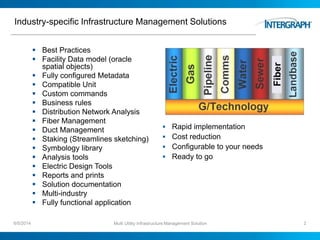
Industry-specific Infrastructure Management Solutions
6/5/2014 Multi Utility Infrastructure Management Solution 2
 Best Practices
 Facility Data model (oracle
spatial objects)
 Fully configured Metadata
 Compatible Unit
 Custom commands
 Business rules
 Distribution Network Analysis
 Fiber Management
 Duct Management
 Staking (Streamlines sketching)
 Symbology library
 Analysis tools
 Electric Design Tools
 Reports and prints
 Solution documentation
 Multi-industry
 Fully functional application
 Rapid implementation
 Cost reduction
 Configurable to your needs
 Ready to go
Fiber
Industryware Product Goals and Direction
 To provide Industryware solutions to improve planning, design, construction
and maintenance productivity and improve the efficiency, reliability and
responsiveness of operations
 To Provide a solution to improve design and asset management productivity
by powering user with productivity tools.
 To provide a single scalable database solutions for utilities (within a single
database instance, for ease of administration and integration) and can grow
as an organization grows and its needs evolve.
 To enable utility customers to easily leverage geospatial asset data through
other applications such as financial, work management and customer
information system (CIS) platforms for maximum ROI.
6/5/2014 Multi Utility Infrastructure Management Solution 3
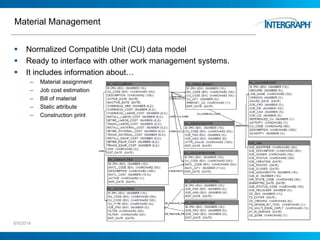
Material Management
 Normalized Compatible Unit (CU) data model
 Ready to interface with other work management systems.
 It includes information about…
– Material assignment
– Job cost estimation
– Bill of material
– Static attribute
– Construction print
6/5/2014 Multi Utility Infrastructure Management Solution 4
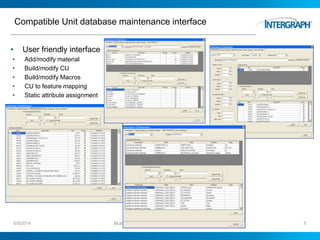
Compatible Unit database maintenance interface
• User friendly interface
• Add/modify material
• Build/modify CU
• Build/modify Macros
• CU to feature mapping
• Static attribute assignment
6/5/2014 Multi Utility Infrastructure Management Solution 5
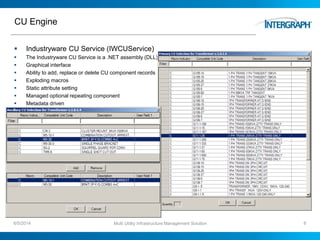
CU Engine
 Industryware CU Service (IWCUService)
 The Industryware CU Service is a .NET assembly (DLL)
 Graphical interface
 Ability to add, replace or delete CU component records
 Exploding macros
 Static attribute setting
 Managed optional repeating component
 Metadata driven
6/5/2014 Multi Utility Infrastructure Management Solution 6
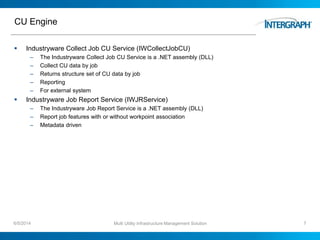
CU Engine
 Industryware Collect Job CU Service (IWCollectJobCU)
– The Industryware Collect Job CU Service is a .NET assembly (DLL)
– Collect CU data by job
– Returns structure set of CU data by job
– Reporting
– For external system
 Industryware Job Report Service (IWJRService)
– The Industryware Job Report Service is a .NET assembly (DLL)
– Report job features with or without workpoint association
– Metadata driven
6/5/2014 Multi Utility Infrastructure Management Solution 7
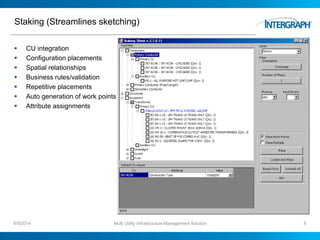
Staking (Streamlines sketching)
 CU integration
 Configuration placements
 Spatial relationships
 Business rules/validation
 Repetitive placements
 Auto generation of work points
 Attribute assignments
6/5/2014 Multi Utility Infrastructure Management Solution 8
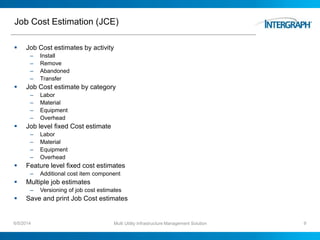
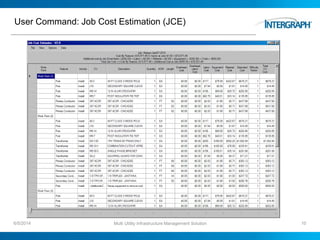
Job Cost Estimation (JCE)
 Job Cost estimates by activity
– Install
– Remove
– Abandoned
– Transfer
 Job Cost estimate by category
– Labor
– Material
– Equipment
– Overhead
 Job level fixed Cost estimate
– Labor
– Material
– Equipment
– Overhead
 Feature level fixed cost estimates
– Additional cost item component
 Multiple job estimates
– Versioning of job cost estimates
 Save and print Job Cost estimates
6/5/2014 Multi Utility Infrastructure Management Solution 9
User Command: Job Cost Estimation (JCE)
6/5/2014 Multi Utility Infrastructure Management Solution 10
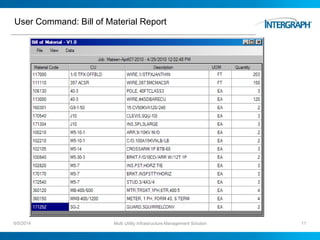
User Command: Bill of Material Report
6/5/2014 Multi Utility Infrastructure Management Solution 11
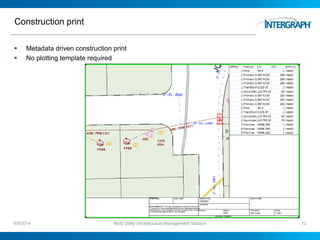
Construction print
 Metadata driven construction print
 No plotting template required
6/5/2014 Multi Utility Infrastructure Management Solution 12
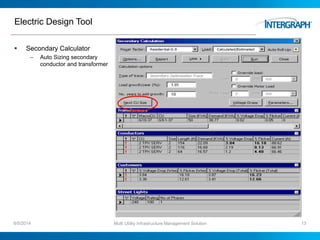
Electric Design Tool
 Secondary Calculator
– Auto Sizing secondary
conductor and transformer
6/5/2014 Multi Utility Infrastructure Management Solution 13
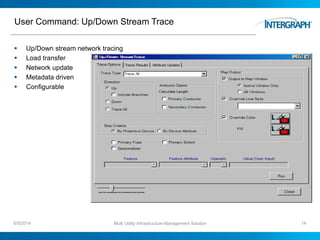
User Command: Up/Down Stream Trace
 Up/Down stream network tracing
 Load transfer
 Network update
 Metadata driven
 Configurable
6/5/2014 Multi Utility Infrastructure Management Solution 14
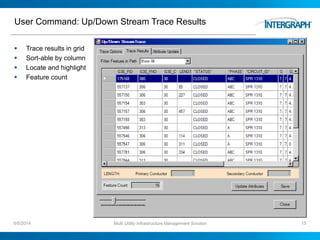
User Command: Up/Down Stream Trace Results
 Trace results in grid
 Sort-able by column
 Locate and highlight
 Feature count
6/5/2014 Multi Utility Infrastructure Management Solution 15
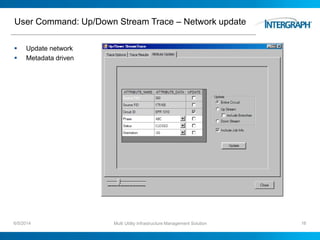
User Command: Up/Down Stream Trace – Network update
 Update network
 Metadata driven
6/5/2014 Multi Utility Infrastructure Management Solution 16
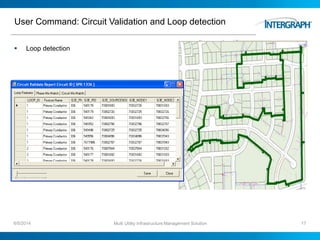
User Command: Circuit Validation and Loop detection
 Loop detection
6/5/2014 Multi Utility Infrastructure Management Solution 17
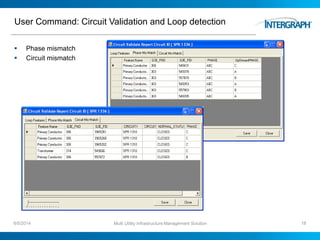
User Command: Circuit Validation and Loop detection
 Phase mismatch
 Circuit mismatch
6/5/2014 Multi Utility Infrastructure Management Solution 18
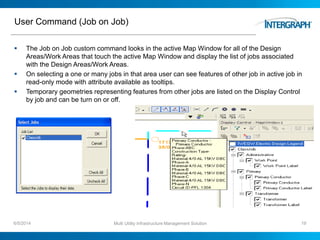
User Command (Job on Job)
 The Job on Job custom command looks in the active Map Window for all of the Design
Areas/Work Areas that touch the active Map Window and display the list of jobs associated
with the Design Areas/Work Areas.
 On selecting a one or many jobs in that area user can see features of other job in active job in
read-only mode with attribute available as tooltips.
 Temporary geometries representing features from other jobs are listed on the Display Control
by job and can be turn on or off.
6/5/2014 Multi Utility Infrastructure Management Solution 19
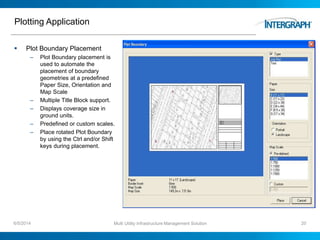
Plotting Application
 Plot Boundary Placement
– Plot Boundary placement is
used to automate the
placement of boundary
geometries at a predefined
Paper Size, Orientation and
Map Scale
– Multiple Title Block support.
– Displays coverage size in
ground units.
– Predefined or custom scales.
– Place rotated Plot Boundary
by using the Ctrl and/or Shift
keys during placement.
6/5/2014 Multi Utility Infrastructure Management Solution 20
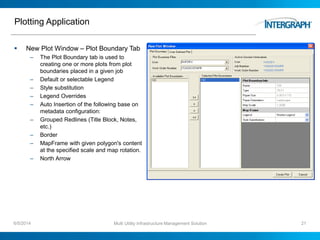
Plotting Application
 New Plot Window – Plot Boundary Tab
– The Plot Boundary tab is used to
creating one or more plots from plot
boundaries placed in a given job
– Default or selectable Legend
– Style substitution
– Legend Overrides
– Auto Insertion of the following base on
metadata configuration:
– Grouped Redlines (Title Block, Notes,
etc.)
– Border
– MapFrame with given polygon's content
at the specified scale and map rotation.
– North Arrow
6/5/2014 Multi Utility Infrastructure Management Solution 21
Plotting Application
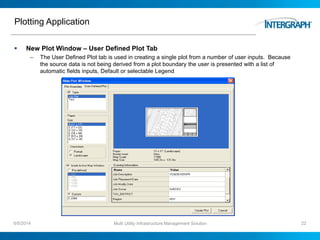
 New Plot Window – User Defined Plot Tab
– The User Defined Plot tab is used in creating a single plot from a number of user inputs. Because
the source data is not being derived from a plot boundary the user is presented with a list of
automatic fields inputs, Default or selectable Legend
6/5/2014 Multi Utility Infrastructure Management Solution 22
Plotting Application
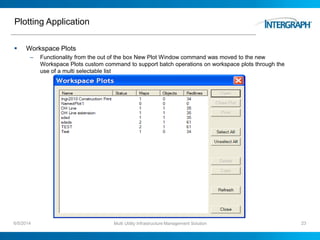
 Workspace Plots
– Functionality from the out of the box New Plot Window command was moved to the new
Workspace Plots custom command to support batch operations on workspace plots through the
use of a multi selectable list
6/5/2014 Multi Utility Infrastructure Management Solution 23
Reporting
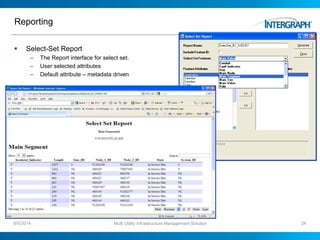
 Select-Set Report
– The Report interface for select set.
– User selected attributes
– Default attribute – metadata driven
6/5/2014 Multi Utility Infrastructure Management Solution 24
Reporting
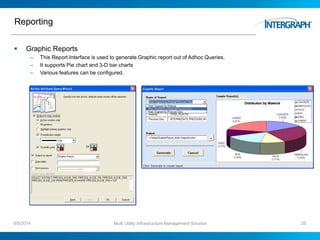
 Graphic Reports
– This Report Interface is used to generate Graphic report out of Adhoc Queries.
– It supports Pie chart and 3-D bar charts
– Various features can be configured.
6/5/2014 Multi Utility Infrastructure Management Solution 25
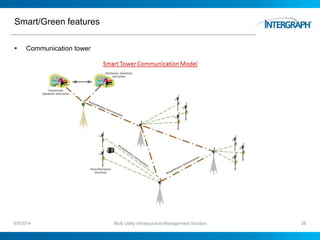
Smart/Green features
 Communication tower
6/5/2014 Multi Utility Infrastructure Management Solution 26
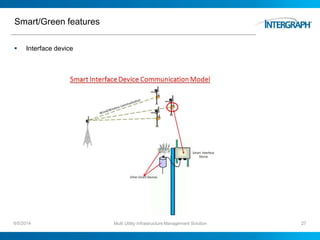
Smart/Green features
 Interface device
6/5/2014 Multi Utility Infrastructure Management Solution 27
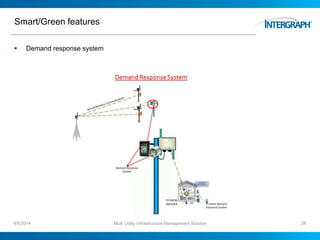
Smart/Green features
 Demand response system
6/5/2014 Multi Utility Infrastructure Management Solution 28
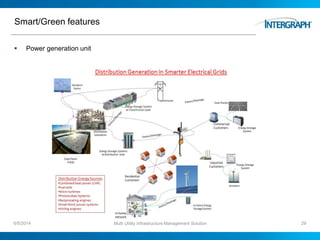
Smart/Green features
 Power generation unit
6/5/2014 Multi Utility Infrastructure Management Solution 29
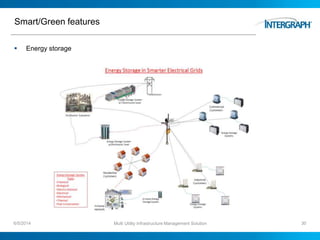
Smart/Green features
 Energy storage
6/5/2014 Multi Utility Infrastructure Management Solution 30
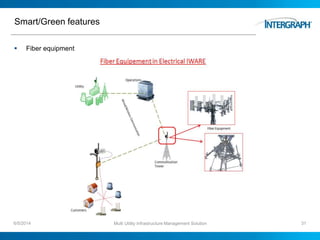
Smart/Green features
 Fiber equipment
6/5/2014 Multi Utility Infrastructure Management Solution 31
Multi-Utility Infrastructure Management Solutions
6/5/2014 Multi Utility Infrastructure Management Solution 32
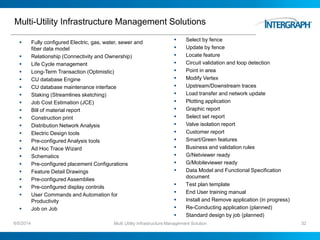
 Fully configured Electric, gas, water, sewer and
fiber data model
 Relationship (Connectivity and Ownership)
 Life Cycle management
 Long-Term Transaction (Optimistic)
 CU database Engine
 CU database maintenance interface
 Staking (Streamlines sketching)
 Job Cost Estimation (JCE)
 Bill of material report
 Construction print
 Distribution Network Analysis
 Electric Design tools
 Pre-configured Analysis tools
 Ad Hoc Trace Wizard
 Schematics
 Pre-configured placement Configurations
 Feature Detail Drawings
 Pre-configured Assemblies
 Pre-configured display controls
 User Commands and Automation for
Productivity
 Job on Job
 Select by fence
 Update by fence
 Locate feature
 Circuit validation and loop detection
 Point in area
 Modify Vertex
 Upstream/Downstream traces
 Load transfer and network update
 Plotting application
 Graphic report
 Select set report
 Valve isolation report
 Customer report
 Smart/Green features
 Business and validation rules
 G/Netviewer ready
 G/Mobileviewer ready
 Data Model and Functional Specification
document
 Test plan template
 End User training manual
 Install and Remove application (in progress)
 Re-Conducting application (planned)
 Standard design by job (planned)
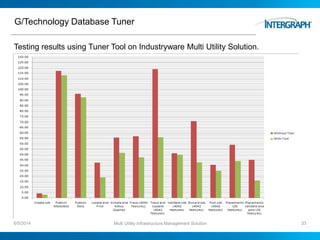
G/Technology Database Tuner
Testing results using Tuner Tool on Industryware Multi Utility Solution.
6/5/2014 Multi Utility Infrastructure Management Solution 33
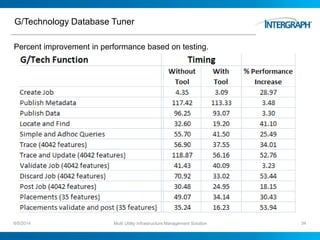
G/Technology Database Tuner
Percent improvement in performance based on testing.
6/5/2014 Multi Utility Infrastructure Management Solution 34
Multi-Utility Infrastructure Management Solutions
6/5/2014 Multi Utility Infrastructure Management Solution 35

Multi-Utility Infrastructure Management

  • 1.
    Multi-Utility Infrastructure Managementupdate Industryware Multi-Utility Infrastructure Management Solution for Utilities (Electric, Fiber, Gas, Water and Sewer)
  • 2.
    Industry-specific Infrastructure ManagementSolutions 6/5/2014 Multi Utility Infrastructure Management Solution 2  Best Practices  Facility Data model (oracle spatial objects)  Fully configured Metadata  Compatible Unit  Custom commands  Business rules  Distribution Network Analysis  Fiber Management  Duct Management  Staking (Streamlines sketching)  Symbology library  Analysis tools  Electric Design Tools  Reports and prints  Solution documentation  Multi-industry  Fully functional application  Rapid implementation  Cost reduction  Configurable to your needs  Ready to go Fiber
  • 3.
    Industryware Product Goalsand Direction  To provide Industryware solutions to improve planning, design, construction and maintenance productivity and improve the efficiency, reliability and responsiveness of operations  To Provide a solution to improve design and asset management productivity by powering user with productivity tools.  To provide a single scalable database solutions for utilities (within a single database instance, for ease of administration and integration) and can grow as an organization grows and its needs evolve.  To enable utility customers to easily leverage geospatial asset data through other applications such as financial, work management and customer information system (CIS) platforms for maximum ROI. 6/5/2014 Multi Utility Infrastructure Management Solution 3
  • 4.
    Material Management  NormalizedCompatible Unit (CU) data model  Ready to interface with other work management systems.  It includes information about… – Material assignment – Job cost estimation – Bill of material – Static attribute – Construction print 6/5/2014 Multi Utility Infrastructure Management Solution 4
  • 5.
    Compatible Unit databasemaintenance interface • User friendly interface • Add/modify material • Build/modify CU • Build/modify Macros • CU to feature mapping • Static attribute assignment 6/5/2014 Multi Utility Infrastructure Management Solution 5
  • 6.
    CU Engine  IndustrywareCU Service (IWCUService)  The Industryware CU Service is a .NET assembly (DLL)  Graphical interface  Ability to add, replace or delete CU component records  Exploding macros  Static attribute setting  Managed optional repeating component  Metadata driven 6/5/2014 Multi Utility Infrastructure Management Solution 6
  • 7.
    CU Engine  IndustrywareCollect Job CU Service (IWCollectJobCU) – The Industryware Collect Job CU Service is a .NET assembly (DLL) – Collect CU data by job – Returns structure set of CU data by job – Reporting – For external system  Industryware Job Report Service (IWJRService) – The Industryware Job Report Service is a .NET assembly (DLL) – Report job features with or without workpoint association – Metadata driven 6/5/2014 Multi Utility Infrastructure Management Solution 7
  • 8.
    Staking (Streamlines sketching) CU integration  Configuration placements  Spatial relationships  Business rules/validation  Repetitive placements  Auto generation of work points  Attribute assignments 6/5/2014 Multi Utility Infrastructure Management Solution 8
  • 9.
    Job Cost Estimation(JCE)  Job Cost estimates by activity – Install – Remove – Abandoned – Transfer  Job Cost estimate by category – Labor – Material – Equipment – Overhead  Job level fixed Cost estimate – Labor – Material – Equipment – Overhead  Feature level fixed cost estimates – Additional cost item component  Multiple job estimates – Versioning of job cost estimates  Save and print Job Cost estimates 6/5/2014 Multi Utility Infrastructure Management Solution 9
  • 10.
    User Command: JobCost Estimation (JCE) 6/5/2014 Multi Utility Infrastructure Management Solution 10
  • 11.
    User Command: Billof Material Report 6/5/2014 Multi Utility Infrastructure Management Solution 11
  • 12.
    Construction print  Metadatadriven construction print  No plotting template required 6/5/2014 Multi Utility Infrastructure Management Solution 12
  • 13.
    Electric Design Tool Secondary Calculator – Auto Sizing secondary conductor and transformer 6/5/2014 Multi Utility Infrastructure Management Solution 13
  • 14.
    User Command: Up/DownStream Trace  Up/Down stream network tracing  Load transfer  Network update  Metadata driven  Configurable 6/5/2014 Multi Utility Infrastructure Management Solution 14
  • 15.
    User Command: Up/DownStream Trace Results  Trace results in grid  Sort-able by column  Locate and highlight  Feature count 6/5/2014 Multi Utility Infrastructure Management Solution 15
  • 16.
    User Command: Up/DownStream Trace – Network update  Update network  Metadata driven 6/5/2014 Multi Utility Infrastructure Management Solution 16
  • 17.
    User Command: CircuitValidation and Loop detection  Loop detection 6/5/2014 Multi Utility Infrastructure Management Solution 17
  • 18.
    User Command: CircuitValidation and Loop detection  Phase mismatch  Circuit mismatch 6/5/2014 Multi Utility Infrastructure Management Solution 18
  • 19.
    User Command (Jobon Job)  The Job on Job custom command looks in the active Map Window for all of the Design Areas/Work Areas that touch the active Map Window and display the list of jobs associated with the Design Areas/Work Areas.  On selecting a one or many jobs in that area user can see features of other job in active job in read-only mode with attribute available as tooltips.  Temporary geometries representing features from other jobs are listed on the Display Control by job and can be turn on or off. 6/5/2014 Multi Utility Infrastructure Management Solution 19
  • 20.
    Plotting Application  PlotBoundary Placement – Plot Boundary placement is used to automate the placement of boundary geometries at a predefined Paper Size, Orientation and Map Scale – Multiple Title Block support. – Displays coverage size in ground units. – Predefined or custom scales. – Place rotated Plot Boundary by using the Ctrl and/or Shift keys during placement. 6/5/2014 Multi Utility Infrastructure Management Solution 20
  • 21.
    Plotting Application  NewPlot Window – Plot Boundary Tab – The Plot Boundary tab is used to creating one or more plots from plot boundaries placed in a given job – Default or selectable Legend – Style substitution – Legend Overrides – Auto Insertion of the following base on metadata configuration: – Grouped Redlines (Title Block, Notes, etc.) – Border – MapFrame with given polygon's content at the specified scale and map rotation. – North Arrow 6/5/2014 Multi Utility Infrastructure Management Solution 21
  • 22.
    Plotting Application  NewPlot Window – User Defined Plot Tab – The User Defined Plot tab is used in creating a single plot from a number of user inputs. Because the source data is not being derived from a plot boundary the user is presented with a list of automatic fields inputs, Default or selectable Legend 6/5/2014 Multi Utility Infrastructure Management Solution 22
  • 23.
    Plotting Application  WorkspacePlots – Functionality from the out of the box New Plot Window command was moved to the new Workspace Plots custom command to support batch operations on workspace plots through the use of a multi selectable list 6/5/2014 Multi Utility Infrastructure Management Solution 23
  • 24.
    Reporting  Select-Set Report –The Report interface for select set. – User selected attributes – Default attribute – metadata driven 6/5/2014 Multi Utility Infrastructure Management Solution 24
  • 25.
    Reporting  Graphic Reports –This Report Interface is used to generate Graphic report out of Adhoc Queries. – It supports Pie chart and 3-D bar charts – Various features can be configured. 6/5/2014 Multi Utility Infrastructure Management Solution 25
  • 26.
    Smart/Green features  Communicationtower 6/5/2014 Multi Utility Infrastructure Management Solution 26
  • 27.
    Smart/Green features  Interfacedevice 6/5/2014 Multi Utility Infrastructure Management Solution 27
  • 28.
    Smart/Green features  Demandresponse system 6/5/2014 Multi Utility Infrastructure Management Solution 28
  • 29.
    Smart/Green features  Powergeneration unit 6/5/2014 Multi Utility Infrastructure Management Solution 29
  • 30.
    Smart/Green features  Energystorage 6/5/2014 Multi Utility Infrastructure Management Solution 30
  • 31.
    Smart/Green features  Fiberequipment 6/5/2014 Multi Utility Infrastructure Management Solution 31
  • 32.
    Multi-Utility Infrastructure ManagementSolutions 6/5/2014 Multi Utility Infrastructure Management Solution 32  Fully configured Electric, gas, water, sewer and fiber data model  Relationship (Connectivity and Ownership)  Life Cycle management  Long-Term Transaction (Optimistic)  CU database Engine  CU database maintenance interface  Staking (Streamlines sketching)  Job Cost Estimation (JCE)  Bill of material report  Construction print  Distribution Network Analysis  Electric Design tools  Pre-configured Analysis tools  Ad Hoc Trace Wizard  Schematics  Pre-configured placement Configurations  Feature Detail Drawings  Pre-configured Assemblies  Pre-configured display controls  User Commands and Automation for Productivity  Job on Job  Select by fence  Update by fence  Locate feature  Circuit validation and loop detection  Point in area  Modify Vertex  Upstream/Downstream traces  Load transfer and network update  Plotting application  Graphic report  Select set report  Valve isolation report  Customer report  Smart/Green features  Business and validation rules  G/Netviewer ready  G/Mobileviewer ready  Data Model and Functional Specification document  Test plan template  End User training manual  Install and Remove application (in progress)  Re-Conducting application (planned)  Standard design by job (planned)
  • 33.
    G/Technology Database Tuner Testingresults using Tuner Tool on Industryware Multi Utility Solution. 6/5/2014 Multi Utility Infrastructure Management Solution 33
  • 34.
    G/Technology Database Tuner Percentimprovement in performance based on testing. 6/5/2014 Multi Utility Infrastructure Management Solution 34
  • 35.
    Multi-Utility Infrastructure ManagementSolutions 6/5/2014 Multi Utility Infrastructure Management Solution 35

Editor's Notes

  • #4 Open and interoperable systems Enabling the Smart Grid. Intelligent Infrastructure Intergraph Solutions for Utilities Scalable to any enterprise.