



Object – Oriented Programming
Week 14– Multithreading
Ferdin Joe John Joseph, PhD
Faculty of Information Technology
Thai-Nichi Institute of Technology
Multithreading / Concurrency
2
Thread
• Thread: single sequential flow of control
within a program
• Single-threaded program can handle one
task at any time.
• Multitasking allows single processor to run
several concurrent threads.
• Most modern operating systems support
multitasking.
3
Advantages of Multithreading
• Reactive systems – constantly monitoring
• More responsive to user input – GUI
application can interrupt a time-consuming
task
• Server can handle multiple clients
simultaneously
• Can take advantage of parallel processing
4
Advantages (cont’d)
• Different processes do not share memory
space.
• A thread can execute concurrently with
other threads within a single process.
• All threads managed by the JVM share
memory space and can communicate with
each other.
5
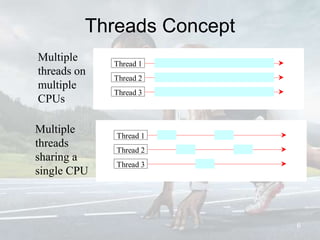
Threads Concept
6
Multiple
threads on
multiple
CPUs
Multiple
threads
sharing a
single CPU
Thread 3
Thread 2
Thread 1
Thread 3
Thread 2
Thread 1
Threads in Java
Creating threads in Java:
• Extend java.lang.Thread class
OR
• Implement java.lang.Runnable interface
7
Threads in Java
Creating threads in Java:
• Extend java.lang.Thread class
– run() method must be overridden (similar to
main method of sequential program)
– run() is called when execution of the thread
begins
– A thread terminates when run() returns
– start() method invokes run()
– Calling run() does not create a new thread
• Implement java.lang.Runnable interface 8
Threads in Java
Creating threads in Java:
• Extend java.lang.Thread class
• Implement java.lang.Runnable interface
– If already inheriting another class (i.e.,
JApplet)
– Single method: public void run()
– Thread class implements Runnable.
9
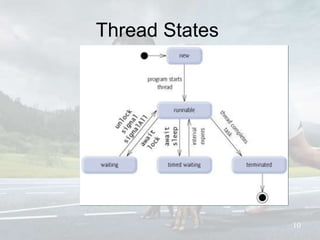
Thread States
10
Thread termination
A thread becomes Not Runnable when one
of these events occurs:
• Its sleep method is invoked.
• The thread calls the wait method to wait
for a specific condition to be satisifed.
• The thread is blocking on I/O.
11
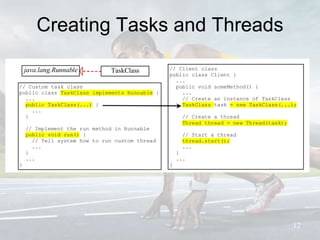
Creating Tasks and Threads
12
// Custom task class
public class TaskClass implements Runnable {
...
public TaskClass(...) {
...
}
// Implement the run method in Runnable
public void run() {
// Tell system how to run custom thread
...
}
...
}
// Client class
public class Client {
...
public void someMethod() {
...
// Create an instance of TaskClass
TaskClass task = new TaskClass(...);
// Create a thread
Thread thread = new Thread(task);
// Start a thread
thread.start();
...
}
...
}
java.lang.Runnable TaskClass
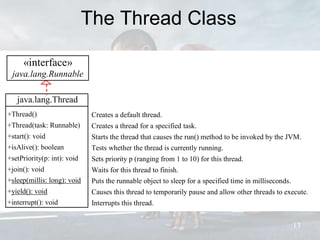
The Thread Class
13
java.lang.Thread
+Thread()
+Thread(task: Runnable)
+start(): void
+isAlive(): boolean
+setPriority(p: int): void
+join(): void
+sleep(millis: long): void
+yield(): void
+interrupt(): void
Creates a default thread.
Creates a thread for a specified task.
Starts the thread that causes the run() method to be invoked by the JVM.
Tests whether the thread is currently running.
Sets priority p (ranging from 1 to 10) for this thread.
Waits for this thread to finish.
Puts the runnable object to sleep for a specified time in milliseconds.
Causes this thread to temporarily pause and allow other threads to execute.
Interrupts this thread.
«interface»
java.lang.Runnable
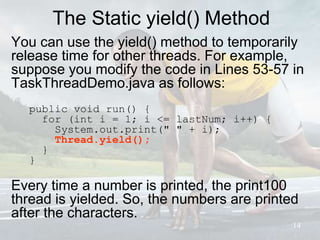
The Static yield() Method
You can use the yield() method to temporarily
release time for other threads. For example,
suppose you modify the code in Lines 53-57 in
TaskThreadDemo.java as follows:
public void run() {
for (int i = 1; i <= lastNum; i++) {
System.out.print(" " + i);
Thread.yield();
}
}
Every time a number is printed, the print100
thread is yielded. So, the numbers are printed
after the characters.
14
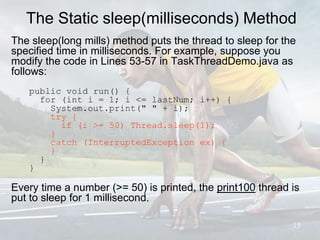
The Static sleep(milliseconds) Method
The sleep(long mills) method puts the thread to sleep for the
specified time in milliseconds. For example, suppose you
modify the code in Lines 53-57 in TaskThreadDemo.java as
follows:
public void run() {
for (int i = 1; i <= lastNum; i++) {
System.out.print(" " + i);
try {
if (i >= 50) Thread.sleep(1);
}
catch (InterruptedException ex) {
}
}
}
Every time a number (>= 50) is printed, the print100 thread is
put to sleep for 1 millisecond.
15
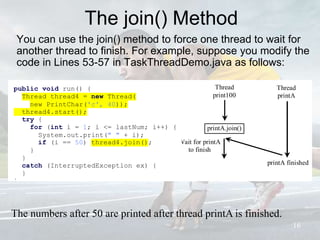
The join() Method
You can use the join() method to force one thread to wait for
another thread to finish. For example, suppose you modify the
code in Lines 53-57 in TaskThreadDemo.java as follows:
16
The numbers after 50 are printed after thread printA is finished.
printA.join()
-char token
+getToken
+setToken
+paintCompone
t
+mouseClicked
Thread
print100
-char token
+getToken
+setToken
+paintCompo
net
+mouseClicke
d
Wait for printA
to finish
+getToken
+setToken
+paintComponet
Thread
printA
-char token
+getToken
+setToken
+paintCompo
net
+mouseClicke
d
printA finished
-char token
public void run() {
Thread thread4 = new Thread(
new PrintChar('c', 40));
thread4.start();
try {
for (int i = 1; i <= lastNum; i++) {
System.out.print(" " + i);
if (i == 50) thread4.join();
}
}
catch (InterruptedException ex) {
}
}
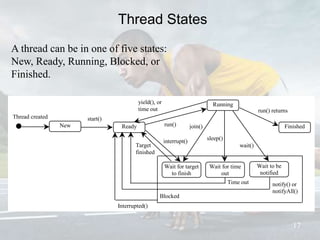
Thread States
17
New Ready
Thread created
Finished
Running
start()
run()
Wait for target
to finish
join()
run() returns
yield(), or
time out
interrupt()
Wait for time
out
Wait to be
notified
sleep()
wait()Target
finished
notify() or
notifyAll()
Time out
Blocked
Interrupted()
A thread can be in one of five states:
New, Ready, Running, Blocked, or
Finished.
Thread methods
isAlive()
• method used to find out the state of a thread.
• returns true: thread is in the Ready, Blocked, or
Running state
• returns false: thread is new and has not started or if it is
finished.
interrupt()
f a thread is currently in the Ready or Running state, its
interrupted flag is set; if a thread is currently blocked, it is
awakened and enters the Ready state, and an
java.io.InterruptedException is thrown.
The isInterrupt() method tests whether the thread is
interrupted.
18
The deprecated stop(), suspend(), and
resume() Methods
NOTE: The Thread class also contains the stop(), suspend(),
and resume() methods. As of Java 2, these methods are
deprecated (or outdated) because they are known to be
inherently unsafe. You should assign null to a Thread variable
to indicate that it is stopped rather than use the stop() method.
19
Thread Priority
• Each thread is assigned a default priority
of Thread.NORM_PRIORITY (constant of 5).
You can reset the priority using
setPriority(int priority).
• Some constants for priorities include
Thread.MIN_PRIORITY Thread.MAX_PRIORITY
Thread.NORM_PRIORITY
• By default, a thread has the priority level of the thread
that created it.
20
Thread Scheduling
• An operating system’s thread scheduler
determines which thread runs next.
• Most operating systems use timeslicing for
threads of equal priority.
• Preemptive scheduling: when a thread of
higher priority enters the running state, it
preempts the current thread.
• Starvation: Higher-priority threads can
postpone (possible forever) the execution
of lower-priority threads. 21
Thread Pools
22
• Starting a new thread for each task could limit throughput and cause
poor performance.
• A thread pool is ideal to manage the number of tasks executing
concurrently.
• Executor interface for executing Runnable objects in a thread pool
•ExecutorService is a subinterface of Executor.
Shuts down the executor, but allows the tasks in the executor to
complete. Once shutdown, it cannot accept new tasks.
Shuts down the executor immediately even though there are
unfinished threads in the pool. Returns a list of unfinished
tasks.
Returns true if the executor has been shutdown.
Returns true if all tasks in the pool are terminated.
«interface»
java.util.concurrent.Executor
+execute(Runnable object): void Executes the runnable task.

«interface»
java.util.concurrent.ExecutorService
+shutdown(): void
+shutdownNow(): List<Runnable>
+isShutdown(): boolean
+isTerminated(): boolean
Creating Executors
23
To create an Executor object, use the static methods in the Executors
class.
Creates a thread pool with a fixed number of threads executing
concurrently. A thread may be reused to execute another task
after its current task is finished.
Creates a thread pool that creates new threads as needed, but
will reuse previously constructed threads when they are
available.
java.util.concurrent.Executors
+newFixedThreadPool(numberOfThreads:
int): ExecutorService
+newCachedThreadPool():
ExecutorService
Thread Synchronization
24
A shared resource may be corrupted if it is
accessed simultaneously by multiple threads.
Example: two unsynchronized threads accessing
the same bank account may cause conflict.
Step balance thread[i] thread[j]
1 0 newBalance = bank.getBalance() + 1;
2 0 newBalance = bank.getBalance() + 1;
3 1 bank.setBalance(newBalance);
4 1 bank.setBalance(newBalance);
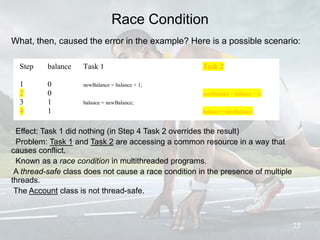
Race Condition
What, then, caused the error in the example? Here is a possible scenario:
25
• Effect: Task 1 did nothing (in Step 4 Task 2 overrides the result)
• Problem: Task 1 and Task 2 are accessing a common resource in a way that
causes conflict.
• Known as a race condition in multithreaded programs.
•A thread-safe class does not cause a race condition in the presence of multiple
threads.
•The Account class is not thread-safe.
Step balance Task 1 Task 2
1 0 newBalance = balance + 1;
2 0 newBalance = balance + 1;
3 1 balance = newBalance;
4 1 balance = newBalance;
);
synchronized
•Problem: race conditions
•Solution: give exclusive access to one thread at a time to code
that manipulates a shared object.
•Synchronization keeps other threads waiting until the object is
available.
•The synchronized keyword synchronizes the method so that
only one thread can access the method at a time.
•The critical region in the Listing 29.7 is the entire deposit
method.
•One way to correct the problem in Listing 29.7: make Account
thread-safe by adding the synchronized keyword in deposit:
public synchronized void deposit(double amount)
26
Synchronizing Instance Methods and Static
Methods
•A synchronized method acquires a lock before it
executes.
•Instance method: the lock is on the object for
which it was invoked.
•Static method: the lock is on the class.
•If one thread invokes a synchronized instance
method (respectively, static method) on an object,
the lock of that object (respectively, class) is
acquired, then the method is executed, and finally
the lock is released.
•Another thread invoking the same method of that
object (respectively, class) is blocked until the lock
is released.
27
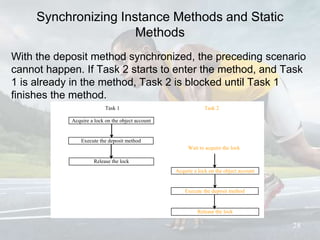
Synchronizing Instance Methods and Static
Methods
With the deposit method synchronized, the preceding scenario
cannot happen. If Task 2 starts to enter the method, and Task
1 is already in the method, Task 2 is blocked until Task 1
finishes the method.
28
Acquire a lock on the object account
-char token
+getToken
+setToken
+paintComponet
+mouseClicked
Execute the deposit method
-char token
+getToken
+setToken
+paintComponet
+mouseClicked
Release the lock
-char token
+getToken
+setToken
+paintComponet
+mouseClicked
Task 1
-char token
+getToken
+setToken
+paintComponet
+mouseClicked
Acqurie a lock on the object account
-char token
+getToken
+setToken
+paintComponet
+mouseClicked
Execute the deposit method
-char token
+getToken
+setToken
+paintComponet
Release the lock
Task 2
-char token
+getToken
+setToken
+paintComponet
+mouseClicked
Wait to acquire the lock
-char token
+getToken
+setToken
+paintComponet
+mouseClicked
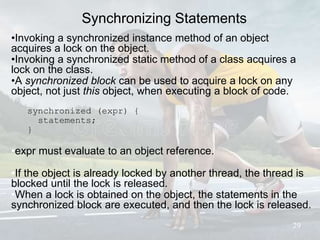
Synchronizing Statements
•Invoking a synchronized instance method of an object
acquires a lock on the object.
•Invoking a synchronized static method of a class acquires a
lock on the class.
•A synchronized block can be used to acquire a lock on any
object, not just this object, when executing a block of code.
synchronized (expr) {
statements;
}
•expr must evaluate to an object reference.
•If the object is already locked by another thread, the thread is
blocked until the lock is released.
•When a lock is obtained on the object, the statements in the
synchronized block are executed, and then the lock is released.
29
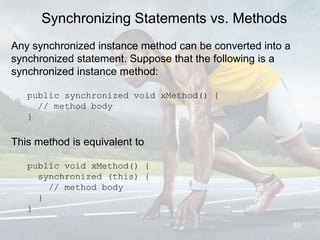
Synchronizing Statements vs. Methods
Any synchronized instance method can be converted into a
synchronized statement. Suppose that the following is a
synchronized instance method:
public synchronized void xMethod() {
// method body
}
This method is equivalent to
public void xMethod() {
synchronized (this) {
// method body
}
}
30
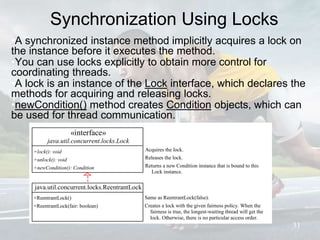
Synchronization Using Locks
•A synchronized instance method implicitly acquires a lock on
the instance before it executes the method.
•You can use locks explicitly to obtain more control for
coordinating threads.
•A lock is an instance of the Lock interface, which declares the
methods for acquiring and releasing locks.
•newCondition() method creates Condition objects, which can
be used for thread communication.
31
Same as ReentrantLock(false).
Creates a lock with the given fairness policy. When the
fairness is true, the longest-waiting thread will get the
lock. Otherwise, there is no particular access order.
«interface»
java.util.concurrent.locks.Lock
+lock(): void
+unlock(): void
+newCondition(): Condition
Acquires the lock.
Releases the lock.
Returns a new Condition instance that is bound to this
Lock instance.
java.util.concurrent.locks.ReentrantLock
+ReentrantLock()
+ReentrantLock(fair: boolean)
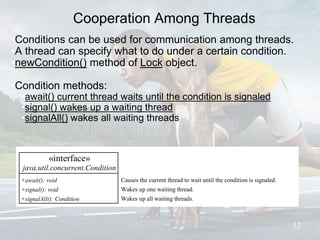
Cooperation Among Threads
•Conditions can be used for communication among threads.
•A thread can specify what to do under a certain condition.
•newCondition() method of Lock object.
•Condition methods:
•await() current thread waits until the condition is signaled
•signal() wakes up a waiting thread
•signalAll() wakes all waiting threads
32
«interface»
java.util.concurrent.Condition
+await(): void
+signal(): void
+signalAll(): Condition
Causes the current thread to wait until the condition is signaled.
Wakes up one waiting thread.
Wakes up all waiting threads.
Cooperation Among Threads
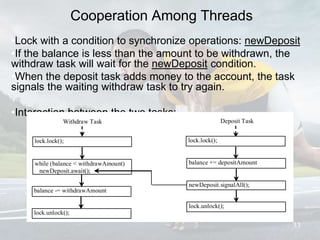
•Lock with a condition to synchronize operations: newDeposit
•If the balance is less than the amount to be withdrawn, the
withdraw task will wait for the newDeposit condition.
•When the deposit task adds money to the account, the task
signals the waiting withdraw task to try again.
•Interaction between the two tasks:
33
while (balance < withdrawAmount)
newDeposit.await();
Withdraw Task
-char token
+getToken
+setToken
+paintComponet
+mouseClicked
balance -= withdrawAmount
-char token
+getToken
+setToken
lock.unlock();
Deposit Task
-char token
+getToken
+setToken
+paintComponet
+mouseClicked
lock.lock();
-char token
+getToken
+setToken
+paintComponet
+mouseClicked newDeposit.signalAll();
balance += depositAmount
-char token
+getToken
+setToken
+paintComponet
+mouseClicked
lock.unlock();
-char token
lock.lock();
-char token
+getToken
+setToken
+paintComponet
+mouseClicked
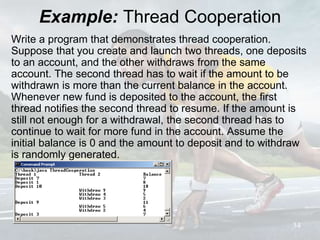
Example: Thread Cooperation
Write a program that demonstrates thread cooperation.
Suppose that you create and launch two threads, one deposits
to an account, and the other withdraws from the same
account. The second thread has to wait if the amount to be
withdrawn is more than the current balance in the account.
Whenever new fund is deposited to the account, the first
thread notifies the second thread to resume. If the amount is
still not enough for a withdrawal, the second thread has to
continue to wait for more fund in the account. Assume the
initial balance is 0 and the amount to deposit and to withdraw
is randomly generated.
34
wait(), notify(), and notifyAll()
Use the wait(), notify(), and notifyAll() methods to facilitate
communication among threads.
The wait(), notify(), and notifyAll() methods must be called in a
synchronized method or a synchronized block on the calling
object of these methods. Otherwise, an
IllegalMonitorStateException would occur.
The wait() method lets the thread wait until some condition
occurs. When it occurs, you can use the notify() or notifyAll()
methods to notify the waiting threads to resume normal
execution. The notifyAll() method wakes up all waiting threads,
while notify() picks up only one thread from a waiting queue.
35
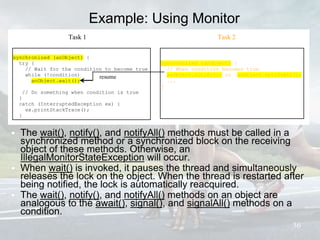
Example: Using Monitor
• The wait(), notify(), and notifyAll() methods must be called in a
synchronized method or a synchronized block on the receiving
object of these methods. Otherwise, an
IllegalMonitorStateException will occur.
• When wait() is invoked, it pauses the thread and simultaneously
releases the lock on the object. When the thread is restarted after
being notified, the lock is automatically reacquired.
• The wait(), notify(), and notifyAll() methods on an object are
analogous to the await(), signal(), and signalAll() methods on a
condition.
36
synchronized (anObject) {
try {
// Wait for the condition to become true
while (!condition)
anObject.wait();
// Do something when condition is true
}
catch (InterruptedException ex) {
ex.printStackTrace();
}
}
Task 1
synchronized (anObject) {
// When condition becomes true
anObject.notify(); or anObject.notifyAll();
...
}
Task 2
resume
Deadlock
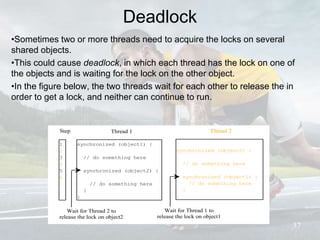
•Sometimes two or more threads need to acquire the locks on several
shared objects.
•This could cause deadlock, in which each thread has the lock on one of
the objects and is waiting for the lock on the other object.
•In the figure below, the two threads wait for each other to release the in
order to get a lock, and neither can continue to run.
37
synchronized (object1) {
// do something here
synchronized (object2) {
// do something here
}
}
Thread 1
synchronized (object2) {
// do something here
synchronized (object1) {
// do something here
}
}
Thread 2Step
1
2
3
4
5
6
Wait for Thread 2 to
release the lock on object2
Wait for Thread 1 to
release the lock on object1
Preventing Deadlock
•Deadlock can be easily avoided by resource ordering.
•With this technique, assign an order on all the objects whose
locks must be acquired and ensure that the locks are acquired
in that order.
•How does this prevent deadlock in the previous example?
38

Multi Threading

  • 1.
    Object – OrientedProgramming Week 14– Multithreading Ferdin Joe John Joseph, PhD Faculty of Information Technology Thai-Nichi Institute of Technology
  • 2.
  • 3.
    Thread • Thread: singlesequential flow of control within a program • Single-threaded program can handle one task at any time. • Multitasking allows single processor to run several concurrent threads. • Most modern operating systems support multitasking. 3
  • 4.
    Advantages of Multithreading •Reactive systems – constantly monitoring • More responsive to user input – GUI application can interrupt a time-consuming task • Server can handle multiple clients simultaneously • Can take advantage of parallel processing 4
  • 5.
    Advantages (cont’d) • Differentprocesses do not share memory space. • A thread can execute concurrently with other threads within a single process. • All threads managed by the JVM share memory space and can communicate with each other. 5
  • 6.
    Threads Concept 6 Multiple threads on multiple CPUs Multiple threads sharinga single CPU Thread 3 Thread 2 Thread 1 Thread 3 Thread 2 Thread 1
  • 7.
    Threads in Java Creatingthreads in Java: • Extend java.lang.Thread class OR • Implement java.lang.Runnable interface 7
  • 8.
    Threads in Java Creatingthreads in Java: • Extend java.lang.Thread class – run() method must be overridden (similar to main method of sequential program) – run() is called when execution of the thread begins – A thread terminates when run() returns – start() method invokes run() – Calling run() does not create a new thread • Implement java.lang.Runnable interface 8
  • 9.
    Threads in Java Creatingthreads in Java: • Extend java.lang.Thread class • Implement java.lang.Runnable interface – If already inheriting another class (i.e., JApplet) – Single method: public void run() – Thread class implements Runnable. 9
  • 10.
  • 11.
    Thread termination A threadbecomes Not Runnable when one of these events occurs: • Its sleep method is invoked. • The thread calls the wait method to wait for a specific condition to be satisifed. • The thread is blocking on I/O. 11
  • 12.
    Creating Tasks andThreads 12 // Custom task class public class TaskClass implements Runnable { ... public TaskClass(...) { ... } // Implement the run method in Runnable public void run() { // Tell system how to run custom thread ... } ... } // Client class public class Client { ... public void someMethod() { ... // Create an instance of TaskClass TaskClass task = new TaskClass(...); // Create a thread Thread thread = new Thread(task); // Start a thread thread.start(); ... } ... } java.lang.Runnable TaskClass
  • 13.
    The Thread Class 13 java.lang.Thread +Thread() +Thread(task:Runnable) +start(): void +isAlive(): boolean +setPriority(p: int): void +join(): void +sleep(millis: long): void +yield(): void +interrupt(): void Creates a default thread. Creates a thread for a specified task. Starts the thread that causes the run() method to be invoked by the JVM. Tests whether the thread is currently running. Sets priority p (ranging from 1 to 10) for this thread. Waits for this thread to finish. Puts the runnable object to sleep for a specified time in milliseconds. Causes this thread to temporarily pause and allow other threads to execute. Interrupts this thread. «interface» java.lang.Runnable
  • 14.
    The Static yield()Method You can use the yield() method to temporarily release time for other threads. For example, suppose you modify the code in Lines 53-57 in TaskThreadDemo.java as follows: public void run() { for (int i = 1; i <= lastNum; i++) { System.out.print(" " + i); Thread.yield(); } } Every time a number is printed, the print100 thread is yielded. So, the numbers are printed after the characters. 14
  • 15.
    The Static sleep(milliseconds)Method The sleep(long mills) method puts the thread to sleep for the specified time in milliseconds. For example, suppose you modify the code in Lines 53-57 in TaskThreadDemo.java as follows: public void run() { for (int i = 1; i <= lastNum; i++) { System.out.print(" " + i); try { if (i >= 50) Thread.sleep(1); } catch (InterruptedException ex) { } } } Every time a number (>= 50) is printed, the print100 thread is put to sleep for 1 millisecond. 15
  • 16.
    The join() Method Youcan use the join() method to force one thread to wait for another thread to finish. For example, suppose you modify the code in Lines 53-57 in TaskThreadDemo.java as follows: 16 The numbers after 50 are printed after thread printA is finished. printA.join() -char token +getToken +setToken +paintCompone t +mouseClicked Thread print100 -char token +getToken +setToken +paintCompo net +mouseClicke d Wait for printA to finish +getToken +setToken +paintComponet Thread printA -char token +getToken +setToken +paintCompo net +mouseClicke d printA finished -char token public void run() { Thread thread4 = new Thread( new PrintChar('c', 40)); thread4.start(); try { for (int i = 1; i <= lastNum; i++) { System.out.print(" " + i); if (i == 50) thread4.join(); } } catch (InterruptedException ex) { } }
  • 17.
    Thread States 17 New Ready Threadcreated Finished Running start() run() Wait for target to finish join() run() returns yield(), or time out interrupt() Wait for time out Wait to be notified sleep() wait()Target finished notify() or notifyAll() Time out Blocked Interrupted() A thread can be in one of five states: New, Ready, Running, Blocked, or Finished.
  • 18.
    Thread methods isAlive() • methodused to find out the state of a thread. • returns true: thread is in the Ready, Blocked, or Running state • returns false: thread is new and has not started or if it is finished. interrupt() f a thread is currently in the Ready or Running state, its interrupted flag is set; if a thread is currently blocked, it is awakened and enters the Ready state, and an java.io.InterruptedException is thrown. The isInterrupt() method tests whether the thread is interrupted. 18
  • 19.
    The deprecated stop(),suspend(), and resume() Methods NOTE: The Thread class also contains the stop(), suspend(), and resume() methods. As of Java 2, these methods are deprecated (or outdated) because they are known to be inherently unsafe. You should assign null to a Thread variable to indicate that it is stopped rather than use the stop() method. 19
  • 20.
    Thread Priority • Eachthread is assigned a default priority of Thread.NORM_PRIORITY (constant of 5). You can reset the priority using setPriority(int priority). • Some constants for priorities include Thread.MIN_PRIORITY Thread.MAX_PRIORITY Thread.NORM_PRIORITY • By default, a thread has the priority level of the thread that created it. 20
  • 21.
    Thread Scheduling • Anoperating system’s thread scheduler determines which thread runs next. • Most operating systems use timeslicing for threads of equal priority. • Preemptive scheduling: when a thread of higher priority enters the running state, it preempts the current thread. • Starvation: Higher-priority threads can postpone (possible forever) the execution of lower-priority threads. 21
  • 22.
    Thread Pools 22 • Startinga new thread for each task could limit throughput and cause poor performance. • A thread pool is ideal to manage the number of tasks executing concurrently. • Executor interface for executing Runnable objects in a thread pool •ExecutorService is a subinterface of Executor. Shuts down the executor, but allows the tasks in the executor to complete. Once shutdown, it cannot accept new tasks. Shuts down the executor immediately even though there are unfinished threads in the pool. Returns a list of unfinished tasks. Returns true if the executor has been shutdown. Returns true if all tasks in the pool are terminated. «interface» java.util.concurrent.Executor +execute(Runnable object): void Executes the runnable task. «interface» java.util.concurrent.ExecutorService +shutdown(): void +shutdownNow(): List<Runnable> +isShutdown(): boolean +isTerminated(): boolean
  • 23.
    Creating Executors 23 To createan Executor object, use the static methods in the Executors class. Creates a thread pool with a fixed number of threads executing concurrently. A thread may be reused to execute another task after its current task is finished. Creates a thread pool that creates new threads as needed, but will reuse previously constructed threads when they are available. java.util.concurrent.Executors +newFixedThreadPool(numberOfThreads: int): ExecutorService +newCachedThreadPool(): ExecutorService
  • 24.
    Thread Synchronization 24 A sharedresource may be corrupted if it is accessed simultaneously by multiple threads. Example: two unsynchronized threads accessing the same bank account may cause conflict. Step balance thread[i] thread[j] 1 0 newBalance = bank.getBalance() + 1; 2 0 newBalance = bank.getBalance() + 1; 3 1 bank.setBalance(newBalance); 4 1 bank.setBalance(newBalance);
  • 25.
    Race Condition What, then,caused the error in the example? Here is a possible scenario: 25 • Effect: Task 1 did nothing (in Step 4 Task 2 overrides the result) • Problem: Task 1 and Task 2 are accessing a common resource in a way that causes conflict. • Known as a race condition in multithreaded programs. •A thread-safe class does not cause a race condition in the presence of multiple threads. •The Account class is not thread-safe. Step balance Task 1 Task 2 1 0 newBalance = balance + 1; 2 0 newBalance = balance + 1; 3 1 balance = newBalance; 4 1 balance = newBalance; );
  • 26.
    synchronized •Problem: race conditions •Solution:give exclusive access to one thread at a time to code that manipulates a shared object. •Synchronization keeps other threads waiting until the object is available. •The synchronized keyword synchronizes the method so that only one thread can access the method at a time. •The critical region in the Listing 29.7 is the entire deposit method. •One way to correct the problem in Listing 29.7: make Account thread-safe by adding the synchronized keyword in deposit: public synchronized void deposit(double amount) 26
  • 27.
    Synchronizing Instance Methodsand Static Methods •A synchronized method acquires a lock before it executes. •Instance method: the lock is on the object for which it was invoked. •Static method: the lock is on the class. •If one thread invokes a synchronized instance method (respectively, static method) on an object, the lock of that object (respectively, class) is acquired, then the method is executed, and finally the lock is released. •Another thread invoking the same method of that object (respectively, class) is blocked until the lock is released. 27
  • 28.
    Synchronizing Instance Methodsand Static Methods With the deposit method synchronized, the preceding scenario cannot happen. If Task 2 starts to enter the method, and Task 1 is already in the method, Task 2 is blocked until Task 1 finishes the method. 28 Acquire a lock on the object account -char token +getToken +setToken +paintComponet +mouseClicked Execute the deposit method -char token +getToken +setToken +paintComponet +mouseClicked Release the lock -char token +getToken +setToken +paintComponet +mouseClicked Task 1 -char token +getToken +setToken +paintComponet +mouseClicked Acqurie a lock on the object account -char token +getToken +setToken +paintComponet +mouseClicked Execute the deposit method -char token +getToken +setToken +paintComponet Release the lock Task 2 -char token +getToken +setToken +paintComponet +mouseClicked Wait to acquire the lock -char token +getToken +setToken +paintComponet +mouseClicked
  • 29.
    Synchronizing Statements •Invoking asynchronized instance method of an object acquires a lock on the object. •Invoking a synchronized static method of a class acquires a lock on the class. •A synchronized block can be used to acquire a lock on any object, not just this object, when executing a block of code. synchronized (expr) { statements; } •expr must evaluate to an object reference. •If the object is already locked by another thread, the thread is blocked until the lock is released. •When a lock is obtained on the object, the statements in the synchronized block are executed, and then the lock is released. 29
  • 30.
    Synchronizing Statements vs.Methods Any synchronized instance method can be converted into a synchronized statement. Suppose that the following is a synchronized instance method: public synchronized void xMethod() { // method body } This method is equivalent to public void xMethod() { synchronized (this) { // method body } } 30
  • 31.
    Synchronization Using Locks •Asynchronized instance method implicitly acquires a lock on the instance before it executes the method. •You can use locks explicitly to obtain more control for coordinating threads. •A lock is an instance of the Lock interface, which declares the methods for acquiring and releasing locks. •newCondition() method creates Condition objects, which can be used for thread communication. 31 Same as ReentrantLock(false). Creates a lock with the given fairness policy. When the fairness is true, the longest-waiting thread will get the lock. Otherwise, there is no particular access order. «interface» java.util.concurrent.locks.Lock +lock(): void +unlock(): void +newCondition(): Condition Acquires the lock. Releases the lock. Returns a new Condition instance that is bound to this Lock instance. java.util.concurrent.locks.ReentrantLock +ReentrantLock() +ReentrantLock(fair: boolean)
  • 32.
    Cooperation Among Threads •Conditionscan be used for communication among threads. •A thread can specify what to do under a certain condition. •newCondition() method of Lock object. •Condition methods: •await() current thread waits until the condition is signaled •signal() wakes up a waiting thread •signalAll() wakes all waiting threads 32 «interface» java.util.concurrent.Condition +await(): void +signal(): void +signalAll(): Condition Causes the current thread to wait until the condition is signaled. Wakes up one waiting thread. Wakes up all waiting threads.
  • 33.
    Cooperation Among Threads •Lockwith a condition to synchronize operations: newDeposit •If the balance is less than the amount to be withdrawn, the withdraw task will wait for the newDeposit condition. •When the deposit task adds money to the account, the task signals the waiting withdraw task to try again. •Interaction between the two tasks: 33 while (balance < withdrawAmount) newDeposit.await(); Withdraw Task -char token +getToken +setToken +paintComponet +mouseClicked balance -= withdrawAmount -char token +getToken +setToken lock.unlock(); Deposit Task -char token +getToken +setToken +paintComponet +mouseClicked lock.lock(); -char token +getToken +setToken +paintComponet +mouseClicked newDeposit.signalAll(); balance += depositAmount -char token +getToken +setToken +paintComponet +mouseClicked lock.unlock(); -char token lock.lock(); -char token +getToken +setToken +paintComponet +mouseClicked
  • 34.
    Example: Thread Cooperation Writea program that demonstrates thread cooperation. Suppose that you create and launch two threads, one deposits to an account, and the other withdraws from the same account. The second thread has to wait if the amount to be withdrawn is more than the current balance in the account. Whenever new fund is deposited to the account, the first thread notifies the second thread to resume. If the amount is still not enough for a withdrawal, the second thread has to continue to wait for more fund in the account. Assume the initial balance is 0 and the amount to deposit and to withdraw is randomly generated. 34
  • 35.
    wait(), notify(), andnotifyAll() Use the wait(), notify(), and notifyAll() methods to facilitate communication among threads. The wait(), notify(), and notifyAll() methods must be called in a synchronized method or a synchronized block on the calling object of these methods. Otherwise, an IllegalMonitorStateException would occur. The wait() method lets the thread wait until some condition occurs. When it occurs, you can use the notify() or notifyAll() methods to notify the waiting threads to resume normal execution. The notifyAll() method wakes up all waiting threads, while notify() picks up only one thread from a waiting queue. 35
  • 36.
    Example: Using Monitor •The wait(), notify(), and notifyAll() methods must be called in a synchronized method or a synchronized block on the receiving object of these methods. Otherwise, an IllegalMonitorStateException will occur. • When wait() is invoked, it pauses the thread and simultaneously releases the lock on the object. When the thread is restarted after being notified, the lock is automatically reacquired. • The wait(), notify(), and notifyAll() methods on an object are analogous to the await(), signal(), and signalAll() methods on a condition. 36 synchronized (anObject) { try { // Wait for the condition to become true while (!condition) anObject.wait(); // Do something when condition is true } catch (InterruptedException ex) { ex.printStackTrace(); } } Task 1 synchronized (anObject) { // When condition becomes true anObject.notify(); or anObject.notifyAll(); ... } Task 2 resume
  • 37.
    Deadlock •Sometimes two ormore threads need to acquire the locks on several shared objects. •This could cause deadlock, in which each thread has the lock on one of the objects and is waiting for the lock on the other object. •In the figure below, the two threads wait for each other to release the in order to get a lock, and neither can continue to run. 37 synchronized (object1) { // do something here synchronized (object2) { // do something here } } Thread 1 synchronized (object2) { // do something here synchronized (object1) { // do something here } } Thread 2Step 1 2 3 4 5 6 Wait for Thread 2 to release the lock on object2 Wait for Thread 1 to release the lock on object1
  • 38.
    Preventing Deadlock •Deadlock canbe easily avoided by resource ordering. •With this technique, assign an order on all the objects whose locks must be acquired and ensure that the locks are acquired in that order. •How does this prevent deadlock in the previous example? 38