DSA 441 – Cloud Computing
Week 2: Virtual Machines and VM Ware
Asst. Prof. Dr. Ferdin Joe John Joseph
Faculty of Information Technology
Thai-Nichi Institute of Technology, Bangkok
Virtualization
Faculty of Information Technology, Thai-Nichi Institute of
Technology
2
• Virtualization, in computing, refers to the act of creating a virtual
(rather than actual) version of something, including but not limited to
a virtual computer hardware platform, operating system (OS), storage
device, or computer network resources.
• The term "virtualization" traces its roots to 1960s mainframes, during
which it was a method of logically dividing the mainframes' resources
for different applications. Since then, the meaning of the term has
evolved to the aforementioned.
Virtualization -Categories
• Server virtualization allows you to run multiple virtual machines on a
single physical server.
• Desktop virtualization allows you to run multiple desktop machines
on a single physical server, and distribute them.
• Application virtualization allows you to distribute multiple copies of
an application from a single physical server.
Faculty of Information Technology, Thai-Nichi Institute of
Technology
3
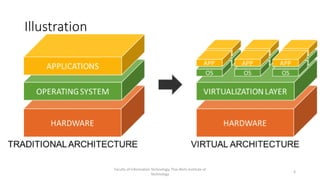
Illustration
Faculty of Information Technology, Thai-Nichi Institute of
Technology
4
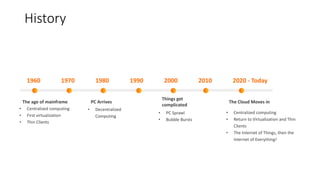
1970 1980 1990 2000 2010 2020 - Today
1960
• Centralized computing
• First virtualization
• Thin Clients
The age of mainframe PC Arrives
Things get
complicated
The Cloud Moves in
• Decentralized
Computing
• PC Sprawl
• Bubble Bursts
• Centralized computing
• Return to Virtualization and Thin
Clients
• The Internet of Things, then the
Internet of Everything!
History
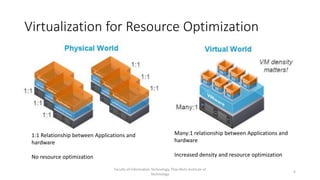
Virtualization for Resource Optimization
Faculty of Information Technology, Thai-Nichi Institute of
Technology
6
1:1 Relationship between Applications and
hardware
No resource optimization
Many:1 relationship between Applications and
hardware
Increased density and resource optimization
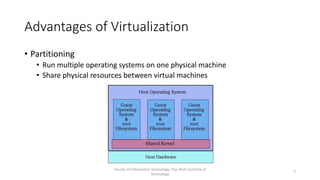
Advantages of Virtualization
• Partitioning
• Run multiple operating systems on one physical machine
• Share physical resources between virtual machines
Faculty of Information Technology, Thai-Nichi Institute of
Technology
7
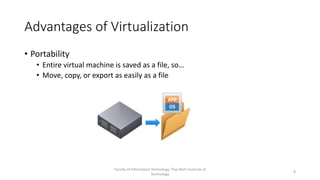
Advantages of Virtualization
• Portability
• Entire virtual machine is saved as a file, so…
• Move, copy, or export as easily as a file
Faculty of Information Technology, Thai-Nichi Institute of
Technology
8
Advantages of Virtualization
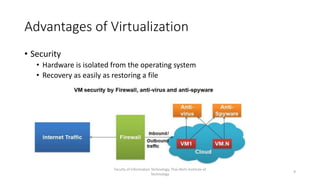
• Security
• Hardware is isolated from the operating system
• Recovery as easily as restoring a file
Faculty of Information Technology, Thai-Nichi Institute of
Technology
9
Advantages of Virtualization
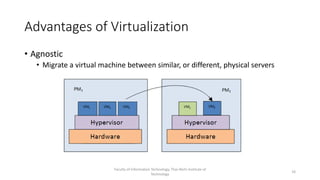
• Agnostic
• Migrate a virtual machine between similar, or different, physical servers
Faculty of Information Technology, Thai-Nichi Institute of
Technology
10
Virtualization – Explained (https://youtu.be/FZR0rG3HKIk)
Faculty of Information Technology, Thai-Nichi Institute of
Technology
11
How does the VM works?
• Hypervisor!
• Hypervisor instructs the guest OS
• Loads servers as guests on host hardware
Faculty of Information Technology, Thai-Nichi Institute of
Technology
12
Hypervisor
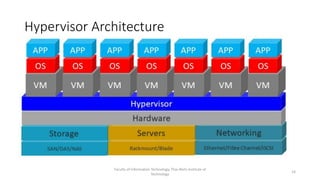
• A hypervisor, also known as a virtual machine monitor or VMM, is
software that creates and runs virtual machines (VMs).
• A hypervisor allows one host computer to support multiple guest VMs
by virtually sharing its resources, such as memory and processing.
Faculty of Information Technology, Thai-Nichi Institute of
Technology
13
Hypervisor Architecture
Faculty of Information Technology, Thai-Nichi Institute of
Technology
14
Types of Hypervisor
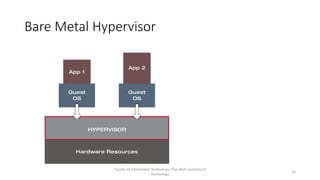
• Bare Metal (Type 1)
• Acts like a lightweight operating system and runs directly on the host’s
hardware
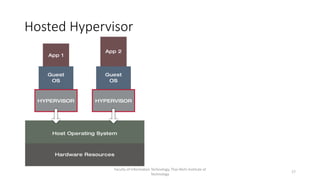
• Hosted (Type 2)
• Runs as a software layer on an operating system, like other computer
programs
Faculty of Information Technology, Thai-Nichi Institute of
Technology
15
Bare Metal Hypervisor
Faculty of Information Technology, Thai-Nichi Institute of
Technology
16
Hosted Hypervisor
Faculty of Information Technology, Thai-Nichi Institute of
Technology
17
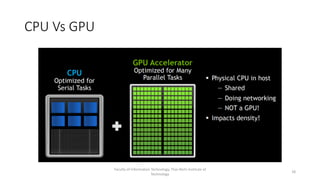
CPU Vs GPU
Faculty of Information Technology, Thai-Nichi Institute of
Technology
18
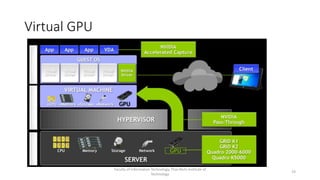
Virtual GPU
Faculty of Information Technology, Thai-Nichi Institute of
Technology
19
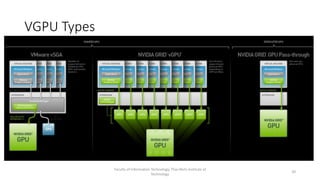
VGPU Types
Faculty of Information Technology, Thai-Nichi Institute of
Technology
20
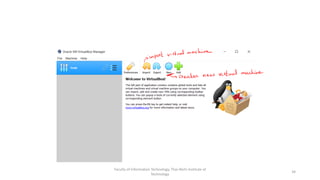
Virtual Box
Faculty of Information Technology, Thai-Nichi Institute of
Technology
21
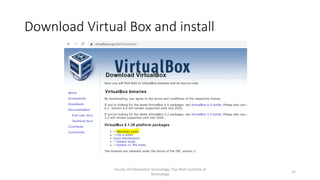
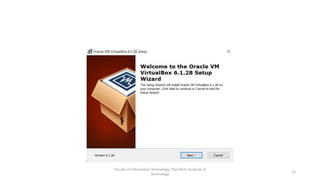
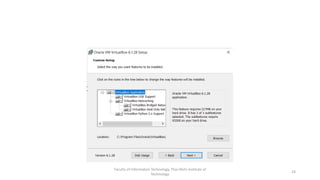
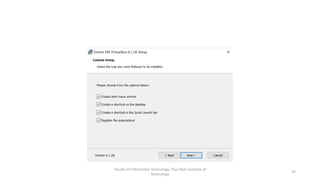
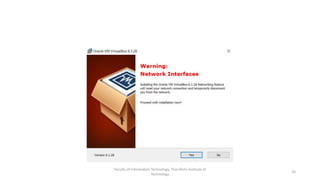
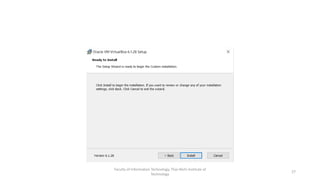
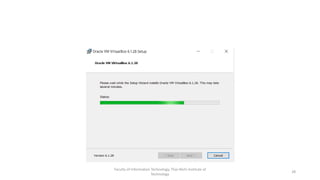
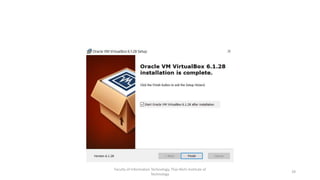
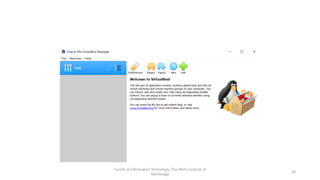
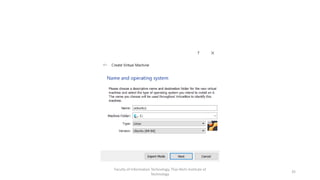
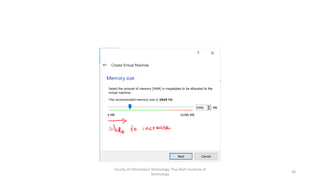
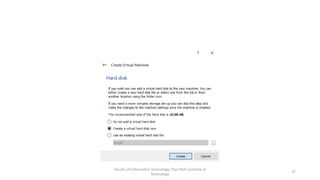
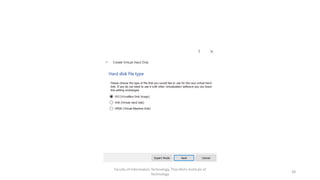
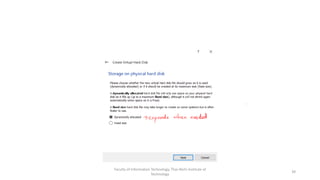
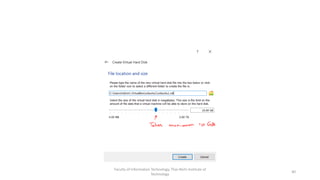
Download Virtual Box and install
Faculty of Information Technology, Thai-Nichi Institute of
Technology
22
Faculty of Information Technology, Thai-Nichi Institute of
Technology
23
Faculty of Information Technology, Thai-Nichi Institute of
Technology
24
Faculty of Information Technology, Thai-Nichi Institute of
Technology
25
Faculty of Information Technology, Thai-Nichi Institute of
Technology
26
Faculty of Information Technology, Thai-Nichi Institute of
Technology
27
Faculty of Information Technology, Thai-Nichi Institute of
Technology
28
Faculty of Information Technology, Thai-Nichi Institute of
Technology
29
Faculty of Information Technology, Thai-Nichi Institute of
Technology
30
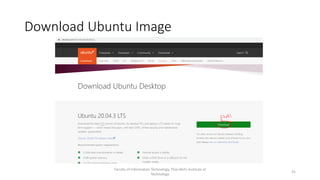
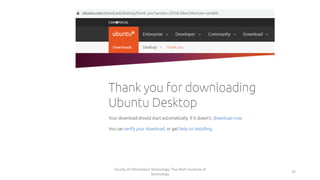
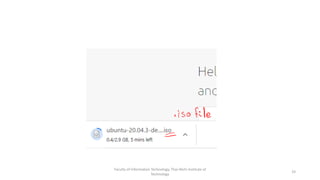
Download Ubuntu Image
Faculty of Information Technology, Thai-Nichi Institute of
Technology
31
Faculty of Information Technology, Thai-Nichi Institute of
Technology
32
Faculty of Information Technology, Thai-Nichi Institute of
Technology
33
Faculty of Information Technology, Thai-Nichi Institute of
Technology
34
Faculty of Information Technology, Thai-Nichi Institute of
Technology
35
Faculty of Information Technology, Thai-Nichi Institute of
Technology
36
Faculty of Information Technology, Thai-Nichi Institute of
Technology
37
Faculty of Information Technology, Thai-Nichi Institute of
Technology
38
Faculty of Information Technology, Thai-Nichi Institute of
Technology
39
Faculty of Information Technology, Thai-Nichi Institute of
Technology
40
Faculty of Information Technology, Thai-Nichi Institute of
Technology
41
Faculty of Information Technology, Thai-Nichi Institute of
Technology
42
Faculty of Information Technology, Thai-Nichi Institute of
Technology
43
Faculty of Information Technology, Thai-Nichi Institute of
Technology
44
Faculty of Information Technology, Thai-Nichi Institute of
Technology
45
Faculty of Information Technology, Thai-Nichi Institute of
Technology
46
Faculty of Information Technology, Thai-Nichi Institute of
Technology
47
Faculty of Information Technology, Thai-Nichi Institute of
Technology
48
Faculty of Information Technology, Thai-Nichi Institute of
Technology
49
• Virtual Private Cloud
• IaaS
• PaaS
• SaaS
Next Week
Faculty of Information Technology, Thai-Nichi Institute of
Technology
50

Week 2: Virtualization and VM Ware - DSA 441 Cloud Computing

  • 1.
    DSA 441 –Cloud Computing Week 2: Virtual Machines and VM Ware Asst. Prof. Dr. Ferdin Joe John Joseph Faculty of Information Technology Thai-Nichi Institute of Technology, Bangkok
  • 2.
    Virtualization Faculty of InformationTechnology, Thai-Nichi Institute of Technology 2 • Virtualization, in computing, refers to the act of creating a virtual (rather than actual) version of something, including but not limited to a virtual computer hardware platform, operating system (OS), storage device, or computer network resources. • The term "virtualization" traces its roots to 1960s mainframes, during which it was a method of logically dividing the mainframes' resources for different applications. Since then, the meaning of the term has evolved to the aforementioned.
  • 3.
    Virtualization -Categories • Servervirtualization allows you to run multiple virtual machines on a single physical server. • Desktop virtualization allows you to run multiple desktop machines on a single physical server, and distribute them. • Application virtualization allows you to distribute multiple copies of an application from a single physical server. Faculty of Information Technology, Thai-Nichi Institute of Technology 3
  • 4.
    Illustration Faculty of InformationTechnology, Thai-Nichi Institute of Technology 4
  • 5.
    1970 1980 19902000 2010 2020 - Today 1960 • Centralized computing • First virtualization • Thin Clients The age of mainframe PC Arrives Things get complicated The Cloud Moves in • Decentralized Computing • PC Sprawl • Bubble Bursts • Centralized computing • Return to Virtualization and Thin Clients • The Internet of Things, then the Internet of Everything! History
  • 6.
    Virtualization for ResourceOptimization Faculty of Information Technology, Thai-Nichi Institute of Technology 6 1:1 Relationship between Applications and hardware No resource optimization Many:1 relationship between Applications and hardware Increased density and resource optimization
  • 7.
    Advantages of Virtualization •Partitioning • Run multiple operating systems on one physical machine • Share physical resources between virtual machines Faculty of Information Technology, Thai-Nichi Institute of Technology 7
  • 8.
    Advantages of Virtualization •Portability • Entire virtual machine is saved as a file, so… • Move, copy, or export as easily as a file Faculty of Information Technology, Thai-Nichi Institute of Technology 8
  • 9.
    Advantages of Virtualization •Security • Hardware is isolated from the operating system • Recovery as easily as restoring a file Faculty of Information Technology, Thai-Nichi Institute of Technology 9
  • 10.
    Advantages of Virtualization •Agnostic • Migrate a virtual machine between similar, or different, physical servers Faculty of Information Technology, Thai-Nichi Institute of Technology 10
  • 11.
    Virtualization – Explained(https://youtu.be/FZR0rG3HKIk) Faculty of Information Technology, Thai-Nichi Institute of Technology 11
  • 12.
    How does theVM works? • Hypervisor! • Hypervisor instructs the guest OS • Loads servers as guests on host hardware Faculty of Information Technology, Thai-Nichi Institute of Technology 12
  • 13.
    Hypervisor • A hypervisor,also known as a virtual machine monitor or VMM, is software that creates and runs virtual machines (VMs). • A hypervisor allows one host computer to support multiple guest VMs by virtually sharing its resources, such as memory and processing. Faculty of Information Technology, Thai-Nichi Institute of Technology 13
  • 14.
    Hypervisor Architecture Faculty ofInformation Technology, Thai-Nichi Institute of Technology 14
  • 15.
    Types of Hypervisor •Bare Metal (Type 1) • Acts like a lightweight operating system and runs directly on the host’s hardware • Hosted (Type 2) • Runs as a software layer on an operating system, like other computer programs Faculty of Information Technology, Thai-Nichi Institute of Technology 15
  • 16.
    Bare Metal Hypervisor Facultyof Information Technology, Thai-Nichi Institute of Technology 16
  • 17.
    Hosted Hypervisor Faculty ofInformation Technology, Thai-Nichi Institute of Technology 17
  • 18.
    CPU Vs GPU Facultyof Information Technology, Thai-Nichi Institute of Technology 18
  • 19.
    Virtual GPU Faculty ofInformation Technology, Thai-Nichi Institute of Technology 19
  • 20.
    VGPU Types Faculty ofInformation Technology, Thai-Nichi Institute of Technology 20
  • 21.
    Virtual Box Faculty ofInformation Technology, Thai-Nichi Institute of Technology 21
  • 22.
    Download Virtual Boxand install Faculty of Information Technology, Thai-Nichi Institute of Technology 22
  • 23.
    Faculty of InformationTechnology, Thai-Nichi Institute of Technology 23
  • 24.
    Faculty of InformationTechnology, Thai-Nichi Institute of Technology 24
  • 25.
    Faculty of InformationTechnology, Thai-Nichi Institute of Technology 25
  • 26.
    Faculty of InformationTechnology, Thai-Nichi Institute of Technology 26
  • 27.
    Faculty of InformationTechnology, Thai-Nichi Institute of Technology 27
  • 28.
    Faculty of InformationTechnology, Thai-Nichi Institute of Technology 28
  • 29.
    Faculty of InformationTechnology, Thai-Nichi Institute of Technology 29
  • 30.
    Faculty of InformationTechnology, Thai-Nichi Institute of Technology 30
  • 31.
    Download Ubuntu Image Facultyof Information Technology, Thai-Nichi Institute of Technology 31
  • 32.
    Faculty of InformationTechnology, Thai-Nichi Institute of Technology 32
  • 33.
    Faculty of InformationTechnology, Thai-Nichi Institute of Technology 33
  • 34.
    Faculty of InformationTechnology, Thai-Nichi Institute of Technology 34
  • 35.
    Faculty of InformationTechnology, Thai-Nichi Institute of Technology 35
  • 36.
    Faculty of InformationTechnology, Thai-Nichi Institute of Technology 36
  • 37.
    Faculty of InformationTechnology, Thai-Nichi Institute of Technology 37
  • 38.
    Faculty of InformationTechnology, Thai-Nichi Institute of Technology 38
  • 39.
    Faculty of InformationTechnology, Thai-Nichi Institute of Technology 39
  • 40.
    Faculty of InformationTechnology, Thai-Nichi Institute of Technology 40
  • 41.
    Faculty of InformationTechnology, Thai-Nichi Institute of Technology 41
  • 42.
    Faculty of InformationTechnology, Thai-Nichi Institute of Technology 42
  • 43.
    Faculty of InformationTechnology, Thai-Nichi Institute of Technology 43
  • 44.
    Faculty of InformationTechnology, Thai-Nichi Institute of Technology 44
  • 45.
    Faculty of InformationTechnology, Thai-Nichi Institute of Technology 45
  • 46.
    Faculty of InformationTechnology, Thai-Nichi Institute of Technology 46
  • 47.
    Faculty of InformationTechnology, Thai-Nichi Institute of Technology 47
  • 48.
    Faculty of InformationTechnology, Thai-Nichi Institute of Technology 48
  • 49.
    Faculty of InformationTechnology, Thai-Nichi Institute of Technology 49
  • 50.
    • Virtual PrivateCloud • IaaS • PaaS • SaaS Next Week Faculty of Information Technology, Thai-Nichi Institute of Technology 50