LBSTI GAUTAM NAGAR2
MICROSOFT EXCEL:-
• MS excel is still the most dominant application on the market when it comes to spreadsheets. Excel
allows people who are not programmers to manipulate and analyze data.
• What if you want a form to prompt a new user to enter data? What if a user needs to ensure the
data goes into the correct fields?
#HarshSir
7503412537
3.
LBSTI GAUTAM NAGAR3
WHAT IS VBA?
VBA stands for visual basic for applications. VBA is a way to automate the tasks you do at
work. It takes the programming language of visual basic and given the user an easy way
to use the language with Microsoft office applications.
VBA can use in all office versions, from MS-office 97 to MS-office 2021 and with any
available latest versions. Among VBA, excel VBA is the popular one.
WHY VBA?
Knowing VBA can make you better at the job you have now. You can use it to do your job faster,
make tasks smoother, and make your work more efficient.
VBA enhance the functionality of excel by allowing you to make excel behave according to your
need.
Learning VBA can be an entry point into VBA programming, finance, data analytics, and related
fields.
#HarshSir
7503412537
4.
LBSTI GAUTAM NAGAR4
APPLICATIONS OF VBA.
VBA in excel as MS-excel itself provides loads of inbuilt functions. MS-excel provides only essential
inbuilt functions that may not be sufficient to perform complex calculations. Under such circumstances,
VBA becomes the most powerful solution.
• What all you can do with excel VBA?
• You can create custom function or UDF (user defined function).
• You can create a custom Addin.
• You can repeat a set of instruction multiple times.
Prerequisite
It is desirable if you know the basic of Excel and how the function in Excel Work.
#HarshSir
7503412537
5.
LBSTI GAUTAM NAGAR5
WHAT IS VBA USED FOR IN EXCEL?
VBA IS USED TO WRITE MACROS, WHICH AUTOMATE SIMPLE AND COMPLEX
TASKS IN EXCEL.
ARE VB AND VBA THE SAME?
• VB IS A PROGRAMMING LANGUAGE THAT ALLOW YOU TO CREATE
STANDALONE EXECUTABLE APPLICATIONS AND DO NOT REQUIRE OFFICE
OR EXCEL LOADED INTO COMPUTERS.
• VBA IS A PROGRAMMING LANGUAGE ALSO THAT CANNOT CREATE
STANDALONE APPLICATIONS, AND IT EXISTS WITHIN A HOST APPLICATION
SUCH AS EXCEL.
VBE (VISUAL BASIC EDITOR)?
THE VISUAL BASIC EDITOR IS A USER FRIENDLY
DEVELOPMENT ENVIRONMENT. IT IS THE PLACE WHERE YOU
KEEP THE VB CODE.
#HarshSir
7503412537
6.
LBSTI GAUTAM NAGAR6
WHAT IS THE DIFFERENCE BETWEEN A MACRO AND VBA?
VBA IS THE PROGRAMMING LANGUAGE TO CREATE MACROS WHILE MACROS ARE
PROGRAMMING CODES THAT RUN ON EXCEL ENVIRONMENT TO PERFORM AUTOMATIC
ROUTINE TASKS.
WHAT IS THE DIFFERENCE BETWEEN A MACRO AND SCRIPT?
• MACROS ARE STORED INSIDE EXCEL WORKBOOK FILES AND CAN ONLY BE
RUN FROM INSIDE EXCEL, IT IS USED TO AUTOMATE VARIOUS EXCEL
FUNCTIONS AND ADD EXTRA FUNCTIONALITY TO WORKBOOKS.
• SCRIPTS ARE STORED IN TEXT FILES USING THE, VBS EXTENSION AND CAN BE
RUN FROM INSIDE WINDOWS OR EXECUTED BY OTHER PROGRAM, IT IS USED
TO AUTOMATE CERTAIN ADMINISTRATIVE TASKS ON A COMPUTER OR
NETWORK.
#HarshSir
7503412537
7.
LBSTI GAUTAM NAGAR7
WHY MACROS IS REQUIRED?
1. TO DO REPETITIVE TASK.
2. TO DEVELOP NEW FORMULAS
SYNONYMS OF MACROS
1. SUBROUTINE
2. PROGRAM
3. CODE
4. PROCEDURE
WHAT DOES A VBA DEVELOPER DO?
People who create macros aren’t developers- they’re analysts. People who focus on VBA
development are able to create Add-ins, user interfaces with forms, interactive dashboards,
report generators, and more.
#HarshSir
7503412537
8.
LBSTI GAUTAM NAGAR8
IS VBA OBJECT-ORIENTED?
Visual basic for applications (VBA) is an object-oriented programming language for writing
macros.
HOW TO RECORD A MACRO
1. A. CLICK ON THE RECORD MACRO BUTTON AT THE BOTTOM LEFT HAND SIDE
B. USE SHORTCUT ALT + T + M + R
C. GO TO DEVELOPER TAB RECORD MACRO
D. GO TO VIEW TAB-RECORD MACRO
2. NAME YOUR MACRO, ASSIGN A SHORTCUT KEY & DECIDE WHERE TO STORE IT (EXISTING WORKBOOK,
NEW WORKBOOK OR PERSONAL MACRO WORKBOOK)
3. RUN THROUGH THE STEPS THE MACRO NEEDS TO DO.
4. STOP THE MACRO
#HarshSir
7503412537
9.
LBSTI GAUTAM NAGAR9
RECORDING YOUR FIRST MACRO
Create a macro that: (for ex-)
• Inserts a new worksheet
• Writes my first macro in A1 – increase font size to 20 and makes bold.
• Apply all border
VBE (VISUAL BASIC EDITOR)
The visual basic editor is not exactly the same as excel. It is actually a separate application,
even though you’ll usually open it through excel. In fact, in order for the VBE to be able to
run, excel must be open.
The main function of the VBE is to allow you to write and edit VBA code.
The visual basic editor is sometimes referred to as the integrated development environment
(IDE).
#HarshSir
7503412537
10.
LBSTI GAUTAM NAGAR10
OPENING THE VB EDITOR
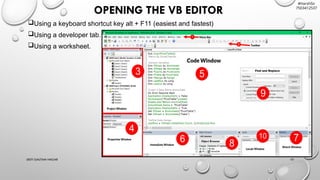
Using a keyboard shortcut key alt + F11 (easiest and fastest)
Using a developer tab.
Using a worksheet.
#HarshSir
7503412537
11.
LBSTI GAUTAM NAGAR11
VBE WINDOWS PANEL:-
• PROJECT EXPLORER – SHOWS A HIERARCHICAL LIST OF OBJECTS (WORKBOOK AND
WORKSHEET CODE MODULES), MODULES (STANDARD), FORMS (CODE AND OBJECT), AND CLASS
MODULES.
• PROPERTIES WINDOWS – LIST OF PROPERTIES FOR THE SELECTED OBJECT, EITHER ALPHABET OR
CATEGORIZED.
• CODE WINDOW – WRITE, EDIT, INSERT, OR DELETE CODE.
• IMMEDIATE WINDOW – RUN ONE LINE CODE STATEMENTS (EG – ACTIVECELL.VALUE=123 [ENTER]),
REPEAT INDIVIDUAL STATEMENT – CLICK IN THE STATEMENT AND PRESS [ENTER], VIEW CODE
OUTPUT FROM A MODULE WITH THE DEBUG, PRINT STATEMENT
• LOCALS WINDOW – MONITOR VALUES AND PROPERTIES OF ACTIVE ELEMENTS. USE BREAK
AND/OR STEP MODE.
• WATCH WINDOW – MONITOR THE VALUES OF SELECTED MODULE ELEMENTS.
#HarshSir
7503412537
![LBSTI GAUTAM NAGAR 11
VBE WINDOWS PANEL:-
• PROJECT EXPLORER – SHOWS A HIERARCHICAL LIST OF OBJECTS (WORKBOOK AND
WORKSHEET CODE MODULES), MODULES (STANDARD), FORMS (CODE AND OBJECT), AND CLASS
MODULES.
• PROPERTIES WINDOWS – LIST OF PROPERTIES FOR THE SELECTED OBJECT, EITHER ALPHABET OR
CATEGORIZED.
• CODE WINDOW – WRITE, EDIT, INSERT, OR DELETE CODE.
• IMMEDIATE WINDOW – RUN ONE LINE CODE STATEMENTS (EG – ACTIVECELL.VALUE=123 [ENTER]),
REPEAT INDIVIDUAL STATEMENT – CLICK IN THE STATEMENT AND PRESS [ENTER], VIEW CODE
OUTPUT FROM A MODULE WITH THE DEBUG, PRINT STATEMENT
• LOCALS WINDOW – MONITOR VALUES AND PROPERTIES OF ACTIVE ELEMENTS. USE BREAK
AND/OR STEP MODE.
• WATCH WINDOW – MONITOR THE VALUES OF SELECTED MODULE ELEMENTS.
#HarshSir
7503412537](https://image.slidesharecdn.com/msexcelvbabasicconcepts-250304094835-af302351/85/Ms-excel-vba-basic-concepts-Excel-VBA-Training-11-320.jpg)


